Chapterبەش 4 · Lectureوانە 4.7
OSPF Neighbours: From Down to Full; DR and BDRڕێدۆزە دراوسێکانی OSPF: لە Downـەوە بۆ Full؛ DR و BDR
How two OSPF routers become neighbours: hellos to 224.0.0.5 every 10 seconds and the 40-second dead interval, what must match, the list of neighbours seen, the states Down, Init, 2-Way, ExStart, Exchange, Loading and Full with the DBD, LSR, LSU and LSAck packets, the exam question “2-Way or Full?”, why shared Ethernet segments elect a DR and a BDR, how the election works (priority, router ID, no pre-emption), and how to read show ip ospf neighbor and show ip ospf interface.
دوو OSPF چۆن دەبنە دراوسێ: بۆ 224.0.0.5 هەر 10 چرکە و کاتی Deadـی 40 چرکەیی، چی دەبێت وەک یەک بێت، لیستی دراوسێ بینراوەکان، دۆخەکانی Down، Init، 2-Way، ExStart، Exchange، Loading و Full لەگەڵ DBD، LSR، LSU و LSAck، پرسیاری تاقیکردنەوەی «2-Way یان Full؟»، بۆچی بڕەکانی Ethernetـی هاوبەش DR و BDR هەڵدەبژێرن، هەڵبژاردنەکە چۆن کار دەکات (پێشینەیی، ، بێ شوێنگرتنەوە) و چۆن show ip ospf neighbor و show ip ospf interface بخوێنیتەوە.
What you will learnچی فێر دەبیت
- Explain how hellos, the hello interval and the dead interval find and keep neighbours.
- List what must match for two routers to become neighbours, and what may differ.
- Follow two routers through the states from Down to Full and name the packets used.
- Explain the difference between 2-Way and Full.
- Explain why a DR and a BDR are elected on Ethernet, predict the election and influence it with priorities.
- Read show ip ospf neighbor and show ip ospf interface.
- ڕوون بکەیتەوە ، کاتی Hello و کاتی Dead چۆن دراوسێکان دەدۆزنەوە و ڕایان دەگرن.
- لیستی ئەوە بکەیت کە دەبێت وەک یەک بێت بۆ ئەوەی دوو ببنە دراوسێ و ئەوەی دەکرێت جیاواز بێت.
- دوو لە دۆخەکانی Downـەوە تا Full بگریتە بەر و ناوی ئەو بهێنیت کە بەکار دێن.
- جیاوازیی نێوان 2-Way و Full ڕوون بکەیتەوە.
- ڕوون بکەیتەوە بۆچی لەسەر Ethernet DR و BDR هەڵدەبژێردرێن، پێشبینیی هەڵبژاردنەکە بکەیت و بە پێشینەیی کاری تێ بکەیت.
- show ip ospf neighbor و show ip ospf interface بخوێنیتەوە.
OSPF neighboursڕێدۆزە دراوسێکانی OSPF
Before two OSPF routers can share their maps, they must become neighbours. OSPF neighbours are two routers that both run OSPF and sit on the same link, in the same subnet. Like two people who must speak the same language to understand each other, they first introduce themselves with small hello packets, and only then copy their databases. This lesson follows two routers from the first hello to a full copy, and then looks at Ethernet segments with many routers. (Why OSPF needs neighbours at all: OSPF in three steps.)
پێش ئەوەی دوو OSPF بتوانن نەخشەکانیان هاوبەش بکەن، دەبێت ببنە . OSPF دوو کە هەردووکیان OSPF بەکار دەهێنن و لەسەر هەمان بەستەر و لە هەمان . وەک دوو مرۆڤ کە دەبێت بە هەمان زمان قسە بکەن تا لە یەکتر تێبگەن، سەرەتا بە بچووک خۆیان دەناسێنن و پاشان کۆپی دەکەن. ئەم وانەیە دوو لە یەکەم Helloـەوە تا کۆپییەکی تەواو دەگرێتە بەر و پاشان سەیری بڕەکانی Ethernet دەکات کە زۆریان لەسەرە. (بۆچی OSPF پێویستی بە دراوسێیە: OSPF بە سێ هەنگاو.)
Hello and dead intervalsکاتی Hello و کاتی Dead
Every router sends its own hellos on a timer, the hello interval: every 10 seconds on Ethernet and point-to-point links (30 seconds on older NBMA links). Hellos find neighbours and then show, again and again, that each neighbour is still alive. A hello is not answered; each router simply keeps sending its own. Each router also counts down a dead interval for every neighbour — by default four times the hello interval, so 40 seconds. Every hello from that neighbour resets the countdown. If the countdown reaches 0, the neighbour is declared Down and its routes are recalculated. Topology changes themselves are not sent in hellos: they travel as LSAs.
هەر خۆی بە پێی کات دەنێرێت، واتە کاتی Hello: لەسەر Ethernet و بەستەری خاڵ بۆ خاڵ هەر 10 چرکە جارێک (لەسەر بەستەری کۆنی NBMA هەر 30 چرکە). دراوسێکان دەدۆزنەوە و پاشان جار لە دوای جار پیشانی دەدەن کە هەر دراوسێیەک هێشتا زیندووە. وەڵامی Hello نادرێتەوە؛ هەر تەنیا بەردەوام Helloـی خۆی دەنێرێت. هەروەها هەر بۆ هەر دراوسێیەک کاتی Dead دەژمێرێتەوە بۆ دواوە — بە بنەڕەت چوار ئەوەندەی کاتی Hello، واتە 40 چرکە. هەر Helloـیەک لەو دراوسێیەوە ژماردنەکە سەرلەنوێ دەست پێ دەکاتەوە. ئەگەر ژماردنەکە گەیشتە 0، دراوسێکە بە Down دادەنرێت و ڕێگەکانی دووپاتە حیساب دەکرێنەوە. خودی گۆڕانەکانی بە Hello نانێردرێن: وەک دەڕۆن.
Why hellos go to 224.0.0.5بۆچی پاکێتەکانی سڵاو بۆ 224.0.0.5 دەچن
When a router starts OSPF it does not know the addresses of its neighbours yet, so it cannot send them a normal (unicast) packet. Instead it sends its hellos to a multicast address that every OSPF router listens to: 224.0.0.5, a class D address (class D). A second address, 224.0.0.6, reaches only the DR and the BDR (their job comes later in this lesson). OSPFv3 uses FF02::5 and FF02::6 in the same way. These packets are sent with TTL 1, so they never leave the link.
کاتێک OSPF دەست پێ دەکات، هێشتا ناونیشانی دراوسێکانی نازانێت، بۆیە ناتوانێت ئاسایی () بۆیان بنێرێت. لە جیاتی ئەوە بۆ ناونیشانێکی دەنێرێت کە هەموو OSPF گوێی لێ دەگرێت: 224.0.0.5، ناونیشانێکی پۆلی D (پۆلی D). ناونیشانی دووەم، 224.0.0.6، تەنیا دەگاتە DR و BDR (کاری ئەوان دواتر لەم وانەیەدا دێت). OSPFv3 بە هەمان شێوە FF02::5 و FF02::6 بەکار دەهێنێت. ئەم بە TTL 1 دەنێردرێن، بۆیە هەرگیز لە بەستەرەکە دەرناچن.
What a hello carriesپاکێتی سڵاو چی هەڵدەگرێت
Every OSPF packet starts with a header that names the sender’s router ID and its area. A hello then adds the settings of the interface — network mask, hello and dead intervals, a stub-area flag — the router’s priority and the DR and BDR it knows, and, most importantly, the list of neighbours it has seen: the router IDs of every router it has received a hello from on that link. When a router finds its own router ID in a neighbour’s hello, it knows that the neighbour hears it too.
هەموو OSPF بە سەرێک دەست پێ دەکات کە نێرەر و تێدایە. پاشان Hello ڕێکخستنەکانی زیاد دەکات — ، کاتی Hello و کاتی Dead، نیشانەیەکی stub — پێشینەیی و ئەو DR و BDRـەی دەیانناسێت و لە هەمووی گرنگتر، لیستی ئەو دراوسێیانەی بینیونی: هەموو ئەو لەسەر ئەو بەستەرە Helloـیان لێ وەرگرتووە. کاتێک خۆی لە Helloـی دراوسێیەکدا دەبینێتەوە، دەزانێت ئەو دراوسێیە گوێی لەویش دەبێت.
What must matchچی دەبێت وەک یەک بێت
Two routers become neighbours only if their hellos agree. These must be the same on both interfaces: the area ID, the subnet and mask, the hello and dead intervals, the authentication settings and the stub flag. The router IDs must be different. The interface must not be passive (passive interfaces), because a passive interface sends no hellos. A matching MTU is not checked in hellos, but without it the routers stop at ExStart or Exchange and never reach Full. The OSPF process ID (router ospf 1 on one router, router ospf 10 on the other) may differ: it is only a local number.
دوو تەنیا کاتێک دەبنە دراوسێ کە یەک بگرنەوە. ئەمانە دەبێت لەسەر هەردوو وەک یەک بن: IDـی ، و ، کاتی Hello و کاتی Dead، ڕێکخستنەکانی و نیشانەی stub. دەبێت جیاواز بن. نابێت بێت (نێوبەستە ناچالاکەکان)، چونکە Hello نانێرێت. وەک یەکبوونی MTU لە Helloـدا ناپشکنرێت، بەڵام بەبێ ئەوە لە ExStart یان Exchange دەوەستن و هەرگیز ناگەنە Full. ژمارەی OSPF (router ospf 1 لەسەر و router ospf 10 لەسەر ئەوی تر) دەکرێت جیاواز بێت: تەنیا ژمارەیەکی ناوخۆییە.
From Down to Full: the neighbour statesلە Down بۆ Full: دۆخەکانی دراوسێی OSPF
While a link is down, two routers cannot be OSPF neighbours over it. When it comes up, they climb a ladder of neighbour states, the same names you see in show ip ospf neighbor. The first three are about finding each other, the next three about copying the database, and the last means the job is done.
تا بەستەرێک کوژاوە بێت، دوو ناتوانن لەسەری ببنە OSPF. کاتێک کارا دەبێت، بە پەیژەیەکی دا سەردەکەون، هەمان ئەو ناوانەی لە show ip ospf neighborـدا دەیانبینیت. سێ یەکەمیان بۆ دۆزینەوەی یەکترن، سێ دواتریان بۆ کۆپیکردنی و دوایینیان واتە کارەکە تەواو بووە.
The steps two OSPF routers go through: Down, Init, 2-Way (each sees the other in hellos), ExStart, Exchange, Loading and Full (their databases are the same). On Ethernet, DROthers stay in 2-Way with each other and become Full only with the DR and the BDR.
ئەو هەنگاوانەن کە دوو OSPF پێیاندا تێدەپەڕن: Down، Init، 2-Way (هەریەکەیان ئەوی تر لە دەبینێت)، ExStart، Exchange، Loading و Full (بنکەدراوەکانیان وەک یەکن). لەسەر Ethernet، DROtherـەکان لەگەڵ یەکتر لە 2-Wayـدا دەمێننەوە و تەنیا لەگەڵ و دەگەنە Full.
Down, Init, 2-Way: the hello handshakeDown، Init، 2-Way: یەکترناسین بە پاکێتی سڵاو
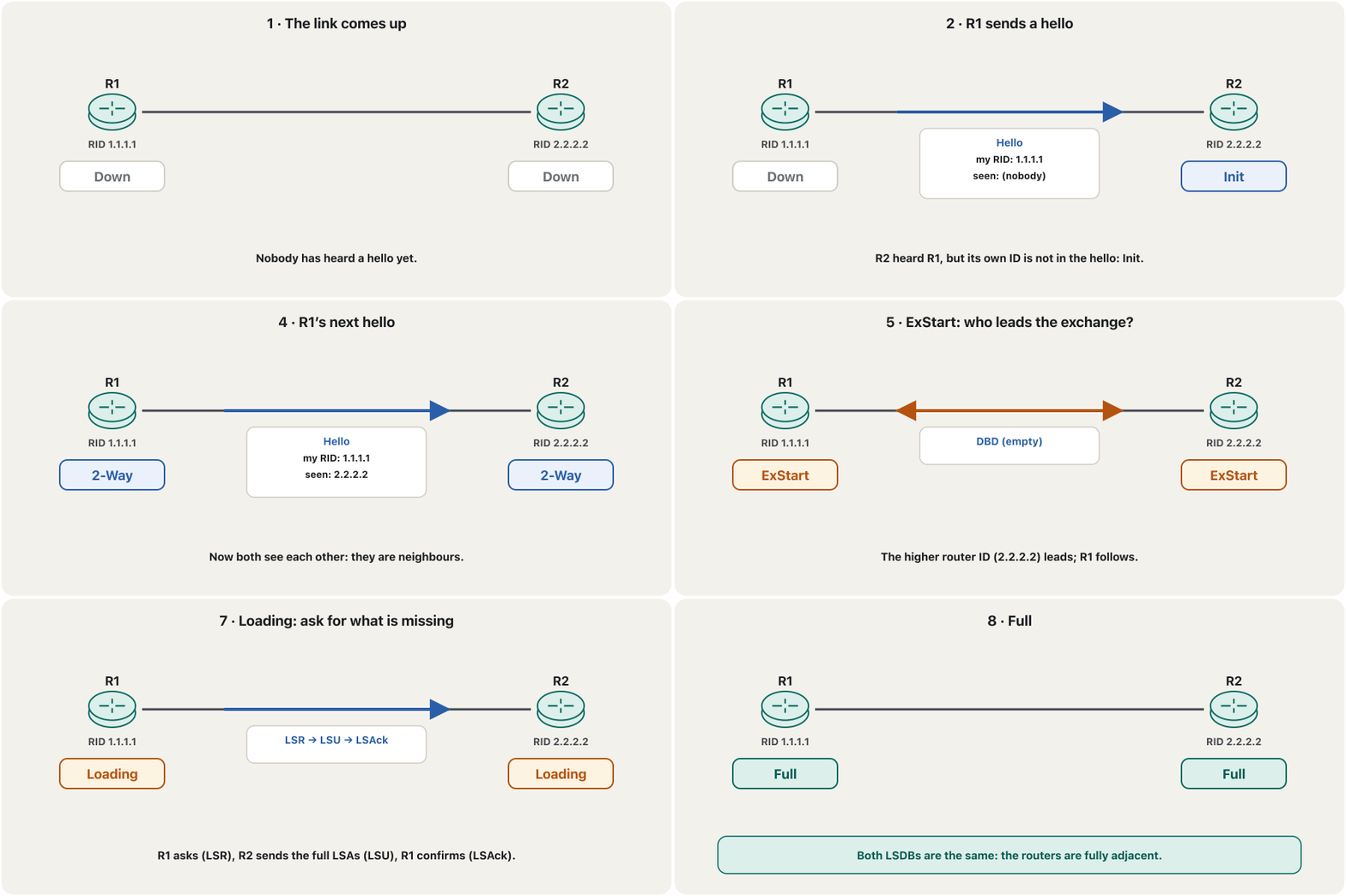
Follow R1 (router ID 1.1.1.1) and R2 (2.2.2.2) when their link comes up. Down: neither has heard anything; a router that was switched off has also lost everything it knew about its neighbours. R1’s first hello lists no neighbours (seen: none). R2 now knows R1 exists, but does not see its own ID in that hello: R2 puts R1 in Init. R2’s hello lists 1.1.1.1 as seen. R1 finds its own ID there, checks the parameters, finds no problem and moves to 2-Way. R1’s next hello lists 2.2.2.2, so R2 moves to 2-Way too. Now they are neighbours — but not yet finished.
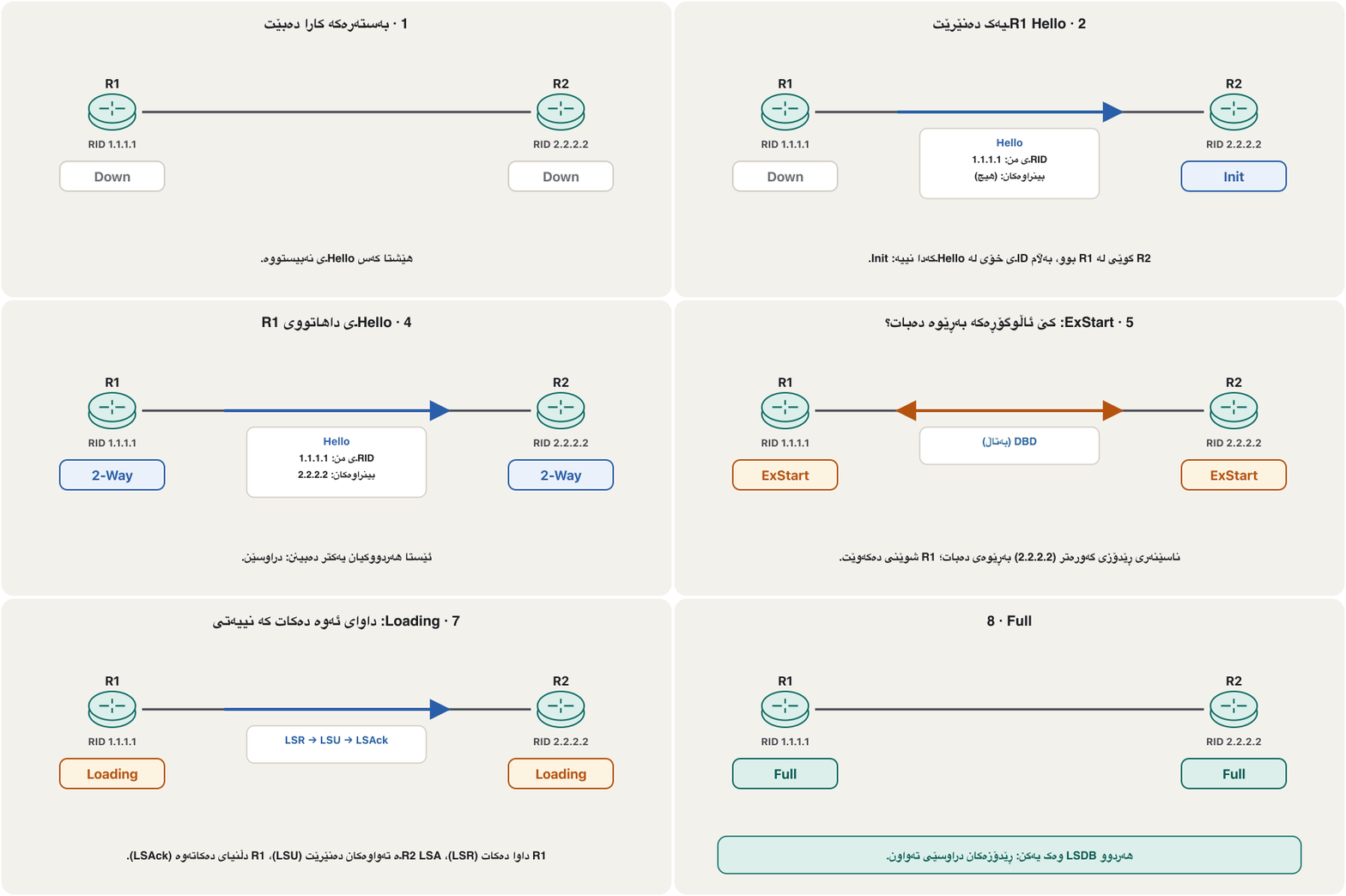
R1 ( 1.1.1.1) و R2 (2.2.2.2) بگرە بەر کاتێک بەستەرەکەیان کارا دەبێت. Down: هیچیان هیچیان نەبیستووە؛ کە کوژێنرابێتەوە هەموو ئەوەشی لەدەست داوە کە لەبارەی دراوسێکانی دەیزانی. یەکەم Helloـی R1 هیچ دراوسێیەک ناژمێرێت (بینراوەکان: هیچ). ئێستا R2 دەزانێت R1 هەیە، بەڵام IDـی خۆی لەو Helloـیەدا نابینێت: R2، R1 دەخاتە Init. Helloـی R2 1.1.1.1 وەک بینراو دەنووسێت. R1 IDـی خۆی لەوێ دەبینێتەوە، ڕێکخستنەکان دەپشکنێت، هیچ کێشەیەک نابینێت و دەچێتە 2-Way. Helloـی داهاتووی R1 2.2.2.2 دەنووسێت، بۆیە R2یش دەچێتە 2-Way. ئێستا دراوسێن — بەڵام هێشتا تەواو نەبوون.
ExStart, Exchange, Loading: copying the databaseExStart، Exchange، Loading: کۆپیکردنی بنکەدراوە
2-Way means the routers are ready to exchange their LSDBs. The exchange takes several messages and states. In ExStart they agree who leads: the router with the higher router ID (here R2). In Exchange they do not send whole LSAs, only lists of the LSAs they have — like checklists — in DBD (database description) packets. Each router compares the list with its own LSDB. In Loading it asks only for what it is missing with an LSR (link-state request); the neighbour sends the full LSAs in an LSU, and the receiver confirms with an LSAck. When nothing is missing, both are Full. RIP, by contrast, sends its whole table every time, which loads the network.
2-Way واتە ئامادەن LSDBـەکانیان ئاڵوگۆڕ بکەن. ئاڵوگۆڕەکە چەند پەیام و دۆخێک دەخایەنێت. لە ExStartـدا ڕێک دەکەون کێ بەڕێوەی دەبات: ئەو گەورەترە (لێرەدا R2). لە Exchangeـدا تەواو نانێرن، تەنیا لیستی ئەو هەیانە — وەک لیستی پشکنین — لە ناو DBD (database description). هەر لیستەکە لەگەڵ LSDBـی خۆی بەراورد دەکات. لە Loadingـدا تەنیا داوای ئەوە دەکات کە نییەتی، بە LSR (link-state request)؛ دراوسێکە تەواوەکان لە ناو LSUـدا دەنێرێت و وەرگر بە LSAck دڵنیای دەکاتەوە. کاتێک هیچ کەم نەما، هەردووکیان Fullـن. لە بەرانبەردا هەموو جارێک هەموو خشتەکەی دەنێرێت، کە بار دەخاتە سەر .
| Typeجۆر | Packet | Jobکار |
|---|---|---|
| 1 | Hello | find neighbours and keep them aliveدۆزینەوە و زیندوو ڕاگرتنی دراوسێکان |
| 2 | DBD (DD) | lists of LSA headers: “this is what I have”لیستی سەری : «ئەمە ئەوەیە کە هەمە» |
| 3 | LSR | “please send me these LSAs”«تکایە ئەم بۆ بنێرە» |
| 4 | LSU | carries complete LSAs (also used for flooding) تەواو دەگوازێتەوە (بۆ بەکار دێت) |
| 5 | LSAck | “received”«گەیشت» |
Exam question: 2-Way or Full?پرسیاری تاقیکردنەوە: 2-Way یان Full؟
A favourite exam question asks for the difference between the 2-Way state and the Full state. In 2-Way (sometimes called «جووتەڕێ», a two-way road), both routers have recognised each other, but they have not exchanged their databases yet. In Full, they have recognised each other and exchanged their databases: both LSDBs are the same, the routers are fully adjacent. “Full” means complete — both routers now have each other’s complete information. 2-Way is therefore not the last step; but on an Ethernet segment, two routers that are neither DR nor BDR normally stay in 2-Way with each other, as you will see below.
پرسیارێکی خۆشەویستی تاقیکردنەوە داوای جیاوازیی نێوان دۆخی 2-Way و دۆخی Full دەکات. لە 2-Wayـدا (کە هەندێک جار «جووتەڕێ»ی پێ دەڵێن، وەک ڕێگەیەکی دوو ئاڕاستە)، هەردوو یەکتریان ناسیوە، بەڵام هێشتا ئاڵوگۆڕ نەکردووە. لە Fullـدا یەکتریان ناسیوە و ئاڵوگۆڕ کردووە: هەردوو LSDB وەک یەکن و دراوسێی تەواون. «Full» واتە تەواو — ئێستا هەردوو زانیاریی تەواوی یەکتریان لایە. کەواتە 2-Way دوایین هەنگاو نییە؛ بەڵام لەسەر بڕێکی Ethernet، دوو کە نە DRن نە BDR بە ئاسایی لەگەڵ یەکتر لە 2-Wayـدا دەمێننەوە، وەک لە خوارەوە دەیبینیت.
Why a shared Ethernet needs a DRبۆچی Ethernetـی هاوبەش پێویستی بە DR هەیە
On a point-to-point link there are only two routers, so there is one neighbourship. On a shared Ethernet segment (a multi-access link) there may be five or ten routers. If every router became Full with every other, n routers would need adjacencies, as in a full mesh (counting mesh links), and every change would be flooded many times over the same wire. So OSPF elects one router on the segment as the designated router (DR) and a second as the backup designated router (BDR). Every other router — a DROTHER — becomes Full only with the DR and the BDR: adjacencies instead. The database exchange happens between the DR and each of the other routers.
لەسەر بەستەرێکی خاڵ بۆ خاڵ تەنیا دوو هەن، بۆیە یەک دراوسێیەتی هەیە. لەسەر بڕێکی Ethernetـی هاوبەش (بەستەرێکی فرەدەستڕاگەیشتن) لەوانەیە پێنج یان دە هەبن. ئەگەر هەموو لەگەڵ هەموو ئەوانی تر Full ببوایە، n پێویستیان بە دراوسێیەتی دەبوو، وەک تەواو (ژماردنی بەستەرەکانی ڕایەڵەی چنراو). هەروەها هەر گۆڕانێک چەندین جار بە سەر هەمان وایەردا بڵاو دەکرایەوە. بۆیە OSPF یەک لەسەر بڕەکە وەک (DR) و یەکێکی تر وەک (BDR) هەڵدەبژێرێت. هەموو تر — DROTHER — تەنیا لەگەڵ DR و BDR دەبێتە Full: لە جیاتی ئەوە دراوسێیەتی. ئاڵوگۆڕی لە نێوان DR و هەریەکێک لە تردا ڕوو دەدات.
The router elected on a multi-access link (such as Ethernet) with which all other OSPF routers exchange their databases, instead of with each other; this cuts the adjacencies of a full mesh. The highest priority wins, then the highest router ID; there is no pre-emption.
ئەو کە لەسەر بەستەرێکی فرەدەستڕاگەیشتن (وەک Ethernet) هەڵدەبژێردرێت و هەموو ڕێدۆزەکانی تری OSPF بنکەدراوەکانیان لەگەڵ ئەو ئاڵوگۆڕ دەکەن، نەک لەگەڵ یەکتر؛ ئەمە پەیوەندیی تەواو کەم دەکاتەوە. بەرزترین پێشینەیی دەباتەوە، پاشان بەرزترین ؛ گرتنەوەی شوێن (pre-emption) نییە.
What the DR and the BDR doDR و BDR چی دەکەن
The DR is the meeting point of the segment. When a DROTHER has news, it sends its LSU to 224.0.0.6, an address only the DR and the BDR listen to. The DR then floods it to 224.0.0.5, so every OSPF router on the segment gets it, and it describes the segment in a network LSA (type 2, LSA types). The BDR — the deputy — listens to everything the DR hears and keeps Full adjacencies with every router too, so if the DR fails, the BDR takes over at once, without a new database exchange. Point-to-point links (serial links, or Ethernet set with ip ospf network point-to-point) have no DR and no BDR.
DR خاڵی کۆبوونەوەی بڕەکەیە. کاتێک DROTHERـێک هەواڵی هەیە، LSUـەکەی بۆ 224.0.0.6 دەنێرێت، ناونیشانێک کە تەنیا DR و BDR گوێی لێ دەگرن. پاشان DR بۆ 224.0.0.5 بڵاوی دەکاتەوە، بۆیە هەموو OSPF لەسەر بڕەکە وەریدەگرێت و بڕەکە لە network (جۆری 2، جۆرەکانی LSA) وەسف دەکات. BDR — جێگرەکە — گوێ لە هەموو ئەوە دەگرێت کە DR دەیبیستێت و ئەویش لەگەڵ هەموو دراوسێیەتیی Fullـی هەیە، بۆیە ئەگەر DR تێک بچێت، BDR دەستبەجێ جێگەی دەگرێتەوە، بەبێ ئاڵوگۆڕێکی نوێی . بەستەری خاڵ بۆ خاڵ (بەستەری زنجیرەیی، یان Ethernet بە ip ospf network point-to-point) نە DRـی هەیە نە BDR.
The second router elected on an OSPF multi-access link; it keeps the same adjacencies as the designated router and takes over at once if the DR fails.
دووەم کە لەسەر بەستەرێکی فرەدەستڕاگەیشتنی OSPF هەڵدەبژێردرێت؛ هەمان پەیوەندییەکانی هەیە و ئەگەر DR تێک بچێت دەستبەجێ جێگەی دەگرێتەوە.
How the DR is electedDR چۆن هەڵدەبژێردرێت
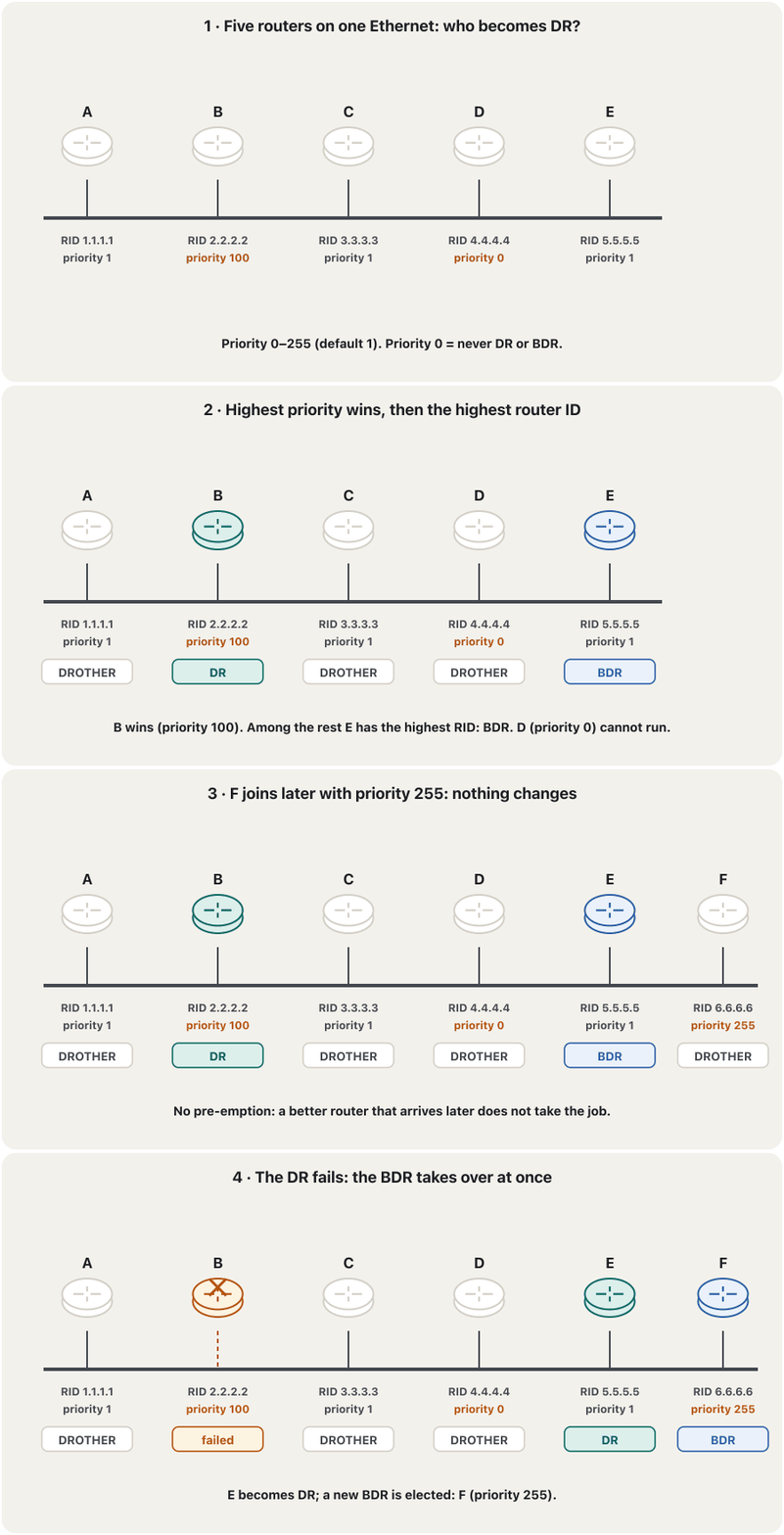
Each router’s interface has an OSPF priority from 0 to 255 (default 1). On the segment, the router with the highest priority becomes DR and the second highest becomes BDR. If the priorities are equal, the highest router ID wins. A router with priority 0 can never be DR or BDR. The election happens once, when the segment comes up (routers wait 40 seconds, the wait timer, to hear everyone). After that there is no pre-emption: a better router that joins later does not take over. The DR keeps its job until it fails; then the BDR becomes DR at once and a new BDR is elected.
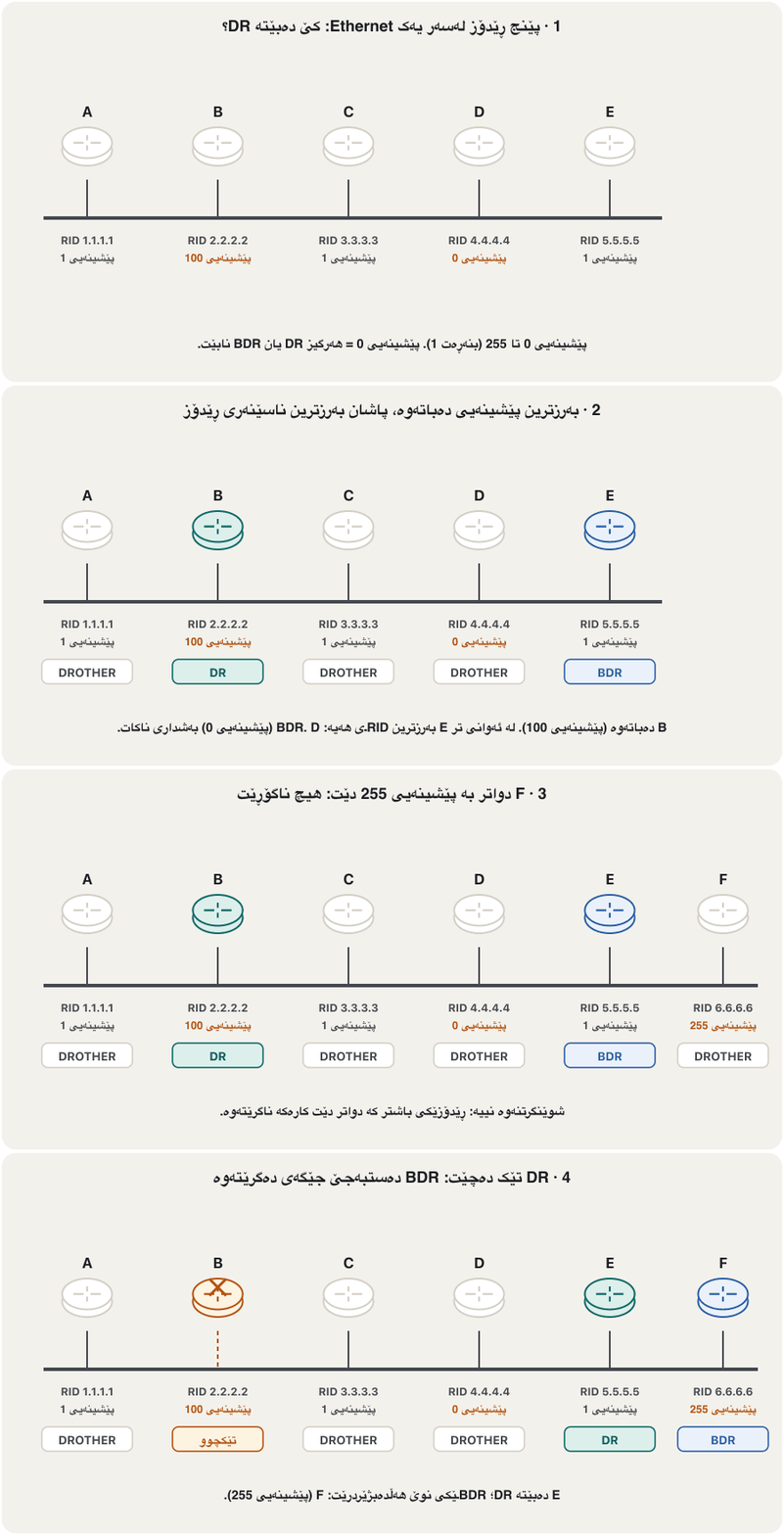
بۆ هەر ژمارەیەکی پێشینەیی OSPF دادەنرێت، لە 0 تا 255 (بنەڕەت 1). لەسەر بڕەکە، ئەو بەرزترین پێشینەیی هەیە دەبێتە DR و دووەمیان دەبێتە BDR. ئەگەر پێشینەییەکان یەکسان بن، بەرزترین دەباتەوە. بە پێشینەیی 0 هەرگیز نابێتە DR یان BDR. هەڵبژاردنەکە یەک جار ڕوو دەدات، کاتێک بڕەکە کارا دەبێت ( 40 چرکە، Wait، چاوەڕێ دەکەن تا گوێیان لە هەمووان بێت). دوای ئەوە شوێنگرتنەوە نییە (no pre-emption): باشتر کە دواتر دێت جێگەکە ناگرێتەوە. DR تا تێک دەچێت کارەکەی دەهێڵێتەوە؛ ئەو کات BDR دەستبەجێ دەبێتە DR و BDRـێکی نوێ هەڵدەبژێردرێت.
Choosing the DR yourselfخۆت DR هەڵبژێرە
Instead of leaving the DR to the router IDs, choose it: give the router you want a high priority and keep weak routers out with priority 0. The priority is set on the interface that faces the segment. Because there is no pre-emption, the new values count only at the next election — after the DR fails, or after you reset OSPF on the routers of the segment.
لە جیاتی ئەوەی DR بۆ بەجێ بهێڵیت، خۆت هەڵیبژێرە: پێشینەییەکی بەرز بدە بەو دەتەوێت و لاوازەکان بە پێشینەیی 0 دەرەوە ڕابگرە. پێشینەیی لەسەر ئەو دادەنرێت کە ڕووی لە بڕەکەیە. چونکە شوێنگرتنەوە نییە، بەها نوێیەکان تەنیا لە هەڵبژاردنی داهاتوودا حیساب دەکرێن — دوای تێکچوونی DR، یان دوای ڕیسێتکردنی OSPF لەسەر بڕەکە.
R4(config)#interface gigabitEthernet 0/0
R4(config-if)#ip ospf priority 255
R4(config-if)#end
R4#copy running-config startup-config
Explain the codeڕوونکردنەوەی کۆدەکە
- Lineدێڕی 2
0–255; the default is 1. Higher means more likely to be DR or BDR.
0–255؛ بنەڕەت 1ـە. بەرزتر واتە ئەگەری زیاتر بۆ ئەوەی ببێتە DR یان BDR.
R1(config)#interface gigabitEthernet 0/0
R1(config-if)#ip ospf priority 0
R1(config-if)#end
R1#clear ip ospf process
Reset ALL OSPF processes? [no]: yes
R1#copy running-config startup-config
Explain the codeڕوونکردنەوەی کۆدەکە
- Lineدێڕی 2
Priority 0: R1 still becomes a neighbour and a DROTHER, but never DR or BDR.
پێشینەیی 0: R1 هێشتا دەبێتە دراوسێ و DROTHER، بەڵام هەرگیز DR یان BDR نابێت.
- Lineدێڕی 4-5
Resets OSPF on R1 so the new priority takes part at once; R1’s neighbours drop and come back to Full.
OSPF لەسەر R1 ڕیسێت دەکاتەوە بۆ ئەوەی پێشینەییە نوێیەکە دەستبەجێ بەشدار بێت؛ دراوسێکانی R1 دەپچڕێن و دەگەڕێنەوە بۆ Full.
Reading show ip ospf neighborخوێندنەوەی show ip ospf neighbor
Four routers share the segment 192.168.1.0/24, all with priority 1. R4 (4.4.4.4) has the highest router ID and is the DR; R3 is the BDR; R1 and R2 are DROTHERs. This is what R1 sees:
چوار بڕی 192.168.1.0/24 هاوبەش دەکەن، هەموویان بە پێشینەیی 1. R4 (4.4.4.4) بەرزترین هەیە و DRـە؛ R3 BDRـە؛ R1 و R2 DROTHERـن. ئەمە ئەوەیە کە R1 دەیبینێت:
R1#show ip ospf neighbor

Neighbor ID     Pri   State           Dead Time   Address         Interface
2.2.2.2           1   2WAY/DROTHER    00:00:37    192.168.1.2     GigabitEthernet0/0
3.3.3.3           1   FULL/BDR        00:00:35    192.168.1.3     GigabitEthernet0/0
4.4.4.4           1   FULL/DR         00:00:32    192.168.1.4     GigabitEthernet0/0
Explain the codeڕوونکردنەوەی کۆدەکە
- Lineدێڕی 3
Neighbor ID = the neighbour’s router ID; Pri = its priority.
Neighbor ID = دراوسێکە؛ Pri = پێشینەییەکەی.
- Lineدێڕی 4
2WAY/DROTHER: a neighbour, but no database exchange — normal between two DROTHERs.
2WAY/DROTHER: دراوسێیە، بەڵام ئاڵوگۆڕی نییە — لە نێوان دوو DROTHERـدا ئاساییە.
- Lineدێڕی 5-6
FULL/BDR and FULL/DR: fully adjacent with the BDR and the DR. The part after / is the neighbour’s role.
FULL/BDR و FULL/DR: دراوسێیەتیی تەواو لەگەڵ BDR و DR. بەشی دوای / ڕۆڵی دراوسێکەیە.
- Lineدێڕی 4-6
Dead Time counts down from 40 and jumps back each time a hello arrives; Address is the neighbour’s interface address.
Dead Time لە 40ـەوە بۆ دواوە دەژمێرێت و هەر جارێک Helloـیەک بگات دەگەڕێتەوە؛ Address ناونیشانی دراوسێکەیە.
On a point-to-point link there is no DR, so the state shows as FULL/ -. On the DR itself, the DROTHERs appear as FULL/DROTHER, because the DR is Full with everyone.
لەسەر بەستەرێکی خاڵ بۆ خاڵ DR نییە، بۆیە دۆخەکە وەک FULL/ - دەردەکەوێت. لەسەر خودی DR، DROTHERـەکان وەک FULL/DROTHER دەردەکەون، چونکە DR لەگەڵ هەمووان Fullـە.
Reading show ip ospf interfaceخوێندنەوەی show ip ospf interface
show ip ospf interface shows one interface from OSPF’s point of view: its area, its cost, its role on the segment, the DR and BDR, the timers and how many neighbours are Full. On R1:
show ip ospf interface یەک لە ڕوانگەی OSPFـەوە پیشان دەدات: ، تێچووەکەی، ڕۆڵی لەسەر بڕەکە، DR و BDR، و چەند دراوسێ Fullـن. لەسەر R1:
R1#show ip ospf interface gigabitEthernet 0/0
GigabitEthernet0/0 is up, line protocol is up
  Internet Address 192.168.1.1/24, Area 0
  Process ID 1, Router ID 1.1.1.1, Network Type BROADCAST, Cost: 1
  Transmit Delay is 1 sec, State DROTHER, Priority 1
  Designated Router (ID) 4.4.4.4, Interface address 192.168.1.4
  Backup Designated router (ID) 3.3.3.3, Interface address 192.168.1.3
  Timer intervals configured, Hello 10, Dead 40, Wait 40, Retransmit 5
    Hello due in 00:00:04
  Index 1/1, flood queue length 0
  Next 0x0(0)/0x0(0)
  Last flood scan length is 1, maximum is 1
  Last flood scan time is 0 msec, maximum is 0 msec
  Neighbor Count is 3, Adjacent neighbor count is 2
    Adjacent with neighbor 3.3.3.3  (Backup Designated Router)
    Adjacent with neighbor 4.4.4.4  (Designated Router)
  Suppress hello for 0 neighbor(s)
Explain the codeڕوونکردنەوەی کۆدەکە
- Lineدێڕی 4
Network Type BROADCAST = a multi-access segment, so a DR is elected. Cost 1: a Gigabit link with the default reference.
Network Type BROADCAST = بڕێکی فرەدەستڕاگەیشتن، بۆیە DR هەڵدەبژێردرێت. تێچوو 1: بەستەرێکی Gigabit بە پێوەری بنەڕەت.
- Lineدێڕی 5
R1’s own role on this segment and its priority.
ڕۆڵی خودی R1 لەسەر ئەم بڕە و پێشینەییەکەی.
- Lineدێڕی 6-7
The DR and BDR by router ID and interface address.
DR و BDR بە و ناونیشانی .
- Lineدێڕی 8
Hello 10 and Dead 40 must match on every router of the segment; Wait = how long to listen before the election.
Hello 10 و Dead 40 دەبێت لەسەر هەموو بڕەکە وەک یەک بن؛ Wait = کاتی گوێگرتن پێش هەڵبژاردن.
- Lineدێڕی 14-16
3 neighbours, but Full (adjacent) only with the DR and the BDR.
3 دراوسێ، بەڵام تەنیا لەگەڵ DR و BDR Full (adjacent)ـە.
On IOS XE routers the output has a few more lines (for example “Attached via Network Statement” and a topology table); the fields above are the same.
لەسەر IOS XE دەرچوونەکە چەند دێڕێکی زیاتری هەیە (بۆ نموونە «Attached via Network Statement» و خشتەیەکی topology)؛ خانەکانی سەرەوە وەک خۆیانن.
Common mistakes and stuck neighboursهەڵە باوەکان و دراوسێی گیرخواردوو
When show ip ospf neighbor shows the wrong thing, the state where a neighbour stops tells you where to look:
کاتێک show ip ospf neighbor شتێکی هەڵە پیشان دەدات، ئەو دۆخەی دراوسێیەک تێیدا دەوەستێت پێت دەڵێت لە کوێ بگەڕێیت:
Exercisesڕاهێنانەکان
What is the difference between the Two-Way state and the Full state? Answer in two sentences, then say which state two DROTHERs on one Ethernet normally stay in.
جیاوازیی نێوان دۆخی Two-Way و دۆخی Full چییە؟ بە دوو ڕستە وەڵام بدەوە، پاشان بڵێ دوو DROTHER لەسەر یەک Ethernet بە ئاسایی لە کام دۆخدا دەمێننەوە.
Show answerوەڵامەکە پیشان بدە
Two-Way: both routers have recognised each other (each sees its own router ID in the other’s hellos), but they have not exchanged their databases yet. Full: they have recognised each other and exchanged their databases, so their LSDBs are the same. Two DROTHERs stay in 2-Way; each is Full with the DR and the BDR.
Two-Way: هەردوو یەکتریان ناسیوە (هەریەکە خۆی لە Helloـی ئەوی تردا دەبینێت)، بەڵام هێشتا ئاڵوگۆڕ نەکردووە. Full: یەکتریان ناسیوە و ئاڵوگۆڕ کردووە، بۆیە LSDBـەکانیان وەک یەکن. دوو DROTHER لە 2-Wayـدا دەمێننەوە؛ هەریەکەیان لەگەڵ DR و BDR Fullـە.
R5 (router ID 5.5.5.5) and R6 (6.6.6.6) are connected and their link comes up. Write the first three hellos (sender, my RID, seen list) and the state each router reaches after each one.
R5 ( 5.5.5.5) و R6 (6.6.6.6) پێکەوە بەستراون و بەستەرەکەیان کارا دەبێت. سێ Helloـی یەکەم بنووسە (نێرەر، RIDـی من، لیستی بینراوەکان) و ئەو دۆخەی هەر دوای هەریەکەیان پێی دەگات.
Show answerوەڵامەکە پیشان بدە
| Hello | Contentsناوەڕۆک | Resultئەنجام |
|---|---|---|
| 1 | R5 → R6: RID 5.5.5.5, seen: — | R6: R5 is InitR6: R5 لە Initـدایە |
| 2 | R6 → R5: RID 6.6.6.6, seen: 5.5.5.5 | R5: R6 is 2-WayR5: R6 لە 2-Wayـدایە |
| 3 | R5 → R6: RID 5.5.5.5, seen: 6.6.6.6 | R6: R5 is 2-WayR6: R5 لە 2-Wayـدایە |
Then ExStart, where R6 leads (6.6.6.6 is higher), Exchange with DBDs, Loading with LSR/LSU/LSAck, and Full. On a point-to-point link there is no DR, so they continue straight to Full.
پاشان ExStart، کە R6 بەڕێوەی دەبات (6.6.6.6 گەورەترە)، Exchange بە DBD، Loading بە LSR/LSU/LSAck و Full. لەسەر بەستەرێکی خاڵ بۆ خاڵ DR نییە، بۆیە ڕاستەوخۆ تا Full بەردەوام دەبن.
Five routers on one Ethernet: A (priority 1, RID 1.1.1.1), B (priority 50, RID 2.2.2.2), C (priority 50, RID 3.3.3.3), D (priority 0, RID 9.9.9.9), E (priority 1, RID 5.5.5.5). (a) Which are DR and BDR? (b) Later C fails. What happens? (c) Then F joins with priority 200. Does it become DR?
پێنج لەسەر یەک Ethernet: A (پێشینەیی 1، RID 1.1.1.1)، B (پێشینەیی 50، RID 2.2.2.2)، C (پێشینەیی 50، RID 3.3.3.3)، D (پێشینەیی 0، RID 9.9.9.9)، E (پێشینەیی 1، RID 5.5.5.5). (أ) DR و BDR کامیانن؟ (ب) دواتر C تێک دەچێت. چی ڕوو دەدات؟ (ج) پاشان F بە پێشینەیی 200 دێت. دەبێتە DR؟
Show answerوەڵامەکە پیشان بدە
- (a) B and C tie on priority 50; C has the higher RID (3.3.3.3), so C = DR, B = BDR. D (priority 0) can never be elected.
- (b) B becomes DR at once; a new BDR is elected among A and E (priority 1): E has the higher RID, so E = BDR.
- (c) No: there is no pre-emption. F stays DROTHER until the DR or the BDR fails, or OSPF is reset.
- (أ) B و C لە پێشینەیی 50دا یەکسانن؛ C RIDـی بەرزتری هەیە (3.3.3.3)، بۆیە C = DR، B = BDR. D (پێشینەیی 0) هەرگیز هەڵنابژێردرێت.
- (ب) B دەستبەجێ دەبێتە DR؛ BDRـێکی نوێ لە نێوان A و E (پێشینەیی 1) هەڵدەبژێردرێت: E RIDـی بەرزتری هەیە، بۆیە E = BDR.
- (ج) نەخێر: شوێنگرتنەوە نییە. F DROTHER دەمێنێتەوە تا DR یان BDR تێک دەچێت، یان OSPF ڕیسێت دەکرێتەوە.
Eight OSPF routers share one Ethernet segment. How many Full adjacencies would there be if every router became Full with every other? How many are there with a DR and a BDR?
هەشت OSPF یەک بڕی Ethernet هاوبەش دەکەن. ئەگەر هەموو لەگەڵ هەموو ئەوانی تر Full ببوایە، چەند دراوسێیەتیی Full هەبوو؟ بە DR و BDR چەندن؟
Show answerوەڵامەکە پیشان بدە
Without a DR: 28. With a DR and a BDR: 7 routers with the DR, plus 6 DROTHERs with the BDR = 13.
بەبێ DR: 28. بە DR و BDR: 7 لەگەڵ DR، لەگەڵ 6 DROTHER لەگەڵ BDR = 13.
On R2 of the four-router segment (R4 = DR, R3 = BDR), write what show ip ospf neighbor shows in the State column for R1, R3 and R4.
لەسەر R2 لە بڕەکەی سەرەوە (R4 = DR، R3 = BDR)، بنووسە show ip ospf neighbor لە ستوونی State چی بۆ R1، R3 و R4 پیشان دەدات.
Show answerوەڵامەکە پیشان بدە
R2#show ip ospf neighbor

Neighbor ID     Pri   State           Dead Time   Address         Interface
1.1.1.1           1   2WAY/DROTHER    00:00:33    192.168.1.1     GigabitEthernet0/0
3.3.3.3           1   FULL/BDR        00:00:39    192.168.1.3     GigabitEthernet0/0
4.4.4.4 1 FULL/DR 00:00:36 192.168.1.4 GigabitEthernet0/0Summaryکورتە
- OSPF neighbours run OSPF on the same link and subnet; they find each other with hellos to 224.0.0.5 (every 10 s on Ethernet; dead after 40 s without a hello). Nobody answers a hello.
- Must match: area, subnet and mask, hello/dead, authentication, stub flag; router IDs must differ; not passive; MTU for Full. The process ID may differ.
- States: Down → Init → 2-Way → ExStart → Exchange → Loading → Full. 2-Way = they know each other; Full = same LSDB.
- Packets: Hello, DBD (lists of LSA headers), LSR (requests), LSU (complete LSAs), LSAck.
- On multi-access Ethernet a DR and a BDR are elected (highest priority 0–255, default 1, then highest router ID; 0 = never; no pre-emption). DROTHERs are Full only with them ( adjacencies instead of ) and send updates to 224.0.0.6.
show ip ospf neighbor: FULL/DR, FULL/BDR, 2WAY/DROTHER (normal), FULL/ - on point-to-point links.show ip ospf interface: role, priority, cost, timers, adjacencies.
- OSPF لەسەر هەمان بەستەر و OSPF بەکار دەهێنن؛ بە بۆ 224.0.0.5 یەکتر دەدۆزنەوە (لەسەر Ethernet هەر 10 چرکە؛ دوای 40 چرکە بێ Hello، Dead). کەس وەڵامی Hello ناداتەوە.
- دەبێت وەک یەک بن: ، و ، Hello/Dead، ، نیشانەی stub؛ دەبێت جیاواز بن؛ نابێت بێت؛ MTU بۆ Full. ژمارەی دەکرێت جیاواز بێت.
- دۆخەکان: Down → Init → 2-Way → ExStart → Exchange → Loading → Full؛ 2-Way واتە یەکتر دەناسن و Full واتە هەمان LSDB.
- : Hello، DBD (لیستی سەری )، LSR (داواکاری)، LSU ( تەواو)، LSAck.
- لەسەر Ethernetـی فرەدەستڕاگەیشتن و هەڵدەبژێردرێن (بەرزترین پێشینەیی 0–255، بنەڕەت 1، پاشان بەرزترین ؛ 0 = هەرگیز؛ شوێنگرتنەوە نییە). DROTHERـەکان تەنیا لەگەڵ ئەوان Fullـن ( دراوسێیەتی لە جیاتی ) و بۆ 224.0.0.6 دەنێرن.
show ip ospf neighbor: FULL/DR، FULL/BDR، 2WAY/DROTHER (ئاسایی)، FULL/ - لەسەر بەستەری خاڵ بۆ خاڵ.show ip ospf interface: ڕۆڵ، پێشینەیی، تێچوو، ، دراوسێیەتییەکان.
Next: switch OSPF on with wildcard masks, network statements and passive interfaces — Configuring OSPF.
دواتر: OSPF هەڵبکە بە ، network و — ڕێکخستنی OSPF.
Lesson complete!وانەکە تەواو بوو!
Well done. Review the key terms, then go on to the next lesson.دەستخۆش. سەیرێکی زاراوە سەرەکییەکان بکەرەوە، پاشان بڕۆ بۆ وانەی داهاتوو.
Key termsزاراوە سەرەکییەکان
Configuring OSPF: Wildcard Masks, Networks and Passive Interfacesڕێکخستنی OSPF: ماسکە پێچەوانەکان، ڕایەڵەکان و نێوبەستە ناچالاکەکان
Related lecturesوانە پەیوەندیدارەکان
- Configuring OSPF: Wildcard Masks, Networks and Passive Interfacesڕێکخستنی OSPF: ماسکە پێچەوانەکان، ڕایەڵەکان و نێوبەستە ناچالاکەکان
- Multi-Area OSPF and Virtual LinksOSPFـی فرەناوچەیی و بەستەرە گریمانەییەکان
- EIGRP: Cisco’s Advanced Distance-Vector ProtocolEIGRP: مەودای ئاڕاستەی پێشکەوتووی Cisco
- Securing Routing Updates: RIP Authentication and Passive Interfacesپاراستنی نوێکردنەوەکانی ڕێدۆزی: پشتڕاستکردنەوەی ناسنامەی RIP و نێوبەستە ناچالاکەکان
- Address Classes, and Why CIDR Replaced Themپۆلەکانی ناونیشانی IP و بۆچی CIDR جێگەیانی گرتەوە
- Network Topologiesتۆپۆلۆجییەکانی ڕایەڵە
References and further readingسەرچاوەکان و خوێندنەوەی زیاتر
- RFC 2328: OSPF Version 2 — §9.4 DR election, §10.1 neighbour states, §10.5 receiving hellos, Appendix A (AllSPFRouters 224.0.0.5, AllDRouters 224.0.0.6, packet formats)
- Cisco: What Does the show ip ospf neighbor Command Reveal? (fields, priority, DROTHER)
- Cisco: What Does the show ip ospf interface Command Reveal? (network type, state, priority, timers, adjacent neighbour count)
- Cisco IOS IP Routing: OSPF Command Reference (ip ospf priority 0–255, default 1; hello-interval 10 s Ethernet, 30 s non-broadcast, must match)
- Cisco: OSPF Frequently Asked Questions (DROTHER, Full only with DR and BDR on broadcast media, no DR on point-to-point)
- Cisco Networking Academy ENSA v7, Module 2: Single-Area OSPFv2 Configuration (DR/BDR election, priority, FULL/DROTHER and 2WAY/DROTHER, hello and dead intervals)
This lecture is a first edition. The Kurdish text and terminology are waiting for review by Kurdish IT teachers.ئەم وانەیە چاپی یەکەمە. دەقە کوردییەکە و زاراوەکانی چاوەڕێی پێداچوونەوەی مامۆستایانی کوردی بواری IT ن.