Chapterبەش 1 · Lectureوانە 1.1
Cisco IOS and the Command LineCisco IOS و نێوبەستەی هێڵی فەرمان
The first lesson of Routing and Switching: where the course and the Cisco certifications lead, what Cisco IOS and IOS XE are, the four memories and the start-up sequence, reaching the CLI through the console (cable, terminal program, 9600 8N1) and in Packet Tracer, the command modes and their prompts, moving between them, host names, how a command is built, abbreviations and Tab, the question-mark help, the three error messages, the clock, and the hot keys and history.
یەکەم وانەی و : کۆرسەکە و بڕوانامەکانی Cisco بۆ کوێت دەبەن، Cisco IOS و IOS XE چین، چوار و ڕیزی دەستپێکردن، گەیشتن بە لە ڕێگەی کۆنسۆڵەوە (کێبڵ، بەرنامەی ، 9600 8N1) و لە Packet Tracerـدا، و ، گواستنەوە لە نێوانیاندا، ، چۆن پێک دێت، و Tab، یارمەتیی نیشانەی پرسیار، سێ ، کاتژمێر و و مێژوو.
What you will learnچی فێر دەبیت
- Say where this course and the Cisco certifications (CCNA 200-301, CCNP, CCIE) lead, and recognise the 2007 exams as history.
- Explain what Cisco IOS is, what each of the four memories holds and the order in which a device starts.
- Connect to a console with the right cable and terminal settings, in real life and in Packet Tracer.
- Name the command modes from their prompts and move between them with enable, configure terminal, exit, end and Ctrl+Z.
- Use host names, abbreviations, Tab, the ? help, the hot keys and history, and read the three error messages.
- بڵێیت ئەم کۆرسە و بڕوانامەکانی Cisco (CCNA 200-301، CCNP، CCIE) بۆ کوێت دەبەن و تاقیکردنەوەکانی 2007 وەک مێژوو بناسیتەوە.
- ڕوونی بکەیتەوە چییە، هەریەکە لە چوار چی هەڵدەگرێت و ئامێرێک بە چ ڕیزێک دەست پێ دەکات.
- بە کێبڵ و ڕێکخستنی دروست بە کۆنسۆڵەوە ببەستیت، لە ژیانی ڕاستەقینە و لە Packet Tracerـدا.
- ناوی لە بزانیت و بە enable، configure terminal، exit، end و Ctrl+Z لە نێوانیاندا بگوازیتەوە.
- ، ، Tab، یارمەتیی ?، و مێژوو بەکار بهێنیت و سێ بخوێنیتەوە.
Welcome to Routing and Switchingبەخێربێیت بۆ ڕێدۆزی و سویچکردن
Welcome to Routing and Switching, the Cisco course of CêIT. Here you configure network devices yourself, step by step: you give a switch and a router a name and passwords, join them, split one LAN into several VLANs, make routers find their way with static routes and with RIP, OSPF, EIGRP and BGP, and add DHCP, NAT and access lists. The course ends with two complete projects.
بەخێربێیت بۆ و ، کۆرسی Ciscoـی CêIT. لێرەدا خۆت هەنگاو بە هەنگاو ئامێرەکانی ڕێک دەخەیت: ناو و دەدەیتە و ، پێکەوەیان دەبەستیت، دابەش دەکەیت بۆ چەند ، وا لە دەکەیت بە و بە RIP، OSPF، EIGRP و BGP ڕێگەی خۆیان بدۆزنەوە، پاشان ، و زیاد دەکەیت. کۆرسەکە بە دوو پڕۆژەی تەواو کۆتایی دێت.
This course builds on Computer Networks, which comes first: IP addresses and subnet masks, subnetting, the OSI and TCP/IP models, and what switches and routers do. If words such as subnet or default gateway are new to you, read those lessons first.
ئەم کۆرسە لەسەر کۆرسی کۆمپیوتەر بنیات نراوە، کە پێش ئەم دێت: و ماسکی ژێرڕایەڵە، ژێرڕایەڵەسازی، و ، هەروەها ئەرکی سویچەکان و ڕێدۆزەکان. ئەگەر وشەی وەک یان بۆت نوێن، سەرەتا ئەو وانانە بخوێنەوە.
You need no equipment of your own. Every lab runs in Cisco Packet Tracer, a free network simulator; Your First Packet Tracer Network shows how to get it. The CêIT 3D network lab shows packets travelling, but it has no command line. Every lab ends with copy running-config startup-config, so your work survives a restart — the next lesson explains why.
پێویست ناکات هیچ ئامێرێک بکڕیت. هەموو تاقیگەیەک لە Cisco Packet Tracerـدا ئەنجام دەدرێت، کە بێبەرانبەری ؛ یەکەم ڕایەڵەکەت لە Packet Tracerـدا پیشانت دەدات چۆن دەستت دەکەوێت. تاقیگەی سێڕەهەندیی ڕایەڵەی CêIT ڕۆیشتنی پیشان دەدات، بەڵام هێڵی تێدا نییە. هەموو تاقیگەیەک بە copy running-config startup-config کۆتایی دێت، تا کارەکەت دوای بمێنێت — وانەی داهاتوو هۆکارەکەی ڕوون دەکاتەوە.
Where this course leads: Cisco certificationsئەم کۆرسە بۆ کوێت دەبات: بڕوانامەکانی Cisco
Companies that run Cisco networks look for people who can prove their skills, and Cisco's certifications are the best-known proof. They have three levels. As of November 2026:
ئەو کۆمپانیایانەی Cisco بەڕێوە دەبەن بە دوای کەسانێکدا دەگەڕێن کە بتوانن شارەزایی خۆیان بسەلمێنن و بڕوانامەکانی Cisco ناسراوترین بەڵگەن. سێ ئاستیان هەیە. تا تشرینی دووەمی 2026:
- CCNA (Associate): one exam, 200-301 Implementing and Administering Cisco Solutions, 120 minutes. Its six topic areas are network fundamentals, network access, IP connectivity, IP services, security fundamentals, and automation and programmability.
- CCNP Enterprise (Professional): the core exam 350-401 ENCOR plus one concentration exam you choose.
- CCIE Enterprise Infrastructure (Expert): the same ENCOR exam plus an 8-hour hands-on lab exam.
- CCNA (ئاستی سەرەتایی): یەک تاقیکردنەوە، 200-301 Implementing and Administering Cisco Solutions، 120 خولەک. شەش بواری هەیە: بنەماکانی ، دەستگەیشتن بە ، پەیوەندیی IP، خزمەتگوزارییەکانی IP، بنەماکانی و و بەرنامەسازی.
- CCNP Enterprise (ئاستی پیشەیی): تاقیکردنەوەی بنەڕەتی 350-401 ENCOR لەگەڵ یەک تاقیکردنەوەی پسپۆڕی کە خۆت هەڵیدەبژێریت.
- CCIE Enterprise Infrastructure (ئاستی شارەزا): هەمان تاقیکردنەوەی ENCOR لەگەڵ تاقیکردنەوەیەکی پراکتیکیی 8 کاتژمێری لە تاقیگەدا.
Cisco has announced CCNA version 2.0 (still exam 200-301), with its first testing day on 3 February 2027, so check Cisco's exam page before you book. This course follows the CCNA routing and switching topics; the CCNP and CCIE go much deeper. The exam's automation area has its own screen in Automation in the CCNA exam.
Cisco وەشانی 2.0ی CCNAـی ڕاگەیاندووە (هێشتا تاقیکردنەوەی 200-301)، کە یەکەم ڕۆژی تاقیکردنەوەکەی 3ی شوباتی 2027ـە، بۆیە پێش ناونووسین پەڕەی تاقیکردنەوەکە لە ماڵپەڕی Cisco ببینە. ئەم کۆرسە بابەتەکانی و CCNA دەگرێتەبەر؛ CCNP و CCIE زۆر قووڵتر دەچن. بواری تاقیکردنەوەکە لە خۆکارکردن لە تاقیکردنەوەی CCNAدا ڕوون کراوەتەوە.
Where this course leads: Cisco certificationsئەم کۆرسە بۆ کوێت دەبات: بڕوانامەکانی Cisco
Old certification tracks, and why the skills still matterڕێڕەوە کۆنەکانی بڕوانامە و بۆچی شارەزاییەکە هێشتا گرنگە
Older books show the system of about 2007: the CCNA came from exam 640-801, or from two exams called INTRO and ICND, and six separate tracks stood on it. Cisco retired that system long ago; in February 2020 it introduced one CCNA for everybody, followed by CCNP and CCIE in areas such as Enterprise, Security, Service Provider, Collaboration and Data Center. Read the old tracks as history:
کتێبە کۆنەکان سیستەمی نزیکەی ساڵی 2007 پیشان دەدەن: CCNA لە تاقیکردنەوەی 640-801ـەوە دەهات، یان لە دوو تاقیکردنەوە بە ناوی INTRO و ICND و شەش ڕێڕەوی جیاواز لەسەری بوون. Cisco دەمێکە ئەو سیستەمەی وەلا ناوە؛ لە شوباتی 2020دا یەک CCNA بۆ هەمووان دانا، پاشان CCNP و CCIE لە بوارەکانی وەک Enterprise، Security، Service Provider، Collaboration و Data Center. ڕێڕەوە کۆنەکان وەک مێژوو بخوێنەوە:
| Track around 2007ڕێڕەو لە نزیکەی 2007 | Its levels thenئاستەکانی ئەو کات | Closest todayنزیکترین ئەمڕۆ |
|---|---|---|
| Network implementationدامەزراندنی | CCNA → CCNP → CCIE Routing and Switching | CCNA → CCNP / CCIE Enterprise |
| Network designدیزاینی | CCDA → CCDP | CCNP Enterprise (design concentration exam)CCNP Enterprise (تاقیکردنەوەی پسپۆڕیی دیزاین) |
| Service providerدابینکەری خزمەتگوزاری | CCIP → CCIE Service Provider | CCNP / CCIE Service Provider |
| Security | CCSP → CCIE Security | CCNP / CCIE Security |
| Voiceدەنگ | CCVP → CCIE Voice | CCNP / CCIE Collaboration |
| Storage networking هەڵگرتن | no professional level → CCIE Storage Networkingبێ ئاستی پیشەیی ← CCIE Storage Networking | CCNP / CCIE Data Center |
One thing has not changed: setting up and tuning routers and switches is a skill employers ask for. In 2026 it is usually asked for together with automation and cloud networking, which the last chapter of this course introduces.
شتێک نەگۆڕاوە: ڕێکخستن و باشترکردنی و شارەزاییەکە خاوەنکارەکان داوای دەکەن. لە 2026دا زۆرجار لەگەڵ و هەوری پێکەوە داوا دەکرێت، کە دوایین بەشی ئەم کۆرسە دەیانناسێنێت.
What Cisco IOS isCisco IOS چییە
A router or a switch is a small computer: it has a CPU, memory and ports, and it needs an operating system (what an operating system does). Cisco's operating system is Cisco IOS, short for Internetwork Operating System. IOS forwards packets, builds the tables the device needs and checks passwords. You give it orders through its command-line interface (CLI).
یان بچووکە: CPU، و هەیە و پێویستی بە هەیە (سیستەمی وەگەڕخەر چی دەکات). Cisco ناوی ـە، کورتکراوەی Internetwork Operating System. IOS دەنێرێت، ئەو خشتانە دروست دەکات کە ئامێرەکە پێویستیەتی و دەپشکنێت. لە ڕێگەی فەرمانی پێ دەدەیت.
Cisco builds a different IOS file for each family of devices — a Catalyst 2960 switch and a Catalyst 4948 switch run different images. Newer devices, such as Catalyst 9000 switches and ISR 4000 and Catalyst 8000 routers, run Cisco IOS XE, which runs IOS on top of a Linux kernel. Almost every command in this course is the same on both. Many devices also offer a web page (a GUI), but the CLI works on every device, can be copied and saved, and is what the CCNA tests.
Cisco بۆ هەر خێزانێکی ئامێر IOSـی جیاواز دروست دەکات — Catalyst 2960 و Catalyst 4948 دوو جیاواز بەکار دەهێنن. ئامێرە نوێیەکان، وەک Catalyst 9000 و ISR 4000 و Catalyst 8000، Cisco IOS XE بەکار دەهێنن، کە IOS لەسەر Linux کار پێ دەکات. نزیکەی هەموو ئەم کۆرسە لە هەردووکیاندا وەک یەکن. زۆر ئامێر پەڕەیەکی وێبیشیان هەیە ()، بەڵام لەسەر هەموو ئامێرێک کار دەکات، دەتوانرێت کۆپی و پاشەکەوت بکرێت و ئەوەیە کە CCNA تاقیی دەکاتەوە.
The four memories of a Cisco deviceچوار بیرگەکەی ئامێرێکی Cisco
A Cisco router or switch keeps different things in four kinds of memory. Learn them now: they explain why a configuration is lost or kept.
یان Cisco شتی جیاواز لە چوار جۆر هەڵدەگرێت. ئێستا فێریان ببە: ڕوونی دەکەنەوە بۆچی ون دەبێت یان دەمێنێت.
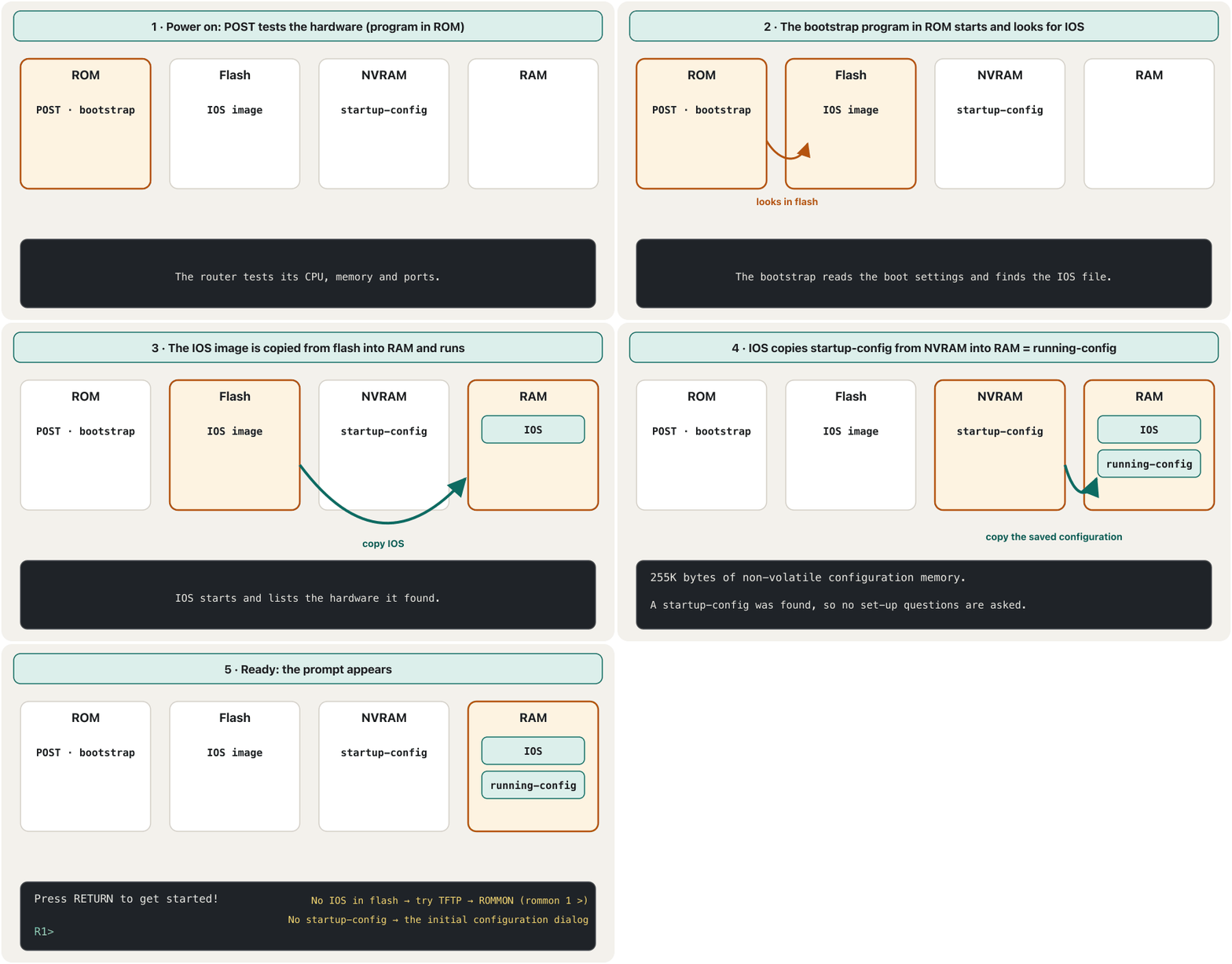
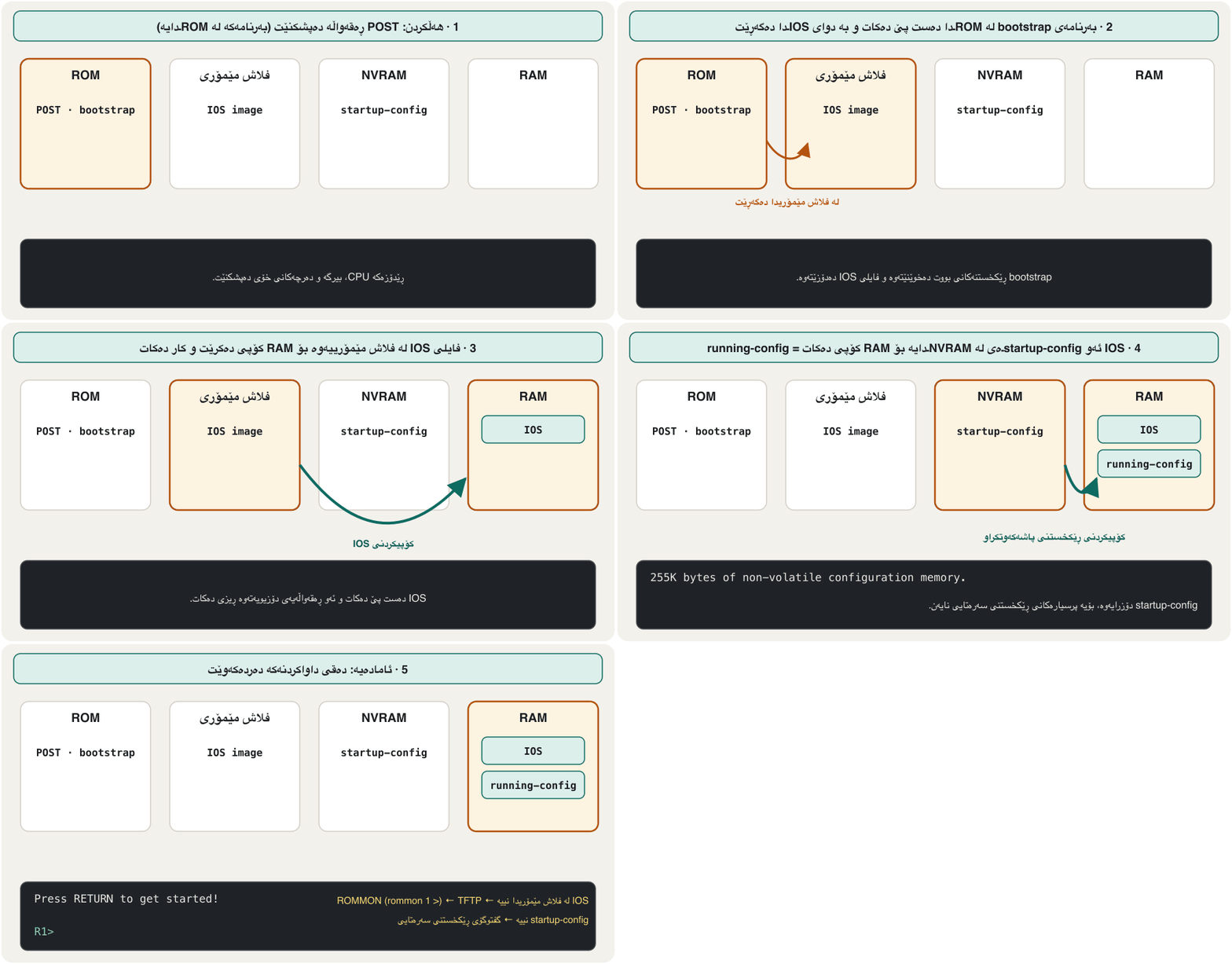
- ROM — the first programs: the power-on self-test (POST), the bootstrap that starts the device, and ROMMON, a tiny recovery system.
- Flash — the IOS image file, like the hard disk of a PC. A switch also keeps its VLAN list here, in
vlan.dat. - NVRAM (non-volatile RAM) — the saved configuration, the startup-config.
- RAM (DRAM) — the running IOS, the running-config, the routing and ARP tables and the packets waiting to be sent.
- — یەکەم بەرنامەکان: تاقیکردنەوەی خۆیی لە کاتی هەڵکردندا (POST)، ئەو bootstrapـەی ئامێرەکە دەست پێ دەکات و ROMMON، سیستەمێکی زۆر بچووکی چاککردنەوە.
- — IOS، وەک دیسکی ڕەقی . لیستی لێرە هەڵدەگرێت، لە
vlan.datـدا. - (RAMـی زوونەفڕ) — پاشەکەوتکراو، .
- (DRAM) — IOSـی کارا، ، خشتەکانی و ARP و کە چاوەڕێی ناردنن.
ROM, flash and NVRAM are non-volatile: they keep their contents without power. RAM is volatile: everything in it disappears when the power goes off. So anything that exists only in RAM is lost at a restart.
ROM، و NVRAM ن: بەبێ کارەبا ناوەڕۆکەکەیان دەپارێزن. RAM ـە: هەر شتێک تێیدا بێت کاتێک کارەبا دەبڕێت نامێنێت. بۆیە هەر شتێک تەنیا لە RAMـدا بێت لە کاتی ون دەبێت.
What happens when you switch it onکاتێک هەڵیدەکەیت چی ڕوو دەدات
Every Cisco router and switch starts in the same order. Each step uses one of the four memories:
هەموو و Cisco بە هەمان ڕیز دەست پێ دەکات. هەر هەنگاوێک یەکێک لە چوار بەکار دەهێنێت:
- Test the hardwareپشکنینی ڕەقەواڵە
POST (power-on self-test), stored in ROM, checks the CPU, memory and ports.
POST (تاقیکردنەوەی خۆیی لە کاتی هەڵکردندا)، کە لە ROMـدایە، CPU، و دەپشکنێت.
- Start the bootstrapدەستپێکردنی bootstrap
The bootstrap program in ROM starts and reads where to find IOS.
بەرنامەی bootstrap لە ROMـدا دەست پێ دەکات و دەخوێنێتەوە کە IOS لە کوێ بدۆزێتەوە.
- Find and load IOSدۆزینەوە و بارکردنی IOS
Normally the IOS image is copied from flash into RAM. If flash has none, the device can try a TFTP server; if that also fails, it stops in ROMMON mode with the prompt
rommon 1 >, where an administrator repairs it.بە شێوەی ئاسایی IOS لە بۆ RAM کۆپی دەکرێت. ئەگەر هیچی تێدا نەبێت، ئامێرەکە دەتوانێت تاقی بکاتەوە؛ ئەگەر ئەویش سەرنەکەوت، لە باری ROMMONـدا دەوەستێت بە
rommon 1 >، کە بەڕێوەبەرێک لەوێ چاکی دەکاتەوە. - Find and load the configurationدۆزینەوە و بارکردنی ڕێکخستن
IOS copies the startup-config from NVRAM into RAM, where it becomes the running-config. If NVRAM is empty, IOS offers the initial configuration dialog instead.
IOS لە NVRAMـەوە بۆ RAM کۆپی دەکات، کە لەوێ دەبێتە . ئەگەر NVRAM بەتاڵ بێت، IOS لەبری ئەوە گفتوگۆی ڕێکخستنی سەرەتایی پێشنیار دەکات.
The first start: read the messages, answer noیەکەم دەستپێکردن: پەیامەکان بخوێنەوە، وەڵامی no بدەوە
When a new Cisco 2901 router starts in Packet Tracer, the console shows lines like these. Some of them name the memories you just met:
کاتێک نوێی Cisco 2901 لە Packet Tracerـدا دەست پێ دەکات، کۆنسۆڵەکە دێڕی وەک ئەمانە پیشان دەدات. هەندێکیان ناوی دەبەن کە ئێستا ناسیتن:
Cisco CISCO2901/K9 (revision 1.0) with 491520K/32768K bytes of memory.
Processor board ID FTX152400KS
2 Gigabit Ethernet interfaces
DRAM configuration is 64 bits wide with parity disabled.
255K bytes of non-volatile configuration memory.
249856K bytes of ATA System CompactFlash 0 (Read/Write)

--- System Configuration Dialog ---

Would you like to enter the initial configuration dialog? [yes/no]: no

Press RETURN to get started!

Router>
Explain the codeڕوونکردنەوەی کۆدەکە
- Lineدێڕی 1
RAM (DRAM) of this router.
RAMـی (DRAM) ئەم .
- Lineدێڕی 5
NVRAM: where the startup-config will be saved.
NVRAM: ئەو شوێنەی startup-config تێیدا پاشەکەوت دەکرێت.
- Lineدێڕی 6
Flash (CompactFlash): where the IOS image lives.
(CompactFlash): شوێنی IOS.
- Lineدێڕی 10
Answer no and press Enter: you will configure the router yourself.
no بنووسە و Enter دابگرە: خۆت ڕێک دەخەیت.
The initial configuration dialog (also called setup mode) asks question after question. Answer no: in this course you type every command yourself, so you understand each one. If you enter it by mistake, press Ctrl+C to leave it. Then press Enter at Press RETURN to get started! and the prompt Router> appears — Router is the default host name.
گفتوگۆی ڕێکخستنی سەرەتایی (کە پێی دەگوترێت setup mode) پرسیار لە دوای پرسیار دەکات. وەڵامی no بدەوە: لەم کۆرسەدا هەموو خۆت دەنووسیت، تا لە هەریەکەیان تێبگەیت. ئەگەر بە هەڵە چوویتە ناوی، Ctrl+C دابگرە بۆ دەرچوون. پاشان لە Press RETURN to get started!ـدا Enter دابگرە و Router> دەردەکەوێت — Router بنەڕەتییە.
Two ways into the command lineدوو ڕێگە بۆ گەیشتن بە نێوبەستەی هێڵی فەرمان
You can reach the CLI in two ways. Through the console (out-of-band): a cable goes straight from your computer to the device's console port. This always works, even on a brand-new device with no IP address, so it is used for the first configuration and for repairs. Over the network (in-band): you connect with SSH to an IP address of the device from anywhere in the network. That needs an IP address, vty lines and SSH first — lesson 5 sets them up.
دەتوانیت بە دوو ڕێگە بگەیتە . لە ڕێگەی کۆنسۆڵەوە (لە دەرەوەی ): کێبڵێک ڕاستەوخۆ لە دەچێتە سەر ئامێرەکە. ئەمە هەمیشە کار دەکات، تەنانەت لەسەر ئامێرێکی تازە کە نییە، بۆیە بۆ یەکەم ڕێکخستن و بۆ چاککردنەوە بەکار دێت. بە ناو (لە ناو ): لە هەر شوێنێکی بە بە ئامێرەکەوە پەیوەندی دەکەیت. ئەمە پێشتر پێویستی بە ، و هەیە — وانەی 5 ڕێکیان دەخات.
Old routers also have an AUX (auxiliary) port for a modem; it is one more door to lock, as lesson 3 shows. Telnet also works in-band, but it sends everything, passwords included, as plain text — this course uses SSH.
کۆن AUX (یارمەتیدەر)یشیان هەیە بۆ ؛ ئەوە دەرگایەکی ترە کە دەبێت قوفڵ بکرێت، وەک وانەی 3 پیشانی دەدات. لە ناو کار دەکات، بەڵام هەموو شتێک، ، وەک دەنێرێت — ئەم کۆرسە بەکار دەهێنێت.
Connecting a console cableبەستنەوەی کێبڵی کۆنسۆڵ
For the console you need two things: a console cable and a terminal program. Plug the cable into the port marked CONSOLE (an RJ-45 socket) or into the USB console port (mini-B) that many newer devices have. On the computer side a USB-to-RJ-45 console cable goes into a USB port; very old PCs used a DB-9 serial (COM) port and a light-blue rollover cable — see the rollover cable.
بۆ کۆنسۆڵ پێویستیت بە دوو شت هەیە: و بەرنامەیەکی . کێبڵەکە بخە ناو ئەو CONSOLEـی لەسەر نووسراوە (سۆکێتێکی RJ-45) یان ناو USB console (mini-B) کە زۆرێک لە ئامێرە نوێیەکان هەیانە. لە لای USB بۆ RJ-45 دەچێتە ناو USB؛ زۆر کۆن DB-9 (COM) و کێبڵێکی rolloverـی شینی کاڵیان بەکار دەهێنا — بڕوانە کێبڵی rollover.
Then open a terminal program such as PuTTY, Tera Term or SecureCRT, choose Serial, pick the COM port of the cable (Windows Device Manager shows its number) and use the console defaults: 9600 bits per second, 8 data bits, no parity, 1 stop bit, no flow control (often written 9600 8N1). Press Enter and the device answers.
پاشان بەرنامەیەکی وەک PuTTY، Tera Term یان SecureCRT بکەرەوە، Serial هەڵبژێرە، COMـی کێبڵەکە دیاری بکە (Device Managerـی Windows ژمارەکەی پیشان دەدات) و ڕێکخستنە بنەڕەتییەکانی کۆنسۆڵ بەکار بهێنە: 9600 لە چرکەیەکدا، 8 data bits، بێ parity، 1 stop bit، بێ flow control (زۆرجار وەک 9600 8N1 دەنووسرێت). Enter دابگرە و ئامێرەکە وەڵام دەداتەوە.
The console in Packet Tracerکۆنسۆڵ لە Packet Tracerـدا
Cisco Packet Tracer is free: you download it from the Cisco Networking Academy (netacad.com) after making a free account, for example through its short Getting Started with Cisco Packet Tracer course. Version 9.0 is current in November 2026, for Windows, macOS and Ubuntu Linux. The lesson Your First Packet Tracer Network walks through it.
Cisco Packet Tracer بێبەرانبەرە: دوای دروستکردنی هەژمارێکی بێبەرانبەر لە Cisco Networking Academy (netacad.com) دای دەبەزێنیت، بۆ نموونە لە ڕێگەی کۆرسە کورتەکەی Getting Started with Cisco Packet Tracer. تا تشرینی دووەمی 2026 وەشانی 9.0 نوێترینە، بۆ Windows، macOS و Ubuntu Linux. وانەی یەکەم ڕایەڵەکەت لە Packet Tracerـدا هەنگاو بە هەنگاو پیشانت دەدات.
There are two ways to a device's CLI in Packet Tracer. The quick way: click the router or switch and open its CLI tab — it behaves like the console. The real-life way: join a PC's RS-232 port to the router's Console port with a Console cable, then open the PC's Desktop → Terminal and accept 9600 8N1. The Config tab only fills in some settings for you and shows the matching IOS commands (the Config tab); in this course you type them in the CLI.
لە Packet Tracerـدا دوو ڕێگە هەیە بۆ ئامێرێک. ڕێگەی خێرا: کرتە لەسەر یان بکە و تابی CLIـی بکەرەوە — وەک کۆنسۆڵ ڕەفتار دەکات. ڕێگەی ژیانی ڕاستەقینە: RS-232ـی بە Consoleـی ببەستە بە کێبڵی Console، پاشان Desktop → Terminalـی بکەرەوە و 9600 8N1 پەسەند بکە. تابی Config تەنیا هەندێک ڕێکخستن بۆت پڕ دەکاتەوە و IOSـی هاوتایان پیشان دەدات (تابی Config)؛ لەم کۆرسەدا لە CLIـدا دەیاننووسیت.
Command modes and their promptsبارەکانی فەرمان و دەقەکانی داواکردنیان
IOS divides its commands into modes, like the rooms of a building: each room has its own commands, and the prompt tells you which room you are in.
IOS خۆی دابەش دەکات بۆ ، وەک ژوورەکانی باڵەخانەیەک: هەر ژوورێک خۆی هەیە و پێت دەڵێت لە کام ژووردایت.
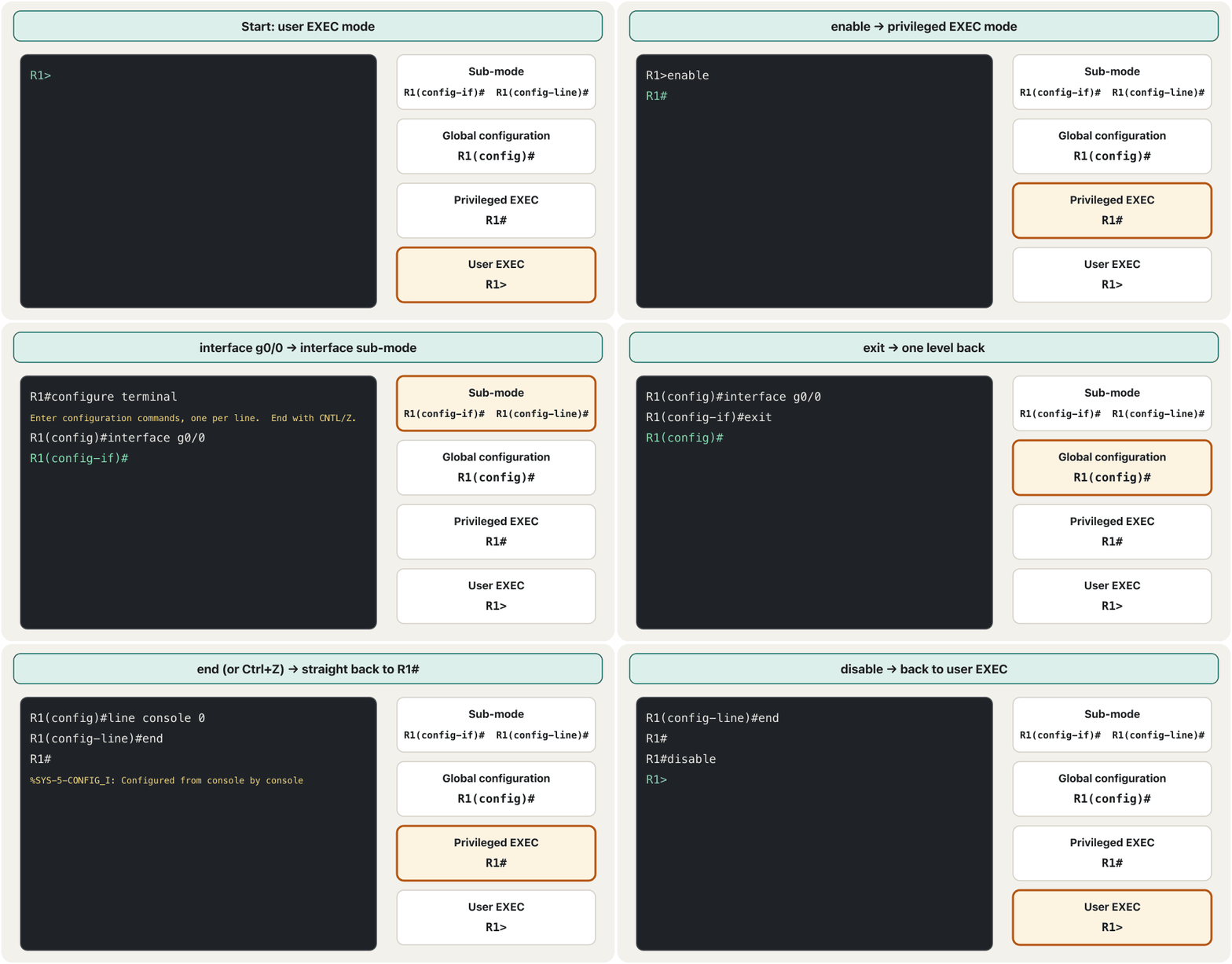
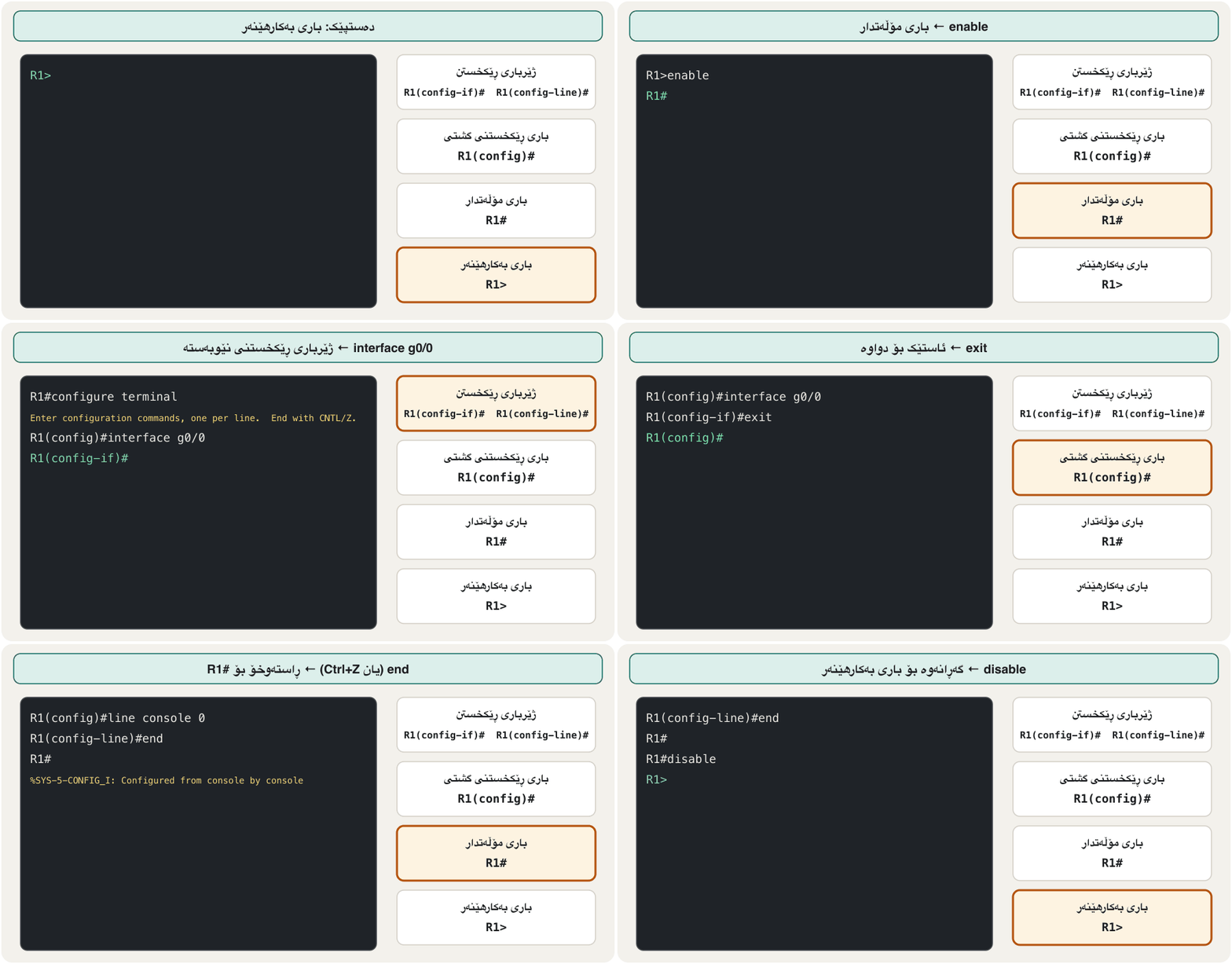
- User EXEC mode —
R1>: the first room. You can look and test (ping, a few show commands) but change nothing. - Privileged EXEC mode —
R1#(also called enable mode): every check — all show commands,copy,reload,debug. - Global configuration mode —
R1(config)#: changes for the whole device, such as its host name. - Sub-modes of configuration for one part:
R1(config-if)#an interface,R1(config-line)#a line (console or vty),SW1(config-vlan)#a VLAN,R1(config-router)#a routing protocol.
- —
R1>: یەکەم ژوور. دەتوانیت سەیر بکەیت و تاقی بکەیتەوە (، هەندێک show) بەڵام هیچ ناگۆڕیت. - —
R1#(پێی دەگوترێت enable modeیش): هەموو پشکنینێک — هەموو show،copy،reload،debug. - —
R1(config)#: گۆڕانکاری بۆ هەموو ئامێرەکە، وەک . - بۆ یەک بەش:
R1(config-if)#،R1(config-line)#هێڵێک (کۆنسۆڵ یان vty)،SW1(config-vlan)#،R1(config-router)#.
Some classrooms say mode 1 for user EXEC and mode 2 for privileged EXEC. That is only a memory aid — exams and Cisco's documents use the real names.
هەندێک پۆل بە دەڵێن mode 1 و بە دەڵێن mode 2. ئەوە تەنیا یارمەتییەکە بۆ لەبیرمانەوە — تاقیکردنەوەکان و بەڵگەنامەکانی Cisco ناوە ڕاستەقینەکان بەکار دەهێنن.
Command modes and their promptsبارەکانی فەرمان و دەقەکانی داواکردنیان
What you can do at R1>لە R1>ـدا چی دەتوانیت بکەیت
Type ? at the user EXEC prompt and IOS lists the commands of that mode. On a switch the main ones are:
لە ? بنووسە و IOS ئەو ڕیز دەکات. لە سەرەکییەکانیان ئەمانەن:
| Command | What it doesچی دەکات |
|---|---|
enable | turn on privileged commands (go to #) مۆڵەتدارەکان چالاک دەکات (دەچێت بۆ #) |
disable | turn off privileged commands (back to >) مۆڵەتدارەکان ناچالاک دەکات (دەگەڕێتەوە بۆ >) |
ping | send echo messages to test a connectionپەیامی echo دەنێرێت بۆ تاقیکردنەوەی پەیوەندییەک |
traceroute | trace the route to a destination بۆ شوێنی مەبەست |
show | show running system information (a limited set here)زانیاریی سیستەمی کارا پیشان دەدات (لێرە بەشێکی سنووردار) |
terminal | set terminal line settings, for example terminal history sizeڕێکخستنەکانی هێڵی دادەنێت، بۆ نموونە terminal history size |
connect, telnet | open a terminal connection to another deviceپەیوەندییەکی بە ئامێرێکی ترەوە دەکاتەوە |
disconnect, resume | close or return to such a connectionئەو جۆرە پەیوەندییە دادەخات یان دەگەڕێتەوە سەری |
exit, logout | leave the EXEC sessionلە دانیشتنی EXEC دەردەچێت |
Moving between modesگواستنەوە لە نێوان بارەکانی فەرماندا
enable— from user EXEC (>) to privileged EXEC (#).disablegoes back.configure terminal(short:conf t) — from#into global configuration.exit— one level back: from a sub-mode to(config)#, from(config)#to#.endor Ctrl+Z — from any configuration mode straight back to#.exitorlogoutat>or#— end the session (log off).
enable— لە (>)ەوە بۆ (#).disableدەیگەڕێنێتەوە.configure terminal(کورتەکەی:conf t) — لە#ـەوە بۆ .exit— ئاستێک بۆ دواوە: لە بۆ(config)#، لە(config)#ـەوە بۆ#.endیان Ctrl+Z — لە هەر بارێکی ڕێکخستنەوە ڕاستەوخۆ بۆ#.exitیانlogoutلە>یان#ـدا — دانیشتنەکە کۆتایی پێ دەهێنێت ().
Router>enable
Router#configure terminal
Enter configuration commands, one per line.  End with CNTL/Z.
Router(config)#interface g0/0
Router(config-if)#exit
Router(config)#exit
Router#
%SYS-5-CONFIG_I: Configured from console by console
Router#disable
Router>exit

Router con0 is now available

Press RETURN to get started.
Explain the codeڕوونکردنەوەی کۆدەکە
- Lineدێڕی 3
IOS reminds you that Ctrl+Z (CNTL/Z) ends configuration.
IOS بیرت دەخاتەوە کە Ctrl+Z (CNTL/Z) ڕێکخستن کۆتایی پێ دەهێنێت.
- Lineدێڕی 5-6
Each exit goes back one level.
هەر exitـێک ئاستێک دەگەڕێتەوە.
- Lineدێڕی 8
A log message: the configuration was changed from the console.
پەیامێکی تۆمار: لە کۆنسۆڵەوە گۆڕدرا.
- Lineدێڕی 10-14
exit at Router> ends the session; the console waits for Enter.
exit لە Router>ـدا دانیشتنەکە کۆتایی پێ دەهێنێت؛ کۆنسۆڵەکە چاوەڕێی Enter دەکات.
Giving the device a nameناونانی ئامێرەکە
Every new router is called Router and every new switch Switch. In a network with many devices that is confusing, so the first command of most labs gives the device its own host name. hostname is a global configuration command, and the prompt changes at once:
هەموو نوێ ناوی Routerـە و هەموو نوێ Switch. لە کە چەندین ئامێری تێدا بێت ئەمە تێکەڵ دەبێت، بۆیە یەکەم زۆربەی تاقیگەکان تایبەت دەداتە ئامێرەکە. hostname و دەستبەجێ دەگۆڕێت:
Router>en
Router#config t
Enter configuration commands, one per line.  End with CNTL/Z.
Router(config)#hostname R1
R1(config)#
Explain the codeڕوونکردنەوەی کۆدەکە
- Lineدێڕی 4-5
The new name appears in the very next prompt.
ناوە نوێیەکە لە یەکسەر دواتردا دەردەکەوێت.
Choose names that tell people where and what the device is. Cisco's own example is Lab-1-Sw1, a switch in lab 1; a company might use Erbil-Core-SW2. A host name must start with a letter, end with a letter or digit, contain only letters, digits and hyphens, and be at most 63 characters long. Packet Tracer accepts some names that a real router rejects, so follow the rules anyway.
ناوێک هەڵبژێرە کە بە خەڵک بڵێت ئامێرەکە لە کوێیە و چییە. نموونەی خودی Cisco Lab-1-Sw1ـە، لە تاقیگەی 1؛ کۆمپانیایەک لەوانەیە Erbil-Core-SW2 بەکار بهێنێت. دەبێت بە پیت دەست پێ بکات، بە پیت یان ژمارە کۆتایی بێت، تەنیا پیت، ژمارە و - (hyphen)ی تێدا بێت و زۆرترین 63 پیت بێت. Packet Tracer هەندێک ناو پەسەند دەکات کە ڕاستەقینە ڕەتیان دەکاتەوە، بۆیە هەر یاساکان پەیڕەو بکە.
How a command is builtفەرمانێک چۆن پێک دێت
Every command line has two parts. First the prompt, which IOS writes: the host name, the mode in brackets, and > or #. Then what you type: a command word, often followed by keywords (fixed words such as ip interface brief) and arguments (values you choose, such as an address or a name). Spaces separate the parts.
هەموو دێڕێکی دوو بەشی هەیە. سەرەتا ، کە IOS دەینووسێت: ، لە ناو کەوانەدا و > یان #. پاشان ئەوەی تۆ دەینووسیت: وشەی ، کە زۆرجار (وشەی جێگیر وەک ip interface brief) و (بەهایەک کە خۆت هەڵیدەبژێریت، وەک ناونیشانێک یان ناوێک) بە دوایدا دێن. بەشەکان لە یەک جیا دەکاتەوە.
IOS commands are not case-sensitive: HOSTNAME r1 works like hostname r1 (the name itself keeps the letters you typed). Passwords are case-sensitive — Cisco and cisco are different passwords.
IOS نین: HOSTNAME r1 وەک hostname r1 کار دەکات (خودی ناوەکە ئەو پیتانە دەپارێزێت کە نووسیوتن). بەڵام — Cisco و cisco دوو جیاوازن.
Type less: abbreviations and Tabکەمتر بنووسە: کورتکراوەکان و Tab
IOS accepts any beginning of a command word that fits only one command. So Router>enable, Router>enab and Router>en do the same, and configure terminal can be typed config t or conf t. Experienced engineers type sh run for show running-config and int g0/0 for interface gigabitethernet0/0.
IOS هەر سەرەتایەکی وشەی پەسەند دەکات کە تەنیا لەگەڵ یەک بگونجێت. بۆیە Router>enable، Router>enab و Router>en هەمان کار دەکەن و configure terminal دەتوانرێت وەک config t یان conf t بنووسرێت. ئەندازیارە شارەزاکان بۆ show running-config دەنووسن sh run و بۆ interface gigabitethernet0/0 دەنووسن int g0/0.
If the beginning fits several commands, IOS cannot choose and says % Ambiguous command:. The Tab key completes a word for you — Router#sh + Tab becomes Router#show — but only when one command fits; otherwise nothing happens and you type one more letter.
ئەگەر سەرەتاکە لەگەڵ چەند بگونجێت، IOS ناتوانێت هەڵبژێرێت و دەڵێت % Ambiguous command:. دوگمەی Tab وشەکەت بۆ تەواو دەکات — Router#sh + Tab دەبێتە Router#show — بەڵام تەنیا کاتێک یەک بگونجێت؛ ئەگەرنا هیچ ڕوو نادات و پیتێکی تر دەنووسیت.
Asking IOS for help with ?داوای یارمەتی لە IOS بە ?
You never need to remember everything: the question mark shows what fits here, in the current mode. Where you put the space matters:
پێویست ناکات هەموو شتێک لەبەر بکەیت: نیشانەی پرسیار پیشانت دەدات چی لێرە دەگونجێت، لە ئێستادا. شوێنی گرنگە:
| You typeدەنووسیت | IOS showsIOS پیشان دەدات |
|---|---|
? | every command of the current modeهەموو ئێستا |
com? | the commands that start with com (word help: no space) کە بە com دەست پێ دەکەن (یارمەتیی وشە: بێ ) |
command ? | the first keywords or arguments of that command, with a short explanation (command help: a space before ?)یەکەم یان ئەو ، لەگەڵ ڕوونکردنەوەیەکی کورت (یارمەتیی : پێش ?) |
command parm? | the keywords of that command that start with parm ئەو کە بە parm دەست پێ دەکەن |
command parm<Tab> | completes parm if only one keyword starts that wayparm تەواو دەکات ئەگەر تەنیا یەک بەو شێوەیە دەست پێ بکات |
command parm1 ? | everything that may come after parm1, explainedهەموو ئەوەی دەتوانێت دوای parm1 بێت، بە ڕوونکردنەوە |
R1#cl?
clear  clock

R1#clock ?
  set  Set the time and date

R1#clock set ?
  hh:mm:ss  Current Time
Explain the codeڕوونکردنەوەی کۆدەکە
- Lineدێڕی 1-2
No space: which commands start with cl?
بێ : کام بە cl دەست پێ دەکەن؟
- Lineدێڕی 4-5
A space: what may follow clock? Only set.
: چی دەتوانێت دوای clock بێت؟ تەنیا set.
- Lineدێڕی 7-8
Keep asking, step by step, until the command is complete.
هەنگاو بە هەنگاو بەردەوام بپرسە تا تەواو دەبێت.
c? works the same way but lists more words: on a current router in privileged EXEC mode it also shows configure, connect, copy and others — the exact list depends on the IOS version. When <cr> appears in a list, the command is complete and you may press Enter.
c? بە هەمان شێوە کار دەکات بەڵام وشەی زیاتر ڕیز دەکات: لە ئەمڕۆدا لە configure، connect، copy و هی تریش پیشان دەدات — لیستە ڕاستەقینەکە بەپێی وەشانی IOS دەگۆڕێت. کاتێک <cr> لە لیستێکدا دەردەکەوێت، تەواوە و دەتوانیت Enter دابگریت.
The three error messagesسێ هەڵەنامەکە
When IOS does not understand you, it answers with one of three short error messages. Each tells you exactly what kind of mistake you made:
کاتێک IOS لێت تێناگات، بە یەکێک لە سێ کورتەکە وەڵام دەداتەوە. هەریەکەیان ڕێک پێت دەڵێت چ جۆرە هەڵەیەکت کردووە:
R1#confog t
       ^
% Invalid input detected at '^' marker.

R1#config t
Enter configuration commands, one per line.  End with CNTL/Z.
R1(config)#end
R1#cl
% Ambiguous command: "cl"
R1#clock
% Incomplete command.
Explain the codeڕوونکردنەوەی کۆدەکە
- Lineدێڕی 1-3
A wrong word. The caret ^ (Shift+6) points at the first letter IOS could not accept: conf was fine, the o was not.
وشەیەکی هەڵە. نیشانەی ^ (Shift+6) ئاماژە بۆ یەکەم پیت دەکات کە IOS نەیتوانی پەسەندی بکات: conf باش بوو، o نا.
- Lineدێڕی 8-9
Too few letters: clear and clock both start with cl.
پیتی کەم: clear و clock هەردووکیان بە cl دەست پێ دەکەن.
- Lineدێڕی 10-11
A part is missing: clock needs set and a time and date.
بەشێک کەمە: clock پێویستی بە set و کات و ڕێکەوت هەیە.
The fix follows from the message: for invalid input, correct the word at the caret; for an ambiguous command, type more letters; for an incomplete command, press ↑ to get the line back and add ? after a space to see what is missing.
چارەسەرەکە لە پەیامەکەوە دەردەکەوێت: بۆ invalid input، وشەکە لە شوێنی ^ ڕاست بکەرەوە؛ بۆ ambiguous command، پیتی زیاتر بنووسە؛ بۆ incomplete command، ↑ دابگرە بۆ گەڕاندنەوەی دێڕەکە و دوای ? زیاد بکە بۆ بینینی ئەوەی کەمە.
Setting the clockڕێکخستنی کاتژمێر
A router writes the time into its log messages, so the clock should be right. clock set is a privileged EXEC command (not a configuration command). Its format is hh:mm:ss day month year; IOS also accepts the month before the day. The full help walk is a good exercise in ?:
کات لە پەیامەکانی تۆمارەکەیدا دەنووسێت، بۆیە دەبێت کاتژمێرەکە ڕاست بێت. clock set ـە (نەک ڕێکخستن). شێوەکەی hh:mm:ss ڕۆژ مانگ ساڵـە؛ IOS مانگ پێش ڕۆژیش پەسەند دەکات. ڕێگای یارمەتییەکە بە تەواوی ڕاهێنانێکی باشە بۆ ?:
R1#clock ?
  set  Set the time and date
R1#clock set 19:50:00 14 July 2003
R1#clock set 09:30:00 5 November 2026
R1#show clock
Explain the codeڕوونکردنەوەی کۆدەکە
- Lineدێڕی 3
Only an example: any valid date works. Pressing Enter confirms the time and date.
تەنیا نموونەیە: هەر ڕێکەوتێکی دروست کار دەکات. Enter دابگرە بۆ پشتڕاستکردنەوەی کات و ڕێکەوت.
- Lineدێڕی 4
Use today's date and time in your own lab.
لە تاقیگەی خۆتدا ڕێکەوت و کاتی ئەمڕۆ بەکار بهێنە.
- Lineدێڕی 5
show clock prints the time the router now uses.
show clock ئەو کاتە چاپ دەکات کە ئێستا بەکاری دەهێنێت.
Hot keys and command historyکورتەڕێکانی کیبۆرد و مێژووی فەرمانەکان
IOS remembers the commands you typed (10 by default) in a history buffer, and it has editing keys that save a lot of typing:
IOS پێشووت هەڵدەگرێت (بە شێوەی بنەڕەت 10) لە مێژوودا و چەند دوگمەیەکی دەستکاریکردنی هەیە کە نووسینێکی زۆر کەم دەکەنەوە:
| Keysدوگمەکان | What they doچی دەکەن |
|---|---|
| ↑ or Ctrl+P | recall older commands, starting with the most recent کۆنترەکان دەگەڕێنێتەوە، لە نوێترینەوە |
| ↓ or Ctrl+N | move back towards more recent commands after ↑دوای ↑ بەرەو نوێترەکان دەگەڕێتەوە |
| Ctrl+A / Ctrl+E | jump to the beginning / the end of the lineبازدان بۆ سەرەتا / کۆتایی دێڕەکە |
| ← or Ctrl+B / → or Ctrl+F | move the cursor one character back / forward پیتێک بۆ دواوە / پێشەوە دەبات |
| Esc, B / Esc, F | move one word back / forwardوشەیەک بۆ دواوە / پێشەوە |
| Tab | complete a command wordوشەی تەواو دەکات |
| Ctrl+Z | from any configuration mode back to privileged EXECلە هەر بارێکی ڕێکخستنەوە بۆ |
| Ctrl+Shift+6 | interrupt a running process such as ping, traceroute or a name lookupپرۆسەیەکی بەردەوام دەوەستێنێت وەک ping، traceroute یان گەڕانی ناو |
show history lists the commands in the buffer, and terminal history size 50 keeps up to 50 for the current session. The arrow keys work in every normal terminal program; Ctrl+P and Ctrl+N work even where arrows do not.
show history ناو ڕیز دەکات و terminal history size 50 بۆ ئەم دانیشتنە هەتا 50 ڕادەگرێت. لە هەموو بەرنامەیەکی ئاسایی کار دەکەن؛ Ctrl+P و Ctrl+N تەنانەت لەو شوێنانەش کار دەکەن کە کار ناکەن.
Common mistakesهەڵە باوەکان
Exercisesڕاهێنانەکان
Name the mode of each prompt and say whether you can change the configuration there: (a) SW1> (b) R2# (c) R1(config)# (d) R1(config-if)# (e) SW1(config-line)# (f) rommon 1 >.
هەر بناسە و بڵێ ئایا لەوێ دەتوانیت بگۆڕیت: (a) SW1> (b) R2# (c) R1(config)# (d) R1(config-if)# (e) SW1(config-line)# (f) rommon 1 >.
Show answerوەڵامەکە پیشان بدە
- (a) user EXEC — no. (b) privileged EXEC — not directly;
configure terminalfirst. (c) global configuration — yes, for the whole device. (d) interface sub-mode — yes, for that interface. (e) line sub-mode — yes, for the console or vty lines. (f) ROMMON — the device found no IOS; only recovery work.
- (a) — نەخێر. (b) — ڕاستەوخۆ نا؛ سەرەتا
configure terminal. (c) — بەڵێ، بۆ هەموو ئامێرەکە. (d) — بەڵێ، بۆ ئەو . (e) line — بەڵێ، بۆ کۆنسۆڵ یان . (f) ROMMON — ئامێرەکە هیچ IOSـێکی نەدۆزیوەتەوە؛ تەنیا کاری چاککردنەوە.
From Router>: name the router R1, enter interface g0/1, return to R1# in one step and log out. Write each command with its prompt.
لە Router>ـەوە: ناو لە بنێ R1، بچۆ ناو g0/1، بە یەک هەنگاو بگەڕێوە بۆ R1# و بچۆ دەرەوە. هەر لەگەڵ بنووسە.
Hintئاماژە
hostname is a global configuration command; end jumps back to #.
hostname ؛ end ڕاستەوخۆ دەگەڕێتەوە بۆ #.
Show answerوەڵامەکە پیشان بدە
Router>enable
Router#configure terminal
Router(config)#hostname R1
R1(config)#interface g0/1
R1(config-if)#end
R1#exitWhat went wrong each time, and what do you type next? (a) R1#sh ip int br works, but R1#s gives % Ambiguous command: "s". (b) R1#copy running-config gives % Incomplete command. (c) R1#show runnig-config gives a caret under the g of runnig.
هەر جارێک چی هەڵە بوو و دواتر چی دەنووسیت؟ (a) R1#sh ip int br کار دەکات، بەڵام R1#s ئەنجامی % Ambiguous command: "s" دەدات. (b) R1#copy running-config ئەنجامی % Incomplete command. دەدات. (c) R1#show runnig-config نیشانەی ^ لە ژێر gـی runnigـدا دادەنێت.
Show answerوەڵامەکە پیشان بدە
- (a) Many commands start with s (show, ssh, setup …). Type
sh. - (b) copy needs a destination too:
copy running-config ?shows it, for examplestartup-config. - (c) A spelling mistake: running has three n's (
r-u-n-n-i-n-g). AfterrunniIOS expected an n, so the caret marks the g. Typeshow running-config(orsh run).
- (a) زۆر بە s دەست پێ دەکەن (show، ssh، setup …).
shبنووسە. - (b) copy پێویستی بە شوێنی مەبەستیش هەیە:
copy running-config ?پیشانی دەدات، بۆ نموونەstartup-config. - (c) هەڵەی ڕێنووس: running سێ nـی تێدایە (
r-u-n-n-i-n-g). دوایrunniIOS چاوەڕێی n بوو، بۆیە ^ لە ژێر g دادەنێت.show running-config(یانsh run) بنووسە.
Order these and name the memory each one uses: load the configuration; POST; run the bootstrap; load IOS. What happens if NVRAM is empty? And if flash is empty?
ئەمانە بەو ڕیزە دابنێ کە ئەنجامیان دەدات و بڵێ هەریەکەیان کام بەکار دەهێنێت: بارکردنی ؛ POST؛ کارپێکردنی bootstrap؛ بارکردنی IOS. ئەگەر NVRAM بەتاڵ بێت چی دەکات؟ ئەی ئەگەر بەتاڵ بێت؟
Show answerوەڵامەکە پیشان بدە
POST (ROM) → bootstrap (ROM) → load IOS (from flash into RAM) → load the configuration (startup-config from NVRAM into RAM as the running-config). Empty NVRAM: IOS starts and offers the initial configuration dialog. Empty flash: the router may try a TFTP server, then stops in ROMMON (rommon 1 >).
POST (ROM) ← bootstrap (ROM) ← بارکردنی IOS (لە بۆ RAM) ← بارکردنی (startup-config لە NVRAMـەوە بۆ RAM وەک running-config). NVRAMـی بەتاڵ: IOS دەست پێ دەکات و گفتوگۆی ڕێکخستنی سەرەتایی پێشنیار دەکات. بەتاڵ: لەوانەیە TFTP تاقی بکاتەوە، پاشان لە ROMMONـدا دەوەستێت (rommon 1 >).
(a) To be a CCNA you pass exam 640-801. (b) Configuring and tuning routers and switches is a skill in high demand. (c) The console needs the device's IP address. (d) Router>en and Router>enable do the same.
(a) بۆ ئەوەی ببیتە CCNA تاقیکردنەوەی 640-801 دەبڕیت. (b) ڕێکخستن و باشترکردنی و شارەزاییەکی زۆر داواکراوە. (c) کۆنسۆڵ پێویستی بە ئامێرەکە هەیە. (d) Router>en و Router>enable هەمان کار دەکەن.
Show answerوەڵامەکە پیشان بدە
- (a) False — 640-801 is from the 2000s; today it is 200-301.
- (b) True — in 2026 often together with automation.
- (c) False — the console works with only a cable and a terminal program.
- (d) True — en fits only enable in user EXEC mode.
- (a) هەڵە — 640-801 هی ساڵانی 2000ـە؛ ئەمڕۆ 200-301ـە.
- (b) ڕاست — لە 2026دا زۆرجار لەگەڵ .
- (c) هەڵە — کۆنسۆڵ تەنیا بە کێبڵێک و بەرنامەیەکی کار دەکات.
- (d) ڕاست — لە en تەنیا لەگەڵ enable دەگونجێت.
Summaryپوختە
- Cisco IOS (Internetwork Operating System) runs Cisco routers and switches; newer devices run IOS XE with almost the same commands. CCNA (exam 200-301) is the first certification step.
- Four memories: ROM (POST, bootstrap, ROMMON), flash (IOS), NVRAM (startup-config), RAM (running-config — lost at power-off).
- Start-up: POST → bootstrap → IOS from flash → configuration from NVRAM; no configuration → the initial configuration dialog (answer no).
- Console: USB or rollover console cable, terminal program, 9600 8N1; in Packet Tracer the CLI tab.
- Modes:
R1>user EXEC →enable→R1#privileged EXEC →configure terminal→R1(config)#→ sub-modes(config-if)#,(config-line)#;exitone level back,end/Ctrl+Z straight to#. hostname R1changes the prompt at once. Abbreviate (conf t), complete with Tab, ask with ? (cl?words,clock ?next part).- Errors:
% Invalid input detected at '^' marker.(wrong word),% Ambiguous command:(too few letters),% Incomplete command.(something missing). - Keys: ↑/Ctrl+P history, Ctrl+A/Ctrl+E line start/end, Ctrl+Z leave configuration, Ctrl+Shift+6 interrupt.
clock setis a privileged EXEC command; real networks use NTP.
- (Internetwork Operating System) و Cisco بەڕێوە دەبات؛ ئامێرە نوێیەکان IOS XE بەکار دەهێنن بە نزیکەی هەمان . CCNA (تاقیکردنەوەی 200-301) یەکەم پلەی بڕوانامەیە.
- چوار : ROM (POST، bootstrap، ROMMON)، (IOS)، NVRAM (startup-config)، RAM (running-config — بە بڕینی کارەبا ون دەبێت).
- دەستپێکردن: POST → bootstrap → IOS لە ← لە NVRAMـەوە؛ نەبێت ← گفتوگۆی ڕێکخستنی سەرەتایی (وەڵامی no).
- کۆنسۆڵ: USB یان rollover، بەرنامەی ، 9600 8N1؛ لە Packet Tracerـدا تابی CLI.
- :
R1>←enable←R1#←configure terminal←R1(config)#←(config-if)#،(config-line)#؛exitئاستێک بۆ دواوە،end/Ctrl+Z ڕاستەوخۆ بۆ#. hostname R1دەستبەجێ دەگۆڕێت. کورتی بکەرەوە (conf t)، بە Tab تەواوی بکە، بە ? بپرسە (cl?وشەکان،clock ?بەشی دواتر).- هەڵەکان:
% Invalid input detected at '^' marker.(وشەی هەڵە)،% Ambiguous command:(پیتی کەم)،% Incomplete command.(شتێک کەمە). - دوگمەکان: ↑/Ctrl+P مێژوو، Ctrl+A/Ctrl+E سەرەتا/کۆتایی دێڕ، Ctrl+Z دەرچوون لە ڕێکخستن، Ctrl+Shift+6 وەستاندن.
clock set؛ ڕاستەقینە NTP بەکار دەهێنن.
Lesson complete!وانەکە تەواو بوو!
Well done. Review the key terms, then go on to the next lesson.دەستخۆش. سەیرێکی زاراوە سەرەکییەکان بکەرەوە، پاشان بڕۆ بۆ وانەی داهاتوو.
Key termsزاراوە سەرەکییەکان
Show Commands, Running and Startup Configurationsفەرمانەکانی show، ڕێکخستنی کارا و ڕێکخستنی دەستپێکردن
Related lecturesوانە پەیوەندیدارەکان
- Show Commands, Running and Startup Configurationsفەرمانەکانی show، ڕێکخستنی کارا و ڕێکخستنی دەستپێکردن
- Securing a Cisco Device: Passwords, Users and Bannersپاراستنی ئامێرێکی Cisco: تێپەڕەوشەکان، بەکارهێنەران و بانەر
- Your First Router: Interfaces and Addressesیەکەم ڕێدۆز: نێوبەستەکان و ناونیشانەکان
- Managing Devices Remotely: From Telnet to SSHبەڕێوەبردنی ئامێرەکان لە دوورەوە: لە Telnetـەوە بۆ SSH
- Lab: Straight-Through, Crossover and Rollover Cablesتاقیگە: کێبڵی ڕاستەوخۆ، کێبڵی خاچی و کێبڵی rollover
- Packet Tracer: Your First NetworkPacket Tracer: یەکەم ڕایەڵەکەت
- The Command Line: Command Prompt Basicsنێوبەستەی هێڵی فەرمان: بنەماکانی Command Prompt
- Software and Operating Systemsنەرمەواڵە و سیستەمەکانی وەگەڕخەر
References and further readingسەرچاوەکان و خوێندنەوەی زیاتر
- Cisco: CCNA exam 200-301 — Implementing and Administering Cisco Solutions (120 minutes; topic areas)
- Cisco Press: Cisco Certification Program Updates (first testing date of CCNA v2.0: 3 February 2027)
- Cisco: CCNP Enterprise (core exam 350-401 ENCOR plus one concentration exam)
- Cisco: CCIE Enterprise Infrastructure (ENCOR plus an 8-hour lab exam)
- Cisco Packet Tracer help: What's New in version 9.0
- Cisco: Catalyst 2960 Software Configuration Guide — Using the Command-Line Interface (modes, help, error messages, history, editing keys)
- Cisco IOS command reference: hostname (naming rules, 63 characters)
- Cisco Press: Introduction to Networks Companion Guide (CCNAv7) — table of contents
This lecture is a first edition. The Kurdish text and terminology are waiting for review by Kurdish IT teachers.ئەم وانەیە چاپی یەکەمە. دەقە کوردییەکە و زاراوەکانی چاوەڕێی پێداچوونەوەی مامۆستایانی کوردی بواری IT ن.