Chapterبەش 1 · Lectureوانە 1.4
Your First Router: Interfaces and Addressesیەکەم ڕێدۆز: نێوبەستەکان و ناونیشانەکان
Give a Cisco router its first working network: read interface names such as GigabitEthernet0/0 and Serial0/0/0, enter an interface, set its IPv4 address and description, switch it on with no shutdown, configure the PC’s address, mask and default gateway, test with ping, and check the result with show ip interface brief, show interfaces and the connected and local routes — plus serial WAN cards and IPv6 on the same interface.
یەکەم کارا بدە بە Cisco: ناوی وەک GigabitEthernet0/0 و Serial0/0/0 بخوێنەوە، بچۆ ناو ، IPv4 و وەسفەکەی دابنێ، بە no shutdown هەڵیبکە، ناونیشان و و PC ڕێک بخە، بە تاقی بکەرەوە و ئەنجامەکە بە show ip interface brief، show interfaces و ڕێگە بەستراو و ناوخۆییەکان بپشکنە — لەگەڵ کارتی زنجیرەیی و لەسەر هەمان .
What you will learnچی فێر دەبیت
- Read router interface names (type, slot, subslot, port) and explain that “g” means GigabitEthernet (1 Gbit/s).
- Configure an interface with
ip address,descriptionandno shutdown, and save withcopy running-config startup-config. - Set a PC’s address, mask and default gateway to match the router and test with ping.
- Verify with
show ip interface brief,show interfacesand the C and L routes ofshow ip route. - Add a serial WAN card and an IPv6 address to a router interface.
- ناوی بخوێنیتەوە (جۆر، شوێن، ژێرشوێن، ) و ڕوونی بکەیتەوە کە «g» واتە GigabitEthernet (1 Gbit/s).
- بە
ip address،descriptionوno shutdownڕێک بخەیت و بەcopy running-config startup-configپاشەکەوتی بکەیت. - ناونیشان، و PCـێک بەپێی ڕێک بخەیت و بە تاقی بکەیتەوە.
- بە
show ip interface brief،show interfacesو ڕێگەکانی C و Lـیshow ip routeبیپشکنیت. - کارتێکی زنجیرەیی و ناونیشانێکی زیاد بکەیت بۆ .
Your first router labیەکەم تاقیکردنەوەی ڕێدۆز
A router joins networks. Before it can do that, each of its interfaces needs an address and must be switched on. In this lesson you build the smallest useful network: one PC, one router and one cable. You give the router interface an IP address, give the PC matching settings, and prove the link works with ping.
بە یەکەوە دەبەستێت. پێش ئەوەی ئەو کارە بکات، هەر پێویستی بە ناونیشانێکە و دەبێت هەڵبکرێت. لەم وانەیەدا بچووکترین بەسوود دروست دەکەیت: یەک PC، یەک و یەک کێبڵ. دەدەیتە ، ڕێکخستنی گونجاو دەدەیتە PCـەکە و بە ping دەیسەلمێنیت کە بەستەرەکە کار دەکات.
You already know what a router does (what is a router) and how to move between IOS modes (Cisco IOS and the command line). Here you use those modes for real work. Every command is typed in Cisco Packet Tracer or on a real Cisco router; the CêIT 3D network lab shows the same idea without a command line.
تۆ پێشتر دەزانیت چی دەکات (ڕێدۆز چییە) و چۆن لە نێوان بارەکانی IOSدا دەگوازیتەوە (Cisco IOS و هێڵی فەرمان). لێرەدا ئەو بارانە بۆ کاری ڕاستەقینە بەکار دەهێنیت. هەموو لە Cisco Packet Tracer یان لەسەر ڕاستەقینەی Cisco دەنووسرێن؛ تاقیگەی سێڕەهەندیی ڕایەڵەی CêIT هەمان بیرۆکە بەبێ هێڵی فەرمان پیشان دەدات.
Interfaces: the router’s doors to networksنێوبەستەکان: دەرگاکانی ڕێدۆز بۆ ڕایەڵەکان
Look at the back of a branch router and you see several kinds of sockets. IOS calls each network connection an interface. Each interface joins the router to one network and has its own IP address in that network.
سەیری پشتی بکە، چەند جۆرە دەبینیت. IOS بە هەر پەیوەندییەکی دەڵێت . هەر بە یەک دەبەستێت و خۆی لەو هەیە.
- LAN interfaces — GigabitEthernet ports (RJ-45 copper or fibre). Your PCs and switches plug in here.
- WAN interfaces — serial ports on an add-on card, or Ethernet ports that face the service provider.
- Management ports — console and AUX. They carry your typing, not user data, and they are not interfaces with IP addresses.
- — GigabitEthernet (مسی RJ-45 یان فایبەر). PC و لێرە دەبەسترێن.
- — زنجیرەیی لەسەر کارتێکی زیادە، یان Ethernet کە ڕوویان لە دابینکەری خزمەتگوزارییە.
- بەڕێوەبردن — کۆنسۆڵ و AUX. ئەوەی تۆ دەینووسیت دەگوازنەوە، نەک بەکارهێنەران و خاوەن IP نین.
A port of a router, switch or computer through which it connects to a network and sends and receives packets, such as GigabitEthernet0/0 or Serial0/0/0. A router interface has its own IP address and is the gateway of its network.
دەرچەیەکی ، یان کۆمپیوتەرە کە لە ڕێگەیەوە بە دەبەسترێت و دەنێرێت و وەردەگرێت، وەک GigabitEthernet0/0 یان Serial0/0/0. هەر نێوبەستەیەکی خۆی هەیە و ڕایەڵەکەیەتی.
The names IOS gives the portsئەو ناوانەی IOS دەیداتە دەرچەکان
The metal of the router shows short labels such as GE 0/0 or CON. Inside IOS every interface has a full name made of its type and its numbers: GigabitEthernet0/0, GigabitEthernet0/1, Serial0/0/0. You use exactly these names in commands and you see them in every show output.
لەسەر کانزای ناوی کورتی وەک GE 0/0 یان CON نووسراوە. لە ناو IOSدا هەر ناوێکی تەواوی هەیە کە لە جۆر و ژمارەکانی پێک هاتووە: GigabitEthernet0/0، GigabitEthernet0/1، Serial0/0/0. ڕێک هەر ئەم ناوانە لە بەکار دەهێنیت و لە هەموو دەرچوونێکی showـدا دەیانبینیت.
Reading an interface nameخوێندنەوەی ناوی نێوبەستەیەک
An interface name has three parts. The type says what kind of link it is. The numbers, read from left to right, say where it sits: the slot (0 = the main board), then the subslot of an add-on card if there is one, then the port. So Serial0/0/1 is the second serial port (port 1) of the card in card slot 0 on the main board.
ناوی سێ بەشی هەیە. جۆر دەڵێت چ جۆرە بەستەرێکە. ژمارەکان، لە چەپەوە بۆ ڕاست، دەڵێن لە کوێیە: شوێن (0 = تەختەی سەرەکی)، پاشان ژێرشوێنی کارتی زیادە ئەگەر هەبێت، پاشان . کەواتە Serial0/0/1 دووەم زنجیرەییە ( 1) لەسەر ئەو کارتەی لە شوێنی کارتی 0ـی تەختەی سەرەکیدایە.
Build the lab in Packet Tracerتاقیکردنەوەکە لە Packet Tracer دروست بکە
- Place the devicesئامێرەکان دابنێ
Drag a router into the workspace — a 2901 (or 1941, 2911, ISR4321) — and a PC.
بۆ ناو شوێنی کارەکە ڕابکێشە — 2901 (یان 1941، 2911، ISR4321) — لەگەڵ PCـێک.
- Cable themکێبڵیان بکە
Pick Copper Cross-Over and join the PC’s FastEthernet0 to the router’s GigabitEthernet0/0.
Copper Cross-Over هەڵبژێرە و FastEthernet0ی PCـەکە بە GigabitEthernet0/0ی ببەستە.
- Open the CLICLI بکەرەوە
Click the router, open the CLI tab and answer
noto the initial configuration dialog.کرتە لەسەر بکە، تابی CLI بکەرەوە و وەڵامی
noبدەرەوە بۆ دیالۆگی ڕێکخستنی سەرەتایی. - Become privilegedببە بە خاوەن مۆڵەت
Type
enable(short:en). The prompt changes fromRouter>toRouter#.enableبنووسە (کورت:en). لەRouter>ـەوە دەبێتەRouter#.
A PC and a router are both “end” devices for the wiring rule, so Packet Tracer wants a cross-over cable between them. On real equipment this rule has almost disappeared: today’s Gigabit ports have Auto-MDI-X and work with either cable (why crossover cables are rarely needed).
PC و بۆ یاسای کێبڵکردن هەردووکیان وەک یەک جۆر ئامێرن، بۆیە Packet Tracer لە نێوانیاندا دەوێت. لەسەر ئامێری ڕاستەقینە ئەم یاسایە نزیکەی نەماوە: گیگابیتی ئەمڕۆ یان هەیە و بە هەر دوو کێبڵەکە کار دەکەن (بۆچی کێبڵی خاچی کەم پێویستە).
Three commands to reach the interfaceسێ فەرمان بۆ گەیشتن بە نێوبەستەکە
Interface settings live in a sub-mode. From privileged EXEC you enter global configuration with configure terminal (short: conf t or config t), then choose the interface with interface (short: int). Watch the prompt: it always tells you where you are.
لە . لە بە configure terminal (کورت: conf t یان config t) دەچیتە ، پاشان بە interface (کورت: int) هەڵدەبژێریت. سەیری بکە: هەمیشە پێت دەڵێت لە کوێیت.
Router>enable
Router#configure terminal
Enter configuration commands, one per line.  End with CNTL/Z.
Router(config)#interface gigabitEthernet 0/0
Router(config-if)#
Explain the codeڕوونکردنەوەی کۆدەکە
- Lineدێڕی 4
Any unambiguous short form works:
int g0/0,int gi0/0,int g 0/0. IOS writes the full name into the configuration.هەر کورتکراوەیەکی ڕوون کار دەکات:
int g0/0،int gi0/0،int g 0/0. IOS ناوە تەواوەکە لە دەنووسێت.- Lineدێڕی 5
(config-if)= interface configuration mode. Every command now changes GigabitEthernet0/0 only.(config-if)= . ئێستا هەموو تەنیا GigabitEthernet0/0 دەگۆڕێت.
Give the interface an addressناونیشانێک بدە بە نێوبەستەکە
Inside the interface, ip address (short: ip add) sets the address and the subnet mask together. IOS wants the mask in dotted form — 255.255.255.0, not /24. Add a description too: it is a note for people (up to a line of text) and changes nothing in how the router works, but the next technician will thank you.
لە ناو ، ip address (کورت: ip add) ناونیشان و پێکەوە دادەنێت. IOS بە شێوەی خاڵدار دەوێت — 255.255.255.0، نەک /24. descriptionـیش زیاد بکە: تێبینییەکە بۆ مرۆڤ (تا دێڕێک دەق) و هیچ لە کارکردنی ناگۆڕێت، بەڵام تەکنیککاری داهاتوو سوپاست دەکات.
R1(config)#interface g0/0
R1(config-if)#description LAN of the IT office
R1(config-if)#ip address 192.168.1.1 255.255.255.0
R1(config-if)#
Explain the codeڕوونکردنەوەی کۆدەکە
- Lineدێڕی 3
One interface = one network. 192.168.1.1/24 makes R1 a member of 192.168.1.0/24 and the gateway for its PCs.
یەک = یەک . 192.168.1.1/24 R1 دەکاتە ئەندامی 192.168.1.0/24 و PCـەکانی.
Routers usually take the first usable address of the network (.1) so that everyone can guess the gateway, but any free address of the network works. Two interfaces of one router may not be in the same network: IOS refuses the second one with a message that it overlaps.
زۆرجار یەکەم ناونیشانی بەکارهاتووی (.1) وەردەگرن بۆ ئەوەی هەمووان بتوانن بزانن، بەڵام هەر ناونیشانێکی بەتاڵی کار دەکات. دوو یەک ناتوانن لە هەمان بن: IOS دووەمیان ڕەت دەکاتەوە بە پەیامێک کە دەڵێت تێکەڵ دەبن.
Switch it on: no shutdownهەڵیبکە: no shutdown
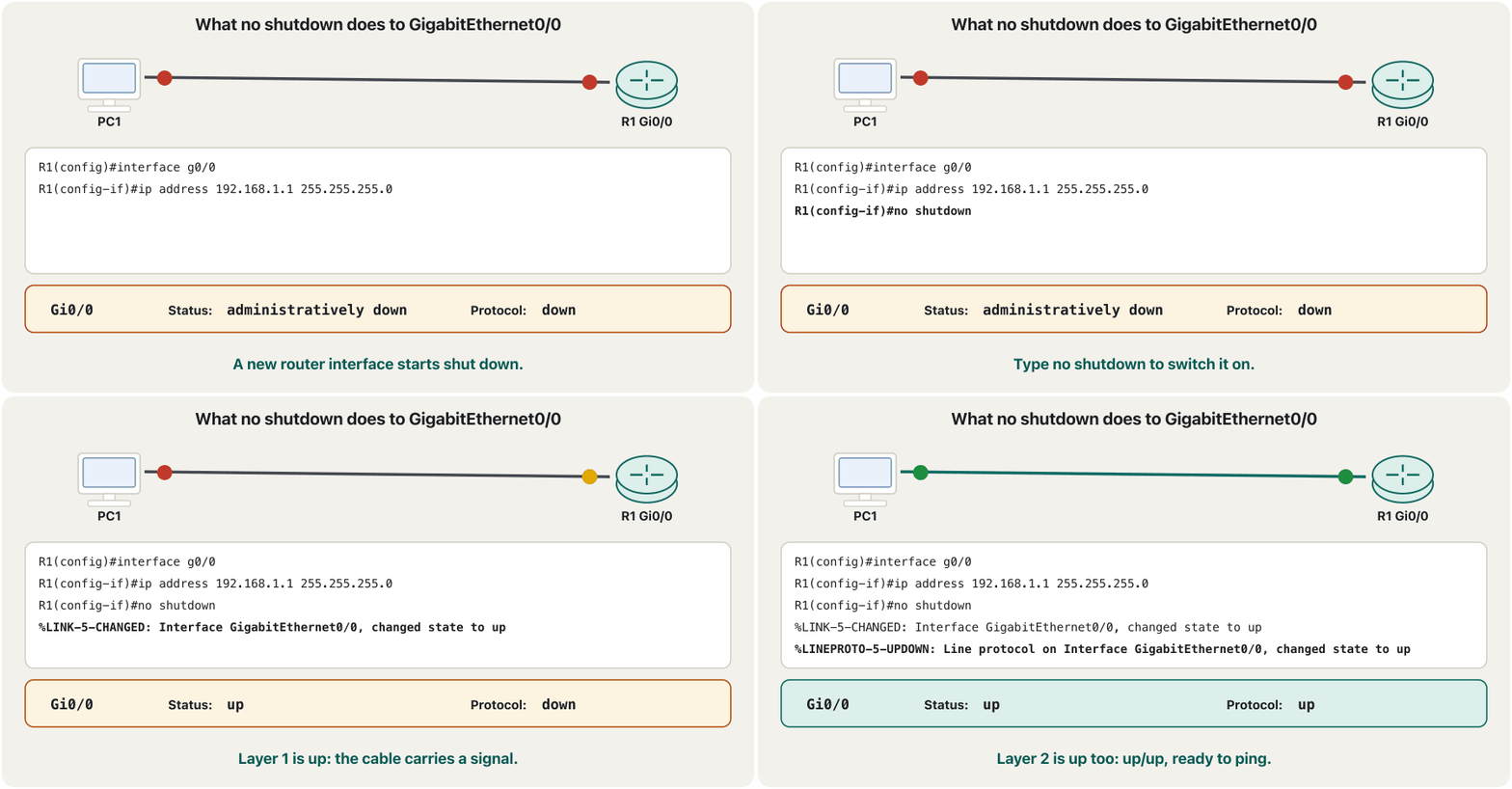
A Cisco router keeps every new interface administratively down — switched off on purpose, so nothing joins a network by accident. no shutdown (short: no shut) switches it on. A switch is the opposite: its ports start enabled.
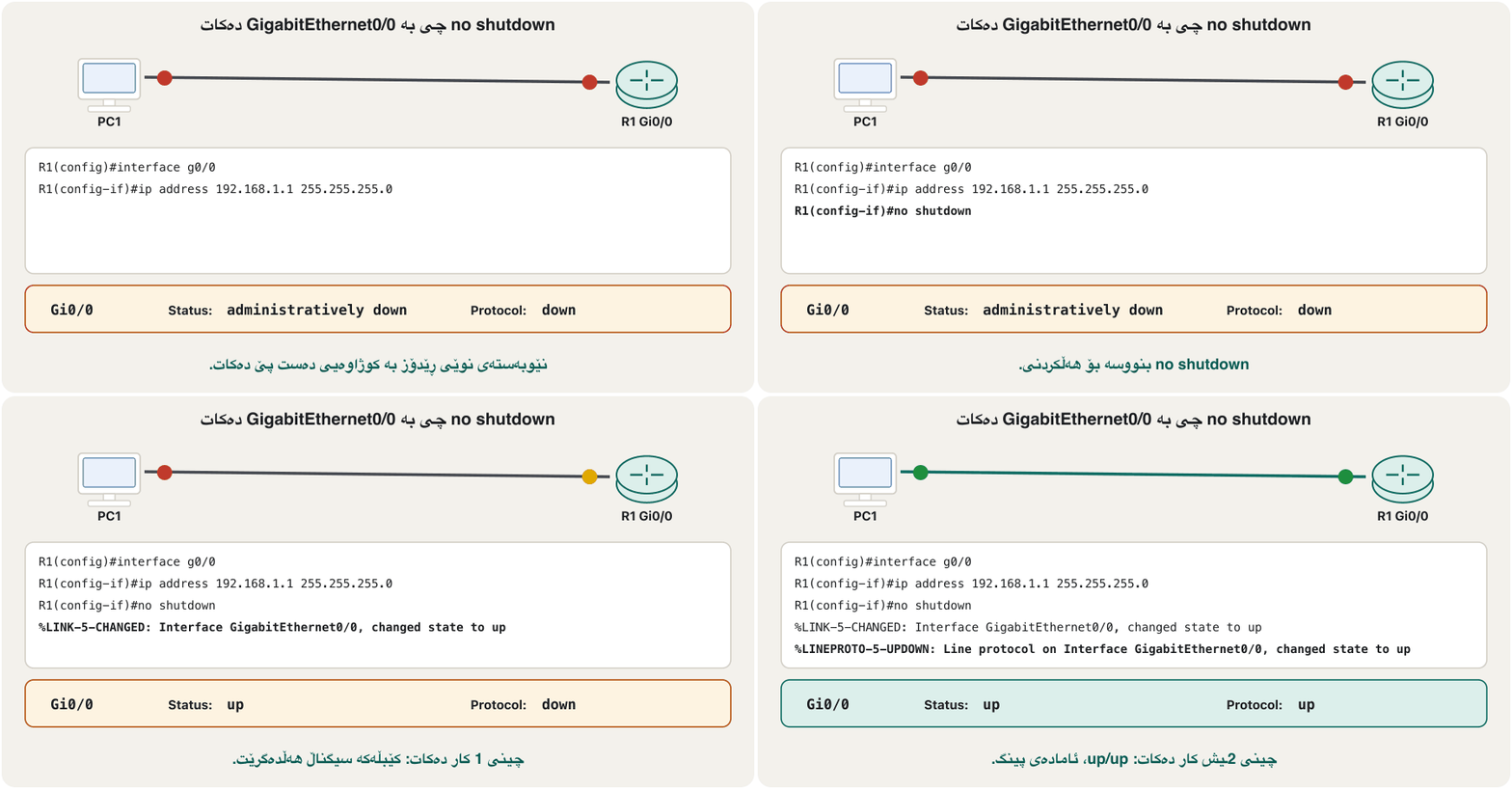
Cisco هەموو نوێ بە administratively down دەهێڵێتەوە — بە مەبەست کوژاوەتەوە، بۆ ئەوەی هیچ شتێک بە هەڵە نەچێتە ناو . no shutdown (کورت: no shut) هەڵیدەکات. بە پێچەوانەوەیە: بە کارایی دەست پێ دەکەن.
R1(config-if)#no shutdown

R1(config-if)#
%LINK-5-CHANGED: Interface GigabitEthernet0/0, changed state to up

%LINEPROTO-5-UPDOWN: Line protocol on Interface GigabitEthernet0/0, changed state to up
Explain the codeڕوونکردنەوەی کۆدەکە
- Lineدێڕی 4
Layer 1: the interface hears a signal on the cable.
چینی 1: لەسەر کێبڵەکە دەبیستێت.
- Lineدێڕی 6
Layer 2: the line protocol is up too — the interface is ready for packets.
چینی 2: هێڵیش کارایە — ئامادەی .
The PC side: address, mask, gatewayلای PC: ناونیشان، ماسکی ژێرڕایەڵە، دەروازەی بنەڕەتی
Click PC1, open Desktop > IP Configuration and choose Static. Fill in three fields. The address must be different from the router’s but in the same network. The mask must be the same as the router’s. The default gateway is the router interface’s address — the door PC1 uses for every other network.
کرتە لەسەر PC1 بکە، Desktop > IP Configuration بکەرەوە و Static هەڵبژێرە. سێ خانە پڕ بکەرەوە. ناونیشانەکە دەبێت جیاواز بێت لە هی بەڵام لە هەمان . دەبێت وەک هی بێت. ناونیشانی — ئەو دەرگایەی PC1 بۆ هەموو تر بەکاری دەهێنێت.
Why does the mask matter? PC1 uses it to decide whether a destination is local (same network or not). With a wrong mask the PC may believe the router is “far away” and never reach it.
بۆچی گرنگە؟ PC1 بەکاری دەهێنێت بۆ ئەوەی بڕیار بدات ئایا مەبەستێک ناوخۆییە (هەمان ڕایەڵە یان نا). بە هەڵە PCـەکە لەوانەیە وا بزانێت «دوورە» و هەرگیز پێی نەگات.
Test it with pingبە پینگ تاقی بکەرەوە
Open Desktop > Command Prompt on PC1 and ping the router interface. The first echo often times out: before PC1 can send it, ARP must learn the router’s MAC address (why the first ping fails). The next replies arrive at once.
لەسەر PC1 Desktop > Command Prompt بکەرەوە و بۆ بکە. یەکەم echo زۆرجار کاتی بەسەر دەچێت: پێش ئەوەی PC1 بینێرێت، دەبێت بزانێت (بۆچی یەکەم پینگ سەرناکەوێت). وەڵامەکانی دواتر دەستبەجێ دێن.
C:\>ping 192.168.1.1

Pinging 192.168.1.1 with 32 bytes of data:

Request timed out.
Reply from 192.168.1.1: bytes=32 time<1ms TTL=255
Reply from 192.168.1.1: bytes=32 time<1ms TTL=255
Reply from 192.168.1.1: bytes=32 time<1ms TTL=255

Ping statistics for 192.168.1.1:
    Packets: Sent = 4, Received = 3, Lost = 1 (25% loss),
Approximate round trip times in milli-seconds:
    Minimum = 0ms, Maximum = 0ms, Average = 0ms
You can also test from the router. IOS sends five echoes and draws one symbol each: ! = reply, . = timeout. .!!!! on the first try is the same ARP delay; other patterns, such as U or a row of dots, are read in Reading ping patterns.
دەتوانیت لە تاقی بکەیتەوە. IOS پێنج echo دەنێرێت و بۆ هەریەکەیان هێمایەک دەکێشێت: ! = وەڵام، . = کات بەسەرچوو. .!!!! لە یەکەم هەوڵدا هەمان دواکەوتنی ؛ شێوەکانی تر، وەک U یان ڕیزێک خاڵ، لە خوێندنەوەی شێوەکانی پینگدا دەخوێنرێنەوە.
R1#ping 192.168.1.2

Type escape sequence to abort.
Sending 5, 100-byte ICMP Echos to 192.168.1.2, timeout is 2 seconds:
.!!!!
Success rate is 80 percent (4/5), round-trip min/avg/max = 0/0/1 msName the router and save your workناو لە ڕێدۆزەکە بنێ و کارەکەت پاشەکەوت بکە
In global configuration, hostname R1 names the router; the prompt changes at once. Names keep several devices apart in your lab and in log messages. show running-config then prints the whole running configuration — host name, passwords, every interface, every line — so it is the best way to check your work.
لە ، hostname R1 ناو لە دەنێت؛ دەستبەجێ دەگۆڕێت. ناوەکان چەند ئامێرێک لە تاقیکردنەوەکەت و لە پەیامەکانی تۆماردا لە یەک جیا دەکەنەوە. پاشان show running-config هەموو چاپ دەکات — ، ، هەموو ، هەموو هێڵێک — بۆیە باشترین ڕێگەیە بۆ پشکنینی کارەکەت.
Router(config)#hostname R1
R1(config)#end
R1#copy running-config startup-config
Destination filename [startup-config]?
Building configuration...
[OK]
Explain the codeڕوونکردنەوەی کۆدەکە
- Lineدێڕی 3
Press Enter at the question. Without this line everything is lost when the router restarts (running vs startup configuration).
لە پرسیارەکەدا Enter دابگرە. بەبێ ئەم دێڕە هەموو شتێک لەدەست دەچێت کاتێک دەکوژێتەوە و هەڵدەکرێتەوە (ڕێکخستنی کارا و ڕێکخستنی دەستپێکردن).
no shutdown itself is never shown — only a missing shutdown line.، وەک IOS هەڵیان دەگرێت. no shutdown خۆی هەرگیز پیشان نادرێت — تەنیا نەبوونی دێڕی shutdown.CêITCheck every interface at onceهەموو نێوبەستەکان بە یەکجار بپشکنە
show ip interface brief (short: sh ip int br) is the command you will type most often. It prints one line per interface: name, IPv4 address, how the address was set, and two states — Status (layer 1: is there a signal?) and Protocol (layer 2: is the link working?).
show ip interface brief (کورت: sh ip int br) ئەو کە زۆرترین جار دەینووسیت. بۆ هەر دێڕێک چاپ دەکات: ناو، ناونیشانی IPv4، چۆن ناونیشانەکە دانراوە و دوو دۆخ — Status (چینی 1: هەیە؟) و Protocol (چینی 2: بەستەرەکە کار دەکات؟).
The long view: show interfacesوێنەی درێژ: show interfaces
When one interface needs a closer look, show interfaces g0/0 prints a full page about it. The first lines answer most questions: the two states in plain words, the hardware and its MAC address, your description, the IPv4 address with its prefix, and the bandwidth.
کاتێک پێویستی بە سەیرکردنی وردترە، show interfaces g0/0 پەڕەیەکی تەواو لەبارەی چاپ دەکات. یەکەم دێڕەکان وەڵامی زۆربەی پرسیارەکان دەدەنەوە: دوو دۆخەکە بە وشەی ساکار، و ، وەسفەکەت، ناونیشانی IPv4 لەگەڵ و .
R1#show interfaces g0/0
GigabitEthernet0/0 is up, line protocol is up
  Hardware is CN Gigabit Ethernet, address is 0001.6458.2501 (bia 0001.6458.2501)
  Description: LAN of the IT office
  Internet address is 192.168.1.1/24
  MTU 1500 bytes, BW 1000000 Kbit/sec, DLY 10 usec,
Explain the codeڕوونکردنەوەی کۆدەکە
- Lineدێڕی 2
“is up” = Status (layer 1); “line protocol is up” = Protocol (layer 2). A shut interface says “is administratively down”.
«is up» = Status (چینی 1)؛ «line protocol is up» = Protocol (چینی 2). کوژاوە دەڵێت «is administratively down».
- Lineدێڕی 3
The MAC address of the interface (yours will differ); bia = burned-in address.
(هی تۆ جیاواز دەبێت)؛ bia = ناونیشانی چاپکراو لە .
- Lineدێڕی 6
BW 1000000 Kbit/sec = 1 Gbit/s: the bandwidth in bits, again not bytes.
BW 1000000 Kbit/sec = 1 Gbit/s: بە ، دیسان نەک .
Many more lines follow: counters of packets in and out, errors, collisions. You will read them when you troubleshoot.
دێڕی زۆر زیاتر دێن: ژمێرەی هاتوو و ڕۆیشتوو، هەڵەکان، پێکدادانەکان. کاتی دەیانخوێنیتەوە.
Two routes appear by themselvesدوو ڕێگە خۆیان دەردەکەون
The moment an interface with an address is up/up, IOS writes two lines into the router’s routing table. C (connected) is the whole network of the interface: “to reach any address in 192.168.1.0/24, send out of Gi0/0”. L (local) is the interface’s own address as a /32 route: “192.168.1.1 is me”. Shut the interface and both disappear.
هەر کە خاوەن ناونیشان up/up بوو، IOS دوو دێڕ دەنووسێتە ناو . C () هەموو : «بۆ گەیشتن بە هەر ناونیشانێک لە 192.168.1.0/24، لە Gi0/0ـەوە بینێرە». L (ناوخۆیی) ناونیشانی خودی وەک ڕێگەی /32: «192.168.1.1 منم». بکوژێنەوە، هەردووکیان نامێنن.
R1#show ip route
Codes: L - local, C - connected, S - static, R - RIP, M - mobile, B - BGP

Gateway of last resort is not set

      192.168.1.0/24 is variably subnetted, 2 subnets, 2 masks
C        192.168.1.0/24 is directly connected, GigabitEthernet0/0
L 192.168.1.1/32 is directly connected, GigabitEthernet0/0How a router uses these lines to forward packets is in How packets are routed; every code and source of routes is in The routing table and route sources.
چۆن ئەم دێڕانە بۆ ناردنی بەکار دەهێنێت لە پاکێتەکان چۆن ڕێیان دەدۆزرێتەوەدایە؛ هەموو کۆد و سەرچاوەیەکی ڕێگەکان لە خشتەی ڕێدۆزی و سەرچاوەکانی ڕێگەدایە.
Adding serial WAN portsزیادکردنی دەرچەکانی زنجیرەیی ڕایەڵەی فراوان
A 1941 or 2901 has no serial ports out of the box. Labs that join two routers over a serial WAN link — like the static-routing labs later in this course — need a WAN interface card. In Packet Tracer the card is HWIC-2T (two serial ports) for ISR G2 routers; real ISR 4000 routers use the NIM-2T. Both cards have small Smart Serial connectors; older routers had a large DB-60 port (Serial ports on real routers).
1941 یان 2901 لە سەرەتادا هیچ زنجیرەیی نییە. ئەو تاقیکردنەوانەی دوو بە بەستەرێکی زنجیرەیی دەبەستنەوە — وەک تاقیکردنەوەکانی لە دواتری ئەم کۆرسەدا — پێویستیان بە کارتی هەیە. لە Packet Tracer کارتەکە HWIC-2Tـە (دوو زنجیرەیی) بۆ ISR G2؛ ڕاستەقینەی ISR 4000 NIM-2T بەکار دەهێنن. هەردوو کارتەکە بچووکی Smart Serialـیان هەیە؛ کۆنەکان گەورەی DB-60ـیان هەبوو (پۆرتە زنجیرەییەکان لەسەر ڕێدۆزە ڕاستەقینەکان).
The new serial interfaces are configured exactly like Gi0/0: interface s0/0/0, ip address …, no shutdown. A serial link has one extra rule — the end with the DCE cable gives the clock — which you will meet in static routes.
زنجیرەییە نوێیەکان ڕێک وەک Gi0/0 ڕێک دەخرێن: interface s0/0/0، ip address …، no shutdown. بەستەری زنجیرەیی یاسایەکی زیاتری هەیە — ئەو سەرەی کێبڵی پێوەیە کاتژمێرەکە دەدات — کە لە ڕێگە جێگیرەکاندا دەیبینیت.
IPv6 on the same interfaceIPv6 لەسەر هەمان نێوبەستە
An interface can carry IPv4 and IPv6 at the same time — dual stack. First let the router forward IPv6 with ipv6 unicast-routing (global). Then give the interface a global address with its prefix length, and, if you like, an easy-to-read link-local address. Address types are explained in IPv6 addresses.
دەتوانێت IPv4 و لە یەک کاتدا هەڵبگرێت — . سەرەتا بە ipv6 unicast-routing (گشتی) ڕێگە بدە بگوازێتەوە. پاشان ناونیشانێکی گشتی لەگەڵ بدە بە و ئەگەر بتەوێت ئاسان بۆ خوێندنەوە. جۆرەکانی ناونیشان لە ناونیشانەکانی IPv6دا ڕوون کراونەتەوە.
R1(config)#ipv6 unicast-routing
R1(config)#interface g0/0
R1(config-if)#ipv6 address 2001:db8:acad:1::1/64
R1(config-if)#ipv6 address fe80::1 link-local
R1(config-if)#end
R1#show ipv6 interface brief
GigabitEthernet0/0         [up/up]
    FE80::1
    2001:DB8:ACAD:1::1
GigabitEthernet0/1         [administratively down/down]
    unassigned
Explain the codeڕوونکردنەوەی کۆدەکە
- Lineدێڕی 3
IPv6 takes the prefix length directly: /64, not a dotted mask. 2001:db8::/32 is the documentation range.
ڕاستەوخۆ وەردەگرێت:
/64، نەک ماسکی خاڵدار. 2001:db8::/32 بۆ بەڵگەنامە و نموونەکان تەرخان کراوە.- Lineدێڕی 4
Without this line IOS makes a link-local address from the MAC address; fe80::1 is easier to type as a gateway.
بەبێ ئەم دێڕە IOS لە دروست دەکات؛ fe80::1 وەک ئاسانترە بۆ نووسین.
- Lineدێڕی 7-9
One block per interface: the state, then its IPv6 addresses (link-local first).
بۆ هەر بلۆکێک: دۆخەکە، پاشان ناونیشانەکانی (سەرەتا link-local).
Common mistakesهەڵە باوەکان
Exercisesڕاهێنانەکان
Build PC1 — R1 in Packet Tracer. Name the router R1, give Gi0/0 the address 192.168.1.1/24 with a description, switch it on, configure PC1 as 192.168.1.2/24 with the right gateway, ping in both directions and save. Write every command with its prompt.
PC1 — R1 لە Packet Tracer دروست بکە. ناوی بکە R1، ناونیشانی 192.168.1.1/24 لەگەڵ وەسفێک بدە بە Gi0/0، هەڵیبکە، PC1 وەک 192.168.1.2/24 لەگەڵ دروست ڕێک بخە، بە هەردوو ئاڕاستە بکە و پاشەکەوتی بکە. هەموو لەگەڵ بنووسە.
Hintئاماژە
Climb the prompts: > then # then (config)# then (config-if)#.
بە پەیژەی سەربکەوە: > پاشان # پاشان (config)# پاشان (config-if)#.
Show answerوەڵامەکە پیشان بدە
Router>enable
Router#configure terminal
Router(config)#hostname R1
R1(config)#interface g0/0
R1(config-if)#description LAN of the IT office
R1(config-if)#ip address 192.168.1.1 255.255.255.0
R1(config-if)#no shutdown
R1(config-if)#end
R1#copy running-config startup-config
PC1: Desktop > IP Configuration > Static: 192.168.1.2, 255.255.255.0, gateway 192.168.1.1. Test: ping 192.168.1.1 on PC1 (the first echo may time out) and ping 192.168.1.2 on R1. Check with show ip interface brief (Gi0/0 up/up).
PC1: Desktop > IP Configuration > Static: 192.168.1.2، 255.255.255.0، 192.168.1.1. تاقیکردنەوە: ping 192.168.1.1 لەسەر PC1 (یەکەم echo لەوانەیە کاتی بەسەر بچێت) و ping 192.168.1.2 لەسەر R1. بە show ip interface brief بیپشکنە (Gi0/0 up/up).
For each line, say what is wrong and the command or action that fixes it: (a) GigabitEthernet0/0 192.168.1.1 YES manual administratively down down; (b) GigabitEthernet0/1 192.168.2.1 YES manual down down; (c) GigabitEthernet0/2 unassigned YES unset up up.
بۆ هەر دێڕێک بڵێ چی هەڵەیە و چ یان کارێک چاکی دەکات: (a) GigabitEthernet0/0 192.168.1.1 YES manual administratively down down؛ (b) GigabitEthernet0/1 192.168.2.1 YES manual down down؛ (c) GigabitEthernet0/2 unassigned YES unset up up.
Show answerوەڵامەکە پیشان بدە
- (a) It was never switched on:
interface g0/0,no shutdown. - (b) Switched on but no signal: check the cable, its type in Packet Tracer and the device at the other end.
- (c) The link works but the interface has no address:
ip address …insideinterface g0/2.
- (a) هەرگیز هەڵنەکراوە:
interface g0/0،no shutdown. - (b) هەڵکراوە بەڵام نییە: کێبڵەکە، جۆرەکەی لە Packet Tracer و ئامێری سەرەکەی تر بپشکنە.
- (c) بەستەرەکە کار دەکات بەڵام ناونیشانی نییە:
ip address …لە ناوinterface g0/2ـدا.
Add PC2 on R1’s Gi0/1 in the network 192.168.2.0/24. Give the router the first usable address. Which settings does PC2 need, and which two new lines appear in show ip route?
PC2 لەسەر Gi0/1ـی R1 لە 192.168.2.0/24 زیاد بکە. یەکەم ناونیشانی بەکارهاتوو بدە بە . PC2 چ ڕێکخستنێکی پێویستە و چ دوو دێڕی نوێ لە show ip routeـدا دەردەکەون؟
Show answerوەڵامەکە پیشان بدە
R1(config)#interface g0/1
R1(config-if)#ip address 192.168.2.1 255.255.255.0
R1(config-if)#no shutdown
R1(config-if)#end
R1#copy running-config startup-config
PC2: 192.168.2.2 (or any free host address), 255.255.255.0, gateway 192.168.2.1. New routes: C 192.168.2.0/24 is directly connected, GigabitEthernet0/1 and L 192.168.2.1/32 is directly connected, GigabitEthernet0/1. PC1 and PC2 can now ping each other through R1.
PC2: 192.168.2.2 (یان هەر ناونیشانێکی بەتاڵ)، 255.255.255.0، 192.168.2.1. ڕێگە نوێیەکان: C 192.168.2.0/24 is directly connected, GigabitEthernet0/1 و L 192.168.2.1/32 is directly connected, GigabitEthernet0/1. ئێستا PC1 و PC2 دەتوانن لە ڕێگەی R1ـەوە بۆ یەکتر بکەن.
Explain each name: GigabitEthernet0/1, Serial0/1/0 on a 1941, GigabitEthernet0/0/1 on an ISR4321. Which one is fastest, and in what unit?
هەر ناوێک ڕوون بکەرەوە: GigabitEthernet0/1، Serial0/1/0 لەسەر 1941، GigabitEthernet0/0/1 لەسەر ISR4321. کامیان خێراترە و بە چ یەکەیەک؟
Show answerوەڵامەکە پیشان بدە
GigabitEthernet0/1: built-in Gigabit Ethernet, slot 0, port 1.Serial0/1/0: serial card in card slot 1 (EHWIC 1), its first port.GigabitEthernet0/0/1: ISR 4000 naming, slot 0, subslot 0 (built-in ports), port 1.- The Gigabit ports: 1 Gbit/s — gigabits per second, not gigabytes.
GigabitEthernet0/1: Gigabit Ethernetـی ناوخۆیی، شوێنی 0، 1.Serial0/1/0: کارتی زنجیرەیی لە شوێنی کارتی 1 (EHWIC 1)، یەکەم .GigabitEthernet0/0/1: ناوی ISR 4000، شوێنی 0، ژێرشوێنی 0 ( ناوخۆییەکان)، 1.- گیگابیتەکان: 1 Gbit/s — گیگابیت لە چرکەیەکدا، نەک گیگابایت.
Add IPv6 to the first lab: R1 Gi0/0 = 2001:db8:acad:1::1/64 with link-local fe80::1; PC1 = 2001:db8:acad:1::2/64. Write the router commands and PC1’s IPv6 gateway.
بۆ تاقیکردنەوەی یەکەم زیاد بکە: R1 Gi0/0 = 2001:db8:acad:1::1/64 لەگەڵ fe80::1؛ PC1 = 2001:db8:acad:1::2/64. و PC1 بنووسە.
Show answerوەڵامەکە پیشان بدە
R1(config)#ipv6 unicast-routing
R1(config)#interface g0/0
R1(config-if)#ipv6 address 2001:db8:acad:1::1/64
R1(config-if)#ipv6 address fe80::1 link-local
R1(config-if)#end
R1#copy running-config startup-config
PC1’s IPv6 gateway: fe80::1 (the router’s link-local address).
PC1: fe80::1 ( ).
Summaryکورتە
- Router ports for networks are interfaces: GigabitEthernet0/0 (type + slot/port), Serial0/0/0 (slot/subslot/port); ISR 4000 adds a level (G0/0/0). “g” = GigabitEthernet, 1 Gbit/s.
interface g0/0→ip address 192.168.1.1 255.255.255.0→description …→no shutdown: router interfaces start administratively down.- The PC needs a unique address, the same mask and the router interface as default gateway.
- Test with
ping(the first echo may be lost to ARP); check withshow ip interface brief(up/up) andshow interfaces. - An up/up interface adds a C (connected network) and an L (local /32) route to the routing table.
- Serial ports come on cards (HWIC-2T, NIM-2T); IPv6 needs
ipv6 unicast-routingandipv6 address …/64. hostname, check withshow running-config, and always finish withcopy running-config startup-config.
- بۆ ن: GigabitEthernet0/0 (جۆر + شوێن/)، Serial0/0/0 (شوێن/ژێرشوێن/)؛ ISR 4000 ئاستێک زیاد دەکات (G0/0/0). «g» = GigabitEthernet، 1 Gbit/s.
interface g0/0←ip address 192.168.1.1 255.255.255.0←description …←no shutdown: بە administratively down دەست پێ دەکەن.- PC پێویستی بە ناونیشانێکی بێهاوتا، هەمان و وەک هەیە.
- بە
pingتاقی بکەرەوە (یەکەم echo لەوانەیە بەهۆی لەدەست بچێت)؛ بەshow ip interface brief(up/up) وshow interfacesبیپشکنە. - up/up ڕێگەیەکی C ( بەستراو) و L (ناوخۆیی
/32) زیاد دەکات بۆ . - زنجیرەییەکان لەسەر کارتن (HWIC-2T، NIM-2T)؛ پێویستی بە
ipv6 unicast-routingوipv6 address …/64هەیە. hostname، بەshow running-configبیپشکنە و هەمیشە بەcopy running-config startup-configکۆتایی پێ بهێنە.
Next: reach this router and a switch from your desk instead of the console — Managing devices remotely: from Telnet to SSH.
دواتر: لەبری کۆنسۆڵ، لە مێزەکەتەوە بگە بەم و بە — بەڕێوەبردنی ئامێرەکان لە دوورەوە: لە Telnetـەوە بۆ SSH.
Lesson complete!وانەکە تەواو بوو!
Well done. Review the key terms, then go on to the next lesson.دەستخۆش. سەیرێکی زاراوە سەرەکییەکان بکەرەوە، پاشان بڕۆ بۆ وانەی داهاتوو.
Key termsزاراوە سەرەکییەکان
Managing Devices Remotely: From Telnet to SSHبەڕێوەبردنی ئامێرەکان لە دوورەوە: لە Telnetـەوە بۆ SSH
Related lecturesوانە پەیوەندیدارەکان
- Show Commands, Running and Startup Configurationsفەرمانەکانی show، ڕێکخستنی کارا و ڕێکخستنی دەستپێکردن
- Securing a Cisco Device: Passwords, Users and Bannersپاراستنی ئامێرێکی Cisco: تێپەڕەوشەکان، بەکارهێنەران و بانەر
- Managing Devices Remotely: From Telnet to SSHبەڕێوەبردنی ئامێرەکان لە دوورەوە: لە Telnetـەوە بۆ SSH
- How a Packet Finds Its Way: Gateways and Routing Tablesپاکێت چۆن ڕێگای خۆی دەدۆزێتەوە: دەروازەی بنەڕەتی و خشتەکانی ڕێدۆزی
- Reading the Routing Table: Route Sources, Metrics and ADخوێندنەوەی خشتەی ڕێدۆزی: سەرچاوەکانی ڕێگە، پێوانە و مەودای بەڕێوەبەری
- Static Routesڕێگە جێگیرەکان
- IPv6 Addresses: Format and Typesناونیشانەکانی IPv6: شێوە و جۆرەکان
- Lab: Straight-Through, Crossover and Rollover Cablesتاقیگە: کێبڵی ڕاستەوخۆ، کێبڵی خاچی و کێبڵی rollover
- Packet Tracer: Your First NetworkPacket Tracer: یەکەم ڕایەڵەکەت
- ARP: From IP Address to MAC AddressARP: لە ناونیشانی IP بۆ ناونیشانی MAC
References and further readingسەرچاوەکان و خوێندنەوەی زیاتر
- Cisco Press: Introduction to Networks Companion Guide (CCNAv7) — chapter 10, Basic Router Configuration (table of contents)
- Cisco IOS command reference: show ip interface (brief) — columns Interface, IP-Address, OK?, Method, Status, Protocol
- Cisco IOS Interface and Hardware Component Command Reference: interface (type number; numbering per hardware guide)
- Cisco Packet Tracer (Cisco Networking Academy)
This lecture is a first edition. The Kurdish text and terminology are waiting for review by Kurdish IT teachers.ئەم وانەیە چاپی یەکەمە. دەقە کوردییەکە و زاراوەکانی چاوەڕێی پێداچوونەوەی مامۆستایانی کوردی بواری IT ن.