Chapterبەش 4 · Lectureوانە 4.8
Configuring OSPF: Wildcard Masks, Networks and Passive Interfacesڕێکخستنی OSPF: ماسکە پێچەوانەکان، ڕایەڵەکان و نێوبەستە ناچالاکەکان
Single-area OSPF on Cisco routers, step by step: wildcard masks (0 = must match, 1 = any; 255.255.255.255 minus the mask, checked with Python), router ospf and the local process ID, the router ID and clear ip ospf process, the network command and what it really does, the interface method ip ospf 1 area 0, the book’s three-router lab with its corrections, passive interfaces in two ways, the four show commands, the reference bandwidth, default-information originate and the common mistakes.
تاکناوچەیی لەسەر Cisco، هەنگاو بە هەنگاو: (0 = دەبێت بگونجێت، 1 = هەرچی؛ 255.255.255.255 لێدەرکردنی ، بە پشکنراو)، router ospf و ژمارەی ناوخۆیی، و clear ip ospf process، network و ئەوەی بەڕاستی دەیکات، ڕێگای ip ospf 1 area 0، تاقیکردنەوەی سێ کتێبەکە بە ڕاستکردنەوەکانییەوە، بە دوو ڕێگا، چوار show، پێوەر، default-information originate و هەڵە باوەکان.
What you will learnچی فێر دەبیت
- Turn a subnet mask into a wildcard mask and say which addresses a wildcard matches.
- Configure single-area OSPF with router ospf, router-id and network lines (or ip ospf area on the interface).
- Make LAN interfaces passive in two ways and explain what passive does and does not stop.
- Verify OSPF with show ip ospf neighbor, show ip route ospf, show ip protocols and show ip ospf interface brief.
- Use auto-cost reference-bandwidth and default-information originate, and fix the common configuration mistakes.
- بکەیتە و بڵێیت لەگەڵ کام ناونیشانانە دەگونجێت.
- تاکناوچەیی بە router ospf، router-id و دێڕەکانی network ڕێک بخەیت (یان ip ospf area لەسەر ).
- بە دوو ڕێگا ناچالاک بکەیت و ڕوون بکەیتەوە ناچالاککردن چی دەوەستێنێت و چی ناوەستێنێت.
- بە show ip ospf neighbor، show ip route ospf، show ip protocols و show ip ospf interface brief بپشکنیت.
- auto-cost reference-bandwidth و default-information originate بەکار بهێنیت و هەڵە باوەکانی چاک بکەیتەوە.
From concepts to commandsلە چەمکەوە بۆ فەرمانەکان
You already know what OSPF does: routers say hello, become neighbours, flood LSAs and each one runs SPF (OSPF concepts, neighbours, DR and BDR). This lesson turns that into commands. On a Cisco router OSPF is switched on in four short steps, then checked and saved. Two small tools come first, because the third step needs them: wildcard masks.
تۆ دەزانیت چی دەکات: سڵاو دەکەن، دەبنە دراوسێ، بڵاو دەکەنەوە و هەریەکەیان SPF کار پێ دەکات (چەمکەکانی OSPF، دراوسێکان، DR و BDR). ئەم وانەیە ئەوە دەکاتە . لەسەر Cisco بە چوار هەنگاوی کورت هەڵدەکرێت، پاشان دەپشکنرێت و پاشەکەوت دەکرێت. سەرەتا ئامرازێکی بچووک فێر دەبین، چونکە هەنگاوی سێیەم پێویستی پێیەتی: .
Wildcard masks: 0 must match, 1 means anyماسکە پێچەوانەکان: 0 دەبێت بگونجێت، 1 واتە هەرچی
A wildcard mask is 32 bits written like an address, for example 0.0.0.255. It does not describe a network the way a subnet mask does. It answers another question: which bits of an address must I check? A 0 bit means “this bit must match”; a 1 bit means “any value is fine — ignore this bit”. So a wildcard mask is usually the subnet mask turned inside out.
32 و وەک ناونیشانێک دەنووسرێت، بۆ نموونە 0.0.0.255. وەک ماسکی ژێرڕایەڵە وەسف ناکات؛ وەڵامی پرسیارێکی تر دەداتەوە: کام ناونیشانێک بپشکنم؟ 0 واتە «ئەم دەبێت وەک یەک بێت»؛ 1 واتە «هەر بەهایەک باشە — گوێی پێ مەدە». بۆیە زۆربەی جار بە پێچەوانەوە.
A 32-bit pattern used by OSPF, EIGRP and ACLs to say which address bits must match: 0 means must match, 1 means ignore. It is the subnet mask turned over: 255.255.255.255 minus the mask (0.0.0.255 for /24).
شێوەیەکی 32 بیتییە کە OSPF، EIGRP و بەکاری دەهێنن بۆ ئەوەی بڵێن کام بیتەکانی ناونیشان دەبێت وەک یەک بن: 0 واتە دەبێت وەک یەک بێت، 1 واتە گرنگ نییە. پێچەوانەی : 255.255.255.255 لابردنی ماسکەکە (0.0.0.255 بۆ /24).
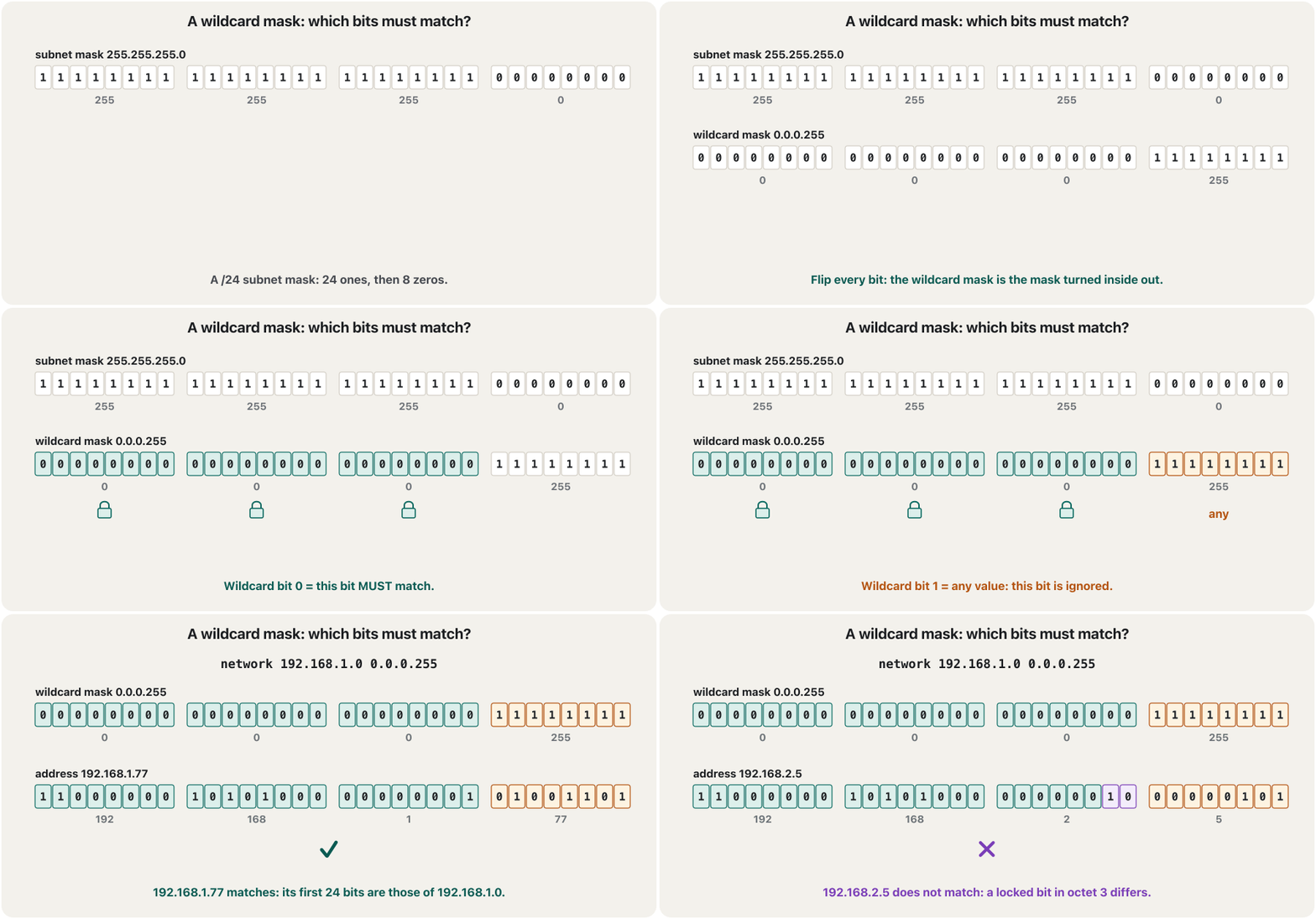
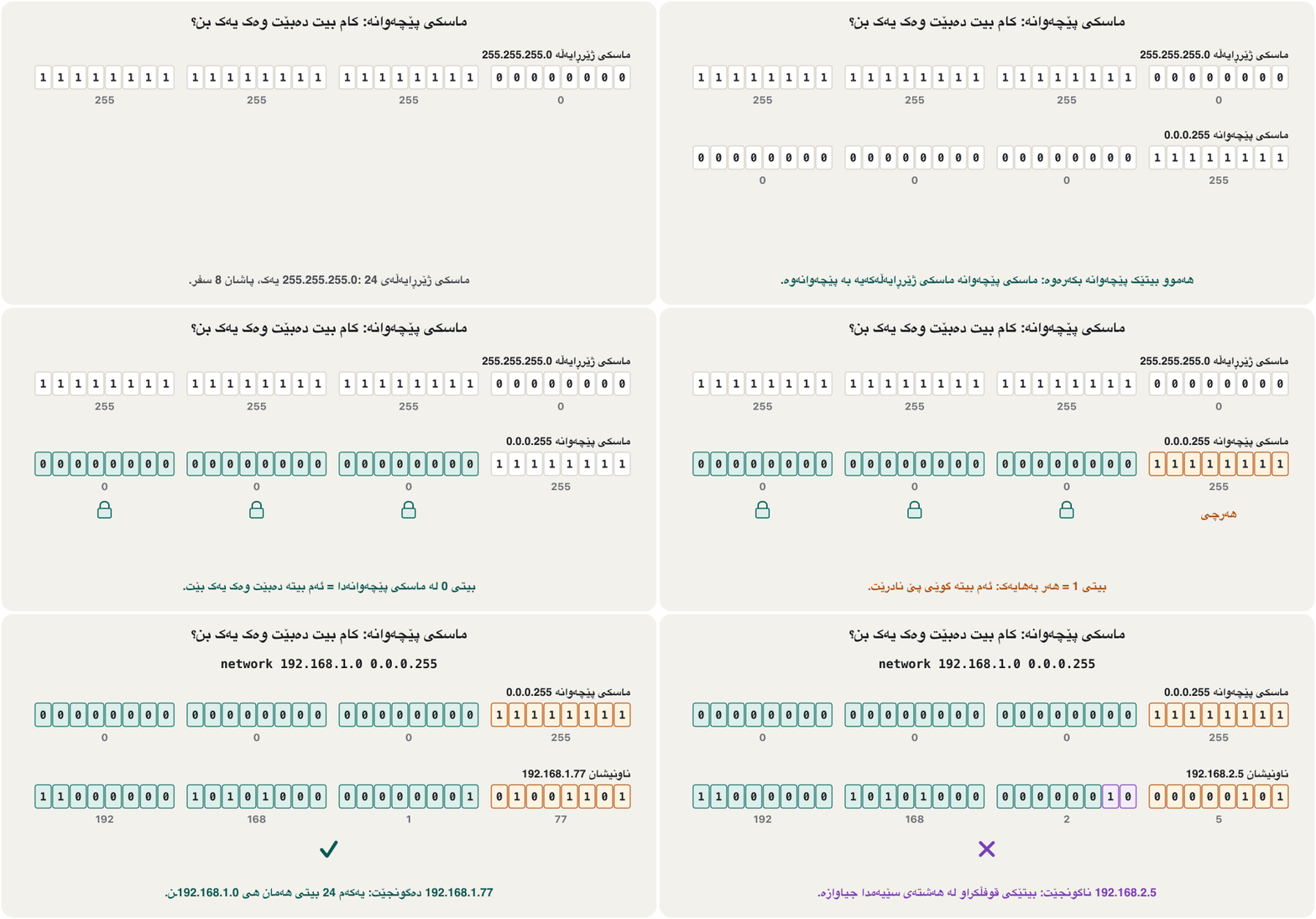
Wildcard masks: 0 must match, 1 means anyماسکە پێچەوانەکان: 0 دەبێت بگونجێت، 1 واتە هەرچی
The inverse-mask trick: 255 minus each octetفێڵی ماسکی پێچەوانە: 255 لێدەرکردنی هەر هەشتەیەک
You do not need binary every time. For a normal mask, subtract it from 255.255.255.255, octet by octet. Every octet of a mask is 0 or 255 or one of seven values in between, so the sums are short.
پێویست ناکات هەموو جارێک بەکار بهێنیت. بۆ ئاسایی، لە 255.255.255.255 دەری بکە، بە . هەموو 0 یان 255ـە یان یەکێکە لە حەوت بەهاکەی نێوانیان، بۆیە ژمێردنەکە کورتە.
Each wildcard octet = 255 − the mask octet: .
هەر = 255 − : .
Wildcard masks: 0 must match, 1 means anyماسکە پێچەوانەکان: 0 دەبێت بگونجێت، 1 واتە هەرچی
Five wildcards you will use every dayپێنج ماسکی پێچەوانە کە هەموو ڕۆژێک بەکاریان دەهێنیت
With whole octets the rule is easy to see: every 0 octet must match the address in the command, every 255 octet can be anything. Here the command’s address is 192.168.1.0.
لەگەڵ تەواو یاساکە ئاسان دەبینرێت: هەر 0 دەبێت لەگەڵ ناونیشانەکەی ناو بگونجێت، هەر 255 دەتوانێت هەرچییەک بێت. لێرەدا ناونیشانی 192.168.1.0ـە.
| Wildcard | Comparesبەراورد دەکات | Matchesدەگونجێت لەگەڵ |
|---|---|---|
0.0.0.0 | all 4 octets — exactly one addressهەر 4 — تەنیا یەک ناونیشان | 192.168.1.0 onlyتەنیا 192.168.1.0 |
0.0.0.255 | the first 3 octets; the last is ignored3 یەکەم؛ دوایین گوێی پێ نادرێت | 192.168.1.0 – 192.168.1.255 |
0.0.255.255 | the first 2 octets2 یەکەم | 192.168.0.0 – 192.168.255.255 |
0.255.255.255 | the first octet onlyتەنیا یەکەم | 192.0.0.0 – 192.255.255.255 |
255.255.255.255 | nothingهیچ | every addressهەموو ناونیشانێک |
Wildcard masks: 0 must match, 1 means anyماسکە پێچەوانەکان: 0 دەبێت بگونجێت، 1 واتە هەرچی
Any mask: /30, /27, /26 — checked with Pythonهەر ماسکی ژێرڕایەڵەیەک: /30، /27، /26 — بە Python پشکنراو
Wildcards are not only whole octets. A link between two routers is often a /30, so its wildcard is 0.0.0.3. You can check any answer with Python’s ipaddress module: its hostmask is the wildcard mask.
تەنیا تەواو نین. بەستەری نێوان دوو زۆرجار /30ـە، بۆیە 0.0.0.3ـە. دەتوانیت هەر وەڵامێک بە مۆدیوڵی ipaddressـی بپشکنیت: hostmaskـەکەی خودی .
import ipaddress

def wildcard(mask):
    """255 minus each octet of the subnet mask."""
    return ".".join(str(255 - int(octet)) for octet in mask.split("."))

for prefix in (8, 16, 24, 26, 27, 30):
    net = ipaddress.ip_network(f"0.0.0.0/{prefix}")
    mask = str(net.netmask)
print(f"/{prefix:<2} mask {mask:<15} wildcard {wildcard(mask):<13} check {net.hostmask}")/8 mask 255.0.0.0 wildcard 0.255.255.255 check 0.255.255.255 /16 mask 255.255.0.0 wildcard 0.0.255.255 check 0.0.255.255 /24 mask 255.255.255.0 wildcard 0.0.0.255 check 0.0.0.255 /26 mask 255.255.255.192 wildcard 0.0.0.63 check 0.0.0.63 /27 mask 255.255.255.224 wildcard 0.0.0.31 check 0.0.0.31 /30 mask 255.255.255.252 wildcard 0.0.0.3 check 0.0.0.3
Explain the codeڕوونکردنەوەی کۆدەکە
- Lineدێڕی 3-5
The inverse-mask trick as a function: 255 minus every octet.
فێڵی وەک : 255 لێدەرکردنی هەموو .
- Lineدێڕی 10
net.hostmaskis Python’s name for the wildcard mask; the last column checks the trick.net.hostmaskناوی بۆ ؛ ستوونی کۆتایی فێڵەکە دەپشکنێت.
Wildcard masks: 0 must match, 1 means anyماسکە پێچەوانەکان: 0 دەبێت بگونجێت، 1 واتە هەرچی
Which addresses does a wildcard catch?ماسکی پێچەوانە کام ناونیشانانە دەگرێت؟
Read a network line octet by octet. With 10.1.0.0 0.0.255.255, the first two octets are locked to 10 and 1; the last two are free. So every interface whose address starts with 10.1 is caught, and nothing else. Wildcards come back later in the course: EIGRP uses the same network lines, and access control lists use wildcards to choose which addresses a rule applies to.
دێڕێکی network بە بخوێنەوە. لەگەڵ 10.1.0.0 0.0.255.255، دوو یەکەم لەسەر 10 و 1 قوفڵ دراون؛ دوو کۆتایی ئازادن. بۆیە هەموو کە ناونیشانەکەی بە 10.1 دەست پێ بکات دەگیرێت و هیچی تر. دواتر لە کۆرسەکەدا دەگەڕێنەوە: EIGRP هەمان دێڕەکانی network بەکار دەهێنێت و ACLـەکان بەکار دەهێنن بۆ دیاریکردنی ئەوەی یاسایەک بۆ کام ناونیشانانەیە.
Step 1: start OSPF with router ospfهەنگاوی 1: OSPF بە router ospf دەست پێ بکە
router ospf 1 starts an OSPF process and moves you into router configuration mode. The number is the process ID (1–65535). It is only a local label: it lets one router run more than one OSPF process, and it is never sent to neighbours. So R1 can use ospf 1 and R2 ospf 7, and they still become neighbours. In labs, use the same number everywhere — it keeps labs tidy.
router ospf 1 دەست پێ دەکات و دەتبات بۆ باری ڕێکخستنی . ژمارەکە ژمارەی ـە (process ID، 1–65535). تەنیا ناونیشانێکی ناوخۆییە: ڕێگە دەدات زیاتر لە یەک کار پێ بکات و هەرگیز بۆ دراوسێکان نانێردرێت. بۆیە R1 دەتوانێت ospf 1 بەکار بهێنێت و R2 ospf 7 و هەر دەبنە دراوسێ. لە تاقیگەدا هەمان ژمارە لە هەموو شوێنێک بەکار بهێنە — تاقیکردنەوەکان ڕێکوپێک دەهێڵێتەوە.
Step 2: give the router an IDهەنگاوی 2: ناسێنەری ڕێدۆز دابنێ
Every OSPF router needs a 32-bit router ID (how OSPF chooses one). Set it yourself so it is easy to read: router-id 1.1.1.1 on R1, 2.2.2.2 on R2, and so on. It looks like an address but it is only a name. Type it before the network lines: an ID is chosen once, when the OSPF process starts. If OSPF is already running with another ID and has neighbours, IOS keeps the old one and tells you how to apply the new one:
هەموو پێویستی بە ی 32 هەیە (OSPF چۆن هەڵیدەبژێرێت). خۆت دایبنێ بۆ ئەوەی خوێندنەوەی ئاسان بێت: router-id 1.1.1.1 لەسەر R1، 2.2.2.2 لەسەر R2 و هتد. وەک ناونیشانێک دەردەکەوێت بەڵام تەنیا ناوێکە. پێش دێڕەکانی network بینووسە: کاتێک هەڵدەبژێردرێت کە دەست پێ دەکات. ئەگەر پێشتر بە تر و لەگەڵ دراوسێکانی کار بکات، IOS کۆنەکە دەهێڵێتەوە و پێت دەڵێت چۆن نوێیەکە جێبەجێ بکەیت:
R1(config)#router ospf 1
R1(config-router)#router-id 1.1.1.1
% OSPF: Reload or use "clear ip ospf process" command, for this to take effect
R1(config-router)#end
R1#clear ip ospf process
Reset ALL OSPF processes? [no]: yes
Explain the codeڕوونکردنەوەی کۆدەکە
- Lineدێڕی 3
Cisco’s command reference: on an OSPF process that is already active (it has neighbours), a new router ID waits for a reload or
clear ip ospf process. Typed first, before the network lines bring up any neighbour,router-idis used at once.بەپێی ڕێبەری Cisco: لەسەر کە پێشتر کارایە (دراوسێی هەیە)، نوێ چاوەڕێی دووپاتە هەڵکردنەوە یان
clear ip ospf processدەکات. ئەگەر سەرەتا بنووسرێت، پێش ئەوەی دێڕەکانی network هیچ دراوسێیەک دروست بکەن،router-idدەستبەجێ بەکار دێت.- Lineدێڕی 5-6
Resetting drops every OSPF neighbour for a moment; they come back with the new ID. Do it before the network is in use.
دەستپێکردنەوە بۆ ساتێک هەموو دراوسێیەکی دەپچڕێنێت؛ بە IDـە نوێیەکەوە دەگەڕێنەوە. پێش ئەوەی بەکار بهێنرێت ئەمە بکە.
Step 3: the network command — address, wildcard, areaهەنگاوی 3: فەرمانی network — ناونیشان، ماسکی پێچەوانە، ناوچە
The rule is network <address> <wildcard-mask> area <area-id>. Many students read it as “advertise this network”, but it does three things. It looks for every interface whose address matches the address and wildcard. It switches OSPF on for those interfaces, so they send hellos and can make neighbours. And it advertises each of those interfaces’ networks, with the interface’s own mask. The wildcard only chooses interfaces; neighbours never see it.
یاساکە network <address> <wildcard-mask> area <area-id>ـە. زۆر قوتابی وەک «ئەم ڕابگەیەنە» دەیخوێننەوە، بەڵام سێ کار دەکات. بەدوای هەموو ئەو دەگەڕێت کە ناونیشانیان لەگەڵ ناونیشان و دەگونجێت. لەسەر ئەو هەڵدەکات، بۆ ئەوەی بنێرن و بتوانن دراوسێ دروست بکەن. و هەر یەک لەو ڕادەگەیەنێت، بە خودی . تەنیا هەڵدەبژێرێت؛ دراوسێکان هەرگیز نایبینن.
Step 3: the network command — address, wildcard, areaهەنگاوی 3: فەرمانی network — ناونیشان، ماسکی پێچەوانە، ناوچە
Exact, wide or everything: choosing the wildcardورد، فراوان یان هەموو: هەڵبژاردنی ماسکی پێچەوانە
The same router can be configured in several correct ways. Choose the wildcard by how precise you want to be:
هەمان دەکرێت بە چەند ڕێگایەکی دروست ڕێک بخرێت. بەپێی ئەوە هەڵبژێرە کە دەتەوێت چەند ورد بیت:
| Line on R1دێڕ لەسەر R1 | Which interfaces run OSPFکام کار پێ دەکات | Use it whenکەی بەکاری بهێنە |
|---|---|---|
network 192.168.1.1 0.0.0.0 area 0 | exactly the interface 192.168.1.1تەنیا 192.168.1.1 | you want full control, one line per interfaceدەتەوێت کۆنترۆڵی تەواوت هەبێت، بۆ هەر یەک دێڕ |
network 192.168.1.0 0.0.0.255 area 0 | every interface in 192.168.1.0/24هەموو لە 192.168.1.0/24ـدا | the usual lab style: one line per networkشێوازی ئاسایی تاقیکردنەوە: بۆ هەر یەک دێڕ |
network 192.168.0.0 0.0.255.255 area 0 | every interface that starts 192.168 — all of R1’sهەموو کە بە 192.168 دەست پێ دەکات — هەموو هی R1 | many networks share a blockزۆر بلۆکێک هاوبەش دەکەن |
network 0.0.0.0 255.255.255.255 area 0 | every interface with an IPv4 addressهەموو کە ناونیشانی هەبێت | rarely: it also catches links you did not mean, such as an Internet linkبە دەگمەن: ئەو بەستەرانەش دەگرێت کە مەبەستت نەبوون، وەک بەستەری |
Another way: ip ospf 1 area 0 on the interfaceڕێگایەکی تر: ip ospf 1 area 0 لەسەر نێوبەستەکە
Since IOS 12.3(11)T and 12.4 — so on every IOS 15 and IOS XE router — you can also switch OSPF on inside the interface itself: ip ospf <process-id> area <area-id>. There is no address and no wildcard to get wrong, and show running-config shows the area right under the interface. If an interface is covered by both methods, the interface command wins. Older Packet Tracer router models may not know the command; if one answers % Invalid input detected at '^' marker., use the network method there.
لە IOS 12.3(11)T و 12.4ـەوە — واتە لەسەر هەموو IOS 15 و IOS XE — دەتوانیت لە ناو خودی هەڵبکەیت: ip ospf <process-id> area <area-id>. هیچ ناونیشان و نییە کە هەڵە بنووسرێت و show running-config ڕاستەوخۆ لە ژێر پیشان دەدات. ئەگەر بە هەردوو ڕێگاکە گیرابێت، دەباتەوە. لەوانەیە مۆدێلە کۆنەکانی لە Packet Tracerـدا ئەم نەناسن؛ ئەگەر یەکێکیان وەڵامی % Invalid input detected at '^' marker.ـی دایەوە، لەوێ ڕێگای network بەکار بهێنە.
R1(config)#interface fastEthernet 0/0
R1(config-if)#ip ospf 1 area 0
R1(config-if)#interface fastEthernet 0/1
R1(config-if)#ip ospf 1 area 0
R1(config-if)#end
Explain the codeڕوونکردنەوەی کۆدەکە
- Lineدێڕی 3
From interface mode you can jump straight to the next interface.
لە باری دەتوانیت ڕاستەوخۆ بچیت بۆ دواتر.
Lab: three routers in one areaتاقیکردنەوە: سێ ڕێدۆز لە یەک ناوچەدا
Build this in Packet Tracer: three 2811 routers in a row, a 2960 switch and a PC at each end. Each LAN and each router-to-router link is its own /24 network. Give the PCs .2 and their router’s .1 as default gateway. Before OSPF, each router knows only its two connected networks, so PC0 cannot reach PC1. After OSPF, every router learns all four networks by itself.
ئەمە لە Packet Tracerـدا دروست بکە: سێ 2811 بە ڕیز، 2960 و PCـێک لە هەر سەرێک. هەر و هەر بەستەرێکی نێوان دوو /24ـی خۆیەتی. ناونیشانی .2 بدە بە PCـەکان و .1ـی وەک . پێش ، هەر تەنیا دوو بەستراوەکەی خۆی دەناسێت، بۆیە PC0 ناگاتە PC1. دوای ، هەموو هەر چوار بە خۆی فێر دەبێت.
Lab: three routers in one areaتاقیکردنەوە: سێ ڕێدۆز لە یەک ناوچەدا
R1: addresses, OSPF, a passive LAN port, saveR1: ناونیشان، OSPF، نێوبەستەیەکی ڕایەڵەی ناوچەیی ناچالاک، پاشەکەوت
Configure R1 first. The interface part is the same as in basic router configuration. The OSPF part is the four steps: process, ID, one network line per connected network (with a wildcard), and a passive LAN port. IOS also prints %LINK messages after each no shutdown; they are left out here.
سەرەتا R1 ڕێک بخە. بەشی وەک ڕێکخستنی سەرەتایی ڕێدۆزـە. بەشی چوار هەنگاوەکەیە: ، ، بۆ هەر بەستراو یەک دێڕی network (بە ) و ناچالاک. IOS دوای هەر no shutdownـێک پەیامەکانی %LINK چاپ دەکات؛ لێرەدا لابراون.
Router>en
Router#conf t
Enter configuration commands, one per line.  End with CNTL/Z.
Router(config)#hostname R1
R1(config)#interface fastEthernet 0/0
R1(config-if)#ip address 192.168.1.1 255.255.255.0
R1(config-if)#no shutdown
R1(config-if)#exit
R1(config)#interface fastEthernet 0/1
R1(config-if)#ip address 192.168.3.1 255.255.255.0
R1(config-if)#no shutdown
R1(config-if)#exit
R1(config)#router ospf 1
R1(config-router)#router-id 1.1.1.1
R1(config-router)#network 192.168.1.0 0.0.0.255 area 0
R1(config-router)#network 192.168.3.0 0.0.0.255 area 0
R1(config-router)#passive-interface fastEthernet 0/1
R1(config-router)#end
R1#copy running-config startup-config
Destination filename [startup-config]?
Building configuration...
[OK]
Explain the codeڕوونکردنەوەی کۆدەکە
- Lineدێڕی 1-2
enandconf tare the usual abbreviations of enable and configure terminal.enوconf tکورتکراوە باوەکانی enable و configure terminalـن.- Lineدێڕی 5-8
The book entered
interface fastEthernet 0/0twice (once for the address, once forno shutdown). One visit is enough.لە کتێبەکەدا
interface fastEthernet 0/0دوو جار نووسراوە (جارێک بۆ ناونیشان، جارێک بۆno shutdown). یەک جار بەسە.- Lineدێڕی 15-16
Wildcard 0.0.0.255 — not the subnet mask 255.255.255.0.
0.0.0.255 — نەک 255.255.255.0.
- Lineدێڕی 17
Fa0/1 faces only PC0: no hellos there, but 192.168.3.0/24 is still advertised.
Fa0/1 تەنیا بەرەو PC0ـە: لەوێ نانێردرێت، بەڵام 192.168.3.0/24 هەر ڕادەگەیەنرێت.
- Lineدێڕی 19-22
Save, or the lab is gone after the next restart.
پاشەکەوتی بکە، ئەگەر نا تاقیکردنەوەکە لە دووپاتە هەڵکردنەوەی داهاتوودا نامێنێت.
Lab: three routers in one areaتاقیکردنەوە: سێ ڕێدۆز لە یەک ناوچەدا
R2 and R3: the neighbours come upR2 و R3: دراوسێکان دەردەکەون
R2 sits in the middle and has no LAN, so it needs no passive interface. As soon as its network line for 192.168.1.0 is in, R2 and R1 exchange hellos and databases, and IOS prints an %OSPF-5-ADJCHG message when they reach FULL (the states up to FULL). R3 is the mirror image of R1.
R2 لە ناوەڕاستدایە و نییە، بۆیە پێویستی بە نییە. هەر کە دێڕی networkـی بۆ 192.168.1.0 نووسرا، R2 و R1 و ئاڵوگۆڕ دەکەن و IOS کاتێک دەگەنە FULL پەیامی %OSPF-5-ADJCHG چاپ دەکات (دۆخەکان تا FULL). R3 وێنەی ئاوێنەیی R1ـە.
Router>en
Router#conf t
Enter configuration commands, one per line.  End with CNTL/Z.
Router(config)#hostname R2
R2(config)#interface fastEthernet 0/0
R2(config-if)#ip address 192.168.1.2 255.255.255.0
R2(config-if)#no shutdown
R2(config-if)#exit
R2(config)#interface fastEthernet 0/1
R2(config-if)#ip address 192.168.2.1 255.255.255.0
R2(config-if)#no shutdown
R2(config-if)#exit
R2(config)#router ospf 1
R2(config-router)#router-id 2.2.2.2
R2(config-router)#network 192.168.1.0 0.0.0.255 area 0
R2(config-router)#network 192.168.2.0 0.0.0.255 area 0
R2(config-router)#
%OSPF-5-ADJCHG: Process 1, Nbr 1.1.1.1 on FastEthernet0/0 from LOADING to FULL, Loading Done
R2(config-router)#end
R2#copy running-config startup-config
Destination filename [startup-config]?
Building configuration...
[OK]
Explain the codeڕوونکردنەوەی کۆدەکە
- Lineدێڕی 13
The book has an extra line
router osbefore this one: an unfinished command that IOS rejects. Leave it out.لە کتێبەکەدا پێش ئەم دێڕە دێڕێکی زیادەی
router osهەیە: تەواونەکراوە کە IOS ڕەتی دەکاتەوە. بینووسە مەنووسە.- Lineدێڕی 18
R2 and R1 (router ID 1.1.1.1) are now full neighbours on Fa0/0.
R2 و R1 ( 1.1.1.1) ئێستا لەسەر Fa0/0 دراوسێی تەواون.
Router>en
Router#conf t
Enter configuration commands, one per line.  End with CNTL/Z.
Router(config)#hostname R3
R3(config)#interface fastEthernet 0/0
R3(config-if)#ip address 192.168.2.2 255.255.255.0
R3(config-if)#no shutdown
R3(config-if)#exit
R3(config)#interface fastEthernet 0/1
R3(config-if)#ip address 192.168.4.1 255.255.255.0
R3(config-if)#no shutdown
R3(config-if)#exit
R3(config)#router ospf 1
R3(config-router)#router-id 3.3.3.3
R3(config-router)#network 192.168.2.0 0.0.0.255 area 0
R3(config-router)#network 192.168.4.0 0.0.0.255 area 0
R3(config-router)#passive-interface fastEthernet 0/1
R3(config-router)#
%OSPF-5-ADJCHG: Process 1, Nbr 2.2.2.2 on FastEthernet0/0 from LOADING to FULL, Loading Done
R3(config-router)#end
R3#copy running-config startup-config
Destination filename [startup-config]?
Building configuration...
[OK]
Explain the codeڕوونکردنەوەی کۆدەکە
- Lineدێڕی 11-12
In the book this
exitline shows the promptRouter(config)#; afterno shutdownyou are still in(config-if)#.لە کتێبەکەدا ئەم دێڕی
exitـەRouter(config)#ـی پیشان داوە؛ دوایno shutdownهێشتا لە(config-if)#ـدایت.- Lineدێڕی 17
R3’s LAN port, like R1’s, is passive.
R3، وەک هی R1، ناچالاکە.
Passive interfaces: no hellos towards the PCsنێوبەستە ناچالاکەکان: هیچ پاکێتی سڵاوێک بەرەو PCـەکان نییە
passive-interface <type> <number> stops OSPF hellos on that interface without removing OSPF: the interface’s network is still advertised, but no neighbour can form there. Use it on every interface that faces only end devices. PCs never answer hellos, so sending them every 10 seconds only wastes bandwidth — and a stranger’s router plugged into that LAN could otherwise join your routing. RIP has the same command, but there a passive interface still listens to updates; in OSPF and EIGRP it forms no neighbour at all (passive-interface in every protocol).
passive-interface <type> <number> لەسەر ئەو دەوەستێنێت بەبێ لابردنی : هەر ڕادەگەیەنرێت، بەڵام هیچ دراوسێیەک لەوێ دروست نابێت. لەسەر هەموو ئەو بەکاری بهێنە کە تەنیا بەرەو ئامێرە کۆتاییەکانن. PCـەکان هەرگیز وەڵامی نادەنەوە، بۆیە ناردنیان هەر 10 چرکە جارێک تەنیا بەفیڕۆ دەدات — و ئەگەر نا کەسێکی نەناسراو کە بەو ببەسترێت دەتوانێت بچێتە ناو تۆوە. هەمان هەیە، بەڵام لەوێ هێشتا گوێ لە نوێکردنەوەکان دەگرێت؛ لە و هیچ دراوسێیەک دروست ناکات (passive-interface لە هەموو پرۆتۆکۆڵێکدا).
R1(config)#router ospf 1
R1(config-router)#passive-interface fastEthernet 0/1
R1(config-router)#no passive-interface fastEthernet 0/1
Explain the codeڕوونکردنەوەی کۆدەکە
- Lineدێڕی 2
Correct spelling:
fastEthernet 0/1(orfa0/1).fasEthernetis not a keyword: IOS answers% Invalid input detected at '^' marker.ڕێنووسی دروست:
fastEthernet 0/1(یانfa0/1).fasEthernetنییە: IOS وەڵام دەداتەوە% Invalid input detected at '^' marker.- Lineدێڕی 3
no+ the same command makes it active again. The hyphen is part of the command:no passive-interface, notno passive interface.no+ هەمان دووپاتە چالاکی دەکاتەوە. هێڵە بچووکەکە بەشێکە لە :no passive-interface، نەکno passive interface.
Passive interfaces: no hellos towards the PCsنێوبەستە ناچالاکەکان: هیچ پاکێتی سڵاوێک بەرەو PCـەکان نییە
Option 2: passive-interface defaultڕێگای 2: passive-interface default
On a router with many LAN interfaces, it is quicker and safer to make every interface passive and then open only the links that lead to other routers. A new interface added later is then passive automatically.
لەسەر کە زۆر هەیە، خێراتر و سەلامەتترە کە هەموو ناچالاک بکەیت و پاشان تەنیا ئەو بەستەرانە بکەیتەوە کە بەرەو تر دەچن. ئەو کات نوێ کە دواتر زیاد بکرێت خۆکارانە ناچالاک دەبێت.
R2(config)#router ospf 1
R2(config-router)#passive-interface default
R2(config-router)#no passive-interface fastEthernet 0/0
R2(config-router)#no passive-interface fastEthernet 0/1
Explain the codeڕوونکردنەوەی کۆدەکە
- Lineدێڕی 2
Typed on a running router, this drops R2’s neighbours at once — they return after the next two lines.
ئەگەر لەسەر بنووسرێت کە کار دەکات، دەستبەجێ دراوسێکانی R2 دەپچڕێنێت — دوای دوو دێڕەکەی دواتر دەگەڕێنەوە.
Checking OSPF: four show commandsپشکنینی OSPF: چوار فەرمانی show
Configuration is only half the job. Four show commands, typed in privileged EXEC mode, answer the four questions you will ask in every OSPF lab. Start with the neighbours: if they are missing, nothing else can work.
تەنیا نیوەی کارەکەیە. چوار show، کە لە دەنووسرێن، وەڵامی ئەو چوار پرسیارە دەدەنەوە کە لە هەموو تاقیکردنەوەیەکی دەیانپرسیت. لە دراوسێکانەوە دەست پێ بکە: ئەگەر نەبن، هیچ شتێکی تر کار ناکات.
Checking OSPF: four show commandsپشکنینی OSPF: چوار فەرمانی show
show ip ospf neighbor: are my neighbours FULL?show ip ospf neighbor: دراوسێکانم FULLـن؟
On R2, in the middle, you should see both neighbours. Each line gives the neighbour’s router ID, its priority, the state and its role on that link, the dead timer counting down from 40 seconds, its address and your interface towards it. FULL is the goal; FULL/DR and FULL/BDR say which router is the DR and BDR of that Ethernet link.
لەسەر R2، کە لە ناوەڕاستدایە، دەبێت هەردوو دراوسێ ببینیت. هەر دێڕێک دراوسێکە، پێشینەییەکەی، دۆخ و ڕۆڵەکەی لەسەر ئەو بەستەرە، dead کە لە 40 چرکەوە بەرەو خوار دەژمێرێت، ناونیشانەکەی و تۆ بەرەو ئەو دەدات. FULL ئامانجەکەیە؛ FULL/DR و FULL/BDR دەڵێن کام DR و BDRـی ئەو بەستەرە .
R2#show ip ospf neighbor

Neighbor ID     Pri   State           Dead Time   Address         Interface
1.1.1.1           1   FULL/BDR        00:00:33    192.168.1.1     FastEthernet0/0
3.3.3.3           1   FULL/DR         00:00:37    192.168.2.2     FastEthernet0/1
Explain the codeڕوونکردنەوەی کۆدەکە
- Lineدێڕی 4-5
Which router becomes DR depends on which started first (there is no pre-emption), so DR and BDR may be swapped in your lab.
ئەوەی کام دەبێتە DR پەیوەستە بەوەی کامیان یەکەم جار دەستی پێ کردووە (شوێنگرتنەوە نییە)، بۆیە لەوانەیە DR و BDR لە تاقیکردنەوەکەی تۆدا پێچەوانە بن.
Checking OSPF: four show commandsپشکنینی OSPF: چوار فەرمانی show
show ip route ospf: the routes OSPF broughtshow ip route ospf: ئەو ڕێگایانەی OSPF هێنانی
Lines with code O were learned by OSPF. In [110/3], 110 is OSPF’s administrative distance and 3 is the cost: here every FastEthernet interface costs 1, and the path to 192.168.4.0 leaves three of them (R1, R2 and R3’s LAN port). Then test from PC0: TTL=125 shows the replies crossed three routers.
ئەو دێڕانەی کۆدی Oیان هەیە لە فێر بوون. لە [110/3]ـدا، 110 مەودای بەڕێوەبەریی و 3 ـە: لێرەدا هەر FastEthernet تێچووی 1ـە و ڕێگای 192.168.4.0 لە سێیان دەردەچێت (R1، R2 و R3). پاشان لە PC0ـەوە تاقی بکەرەوە: TTL=125 پیشان دەدات کە وەڵامەکان بە سێ تێپەڕیون.
R1#show ip route ospf
Codes: L - local, C - connected, S - static, R - RIP, M - mobile, B - BGP
       D - EIGRP, EX - EIGRP external, O - OSPF, IA - OSPF inter area

Gateway of last resort is not set

O     192.168.2.0/24 [110/2] via 192.168.1.2, 00:03:12, FastEthernet0/0
O 192.168.4.0/24 [110/3] via 192.168.1.2, 00:02:40, FastEthernet0/0C:\>ping 192.168.4.2
Pinging 192.168.4.2 with 32 bytes of data:
Request timed out.
Reply from 192.168.4.2: bytes=32 time=1ms TTL=125
Reply from 192.168.4.2: bytes=32 time=1ms TTL=125
Reply from 192.168.4.2: bytes=32 time=1ms TTL=125
Ping statistics for 192.168.4.2:
Packets: Sent = 4, Received = 3, Lost = 1 (25% loss),Explain the codeڕوونکردنەوەی کۆدەکە
- Lineدێڕی 5
The first echo may be lost while ARP finds the MAC addresses on each link.
یەکەم echo لەوانەیە لەدەست بچێت تا لەسەر هەر بەستەرێک دەدۆزێتەوە.
Checking OSPF: four show commandsپشکنینی OSPF: چوار فەرمانی show
show ip protocols and show ip ospf interface briefshow ip protocols و show ip ospf interface brief
show ip protocols shows the configuration as OSPF understood it: the router ID, the network lines (with their wildcards), the passive interfaces and the neighbours that sent routes. show ip ospf interface brief lists each OSPF interface with its area, cost, role and neighbour count — the quickest way to spot an interface in the wrong area.
show ip protocols بەو شێوەیە پیشان دەدات کە لێی تێگەیشتووە: ، دێڕەکانی network (بە )، و ئەو دراوسێیانەی ڕێگایان ناردووە. show ip ospf interface brief هەر لەگەڵ ، تێچوو، ڕۆڵ و ژمارەی دراوسێکانی ڕیز دەکات — خێراترین ڕێگا بۆ دۆزینەوەی لە هەڵەدا.
R1#show ip protocols
Routing Protocol is "ospf 1"
  Outgoing update filter list for all interfaces is not set
  Incoming update filter list for all interfaces is not set
  Router ID 1.1.1.1
  Number of areas in this router is 1. 1 normal 0 stub 0 nssa
  Maximum path: 4
  Routing for Networks:
    192.168.1.0 0.0.0.255 area 0
    192.168.3.0 0.0.0.255 area 0
  Passive Interface(s):
    FastEthernet0/1
  Routing Information Sources:
    Gateway         Distance      Last Update
    2.2.2.2              110      00:04:12
    3.3.3.3              110      00:03:51
Distance: (default is 110)R1#show ip ospf interface brief
Interface PID Area IP Address/Mask Cost State Nbrs F/C
Fa0/1 1 0 192.168.3.1/24 1 DR 0/0
Fa0/0 1 0 192.168.1.1/24 1 BDR 1/1Explain the codeڕوونکردنەوەی کۆدەکە
- Lineدێڕی 3
Fa0/1 is passive: 0 neighbours (F/C = full/count).
Fa0/1 ناچالاکە: 0 دراوسێ (F/C = full/count).
- Lineدێڕی 4
Fa0/0: one full neighbour (R2); R1 is the BDR of that link.
Fa0/0: یەک دراوسێی تەواو (R2)؛ R1 BDRـی ئەو بەستەرەیە.
Faster links: auto-cost reference-bandwidthبەستەری خێراتر: auto-cost reference-bandwidth
OSPF’s cost is the reference bandwidth divided by the interface bandwidth, and Cisco’s default reference is 100 Mb/s — so FastEthernet, Gigabit and 10-Gigabit links all cost 1 (why, with the numbers). In a network with fast links, raise the reference in router mode, in Mb/s, and do it on every router: IOS reminds you.
بریتییە لە پێوەر دابەش بە و پێوەری بنەڕەتیی Cisco 100 Mb/sـە — بۆیە بەستەرەکانی FastEthernet، Gigabit و 10-Gigabit هەموویان تێچووی 1ـیان هەیە (بۆچی، بە ژمارەکانەوە). لە کە بەستەری خێرای هەیە، پێوەرەکە لە باری بە Mb/s بەرز بکەرەوە و لەسەر هەموو بیکە: IOS بیرت دەخاتەوە.
R1(config)#router ospf 1
R1(config-router)#auto-cost reference-bandwidth 10000
% OSPF: Reference bandwidth is changed.
        Please ensure reference bandwidth is consistent across all routers.
R1(config-router)#end
R1#copy running-config startup-config
Explain the codeڕوونکردنەوەی کۆدەکە
- Lineدێڕی 2
The value is in Mb/s: 10000 = 10 Gb/s.
بەهاکە بە Mb/sـە: 10000 = 10 Gb/s.
- Lineدێڕی 6
Save, and repeat the same value on every OSPF router.
پاشەکەوتی بکە و هەمان بەها لەسەر هەموو دووپاتە بکەرەوە.
Sharing the way out: default-information originateبەشکردنی ڕێگای دەرچوون: default-information originate
Suppose R1 also connects to an ISP on a third interface, Serial0/0/0, with the address 203.0.113.2/30. R1 gets a default route to the ISP, and one more line in router mode, default-information originate, makes OSPF advertise that default route to every other router. R2 and R3 then show it as O*E2 — learned from OSPF, a candidate default, external to OSPF. R1 has become an ASBR, the router at OSPF’s border (more in the next lesson). The final project uses the same line: the OSPF step of the company network.
وای دابنێ R1 لە ڕێگەی سێیەمەوە، Serial0/0/0 بە ناونیشانی 203.0.113.2/30، بە بەستراوە. R1 ڕێگەیەکی بنەڕەتی بەرەو وەردەگرێت و یەک دێڕی تر لە باری ، default-information originate، وا لە دەکات ئەو بۆ هەموو تر ڕابگەیەنێت. ئەو کات R2 و R3 وەک O*E2 پیشانی دەدەن — لە فێربوو، کاندیدی بنەڕەتی، لە دەرەوەی . R1 بووەتە ، ئەو لەسەر سنووری (زیاتر لە وانەی داهاتوودا). پڕۆژەی کۆتایی هەمان دێڕ بەکار دەهێنێتەوە: هەنگاوی OSPFـی ڕایەڵەی کۆمپانیاکە.
R1(config)#interface serial 0/0/0
R1(config-if)#ip address 203.0.113.2 255.255.255.252
R1(config-if)#no shutdown
R1(config-if)#exit
R1(config)#ip route 0.0.0.0 0.0.0.0 203.0.113.1
R1(config)#router ospf 1
R1(config-router)#default-information originate
R1(config-router)#end
R1#copy running-config startup-config

R2#show ip route ospf
...
Gateway of last resort is 192.168.1.1 to network 0.0.0.0

O*E2  0.0.0.0/0 [110/1] via 192.168.1.1, 00:00:12, FastEthernet0/0
O     192.168.3.0/24 [110/2] via 192.168.1.1, 00:06:40, FastEthernet0/0
O     192.168.4.0/24 [110/2] via 192.168.2.2, 00:06:10, FastEthernet0/1
Explain the codeڕوونکردنەوەی کۆدەکە
- Lineدێڕی 1-3
The link to the ISP: 203.0.113.0/30 is a documentation range; a real ISP gives you the addresses. On a 2811 in Packet Tracer, add a serial card (HWIC-2T) first. It needs no network line: R1 should not run OSPF towards the ISP.
بەستەرەکە بەرەو : 203.0.113.0/30 ناونیشانێکی تەرخانکراو بۆ بەڵگەنامەیە؛ ڕاستەقینە ناونیشانەکانت دەداتێ. لەسەر 2811 لە Packet Tracerـدا سەرەتا کارتێکی serial (HWIC-2T) زیاد بکە. پێویستی بە دێڕی network نییە: R1 نابێت بەرەو کار پێ بکات.
- Lineدێڕی 5
A static default route to the ISP’s end of the link, 203.0.113.1.
جێگیر بەرەو سەری لە بەستەرەکە، 203.0.113.1.
- Lineدێڕی 7
Without a default route of its own, R1 advertises nothing;
default-information originate alwayswould advertise it anyway (rarely wise).بەبێ خۆی، R1 هیچ ڕاناگەیەنێت؛
default-information originate alwaysلەگەڵ ئەوەشدا ڕایدەگەیەنێت (بە دەگمەن ژیرانەیە).
Common mistakesهەڵە باوەکان
R1(config-router)#passive-interface fasEthernet 0/1
                                       ^
% Invalid input detected at '^' marker.

R1(config-router)#passive-interface fastEthernet 0/1
R1(config-router)#
Explain the codeڕوونکردنەوەی کۆدەکە
- Lineدێڕی 2
The caret points where IOS stopped understanding: “fas” was fine, “E” was not.
نیشانەی ^ ئەو شوێنە پیشان دەدات کە IOS لێی تێنەگەیشت: «fas» دروست بوو، «E» نا.
Exercisesڕاهێنانەکان
Write the wildcard mask for each prefix: /25, /28, /29, /20, /22.
هەر پێشگرێک بنووسە: /25، /28، /29، /20، /22.
Hintئاماژە
Write the mask first: /20 = 255.255.240.0.
سەرەتا بنووسە: /20 = 255.255.240.0.
Show answerوەڵامەکە پیشان بدە
/25 → 0.0.0.127 · /28 → 0.0.0.15 · /29 → 0.0.0.7 · /20 → 0.0.15.255 · /22 → 0.0.3.255 (each octet = 255 − mask octet; checked with Python’s hostmask).
/25 ← 0.0.0.127 · /28 ← 0.0.0.15 · /29 ← 0.0.0.7 · /20 ← 0.0.15.255 · /22 ← 0.0.3.255 (هەر = 255 − ؛ بە hostmaskـی پشکنراوە).
This is the OSPF lab as it was first typed in Packet Tracer. List every line you would change and why.
ئەمە تاقیکردنەوەی وەک یەکەم جار لە Packet Tracerـدا نووسرا. هەموو ئەو دێڕانە ڕیز بکە کە دەیانگۆڕیت و بۆچی.
Show answerوەڵامەکە پیشان بدە
- Every
networkline has a subnet mask (255.255.255.0): write the wildcard0.0.0.255. - Router1:
router osis an unfinished command — delete it. - Router2: the prompt after
no shutdownshould beRouter(config-if)#exit. - Router0 enters Fa0/0 twice — harmless, but one visit is enough.
- Missing but useful:
router-id,passive-interfaceon the LAN ports andcopy running-config startup-config. - Areas 1 and 2 on the LAN lines make Router0 and Router2 area border routers — correct, and the subject of the next lesson.
- هەموو دێڕێکی
networkهەیە (255.255.255.0):0.0.0.255بنووسە. - Router1:
router osتەواونەکراوە — بیسڕەوە. - Router2: دوای
no shutdownدەبێتRouter(config-if)#exitبێت. - Router0 دوو جار دەچێتە ناو Fa0/0 — زیانی نییە، بەڵام یەک جار بەسە.
- نییە بەڵام بەسوودە:
router-id،passive-interfaceلەسەر وcopy running-config startup-config. - 1 و 2 لەسەر دێڕەکانی Router0 و Router2 دەکەنە — دروستە و بابەتی وانەی داهاتووە.
A router has interfaces 172.16.5.1, 172.16.15.254, 172.16.16.1 and 172.17.0.1. Which run OSPF after network 172.16.0.0 0.0.15.255 area 0?
ئەم هەیە: 172.16.5.1، 172.16.15.254، 172.16.16.1 و 172.17.0.1. دوای network 172.16.0.0 0.0.15.255 area 0 کامیان کار پێ دەکەن؟
Show answerوەڵامەکە پیشان بدە
172.16.5.1 and 172.16.15.254. The wildcard is a /20 (172.16.0.0–172.16.15.255): 16 in the third octet is outside it, and 172.17 differs in a locked octet.
172.16.5.1 و 172.16.15.254. /20ـە (172.16.0.0–172.16.15.255): 16 لە سێیەمدا لە دەرەوەیە و 172.17 لە قوفڵکراودا جیاوازە.
R4 joins R3 on a new link 192.168.5.0/30 (R3 Fa1/0 = .1, R4 Fa0/0 = .2). R4 also has a LAN 192.168.6.0/24 on Fa0/1. Write the OSPF lines for R3 and the whole OSPF part for R4 (router ID 4.4.4.4), and save.
R4 لەسەر بەستەرێکی نوێی 192.168.5.0/30 بە R3ـەوە دەبەسترێت (R3 Fa1/0 = .1، R4 Fa0/0 = .2). R4 192.168.6.0/24ـیشی لەسەر Fa0/1 هەیە. دێڕەکانی بۆ R3 و هەموو بەشی بۆ R4 ( 4.4.4.4) بنووسە و پاشەکەوتی بکە.
Hintئاماژە
A /30 has the wildcard 0.0.0.3.
/30 0.0.0.3ـە.
Show answerوەڵامەکە پیشان بدە
R3(config)#router ospf 1
R3(config-router)#network 192.168.5.0 0.0.0.3 area 0
R3(config-router)#end
R3#copy running-config startup-config

R4(config)#router ospf 1
R4(config-router)#router-id 4.4.4.4
R4(config-router)#network 192.168.5.0 0.0.0.3 area 0
R4(config-router)#network 192.168.6.0 0.0.0.255 area 0
R4(config-router)#passive-interface fastEthernet 0/1
R4(config-router)#end
R4#copy running-config startup-configWhat is the difference between passive-interface fa0/1 (in router mode) and shutdown (in interface mode) on R1’s LAN port?
جیاوازیی نێوان passive-interface fa0/1 (لە باری ) و shutdown (لە باری ) لەسەر R1 چییە؟
Show answerوەڵامەکە پیشان بدە
passive-interface only stops OSPF hellos: the port still carries the PCs’ traffic and its network is still advertised. shutdown turns the port off: the PCs lose their gateway and the network disappears from every routing table.
passive-interface تەنیا دەوەستێنێت: هێشتا هاتوچۆی PCـەکان هەڵدەگرێت و هەر ڕادەگەیەنرێت. shutdown دەکوژێنێتەوە: PCـەکان لەدەست دەدەن و لە هەموو نامێنێت.
Summaryکورتە
- A wildcard mask marks which bits must match (0) and which are ignored (1); for a normal mask it is 255.255.255.255 minus the mask (/24 → 0.0.0.255, /26 → 0.0.0.63, /30 → 0.0.0.3).
router ospf 1(process ID: local) →router-id 1.1.1.1(first) →network <address> <wildcard> area 0, orip ospf 1 area 0on the interface.- A
networkline chooses interfaces, runs OSPF on them and advertises their networks with the interfaces’ own masks. passive-interfaceon LAN ports (orpassive-interface default+no passive-interfaceon router links): no hellos, still advertised.- Check with
show ip ospf neighbor(FULL),show ip route ospf(O, [110/cost]),show ip protocols,show ip ospf interface brief. auto-cost reference-bandwidthon every router;default-information originateshares a default route (O*E2); save withcopy running-config startup-config.
- نیشان دەدات کام دەبێت بگونجێت (0) و کامیان گوێی پێ نادرێت (1)؛ بۆ ئاسایی 255.255.255.255 لێدەرکردنی (
/24← 0.0.0.255،/26← 0.0.0.63،/30← 0.0.0.3). router ospf 1(ژمارەی : ناوخۆیی) ←router-id 1.1.1.1(سەرەتا) ←network <address> <wildcard> area 0، یانip ospf 1 area 0لەسەر .- دێڕێکی
networkهەڵدەبژێرێت، لەسەر کار پێ دەکات و بە خودی ڕادەگەیەنێت. passive-interfaceلەسەر (یانpassive-interface default+no passive-interfaceلەسەر بەستەرەکانی ): نییە، بەڵام هەر ڕادەگەیەنرێت.- بە
show ip ospf neighbor(FULL)،show ip route ospf(O، [110/تێچوو])،show ip protocolsوshow ip ospf interface briefبیپشکنە. auto-cost reference-bandwidthلەسەر هەموو ؛default-information originateبەش دەکات (O*E2)؛ بەcopy running-config startup-configپاشەکەوتی بکە.
Next: one area is not enough for a big network — Multi-area OSPF and virtual links.
دواتر: یەک بۆ گەورە بەس نییە — OSPFـی فرەناوچەیی و بەستەرە گریمانەییەکان.
Lesson complete!وانەکە تەواو بوو!
Well done. Review the key terms, then go on to the next lesson.دەستخۆش. سەیرێکی زاراوە سەرەکییەکان بکەرەوە، پاشان بڕۆ بۆ وانەی داهاتوو.
Key termsزاراوە سەرەکییەکان
Multi-Area OSPF and Virtual LinksOSPFـی فرەناوچەیی و بەستەرە گریمانەییەکان
Related lecturesوانە پەیوەندیدارەکان
- Multi-Area OSPF and Virtual LinksOSPFـی فرەناوچەیی و بەستەرە گریمانەییەکان
- EIGRP: Cisco’s Advanced Distance-Vector ProtocolEIGRP: مەودای ئاڕاستەی پێشکەوتووی Cisco
- Access Control Lists: Filtering TrafficACLـەکان: فلتەرکردنی هاتوچۆ
- Securing Routing Updates: RIP Authentication and Passive Interfacesپاراستنی نوێکردنەوەکانی ڕێدۆزی: پشتڕاستکردنەوەی ناسنامەی RIP و نێوبەستە ناچالاکەکان
- Reading the Routing Table: Route Sources, Metrics and ADخوێندنەوەی خشتەی ڕێدۆزی: سەرچاوەکانی ڕێگە، پێوانە و مەودای بەڕێوەبەری
- Default Routes and Floating Static Routesڕێگە بنەڕەتییەکان و ڕێگە جێگیرە یەدەگەکان
- Show Commands, Running and Startup Configurationsفەرمانەکانی show، ڕێکخستنی کارا و ڕێکخستنی دەستپێکردن
References and further readingسەرچاوەکان و خوێندنەوەی زیاتر
- Cisco IOS IP Routing: OSPF Configuration Guide — Configuring OSPF (network area, ip ospf area, passive-interface, auto-cost, default-information originate)
- RFC 2328: OSPF Version 2
- Cisco: Understand OSPF Areas and Virtual Links (Document 13703, updated 26 Nov 2024)
- Ivan Pepelnjak: IOS turns a subnet mask in an OSPF network statement into wildcard bits
- Python 3.13 documentation: ipaddress — hostmask
- Cisco Networking Academy: Enterprise Networking, Security, and Automation (ENSA) companion guide — single-area OSPFv2 configuration
- ipSpace.net (Ivan Pepelnjak, 2007): Network statements are no longer needed in OSPF configuration — ip ospf area on the interface since IOS 12.3(11)T / 12.4
This lecture is a first edition. The Kurdish text and terminology are waiting for review by Kurdish IT teachers.ئەم وانەیە چاپی یەکەمە. دەقە کوردییەکە و زاراوەکانی چاوەڕێی پێداچوونەوەی مامۆستایانی کوردی بواری IT ن.