Chapterبەش 7 · Lectureوانە 7.1
Project: A Campus Network with VLANs and DHCPپڕۆژە: ڕایەڵەی کەمپەسێک بە VLAN و DHCP
A guided project that ties the switching chapters together: a university campus with a VLAN per department, trunks, router-on-a-stick, a DHCP pool per VLAN, static DNS and web servers, SSH and port security — with the full configurations, a test plan, the mistakes of the first version, a four-college extension and two exam tasks.
پڕۆژەیەکی ڕێنماییکراو کە بەشەکانی بە یەکەوە دەبەستێت: کەمپەسی زانکۆیەک بە بۆ هەر بەشێک، ، ، DHCP بۆ هەر ، جێگیری DNS و وێب، SSH و — لەگەڵ تەواوەکان، پلانی تاقیکردنەوە، هەڵەکانی وەشانی یەکەم، فراوانکردنێکی چوار کۆلێژ و دوو ئەرکی تاقیکردنەوە.
What you will learnچی فێر دەبیت
- Plan the addresses of a multi-VLAN campus with one subnet and one gateway per VLAN.
- Configure VLANs, access ports, trunks and router-on-a-stick subinterfaces.
- Serve every VLAN from one router with excluded addresses and one DHCP pool per VLAN.
- Give servers static addresses, DNS records and web pages.
- Secure the devices with console logins, SSH, a banner and port security.
- Test, verify and document the network, and find addressing mistakes in other designs.
- ناونیشانەکانی کەمپەسێکی چەند VLANـی پلان بکەیت بە یەک و یەک بۆ هەر .
- VLAN، ، و ڕێک بخەیت.
- هەموو لە یەک خزمەت بکەیت بە ناونیشانی دەرکراو و بۆ هەر DHCP.
- ناونیشانی جێگیر، و پەڕەی وێب بدەیتە .
- ئامێرەکان بە چوونەژوورەوەی کۆنسۆڵ، SSH، بانەر و بپارێزیت.
- تاقی بکەیتەوە، بیپشکنیت و بۆ بنووسیت و هەڵەی ناونیشان لە دیزاینی تردا بدۆزیتەوە.
The project: a university that hands out addresses by itselfپڕۆژەکە: زانکۆیەک کە خۆی ناونیشان دابەش دەکات
Time to build a whole network from the course. A polytechnic university wants every computer in its departments to get its IP address automatically. To keep the design clear, start with two colleges: Informatics with the IT and Database departments, and Health with Nursing and Medical Laboratory Technicians (MLT). One router joins the two college switches; each department is a VLAN with its own server; the dean's laptop is the only computer cabled to the router's console port.
کاتی ئەوەیە تەواو لە بابەتەکانی ئەم کۆرسە دروست بکەیت. زانکۆیەکی پۆلیتەکنیکی دەیەوێت هەموو کۆمپیوتەرێکی بەشەکانی خۆکار وەربگرێت. بۆ ئەوەی دیزاینەکە ڕوون بمێنێتەوە، بە دوو کۆلێژ دەست پێ بکە: ئینفۆرماتیک بە بەشەکانی IT و ؛ تەندروستی بە بەشەکانی پەرستاری و تەکنیکی تاقیگەی پزیشکی (MLT). یەک دوو کۆلێژ بە یەکەوە دەبەستێت؛ هەر بەشێک بە خۆیەوە؛ لاپتۆپی ڕاگر تاکە کۆمپیوتەرە کە بە بەستراوە.
What you hand inئەوەی ڕادەستی دەکەیت
A network project is judged by four things, as in any company: an addressing table (every subnet, gateway, DHCP range and static address), the topology (devices, ports and cables), the configuration of every device, and a test plan with the results you really saw. This lesson builds all four step by step; the final configurations are at the end, so you can compare yours line by line.
پڕۆژەیەکی بە چوار شت هەڵدەسەنگێنرێت، وەک لە هەر کۆمپانیایەکدا: خشتەی ناونیشان (هەموو ، ، ناونیشانەکانی DHCP و ناونیشانی جێگیر)، تۆپۆلۆجی (ئامێر، و کێبڵ)، هەموو ئامێرێک و پلانی تاقیکردنەوە لەگەڵ ئەو ئەنجامانەی بە ڕاستی بینیوتن. ئەم وانەیە هەر چواریان هەنگاو بە هەنگاو دروست دەکات؛ کۆتاییەکان لە کۆتاییدان، بۆ ئەوەی هی خۆت دێڕ بە دێڕ بەراورد بکەیت.
The requirements, and the lesson behind eachپێداویستییەکان و وانەی پشت هەر یەکێکیان
Read the requirements first and find the lesson that teaches each one. Every line below is one part of the project.
سەرەتا پێداویستییەکان بخوێنەوە و ئەو وانەیە بدۆزەوە کە هەر یەکێکیان فێر دەکات. هەر دێڕێکی خوارەوە بەشێکی پڕۆژەکەیە.
| Requirementپێداویستی | Howچۆن | Lessonوانە |
|---|---|---|
| Each department in its own broadcast domainهەر بەشێک لە خۆیدا | one VLAN per departmentبۆ هەر بەشێک | VLANs |
| One cable from each college switch to the routerیەک کێبڵ لە هەر کۆلێژەوە بۆ | 802.1Q trunks, native VLAN 999 802.1Q، 999 | Trunks |
| Departments can reach each other and the serversبەشەکان بگەنە یەکتر و | router-on-a-stick subinterfaces | Router-on-a-stick |
| Every PC gets its address automaticallyهەموو PCـێک ناونیشانەکەی خۆکار وەربگرێت | one DHCP pool per VLAN on R1بۆ هەر DHCP لەسەر R1 | DHCP on IOS |
| Web sites by name بە ناو | static servers, one DNS server جێگیر، یەک DNS | DNS |
| Only the dean on the console; SSH for remote workتەنیا ڕاگر لەسەر کۆنسۆڵ؛ SSH بۆ کاری دوور | local users, SSH onlyبەکارهێنەری ناوخۆیی، تەنیا SSH | SSH |
| No strangers on the portsهیچ کەسێکی نەناسراو لەسەر | port security, parked ports، وەستێنراو | Port security |
The address planنەخشەی ناونیشان
One rule makes the plan easy to remember: the third octet is the VLAN number. Every department subnet is a /24 whose gateway is .1 on R1. Addresses .2 to .10 are kept out of DHCP for servers and printers, and each server takes .5. VLAN 99 exists on both switches, but they are two separate VLAN 99s on two different router ports, so they need two different subnets: the /24 is cut into two /25s (subnetting).
یەک یاسا نەخشەکە ئاسان دەکات بۆ لەبەرکردن: سێیەم ژمارەی . هەر بەش /24ـە (255.255.255.0) و ناونیشانی 1ـە لەسەر R1. ناونیشانەکانی 2 تا 10 لە DHCP دوور دەخرێنەوە بۆ و و هەر ناونیشانی 5 وەردەگرێت. VLAN 99 لەسەر هەردوو هەیە، بەڵام دوو VLAN 99ـی جیاوازن لەسەر دوو جیاوازی ، بۆیە پێویستیان بە دوو جیاوازە: /24ـەکە دەکرێت بە دوو /25 (ژێرڕایەڵەسازی).
| VLANژمارەی VLAN | Nameناو | Subnet | Gateway (R1) (R1) | DHCPناونیشانەکانی DHCP | Staticجێگیر |
|---|---|---|---|---|---|
| 10 | IT | 192.168.10.0/24 | .1 G0/0.10 | .11–.254 | IT-Server .5 (DNS, web)DNS و وێب لەسەر IT-Server 192.168.10.5 |
| 20 | Database | 192.168.20.0/24 | .1 G0/0.20 | .11–.254 | DB-Server .5 |
| 30 | Nursingپەرستاری | 192.168.30.0/24 | .1 G0/1.30 | .11–.254 | NUR-Server .5 |
| 40 | MLT | 192.168.40.0/24 | .1 G0/1.40 | .11–.254 | MLT-Server .5 |
| 99 | Management (Informatics)بەڕێوەبردن (ئینفۆرماتیک) | 192.168.99.0/25 | .1 G0/0.99 | noneنییە | SW1 .2 |
| 99 | Management (Health)بەڕێوەبردن (تەندروستی) | 192.168.99.128/25 | .129 G0/1.99 | noneنییە | SW2 .130 |
| 998 | Unused (parked)بەکارنەهاتوو (وەستێنراو) | no subnetبێ | noneنییە | noneنییە | ports shut داخراون |
| 999 | Nativeڕەسەن | no subnetبێ | noneنییە | noneنییە | trunks onlyتەنیا |
Step 1: VLANs, access ports and the trunk on each switchهەنگاوی 1: VLAN، دەرچەکانی دەستڕاگەیشتن و ترەنک لەسەر هەر سویچێک
Start at the edge. On SW1 create VLANs 10 and 20 and the three helper VLANs (99 management, 998 unused, 999 native), put the ports into them, park the unused ports, and make G0/1 a fixed trunk to the router. The router does not negotiate trunks, so the mode is set by hand and DTP is switched off. SW2 is the same with VLANs 30 (Nursing) and 40 (MLT).
لە لێوارەوە دەست پێ بکە. لەسەر SW1، VLAN 10 و 20 و سێ یاریدەدەرەکە (99 بەڕێوەبردن، 998 بەکارنەهاتوو، 999 ڕەسەن) دروست بکە، بخەرە ناویانەوە، بەکارنەهاتوو بوەستێنە و G0/1 بکە بە جێگیر بۆ . لەسەر دانوستان ناکات، بۆیە بارەکە بە دەست دادەنرێت و DTP دەکوژێنرێتەوە. SW2 هەمان شتە بە VLAN 30 (پەرستاری) و 40 (MLT).
SW1(config)#vlan 10
SW1(config-vlan)#name IT
SW1(config-vlan)#vlan 20
SW1(config-vlan)#name Database
SW1(config-vlan)#vlan 99
SW1(config-vlan)#name Management
SW1(config-vlan)#vlan 998
SW1(config-vlan)#name Unused
SW1(config-vlan)#vlan 999
SW1(config-vlan)#name Native
SW1(config-vlan)#exit
SW1(config)#interface range fastEthernet 0/1 - 10
SW1(config-if-range)#description IT
SW1(config-if-range)#switchport mode access
SW1(config-if-range)#switchport access vlan 10
SW1(config-if-range)#interface range fastEthernet 0/11 - 20
SW1(config-if-range)#description Database
SW1(config-if-range)#switchport mode access
SW1(config-if-range)#switchport access vlan 20
SW1(config-if-range)#interface range fastEthernet 0/21 - 24, gigabitEthernet 0/2
SW1(config-if-range)#description Unused
SW1(config-if-range)#switchport mode access
SW1(config-if-range)#switchport access vlan 998
SW1(config-if-range)#shutdown
SW1(config-if-range)#exit
SW1(config)#interface gigabitEthernet 0/1
SW1(config-if)#description Trunk to R1 G0/0
SW1(config-if)#switchport mode trunk
SW1(config-if)#switchport nonegotiate
SW1(config-if)#switchport trunk native vlan 999
SW1(config-if)#switchport trunk allowed vlan 10,20,99,999
SW1(config-if)#exit
SW1(config)#end
SW1#copy running-config startup-config
Explain the codeڕوونکردنەوەی کۆدەکە
- Lineدێڕی 1-11
One name per VLAN; VLAN 998 parks unused ports, VLAN 999 is the native VLAN and stays empty.
بۆ هەر ناوێک؛ VLAN 998 بەکارنەهاتوو دەوەستێنێت، VLAN 999 و بەتاڵ دەمێنێتەوە.
- Lineدێڕی 20-24
Unused ports: into VLAN 998 and shut down. IOS prints one administratively down line for each port.
بەکارنەهاتوو: بۆ ناو VLAN 998 و داخستن. IOS بۆ هەر دێڕێکی administratively down چاپ دەکات.
- Lineدێڕی 26-31
G0/1 to R1: trunk by hand, no DTP, native VLAN 999, only the VLANs in use.
G0/1 بۆ R1: بە دەست، بێ DTP، 999، تەنیا ئەو بەکار دێن.
Step 2: one subinterface per VLAN on R1هەنگاوی 2: بۆ هەر VLANـێک ژێرنێوبەستەیەک لەسەر R1
R1 has two physical ports, one per college. Switch each on with no shutdown, then give it one subinterface per VLAN: first encapsulation dot1Q <VLAN>, then the gateway address. The native VLAN 999 gets a subinterface with the native keyword and no address (why). The gateways must be addresses that exist only here.
R1 دوو فیزیکیی هەیە، بۆ هەر کۆلێژێک یەک. هەر یەکێکیان بە no shutdown هەڵبکە، پاشان بۆ هەر پێ بدە: سەرەتا encapsulation dot1Q <VLAN>، پاشان ناونیشانی . 999 بە وشەی native و بێ ناونیشان وەردەگرێت (بۆچی). ناونیشانەکانی دەبێت تەنیا لێرە هەبن.
R1(config)#interface g0/0
R1(config-if)#description Trunk to SW1 (Informatics)
R1(config-if)#no shutdown
R1(config-if)#interface g0/0.10
R1(config-subif)#description VLAN 10 IT
R1(config-subif)#encapsulation dot1Q 10
R1(config-subif)#ip address 192.168.10.1 255.255.255.0
R1(config-subif)#interface g0/0.20
R1(config-subif)#description VLAN 20 Database
R1(config-subif)#encapsulation dot1Q 20
R1(config-subif)#ip address 192.168.20.1 255.255.255.0
R1(config-subif)#interface g0/0.99
R1(config-subif)#description Management of SW1
R1(config-subif)#encapsulation dot1Q 99
R1(config-subif)#ip address 192.168.99.1 255.255.255.128
R1(config-subif)#interface g0/0.999
R1(config-subif)#encapsulation dot1Q 999 native
R1(config-subif)#interface g0/1
R1(config-if)#description Trunk to SW2 (Health)
R1(config-if)#no shutdown
R1(config-if)#interface g0/1.30
R1(config-subif)#description VLAN 30 Nursing
R1(config-subif)#encapsulation dot1Q 30
R1(config-subif)#ip address 192.168.30.1 255.255.255.0
R1(config-subif)#interface g0/1.40
R1(config-subif)#description VLAN 40 MLT
R1(config-subif)#encapsulation dot1Q 40
R1(config-subif)#ip address 192.168.40.1 255.255.255.0
R1(config-subif)#interface g0/1.99
R1(config-subif)#description Management of SW2
R1(config-subif)#encapsulation dot1Q 99
R1(config-subif)#ip address 192.168.99.129 255.255.255.128
R1(config-subif)#interface g0/1.999
R1(config-subif)#encapsulation dot1Q 999 native
R1(config-subif)#exit
Explain the codeڕوونکردنەوەی کۆدەکە
- Lineدێڕی 1-3
The parent interface needs no address, only no shutdown.
دایکەکە پێویستی بە ناونیشان نییە، تەنیا no shutdown.
- Lineدێڕی 12-15
The management VLAN of SW1: a /25, so the Health side can use the other half.
بەڕێوەبردنی SW1:
/25، بۆ ئەوەی لای تەندروستی نیوەکەی تر بەکار بهێنێت.- Lineدێڕی 16-17
Native VLAN 999: untagged frames belong here; no IP address.
999: بێتاگ سەر بەمەن؛ بێ .
Step 3: one DHCP pool per VLANهەنگاوی 3: بۆ هەر VLANـێک پووڵێکی ناونیشانی DHCP
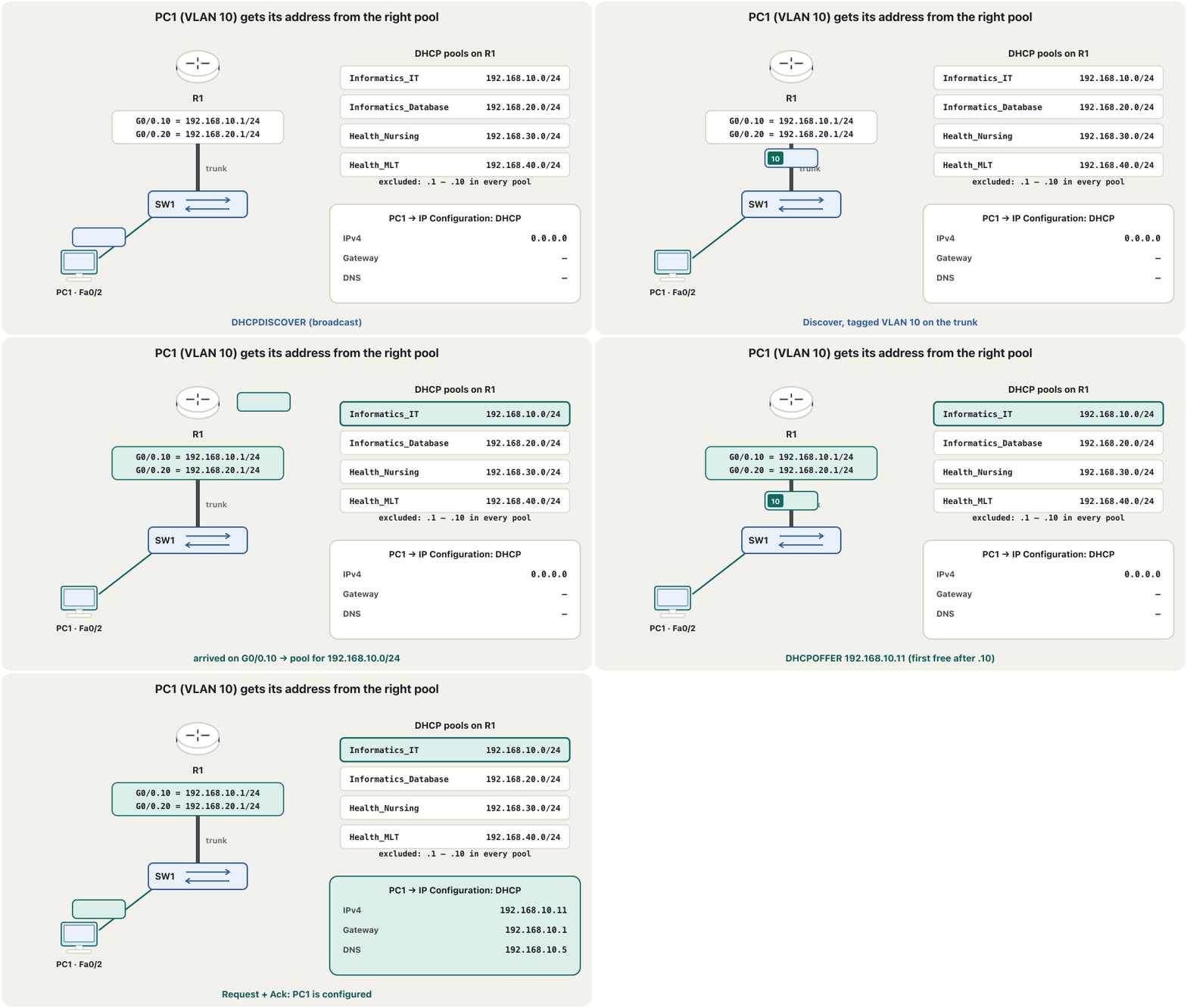
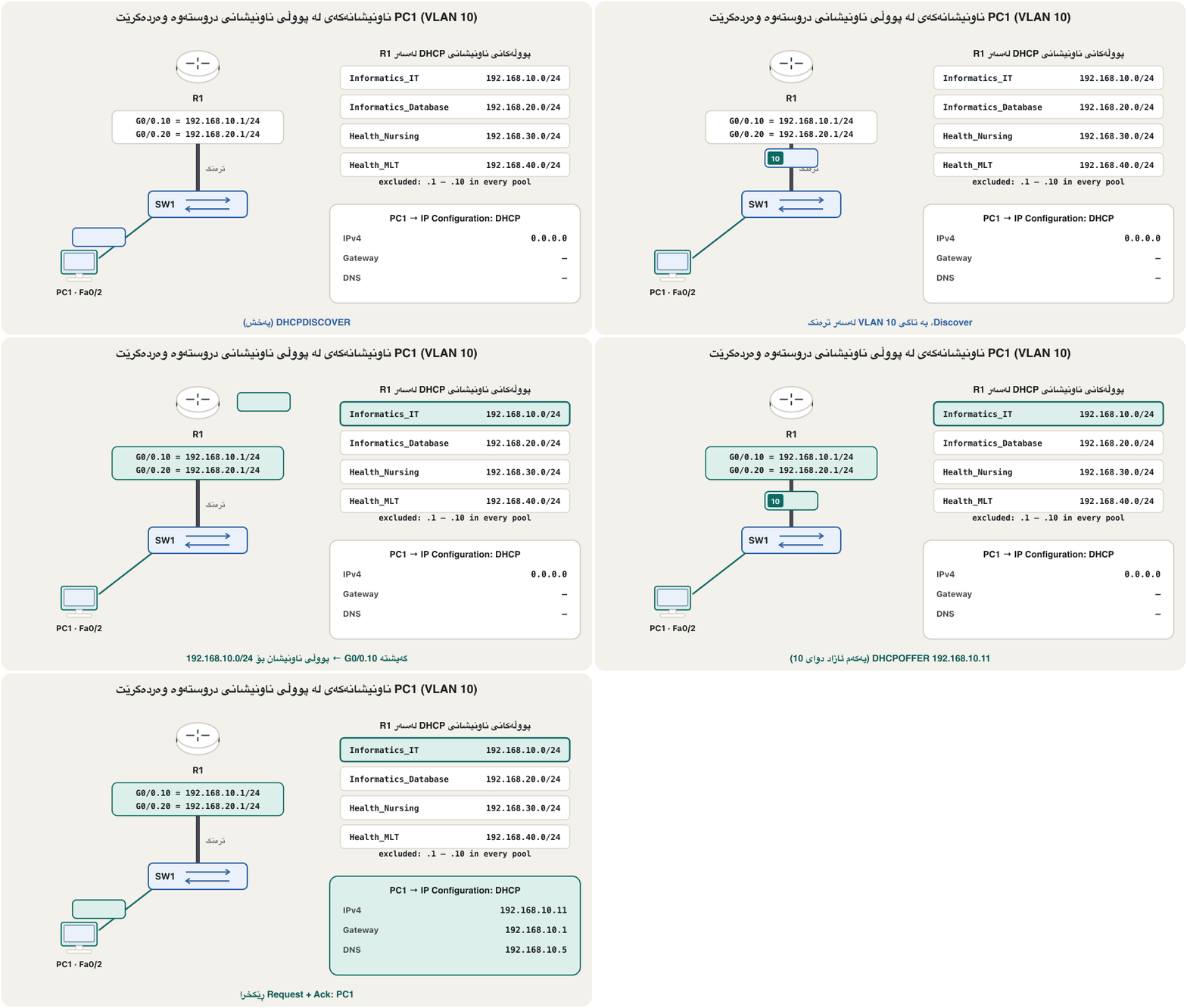
R1 is the DHCP server of the whole campus (DHCP on IOS). First exclude .1 to .10 in each subnet, then create one pool per VLAN with its network, its gateway and the DNS server. How does R1 choose the pool? A Discover arrives on a subinterface — for PC1 on G0/0.10, 192.168.10.1/24 — and R1 uses the pool whose network contains that address. The IT pool once handed out a DNS address where no DNS server lived; here every pool points to the one real DNS server, 192.168.10.5.
R1 DHCPـی هەموو کەمپەسەکەیە (DHCP لەسەر IOS). سەرەتا ناونیشانەکانی 1 تا 10 لە هەر دەربکە، پاشان بۆ هەر دروست بکە بە ، و DNSـەکەی. R1 چۆن هەڵدەبژێرێت؟ Discoverـێک لەسەر دەگات — بۆ PC1 لەسەر G0/0.10، 192.168.10.1/24 — و R1 ئەو بەکار دەهێنێت کە ئەو ناونیشانە لەخۆ دەگرێت. IT جارێک ناونیشانێکی DNSـی دەدا کە هیچ DNSـی لێ نەبوو؛ لێرە هەموو ئاماژە بە تاکە DNSـی ڕاستەقینە دەکات، 192.168.10.5.
R1(config)#ip dhcp excluded-address 192.168.10.1 192.168.10.10
R1(config)#ip dhcp excluded-address 192.168.20.1 192.168.20.10
R1(config)#ip dhcp excluded-address 192.168.30.1 192.168.30.10
R1(config)#ip dhcp excluded-address 192.168.40.1 192.168.40.10
R1(config)#ip dhcp pool Informatics_IT
R1(dhcp-config)#network 192.168.10.0 255.255.255.0
R1(dhcp-config)#default-router 192.168.10.1
R1(dhcp-config)#dns-server 192.168.10.5
R1(dhcp-config)#exit
R1(config)#ip dhcp pool Informatics_Database
R1(dhcp-config)#network 192.168.20.0 255.255.255.0
R1(dhcp-config)#default-router 192.168.20.1
R1(dhcp-config)#dns-server 192.168.10.5
R1(dhcp-config)#exit
R1(config)#ip dhcp pool Health_Nursing
R1(dhcp-config)#network 192.168.30.0 255.255.255.0
R1(dhcp-config)#default-router 192.168.30.1
R1(dhcp-config)#dns-server 192.168.10.5
R1(dhcp-config)#exit
R1(config)#ip dhcp pool Health_MLT
R1(dhcp-config)#network 192.168.40.0 255.255.255.0
R1(dhcp-config)#default-router 192.168.40.1
R1(dhcp-config)#dns-server 192.168.10.5
R1(dhcp-config)#exit
Explain the codeڕوونکردنەوەی کۆدەکە
- Lineدێڕی 1-4
Gateway, servers and spares stay out of every pool.
، و یەدەگ لە دەرەوەی هەموو دەمێننەوە.
- Lineدێڕی 5-8
The pool names are the project's own; any name works.
ناوی هی خودی پڕۆژەکەن؛ هەر ناوێک کار دەکات.
- Lineدێڕی 8
One DNS server for the whole campus: the static IT-Server.
یەک DNS بۆ هەموو کەمپەس: IT-Serverـی جێگیر.
Step 4: static servers, DNS records and web pagesهەنگاوی 4: ڕاژەکاری جێگیر، تۆمارەکانی DNS و پەڕەی وێب
Servers must stay at fixed addresses, so clients can always find them: set each server to Static in Desktop → IP Configuration (IT-Server 192.168.10.5, DB-Server 192.168.20.5, NUR-Server 192.168.30.5, MLT-Server 192.168.40.5), each with its VLAN's gateway and DNS 192.168.10.5. On IT-Server switch the DNS service on and add one A record per department web site; on every server switch HTTP on (server services in Packet Tracer). The names use example.com, a name reserved for examples.
دەبێت لە ناونیشانی جێگیردا بمێننەوە، بۆ ئەوەی هەمیشە بیاندۆزنەوە: لە Desktop → IP Configuration هەر بکە بە Static (IT-Server 192.168.10.5، DB-Server 192.168.20.5، NUR-Server 192.168.30.5، MLT-Server 192.168.40.5)، هەر یەکەیان بە و DNS 192.168.10.5. لەسەر IT-Server خزمەتگوزاریی DNS هەڵبکە و بۆ هەر بەشێک لە جۆری A زیاد بکە؛ لەسەر هەموو HTTP هەڵبکە (خزمەتگوزارییەکانی ڕاژەکار لە Packet Tracer). ناوەکان example.com بەکار دەهێنن، ناوێک کە بۆ نموونە پارێزراوە.
Step 5: locks — console, SSH and port securityهەنگاوی 5: قفڵەکان — کۆنسۆڵ، SSH و ئاسایشی دەرچە
Only the dean's laptop is cabled to R1's console port, and even it must log in. Give R1 secrets, local users and a warning banner (device security); allow remote management only with SSH (SSH). The switches get the same locks, a management address in VLAN 99 and port security on every access port (port security). Never use a name as its own password, as the first version did ("Dean"/"Dean").
تەنیا لاپتۆپی ڕاگر بە R1ـەوە بەستراوە و ئەویش دەبێت بچێتە ژوورەوە. نهێنی، بەکارهێنەری ناوخۆیی و بانەرێکی ئاگادارکردنەوە بدە R1 (ئاسایشی ئامێر)؛ بەڕێوەبردن لە دوورەوە تەنیا بە SSH ڕێگە پێ بدە (SSH). هەمان قفڵەکان وەردەگرن، لەگەڵ ناونیشانی بەڕێوەبردنیان لە VLAN 99 و لەسەر هەموو (ئاسایشی دەرچە). هەرگیز ناوێک وەک خۆی بەکار مەهێنە، وەک وەشانی یەکەم کردی ("Dean"/"Dean").
Router>enable
Router#configure terminal
Enter configuration commands, one per line.  End with CNTL/Z.
Router(config)#hostname R1
R1(config)#enable secret En@ble2026
R1(config)#username admin secret N3tLab!26
R1(config)#username dean secret D3an-Campus26
R1(config)#service password-encryption
R1(config)#banner motd # Authorised access only. Activity is logged. #
R1(config)#line console 0
R1(config-line)#login local
R1(config-line)#exec-timeout 5 0
R1(config-line)#exit
R1(config)#ip domain-name example.com
R1(config)#crypto key generate rsa
The name for the keys will be: R1.example.com
Choose the size of the key modulus in the range of 360 to 4096 for your
  General Purpose Keys. Choosing a key modulus greater than 512 may take
  a few minutes.

How many bits in the modulus [512]: 2048
% Generating 2048 bit RSA keys, keys will be non-exportable...[OK]

%SSH-5-ENABLED: SSH 1.99 has been enabled
R1(config)#ip ssh version 2
R1(config)#line vty 0 4
R1(config-line)#login local
R1(config-line)#transport input ssh
R1(config-line)#exec-timeout 5 0
R1(config-line)#exit
Explain the codeڕوونکردنەوەی کۆدەکە
- Lineدێڕی 5-7
Secrets, not passwords: type 5 (MD5) in Packet Tracer, type 9 (scrypt) by default on current IOS XE.
secret، نەک password: لە Packet Tracer جۆری 5 (MD5)، لە IOS XEـی ئەمڕۆ بە شێوەی بنەڕەتی جۆری 9 (scrypt).
- Lineدێڕی 10-12
The console asks for a local user: the dean or the admin.
کۆنسۆڵ داوای بەکارهێنەرێکی ناوخۆیی دەکات: ڕاگر یان admin.
- Lineدێڕی 14-25
SSH needs a host name, a domain name and an RSA key of at least 2048 bits.
SSH پێویستی بە ، و بە لانیکەم 2048 هەیە.
- Lineدێڕی 26-29
vty lines: local users, SSH only — Telnet is refused.
: ناوخۆیی، تەنیا SSH — Telnet ڕەت دەکرێتەوە.
SW1(config)#interface range fastEthernet 0/1 - 20
SW1(config-if-range)#switchport port-security
SW1(config-if-range)#switchport port-security maximum 1
SW1(config-if-range)#switchport port-security mac-address sticky
SW1(config-if-range)#spanning-tree portfast
SW1(config-if-range)#spanning-tree bpduguard enable
SW1(config-if-range)#exit
Explain the codeڕوونکردنەوەی کۆدەکە
- Lineدێڕی 2-4
One device per port; the first MAC address is learned and saved (sticky).
بۆ هەر یەک ئامێر؛ یەکەم فێر دەبێت و هەڵدەگیرێت (sticky).
- Lineدێڕی 5-6
PortFast lets PCs get DHCP at once; BPDU guard shuts the port if a switch is plugged in. The PortFast warning IOS prints is expected.
PortFast ڕێگە دەدات PCـەکان یەکسەر DHCP وەربگرن؛ BPDU guard دادەخات ئەگەر پێوە بکرێت. IOS لێرە ئاگادارکردنەوەیەکی PortFast چاپ دەکات — چاوەڕوانکراوە.
Step 6: test from the PCsهەنگاوی 6: لە PCـەکانەوە تاقی بکەرەوە
Set every PC to DHCP (Desktop → IP Configuration → DHCP) and work through the test plan. Start close and go far: own address, own gateway, another VLAN, a name, a web page, SSH. Write what you saw next to each line. The first ping to another VLAN may lose one reply while ARP works (why); TTL=127 shows that one router was crossed.
هەموو PCـێک بکە بە DHCP (Desktop → IP Configuration → DHCP) و پلانی تاقیکردنەوەکە هەنگاو بە هەنگاو جێبەجێ بکە. لە نزیکەوە دەست پێ بکە و بڕۆ بۆ دوور: ناونیشانی خۆی، خۆی، تر، ناوێک، پەڕەیەکی وێب، SSH. لە تەنیشت هەر دێڕێک بنووسە چیت بینی. یەکەم بۆ تر لەوانەیە وەڵامێک لە دەست بدات کاتێک ARP کار دەکات (بۆچی)؛ TTL=127 پیشان دەدات کە یەک تێپەڕێنراوە.
C:\>ipconfig

FastEthernet0 Connection:(default port)

   ...
   IPv4 Address....................: 192.168.10.11
   Subnet Mask.....................: 255.255.255.0
   Default Gateway.................: ::
                                     192.168.10.1

C:\>ping 192.168.40.11

Pinging 192.168.40.11 with 32 bytes of data:

Request timed out.
Reply from 192.168.40.11: bytes=32 time<1ms TTL=127
Reply from 192.168.40.11: bytes=32 time<1ms TTL=127
Reply from 192.168.40.11: bytes=32 time<1ms TTL=127

Ping statistics for 192.168.40.11:
    Packets: Sent = 4, Received = 3, Lost = 1 (25% loss),
Approximate round trip times in milli-seconds:
    Minimum = 0ms, Maximum = 0ms, Average = 0ms

C:\>ssh -l admin 192.168.99.2

Password:

Authorised access only. Activity is logged.

SW1>
Explain the codeڕوونکردنەوەی کۆدەکە
- Lineدێڕی 1-9
PC1 got the first free address of its pool and the right gateway (other lines shortened with …).
PC1 یەکەم ناونیشانی ئازادی و دروستی وەرگرت (دێڕەکانی تر بە … کورت کراونەتەوە).
- Lineدێڕی 11-23
VLAN 10 → VLAN 40 (PC7): the first request times out while ARP works, then TTL=127.
VLAN 10 بۆ VLAN 40 (PC7): یەکەم کاتی بەسەر دەچێت کاتێک ARP کار دەکات، پاشان TTL=127.
- Lineدێڕی 25-31
SSH to SW1's management address in VLAN 99: the password is typed but not shown, then the warning banner appears.
SSH بۆ ناونیشانی بەڕێوەبردنی SW1 لە VLAN 99: دەنووسرێت بەڵام پیشان نادرێت، پاشان بانەری ئاگادارکردنەوە دەردەکەوێت.
C:\>ping it.example.com

Pinging 192.168.10.5 with 32 bytes of data:

Reply from 192.168.10.5: bytes=32 time<1ms TTL=127
Reply from 192.168.10.5: bytes=32 time<1ms TTL=127
Reply from 192.168.10.5: bytes=32 time<1ms TTL=127
Reply from 192.168.10.5: bytes=32 time<1ms TTL=127

Ping statistics for 192.168.10.5:
    Packets: Sent = 4, Received = 4, Lost = 0 (0% loss),
Approximate round trip times in milli-seconds:
    Minimum = 0ms, Maximum = 0ms, Average = 0ms
Explain the codeڕوونکردنەوەی کۆدەکە
- Lineدێڕی 1-3
The DNS server turned the name into 192.168.10.5. Packet Tracer prints only the address; Windows prints
Pinging it.example.com [192.168.10.5].DNS ناوەکەی کرد بە 192.168.10.5. Packet Tracer تەنیا ناونیشانەکە دەنووسێت؛ Windows دەنووسێت
Pinging it.example.com [192.168.10.5].- Lineدێڕی 5-8
TTL=127: the server is in another VLAN, one router away.
TTL=127: لە ترە، یەک دوورتر.
Check the devices with show commandsئامێرەکان بە فەرمانەکانی show بپشکنە
The PCs prove that the network works; show commands prove why (more show commands). On R1 every subinterface must be up/up and show ip dhcp binding must list each PC's address with its MAC address. On each switch the trunk must be trunking with native VLAN 999 and only the VLANs in use.
PCـەکان دەیسەلمێنن کە کار دەکات؛ show دەیسەلمێنن بۆچی (فەرمانی showـی زیاتر). لەسەر R1 هەموو دەبێت up/up بێت و show ip dhcp binding دەبێت ناونیشانی هەر PCـێک لەگەڵ پیشان بدات. لەسەر هەر دەبێت لە دۆخی trunking بێت بە 999 و تەنیا ئەو بەکار دێن.
R1#show ip interface brief
Interface              IP-Address      OK? Method Status                Protocol
GigabitEthernet0/0     unassigned      YES unset  up                    up
GigabitEthernet0/0.10  192.168.10.1    YES manual up                    up
GigabitEthernet0/0.20  192.168.20.1    YES manual up                    up
GigabitEthernet0/0.99  192.168.99.1    YES manual up                    up
GigabitEthernet0/0.999 unassigned      YES unset  up                    up
GigabitEthernet0/1     unassigned      YES unset  up                    up
GigabitEthernet0/1.30  192.168.30.1    YES manual up                    up
GigabitEthernet0/1.40  192.168.40.1    YES manual up                    up
GigabitEthernet0/1.99  192.168.99.129  YES manual up                    up
GigabitEthernet0/1.999 unassigned      YES unset  up                    up
GigabitEthernet0/2     unassigned      YES unset  administratively down down
Vlan1                  unassigned      YES unset  administratively down down
Explain the codeڕوونکردنەوەی کۆدەکە
- Lineدێڕی 14
Packet Tracer's 2911 also lists Vlan1; a real 2911 without a switch module has no Vlan1 line.
2911ـی Packet Tracer دێڕی Vlan1ـیش پیشان دەدات؛ 2911ـێکی ڕاستەقینە بێ مۆدیولی ئەو دێڕەی نییە.
R1#show ip dhcp binding
IP address       Client-ID/              Lease expiration        Type
                 Hardware address
192.168.10.11    0001.9702.D144           --                     Automatic
192.168.10.12    00E0.F7A1.3C52           --                     Automatic
192.168.20.11    0060.2F4B.9A11           --                     Automatic
192.168.20.12    000C.85D2.4E07           --                     Automatic
192.168.30.11    0090.21A8.6B3E           --                     Automatic
192.168.30.12    0002.4A7C.11F9           --                     Automatic
192.168.40.11    00D0.BC55.2A60           --                     Automatic
192.168.40.12    0050.0F3E.9D84           --                     Automatic
Explain the codeڕوونکردنەوەی کۆدەکە
- Lineدێڕی 4-11
Two PCs per VLAN, each starting at .11 — the excluded addresses were skipped.
دوو PC بۆ هەر ، هەر یەکەیان لە ناونیشانی 11ـەوە — ناونیشانە دەرکراوەکان بازیان بەسەردا دراوە.
- Lineدێڕی 2-3
This is Packet Tracer's layout: real IOS prints the date and time each lease ends instead of --, and a client ID (01 followed by the MAC address).
ئەمە شێوازی Packet Tracerـە: IOSـی ڕاستەقینە لە جیاتی -- کات و ڕێکەوتی کۆتایی هەر دەنووسێت و client ID: 01 و پاشان .
SW1#show interfaces trunk

Port        Mode             Encapsulation  Status        Native vlan
Gig0/1      on               802.1q         trunking      999

Port        Vlans allowed on trunk
Gig0/1      10,20,99,999

Port        Vlans allowed and active in management domain
Gig0/1      10,20,99,999

Port        Vlans in spanning tree forwarding state and not pruned
Gig0/1      10,20,99,999
Explain the codeڕوونکردنەوەی کۆدەکە
- Lineدێڕی 4
Packet Tracer writes the port as Gig0/1; real IOS writes Gi0/1.
Packet Tracer وەک Gig0/1 دەنووسێت؛ IOSـی ڕاستەقینە Gi0/1.
The final configurations: R1ڕێکخستنە کۆتاییەکان: R1
Deliverable 3: the complete configuration of every device, in the order you type it. You can paste each block into the device's CLI in Packet Tracer. Compare it with yours line by line; every block ends with saving.
بەرهەمی 3: تەواوی هەموو ئامێرێک، بەو ڕیزبەندییەی دەینووسیت. دەتوانیت هەر بەشێک بخەیتە ناو CLIـی ئامێرەکە لە Packet Tracer. دێڕ بە دێڕ لەگەڵ هی خۆت بەراوردی بکە؛ هەموو بەشێک بە پاشەکەوتکردن کۆتایی دێت.
Router>enable
Router#configure terminal
Enter configuration commands, one per line.  End with CNTL/Z.
Router(config)#hostname R1
R1(config)#enable secret En@ble2026
R1(config)#username admin secret N3tLab!26
R1(config)#username dean secret D3an-Campus26
R1(config)#service password-encryption
R1(config)#banner motd # Authorised access only. Activity is logged. #
R1(config)#line console 0
R1(config-line)#login local
R1(config-line)#exec-timeout 5 0
R1(config-line)#exit
R1(config)#ip domain-name example.com
R1(config)#crypto key generate rsa
The name for the keys will be: R1.example.com
Choose the size of the key modulus in the range of 360 to 4096 for your
  General Purpose Keys. Choosing a key modulus greater than 512 may take
  a few minutes.

How many bits in the modulus [512]: 2048
% Generating 2048 bit RSA keys, keys will be non-exportable...[OK]

%SSH-5-ENABLED: SSH 1.99 has been enabled
R1(config)#ip ssh version 2
R1(config)#line vty 0 4
R1(config-line)#login local
R1(config-line)#transport input ssh
R1(config-line)#exec-timeout 5 0
R1(config-line)#exit
R1(config)#interface g0/0
R1(config-if)#description Trunk to SW1 (Informatics)
R1(config-if)#no shutdown
R1(config-if)#interface g0/0.10
R1(config-subif)#description VLAN 10 IT
R1(config-subif)#encapsulation dot1Q 10
R1(config-subif)#ip address 192.168.10.1 255.255.255.0
R1(config-subif)#interface g0/0.20
R1(config-subif)#description VLAN 20 Database
R1(config-subif)#encapsulation dot1Q 20
R1(config-subif)#ip address 192.168.20.1 255.255.255.0
R1(config-subif)#interface g0/0.99
R1(config-subif)#description Management of SW1
R1(config-subif)#encapsulation dot1Q 99
R1(config-subif)#ip address 192.168.99.1 255.255.255.128
R1(config-subif)#interface g0/0.999
R1(config-subif)#encapsulation dot1Q 999 native
R1(config-subif)#interface g0/1
R1(config-if)#description Trunk to SW2 (Health)
R1(config-if)#no shutdown
R1(config-if)#interface g0/1.30
R1(config-subif)#description VLAN 30 Nursing
R1(config-subif)#encapsulation dot1Q 30
R1(config-subif)#ip address 192.168.30.1 255.255.255.0
R1(config-subif)#interface g0/1.40
R1(config-subif)#description VLAN 40 MLT
R1(config-subif)#encapsulation dot1Q 40
R1(config-subif)#ip address 192.168.40.1 255.255.255.0
R1(config-subif)#interface g0/1.99
R1(config-subif)#description Management of SW2
R1(config-subif)#encapsulation dot1Q 99
R1(config-subif)#ip address 192.168.99.129 255.255.255.128
R1(config-subif)#interface g0/1.999
R1(config-subif)#encapsulation dot1Q 999 native
R1(config-subif)#exit
R1(config)#ip dhcp excluded-address 192.168.10.1 192.168.10.10
R1(config)#ip dhcp excluded-address 192.168.20.1 192.168.20.10
R1(config)#ip dhcp excluded-address 192.168.30.1 192.168.30.10
R1(config)#ip dhcp excluded-address 192.168.40.1 192.168.40.10
R1(config)#ip dhcp pool Informatics_IT
R1(dhcp-config)#network 192.168.10.0 255.255.255.0
R1(dhcp-config)#default-router 192.168.10.1
R1(dhcp-config)#dns-server 192.168.10.5
R1(dhcp-config)#exit
R1(config)#ip dhcp pool Informatics_Database
R1(dhcp-config)#network 192.168.20.0 255.255.255.0
R1(dhcp-config)#default-router 192.168.20.1
R1(dhcp-config)#dns-server 192.168.10.5
R1(dhcp-config)#exit
R1(config)#ip dhcp pool Health_Nursing
R1(dhcp-config)#network 192.168.30.0 255.255.255.0
R1(dhcp-config)#default-router 192.168.30.1
R1(dhcp-config)#dns-server 192.168.10.5
R1(dhcp-config)#exit
R1(config)#ip dhcp pool Health_MLT
R1(dhcp-config)#network 192.168.40.0 255.255.255.0
R1(dhcp-config)#default-router 192.168.40.1
R1(dhcp-config)#dns-server 192.168.10.5
R1(dhcp-config)#exit
R1(config)#end
R1#copy running-config startup-config
Destination filename [startup-config]?
Building configuration...
[OK]
Explain the codeڕوونکردنەوەی کۆدەکە
- Lineدێڕی 4-13
Name, secrets, users, banner, console.
ناو، نهێنی، بەکارهێنەر، بانەر، کۆنسۆڵ.
- Lineدێڕی 14-30
SSH only on the vty lines.
تەنیا SSH لەسەر .
- Lineدێڕی 31-65
Eight subinterfaces: the gateways of the campus.
هەشت : ناونیشانەکانی کەمپەس.
- Lineدێڕی 66-89
Excluded addresses and four DHCP pools, all with DNS 192.168.10.5.
ناونیشانی دەرکراو و چوار DHCP، هەموویان بە DNS 192.168.10.5.
The final configurations: R1ڕێکخستنە کۆتاییەکان: R1
The final configuration of SW1 (Informatics)ڕێکخستنی کۆتایی SW1 (ئینفۆرماتیک)
Switch>enable
Switch#configure terminal
Enter configuration commands, one per line.  End with CNTL/Z.
Switch(config)#hostname SW1
SW1(config)#enable secret En@ble2026
SW1(config)#username admin secret N3tLab!26
SW1(config)#service password-encryption
SW1(config)#banner motd # Authorised access only. Activity is logged. #
SW1(config)#line console 0
SW1(config-line)#login local
SW1(config-line)#exec-timeout 5 0
SW1(config-line)#exit
SW1(config)#vlan 10
SW1(config-vlan)#name IT
SW1(config-vlan)#vlan 20
SW1(config-vlan)#name Database
SW1(config-vlan)#vlan 99
SW1(config-vlan)#name Management
SW1(config-vlan)#vlan 998
SW1(config-vlan)#name Unused
SW1(config-vlan)#vlan 999
SW1(config-vlan)#name Native
SW1(config-vlan)#exit
SW1(config)#interface range fastEthernet 0/1 - 10
SW1(config-if-range)#description IT
SW1(config-if-range)#switchport mode access
SW1(config-if-range)#switchport access vlan 10
SW1(config-if-range)#interface range fastEthernet 0/11 - 20
SW1(config-if-range)#description Database
SW1(config-if-range)#switchport mode access
SW1(config-if-range)#switchport access vlan 20
SW1(config-if-range)#interface range fastEthernet 0/21 - 24, gigabitEthernet 0/2
SW1(config-if-range)#description Unused
SW1(config-if-range)#switchport mode access
SW1(config-if-range)#switchport access vlan 998
SW1(config-if-range)#shutdown
SW1(config-if-range)#exit
SW1(config)#interface gigabitEthernet 0/1
SW1(config-if)#description Trunk to R1 G0/0
SW1(config-if)#switchport mode trunk
SW1(config-if)#switchport nonegotiate
SW1(config-if)#switchport trunk native vlan 999
SW1(config-if)#switchport trunk allowed vlan 10,20,99,999
SW1(config-if)#exit
SW1(config)#interface range fastEthernet 0/1 - 20
SW1(config-if-range)#switchport port-security
SW1(config-if-range)#switchport port-security maximum 1
SW1(config-if-range)#switchport port-security mac-address sticky
SW1(config-if-range)#spanning-tree portfast
SW1(config-if-range)#spanning-tree bpduguard enable
SW1(config-if-range)#exit
SW1(config)#interface vlan 99
SW1(config-if)#description Management
SW1(config-if)#ip address 192.168.99.2 255.255.255.128
SW1(config-if)#no shutdown
SW1(config-if)#exit
SW1(config)#ip default-gateway 192.168.99.1
SW1(config)#ip domain-name example.com
SW1(config)#crypto key generate rsa
The name for the keys will be: SW1.example.com
Choose the size of the key modulus in the range of 360 to 4096 for your
  General Purpose Keys. Choosing a key modulus greater than 512 may take
  a few minutes.

How many bits in the modulus [512]: 2048
% Generating 2048 bit RSA keys, keys will be non-exportable...[OK]

%SSH-5-ENABLED: SSH 1.99 has been enabled
SW1(config)#ip ssh version 2
SW1(config)#line vty 0 15
SW1(config-line)#login local
SW1(config-line)#transport input ssh
SW1(config-line)#exec-timeout 5 0
SW1(config-line)#end
SW1#copy running-config startup-config
Destination filename [startup-config]?
Building configuration...
[OK]
Explain the codeڕوونکردنەوەی کۆدەکە
- Lineدێڕی 13-44
VLANs, access ports, parked ports, the trunk.
VLAN، ، وەستێنراو، .
- Lineدێڕی 45-51
Port security, PortFast and BPDU guard on Fa0/1–20.
، PortFast و BPDU guard لەسەر Fa0/1–20.
- Lineدێڕی 52-78
Management address in VLAN 99, SSH, save.
ناونیشانی بەڕێوەبردن لە VLAN 99، SSH، پاشەکەوت.
The final configurations: R1ڕێکخستنە کۆتاییەکان: R1
The final configuration of SW2 (Health)ڕێکخستنی کۆتایی SW2 (تەندروستی)
SW2 is SW1's twin: VLANs 30 and 40 instead of 10 and 20, and its management address 192.168.99.130 in the upper /25.
SW2 دووانەی SW1ـە: VLAN 30 و 40 لە جیاتی 10 و 20. ناونیشانی بەڕێوەبردنی 192.168.99.130ـە، لە /25ـی سەرەوە.
Switch>enable
Switch#configure terminal
Enter configuration commands, one per line.  End with CNTL/Z.
Switch(config)#hostname SW2
SW2(config)#enable secret En@ble2026
SW2(config)#username admin secret N3tLab!26
SW2(config)#service password-encryption
SW2(config)#banner motd # Authorised access only. Activity is logged. #
SW2(config)#line console 0
SW2(config-line)#login local
SW2(config-line)#exec-timeout 5 0
SW2(config-line)#exit
SW2(config)#vlan 30
SW2(config-vlan)#name Nursing
SW2(config-vlan)#vlan 40
SW2(config-vlan)#name MLT
SW2(config-vlan)#vlan 99
SW2(config-vlan)#name Management
SW2(config-vlan)#vlan 998
SW2(config-vlan)#name Unused
SW2(config-vlan)#vlan 999
SW2(config-vlan)#name Native
SW2(config-vlan)#exit
SW2(config)#interface range fastEthernet 0/1 - 10
SW2(config-if-range)#description Nursing
SW2(config-if-range)#switchport mode access
SW2(config-if-range)#switchport access vlan 30
SW2(config-if-range)#interface range fastEthernet 0/11 - 20
SW2(config-if-range)#description MLT
SW2(config-if-range)#switchport mode access
SW2(config-if-range)#switchport access vlan 40
SW2(config-if-range)#interface range fastEthernet 0/21 - 24, gigabitEthernet 0/2
SW2(config-if-range)#description Unused
SW2(config-if-range)#switchport mode access
SW2(config-if-range)#switchport access vlan 998
SW2(config-if-range)#shutdown
SW2(config-if-range)#exit
SW2(config)#interface gigabitEthernet 0/1
SW2(config-if)#description Trunk to R1 G0/1
SW2(config-if)#switchport mode trunk
SW2(config-if)#switchport nonegotiate
SW2(config-if)#switchport trunk native vlan 999
SW2(config-if)#switchport trunk allowed vlan 30,40,99,999
SW2(config-if)#exit
SW2(config)#interface range fastEthernet 0/1 - 20
SW2(config-if-range)#switchport port-security
SW2(config-if-range)#switchport port-security maximum 1
SW2(config-if-range)#switchport port-security mac-address sticky
SW2(config-if-range)#spanning-tree portfast
SW2(config-if-range)#spanning-tree bpduguard enable
SW2(config-if-range)#exit
SW2(config)#interface vlan 99
SW2(config-if)#description Management
SW2(config-if)#ip address 192.168.99.130 255.255.255.128
SW2(config-if)#no shutdown
SW2(config-if)#exit
SW2(config)#ip default-gateway 192.168.99.129
SW2(config)#ip domain-name example.com
SW2(config)#crypto key generate rsa
The name for the keys will be: SW2.example.com
Choose the size of the key modulus in the range of 360 to 4096 for your
  General Purpose Keys. Choosing a key modulus greater than 512 may take
  a few minutes.

How many bits in the modulus [512]: 2048
% Generating 2048 bit RSA keys, keys will be non-exportable...[OK]

%SSH-5-ENABLED: SSH 1.99 has been enabled
SW2(config)#ip ssh version 2
SW2(config)#line vty 0 15
SW2(config-line)#login local
SW2(config-line)#transport input ssh
SW2(config-line)#exec-timeout 5 0
SW2(config-line)#end
SW2#copy running-config startup-config
Destination filename [startup-config]?
Building configuration...
[OK]Find the mistakes in the first versionهەڵەکانی وەشانی یەکەم بدۆزەوە
The first version of this project, made by a group of students, worked in Packet Tracer at first sight — the PDU list showed green ticks. Yet it hid several mistakes. Read these lines from it and find them before you open the answer.
وەشانی یەکەمی ئەم پڕۆژەیە، کە گرووپێک خوێندکار دروستیان کرد، لە یەکەم سەیرکردندا لە Packet Tracer کاری دەکرد — لیستی PDU نیشانەی سەوزی پیشان دەدا. بەڵام چەند هەڵەیەکی شاردبووەوە. ئەم دێڕانەی لێ بخوێنەوە و پێش کردنەوەی وەڵامەکە بیاندۆزەوە.
Switch(config)#interface vlan 10
Switch(config-if)#ip address 192.168.10.1 255.255.255.0
Switch(config-if)#exit
Switch(config)#interface vlan 20
Switch(config-if)#ip address 192.168.20.1 255.255.255.0
Switch(config-if)#exit
Switch(config)#hostname Informatics
Informatics(config)#enable secret InformaticsRouter(config)#username Dean secret Dean
Router(config)#banner motd #Welcome Dean!#
Router(config)#enable secret Dean
Router(config)#hostname Campus
Campus(config)#ip dhcp pool Informatics_IT
Campus(dhcp-config)#default-router 192.168.10.1
Campus(dhcp-config)#network 192.168.10.0 255.255.255.0
Campus(dhcp-config)#dns-server 192.168.10.2Name at least five problems in the first version and the fix for each.
لانیکەم پێنج کێشە لە وەشانی یەکەمدا بدۆزەوە و چارەسەری هەر یەکێکیان بنووسە.
Show answerوەڵامەکە پیشان بدە
- The switch SVIs reuse the router's gateway addresses (192.168.10.1, .20.1 …): duplicate IP addresses. Remove them; give each switch one management address in VLAN 99.
- The pool hands out DNS 192.168.10.2, but the DNS server took 192.168.10.4 by DHCP. Servers get static addresses, excluded from the pools.
- No
ip dhcp excluded-addressat all, so nothing protects the static addresses. - Passwords equal to the names (Dean/Dean, Informatics, Health) and a "Welcome" banner. Use long secrets and a legal warning.
- The text says the VLANs cannot talk, yet the subinterfaces route between them. To block traffic, add ACLs.
- No SSH, no
copy running-config startup-config: after a reload everything is lost.
- SVIـەکانی هەمان ناونیشانەکانی بەکار دەهێننەوە (192.168.10.1، 192.168.20.1 …): دووپاتە. لایان ببە؛ بە هەر یەک ناونیشانی بەڕێوەبردن لە VLAN 99 بدە.
- DNS 192.168.10.2 دەدات، بەڵام DNS بە DHCP 192.168.10.4ـی وەرگرت. ناونیشانی جێگیر وەردەگرن، دەرکراو لە .
- هیچ
ip dhcp excluded-addressـێک نییە، بۆیە هیچ شتێک ناونیشانە جێگیرەکان ناپارێزێت. - وەک ناوەکان (Dean/Dean، Informatics، Health) و بانەرێکی «Welcome». نهێنیی درێژ و ئاگادارکردنەوەیەکی یاسایی بەکار بهێنە.
- دەقەکە دەڵێت ناتوانن قسە بکەن، بەڵام لە نێوانیاندا دەکەن. بۆ داخستنی هاتوچۆ ACL زیاد بکە.
- نە SSH، نە
copy running-config startup-config: دوای reload هەموو شتێک ون دەبێت.
The four-college version: one address plan for many collegesوەشانی چوار کۆلێژ: یەک نەخشەی ناونیشان بۆ چەندین کۆلێژ
The project was later extended to four colleges: Informatics (IT, Database), Engineering (Urban Planning, Mechanics), Business (Media, Marketing) and Health (Nursing), each with a switch and a server, all on one router. Look at the legend on the right of the picture: every college uses VLAN 10 = 192.168.10.1 and VLAN 20 = 192.168.20.1.
دواتر پڕۆژەکە فراوان کرا بۆ چوار کۆلێژ: ئینفۆرماتیک (IT، )، ئەندازیاری (پلاندانانی شار، میکانیک)، بازرگانی (میدیا، بازاڕگەری) و تەندروستی (پەرستاری)، هەر یەکەیان بە و ، هەموویان لەسەر یەک . سەیری ڕوونکردنەوەکەی لای ڕاستی وێنەکە بکە: هەموو کۆلێژێک VLAN 10 = 192.168.10.1 و VLAN 20 = 192.168.20.1 بەکار دەهێنێت.
Why can this plan not work on one router, and what is a correct plan?
بۆچی ئەم نەخشەیە لەسەر یەک کار ناکات و نەخشەیەکی دروست چییە؟
Hintئاماژە
Try to type the second 192.168.10.1/24 on R1 and read the message.
هەوڵ بدە 192.168.10.1/24ـی دووەم لەسەر R1 بنووسیت و پەیامەکە بخوێنەوە.
Show answerوەڵامەکە پیشان بدە
One router cannot hold the same subnet on two interfaces: the moment you give a second college's subinterface 192.168.10.1/24, IOS refuses it with % 192.168.10.0 overlaps with … and names the first interface. Each department needs its own VLAN and its own subnet. Keep the rule third octet = VLAN number:
یەک ناتوانێت هەمان لەسەر دوو هەڵبگرێت: هەر کە 192.168.10.1/24 دەدەیتە کۆلێژی دووەم، IOS بە % 192.168.10.0 overlaps with … ڕەتی دەکاتەوە و یەکەم ناو دەبات. هەر بەشێک و خۆی پێویستە. یاسای سێیەم = ژمارەی بپارێزە:
| Collegeکۆلێژ | Departmentبەش | VLANژمارەی VLAN | Subnet / gateway / |
|---|---|---|---|
| Informaticsئینفۆرماتیک | IT | 10 | 192.168.10.0/24 · .1 |
| Informaticsئینفۆرماتیک | Database | 20 | 192.168.20.0/24 · .1 |
| Healthتەندروستی | Nursingپەرستاری | 30 | 192.168.30.0/24 · .1 |
| Healthتەندروستی | MLT | 40 | 192.168.40.0/24 · .1 |
| Engineeringئەندازیاری | Urban Planningپلاندانانی شار | 50 | 192.168.50.0/24 · .1 |
| Engineeringئەندازیاری | Mechanicsمیکانیک | 60 | 192.168.60.0/24 · .1 |
| Businessبازرگانی | Mediaمیدیا | 70 | 192.168.70.0/24 · .1 |
| Businessبازرگانی | Marketingبازاڕگەری | 80 | 192.168.80.0/24 · .1 |
A 2911 has only three Ethernet ports, so for four colleges either add a port module or — simpler — cable R1 with one trunk to a central switch and trunk the four college switches to it; all eight gateways are then subinterfaces of one router port (or SVIs of a layer 3 switch).
2911 تەنیا سێ Ethernetـی هەیە، بۆیە بۆ چوار کۆلێژ یان مۆدیولێکی زیاد بکە یان — سادەتر — R1 بە یەک بە ناوەندییەوە ببەستە و چوار کۆلێژ بە پێیەوە ببەستە؛ ئەوکاتە هەر هەشت یەک (یان SVIـی سویچێکی چینی 3).
Exam task 1: VLANs through a layer 3 switch, DHCP from the routerئەرکی تاقیکردنەوەی 1: VLAN لە ڕێگەی سویچی چینی 3ـەوە، DHCP لە ڕێدۆزەوە
A question from the owner's book: build the topology below; with the layer 3 and layer 2 switches put the three PCs into three VLANs so that data can move from one VLAN to another; then give each VLAN DHCP from the router. The router (Fa0/0) and the multilayer switch (Fa0/1, a trunk) both hang on the 2960's ports Fa0/5 and Fa0/4; the PCs sit on Fa0/1–3.
پرسیارێک لە کتێبەکەی خاوەنی ماڵپەڕەکە: ئەم تۆپۆلۆجییەی خوارەوە دروست بکە؛ بە و چینی 2 سێ PCـەکە بخەرە سێ بۆ ئەوەی لە بچێت بۆ یەکێکی تر؛ پاشان DHCP لە بدە بە هەر . (Fa0/0) و فرەچین (Fa0/1، ) هەردووکیان لەسەر Fa0/5 و Fa0/4ـی 2960ـەکەن؛ PCـەکان لەسەر Fa0/1–3ن.
The book's answer starts correctly — on the layer 2 switch only create the VLANs, put Fa0/1–3 into them and make Fa0/4 (to the layer 3 switch) a trunk — and then stops. Finish it yourself; the router is not on the trunk, so think about how DHCP requests and routes reach it.
وەڵامەکەی کتێبەکە بە دروستی دەست پێ دەکات — لەسەر چینی 2 تەنیا دروست بکە، Fa0/1–3 بخەرە ناویانەوە و Fa0/4 (بەرەو ) بکە بە — پاشان دەوەستێت. خۆت تەواوی بکە؛ لەسەر نییە، بۆیە بیر بکەرەوە DHCP و ڕێگەکان چۆن پێی دەگەن.
Configure the three devices: VLANs 10, 20, 30 for the PCs (192.168.10.0/24, 20.0/24, 30.0/24), inter-VLAN routing on the multilayer switch, DHCP pools on the router.
سێ ئامێرەکە ڕێک بخە: VLAN 10، 20، 30 بۆ PCـەکان (192.168.10.0/24، 20.0/24، 30.0/24)، لەسەر فرەچین، DHCP لەسەر .
Hintئاماژە
The router's port may not sit in a subnet that the multilayer switch already routes for the PCs.
نابێت لە بێت کە فرەچین بۆ PCـەکان بۆ دەکات.
Show answerوەڵامەکە پیشان بدە
The router–switch link needs its own subnet: put the 2960's Fa0/5 into a transit VLAN 100 and give it 10.0.0.0/30 — router 10.0.0.1, multilayer switch SVI 100 10.0.0.2. The SVIs 10/20/30 are the PCs' gateways and relay DHCP with ip helper-address 10.0.0.1 (relay agents). The router needs routes back to the three VLAN subnets, because its offers go to the relay address (192.168.10.1 …). Both ends of the trunk use native VLAN 999, and the unused ports are parked in VLAN 998, as everywhere in this course.
بەستەری و خۆی پێویستە: Fa0/5ـی 2960 بخەرە VLANـی گواستنەوەی 100 و 10.0.0.0/30ـی پێ بدە — 10.0.0.1، SVI 100ـی فرەچین 10.0.0.2. SVIـەکانی 10/20/30 PCـەکانن و DHCP بە ip helper-address 10.0.0.1 دەگوازنەوە (بریکاری گواستنەوە). پێویستی بە ڕێگەی گەڕانەوەیە بۆ سێ VLAN، چونکە پێشنیارەکانی دەچن بۆ ناونیشانی گواستنەوەکە (192.168.10.1 …). هەردوو سەری 999 بەکار دەهێنن و بەکارنەهاتوو لە VLAN 998 دەوەستێنرێن، وەک لە هەموو ئەم کۆرسەدا.
Switch(config)#hostname SW-L2
SW-L2(config)#vlan 10
SW-L2(config-vlan)#vlan 20
SW-L2(config-vlan)#vlan 30
SW-L2(config-vlan)#vlan 100
SW-L2(config-vlan)#name Transit
SW-L2(config-vlan)#vlan 998
SW-L2(config-vlan)#name Unused
SW-L2(config-vlan)#vlan 999
SW-L2(config-vlan)#name Native
SW-L2(config-vlan)#exit
SW-L2(config)#interface fastEthernet 0/1
SW-L2(config-if)#switchport mode access
SW-L2(config-if)#switchport access vlan 10
SW-L2(config-if)#interface fastEthernet 0/2
SW-L2(config-if)#switchport mode access
SW-L2(config-if)#switchport access vlan 20
SW-L2(config-if)#interface fastEthernet 0/3
SW-L2(config-if)#switchport mode access
SW-L2(config-if)#switchport access vlan 30
SW-L2(config-if)#interface fastEthernet 0/5
SW-L2(config-if)#switchport mode access
SW-L2(config-if)#switchport access vlan 100
SW-L2(config-if)#interface fastEthernet 0/4
SW-L2(config-if)#switchport mode trunk
SW-L2(config-if)#switchport trunk native vlan 999
SW-L2(config-if)#interface range fastEthernet 0/6 - 24, gigabitEthernet 0/1 - 2
SW-L2(config-if-range)#switchport mode access
SW-L2(config-if-range)#switchport access vlan 998
SW-L2(config-if-range)#shutdown
SW-L2(config-if-range)#end
SW-L2#copy running-config startup-configSwitch(config)#hostname MLS
MLS(config)#vlan 10
MLS(config-vlan)#vlan 20
MLS(config-vlan)#vlan 30
MLS(config-vlan)#vlan 100
MLS(config-vlan)#name Transit
MLS(config-vlan)#vlan 998
MLS(config-vlan)#name Unused
MLS(config-vlan)#vlan 999
MLS(config-vlan)#name Native
MLS(config-vlan)#exit
MLS(config)#interface fastEthernet 0/1
MLS(config-if)#switchport trunk encapsulation dot1q
MLS(config-if)#switchport mode trunk
MLS(config-if)#switchport trunk native vlan 999
MLS(config-if)#interface range fastEthernet 0/2 - 24, gigabitEthernet 0/1 - 2
MLS(config-if-range)#switchport mode access
MLS(config-if-range)#switchport access vlan 998
MLS(config-if-range)#shutdown
MLS(config-if-range)#interface vlan 10
MLS(config-if)#ip address 192.168.10.1 255.255.255.0
MLS(config-if)#no shutdown
MLS(config-if)#ip helper-address 10.0.0.1
MLS(config-if)#interface vlan 20
MLS(config-if)#ip address 192.168.20.1 255.255.255.0
MLS(config-if)#no shutdown
MLS(config-if)#ip helper-address 10.0.0.1
MLS(config-if)#interface vlan 30
MLS(config-if)#ip address 192.168.30.1 255.255.255.0
MLS(config-if)#no shutdown
MLS(config-if)#ip helper-address 10.0.0.1
MLS(config-if)#interface vlan 100
MLS(config-if)#ip address 10.0.0.2 255.255.255.252
MLS(config-if)#no shutdown
MLS(config-if)#exit
MLS(config)#ip routing
MLS(config)#ip route 0.0.0.0 0.0.0.0 10.0.0.1
MLS(config)#end
MLS#copy running-config startup-configRouter(config)#hostname R1
R1(config)#interface fastEthernet 0/0
R1(config-if)#ip address 10.0.0.1 255.255.255.252
R1(config-if)#no shutdown
R1(config-if)#exit
R1(config)#ip route 192.168.10.0 255.255.255.0 10.0.0.2
R1(config)#ip route 192.168.20.0 255.255.255.0 10.0.0.2
R1(config)#ip route 192.168.30.0 255.255.255.0 10.0.0.2
R1(config)#ip dhcp excluded-address 192.168.10.1
R1(config)#ip dhcp excluded-address 192.168.20.1
R1(config)#ip dhcp excluded-address 192.168.30.1
R1(config)#ip dhcp pool V10
R1(dhcp-config)#network 192.168.10.0 255.255.255.0
R1(dhcp-config)#default-router 192.168.10.1
R1(dhcp-config)#exit
R1(config)#ip dhcp pool V20
R1(dhcp-config)#network 192.168.20.0 255.255.255.0
R1(dhcp-config)#default-router 192.168.20.1
R1(dhcp-config)#exit
R1(config)#ip dhcp pool V30
R1(dhcp-config)#network 192.168.30.0 255.255.255.0
R1(dhcp-config)#default-router 192.168.30.1
R1(dhcp-config)#end
R1#copy running-config startup-configExam task 2: the practical final examئەرکی تاقیکردنەوەی 2: تاقیکردنەوەی کردەیی کۆتایی
A practical final exam asked for this network in Packet Tracer: a 3560 multilayer switch (with the HR PC) joined by trunks to a middle 2960 and to IT_Switch; PCs in VLAN 10 (192.168.1.0/24) and VLAN 20 (192.168.2.0/24); DHCP for both VLANs on the multilayer switch with excluded addresses; SSH management and port security (maximum 2, sticky) on IT_Switch. The submitted solution showed green ticks — but only for pings inside each VLAN.
تاقیکردنەوەیەکی کردەیی کۆتایی داوای ئەم لە Packet Tracer کرد: فرەچینی 3560 (بە PCـی HR) کە بە بە 2960ـی ناوەڕاست و IT_Switchـەوە بەستراوە؛ PCـەکان لە VLAN 10 (192.168.1.0/24) و VLAN 20 (192.168.2.0/24)؛ DHCP بۆ هەردوو لەسەر فرەچین بە ناونیشانی دەرکراوەوە؛ بەڕێوەبردن بە SSH و (maximum 2، sticky) لەسەر IT_Switch. وەڵامە ڕادەستکراوەکە نیشانەی سەوزی پیشان دەدا — بەڵام تەنیا بۆ لە ناو هەر .
Configure MLS, SW-Mid and IT_Switch. The submitted solution (1) forgot ip routing, (2) gave IT_Switch SVIs with the gateway addresses 192.168.1.1 and 192.168.2.1, (3) left out transport input ssh, (4) used a 1024-bit RSA key and (5) tested only inside each VLAN. Write the corrected configuration.
MLS، SW-Mid و IT_Switch ڕێک بخە. وەڵامە ڕادەستکراوەکە (1) ip routingـی لە بیر کرد، (2) SVIـی بە ناونیشانەکانی 192.168.1.1 و 192.168.2.1 دا بە IT_Switch، (3) transport input sshـی نەنووسی، (4) RSAـی 1024 بیتی بەکار هێنا و (5) تەنیا لە ناو هەر تاقی کردەوە. ڕاستکراوە بنووسە.
Show answerوەڵامەکە پیشان بدە
SW-Mid needs no SVIs: only the VLANs, Fa0/2 in VLAN 10, Fa0/8 in VLAN 20 and trunks on Fa0/23 and Fa0/24. The multilayer switch routes and serves DHCP. The exam kept .2 of each VLAN for the switches' management addresses; this course gives management its own VLAN 99 instead: SVI 99 on the MLS (192.168.99.1/24) is the gateway, and IT_Switch gets one management address, 192.168.99.2. VLAN 99 must exist on SW-Mid too, or SW-Mid will not carry it. Every trunk uses native VLAN 999 and the unused ports wait in VLAN 998. (The HR PC is placed in VLAN 10 here; the exam did not say.)
SW-Mid هیچ SVIـێکی ناوێت: تەنیا ، Fa0/2 لە VLAN 10، Fa0/8 لە VLAN 20 و لەسەر Fa0/23 و Fa0/24. فرەچین دەکات و DHCP دابەش دەکات. تاقیکردنەوەکە ناونیشانی 2ـی هەر بۆ ناونیشانی بەڕێوەبردنی هێشتبووەوە؛ ئەم کۆرسە لە جیاتی ئەوە VLAN 99ـی تایبەت بە بەڕێوەبردن بەکار دەهێنێت: SVI 99 لەسەر MLS (192.168.99.1/24) و IT_Switch یەک ناونیشانی بەڕێوەبردن وەردەگرێت، 192.168.99.2. VLAN 99 دەبێت لەسەر SW-Midـیش هەبێت، دەنا SW-Mid نایگوازێتەوە. هەموو 999 بەکار دەهێنێت و بەکارنەهاتوو لە VLAN 998 دەمێننەوە. (لێرە PCـی HR خراوەتە VLAN 10؛ تاقیکردنەوەکە نەیگوتبوو.)
Switch(config)#hostname MLS
MLS(config)#vlan 10
MLS(config-vlan)#vlan 20
MLS(config-vlan)#vlan 99
MLS(config-vlan)#name Management
MLS(config-vlan)#vlan 998
MLS(config-vlan)#name Unused
MLS(config-vlan)#vlan 999
MLS(config-vlan)#name Native
MLS(config-vlan)#exit
MLS(config)#interface fastEthernet 0/1
MLS(config-if)#description HR PC
MLS(config-if)#switchport mode access
MLS(config-if)#switchport access vlan 10
MLS(config-if)#interface fastEthernet 0/24
MLS(config-if)#description Trunk to SW-Mid
MLS(config-if)#switchport trunk encapsulation dot1q
MLS(config-if)#switchport mode trunk
MLS(config-if)#switchport trunk native vlan 999
MLS(config-if)#interface range fastEthernet 0/2 - 23, gigabitEthernet 0/1 - 2
MLS(config-if-range)#switchport mode access
MLS(config-if-range)#switchport access vlan 998
MLS(config-if-range)#shutdown
MLS(config-if-range)#exit
MLS(config)#interface vlan 10
MLS(config-if)#ip address 192.168.1.1 255.255.255.0
MLS(config-if)#no shutdown
MLS(config-if)#interface vlan 20
MLS(config-if)#ip address 192.168.2.1 255.255.255.0
MLS(config-if)#no shutdown
MLS(config-if)#interface vlan 99
MLS(config-if)#ip address 192.168.99.1 255.255.255.0
MLS(config-if)#no shutdown
MLS(config-if)#exit
MLS(config)#ip routing
MLS(config)#ip dhcp excluded-address 192.168.1.1 192.168.1.10
MLS(config)#ip dhcp excluded-address 192.168.2.1 192.168.2.10
MLS(config)#ip dhcp pool VLAN10
MLS(dhcp-config)#network 192.168.1.0 255.255.255.0
MLS(dhcp-config)#default-router 192.168.1.1
MLS(dhcp-config)#exit
MLS(config)#ip dhcp pool VLAN20
MLS(dhcp-config)#network 192.168.2.0 255.255.255.0
MLS(dhcp-config)#default-router 192.168.2.1
MLS(dhcp-config)#end
MLS#copy running-config startup-config
Explain the codeڕوونکردنەوەی کۆدەکە
- Lineدێڕی 25-33
Three SVIs: the gateways of VLAN 10 and 20, and the management gateway in VLAN 99.
سێ SVI: VLAN 10 و 20 لەگەڵ بەڕێوەبردن لە VLAN 99.
- Lineدێڕی 35
The line the submitted solution forgot: without it the MLS does not route between the VLANs.
ئەو دێڕەی وەڵامە ڕادەستکراوەکە لە بیری کرد: بەبێ ئەو MLS لە نێوان ناکات.
Switch(config)#hostname SW-Mid
SW-Mid(config)#vlan 10
SW-Mid(config-vlan)#vlan 20
SW-Mid(config-vlan)#vlan 99
SW-Mid(config-vlan)#name Management
SW-Mid(config-vlan)#vlan 998
SW-Mid(config-vlan)#name Unused
SW-Mid(config-vlan)#vlan 999
SW-Mid(config-vlan)#name Native
SW-Mid(config-vlan)#exit
SW-Mid(config)#interface fastEthernet 0/2
SW-Mid(config-if)#switchport mode access
SW-Mid(config-if)#switchport access vlan 10
SW-Mid(config-if)#interface fastEthernet 0/8
SW-Mid(config-if)#switchport mode access
SW-Mid(config-if)#switchport access vlan 20
SW-Mid(config-if)#interface range fastEthernet 0/23 - 24
SW-Mid(config-if-range)#switchport mode trunk
SW-Mid(config-if-range)#switchport trunk native vlan 999
SW-Mid(config-if-range)#interface range fastEthernet 0/1, fastEthernet 0/3 - 7, fastEthernet 0/9 - 22, gigabitEthernet 0/1 - 2
SW-Mid(config-if-range)#switchport mode access
SW-Mid(config-if-range)#switchport access vlan 998
SW-Mid(config-if-range)#shutdown
SW-Mid(config-if-range)#end
SW-Mid#copy running-config startup-config
Explain the codeڕوونکردنەوەی کۆدەکە
- Lineدێڕی 4-5
VLAN 99 must exist here too: a switch carries over its trunks only the VLANs it knows.
VLAN 99 دەبێت لێرەش هەبێت: تەنیا ئەو بە دەگوازێتەوە کە دەیانناسێت.
Switch(config)#hostname IT_Switch
IT_Switch(config)#enable secret En@ble2026
IT_Switch(config)#username admin secret N3tLab!26
IT_Switch(config)#vlan 10
IT_Switch(config-vlan)#vlan 20
IT_Switch(config-vlan)#vlan 99
IT_Switch(config-vlan)#name Management
IT_Switch(config-vlan)#vlan 998
IT_Switch(config-vlan)#name Unused
IT_Switch(config-vlan)#vlan 999
IT_Switch(config-vlan)#name Native
IT_Switch(config-vlan)#exit
IT_Switch(config)#interface fastEthernet 0/1
IT_Switch(config-if)#switchport mode access
IT_Switch(config-if)#switchport access vlan 10
IT_Switch(config-if)#interface fastEthernet 0/8
IT_Switch(config-if)#switchport mode access
IT_Switch(config-if)#switchport access vlan 20
IT_Switch(config-if)#interface range fastEthernet 0/1, fastEthernet 0/8
IT_Switch(config-if-range)#switchport port-security
IT_Switch(config-if-range)#switchport port-security maximum 2
IT_Switch(config-if-range)#switchport port-security mac-address sticky
IT_Switch(config-if-range)#interface fastEthernet 0/23
IT_Switch(config-if)#switchport mode trunk
IT_Switch(config-if)#switchport trunk native vlan 999
IT_Switch(config-if)#interface range fastEthernet 0/2 - 7, fastEthernet 0/9 - 22, fastEthernet 0/24, gigabitEthernet 0/1 - 2
IT_Switch(config-if-range)#switchport mode access
IT_Switch(config-if-range)#switchport access vlan 998
IT_Switch(config-if-range)#shutdown
IT_Switch(config-if-range)#interface vlan 99
IT_Switch(config-if)#ip address 192.168.99.2 255.255.255.0
IT_Switch(config-if)#no shutdown
IT_Switch(config-if)#exit
IT_Switch(config)#ip default-gateway 192.168.99.1
IT_Switch(config)#ip domain-name example.com
IT_Switch(config)#crypto key generate rsa
The name for the keys will be: IT_Switch.example.com
Choose the size of the key modulus in the range of 360 to 4096 for your
  General Purpose Keys. Choosing a key modulus greater than 512 may take
  a few minutes.

How many bits in the modulus [512]: 2048
% Generating 2048 bit RSA keys, keys will be non-exportable...[OK]

%SSH-5-ENABLED: SSH 1.99 has been enabled
IT_Switch(config)#ip ssh version 2
IT_Switch(config)#line vty 0 15
IT_Switch(config-line)#login local
IT_Switch(config-line)#transport input ssh
IT_Switch(config-line)#end
IT_Switch#copy running-config startup-config
Explain the codeڕوونکردنەوەی کۆدەکە
- Lineدێڕی 19-22
Port security on both PC ports, as the exam asked: at most two MAC addresses, learned sticky.
لەسەر هەردوو PCـەکان، وەک تاقیکردنەوەکە داوای کرد: زۆرترین دوو ، بە sticky فێر دەبێت.
- Lineدێڕی 30-34
One management address in VLAN 99 and a default gateway — never the users' gateway addresses.
یەک ناونیشانی بەڕێوەبردن لە VLAN 99 و — هەرگیز ناونیشانی بەکارهێنەران نا.
- Lineدێڕی 47-49
SSH only, with a 2048-bit key: the two slips of the submitted solution, fixed.
تەنیا SSH، بە 2048 : دوو هەڵەکەی وەڵامە ڕادەستکراوەکە، چاککراون.
Test PC1 → PC3 too: before ip routing that ping fails, after it the replies come with TTL=127. Then, from PC2, ssh -l admin 192.168.99.2 must ask for IT_Switch's password.
PC1 بۆ PC3ـیش تاقی بکەرەوە: پێش ip routing ئەو سەرناکەوێت، دوای ئەو وەڵامەکان بە TTL=127 دێن. پاشان لە PC2ـەوە ssh -l admin 192.168.99.2 دەبێت IT_Switch بپرسێت.
Going further: a two-campus designهەنگاوێکی تر: دیزاینێکی دوو کەمپەس
Large organisations join several campuses. A design worth trying once you finish this course: two campuses, each with two edge routers to the Internet and VPN tunnels to the other campus (a primary and a backup), two core layer 3 switches, access switches, a server farm (web, DNS, DHCP, FTP), an administrator PC, a guest Wi-Fi network in its own VLAN and IP phones in a voice VLAN. Every piece is a lesson you have done or will meet in your CCNA studies (redundant gateways, VPNs, QoS).
ڕێکخراوە گەورەکان چەند کەمپەسێک بە یەکەوە دەبەستن. دیزاینێک کە شایەنی تاقیکردنەوەیە کاتێک ئەم کۆرسە تەواو دەکەیت: دوو کەمپەس، هەر یەکەیان بە دوو لێوار بۆ و تونێلی VPN بۆ کەمپەسەکەی تر (سەرەکی و یەدەگ)، دوو ناوک، دەستڕاگەیشتن، کۆمەڵە (وێب، DNS، DHCP، FTP)، PCـی ، Wi-Fiـی میوان لە خۆیدا و تەلەفۆنی IP لە دەنگدا. هەموو پارچەیەک وانەیەکە کە کردووتە یان لە خوێندنی CCNAـدا دەیبینیت (دەروازەی یەدەگ، VPN، QoS).
Common mistakesهەڵە باوەکان
Exercisesڕاهێنانەکان
Engineering joins on R1 G0/2 with VLAN 50 (Urban Planning) and VLAN 60 (Mechanics). Write R1's new lines.
ئەندازیاری لەسەر R1 G0/2 زیاد دەبێت بە VLAN 50 (پلاندانانی شار) و VLAN 60 (میکانیک). دێڕە نوێیەکانی R1 بنووسە.
Show answerوەڵامەکە پیشان بدە
R1(config)#interface g0/2
R1(config-if)#description Trunk to SW3 (Engineering)
R1(config-if)#no shutdown
R1(config-if)#interface g0/2.50
R1(config-subif)#description VLAN 50 Urban Planning
R1(config-subif)#encapsulation dot1Q 50
R1(config-subif)#ip address 192.168.50.1 255.255.255.0
R1(config-subif)#interface g0/2.60
R1(config-subif)#description VLAN 60 Mechanics
R1(config-subif)#encapsulation dot1Q 60
R1(config-subif)#ip address 192.168.60.1 255.255.255.0
R1(config-subif)#interface g0/2.99
R1(config-subif)#description Management of SW3
R1(config-subif)#encapsulation dot1Q 99
R1(config-subif)#ip address 192.168.98.1 255.255.255.128
R1(config-subif)#interface g0/2.999
R1(config-subif)#encapsulation dot1Q 999 native
R1(config-subif)#exit
R1(config)#ip dhcp excluded-address 192.168.50.1 192.168.50.10
R1(config)#ip dhcp excluded-address 192.168.60.1 192.168.60.10
R1(config)#ip dhcp pool Engineering_Urban
R1(dhcp-config)#network 192.168.50.0 255.255.255.0
R1(dhcp-config)#default-router 192.168.50.1
R1(dhcp-config)#dns-server 192.168.10.5
R1(dhcp-config)#exit
R1(config)#ip dhcp pool Engineering_Mechanics
R1(dhcp-config)#network 192.168.60.0 255.255.255.0
R1(dhcp-config)#default-router 192.168.60.1
R1(dhcp-config)#dns-server 192.168.10.5
R1(dhcp-config)#end
R1#copy running-config startup-config
On the new switch SW3: VLANs 50, 60, 99, 998 and 999, access ports, and a trunk on G0/1 with native VLAN 999 — copy SW1's pattern. Both halves of 192.168.99.0/24 are taken, so SW3's management VLAN 99 gets a new subnet, 192.168.98.0/25: gateway 192.168.98.1 on G0/2.99, and SW3 at 192.168.98.2 with ip default-gateway 192.168.98.1.
لەسەر نوێیەکە SW3: VLAN 50، 60، 99، 998 و 999، و لەسەر G0/1 بە 999 — شێوازی SW1 کۆپی بکە. هەردوو نیوەی 192.168.99.0/24 گیراون، بۆیە VLAN 99ـی بەڕێوەبردنی SW3 نوێ وەردەگرێت، 192.168.98.0/25: 192.168.98.1 لەسەر G0/2.99 و SW3 لەسەر 192.168.98.2 بە ip default-gateway 192.168.98.1.
PC8 (VLAN 40) is the second PC to ask in its VLAN. Which pool answers and which address does it get? Why not 192.168.40.2?
PC8 (VLAN 40) دووەم PCـە لە کە داوا دەکات. کام وەڵام دەداتەوە و چ ناونیشانێک وەردەگرێت؟ بۆچی 192.168.40.2 نا؟
Show answerوەڵامەکە پیشان بدە
Health_MLT, because the Discover arrives on G0/1.40 (192.168.40.1/24). It gets 192.168.40.12: .1–.10 are excluded and PC7 already has .11.
Health_MLT، چونکە Discoverـەکە لەسەر G0/1.40 (192.168.40.1/24) دەگات. 192.168.40.12 وەردەگرێت: ناونیشانەکانی 1 تا 10 دەرکراون و PC7 پێشتر 192.168.40.11ـی هەیە.
The university decides that Nursing PCs (VLAN 30) may not reach the Database VLAN (20), but everything else stays open. Which tool, and where?
زانکۆ بڕیار دەدات PCـەکانی پەرستاری (VLAN 30) نەگەنە VLANـی (20)، بەڵام هەموو شتێکی تر کراوە بمێنێتەوە. کام ئامراز و لە کوێ؟
Show answerوەڵامەکە پیشان بدە
An extended ACL on R1, applied inbound on G0/1.30, close to the source (access control lists). The final permit ip any any is needed because every ACL ends with an invisible deny any.
ACLـێکی درێژکراوە لەسەر R1، بە ئاڕاستەی ژوورەوە لەسەر G0/1.30، نزیک لە سەرچاوە (ACL). permit ip any anyـی کۆتایی پێویستە چونکە هەموو ACLـێک بە deny anyـێکی نەبینراو کۆتایی دێت.
R1(config)#access-list 110 deny ip 192.168.30.0 0.0.0.255 192.168.20.0 0.0.0.255
R1(config)#access-list 110 permit ip any any
R1(config)#interface g0/1.30
R1(config-subif)#ip access-group 110 in
R1(config-subif)#end
R1#copy running-config startup-configWhich command on R1 proves that PC3 got its address from R1, and what do you look for?
کام لەسەر R1 دەیسەلمێنێت کە PC3 ناونیشانەکەی لە R1ـەوە وەرگرتووە و بۆ چی دەگەڕێیت؟
Show answerوەڵامەکە پیشان بدە
show ip dhcp binding: a line with 192.168.20.11 (or the address PC3 shows in ipconfig) and PC3's MAC address, type Automatic.
show ip dhcp binding: دێڕێک بە 192.168.20.11 (یان ئەو ناونیشانەی PC3 لە ipconfigـدا پیشانی دەدات) و PC3، جۆری Automatic.
Summaryپوختە
- One VLAN and one /24 per department; the third octet = the VLAN number; gateways .1 on R1, servers static at .5.
- College switches: access ports, parked ports in VLAN 998, a fixed trunk to R1 with native VLAN 999, one management SVI in VLAN 99.
- R1: one subinterface per VLAN (dot1Q first), excluded addresses and one DHCP pool per VLAN; the receiving subinterface chooses the pool.
- Locks: console login, secrets, SSH only, a warning banner, port security.
- Deliverables: addressing table, topology, configurations, test plan with results — and every device saved.
- بۆ هەر بەشێک یەک و یەک
/24؛ سێیەم = ژمارەی ؛ ناونیشانی 1 لەسەر R1، جێگیر لەسەر ناونیشانی 5. - کۆلێژ: ، وەستێنراو لە VLAN 998، جێگیر بۆ R1 بە 999، یەک SVIـی بەڕێوەبردن لە VLAN 99.
- R1: بۆ هەر (سەرەتا dot1Q)، ناونیشانی دەرکراو و بۆ هەر DHCP؛ وەرگرەکە هەڵدەبژێرێت.
- قفڵەکان: چوونەژوورەوەی کۆنسۆڵ، نهێنی، تەنیا SSH، بانەری ئاگادارکردنەوە، .
- بەرهەمەکان: خشتەی ناونیشان، تۆپۆلۆجی، ، پلانی تاقیکردنەوە لەگەڵ ئەنجام — و هەموو ئامێرێک پاشەکەوتکراو.
Next: the second project — subnet, route and NAT a company network; it ends with a checklist of the whole course.
داهاتوو: پڕۆژەی دووەم — ژێرڕایەڵەسازی، ڕێدۆزی و NATـی ڕایەڵەی کۆمپانیایەک؛ بە لیستی پشکنینی هەموو کۆرسەکە کۆتایی دێت.
Lesson complete!وانەکە تەواو بوو!
Well done. Review the key terms, then go on to the next lesson.دەستخۆش. سەیرێکی زاراوە سەرەکییەکان بکەرەوە، پاشان بڕۆ بۆ وانەی داهاتوو.
Key termsزاراوە سەرەکییەکان
Project: Subnet, Route and NAT a Company Networkپڕۆژە: ژێرڕایەڵەسازی، ڕێدۆزی و NATـی ڕایەڵەی کۆمپانیایەک
Related lecturesوانە پەیوەندیدارەکان
- Inter-VLAN Routing with a Layer-3 Switchڕێدۆزیی نێوان VLANـەکان بە سویچی چینی 3
- Switch Port Securityئاسایشی دەرچەی سویچ
- Managing Devices Remotely: From Telnet to SSHبەڕێوەبردنی ئامێرەکان لە دوورەوە: لە Telnetـەوە بۆ SSH
- Securing a Cisco Device: Passwords, Users and Bannersپاراستنی ئامێرێکی Cisco: تێپەڕەوشەکان، بەکارهێنەران و بانەر
- DHCP: Automatic Addresses, DORA and LeasesDHCP: ناونیشانی خۆکار، DORA و کرێکانی DHCP
- DNS: How Names Become AddressesDNS: ناو چۆن دەبێتە ناونیشان
- Packet Tracer Lab: DHCP, Web, DNS and FTP Serversتاقیگەی Packet Tracer: ڕاژەکارەکانی DHCP، وێب، DNS و FTP
- Access Control Lists: Filtering TrafficACLـەکان: فلتەرکردنی هاتوچۆ
- Project: Subnet, Route and NAT a Company Networkپڕۆژە: ژێرڕایەڵەسازی، ڕێدۆزی و NATـی ڕایەڵەی کۆمپانیایەک
- Network Virtualization, SDN and Automationگریمانەسازیی ڕایەڵە، SDN و خۆکارکردن
References and further readingسەرچاوەکان و خوێندنەوەی زیاتر
- Cisco Press: Switching, Routing, and Wireless Essentials Companion Guide (CCNAv7)
- Cisco: IP Addressing DHCP Configuration Guide, IOS 15M&T — Configuring the Cisco IOS DHCP Server
- Cisco Catalyst 2960 Software Configuration Guide 12.2(55)SE: Configuring VLANs (trunks, native VLAN, allowed VLANs)
- RFC 2606: Reserved Top Level DNS Names (example.com)
- RFC 2131: Dynamic Host Configuration Protocol
- Cisco Catalyst 2960 Software Configuration Guide 12.2(55)SE: Configuring Interface Characteristics (interface range)
This lecture is a first edition. The Kurdish text and terminology are waiting for review by Kurdish IT teachers.ئەم وانەیە چاپی یەکەمە. دەقە کوردییەکە و زاراوەکانی چاوەڕێی پێداچوونەوەی مامۆستایانی کوردی بواری IT ن.