Chapterبەش 2 · Lectureوانە 2.4
Inter-VLAN Routing with a Layer-3 Switchڕێدۆزیی نێوان VLANـەکان بە سویچی چینی 3
Multilayer switches that route between VLANs in hardware: SVIs as the VLANs’ gateways, ip routing, a one-switch lab and a core-plus-access lab with a trunk, what happens inside the switch, routed ports with no switchport, why an SVI stays down, the three inter-VLAN routing methods compared, and the common mistakes.
کە لە لە نێوان دەکەن: SVI وەک ، ip routing، تاقیکردنەوەیەکی یەک و تاقیکردنەوەیەکی ناوەند و دەستڕاگەیشتن بە ، لە ناو چی ڕوو دەدات، بە no switchport، بۆچی SVI down دەمێنێتەوە، بەراوردی سێ ڕێگەی و هەڵە باوەکان.
What you will learnچی فێر دەبیت
- Explain what a layer 3 (multilayer) switch adds to a layer 2 switch.
- Configure SVIs as VLAN gateways and enable ip routing.
- Join a layer 2 access switch to a layer 3 core with a trunk, and configure a routed port.
- Explain why an SVI stays down and fix it.
- Compare legacy routing, router-on-a-stick and layer 3 switching and choose one for a network.
- ڕوون بکەیتەوە (فرەچین) چی زیاد دەکات بۆ چینی 2.
- SVI وەک ڕێک بخەیت و ip routing هەڵبکەیت.
- چینی 2ی دەستڕاگەیشتن بە بە ناوەندی چینی 3ـەوە ببەستیت و ڕێک بخەیت.
- ڕوون بکەیتەوە بۆچی SVI down دەمێنێتەوە و چاکی بکەیتەوە.
- کۆن، و چینی 3 بەراورد بکەیت و یەکێکیان بۆ هەڵبژێریت.
A switch that can also routeسویچێک کە دەتوانێت ڕێدۆزیش بکات
A layer 3 switch (also multilayer switch) is a switch that can perform routing functions in addition to switching. It forwards frames inside a VLAN like any switch, and it routes packets between VLANs by their IP addresses — in hardware, so it is much faster than a router’s software. Packet Tracer offers the Catalyst 3560-24PS and 3650-24PS; a 2960 is a layer 2 switch and cannot do this (unmanaged, managed and layer 3 switches).
کە جگە لە دەتوانێت کاری بکات. وەک هەر لە ناو دەگوازێتەوە و لە نێوان بە دەکات — لە ، بۆیە زۆر لە خێراترە. Packet Tracer Catalyst 3560-24PS و 3650-24PS پێشکەش دەکات؛ 2960 چینی 2ـیە و ناتوانێت ئەمە بکات (سویچەکان: نەبەڕێوەبراو، بەڕێوەبراو و چینی 3).
A multilayer switch that can also route between VLANs and subnets in its hardware, using SVIs or routed ports; inside a campus it is faster than .
فرەچینە کە دەتوانێت لە هاردوێری خۆیدا لە نێوان و ڕێدۆزی بکات، بە یان دەرچەی ڕێدۆزی؛ لەناو کەمپەسێکدا لە خێراترە.
SVIs become the VLANs’ gatewaysSVIـەکان دەبن بە دەروازەی بنەڕەتیی VLANـەکان
On a layer 2 switch an SVI (interface vlan 99) is only a management address (a switch needs an address). On a layer 3 switch you make one SVI per VLAN, give it an address in that VLAN’s subnet and switch it on with no shutdown. That address is the default gateway of the VLAN’s PCs. The SVIs are the switch’s internal router interfaces, one into each VLAN — like the subinterfaces of router-on-a-stick, but inside the switch. If the VLANs’ DHCP server is elsewhere, each SVI also gets ip helper-address (Relaying between VLANs).
لەسەر چینی 2، SVI (interface vlan 99) تەنیا ناونیشانی بەڕێوەبردنە (سویچ ناونیشانێکی پێویستە). لەسەر بۆ هەر یەک SVI دروست دەکەیت، ناونیشانێکی لە ئەو دەدەیتێ و بە no shutdown هەڵی دەکەیت. ئەو ناونیشانە PCـەکانی ئەو . SVIـەکان ناوەوەی ، یەکێک بۆ ناو هەر — وەک ، بەڵام لە ناو . ئەگەر VLANـەکان لە شوێنێکی تر بێت، هەر SVIـیەک ip helper-addressـیش وەردەگرێت (گواستنەوە لە نێوان VLANـەکاندا).
A virtual interface of a switch for one VLAN (interface vlan 10). An SVI gives a layer 2 switch an IP address for remote management; on a layer 3 switch it is the default gateway of the VLAN.
گریمانەیی بۆ یەک VLAN (interface vlan 10). SVI ناونیشانێکی IP دەدات بە سویچێکی چینی 2 بۆ بەڕێوەبردنی لە دوورەوە؛ لەسەر VLANـەکەیە.
ip routing: turn the router inside onip routing: ڕێدۆزی ناوەوە هەڵبکە
Catalyst multilayer switches start in layer 2 mode with IP routing off. The SVIs answer pings from their own VLAN, but nothing is routed between VLANs until you type ip routing once, in global configuration mode. Routers are the other way round: routing is on by default. For the routing to work, every host needs a default gateway set to its VLAN’s SVI address, and each VLAN needs its own subnet.
Catalyst لە باری چینی 2دا و بە IPـی کوژاوە دەست پێ دەکەن. SVIـەکان وەڵامی خۆیان دەدەنەوە، بەڵام تا یەک جار ip routing لە نەنووسیت هیچ شتێک لە نێوان ناکرێت. پێچەوانەن: بە بنەڕەت هەڵکراوە. بۆ ئەوەی کار بکات، هەموو پێویستە کە ناونیشانی SVIـی بێت و هەر خۆی پێویستە.
Lab 1: one layer 3 switch, two VLANsتاقیکردنەوەی 1: یەک سویچی چینی 3، دوو VLAN
Build this in Packet Tracer: one 3560-24PS switch and four PCs. PC0 (192.168.10.2) and PC2 (192.168.10.3) on Fa0/1–2 are in VLAN 10; PC1 (192.168.20.2) and PC3 (192.168.20.3) on Fa0/3–4 are in VLAN 20. The PCs of VLAN 10 use the gateway 192.168.10.1, those of VLAN 20 use 192.168.20.1. Then configure the switch in four steps: VLANs, access ports, SVIs, ip routing — and save.
ئەمە لە Packet Tracer دروست بکە: یەک 3560-24PS و چوار PC. PC0 (192.168.10.2) و PC2 (192.168.10.3) لەسەر Fa0/1–2 لە VLAN 10دان؛ PC1 (192.168.20.2) و PC3 (192.168.20.3) لەسەر Fa0/3–4 لە VLAN 20دان. PCـەکانی VLAN 10 192.168.10.1 بەکار دەهێنن و هی VLAN 20 192.168.20.1. پاشان بە چوار هەنگاو ڕێک بخە: ، ، SVI، ip routing — و پاشەکەوتی بکە.
Switch>enable
Switch#configure terminal
Switch(config)#hostname SW1
SW1(config)#vlan 10
SW1(config-vlan)#name IT
SW1(config-vlan)#vlan 20
SW1(config-vlan)#name Marketing
SW1(config-vlan)#exit
SW1(config)#interface range fastEthernet 0/1 - 2
SW1(config-if-range)#switchport mode access
SW1(config-if-range)#switchport access vlan 10
SW1(config-if-range)#interface range fastEthernet 0/3 - 4
SW1(config-if-range)#switchport mode access
SW1(config-if-range)#switchport access vlan 20
SW1(config-if-range)#exit
SW1(config)#interface vlan 10
SW1(config-if)#ip address 192.168.10.1 255.255.255.0
SW1(config-if)#no shutdown
SW1(config-if)#interface vlan 20
SW1(config-if)#ip address 192.168.20.1 255.255.255.0
SW1(config-if)#no shutdown
SW1(config-if)#exit
SW1(config)#ip routing
SW1(config)#end
SW1#copy running-config startup-config
Explain the codeڕوونکردنەوەی کۆدەکە
- Lineدێڕی 4-8
Create the VLANs first. Assigning a port to a missing VLAN also creates it (“% Access VLAN does not exist. Creating vlan 20”), but creating an SVI does not.
سەرەتا دروست بکە. خستنی بۆ نەبوو دروستی دەکات («% Access VLAN does not exist. Creating vlan 20»)، بەڵام دروستکردنی SVI نا.
- Lineدێڕی 16-21
One SVI per VLAN, each in its own subnet, switched on with no shutdown.
بۆ هەر SVIـێک، هەریەکە لە خۆیدا، بە no shutdown هەڵکراوە.
- Lineدێڕی 23
Routing between the SVIs starts here.
لە نێوان SVIـەکاندا لێرەوە دەست پێ دەکات.
What happens inside the switchلە ناو سویچەکەدا چی ڕوو دەدات
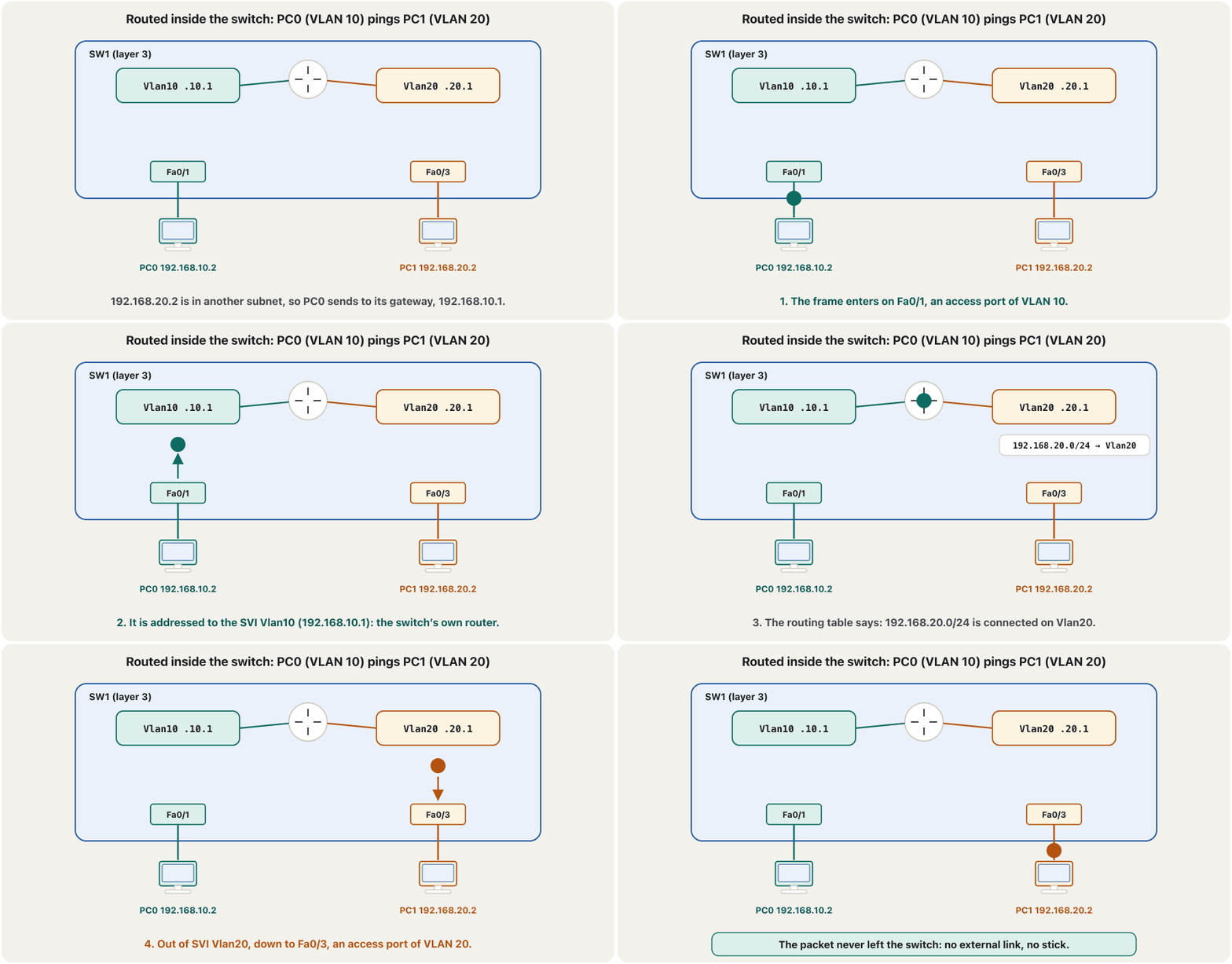
PC0 (VLAN 10) pings PC1 (VLAN 20). PC0 sends the frame to its gateway, 192.168.10.1 — the switch’s own SVI. The switch looks up 192.168.20.2 in its routing table, finds 192.168.20.0/24 connected on Vlan20, and sends the packet out of an access port of VLAN 20. The packet never leaves the switch: no external link, no U-turn on a stick.
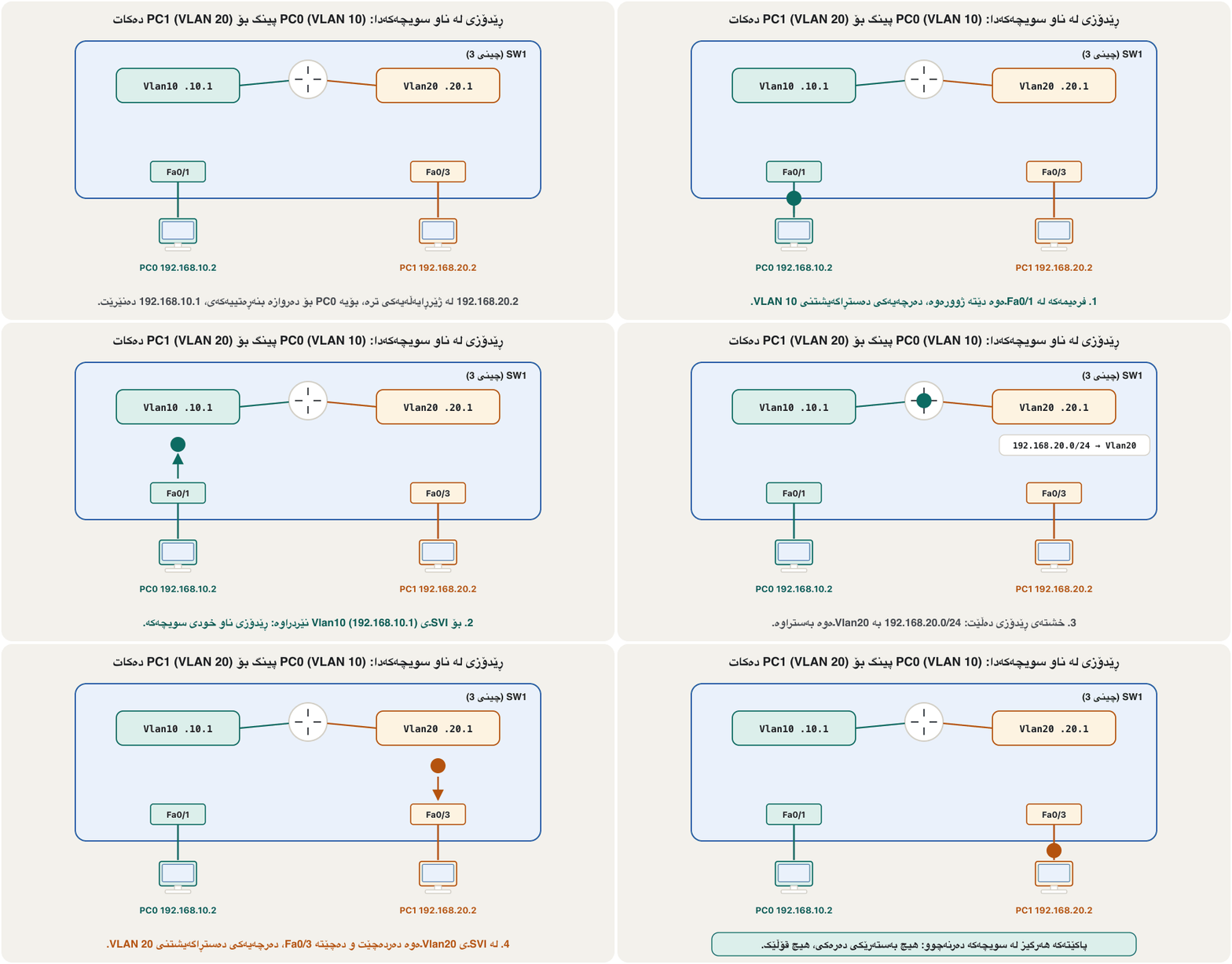
PC0 (VLAN 10) بۆ PC1 (VLAN 20) دەکات. PC0 دەنێرێت بۆ ، 192.168.10.1 — SVIـی خودی . لە بەدوای 192.168.20.2دا دەگەڕێت، دەبینێت 192.168.20.0/24 بە Vlan20ـەوە بەستراوە و لە VLAN 20ـەوە دەنێرێتە دەرەوە. هەرگیز لە دەرناچێت: هیچ بەستەرێکی دەرەکی، هیچ سووڕانەوەیەک لەسەر قۆڵ.
Check Lab 1تاقیکردنەوەی 1 بپشکنە
show ip interface brief must show Vlan10 and Vlan20 up / up with their addresses. show ip route must show the two VLAN subnets as connected (C) routes. A ping from PC0 to PC1 then gets replies with TTL=127: one routing hop, inside the switch. The first request may time out while ARP runs: PC0 asks for the SVI’s MAC address, and the switch asks for PC1’s.
show ip interface brief دەبێت Vlan10 و Vlan20 بە up / up و ناونیشانەکانیانەوە پیشان بدات. show ip route دەبێت هەردوو VLANـەکان وەک (C) پیشان بدات. پاشان لە PC0ـەوە بۆ PC1 وەڵام بە TTL=127 وەردەگرێت: یەک ، لە ناو . لەوانەیە یەکەم داواکاری کاتی بەسەر بچێت، چونکە هێشتا کار دەکات: PC0 بەدوای SVIـەکەدا دەگەڕێت و بەدوای هی PC1دا.
SW1#show ip interface brief
Interface              IP-Address      OK? Method Status                Protocol
FastEthernet0/1        unassigned      YES unset  up                    up
FastEthernet0/2        unassigned      YES unset  up                    up
FastEthernet0/3        unassigned      YES unset  up                    up
FastEthernet0/4        unassigned      YES unset  up                    up
Vlan1                  unassigned      YES unset  administratively down down
Vlan10                 192.168.10.1    YES manual up                    up
Vlan20 192.168.20.1 YES manual up upSW1#show ip route
Gateway of last resort is not set
C 192.168.10.0/24 is directly connected, Vlan10
C 192.168.20.0/24 is directly connected, Vlan20The 3560 in Packet Tracer runs an older IOS 12.2, which lists only the C routes. On IOS 15 and IOS XE switches such as the 3650, each SVI also adds an L (local) route for its own address, exactly as on a router (connected and local routes).
3560 لە Packet Tracerـدا IOS 12.2ـی کۆنتر کار پێ دەکات کە تەنیا ڕێگەکانی C ڕیز دەکات. لەسەر IOS 15 و IOS XE وەک 3650، هەر SVIـێک ڕێگەیەکی L (ناوخۆیی)ـش بۆ ناونیشانی خۆی زیاد دەکات، ڕێک وەک (ڕێگە بەستراو و ناوخۆییەکان).
C:\>ping 192.168.20.2

Pinging 192.168.20.2 with 32 bytes of data:

Request timed out.
Reply from 192.168.20.2: bytes=32 time<1ms TTL=127
Reply from 192.168.20.2: bytes=32 time<1ms TTL=127
Reply from 192.168.20.2: bytes=32 time<1ms TTL=127

Ping statistics for 192.168.20.2:
    Packets: Sent = 4, Received = 3, Lost = 1 (25% loss),
Approximate round trip times in milli-seconds:
Minimum = 0ms, Maximum = 0ms, Average = 0msRouted ports: no switchportدەرچە ڕێدۆزییەکان: no switchport
A layer 3 switch can also turn one physical port into a routed port, a port that works like a router interface: it belongs to no VLAN and has its own IP address. no switchport does the change. Routed ports join the layer 3 switch to an edge router or to another layer 3 switch. A default route then sends traffic for other networks to the router (default routes); the router needs routes back to the VLAN subnets (static routes).
دەتوانێت یەک فیزیکیش بکات بە ، کە وەک کار دەکات: سەر بە هیچ نییە و خۆی هەیە. no switchport ئەم گۆڕانکارییە دەکات. بە لێوار یان بە ترەوە دەبەستن. پاشان هاتوچۆی تر دەنێرێت بۆ (ڕێگەی بنەڕەتی)؛ ڕێگەی گەڕانەوەی بۆ VLANـەکان پێویستە (ڕێگە جێگیرەکان).
SW1(config)#interface gigabitEthernet 0/1
SW1(config-if)#no switchport
SW1(config-if)#ip address 10.0.0.1 255.255.255.252
SW1(config-if)#no shutdown
SW1(config-if)#exit
SW1(config)#ip route 0.0.0.0 0.0.0.0 10.0.0.2
SW1(config)#end
SW1#copy running-config startup-config
Explain the codeڕوونکردنەوەی کۆدەکە
- Lineدێڕی 2
From here G0/1 is a layer 3 port: switchport commands no longer apply to it.
لێرەوە G0/1 چینی 3ـە: switchport ئیتر لەسەری کار ناکەن.
- Lineدێڕی 6
Everything not in the routing table goes to R2.
هەموو شتێک کە لە نییە دەچێت بۆ R2.
Lab 2: a layer 3 core and a layer 2 access switchتاقیکردنەوەی 2: سویچی چینی 3 لە ناوەند و سویچێکی چینی 2ی دەستڕاگەیشتن
Layer 3 switches are expensive, so a typical design has one layer 3 switch in the middle and cheaper layer 2 switches for the PCs, joined by trunks. The VLANs exist on every switch, the SVIs and ip routing only on the layer 3 switch. Here is a practice lab: SW1 is a 3560 and SW2 a 2960, joined on Fa0/24 by a trunk. On both switches VLAN 10 uses Fa0/1–8 and Fa0/10, VLAN 20 uses Fa0/11–15 and Fa0/17. Each switch has one PC per VLAN, and every PC uses its VLAN’s SVI on SW1 as gateway.
گرانن، بۆیە نەخشەیەکی ئاسایی یەک لە ناوەڕاستدا و چینی 2ی هەرزانتر بۆ PCـەکان هەیە، کە بە پێکەوە بەستراون. لەسەر هەموو هەن، SVI و ip routing تەنیا لەسەر . ئەمە تاقیکردنەوەیەکی ڕاهێنانە: SW1 3560 و SW2 2960ـە، لەسەر Fa0/24 بە بەستراون. لەسەر هەردوو VLAN 10 Fa0/1–8 و Fa0/10 بەکار دەهێنێت و VLAN 20 Fa0/11–15 و Fa0/17. هەر بۆ هەر PCـێکی هەیە و هەموو PCـێک SVIـی لەسەر SW1 وەک بەکار دەهێنێت.
The same core-plus-access idea, with DHCP from a router added, is the first exam task of the campus project.
هەمان بیرۆکەی ناوەند و دەستڕاگەیشتن، لەگەڵ DHCP لە ، یەکەم ئەرکی تاقیکردنەوەی پرۆژەی کەمپەسـە.
Step 1: the layer 2 access switchهەنگاوی 1: سویچی چینی 2ی دەستڕاگەیشتن
SW2 needs only VLANs, access ports and the trunk. interface range takes lists with commas, so the lab’s port plan fits in two commands. SW2 needs no SVIs for VLAN 10 and VLAN 20 — the gateways are on SW1.
SW2 تەنیا ، و پێویستە. interface range لیستی بە کۆما وەردەگرێت، بۆیە نەخشەی تاقیکردنەوەکە لە دوو جێی دەبێتەوە. SW2 بۆ VLAN 10 و VLAN 20 هیچ SVIـێکی ناوێت — ناونیشانەکانی لەسەر SW1ـن.
SW2(config)#vlan 10
SW2(config-vlan)#name IT
SW2(config-vlan)#vlan 20
SW2(config-vlan)#name Marketing
SW2(config-vlan)#vlan 999
SW2(config-vlan)#name Native
SW2(config-vlan)#exit
SW2(config)#interface range fastEthernet 0/1 - 8, fastEthernet 0/10
SW2(config-if-range)#switchport mode access
SW2(config-if-range)#switchport access vlan 10
SW2(config-if-range)#exit
SW2(config)#interface range fastEthernet 0/11 - 15, fastEthernet 0/17
SW2(config-if-range)#switchport mode access
SW2(config-if-range)#switchport access vlan 20
SW2(config-if-range)#exit
SW2(config)#interface fastEthernet 0/24
SW2(config-if)#switchport mode trunk
SW2(config-if)#switchport trunk native vlan 999
SW2(config-if)#end
SW2#copy running-config startup-config
Explain the codeڕوونکردنەوەی کۆدەکە
- Lineدێڕی 8
A range can mix a span and single ports, separated by a comma.
interface rangeدەتوانێت چەند یەک لە دوای یەک (0/1 - 8) و تاک (0/10) تێکەڵ بکات؛ بە کۆما لە یەک جیا دەکرێنەوە.- Lineدێڕی 16-18
The trunk to SW1; native VLAN 999 (unused) on both ends.
بۆ SW1؛ 999 (بەکارنەهێنراو) لەسەر هەردوو سەر.
Step 2: the layer 3 core switchهەنگاوی 2: سویچی چینی 3ـی ناوەند
SW1 gets the same VLANs and access ports, and three more things: the trunk on Fa0/24 — on a 3560 with switchport trunk encapsulation dot1q before switchport mode trunk, on that same port (why) —, one SVI per VLAN, and ip routing. Then ping from PC0 on SW2 to PC3 on SW1: the frame crosses the trunk tagged 10, is routed inside SW1, and reaches PC3 in VLAN 20.
SW1 هەمان و وەردەگرێت و سێ شتی تریش: لەسەر Fa0/24 — لەسەر 3560 switchport trunk encapsulation dot1q پێش switchport mode trunk، لەسەر هەمان (بۆچی) —، بۆ هەر SVIـێک و ip routing. پاشان لە PC0 لەسەر SW2ـەوە بۆ PC3 لەسەر SW1 بکە: بە تاگی 10 بە تێدەپەڕێت، لە ناو SW1 دەکرێت و لە VLAN 20دا دەگاتە PC3.
SW1(config)#vlan 10
SW1(config-vlan)#name IT
SW1(config-vlan)#vlan 20
SW1(config-vlan)#name Marketing
SW1(config-vlan)#vlan 999
SW1(config-vlan)#name Native
SW1(config-vlan)#exit
SW1(config)#interface range fastEthernet 0/1 - 8, fastEthernet 0/10
SW1(config-if-range)#switchport mode access
SW1(config-if-range)#switchport access vlan 10
SW1(config-if-range)#exit
SW1(config)#interface range fastEthernet 0/11 - 15, fastEthernet 0/17
SW1(config-if-range)#switchport mode access
SW1(config-if-range)#switchport access vlan 20
SW1(config-if-range)#exit
SW1(config)#interface fastEthernet 0/24
SW1(config-if)#switchport trunk encapsulation dot1q
SW1(config-if)#switchport mode trunk
SW1(config-if)#switchport trunk native vlan 999
SW1(config-if)#exit
SW1(config)#interface vlan 10
SW1(config-if)#ip address 192.168.10.1 255.255.255.0
SW1(config-if)#no shutdown
SW1(config-if)#interface vlan 20
SW1(config-if)#ip address 192.168.20.1 255.255.255.0
SW1(config-if)#no shutdown
SW1(config-if)#exit
SW1(config)#ip routing
SW1(config)#end
SW1#copy running-config startup-config
Explain the codeڕوونکردنەوەی کۆدەکە
- Lineدێڕی 17-18
On the trunk port itself: encapsulation first, then trunk mode.
لەسەر خودی : سەرەتا encapsulation، پاشان باری trunk.
- Lineدێڕی 21-26
The gateways of VLAN 10 and VLAN 20.
ناونیشانەکانی VLAN 10 و VLAN 20.
- Lineدێڕی 28
Typed once. Typing it twice changes nothing.
یەک جار دەنووسرێت. دوو جار نووسینی هیچ ناگۆڕێت.
When an SVI stays downکاتێک SVIـێک down دەمێنێتەوە
An SVI is up/up only when three things are true: the VLAN exists on the switch, the SVI is not shut down, and at least one port of that VLAN is up — an access port with a device on it, or a trunk that carries the VLAN. Cisco puts it simply: an SVI does not become active until it is associated with a physical port. An SVI that is up/down cannot work as a gateway. Typical causes: the VLAN was never created (creating interface vlan 30 does not create VLAN 30), no PC is connected in that VLAN yet, or the trunk does not carry it.
SVI تەنیا کاتێک up/upـە کە سێ شت ڕاست بن: لەسەر هەیە، SVIـەکە نەکوژاوەتەوە و لانیکەم یەک ئەو upـە — کە ئامێرێکی پێوەیە، یان کە هەڵدەگرێت. Cisco بە ساکاری دەڵێت: SVI تا بە فیزیکییەوە نەبەسترێتەوە چالاک نابێت. SVIـێکی up/down ناتوانێت وەک کار بکات. هۆکارە ئاساییەکان: هەرگیز دروست نەکراوە (دروستکردنی interface vlan 30 VLAN 30 دروست ناکات)، هێشتا هیچ PCـێک لەو نەبەستراوە، یان هەڵی ناگرێت.
SW1(config)#vlan 30
SW1(config-vlan)#name Guests
SW1(config-vlan)#exit
SW1(config)#interface fastEthernet 0/20
SW1(config-if)#switchport mode access
SW1(config-if)#switchport access vlan 30
SW1(config-if)#end
SW1#copy running-config startup-configThree ways to route between VLANsسێ ڕێگەی ڕێدۆزیی نێوان VLANـەکان
All three methods route between VLANs; they differ in links, speed and scale. Cisco’s course describes the layer 3 switch as the most scalable choice for medium and large networks — much faster because everything is switched and routed in hardware, with no external link to a router — and its only drawback as cost. Router-on-a-stick suits small and medium networks; the legacy way survives only in textbooks.
هەر سێ ڕێگەکە لە نێوان دەکەن؛ لە بەستەر، خێرایی و فراوانبووندا جیاوازن. کۆرسی CCNAـی Cisco بە فراوانترین هەڵبژاردە بۆ مامناوەند و گەورە دادەنێت — زۆر خێراترە چونکە و هەردووکیان لە دەکرێن، بێ بەستەری دەرەکی بۆ — و تاکە کەموکوڕییەکەی نرخەکەیەتی. بۆ بچووک و مامناوەند گونجاوە؛ ڕێگا کۆنەکە ئەمڕۆ تەنیا لە کتێبەکاندا دەبینرێت.
| Methodڕێگە | Legacyکۆن | Router-on-a-stick | Layer 3 switch |
|---|---|---|---|
| Links to the routerبەستەر بۆ | one per VLANیەکێک بۆ هەر | one trunkیەک | none — the router is insideهیچ — لە ناوەوەیە |
| Gateways onناونیشانەکانی لەسەر | physical router interfaces فیزیکیی | router subinterfaces | SVIsSVIـەکان |
| Routing done in لە | router software | router software | switch hardware |
| Speedخێرایی | mediumمامناوەند | lowest: one shared link, crossed twiceکەمترین: یەک بەستەری هاوبەش کە دوو جار پێیدا تێدەپەڕێت | highestزۆرترین |
| Scaleفراوانبوون | a few VLANsچەند | small/medium; about 50 VLANs at mostبچووک/مامناوەند؛ تا نزیکەی 50 | medium to large campusکەمپەسی مامناوەند تا گەورە |
| Costنرخ | many router portsزۆر | cheapestهەرزانترین | a layer 3 switch costs more گرانترە |
Common mistakesهەڵە باوەکان
Exercisesڕاهێنانەکان
A 3560 (SW1) is joined on Fa0/1 to Fa0/1 of a 2960 (SW2). On SW2 a PC on Fa0/2 is in VLAN 10 (192.168.10.2), one on Fa0/3 in VLAN 20 (192.168.20.2) and one on Fa0/4 in VLAN 30 (192.168.30.2). Make every PC able to ping the others. Write both configurations and each PC’s gateway.
3560 (SW1) لەسەر Fa0/1 بە Fa0/1ـی 2960 (SW2)ـەوە بەستراوە. لەسەر SW2 PCـێک لەسەر Fa0/2 لە VLAN 10 (192.168.10.2)، یەکێک لەسەر Fa0/3 لە VLAN 20 (192.168.20.2) و یەکێک لەسەر Fa0/4 لە VLAN 30 (192.168.30.2)دایە. وا بکە هەموو PCـێک بتوانێت بۆ ئەوانی تر بکات. هەردوو و هەر PCـێک بنووسە.
Hintئاماژە
Start from Lab 2 and add VLAN 30 everywhere.
لە تاقیکردنەوەی 2ـەوە دەست پێ بکە و VLAN 30 لە هەموو شوێنێک زیاد بکە.
Show answerوەڵامەکە پیشان بدە
SW1(config)#vlan 10
SW1(config-vlan)#vlan 20
SW1(config-vlan)#vlan 30
SW1(config-vlan)#vlan 999
SW1(config-vlan)#name Native
SW1(config-vlan)#exit
SW1(config)#interface fastEthernet 0/1
SW1(config-if)#switchport trunk encapsulation dot1q
SW1(config-if)#switchport mode trunk
SW1(config-if)#switchport trunk native vlan 999
SW1(config-if)#exit
SW1(config)#interface vlan 10
SW1(config-if)#ip address 192.168.10.1 255.255.255.0
SW1(config-if)#no shutdown
SW1(config-if)#interface vlan 20
SW1(config-if)#ip address 192.168.20.1 255.255.255.0
SW1(config-if)#no shutdown
SW1(config-if)#interface vlan 30
SW1(config-if)#ip address 192.168.30.1 255.255.255.0
SW1(config-if)#no shutdown
SW1(config-if)#exit
SW1(config)#ip routing
SW1(config)#end
SW1#copy running-config startup-config

SW2(config)#vlan 10
SW2(config-vlan)#vlan 20
SW2(config-vlan)#vlan 30
SW2(config-vlan)#vlan 999
SW2(config-vlan)#name Native
SW2(config-vlan)#exit
SW2(config)#interface fastEthernet 0/2
SW2(config-if)#switchport mode access
SW2(config-if)#switchport access vlan 10
SW2(config-if)#interface fastEthernet 0/3
SW2(config-if)#switchport mode access
SW2(config-if)#switchport access vlan 20
SW2(config-if)#interface fastEthernet 0/4
SW2(config-if)#switchport mode access
SW2(config-if)#switchport access vlan 30
SW2(config-if)#interface fastEthernet 0/1
SW2(config-if)#switchport mode trunk
SW2(config-if)#switchport trunk native vlan 999
SW2(config-if)#end
SW2#copy running-config startup-config
Gateways: 192.168.10.1, 192.168.20.1 and 192.168.30.1. The VLANs must exist on SW1 too, otherwise its SVIs stay down; on the 3560 the encapsulation comes before trunk mode; native VLAN 999 (unused) on both ends of the trunk, as in Lab 2.
ناونیشانەکانی : 192.168.10.1، 192.168.20.1 و 192.168.30.1. دەبێت لەسەر SW1ـیش هەبن، ئەگەرنا SVIـەکانی down دەمێننەوە؛ لەسەر 3560 encapsulation پێش باری trunk دێت؛ 999 (بەکارنەهێنراو) لەسەر هەردوو سەری ، وەک تاقیکردنەوەی 2.
A student’s solution of this lab ends with these lines on the 3560. Find three problems and say what the correct lines are.
چارەسەری قوتابییەک بۆ ئەم تاقیکردنەوەیە بەم دێڕانە لەسەر 3560 کۆتایی دێت. سێ کێشە بدۆزەوە و بڵێ دێڕە دروستەکان چین.
Switch(config)#interface fastEthernet 0/24
Switch(config-if)#switchport mode access
Switch(config-if)#switchport mode trunk
Command rejected: An interface whose trunk encapsulation is "Auto" can not be configured to "trunk" mode.
Switch(config-if)#exit
Switch(config)#ip routing
Switch(config)#interface range fastEthernet 0/1-11
Switch(config-if-range)#switchport trunk encapsulation dot1q
Switch(config-if-range)#exit
Switch(config)#ip routing
Show answerوەڵامەکە پیشان بدە
- The encapsulation was put on Fa0/1–11 (access ports) — it belongs on Fa0/24, before
switchport mode trunk, which the 3560 had refused. switchport mode accessbeforeswitchport mode trunkon Fa0/24 is not needed.ip routingis typed twice; once is enough.
- encapsulation لەسەر Fa0/1–11 () دانرا — جێگەی لەسەر Fa0/24ـە، پێش
switchport mode trunk، کە 3560 ڕەتی کردبووەوە. switchport mode accessپێشswitchport mode trunkلەسەر Fa0/24 پێویست نییە.ip routingدوو جار نووسراوە؛ یەک جار بەسە.
Switch(config)#interface fastEthernet 0/24
Switch(config-if)#switchport trunk encapsulation dot1q
Switch(config-if)#switchport mode trunkA student planned these commands for a layer 3 switch: Fa0/1–2 in VLAN 10 (192.168.1.0/24) and Fa0/3–4 in VLAN 20 (192.168.2.0/24). Four lines are wrong. Find them and say what each would do.
قوتابییەک ئەم بۆ ئامادە کردووە: Fa0/1–2 لە VLAN 10 (192.168.1.0/24) و Fa0/3–4 لە VLAN 20 (192.168.2.0/24). چوار دێڕ هەڵەن. بیاندۆزەوە و بڵێ هەریەکەیان چی دەکات.
interface vlan 20
 ip address 192.168.1.1 255.255.255.0
 no shutdown
 exit
interface fastEthernet 0/1-2
 switchport access vlan 10
 exit
interface vlan 20
 ip address 192.168.2.1 255.255.255.0
 no shutdown
 exit
interface fastEthernet 0/3-4
 switchport access vlan 2
 exit
ip routing
end
Show answerوەڵامەکە پیشان بدە
- Line 1: the first SVI must be
interface vlan 10. As planned, the secondinterface vlan 20block only replaces Vlan20’s address with 192.168.2.1, so VLAN 10 is left with no SVI and no gateway. - Lines 5 and 12:
interface fastEthernet 0/1-2and0/3-4need the wordrange. Without it IOS rejects the line (“% Invalid input detected”), and the port commands under it never reach the ports. - Line 13:
switchport access vlan 2must beswitchport access vlan 20; as planned, Fa0/3–4 would land in a new VLAN 2 that has no SVI.
- دێڕی 1: یەکەم SVI دەبێت
interface vlan 10بێت. وەک ئامادە کراوە، بەشی دووەمیinterface vlan 20تەنیا ناونیشانی Vlan20 دەگۆڕێت بۆ 192.168.2.1، بۆیە VLAN 10 بێ SVI و بێ دەمێنێتەوە. - دێڕەکانی 5 و 12:
interface fastEthernet 0/1-2و0/3-4پێویستیان بە وشەیrangeهەیە. بەبێ ئەو IOS دێڕەکە ڕەت دەکاتەوە («% Invalid input detected») و ژێرەوەی هەرگیز ناگەنە . - دێڕی 13:
switchport access vlan 2دەبێتswitchport access vlan 20بێت؛ وەک ئامادە کراوە، Fa0/3–4 دەکەونە ناو VLAN 2ـێکی نوێ کە SVIـی نییە.
SW1(config)#vlan 10
SW1(config-vlan)#vlan 20
SW1(config-vlan)#exit
SW1(config)#interface vlan 10
SW1(config-if)#ip address 192.168.1.1 255.255.255.0
SW1(config-if)#no shutdown
SW1(config-if)#interface vlan 20
SW1(config-if)#ip address 192.168.2.1 255.255.255.0
SW1(config-if)#no shutdown
SW1(config-if)#exit
SW1(config)#interface range fastEthernet 0/1 - 2
SW1(config-if-range)#switchport mode access
SW1(config-if-range)#switchport access vlan 10
SW1(config-if-range)#interface range fastEthernet 0/3 - 4
SW1(config-if-range)#switchport mode access
SW1(config-if-range)#switchport access vlan 20
SW1(config-if-range)#exit
SW1(config)#ip routing
SW1(config)#end
SW1#copy running-config startup-configComplete the rule in your own words: ip routing moves packets between VLANs only when …
یاساکە بە وشەی خۆت تەواو بکە: ip routing تەنیا کاتێک لە نێوان دەگوازێتەوە کە …
Show answerوەڵامەکە پیشان بدە
… every VLAN has its own subnet and an SVI that is up/up with an address in that subnet, and every host has that SVI address as its default gateway. The command is typed once, in global configuration mode.
… هەموو خۆی و SVIـێکی up/upـی بە ناونیشانێک لەو هەبێت و هەموو ئەو ناونیشانەی SVI وەک هەبێت. یەک جار، لە دەنووسرێت.
For each case choose legacy routing, router-on-a-stick or a layer 3 switch, and give one reason: (a) a shop with 2 VLANs and an old router with one free port; (b) a university building with 60 VLANs; (c) a training lab that must show how 802.1Q tags reach a router.
بۆ هەر حاڵەتێک کۆن، یان هەڵبژێرە و هۆکارێک بڵێ: (a) دوکانێک بە 2 و کۆن بە یەک بەتاڵ؛ (b) بینایەکی زانکۆ بە 60 ؛ (c) تاقیگەیەکی ڕاهێنان کە دەبێت پیشان بدات تاگەکانی 802.1Q چۆن دەگەنە .
Show answerوەڵامەکە پیشان بدە
- (a) Router-on-a-stick: one free port is enough for both VLANs.
- (b) A layer 3 switch: many VLANs and much traffic; router-on-a-stick does not scale beyond about 50 VLANs.
- (c) Router-on-a-stick: the subinterfaces show the tags arriving at the router.
- (a) : یەک بەتاڵ بۆ هەردوو بەسە.
- (b) : زۆر و هاتوچۆی زۆر؛ لە نزیکەی 50 زیاتر گەورە نابێت.
- (c) : پیشان دەدەن تاگەکان چۆن دەگەنە .
Summaryکورتە
- A layer 3 switch switches inside VLANs and routes between them in hardware (3560/3650 in Packet Tracer).
- One SVI per VLAN (
interface vlan 10, address,no shutdown) is that VLAN’s default gateway;ip routingturns routing on (off by default on Catalyst switches). - An SVI is up/up only if its VLAN exists, it is not shut, and a port of that VLAN is up.
- Routed ports (
no switchport+ IP) join the switch to routers; access switches join the core with trunks (on a 3560: encapsulation dot1q first). - Compared with router-on-a-stick and the legacy way, it is the fastest and most scalable; its drawback is cost.
- Common mistakes: no
ip routing, two SVIs in one subnet, an SVI down, trunk/access mismatches, gateways missing on the PCs.
- لە ناو دەکات و لە نێوانیاندا لە دەکات (3560/3650 لە Packet Tracer).
- بۆ هەر یەک SVI (
interface vlan 10، ناونیشان،no shutdown) ئەو ؛ip routingهەڵدەکات (لەسەر Catalyst بە بنەڕەت کوژاوەیە). - SVI تەنیا کاتێک up/upـە کە هەبێت، نەکوژابێتەوە و ئەو up بێت.
- (
no switchport+ IP) بە دەبەستن؛ دەستڕاگەیشتن بە بە ناوەندەوە دەبەسترێن (لەسەر 3560: سەرەتا encapsulation dot1q). - بە بەراورد لەگەڵ و ڕێگا کۆنەکە، خێراترین و فراوانترینە؛ کەموکوڕییەکەی نرخە.
- هەڵە باوەکان: نەبوونی
ip routing، دوو SVI لە یەک ، SVIـی down، نەگونجانی trunk/access، نەبوونی لەسەر PCـەکان.
Next: keep redundant switch links without loops — Spanning Tree and EtherChannel.
دواتر: بەستەری یەدەگی نێوان بەبێ ئەڵقە ڕابگرە — پرۆتۆکۆڵی داری داپۆشەر و EtherChannel.
Lesson complete!وانەکە تەواو بوو!
Well done. Review the key terms, then go on to the next lesson.دەستخۆش. سەیرێکی زاراوە سەرەکییەکان بکەرەوە، پاشان بڕۆ بۆ وانەی داهاتوو.
Key termsزاراوە سەرەکییەکان
Redundant Links: Spanning Tree and EtherChannelبەستەری یەدەگ: پرۆتۆکۆڵی داری داپۆشەر و EtherChannel
Related lecturesوانە پەیوەندیدارەکان
- Bridges and Switchesپردەکانی ڕایەڵە و سویچەکان
- Your First Router: Interfaces and Addressesیەکەم ڕێدۆز: نێوبەستەکان و ناونیشانەکان
- Static Routesڕێگە جێگیرەکان
- Default Routes and Floating Static Routesڕێگە بنەڕەتییەکان و ڕێگە جێگیرە یەدەگەکان
- Redundant Links: Spanning Tree and EtherChannelبەستەری یەدەگ: پرۆتۆکۆڵی داری داپۆشەر و EtherChannel
- Project: A Campus Network with VLANs and DHCPپڕۆژە: ڕایەڵەی کەمپەسێک بە VLAN و DHCP
References and further readingسەرچاوەکان و خوێندنەوەی زیاتر
- Cisco Press, SRWE: Inter-VLAN Routing Operation — the three methods and the advantages of layer 3 switches
- Cisco Press, SRWE: Inter-VLAN Routing using Layer 3 Switches — VLANs, SVIs, ip routing, routed port with no switchport
- Cisco Catalyst 9300 (IOS XE 17.12) Interface and Hardware Configuration Guide: Configuring Interface Characteristics — SVIs, routed ports, SVI autostate
- Cisco Catalyst 9300 (IOS XE 17.12) VLAN Configuration Guide: Configuring VLAN Trunks
- Cisco Catalyst 9300 (IOS XE 17.12) VLAN Configuration Guide: Configuring Layer 3 Subinterfaces
- Cisco Catalyst 9300 (IOS XE 17.12) IP Routing Configuration Guide: Configuring IP Unicast Routing — IP routing is disabled by default
This lecture is a first edition. The Kurdish text and terminology are waiting for review by Kurdish IT teachers.ئەم وانەیە چاپی یەکەمە. دەقە کوردییەکە و زاراوەکانی چاوەڕێی پێداچوونەوەی مامۆستایانی کوردی بواری IT ن.