Chapterبەش 5 · Lectureوانە 5.1
DHCP on a Cisco Router and DHCP RelayDHCP لەسەر ڕێدۆزێکی Cisco و گوازەرەوەی DHCP
Make a Cisco router the DHCP server of a LAN: excluded addresses, the pool with network, default-router, dns-server and lease, optional settings (domain name, WINS, option numbers, service dhcp), the PC side, show ip dhcp binding and show ip dhcp pool, why the router pings before it offers (address conflicts), relaying with ip helper-address across a router and between VLANs, one pool per VLAN, DHCP snooping and DHCPv6 in brief, and the mistakes of a real lab log.
Cisco بکە بە : ناونیشانە جیاکراوەکان، بە network، default-router، dns-server و lease، ڕێکخستنە ئارەزوومەندانەکان (، WINS، ژمارەی هەڵبژاردەکان، service dhcp)، لای PC، show ip dhcp binding و show ip dhcp pool، بۆچی پێش پێشکەشکردن دەکات (ناکۆکیی ناونیشان)، گواستنەوە بە ip helper-address بە و لە نێوان VLANـەکاندا، یەک بۆ هەر VLANـێک، و DHCPv6 بە کورتی و هەڵەکانی تۆماری تاقیکردنەوەیەکی ڕاستەقینە.
What you will learnچی فێر دەبیت
- Configure a Cisco router as a DHCP server with exclusions, a pool, a gateway, DNS and a lease.
- Verify leases with show ip dhcp binding and show ip dhcp pool, and explain address conflicts.
- Relay DHCP across a router and between VLANs with ip helper-address on the right interface.
- Serve several VLANs from one router with one pool per VLAN.
- Recognise and fix the typical mistakes of a DHCP lab.
- Cisco وەک ڕێک بخەیت بە جیاکردنەوە، ، ، DNS و .
- بە show ip dhcp binding و show ip dhcp pool بپشکنیت و ناکۆکیی ناونیشان ڕوون بکەیتەوە.
- بە ip helper-address لەسەر دروست بە و لە نێوان VLANـەکاندا بگوازیتەوە.
- چەند VLANـێک لە یەک بە یەک بۆ هەر VLANـێک خزمەت بکەیت.
- هەڵە باوەکانی تاقیکردنەوەیەکی بناسیتەوە و چاکیان بکەیت.
A router as the DHCP serverڕێدۆز وەک ڕاژەکاری DHCP
DHCP hands every device its address, mask, gateway and DNS server automatically: the device broadcasts a request and a DHCP server answers with a free address. You learned the four messages in DORA and the lease in the concept lesson. Here you make a Cisco router be that server.
ناونیشان، ماسک، و بە خۆکاری دەداتە هەموو ئامێرێک: ئامێرەکە داواکارییەک بە دەنێرێت و بە ناونیشانێکی ئازاد وەڵام دەداتەوە. چوار پەیامەکەت لە DORA و کرێی DHCP لە وانە چەمکییەکەدا ناسی. لێرەدا Cisco دەکەیتە ئەو .
This is common in small offices and shops, where there is no separate server. The DHCP server inside Cisco IOS is switched on by default; it starts to lend addresses as soon as you create a pool whose network matches one of the router’s interfaces.
ئەمە لە نووسینگە و دوکانە بچووکەکاندا باوە، کە جیایان نییە. لە ناو بە بنەڕەت هەڵکراوە؛ هەر کە دروست بکەیت کە لەگەڵ یەکێک لە بگونجێت، دەست دەکات بە قەرزدانی ناونیشان.
The DHCP commands of Cisco IOSفەرمانەکانی DHCPـی Cisco IOS
A DHCP server on IOS needs one command in global configuration mode and a small block of commands for the pool. Notice the new prompt: ip dhcp pool takes you into DHCP pool configuration mode, R1(dhcp-config)#.
لەسەر IOS پێویستی بە یەک لە و بلۆکێکی بچووک بۆ هەیە. سەرنجی پرۆمپتە نوێیەکە بدە: ip dhcp pool دەتباتە باری ڕێکخستنی ، R1(dhcp-config)#.
| Command | Modeبار | What it doesچی دەکات |
|---|---|---|
ip dhcp excluded-address 192.168.2.1 192.168.2.10 | (config)# | Never lend these addresses (the router, servers, printers).ئەم ناونیشانانە هەرگیز بە قەرز مەدە (، ، ). |
ip dhcp pool LAN | (config)# | Create a pool called LAN and enter it. The name is only a label. بە ناوی LAN دروست بکە و بچۆ ناوی. ناوەکە تەنیا ناونیشانێکە. |
network 192.168.2.0 255.255.255.0 | (dhcp-config)# | The addresses to lend, and the mask the clients get.ئەو ناونیشانانەی بە قەرز دەدرێن و ئەو ماسکەی وەریدەگرن. |
default-router 192.168.2.1 | (dhcp-config)# | The clients’ default gateway: the router’s own interface address. : ناونیشانی خودی . |
dns-server 8.8.8.8 | (dhcp-config)# | The DNS server the clients will ask (up to eight).ئەو کە پرسیاری لێ دەکەن (تا هەشت). |
lease 7 | (dhcp-config)# | Lease time in days [hours [minutes]]; the default is one day.درێژیی بە ڕۆژ [کاتژمێر [خولەک]]؛ بنەڕەتەکەی یەک ڕۆژە. |
Lab: the router and its LANتاقیکردنەوە: ڕێدۆزەکە و ڕایەڵە ناوچەییەکەی
Build a 1941 router R1, a 2960 switch SW1, two PCs and a printer in Packet Tracer. The LAN is 192.168.2.0/24 and R1’s G0/0 is its gateway, 192.168.2.1. The printer keeps a fixed address, 192.168.2.10, typed by hand. (You can also join one PC straight to the router with a crossover cable; a switch lets you add more PCs.)
لە Packet Tracerـدا 1941 بە ناوی R1، 2960 بە ناوی SW1، دوو PC و دروست بکە. 192.168.2.0/24ـە و G0/0ـی R1 ، 192.168.2.1. ناونیشانێکی جێگیر دەهێڵێتەوە، 192.168.2.10، کە بە دەست نووسراوە. (دەتوانیت PCـێکیش ڕاستەوخۆ بە ببەستیتەوە بە ؛ ڕێگە دەدات PCـی زیاتر زیاد بکەیت.)
Step 1 — the interface. Give G0/0 its address and switch it on, as in your first router. This address matters twice: it is the PCs’ gateway, so the pool’s default-router must be exactly this address.
هەنگاوی 1 — . ناونیشان بدە بە G0/0 و هەڵی بکە، وەک لە یەکەم ڕێدۆزەکەت. ئەم ناونیشانە دوو جار گرنگە: PCـەکانە، بۆیە default-routerـی دەبێت ڕێک ئەم ناونیشانە بێت.
R1>enable
R1#configure terminal
R1(config)#interface g0/0
R1(config-if)#ip address 192.168.2.1 255.255.255.0
R1(config-if)#no shutdown
%LINK-5-CHANGED: Interface GigabitEthernet0/0, changed state to up
%LINEPROTO-5-UPDOWN: Line protocol on Interface GigabitEthernet0/0, changed state to up
R1(config-if)#exitStep 2: keep some addresses out of the poolهەنگاوی 2: هەندێک ناونیشان لە پووڵی ناونیشانەکە دەربهێنە
Devices that are set by hand — the router, servers, printers — must never get the same address from DHCP. Exclude a range with ip dhcp excluded-address <first> [<last>] in global configuration mode; one address alone needs no second number. Here 192.168.2.1–192.168.2.10 are kept for such devices.
ئەو ئامێرانەی بە دەست ڕێک دەخرێن — ، ، — هەرگیز نابێت هەمان ناونیشان لە وەربگرن. زنجیرەیەک ناونیشان بە ip dhcp excluded-address <first> [<last>] لە جیا بکەرەوە؛ یەک ناونیشان بەتەنیا ژمارەی دووەمی ناوێت. لێرەدا 192.168.2.1–192.168.2.10 بۆ ئەو جۆرە ئامێرانە هێڵراونەتەوە.
R1(config)#ip dhcp excluded-address 192.168.2.1 192.168.2.10Real IOS never lends the router’s own interface address — it is excluded automatically. Excluding it yourself is still good practice and keeps Packet Tracer happy too. An excluded address must lie inside the pool’s network: ip dhcp excluded-address 192.168.1.2 does nothing for a 192.168.2.0/24 pool.
IOSـی ڕاستەقینە هەرگیز ناونیشانی خودی بە قەرز نادات — بە خۆکاری جیا دەکرێتەوە. جیاکردنەوەی بە دەستی خۆت هێشتا خوویەکی باشە و Packet Tracerـیش ڕازی دەکات. ناونیشانی جیاکراوە دەبێت لە ناو بێت: ip dhcp excluded-address 192.168.1.2 هیچ کارێک بۆ 192.168.2.0/24 ناکات.
Step 3: create the poolهەنگاوی 3: پووڵی ناونیشانەکە دروست بکە
Now create the pool and give it the network, the gateway, the DNS server and the lease. The pool name is free text — LAN, OFFICE, V10. (Avoid a misleading name such as vlan2 for a pool that has nothing to do with VLAN 2.)
ئێستا دروست بکە و ، ، و پێ بدە. ناوی دەقێکی ئازادە — LAN، OFFICE، V10. (خۆت لە ناوێکی هەڵخەڵەتێنەری وەک vlan2 بەدوور بگرە بۆ کە هیچ پەیوەندییەکی بە VLAN 2ـەوە نییە.)
R1(config)#ip dhcp pool LAN
R1(dhcp-config)#network 192.168.2.0 255.255.255.0
R1(dhcp-config)#default-router 192.168.2.1
R1(dhcp-config)#dns-server 8.8.8.8
R1(dhcp-config)#lease 7
R1(dhcp-config)#end
R1#copy running-config startup-config
Destination filename [startup-config]?
Building configuration...
[OK]
Explain the codeڕوونکردنەوەی کۆدەکە
- Lineدێڕی 2
The network address and mask of the LAN — never a host address such as 192.168.2.4.
و ماسکی — هەرگیز ناونیشانی وەک 192.168.2.4 نا.
- Lineدێڕی 4
8.8.8.8 is Google Public DNS; a company may give its own DNS server instead.
8.8.8.8 DNSـی گشتیی Googleـە؛ کۆمپانیایەک دەتوانێت لە جیاتی ئەوە DNSـی خۆی بدات.
- Lineدێڕی 5
Seven days.
lease 0 8= 8 hours,lease infinite= never expires; without the command, one day.حەوت ڕۆژ.
lease 0 8= 8 کاتژمێر،lease infinite= هەرگیز بەسەر ناچێت؛ بەبێ ، یەک ڕۆژ.
More pool settings: domain name, WINS and option numbersڕێکخستنی زیاتری پووڵی ناونیشان: ناوی دۆمەین، WINS و ژمارەی هەڵبژاردەکان
The four pool lines of Step 3 are what most LANs need. A pool can hand out more settings, all optional. domain-name example.com gives the clients a domain to add to short names: when a user types ping fileserver, the PC asks DNS for fileserver.example.com. netbios-name-server 192.168.2.5 names a WINS server, which turned old Windows NetBIOS names into addresses. WINS is legacy: Microsoft deprecated it in Windows Server 2022, and Windows Server 2025 is the last release that includes it.
ئەو چوار دێڕەی لە هەنگاوی 3ـدا ئەوەن کە زۆربەی پێویستیانە. دەتوانێت ڕێکخستنی زیاتریش بدات، هەموویان ئارەزوومەندانەن. domain-name example.com دەداتە کە دەیخەنە سەر ناوە کورتەکان: کاتێک بەکارهێنەرێک ping fileserver دەنووسێت، PCـەکە پرسیاری fileserver.example.com لە دەکات. netbios-name-server 192.168.2.5 WINS دیاری دەکات، کە ناوە کۆنەکانی NetBIOSـی لە Windowsـدا دەکردە ناونیشان. WINS کۆنە: Microsoft لە Windows Server 2022ـدا ڕایگەیاند کە وازی لێ دەهێنێت و Windows Server 2025 دوایین وەشانە کە تێیدایە.
R1(config)#ip dhcp pool LAN
R1(dhcp-config)#domain-name example.com
R1(dhcp-config)#netbios-name-server 192.168.2.5
R1(dhcp-config)#option 150 ip 192.168.2.6
R1(dhcp-config)#end
R1#copy running-config startup-config
Destination filename [startup-config]?
Building configuration...
[OK]
Explain the codeڕوونکردنەوەی کۆدەکە
- Lineدێڕی 1
Typing the name of an existing pool opens it again; its earlier lines stay.
نووسینی ناوی هەبوو دووپاتە دەیکاتەوە؛ دێڕەکانی پێشووی دەمێننەوە.
- Lineدێڕی 2
Option 15: the domain the clients add to short names.
هەڵبژاردەی 15: بۆ ناوە کورتەکانی .
- Lineدێڕی 3
Option 44: the WINS server (legacy). Like
dns-server, it takes up to eight addresses.هەڵبژاردەی 44: WINS (کۆن). وەک
dns-server، تا هەشت ناونیشان وەردەگرێت.- Lineدێڕی 4
Option 150 is Cisco’s own: the TFTP server of Cisco IP phones.
هەڵبژاردەی 150 هی خودی Ciscoـیە: تەلەفۆنەکانی IPـی Cisco.
Every other setting is a numbered DHCP option (what a DHCP server hands out), set with option <number> ip|ascii|hex …; option 150 above tells Cisco IP phones where their TFTP server is. The DHCP service itself is on by default (service dhcp); no service dhcp switches off both the server and the relay. Packet Tracer’s routers accept only some of these lines: skip any line it refuses.
هەموو ڕێکخستنێکی تر هەڵبژاردەیەکی ژمارەداری (ئەوەی ڕاژەکاری DHCP دەیدات)، کە بە option <number> ip|ascii|hex … دادەنرێت؛ option 150ـی سەرەوە بە تەلەفۆنەکانی IPـی Cisco دەڵێت لە کوێیە. خودی خزمەتی بە بنەڕەت هەڵکراوە (service dhcp)؛ no service dhcp هەم و هەم دەکوژێنێتەوە. Packet Tracer تەنیا هەندێک لەم دێڕانە قبووڵ دەکەن: هەر دێڕێک ڕەت کرایەوە، بەجێی بهێڵە.
Step 4: the PCs ask for an addressهەنگاوی 4: PCـەکان داوای ناونیشان دەکەن
On each PC open Desktop > IP Configuration and choose DHCP. After a moment Packet Tracer says DHCP request successful. and fills in the address, mask, gateway and DNS server. (On a Windows PC the same choice is “Obtain an IP address automatically”; ipconfig /all then shows the lease — see your lease.)
لەسەر هەر PCـێک Desktop > IP Configuration بکەرەوە و DHCP هەڵبژێرە. دوای کەمێک Packet Tracer دەڵێت DHCP request successful. و ناونیشان، ماسک، و پڕ دەکاتەوە. (لەسەر PCـی Windows هەمان هەڵبژاردە «Obtain an IP address automatically»ـە؛ پاشان ipconfig /all پیشان دەدات — کرێی DHCPـەکەت ببینە.)
Without exclusions the first PC would get 192.168.2.2, the first free address after the router’s own .1. With our exclusions PC1 gets 192.168.2.11 and PC2 192.168.2.12.
بەبێ جیاکردنەوە یەکەم PC 192.168.2.2 وەردەگرێت، یەکەم ناونیشانی ئازاد دوای .1ـی خودی . بە جیاکردنەوەکانی ئێمە PC1 192.168.2.11 و PC2 192.168.2.12 وەردەگرن.
Step 5: check the leasesهەنگاوی 5: کرێکانی DHCP بپشکنە
show ip dhcp binding lists every address the router has lent, with the client’s MAC address. show ip dhcp pool shows how full each pool is and the next address it will try.
show ip dhcp binding هەموو ئەو ناونیشانانە ڕیز دەکات کە بە قەرزی داون، لەگەڵ . show ip dhcp pool پیشان دەدات هەر چەند پڕە و ناونیشانی داهاتوو کە تاقی دەکاتەوە چییە.
R1#show ip dhcp binding
Bindings from all pools not associated with VRF:
IP address          Client-ID/              Lease expiration        Type
                    Hardware address/
                    User name
192.168.2.11        0100.0197.02d1.44       Nov 16 2026 09:12 AM    Automatic
192.168.2.12        0100.602f.4b9a.11       Nov 16 2026 09:14 AM    Automatic
Explain the codeڕوونکردنەوەی کۆدەکە
- Lineدێڕی 6
PC1: its client ID is 01 (Ethernet) + its MAC address 0001.9702.D144; the 7-day lease ends on 16 November. Automatic = lent by DHCP, not reserved by hand.
PC1: ناسنامەی 01ـە (Ethernet) + 0001.9702.D144؛ 7 ڕۆژییەکە لە 16ی تشرینی دووەم تەواو دەبێت. Automatic = بە بە قەرز دراوە، نەک بە دەست تەرخان کرابێت.
R1#show ip dhcp pool

Pool LAN :
 Utilization mark (high/low)    : 100 / 0
 Subnet size (first/next)       : 0 / 0
 Total addresses                : 254
 Leased addresses               : 2
 Excluded addresses             : 10
 Pending event                  : none

 1 subnet is currently in the pool :
 Current index        IP address range                    Leased/Excluded/Total
 192.168.2.13         192.168.2.1      - 192.168.2.254     2     / 10    / 254
Packet Tracer prints a shorter binding table: no VRF line, the bare MAC address (0001.9702.D144) and -- instead of the expiry date, because it does not track lease times.
Packet Tracer خشتەیەکی bindingـی کورتتر پیشان دەدات: دێڕی VRF نییە، تەنیا (0001.9702.D144) و -- لە جیاتی ڕێکەوتی بەسەرچوون، چونکە کاتی ناژمێرێت.
Why the log says “address conflict”بۆچی تۆمارەکە دەڵێت «address conflict»
Before the router offers an address, it pings it: two echo requests, waiting up to two seconds for each (RFC 2131 asks servers to probe first). If something answers, the address is already in use — perhaps a device set by hand. The router logs a conflict, takes that address out of the pool and offers the next one.
پێش ئەوەی ناونیشانێک پێشکەش بکات، ـی دەکات: دوو echo request، بۆ هەریەکەیان تا دوو چرکە چاوەڕێ دەکات ( 2131 داوا لە دەکات سەرەتا بپشکنن). ئەگەر شتێک وەڵام بداتەوە، ناونیشانەکە پێشتر بەکار دێت — لەوانەیە ئامێرێک بێت کە بە دەست ڕێکخراوە. ناکۆکییەک تۆمار دەکات، ئەو ناونیشانە لە دەردەهێنێت و دانەی دواتر پێشکەش دەکات.
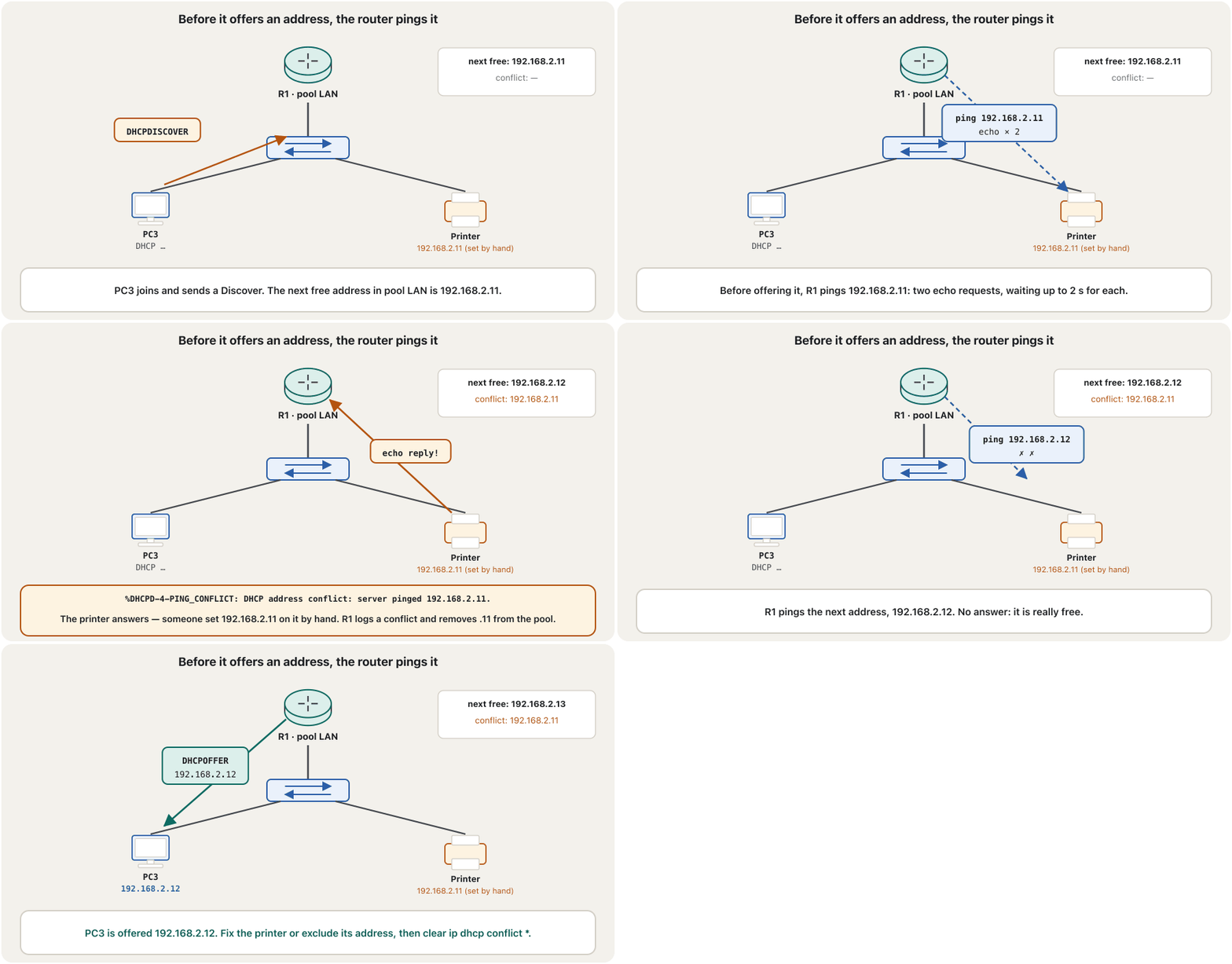
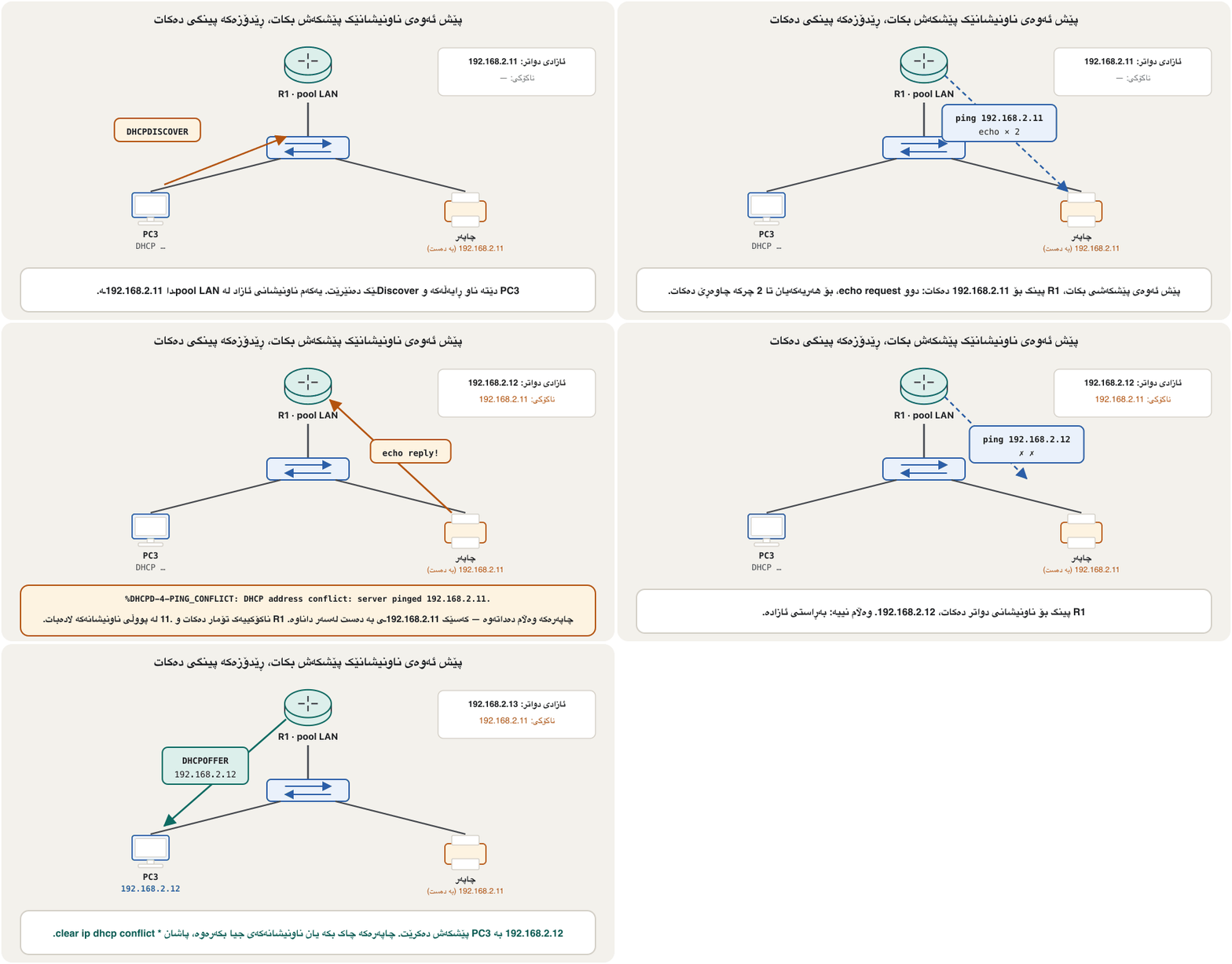
In Packet Tracer you may see %DHCPD-4-PING_CONFLICT: DHCP address conflict: server pinged 192.168.2.1. — the router’s own gateway address, when no exclusion was typed. A real router excludes its interface address by itself, so there the same message always means another device holds the address. Check with show ip dhcp conflict, fix the device or exclude its address, then empty the list with clear ip dhcp conflict *.
لە Packet Tracerـدا لەوانەیە ئەمە ببینیت: %DHCPD-4-PING_CONFLICT: DHCP address conflict: server pinged 192.168.2.1. — ناونیشانی خودی ، کاتێک هیچ جیاکردنەوەیەک نەنووسراوە. ڕاستەقینە ناونیشانی خۆی خۆی جیا دەکاتەوە، بۆیە لەوێ هەمان پەیام هەمیشە واتە ئامێرێکی تر ناونیشانەکەی هەیە. بە show ip dhcp conflict بیپشکنە، ئامێرەکە چاک بکە یان ناونیشانەکەی جیا بکەرەوە، پاشان بە clear ip dhcp conflict * لیستەکە بەتاڵ بکە.
R1(config)#ip dhcp ping packets 2
R1(config)#ip dhcp ping timeout 2000
R1(config)#end
R1#show ip dhcp conflict
R1#clear ip dhcp conflict *
Explain the codeڕوونکردنەوەی کۆدەکە
- Lineدێڕی 1
ip dhcp ping packets 0switches the check off — rarely a good idea.ip dhcp ping packets 0پشکنینەکە دەکوژێنێتەوە — کەم جار بیرۆکەیەکی باشە.
A server on another network: the relay agentڕاژەکارێک لە ڕایەڵەیەکی تر: گوازەرەوەی DHCP
In a bigger network one DHCP server serves many LANs. But the Discover is a broadcast, and routers do not forward broadcasts. The fix is a relay agent on the router interface that faces the clients: ip helper-address <server>. The router takes the broadcast, sends it on as a unicast to the server, and writes its own interface address (giaddr) into it so the server knows which pool to use.
لە گەورەتردا یەک خزمەتی زۆر دەکات. بەڵام Discover پەخشکردنـە و تێناپەڕێنن. چارەسەر ـە لەسەر ئەو کە ڕووی لە : ip helper-address <server>. وەردەگرێت، وەک بۆ دەنێرێت و ناونیشانی خۆی (giaddr) تێدا دەنووسێت بۆ ئەوەی بزانێت کام بەکار بهێنێت.
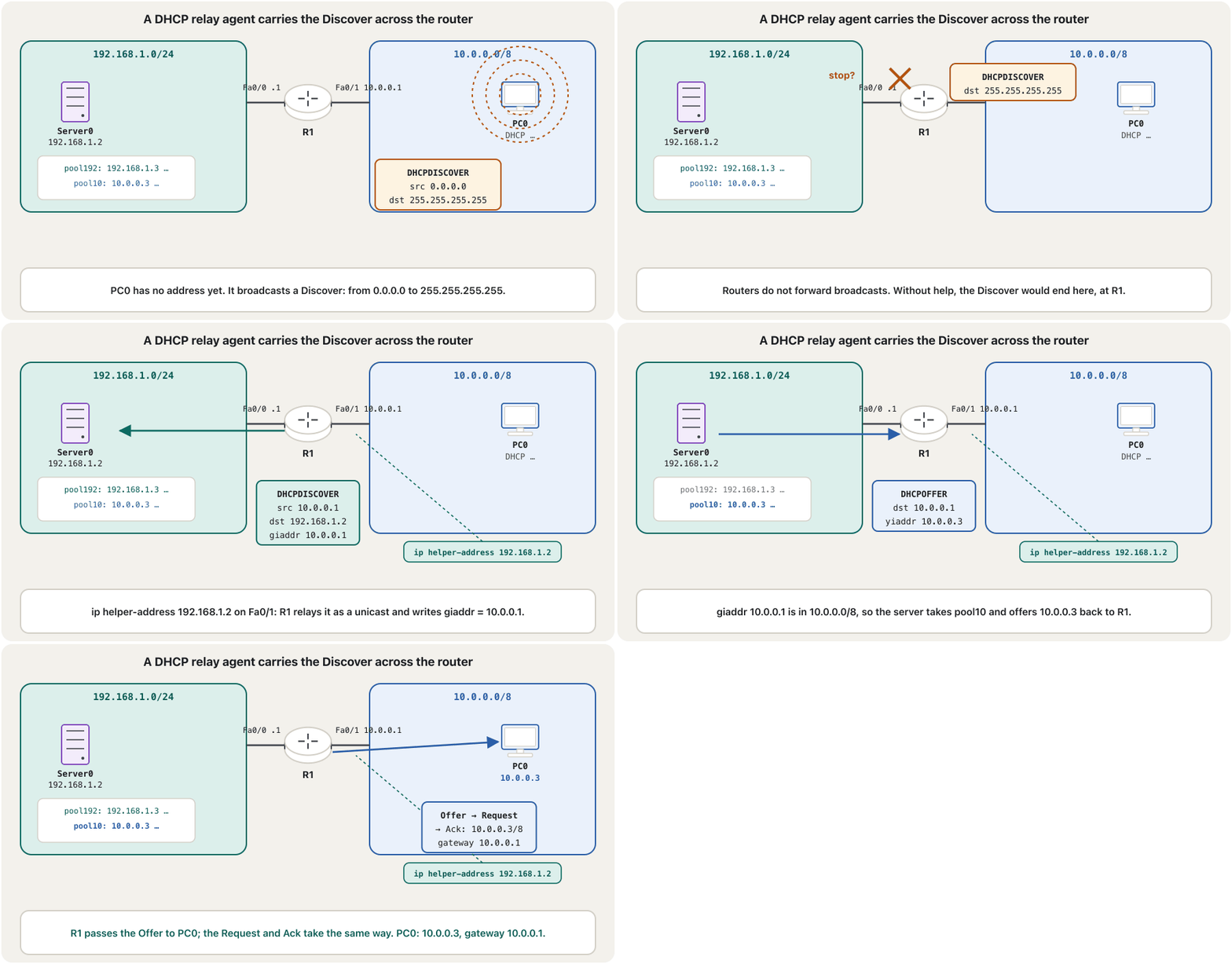
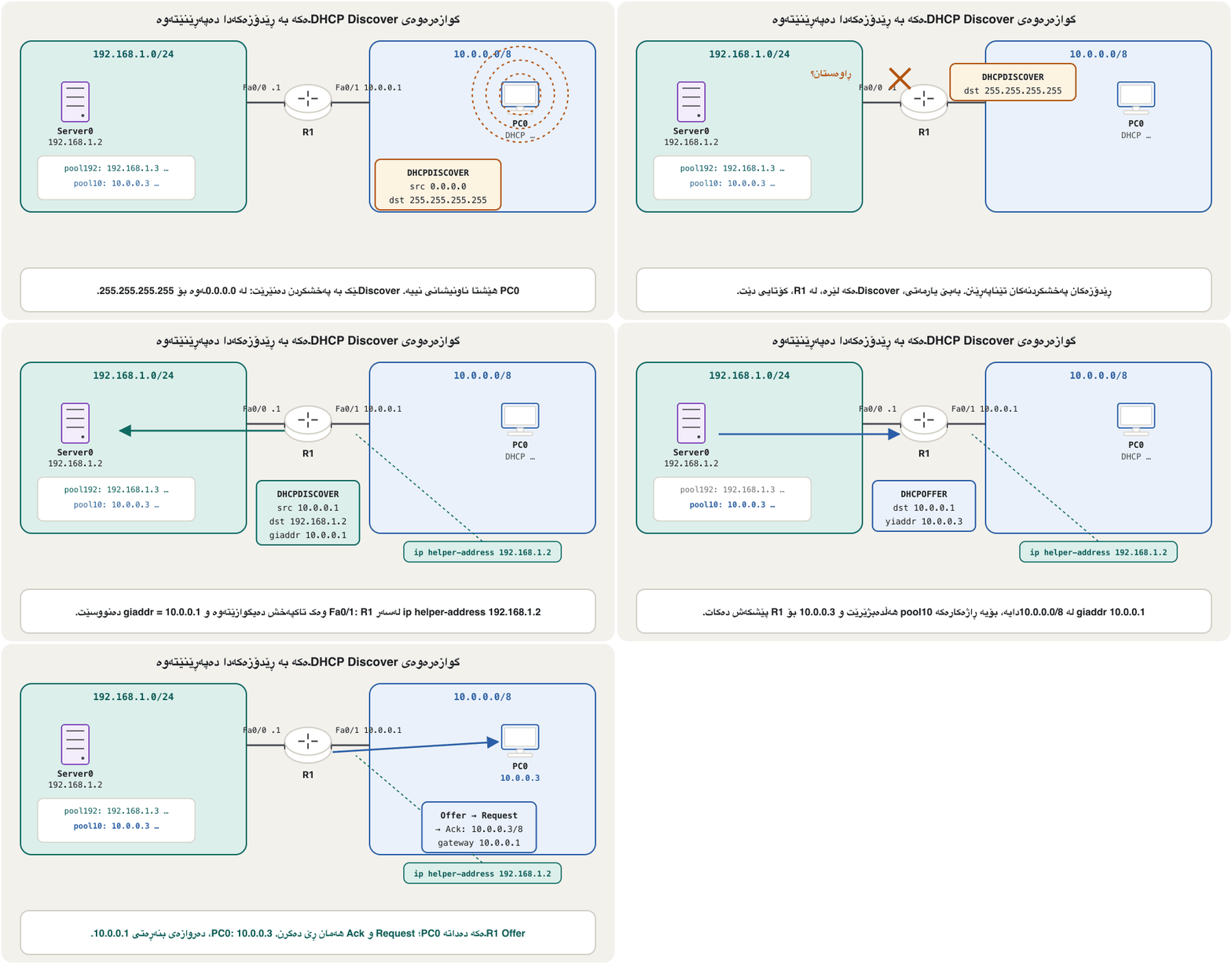
You fly from Europe to Australia with a stop in Singapore, but you have no visa for Singapore: you may not leave the airport. A DHCP broadcast is the same: it may not leave its own network through the router. The helper address is the airline desk that takes your bag and puts it, labelled, on the right connecting flight.
لە ئەوروپاوە بۆ ئوسترالیا دەفڕیت و لە سینگاپوور دەوەستیت، بەڵام ڤیزای سینگاپوورت نییە: ناتوانیت لە فڕۆکەخانەکە بچیتە دەرەوە. هەروایە: ناتوانێت لە ڕێی لە خۆی بچێتە دەرەوە. helper address ئەو مێزەی کۆمپانیای فڕۆکەوانییە کە جانتاکەت وەردەگرێت و بە ناونیشانەوە دەیخاتە سەر فڕۆکە دروستەکەی دواتر.
Where the analogy stops workingسنووری ئەم نموونەیە
Only some UDP broadcasts are relayed — DHCP and a few other services — never every broadcast, and the router changes the packet (new source, unicast destination, giaddr).
تەنیا هەندێک دەگوازرێنەوە — و چەند خزمەتگوزارییەکی تر — هەرگیز هەموو نا. هەروەها دەگۆڕێت (سەرچاوەی نوێ، مەبەستی ، giaddr).
Lab: a DHCP server behind a routerتاقیکردنەوە: ڕاژەکارێکی DHCP لە پشت ڕێدۆزێک
In this lab, Server0 (192.168.1.2) is a DHCP server with two pools: pool192 for its own LAN (gateway 192.168.1.1, start 192.168.1.3, mask 255.255.255.0) and pool10 for the other LAN (gateway 10.0.0.1, start 10.0.0.3, mask 255.0.0.0), both with DNS and TFTP server 192.168.1.2. R1 joins the two LANs. Server0 is a Packet Tracer server, so its pools are set on its Services → DHCP tab, not with IOS commands (the server lab).
لەم تاقیکردنەوەیەدا Server0 (192.168.1.2) بە دوو : pool192 بۆ خۆی ( 192.168.1.1، سەرەتا 192.168.1.3، ماسک 255.255.255.0) و pool10 بۆ تر ( 10.0.0.1، سەرەتا 10.0.0.3، ماسک 255.0.0.0)، هەردووکیان بە DNS و TFTP 192.168.1.2. R1 دوو دەبەستێتەوە. Server0 Packet Tracerـە، بۆیە لەسەر ئەو لە تابی Services → DHCPـەوە ڕێک دەخرێن، نەک بە IOS (تاقیکردنەوەی ڕاژەکارەکە).
R1(config)#interface fa0/1
R1(config-if)#ip address 10.0.0.1 255.0.0.0
R1(config-if)#ip helper-address 192.168.1.2
R1(config-if)#no shutdown
R1(config-if)#end
R1#copy running-config startup-config
No routing protocol is needed here: both LANs are directly connected to the one router, so it already has both routes. Routing matters for the reply — the server must be able to reach 10.0.0.1 — and here its gateway, R1, can.
لێرەدا هیچ پێویست نییە: هەردوو ڕاستەوخۆ بە یەک بەستراون، بۆیە پێشتر هەردوو ڕێگەکەی هەیە. بۆ وەڵامەکە گرنگە — دەبێت بگاتە 10.0.0.1 — و لێرەدا ، R1، دەگاتێ.
Relaying between VLANsگواستنەوە لە نێوان VLANـەکاندا
A common case: hosts in VLAN 10 have a DHCP server, VLAN 20 has none. VLANs are separate broadcast domains, so VLAN 20’s Discover never reaches the server by itself. Put ip helper-address <server> on the router interface that is the gateway of VLAN 20; then VLAN 20’s clients run DORA with the server in VLAN 10.
نموونەیەکی باو: VLAN 10 هەیە، VLAN 20 نییەتی. VLANـەکان جیان، بۆیە Discoverـی VLAN 20 بە خۆی هەرگیز ناگاتە . ip helper-address <server> لەسەر ئەو دابنێ کە VLAN 20ـە؛ پاشان VLAN 20 لەگەڵ VLAN 10ـدا دەکەن.
RouterC(config)#interface fa0/0
RouterC(config-if)#ip address 10.10.0.1 255.255.255.0
RouterC(config-if)#ip helper-address 192.168.1.10
RouterC(config-if)#no shutdown
RouterC(config-if)#exit
RouterC(config)#interface fa1/0
RouterC(config-if)#ip address 192.168.1.1 255.255.255.0
RouterC(config-if)#no shutdown
RouterC(config-if)#end
RouterC#copy running-config startup-config
Explain the codeڕوونکردنەوەی کۆدەکە
- Lineدێڕی 6-8
The server’s own LAN: no helper address. One here would do no good, because the server already hears this LAN’s broadcasts.
خودی : هیچ helper addressـێک. یەکێک لێرەدا هیچ سوودێکی نییە، چونکە پێشتر ئەم دەبیستێت.
With router-on-a-stick the gateway of VLAN 20 is a subinterface, so the helper goes there: interface g0/0.20 then ip helper-address 192.168.1.10. On a layer 3 switch it goes on the SVI: interface vlan 20.
بە ڕێدۆزی تاکقۆڵ VLAN 20 ، بۆیە helper لەوێ دادەنرێت: interface g0/0.20 پاشان ip helper-address 192.168.1.10. لەسەر سویچی چینی 3 لەسەر دادەنرێت: interface vlan 20.
The router as server for several VLANsڕێدۆزەکە وەک ڕاژەکار بۆ چەند VLANـێک
If the router itself is the DHCP server, give it one pool per VLAN. When a Discover arrives on a subinterface, the router lends from the pool whose network contains that subinterface’s address. With the router-on-a-stick lab — VLAN 10 on 192.168.10.0/24 and VLAN 20 on 192.168.20.0/24 — it looks like this:
ئەگەر خۆی بێت، یەک بۆ هەر VLANـێک پێی بدە. کاتێک Discoverـێک لەسەر دەگات، لەو قەرز دەدات کە ناونیشانی ئەو لەخۆ دەگرێت. بە تاقیکردنەوەی ڕێدۆزی تاکقۆڵ — VLAN 10 لەسەر 192.168.10.0/24 و VLAN 20 لەسەر 192.168.20.0/24 — بەم شێوەیە دەبێت:
R1(config)#ip dhcp excluded-address 192.168.10.1 192.168.10.10
R1(config)#ip dhcp excluded-address 192.168.20.1 192.168.20.10
R1(config)#ip dhcp pool V10
R1(dhcp-config)#network 192.168.10.0 255.255.255.0
R1(dhcp-config)#default-router 192.168.10.1
R1(dhcp-config)#dns-server 8.8.8.8
R1(dhcp-config)#exit
R1(config)#ip dhcp pool V20
R1(dhcp-config)#network 192.168.20.0 255.255.255.0
R1(dhcp-config)#default-router 192.168.20.1
R1(dhcp-config)#dns-server 8.8.8.8
R1(dhcp-config)#end
R1#copy running-config startup-config
Explain the codeڕوونکردنەوەی کۆدەکە
- Lineدێڕی 5
Each pool gets its own VLAN’s gateway — the subinterface address.
هەر VLANـەکەی خۆی وەردەگرێت — ناونیشانی .
No pool is made for the management VLAN 99 (its devices are set by hand) or the unused native VLAN 999. The campus project builds this for a whole university, and the company project on the router of each building.
هیچ بۆ VLANـی بەڕێوەبردنی 99 دروست ناکرێت ( بە دەست ڕێک دەخرێن) و نە بۆ بەکارنەهاتووی 999. پڕۆژەی کەمپەس ئەمە بۆ زانکۆیەکی تەواو دروست دەکات و پڕۆژەی کۆمپانیا لەسەر هەر باڵەخانەیەک.
Protecting DHCP, and DHCP for IPv6پاراستنی DHCP و DHCP بۆ IPv6
A client trusts the first Offer it hears, so a rogue DHCP server can hand out a false gateway. Switches stop that with DHCP snooping: only the port towards the real server is trusted, and Offers from other ports are dropped. Its configuration is in switch port security.
متمانە بە یەکەم Offer دەکات کە دەیبیستێت، بۆیە ڕاژەکارێکی DHCPـی ساختە دەتوانێت درۆ دابەش بکات. بە ڕێگەی لێ دەگرن: تەنیا ئەو بەرەو ڕاستەقینەکەیە متمانەی پێ دەکرێت و Offerـی تر فڕێ دەدرێن. ڕێکخستنەکەی لە ئاسایشی دەرچەـدایە.
IPv6 hosts usually build their own address with SLAAC; DHCPv6 can add DNS servers or hand out addresses. A Cisco router can be a DHCPv6 server too, with ipv6 dhcp pool — see SLAAC and DHCPv6.
زۆربەی کات بە ناونیشانی خۆیان دروست دەکەن؛ DHCPv6 دەتوانێت DNS زیاد بکات یان ناونیشان دابەش بکات. Cisco دەتوانێت ببێتە DHCPv6ـیش، بە ipv6 dhcp pool — SLAAC و DHCPv6 ببینە.
Mistakes from a real lab logهەڵەکان لە تۆماری تاقیکردنەوەیەکی ڕاستەقینەوە
Typing mistakes are normal in a first DHCP lab. Here are real ones from a Packet Tracer session, with what IOS answered and the fix:
هەڵەی نووسین لە یەکەم تاقیکردنەوەی ئاساییە. ئەمانە هەڵەی ڕاستەقینەن لە دانیشتنێکی Packet Tracerـەوە، لەگەڵ ئەوەی IOS وەڵامی دایەوە و چارەسەرەکە:
| Typedنووسراو | IOS answersوەڵامی IOS | Fixچارەسەر |
|---|---|---|
ip address 192.168.2.5 | % Incomplete command. | Add the mask: ip address 192.168.2.5 255.255.255.0.ماسکەکە زیاد بکە: ip address 192.168.2.5 255.255.255.0. |
ip-ad | % Invalid input detected at '^' marker. | No hyphen: ip address.بێ هێڵ: ip address. |
net | % Ambiguous command: "net" | Several pool commands start with net (netbios-name-server, network …): type enough letters (netw) or the whole word.چەند ناو بە net دەست پێ دەکەن (netbios-name-server، network …): پیتی تەواو بنووسە (netw) یان هەموو وشەکە. |
show ? (in config-if) | % Unrecognized command | Use do show …, or end first.do show … بەکار بهێنە، یان سەرەتا end. |
default-router 192.168.2.5 | nothing — but the interface is 192.168.2.1هیچ — بەڵام 192.168.2.1ـە | The gateway must equal the interface address. دەبێت یەکسان بێت بە ناونیشانی . |
network 192.168.2.4 255.255.255.0 | a host address, not the networkناونیشانی ، نەک | Write the network address: network 192.168.2.0 255.255.255.0. بنووسە: network 192.168.2.0 255.255.255.0. |
en (at R1#) | nothing happensهیچ ڕوو نادات | You are already in privileged EXEC mode.تۆ پێشتر لە . |
Exercisesڕاهێنانەکان
The picture shows a Packet Tracer lab. Which address does PC10 get, which addresses are never lent, and what would you add so that PC10 can also use names such as www.example.com?
وێنەکە تاقیکردنەوەیەکی Packet Tracer پیشان دەدات. PC10 کام ناونیشان وەردەگرێت، کام ناونیشانانە هەرگیز بە قەرز نادرێن و چی زیاد دەکەیت بۆ ئەوەی PC10 بتوانێت ناوی وەک www.example.comـیش بەکار بهێنێت؟
Show answerوەڵامەکە پیشان بدە
- PC10 gets 192.168.1.2: .1 is the router’s own address, and the first free one is .2.
- 192.168.1.5–192.168.1.7 are excluded, as is the router’s 192.168.1.1.
- Add
dns-server <address>inside the pool. Typing the exclusion before the pool is the safer order.
- PC10 192.168.1.2 وەردەگرێت: .1 ناونیشانی خودی و یەکەمی ئازاد .2ـە.
- 192.168.1.5–192.168.1.7 جیاکراونەتەوە، هەروەها 192.168.1.1ـی .
dns-server <address>لە ناو زیاد بکە. نووسینی جیاکردنەوەکە پێش ڕیزبەندییەکی سەلامەتترە.
G0/0 is 192.168.2.5/24. Someone typed: ip dhcp pool vlan2, network 192.168.2.4 255.255.255.0, default-router 192.168.2.4, dns-server 8.8.8.8, end. Find three problems and write the corrected lines.
G0/0 192.168.2.5/24ـە. کەسێک ئەمەی نووسیوە: ip dhcp pool vlan2، network 192.168.2.4 255.255.255.0، default-router 192.168.2.4، dns-server 8.8.8.8، end. سێ کێشە بدۆزەرەوە و دێڕە ڕاستکراوەکان بنووسە.
Show answerوەڵامەکە پیشان بدە
networkneeds the network address: 192.168.2.0, not the host 192.168.2.4.default-routermust be the interface address, 192.168.2.5 — no device has 192.168.2.4.- No exclusion and no save: add
ip dhcp excluded-address 192.168.2.1 192.168.2.10before the pool and finish withcopy running-config startup-config. (A clearer pool name than vlan2 helps too.)
networkپێویستی بە هەیە: 192.168.2.0، نەک 192.168.2.4.default-routerدەبێت ناونیشانی بێت، 192.168.2.5 — هیچ ئامێرێک 192.168.2.4ـی نییە.- جیاکردنەوە و پاشەکەوت نییە:
ip dhcp excluded-address 192.168.2.1 192.168.2.10پێش زیاد بکە و بەcopy running-config startup-configتەواوی بکە. (ناوێکی ڕوونتر لە vlan2 بۆ یارمەتیش دەدات.)
R1(config)#ip dhcp excluded-address 192.168.2.1 192.168.2.10
R1(config)#ip dhcp pool LAN
R1(dhcp-config)#network 192.168.2.0 255.255.255.0
R1(dhcp-config)#default-router 192.168.2.5
R1(dhcp-config)#dns-server 8.8.8.8
R1(dhcp-config)#end
R1#copy running-config startup-configR1 is a router-on-a-stick. The DHCP server 192.168.10.5 is in VLAN 10; VLAN 20 (192.168.20.0/24, gateway 192.168.20.1 on G0/0.20) has none. Write the commands that let VLAN 20’s PCs get addresses. What must the server have?
R1 . 192.168.10.5 لە VLAN 10دایە؛ VLAN 20 (192.168.20.0/24، 192.168.20.1 لەسەر G0/0.20) نییەتی. ئەو بنووسە کە ڕێگە دەدەن PCـەکانی VLAN 20 ناونیشان وەربگرن. دەبێت چی هەبێت؟
Show answerوەڵامەکە پیشان بدە
R1(config)#interface g0/0.20
R1(config-subif)#ip helper-address 192.168.10.5
R1(config-subif)#end
R1#copy running-config startup-config
The server needs a pool for 192.168.20.0/24 with gateway 192.168.20.1, and a gateway of its own (192.168.10.1) so its replies reach 192.168.20.1.
پێویستی بە بۆ 192.168.20.0/24 بە 192.168.20.1 هەیە، هەروەها خۆی (192.168.10.1) بۆ ئەوەی وەڵامەکانی بگەنە 192.168.20.1.
A café’s guests stay about two hours. Write a pool for 10.20.0.0/24 with gateway 10.20.0.1, DNS 10.20.0.2 and a lease of 3 hours, excluding .1 to .20.
میوانەکانی کافێیەک نزیکەی دوو کاتژمێر دەمێننەوە. بۆ 10.20.0.0/24 بنووسە بە 10.20.0.1، DNS 10.20.0.2 و 3 کاتژمێری، .1 تا .20 جیا بکەرەوە.
Show answerوەڵامەکە پیشان بدە
R1(config)#ip dhcp excluded-address 10.20.0.1 10.20.0.20
R1(config)#ip dhcp pool CAFE
R1(dhcp-config)#network 10.20.0.0 255.255.255.0
R1(dhcp-config)#default-router 10.20.0.1
R1(dhcp-config)#dns-server 10.20.0.2
R1(dhcp-config)#lease 0 3
R1(dhcp-config)#end
R1#copy running-config startup-config
A short lease returns the addresses of guests who left; with a one-day lease a busy café could run out of addresses.
کورت ناونیشانی ئەو میوانانە دەگەڕێنێتەوە کە ڕۆیشتوون؛ بە یەک ڕۆژی کافێیەکی قەرەباڵغ لەوانەیە ناونیشانی تەواو بێت.
Summaryکورتە
- A Cisco router can be the DHCP server of its LANs:
ip dhcp excluded-addressfirst, thenip dhcp poolwithnetwork,default-router,dns-serverandlease(default one day). default-routeris the router’s own interface address;networkis the network address, never a host address.- Optional pool lines:
domain-name(a domain for short names),netbios-name-server(WINS, legacy) andoption <number>; the DHCP service is on by default (service dhcp). - Check with
show ip dhcp bindingandshow ip dhcp pool. The server pings an address before offering it; conflicts are listed byshow ip dhcp conflict. - Broadcasts stop at routers:
ip helper-address <server>on the clients’ gateway interface (a subinterface or an SVI) relays DHCP to a server elsewhere. - One pool per VLAN; DHCP snooping protects against rogue servers; save with
copy running-config startup-config.
- Cisco دەتوانێت خۆی بێت: سەرەتا
ip dhcp excluded-address، پاشانip dhcp poolبەnetwork،default-router،dns-serverوlease(بنەڕەت یەک ڕۆژ). default-routerناونیشانی خودی ؛network، هەرگیز ناونیشانی نا.- دێڕە ئارەزوومەندانەکانی :
domain-name( بۆ ناوە کورتەکان)،netbios-name-server(WINS، کۆن) وoption <number>؛ خزمەتی بە بنەڕەت هەڵکراوە (service dhcp). - بە
show ip dhcp bindingوshow ip dhcp poolبیپشکنە. پێش پێشکەشکردن ناونیشانەکە دەکات؛ ناکۆکییەکان بەshow ip dhcp conflictڕیز دەکرێن. - لە دەوەستن:
ip helper-address <server>لەسەر ( یان ) دەگوازێتەوە بۆ لە شوێنێکی تر. - یەک بۆ هەر VLANـێک؛ لە ساختە دەمانپارێزێت؛ بە
copy running-config startup-configپاشەکەوت بکە.
Next: sharing one public address among many devices — NAT and PAT.
دواتر: بەشکردنی یەک ناونیشانی گشتی لە نێوان زۆر ئامێردا — وەرگێڕانی ناونیشانی ڕایەڵە و وەرگێڕانی ناونیشانی پۆرت.
Lesson complete!وانەکە تەواو بوو!
Well done. Review the key terms, then go on to the next lesson.دەستخۆش. سەیرێکی زاراوە سەرەکییەکان بکەرەوە، پاشان بڕۆ بۆ وانەی داهاتوو.
Key termsزاراوە سەرەکییەکان
NAT and PAT: Sharing Public Addressesوەرگێڕانی ناونیشانی ڕایەڵە و وەرگێڕانی ناونیشانی پۆرت: هاوبەشکردنی ناونیشانی گشتی
Related lecturesوانە پەیوەندیدارەکان
- Inter-VLAN Routing with a Layer-3 Switchڕێدۆزیی نێوان VLANـەکان بە سویچی چینی 3
- Switch Port Securityئاسایشی دەرچەی سویچ
- IPv6 in Practice: SLAAC, Neighbour Discovery and Dual StackIPv6 لە کرداردا: SLAAC، دۆزینەوەی دراوسێ و ستاکی دووانە
- Packet Tracer Lab: DHCP, Web, DNS and FTP Serversتاقیگەی Packet Tracer: ڕاژەکارەکانی DHCP، وێب، DNS و FTP
- Project: A Campus Network with VLANs and DHCPپڕۆژە: ڕایەڵەی کەمپەسێک بە VLAN و DHCP
- Show Commands, Running and Startup Configurationsفەرمانەکانی show، ڕێکخستنی کارا و ڕێکخستنی دەستپێکردن
References and further readingسەرچاوەکان و خوێندنەوەی زیاتر
- Cisco IP Addressing: DHCP Configuration Guide 15M&T — Configuring the Cisco IOS DHCP Server (excluded-address, pool, default-router, dns-server, one-day lease, 2 ping packets and 2 s timeout, interface address excluded automatically)
- Cisco Catalyst 2960 Software Configuration Guide — DHCP (example output of show ip dhcp pool)
- RFC 2131: Dynamic Host Configuration Protocol (relay agents, giaddr, probing an address before allocating it)
- Cisco Press: Switching, Routing, and Wireless Essentials Companion Guide (CCNAv7) — DHCPv4
- RFC 2132: DHCP Options and BOOTP Vendor Extensions (option 15 domain name, option 44 NetBIOS over TCP/IP name server)
- Microsoft: WINS removal — moving forward with modern name resolution (KB5071836, 10 November 2025: deprecated in Windows Server 2022; Windows Server 2025 is the last release with WINS)
This lecture is a first edition. The Kurdish text and terminology are waiting for review by Kurdish IT teachers.ئەم وانەیە چاپی یەکەمە. دەقە کوردییەکە و زاراوەکانی چاوەڕێی پێداچوونەوەی مامۆستایانی کوردی بواری IT ن.