Chapterبەش 6 · Lectureوانە 6.1
Troubleshooting with IOS: show, ping, traceroute and debugچارەسەرکردنی کێشە بە IOS: show، پینگ، بەدواداچوونی ڕێگە و debug
The troubleshooting method applied on Cisco routers and switches: show commands by layer, interface Status and Protocol, error counters, serial clocks with show controllers, CDP and LLDP neighbours, switch and routing checks, IOS ping characters and patterns, extended ping with a source, IOS traceroute marks, safe debugging with terminal monitor and undebug all, service checks, the four static-route faults, a divide-and-conquer case, backups and documentation, and Packet Tracer practice scenarios.
ڕێگای لەسەر و Cisco: show بەپێی چین، Status و Protocolـی ، ژمێرەرەکانی هەڵە، کاتژمێری زنجیرەیی بە show controllers، دراوسێکانی CDP و LLDP، پشکنینەکانی و ، پیت و شێوەکانی IOS، extended ping بە سەرچاوەوە، نیشانەکانی IOS، debugـی سەلامەت بە terminal monitor و undebug all، پشکنینی خزمەتگوزارییەکان، چوار هەڵەکەی ، نموونەیەکی دابەشکردن و زاڵبوون، و و سیناریۆکانی ڕاهێنان لە Packet Tracerـدا.
What you will learnچی فێر دەبیت
- Choose the right IOS show command for each layer and read interface Status/Protocol and error counters.
- Use show controllers, CDP and LLDP to check serial clocks and neighbours.
- Read IOS ping characters and patterns, run an extended ping with a source, and read IOS traceroute marks.
- Use debug safely with terminal monitor, a filter and undebug all.
- Find the four typical static and default route faults and finish a fix with saving, a backup and documentation.
- showـی گونجاو بۆ هەر چینێک هەڵبژێریت و Status/Protocol و ژمێرەرەکانی هەڵەی بخوێنیتەوە.
- show controllers، CDP و LLDP بەکار بهێنیت بۆ پشکنینی کاتژمێری زنجیرەیی و دراوسێکان.
- پیت و شێوەکانی IOS بخوێنیتەوە، extended ping بە سەرچاوەوە بکەیت و نیشانەکانی IOS بخوێنیتەوە.
- debug بە سەلامەتی بەکار بهێنیت لەگەڵ terminal monitor، فلتەرێک و undebug all.
- چوار هەڵە ئاساییەکەی و بدۆزیتەوە و چاککردنەوەیەک بە پاشەکەوت، و تەواو بکەیت.
The method you know, from the network’s sideئەو ڕێگایەی دەیناسیت، لە لای ڕایەڵەکەوە
You already have a method: the seven steps, the layers as a checklist, and the approaches bottom-up, top-down and divide and conquer (Troubleshooting networks, approaches). On a PC your tools were ipconfig, ping and tracert. On a Cisco router or switch the same questions are answered by show commands, by IOS’s own ping and traceroute, and — carefully — by debug. This lesson maps each tool to the layer it checks.
پێشتر ڕێگایەکت هەیە: حەوت هەنگاوەکە، چینەکان وەک لیستی پشکنین و ڕێگاکانی خوارەوە-بۆ-سەرەوە، سەرەوە-بۆ-خوارەوە و دابەشکردن و زاڵبوون (چارەسەرکردنی کێشەی ڕایەڵەکان، ڕێگاکان). لەسەر PC ئامرازەکانت ipconfig، ping و tracert بوون. لەسەر یان Cisco هەمان پرسیارەکان بە show، بە و خودی IOS و — بە وریاییەوە — بە debug وەڵام دەدرێنەوە. ئەم وانەیە هەر ئامرازێک بەو چینە دەبەستێتەوە کە دەیپشکنێت.
show first, debug lastسەرەتا show، دواجار debug
show commands only read — they change nothing and cost almost nothing, so they are always the first step. ping and traceroute send a handful of test packets. debug makes the router describe events as they happen; on a busy router that can use so much processor time that the router stops responding, so it comes last, as narrow as possible, and is switched off at once.
show تەنیا دەخوێننەوە — هیچ شتێک ناگۆڕن و هیچ نرخێکیان نییە، بۆیە هەمیشە هەنگاوی یەکەمن. ping و traceroute چەند تاقیکردنەوە دەنێرن. debug ناچار دەکات ڕووداوەکان لە کاتی ڕوودانیاندا وەسف بکات؛ لەسەر سەرقاڵ ئەمە دەتوانێت ئەوەندە کاتی پرۆسێسەر بەکار بهێنێت کە وەڵام نەداتەوە، بۆیە دواجار دێت، تا بتوانرێت تەسک و دەستبەجێ دەکوژێنرێتەوە.
The practice networkڕایەڵەی ڕاهێنان
Build this in Packet Tracer to follow the lesson: PC1 on R1’s LAN, three routers joined by serial links, and a server on R3’s LAN. R1 and R3 use default routes towards R2; R2 has a static route to each LAN (Static routes, Default routes). Every fault in this lesson is one small change to this network.
ئەمە لە Packet Tracerـدا دروست بکە بۆ ئەوەی دوای وانەکە بکەویت: PC1 لەسەر R1، سێ کە بە بەستەری زنجیرەیی بەستراون و لەسەر R3. R1 و R3 بەرەو R2 بەکار دەهێنن؛ R2 بۆ هەر هەیە (ڕێگە جێگیرەکان، ڕێگە بنەڕەتییەکان). هەموو هەڵەیەکی ئەم وانەیە یەک گۆڕانکاریی بچووکە لەم .
Layer 1 and 2: the two interface statesچینی 1 و 2: دوو دۆخەکەی نێوبەستە
Start with show ip interface brief (you met it in Your first router). The Status column is mostly layer 1 — is there a signal, and is the interface switched on? The Protocol column is layer 2 — does the link really work? Here R2’s link to R3 has a signal but does not come up:
بە show ip interface brief دەست پێ بکە (لە یەکەم ڕێدۆزەکەت بینیت). ستوونی Status زۆرتر چینی 1ـە — سیگناڵ هەیە و هەڵکراوە؟ ستوونی Protocol چینی 2ـیە — بەستەرەکە بەڕاستی کار دەکات؟ لێرەدا بەستەری R2 بۆ R3 سیگناڵی هەیە بەڵام کارا نابێت:
R2#show ip interface brief
Interface              IP-Address      OK? Method Status                Protocol
GigabitEthernet0/0     unassigned      YES unset  administratively down down
GigabitEthernet0/1     unassigned      YES unset  administratively down down
Serial0/0/0            10.0.12.2       YES manual up                    up
Serial0/0/1            10.0.23.1       YES manual up                    down
Reading the error countersخوێندنەوەی ژمێرەرەکانی هەڵە
When the state is up/up but users complain of slow or broken transfers, read the counters in show interfaces. A few errors over months mean little; a counter that keeps rising is the clue. Reset them with clear counters, wait a few minutes of normal traffic, and look again.
کاتێک دۆخەکە up/upـە بەڵام بەکارهێنەران سکاڵا لە گواستنەوەی هێواش یان پچڕاو دەکەن، ژمێرەرەکان لە show interfacesـدا بخوێنەوە. چەند هەڵەیەک لە چەند مانگێکدا واتای کەمە؛ ژمێرەرێک کە بەردەوام زیاد دەبێت نیشانەکەیە. بە clear counters بیانگەڕێنەوە بۆ سفر، چەند خولەکێک لە هاتوچۆی ئاسایی چاوەڕێ بکە و دووپاتە سەیر بکە.
R1#show interfaces g0/0
GigabitEthernet0/0 is up, line protocol is up
  Hardware is CN Gigabit Ethernet, address is 0001.6458.2501 (bia 0001.6458.2501)
  Internet address is 192.168.1.1/24
     0 runts, 0 giants, 0 throttles
     412 input errors, 398 CRC, 14 frame, 0 overrun, 0 ignored
0 output errors, 0 collisions, 1 interface resetsSerial links: who gives the clock?بەستەری زنجیرەیی: کێ کاتژمێرەکە دەدات؟
On a back-to-back serial link in a lab, one end of the cable is DCE and must provide the clock with clock rate (Step 2: a serial link). If it does not, the interfaces stay up/down. show controllers serial tells you which end of the cable is plugged in here — DCE or DTE, with its standard such as V.35 (serial ports on real routers) — and the clock it gives:
لە بەستەرێکی زنجیرەیی ڕاستەوخۆدا لە تاقیگەدا، سەرێکی کێبڵەکە DCEـیە و دەبێت بە clock rate کاتژمێرەکە دابین بکات (هەنگاوی 2: بەستەرێکی زنجیرەیی). ئەگەر نەیکات، up/down دەمێننەوە. show controllers serial پێت دەڵێت کام لای کێبڵەکە لێرە بەستراوە — DCE یان DTE، لەگەڵ ستانداردەکەی وەک V.35 (پۆرتە زنجیرەییەکان لەسەر ڕێدۆزە ڕاستەقینەکان) — و ئەو کاتژمێرەی دەیدات:
R2(config)#interface s0/0/1
R2(config-if)#clock rate 64000
R2(config-if)#end
R2#show controllers serial 0/0/1
Interface Serial0/0/1
DCE V.35, clock rate 64000Who is next to me? CDP and LLDPکێ لە تەنیشتمە؟ CDP و LLDP
When a diagram is missing or wrong, ask the devices. CDP (Cisco Discovery Protocol) runs at layer 2 on Cisco devices and is on by default: every 60 seconds each device announces itself, and neighbours keep the information for 180 seconds. show cdp neighbors lists who is plugged into which port — even before any IP address is right. detail adds the neighbour’s IP address and IOS version.
کاتێک هێڵکارییەک نییە یان هەڵەیە، لە ئامێرەکان بپرسە. لە چینی 2دا لەسەر ئامێرەکانی Cisco کار دەکات و بە شێوەی بنەڕەت کارایە: هەر 60 چرکە جارێک هەر ئامێرێک خۆی ڕادەگەیەنێت و دراوسێکان زانیارییەکە بۆ 180 چرکە هەڵدەگرن. show cdp neighbors ڕیز دەکات کێ بە کام بەستراوە — تەنانەت پێش ئەوەی هیچ دروست بێت. detail دراوسێکە و وەشانی IOSـەکەی زیاد دەکات.
R2#show cdp neighbors
Capability Codes: R - Router, T - Trans Bridge, B - Source Route Bridge
                  S - Switch, H - Host, I - IGMP, r - Repeater, P - Phone,
                  D - Remote, C - CVTA, M - Two-port Mac Relay

Device ID        Local Intrfce     Holdtme    Capability  Platform  Port ID
R1               Ser 0/0/0         152             R S I  CISCO1941 Ser 0/0/0
R3               Ser 0/0/1         137             R S I  CISCO1941 Ser 0/0/1

Total cdp entries displayed : 2
R2#show cdp neighbors detail
-------------------------
Device ID: R1
Entry address(es):
  IP address: 10.0.12.1
Platform: Cisco CISCO1941/K9,  Capabilities: Router Switch IGMP
Interface: Serial0/0/0,  Port ID (outgoing port): Serial0/0/0
Holdtime : 152 sec
Explain the codeڕوونکردنەوەی کۆدەکە
- Lineدێڕی 7-8
R S I = router, switch, IGMP. Packet Tracer prints a shorter legend and may show only R.
R S I = ، ، IGMP. Packet Tracer ڕوونکردنەوەیەکی کورتتر چاپ دەکات و لەوانەیە تەنیا R پیشان بدات.
LLDP (IEEE 802.1AB) is the vendor-neutral twin, needed when Cisco devices meet other brands (phones, servers, other switches). On most Cisco devices it is off by default: switch it on with lldp run in global configuration and read show lldp neighbors — device, local interface, hold time, capabilities and port ID. Both protocols tell strangers about your devices, so turn them off where they face users or the ISP (no cdp enable, no lldp transmit on the interface).
(IEEE 802.1AB) جووتە بێلایەنەکەیە، پێویست کاتێک ئامێرەکانی Cisco بە براندەکانی تر دەگەن (تەلەفۆن، ، تر). لەسەر زۆربەی ئامێرەکانی Cisco بە شێوەی بنەڕەت کوژاوە: بە lldp run لە هەڵیبکە و show lldp neighbors بخوێنەوە — ئامێر، ناوخۆیی، hold time، capabilities و port ID. هەردوو لەبارەی ئامێرەکانت بە نامۆکان دەڵێن، بۆیە لەو شوێنانەی ڕوویان لە بەکارهێنەران یان بیانکوژێنەرەوە (no cdp enable، no lldp transmit لەسەر ).
Layer 2 on a switchچینی 2 لەسەر سویچێک
When a PC cannot even reach its gateway, the fault is often on the switch. Five show commands answer the usual questions; each is explained in its own lesson:
کاتێک PCـێک تەنانەت ناگاتە ، هەڵەکە زۆرجار لەسەر . پێنج show وەڵامی پرسیارە ئاساییەکان دەدەنەوە؛ هەریەکەیان لە وانەی خۆیدا ڕوون کراوەتەوە:
| Command | Taught inفێرکراوە لە |
|---|---|
show vlan brief | Check the VLANs: show vlan briefپشکنینی VLANـەکان: show vlan brief |
show interfaces trunk | Check the trunkپشکنینی ترەنک |
show spanning-tree | Reading show spanning-treeخوێندنەوەی show spanning-tree |
show port-security | Check with show port-security, bring a port backپشکنین بە show port-security، دەرچەیەک بگەڕێنەرەوە |
show mac address-table | Which addresses are secure?کام ناونیشانانە پارێزراون؟ |
Layer 3: the routing table and the protocolsچینی 3: خشتەی ڕێدۆزی و پرۆتۆکۆڵەکان
show ip route shows every route (The routing table). When you care about one destination, give the address: IOS shows the route that would be used, or tells you there is none. show ip protocols shows which routing protocols run, on which networks and with which neighbours; for OSPF, show ip ospf neighbor lists the neighbours and their state (OSPF neighbours).
show ip route هەموو ڕێگەیەک پیشان دەدات (خشتەی ڕێدۆزی). کاتێک گرنگیت بە یەک مەبەست هەیە، ناونیشانەکە بدە: IOS ئەو ڕێگەیە پیشان دەدات کە بەکار دەهێنرێت، یان پێت دەڵێت هیچ نییە. show ip protocols پیشان دەدات کام کار دەکەن، لەسەر کام و لەگەڵ کام دراوسێ؛ بۆ OSPF، show ip ospf neighbor دراوسێکان و دۆخیان ڕیز دەکات (دراوسێکانی OSPF).
R2#show ip route 192.168.3.10
Routing entry for 192.168.3.0/24
  Known via "static", distance 1, metric 0
  Routing Descriptor Blocks:
  * 10.0.23.2
      Route metric is 0, traffic share count is 1
R2#show ip route 192.168.9.1
% Network not in table
Explain the codeڕوونکردنەوەی کۆدەکە
- Lineدێڕی 2-5
The route R2 would use: a static route via 10.0.23.2.
ئەو ڕێگەیەی R2 بەکاری دەهێنێت: لە ڕێگەی 10.0.23.2ـەوە.
- Lineدێڕی 8
No route and no default route: R2 drops packets to this address.
نە ڕێگە، نە : R2 بۆ ئەم ناونیشانە فڕێ دەدات.
ping from IOSپینگ لە IOSـەوە
IOS ping differs from Windows ping. It sends five ICMP echoes of 100 bytes, waits 2 seconds for each, and prints one character per echo on a single line, then a success rate:
IOS لە Windows جیاوازە. پێنج echoـی ICMPـی 100 دەنێرێت، بۆ هەریەکەیان 2 چرکە چاوەڕێ دەکات و بۆ هەر echoـێک یەک پیت لەسەر یەک دێڕ چاپ دەکات، پاشان ڕێژەی سەرکەوتن:
R1#ping 192.168.3.10

Type escape sequence to abort.
Sending 5, 100-byte ICMP Echos to 192.168.3.10, timeout is 2 seconds:
U.U.U
Success rate is 0 percent (0/5)Reading ping patternsخوێندنەوەی شێوەکانی پینگ
The pattern says more than the success rate. .!!!! on the first try is just ARP (why the first ping fails). U means a router answered that it cannot deliver — so the path works up to that router; the dots between the Us appear because, by default, a Cisco router sends at most one unreachable message every 500 ms. A row of dots means silence: the target may be off, the reply may be lost on the way back, or something filters it.
شێوەکە زیاتر لە ڕێژەی سەرکەوتن دەڵێت. .!!!! لە یەکەم هەوڵدا تەنیا ARPـە (بۆچی یەکەم پینگ شکست دەهێنێت). U واتە وەڵامی داوەتەوە کە ناتوانێت بیگەیەنێت — بۆیە ڕێگاکە تا ئەو کار دەکات؛ خاڵەکانی نێوان Uـەکان دەردەکەون چونکە بە شێوەی بنەڕەت Cisco لە هەر 500 ms جارێک زۆرترین یەک پەیامی unreachable دەنێرێت. ڕیزێک خاڵ واتە بێدەنگی: لەوانەیە ئامانجەکە کوژاوە بێت، وەڵامەکە لە ڕێگای گەڕانەوەدا ون بووبێت، یان شتێک فلتەری دەکات.
Extended ping: choose the sourceextended ping: سەرچاوە هەڵبژێرە
A plain ping from R1 uses R1’s exit interface (10.0.12.1) as its source. That can fool you: the far routers may know the way back to 10.0.12.0 but not to the users’ LAN. Extended ping lets you choose the source, so the router tests exactly what PC1 experiences. Type ping alone in privileged EXEC and answer the questions (Enter keeps the default in brackets):
سادە لە R1ـەوە R1 (10.0.12.1) وەک سەرچاوە بەکار دەهێنێت. ئەمە دەتوانێت فریوت بدات: لەوانەیە ڕێگای گەڕانەوە بۆ 10.0.12.0 بزانن بەڵام بۆ بەکارهێنەران نا. extended ping ڕێگەت پێ دەدات سەرچاوە هەڵبژێریت، بۆیە ڕێک ئەوە تاقی دەکاتەوە کە PC1 تووشی دەبێت. ping بە تەنیا لە بنووسە و وەڵامی پرسیارەکان بدەرەوە (Enter بەهای بنەڕەتی ناو کەوانەکە دەهێڵێتەوە):
R1#ping
Protocol [ip]:
Target IP address: 192.168.3.10
Repeat count [5]:
Datagram size [100]:
Timeout in seconds [2]:
Extended commands [n]: y
Source address or interface: 192.168.1.1
Type of service [0]:
Set DF bit in IP header? [no]:
Validate reply data? [no]:
Data pattern [0xABCD]:
Loose, Strict, Record, Timestamp, Verbose[none]:
Sweep range of sizes [n]:
Type escape sequence to abort.
Sending 5, 100-byte ICMP Echos to 192.168.3.10, timeout is 2 seconds:
Packet sent with a source address of 192.168.1.1
.....
Success rate is 0 percent (0/5)
Explain the codeڕوونکردنەوەی کۆدەکە
- Lineدێڕی 7-8
Answer y, then give the source: an address or an interface name such as g0/0.
وەڵام بدەرەوە y، پاشان سەرچاوە بدە: ناونیشانێک یان ناوی وەک g0/0.
- Lineدێڕی 18
Silence: the requests arrive, but the replies to 192.168.1.1 have no way back.
بێدەنگی: دەگەن، بەڵام وەڵامەکان بۆ 192.168.1.1 ڕێگای گەڕانەوەیان نییە.
On real IOS the same test fits on one line: ping 192.168.3.10 source g0/0. Extended ping can also repeat many echoes or send bigger packets, which helps with links that fail only under load.
لە IOSـی ڕاستەقینەدا هەمان تاقیکردنەوە لە یەک دێڕدا جێی دەبێتەوە: ping 192.168.3.10 source g0/0. extended ping دەتوانێت زۆر echo دووپاتە بکاتەوە یان بنێرێت، ئەمەش یارمەتیدەرە بۆ ئەو بەستەرانەی تەنیا لە ژێر باردا شکست دەهێنن.
traceroute from IOSبەدواداچوونی ڕێگە لە IOSـەوە
IOS traceroute works like Linux’s (tracert and traceroute): it sends UDP probes starting at port 33434, three per hop, with TTL 1, 2, 3 … up to 30, and lists who answered. A line of * is a timeout; letters such as !H (host unreachable), !N (network unreachable) and !A (administratively prohibited — often an ACL) say why a router refused. To stop a long trace, press Ctrl+Shift+6 (hot keys).
tracerouteـی IOS وەک هی Linux کار دەکات (tracert و traceroute): تاقیکەرەوەی UDP دەنێرێت کە لە 33434ـەوە دەست پێ دەکەن، سێ دانە بۆ هەر ، بە TTLـی 1، 2، 3 … تا 30. پاشان ڕیزی دەکات کێ وەڵامی دایەوە. دێڕێکی * کات تەواوبوونە؛ پیتەکانی وەک !H (host unreachable)، !N (network unreachable) و !A (administratively prohibited — زۆرجار ) دەڵێن بۆچی ڕەتی کردەوە. بۆ ڕاگرتنی بەدواداچوونێکی درێژ، Ctrl+Shift+6 دابگرە (کلیلە خێراکان).
debug, carefullydebug، بە وریاییەوە
When show commands and pings cannot explain a fault, debug lets you watch it happen. On the console, debug messages appear by default; in an SSH session you must first type terminal monitor. Make the debug as narrow as you can — debug ip packet with an access list shows only the packets that list permits (the list only selects; it filters nothing) — and switch everything off with undebug all as soon as you have the answer. show debugging lists what is running.
کاتێک show و ناتوانن هەڵەیەک ڕوون بکەنەوە، debug ڕێگەت پێ دەدات سەیری ڕوودانی بکەیت. لەسەر کۆنسۆڵ، پەیامەکانی debug بە شێوەی بنەڕەت دەردەکەون؛ لە دانیشتنێکی SSHـدا دەبێت سەرەتا terminal monitor بنووسیت. debugـەکە تا بتوانیت تەسک بکە — debug ip packet لەگەڵ تەنیا ئەو پیشان دەدات کە لیستەکە ڕێگەیان پێ دەدات (لیستەکە تەنیا هەڵدەبژێرێت؛ هیچ شتێک فلتەر ناکات) — و هەر کە وەڵامەکەت دەست کەوت هەموو شتێک بە undebug all بکوژێنەرەوە. show debugging ڕیزی دەکات چی کار دەکات.
R2#configure terminal
R2(config)#access-list 101 permit icmp host 192.168.1.10 host 192.168.3.10
R2(config)#end
R2#debug ip packet 101
IP packet debugging is on for access list 101
IP: s=192.168.1.10 (Serial0/0/0), d=192.168.3.10, len 60, unroutable
R2#undebug all
All possible debugging has been turned off
Explain the codeڕوونکردنەوەی کۆدەکە
- Lineدێڕی 2
ACL 101 only picks what the debug shows.
ACL 101 تەنیا ئەوە هەڵدەبژێرێت کە debugـەکە پیشانی دەدات.
- Lineدێڕی 6
unroutable: R2 has no route for 192.168.3.10 — the same fault ping and traceroute pointed at.
unroutable: R2 ڕێگەی بۆ 192.168.3.10 نییە — هەمان هەڵە کە و ئاماژەیان پێ کرد.
Checking the servicesپشکنینی خزمەتگوزارییەکان
When the path works but a service does not, ask the service directly. Each command below is taught in its own lesson:
کاتێک ڕێگاکە کار دەکات بەڵام خزمەتگوزارییەک کار ناکات، ڕاستەوخۆ لە خزمەتگوزارییەکە بپرسە. هەر خوارەوە لە وانەی خۆیدا فێر کراوە:
| Command | Question it answersئەو پرسیارەی وەڵامی دەداتەوە | Taught inفێرکراوە لە |
|---|---|---|
show ip dhcp binding | Which PC got which address from the router?کام PC کام ناونیشانی لە وەرگرت؟ | DHCP on a Cisco routerDHCP لەسەر ڕێدۆزێکی Cisco |
show ip nat translations | Which inside address is mapped to which public address?کام ناونیشانی ناوەوە بە کام ناونیشانی گشتی بەستراوەتەوە؟ | Step 4: ping and read the translation tableهەنگاوی 4: خشتەی وەرگێڕان |
show ip nat statistics | Are the inside and outside interfaces marked? Is the pool full? ناوەوە و دەرەوە دیاری کراون؟ پڕە؟ | Checking dynamic NATپشکنینی وەرگێڕانی بزۆکی ناونیشانی ڕایەڵە |
show access-lists | Which ACL line do the packets really hit? بەڕاستی بە کام دێڕی دەگەن؟ | Checking an ACLپشکنینی ACL |
show ip interface g0/0 | Which ACL is applied here, in which direction?کام لێرە جێبەجێ کراوە، بە کام ئاڕاستە؟ | Checking an ACLپشکنینی ACL |
Four faults of static and default routesچوار هەڵەی ڕێگە جێگیرەکان و ڕێگە بنەڕەتییەکان
Cisco’s switching and routing course ends with troubleshooting static and default routes. Almost every fault is one of four. Each leaves a clear trace in a show command:
کۆرسی و Cisco بە و کۆتایی دێت. نزیکەی هەموو هەڵەیەک یەکێکە لە چوار. هەریەکەیان شوێنێکی ڕوون لە showـدا جێدەهێڵێت:
R2#show ip route static
S     192.168.1.0/24 [1/0] via 10.0.12.1
      192.168.3.0/32 is subnetted, 1 subnets
S        192.168.3.0 [1/0] via 10.0.23.2
R2#show running-config | include ip route
ip route 192.168.1.0 255.255.255.0 10.0.12.1
ip route 192.168.3.0 255.255.255.255 10.0.23.2
Explain the codeڕوونکردنەوەی کۆدەکە
- Lineدێڕی 3-4
A /32 route: it matches only the address 192.168.3.0, not the server (192.168.3.10).
ڕێگەیەکی
/32: تەنیا ناونیشانی 192.168.3.0 دەگرێتەوە، نەک (192.168.3.10).- Lineدێڕی 5
| includeshows only matching lines. If your Packet Tracer version rejects|, read the fullshow running-config.| includeتەنیا دێڕە گونجاوەکان پیشان دەدات. ئەگەر وەشانی Packet Tracerـەکەت|ڕەت بکاتەوە، هەمووshow running-configبخوێنەوە.
Putting it together: divide and conquer along the pathکۆکردنەوەی هەمووی: دابەشکردن و زاڵبوون لە درێژایی ڕێگاکەدا
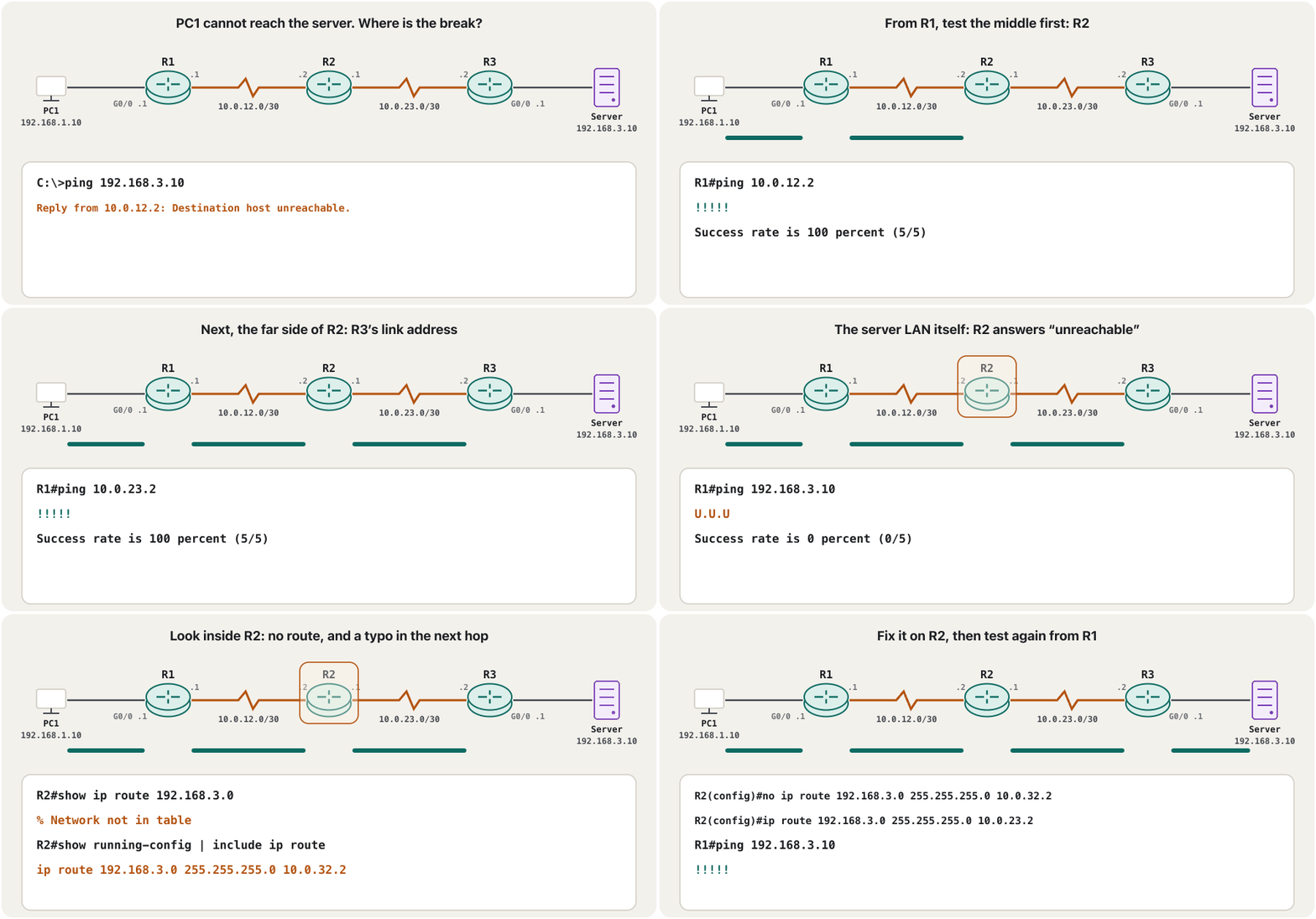
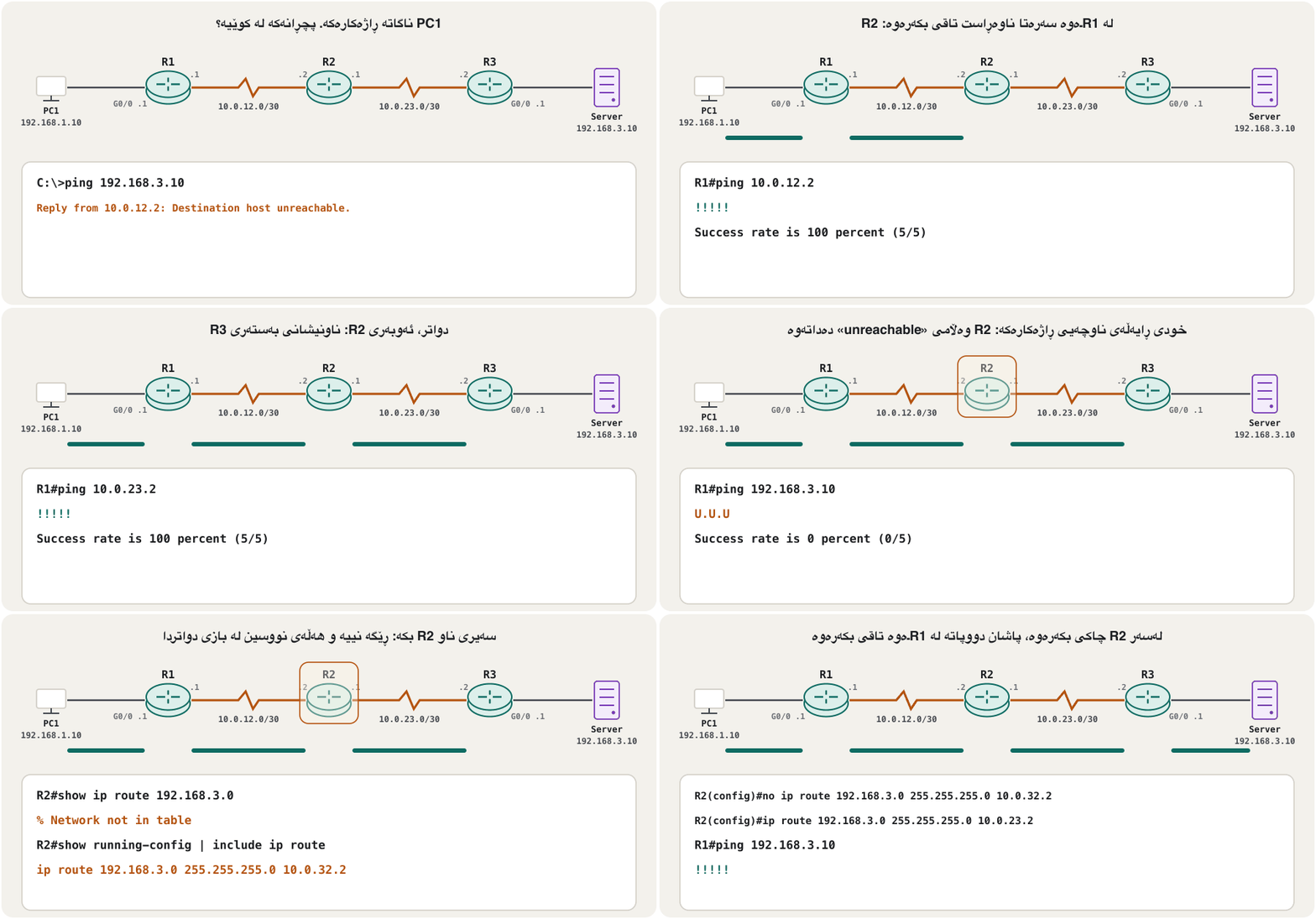
Here is a whole case. PC1 cannot reach the server, and its ping already gives a clue: R2 answers “unreachable”. From R1, test the middle of the path, then a little further, until a ping fails; then look inside the router where it fails. Each test halves the suspects.
ئەمە نموونەیەکی تەواوە. PC1 ناگاتە و پێشتر سەرەداوێک دەدات: R2 وەڵامی «unreachable» دەداتەوە. لە R1ـەوە ناوەڕاستی ڕێگاکە تاقی بکەرەوە، پاشان کەمێک دوورتر، تا شکست دەهێنێت؛ پاشان سەیری ناو ئەو بکە کە شکستەکەی لێیە. هەر تاقیکردنەوەیەک گومانلێکراوەکان نیوە دەکات.
After the fix: verify, save, back up, documentدوای چاککردنەوە: پشکنین، پاشەکەوت، باکئەپ، بەڵگەنامە
A fix is finished when the user’s test works, not just yours. Then save it (copy running-config startup-config), keep a copy of the configuration off the device — a TFTP or SCP server, as in Backups on a server — and write down what happened, what you changed and why (Verify, prevent and document). A saved, known-good configuration is also your fastest tool next time: compare the broken router with it.
چاککردنەوەیەک کاتێک تەواو دەبێت کە تاقیکردنەوەی بەکارهێنەر کار بکات، نەک تەنیا هی تۆ. پاشان پاشەکەوتی بکە (copy running-config startup-config)، کۆپییەکی لە دەرەوەی ئامێرەکە هەڵبگرە — TFTP یان SCP، وەک لە باکئەپ لەسەر ڕاژەکارێک — و بنووسە چی ڕوویدا، چیت گۆڕی و بۆچی (پشکنین، ڕێگرتن و بەڵگەنامە). پاشەکەوتکراو و دڵنیا خێراترین ئامرازیشتە بۆ جاری داهاتوو: تێکچووەکەی لەگەڵ بەراورد بکە.
R2#copy running-config startup-config
Destination filename [startup-config]?
Building configuration...
[OK]
R2#copy running-config tftp://192.168.3.10/r2-confg
Address or name of remote host [192.168.3.10]?
Destination filename [r2-confg]?
!!
1279 bytes copied in 0.140 secs (9136 bytes/sec)
Explain the codeڕوونکردنەوەی کۆدەکە
- Lineدێڕی 6-7
Press Enter to accept the answers in brackets. Packet Tracer words these lines a little differently.
Enter دابگرە بۆ وەرگرتنی وەڵامەکانی ناو کەوانە. Packet Tracer ئەم دێڕانە کەمێک بە شێوەیەکی تر دەنووسێت.
Common mistakesهەڵە باوەکان
Practice scenarios in Packet Tracerسیناریۆکانی ڕاهێنان لە Packet Tracerـدا
Break the practice network (or a lab from an earlier lesson) in one of these ways, swap with a classmate, and find each other’s fault with the tools of this lesson. Write down: symptom → command → finding → fix.
ڕاهێنان (یان تاقیکردنەوەیەک لە وانەیەکی پێشوو) بە یەکێک لەم ڕێگایانە تێک بدە، لەگەڵ هاوپۆلێک بیگۆڕنەوە و بە ئامرازەکانی ئەم وانەیە هەڵەی یەکتری بدۆزنەوە. بنووسە: نیشانە ← ← دۆزینەوە ← چاککردنەوە.
R2’s Serial0/0/1 shows up/down after someone erased part of the configuration. Which commands find the cause, and what is the fix?
Serial0/0/1ـی R2 دوای ئەوەی کەسێک بەشێک لە سڕییەوە up/down پیشان دەدات. کام هۆکارەکە دەدۆزنەوە و چاککردنەوەکە چییە؟
Show answerوەڵامەکە پیشان بدە
show ip interface brief (up/down = layer 2), then show controllers serial 0/0/1 on both routers: R2 has the DCE cable. Add clock rate 64000 under R2’s S0/0/1, check that the line protocol comes up, then save.
show ip interface brief (up/down = چینی 2)، پاشان show controllers serial 0/0/1 لەسەر هەردوو : کێبڵی DCE لای R2ـیە. clock rate 64000 لە ژێر S0/0/1ـی R2 زیاد بکە، بپشکنە کە line protocol کارا دەبێت، پاشان پاشەکەوت بکە.
In the router-on-a-stick lab, PCs in VLAN 20 cannot ping their gateway while VLAN 10 works. Find the fault on the switch.
لە تاقیکردنەوەی router-on-a-stickـدا، PCـەکانی VLAN 20 ناتوانن بۆ بکەن لە کاتێکدا VLAN 10 کار دەکات. هەڵەکە لەسەر بدۆزەرەوە.
Show answerوەڵامەکە پیشان بدە
show vlan brief (does VLAN 20 exist and hold the PCs’ ports?) and show interfaces trunk (is VLAN 20 in the allowed and active list?). A typical fix: switchport trunk allowed vlan add 20 on the trunk (native and allowed VLANs); on the router, check the subinterface’s encapsulation dot1Q 20 (the router side).
show vlan brief (VLAN 20 هەیە و PCـەکانی تێدایە؟) و show interfaces trunk (VLAN 20 لە نێو VLANـە ڕێگەپێدراو و کاراکاندایە؟). چاککردنەوەی ئاسایی: switchport trunk allowed vlan add 20 لەسەر (VLANـی ڕەسەن و ڕێگەپێدراو)؛ لەسەر ، encapsulation dot1Q 20ـی بپشکنە (لای ڕێدۆزەکە).
The new admin laptop (192.168.10.6) cannot open SSH to R1; the old admin PC (192.168.10.5) can. Passwords are correct. What do you check?
نوێی بەڕێوەبەر (192.168.10.6) ناتوانێت SSH بۆ R1 بکاتەوە؛ PCـی کۆنی بەڕێوەبەر (192.168.10.5) دەتوانێت. دروستن. چی دەپشکنیت؟
Show answerوەڵامەکە پیشان بدە
show running-config under line vty 0 4 shows access-class 5 in; show access-lists shows that ACL 5 permits only host 192.168.10.5 (and its counter rises for the old PC). Add access-list 5 permit host 192.168.10.6 (access-class).
show running-config لە ژێر line vty 0 4 access-class 5 in پیشان دەدات؛ show access-lists پیشان دەدات کە ACL 5 تەنیا ڕێگە بە host 192.168.10.5 دەدات (و ژمێرەرەکەی بۆ PCـە کۆنەکە زیاد دەبێت). access-list 5 permit host 192.168.10.6 زیاد بکە (access-class).
In the PAT lab, no PC reaches the outside and show ip nat translations stays empty. Which command shows the fault quickest?
لە تاقیکردنەوەی PATـدا، هیچ PCـێک ناگاتە دەرەوە و show ip nat translations بەتاڵ دەمێنێتەوە. کام خێراتر هەڵەکە پیشان دەدات؟
Show answerوەڵامەکە پیشان بدە
show ip nat statistics: if the inside or outside interface list is empty or wrong, add ip nat inside / ip nat outside; if they are right, check the access list with show access-lists (NAT checklist).
show ip nat statistics: ئەگەر لیستی ناوەوە یان دەرەوە بەتاڵ یان هەڵە بێت، ip nat inside / ip nat outside زیاد بکە؛ ئەگەر دروست بن، بە show access-lists بپشکنە (لیستی پشکنینی NAT).
A PC in the library stopped working after someone plugged a small hub into its wall port. The switch port shows down (err-disabled). What happened, and how do you bring it back?
PCـێک لە کتێبخانەکە دوای ئەوەی کەسێک بچووکی بە دیوارەکەیەوە بەست وەستا. down (err-disabled) پیشان دەدات. چی ڕوویدا و چۆن دەیگەڕێنیتەوە؟
Show answerوەڵامەکە پیشان بدە
Port security saw a second MAC address and shut the port (show port-security interface …). Remove the hub, then shutdown and no shutdown on the port (bring the port back).
دووەمی بینی و کوژاندەوە (show port-security interface …). لاببە، پاشان shutdown و no shutdown لەسەر (دەرچەکە بگەڕێنەرەوە).
Summaryپوختە
- Same method as on a PC, different tools: show commands first, then ping and traceroute, debug last.
- Layer 1–2:
show ip interface brief(Status/Protocol),show interfacescounters,show controllers serial(DCE clock),show cdp neighbors/ LLDP, the switch commands. - Layer 3:
show ip route [address],show ip protocols; IOS ping characters ! . U Q M ? &; extended ping with a source; traceroute marks * !H !N !A. - Services:
show ip dhcp binding,show ip nat translations,show access-lists. - debug:
terminal monitorover SSH, filter it,undebug allat once. - Static-route faults: wrong next hop, missing return route, interface down, mask typo. Then verify, save, back up and document.
- هەمان ڕێگای سەر PC، ئامرازی جیاواز: سەرەتا show، پاشان و ، دواجار debug.
- چینی 1–2:
show ip interface brief(Status/Protocol)، ژمێرەرەکانیshow interfaces،show controllers serial(کاتژمێری DCE)،show cdp neighbors/ LLDP، . - چینی 3:
show ip route [address]،show ip protocols؛ پیتەکانی IOS ! . U Q M ? &؛ extended ping بە سەرچاوەوە؛ نیشانەکانی traceroute * !H !N !A. - خزمەتگوزارییەکان:
show ip dhcp binding،show ip nat translations،show access-lists. - debug:
terminal monitorبە SSH، فلتەری بکە، دەستبەجێundebug all. - هەڵەکانی : هەڵە، ڕێگەی گەڕانەوەی ون، کەوتوو، هەڵەی ماسک. پاشان پشکنین، پاشەکەوت، و .
The next lesson leaves the command line behind: Network Virtualization, SDN and Automation shows how controllers and scripts configure — and check — hundreds of devices at once.
وانەی داهاتوو بەجێ دەهێڵێت: Network Virtualization، SDN و ئۆتۆماتیک پیشان دەدات کۆنترۆڵەر و سکریپتەکان چۆن سەدان ئامێر بەیەکجار ڕێک دەخەن — و دەپشکنن.
Lesson complete!وانەکە تەواو بوو!
Well done. Review the key terms, then go on to the next lesson.دەستخۆش. سەیرێکی زاراوە سەرەکییەکان بکەرەوە، پاشان بڕۆ بۆ وانەی داهاتوو.
Key termsزاراوە سەرەکییەکان
Network Virtualization, SDN and Automationگریمانەسازیی ڕایەڵە، SDN و خۆکارکردن
Related lecturesوانە پەیوەندیدارەکان
- ICMP, Ping and TracerouteICMP، پینگ و بەدواداچوونی ڕێگە
- Your First Router: Interfaces and Addressesیەکەم ڕێدۆز: نێوبەستەکان و ناونیشانەکان
- Default Routes and Floating Static Routesڕێگە بنەڕەتییەکان و ڕێگە جێگیرە یەدەگەکان
- Reading the Routing Table: Route Sources, Metrics and ADخوێندنەوەی خشتەی ڕێدۆزی: سەرچاوەکانی ڕێگە، پێوانە و مەودای بەڕێوەبەری
- VLANs: Many Networks on One SwitchVLAN: چەند ڕایەڵەیەک لەسەر یەک سویچ
- Trunks and 802.1Q Tagsترەنکەکان و تاگەکانی 802.1Q
- Redundant Links: Spanning Tree and EtherChannelبەستەری یەدەگ: پرۆتۆکۆڵی داری داپۆشەر و EtherChannel
- Switch Port Securityئاسایشی دەرچەی سویچ
- Configuring Static NAT, Dynamic NAT and PATڕێکخستنی وەرگێڕانی جێگیری ناونیشانی ڕایەڵە، وەرگێڕانی بزۆکی ناونیشانی ڕایەڵە و وەرگێڕانی ناونیشانی پۆرت
- Access Control Lists: Filtering TrafficACLـەکان: فلتەرکردنی هاتوچۆ
- DHCP on a Cisco Router and DHCP RelayDHCP لەسەر ڕێدۆزێکی Cisco و گوازەرەوەی DHCP
- OSPF Neighbours: From Down to Full; DR and BDRڕێدۆزە دراوسێکانی OSPF: لە Downـەوە بۆ Full؛ DR و BDR
- ARP: From IP Address to MAC AddressARP: لە ناونیشانی IP بۆ ناونیشانی MAC
- Cisco IOS and the Command LineCisco IOS و نێوبەستەی هێڵی فەرمان
References and further readingسەرچاوەکان و خوێندنەوەی زیاتر
- Cisco: Understand the Ping and Traceroute Commands (ping characters ! . U Q M ? &; traceroute characters; U.U.U example)
- Cisco: Understand the Extended Ping and Extended Traceroute Commands (dialogue and defaults; UDP port 33434)
- Cisco: Understand the Traceroute Command (UDP probes, three per TTL; ICMP unreachables limited to one per 500 ms)
- Cisco Internetworking Troubleshooting Handbook: Troubleshooting Serial Lines (status line conditions, clock rate on the DCE, CRC and framing errors)
- Cisco: Troubleshoot Switch Port and Interface Problems (CRC, runts, giants, late collisions, err-disabled)
- Cisco Catalyst 2960 Software Configuration Guide 12.2(55)SE: Configuring CDP (defaults: on, 60 s timer, 180 s holdtime)
- Cisco Catalyst 9300 IOS XE 17.12: Configuring LLDP (IEEE 802.1AB; disabled globally by default; lldp run)
- Cisco IOS command reference: show cdp neighbors (columns; detail adds address and version)
- Cisco: Important Information on Debug Commands (impact, terminal monitor, undebug all, logging buffered, timestamps)
- Cisco Press: Switching, Routing, and Wireless Essentials Companion Guide (CCNAv7) — troubleshoot static and default routes
- Cisco: 200-301 CCNA v2.0 exam topics (PDF) — 2.3 CDP/LLDP, 2.4 show, ping, extended ping, traceroute
This lecture is a first edition. The Kurdish text and terminology are waiting for review by Kurdish IT teachers.ئەم وانەیە چاپی یەکەمە. دەقە کوردییەکە و زاراوەکانی چاوەڕێی پێداچوونەوەی مامۆستایانی کوردی بواری IT ن.