Chapterبەش 1 · Lectureوانە 1.3
Securing a Cisco Device: Passwords, Users and Bannersپاراستنی ئامێرێکی Cisco: تێپەڕەوشەکان، بەکارهێنەران و بانەر
Why a router needs locks and which doors it has (console, AUX, vty, enable); console and vty passwords with login; enable password vs enable secret; the password types 0, 7, 5, 8 and 9 and what service password-encryption really does; hashes, salt and type 9 scrypt secrets; minimum length; local user accounts with login local; exec-timeout; banner motd as a legal warning; removing and checking passwords; the full lab with saving.
بۆچی پێویستی بە قوفڵە و چ دەرگایەکی هەیە (کۆنسۆڵ، AUX، vty، enable)؛ کۆنسۆڵ و vty لەگەڵ login؛ enable password و enable secret؛ جۆرەکانی 0، 7، 5، 8 و 9 و service password-encryption بەڕاستی چی دەکات؛ هاش، و secretـی scryptـی جۆری 9؛ کەمترین درێژی؛ ناوخۆیی بە login local؛ exec-timeout؛ banner motd وەک ئاگادارکردنەوەی یاسایی؛ لابردن و پشکنینی ؛ هەموو تاقیگەکە لەگەڵ پاشەکەوتکردن.
What you will learnچی فێر دەبیت
- Name the ways into a Cisco device and lock each one: console, vty lines and privileged EXEC.
- Explain why enable secret replaces enable password, and read password types 0, 7, 5, 8 and 9 in a configuration.
- Explain what service password-encryption really does and why hashed (type 9) secrets are safer.
- Create local user accounts with login local, set a minimum length and exec-timeout, and add a warning banner.
- Remove and check passwords, and finish the lab by saving the configuration.
- ڕێگاکانی چوونە ناو ئامێرێکی Cisco بناسیت و هەریەکەیان قوفڵ بکەیت: کۆنسۆڵ، و .
- ڕوونی بکەیتەوە بۆچی enable secret جێگەی enable password دەگرێتەوە و جۆرەکانی 0، 7، 5، 8 و 9 لە بخوێنیتەوە.
- ڕوونی بکەیتەوە service password-encryption بەڕاستی چی دەکات و بۆچی secretـی هاشکراو (جۆری 9) سەلامەترن.
- ناوخۆیی بە login local دروست بکەیت، کەمترین درێژی و exec-timeout دابنێیت و بانەرێکی ئاگادارکردنەوە زیاد بکەیت.
- لاببەیت و بیانپشکنیت و تاقیگەکە بە پاشەکەوتکردنی تەواو بکەیت.
Why a router needs locksبۆچی ڕێدۆز پێویستی بە قوفڵە
A new Cisco router or switch has no passwords at all. Anyone who plugs a console cable into it — a visitor in the server room, a student in the lab — reaches R1> and, with enable, R1#, where they can read the configuration, change it or erase it. Once the device has an IP address, the same is possible over the network. So securing access is part of the very first configuration, not an extra.
یان نوێی Cisco هیچ نییە. هەر کەسێک تێی بخات — میوانێک لە ژووری ، قوتابییەک لە تاقیگەدا — دەگاتە R1> و بە enable دەگاتە R1#، کە لەوێ دەتوانێت بخوێنێتەوە، بیگۆڕێت یان بیسڕێتەوە. کاتێک ئامێرەکە هەبوو، هەمان شت لە ڕێگەی دەکرێت. بۆیە پاراستنی دەستڕاگەیشتن بەشێکە لە یەکەم ڕێکخستن، نەک شتێکی زیادە.
Think of the device as a building with several doors: the console port, the old AUX port and the virtual (vty) lines for remote logins all lead into user EXEC mode; an inner door, enable, leads to privileged EXEC mode. Each door needs its own lock. Good passwords themselves are explained in Passwords and Authentication.
ئامێرەکە وەک باڵەخانەیەک بزانە کە چەند دەرگایەکی هەیە: ، کۆنی AUX و بۆ چوونەژوورەوە لە دوورەوە، هەموویان دەچنە ناو ؛ دەرگایەکی ناوەوە، enable، دەبات بۆ . هەر دەرگایەک قوفڵی خۆی پێویستە. باش خۆیان لە تێپەڕەوشەکان و پشتڕاستکردنەوەی ناسنامەدا ڕوون کراونەتەوە.
The lab: one router, one switch, two PCsتاقیگەکە: ڕێدۆزێک، سویچێک، دوو کۆمپیوتەر
In this lesson you lock router R1 (and, the same way, switch SW1) of the network below. The checklist is: host name, privileged EXEC password and secret, console password, vty password — and a default gateway for the PCs (192.168.1.1, the router's G0/0), so they can reach other networks. Start, as always, with the host name; the prompt changes at once:
لەم وانەیەدا R1 (و بە هەمان شێوە SW1)ی ئەم خوارەوە قوفڵ دەکەیت. لیستی کارەکان ئەمەیە: ، و secretـی ، کۆنسۆڵ، vty — و بۆ (192.168.1.1، G0/0ـی )، تا بگەنە تر. وەک هەمیشە، بە دەست پێ بکە؛ دەستبەجێ دەگۆڕێت:
Router>enable
Router#configure terminal
Enter configuration commands, one per line.  End with CNTL/Z.
Router(config)#hostname R1
R1(config)#
Explain the codeڕوونکردنەوەی کۆدەکە
- Lineدێڕی 4-5
From now on the prompt says R1, not Router.
لە ئێستاوە دەڵێت R1، نەک Router.
Locking the consoleقوفڵکردنی کۆنسۆڵ
The console is a line, so you lock it in line configuration mode: line console 0 selects it, password sets the password and login tells IOS to ask for it. Without login the password is stored but never asked for.
کۆنسۆڵ هێڵێکە، بۆیە لە line قوفڵی دەکەیت: line console 0 هەڵیدەبژێرێت، password دادەنێت و login بە IOS دەڵێت داوای بکات. بەبێ login هەڵدەگیرێت بەڵام هەرگیز داوا ناکرێت.
R1(config)#line console 0
R1(config-line)#password C0nsole-Lab!
R1(config-line)#login
R1(config-line)#exit
R1(config)#
Explain the codeڕوونکردنەوەی کۆدەکە
- Lineدێڕی 1
0 is the number of the console line — a router has one console line, number 0.
0 ژمارەی هێڵی کۆنسۆڵە — یەک هێڵی کۆنسۆڵی هەیە، ژمارە 0.
- Lineدێڕی 2-3
Set the password, then turn on the check.
دابنێ، پاشان پشکنینەکە چالاک بکە.
Log out (end, then exit) and press Enter: the console now says User Access Verification and asks for the password. The characters you type are not shown.
دەربچۆ (end، پاشان exit) و Enter دابگرە: کۆنسۆڵەکە ئێستا دەڵێت User Access Verification و داوای دەکات. ئەو پیتانەی دەینووسیت پیشان نادرێن.
enable password or enable secretenable password یان enable secret
The inner door, from R1> to R1#, is locked in global configuration mode with one of two commands. enable password … stores the password as plain text: anyone who sees show running-config reads it. enable secret … stores only a hash of it, so the password itself is not in the configuration. If both are set, IOS asks only for the secret — the secret wins. Cisco says to use enable secret, not the older enable password.
دەرگای ناوەوە، لە R1>ـەوە بۆ R1#، لە بە یەکێک لە دوو قوفڵ دەکرێت. enable password … وەک هەڵدەگرێت: هەر کەسێک show running-config ببینێت دەیخوێنێتەوە. enable secret … تەنیا هاشێکی هەڵدەگرێت، بۆیە خودی لە نییە. ئەگەر هەردووکیان دانرابن، IOS تەنیا داوای secret دەکات — secret سەردەکەوێت. Cisco دەڵێت دەبێت enable secret لەبری enable passwordـی کۆنتر بەکار بهێنرێت.
R1(config)#enable password En@ble-R1-2026
R1(config)#enable secret En@ble-R1-2026
R1(config)#do show running-config | include enable
enable secret 5 $1$Kq3T$7dt.EGq26uqyDTfEO5DqW0
enable password En@ble-R1-2026
Explain the codeڕوونکردنەوەی کۆدەکە
- Lineدێڕی 3
| include enable shows only the lines that contain the word enable.
| include enable تەنیا ئەو دێڕانە پیشان دەدات کە وشەی enableـیان تێدایە.
- Lineدێڕی 4
The secret: a salted hash, not the password.
secret: هاشێکی خوێدار، نەک .
- Lineدێڕی 5
The password: readable by anyone.
password: هەمووان دەیخوێننەوە.
Password types 0, 7, 5, 8 and 9جۆرەکانی تێپەڕەوشە 0، 7، 5، 8 و 9
In show running-config the number after password or secret is the type — how the password is stored. Older notes and web pages list "six types" and mix them up; these are the ones IOS uses for logins today:
لە show running-configـدا ئەو ژمارەیەی دوای password یان secret دێت جۆرەکەیە — چۆن هەڵگیراوە. تێبینییە کۆنەکان و پەڕە وێبییەکان "شەش جۆر" ڕیز دەکەن و تێکەڵیان دەکەن؛ ئەمانە ئەوانەن کە IOS ئەمڕۆ بۆ چوونەژوورەوە بەکاریان دەهێنێت:
| Typeجۆر | How it is storedچۆن هەڵدەگیرێت | Made byبە چی دروست دەبێت | Safe?سەلامەتە؟ |
|---|---|---|---|
| 0 | plain text | enable password, password (line), username … password | noنەخێر |
| 7 | scrambled with a fixed, public key — reversibleتێکدراو بە جێگیر و ئاشکرا — دەگەڕێتەوە | service password-encryption | no — hides only from a glanceنەخێر — تەنیا لە سەیرکردنێکی خێرا دەیشارێتەوە |
| 5 | salted MD5 hashهاشی MD5ـی خوێدار | enable secret, username … secret on older IOS and Packet Tracerenable secret، username … secret لە IOSـی کۆن و Packet Tracerـدا | old — move to 8 or 9کۆن — بگوازەوە بۆ 8 یان 9 |
| 8 | PBKDF2 with SHA-256 (salted, slow)PBKDF2 بە SHA-256 (خوێدار، هێواش) | … algorithm-type sha256 secret … | yesبەڵێ |
| 9 | scrypt (salted, slow, uses a lot of memory)scrypt (خوێدار، هێواش، زۆر بەکار دەهێنێت) | … algorithm-type scrypt secret …; the default for secrets on current IOS XE… algorithm-type scrypt secret …؛ بنەڕەتی secret لە IOS XEـی ئەمڕۆدا | yes — the best choiceبەڵێ — باشترین هەڵبژاردە |
Two more numbers appear in lists: type 4 was a flawed SHA-256 method that Cisco withdrew, and type 6 is reversible AES encryption for stored keys (such as VPN keys), not for login passwords.
دوو ژمارەی تریش لە لیستەکاندا دەردەکەون: جۆری 4 ڕێگەیەکی SHA-256ـی هەڵەدار بوو کە Cisco کشاندییەوە و جۆری 6 شفرەکردنی AESـی گەڕاوەیە بۆ هەڵگیراوەکان (وەک VPN)، نەک بۆ چوونەژوورەوە.
What service password-encryption really doesservice password-encryption بەڕاستی چی دەکات
enable password and the line passwords are plain text. The global command service password-encryption turns every such password — now and in the future — into type 7, so they no longer stand readable in show running-config. That is all it does: it does not turn anything into type 5, and it does not touch secrets, which are already hashed.
enable password و هێڵەکان . گشتیی service password-encryption هەموو ئەو جۆرە — ئێستا و لە داهاتوودا — دەکاتە جۆری 7، تا چیتر بە خوێندراوی لە show running-configـدا نەوەستن. هەر ئەوەندە دەکات: هیچ شتێک ناکاتە جۆری 5 و دەست لە secretـەکان نادات، کە پێشتر هاش کراون.
Type 7 is not real encryption. It is a simple scrambling with a key that has been public for decades; free tools turn it back into the password in a second. Cisco calls type 7 passwords obfuscated, not encrypted. Still turn it on — it stops someone reading a password over your shoulder or in a printed configuration — but never rely on it: use secrets.
جۆری 7 شفرەکردنی ڕاستەقینە نییە. تێکدانێکی سادەیە بە کە دەیان ساڵە ئاشکرایە؛ ئامرازی بێبەرانبەر لە چرکەیەکدا دەیگەڕێننەوە بۆ . Cisco بە جۆری 7 دەڵێت شاراوە، نەک شفرەکراو. هێشتا چالاکی بکە — ڕێگری لەوە دەکات کەسێک لە پشت شانتەوە یان لە چاپکراودا بخوێنێتەوە — بەڵام هەرگیز پشتی پێ مەبەستە: secret بەکار بهێنە.
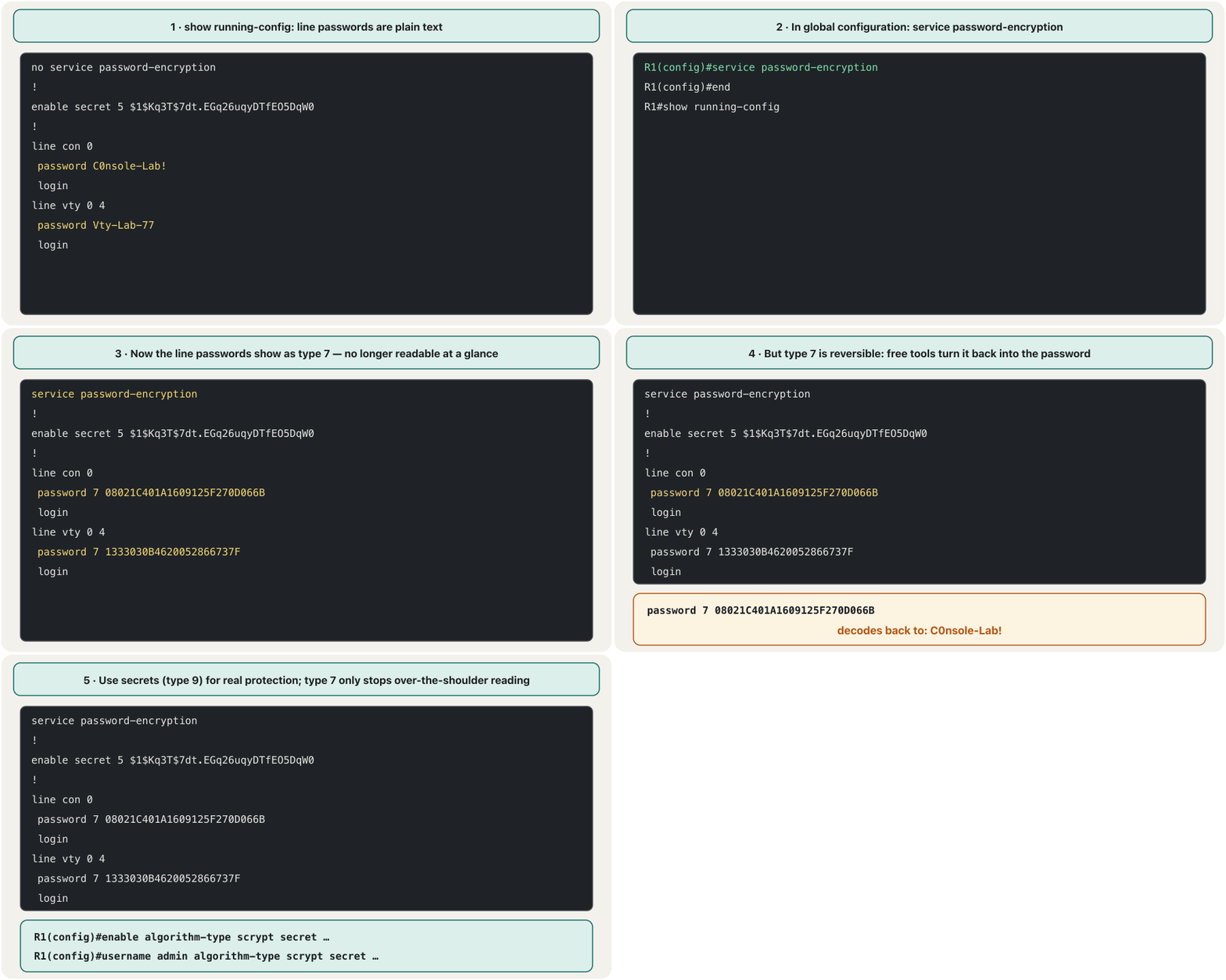
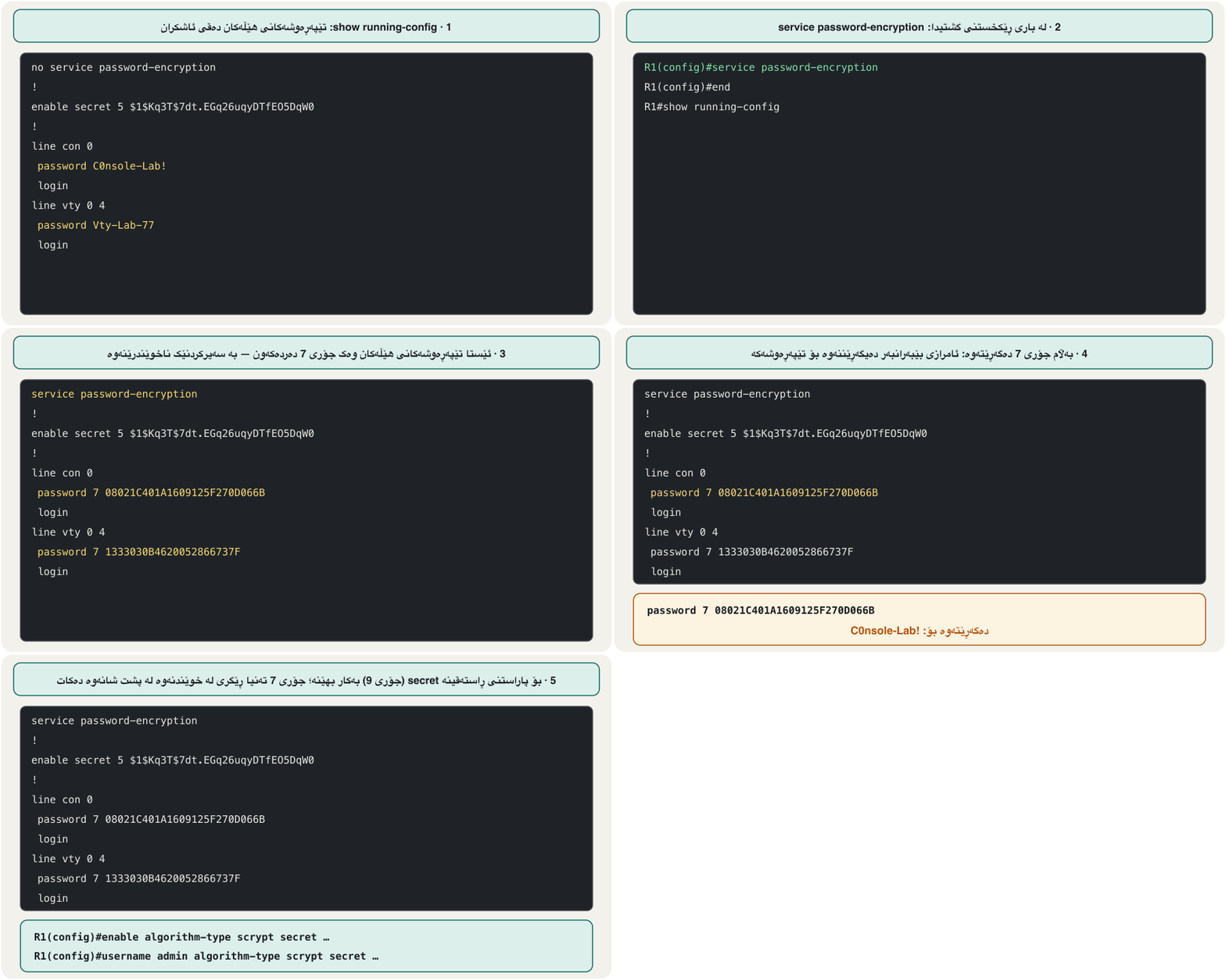
R1(config)#service password-encryption
R1(config)#do show running-config
<output omitted>
service password-encryption
<output omitted>
line con 0
 password 7 08021C401A1609125F270D066B
 login
<output omitted>
R1(config)#no service password-encryption
Explain the codeڕوونکردنەوەی کۆدەکە
- Lineدێڕی 7
Type 7: hidden from a glance only.
جۆری 7: تەنیا لە سەیرکردنێکی خێرا شاراوەیە.
- Lineدێڕی 10
no service password-encryption stops scrambling new passwords; passwords already shown as type 7 stay type 7.
no service password-encryption تێکدانی نوێکان ڕادەگرێت؛ ئەوانەی پێشتر جۆری 7 بوون جۆری 7 دەمێننەوە.
Hashes: why secrets are saferهاشەکان: بۆچی secret سەلامەترە
A secret is stored as a hash: the password and a random salt go through a one-way hash function, and only the result is kept. At login, IOS hashes what you type with the same salt and compares. A hash cannot be turned back, so an attacker can only hash guess after guess (hashing, salting passwords).
secret وەک هاش هەڵدەگیرێت: و هەڕەمەکی بە یەک ئاڕاستەدا دەڕۆن و تەنیا ئەنجامەکە دەهێڵدرێتەوە. لە کاتی چوونەژوورەوەدا، IOS ئەوەی دەینووسیت بە هەمان هاش دەکات و ئەنجامەکان بەراورد دەکات. هاش ناگەڕێتەوە، بۆیە هێرشبەر تەنیا دەتوانێت مەزەندە لە دوای مەزەندە هاش بکات (هاشکردن، خوێدانی تێپەڕەوشەکان).
So the speed of the hash decides how many guesses per second an attacker gets. MD5 (type 5) is fast and broken; Cisco asks for type 5 secrets to move to type 8 or 9. Type 9 (scrypt) is slow on purpose and needs much memory, which makes guessing very expensive.
بۆیە خێرایی هاشەکە بڕیار دەدات هێرشبەر لە چرکەیەکدا چەند مەزەندە بکات. MD5 (جۆری 5) خێرا و شکاوە، بۆیە چیتر بە بەهێز ناوی نابرێت؛ Cisco داوا دەکات secretـی جۆری 5 بگوازرێتەوە بۆ جۆری 8 یان 9. جۆری 9 (scrypt) بە ئەنقەست هێواشە و زۆری پێویستە، کە مەزەندەکردن زۆر گران دەکات.
R1(config)#enable algorithm-type scrypt secret En@ble-R1-2026
R1(config)#do show running-config | include enable
enable secret 9 $9$nS2uWq7Xz1Lb4c$1V89nwtfI8YlSRAfXlRYm3x42cHsJclp95aAqAji9z6
Explain the codeڕوونکردنەوەی کۆدەکە
- Lineدێڕی 1
algorithm-type sha256 would give type 8; md5 would give type 5.
algorithm-type sha256 جۆری 8 دەدات؛ md5 جۆری 5.
- Lineدێڕی 3
$9$, then the 14-character salt, then the hash.
$9$، پاشان 14 پیتییەکە، پاشان هاشەکە.
A minimum password lengthکەمترین درێژیی تێپەڕەوشە
Length is what makes a password hard to guess (why length wins). security passwords min-length in global configuration makes IOS refuse new user, enable and line passwords and secrets that are shorter than the number you give. It is off by default, and IOS checks the length when a password is typed — so set the minimum before the passwords.
درێژییە کە قورس دەکات بۆ مەزەندەکردن (بۆچی درێژی سەردەکەوێت). security passwords min-length لە وا لە IOS دەکات و secretـی نوێی بەکارهێنەر، enable و هێڵەکان ڕەت بکاتەوە کە لەو ژمارەیەی دەیدەیت کورتتر بن. بە شێوەی بنەڕەت ناچالاکە و IOS درێژییەکە لە کاتی نووسینی دەپشکنێت — بۆیە کەمترین درێژی پێش دابنێ.
R1(config)#security passwords min-length 10
R1(config)#enable secret cisco
% Password too short - must be at least 10 characters. Password not configured.
R1(config)#enable algorithm-type scrypt secret En@ble-R1-2026
R1(config)#
Explain the codeڕوونکردنەوەی کۆدەکە
- Lineدێڕی 2-3
cisco has 5 characters, so IOS refuses it and keeps the old setting.
cisco 5 پیتە، بۆیە IOS ڕەتی دەکاتەوە و ڕێکخستنە کۆنەکە دەهێڵێتەوە.
- Lineدێڕی 4
14 characters: accepted.
14 پیت: پەسەند کرا.
Local user accounts: username and login localهەژمارەکانی بەکارهێنەر ناوخۆیی: username و login local
A line password is one shared password: everyone knows it, and the log cannot say who logged in. Better: create a user account for each person with username <name> secret <password> (never username … password …, which is stored as type 0 or 7), and tell the line to use these accounts with login local. The line password is then ignored.
هێڵ یەک هاوبەشە: هەمووان دەیزانن و تۆمارەکە ناتوانێت بڵێت کێ چووە ژوورەوە. باشتر: بۆ هەر کەسێک دروست بکە بە username <name> secret <password> (هەرگیز username … password …، کە وەک جۆری 0 یان 7 هەڵدەگیرێت) و بە login local بە هێڵەکە بڵێ ئەم هەژمارانە بەکار بهێنێت. ئیتر هێڵەکە پشتگوێ دەخرێت.
R1(config)#username admin algorithm-type scrypt secret Adm1n-Lab-26
R1(config)#line console 0
R1(config-line)#login local
R1(config-line)#end
R1#show running-config | include username
username admin secret 9 $9$Pd8eRt3Yk6Mv0a$KHCw167dcDF7Z5I5oK7vxh.ikLLkN.UjelI/xnmxS9U
R1#exit

User Access Verification

Username: admin
Password:
R1>
Explain the codeڕوونکردنەوەی کۆدەکە
- Lineدێڕی 1
In Packet Tracer use username admin secret … (stored as type 5).
لە Packet Tracerـدا username admin secret … بەکار بهێنە (وەک جۆری 5 هەڵدەگیرێت).
- Lineدێڕی 3
login local: ask for a user name and its secret.
login local: داوای و secretـەکەی بکە.
- Lineدێڕی 11-12
Now the console asks for both.
ئێستا کۆنسۆڵەکە داوای هەردووکیان دەکات.
The remote doors: vty linesدەرگا دوورەکان: هێڵەکانی VTY
Remote logins (SSH, or the old Telnet) arrive on virtual terminal (vty) lines. A switch usually has 16 (line vty 0 15); many routers show 5 (line vty 0 4). Each remote session takes one free line, so lock all of them: either a password with login, or better login local. The complete remote set-up — a local user and SSH-only vty lines — is in Managing Devices Remotely. Later an access list can also limit who may even try (access-class).
چوونەژوورەوە لە دوورەوە (، یان کۆن) دەگاتە سەر (هێڵی تێرمیناڵی گریمانەیی). زۆرجار 16ـی هەیە (line vty 0 15)؛ زۆر 5 پیشان دەدەن (line vty 0 4). هەر دانیشتنێکی دوور هێڵێکی بەتاڵ دەگرێت، بۆیە هەموویان قوفڵ بکە: یان لەگەڵ login، یان باشتر login local. ڕێکخستنی تەواوی دوور — بەکارهێنەرێکی ناوخۆیی و تەنیا — لە بەڕێوەبردنی ئامێرەکان لە دوورەوەدایە. دواتر دەتوانێت دیاری بکات کێ تەنانەت بۆی هەیە هەوڵ بدات (access-class).
R1(config)#line vty 0 4
R1(config-line)#password Vty-Lab-77
R1(config-line)#login
R1(config-line)#exit
SW1(config)#line vty 0 15
SW1(config-line)#login local
SW1(config-line)#exit
Explain the codeڕوونکردنەوەی کۆدەکە
- Lineدێڕی 1
line vty 0 4 = lines 0 to 4 (five lines). Written as line vty 0 <0-15>, it means: 0, then the last line number.
line vty 0 4 = هێڵەکانی 0 تا 4 (پێنج هێڵ). ئەگەر بە شێوەی line vty 0 <0-15> نووسرابێت، واتە: 0، پاشان ژمارەی دوایین هێڵ.
- Lineدێڕی 5-6
On the switch: all 16 lines use the local user accounts.
لەسەر : هەر 16 هێڵەکە ناوخۆییەکان بەکار دەهێنن.
exec-timeout: closing forgotten sessionsexec-timeout: داخستنی دانیشتنە لەبیرکراوەکان
An administrator walks away from a logged-in console — and anyone can use it. exec-timeout logs a session out after it has been idle for a while. The default is 10 minutes; exec-timeout 5 0 (minutes, seconds) is a good lab value. exec-timeout 0 0 means never and should not be used.
بەڕێوەبەرێک لە کۆنسۆڵێکی چووەژوورەوە دوور دەکەوێتەوە — و هەر کەسێک دەتوانێت بەکاری بهێنێت. exec-timeout دانیشتنێک دوای کاتێکی بێکاری دەردەکات. بنەڕەتەکەی 10 خولەکە؛ exec-timeout 5 0 (خولەک، چرکە) بەهایەکی باشە بۆ تاقیگە. exec-timeout 0 0 واتە هەرگیز و نابێت بەکار بهێنرێت.
R1(config)#line console 0
R1(config-line)#exec-timeout 5 0
R1(config-line)#line vty 0 4
R1(config-line)#exec-timeout 5 0
R1(config-line)#end
Explain the codeڕوونکردنەوەی کۆدەکە
- Lineدێڕی 3
You can jump from one line straight to another.
دەتوانیت لە هێڵێکەوە ڕاستەوخۆ بچیتە سەر هێڵێکی تر.
banner motd: a warning, not a welcomebanner motd: ئاگادارکردنەوە، نەک بەخێرهاتن
banner motd (message of the day) sets a text that everyone sees when they connect, before the login prompt. Type the command, a delimiter character such as #, the text and the same delimiter again; the delimiter may not appear inside the text. You can write it on one line, or press Enter after the first # and IOS lets you type several lines.
banner motd (message of the day) دەقێک دادەنێت کە هەمووان کاتی پەیوەندیکردن دەیبینن، پێش چوونەژوورەوە. ، نیشانەیەکی جیاکەرەوە وەک #، دەقەکە و دووپاتە هەمان جیاکەرەوە بنووسە؛ جیاکەرەوەکە نابێت لە ناو دەقەکەدا بێت. دەتوانیت لە یەک دێڕدا بینووسیت، یان دوای یەکەم # Enter دابگریت و IOS ڕێگەت دەدات چەند دێڕێک بنووسیت.
Use the banner as a legal warning: say that access is for authorised people only and is monitored. It is not decoration and not a welcome: "Welcome" sounds like an invitation, while a clear warning means no intruder can say they were not told. Do not name the company, the device model or a person; Cisco advises leaving such details out.
بانەرەکە وەک ئاگادارکردنەوەیەکی یاسایی بەکار بهێنە: بڵێ دەستڕاگەیشتن تەنیا بۆ کەسانی مۆڵەتدارە و چاودێری دەکرێت. جوانکاری نییە و بەخێرهاتن نییە: "Welcome" وەک بانگهێشتێک دەردەکەوێت، بەڵام ئاگادارکردنەوەیەکی ڕوون وا دەکات کەسی بێمۆڵەت نەتوانێت بڵێت ئاگادار نەکرابووەوە. ناوی کۆمپانیا، مۆدێلی ئامێرەکە یان کەسێک مەبە؛ Cisco ئامۆژگاری دەکات ئەو وردەکارییانە دانەنرێن.
Checking and removing passwordsپشکنین و لابردنی تێپەڕەوشەکان
Check your work with show running-config (from configuration mode, do show running-config): you see every password line and its type. To remove a setting, type the same command with no in front. Line passwords are removed inside the line — there is no no line console password command.
کارەکەت بە show running-config بپشکنە (لە ڕێکخستنەوە، do show running-config): هەموو دێڕێکی و جۆرەکەی دەبینیت. بۆ لابردنی ڕێکخستنێک، هەمان بنووسە و no بخە پێشەوەی. هێڵ لە ناو هێڵەکەدا لادەبرێن — no line console password نییە.
R1(config)#no enable password
R1(config)#no enable secret
R1(config)#line console 0
R1(config-line)#no password
R1(config-line)#no login
R1(config-line)#end
R1#show running-config
Explain the codeڕوونکردنەوەی کۆدەکە
- Lineدێڕی 3-5
Inside the console line: remove the password and the login check.
لە ناو هێڵی کۆنسۆڵدا: و پشکنینی login لاببە.
- Lineدێڕی 7
Check that the lines are gone.
دڵنیابە کە دێڕەکان نەماون.
The whole lab, step by stepهەموو تاقیگەکە، هەنگاو بە هەنگاو
Here is a clean sequence that locks a new router from scratch. It follows the usual order of a lab and adds the steps that are often left out: the vty and AUX lines, a timeout, the banner and — always — saving.
ئەمە زنجیرەیەکی پاکە کە نوێ لە سفرەوە قوفڵ دەکات. ڕیزی ئاسایی تاقیکردنەوەیەک پەیڕەو دەکات و ئەو هەنگاوانەش زیاد دەکات کە زۆرجار لەبیر دەکرێن: و هێڵی AUX، کاتی دەرکردن (exec-timeout)، بانەر و — هەمیشە — پاشەکەوتکردن.
Router>en
Router#config t
Enter configuration commands, one per line.  End with CNTL/Z.
Router(config)#hostname R1
R1(config)#security passwords min-length 10
R1(config)#enable algorithm-type scrypt secret En@ble-R1-2026
R1(config)#username admin algorithm-type scrypt secret Adm1n-Lab-26
R1(config)#line console 0
R1(config-line)#login local
R1(config-line)#exec-timeout 5 0
R1(config-line)#line vty 0 4
R1(config-line)#login local
R1(config-line)#exec-timeout 5 0
R1(config-line)#line aux 0
R1(config-line)#login local
R1(config-line)#exec-timeout 5 0
R1(config-line)#exit
R1(config)#service password-encryption
R1(config)#banner motd # *** Authorised access only. Activity is logged. *** #
R1(config)#end
R1#
%SYS-5-CONFIG_I: Configured from console by console
R1#copy running-config startup-config
Destination filename [startup-config]?
Building configuration...
[OK]
Explain the codeڕوونکردنەوەی کۆدەکە
- Lineدێڕی 6-7
In Packet Tracer, if algorithm-type is refused: enable secret … and username admin secret … (type 5).
لە Packet Tracerـدا، ئەگەر algorithm-type ڕەت کرایەوە: enable secret … و username admin secret … (جۆری 5).
- Lineدێڕی 14-16
The AUX port is one more door (lesson start): lock it the same way.
AUX دەرگایەکی ترە (سەرەتای وانەکە): بە هەمان شێوە قوفڵی بکە.
- Lineدێڕی 18
Hides any plain-text password that may still be added later.
هەر ئاشکرا دەشارێتەوە کە لەوانەیە دواتر زیاد بکرێت.
- Lineدێڕی 23-26
Without this, everything is lost at the next restart.
بەبێ ئەمە، هەموو شتێک لە داهاتوودا ون دەبێت.
Common mistakesهەڵە باوەکان
Exercisesڕاهێنانەکان
On switch SW1: "Create a user account with the type-5 encryption method (user name Cisco, password Cisco) and set the console line to use locally defined accounts." Write the commands, and say what "type-5 encryption" really is.
لەسەر SW1: " بە ڕێگەی جۆری 5 دروست بکە ( Cisco، Cisco) و هێڵی کۆنسۆڵ ڕێک بخە تا هەژمارە ناوخۆییەکان بەکار بهێنێت." بنووسە و بڵێ "شفرەکردنی جۆری 5" بەڕاستی چییە.
Show answerوەڵامەکە پیشان بدە
SW1(config)#username Cisco secret Cisco
SW1(config)#line console 0
SW1(config-line)#login local
SW1(config-line)#end
SW1#copy running-config startup-config
Type 5 is not encryption but a salted MD5 hash, which cannot be reversed — and is old: on current IOS use algorithm-type scrypt (type 9). Cisco/Cisco are the exam's lab values only.
جۆری 5 شفرەکردن نییە بەڵکو هاشی MD5ـی خوێدارە، کە ناگەڕێتەوە — و کۆنە: لە IOSـی ئەمڕۆدا algorithm-type scrypt (جۆری 9) بەکار بهێنە. Cisco/Cisco تەنیا بەهای تاقیگەی تاقیکردنەوەکەن.
Set the warning message "only authorized persons are allowed" on SW1, and say when users will see it.
پەیامی ئاگادارکردنەوەی "only authorized persons are allowed" لەسەر SW1 دابنێ و بڵێ بەکارهێنەران کەی دەیبینن.
Show answerوەڵامەکە پیشان بدە
SW1(config)#banner motd #only authorized persons are allowed#Every user sees it when they connect, before the login prompt.
هەموو بەکارهێنەرێک کاتی پەیوەندیکردن دەیبینێت، پێش چوونەژوورەوە.
Find the five mistakes and correct them:
Router(config)#hostname eng → next prompt Router(config)# · Router(config)#enable password 1234 · Router(config)#login · Router(config)#enable Cisco · Router(config)#no line console password · and the lab never saves.
پێنج هەڵەکە بدۆزەرەوە و ڕاستیان بکەرەوە:
Router(config)#hostname eng ← دواتر Router(config)# · Router(config)#enable password 1234 · Router(config)#login · Router(config)#enable Cisco · Router(config)#no line console password · و تاقیگەکە هەرگیز پاشەکەوت ناکات.
Show answerوەڵامەکە پیشان بدە
- After
hostname engthe prompt iseng(config)#. loginbelongs underline console 0/line vty …; in global configurationloginalone is incomplete and locks nothing.enable Cisco→enable secret …(or at leastenable password Cisco).no line console password→line console 0,no password,no login.- Add
copy running-config startup-configat the end. (And1234is far too short for a real device.)
- دوای
hostname engeng(config)#ـە. loginسەر بەline console 0/line vty …ـە؛ لەloginبەتەنیا ناتەواوە و هیچ قوفڵ ناکات.enable Cisco←enable secret …(یان لانیکەمenable password Cisco).no line console password←line console 0،no password،no login.- لە کۆتاییدا
copy running-config startup-configزیاد بکە. (هەروەها1234بۆ ئامێرێکی ڕاستەقینە زۆر کورتە.)
In a lab you hear the shorthand "mode 1" for the console password and "mode 2" for enable password 1234. Give the Cisco names of the two modes and the better command for mode 2.
لە تاقیگەیەکدا کورتکراوەی "mode 1" بۆ کۆنسۆڵ و "mode 2" بۆ enable password 1234 دەبیستیت. ناوی Ciscoـی هەردوو و باشتر بۆ mode 2 بڵێ.
Show answerوەڵامەکە پیشان بدە
Mode 1 = user EXEC (R1>), protected by the console (or vty) password. Mode 2 = privileged EXEC (R1#), protected by enable secret — better than enable password, which is plain text.
mode 1 = (R1>)، کە کۆنسۆڵ (یان vty) دەیپارێزێت. mode 2 = (R1#)، کە enable secret دەیپارێزێت — باشترە لە enable password، کە .
What does each line tell you, and which would you change? (a) enable secret 5 $1$mERr$hx5rVt7rPNoS4wqbXKX7m0 (b) password 7 0822455D0A16 under line con 0 (c) username aram secret 9 $9$… (d) enable password class
هەر دێڕێک چیت پێ دەڵێت و کامیان دەگۆڕیت؟ (a) enable secret 5 $1$mERr$hx5rVt7rPNoS4wqbXKX7m0 (b) password 7 0822455D0A16 لە ژێر line con 0 (c) username aram secret 9 $9$… (d) enable password class
Show answerوەڵامەکە پیشان بدە
- (a) An MD5 hash (type 5): old — re-enter it with
algorithm-type scrypt. - (b) Type 7: reversible — this one hides the well-known lab password
cisco. Replace it withlogin localand a user secret. - (c) A scrypt hash (type 9): good.
- (d) Plain text, and ignored if an enable secret exists: remove it with
no enable password.
- (a) هاشی MD5 (جۆری 5): کۆن — بە
algorithm-type scryptدووپاتە دایبنێوە. - (b) جۆری 7: دەگەڕێتەوە — ئەمە ناسراوی تاقیگە
ciscoدەشارێتەوە. لەبری ئەوەlogin localو secretـی بەکارهێنەر دابنێ. - (c) هاشی scrypt (جۆری 9): باشە.
- (d) و ئەگەر enable secret هەبێت پشتگوێ دەخرێت: بە
no enable passwordلایببە.
Summaryپوختە
- A new device has no passwords. Lock every door: console (
line console 0), AUX, all vty lines (line vty 0 15/0 4), and privileged EXEC (enable secret). - A line password needs
login; better,username … secret …pluslogin local(create the user first). enable secretbeatsenable password(plain text) and wins when both exist.- Types: 0 plain, 7 reversible (
service password-encryption— obfuscation only), 5 MD5 (old), 8 PBKDF2-SHA-256, 9 scrypt (best; default on current IOS XE;algorithm-type scrypt). security passwords min-length 10,exec-timeout 5 0, and abanner motdthat warns, never welcomes.- Remove with
no …in the right mode; check withshow running-config; end withcopy running-config startup-config.
- ئامێرێکی نوێ هیچ نییە. هەموو دەرگایەک قوفڵ بکە: کۆنسۆڵ (
line console 0)، AUX، هەموو (line vty 0 15/0 4) و (enable secret). - هێڵ پێویستی بە
loginـە؛ باشتر،username … secret …لەگەڵlogin local(سەرەتا بەکارهێنەرەکە دروست بکە). enable secretلەenable password() باشترە و کاتێک هەردووکیان هەبن سەردەکەوێت.- جۆرەکان: 0 ئاشکرا، 7 گەڕاوە (
service password-encryption— تەنیا شاردنەوە)، 5 MD5 (کۆن)، 8 PBKDF2-SHA-256، 9 scrypt (باشترین؛ بنەڕەتی IOS XEـی ئەمڕۆ؛algorithm-type scrypt). security passwords min-length 10،exec-timeout 5 0وbanner motdـێک کە ئاگادار دەکاتەوە، هەرگیز بەخێرهاتن ناکات.- بە
no …لە دروستدا لایببە؛ بەshow running-configبیپشکنە؛ بەcopy running-config startup-configکۆتایی پێ بهێنە.
Lesson complete!وانەکە تەواو بوو!
Well done. Review the key terms, then go on to the next lesson.دەستخۆش. سەیرێکی زاراوە سەرەکییەکان بکەرەوە، پاشان بڕۆ بۆ وانەی داهاتوو.
Key termsزاراوە سەرەکییەکان
Your First Router: Interfaces and Addressesیەکەم ڕێدۆز: نێوبەستەکان و ناونیشانەکان
Related lecturesوانە پەیوەندیدارەکان
- Managing Devices Remotely: From Telnet to SSHبەڕێوەبردنی ئامێرەکان لە دوورەوە: لە Telnetـەوە بۆ SSH
- Your First Router: Interfaces and Addressesیەکەم ڕێدۆز: نێوبەستەکان و ناونیشانەکان
- Switch Port Securityئاسایشی دەرچەی سویچ
- Passwords, MFA and Access Controlتێپەڕەوشەکان، MFA و کۆنترۆڵی دەستڕاگەیشتن
- Encryption, Hashing and Digital Signaturesشفرەکردن، هاشکردن و واژووە دیجیتاڵییەکان
References and further readingسەرچاوەکان و خوێندنەوەی زیاتر
- Cisco: Catalyst 9300 Security Configuration Guide (IOS XE 17.9) — Controlling Switch Access with Passwords and Privilege Levels (secrets default to type 9; enable secret wins)
- Cisco: Guide to Harden Cisco IOS Devices (type 7 is obfuscation; use enable secret and type 9; exec-timeout default; login banners; transport input ssh)
- Cisco IOS Security Command Reference S1: security passwords min-length
- Cisco IOS Security Command Reference: Commands D to L — enable algorithm-type, enable secret (types 5, 8, 9)
- Cisco Press: Introduction to Networks Companion Guide (CCNAv7) — table of contents
This lecture is a first edition. The Kurdish text and terminology are waiting for review by Kurdish IT teachers.ئەم وانەیە چاپی یەکەمە. دەقە کوردییەکە و زاراوەکانی چاوەڕێی پێداچوونەوەی مامۆستایانی کوردی بواری IT ن.