Chapterبەش 2 · Lectureوانە 2.2
Trunks and 802.1Q Tagsترەنکەکان و تاگەکانی 802.1Q
How one link carries many VLANs: what a trunk is, the 4-byte IEEE 802.1Q tag and its fields, ISL as history, the native VLAN and why it must match and move off VLAN 1, configuring trunks with switchport mode trunk, native and allowed VLANs, encapsulation dot1q on switches that also knew ISL, DTP and nonegotiate, and checking with show interfaces trunk.
یەک بەستەر چۆن چەندین هەڵدەگرێت: چییە، تاگی 4 و خانەکانی، ISL وەک مێژوو، و بۆچی دەبێت وەک یەک بێت و لە VLAN 1 دوور بخرێتەوە، ڕێکخستنی بە switchport mode trunk، ڕەسەن و ڕێپێدراو، encapsulation dot1q لەسەر ئەو ISLـیشیان دەناسی، و nonegotiate و پشکنین بە show interfaces trunk.
What you will learnچی فێر دەبیت
- Explain why trunks exist and what they carry.
- Describe the 802.1Q tag: where it goes and its four fields (TPID, PCP, DEI, VID).
- Explain the native VLAN, a native VLAN mismatch and why the native VLAN moves off VLAN 1.
- Configure a trunk with mode, native VLAN, allowed list and, where needed, encapsulation dot1q.
- Predict DTP results and verify a trunk with show interfaces trunk.
- ڕوون بکەیتەوە بۆچی هەیە و چی هەڵدەگرێت.
- 802.1Q باس بکەیت: لە کوێ دادەنرێت و چوار خانەکەی (TPID، PCP، DEI، VID).
- ، نەگونجانی و بۆچی لە VLAN 1 دوور دەخرێتەوە ڕوون بکەیتەوە.
- بە بار، ، لیستی ڕێپێدراو و لە شوێنی پێویستدا encapsulation dot1q ڕێک بخەیت.
- ئەنجامی DTP پێشبینی بکەیت و بە show interfaces trunk بپشکنیت.
One cable for many VLANsیەک کێبڵ بۆ چەندین VLAN
In the last lesson two switches shared two VLANs, and every VLAN needed its own cable between them (two switches without a trunk). Ten VLANs would mean ten cables and ten ports used up on each switch, and every new VLAN would need one more cable. A trunk removes the problem: it cuts the cables between the switches down to one, and that one link carries the data of every VLAN.
لە وانەی پێشوودا دوو دوو بەش دەکرد و هەر کێبڵی خۆی لە نێوانیاندا پێویست بوو (دوو سویچ بەبێ ترەنک). دە واتە دە کێبڵ و دە کە لەسەر هەر دەگیرێن. هەروەها هەر نوێ کێبڵێکی تری دەوێت. ئەم کێشەیە لادەبات: کێبڵەکانی نێوان کەم دەکاتەوە بۆ یەک کێبڵ و ئەو یەک بەستەرە هەموو هەڵدەگرێت.
What a trunk isترەنک چییە
A trunk (also trunk link or trunk port) is a link between two switches — or between a switch and a router — that carries frames of many VLANs at the same time. Before a frame goes onto the trunk, the switch marks it with the number of its VLAN, so the switch at the other end knows which VLAN it belongs to. The ports that join PCs stay access ports: one VLAN each and no marks (access ports).
بەستەرێکە لە نێوان دوو — یان لە نێوان و — کە لە یەک کاتدا چەندین هەڵدەگرێت. پێش ئەوەی بچێتە سەر ، ژمارەی لێ دەدات، تاکو سەرەکەی تر بزانێت سەر بە کام . ئەو PC دەبەستنەوە هەر دەمێننەوە: هەریەکە یەک و بێ نیشانە (دەرچەکانی دەستڕاگەیشتن).
A link between switches, or between a switch and a router, that carries the frames of many VLANs at once, each marked with an 802.1Q tag: switchport mode trunk.
بەستەرێکە لە نێوان ، یان لە نێوان و ، کە لە یەک کاتدا چەندین VLAN هەڵدەگرێت، هەریەکەیان بە نیشانە کراوە: switchport mode trunk.
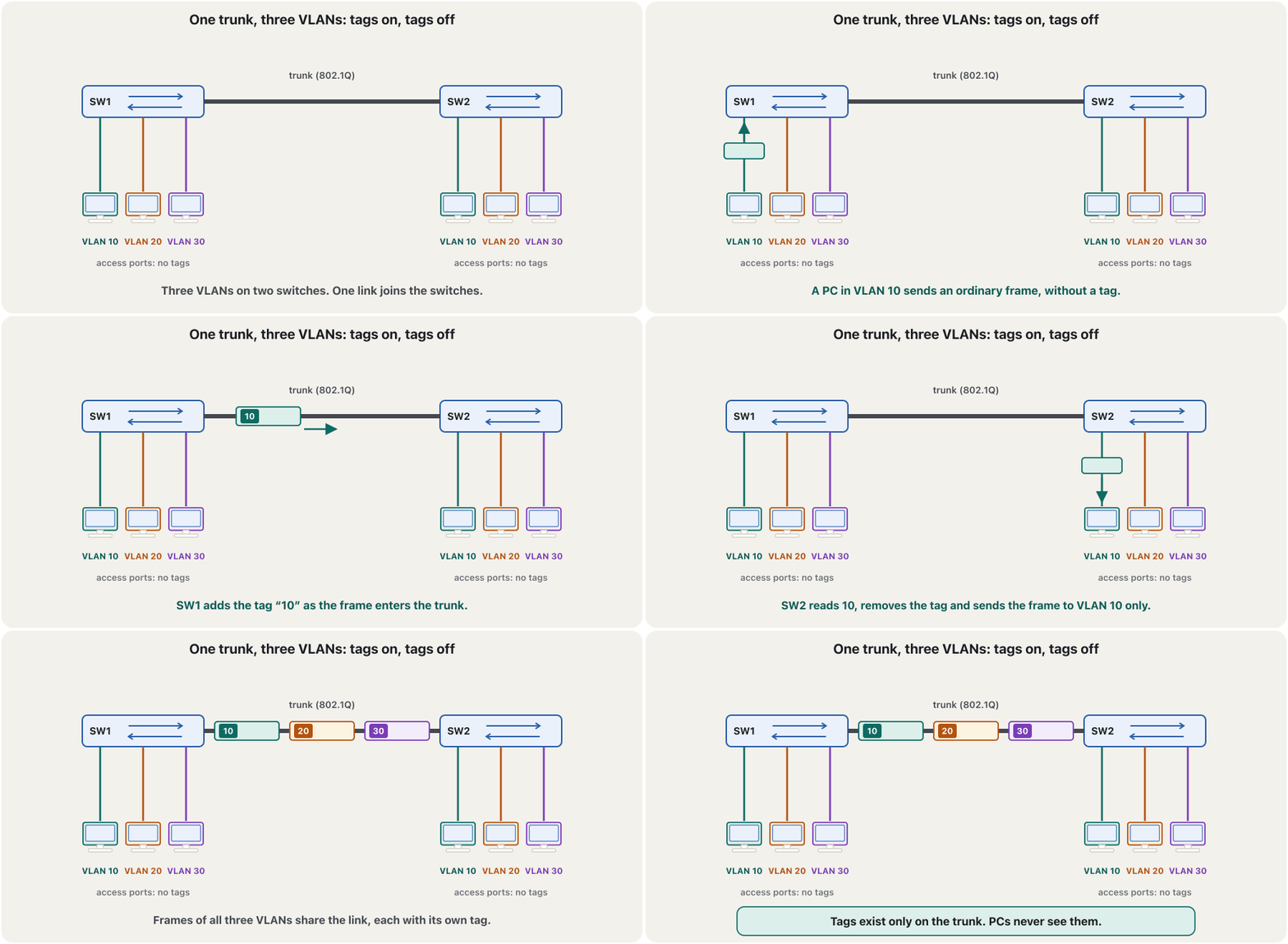
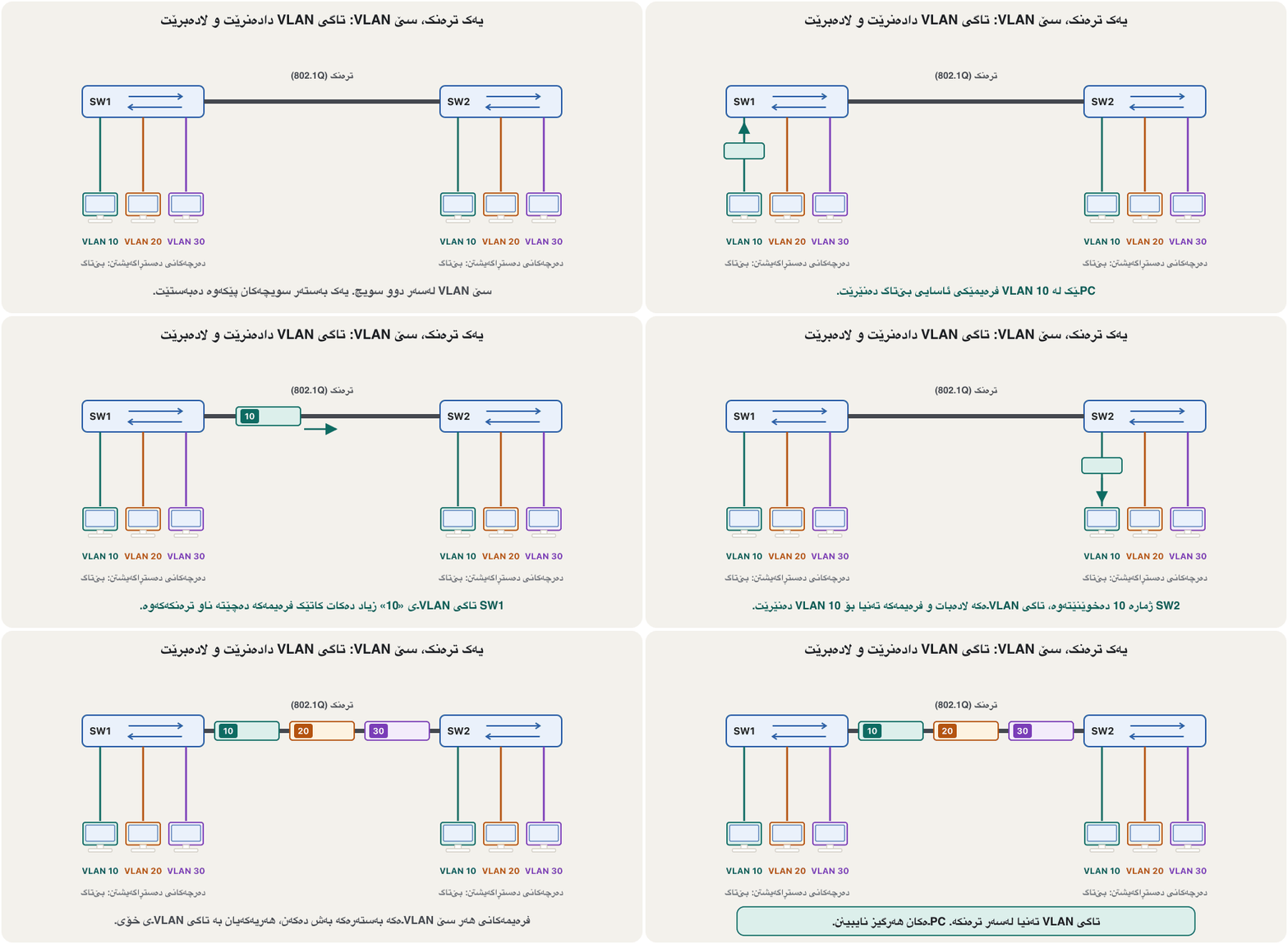
Trunks are not only for switch-to-switch links. A trunk also goes to a router that routes between VLANs (next lesson), to a server that runs virtual machines in several VLANs, or to an access point that offers several Wi-Fi networks.
تەنیا بۆ بەستەری بۆ نییە. دەچێت بۆ کە لە نێوان دەکات (وانەی داهاتوو)، بۆ کە لە چەند کار پێ دەکات، یان بۆ کە چەند پێشکەش دەکات.
How 802.1Q tags frames so that one trunk link can carry many VLANs, and why access ports send frames without a tag.
چۆن دەخاتە ناو بۆ ئەوەی یەک چەند هەڵبگرێت؛ هەروەها بۆچی بەبێ تاگ دەنێرن.
Whole video: tagging, trunk (tagged) ports and access (untagged) ports.
هەموو ڤیدیۆکە: تاگکردن، (تاگدار) و (بێ تاگ).
Why “trunk”?بۆچی «ترەنک»؟
In English a trunk is the main stem of a tree, and the word is used in computing for a main, central line. Telephone companies called the main lines between exchanges trunk lines: one line shared by many calls. A network trunk is the same idea — one main link shared by many VLANs.
لە ئینگلیزیدا trunk قەدی سەرەکیی دارە و لە کۆمپیوتەردا بۆ هێڵێکی سەرەکی و ناوەندی بەکار دێت. کۆمپانیاکانی تەلەفۆن بە هێڵە سەرەکییەکانی نێوان ناوەندەکانیان دەوت trunk line: یەک هێڵ کە چەندین پەیوەندی بەشی دەکەن. لە هەمان بیرۆکەیە — یەک بەستەری سەرەکی کە چەندین بەشی دەکەن.
A minibus carries passengers of three families on one road. At the door each passenger gets a badge in the colour of the family (the tag). In Erbil the driver reads the badges, takes them off, and sends each passenger to the right house. The road is the trunk, the families are the VLANs, and only the minibus needs badges — nobody wears them at home.
پاسێکی بچووک ڕێبوارانی سێ خێزان بە یەک ڕێگا دەگوازێتەوە. لە دەرگاکەدا هەر ڕێبوارێک نیشانەیەک بە ڕەنگی خێزانەکەی وەردەگرێت (تاگەکە). لە هەولێر شۆفێرەکە نیشانەکان دەخوێنێتەوە، لایان دەبات و هەر ڕێبوارێک دەنێرێت بۆ ماڵی خۆی. ڕێگاکە ، خێزانەکان و تەنیا لە ناو پاسەکەدا نیشانە پێویستە — کەس لە ماڵەوە نایپۆشێت.
Where the analogy stops workingسنووری ئەم نموونەیە
On a real trunk the switch, not the passenger, puts the badge on, and one VLAN (the native VLAN) may travel without a badge.
لەسەر ڕاستەقینە نیشانەکە دادەنێت نەک ڕێبوارەکە. هەروەها یەک () دەتوانێت بێ نیشانە بڕوات.
Why “trunk”?بۆچی «ترەنک»؟
What a trunk is notترەنک چی نییە
The 802.1Q tag inside the frameتاگی VLAN لە ناو فرەیمدا
Every switch today marks frames with the tag defined by the IEEE 802.1Q standard; Cisco commands call it dot1Q. The tag is 4 bytes long. The switch inserts it right after the source MAC address, in front of the EtherType field (inside an Ethernet II frame). Because the frame has changed, the switch calculates a new FCS. A full-size frame grows from 1518 to 1522 bytes. The receiving switch takes the tag out again before the frame leaves through an access port.
ئەمڕۆ هەموو بەو تاگە نیشان دەکات کە پێناسەی کردووە؛ Cisco پێی دەڵێن dot1Q. تاگەکە 4 ـە. ڕێک دوای سەرچاوە دایدەنێت، پێش خانەی (ناو فرەیمێکی Ethernet II). چونکە گۆڕاوە، FCSـێکی نوێ دەژمێرێت. پڕ قەبارە لە 1518ـەوە دەبێت بە 1522 . ئەو وەری دەگرێت پێش ئەوەی لە دەربچێت، تاگەکە لادەباتەوە.
The 802.1Q tag inside the frameتاگی VLAN لە ناو فرەیمدا
The four fields of the tagچوار خانەکەی تاگەکە
The 32 bits of the tag hold four fields. The first is a fixed number; the last one is the VLAN ID that every trunk needs.
32 تاگەکە چوار خانە هەڵدەگرن. یەکەمیان ژمارەیەکی جێگیرە؛ دوایینیان ژمارەی VLANـە کە هەموو پێویستی پێیەتی.
| Fieldخانە | Bits | What it saysچی دەڵێت |
|---|---|---|
TPID | 16 | Always 0x8100. It sits where the EtherType normally is, so the receiver knows a tag follows (EtherType).هەمیشە 0x8100. لە شوێنی ئاساییدایە، بۆیە وەرگر دەزانێت تاگێک دێت (EtherType). |
PCP | 3 | Priority 0 to 7 (also called 802.1p or CoS), used by QoS so that voice can go first.پێشینەیی لە 0 تا 7 (پێی دەوترێت 802.1p یان CoS)، QoS بەکاری دەهێنێت بۆ ئەوەی دەنگ پێشتر بڕوات. |
DEI | 1 | Drop Eligible Indicator (once called CFI): 1 means the frame may be dropped first when a link is congested.Drop Eligible Indicator، کە پێشتر ناوی CFI بوو. 1 واتە ئەگەر بەستەر قەرەباڵغ بێت ئەم پێشتر فڕێ دەدرێت. |
VID | 12 | The VLAN ID: which VLAN the frame belongs to.ژمارەی VLAN: سەر بە کام . |
Twelve bits give 4096 values. 0 and 4095 are reserved by 802.1Q, which is why VLAN numbers run from 1 to 4094 (VLAN numbers).
دوازدە 4096 بەها دەدەن. 0 و 4095 لەلایەن 802.1Qـەوە پارێزراون، بۆیە ژمارەکانی VLAN لە 1ـەوە تا 4094ن (ژمارەکانی VLAN).
802.1Q today, ISL in history802.1Q ئەمڕۆ، ISL لە مێژوودا
The first edition, IEEE 802.1Q-1998, dates from 1998. As of November 2026 the edition in force is IEEE 802.1Q-2022, Bridges and Bridged Networks (approved in September 2022), an active standard with several amendments approved between 2023 and 2025. Every vendor follows it, so a Cisco switch and a switch of another make can share a trunk.
یەکەم چاپی، IEEE 802.1Q-1998، هی ساڵی 1998ـە. تا نۆڤەمبەری 2026، چاپی کاراکەی IEEE 802.1Q-2022ـە، Bridges and Bridged Networks (لە سێپتەمبەری 2022 پەسەند کرا)، چالاکە و چەند هەموارکردنێکی لە نێوان 2023 و 2025 پەسەند کراون. هەموو کۆمپانیایەک پەیڕەوی دەکات، بۆیە Cisco و کۆمپانیایەکی تر دەتوانن بەش بکەن.
Before 802.1Q spread everywhere, Cisco had its own trunk format, ISL (Inter-Switch Link). ISL wrapped the whole frame in a 26-byte header and a 4-byte trailer, and it worked only between Cisco devices. ISL is obsolete: the Catalyst 2960 and today’s Catalyst 9000 switches support only 802.1Q. A few older multilayer switches, such as the Catalyst 3560 that Packet Tracer offers, still know both formats — which is why they need one extra command (below).
پێش ئەوەی 802.1Q لە هەموو شوێنێک بڵاو ببێتەوە، Cisco شێوەی تایبەتی خۆی هەبوو، ISL (Inter-Switch Link). ISL هەموو لە ناو سەرێکی 26 و کۆتاییەکی 4 دەپێچایەوە و تەنیا لە نێوان ئامێرەکانی Ciscoـدا کاری دەکرد. ISL بەسەرچووە: Catalyst 2960 و Catalyst 9000ـی ئەمڕۆ تەنیا 802.1Q پشتگیری دەکەن. چەند فرەچینی کۆن، وەک Catalyst 3560 کە لە Packet Tracerـدا هەیە، هێشتا هەردوو شێوەکە دەناسن — بۆیە پێویستیان بە زیادە هەیە (لە خوارەوە).
The native VLAN: the one without a tagVLANـی ڕەسەن: ئەوەی تاگی نییە
One VLAN on an 802.1Q trunk is special: its frames cross without a tag. This is the native VLAN. The switch sends that VLAN’s frames out untagged, and it puts every untagged frame that arrives on the trunk into the native VLAN. So untagged traffic on the link always has a home. By default the native VLAN is VLAN 1, and you change it with switchport trunk native vlan 999.
یەک لەسەر 802.1Q تایبەتە: بێ تاگ تێدەپەڕن. ئەمە . ئەو بێتاگ دەنێرێت و هەموو بێتاگ کە بە دەگات دەخاتە ناو . بەم شێوەیە هاتوچۆی بێتاگی سەر بەستەرەکە هەمیشە شوێنێکی هەیە. بە بنەڕەت VLAN 1ـە و بە switchport trunk native vlan 999 دەیگۆڕیت.
The one VLAN whose frames cross an 802.1Q trunk without a tag (VLAN 1 by default). It must be the same on both ends of the trunk; moving it to an unused VLAN, such as 99, stops VLAN-hopping attacks.
ئەو یەک VLANـەیە کە بەبێ تاگ لە 802.1Q تێدەپەڕن (بە بنەڕەت VLAN 1). دەبێت لە هەردوو سەری ترەنکەکەدا وەک یەک بێت؛ گواستنەوەی بۆ VLANـێکی بەکارنەهاتوو، وەک 99، ڕێگە لە هێرشی VLAN hopping دەگرێت.
The native VLAN: the one without a tagVLANـی ڕەسەن: ئەوەی تاگی نییە
When the two ends disagreeکاتێک دوو سەرەکە ڕێک نین
Suppose SW1 uses native VLAN 999 but SW2 still uses VLAN 1. A VLAN 999 frame leaves SW1 without a tag — and SW2 puts it into its native VLAN, VLAN 1. Traffic of the two VLANs leaks into each other, and Cisco warns that a mismatch can even cause spanning-tree loops. Cisco switches notice the problem through CDP (Cisco Discovery Protocol) and log a message on the console:
وای دابنێ SW1 999 بەکار دەهێنێت بەڵام SW2 هێشتا VLAN 1 بەکار دەهێنێت. VLAN 999 بێ تاگ لە SW1 دەردەچێت — و SW2 دەیخاتە ناو خۆی، VLAN 1. هاتوچۆی هەردوو تێکەڵی یەکتر دەبن و Cisco ئاگادار دەکاتەوە کە نەگونجان تەنانەت دەتوانێت ئەڵقەی دروست بکات. Cisco لە ڕێگەی CDP (Cisco Discovery Protocol)ـەوە کێشەکە دەدۆزنەوە و پەیامێک لەسەر کۆنسۆڵ تۆمار دەکەن:
SW2#
%CDP-4-NATIVE_VLAN_MISMATCH: Native VLAN mismatch discovered on FastEthernet0/24 (1), with SW1 FastEthernet0/24 (999).The fix is one command on the switch that is wrong, so that both ends use the same native VLAN. Remember that the message names the local port and native VLAN first and the neighbour second.
چارەسەرەکە یەک لەسەر ئەو هەڵەیە، تاکو هەردوو سەر هەمان بەکار بهێنن. لەبیرت بێت پەیامەکە سەرەتا و ناوخۆیی ناو دەبات و دواتر هی دراوسێکە.
The native VLAN: the one without a tagVLANـی ڕەسەن: ئەوەی تاگی نییە
Why the native VLAN moves off VLAN 1بۆچی VLANـی ڕەسەن لە VLAN 1 دوور دەخرێتەوە
Good practice is to make the native VLAN an unused VLAN, such as 999, that no port belongs to — never VLAN 1, which every unconfigured port is in, and not the management VLAN either (99 in these lessons): Cisco’s hardening advice is a native VLAN that carries no traffic at all. The reason is VLAN hopping: tricks that push frames into a VLAN the sender does not belong to. In double tagging a device in the native VLAN sends a frame with two tags; the first switch removes the outer, native tag and the next switch obeys the inner one. In switch spoofing a PC answers like a switch with DTP and gets a trunk that carries every VLAN.
ڕێگەی باش ئەوەیە بەکارنەهێنراو بێت، وەک 999، کە هیچ سەر بەوە نەبێت — هەرگیز VLAN 1 نا، کە هەموو ڕێکنەخراو تێیدایە، هەروەها بەڕێوەبردنیش نا (لەم وانانەدا 99): ئامۆژگاریی Cisco بۆ پاراستن ئەوەیە هیچ هاتوچۆیەک هەڵنەگرێت. هۆکارەکە : ئەو فێڵانەی دەنێرنە ناو کە نێرەرەکە سەر بەوە نییە. لە دوو تاگدا ئامێرێک لە بە دوو تاگەوە دەنێرێت؛ یەکەم تاگە دەرەکییەکە (ڕەسەن) لادەبات و دواتر گوێ لە تاگە ناوەکییەکە دەگرێت. لە خۆکردن بە ـدا PCـێک بە وەک وەڵام دەداتەوە و وەردەگرێت کە هەموو هەڵدەگرێت.
Both tricks stop when user ports are fixed access ports, trunks do not negotiate, and the native VLAN has no users. Keeping groups apart like this is part of network segmentation.
هەردوو فێڵەکە دەوەستن کاتێک جێگیر بن، دانوستان نەکەن و هیچ نەبێت. جیاهێشتنەوەی گرووپەکان بەم شێوەیە بەشێکە لە بەشبەشکردنی ڕایەڵە.
The lab: two switches, one trunkتاقیکردنەوەکە: دوو سویچ، یەک ترەنک
Start from the two-switch VLAN lab (two switches), but join SW1 and SW2 with one cable between Fa0/24 and Fa0/24. Both 2960 switches keep the same port plan: VLAN 10 (IT) on Fa0/1–5 and VLAN 20 (Marketing) on Fa0/6–10. VLAN 999 becomes the native VLAN; no port is in it (VLAN 99 stays reserved for switch management). In Packet Tracer join two switches with a copper cross-over cable.
لە تاقیکردنەوەی دوو دەست پێ بکە (دوو سویچ)، بەڵام SW1 و SW2 بە یەک کێبڵ لە نێوان Fa0/24 و Fa0/24 ببەستەوە. هەردوو 2960 هەمان نەخشەی دەهێڵنەوە: VLAN 10 (IT) لەسەر Fa0/1–5 و VLAN 20 (Marketing) لەسەر Fa0/6–10. VLAN 999 دەبێت بە ؛ هیچ تێیدا نییە (VLAN 99 بۆ بەڕێوەبردنی دەمێنێتەوە). لە Packet Tracerـدا دوو بە مس ببەستەوە.
Steps 1 and 2: VLANs, access ports and the trunkهەنگاوی 1 و 2: VLAN، دەرچەکانی دەستڕاگەیشتن و ترەنک
On SW1 create the VLANs and put the PC ports into them, exactly as in the VLAN lesson. Then enter the port that carries the cable to the other switch and make it a trunk with switchport mode trunk. Type the same on SW2 (with its own host name).
لەسەر SW1 دروست بکە و PCـەکانیان بخە ناو، ڕێک وەک وانەی . پاشان بچۆ ناو ئەو کێبڵەکە بۆ تر دەبات و بە switchport mode trunk بیکە بە . هەمان شت لەسەر SW2 بنووسە (بە ناوی خۆیەوە).
SW1(config)#vlan 10
SW1(config-vlan)#name IT
SW1(config-vlan)#vlan 20
SW1(config-vlan)#name Marketing
SW1(config-vlan)#vlan 999
SW1(config-vlan)#name Native
SW1(config-vlan)#exit
SW1(config)#interface range fastEthernet 0/1 - 5
SW1(config-if-range)#switchport mode access
SW1(config-if-range)#switchport access vlan 10
SW1(config-if-range)#exit
SW1(config)#interface range fastEthernet 0/6 - 10
SW1(config-if-range)#switchport mode access
SW1(config-if-range)#switchport access vlan 20
SW1(config-if-range)#exit
SW1(config)#interface fastEthernet 0/24
SW1(config-if)#switchport mode trunk
Explain the codeڕوونکردنەوەی کۆدەکە
- Lineدێڕی 1-7
The VLANs must exist on both switches: a trunk carries only VLANs that the switch knows.
دەبێت لەسەر هەردوو هەبن: تەنیا ئەو هەڵدەگرێت کە دەیانناسێت.
- Lineدێڕی 16-17
The uplink port becomes a trunk. While the port changes mode the link may go down and up once.
سەرەوە دەبێت بە . کاتێک بارەکەی دەگۆڕێت، لەوانەیە بەستەرەکە جارێک بکەوێت و هەستێتەوە.
Step 3: native VLAN and allowed listهەنگاوی 3: VLANـی ڕەسەن و لیستی ڕێپێدراو
Still on Fa0/24, move the native VLAN to 999 and list the VLANs the trunk may carry. By default a trunk allows every VLAN, 1 to 4094; a list keeps unused VLANs off the link. Do the same on SW2 — the native VLAN must match — and save both switches.
هێشتا لەسەر Fa0/24، بگوازەوە بۆ 999 و ئەو بنووسە کە دەتوانێت هەڵیان بگرێت. بە بنەڕەت ڕێگە بە هەموو دەدات، 1 تا 4094؛ لیستێک بەکارنەهێنراوەکان لە بەستەرەکە دوور دەخاتەوە. هەمان شت لەسەر SW2 بکە — دەبێت وەک یەک بێت — و هەردوو پاشەکەوت بکە.
SW1(config)#interface fastEthernet 0/24
SW1(config-if)#switchport trunk native vlan 999
SW1(config-if)#switchport trunk allowed vlan 10,20,999
SW1(config-if)#end
SW1#copy running-config startup-config
Destination filename [startup-config]?
Building configuration...
[OK]| Command (on the trunk port) (لەسەر ) | Allowed list afterwardsلیستی ڕێپێدراو دواتر |
|---|---|
switchport trunk allowed vlan 10,20,999 | exactly 10, 20 and 999ڕێک 10، 20 و 999 |
switchport trunk allowed vlan add 30 | the old list plus 30لیستە کۆنەکە لەگەڵ 30 |
switchport trunk allowed vlan remove 20 | the old list without 20لیستە کۆنەکە بەبێ 20 |
switchport trunk allowed vlan except 30 | every VLAN except 30هەموو جگە لە 30 |
switchport trunk allowed vlan all | every VLAN (the default)هەموو (بنەڕەت) |
switchport trunk allowed vlan none | no VLAN at allهیچ |
Switches that also knew ISL: encapsulation dot1q firstئەو سویچانەی ISLـیش دەناسن: سەرەتا encapsulation dot1q
A switch that supports both ISL and 802.1Q, such as the Catalyst 3560 in Packet Tracer, starts with the trunk encapsulation set to “negotiate”. It refuses trunk mode until you choose the format. So on those switches the order is: first switchport trunk encapsulation dot1q, then switchport mode trunk. Switches that know only 802.1Q — the 2960 and the Catalyst 9000 family — do not have the encapsulation command at all; on a 2960 it gives % Invalid input detected at '^' marker.
کە هەم ISL و هەم 802.1Q پشتگیری دەکات، وەک Catalyst 3560 لە Packet Tracerـدا، بە «negotiate» وەک encapsulationـی دەست پێ دەکات. تا شێوەکە هەڵنەبژێریت، باری trunk ڕەت دەکاتەوە. کەواتە لەسەر ئەو ڕیزبەندییەکە ئەمەیە: سەرەتا switchport trunk encapsulation dot1q، پاشان switchport mode trunk. ئەو تەنیا 802.1Q دەناسن — 2960 و خێزانی Catalyst 9000 — encapsulationـیان هەر نییە؛ لەسەر 2960 % Invalid input detected at '^' marker. دەدات.
SW1(config)#interface fastEthernet 0/24
SW1(config-if)#switchport mode trunk
Command rejected: An interface whose trunk encapsulation is "Auto" can not be configured to "trunk" mode.
SW1(config-if)#switchport trunk encapsulation dot1q
SW1(config-if)#switchport mode trunk
Explain the codeڕوونکردنەوەی کۆدەکە
- Lineدێڕی 3
The refusal: the switch does not yet know which trunk format to use.
ڕەتکردنەوەکە: هێشتا نازانێت کام شێوەی بەکار بهێنێت.
- Lineدێڕی 4-5
Choose 802.1Q, and trunk mode is accepted.
802.1Q هەڵبژێرە و باری trunk وەردەگیرێت.
DTP: when ports negotiate a trunkDTP: کاتێک دەرچەکان لەسەر ترەنک دانوستان دەکەن
Cisco switches can agree on a trunk by themselves with DTP (Dynamic Trunking Protocol), Cisco’s own protocol. Each port has a mode:
Cisco دەتوانن خۆیان بە (Dynamic Trunking Protocol)، تایبەتی Cisco، لەسەر ڕێک بکەون. هەر بارێکی هەیە:
| Modeبار | What the port does چی دەکات |
|---|---|
switchport mode access | Never a trunk, whatever the neighbour says.هەرگیز نابێت، دراوسێکە هەرچی بڵێت. |
switchport mode trunk | Always a trunk; it still sends DTP so the neighbour can follow.هەمیشە ؛ هێشتا DTP دەنێرێت بۆ ئەوەی دراوسێکە شوێنی بکەوێت. |
switchport mode dynamic desirable | Asks for a trunk; becomes one if the neighbour is trunk, desirable or auto.داوای دەکات؛ ئەگەر دراوسێکە trunk، desirable یان auto بێت، دەبێت بە . |
switchport mode dynamic auto | Waits; becomes a trunk only if the neighbour is trunk or desirable. The default on the 2960 and the Catalyst 9300.چاوەڕێ دەکات؛ تەنیا ئەگەر دراوسێکە trunk یان desirable بێت دەبێت بە . بنەڕەتی 2960 و Catalyst 9300. |
switchport nonegotiate | Stops sending DTP; only with access or trunk mode, and the neighbour must be set by hand.ناردنی DTP ڕادەگرێت؛ تەنیا لەگەڵ باری access یان trunk و دراوسێکە دەبێت بە دەست ڕێک بخرێت. |
SW1(config)#interface fastEthernet 0/24
SW1(config-if)#switchport mode trunk
SW1(config-if)#switchport nonegotiateStep 4: check with show interfaces trunkهەنگاوی 4: بە show interfaces trunk بیپشکنە
show interfaces trunk lists every trunk port in four blocks. Read them from top to bottom: the mode and native VLAN, the allowed list, the allowed VLANs that exist on this switch, and those that spanning tree lets through. A VLAN missing from the third block usually means you forgot to create it on this switch.
show interfaces trunk هەموو لە چوار بەشدا ڕیز دەکات. لە سەرەوە بۆ خوارەوە بیانخوێنەوە: بار و ، لیستی ڕێپێدراو، ئەو ڕێپێدراوانەی لەسەر ئەم هەن و ئەوانەی ڕێیان پێ دەدات. ئەگەر لە بەشی سێیەمدا نەبێت، زۆرجار واتە لەبیرت چووە لەسەر ئەم دروستی بکەیت.
SW1#show interfaces trunk

Port        Mode             Encapsulation  Status        Native vlan
Fa0/24      on               802.1q         trunking      999

Port        Vlans allowed on trunk
Fa0/24      10,20,999

Port        Vlans allowed and active in management domain
Fa0/24      10,20,999

Port        Vlans in spanning tree forwarding state and not pruned
Fa0/24      10,20,999
Explain the codeڕوونکردنەوەی کۆدەکە
- Lineدێڕی 3-4
Mode “on” = switchport mode trunk; 802.1q; trunking; native VLAN 999.
باری «on» = switchport mode trunk؛ 802.1q؛ trunking؛ 999.
SW1#show interfaces fastEthernet 0/24 switchport
Name: Fa0/24
Switchport: Enabled
Administrative Mode: trunk
Operational Mode: trunk
Administrative Trunking Encapsulation: dot1q
Operational Trunking Encapsulation: dot1q
Negotiation of Trunking: On
Access Mode VLAN: 1 (default)
Trunking Native Mode VLAN: 999 (Native)
Explain the codeڕوونکردنەوەی کۆدەکە
- Lineدێڕی 4-5
Administrative = what you configured; Operational = what the port is doing now.
Administrative = ئەوەی تۆ ڕێکت خست؛ Operational = ئەوەی ئێستا دەیکات.
- Lineدێڕی 8
With switchport nonegotiate this line says Off.
بە switchport nonegotiate ئەم دێڕە Off دەڵێت.
Step 5: test — same VLAN yes, other VLAN noهەنگاوی 5: تاقی بکەرەوە — هەمان VLAN بەڵێ، VLANـی تر نەخێر
Give the PCs their addresses and ping. PC1 now reaches PC3 on the other switch, because both are in VLAN 10 and the trunk carries VLAN 10. The reply’s TTL is still 128: no router is on the way. But PC1 cannot reach PC4: it is in VLAN 20 and another subnet, and a trunk does not route. Joining VLANs is the job of the next two lessons.
ناونیشانی PCـەکان بدە و بکە. PC1 ئێستا دەگاتە PC3 لەسەر تر، چونکە هەردووکیان لە VLAN 10دان و VLAN 10 هەڵدەگرێت. وەڵامەکە هێشتا 128ـە: هیچ لە ڕێگادا نییە. بەڵام PC1 ناگاتە PC4: ئەو لە VLAN 20 و ترە و ناکات. پێکەوەبەستنی کاری دوو وانەی داهاتووە.
C:\>ping 192.168.10.12

Pinging 192.168.10.12 with 32 bytes of data:

Reply from 192.168.10.12: bytes=32 time<1ms TTL=128
Reply from 192.168.10.12: bytes=32 time<1ms TTL=128
Reply from 192.168.10.12: bytes=32 time<1ms TTL=128
Reply from 192.168.10.12: bytes=32 time<1ms TTL=128

Ping statistics for 192.168.10.12:
    Packets: Sent = 4, Received = 4, Lost = 0 (0% loss),
Approximate round trip times in milli-seconds:
Minimum = 0ms, Maximum = 0ms, Average = 0msCommon mistakesهەڵە باوەکان
Exercisesڕاهێنانەکان
Take the two-switch VLAN lab with one cable per VLAN. Remove both cables, join the switches with one cable on Fa0/24, make it a trunk with native VLAN 999 and the allowed list 10, 20, 999, check it and save. Write the commands for both switches (VLAN 999 must exist on both).
تاقیکردنەوەی دوو بە یەک کێبڵ بۆ هەر وەربگرە. هەردوو کێبڵەکە لاببە، بە یەک کێبڵ لەسەر Fa0/24 ببەستەوە، بیکە بە بە 999 و لیستی ڕێپێدراوی 10، 20، 999، بیپشکنە و پاشەکەوتی بکە. هەردوو بنووسە (VLAN 999 دەبێت لەسەر هەردووکیان هەبێت).
Hintئاماژە
Native VLAN and allowed list go on the trunk port, not inside vlan 999.
و لیستی ڕێپێدراو لەسەر دادەنرێن، نەک لە ناو vlan 999.
Show answerوەڵامەکە پیشان بدە
SW1(config)#interface fastEthernet 0/24
SW1(config-if)#switchport mode trunk
SW1(config-if)#switchport trunk native vlan 999
SW1(config-if)#switchport trunk allowed vlan 10,20,999
SW1(config-if)#end
SW1#copy running-config startup-config

SW2(config)#interface fastEthernet 0/24
SW2(config-if)#switchport mode trunk
SW2(config-if)#switchport trunk native vlan 999
SW2(config-if)#switchport trunk allowed vlan 10,20,999
SW2(config-if)#end
SW2#copy running-config startup-config
Check with show interfaces trunk on both: mode on, 802.1q, trunking, native 999, VLANs 10,20,999. PC1 then pings PC3 and PC2 pings PC4.
لەسەر هەردووکیان بە show interfaces trunk بیپشکنە: on، 802.1q، trunking، ڕەسەن 999، VLANـەکانی 10,20,999. پاشان PC1 بۆ PC3 و PC2 بۆ PC4 دەکات.
A two-switch lab was typed like this. Find every problem and write a correct version for the trunk port.
تاقیکردنەوەیەکی دوو بەم شێوەیە نووسراوە. هەموو کێشەیەک بدۆزەوە و بۆ وەشانێکی دروست بنووسە.
Switch1(config)#interface vlan 10
Switch1(config-if)#ip address 192.168.1.1 255.255.255.0
Switch1(config-if)#no shutdown
Switch1(config-if)#exit
Switch0(config)#interface range fastEthernet 0/1-10
Switch0(config-if-range)#switchport mode access
Switch0(config-if-range)#switchport access vlan 10
Switch0(config-if-range)#interface fastEthernet 0/24
Switch0(config-if)#Switchpiort mode access
Switch0(config-if)#Switchpiort mode trunk
Show answerوەڵامەکە پیشان بدە
- The prompt changes from Switch1 to Switch0 in the middle: the commands were typed on two different switches, so neither is complete.
Switchpiortis a typo: IOS answers% Invalid input detected at '^' marker.and nothing is configured.mode accessbeforemode trunkis not needed.- An SVI for managing the switch belongs in the management VLAN (99 in these lessons), with a unique address on each switch, such as 192.168.99.2 and 192.168.99.3 — not in the users’ VLAN 10, and never the same address twice.
- پرۆمپتەکە لە ناوەڕاستدا لە Switch1ـەوە دەگۆڕێت بۆ Switch0: لەسەر دوو جیاواز نووسراون، بۆیە هیچیان تەواو نییە.
Switchpiortهەڵەی نووسینە: IOS بە% Invalid input detected at '^' marker.وەڵام دەداتەوە و هیچ ڕێک ناخرێت.mode accessپێشmode trunkپێویست نییە.- SVIـی بەڕێوەبردنی دەچێتە ناو بەڕێوەبردن (لەم وانانەدا 99)، بە ناونیشانێکی جیا بۆ هەر ، وەک 192.168.99.2 و 192.168.99.3 — نەک لە VLAN 10ـی . هەرگیز یەک ناونیشان دوو جار بەکار مەهێنە.
Switch0(config)#interface fastEthernet 0/24
Switch0(config-if)#switchport mode trunkHow many VLAN IDs can the 12-bit VID field hold, and how many can you use? How big is the 802.1Q tag in bits, and how long is the largest tagged frame?
خانەی VIDـی 12 چەند ژمارەی VLAN هەڵدەگرێت و چەندیان دەتوانیت بەکار بهێنیت؟ چەند و گەورەترین تاگدار چەند درێژە؟
Show answerوەڵامەکە پیشان بدە
The tag is 16 + 3 + 1 + 12 = 32 bits = 4 bytes, so the largest frame grows from 1518 to 1522 bytes.
تاگەکە 16 + 3 + 1 + 12 = 32 = 4 ، بۆیە گەورەترین لە 1518ـەوە دەبێت بە 1522 .
For each pair of port modes say whether the link becomes a trunk: (a) trunk + dynamic auto; (b) dynamic auto + dynamic auto; (c) dynamic desirable + dynamic desirable; (d) access + trunk.
بۆ هەر جووتێکی بارەکانی بڵێ ئایا بەستەرەکە دەبێت بە : (a) trunk + dynamic auto؛ (b) dynamic auto + dynamic auto؛ (c) dynamic desirable + dynamic desirable؛ (d) access + trunk.
Show answerوەڵامەکە پیشان بدە
- (a) Trunk: the trunk side sends DTP and auto agrees.
- (b) No trunk: both wait, the link stays access — the trap of two new switches.
- (c) Trunk: both ask.
- (d) A mismatch: one end trunks, the other never will. Fix it, never leave it.
- (a) : لای trunk DTP دەنێرێت و auto ڕازی دەبێت.
- (b) نییە: هەردووکیان چاوەڕێ دەکەن و بەستەرەکە access دەمێنێتەوە — تەڵەی دوو نوێ.
- (c) : هەردووکیان داوا دەکەن.
- (d) نەگونجان: سەرێک و ئەوی تر هەرگیز نابێت. چاکی بکەرەوە، هەرگیز وای مەهێڵەوە.
SW1 shows: %CDP-4-NATIVE_VLAN_MISMATCH: Native VLAN mismatch discovered on FastEthernet0/24 (999), with SW2 FastEthernet0/24 (1). Which switch uses which native VLAN, what goes wrong, and how do you fix it the recommended way?
SW1 پیشان دەدات: %CDP-4-NATIVE_VLAN_MISMATCH: Native VLAN mismatch discovered on FastEthernet0/24 (999), with SW2 FastEthernet0/24 (1). کام کام بەکار دەهێنێت، چی تێک دەچێت و بە ڕێگە پێشنیارکراوەکە چۆن چاکی دەکەیتەوە؟
Show answerوەڵامەکە پیشان بدە
SW1 (the local switch, named first) uses 999; SW2 uses VLAN 1. Untagged VLAN 999 frames from SW1 end up in VLAN 1 on SW2. Fix SW2: interface fastEthernet 0/24, switchport trunk native vlan 999 — keeping 999, an unused VLAN, rather than going back to VLAN 1.
SW1 ( ناوخۆیی، کە یەکەم ناو دەبرێت) 999 بەکار دەهێنێت؛ SW2 VLAN 1. VLAN 999 لە SW1ـەوە لەسەر SW2 دەکەونە ناو VLAN 1. SW2 چاک بکەرەوە: interface fastEthernet 0/24، switchport trunk native vlan 999 — 999 دەهێڵینەوە، کە بەکارنەهێنراوە، لە جیاتی گەڕانەوە بۆ VLAN 1.
A study note says: “In Packet Tracer, trunk is a port type; the name comes from bundling several cables into one trunk, which gives more bandwidth and lets voice and video be prioritised.” Correct it in three sentences.
تێبینییەکی خوێندن دەڵێت: «لە Packet Tracerـدا trunk جۆرێکی ؛ ناوەکەی لە کۆکردنەوەی چەند کێبڵێک بۆ یەک trunk هاتووە، کە زیاتر دەدات و ڕێگە دەدات دەنگ و ڤیدیۆ پێش بخرێن.» بە سێ ڕستە ڕاستی بکەرەوە.
Show answerوەڵامەکە پیشان بدە
A trunk is a link of any real switch, not a Packet Tracer feature: it carries many VLANs over one link with 802.1Q tags. The name comes from main telephone lines shared by many calls; bundling cables for more bandwidth is link aggregation (EtherChannel). Priority for voice and video is QoS, which uses the PCP field of the tag.
بەستەرێکی هەر ڕاستەقینەیە، نەک تایبەتمەندییەکی Packet Tracer: چەندین بە یەک بەستەر و تاگی 802.1Q هەڵدەگرێت. ناوەکە لە هێڵە سەرەکییەکانی تەلەفۆنەوە هاتووە کە چەندین پەیوەندی بەشیان دەکرد؛ کۆکردنەوەی کێبڵ بۆ زیاتر کۆکردنەوەی بەستەرە (EtherChannel). پێشینەیی بۆ دەنگ و ڤیدیۆ QoSـە کە خانەی PCPـی تاگەکە بەکار دەهێنێت.
Summaryکورتە
- A trunk carries many VLANs over one link between switches (or to a router, server or access point); access ports carry one VLAN each.
- IEEE 802.1Q (dot1Q) inserts a 4-byte tag after the source MAC: TPID 0x8100, PCP (priority), DEI, and the 12-bit VLAN ID. IEEE 802.1Q-2022 is the current edition; Cisco’s ISL is history.
- The native VLAN is untagged, must match on both ends, and should be an unused VLAN such as 999, not VLAN 1.
- Commands:
switchport mode trunk,switchport trunk native vlan 999,switchport trunk allowed vlan 10,20,999(change it with add/remove); on a 3560switchport trunk encapsulation dot1qfirst. - DTP negotiates trunks (dynamic auto is the default; two autos stay access); fix trunks with
switchport nonegotiateand user ports withswitchport mode access. - Check with
show interfaces trunk; a trunk stretches VLANs across switches but does not route between them.
- چەندین بە یەک بەستەر لە نێوان هەڵدەگرێت (یان بۆ ، یان )؛ هەر یەک هەڵدەگرێت.
- (dot1Q) تاگێکی 4 دوای MACـی سەرچاوە دادەنێت: TPID 0x8100، PCP (پێشینەیی)، DEI و ژمارەی VLANـی 12 . IEEE 802.1Q-2022 چاپی ئێستایە؛ ISLـی Cisco مێژووە.
- بێتاگە، دەبێت لەسەر هەردوو سەر وەک یەک بێت و باشترە بەکارنەهێنراو بێت وەک 999، نەک VLAN 1.
- :
switchport mode trunk،switchport trunk native vlan 999،switchport trunk allowed vlan 10,20,999(بە add/remove بیگۆڕە)؛ لەسەر 3560 سەرەتاswitchport trunk encapsulation dot1q. - لەسەر دانوستان دەکات (dynamic auto بنەڕەتە؛ دوو auto access دەمێننەوە)؛ بە
switchport nonegotiateو بەswitchport mode accessجێگیر بکە. - بە
show interfaces trunkبیپشکنە؛ بەسەر درێژ دەکاتەوە بەڵام لە نێوانیاندا ناکات.
Next: route between VLANs with one router and one trunk — Router-on-a-stick.
دواتر: بە یەک و یەک لە نێوان بکە — ڕێدۆزی تاکقۆڵ.
Lesson complete!وانەکە تەواو بوو!
Well done. Review the key terms, then go on to the next lesson.دەستخۆش. سەیرێکی زاراوە سەرەکییەکان بکەرەوە، پاشان بڕۆ بۆ وانەی داهاتوو.
Key termsزاراوە سەرەکییەکان
Inter-VLAN Routing with a Router: Router-on-a-Stickڕێدۆزیی نێوان VLANـەکان بە ڕێدۆز: ڕێدۆزی تاکقۆڵ
Related lecturesوانە پەیوەندیدارەکان
- Inter-VLAN Routing with a Router: Router-on-a-Stickڕێدۆزیی نێوان VLANـەکان بە ڕێدۆز: ڕێدۆزی تاکقۆڵ
- Inter-VLAN Routing with a Layer-3 Switchڕێدۆزیی نێوان VLANـەکان بە سویچی چینی 3
- Redundant Links: Spanning Tree and EtherChannelبەستەری یەدەگ: پرۆتۆکۆڵی داری داپۆشەر و EtherChannel
- Switch Port Securityئاسایشی دەرچەی سویچ
- Collision Domains and Broadcast Domainsپاوانەکانی پێکدادان و پاوانەکانی پەخش
- Network Defences: Firewalls, Segmentation, Monitoring and SIEMبەرگرییەکانی ڕایەڵە: ئاگرەدیوار، بەشبەشکردنی ڕایەڵە، چاودێریی ئاسایش و SIEM
References and further readingسەرچاوەکان و خوێندنەوەی زیاتر
- IEEE 802.1Q-2022: Bridges and Bridged Networks — active standard, approved 21 Sept 2022, published 22 Dec 2022, amendments 2023–2025
- Cisco Catalyst 9300 (IOS XE 17.12) VLAN Configuration Guide: Configuring VLAN Trunks — 802.1Q, native VLAN must match, default mode dynamic auto, switchport nonegotiate, allowed list
- Cisco Catalyst 2960 Software Configuration Guide 12.2(55)SE: Configuring VLANs — trunk modes (access, trunk, dynamic auto, dynamic desirable, nonegotiate), only IEEE 802.1Q
- Cisco Press, SRWE: Router-on-a-Stick Inter-VLAN Routing — show interfaces trunk output
- NetworkLessons: Trunking on Cisco IOS Switch — the “encapsulation is Auto” refusal and DTP combinations
This lecture is a first edition. The Kurdish text and terminology are waiting for review by Kurdish IT teachers.ئەم وانەیە چاپی یەکەمە. دەقە کوردییەکە و زاراوەکانی چاوەڕێی پێداچوونەوەی مامۆستایانی کوردی بواری IT ن.