Chapterبەش 2 · Lectureوانە 2.6
Switch Port Securityئاسایشی دەرچەی سویچ
Locking switch ports to known devices: why (strangers and MAC flooding), access mode first, static, dynamic and sticky secure addresses, maximum, the four violation modes (protect, restrict, shutdown, shutdown vlan), the defaults, a step-by-step lab and the Lab 5 exercises, verification and recovery from err-disabled, unused ports, a practical exam task, and DHCP snooping, DAI and 802.1X.
قوفڵکردنی بە ئامێرە ناسراوەکانەوە: بۆچی (نەناسراوەکان و )، سەرەتا باری access، static، dynamic و sticky، maximum، چوار شێوازی (protect، restrict، shutdown، shutdown vlan)، بەها بنەڕەتییەکان، تاقیکردنەوەیەکی هەنگاو بە هەنگاو و ڕاهێنانەکانی تاقیکردنەوەی 5، پشکنین و گەڕاندنەوە لە ، بەکارنەهێنراو، ئەرکێکی تاقیکردنەوەی کردەیی و ، DAI و 802.1X.
What you will learnچی فێر دەبیت
- Explain why access ports need protection, including MAC flooding.
- Configure port security with maximum, static or sticky secure addresses and a violation mode, in the right order.
- Tell protect, restrict, shutdown and shutdown vlan apart and choose the right one for a task.
- Verify port security, recover an err-disabled port and save sticky addresses.
- Secure unused ports and name what DHCP snooping, DAI and 802.1X add.
- ڕوون بکەیتەوە بۆچی پێویستیان بە پاراستنە، لەوانە .
- بە maximum، static یان sticky و شێوازێکی بە ڕیزبەندیی دروست ڕێک بخەیت.
- protect، restrict، shutdown و shutdown vlan لە یەک جیا بکەیتەوە و دروستەکەیان بۆ ئەرکێک هەڵبژێریت.
- بپشکنیت، دەرچەیەکی بگەڕێنیتەوە و پاشەکەوت بکەیت.
- بەکارنەهێنراو بپارێزیت و ئەوە ناو ببەیت کە ، DAI و 802.1X زیادی دەکەن.
A port that belongs to one computerدەرچەیەک کە هی یەک کۆمپیوتەرە
A switch accepts any device you plug in: it learns the newcomer's MAC address and forwards its frames like everyone else's. In an office, a classroom or a hospital that means anyone with a laptop and a wall socket is inside the network. The aim of this lesson is simple: tie a switch port to its computer, so that if the cable is moved to another computer, the connection stops at once.
هەر ئامێرێک وەردەگرێت کە پێوەی دەبەستیت: تازەهاتووەکە فێر دەبێت و وەک هی هەمووان دەنێرێت. لە نووسینگەیەک، پۆلێک یان نەخۆشخانەیەکدا ئەمە واتە هەر کەسێک و سۆکێتێکی دیواری هەبێت لە ناو . ئامانجی ئەم وانەیە سادەیە: بە ببەستە، بۆ ئەوەی ئەگەر کێبڵەکە بۆ تر گوازرایەوە، پەیوەندییەکە یەکسەر بوەستێت.
MAC flooding: the attack port security stopsلافاوکردنی MAC: ئەو هێرشەی ئاسایشی دەرچە ڕایدەگرێت
A switch's MAC address table has room for a few thousand entries (the CAM table). In MAC flooding a device sends thousands of frames, each with a different fake source address, until the table is full. Then the switch cannot learn real devices, so it floods frames for them out of every port — like a hub — and a listener on the attacker's port can read traffic meant for others. Limiting each port to one or two addresses stops it.
خشتەی ناونیشانی MACـی جێی چەند هەزار تۆمارێکی تێدایە (خشتەی CAM). لە ـدا ئامێرێک هەزاران دەنێرێت، هەریەکەیان بە ناونیشانێکی سەرچاوەی ساختەی جیاواز، تا خشتەکە پڕ دەبێت. ئینجا ناتوانێت فێری ئامێرە ڕاستەقینەکان ببێت، بۆیە بۆ هەموو دەرچەیەک دەنێرێت — وەک — و گوێگرێک لەسەر دەرچەی دەتوانێت ئەو هاتوچۆیە بخوێنێتەوە کە بۆ کەسانی تر بووە. سنووردارکردنی هەر دەرچەیەک بە یەک یان دوو ناونیشان ڕایدەگرێت.
What port security doesئاسایشی دەرچە چی دەکات
Port security is switched off by default. Turned on, it limits how many MAC addresses may use a port and which ones: you can allow a group of addresses, or just one, and choose what happens when a stranger appears — for example, shut the port automatically. The allowed addresses are called secure MAC addresses.
بە شێوەی بنەڕەت کوژاوەیە. کاتێک چالاک دەکرێت، سنوور بۆ ئەوە دادەنێت چەند و کامیان دەتوانن دەرچەیەک بەکار بهێنن: دەتوانیت ڕێگە بە کۆمەڵێک ناونیشان بدەیت یان تەنیا یەکێک. هەروەها هەڵدەبژێریت کاتێک نەناسراوێک دەردەکەوێت چی بکرێت — بۆ نموونە، دەرچەکە بە شێوەی خۆکار دابخرێت. ناونیشانە ڕێگەپێدراوەکان پێیان دەوترێت .
A switch feature that allows only known MAC addresses on an access port (a maximum number, typed or learned 'sticky') and reacts to a violation by protecting, restricting or shutting the port down.
تایبەتمەندییەکی کە تەنیا ڕێگە بە ناسراو دەدات لەسەر (ژمارەیەکی ئەوپەڕ، کە بە دەست دەنووسرێت یان بە 'sticky' فێر دەکرێت) و بەرامبەر بە protect، restrict یان shutdown وەڵام دەداتەوە.
In a university exam hall every seat has a student's name card. If a stranger sits in your seat, the invigilator notices at once. She may quietly send the stranger out (protect), send him out and write it in her report (restrict), or close the whole row until the dean arrives (shutdown) — the three reactions you will meet in this lesson.
لە هۆڵی تاقیکردنەوەی زانکۆدا هەموو کورسییەک کارتی ناوی قوتابییەکی لەسەرە. ئەگەر نەناسراوێک لەسەر کورسییەکەت دابنیشێت، چاودێر یەکسەر هەست دەکات. لەوانەیە بە بێدەنگی نەناسراوەکە بکاتە دەرەوە (protect)، بیکاتە دەرەوە و لە ڕاپۆرتەکەیدا بینووسێت (restrict)، یان هەموو ڕیزەکە دابخات تا ڕاگر دێت (shutdown) — ئەو سێ کاردانەوەیەی لەم وانەیەدا دەیانبینیت.
Where the analogy stops workingسنووری ئەم نموونەیە
A name card is checked against a face; a MAC address can be copied by anyone who sees it, so port security stops honest mistakes and simple attacks, not a determined attacker.
کارتی ناو لەگەڵ ڕووخسار بەراورد دەکرێت؛ هەر کەسێک بیبینێت دەتوانێت کۆپیی بکات، بۆیە هەڵەی بێمەبەست و هێرشی سادە ڕادەگرێت، نەک سوور.
First make it an access portسەرەتا بیکە بە دەرچەی دەستڕاگەیشتن
Port security works on ports with a fixed mode — normally access ports, where end devices plug in. A 2960 port starts in dynamic mode (it could turn into a trunk), and IOS refuses to secure such a port. So switchport mode access must come before switchport port-security:
لەسەر ئەو دەرچانە کار دەکات کە بارێکی جێگیریان هەیە — بەزۆری ، ئەو شوێنانەی پێیانەوە دەبەسترێن. دەرچەیەکی 2960 بە باری dynamic دەست پێ دەکات (دەکرێت ببێتە ) و IOS ڕازی نابێت دەرچەیەکی وا بپارێزێت. بۆیە switchport mode access دەبێت پێش switchport port-security بێت:
Switch(config)#interface fastEthernet 0/1
Switch(config-if)#switchport port-security
Command rejected: FastEthernet0/1 is a dynamic port.
Switch(config-if)#switchport mode access
Switch(config-if)#switchport port-security
Switch(config-if)#
Explain the codeڕوونکردنەوەی کۆدەکە
- Lineدێڕی 2-3
Port security on a port that is still dynamic: rejected.
لەسەر دەرچەیەک کە هێشتا dynamicـە: ڕەت دەکرێتەوە.
- Lineدێڕی 4-5
Access mode first, then port security: accepted (no message means success).
سەرەتا باری access، پاشان : وەردەگیرێت (هیچ پەیامێک واتە سەرکەوتن).
Static, dynamic and sticky secure addressesناونیشانەکانی MACـی ڕێگەپێدراوی static، dynamic و sticky
A secure address can get onto the list in three ways:
بە سێ ڕێگە دەچێتە ناو لیستەکەوە:
| Kindجۆر | How it gets thereچۆن دەچێتە ناوی | Where it is keptلە کوێ دەمێنێتەوە | After a reloadدوای reload |
|---|---|---|---|
static | you type it: mac-address 0001.9702.D144خۆت دەینووسیت: mac-address 0001.9702.D144 | MAC table + running-config + | kept if savedدەمێنێت ئەگەر پاشەکەوت کرابێت |
dynamic | learned from the first frames (just switchport port-security)لە یەکەم فێر دەبێت (تەنیا switchport port-security) | MAC table onlyتەنیا | lost — learned againلەدەست دەچێت — دووپاتە فێر دەبێتەوە |
sticky | learned, then written down (mac-address sticky); can also be typedفێر دەبێت، پاشان دەنووسرێتەوە (mac-address sticky)؛ دەکرێت بنووسرێتیش | MAC table + running-config + | kept only if you savedتەنیا ئەگەر پاشەکەوتت کردبێت دەمێنێت |
The three configurationsسێ ڕێکخستنەکە
All three start the same way — access mode, then port security on. They differ in one line:
هەر سێکیان بە هەمان شێوە دەست پێ دەکەن — باری access، پاشان چالاککردنی . لە یەک دێڕدا جیاوازن:
S1(config)#interface fastEthernet 0/1
S1(config-if)#switchport mode access
S1(config-if)#switchport port-security
S1(config-if)#switchport port-security mac-address abcd.1234.7890S1(config)#interface fastEthernet 0/1
S1(config-if)#switchport mode access
S1(config-if)#switchport port-securityS1(config)#interface fastEthernet 0/19
S1(config-if)#switchport mode access
S1(config-if)#switchport port-security
S1(config-if)#switchport port-security maximum 24
S1(config-if)#switchport port-security mac-address stickyExplain the codeڕوونکردنەوەی کۆدەکە
- Lineدێڕی 4
Maximum 24 suits a port that leads to a small switch or many virtual machines; for one PC keep 1.
maximum 24 بۆ دەرچەیەک دەگونجێت کە دەچێتە بچووک یان زۆر ؛ بۆ یەک PC 1 بهێڵەوە.
How many devices? maximumچەند ئامێر؟ maximum
switchport port-security maximum sets how many secure addresses — how many devices — one port may have; the default is 1. In Lab 5, two PCs sit behind a hub on one switch port, so the port sees two MAC addresses: maximum 2 lets both in. A third computer plugged into the hub is the third address on the port — a violation.
switchport port-security maximum دیاری دەکات یەک دەرچە چەند — چەند ئامێر — دەتوانێت هەیبێت؛ بنەڕەت 1ـە. (maximum واتە «ئەوپەڕ، دوایین ڕادە».) لە تاقیکردنەوەی 5دا دوو PC لە پشت لەسەر یەک دانراون، بۆیە دەرچەکە دوو دەبینێت: maximum 2 ڕێگە بە هەردووکیان دەدات. سێیەم کە بە ببەسترێت سێیەم ناونیشانە لەسەر دەرچەکە — .
Switch>en
Switch#config t
Switch(config)#int fa 0/1
Switch(config-if)#switchport mode access
Switch(config-if)#switchport port-security
Switch(config-if)#switchport port-security maximum 2
Switch(config-if)#switchport port-security violation shutdown
Switch(config-if)#end
Switch#show mac-address-table
          Mac Address Table
-------------------------------------------

Vlan    Mac Address       Type        Ports
----    -----------       --------    -----

   1    00d0.bc9c.dde6    DYNAMIC     Fa0/1
   1    00d0.ff22.e3ad    DYNAMIC     Fa0/1
Explain the codeڕوونکردنەوەی کۆدەکە
- Lineدێڕی 1-3
Short forms:
en= enable,config t= configure terminal,int fa 0/1= interface fastEthernet 0/1.کورتکراوەکان:
en= enable،config t= configure terminal،int fa 0/1= interface fastEthernet 0/1.- Lineدێڕی 9
Newer IOS writes
show mac address-table; Packet Tracer accepts both.IOSـی نوێتر
show mac address-tableدەنووسێت؛ Packet Tracer هەردووکیان وەردەگرێت.- Lineدێڕی 16-17
Two MAC addresses on the same port Fa0/1: exactly the limit of 2. Packet Tracer lists them as DYNAMIC; a real switch lists secure addresses as STATIC (Step 4).
دوو لەسەر هەمان دەرچەی Fa0/1: ڕێک سنووری 2. Packet Tracer وەک DYNAMIC پیشانیان دەدات؛ ڕاستەقینە وەک STATIC پیشان دەدات (هەنگاوی 4).
Violations and the four violation modesسەرپێچی و چوار شێوازەکەی
A violation happens in two cases: the port already has its maximum of secure addresses and a device with another address sends; or an address that is secure on one port shows up on another secure port in the same VLAN. What the switch then does is the violation mode — type ? to see the choices:
لە دوو حاڵەتدا ڕوو دەدات: دەرچەکە پێشتر گەیشتووەتە ئەوپەڕی و ئامێرێک بە ناونیشانێکی تر دەنێرێت؛ یان ناونیشانێک کە لەسەر دەرچەیەک ڕێگەپێدراوە لەسەر دەرچەیەکی پارێزراوی تر لە هەمان دەردەکەوێت. ئەوەی دواتر دەیکات شێوازی ـە — ? بنووسە بۆ بینینی هەڵبژاردەکان:
Switch(config-if)#switchport port-security violation ?
  protect   Security violation protect mode
  restrict  Security violation restrict mode
shutdown Security violation shutdown mode- protect — drops the stranger's frames silently: no message, no counter.
- restrict — drops them and reports it: a log message, an SNMP trap and the violation counter goes up.
- shutdown (the default) — puts the whole port into the err-disabled state: the light goes off, nothing passes, a message is logged and the counter goes up.
- shutdown vlan — on real Catalyst switches: disables only the VLAN where the violation happened (useful on a port with a phone and a PC).
- protect — نەناسراوەکە بە بێدەنگی فڕێ دەدات: نە پەیام، نە .
- restrict — فڕێیان دەدات و ڕاپۆرتی دەکات: پەیامێکی log، SNMP trap و زیاد دەبێت.
- shutdown (بنەڕەت) — هەموو دەرچەکە دەخاتە : گڵۆپەکە دەکوژێتەوە، هیچ تێناپەڕێت، پەیامێک تۆمار دەکرێت و زیاد دەبێت.
- shutdown vlan — لەسەر ڕاستەقینەی Catalyst: تەنیا ئەو ناچالاک دەکات کە تێدا ڕوویدا (بەسوودە لەسەر دەرچەیەک کە تەلەفۆن و PCـی پێوەیە).
The defaultsبەها بنەڕەتییەکان
When you only type switchport port-security, these values apply. Default values do not appear in show running-config; only what you change does.
کاتێک تەنیا switchport port-security دەنووسیت، ئەم بەهایانە کار دەکەن. بەها بنەڕەتییەکان لە show running-configـدا دەرناکەون؛ تەنیا ئەوەی دەیگۆڕیت دەردەکەوێت.
| Featureتایبەتمەندی | Defaultبنەڕەت |
|---|---|
| Port security | disabled on every portلەسەر هەموو دەرچەیەک ناچالاک |
| Maximum secure MAC addresses per portئەوپەڕی بۆ هەر دەرچەیەک | 1 |
| Violation modeشێوازی | shutdown — the port is err-disabled when the maximum is exceededshutdown — کاتێک لە ئەوپەڕ تێپەڕێت دەرچەکە دەبێت |
| Sticky learningفێربوونی sticky | disabledناچالاک |
| Aging of secure addressesبەسەرچوونی | disabled (aging time 0, type absolute)ناچالاک (aging time 0، جۆری absolute) |
The lab: lock Fa0/1 to PC1تاقیکردنەوەکە: Fa0/1 بە PC1ـەوە قوفڵ بکە
Build it in Packet Tracer: one 2960 switch, PC1 (192.168.1.1) on Fa0/1 and PC2 (192.168.1.2) on Fa0/2, all /24. Keep a third computer, PC3 (192.168.1.3), aside without a cable — it will play the stranger. Test that PC1 and PC2 can ping each other before you start.
لە Packet Tracer دروستی بکە: یەک 2960، PC1 (192.168.1.1) لەسەر Fa0/1 و PC2 (192.168.1.2) لەسەر Fa0/2، هەموو بە /24. سێیەم، PC3 (192.168.1.3)، بەبێ کێبڵ لە لایەک دابنێ — ڕۆڵی نەناسراوەکە دەگێڕێت. پێش دەستپێکردن تاقی بکەرەوە کە PC1 و PC2 دەتوانن بۆ یەکتر بکەن.
Step 1: configure the portهەنگاوی 1: دەرچەکە ڕێک بخە
In global configuration mode, enter Fa0/1 and type the five port-security lines. Each one does one job:
لە بچۆ ناو Fa0/1 و پێنج دێڕی بنووسە. هەریەکەیان یەک کار دەکات:
SW1#configure terminal
SW1(config)#interface fastEthernet 0/1
SW1(config-if)#switchport mode access
SW1(config-if)#switchport port-security
SW1(config-if)#switchport port-security maximum 1
SW1(config-if)#switchport port-security violation shutdown
SW1(config-if)#switchport port-security mac-address sticky
SW1(config-if)#end
Explain the codeڕوونکردنەوەی کۆدەکە
- Lineدێڕی 2
Go into the port you want to limit.
بچۆ ناو ئەو دەرچەیەی دەتەوێت سنووری بۆ دابنێیت.
- Lineدێڕی 3
A fixed access port — required before port security.
جێگیر — پێش پێویستە.
- Lineدێڕی 4
Turn port security on.
چالاک بکە.
- Lineدێڕی 5
At most one computer (the default, written here to be clear).
زۆرترین یەک (بنەڕەتە، لێرە بۆ ڕوونی نووسراوە).
- Lineدێڕی 6
The penalty for a violation: shut the port (also the default).
سزای : داخستنی دەرچەکە (ئەویش بنەڕەتە).
- Lineدێڕی 7
Learn the first address automatically and write it down.
یەکەم ناونیشان بە شێوەی خۆکار فێر ببە و بینووسە.
Now let PC1 send anything — a ping to PC2 is the easy way. The first frame PC1 sends, of any kind, makes its MAC address the port's sticky secure address; it does not have to be a ping.
ئێستا با PC1 هەر شتێک بنێرێت — بۆ PC2 ڕێگە ئاسانەکەیە. یەکەم کە PC1 دەینێرێت، لە هەر جۆرێک بێت، دەکات بە دەرچەکە؛ پێویست ناکات بێت.
Step 2: look at the sticky address — and save itهەنگاوی 2: سەیری ناونیشانی MACـی لکاوەکە بکە — و پاشەکەوتی بکە
After PC1 has sent a frame, the learned address appears in the running configuration as a new line. Default values such as maximum 1 and violation shutdown are not shown.
دوای ئەوەی PC1 نارد، ناونیشانە فێربووەکە وەک دێڕێکی نوێ لە دەردەکەوێت. بەها بنەڕەتییەکانی وەک maximum 1 و violation shutdown پیشان نادرێن.
SW1#show running-config
...
interface FastEthernet0/1
 switchport mode access
 switchport port-security
 switchport port-security mac-address sticky
 switchport port-security mac-address sticky 0001.9702.d144
!
interface FastEthernet0/2
...
SW1#copy running-config startup-config
Destination filename [startup-config]?
Building configuration...
[OK]
Explain the codeڕوونکردنەوەی کۆدەکە
- Lineدێڕی 7
The sticky address, written by the switch itself.
، کە خۆی نووسیویەتی.
- Lineدێڕی 11-14
Without this the sticky address is lost at the next reload (saving).
بەبێ ئەمە لە reloadـی داهاتوودا لەدەست دەچێت (پاشەکەوتکردن).
Step 3: plug in the strangerهەنگاوی 3: نەناسراوەکە ببەستە
Now move Fa0/1's cable from PC1 to PC3 and ping PC2 from PC3. PC3's first frame carries an address that is not on the list and the list is full: violation. With mode shutdown, Fa0/1 goes down at once — in Packet Tracer both ends of the link turn red. The console shows:
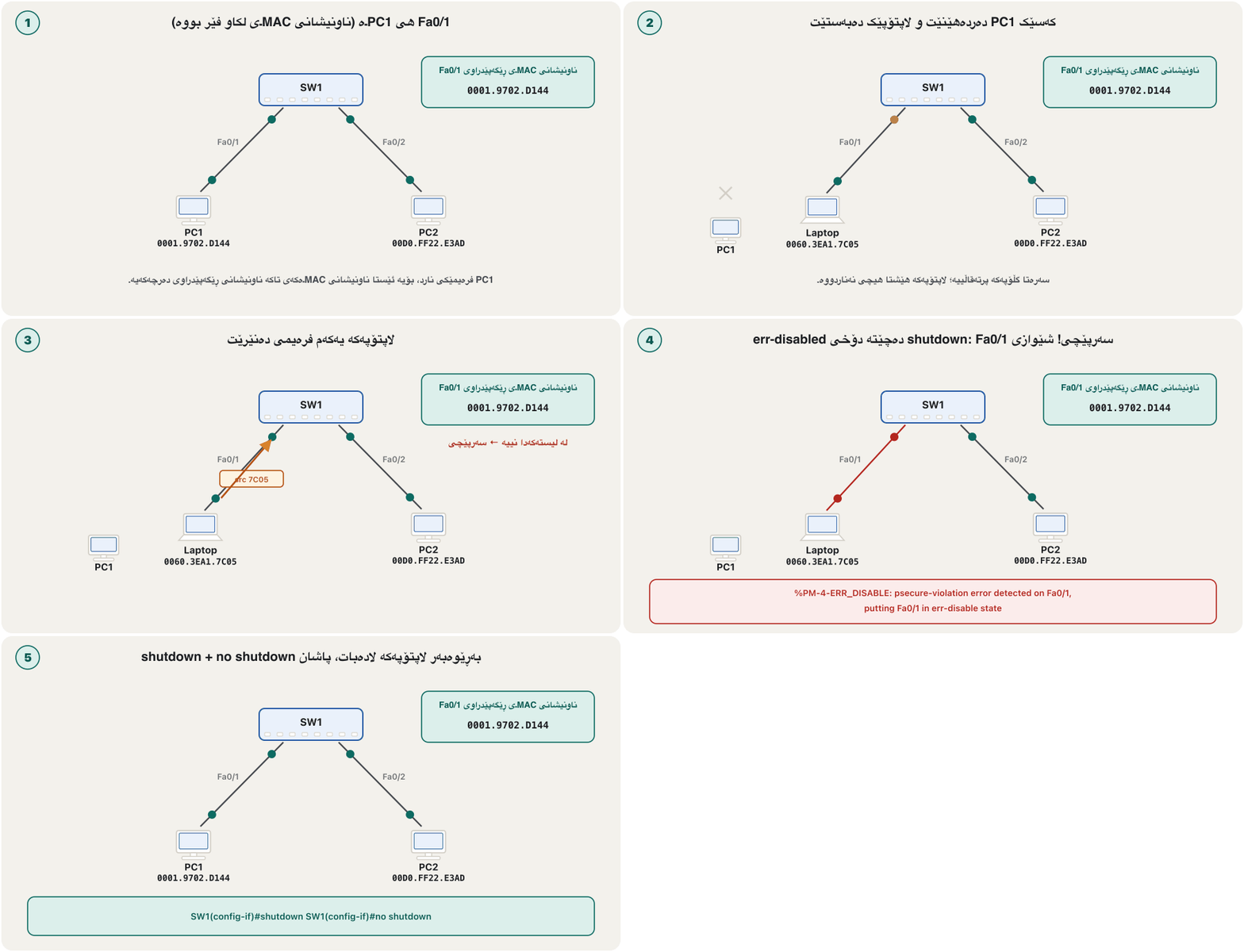
ئێستا کێبڵی Fa0/1 لە PC1ـەوە بگوازەوە بۆ PC3 و لە PC3ـەوە بۆ PC2 بکە. یەکەم PC3 ناونیشانێک هەڵدەگرێت کە لە لیستەکەدا نییە و لیستەکەش پڕە: . بە شێوازی shutdown، Fa0/1 یەکسەر دەکوژێتەوە — لە Packet Tracer هەردوو سەری بەستەرەکە سوور دەبن. کۆنسۆڵ ئەمە پیشان دەدات:
%PM-4-ERR_DISABLE: psecure-violation error detected on Fa0/1, putting Fa0/1 in err-disable state
%PORT_SECURITY-2-PSECURE_VIOLATION: Security violation occurred, caused by MAC address 0060.3ea1.7c05 on port FastEthernet0/1.
%LINEPROTO-5-UPDOWN: Line protocol on Interface FastEthernet0/1, changed state to down
%LINK-3-UPDOWN: Interface FastEthernet0/1, changed state to down
Explain the codeڕوونکردنەوەی کۆدەکە
- Lineدێڕی 2
The stranger's MAC address is named — useful for finding the device.
نەناسراوەکە ناو دەبرێت — بەسوودە بۆ دۆزینەوەی ئامێرەکە.
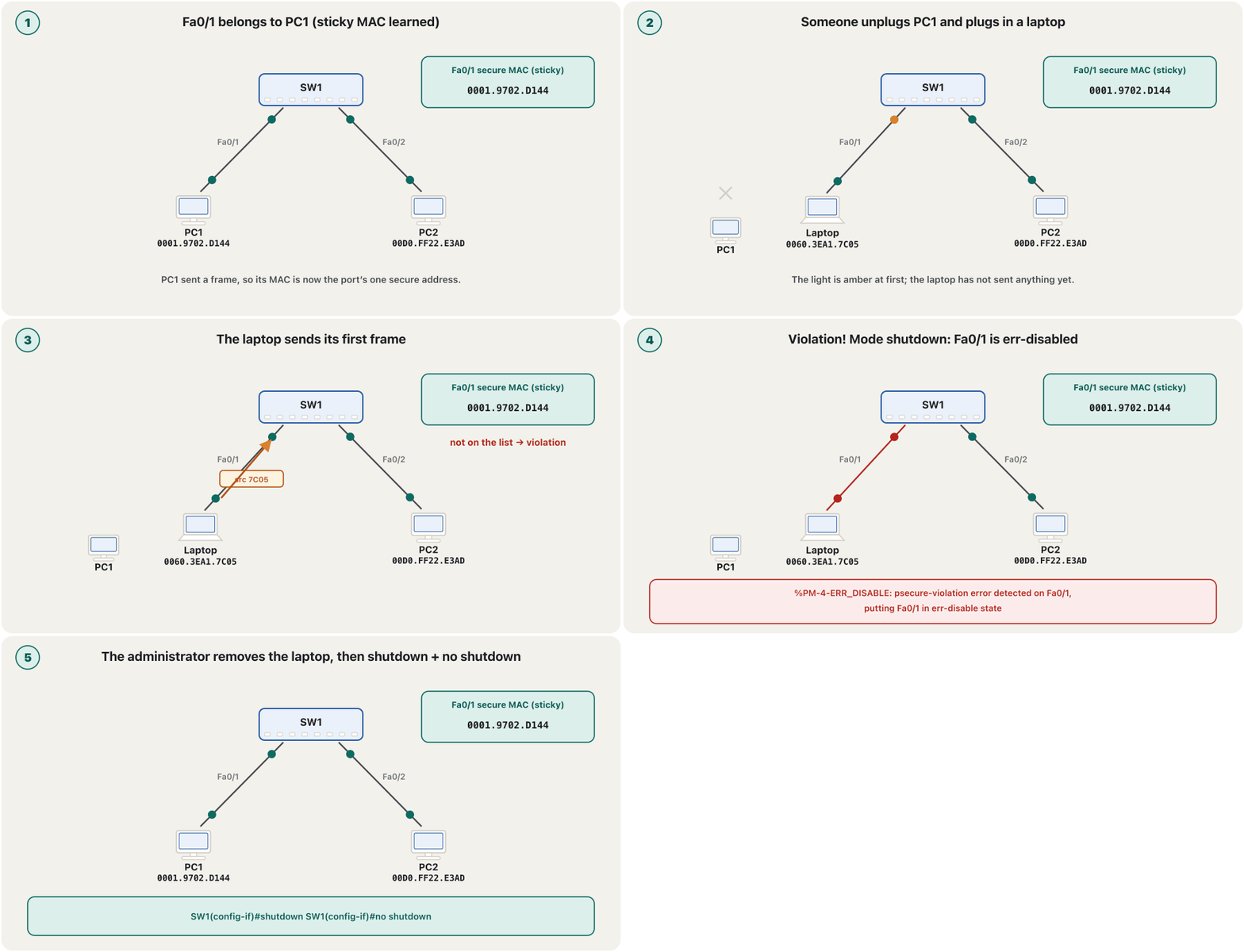
Only Fa0/1 goes down — not the switch: PC2 on Fa0/2 keeps working. Packet Tracer tip: to move a cable end without deleting the cable, drag the link's end marker next to the old PC onto the new one.
تەنیا Fa0/1 دەکوژێتەوە — نەک : PC2 لەسەر Fa0/2 بەردەوام کار دەکات. ئامۆژگاریی Packet Tracer: بۆ گواستنەوەی سەری کێبڵێک بەبێ سڕینەوەی کێبڵەکە، نیشانەی سەری بەستەرەکە لە تەنیشت PCـە کۆنەکەوە ڕابکێشە بۆ سەر نوێیەکە.
Step 4: check with show port-securityهەنگاوی 4: بە show port-security بیپشکنە
Run the show commands from privileged EXEC (SW1#). Packet Tracer accepts some of them at SW1> too, but real IOS expects #. show port-security interface gives the details of one port:
show لە (SW1#) جێبەجێ بکە. Packet Tracer هەندێکیان لە SW1>ـیش وەردەگرێت، بەڵام IOSـی ڕاستەقینە چاوەڕێی # دەکات. show port-security interface وردەکاریی یەک دەرچە دەدات:
SW1#show port-security interface fastEthernet 0/1
Port Security              : Enabled
Port Status                : Secure-shutdown
Violation Mode             : Shutdown
Aging Time                 : 0 mins
Aging Type                 : Absolute
SecureStatic Address Aging : Disabled
Maximum MAC Addresses      : 1
Total MAC Addresses        : 1
Configured MAC Addresses   : 0
Sticky MAC Addresses       : 1
Last Source Address:Vlan   : 0060.3ea1.7c05:1
Security Violation Count   : 1
Explain the codeڕوونکردنەوەی کۆدەکە
- Lineدێڕی 3
Secure-shutdown = err-disabled by a violation. Before it, Secure-up.
Secure-shutdown = بەهۆی . پێشتر Secure-up.
- Lineدێڕی 11
PC1's sticky address is still kept.
PC1 هێشتا لەوێیە.
- Lineدێڕی 12-13
The last address seen (the stranger, in VLAN 1) and one violation.
دوایین ناونیشانی بینراو (نەناسراوەکە، لە VLAN 1دا) و یەک .
SW1#show port-security
Secure Port  MaxSecureAddr  CurrentAddr  SecurityViolation  Security Action
                (Count)       (Count)          (Count)
---------------------------------------------------------------------------
      Fa0/1              1            1                  1         Shutdown
---------------------------------------------------------------------------
Total Addresses in System (excluding one mac per port)     : 0
Max Addresses limit in System (excluding one mac per port) : 8320Which addresses are secure?کام ناونیشانانە ڕێگەپێدراون؟
show port-security address lists every secure address with its type: SecureConfigured (static), SecureDynamic or SecureSticky. On a real switch show mac address-table lists a secure address as STATIC, while normally learned addresses are DYNAMIC; Packet Tracer shows secure addresses as DYNAMIC, as in Lab 5. The MAC address table is not a routing table — compare the two.
show port-security address هەموو لەگەڵ جۆرەکەی دەنووسێت: SecureConfigured (static)، SecureDynamic یان SecureSticky. لەسەر ڕاستەقینە show mac address-table وەک STATIC پیشان دەدات، لە کاتێکدا ناونیشانە ئاسایییە فێربووەکان DYNAMICـن؛ Packet Tracer وەک DYNAMIC پیشان دەدات، وەک لە تاقیکردنەوەی 5دا. نییە — هەردووکیان بەراورد بکە.
SW1#show port-security address
               Secure Mac Address Table
-----------------------------------------------------------------------------
Vlan    Mac Address       Type                          Ports   Remaining Age
                                                                   (mins)
----    -----------       ----                          -----   -------------
   1    0001.9702.d144    SecureSticky                  Fa0/1        -
-----------------------------------------------------------------------------
Total Addresses in System (excluding one mac per port)     : 0
Max Addresses limit in System (excluding one mac per port) : 8320SW1#show mac address-table
Mac Address Table
-------------------------------------------
Vlan Mac Address Type Ports
---- ----------- -------- -----
1 0001.9702.d144 STATIC Fa0/1
1 00d0.ff22.e3ad DYNAMIC Fa0/2Step 5: bring the port backهەنگاوی 5: دەرچەکە بگەڕێنەوە
Plugging PC1 back in does not help: an err-disabled port stays down even for the right computer. First remove the cause (unplug the stranger), then switch the port off and on again. no shutdown alone is not enough.
بەستنەوەی PC1 یارمەتی نادات: دەرچەیەکی تەنانەت بۆ دروستەکەش کوژاوە دەمێنێتەوە. سەرەتا هۆکارەکە لابە (نەناسراوەکە دەربهێنە)، پاشان دەرچەکە بکوژێنەوە و دووپاتە هەڵی بکەوە. تەنیا no shutdown بەس نییە.
SW1#show interfaces fastEthernet 0/1
FastEthernet0/1 is down, line protocol is down (err-disabled)
...
SW1#configure terminal
SW1(config)#interface fastEthernet 0/1
SW1(config-if)#shutdown
SW1(config-if)#no shutdown
SW1(config-if)#endSW1(config)#errdisable recovery cause psecure-violation
SW1(config)#errdisable recovery interval 600Explain the codeڕوونکردنەوەی کۆدەکە
- Lineدێڕی 1-2
Useful in offices with many ports; if the stranger is still there, the port goes down again.
بەسوودە لە نووسینگەی پڕ لە دەرچە؛ ئەگەر نەناسراوەکە هێشتا لەوێ بێت، دەرچەکە دووپاتە دەکوژێتەوە.
Homework lab: a static secure addressتاقیکردنەوەی ئەرکی ماڵەوە: ناونیشانی MACـی ڕێگەپێدراوی static
This lab does the same with a typed address: Fa0/1 is allowed only for PC3's MAC. Then the cable is moved to PC4, and PC4 pings the switch itself — so the switch needs an IP address first (an SVI in VLAN 1); without it, there is nothing to ping.
ئەم تاقیکردنەوەیە هەمان شت بە ناونیشانێکی نووسراو دەکات: Fa0/1 تەنیا بۆ MACـی PC3 ڕێگەپێدراوە. پاشان کێبڵەکە دەگوازرێتەوە بۆ PC4 و PC4 بۆ خودی دەکات — بۆیە سەرەتا پێویستی بە هەیە ( لە VLAN 1دا)؛ بەبێ ئەو هیچ شتێک نییە بۆ بکرێت.
- Find PC3's MAC addressناونیشانی MACـی PC3 بدۆزەوە
On PC3 run
ipconfig /alland read Physical Address — Packet Tracer already prints it in the switch's format, e.g. 0001.9702.D144 (a real Windows PC writes 00-01-97-02-D1-44). Or, while PC3 is cabled, read it fromshow mac address-tableon the switch.لەسەر PC3
ipconfig /allجێبەجێ بکە و Physical Address بخوێنەوە — Packet Tracer پێشتر بە شێوازی چاپی دەکات، بۆ نموونە 0001.9702.D144 (PCـێکی ڕاستەقینەی Windows هەمان ناونیشان وەک 00-01-97-02-D1-44 دەنووسێت). یان، کاتێک PC3 بەستراوە، لەshow mac address-tableـی بیخوێنەوە. - Secure the port with that addressدەرچەکە بەو ناونیشانە بپارێزە
Access mode first, then port security, the static MAC and the violation mode:
سەرەتا باری access، پاشان ، MACـە staticـەکە و شێوازی :
TEXT Switch#config t Switch(config)#int fa 0/1 Switch(config-if)#switchport mode access Switch(config-if)#switchport port-security Switch(config-if)#switchport port-security mac-address 0001.9702.D144 Switch(config-if)#switchport port-security violation shutdown Switch(config-if)#exit - Give the switch an addressناونیشانێک بدە بە سویچەکە
So that PC4 has something to ping (in this one-VLAN lab the address is on VLAN 1; with VLANs it belongs in the management VLAN 99 — a switch needs an address):
بۆ ئەوەی PC4 شتێکی هەبێت بۆ بکات (لەم تاقیکردنەوە یەک-VLANـەدا ناونیشانەکە لەسەر VLAN 1ـە؛ کاتێک هەن، جێگەی لە بەڕێوەبردنی 99دایە — سویچ ناونیشانێکی پێویستە):
TEXT Switch(config)#int vlan1 Switch(config-if)#ip address 192.168.1.9 255.255.255.0 Switch(config-if)#no sh %LINK-5-CHANGED: Interface Vlan1, changed state to up %LINEPROTO-5-UPDOWN: Line protocol on Interface Vlan1, changed state to up Switch(config-if)#end Switch#copy running-config startup-config - Move the cable and testکێبڵەکە بگوازەوە و تاقی بکەرەوە
Move the cable from PC3 to PC4 and ping 192.168.1.9 from PC4: the port goes err-disabled. (
int fa 0/1beforeint vlan1is not needed;shis short forshutdownandno shforno shutdown.)کێبڵەکە لە PC3ـەوە بگوازەوە بۆ PC4 و لە PC4ـەوە بۆ 192.168.1.9 بکە: دەرچەکە دەبێت. (
int fa 0/1پێشint vlan1پێویست نییە؛shکورتکراوەیshutdownـە وno shهیno shutdown.)
Unused ports: shut them and park themدەرچەکان بەکارنەهێنراو: بیانکوژێنەوە و دووریان بخەرەوە
An empty port is an open invitation. Cisco's advice: shut down every unused port and move it into an unused VLAN (here 998), so that even if someone turns it on it leads nowhere. Use a VLAN of its own: not VLAN 1, not the management VLAN 99 and not the trunks' native VLAN 999, which must stay empty (native VLAN). interface range does many ports at once (VLAN good practice).
دەرچەیەکی بەتاڵ بانگهێشتێکی کراوەیە. ئامۆژگاریی Cisco: هەموو بەکارنەهێنراو بکوژێنەوە و بیگوازەوە بۆ بەکارنەهێنراو (لێرە 998)، بۆ ئەوەی ئەگەر کەسێک هەڵیشی بکاتەوە بۆ هیچ کوێ نەچێت. تایبەت بەکار بهێنە: نە VLAN 1، نە بەڕێوەبردنی 99 و نە 999ـی کە دەبێت بەتاڵ بمێنێتەوە (VLANـی ڕەسەن). interface range چەندین دەرچە پێکەوە ڕێک دەخات (ڕێگەی باشی VLAN).
SW1(config)#vlan 998
SW1(config-vlan)#name Unused
SW1(config-vlan)#exit
SW1(config)#interface range fastEthernet 0/4 - 24
SW1(config-if-range)#switchport mode access
SW1(config-if-range)#switchport access vlan 998
SW1(config-if-range)#shutdown
SW1(config-if-range)#end
SW1#copy running-config startup-config
Explain the codeڕوونکردنەوەی کۆدەکە
- Lineدێڕی 4
Any list works, for example
interface range fastethernet 0/1 - 10for the first ten ports.هەر لیستێک دەبێت، بۆ نموونە
interface range fastethernet 0/1 - 10بۆ یەکەم دە دەرچە.
A practical exam taskئەرکێکی تاقیکردنەوەی کردەیی
A practical midterm used this topology: Laptop0 on the console of a 2960 switch (192.168.10.240/24), PC1 (192.168.10.2) on Fa0/1 and PC2 (192.168.10.1) on Fa0/2, user name and password Cisco, “only use the given IP addresses”. Question 3 said: set FastEthernet 0/1 to accept the first device only and reject any other by dropping the frame with notify.
تاقیکردنەوەیەکی کردەیی نیوەی وەرز ئەم تۆپۆلۆجییەی بەکار هێنا: Laptop0 لەسەر کۆنسۆڵی 2960 (192.168.10.240/24)، PC1 (192.168.10.2) لەسەر Fa0/1 و PC2 (192.168.10.1) لەسەر Fa0/2، و Cisco، «تەنیا ناونیشانە دراوەکان بەکار بهێنە». پرسیاری 3 دەیگوت: FastEthernet 0/1 ڕێک بخە کە تەنیا یەکەم ئامێر وەربگرێت و هەر ئامێرێکی تر ڕەت بکاتەوە بە فڕێدانی لەگەڵ ئاگادارکردنەوە.
“The first device only” = maximum 1 + sticky. “Dropping the frame with notify” = restrict: it drops and reports. protect drops without telling anyone, and shutdown closes the whole port instead of just dropping the frames — which is why an answer with shutdown was marked wrong.
«تەنیا یەکەم ئامێر» = maximum 1 + sticky. «فڕێدانی لەگەڵ ئاگادارکردنەوە» = restrict: فڕێ دەدات و ڕاپۆرت دەکات. protect بەبێ ئاگادارکردنەوەی کەس فڕێ دەدات و shutdown لەبری تەنیا فڕێدانی هەموو دەرچەکە دادەخات — بۆیە وەڵامێک بە shutdown بە هەڵە نیشانە کرا.
Answer all four questions on IT_Switch: (1) a user account with a hashed (“type-5”) password and the console line using local accounts; (2) rename the switch IT_Switch and manage it securely from the PCs, with a password from user mode to privileged mode; (3) Fa0/1 accepts the first device only and drops others with a notification; (4) the warning “only authorized persons are allowed”.
وەڵامی هەر چوار پرسیارەکە لەسەر IT_Switch بدەرەوە: (1) بە هاشکراو («type-5») و هێڵی کۆنسۆڵ کە ناوخۆیی بەکار بهێنێت؛ (2) ناوی بکە بە IT_Switch و بە سەلامەتی لە PCـەکانەوە بەڕێوەی ببە، لەگەڵ لە بۆ ؛ (3) Fa0/1 تەنیا یەکەم ئامێر وەردەگرێت و ئەوانی تر بە ئاگادارکردنەوە فڕێ دەدات؛ (4) ئاگادارییەکەی «only authorized persons are allowed».
Hintئاماژە
Q1 is the console line, Q2 the vty lines.
پرسیاری 1 هێڵی کۆنسۆڵە، پرسیاری 2 هێڵەکانی vty.
Show answerوەڵامەکە پیشان بدە
Switch>enable
Switch#configure terminal
Switch(config)#hostname IT_Switch
IT_Switch(config)#username Cisco secret Cisco
IT_Switch(config)#line console 0
IT_Switch(config-line)#login local
IT_Switch(config-line)#exit
IT_Switch(config)#interface vlan 1
IT_Switch(config-if)#ip address 192.168.10.240 255.255.255.0
IT_Switch(config-if)#no shutdown
IT_Switch(config-if)#exit
IT_Switch(config)#ip domain-name example.com
IT_Switch(config)#crypto key generate rsa
How many bits in the modulus [512]: 2048
IT_Switch(config)#ip ssh version 2
IT_Switch(config)#line vty 0 15
IT_Switch(config-line)#login local
IT_Switch(config-line)#transport input ssh
IT_Switch(config-line)#exit
IT_Switch(config)#enable secret An0ther-Long!Secret
IT_Switch(config)#interface fastEthernet 0/1
IT_Switch(config-if)#switchport mode access
IT_Switch(config-if)#switchport port-security
IT_Switch(config-if)#switchport port-security maximum 1
IT_Switch(config-if)#switchport port-security mac-address sticky
IT_Switch(config-if)#switchport port-security violation restrict
IT_Switch(config-if)#exit
IT_Switch(config)#banner motd #only authorized persons are allowed#
IT_Switch(config)#end
IT_Switch#copy running-config startup-config
Explain the codeڕوونکردنەوەی کۆدەکە
- Lineدێڕی 5-6
Q1 asks for the console line:
line console 0. The vty lines are the remote lines of Q2.پرسیاری 1 داوای هێڵی کۆنسۆڵ دەکات:
line console 0. هێڵەکانی vty هێڵە دوورەکانی پرسیاری 2ن.- Lineدێڕی 8-18
Q2 “securely” = SSH, never Telnet (SSH step by step).
«بە سەلامەتی»ی پرسیاری 2 = ، هەرگیز (SSH هەنگاو بە هەنگاو).
- Lineدێڕی 20
The paper asked for a type-7 password (
enable password+service password-encryption). Type 7 can be reversed in seconds;enable secretis the safe answer (password types).کاغەزەکە داوای type 7ـی کرد (
enable password+service password-encryption). type 7 لە چەند چرکەیەکدا دەگەڕێنرێتەوە؛enable secretوەڵامە سەلامەتەکەیە (جۆرەکانی تێپەڕەوشە).- Lineدێڕی 26
Q3: restrict, because the task says “with notify”.
پرسیاری 3: restrict، چونکە ئەرکەکە دەڵێت «لەگەڵ ئاگادارکردنەوە».
- Lineدێڕی 4
“Cisco” is the exam's lab value only — never a real password.
«Cisco» تەنیا بەهای تاقیکردنەوەکەیە — هەرگیز ڕاستەقینە نییە.
Beyond port security: DHCP snooping, DAI and 802.1Xلە ئاسایشی دەرچە زیاتر: DHCP snooping، DAI و 802.1X
Port security decides which devices may use a port. Three related switch features stop other tricks from inside the LAN:
بڕیار دەدات کام ئامێر دەتوانێت دەرچەیەک بەکار بهێنێت. سێ تایبەتمەندیی تری فێڵی تر لە ناو ڕادەگرن:
- DHCP snooping — only the port towards the real DHCP server is trusted; server messages arriving on other ports are dropped, so a rogue DHCP server cannot hand out a fake gateway. The switch also records who got which address.
- Dynamic ARP Inspection (DAI) — checks every ARP reply against that record and drops the lies of ARP spoofing.
- IEEE 802.1X — the port opens only after the user or device logs in: the switch passes the log-in to a RADIUS server, as in enterprise Wi-Fi.
- — تەنیا ئەو دەرچەیەی بەرەو ڕاستەقینەی دەچێت متمانەپێکراوە؛ پەیامەکانی کە لەسەر دەرچەکانی تر دەگەن فڕێ دەدرێن، بۆیە ڕاژەکارێکی DHCPـی ساختە ناتوانێت ناونیشانێکی ساختە وەک دابەش بکات. هەروەها تۆمار دەکات کێ کام ناونیشانی وەرگرتووە.
- (DAI) — هەموو وەڵامێکی لەگەڵ ئەو تۆمارەدا بەراورد دەکات و درۆکانی هەڵخەڵەتاندنی ARP فڕێ دەدات.
- — دەرچەکە تەنیا دوای ئەوەی بەکارهێنەر یان ئامێرەکە ناسنامەی خۆی دەسەلمێنێت دەکرێتەوە: چوونەژوورەوەکە دەداتە RADIUS، وەک وایفایی دامەزراوەکان.
SW1(config)#ip dhcp snooping
SW1(config)#ip dhcp snooping vlan 10
SW1(config)#ip arp inspection vlan 10
SW1(config)#interface gigabitEthernet 0/1
SW1(config-if)#ip dhcp snooping trust
SW1(config-if)#ip arp inspection trust
SW1(config-if)#endCommon mistakesهەڵە باوەکان
Exercisesڕاهێنانەکان
Build Switch0 (2960) with Hub0 on Fa0/1 and PC0, PC1, PC2 (192.168.1.1–3/24) on the hub, but leave PC2's cable off. Allow at most two devices on Fa0/1, shut the port on a violation, check the learned addresses, then connect PC2 and ping. What happens and why?
Switch0 (2960) دروست بکە بە Hub0 لەسەر Fa0/1 و PC0، PC1، PC2 (192.168.1.1–3/24) لەسەر ، بەڵام کێبڵی PC2 مەبەستە. ڕێگە بە زۆرترین دوو ئامێر بدە لەسەر Fa0/1، لە کاتی دەرچەکە دابخە، ناونیشانە فێربووەکان بپشکنە، پاشان PC2 ببەستە و بکە. چی ڕوو دەدات و بۆچی؟
Hintئاماژە
A hub repeats every frame, so the switch sees every PC's MAC on Fa0/1.
هەموو دووپاتە دەکاتەوە، بۆیە MACـی هەموو PCـێک لەسەر Fa0/1 دەبینێت.
Show answerوەڵامەکە پیشان بدە
Switch>enable
Switch#configure terminal
Switch(config)#interface fastEthernet 0/1
Switch(config-if)#switchport mode access
Switch(config-if)#switchport port-security
Switch(config-if)#switchport port-security maximum 2
Switch(config-if)#switchport port-security violation shutdown
Switch(config-if)#end
Switch#show mac address-table
Switch#copy running-config startup-config
After PC0 and PC1 send a message, show mac address-table lists two addresses on Fa0/1 (DYNAMIC in Packet Tracer, STATIC on a real switch). When PC2 sends, its address is the third on a port allowed two: violation, and Fa0/1 goes err-disabled — so PC0 and PC1 lose the network too, because they share that one port. Recover with shutdown / no shutdown after removing PC2.
دوای ئەوەی PC0 و PC1 نامەیەک دەنێرن، show mac address-table دوو ناونیشان لەسەر Fa0/1 دەنووسێت (لە Packet Tracerـدا DYNAMIC، لەسەر ڕاستەقینە STATIC). کاتێک PC2 دەنێرێت، ناونیشانەکەی سێیەمە لەسەر دەرچەیەک کە ڕێگەی بە دوو داوە: و Fa0/1 دەبێت — بۆیە PC0 و PC1ـیش لەدەست دەدەن، چونکە ئەو یەک دەرچەیە هاوبەشن. دوای لابردنی PC2 بە shutdown / no shutdown بیگەڕێنەوە.
For each situation choose protect, restrict or shutdown: (a) a classroom where students keep swapping cables and the teacher only wants strangers ignored; (b) a bank branch that must see every attempt in its logs but cannot lose the cashier's PC; (c) a server room where any stranger must cut the port until someone checks it.
بۆ هەر حاڵەتێک protect، restrict یان shutdown هەڵبژێرە: (a) پۆلێک کە قوتابیان بەردەوام کێبڵ دەگۆڕنەوە و مامۆستا تەنیا دەیەوێت نەناسراوەکان پشتگوێ بخرێن؛ (b) لقێکی بانک کە دەبێت هەموو هەوڵێک لە logـەکانیدا ببینێت بەڵام ناتوانێت PCـی کاشێرەکەی لەدەست بدات؛ (c) ژووری کە هەر نەناسراوێک دەبێت دەرچەکە ببڕێت تا کەسێک دەیپشکنێت.
Show answerوەڵامەکە پیشان بدە
(a) protect — strangers' frames are dropped silently; (b) restrict — dropped, logged and counted while the port stays up; (c) shutdown — the port is err-disabled until an administrator recovers it.
(a) protect — نەناسراوەکان بە بێدەنگی فڕێ دەدرێن؛ (b) restrict — فڕێ دەدرێن، تۆمار و ژمێردرێن و دەرچەکە کراوە دەمێنێتەوە؛ (c) shutdown — دەرچەکە دەبێت تا بەڕێوەبەرێک دەیگەڕێنێتەوە.
A student typed, in this order: int fa 0/1, switchport port-security, switchport mode access, switchport port-security mac 0001.9702.D144, switchport port-security violation sh. Which line fails on a 2960, and what is the corrected sequence?
قوتابییەک بەم ڕیزبەندییە نووسی: int fa 0/1، switchport port-security، switchport mode access، switchport port-security mac 0001.9702.D144، switchport port-security violation sh. کام دێڕ لەسەر 2960 سەرناکەوێت و ڕیزبەندیی دروست چییە؟
Show answerوەڵامەکە پیشان بدە
The second line is rejected (“Command rejected: FastEthernet0/1 is a dynamic port.”) because the port is still dynamic. Correct order: interface fastEthernet 0/1, switchport mode access, switchport port-security, switchport port-security mac-address 0001.9702.D144, switchport port-security violation shutdown. (mac and sh are accepted abbreviations of mac-address and shutdown.)
دێڕی دووەم ڕەت دەکرێتەوە («Command rejected: FastEthernet0/1 is a dynamic port.») چونکە دەرچەکە هێشتا dynamicـە. ڕیزبەندیی دروست: interface fastEthernet 0/1، switchport mode access، switchport port-security، switchport port-security mac-address 0001.9702.D144، switchport port-security violation shutdown. (mac و sh کورتکراوەی وەرگیراوی mac-address و shutdownـن.)
show port-security interface fa0/9 shows Port Status: Secure-up, Violation Mode: Restrict, Maximum MAC Addresses: 2, Total MAC Addresses: 2, Security Violation Count: 37. What is going on at Fa0/9, and is the port working?
show port-security interface fa0/9 پیشان دەدات Port Status: Secure-up، Violation Mode: Restrict، Maximum MAC Addresses: 2، Total MAC Addresses: 2، Security Violation Count: 37. لە Fa0/9 چی ڕوو دەدات و ئایا دەرچەکە کار دەکات؟
Show answerوەڵامەکە پیشان بدە
Yes, it works for its two allowed devices (Secure-up). A third device has tried 37 times — restrict dropped its frames and counted each attempt. Find it with Last Source Address:Vlan and the log messages.
بەڵێ، بۆ دوو ئامێرە ڕێگەپێدراوەکەی کار دەکات (Secure-up). ئامێرێکی سێیەم 37 جار هەوڵی داوە — restrict فڕێ داوە و هەر هەوڵێکی ژماردووە. بە Last Source Address:Vlan و پەیامەکانی log بیدۆزەوە.
Summaryکورتە
- Port security (off by default) limits which and how many MAC addresses may use an access port; it stops strangers and MAC flooding.
- Order:
switchport mode access,switchport port-security, thenmaximum(default 1),mac-address(static) ormac-address sticky, andviolation. - Secure addresses are static (typed), dynamic (lost at reload) or sticky (in the running-config — saved only with
copy running-config startup-config). - Violation modes: protect drops silently; restrict drops, logs and counts; shutdown (default) err-disables the port; shutdown vlan disables one VLAN.
- Check with
show port-security interface,show port-security addressandshow mac address-table; recover withshutdown+no shutdownorerrdisable recovery. - Shut unused ports and park them in an unused VLAN; add DHCP snooping, DAI and 802.1X for stronger protection.
- (بە بنەڕەت کوژاوە) سنوور بۆ ئەوە دادەنێت کام و چەند دەتوانن بەکار بهێنن؛ نەناسراوەکان و ڕادەگرێت.
- ڕیزبەندی:
switchport mode access،switchport port-security، پاشانmaximum(بنەڕەت 1)،mac-address(static) یانmac-address stickyوviolation. - static (نووسراو)، dynamic (لە reloadـدا لەدەست دەچێت) یان sticky (لە — تەنیا بە
copy running-config startup-configپاشەکەوت دەکرێت)ن. - شێوازەکانی : protect بە بێدەنگی فڕێ دەدات؛ restrict فڕێ دەدات، تۆمار دەکات و دەژمێرێت؛ shutdown (بنەڕەت) دەرچەکە دەخاتە ؛ shutdown vlan یەک ناچالاک دەکات.
- بە
show port-security interface،show port-security addressوshow mac address-tableبیپشکنە؛ بەshutdown+no shutdownیانerrdisable recoveryبیگەڕێنەوە. - بەکارنەهێنراو بکوژێنەوە و بیانخە بەکارنەهێنراوەوە؛ بۆ پاراستنی بەهێزتر ، DAI و 802.1X زیاد بکە.
Lesson complete!وانەکە تەواو بوو!
Well done. Review the key terms, then go on to the next lesson.دەستخۆش. سەیرێکی زاراوە سەرەکییەکان بکەرەوە، پاشان بڕۆ بۆ وانەی داهاتوو.
Key termsزاراوە سەرەکییەکان
Lab: Building a Wireless LAN in Packet Tracerتاقیگە: دروستکردنی ڕایەڵەیەکی بێتەلی ناوچەیی لە Packet Tracer
Related lecturesوانە پەیوەندیدارەکان
- Redundant Links: Spanning Tree and EtherChannelبەستەری یەدەگ: پرۆتۆکۆڵی داری داپۆشەر و EtherChannel
- Securing a Cisco Device: Passwords, Users and Bannersپاراستنی ئامێرێکی Cisco: تێپەڕەوشەکان، بەکارهێنەران و بانەر
- Managing Devices Remotely: From Telnet to SSHبەڕێوەبردنی ئامێرەکان لە دوورەوە: لە Telnetـەوە بۆ SSH
- MAC Addresses and Ethernet Framesناونیشانەکانی MAC و فرەیمەکانی Ethernet
- DHCP: Automatic Addresses, DORA and LeasesDHCP: ناونیشانی خۆکار، DORA و کرێکانی DHCP
- ARP: From IP Address to MAC AddressARP: لە ناونیشانی IP بۆ ناونیشانی MAC
- Network Defences: Firewalls, Segmentation, Monitoring and SIEMبەرگرییەکانی ڕایەڵە: ئاگرەدیوار، بەشبەشکردنی ڕایەڵە، چاودێریی ئاسایش و SIEM
- Threats, Vulnerabilities, Attacks and Riskهەڕەشەکان، خاڵە لاوازەکان، هێرشەکان و مەترسی
References and further readingسەرچاوەکان و خوێندنەوەی زیاتر
- Cisco Catalyst 2960 Software Configuration Guide 12.2(55)SE: Configuring Port-Based Traffic Control — secure MAC types, violation modes and their actions, defaults, guidelines, err-disabled recovery, aging
- Cisco Catalyst 9300 Switches, IOS XE 17.12 Security Configuration Guide: Port Security — violation-mode table, defaults, trunk and EtherChannel restrictions, recovery
This lecture is a first edition. The Kurdish text and terminology are waiting for review by Kurdish IT teachers.ئەم وانەیە چاپی یەکەمە. دەقە کوردییەکە و زاراوەکانی چاوەڕێی پێداچوونەوەی مامۆستایانی کوردی بواری IT ن.