Chapterبەش 3 · Lectureوانە 3.2
Static Routesڕێگە جێگیرەکان
Why two routers cannot reach each other’s networks, and how a static route fixes it: when static routes fit, the ip route rule with its Kurdish placeholders, the two-company serial lab step by step (PC gateways, HWIC-2T, DCE clock, both routers, verification, saving), the DB-60 and Smart Serial ports of real routers and their five cable standards, routes in both directions, next-hop vs exit-interface vs fully specified routes and recursive lookup, a chain of routers and a three-router exercise, checking with show commands, ping and tracert, IPv6 static routes and common mistakes.
بۆچی دوو ناگەنە یەکتری و چۆن چارەسەری دەکات: کەی دەگونجێن، یاسای ip route بە شوێنە چۆڵە کوردییەکانییەوە، تاقیکردنەوەی زنجیرەیی دوو کۆمپانیاکە هەنگاو بە هەنگاو ( PCـەکان، HWIC-2T، کاتژمێری DCE، هەردوو ، پشکنین، پاشەکەوت)، DB-60 و Smart Serial لەسەر ڕاستەقینەکان و پێنج کێبڵەکەیان، ڕێگە لە هەردوو ئاڕاستەدا، بەرانبەر بەرانبەر ڕێگەی تەواو دیاریکراو و گەڕانی دووپاتەیی، زنجیرەیەک و ڕاهێنانێکی سێ ، پشکنین بە show، و tracert، و هەڵە باوەکان.
What you will learnچی فێر دەبیت
- Explain why a router needs static routes for networks that are not directly connected, and when static routing fits.
- Write
ip routecommands with the right network, mask and next hop, in both directions. - Build and save the two-router serial lab, including the DCE clock and the PC gateways.
- Choose between next-hop, exit-interface and fully specified routes and explain recursive lookup.
- Verify static routes with show commands, ping and tracert, and configure an IPv6 static route.
- ڕوون بکەیتەوە بۆچی بۆ ئەو ڕاستەوخۆ نەبەستراون پێویستی بە هەیە و کەی دەگونجێن.
-
ip routeبە ، ماسک و دروست بنووسیت، لە هەردوو ئاڕاستەدا. - تاقیکردنەوەی زنجیرەیی دوو دروست بکەیت و پاشەکەوتی بکەیت، لەگەڵ کاتژمێری DCE و PCـەکان.
- لە نێوان ڕێگەی ، و تەواو دیاریکراودا هەڵبژێریت و گەڕانی دووپاتەیی ڕوون بکەیتەوە.
- بە show، و tracert بپشکنیت و ڕێک بخەیت.
Two routers that cannot help each otherدوو ڕێدۆز کە ناتوانن یارمەتیی یەکتری بدەن
Learn this by doing first, then the theory. Two companies each have a router at the head office, and the routers are joined by one cable. Each router knows only the networks on its own interfaces: R1 knows 192.168.100.0/24 and the link 192.168.168.0/24; R2 knows the link and 192.168.200.0/24. Inside each LAN everything works — but a packet for the other company stops at the first router.
سەرەتا بە کردەوە فێری ببە، پاشان تیۆرییەکەی. دوو کۆمپانیا هەریەکەیان لە نووسینگەی سەرەکی هەیە و بە یەک کێبڵ بەستراونەتەوە. هەر تەنیا ئەو دەناسێت کە لەسەر خۆیەتی: R1 192.168.100.0/24 و بەستەری 192.168.168.0/24 دەناسێت؛ R2 بەستەرەکە و 192.168.200.0/24 دەناسێت. لە ناو هەر هەموو شتێک کار دەکات — بەڵام بۆ کۆمپانیاکەی تر لە یەکەم دەوەستێت.
In Packet Tracer, PC0’s ping answers “Reply from 192.168.100.1: Destination host unreachable.” The message comes from R1 itself: it has no route for 192.168.200.0, so it drops the packet and tells the sender with ICMP (match, default route, or drop).
لە Packet Tracerـدا PC0 وەڵام دەداتەوە: «Reply from 192.168.100.1: Destination host unreachable.» پەیامەکە لە خودی R1ـەوە دێت: ڕێگەی بۆ 192.168.200.0 نییە، بۆیە فڕێ دەدات و بە بە نێرەر دەڵێت (گونجان، ڕێگەی بنەڕەتی، یان فڕێدان).
What a static route isڕێگەی جێگیر چییە
Every router needs a route to every destination it must reach. A post office works the same way: it sends each letter along a planned route to the next post office on the way, not straight to the house. When a packet arrives, the router must know the next hop — the address of the next router on the way (hop and next hop). It can learn that in two ways: an administrator types the route (static routing), or the routers learn it from each other with a routing protocol (dynamic routing, from Routing protocols on). A static route is called static because it stays exactly as a person configured it until a person changes it.
هەموو پێویستی بە ڕێگەیەکە بۆ هەموو ئەو شوێنانەی دەبێت پێیان بگات. پۆستەخانەش بە هەمان شێوە کار دەکات: هەر نامەیەک بە ڕێگایەکی پێشوەختە دیاریکراودا دەنێرێت بۆ پۆستەخانەی دواتری سەر ڕێگاکە، نەک ڕاستەوخۆ بۆ ماڵەکە. کاتێک دێت، دەبێت بزانێت — ناونیشانی داهاتوو لە ڕێگاکەدا (باز و بازی دواتر). بە دوو شێوە فێری دەبێت: ڕێگەکە دەنووسێت (ڕێدۆزیی جێگیر)، یان بە لە یەکتری فێری دەبن (، لە پرۆتۆکۆڵەکانی ڕێدۆزیـەوە). پێی دەگوترێت جێگیر چونکە ڕێک وەک ئەوەی مرۆڤێک ڕێکی خستووە دەمێنێتەوە تا مرۆڤێک دەیگۆڕێت.
A route typed into a router by hand (ip route <network> <mask> <next hop or exit interface>, code S). Static routes suit small or stub networks; they do not change by themselves when the network changes, and each network needs routes in both directions.
ڕێگەیەکە کە بە دەست لە دەنووسرێت (ip route <network> <mask> <next hop or exit interface>، کۆدی S). بۆ ڕایەڵەی بچووک یان دەگونجێن؛ کاتێک دەگۆڕێت خۆیان ناگۆڕێن. هەروەها هەموو ڕایەڵەیەک پێویستی بە ڕێگەیە لە هەردوو ئاڕاستەدا.
There are many ways to reach the Sara gate in Sulaimani. But I tell you: “Go by this road to the Sara gate and give my letter to this person.” I have given you a fixed direction — you do not choose, you follow it. A static route is that instruction, written into the router.
ڕێگای زۆر هەیە بۆ گەیشتن بە بەردەرکی سەرا لە سلێمانی. بەڵام من پێت دەڵێم: «بەم ڕێگایەدا بڕۆ بۆ بەردەرکی سەرا و نامەکەم بدە بەم کەسە.» ئاڕاستەیەکی جێگیرم پێ داویت — تۆ هەڵنابژێریت، بەدوایدا دەڕۆیت. ئەو ڕێنماییەیە کە لە ناو نووسراوە.
Where the analogy stops workingسنووری ئەم نموونەیە
A person can take another road when one is closed; a static route never changes by itself. If its road breaks, packets are lost — unless a backup route exists (floating static routes).
مرۆڤ دەتوانێت کاتێک ڕێگایەک داخراوە ڕێگایەکی تر بگرێت؛ هەرگیز خۆی ناگۆڕێت. ئەگەر ڕێگاکەی تێکبچێت، ون دەبن — مەگەر ڕێگەیەکی یەدەگ هەبێت (ڕێگە جێگیرە یەدەگەکان).
Static routes live in the running-config: save them with copy running-config startup-config, or a restart loses them. A router’s table first holds only its directly connected networks; each static route adds a remote network that is not directly connected.
لە ـدا دەژین: بە copy running-config startup-config پاشەکەوتیان بکە، دەنا دووپاتە هەڵکردنەوە لەناویان دەبات. سەرەتا تەنیا ڕاستەوخۆ بەستراوەکانی خۆی تێدایە؛ هەر دوور زیاد دەکات کە ڕاستەوخۆ نەبەستراوە.
When static routes are a good ideaڕێگە جێگیرەکان کەی بیرۆکەیەکی باشن
Static routes suit small networks whose shape rarely changes, and stub networks — a branch or a home with only one way out. In large or changing networks they become a burden: every new network, address change or broken link must be fixed by hand on every router involved, so large networks use dynamic routing protocols, which adapt by themselves.
بۆ بچووک دەگونجێن کە شێوەیان کەم دەگۆڕێت، هەروەها بۆ — لقێک یان ماڵێک کە تەنیا یەک ڕێگای دەرچوونی هەیە. لە گەورە یان گۆڕاودا دەبنە بار: هەموو نوێ، گۆڕینی ناونیشان یان بەستەرێکی تێکچوو دەبێت لەسەر هەموو پەیوەندیدار بە دەست چاک بکرێتەوە، بۆیە گەورە بزۆک بەکار دەهێنن کە خۆیان خۆیان دەگونجێنن.
| Set-upڕێکخستن | by hand, on every routerبە دەست، لەسەر هەموو | once per router; routers share routesیەک جار بۆ هەر ؛ ڕێگەکان بەش دەکەن |
| When a link failsکاتێک بەستەرێک دەپچڕێت | nothing changes unless a backup is configuredهیچ ناگۆڕێت مەگەر یەدەگێک ڕێکخرابێت | routers find another path by themselves خۆیان ڕێگایەکی تر دەدۆزنەوە |
| Router CPU, memory, link useCPU، و بەکارهێنانی بەستەر | none for routing updatesهیچ بۆ نوێکردنەوەی | updates and calculationsنوێکردنەوە و هەژمارکردن |
| no routing protocol to attack or foolهیچ نییە هێرشی بکرێتە سەر یان فریو بدرێت | needs authentication (RIP authentication)پێویستی بە هەیە (پشتڕاستکردنەوەی ناسنامەی RIP) | |
| Best forباشترین بۆ | small and stub networks, backups, a default route بچووک و بنبەست، یەدەگ، | medium and large networks مامناوەند و گەورە |
The rule: ip route network mask next-hopیاساکە: ip route network mask next-hop
A static route is one line in global configuration mode. Read it as a sentence: “to reach this network with this mask, send to this next hop.” The mask belongs to the destination network, not to the next hop. Instead of the next hop you may name this router’s exit interface; the three forms are compared later on this page. To remove a route, type the same line again with no in front: no ip route 192.168.200.0 255.255.255.0 192.168.168.2.
یەک دێڕە لە . وەک ڕستەیەک بیخوێنەرەوە: «بۆ گەیشتن بەم بەم ماسکە، بینێرە بۆ ئەم .» ماسکەکە هی مەبەستە، نەک هی . لە جیاتی دەتوانیت ئەم ناو ببەیت؛ سێ شێوەکە دواتر لەم لاپەڕەیەدا بەراورد دەکرێن. بۆ لابردنی ڕێگەیەک، هەمان دێڕ دووپاتە بنووسە و no بخە پێشییەوە: no ip route 192.168.200.0 255.255.255.0 192.168.168.2.
ip route <destination network> <subnet mask> <next-hop address | exit interface>

R1(config)#ip route 192.168.200.0 255.255.255.0 192.168.168.2
Explain the codeڕوونکردنەوەی کۆدەکە
- Lineدێڕی 3
“To reach 192.168.200.0/24, send to 192.168.168.2 (R2’s serial address).”
«بۆ گەیشتن بە 192.168.200.0/24، بینێرە بۆ 192.168.168.2 (ناونیشانی زنجیرەیی R2).»
The rule for every router: one route for every network that is not directly connected — and in both directions, because replies need a way back. In Kurdish the three blanks of the rule are the destination’s , the destination’s and the (the facing interface of the next router).
یاساکە بۆ هەموو : ڕێگەیەک بۆ هەر کە ڕاستەوخۆ نەبەستراوە — و لە هەردوو ئاڕاستەدا، چونکە وەڵامەکان ڕێگای گەڕانەوەیان پێویستە. بە کوردی سێ شوێنە چۆڵەکەی یاساکە ئەمانەن: دواجێ، دواجێ و ( بەرانبەری دواتر).
Lab: joining two companiesتاقیکردنەوە: بەستنەوەی دوو کۆمپانیا
A daily-life scenario. Company A has a router at its head office and switches in Dukan and Ranya, where its users connect. Company B has the same: a router at its head office and its own switches and users. IP routing means joining the two companies’ networks so they can exchange data, such as messages. In Packet Tracer the lab is two 1941 routers, two 2960 switches and two PCs:
سیناریۆیەکی ڕۆژانە. کۆمپانیای A لە نووسینگەی سەرەکی هەیە و لە دوکان و ڕانیە، کە بەکارهێنەرانی لەوێ دەبەسترێنەوە. کۆمپانیای B هەمان شتی هەیە: لە نووسینگەی سەرەکی و و بەکارهێنەرانی خۆی. IP واتە بەستنەوەی دوو کۆمپانیاکە بە یەکەوە تا بتوانن ئاڵوگۆڕ بکەن، وەک نامەناردن. لە Packet Tracerـدا تاقیکردنەوەکە دوو 1941، دوو 2960 و دوو PCـیە:
The red cable is a network of its own: two connected router interfaces must be in the same network, so R1 gets 192.168.168.1 and R2 192.168.168.2. The main steps: (1) addresses and gateways on the PCs, (2) a serial module in each router, (3) R1’s CLI, (4) R2’s CLI, (5) a ping from PC0 to PC1. On a real router-to-router link you would usually give the link a small /30 or /31 subnet (/31 on point-to-point links); /24 keeps the lab easy to read.
کێبڵە سوورەکە سەربەخۆیە: دوو بەستراوی دەبێت لە هەمان بن، بۆیە R1 192.168.168.1 وەردەگرێت و R2 192.168.168.2. هەنگاوە سەرەکییەکان: (1) ناونیشان و لەسەر PCـەکان، (2) مۆدیولێکی زنجیرەیی لە هەر ، (3) CLIـی R1، (4) CLIـی R2، (5) لە PC0ـەوە بۆ PC1. لەسەر بەستەرێکی ڕاستەقینەی نێوان دوو ، زۆرجار بچووکی /30 یان /31 دەدەیت بە بەستەرەکە (/31 لەسەر بەستەری خاڵ بۆ خاڵ)؛ /24 تاقیکردنەوەکە ئاسان دەکات بۆ خوێندنەوە.
Step 1: addresses and gateways on the PCsهەنگاوی 1: ناونیشان و دەروازەی بنەڕەتی لەسەر PCـەکان
Give each PC an address, the mask 255.255.255.0 (do not forget it) and a default gateway: the address of the router interface on its own LAN — the door out of the network (the default gateway; the word itself is gate + way). Every computer on one router’s LAN uses that same gateway: PC0 and everyone in company A use 192.168.100.1; PC1 and company B use 192.168.200.1.
ناونیشانێک، ماسکی 255.255.255.0 (لەبیری مەکە) و بدە بە هەر PCـیەک: ناونیشانی لەسەر خۆی — دەرگای دەرچوون لە (دەروازەی بنەڕەتی؛ وشەکە خۆی gate (دەروازە) + way (ڕێ)ـیە). هەموو سەر یەک هەمان بەکار دەهێنن: PC0 و هەموو کۆمپانیای A 192.168.100.1؛ PC1 و کۆمپانیای B 192.168.200.1.
Which part of the address must match the gateway? The network part — with a /24 mask, the first three octets (192.168.100) — while the host part, the last octet, must be different on every device: the gateway .1, PC0 .2, the next PC .3 … up to .254 (.0 is the network address and .255 the broadcast).
کام بەشی ناونیشانەکە دەبێت وەک بێت؟ — بە ماسکی /24، سێ یەکەم (192.168.100) — لە کاتێکدا ، کۆتایی، دەبێت لەسەر هەموو ئامێرێک جیاواز بێت: .1، PC0 .2، PCـی دواتر .3 … تا .254 (.0 و .255 ).
Step 2: a serial link between the routersهەنگاوی 2: بەستەرێکی زنجیرەیی لە نێوان ڕێدۆزەکان
A 1941 has no serial ports, so add a HWIC-2T card — two high-speed serial ports — in each router: on the Physical tab switch the router off, drag the card into an empty slot, switch it on again (adding serial WAN ports). The card depends on the model: older 2811 routers take a WIC-2T, ISR 4331 routers a NIM-2T (then the ports are named Se0/1/0 and the LAN port Gig0/0/0). Join the routers with the Serial DCE cable.
1941 هیچ نییە، بۆیە کارتێکی HWIC-2T — دوو خێرا — بخە ناو هەر : لە تابی Physical بکوژێنەوە، کارتەکە ڕابکێشە بۆ شوێنێکی چۆڵ، دووپاتە هەڵیبکەرەوە (زیادکردنی دەرچەی زنجیرەیی ڕایەڵەی فراوان). کارتەکە بەپێی مۆدێلەکە دەگۆڕێت: کۆنی 2811 WIC-2T وەردەگرن، ISR 4331 NIM-2T (ئەوسا ناویان Se0/1/0ـە و Gig0/0/0). بە کێبڵی Serial DCE بەیەکەوە ببەستە.
Serial links were made for long distances, but they are slower, not faster: Cisco gives the HWIC-2T at most 8 Mbit/s per port, while the same routers’ Gigabit Ethernet ports run at 1,000 Mbit/s, and LAN Ethernet comes in 10, 100, 1,000 Mbit/s and more. In 2026 real links between sites are Ethernet over fibre; serial labs remain because they show clearly that a link between routers is its own network.
بەستەرە زنجیرەییەکان بۆ دووریی زۆر دروست کران، بەڵام هێواشترن، نەک خێراتر: Cisco بۆ HWIC-2T زۆرترین 8 Mbit/s بۆ هەر دەدات، لە کاتێکدا Gigabit Ethernetـی هەمان بە 1,000 Mbit/s کار دەکەن و بە 10، 100، 1,000 Mbit/s و زیاتر هەیە. لە 2026ـدا بەستەرە ڕاستەقینەکانی نێوان شوێنەکان لەسەر فایبەر؛ تاقیکردنەوە زنجیرەییەکان ماونەتەوە چونکە بە ڕوونی پیشان دەدەن کە بەستەری نێوان سەربەخۆیە.
Step 2: a serial link between the routersهەنگاوی 2: بەستەرێکی زنجیرەیی لە نێوان ڕێدۆزەکان
The DCE end gives the clockسەری DCE کاتژمێرەکە دەدات
A serial link has two ends. The DCE end (data circuit-terminating equipment) gives the clock that sets the speed; the DTE end follows it. Configure clock rate 64000 on the interface that has the DCE end of the cable — Packet Tracer marks it with a small clock. Many current IOS images add a default clock rate by themselves when they detect a DCE cable; typing it does no harm. The two ends may use different interface numbers (S0/0/1 on R1 and S0/0/0 on R2 is fine); what matters is that the cable joins them.
بەستەرێکی زنجیرەیی دوو سەری هەیە. سەری (data circuit-terminating equipment) ئەو کاتژمێرە دەدات کە خێرایی دیاری دەکات؛ سەری DTE بەدوایدا دەڕوات. لەسەر ئەو سەری DCEـی کێبڵەکەی پێوەیە clock rate 64000 بنووسە — Packet Tracer بە کاتژمێرێکی بچووک نیشانی دەکات. زۆرێک لە وەشانە ئێستاییەکانی IOS خۆیان clock rateـێکی بنەڕەتی زیاد دەکەن کاتێک کێبڵی DCE دەناسنەوە؛ نووسینی زیانی نییە. دوو سەرەکە دەتوانن ژمارەی جیاوازیان هەبێت (S0/0/1 لەسەر R1 و S0/0/0 لەسەر R2 ئاساییە)؛ گرنگ ئەوەیە کێبڵەکە بەیەکیان بگەیەنێت.
Step 2: a serial link between the routersهەنگاوی 2: بەستەرێکی زنجیرەیی لە نێوان ڕێدۆزەکان
Serial ports on real routers: DB-60 and Smart Serialپۆرتە زنجیرەییەکان لەسەر ڕێدۆزە ڕاستەقینەکان: DB-60 و Smart Serial
In Packet Tracer you simply pick the Serial DCE cable; real serial ports show their age. Older Cisco routers — the 2500 series, or a one-port WIC-1T card in a 2600 — have a large 60-pin DB-60 port. That one port works with five cable standards: EIA/TIA-232, EIA/TIA-449, V.35, X.21 and EIA-530. The cable decides which: its network end carries that standard’s own connector, and pins joined inside its router-end plug tell the router the standard and whether this end is DTE or DCE.
لە Packet Tracerـدا تەنیا کێبڵی Serial DCE هەڵدەبژێریت؛ بەڵام لەسەر ئامێری ڕاستەقینە تەمەنی خۆیان دەردەخەن. کۆنەکانی Cisco — زنجیرەی 2500، یان کارتی WIC-1T (یەک ) لە 2600ـدا — گەورەیان هەیە بە ناوی DB-60 کە 60 پینی هەیە. ئەو تاکە لەگەڵ پێنج کێبڵ کار دەکات: EIA/TIA-232، EIA/TIA-449، V.35، X.21 و EIA-530. کێبڵەکە بڕیار دەدات کامیان بێت: سەرەکەی لای تایبەتی ئەو هەیە و چەند پینێکی بەیەکەوە بەستراو لە ناو سەرەکەی لای بە دەڵێن کام و ئەم سەرە DTEـە یان .
The smaller 26-pin Smart Serial port lets one card carry two or four ports, so the WIC-2T and the HWIC-2T of this lab use it, with cables for the same five standards. show controllers names the cable on a port, for example DCE V.35 (checking serial links). In 2026 all of this is history: sites are joined by Ethernet over fibre (different cables, different frames).
بچووکتری 26 پینیی Smart Serial ڕێگە دەدات یەک کارت دوو یان چوار هەڵبگرێت، بۆیە WIC-2T و HWIC-2Tـی ئەم تاقیکردنەوەیە بەکاری دەهێنن، لەگەڵ کێبڵ بۆ هەمان پێنج . show controllers ناوی کێبڵی سەر دەڵێت، بۆ نموونە DCE V.35 (پشکنینی بەستەری زنجیرەیی). لە 2026ـدا هەموو ئەمانە مێژوون: شوێنەکان بە لەسەر فایبەر بەیەکەوە دەبەسترێن (کێبڵی جیاواز، فرەیمی جیاواز).
Step 3: configure R1هەنگاوی 3: R1 ڕێک بخە
Open R1’s CLI. The short forms below are the ones many students type; each is explained beside the code. The last configuration line is the static route: on R1 we enter the far router’s network.
CLIـی R1 بکەرەوە. شێوە کورتەکانی خوارەوە ئەوانەن کە زۆرێک لە قوتابیان دەینووسن؛ هەریەکەیان لە تەنیشت کۆدەکەدا ڕوون کراوەتەوە. دوایین دێڕی : لەسەر R1 ئەوبەر دەنووسین.
Would you like to enter the initial configuration dialog? [yes/no]: no

Router>en
Router#config t
Enter configuration commands, one per line.  End with CNTL/Z.
Router(config)#hostname R1
R1(config)#int g 0/0
R1(config-if)#ip address 192.168.100.1 255.255.255.0
R1(config-if)#no sh
R1(config-if)#ex
R1(config)#int se 0/0/0
R1(config-if)#ip address 192.168.168.1 255.255.255.0
R1(config-if)#clock rate 64000
R1(config-if)#no sh
R1(config-if)#ex
R1(config)#ip route 192.168.200.0 255.255.255.0 192.168.168.2
R1(config)#end
R1#copy running-config startup-config
Destination filename [startup-config]?
Building configuration...
[OK]
Explain the codeڕوونکردنەوەی کۆدەکە
- Lineدێڕی 1
Answer no: you will configure the router yourself.
وەڵام بدەرەوە no: خۆت ڕێک دەخەیت.
- Lineدێڕی 3-4
en= enable (user EXEC → privileged EXEC);config t= configure terminal (global configuration).en= enable ( ← )؛config t= configure terminal ().- Lineدێڕی 7
int g 0/0= interface GigabitEthernet0/0:gfor Gigabit,fwould be FastEthernet (the 2960 switch side).int g 0/0= interface GigabitEthernet0/0:gبۆ Gigabit،fواتە FastEthernet (لای 2960).- Lineدێڕی 9
no sh= no shutdown. Plainno sis ambiguous on a router (shutdown, speed, standby …): IOS answers% Ambiguous command: "no s".no sh= no shutdown.no sبە تەنیا لەسەر ناڕوونە (shutdown، speed، standby …): IOS وەڵام دەداتەوە% Ambiguous command: "no s".- Lineدێڕی 13
R1 has the DCE end of the serial cable, so it gives the clock.
سەری DCEـی کێبڵە زنجیرەییەکە لای R1ـە، بۆیە ئەو کاتژمێرەکە دەدات.
- Lineدێڕی 16
The static route: to reach 192.168.200.0/24, send to R2’s serial address 192.168.168.2. The network ends in .0 because a network address has a host part of zero; its hosts are .1–.254.
: بۆ گەیشتن بە 192.168.200.0/24، بینێرە بۆ ناونیشانی زنجیرەیی R2، 192.168.168.2. بە
.0کۆتایی دێت چونکە سفرە؛.1–.254ـن.- Lineدێڕی 18-21
Save — without this the lab is lost at the next restart.
پاشەکەوت بکە — بەبێ ئەمە تاقیکردنەوەکە لە دووپاتە هەڵکردنەوەی داهاتوودا نامێنێت.
Step 4: configure R2 — the mirror imageهەنگاوی 4: R2 ڕێک بخە — وێنەی ئاوێنە
R2 gets the same steps with the information reversed: its own LAN address, its serial address and a route back to company A’s network through R1’s serial address. Here the commands are written in full.
R2 هەمان هەنگاوەکان وەردەگرێت بە زانیاریی پێچەوانەکراو: ناونیشانی خۆی، ناونیشانە زنجیرەییەکەی و ڕێگەیەکی گەڕانەوە بۆ کۆمپانیای A لە ڕێی ناونیشانە زنجیرەییەکەی R1ـەوە. لێرەدا بە تەواوی نووسراون.
Router>enable
Router#configure terminal
Enter configuration commands, one per line.  End with CNTL/Z.
Router(config)#hostname R2
R2(config)#interface GigabitEthernet0/0
R2(config-if)#ip address 192.168.200.1 255.255.255.0
R2(config-if)#no shutdown
R2(config-if)#exit
R2(config)#interface Serial0/0/0
R2(config-if)#ip address 192.168.168.2 255.255.255.0
R2(config-if)#no shutdown
R2(config-if)#exit
R2(config)#ip route 192.168.100.0 255.255.255.0 192.168.168.1
R2(config)#end
R2#copy running-config startup-config
Destination filename [startup-config]?
Building configuration...
[OK]
Explain the codeڕوونکردنەوەی کۆدەکە
- Lineدێڕی 9-11
No
clock ratehere: R2 has the DTE end.لێرەدا
clock rateنییە: سەری DTE لای R2ـە.- Lineدێڕی 13
The way back: to reach 192.168.100.0/24, send to R1’s serial address 192.168.168.1.
ڕێگای گەڕانەوە: بۆ گەیشتن بە 192.168.100.0/24، بینێرە بۆ ناونیشانە زنجیرەییەکەی R1، 192.168.168.1.
Step 5: check the table and pingهەنگاوی 5: خشتەکە بپشکنە و پینگ بکە
In privileged EXEC mode, show ip route now shows R1’s two connected networks (C and L) and the new S line. (In Packet Tracer you can also hold the mouse pointer over a router to see its interfaces and addresses.)
لە ، show ip route ئێستا دوو بەستراوەکەی R1 (C و L) و دێڕە نوێیەکەی S پیشان دەدات. (لە Packet Tracerـدا دەتوانیت نیشاندەری ماوس لەسەر ڕابگریت بۆ بینینی و ناونیشانەکانی.)
R1#show ip route
Codes: L - local, C - connected, S - static, R - RIP, M - mobile, B - BGP

Gateway of last resort is not set

      192.168.100.0/24 is variably subnetted, 2 subnets, 2 masks
C        192.168.100.0/24 is directly connected, GigabitEthernet0/0
L        192.168.100.1/32 is directly connected, GigabitEthernet0/0
      192.168.168.0/24 is variably subnetted, 2 subnets, 2 masks
C        192.168.168.0/24 is directly connected, Serial0/0/0
L        192.168.168.1/32 is directly connected, Serial0/0/0
S     192.168.200.0/24 [1/0] via 192.168.168.2
Then, on PC0 (Desktop > Command Prompt), ping PC1. The first echo may be lost while ARP finds MAC addresses on the LANs; then the replies arrive. TTL=126 tells you the packets crossed two routers (a PC starts at 128).
پاشان، لەسەر PC0 (Desktop > Command Prompt)، بۆ PC1 بکە. یەکەم echo لەوانەیە لەدەست بچێت تا لەسەر دەدۆزێتەوە؛ پاشان وەڵامەکان دێن. TTL=126 پێت دەڵێت بە دوو تێپەڕیون (PC بە 128 دەست پێ دەکات).
C:\>ping 192.168.200.2

Pinging 192.168.200.2 with 32 bytes of data:

Request timed out.
Reply from 192.168.200.2: bytes=32 time=2ms TTL=126
Reply from 192.168.200.2: bytes=32 time=1ms TTL=126
Reply from 192.168.200.2: bytes=32 time=1ms TTL=126

Ping statistics for 192.168.200.2:
    Packets: Sent = 4, Received = 3, Lost = 1 (25% loss),
Approximate round trip times in milli-seconds:
Minimum = 1ms, Maximum = 2ms, Average = 1msRoutes are needed in both directionsڕێگە لە هەردوو ئاڕاستەدا پێویستە
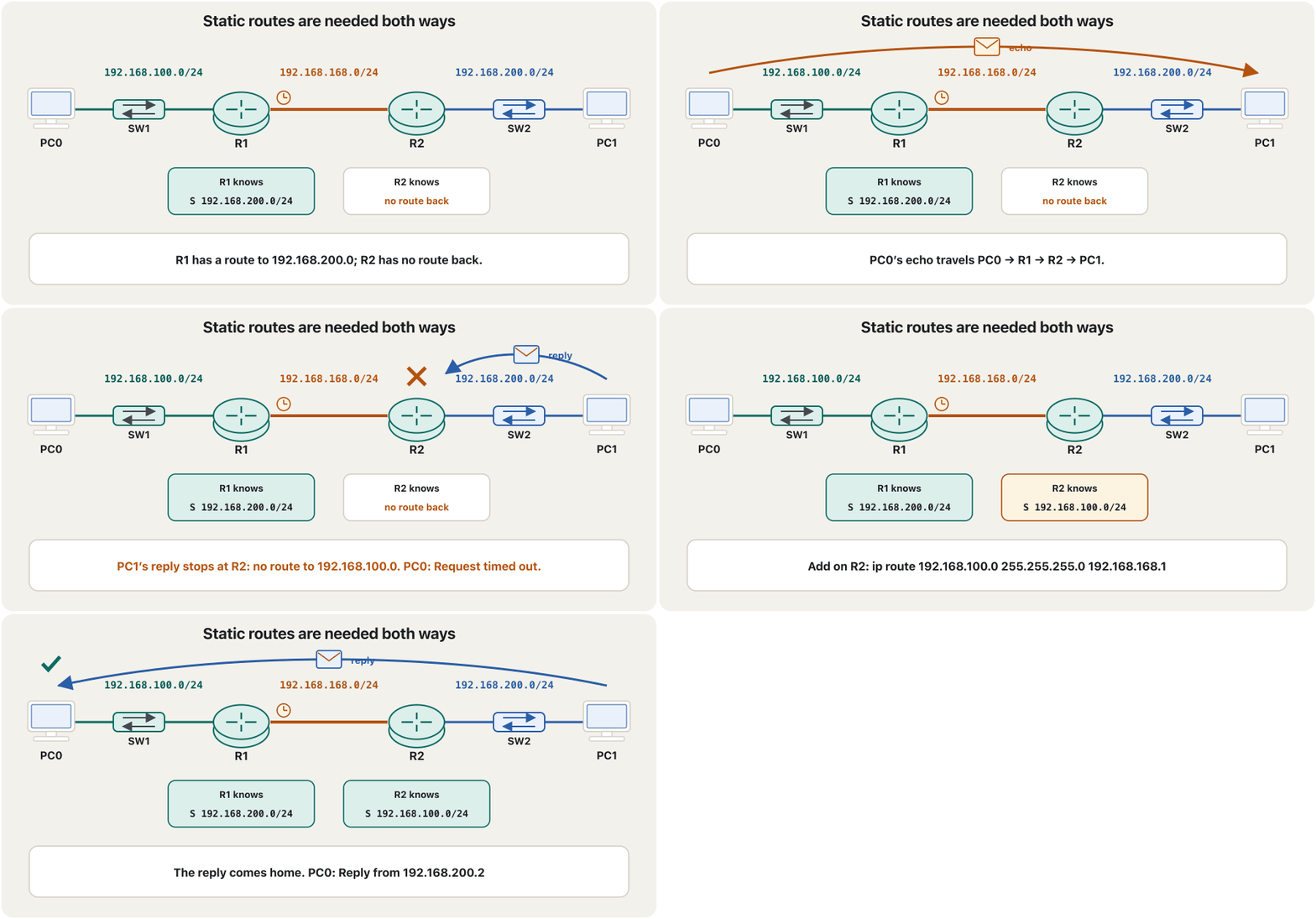
A ping is a round trip. If only R1 has its static route, PC0’s echo reaches PC1 — but PC1’s reply reaches R2, and R2 has no route back to 192.168.100.0. R2 drops it, and PC0 sees only Request timed out. Add R2’s route and the reply comes home. This is why the rule says in both directions.
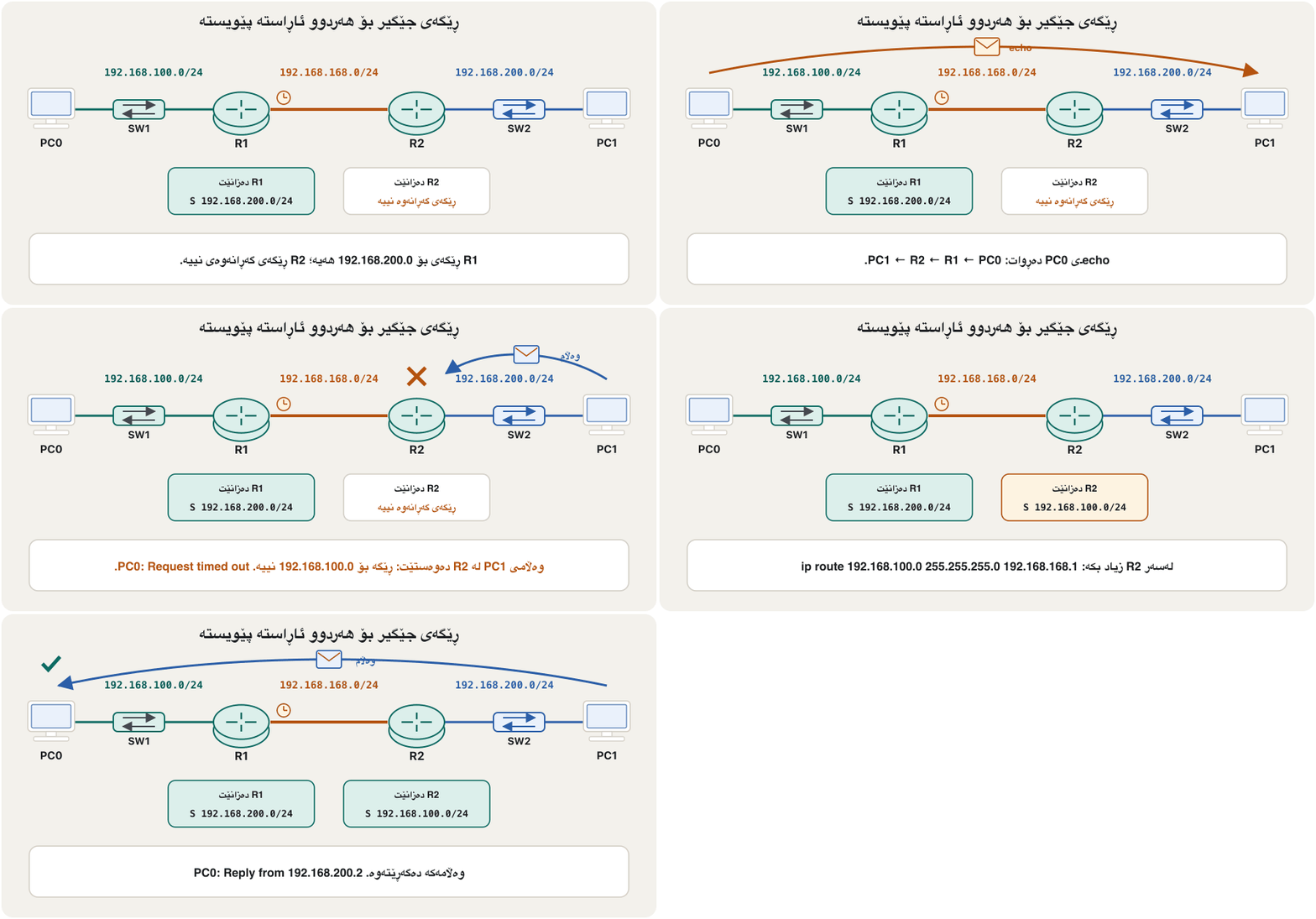
گەشتێکی چوون و هاتنەوەیە. ئەگەر تەنیا R1 هەبێت، echoـی PC0 دەگاتە PC1 — بەڵام وەڵامەکەی PC1 دەگاتە R2 و R2 هیچ ڕێگەیەکی گەڕانەوەی بۆ 192.168.100.0 نییە. R2 فڕێی دەدات و PC0 تەنیا Request timed out. دەبینێت. ڕێگەکەی R2 زیاد بکە و وەڵامەکە دەگەڕێتەوە. لەبەر ئەمەیە یاساکە دەڵێت لە هەردوو ئاڕاستەدا.
What the S line saysدێڕی S چی دەڵێت
In plain words, the two commands are polite requests. To R1: “Please store the address 192.168.200.0/24 — you can deliver your data to it through R2’s interface 192.168.168.2.” To R2: “Please store 192.168.100.0/24 — reachable through R1’s interface 192.168.168.1.” After the command, show ip route on R1 shows S 192.168.200.0/24 [1/0] via 192.168.168.2: the network 192.168.200.0 is known statically, through 192.168.168.2, with AD 1 and metric 0 (reading the brackets).
بە وشەی سادە، دوو داواکاریی بەڕێزانەن. بۆ R1: «کاک R1! بەئەرک نەبێت ناونیشانی 192.168.200.0/24 لای خۆت خەزن بکە، کە لەڕێی 192.168.168.2ـی R2ـەوە دەتوانیت پێ بگەیەنیت.» بۆ R2: «کاک R2! بەئەرک نەبێت 192.168.100.0/24 لای خۆت خەزن بکە، کە لەڕێی 192.168.168.1ـی R1ـەوە دەگەیت پێی.» لە دوای ، show ip route لەسەر R1 S 192.168.200.0/24 [1/0] via 192.168.168.2 پیشان دەدات: 192.168.200.0 بە شێوەی جێگیر ناسراوە، لە ڕێی 192.168.168.2ـەوە، بە AD 1 و 0 (خوێندنەوەی کەوانەکان).
Next hop, exit interface, or bothبازی دواتر، نێوبەستەی دەرچوون یان هەردووکیان
The last part of ip route can be written three ways. Each one appears differently in the table:
دوایین بەشی ip route بە سێ شێوە دەنووسرێت. هەریەکەیان لە خشتەکەدا بە شێوەیەکی جیاواز دەردەکەوێت:
| Formشێوە | Command on R1 لەسەر R1 | Line in show ip routeدێڕ لە show ip route |
|---|---|---|
| Next hop (recursive) (دووپاتەیی) | ip route 192.168.200.0 255.255.255.0 192.168.168.2 | S 192.168.200.0/24 [1/0] via 192.168.168.2 |
| Exit interface (directly attached) (ڕاستەوخۆ لکاو) | ip route 192.168.200.0 255.255.255.0 Serial0/0/0 | S 192.168.200.0/24 is directly connected, Serial0/0/0 |
| Both (fully specified)هەردووکیان (تەواو دیاریکراو) | ip route 192.168.200.0 255.255.255.0 Serial0/0/0 192.168.168.2 | S 192.168.200.0/24 [1/0] via 192.168.168.2, Serial0/0/0 |
Cisco’s advice: on a point-to-point serial interface, the exit interface alone is enough. On Ethernet — a multi-access link with many possible neighbours — always give the next-hop address, best together with the interface; a route that names only an Ethernet interface makes the router treat every destination as directly connected and send an ARP request for each one. Whatever the form, the route is still static with AD 1. An exit-interface route is only shown as directly connected: show ip route 192.168.200.0 answers Known via "static", distance 1, metric 0 (connected) — it does not get the AD 0 of a connected network.
ئامۆژگاریی Cisco: لەسەر زنجیرەیی خاڵ بۆ خاڵ، بە تەنیا بەسە. لەسەر — بەستەرێکی فرە-دەستپێگەیشتن کە دەکرێت چەند دراوسێیەکی هەبێت — هەمیشە ناونیشانی بدە، باشتر لەگەڵ ؛ ڕێگەیەک کە تەنیا ناو ببات وا لە دەکات هەموو مەبەستێک بە ڕاستەوخۆ بەستراو دابنێت و بۆ هەریەکەیان داواکارییەکی بنێرێت. هەر شێوەیەک هەڵبژێریت، ڕێگەکە هەر جێگیرە بە AD 1. ڕێگەی تەنیا وەک ڕاستەوخۆ بەستراو پیشان دەدرێت: show ip route 192.168.200.0 وەڵام دەداتەوە Known via "static", distance 1, metric 0 (connected) — ADـی 0ـی بەستراو وەرناگرێت.
Next hop, exit interface, or bothبازی دواتر، نێوبەستەی دەرچوون یان هەردووکیان
Recursive lookup: two searches for one packetگەڕانی دووپاتەیی: دوو گەڕان بۆ یەک پاکێت
A next-hop route does not say which interface to use, so the router searches its table twice: first for the destination (192.168.200.0/24 → next hop 192.168.168.2), then for the next hop itself (192.168.168.2 is in C 192.168.168.0/24 → Serial0/0/0). That is why a static route is called recursive. It also means a next-hop route stays in the table only while its next hop can be reached; if the link to 192.168.168.2 goes down, the route disappears. Modern routers precompute the result (Cisco Express Forwarding), but the logic is the same.
ڕێگەیەکی نالێت کام بەکار بهێنرێت، بۆیە دوو جار لە خشتەکەیدا دەگەڕێت: یەکەم بۆ مەبەستەکە (192.168.200.0/24 ← 192.168.168.2)، پاشان بۆ خودی (192.168.168.2 لە ناو C 192.168.168.0/24ـدایە ← Serial0/0/0). لەبەر ئەمە وا پێی دەگوترێت دووپاتەیی. هەروەها واتە ڕێگەیەکی تەنیا تا ئەو کاتە لە خشتەکەدا دەمێنێتەوە کە دەستی پێ بگات؛ ئەگەر بەستەرەکەی 192.168.168.2 بکەوێت، ڕێگەکە نامێنێت. نوێیەکان ئەنجامەکە پێشوەختە هەژمار دەکەن (Cisco Express Forwarding)، بەڵام لۆجیکەکە هەمانە.
Many routers in a rowچەند ڕێدۆزێک بە ڕیز
With more routers the same rule is applied in every router: ip route [destination network ID] [destination subnet mask] [the facing interface of the next router]. In this chain of four routers PC3 (10.0.1.2) must reach PC4 (10.0.5.2). Each router needs the far-end network it does not touch, pointing at its neighbour in that direction: R4 and R7 need one route each, R5 and R6 two each (one each way).
بە زیاتر هەمان یاسا لە هەموو جێبەجێ دەکرێت: ip route [destination network ID] [destination subnet mask] [the facing interface of the next router]. لەم زنجیرەیەی چوار PC3 (10.0.1.2) دەبێت بگاتە PC4 (10.0.5.2). هەر پێویستی بەو دوورەیە کە دەستی پێی ناگات، بە ئاماژە بۆ دراوسێکەی لەو ئاڕاستەیەدا: R4 و R7 هەریەکە یەک ڕێگە، R5 و R6 هەریەکە دوو ڕێگە (هەر ئاڕاستەیەک یەکێک).
R4(config)#ip route 10.0.5.0 255.255.255.0 10.0.2.2
R5(config)#ip route 10.0.5.0 255.255.255.0 10.0.3.2
R5(config)#ip route 10.0.1.0 255.255.255.0 10.0.2.1
R6(config)#ip route 10.0.5.0 255.255.255.0 10.0.4.2
R6(config)#ip route 10.0.1.0 255.255.255.0 10.0.3.1
R7(config)#ip route 10.0.1.0 255.255.255.0 10.0.4.1Worked example: three routers, a chosen pathنموونەی کارپێکراو: سێ ڕێدۆز، ڕێگایەکی هەڵبژێردراو
A classic exercise. Three routers form a triangle; each colour is a network with its own network ID (1.0, 2.0 … are short for 192.168.1.0, 192.168.2.0 …). The task: send data from PC4 to PC5 only through R9, and bring the replies back from R8 straight to R10 over network 192.168.3.0 — with static routes. The link between two routers is a network too, so both of its interfaces are in the same network.
ڕاهێنانێکی ناسراو. سێ سێگۆشەیەک پێک دەهێنن؛ هەر ڕەنگێک بە خۆی (1.0، 2.0 … کورتکراوەی 192.168.1.0، 192.168.2.0 …ـن). ئەرکەکە: لە PC4ـەوە بۆ PC5 تەنیا لە ڕێی R9ـەوە بنێرە و وەڵامەکان لە R8ـەوە ڕاستەوخۆ بە 192.168.3.0دا بۆ R10 بگەڕێنەوە — بە . بەستەری نێوان دوو خۆیشی ، بۆیە هەردوو لە هەمان .
Add a WIC-2T serial card to each 2811 router (power off, insert, power on) and join them with serial cables.
کارتێکی زنجیرەیی WIC-2T بخە ناو هەر 2811 (کوژاندنەوە، دانان، هەڵکردن) و بە کێبڵی زنجیرەیی بەیەکەوەیان ببەستە.
Gateways: PC4 → 192.168.1.1 (its R10 interface), PC5 → 192.168.4.1 (its R8 interface).
: PC4 ← 192.168.1.1 ( R10ـەکەی)، PC5 ← 192.168.4.1 ( R8ـەکەی).
On R10, the destination network towards R9:
ip route 192.168.4.0 255.255.255.0 192.168.2.2.لەسەر R10، مەبەست بەرەو R9:
ip route 192.168.4.0 255.255.255.0 192.168.2.2.On R9, the destination network towards R8:
ip route 192.168.4.0 255.255.255.0 192.168.5.2.لەسەر R9، مەبەست بەرەو R8:
ip route 192.168.4.0 255.255.255.0 192.168.5.2.On R8, the way back over 192.168.3.0:
ip route 192.168.1.0 255.255.255.0 192.168.3.1.لەسەر R8، ڕێگای گەڕانەوە بە 192.168.3.0دا:
ip route 192.168.1.0 255.255.255.0 192.168.3.1.Test with a ping from PC4 to PC5, then save on every router.
بە لە PC4ـەوە بۆ PC5 تاقی بکەرەوە، پاشان لەسەر هەموو پاشەکەوت بکە.
R10(config)#ip route 192.168.4.0 255.255.255.0 192.168.2.2
R10(config)#ip route 192.168.5.0 255.255.255.0 192.168.2.2
R9(config)#ip route 192.168.4.0 255.255.255.0 192.168.5.2
R8(config)#ip route 192.168.1.0 255.255.255.0 192.168.3.1
Explain the codeڕوونکردنەوەی کۆدەکە
- Lineدێڕی 2
Not needed for PC4 ↔ PC5; it only lets R10 reach the R9–R8 link.
بۆ PC4 ↔ PC5 پێویست نییە؛ تەنیا ڕێگە دەدات R10 بگاتە بەستەری R9–R8.
- Lineدێڕی 3
R9 needs no route to 192.168.1.0: the replies never pass through R9.
R9 پێویستی بە ڕێگە بۆ 192.168.1.0 نییە: وەڵامەکان هەرگیز بە R9دا تێناپەڕن.
Checking static routesپشکنینی ڕێگە جێگیرەکان
Four checks, from the router and from a PC:
چوار پشکنین، لە و لە PCـیەکەوە:
show ip route staticlists only the static routes;show ip route 192.168.200.0shows one route in detail (Known via “static”, distance 1, metric 0).show running-config | include ip routelists theip routelines you typed — also the ones not in the table right now. (If your simulator rejects the|filter, use plainshow running-config.)pingfrom a PC to a PC in the other network tests both directions at once.tracert(Windows) ortraceroute(router, Linux) lists the routers on the way — the last one that answers is where to look (reading tracert).
show ip route staticتەنیا لیست دەکات؛show ip route 192.168.200.0یەک ڕێگە بە وردی پیشان دەدات (Known via “static”, distance 1, metric 0).show running-config | include ip routeئەو دێڕانەیip routeلیست دەکات کە نووسیوتن — ئەوانەش کە ئێستا لە خشتەکەدا نین. (ئەگەر هاوشێوەسازەکەت پاڵێوەری|قبووڵ نەکات،show running-configبە تەنیا بەکار بهێنە.)pingلە PCـیەکەوە بۆ PCـیەک لە تر هەردوو ئاڕاستە پێکەوە تاقی دەکاتەوە.tracert(Windows) یانtraceroute(، Linux) سەر ڕێگاکە لیست دەکات — دوایین دانە کە وەڵام دەداتەوە ئەو شوێنەیە کە دەبێت سەیری بکەیت (خوێندنەوەی tracert).
C:\>tracert 192.168.200.2

Tracing route to 192.168.200.2 over a maximum of 30 hops

  1    <1 ms    <1 ms    <1 ms  192.168.100.1
  2     1 ms     1 ms     1 ms  192.168.168.2
  3     2 ms     1 ms     1 ms  192.168.200.2

Trace complete.
In Packet Tracer’s Simulation mode you can also watch the ping hop by hop: the Event List shows each ICMP message at each device, and the last event of a working ping is marked successful. Other entries such as CDP are Cisco’s discovery messages between neighbours, not part of the ping (realtime and simulation). The CêIT network lab shows routing tables and ping in 3D too.
لە دۆخی Simulationـی Packet Tracerـدا دەتوانیت باز بە باز ببینیت: Event List هەر پەیامێکی لە هەر ئامێرێکدا پیشان دەدات و دوایین ڕووداوی سەرکەوتوو بە سەرکەوتوو نیشان دەکرێت. تۆمارەکانی تری وەک CDP پەیامی دۆزینەوەی Ciscoـن لە نێوان دراوسێکاندا، بەشێک نین لە (realtime و simulation). تاقیگەی ڕایەڵەی CêIT ـیش و بە سێ ڕەهەندی پیشان دەدات.
IPv6 static routesڕێگە جێگیرەکانی IPv6
IPv6 works the same way with ipv6 route. First let the router forward IPv6 with ipv6 unicast-routing (IPv6 on an interface). Then write the prefix with its length — no dotted mask — and the next hop. A link-local next hop (fe80::…) exists on every link, so it must come with the exit interface: ipv6 route 2001:db8:acad:2::/64 s0/0/0 fe80::2.
بە هەمان شێوە بە ipv6 route کار دەکات. سەرەتا بە ipv6 unicast-routing ڕێگە بدە بگوازێتەوە (IPv6 لەسەر نێوبەستەیەک). پاشان لەگەڵ درێژییەکەی بنووسە — بێ ماسکی خاڵدار — و . (fe80::…) لەسەر هەموو بەستەرێک هەیە، بۆیە دەبێت لەگەڵ بێت: ipv6 route 2001:db8:acad:2::/64 s0/0/0 fe80::2.
R1(config)#ipv6 unicast-routing
R1(config)#ipv6 route 2001:db8:acad:2::/64 2001:db8:acad:12::2
R1(config)#end
R1#show ipv6 route static
S   2001:DB8:ACAD:2::/64 [1/0]
     via 2001:DB8:ACAD:12::2

R2(config)#ipv6 unicast-routing
R2(config)#ipv6 route 2001:db8:acad:1::/64 2001:db8:acad:12::1
Explain the codeڕوونکردنەوەی کۆدەکە
- Lineدێڕی 2
Recursive form: the next hop is R2’s global address on the link 2001:db8:acad:12::/64.
شێوەی دووپاتەیی: ناونیشانی گشتیی R2ـە لەسەر بەستەری 2001:db8:acad:12::/64.
- Lineدێڕی 5-6
IOS writes IPv6 addresses in capitals and the next hop on its own line.
IOS ناونیشانەکانی بە پیتی گەورە دەنووسێت و لە دێڕێکی جیادا.
Common mistakesهەڵە باوەکان
A step-by-step way to find the fault is in IOS troubleshooting: static route faults.
ڕێگایەکی هەنگاو بە هەنگاو بۆ دۆزینەوەی کێشەکە لە چارەسەرکردنی کێشە لە IOS: کێشەکانی ڕێگەی جێگیردایە.
Exercisesڕاهێنانەکان
Build the two-company lab: R1 G0/0 192.168.100.1/24, R2 G0/0 192.168.200.1/24, the serial link 192.168.168.0/24 with R1 as the DCE end. Configure both routers with static routes, test with a ping from PC0 to PC1 and save. Write R1’s commands and the line that appears in R1’s table.
تاقیکردنەوەی دوو کۆمپانیاکە دروست بکە: R1 G0/0 192.168.100.1/24، R2 G0/0 192.168.200.1/24، بەستەری زنجیرەیی 192.168.168.0/24 بە R1 وەک سەری DCE. هەردوو بە ڕێک بخە، بە لە PC0ـەوە بۆ PC1 تاقی بکەرەوە و پاشەکەوت بکە. R1 و ئەو دێڕەی لە خشتەی R1ـدا دەردەکەوێت بنووسە.
Show answerوەڵامەکە پیشان بدە
R1(config)#interface g0/0
R1(config-if)#ip address 192.168.100.1 255.255.255.0
R1(config-if)#no shutdown
R1(config-if)#interface s0/0/0
R1(config-if)#ip address 192.168.168.1 255.255.255.0
R1(config-if)#clock rate 64000
R1(config-if)#no shutdown
R1(config-if)#exit
R1(config)#ip route 192.168.200.0 255.255.255.0 192.168.168.2
R1(config)#end
R1#copy running-config startup-config
R1’s table gains S 192.168.200.0/24 [1/0] via 192.168.168.2. R2 needs ip route 192.168.100.0 255.255.255.0 192.168.168.1.
خشتەی R1 S 192.168.200.0/24 [1/0] via 192.168.168.2 وەردەگرێت. R2 پێویستی بە ip route 192.168.100.0 255.255.255.0 192.168.168.1 هەیە.
Three routers R1, R0 and R2 form a triangle (picture). (a) Write static routes so that PC1 (192.168.1.2) and PC2 (192.168.5.2) can ping each other over the direct link 192.168.2.0. (b) Which extra routes give every router a route to all five networks? (c) What happens to the ping if the R1–R2 link fails?
سێ ، R1، R0 و R2، سێگۆشەیەک پێک دەهێنن (وێنەکە). (ئ) بنووسە تا PC1 (192.168.1.2) و PC2 (192.168.5.2) بتوانن بە بەستەری ڕاستەوخۆی 192.168.2.0 بۆ یەکتری بکەن. (ب) کام ڕێگەی زیاتر بە هەموو ڕێگە دەدات بۆ هەر پێنج ؟ (ج) ئەگەر بەستەری R1–R2 بپچڕێت، چی بە دەگات؟
Show answerوەڵامەکە پیشان بدە
- (a) R1:
ip route 192.168.5.0 255.255.255.0 192.168.2.2; R2:ip route 192.168.1.0 255.255.255.0 192.168.2.1. - (b) R1 also needs 192.168.4.0 (via 192.168.3.2); R2 needs 192.168.3.0 (via 192.168.4.2); R0 needs 192.168.1.0 (via 192.168.3.1), 192.168.5.0 (via 192.168.4.1) and 192.168.2.0 (via 192.168.3.1 or 192.168.4.1).
- (c) The two routes over 192.168.2.0 leave the tables (their next hops are unreachable) and the ping fails — static routes do not use the path through R0 by themselves. A backup route with a higher AD solves it: floating static routes.
- (ئ) R1:
ip route 192.168.5.0 255.255.255.0 192.168.2.2؛ R2:ip route 192.168.1.0 255.255.255.0 192.168.2.1. - (ب) R1 هەروەها پێویستی بە 192.168.4.0 هەیە (via 192.168.3.2)؛ R2 پێویستی بە 192.168.3.0 هەیە (via 192.168.4.2)؛ R0 پێویستی بە 192.168.1.0 (via 192.168.3.1)، 192.168.5.0 (via 192.168.4.1) و 192.168.2.0 (via 192.168.3.1 یان 192.168.4.1) هەیە.
- (ج) دوو ڕێگەکەی سەر 192.168.2.0 لە خشتەکان دەردەچن ( ناگەنێ) و سەرناکەوێت — خۆیان ڕێگای سەر R0 بەکار ناهێنن. ڕێگەیەکی یەدەگ بە ADـی بەرزتر چارەسەری دەکات: ڕێگە جێگیرە یەدەگەکان.
In the chain R4–R5–R6–R7 (10.0.1.0 … 10.0.5.0), which routes are missing so that every router can ping every interface? Use as few lines as you can.
لە زنجیرەی R4–R5–R6–R7 (10.0.1.0 … 10.0.5.0)، کام ڕێگانە نین تا هەموو بتوانێت بۆ هەموو بکات؟ کەمترین دێڕ بەکار بهێنە.
Show answerوەڵامەکە پیشان بدە
- R4: 10.0.3.0 and 10.0.4.0 via 10.0.2.2 — or one default route via 10.0.2.2 (it is a stub end).
- R5: 10.0.4.0 via 10.0.3.2. R6: 10.0.2.0 via 10.0.3.1.
- R7: 10.0.2.0 and 10.0.3.0 via 10.0.4.1 — or one default route via 10.0.4.1.
- R4: 10.0.3.0 و 10.0.4.0 via 10.0.2.2 — یان یەک via 10.0.2.2 (کۆتاییەکی بنبەستە).
- بۆ R5: 10.0.4.0 via 10.0.3.2؛ بۆ R6: 10.0.2.0 via 10.0.3.1.
- R7: 10.0.2.0 و 10.0.3.0 via 10.0.4.1 — یان یەک via 10.0.4.1.
A student’s R2 shows no S line after typing ip route 192.168.100.0 255.255.255.0 192.168.168.2, and PC1 has the address 192.168.201.2 with gateway 192.168.200.1. Name both faults and the fixes.
R2ـی قوتابییەک دوای نووسینی ip route 192.168.100.0 255.255.255.0 192.168.168.2 هیچ دێڕێکی S پیشان نادات، هەروەها PC1 ناونیشانی 192.168.201.2ـی هەیە بە 192.168.200.1. هەردوو هەڵەکە و چاککردنەوەکانیان ناو ببە.
Show answerوەڵامەکە پیشان بدە
- 192.168.168.2 is R2’s own address — the next hop must be R1’s:
ip route 192.168.100.0 255.255.255.0 192.168.168.1(andno ip route …for the wrong line). - PC1 is in 192.168.201.0, not in its gateway’s network: give it 192.168.200.2/24.
- 192.168.168.2 ناونیشانی خودی R2ـیە — دەبێت هی R1 بێت:
ip route 192.168.100.0 255.255.255.0 192.168.168.1(وno ip route …بۆ دێڕە هەڵەکە). - PC1 لە 192.168.201.0دایە، نەک لە : 192.168.200.2/24ـی بدەرێ.
Summaryکورتە
- A router knows only its connected networks; a static route adds a remote one by hand:
ip route <network> <mask> <next hop | exit interface>. - The rule: in every router, one route for every network that is not directly connected — in both directions.
- The mask belongs to the destination; the next hop is the neighbour’s address on the shared link.
- Three forms: next hop (recursive), exit interface (point-to-point only), both (best on Ethernet). In the table:
S … [1/0] via …. - Serial labs: the DCE end gives the clock (
clock rate); real serial ports (DB-60, later Smart Serial) take five cable standards; serial is slow and legacy. - Check with
show ip route static,pingandtracert; IPv6 usesipv6 route; remove a route withno ip route …; save withcopy running-config startup-config.
- تەنیا بەستراوەکانی خۆی دەناسێت؛ دوور بە دەست زیاد دەکات:
ip route <network> <mask> <next hop | exit interface>. - یاساکە: لە هەموو ، ڕێگەیەک بۆ هەر کە ڕاستەوخۆ نەبەستراوە — لە هەردوو ئاڕاستەدا.
- ماسکەکە هی مەبەستەکەیە؛ ناونیشانی دراوسێیە لەسەر بەستەرە هاوبەشەکە.
- سێ شێوە: (دووپاتەیی)، (تەنیا خاڵ بۆ خاڵ)، هەردووکیان (باشترین لەسەر ). لە خشتەکەدا:
S … [1/0] via …. - تاقیکردنەوە زنجیرەییەکان: سەری DCE کاتژمێر دەدات (
clock rate)؛ لەسەر ئامێری ڕاستەقینە (DB-60، دواتر Smart Serial) پێنج کێبڵ وەردەگرن؛ زنجیرەیی هێواش و کۆنە. - بە
show ip route static،pingوtracertبیپشکنە؛ipv6 routeبەکار دەهێنێت؛ ڕێگە بەno ip route …لادەبرێت؛ بەcopy running-config startup-configپاشەکەوتی بکە.
Next: one route for everything else, and backup routes — Default routes and floating static routes.
دواتر: یەک ڕێگە بۆ هەموو شتێکی تر و ڕێگە یەدەگەکان — ڕێگە بنەڕەتییەکان و ڕێگە جێگیرە یەدەگەکان.
Lesson complete!وانەکە تەواو بوو!
Well done. Review the key terms, then go on to the next lesson.دەستخۆش. سەیرێکی زاراوە سەرەکییەکان بکەرەوە، پاشان بڕۆ بۆ وانەی داهاتوو.
Key termsزاراوە سەرەکییەکان
Default Routes and Floating Static Routesڕێگە بنەڕەتییەکان و ڕێگە جێگیرە یەدەگەکان
Related lecturesوانە پەیوەندیدارەکان
- Default Routes and Floating Static Routesڕێگە بنەڕەتییەکان و ڕێگە جێگیرە یەدەگەکان
- How Routers Learn Routes: Routing Protocols, Metrics and Loopsڕێدۆزەکان چۆن ڕێگەکان فێر دەبن: پرۆتۆکۆڵەکانی ڕێدۆزی، پێوانەکان و ئەڵقەکانی ڕێدۆزی
- Show Commands, Running and Startup Configurationsفەرمانەکانی show، ڕێکخستنی کارا و ڕێکخستنی دەستپێکردن
- ICMP, Ping and TracerouteICMP، پینگ و بەدواداچوونی ڕێگە
- Packet Tracer: Your First NetworkPacket Tracer: یەکەم ڕایەڵەکەت
- Subnetting Step by Stepژێرڕایەڵەسازی هەنگاو بە هەنگاو
- Address Classes, and Why CIDR Replaced Themپۆلەکانی ناونیشانی IP و بۆچی CIDR جێگەیانی گرتەوە
- IPv6 Addresses: Format and Typesناونیشانەکانی IPv6: شێوە و جۆرەکان
References and further readingسەرچاوەکان و خوێندنەوەی زیاتر
- Cisco: Configure a Next Hop IP Address for Static Routes (recursive static routes; exit interface only on point-to-point links; fully specified routes recommended; updated 10 July 2023)
- Cisco IOS command reference: ip route (prefix, mask, next-hop address or interface, optional distance)
- Cisco IOS IPv6 Configuration Guide: Implementing Static Routes for IPv6 (directly attached, recursive and fully specified routes; ::/0)
- Cisco: High-Speed WAN Interface Cards data sheet (HWIC-2T: up to 8 Mbit/s per port)
- Cisco Press: Switching, Routing, and Wireless Essentials Companion Guide (CCNAv7) — static routing
- RFC 4632: Classless Inter-domain Routing (CIDR)
- Cisco: Modular Access Router Cable Specifications — 60-pin (DB-60) and 26-pin Smart Serial cables for EIA/TIA-232, EIA/TIA-449, V.35, X.21 and EIA-530 (EIA-530 is DTE only; the cable sets the interface type and DTE or DCE mode)
This lecture is a first edition. The Kurdish text and terminology are waiting for review by Kurdish IT teachers.ئەم وانەیە چاپی یەکەمە. دەقە کوردییەکە و زاراوەکانی چاوەڕێی پێداچوونەوەی مامۆستایانی کوردی بواری IT ن.