Chapterبەش 6 · Lectureوانە 6.2
Network Virtualization, SDN and Automationگریمانەسازیی ڕایەڵە، SDN و خۆکارکردن
Why networks are automated; virtual machines, virtual switches, containers and cloud networks; the management, control and data planes; SDN controllers and their APIs; REST, JSON, YANG, NETCONF and RESTCONF; Ansible and Python; AI in operations; and what the CCNA asks about all of it.
بۆچی دەکرێن؛ ، ، و هەور؛ ، و ؛ و ؛ ، JSON، YANG، NETCONF و RESTCONF؛ Ansible و Python؛ لە کارپێکردندا؛ و ئەوەی CCNA لەسەر هەموویان دەپرسێت.
What you will learnچی فێر دەبیت
- Explain why network automation is used and how to roll out a change safely.
- Describe virtual machines, virtual switches, containers and a virtual private cloud.
- Sort device jobs into the management, control and data planes, and explain what SDN changes.
- Tell northbound from southbound APIs and read REST requests and JSON device data.
- Explain the roles of YANG, NETCONF, RESTCONF, Ansible and Python with Netmiko.
- Run a Python program that turns a JSON device list into a report and commands.
- Describe how AI is used in network operations and its limits, as of 2026.
- ڕوون بکەیتەوە بۆچی بەکار دێت و چۆن گۆڕانکارییەک بە بێمەترسی بڵاو دەکرێتەوە.
- ، ، و گریمانەیی وەسف بکەیت.
- کارەکانی ئامێر بەسەر ، و دابەش بکەیت و ڕوون بکەیتەوە SDN چی دەگۆڕێت.
- ڕووەو سەرەوە لە ڕووەو خوار جیا بکەیتەوە و و JSONـی ئامێر بخوێنیتەوە.
- ڕۆڵی YANG، NETCONF، RESTCONF، Ansible و Python لەگەڵ Netmiko ڕوون بکەیتەوە.
- Python کار پێ بکەیت کە لیستێکی JSONـی ئامێرەکان دەکات بە ڕاپۆرت و .
- وەسف بکەیت چۆن لە کارپێکردنی بەکار دێت و سنوورەکانی، تا 2026.
Why automate a network?بۆچی ڕایەڵە خۆکار بکەین؟
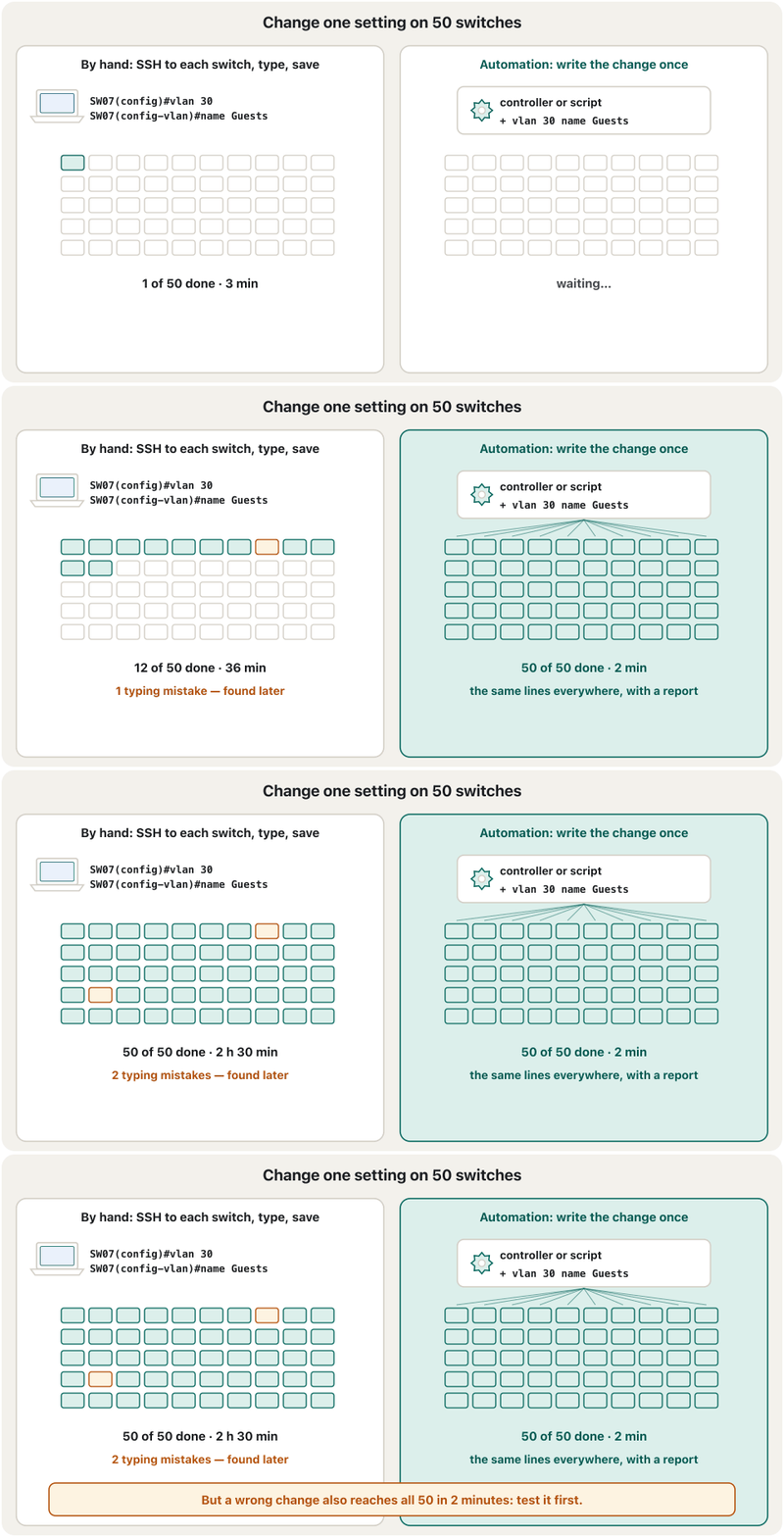
In this course you configured every router and switch by hand: open the CLI, type the commands, save. That is right for one lab. A university or a mobile operator has hundreds of devices. Imagine adding a guest VLAN to fifty switches: fifty SSH logins, fifty times the same lines, and somewhere a typing mistake that nobody sees until users complain.
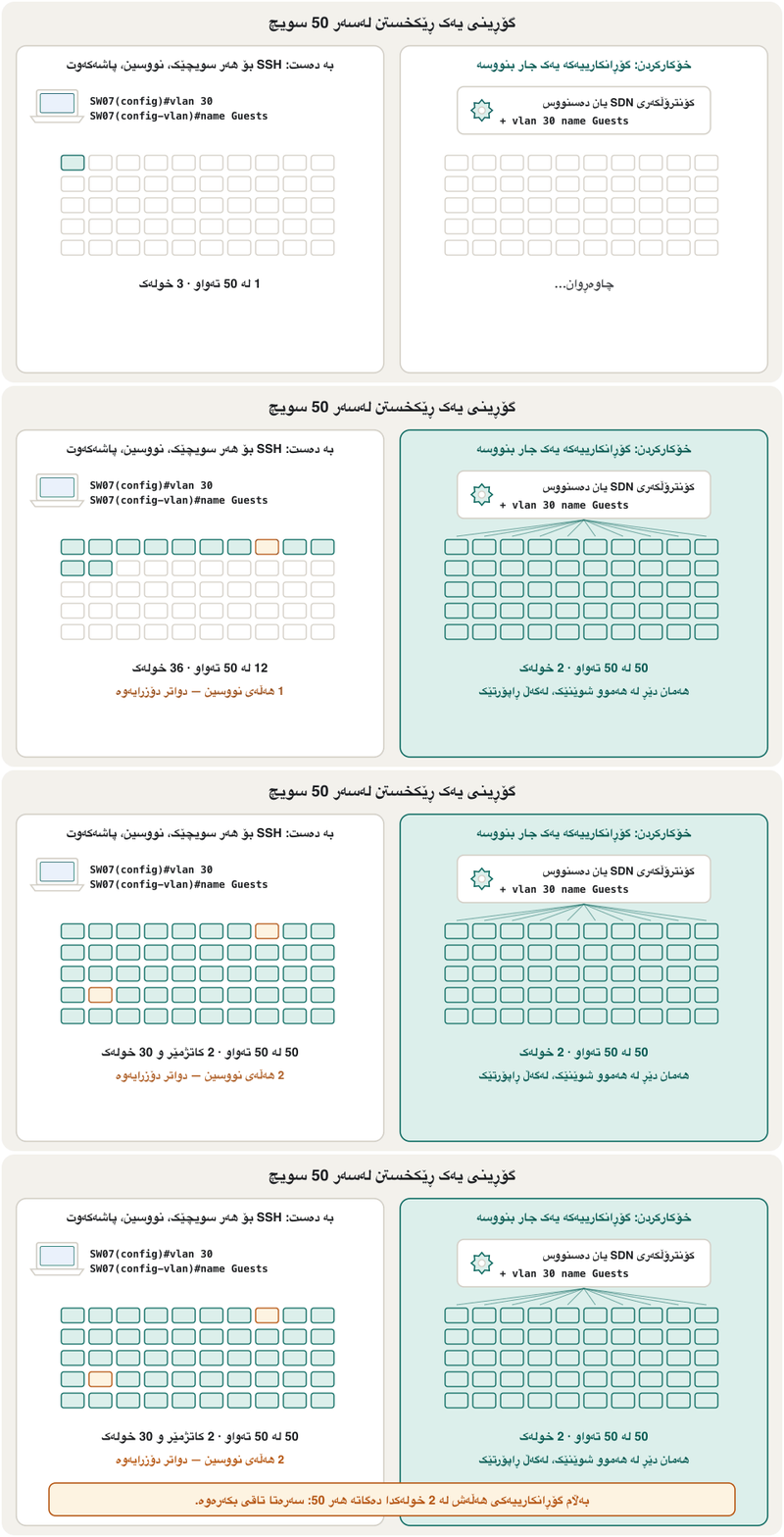
لەم کۆرسەدا هەموو و بە دەست ڕێک خست: CLI بکەرەوە، بنووسە، پاشەکەوتی بکە. ئەمە بۆ یەک تاقیکردنەوە دروستە. بەڵام زانکۆیەک یان کۆمپانیایەکی مۆبایل سەدان ئامێری هەیە. وێنا بکە میوان بۆ پەنجا زیاد بکەیت: پەنجا جار چوونەژوورەوە بە SSH، پەنجا جار هەمان دێڕەکان و لە شوێنێکدا هەڵەیەکی نووسین کە کەس نایبینێت تا بەکارهێنەران سکاڵا دەکەن.
Network automation means letting software do these repeated jobs: you describe the change once, and a program or a controller applies it to every device the same way, checks the result and writes a report. It is faster, the same everywhere and recorded. The rest of this lesson shows the ideas and the tools behind it.
واتە ئەم کارە دووپاتانە بدەیتە دەست : گۆڕانکارییەکە یەک جار وەسف دەکەیت و یان بە هەمان شێوە لەسەر هەموو ئامێرێک جێبەجێی دەکات، ئەنجامەکە دەپشکنێت و ڕاپۆرتێک دەنووسێت. خێراترە، لە هەموو شوێنێک وەک یەکە و تۆمار دەکرێت. باقیی ئەم وانەیە بیرۆکە و ئامرازەکانی پشت ئەمە پیشان دەدات.
Virtual machines and virtual switchesئامێرە گریمانەییەکان و سویچە گریمانەییەکان
Automation and SDN grew up in data centres full of virtual machines. A program called a hypervisor divides one physical server into several virtual machines (VMs), each with its own operating system (virtualization in the IT course). But the VMs still need a network. Inside the server, the hypervisor runs a virtual switch: a switch made of software. Each VM has a virtual network card (vNIC) plugged into it, and the virtual switch keeps the VMs in their VLANs, just like the access ports you configured.
و SDN لە گەورە بوون کە پڕن لە . بە ناوی یەک فیزیکی دابەش دەکات بۆ چەند (VM)، هەر یەکەیان خۆی هەیە (گریمانەسازی لە کۆرسی IT). بەڵام VMـەکان هێشتا پێویستیان بە هەیە. لە ناو ، کار پێ دەکات: کە لە دروست کراوە. هەر VMـێک کارتێکی گریمانەیی (vNIC) هەیە کە پێیەوە بەستراوە و VMـەکان لە خۆیاندا دەهێڵێتەوە، هەر وەک ئەو کە پێشتر ڕێکت خستن.
The server's real network card is cabled to a physical switch, usually as a trunk: the frames of every VM leave tagged with their VLAN (802.1Q tags). Routers and firewalls can also run as VMs, for example Cisco's Catalyst 8000V virtual router. This is called network functions virtualization (NFV): a network device becomes software you start in minutes.
کارتی ڕاستەقینەی بە فیزیکییەوە دەبەسترێت، زۆرجار وەک : هەموو VMـێک بە تاگی دەردەچن (تاگی 802.1Q). و دەتوانن وەک VM کار بکەن، بۆ نموونە گریمانەیی Catalyst 8000Vـی Cisco. ئەمە پێی دەوترێت کارەکانی (NFV): ئامێرێکی دەبێتە کە لە چەند خولەکێکدا هەڵی دەکەیت.
Containers: lighter than virtual machinesکۆنتەینەرەکان: سووکتر لە ئامێرە گریمانەییەکان
A VM carries a whole operating system with its own kernel, so it is large and takes a while to start. A container packs only one application and the files it needs. All containers on a computer share the host's kernel, so they are small and start in seconds — Docker is the best-known tool, and Kubernetes starts and moves thousands of them. Many network tools now ship as containers, and modern Cisco IOS XE switches can even run small container apps on the switch itself.
VM تەواو بە خۆیەوە هەڵدەگرێت، بۆیە گەورەیە و دەستپێکردنی کاتی دەوێت. تەنیا یەک و ئەو فایلانەی پێویستیەتی دەپێچێتەوە. هەموو سەر کۆمپیوتەرێک خانەخوێ بەش دەکەن، بۆیە بچووکن و لە چەند چرکەیەکدا دەست پێ دەکەن — Docker ناسراوترین ئامرازە و Kubernetes هەزاران دانەیان هەڵدەکات و دەیانگوازێتەوە. زۆر ئامرازی ئێستا وەک دێن و نوێی Cisco IOS XE تەنانەت دەتوانن بچووکی لەسەر خودی کار پێ بکەن.
Networks in the cloud: the virtual private cloudڕایەڵە لە هەوردا: هەوری تایبەتی گریمانەیی
When a company rents servers in a public cloud (IaaS — the service models), it also needs a network for them. The provider gives each customer a virtual private cloud (VPC): a private network that is isolated from other customers but runs on the provider's shared hardware. Amazon calls it a VPC, Microsoft Azure a virtual network (VNet), Google Cloud a VPC network.
کاتێک کۆمپانیایەک لە بە کرێ دەگرێت (IaaS — مۆدێلەکانی خزمەتگوزاری)، پێویستی بە هەیە بۆیان. بۆ هەر کڕیارێک گریمانەیی (VPC) دەدات: تایبەت کە لە کڕیارانی تر جیا کراوەتەوە، بەڵام لەسەر هاوبەشی کار دەکات. Amazon پێی دەڵێت VPC، Microsoft Azure ـ virtual network (VNet) و Google Cloud ـ VPC network.
Inside it you meet every idea of this course: an address block (10.0.0.0/16), subnets, a route table with a default route to an Internet gateway, and firewall rules (security groups). The difference is how you set them: not on a console cable, but in a web page or through an API — which is exactly why automation matters.
لە ناویدا هەموو بیرۆکەیەکی ئەم کۆرسە دەبینیتەوە: بلۆکێکی ناونیشان (10.0.0.0/16)، ، بە بەرەو دەروازەی و یاساکانی (security groups). جیاوازییەکە لە چۆنییەتی دانانیانە: نەک بە ، بەڵکو لە پەڕەیەکی وێب یان لە ڕێگەی — ئەمەش ڕێک هۆی گرنگیی .
Three planes: management, control and dataسێ ڕووتەخت: بەڕێوەبردن، کۆنترۆڵ و دراوە
Every router and switch does three different jobs, called planes. The data plane (also forwarding plane) moves each packet or frame: it looks up the routing table or MAC table and sends the packet out of the right port, millions of times a second, in special hardware. The control plane is the brain that builds those tables: OSPF, EIGRP, ARP and STP all live here. The management plane is how people reach the device to configure and watch it: the CLI over SSH, SNMP, syslog and APIs.
هەموو و سێ کاری جیاواز دەکات کە پێیان دەوترێت ڕووتەخت. (یان ڕووتەختی ) هەر یان دەگوازێتەوە: لە یان دەگەڕێت و لە دروستەوە دەنێرێت، ملیۆنان جار لە چرکەیەکدا، لە تایبەتدا. مێشکەکەیە کە ئەو خشتانە دروست دەکات: OSPF، EIGRP، ARP و STP هەموویان لێرەن. ئەو ڕێگەیەیە کە مرۆڤ پێی دەگاتە ئامێرەکە بۆ ڕێکخستن و چاودێری: CLI بە SSH، SNMP، syslog و .
The words come from network research (RFC 7426, 2015, describes the planes of software-defined networks). Remember them with a simple picture: the control plane decides, the data plane does, and the management plane lets people in.
ئەم وشانە لە توێژینەوەی هاتوون (RFC 7426، ساڵی 2015، ڕووتەختەکانی بە دیاریکراو وەسف دەکات). بە وێنەیەکی سادە لەبیریان بکە: بڕیار دەدات، جێبەجێ دەکات و مرۆڤ دەهێنێتە ژوورەوە.
Three planes: management, control and dataسێ ڕووتەخت: بەڕێوەبردن، کۆنترۆڵ و دراوە
Which plane does it?کام ڕووتەخت ئەمە دەکات؟
Sort everyday jobs of a router or switch into the three planes. If the job moves user traffic, it is the data plane; if it learns or builds a table, it is the control plane; if a person or a monitoring system talks to the device, it is the management plane.
کارە ڕۆژانەکانی یان بەسەر سێ ڕووتەختەکەدا دابەش بکە. ئەگەر کارەکە هاتوچۆی بەکارهێنەر بگوازێتەوە، ؛ ئەگەر خشتەیەک فێر ببێت یان دروست بکات، ؛ ئەگەر مرۆڤێک یان سیستەمێکی چاودێری قسە لەگەڵ ئامێرەکە بکات، .
| Jobکار | Planeڕووتەخت |
|---|---|
| Forwarding a ping from PC1 to PC2ناردنی لە PC1ـەوە بۆ PC2 | dataدراوە |
| Checking a packet against an ACL on an interfaceپشکنینی بە ACLـێک لەسەر | dataدراوە |
| OSPF calculating the best pathOSPF ڕێگەی باشترین دەژمێرێت | controlکۆنترۆڵ |
| STP choosing which port to blockSTP دیاری دەکات کام دابخرێت | controlکۆنترۆڵ |
| ARP finding the MAC address of the gatewayARP دەدۆزێتەوە | controlکۆنترۆڵ |
An admin typing show running-config over SSH لە ڕێگەی SSHـەوە show running-config دەنووسێت | managementبەڕێوەبردن |
| A monitoring server reading interface counters with SNMP چاودێری بە SNMP ژمێرەرەکانی دەخوێنێتەوە | managementبەڕێوەبردن |
SDN: one controller, a global viewSDN: یەک کۆنترۆڵکەری SDN، بینینێکی گشتی
In a traditional network every router has its own control plane. The routers talk to each other with routing protocols, and each one decides alone from what its neighbours tell it. Software-defined networking (SDN) separates the two: the Open Networking Foundation defines SDN as the physical separation of the control plane from the forwarding plane, with one control plane controlling several devices.
لە نەریتیدا هەموو خۆی هەیە. بە قسە لەگەڵ یەکتر دەکەن و هەر یەکەیان بە تەنیا، لەسەر بنەمای ئەوەی دراوسێکانی پێی دەڵێن، بڕیار دەدات. بە دیاریکراو (SDN) ئەم دووانە جیا دەکاتەوە: Open Networking Foundation، SDN وا پێناسە دەکات کە جیاکردنەوەی فیزیکیی لە ڕووتەختی ، بە شێوەیەک یەک چەند ئامێرێک کۆنترۆڵ بکات.
That central control plane is the SDN controller. Because it sees the whole topology at once (a global view), it can choose paths and apply policies for the whole network. The switches keep only the data plane: they forward as the controller tells them. ONF lists the benefits: the network becomes directly programmable, agile, centrally managed, configured by programs, and based on open standards rather than one vendor's tools.
ئەو ناوەندییە ـە. چونکە هەموو تۆپۆلۆجییەکە پێکەوە دەبینێت (بینینێکی گشتی)، دەتوانێت ڕێگەکان هەڵبژێرێت و سیاسەتەکان بۆ هەموو جێبەجێ بکات. تەنیا دەهێڵنەوە: بەو شێوەیە دەکەن کە پێیان دەڵێت. ONF سوودەکان دەژمێرێت: ڕاستەوخۆ بەرنامەڕێژ دەکرێت، چالاکە، بە شێوەی ناوەندی بەڕێوە دەبرێت، بە ڕێک دەخرێت و لەسەر بنیات نراوە نەک ئامرازی یەک کۆمپانیا.
In a traditional network each crossroads in Sulaimani has its own traffic policeman who watches only his street. In SDN one traffic control centre sees every camera in the city and sets all the traffic lights together.
لە نەریتیدا هەر چوارڕیانێکی سلێمانی پۆلیسێکی هاتوچۆی خۆی هەیە کە تەنیا شەقامەکەی خۆی دەبینێت. لە SDNـدا یەک ناوەندی کۆنترۆڵی هاتوچۆ هەموو کامێرایەکی شار دەبینێت و هەموو گڵۆپەکانی هاتوچۆ پێکەوە ڕێک دەخات.
Where the analogy stops workingسنووری ئەم نموونەیە
If the traffic centre loses power, the lights keep their last settings but nobody can change them. A real controller is therefore built in clusters, and switches keep forwarding with their last tables.
ئەگەر کارەبای ناوەندی هاتوچۆ ببڕێت، گڵۆپەکان دوا ڕێکخستنی خۆیان دەهێڵنەوە، بەڵام کەس ناتوانێت بیانگۆڕێت. بۆیە ڕاستەقینە بە کۆمەڵێک ئامێر دروست دەکرێت و بە دوا خشتەکانیان بەردەوام دەکەن.
Northbound and southbound APIsAPIـەکانی ڕووەو سەرەوە و ڕووەو خوار
A controller talks in two directions through APIs (application programming interfaces — fixed ways for programs to ask another program for something). Drawn with the controller in the middle, the applications sit above it and the devices below. The northbound API faces up, to the applications: a monitoring tool, a security system or your own Python script asks the controller for information or for a change, usually with REST and JSON over HTTPS.
لە ڕێگەی ـەوە بە دوو ئاڕاستە قسە دەکات (: شێوازێکی دیاریکراو کە پێی داوای شتێک لە تر دەکات). ئەگەر لە ناوەڕاست بکێشیت، لە سەرەوەی دەبن و ئامێرەکان لە خوارەوەی. ڕووەو سەرەوە (northbound) ڕووی لە : ئامرازێکی چاودێری، سیستەمێکی یان Pythonـەکەی خۆت زانیاری یان گۆڕانکاری لە داوا دەکات، زۆرجار بە و JSON لەسەر HTTPS.
The southbound API faces down, to the devices: the controller reads and changes them with NETCONF, RESTCONF, SNMP, plain SSH and the CLI, or OpenFlow. Northbound means towards the people and programs, southbound means towards the network.
ڕووەو خوار (southbound) ڕووی لە ئامێرەکانە: بە NETCONF، RESTCONF، SNMP، SSH و CLIـی ئاسایی یان OpenFlow دەیانخوێنێتەوە و دەیانگۆڕێت. ڕووەو سەرەوە واتە بەرەو مرۆڤ و ، ڕووەو خوار واتە بەرەو .
Northbound and southbound APIsAPIـەکانی ڕووەو سەرەوە و ڕووەو خوار
OpenFlow: where SDN beganOpenFlow: SDN لێرەوە دەستی پێ کرد
The first standard southbound protocol was OpenFlow, first published in 2009 at Stanford University and then developed by the Open Networking Foundation. An OpenFlow switch has a flow table: each entry matches some fields of a packet and gives an action — send it out of a port, drop it, or send it to the controller. The controller fills the table; the switch only follows it.
یەکەم ستانداردی ڕووەو خوار OpenFlow بوو کە یەکەم جار لە ساڵی 2009 لە زانکۆی Stanford بڵاو کرایەوە و پاشان Open Networking Foundation پەرەی پێدا. OpenFlow خشتەیەکی جۆگەی هەیە: هەر تۆمارێک لەگەڵ هەندێک خانەی هاوتا دەبێت و کارێک دیاری دەکات — لە بینێرە، فڕێی بدە یان بینێرە بۆ . خشتەکە پڕ دەکاتەوە؛ تەنیا پەیڕەوی دەکات.
OpenFlow proved that SDN works, and big companies built data-centre networks with it. Today most commercial controllers reach devices with NETCONF, RESTCONF, SSH and their own APIs instead, so treat OpenFlow as the history that explains the idea.
OpenFlow سەلماندی کە SDN کار دەکات و کۆمپانیا گەورەکان پێی دروست کرد. ئەمڕۆ زۆربەی بازرگانی لە جیاتی ئەوە بە NETCONF، RESTCONF، SSH و خۆیان دەگەنە ئامێرەکان، بۆیە OpenFlow وەک ئەو مێژووە سەیر بکە کە بیرۆکەکە ڕوون دەکاتەوە.
Controllers you will meet: Catalyst Center and intentئەو کۆنترۆڵکەری SDNـانەی دەیانبینیت: Catalyst Center و مەبەست
In a Cisco campus network the controller is Cisco Catalyst Center (formerly DNA Center). It discovers the switches, routers and wireless controllers, keeps their inventory, pushes configuration from templates, upgrades software, and watches the network's health (Cisco calls this assurance, now with AI/ML and an AI assistant). It has its own REST API, and it can run on an appliance or in a public cloud. Smaller networks are often cloud-managed instead, for example with the Cisco Meraki web dashboard.
لە کەمپەسێکی Ciscoـدا Cisco Catalyst Centerـە (پێشتر DNA Center). ، و کۆنترۆڵکەرەکانی دەدۆزێتەوە، لیستیان هەڵدەگرێت، لە دەنێرێت، نوێ دەکاتەوە و چاودێریی تەندروستیی دەکات (Cisco پێی دەڵێت assurance، ئێستا بە ، ML و یاریدەدەرێکی ). خۆی هەیە و دەتوانێت لەسەر ئامێرێکی تایبەت یان لە کار بکات. بچووکتر زۆرجار لە جیاتی ئەوە لە هەورەوە بەڕێوە دەبرێن، بۆ نموونە بە Cisco Meraki.
Cisco describes Catalyst Center as the controller of an intent-based network: you state what you want — “guests may reach only the Internet” — and the controller works out how, turns it into VLANs and ACLs for every device, applies them and keeps checking that the network still does what you asked.
Cisco، Catalyst Center وەک دەناسێنێت: تۆ دەڵێیت چیت دەوێت — «میوانەکان تەنیا بگەنە » — و چۆنییەتییەکەی دەدۆزێتەوە، دەیکات بە VLAN و ACL بۆ هەموو ئامێرێک، جێبەجێیان دەکات و بەردەوام دەپشکنێت کە هێشتا ئەوە دەکات کە داوات کردووە.
SD-WAN: one controller for many sitesSD-WAN: یەک کۆنترۆڵکەری SDN بۆ چەندین شوێن
A company with a head office in Sulaimani and branches in Erbil and Duhok joins its sites over a WAN. SD-WAN (software-defined WAN) uses every link a site has — business broadband Internet, 4G/5G, MPLS — and builds encrypted tunnels over them. Central software chooses the best link for each application, for example video calls on the link with the lowest delay.
کۆمپانیایەک بە نووسینگەیەکی سەرەکی لە سلێمانی و لق لە هەولێر و دهۆک شوێنەکانی بە بە یەکەوە دەبەستێت. SD-WAN (WANـی بە دیاریکراو) هەموو بەستەرێکی شوێنێک بەکار دەهێنێت — ، 4G/5G، MPLS — و تونێلی شفرەکراو لەسەریان دروست دەکات. ناوەندی باشترین بەستەر بۆ هەر هەڵدەبژێرێت، بۆ نموونە پەیوەندیی ڤیدیۆیی لەسەر ئەو بەستەرەی کەمترین دواکەوتنی هەیە.
Cisco Catalyst SD-WAN shows the planes clearly: the SD-WAN Manager (formerly vManage) is the management plane with the dashboard, the SD-WAN Controller (formerly vSmart) is the control plane, the SD-WAN Validator (formerly vBond) checks devices when they join, and the WAN edge routers at each site are the data plane. The tunnels form an overlay; the Internet and 5G links under them are the underlay.
Cisco Catalyst SD-WAN ڕووتەختەکان بە ڕوونی پیشان دەدات: SD-WAN Manager (پێشتر vManage) بە داشبۆردەکەیەوە، SD-WAN Controller (پێشتر vSmart) ، SD-WAN Validator (پێشتر vBond) ئامێرەکان کاتی هاتنە ناوەوەیان دەپشکنێت و لێواری WAN لە هەر شوێنێک . تونێلەکان سەرخراو (overlay) دروست دەکەن؛ بەستەرەکانی و 5G لە ژێریاندا بنچینەن (underlay).
REST and JSON on a network deviceREST و JSON لەسەر ئامێرێکی ڕایەڵە
Most controllers and modern devices offer a REST API: you send an HTTPS request to a URL and get an answer, usually in JSON (REST in one screen, JSON). The HTTP method says what to do, following the four CRUD actions. The status code says how it went: 200 OK, 201 Created, 204 No Content, 400 Bad Request, 401 Unauthorized, 404 Not Found. Every request must also prove who you are: a username and password (basic authentication), a token you received when you logged in, or an API key.
زۆربەی و ئامێرە نوێیەکان پێشکەش دەکەن: HTTPS دەنێریت بۆ و وەڵامێک وەردەگریت، زۆرجار بە JSON (REST لە یەک شاشەدا، JSON). دەڵێت چی بکرێت، بەپێی چوار کارەکەی . دەڵێت چۆن ڕۆیشت: 200 OK، 201 Created، 204 No Content، 400 Bad Request، 401 Unauthorized، 404 Not Found. هەموو دەبێت بیسەلمێنێت تۆ کێیت: و (basic authentication)، تۆکنێک کە لە کاتی چوونەژوورەوەدا وەرتگرتووە، یان .
| CRUD actionکاری | HTTP method | On a network deviceلەسەر ئامێرێکی |
|---|---|---|
| Createدروستکردن | POST | add a new VLAN or loopbackزیادکردنی نوێ یان loopback |
| Readخوێندنەوە | GET | read an interface's settingsخوێندنەوەی ڕێکخستنەکانی |
| Updateنوێکردنەوە | PUT / PATCH | replace / change part of a settingگۆڕینی تەواو / بەشێک لە ڕێکخستنێک |
| Deleteسڕینەوە | DELETE | remove a loopback interfaceلابردنی loopback |
Here is the same interface twice: first as CLI lines, then as JSON data. The JSON follows a standard model (YANG, next screen), so a program can read every value by its name instead of cutting text.
ئەمە هەمان دوو جار: سەرەتا وەک دێڕی CLI، پاشان وەک JSON. JSONـەکە مۆدێلێکی ستاندارد پەیڕەو دەکات (YANG، شاشەی داهاتوو)، بۆیە دەتوانێت هەر بەهایەک بە ناوەکەی بخوێنێتەوە لە جیاتی بڕینی دەق.
interface GigabitEthernet0/0/1
 description Link to ISP
 ip address 203.0.113.2 255.255.255.252
no shutdown{
"ietf-interfaces:interface": {
"name": "GigabitEthernet0/0/1",
"description": "Link to ISP",
"type": "iana-if-type:ethernetCsmacd",
"enabled": true,
"ietf-ip:ipv4": {
"address": [
{
"ip": "203.0.113.2",
"netmask": "255.255.255.252"
}
]
}
}
}Explain the codeڕوونکردنەوەی کۆدەکە
- Lineدێڕی 2-3
The object is named
module:node;nameis the key of the interface list.ئۆبجێکتەکە بە
module:nodeناو دەنرێت؛nameلیستی .- Lineدێڕی 6
truewithout quotes: a JSON boolean, not the text "true".trueبێ دوو کەوانە: JSON، نەک دەقی "true".- Lineدێڕی 8-13
addressis an array: an interface can have several addresses.addressئەڕەیە: دەتوانێت چەند ناونیشانێکی هەبێت.
YANG models, NETCONF and RESTCONFمۆدێلەکانی YANG، NETCONF و RESTCONF
Scripts that type CLI lines and read the text that comes back are fragile: one changed space in an output can break them. Model-driven automation fixes this. A YANG model (RFC 7950, 2016) describes the data of a device as a tree — containers, lists and leaves with types — so a program knows that enabled is true or false and ip is an address. Standard models come from the IETF (for example ietf-interfaces) and OpenConfig; vendors add their own, such as Cisco-IOS-XE-native.
ئەو دێڕی CLI دەنووسن و ئەو دەقەی دێتەوە دەخوێننەوە ناسکن: یەک گۆڕاو لە دەرئەنجامێکدا دەتوانێت تێکیان بدات. لەسەر بنەمای مۆدێل ئەمە چاک دەکات. مۆدێلێکی YANG (RFC 7950، 2016) ئامێرێک وەک دارێک وەسف دەکات — کۆنتەینەر، لیست و گەڵا بە جۆرەکانیانەوە — بۆیە دەزانێت enabled ڕاست یان هەڵەیە و ip ناونیشانێکە. مۆدێلە ستانداردەکان لە IETF (بۆ نموونە ietf-interfaces) و OpenConfigـەوە دێن؛ کۆمپانیاکان هی خۆیان زیاد دەکەن، وەک Cisco-IOS-XE-native.
Two protocols carry that modelled data. NETCONF (RFC 6241, 2011) sends XML messages over SSH on port 830 and works on datastores (running, candidate, startup) with operations such as <get-config> and <edit-config>. RESTCONF (RFC 8040, 2017) offers the same data as a REST API over HTTPS: GET reads, POST creates, PUT and PATCH change, DELETE removes, in JSON or XML.
دوو ئەو مۆدێلکراوە دەگوازنەوە. NETCONF (RFC 6241، 2011) پەیامی XML بە SSH لەسەر 830 دەنێرێت و لەسەر کۆگاکانی (running، candidate، startup) بە کارەکانی وەک <get-config> و <edit-config> کار دەکات. RESTCONF (RFC 8040، 2017) هەمان وەک لەسەر HTTPS پێشکەش دەکات: GET دەخوێنێتەوە، POST دروست دەکات، PUT و PATCH دەگۆڕن، DELETE لادەبات، بە JSON یان XML.
curl -k -u admin \
  -H "Accept: application/yang-data+json" \
  "https://192.168.99.1/restconf/data/ietf-interfaces:interfaces/interface=GigabitEthernet0%2F0%2F1"
Explain the codeڕوونکردنەوەی کۆدەکە
- Lineدێڕی 1
-kskips the certificate check — only in a lab;-u adminasks for the password.-kپشکنینی بڕوانامە دەبەزێنێت — تەنیا لە تاقیگە؛-u adminدەپرسێت.- Lineدێڕی 3
Slashes inside the interface name are written as
%2Fin a URL.لێکجیاکەرەوەی
/لە ناو ناوی لە وەک%2Fدەنووسرێت.
<rpc message-id="101" xmlns="urn:ietf:params:xml:ns:netconf:base:1.0">
  <get-config>
    <source>
      <running/>
    </source>
  </get-config>
</rpc>Try it: Packet Tracer’s Network Controllerتاقی بکەرەوە: Network Controllerـی Packet Tracer
Packet Tracer has a small SDN controller you can use today: the Network Controller (you find it among the end devices). It discovers the routers and switches you connect to it (by CDP or an address range, with the device credentials you give it), shows the topology and health, and offers a REST API at /api/v1 — reachable from a PC's Programming tab with Python, and from your real computer when you allow it.
Packet Tracer بچووکی هەیە کە ئەمڕۆ دەتوانیت بەکاری بهێنیت: Network Controller (لە نێو End Devicesـدا دەیدۆزیتەوە). ئەو و پێیەوە دەیبەستیت دەیاندۆزێتەوە (بە CDP یان کۆمەڵە ناونیشانێک، بەو ناسنامانەی ئامێرەکان کە پێی دەدەیت)، تۆپۆلۆجی و تەندروستی پیشان دەدات و لە /api/v1 پێشکەش دەکات — لە تابی Programmingـی PCـێکەوە بە Python دەگاتێ و لە کۆمپیوتەرە ڕاستەقینەکەشتەوە کاتێک ڕێگەی پێ دەدەیت.
- Get a ticketبلیتێک وەربگرە
Log in:
POST /api/v1/ticketwith a JSON body that holds the username and password.چوونەژوورەوە:
POST /api/v1/ticketبە بەدەنێکی JSON کە و هەڵدەگرێت. - Keep the ticketبلیتەکە هەڵبگرە
The answer contains a
serviceTicket: a temporary token that proves you logged in.وەڵامەکە
serviceTicketـێک هەڵدەگرێت: تۆکنێکی کاتی کە دەیسەلمێنێت چوویتە ژوورەوە. - Ask with the ticketبە بلیتەکە بپرسە
Send the ticket in the
X-Auth-Tokenheader with every request, for exampleGET /api/v1/network-devicefor the list of devices.بلیتەکە لە سەرپەڕەی
X-Auth-Tokenلەگەڵ هەموو بنێرە، بۆ نموونەGET /api/v1/network-deviceبۆ لیستی ئامێرەکان.
Ansible in one screenAnsible لە یەک شاشەدا
Ansible (from Red Hat, open source) is a configuration-management tool. You install it only on one control node — a Linux or macOS computer. An inventory file lists the devices; a playbook written in YAML lists the tasks. For Cisco devices Ansible connects with plain SSH (network_cli), so nothing is installed on the routers and switches. The cisco.ios collection gives modules such as ios_config (change configuration) and ios_command (run show commands).
Ansible (لە Red Hat، ) ئامرازێکی بەڕێوەبردنی . تەنیا لەسەر یەک کۆنترۆڵ دایدەمەزرێنیت — کۆمپیوتەرێکی Linux یان macOS. فایلێکی inventory ئامێرەکان دەژمێرێت؛ playbookـێک کە بە نووسراوە کارەکان دەژمێرێت. بۆ ئامێرەکانی Cisco، Ansible بە SSHـی ئاسایی (network_cli) پەیوەندی دەکات، بۆیە هیچ شتێک لەسەر و دانامەزرێت. کۆمەڵەی cisco.ios وەک ios_config (گۆڕینی ) و ios_command (کارپێکردنی فەرمانەکانی show) دەدات.
[access_switches]
SW1 ansible_host=192.168.99.11
SW2 ansible_host=192.168.99.12

[access_switches:vars]
ansible_network_os=cisco.ios.ios
ansible_user=admin- name: Add the guest VLAN to every access switch
hosts: access_switches
gather_facts: false
connection: ansible.netcommon.network_cli
tasks:
- name: Create VLAN 30 and name it
cisco.ios.ios_config:
parents: vlan 30
lines:
- name Guests
save_when: changed
- name: Show the VLANs
cisco.ios.ios_command:
commands: show vlan brief
register: result
- name: Print the answer
ansible.builtin.debug:
var: result.stdout_linesExplain the codeڕوونکردنەوەی کۆدەکە
- Lineدێڕی 2-4
Which group of the inventory, and the SSH connection for network devices.
کام گرووپی inventory و پەیوەندیی SSH بۆ ئامێرەکانی .
- Lineدێڕی 7-12
parentsentersvlan 30,linesare typed inside it;save_when: changedsaves only when something changed.parentsدەچێتە ناوvlan 30،linesلە ناویدا دەنووسرێن؛save_when: changedتەنیا کاتێک پاشەکەوت دەکات کە شتێک گۆڕابێت.- Lineدێڕی 14-17
Run a show command and keep the answer in
result.فەرمانێکی show کار پێ بکە و وەڵامەکە لە
resultهەڵبگرە.
Run it with ansible-playbook -i inventory.ini guests.yml -k (-k asks for the SSH password, so it is never written in a file). Run it twice: the second time ios_config finds name Guests already there and reports ok instead of changed — a playbook describes the wanted state, not a list of keystrokes.
بە ansible-playbook -i inventory.ini guests.yml -k کاری پێ بکە (-k SSH دەپرسێت، بۆیە هەرگیز لە فایلێکدا نانووسرێت). دوو جار کاری پێ بکە: جاری دووەم ios_config دەبینێت name Guests پێشتر هەیە و لە جیاتی changed دەڵێت ok — playbook بارودۆخی خوازراو وەسف دەکات، نەک لیستێکی دوگمە لێدان.
Python with Netmiko in one screenPython لەگەڵ Netmiko لە یەک شاشەدا
Python is the language most network engineers learn for automation (the Python track). The open-source library Netmiko opens an SSH session to a router or switch for you, enters the right modes and returns the output as text. You describe the device in a dictionary, connect, send show commands or a list of configuration lines, and save. Netmiko supports many vendors; device_type tells it which one (as of November 2026, Netmiko 4.8 needs Python 3.10 or newer).
ئەو زمانەیە کە زۆربەی ئەندازیارانی بۆ فێری دەبن (بەشی Python). Netmiko بۆت دانیشتنێکی SSH بۆ یان دەکاتەوە، دەچێتە بارە دروستەکانەوە و دەرئەنجامەکە وەک دەق دەگەڕێنێتەوە. ئامێرەکە لە وەسف دەکەیت، پەیوەندی دەکەیت، فەرمانی show یان لیستێک دێڕی دەنێریت و پاشەکەوتی دەکەیت. Netmiko پشتگیریی زۆر کۆمپانیا دەکات؛ device_type پێی دەڵێت کامەیان (تا تشرینی دووەمی 2026، Netmiko 4.8 پێویستی بە Python 3.10 یان نوێترە).
import os
from netmiko import ConnectHandler

sw1 = {
    "device_type": "cisco_ios",
    "host": "192.168.99.11",
    "username": "admin",
    "password": os.environ["SW_PASSWORD"],  # never write a password in the script
}

with ConnectHandler(**sw1) as conn:
    print(conn.send_command("show vlan brief"))
    print(conn.send_config_set(["vlan 30", "name Guests"]))
    conn.save_config()                      # = write memory
Explain the codeڕوونکردنەوەی کۆدەکە
- Lineدێڕی 4-9
The device as a dictionary; the password comes from an environment variable, not from the file.
ئامێرەکە وەک ؛ لە ژینگەوە دێت، نەک لە فایلەکەوە.
- Lineدێڕی 11
withcloses the SSH session at the end, even after an error.withلە کۆتاییدا دانیشتنی SSH دادەخات، تەنانەت دوای هەڵەیەکیش.- Lineدێڕی 12-14
A show command, two configuration lines (Netmiko enters and leaves configuration mode), then
write memory.فەرمانێکی show، دوو دێڕی (Netmiko دەچێتە و دێتە دەرەوە)، پاشان
write memory.
A program that runs: from JSON to commandsبەرنامەیەک کە کار دەکات: لە JSONـەوە بۆ فەرمانەکان
Every automation tool does the same thing underneath: it reads data (a device list, an address plan) and turns it into commands or API calls. This Python 3.13 program needs no devices. It reads a JSON inventory of three switches, reports which are down, and writes the VLAN commands for the switches that are up. json.loads() turns the JSON text into a list of dictionaries (JSON in Python, dictionaries).
هەموو ئامرازێکی لە ژێرەوە هەمان کار دەکات: دەخوێنێتەوە (لیستی ئامێرەکان، پلانی ناونیشان) و دەیکات بە یان بانگکردنی . ئەم Python 3.13 پێویستی بە هیچ ئامێرێک نییە. inventoryـی JSONـی سێ دەخوێنێتەوە، ڕاپۆرت دەدات کامیان کوژاوەیە و VLAN بۆ ئەو دەنووسێت کە کار دەکەن. json.loads() دەقی JSON دەکات بە لە (JSON لە Pythonـدا، فەرهەنگەکان).
import json

inventory = """
[
  {"hostname": "SW1", "ip": "192.168.99.11", "status": "up",
   "vlans": {"10": "IT", "20": "Sales"}},
  {"hostname": "SW2", "ip": "192.168.99.12", "status": "down",
   "vlans": {"10": "IT"}},
  {"hostname": "SW3", "ip": "192.168.99.13", "status": "up",
   "vlans": {"30": "Guests", "20": "Sales"}}
]
"""

devices = json.loads(inventory)      # JSON text -> a list of dictionaries

up = [d for d in devices if d["status"] == "up"]
print(f"{len(up)} of {len(devices)} switches are up")
for d in devices:
    if d["status"] != "up":
        print(f"  check {d['hostname']} ({d['ip']})")

for d in up:                         # commands for every working switch
    print(f"\n! {d['hostname']}")
    for vlan_id in sorted(d["vlans"], key=int):
        print(f"vlan {vlan_id}")
print(f" name {d['vlans'][vlan_id]}")2 of 3 switches are up check SW2 (192.168.99.12) ! SW1 vlan 10 name IT vlan 20 name Sales ! SW3 vlan 20 name Sales vlan 30 name Guests
Explain the codeڕوونکردنەوەی کۆدەکە
- Lineدێڕی 3-12
JSON keys are always strings, so the VLAN numbers are written "10", "20".
JSON هەمیشە ، بۆیە ژمارەکانی VLAN وەک "10"، "20" دەنووسرێن.
- Lineدێڕی 16
A list of only the switches whose status is "up".
تەنیا لەو دۆخیان "up"ـە.
- Lineدێڕی 24
key=intsorts "30" after "20" as numbers, not as text.key=int"30" وەک ژمارە لە دوای "20" ڕیز دەکات، نەک وەک دەق.
AI in network operationsژیریی دەستکرد لە کارپێکردنی ڕایەڵەدا
Networks produce a flood of data: interface counters, syslog messages, flow records (telemetry). Three kinds of AI help people use it. Predictive AI and machine learning learn what is normal for each link and warn about the unusual — a link that will soon be full, an access point that fails every evening. Generative AI writes text: an assistant explains a log message or drafts commands when you ask in plain language. Agentic AI goes further: it plans several steps and uses tools, such as running show commands, to suggest or make a fix.
لافاوێک بەرهەم دەهێنن: ژمێرەرەکانی ، پەیامەکانی syslog، تۆمارەکانی جۆگە (). سێ جۆری یارمەتیی مرۆڤ دەدەن بۆ بەکارهێنانیان. پێشبینیکەر و فێر دەبن چی بۆ هەر بەستەرێک ئاساییە و ئاگاداری نائاسایی دەکەنەوە — بەستەرێک کە بەم زووانە پڕ دەبێت، کە هەموو ئێوارەیەک تێک دەچێت. دەق دەنووسێت: یاریدەدەرێک پەیامێکی لۆگ ڕوون دەکاتەوە یان دەنووسێت کاتێک بە زمانی ئاسایی دەپرسیت. بریکار (agentic) دوورتر دەڕوات: چەند هەنگاوێک پلان دەکات و ئامراز بەکار دەهێنێت، وەک کارپێکردنی فەرمانەکانی show، بۆ پێشنیارکردن یان جێبەجێکردنی چارەسەرێک.
As of November 2026 these features are in real products — Catalyst Center, for example, lists an AI assistant and AI-based diagnostics — and Cisco's new CCNA (from 3 February 2027) asks you to judge the output of AI assistants. The rules stay human: an AI can be confidently wrong, so check every suggestion, test it before it touches the network, and never paste passwords, keys or full configurations into a public AI tool.
تا تشرینی دووەمی 2026 ئەم تایبەتمەندییانە لە بەرهەمی ڕاستەقینەدان — بۆ نموونە Catalyst Center یاریدەدەرێکی و دەستنیشانکردنی کێشە بە دەژمێرێت — و CCNAـی نوێی Cisco (لە 3ی شوباتی 2027ـەوە) داوات لێ دەکات هەڵسەنگاندن بۆ دەرئەنجامی یاریدەدەرەکانی بکەیت. یاساکان مرۆییانە دەمێننەوە: دەتوانێت بە دڵنیاییەوە هەڵە بێت، بۆیە هەموو پێشنیارێک بپشکنە، پێش ئەوەی دەست لە بدات تاقیی بکەرەوە و هەرگیز ، یان تەواو مەخەرە ناو ئامرازێکی گشتیی .
Automation in the CCNA examخۆکارکردن لە تاقیکردنەوەی CCNA
Cisco's CCNA exam 200-301 has a whole area for this lesson (the certifications). As of November 2026 the current version, v1.1 (since 20 August 2024), gives 10% of the exam to Automation and Programmability. It can be taken until 2 February 2027; v2.0 starts on 3 February 2027.
تاقیکردنەوەی CCNA 200-301ـی Cisco بەشێکی تەواوی بۆ ئەم وانەیە هەیە (بڕوانامەکان). تا تشرینی دووەمی 2026 وەشانی ئێستا، v1.1 (لە 20ی ئابی 2024ـەوە)، 10%ـی تاقیکردنەوەکە دەداتە و . تا 2ی شوباتی 2027 دەتوانرێت بکرێت؛ v2.0 لە 3ی شوباتی 2027 دەست پێ دەکات.
- v1.1, domain 6: how automation changes network management; traditional versus controller-based networks; SDN architecture — the split of control and data plane, northbound and southbound APIs, overlay, underlay and fabric; AI (generative and predictive) and machine learning in operations; REST APIs (authentication, CRUD, HTTP verbs, data encoding); Ansible and Terraform; reading JSON.
- v2.0, domain 5 (10%), AI, and Network Operations and Management: agentic AI in operations; choosing a good prompt for a generative AI (data classification, output format, persona, instructions); management approaches — device-based, cloud-based, controller-based, automation-based and infrastructure as code; SNMP; using Ansible to run commands; reading syslog messages. Hypervisors, VMs and containers move to domain 1.
- v1.1، بەشی 6: چۆن بەڕێوەبردنی دەگۆڕێت؛ نەریتی بەرانبەر لەسەر بنەمای ؛ ڕێکخستنی SDN — جیاکردنەوەی و ، ڕووەو سەرەوە و ڕووەو خوار، overlay، underlay و fabric؛ (بەرهەمهێنەر و پێشبینیکەر) و لە کارپێکردندا؛ (پشتڕاستکردنەوە، ، کارەکانی HTTP، کۆدکردنی )؛ Ansible و Terraform؛ خوێندنەوەی JSON.
- v2.0، بەشی 5 (10%)، ، کارپێکردن و بەڕێوەبردنی : بریکار لە کارپێکردندا؛ هەڵبژاردنی داوایەکی باش بۆ (پۆلێنکردنی ، شێوەی دەرئەنجام، ڕۆڵ، ڕێنمایی)؛ ڕێگاکانی بەڕێوەبردن — لەسەر ئامێر، لە هەورەوە، بە ، بە و ژێرخان وەک کۆد؛ SNMP؛ بەکارهێنانی Ansible بۆ کارپێکردنی ؛ خوێندنەوەی پەیامەکانی syslog. ، VM و دەچنە بەشی 1.
Common mistakesهەڵە باوەکان
Exercisesڕاهێنانەکان
Name the plane of each job: (a) EIGRP choosing a successor; (b) a router dropping a packet because of an ACL; (c) syslog messages sent to a server; (d) a router forwarding a packet by its routing table; (e) an engineer logging in with SSH.
ڕووتەختی هەر کارێک بنووسە: (a) EIGRP جێنشینێک هەڵدەبژێرێت؛ (b) بەهۆی ACLـێکەوە فڕێ دەدات؛ (c) پەیامەکانی syslog بۆ دەنێردرێن؛ (d) بەپێی دەنێرێت؛ (e) ئەندازیارێک بە SSH دەچێتە ژوورەوە.
Show answerوەڵامەکە پیشان بدە
(a) control; (b) data — the ACL check happens while forwarding; (c) management; (d) data; (e) management.
(a) کۆنترۆڵ؛ (b) دراوە — پشکنینی ACL لە کاتی ڕوو دەدات؛ (c) بەڕێوەبردن؛ (d) دراوە؛ (e) بەڕێوەبردن.
Write the IETF JSON for interface GigabitEthernet0/0/0 with the description "Link to R2", enabled, and the address 10.10.1.153 with mask 255.255.255.252 (follow the example in REST and JSON).
JSONـی IETF بۆ GigabitEthernet0/0/0 بنووسە بە description ـی "Link to R2"، هەڵکراو و ناونیشانی 10.10.1.153 بە ماسکی 255.255.255.252 (نموونەکەی REST و JSON پەیڕەو بکە).
Hintئاماژە
Strings in double quotes; true without quotes; address is a list.
لە ناو دوو کەوانەدا؛ true بێ کەوانە؛ address لیستە.
Show answerوەڵامەکە پیشان بدە
{
  "ietf-interfaces:interface": {
    "name": "GigabitEthernet0/0/0",
    "description": "Link to R2",
    "type": "iana-if-type:ethernetCsmacd",
    "enabled": true,
    "ietf-ip:ipv4": {
      "address": [
        {
          "ip": "10.10.1.153",
          "netmask": "255.255.255.252"
        }
      ]
    }
  }
}What does this request do? DELETE https://192.168.99.1/restconf/data/ietf-interfaces:interfaces/interface=Loopback1
ئەم چی دەکات؟ DELETE https://192.168.99.1/restconf/data/ietf-interfaces:interfaces/interface=Loopback1
Show answerوەڵامەکە پیشان بدە
It asks the router at 192.168.99.1, over RESTCONF and HTTPS, to remove the interface Loopback1 from its configuration — like typing no interface Loopback1. A successful answer is usually 204 No Content.
داوا لە 192.168.99.1 دەکات، بە RESTCONF و HTTPS، Loopback1 لە لابەرێت — وەک نووسینی no interface Loopback1. وەڵامی سەرکەوتوو زۆرجار 204 No Contentـە.
Add a fourth switch to the JSON in the program: SW4, 192.168.99.14, status up, VLAN 40 "Cameras". Run it again. What does it print?
چوارەم بۆ JSONـی بەرنامەکە زیاد بکە: SW4، 192.168.99.14، دۆخی up، VLAN 40 "Cameras". دووپاتە کاری پێ بکە. چی چاپ دەکات؟
Hintئاماژە
SW3's entry now needs a comma after it — but SW4, the last one, must not have one.
تۆماری SW3 ئێستا پێویستی بە فاریزەیەکە لە دوایدا — بەڵام SW4، دوا دانە، نابێت فاریزەی هەبێت.
Show answerوەڵامەکە پیشان بدە
  {"hostname": "SW3", "ip": "192.168.99.13", "status": "up",
   "vlans": {"30": "Guests", "20": "Sales"}},
  {"hostname": "SW4", "ip": "192.168.99.14", "status": "up",
"vlans": {"40": "Cameras"}}3 of 4 switches are up check SW2 (192.168.99.12) ! SW1 vlan 10 name IT vlan 20 name Sales ! SW3 vlan 20 name Sales vlan 30 name Guests ! SW4 vlan 40 name Cameras
Which approach fits best? (a) You change the hostname of one lab router. (b) You add the same NTP server to 300 switches. (c) A company wants its three sites joined over Internet and 5G links, managed from one dashboard. (d) A program must read and change interfaces in a structured, vendor-neutral way.
کام ڕێگە باشترین گونجاوە؟ (a) یەک تاقیگە دەگۆڕیت. (b) هەمان NTP بۆ 300 زیاد دەکەیت. (c) کۆمپانیایەک دەیەوێت سێ شوێنەکەی بە بەستەرەکانی و 5G بە یەکەوە ببەسترێن و لە یەک داشبۆردەوە بەڕێوە ببرێن. (d) دەبێت بە شێوەیەکی ڕێکخراو و بێلایەن لە کۆمپانیا بخوێنێتەوە و بگۆڕێت.
Show answerوەڵامەکە پیشان بدە
(a) The CLI — automation is not worth it for one change. (b) Ansible, a Python script or the controller, rolled out in waves. (c) SD-WAN. (d) NETCONF or RESTCONF with a standard YANG model (IETF or OpenConfig).
(a) CLI — بۆ یەک گۆڕانکاری ناهێنێت. (b) Ansible، Python یان ، بە شەپۆل. (c) SD-WAN. (d) NETCONF یان RESTCONF بە مۆدێلێکی ستانداردی YANG (IETF یان OpenConfig).
PCs in VLAN 10 cannot reach VLAN 20 through a layer 3 switch. An AI assistant answers: “Type no ip routing and then ip routing again.” What do you do?
PCـەکانی VLAN 10 لە ڕێگەی ناگەنە VLAN 20. یاریدەدەرێکی وەڵام دەداتەوە: «no ip routing بنووسە و پاشان دووپاتە ip routing.» چی دەکەیت؟
Show answerوەڵامەکە پیشان بدە
Do not type it on a working network: no ip routing stops routing for every VLAN at once (and can remove routing configuration). First collect facts — show ip interface brief (are the SVIs up/up?), show ip route, the PCs' gateways — as in layer 3 switching. Use the AI's text as an idea to check, not as an order.
لەسەر کارکەر مەینووسە: no ip routing بۆ هەموو پێکەوە دەوەستێنێت (و دەتوانێت لابەرێت). سەرەتا زانیاری کۆ بکەرەوە — show ip interface brief (ئایا SVIـەکان up/upـن؟)، show ip route، PCـەکان — وەک لە سویچکردنی چینی 3. دەقی وەک بیرۆکەیەک بۆ پشکنین بەکار بهێنە، نەک وەک فەرمان.
Summaryپوختە
- Automation applies one described change to many devices: fast, identical and recorded — test first and roll out in waves.
- Hypervisors run VMs; virtual switches carry their VLANs; containers share one kernel; a VPC is a network defined in software.
- Data plane forwards, control plane decides, management plane lets people in; SDN moves the control plane into a controller with a global view.
- Northbound APIs (REST/JSON) face applications; southbound (NETCONF, RESTCONF, SSH, SNMP, OpenFlow) face devices.
- YANG models describe device data; NETCONF carries it as XML over SSH (port 830), RESTCONF as JSON or XML over HTTPS.
- Ansible (YAML playbooks over SSH) and Python with Netmiko automate the CLI; Catalyst Center and SD-WAN are controllers you will meet.
- AI helps with telemetry and suggestions; a person checks every change and keeps secrets out of AI tools.
- یەک گۆڕانکاریی وەسفکراو لەسەر زۆر ئامێر جێبەجێ دەکات: خێرا، وەک یەک و تۆمارکراو — سەرەتا تاقی بکەرەوە و بە شەپۆل بڵاوی بکەرەوە.
- VM کار پێ دەکات؛ هەڵدەگرن؛ یەک بەش دەکەن؛ VPC کە بە دیاری دەکرێت.
- دەکات، بڕیار دەدات، مرۆڤ دەهێنێتە ژوورەوە؛ SDN دەگوازێتەوە بۆ بە بینینێکی گشتی.
- ڕووەو سەرەوە ( و JSON) ڕوویان لە ؛ ڕووەو خوار (NETCONF، RESTCONF، SSH، SNMP، OpenFlow) ڕوویان لە ئامێرەکانە.
- مۆدێلەکانی YANG ئامێر وەسف دەکەن؛ NETCONF بە XML لەسەر SSH ( 830) دەیگوازێتەوە، RESTCONF بە JSON یان XML لەسەر HTTPS.
- Ansible (playbookـی YAML لەسەر SSH) و Python لەگەڵ Netmiko CLI دەکەن؛ Catalyst Center و SD-WAN ئەو کە دەیانبینیت.
- لە و پێشنیارکردندا یارمەتی دەدات؛ مرۆڤ هەموو گۆڕانکارییەک دەپشکنێت و نهێنییەکان لە ئامرازەکانی دوور دەخاتەوە.
Next: put the whole course together in the projects — a campus network with VLANs and DHCP and a routed company network.
داهاتوو: هەموو کۆرسەکە لە پڕۆژەکاندا کۆ بکەرەوە — ڕایەڵەی کەمپەسێک بە VLAN و DHCP و ڕایەڵەی کۆمپانیایەک بە ڕێدۆزی.
Lesson complete!وانەکە تەواو بوو!
Well done. Review the key terms, then go on to the next lesson.دەستخۆش. سەیرێکی زاراوە سەرەکییەکان بکەرەوە، پاشان بڕۆ بۆ وانەی داهاتوو.
Key termsزاراوە سەرەکییەکان
Project: A Campus Network with VLANs and DHCPپڕۆژە: ڕایەڵەی کەمپەسێک بە VLAN و DHCP
Related lecturesوانە پەیوەندیدارەکان
- Cloud Computingهەورەژمێرکاری
- Web APIs and JSONAPIـی وێب و JSON
- Tuples, Sets and Dictionariesتاپڵەکان، کۆمەڵەکان و فەرهەنگەکان
- Moving in a File and Saving Python Objectsجووڵە لەناو فایلێکدا و هەڵگرتنی ئۆبجێکتەکانی Python
- Trunks and 802.1Q Tagsترەنکەکان و تاگەکانی 802.1Q
- Inter-VLAN Routing with a Layer-3 Switchڕێدۆزیی نێوان VLANـەکان بە سویچی چینی 3
- Troubleshooting with IOS: show, ping, traceroute and debugچارەسەرکردنی کێشە بە IOS: show، پینگ، بەدواداچوونی ڕێگە و debug
- Project: A Campus Network with VLANs and DHCPپڕۆژە: ڕایەڵەی کەمپەسێک بە VLAN و DHCP
- Project: Subnet, Route and NAT a Company Networkپڕۆژە: ژێرڕایەڵەسازی، ڕێدۆزی و NATـی ڕایەڵەی کۆمپانیایەک
References and further readingسەرچاوەکان و خوێندنەوەی زیاتر
- Open Networking Foundation: Software-Defined Networking (SDN) Definition
- RFC 7426: Software-Defined Networking (SDN): Layers and Architecture Terminology
- RFC 6241: Network Configuration Protocol (NETCONF)
- RFC 6242: Using the NETCONF Protocol over Secure Shell (SSH)
- RFC 7950: The YANG 1.1 Data Modeling Language
- RFC 8040: RESTCONF Protocol
- Cisco IOS XE Programmability Configuration Guide: RESTCONF
- Cisco: CCNA exam 200-301
- Cisco: 200-301 CCNA v2.0 exam topics (PDF)
- Cisco Learning blog: Stay on track — get certified before the CCNA refresh (1 July 2026)
- Cisco Catalyst Center
- Cisco Catalyst SD-WAN: system overview
- Packet Tracer help: Configuring Network Controllers
- Ansible: Basic concepts of network automation
- Ansible: How network automation is different
- Ansible: cisco.ios.ios_config module
- Ansible: cisco.ios.ios_command module
- Netmiko (GitHub)
- Docker: What is a container?
- AWS: What is Amazon VPC?
- PyPI: netmiko 4.8.0 (21 September 2026; requires Python >= 3.10)
This lecture is a first edition. The Kurdish text and terminology are waiting for review by Kurdish IT teachers.ئەم وانەیە چاپی یەکەمە. دەقە کوردییەکە و زاراوەکانی چاوەڕێی پێداچوونەوەی مامۆستایانی کوردی بواری IT ن.