Chapterبەش 7 · Lectureوانە 7.2
Project: Subnet, Route and NAT a Company Networkپڕۆژە: ژێرڕایەڵەسازی، ڕێدۆزی و NATـی ڕایەڵەی کۆمپانیایەک
The capstone: one private block planned with VLSM for a three-building company, router-on-a-stick per building, OSPF with a shared default route, DHCP, PAT to the Internet, an ACL in front of the servers, verification and documentation — with every subnet computed in Python, the full configurations, an EIGRP variant, an IPv6 extension and where to go after the course.
پڕۆژەی کۆتایی: یەک بلۆکی تایبەت کە بە VLSM بۆ کۆمپانیایەکی سێ باڵەخانە پلان دەکرێت، بۆ هەر باڵەخانەیەک، OSPF بە بەشکراو، DHCP، PAT بۆ ، ACLـێک لە بەردەم ، پشکنین و — هەموو بە Python ژمێردراوە، لەگەڵ تەواوەکان، جۆرێکی EIGRP، فراوانکردنێکی IPv6 و ئەوەی دوای کۆرسەکە بۆ کوێ بچیت.
What you will learnچی فێر دەبیت
- Count the networks of a design and plan one block with VLSM, biggest first, checked with Python.
- Explain why fixed-length subnets waste addresses and why a department should be one VLAN per building.
- Configure router-on-a-stick, OSPF with passive interfaces and a shared default route, and DHCP per VLAN on three routers.
- Configure PAT with every inside interface and protect servers with a named extended ACL.
- Verify the network along a packet's path and document it.
- Compare OSPF and EIGRP on the same network, and plan an IPv6 dual-stack extension.
- دیزاینێک بژمێریت و یەک بلۆک بە VLSM پلان بکەیت، سەرەتا گەورەترین، بە Python پشکنراو.
- ڕوون بکەیتەوە بۆچی درێژیی جێگیر ناونیشان بەفیڕۆ دەدات و بۆچی بەشێک دەبێت بۆ هەر باڵەخانەیەک یەک بێت.
- ، OSPF بە و بەشکراو و DHCP بۆ هەر لەسەر سێ ڕێک بخەیت.
- PAT بە هەموو ناوەوە ڕێک بخەیت و بە ACLـێکی درێژکراوەی ناودار بپارێزیت.
- بە درێژایی ڕێگەی بپشکنیت و بۆ بنووسیت.
- OSPF و EIGRP لەسەر هەمان بەراورد بکەیت و فراوانکردنێکی IPv6 پلان بکەیت.
The capstone: a company network from one address blockپڕۆژەی کۆتایی: ڕایەڵەی کۆمپانیایەک لە یەک بلۆکی ناونیشان
The last project uses almost everything in this course. A company has three buildings; each building has a router and switches, and the three routers are joined in a triangle. Every department needs its own subnet, cut from one private block. The routers share their routes with a dynamic routing protocol, hand out addresses with DHCP, reach the Internet through one ISP link with PAT, and protect the servers with an ACL.
دوا پڕۆژە نزیکەی هەموو شتێکی ئەم کۆرسە بەکار دەهێنێت. کۆمپانیایەک سێ باڵەخانەی هەیە؛ هەر باڵەخانەیەک و هەیە و سێ بە شێوەی سێگۆشەیەک بە یەکەوە بەستراون. هەر بەشێک خۆی پێویستە، کە لە یەک بلۆکی تایبەت دەبڕدرێت. بە بزۆک ڕێگەکانیان بەش دەکەن، بە DHCP ناونیشان دابەش دەکەن، لە ڕێگەی یەک بەستەری بە PAT دەگەنە و بە ACLـێک دەپارێزن.
Nine steps, and what you hand inنۆ هەنگاو و ئەوەی ڕادەستی دەکەیت
Work in this order: requirements → address plan with VLSM → topology → interfaces → OSPF → DHCP → PAT → ACL → verification and documentation. After every step test it and save it. You hand in the same four things as in the campus project: the addressing table, the topology, the configuration of every device and the test plan with its results.
بەم ڕیزبەندییە کار بکە: پێداویستییەکان ← پلانی ناونیشان بە VLSM ← تۆپۆلۆجی ← ← OSPF → DHCP → PAT → ACL ← پشکنین و . دوای هەر هەنگاوێک تاقیی بکەرەوە و پاشەکەوتی بکە. هەمان چوار شت ڕادەست دەکەیت وەک لە پڕۆژەی کەمپەس: خشتەی ناونیشان، تۆپۆلۆجی، هەموو ئامێرێک و پلانی تاقیکردنەوە لەگەڵ ئەنجامەکانی.
Warm-up: six networks from one /24گەرمکردنەوە: شەش ڕایەڵە لە یەک /24
Start with a smaller task: one subnetted address block for four networks, with more than one dynamic routing protocol. The lab below goes further: three routers and three PCs make six networks — three LANs and three router links — and all must come from 192.168.1.0/24. Borrow host bits until there are enough subnets: , , so borrow 3 bits: the new mask is /27 (255.255.255.224), each subnet is 256 ÷ 8 = 32 addresses, and two subnets stay spare (how many bits).
بە ئەرکێکی بچووکتر دەست پێ بکە: یەک بلۆکی ناونیشان کە بۆ کراوە بۆ چوار ، بە زیاتر لە یەک بزۆک. لە تاقیکردنەوەکەی خوارەوەدا سێ و سێ PC شەش دروست دەکەن — سێ و سێ بەستەری — و هەموویان دەبێت لە 192.168.1.0/24 بن. لە قەرز بکە تا تەواو هەبێت: ، ، بۆیە 3 قەرز بکە: نوێ /27ـە (255.255.255.224)، هەر 256 ÷ 8 = 32 ناونیشانە و دوو یەدەگ دەمێننەوە (چەند بیت).
/27 لە 192.168.1.0/24. (کاری Packet Tracerـی خودی خاوەنی ماڵپەڕەکە.)Course material/27 بە Python 3.13 بپشکنەfixed.pyPYTHONType in a terminalلە تێرمیناڵدا بینووسەimport ipaddress
block = ipaddress.ip_network("192.168.1.0/24")
subnets = list(block.subnets(prefixlen_diff=3)) # borrow 3 bits: 2**3 = 8 subnets
print(f"{len(subnets)} subnets of {subnets[0].num_addresses} addresses, mask {subnets[0].netmask}")
for i, net in enumerate(subnets):
first, last = net.network_address + 1, net.broadcast_address - 1
print(f"{i}: {str(net):18} {first} - {last}")8 subnets of 32 addresses, mask 255.255.255.224 0: 192.168.1.0/27 192.168.1.1 - 192.168.1.30 1: 192.168.1.32/27 192.168.1.33 - 192.168.1.62 2: 192.168.1.64/27 192.168.1.65 - 192.168.1.94 3: 192.168.1.96/27 192.168.1.97 - 192.168.1.126 4: 192.168.1.128/27 192.168.1.129 - 192.168.1.158 5: 192.168.1.160/27 192.168.1.161 - 192.168.1.190 6: 192.168.1.192/27 192.168.1.193 - 192.168.1.222 7: 192.168.1.224/27 192.168.1.225 - 192.168.1.254
Explain the codeڕوونکردنەوەی کۆدەکە
- Lineدێڕی 4
prefixlen_diff=3borrows three bits: /24 becomes /27.prefixlen_diff=3سێ قەرز دەکات:/24دەبێتە/27.
What fixed-length subnets wasteئەوەی ژێرڕایەڵەی درێژیی جێگیر بەفیڕۆی دەدات
The warm-up works, but look at the router links: each needs two addresses and gets a /27 with 30 usable — 28 wasted per link, 84 for three links. Real departments differ too: Sales may need 100 addresses and IT only 20. VLSM gives every network the smallest block that fits (the VLSM method): a /30 for a router link (or a /31, which RFC 3021 allows on point-to-point links — /31).
گەرمکردنەوەکە کار دەکات، بەڵام سەیری بەستەرەکانی بکە: هەر یەکەیان دوو ناونیشانی پێویستە و /27ـێک بە 30 ناونیشانی بەکارهاتوو وەردەگرێت — بۆ هەر بەستەرێک 28 بەفیڕۆ دەچێت، بۆ سێ بەستەر 84. بەشە ڕاستەقینەکانیش جیاوازن: لەوانەیە فرۆشتن 100 ناونیشانی پێویست بێت و IT تەنیا 20. بچووکترین بلۆکی گونجاو دەداتە هەر (ڕێگای VLSM): /30 بۆ بەستەری (یان /31، کە RFC 3021 لەسەر بەستەری خاڵ بۆ خاڵ ڕێگەی پێ دەدات — /31).
The three-building idea — and its subnet countبیرۆکەی سێ باڵەخانە — و ژمارەی ژێرڕایەڵەکانی
The second lab gives the company its shape: each router is a building, each child switch a floor, and every floor switch has three VLANs — Marketing, Sales and IT — reached from the router by dot1Q subinterfaces. Here 192.168.1.0 must be cut into 27 subnets, because 9 floor switches × 3 VLANs = 27.
تاقیکردنەوەی دووەم شێوەی کۆمپانیاکە دەدات: هەر باڵەخانەیەکە، هەر منداڵ نهۆمێکە و هەموو نهۆم سێ هەیە — بازاڕگەری، فرۆشتن و IT — کە بە dot1Q پێیان دەگات. لێرەدا 192.168.1.0 دەبێت بکرێت بە 27 ، چونکە 9 نهۆم × 3 VLAN = 27.
Check the count. 27 subnets need 5 borrowed bits (), so each would be a /29 with only 6 hosts — too small for a department — and the three router links need 3 more. The better design: a department is one VLAN per building, and trunks carry that VLAN to every floor. That gives 3 × 3 = 9 user subnets, plus servers, management and links, in a larger private block planned with VLSM.
ژمارەکە بپشکنە. 27 پێویستی بە 5 قەرزکراوە ()، بۆیە هەر یەکەیان دەبێتە /29 بە تەنیا 6 — بۆ بەشێک زۆر بچووکە — و سێ بەستەری 3ـی تریان پێویستە. دیزاینی باشتر: بەشێک بۆ هەر باڵەخانەیەک یەک و ئەو دەبەن بۆ هەموو نهۆمێک. ئەمە 3 × 3 = 9 بەکارهێنەر دەدات، لەگەڵ ، بەڕێوەبردن و بەستەرەکان، لە بلۆکێکی تایبەتی گەورەتردا کە بە VLSM پلان دەکرێت.
The requirementsپێداویستییەکان
Each building has the three departments. The numbers below are hosts (PCs, printers, servers); add one address for the gateway, plus the network and broadcast addresses, when you choose a block. Building A also holds two servers: SRV1 (web and DNS) and SRV2 (files). In Packet Tracer one switch per building (SW-A, SW-B, SW-C) stands in for the floors; real floor switches would hang on it with trunks.
هەر باڵەخانەیەک سێ بەشەکەی تێدایە. ژمارەکانی خوارەوە ژمارەی (PC، ، )؛ کاتێک بلۆکێک هەڵدەبژێریت، یەک ناونیشان بۆ زیاد بکە، لەگەڵ و . باڵەخانەی A دوو تێدایە: SRV1 (وێب و DNS) و SRV2 (فایل). لە Packet Tracer یەک بۆ هەر باڵەخانەیەک (SW-A، SW-B، SW-C) لە جیاتی نهۆمەکان بەسە؛ ڕاستەقینەی نهۆم بە پێیەوە دەبەسترێن.
| Buildingباڵەخانە | Marketing (VLAN 10)بازاڕگەری (VLAN 10) | Sales (VLAN 20)فرۆشتن (VLAN 20) | IT (VLAN 30)بەشی IT (VLAN 30) | Otherتر |
|---|---|---|---|---|
| A · R1 | 50 | 100 | 20 | servers VLAN 50: 6 · management: 10 VLAN 50: 6 · بەڕێوەبردن: 10 |
| B · R2 | 25 | 50 | 10 | management: 10بەڕێوەبردن: 10 |
| C · R3 | 10 | 25 | 5 | management: 10بەڕێوەبردن: 10 |
The VLSM plan, computed with Pythonپلانی VLSM، بە Python ژمێردراو
Plan the block 10.10.0.0/23 (512 addresses) biggest first. This Python 3.13 program does exactly the method of the VLSM lesson: for every network it adds the gateway, network and broadcast addresses, rounds up to a power of two, sorts the blocks from the largest, and hands them out one after another. Every number in this project comes from its output.
بلۆکی 10.10.0.0/23 (512 ناونیشان) لە گەورەترینەوە پلان بکە. ئەم Python 3.13 ڕێک ڕێگاکەی وانەی VLSM جێبەجێ دەکات: بۆ هەر ناونیشانی ، و زیاد دەکات، بۆ توانێکی دوو بەرز دەیکاتەوە، بلۆکەکان لە گەورەترینەوە ڕیز دەکات و یەک لە دوای یەک دابەشیان دەکات. هەموو ژمارەیەکی ئەم پڕۆژەیە لە دەرئەنجامەکەیەوە دێت.
import ipaddress
import math

block = ipaddress.ip_network("10.10.0.0/23")

# name: hosts (PCs, printers, servers; the gateway is added below)
needs = {
    "A-Sales": 100, "A-Marketing": 50, "A-IT": 20, "A-Servers": 6,
    "B-Sales": 50, "B-Marketing": 25, "B-IT": 10,
    "C-Sales": 25, "C-Marketing": 10, "C-IT": 5,
    "A-Mgmt": 10, "B-Mgmt": 10, "C-Mgmt": 10,
    "Link R1-R2": 2, "Link R1-R3": 2, "Link R2-R3": 2,
}

def prefix_for(hosts, link):
    addresses = hosts + 2 if link else hosts + 1 + 2  # + gateway + network + broadcast
    return 32 - math.ceil(math.log2(addresses))

plan = sorted(needs.items(), key=lambda item: prefix_for(item[1], item[0].startswith("Link")))
start = block.network_address
for name, hosts in plan:
    net = ipaddress.ip_network(f"{start}/{prefix_for(hosts, name.startswith('Link'))}")
    first, last = net.network_address + 1, net.broadcast_address - 1
    print(f"{name:12} {hosts:4} {str(net):17} {str(first):12} - {str(last):12} {net.broadcast_address}")
    start = net.broadcast_address + 1

used = int(start) - int(block.network_address)
print(f"used {used} of {block.num_addresses}; spare from {start}")A-Sales 100 10.10.0.0/25 10.10.0.1 - 10.10.0.126 10.10.0.127 A-Marketing 50 10.10.0.128/26 10.10.0.129 - 10.10.0.190 10.10.0.191 B-Sales 50 10.10.0.192/26 10.10.0.193 - 10.10.0.254 10.10.0.255 A-IT 20 10.10.1.0/27 10.10.1.1 - 10.10.1.30 10.10.1.31 B-Marketing 25 10.10.1.32/27 10.10.1.33 - 10.10.1.62 10.10.1.63 C-Sales 25 10.10.1.64/27 10.10.1.65 - 10.10.1.94 10.10.1.95 A-Servers 6 10.10.1.96/28 10.10.1.97 - 10.10.1.110 10.10.1.111 B-IT 10 10.10.1.112/28 10.10.1.113 - 10.10.1.126 10.10.1.127 C-Marketing 10 10.10.1.128/28 10.10.1.129 - 10.10.1.142 10.10.1.143 A-Mgmt 10 10.10.1.144/28 10.10.1.145 - 10.10.1.158 10.10.1.159 B-Mgmt 10 10.10.1.160/28 10.10.1.161 - 10.10.1.174 10.10.1.175 C-Mgmt 10 10.10.1.176/28 10.10.1.177 - 10.10.1.190 10.10.1.191 C-IT 5 10.10.1.192/29 10.10.1.193 - 10.10.1.198 10.10.1.199 Link R1-R2 2 10.10.1.200/30 10.10.1.201 - 10.10.1.202 10.10.1.203 Link R1-R3 2 10.10.1.204/30 10.10.1.205 - 10.10.1.206 10.10.1.207 Link R2-R3 2 10.10.1.208/30 10.10.1.209 - 10.10.1.210 10.10.1.211 used 468 of 512; spare from 10.10.1.212
Explain the codeڕوونکردنەوەی کۆدەکە
- Lineدێڕی 15-17
Hosts + gateway + network + broadcast, rounded up to a power of two; a router link has no separate gateway.
+ + + ، بۆ توانێکی دوو بەرز دەکرێتەوە؛ بەستەری جیای نییە.
- Lineدێڕی 19
Biggest first: sort by prefix length (/25 before /26 …).
سەرەتا گەورەترین: ڕیزکردن بەپێی (
/25پێش/26…).- Lineدێڕی 20-25
Each block starts where the previous one ended.
هەر بلۆکێک لەو شوێنە دەست پێ دەکات کە پێشوو کۆتایی هات.
Step 4: interfaces and subinterfacesهەنگاوی 4: نێوبەستەکان و ژێرنێوبەستەکان
Each router does router-on-a-stick for its building (router-on-a-stick): G0/0 is a trunk to the building switch with one subinterface per VLAN, whose address is the first usable address of that VLAN's subnet. G0/1 and G0/2 are the router links, each a /30. R1 also gets the ISP link on S0/0/0. The building switches are configured like the campus switches (VLANs, access ports, a fixed trunk, native VLAN 999, management in VLAN 99) — their full configurations are at the end.
هەر بۆ باڵەخانەکەی دەکات (ڕێدۆزی تاکقۆڵ): G0/0 بۆ باڵەخانە بە بۆ هەر ، کە ناونیشانەکەی یەکەم ناونیشانی بەکارهاتووی ئەو . G0/1 و G0/2 بەستەرەکانی ، هەر یەکەیان /30. R1 بەستەری لەسەر S0/0/0 وەردەگرێت. باڵەخانە وەک کەمپەس ڕێک دەخرێن (VLAN، ، جێگیر، 999، بەڕێوەبردن لە VLAN 99) — تەواوەکانیان لە کۆتاییدان.
R1(config)#interface g0/0
R1(config-if)#description Trunk to SW-A
R1(config-if)#no shutdown
R1(config-if)#interface g0/0.10
R1(config-subif)#description A Marketing
R1(config-subif)#encapsulation dot1Q 10
R1(config-subif)#ip address 10.10.0.129 255.255.255.192
R1(config-subif)#interface g0/0.20
R1(config-subif)#description A Sales
R1(config-subif)#encapsulation dot1Q 20
R1(config-subif)#ip address 10.10.0.1 255.255.255.128
R1(config-subif)#interface g0/0.30
R1(config-subif)#description A IT
R1(config-subif)#encapsulation dot1Q 30
R1(config-subif)#ip address 10.10.1.1 255.255.255.224
R1(config-subif)#interface g0/0.50
R1(config-subif)#description A Servers
R1(config-subif)#encapsulation dot1Q 50
R1(config-subif)#ip address 10.10.1.97 255.255.255.240
R1(config-subif)#interface g0/0.99
R1(config-subif)#description A Management
R1(config-subif)#encapsulation dot1Q 99
R1(config-subif)#ip address 10.10.1.145 255.255.255.240
R1(config-subif)#interface g0/0.999
R1(config-subif)#encapsulation dot1Q 999 native
R1(config-subif)#interface g0/1
R1(config-if)#description Link to R2
R1(config-if)#ip address 10.10.1.201 255.255.255.252
R1(config-if)#no shutdown
R1(config-if)#interface g0/2
R1(config-if)#description Link to R3
R1(config-if)#ip address 10.10.1.205 255.255.255.252
R1(config-if)#no shutdown
R1(config-if)#interface s0/0/0
R1(config-if)#description Link to ISP
R1(config-if)#ip address 203.0.113.2 255.255.255.252
R1(config-if)#no shutdown
R1(config-if)#exit
Explain the codeڕوونکردنەوەی کۆدەکە
- Lineدێڕی 4-25
One subinterface per VLAN: the gateway is the first usable address of each VLSM block.
بۆ هەر : یەکەم ناونیشانی بەکارهاتووی هەر بلۆکێکی VLSMـە.
- Lineدێڕی 26-37
Router links /30 and the ISP link; the ISP's end is the DCE and gives the clock.
بەستەرەکانی
/30و بەستەری ؛ لای DCEـیە و کاتژمێرەکە دەدات.
Step 5: OSPF in area 0, and a default route for everyoneهەنگاوی 5: OSPF لە ناوچە 0 و ڕێگەیەکی بنەڕەتی بۆ هەمووان
All company subnets lie inside 10.10.0.0/23, so one network statement with the wildcard 0.0.1.255 puts every company interface into area 0 (wildcard masks). passive-interface default keeps hellos away from the PC VLANs, and no passive-interface opens only the router links (passive-interface default). R1 alone knows the way out: a static default route to the ISP, shared with R2 and R3 by default-information originate (sharing the way out). R2 and R3 use router IDs 2.2.2.2 and 3.3.3.3.
هەموو کۆمپانیا لە ناو 10.10.0.0/23دان، بۆیە یەک دێڕی network بە 0.0.1.255 هەموو کۆمپانیا دەخاتە 0 (ماسکە پێچەوانەکان). passive-interface default لە VLANـەکانی PC دوور دەخاتەوە و no passive-interface تەنیا بەستەرەکانی دەکاتەوە (passive-interface default). تەنیا R1 ڕێگەی دەرەوە دەزانێت: جێگیر بۆ ، کە بە default-information originate لەگەڵ R2 و R3 بەش دەکرێت (بەشکردنی ڕێگەی دەرەوە). R2 و R3 2.2.2.2 و 3.3.3.3 بەکار دەهێنن.
R1(config)#ip route 0.0.0.0 0.0.0.0 203.0.113.1
R1(config)#router ospf 1
R1(config-router)#router-id 1.1.1.1
R1(config-router)#network 10.10.0.0 0.0.1.255 area 0
R1(config-router)#passive-interface default
R1(config-router)#no passive-interface g0/1
R1(config-router)#no passive-interface g0/2
R1(config-router)#default-information originate
R1(config-router)#exit
Explain the codeڕوونکردنەوەی کۆدەکە
- Lineدێڕی 4
0.0.1.255 matches 10.10.0.0 to 10.10.1.255: the whole /23.
0.0.1.255لەگەڵ 10.10.0.0 تا 10.10.1.255 هاوتا دەبێت: هەموو/23ـەکە.- Lineدێڕی 5-7
Silent on the LANs, talking on G0/1 and G0/2.
بێدەنگ لەسەر ، قسەکردن لەسەر G0/1 و G0/2.
Step 6: DHCP on each building routerهەنگاوی 6: DHCP لەسەر ڕێدۆزی هەر باڵەخانەیەک
Each router serves the VLANs of its own building, so no relay is needed (DHCP on IOS). The pools follow the VLSM plan exactly: the network and mask of the block, the subinterface as default router, and SRV1 (10.10.1.98) as DNS server. Exclude the gateway addresses. Servers (VLAN 50) and switches (VLAN 99) are static in VLANs that have no pool; a printer with a static address must be excluded too. A /29 has only 6 usable addresses — check that the smallest pools are big enough.
هەر خزمەتی باڵەخانەکەی خۆی دەکات، بۆیە پێویست بە گواستنەوە ناکات (DHCP لەسەر IOS). ڕێک پلانی VLSM پەیڕەو دەکەن: و بلۆکەکە، وەک default router و SRV1 (10.10.1.98) وەک DNS. ناونیشانەکانی دەربکە. لە VLAN 50 و لە VLAN 99 ناونیشانی جێگیریان هەیە و ئەو دوو VLANـە نییە؛ کە ناونیشانی جێگیری هەبێت دەبێت ئەویش دەربکرێت. /29 تەنیا 6 ناونیشانی بەکارهاتووی هەیە — بپشکنە کە بچووکترین بەس گەورەن.
R3(config)#ip dhcp excluded-address 10.10.1.129
R3(config)#ip dhcp excluded-address 10.10.1.65
R3(config)#ip dhcp excluded-address 10.10.1.193
R3(config)#ip dhcp pool C-MARKETING
R3(dhcp-config)#network 10.10.1.128 255.255.255.240
R3(dhcp-config)#default-router 10.10.1.129
R3(dhcp-config)#dns-server 10.10.1.98
R3(dhcp-config)#exit
R3(config)#ip dhcp pool C-SALES
R3(dhcp-config)#network 10.10.1.64 255.255.255.224
R3(dhcp-config)#default-router 10.10.1.65
R3(dhcp-config)#dns-server 10.10.1.98
R3(dhcp-config)#exit
R3(config)#ip dhcp pool C-IT
R3(dhcp-config)#network 10.10.1.192 255.255.255.248
R3(dhcp-config)#default-router 10.10.1.193
R3(dhcp-config)#dns-server 10.10.1.98
R3(dhcp-config)#exitStep 7: PAT to the Internet on R1هەنگاوی 7: PAT بۆ ئینتەرنێت لەسەر R1
The company has one public address, 203.0.113.2 on R1's serial link (a documentation address standing in for the one the ISP gives). PAT lets every PC share it (PAT in IOS). Mark the interfaces first (inside and outside): every interface where company traffic enters R1 is inside — the five subinterfaces of building A and the links from R2 and R3 — and S0/0/0 is outside. Then name the traffic with access list 1 and translate it to the outside interface's address.
کۆمپانیاکە یەک هەیە، 203.0.113.2 لەسەر بەستەری serialـی R1 (ناونیشانێکی بەڵگەنامە لە جیاتی ئەوەی دەیدات). PAT ڕێگە دەدات هەموو PCـێک بەشی بکات (PAT لە IOS). سەرەتا دیاری بکە (ناوەوە و دەرەوە): هەر کە هاتوچۆی کۆمپانیا لێیەوە دێتە ناو R1 ناوەوەیە — پێنج باڵەخانەی A و بەستەرەکانی R2 و R3 — و S0/0/0 دەرەوەیە. پاشان هاتوچۆکە بە access list 1 دیاری بکە و بۆ ناونیشانی دەرەوە وەری بگێڕە.
R1(config)#interface g0/0.10
R1(config-subif)#ip nat inside
R1(config-subif)#interface g0/0.20
R1(config-subif)#ip nat inside
R1(config-subif)#interface g0/0.30
R1(config-subif)#ip nat inside
R1(config-subif)#interface g0/0.50
R1(config-subif)#ip nat inside
R1(config-subif)#interface g0/0.99
R1(config-subif)#ip nat inside
R1(config-subif)#interface g0/1
R1(config-if)#ip nat inside
R1(config-if)#interface g0/2
R1(config-if)#ip nat inside
R1(config-if)#interface s0/0/0
R1(config-if)#ip nat outside
R1(config-if)#exit
R1(config)#access-list 1 remark company networks for PAT
R1(config)#access-list 1 permit 10.10.0.0 0.0.1.255
R1(config)#ip nat inside source list 1 interface s0/0/0 overload
Explain the codeڕوونکردنەوەی کۆدەکە
- Lineدێڕی 1-10
The building A subinterfaces are inside.
باڵەخانەی A ناوەوەن.
- Lineدێڕی 11-14
Easy to forget: R2's and R3's traffic enters on G0/1 and G0/2 — they are inside too.
ئاسانە لە بیر بچێت: هاتوچۆی R2 و R3 لەسەر G0/1 و G0/2 دێتە ناوەوە — ئەوانیش ناوەوەن.
- Lineدێڕی 18-20
List 1 = the company block; overload = PAT on S0/0/0's address.
List 1 = بلۆکی کۆمپانیا؛ overload = PAT لەسەر ناونیشانی S0/0/0.
Step 8: an ACL in front of the serversهەنگاوی 8: ACLـێک لە بەردەم ڕاژەکارەکان
The servers sit in VLAN 50 behind R1 G0/0.50. Policy: every company network may use the web site and DNS on SRV1, may ping the servers, and only the three IT subnets may reach the servers for anything else (file shares, SSH). A named extended ACL, applied outbound on G0/0.50, checks every packet on its way to the servers (access control lists). The last line, deny ip any any, repeats the invisible deny so that its counter shows what was blocked.
لە VLAN 50 لە پشت R1 G0/0.50دان. سیاسەت: هەموو کۆمپانیا دەتوانێت و DNS لەسەر SRV1 بەکار بهێنێت و بۆ بکات و تەنیا سێ IT دەتوانن بۆ هەر شتێکی تر، وەک فایلی هاوبەش و SSH، بگەنە . ACLـێکی درێژکراوەی ناودار، کە بە ئاڕاستەی دەرەوە لەسەر G0/0.50 دانراوە، هەموو لە ڕێگەی بۆ دەپشکنێت (ACL). دوا دێڕ، deny ip any any، ڕێگرییە نەبینراوەکە دووپاتە دەکاتەوە بۆ ئەوەی ژمارەی هاوتاکانی پیشان بدات چی داخراوە.
R1(config)#ip access-list extended PROTECT-SERVERS
R1(config-ext-nacl)#permit tcp 10.10.0.0 0.0.1.255 host 10.10.1.98 eq www
R1(config-ext-nacl)#permit tcp 10.10.0.0 0.0.1.255 host 10.10.1.98 eq 443
R1(config-ext-nacl)#permit udp 10.10.0.0 0.0.1.255 host 10.10.1.98 eq domain
R1(config-ext-nacl)#permit ip 10.10.1.0 0.0.0.31 10.10.1.96 0.0.0.15
R1(config-ext-nacl)#permit ip 10.10.1.112 0.0.0.15 10.10.1.96 0.0.0.15
R1(config-ext-nacl)#permit ip 10.10.1.192 0.0.0.7 10.10.1.96 0.0.0.15
R1(config-ext-nacl)#permit icmp 10.10.0.0 0.0.1.255 10.10.1.96 0.0.0.15 echo
R1(config-ext-nacl)#deny ip any any
R1(config-ext-nacl)#exit
R1(config)#interface g0/0.50
R1(config-subif)#ip access-group PROTECT-SERVERS out
R1(config-subif)#exit
Explain the codeڕوونکردنەوەی کۆدەکە
- Lineدێڕی 2-4
Web (80, 443) and DNS (53) on SRV1 for all of 10.10.0.0/23 — without DNS, names fail.
وێب (80، 443) و DNS (53) لەسەر SRV1 بۆ هەموو 10.10.0.0/23 — بەبێ DNS ناوەکان کار ناکەن.
- Lineدێڕی 5-7
The IT subnets of A, B and C: everything to the server subnet.
ITـی A، B و C: هەموو شتێک بۆ .
- Lineدێڕی 11-12
Outbound on the server subinterface: traffic towards the servers is checked.
بە ئاڕاستەی دەرەوە لەسەر : هاتوچۆ بەرەو دەپشکنرێت.
Follow one packet to the Internet and backیەک پاکێت بۆ ئینتەرنێت و گەڕانەوە پەیڕەو بکە
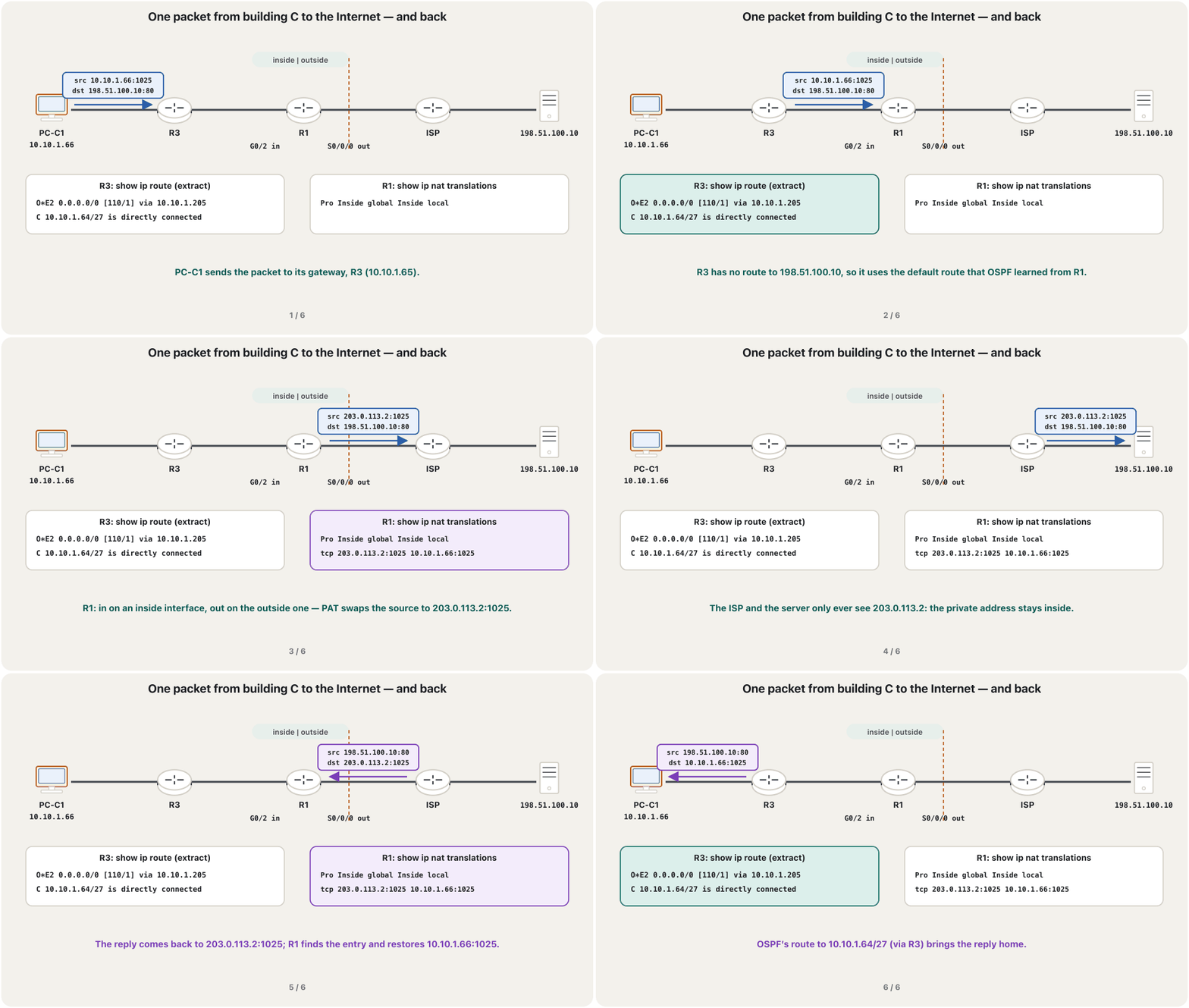
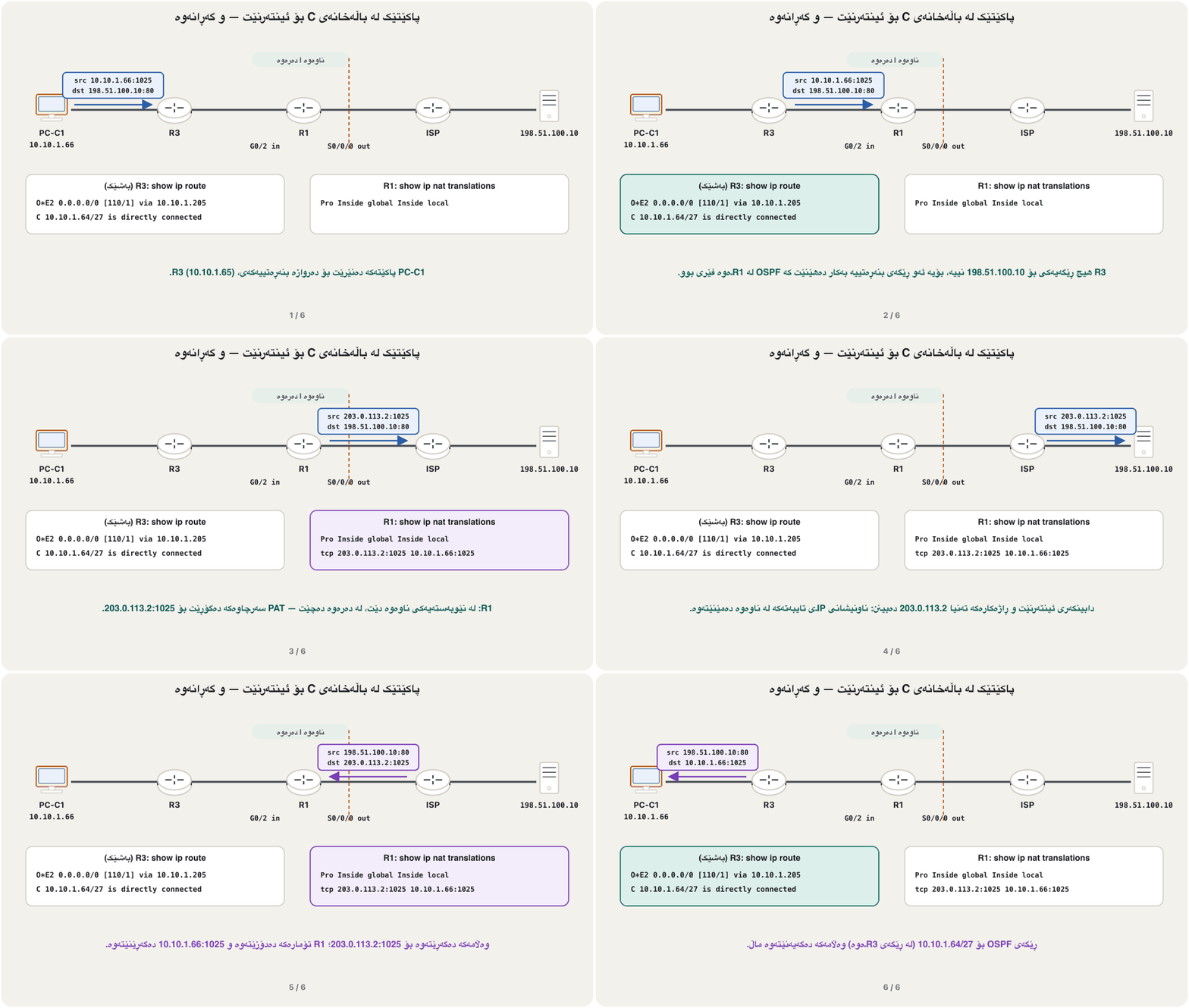
Put the pieces together. PC-C1 in building C Sales (10.10.1.66) opens the web page of 198.51.100.10. OSPF brings the packet from R3 to R1, PAT gives it R1's public address, and on the way back R1's translation table and OSPF lead the reply home.
پارچەکان پێکەوە دابنێ. PC-C1 لە فرۆشتنی باڵەخانەی C (10.10.1.66) پەڕەی وێبی 198.51.100.10 دەکاتەوە. OSPF لە R3ـەوە دەهێنێت بۆ R1، PAT R1ـی پێ دەدات و لە گەڕانەوەدا خشتەی وەرگێڕانی R1 و OSPF وەڵامەکە دەگەیەننەوە ماڵ.
Step 9: verify, then documentهەنگاوی 9: بپشکنە، پاشان بەڵگەنامە بنووسە
Check in the order a packet travels: the PC's address, OSPF neighbours, the routes, the NAT table, the ACL counters, and finally a traceroute to the Internet (troubleshooting with IOS). On each link the DR and BDR depend on which router started first; FULL is what matters. Packet Tracer writes the ACL counters as match(es).
بەو ڕیزبەندییە بپشکنە کە پێیدا دەڕوات: ناونیشانی PCـەکە، دراوسێکانی OSPF، ڕێگەکان، خشتەی NAT، ژمارەی هاوتاکانی ACL و لە کۆتاییدا بۆ (چارەسەرکردنی کێشە بە IOS). لەسەر هەر بەستەرێک DR و BDR بەندن بەوەی کام یەکەم دەستی پێ کرد؛ FULL ئەوەیە کە گرنگە. Packet Tracer ژمارەی هاوتاکان وەک match(es) دەنووسێت.
R1#show ip ospf neighbor

Neighbor ID     Pri   State           Dead Time   Address         Interface
2.2.2.2           1   FULL/DR         00:00:35    10.10.1.202     GigabitEthernet0/1
3.3.3.3 1 FULL/DR 00:00:31 10.10.1.206 GigabitEthernet0/2R3#show ip route ospf
...
Gateway of last resort is 10.10.1.205 to network 0.0.0.0
O*E2 0.0.0.0/0 [110/1] via 10.10.1.205, 00:12:40, GigabitEthernet0/1
10.0.0.0/8 is variably subnetted, 22 subnets, 7 masks
O 10.10.0.0/25 [110/2] via 10.10.1.205, 00:12:40, GigabitEthernet0/1
O 10.10.0.128/26 [110/2] via 10.10.1.205, 00:12:40, GigabitEthernet0/1
O 10.10.0.192/26 [110/2] via 10.10.1.209, 00:12:38, GigabitEthernet0/2
O 10.10.1.0/27 [110/2] via 10.10.1.205, 00:12:40, GigabitEthernet0/1
O 10.10.1.32/27 [110/2] via 10.10.1.209, 00:12:38, GigabitEthernet0/2
O 10.10.1.96/28 [110/2] via 10.10.1.205, 00:12:40, GigabitEthernet0/1
O 10.10.1.112/28 [110/2] via 10.10.1.209, 00:12:38, GigabitEthernet0/2
O 10.10.1.144/28 [110/2] via 10.10.1.205, 00:12:40, GigabitEthernet0/1
O 10.10.1.160/28 [110/2] via 10.10.1.209, 00:12:38, GigabitEthernet0/2
O 10.10.1.200/30 [110/2] via 10.10.1.209, 00:12:38, GigabitEthernet0/2
[110/2] via 10.10.1.205, 00:12:40, GigabitEthernet0/1Explain the codeڕوونکردنەوەی کۆدەکە
- Lineدێڕی 3-5
The default route comes from R1 (O*E2) — R3 needs no static route.
لە R1ـەوە دێت (O*E2) — R3 پێویستی بە نییە.
- Lineدێڕی 16-17
Two equal-cost paths to the R1–R2 link: OSPF uses both.
دوو ڕێگە بە یەکسان بۆ بەستەری R1–R2: OSPF هەردووکیان بەکار دەهێنێت.
R1#show ip nat translations
Pro Inside global        Inside local       Outside local      Outside global
icmp 203.0.113.2:1       10.10.0.11:1       198.51.100.10:1    198.51.100.10:1
tcp 203.0.113.2:1025 10.10.1.66:1025 198.51.100.10:80 198.51.100.10:80R1#show access-lists
Standard IP access list 1
10 permit 10.10.0.0, wildcard bits 0.0.1.255 (12 matches)
Extended IP access list PROTECT-SERVERS
10 permit tcp 10.10.0.0 0.0.1.255 host 10.10.1.98 eq www (24 matches)
20 permit tcp 10.10.0.0 0.0.1.255 host 10.10.1.98 eq 443
30 permit udp 10.10.0.0 0.0.1.255 host 10.10.1.98 eq domain (8 matches)
40 permit ip 10.10.1.0 0.0.0.31 10.10.1.96 0.0.0.15 (5 matches)
50 permit ip 10.10.1.112 0.0.0.15 10.10.1.96 0.0.0.15
60 permit ip 10.10.1.192 0.0.0.7 10.10.1.96 0.0.0.15
70 permit icmp 10.10.0.0 0.0.1.255 10.10.1.96 0.0.0.15 echo (4 matches)
80 deny ip any any (3 matches)C:\>tracert 198.51.100.10
Tracing route to 198.51.100.10 over a maximum of 30 hops
1 <1 ms <1 ms <1 ms 10.10.1.65
2 <1 ms <1 ms <1 ms 10.10.1.205
3 1 ms 1 ms 1 ms 203.0.113.1
4 2 ms 1 ms 1 ms 198.51.100.10
Trace complete.Document as you go: the addressing table (the VLSM output), the topology with addresses, every final configuration (saved, and copied off the devices — backups) and the test plan with these outputs.
لە کاتی کارکردندا بنووسە: خشتەی ناونیشان (دەرئەنجامی VLSM)، تۆپۆلۆجی بە ناونیشانەکانەوە، هەموو کۆتایی (پاشەکەوتکراو و کۆپیکراو لە ئامێرەکانەوە — باکئەپەکان) و پلانی تاقیکردنەوە بەم دەرئەنجامانەوە.
A second protocol: EIGRPدووەم پرۆتۆکۆڵ: EIGRP
The task asks for more than one dynamic routing protocol. Build the network a second time with EIGRP instead of OSPF (configuring EIGRP): AS 100 on all three routers, the same network wildcard and the same passive interfaces. EIGRP does not take over OSPF's default route, so give R2 and R3 a static default towards R1 (ip route 0.0.0.0 0.0.0.0 10.10.1.201 on R2, … 10.10.1.205 on R3). If both protocols run at once, every route is taken from EIGRP, whose administrative distance (90) is lower than OSPF's (110) (AD).
ئەرکەکە داوای زیاتر لە یەک بزۆک دەکات. جارێکی تر بە EIGRP لە جیاتی OSPF دروست بکە (ڕێکخستنی EIGRP): AS 100 لەسەر هەر سێ ، هەمان network و هەمان . EIGRP OSPF وەرناگرێت، بۆیە جێگیر بەرەو R1 بدە R2 و R3 (ip route 0.0.0.0 0.0.0.0 10.10.1.201 لەسەر R2، … 10.10.1.205 لەسەر R3). ئەگەر هەردوو پێکەوە کار بکەن، هەموو ڕێگەیەک لە EIGRPـەوە وەردەگیرێت، کە (90) لە هی OSPF (110) کەمترە (AD).
R1(config)#no router ospf 1
R1(config)#router eigrp 100
R1(config-router)#eigrp router-id 1.1.1.1
R1(config-router)#network 10.10.0.0 0.0.1.255
R1(config-router)#passive-interface default
R1(config-router)#no passive-interface g0/1
R1(config-router)#no passive-interface g0/2
R1(config-router)#end
R1#copy running-config startup-configThe final configurations: R1ڕێکخستنە کۆتاییەکان: R1
Deliverable 3. Each block is complete, in typing order, and can be pasted into the device's CLI. R1 carries the most: building A's gateways, two router links, the ISP link, OSPF with the default route, three DHCP pools, PAT and the server ACL.
بەرهەمی 3. هەر بەشێک تەواوە و بە ڕیزبەندیی نووسینە؛ دەتوانرێت بخرێتە ناو CLIـی ئامێرەکە. R1 زۆرترین هەڵدەگرێت: ناونیشانەکانی باڵەخانەی A، دوو بەستەری ، بەستەری ، OSPF بە ، سێ DHCP، PAT و ACLـی .
Router>enable
Router#configure terminal
Enter configuration commands, one per line.  End with CNTL/Z.
Router(config)#hostname R1
R1(config)#enable secret En@ble2026
R1(config)#username admin secret N3tLab!26
R1(config)#service password-encryption
R1(config)#banner motd # Authorised access only. Activity is logged. #
R1(config)#line console 0
R1(config-line)#login local
R1(config-line)#exec-timeout 5 0
R1(config-line)#exit
R1(config)#ip domain-name example.com
R1(config)#crypto key generate rsa
The name for the keys will be: R1.example.com
Choose the size of the key modulus in the range of 360 to 4096 for your
  General Purpose Keys. Choosing a key modulus greater than 512 may take
  a few minutes.

How many bits in the modulus [512]: 2048
% Generating 2048 bit RSA keys, keys will be non-exportable...[OK]

%SSH-5-ENABLED: SSH 1.99 has been enabled
R1(config)#ip ssh version 2
R1(config)#line vty 0 4
R1(config-line)#login local
R1(config-line)#transport input ssh
R1(config-line)#exec-timeout 5 0
R1(config-line)#exit
R1(config)#interface g0/0
R1(config-if)#description Trunk to SW-A
R1(config-if)#no shutdown
R1(config-if)#interface g0/0.10
R1(config-subif)#description A Marketing
R1(config-subif)#encapsulation dot1Q 10
R1(config-subif)#ip address 10.10.0.129 255.255.255.192
R1(config-subif)#interface g0/0.20
R1(config-subif)#description A Sales
R1(config-subif)#encapsulation dot1Q 20
R1(config-subif)#ip address 10.10.0.1 255.255.255.128
R1(config-subif)#interface g0/0.30
R1(config-subif)#description A IT
R1(config-subif)#encapsulation dot1Q 30
R1(config-subif)#ip address 10.10.1.1 255.255.255.224
R1(config-subif)#interface g0/0.50
R1(config-subif)#description A Servers
R1(config-subif)#encapsulation dot1Q 50
R1(config-subif)#ip address 10.10.1.97 255.255.255.240
R1(config-subif)#interface g0/0.99
R1(config-subif)#description A Management
R1(config-subif)#encapsulation dot1Q 99
R1(config-subif)#ip address 10.10.1.145 255.255.255.240
R1(config-subif)#interface g0/0.999
R1(config-subif)#encapsulation dot1Q 999 native
R1(config-subif)#interface g0/1
R1(config-if)#description Link to R2
R1(config-if)#ip address 10.10.1.201 255.255.255.252
R1(config-if)#no shutdown
R1(config-if)#interface g0/2
R1(config-if)#description Link to R3
R1(config-if)#ip address 10.10.1.205 255.255.255.252
R1(config-if)#no shutdown
R1(config-if)#interface s0/0/0
R1(config-if)#description Link to ISP
R1(config-if)#ip address 203.0.113.2 255.255.255.252
R1(config-if)#no shutdown
R1(config-if)#exit
R1(config)#ip route 0.0.0.0 0.0.0.0 203.0.113.1
R1(config)#router ospf 1
R1(config-router)#router-id 1.1.1.1
R1(config-router)#network 10.10.0.0 0.0.1.255 area 0
R1(config-router)#passive-interface default
R1(config-router)#no passive-interface g0/1
R1(config-router)#no passive-interface g0/2
R1(config-router)#default-information originate
R1(config-router)#exit
R1(config)#ip dhcp excluded-address 10.10.0.129
R1(config)#ip dhcp excluded-address 10.10.0.1
R1(config)#ip dhcp excluded-address 10.10.1.1
R1(config)#ip dhcp pool A-MARKETING
R1(dhcp-config)#network 10.10.0.128 255.255.255.192
R1(dhcp-config)#default-router 10.10.0.129
R1(dhcp-config)#dns-server 10.10.1.98
R1(dhcp-config)#exit
R1(config)#ip dhcp pool A-SALES
R1(dhcp-config)#network 10.10.0.0 255.255.255.128
R1(dhcp-config)#default-router 10.10.0.1
R1(dhcp-config)#dns-server 10.10.1.98
R1(dhcp-config)#exit
R1(config)#ip dhcp pool A-IT
R1(dhcp-config)#network 10.10.1.0 255.255.255.224
R1(dhcp-config)#default-router 10.10.1.1
R1(dhcp-config)#dns-server 10.10.1.98
R1(dhcp-config)#exit
R1(config)#interface g0/0.10
R1(config-subif)#ip nat inside
R1(config-subif)#interface g0/0.20
R1(config-subif)#ip nat inside
R1(config-subif)#interface g0/0.30
R1(config-subif)#ip nat inside
R1(config-subif)#interface g0/0.50
R1(config-subif)#ip nat inside
R1(config-subif)#interface g0/0.99
R1(config-subif)#ip nat inside
R1(config-subif)#interface g0/1
R1(config-if)#ip nat inside
R1(config-if)#interface g0/2
R1(config-if)#ip nat inside
R1(config-if)#interface s0/0/0
R1(config-if)#ip nat outside
R1(config-if)#exit
R1(config)#access-list 1 remark company networks for PAT
R1(config)#access-list 1 permit 10.10.0.0 0.0.1.255
R1(config)#ip nat inside source list 1 interface s0/0/0 overload
R1(config)#ip access-list extended PROTECT-SERVERS
R1(config-ext-nacl)#permit tcp 10.10.0.0 0.0.1.255 host 10.10.1.98 eq www
R1(config-ext-nacl)#permit tcp 10.10.0.0 0.0.1.255 host 10.10.1.98 eq 443
R1(config-ext-nacl)#permit udp 10.10.0.0 0.0.1.255 host 10.10.1.98 eq domain
R1(config-ext-nacl)#permit ip 10.10.1.0 0.0.0.31 10.10.1.96 0.0.0.15
R1(config-ext-nacl)#permit ip 10.10.1.112 0.0.0.15 10.10.1.96 0.0.0.15
R1(config-ext-nacl)#permit ip 10.10.1.192 0.0.0.7 10.10.1.96 0.0.0.15
R1(config-ext-nacl)#permit icmp 10.10.0.0 0.0.1.255 10.10.1.96 0.0.0.15 echo
R1(config-ext-nacl)#deny ip any any
R1(config-ext-nacl)#exit
R1(config)#interface g0/0.50
R1(config-subif)#ip access-group PROTECT-SERVERS out
R1(config-subif)#exit
R1(config)#end
R1#copy running-config startup-config
Destination filename [startup-config]?
Building configuration...
[OK]The final configurations: R1ڕێکخستنە کۆتاییەکان: R1
The final configurations of R2 and R3ڕێکخستنە کۆتاییەکانی R2 و R3
Router>enable
Router#configure terminal
Enter configuration commands, one per line.  End with CNTL/Z.
Router(config)#hostname R2
R2(config)#enable secret En@ble2026
R2(config)#username admin secret N3tLab!26
R2(config)#service password-encryption
R2(config)#banner motd # Authorised access only. Activity is logged. #
R2(config)#line console 0
R2(config-line)#login local
R2(config-line)#exec-timeout 5 0
R2(config-line)#exit
R2(config)#ip domain-name example.com
R2(config)#crypto key generate rsa
The name for the keys will be: R2.example.com
Choose the size of the key modulus in the range of 360 to 4096 for your
  General Purpose Keys. Choosing a key modulus greater than 512 may take
  a few minutes.

How many bits in the modulus [512]: 2048
% Generating 2048 bit RSA keys, keys will be non-exportable...[OK]

%SSH-5-ENABLED: SSH 1.99 has been enabled
R2(config)#ip ssh version 2
R2(config)#line vty 0 4
R2(config-line)#login local
R2(config-line)#transport input ssh
R2(config-line)#exec-timeout 5 0
R2(config-line)#exit
R2(config)#interface g0/0
R2(config-if)#description Trunk to SW-B
R2(config-if)#no shutdown
R2(config-if)#interface g0/0.10
R2(config-subif)#description B Marketing
R2(config-subif)#encapsulation dot1Q 10
R2(config-subif)#ip address 10.10.1.33 255.255.255.224
R2(config-subif)#interface g0/0.20
R2(config-subif)#description B Sales
R2(config-subif)#encapsulation dot1Q 20
R2(config-subif)#ip address 10.10.0.193 255.255.255.192
R2(config-subif)#interface g0/0.30
R2(config-subif)#description B IT
R2(config-subif)#encapsulation dot1Q 30
R2(config-subif)#ip address 10.10.1.113 255.255.255.240
R2(config-subif)#interface g0/0.99
R2(config-subif)#description B Management
R2(config-subif)#encapsulation dot1Q 99
R2(config-subif)#ip address 10.10.1.161 255.255.255.240
R2(config-subif)#interface g0/0.999
R2(config-subif)#encapsulation dot1Q 999 native
R2(config-subif)#interface g0/1
R2(config-if)#description Link to R1
R2(config-if)#ip address 10.10.1.202 255.255.255.252
R2(config-if)#no shutdown
R2(config-if)#interface g0/2
R2(config-if)#description Link to R3
R2(config-if)#ip address 10.10.1.209 255.255.255.252
R2(config-if)#no shutdown
R2(config-if)#exit
R2(config)#router ospf 1
R2(config-router)#router-id 2.2.2.2
R2(config-router)#network 10.10.0.0 0.0.1.255 area 0
R2(config-router)#passive-interface default
R2(config-router)#no passive-interface g0/1
R2(config-router)#no passive-interface g0/2
R2(config-router)#exit
R2(config)#ip dhcp excluded-address 10.10.1.33
R2(config)#ip dhcp excluded-address 10.10.0.193
R2(config)#ip dhcp excluded-address 10.10.1.113
R2(config)#ip dhcp pool B-MARKETING
R2(dhcp-config)#network 10.10.1.32 255.255.255.224
R2(dhcp-config)#default-router 10.10.1.33
R2(dhcp-config)#dns-server 10.10.1.98
R2(dhcp-config)#exit
R2(config)#ip dhcp pool B-SALES
R2(dhcp-config)#network 10.10.0.192 255.255.255.192
R2(dhcp-config)#default-router 10.10.0.193
R2(dhcp-config)#dns-server 10.10.1.98
R2(dhcp-config)#exit
R2(config)#ip dhcp pool B-IT
R2(dhcp-config)#network 10.10.1.112 255.255.255.240
R2(dhcp-config)#default-router 10.10.1.113
R2(dhcp-config)#dns-server 10.10.1.98
R2(dhcp-config)#exit
R2(config)#end
R2#copy running-config startup-config
Destination filename [startup-config]?
Building configuration...
[OK]Router>enable
Router#configure terminal
Enter configuration commands, one per line. End with CNTL/Z.
Router(config)#hostname R3
R3(config)#enable secret En@ble2026
R3(config)#username admin secret N3tLab!26
R3(config)#service password-encryption
R3(config)#banner motd # Authorised access only. Activity is logged. #
R3(config)#line console 0
R3(config-line)#login local
R3(config-line)#exec-timeout 5 0
R3(config-line)#exit
R3(config)#ip domain-name example.com
R3(config)#crypto key generate rsa
The name for the keys will be: R3.example.com
Choose the size of the key modulus in the range of 360 to 4096 for your
General Purpose Keys. Choosing a key modulus greater than 512 may take
a few minutes.
How many bits in the modulus [512]: 2048
% Generating 2048 bit RSA keys, keys will be non-exportable...[OK]
%SSH-5-ENABLED: SSH 1.99 has been enabled
R3(config)#ip ssh version 2
R3(config)#line vty 0 4
R3(config-line)#login local
R3(config-line)#transport input ssh
R3(config-line)#exec-timeout 5 0
R3(config-line)#exit
R3(config)#interface g0/0
R3(config-if)#description Trunk to SW-C
R3(config-if)#no shutdown
R3(config-if)#interface g0/0.10
R3(config-subif)#description C Marketing
R3(config-subif)#encapsulation dot1Q 10
R3(config-subif)#ip address 10.10.1.129 255.255.255.240
R3(config-subif)#interface g0/0.20
R3(config-subif)#description C Sales
R3(config-subif)#encapsulation dot1Q 20
R3(config-subif)#ip address 10.10.1.65 255.255.255.224
R3(config-subif)#interface g0/0.30
R3(config-subif)#description C IT
R3(config-subif)#encapsulation dot1Q 30
R3(config-subif)#ip address 10.10.1.193 255.255.255.248
R3(config-subif)#interface g0/0.99
R3(config-subif)#description C Management
R3(config-subif)#encapsulation dot1Q 99
R3(config-subif)#ip address 10.10.1.177 255.255.255.240
R3(config-subif)#interface g0/0.999
R3(config-subif)#encapsulation dot1Q 999 native
R3(config-subif)#interface g0/1
R3(config-if)#description Link to R1
R3(config-if)#ip address 10.10.1.206 255.255.255.252
R3(config-if)#no shutdown
R3(config-if)#interface g0/2
R3(config-if)#description Link to R2
R3(config-if)#ip address 10.10.1.210 255.255.255.252
R3(config-if)#no shutdown
R3(config-if)#exit
R3(config)#router ospf 1
R3(config-router)#router-id 3.3.3.3
R3(config-router)#network 10.10.0.0 0.0.1.255 area 0
R3(config-router)#passive-interface default
R3(config-router)#no passive-interface g0/1
R3(config-router)#no passive-interface g0/2
R3(config-router)#exit
R3(config)#ip dhcp excluded-address 10.10.1.129
R3(config)#ip dhcp excluded-address 10.10.1.65
R3(config)#ip dhcp excluded-address 10.10.1.193
R3(config)#ip dhcp pool C-MARKETING
R3(dhcp-config)#network 10.10.1.128 255.255.255.240
R3(dhcp-config)#default-router 10.10.1.129
R3(dhcp-config)#dns-server 10.10.1.98
R3(dhcp-config)#exit
R3(config)#ip dhcp pool C-SALES
R3(dhcp-config)#network 10.10.1.64 255.255.255.224
R3(dhcp-config)#default-router 10.10.1.65
R3(dhcp-config)#dns-server 10.10.1.98
R3(dhcp-config)#exit
R3(config)#ip dhcp pool C-IT
R3(dhcp-config)#network 10.10.1.192 255.255.255.248
R3(dhcp-config)#default-router 10.10.1.193
R3(dhcp-config)#dns-server 10.10.1.98
R3(dhcp-config)#exit
R3(config)#end
R3#copy running-config startup-config
Destination filename [startup-config]?
Building configuration...
[OK]The final configurations: R1ڕێکخستنە کۆتاییەکان: R1
The final configurations of the ISP and the switchesڕێکخستنە کۆتاییەکانی دابینکەری ئینتەرنێت و سویچەکان
The ISP router plays the provider: it only knows its two connected networks, so it can reach the company only through PAT's public address. The three switches follow one pattern; SW-A also carries VLAN 50 for the servers. Set the end devices by hand: the web server 198.51.100.10/24 with gateway 198.51.100.1 and HTTP on; SRV1 10.10.1.98 and SRV2 10.10.1.99 with mask 255.255.255.240, gateway 10.10.1.97 and DNS 10.10.1.98, SRV1 with HTTP and DNS on; every PC on DHCP.
ڕۆڵی دابینکەر دەگێڕێت: تەنیا دوو بەستراوەکەی خۆی دەزانێت، بۆیە تەنیا لە ڕێگەی PATـەوە دەگاتە کۆمپانیاکە. سێ یەک شێوە پەیڕەو دەکەن؛ SW-A VLAN 50ـیش بۆ هەڵدەگرێت. بە دەست ڕێک بخە: 198.51.100.10/24 بە 198.51.100.1 و HTTPـی هەڵکراو؛ SRV1 10.10.1.98 و SRV2 10.10.1.99 بە 255.255.255.240، 10.10.1.97 و DNS 10.10.1.98، SRV1 بە HTTP و DNSـی هەڵکراو؛ هەموو PCـێک بە DHCP.
Router>enable
Router#configure terminal
Enter configuration commands, one per line.  End with CNTL/Z.
Router(config)#hostname ISP
ISP(config)#interface s0/0/0
ISP(config-if)#description Customer: the company (R1)
ISP(config-if)#ip address 203.0.113.1 255.255.255.252
ISP(config-if)#clock rate 64000
ISP(config-if)#no shutdown
ISP(config-if)#interface g0/0
ISP(config-if)#description Internet server LAN
ISP(config-if)#ip address 198.51.100.1 255.255.255.0
ISP(config-if)#no shutdown
ISP(config-if)#end
ISP#copy running-config startup-config
Destination filename [startup-config]?
Building configuration...
[OK]Switch>enable
Switch#configure terminal
Enter configuration commands, one per line. End with CNTL/Z.
Switch(config)#hostname SW-A
SW-A(config)#enable secret En@ble2026
SW-A(config)#username admin secret N3tLab!26
SW-A(config)#service password-encryption
SW-A(config)#banner motd # Authorised access only. Activity is logged. #
SW-A(config)#line console 0
SW-A(config-line)#login local
SW-A(config-line)#exec-timeout 5 0
SW-A(config-line)#exit
SW-A(config)#vlan 10
SW-A(config-vlan)#name Marketing
SW-A(config-vlan)#vlan 20
SW-A(config-vlan)#name Sales
SW-A(config-vlan)#vlan 30
SW-A(config-vlan)#name IT
SW-A(config-vlan)#vlan 50
SW-A(config-vlan)#name Servers
SW-A(config-vlan)#vlan 99
SW-A(config-vlan)#name Management
SW-A(config-vlan)#vlan 998
SW-A(config-vlan)#name Unused
SW-A(config-vlan)#vlan 999
SW-A(config-vlan)#name Native
SW-A(config-vlan)#exit
SW-A(config)#interface range fastEthernet 0/1 - 8
SW-A(config-if-range)#switchport mode access
SW-A(config-if-range)#switchport access vlan 20
SW-A(config-if-range)#switchport port-security
SW-A(config-if-range)#switchport port-security mac-address sticky
SW-A(config-if-range)#spanning-tree portfast
SW-A(config-if-range)#interface range fastEthernet 0/9 - 14
SW-A(config-if-range)#switchport mode access
SW-A(config-if-range)#switchport access vlan 10
SW-A(config-if-range)#switchport port-security
SW-A(config-if-range)#switchport port-security mac-address sticky
SW-A(config-if-range)#spanning-tree portfast
SW-A(config-if-range)#interface range fastEthernet 0/15 - 18
SW-A(config-if-range)#switchport mode access
SW-A(config-if-range)#switchport access vlan 30
SW-A(config-if-range)#switchport port-security
SW-A(config-if-range)#switchport port-security mac-address sticky
SW-A(config-if-range)#spanning-tree portfast
SW-A(config-if-range)#interface range fastEthernet 0/19 - 20
SW-A(config-if-range)#switchport mode access
SW-A(config-if-range)#switchport access vlan 50
SW-A(config-if-range)#switchport port-security
SW-A(config-if-range)#switchport port-security mac-address sticky
SW-A(config-if-range)#spanning-tree portfast
SW-A(config-if-range)#interface range fastEthernet 0/21 - 24, gigabitEthernet 0/2
SW-A(config-if-range)#switchport mode access
SW-A(config-if-range)#switchport access vlan 998
SW-A(config-if-range)#shutdown
SW-A(config-if-range)#exit
SW-A(config)#interface gigabitEthernet 0/1
SW-A(config-if)#description Trunk to the building router
SW-A(config-if)#switchport mode trunk
SW-A(config-if)#switchport nonegotiate
SW-A(config-if)#switchport trunk native vlan 999
SW-A(config-if)#switchport trunk allowed vlan 10,20,30,50,99,999
SW-A(config-if)#interface vlan 99
SW-A(config-if)#ip address 10.10.1.146 255.255.255.240
SW-A(config-if)#no shutdown
SW-A(config-if)#exit
SW-A(config)#ip default-gateway 10.10.1.145
SW-A(config)#ip domain-name example.com
SW-A(config)#crypto key generate rsa
The name for the keys will be: SW-A.example.com
Choose the size of the key modulus in the range of 360 to 4096 for your
General Purpose Keys. Choosing a key modulus greater than 512 may take
a few minutes.
How many bits in the modulus [512]: 2048
% Generating 2048 bit RSA keys, keys will be non-exportable...[OK]
%SSH-5-ENABLED: SSH 1.99 has been enabled
SW-A(config)#ip ssh version 2
SW-A(config)#line vty 0 15
SW-A(config-line)#login local
SW-A(config-line)#transport input ssh
SW-A(config-line)#exec-timeout 5 0
SW-A(config-line)#exit
SW-A(config)#end
SW-A#copy running-config startup-config
Destination filename [startup-config]?
Building configuration...
[OK]Switch>enable
Switch#configure terminal
Enter configuration commands, one per line. End with CNTL/Z.
Switch(config)#hostname SW-B
SW-B(config)#enable secret En@ble2026
SW-B(config)#username admin secret N3tLab!26
SW-B(config)#service password-encryption
SW-B(config)#banner motd # Authorised access only. Activity is logged. #
SW-B(config)#line console 0
SW-B(config-line)#login local
SW-B(config-line)#exec-timeout 5 0
SW-B(config-line)#exit
SW-B(config)#vlan 10
SW-B(config-vlan)#name Marketing
SW-B(config-vlan)#vlan 20
SW-B(config-vlan)#name Sales
SW-B(config-vlan)#vlan 30
SW-B(config-vlan)#name IT
SW-B(config-vlan)#vlan 99
SW-B(config-vlan)#name Management
SW-B(config-vlan)#vlan 998
SW-B(config-vlan)#name Unused
SW-B(config-vlan)#vlan 999
SW-B(config-vlan)#name Native
SW-B(config-vlan)#exit
SW-B(config)#interface range fastEthernet 0/1 - 8
SW-B(config-if-range)#switchport mode access
SW-B(config-if-range)#switchport access vlan 20
SW-B(config-if-range)#switchport port-security
SW-B(config-if-range)#switchport port-security mac-address sticky
SW-B(config-if-range)#spanning-tree portfast
SW-B(config-if-range)#interface range fastEthernet 0/9 - 14
SW-B(config-if-range)#switchport mode access
SW-B(config-if-range)#switchport access vlan 10
SW-B(config-if-range)#switchport port-security
SW-B(config-if-range)#switchport port-security mac-address sticky
SW-B(config-if-range)#spanning-tree portfast
SW-B(config-if-range)#interface range fastEthernet 0/15 - 18
SW-B(config-if-range)#switchport mode access
SW-B(config-if-range)#switchport access vlan 30
SW-B(config-if-range)#switchport port-security
SW-B(config-if-range)#switchport port-security mac-address sticky
SW-B(config-if-range)#spanning-tree portfast
SW-B(config-if-range)#interface range fastEthernet 0/19 - 24, gigabitEthernet 0/2
SW-B(config-if-range)#switchport mode access
SW-B(config-if-range)#switchport access vlan 998
SW-B(config-if-range)#shutdown
SW-B(config-if-range)#exit
SW-B(config)#interface gigabitEthernet 0/1
SW-B(config-if)#description Trunk to the building router
SW-B(config-if)#switchport mode trunk
SW-B(config-if)#switchport nonegotiate
SW-B(config-if)#switchport trunk native vlan 999
SW-B(config-if)#switchport trunk allowed vlan 10,20,30,99,999
SW-B(config-if)#interface vlan 99
SW-B(config-if)#ip address 10.10.1.162 255.255.255.240
SW-B(config-if)#no shutdown
SW-B(config-if)#exit
SW-B(config)#ip default-gateway 10.10.1.161
SW-B(config)#ip domain-name example.com
SW-B(config)#crypto key generate rsa
The name for the keys will be: SW-B.example.com
Choose the size of the key modulus in the range of 360 to 4096 for your
General Purpose Keys. Choosing a key modulus greater than 512 may take
a few minutes.
How many bits in the modulus [512]: 2048
% Generating 2048 bit RSA keys, keys will be non-exportable...[OK]
%SSH-5-ENABLED: SSH 1.99 has been enabled
SW-B(config)#ip ssh version 2
SW-B(config)#line vty 0 15
SW-B(config-line)#login local
SW-B(config-line)#transport input ssh
SW-B(config-line)#exec-timeout 5 0
SW-B(config-line)#exit
SW-B(config)#end
SW-B#copy running-config startup-config
Destination filename [startup-config]?
Building configuration...
[OK]Switch>enable
Switch#configure terminal
Enter configuration commands, one per line. End with CNTL/Z.
Switch(config)#hostname SW-C
SW-C(config)#enable secret En@ble2026
SW-C(config)#username admin secret N3tLab!26
SW-C(config)#service password-encryption
SW-C(config)#banner motd # Authorised access only. Activity is logged. #
SW-C(config)#line console 0
SW-C(config-line)#login local
SW-C(config-line)#exec-timeout 5 0
SW-C(config-line)#exit
SW-C(config)#vlan 10
SW-C(config-vlan)#name Marketing
SW-C(config-vlan)#vlan 20
SW-C(config-vlan)#name Sales
SW-C(config-vlan)#vlan 30
SW-C(config-vlan)#name IT
SW-C(config-vlan)#vlan 99
SW-C(config-vlan)#name Management
SW-C(config-vlan)#vlan 998
SW-C(config-vlan)#name Unused
SW-C(config-vlan)#vlan 999
SW-C(config-vlan)#name Native
SW-C(config-vlan)#exit
SW-C(config)#interface range fastEthernet 0/1 - 8
SW-C(config-if-range)#switchport mode access
SW-C(config-if-range)#switchport access vlan 20
SW-C(config-if-range)#switchport port-security
SW-C(config-if-range)#switchport port-security mac-address sticky
SW-C(config-if-range)#spanning-tree portfast
SW-C(config-if-range)#interface range fastEthernet 0/9 - 14
SW-C(config-if-range)#switchport mode access
SW-C(config-if-range)#switchport access vlan 10
SW-C(config-if-range)#switchport port-security
SW-C(config-if-range)#switchport port-security mac-address sticky
SW-C(config-if-range)#spanning-tree portfast
SW-C(config-if-range)#interface range fastEthernet 0/15 - 18
SW-C(config-if-range)#switchport mode access
SW-C(config-if-range)#switchport access vlan 30
SW-C(config-if-range)#switchport port-security
SW-C(config-if-range)#switchport port-security mac-address sticky
SW-C(config-if-range)#spanning-tree portfast
SW-C(config-if-range)#interface range fastEthernet 0/19 - 24, gigabitEthernet 0/2
SW-C(config-if-range)#switchport mode access
SW-C(config-if-range)#switchport access vlan 998
SW-C(config-if-range)#shutdown
SW-C(config-if-range)#exit
SW-C(config)#interface gigabitEthernet 0/1
SW-C(config-if)#description Trunk to the building router
SW-C(config-if)#switchport mode trunk
SW-C(config-if)#switchport nonegotiate
SW-C(config-if)#switchport trunk native vlan 999
SW-C(config-if)#switchport trunk allowed vlan 10,20,30,99,999
SW-C(config-if)#interface vlan 99
SW-C(config-if)#ip address 10.10.1.178 255.255.255.240
SW-C(config-if)#no shutdown
SW-C(config-if)#exit
SW-C(config)#ip default-gateway 10.10.1.177
SW-C(config)#ip domain-name example.com
SW-C(config)#crypto key generate rsa
The name for the keys will be: SW-C.example.com
Choose the size of the key modulus in the range of 360 to 4096 for your
General Purpose Keys. Choosing a key modulus greater than 512 may take
a few minutes.
How many bits in the modulus [512]: 2048
% Generating 2048 bit RSA keys, keys will be non-exportable...[OK]
%SSH-5-ENABLED: SSH 1.99 has been enabled
SW-C(config)#ip ssh version 2
SW-C(config)#line vty 0 15
SW-C(config-line)#login local
SW-C(config-line)#transport input ssh
SW-C(config-line)#exec-timeout 5 0
SW-C(config-line)#exit
SW-C(config)#end
SW-C#copy running-config startup-config
Destination filename [startup-config]?
Building configuration...
[OK]Extension: dual stack with IPv6فراوانکردن: ستاکی دووانە بە IPv6
For extra credit, run IPv6 beside IPv4 (dual stack — dual stack). Take the documentation prefix 2001:db8:acad::/48 and give every user and server VLAN a /64 whose fourth group names the building and the VLAN (A-Sales = 2001:db8:acad:120::/64), and each router link its own /64. Turn on ipv6 unicast-routing, add the addresses, and route with OSPFv3. No NAT is needed: every PC gets a global address of its own (no NAT).
بۆ نمرەی زیادە، IPv6 لە تەنیشت IPv4 کار پێ بکە ( — ستاکی دووانە). پێشگری بەڵگەنامەی 2001:db8:acad::/48 وەربگرە و بە هەر بەکارهێنەر و /64ـێک بدە کە گرووپی چوارەمی باڵەخانە و ناو دەبات (A-Sales = 2001:db8:acad:120::/64) و بە هەر بەستەرێکی /64ـی خۆی. ipv6 unicast-routing هەڵبکە، ناونیشانەکان زیاد بکە و بە OSPFv3 بکە. پێویست بە NAT ناکات: هەموو PCـێک ناونیشانێکی گشتیی خۆی وەردەگرێت (بێ NAT).
/64ـێک، بە ناوی باڵەخانە و .CêITR1(config)#ipv6 unicast-routing
R1(config)#interface g0/0.20
R1(config-subif)#ipv6 address 2001:db8:acad:120::1/64
R1(config-subif)#interface g0/1
R1(config-if)#ipv6 address 2001:db8:acad:1001::1/64
R1(config-if)#endCommon mistakesهەڵە باوەکان
Exercisesڕاهێنانەکان
Redo the warm-up lab with VLSM: three LANs of 25 hosts each and three router links, from 192.168.1.0/24. List the subnets, biggest first.
تاقیکردنەوەی گەرمکردنەوە بە VLSM دووپاتە بکەرەوە: سێ ، هەر یەکەیان 25 میوانگر و سێ بەستەری ، لە 192.168.1.0/24. بنووسە، سەرەتا گەورەترین.
Show answerوەڵامەکە پیشان بدە
| Network | Blockبلۆک | Usableبەکارهاتوو |
|---|---|---|
| LAN 1 | 192.168.1.0/27 | .1 – .30 |
| LAN 2 | 192.168.1.32/27 | .33 – .62 |
| LAN 3 | 192.168.1.64/27 | .65 – .94 |
| Link 1بەستەری 1 | 192.168.1.96/30 | .97 – .98 |
| Link 2بەستەری 2 | 192.168.1.100/30 | .101 – .102 |
| Link 3بەستەری 3 | 192.168.1.104/30 | .105 – .106 |
25 + 1 + 2 = 28 → /27 for each LAN; /30 for each link. Everything after 192.168.1.108 — more than half the block — stays free.
25 + 1 + 2 = 28 ← /27 بۆ هەر ؛ /30 بۆ هەر بەستەرێک. هەموو ئەوەی دوای 192.168.1.108ـە — زیاتر لە نیوەی بلۆکەکە — ئازاد دەمێنێتەوە.
C-IT grows from 5 to 12 hosts. Does it still fit 10.10.1.192/29? If not, which spare block of the plan can it move to, and what changes on R3?
C-IT لە 5 میوانگرەوە دەبێتە 12. هێشتا لە 10.10.1.192/29 جێی دەبێتەوە؟ ئەگەر نا، دەتوانێت بچێتە کام بلۆکی یەدەگی پلانەکە و چی لەسەر R3 دەگۆڕێت؟
Show answerوەڵامەکە پیشان بدە
No: 12 + 1 + 2 = 15 addresses need a /28. The spare range starts at 10.10.1.212, but a /28 must start at a multiple of 16: use 10.10.1.224/28 (gateway 10.10.1.225). On R3 change G0/0.30's address and mask, the C-IT pool's network and default-router, and the excluded address; OSPF advertises the new subnet by itself, because it is still inside 10.10.0.0/23. Update the ACL line for the IT subnets on R1 (10.10.1.224 0.0.0.15).
نەخێر: 12 + 1 + 2 = 15 ناونیشان /28ـی پێویستە. ناونیشانە یەدەگەکان لە 10.10.1.212ـەوە دەست پێ دەکەن، بەڵام /28 دەبێت لە چەندجارەیەکی 16 دەست پێ بکات: 10.10.1.224/28 بەکار بهێنە ( 10.10.1.225). لەسەر R3 ناونیشان و G0/0.30، network و default-routerـی C-IT و ناونیشانی دەرکراو بگۆڕە؛ OSPF خۆی نوێیەکە ڕادەگەیەنێت، چونکە هێشتا لە ناو 10.10.0.0/23دایە. دێڕی ACLـی IT لەسەر R1 نوێ بکەرەوە (10.10.1.224 0.0.0.15).
In tcp 203.0.113.2:1025 10.10.1.66:1025 198.51.100.10:80 198.51.100.10:80, name the inside local, inside global and outside addresses, and the building of the PC.
لە tcp 203.0.113.2:1025 10.10.1.66:1025 198.51.100.10:80 198.51.100.10:80ـدا، ، و ناونیشانەکانی دەرەوە ناو ببە و باڵەخانەی PCـەکە.
Show answerوەڵامەکە پیشان بدە
Inside global 203.0.113.2:1025 (R1's public address and port), inside local 10.10.1.66:1025 (the PC), outside local and global 198.51.100.10:80 (the web server). 10.10.1.66 lies in 10.10.1.64/27, C-Sales: building C.
203.0.113.2:1025 ( و R1)، 10.10.1.66:1025، واتە PCـەکە، ناونیشانی ناوخۆیی و گشتیی دەرەوە 198.51.100.10:80 (). 10.10.1.66 لە 10.10.1.64/27ـدایە، C-Sales: باڵەخانەی C.
Predict before you test: (a) a Sales PC in building B opens http://10.10.1.98; (b) the same PC opens a file share on SRV2 (TCP 445); (c) a PC in B-IT does the same; (d) a Marketing PC pings SRV2.
پێش تاقیکردنەوە پێشبینی بکە: (a) PCـێکی فرۆشتن لە باڵەخانەی B ـ http://10.10.1.98 دەکاتەوە؛ (b) هەمان PC فایلێکی هاوبەش لەسەر SRV2 دەکاتەوە (TCP 445)؛ (c) PCـێک لە B-IT هەمان شت دەکات؛ (d) PCـێکی بازاڕگەری بۆ SRV2 دەکات.
Show answerوەڵامەکە پیشان بدە
(a) allowed by line 10; (b) blocked by line 80 — its counter rises; (c) allowed by line 50 (10.10.1.112/28); (d) allowed by line 70 (echo to the server subnet).
(a) دێڕی 10 ڕێگە دەدات؛ (b) دێڕی 80 دەیگرێت — ژمێرەرەکەی بەرز دەبێتەوە؛ (c) دێڕی 50 ڕێگە دەدات (10.10.1.112/28)؛ (d) دێڕی 70 ڕێگە دەدات (echo بۆ ).
The whole course in one checklistهەموو کۆرسەکە لە یەک لیستی پشکنیندا
Check yourself: every chapter of this course, where the two projects used it, and a way to stretch the company network to practise the rest.
خۆت بپشکنە: هەموو بەشێکی ئەم کۆرسە، دوو پڕۆژەکە لە کوێ بەکاریان هێنا و ڕێگەیەک بۆ فراوانکردنی کۆمپانیاکە تا ئەوانی تریش ڕاهێنان بکەیت.
| Chapterبەش | In the projects, and a stretchلە پڕۆژەکاندا و فراوانکردنێک | Lessonsوانەکان |
|---|---|---|
| Cisco IOS basicsبنەماکانی Cisco IOS | Both: host names, secrets, local users, a banner, SSH only, and copy running-config startup-config on every deviceهەردووکیان: ، نهێنی، ناوخۆیی، بانەر، تەنیا SSH و copy running-config startup-config لەسەر هەموو ئامێرێک | CLI, files, security, SSHCLI، فایلەکان، ئاسایش، SSH |
| Switching and VLANs و VLANـەکان | Campus: VLANs, trunks with native VLAN 999, router-on-a-stick, port security; exam tasks: a layer 3 switch. Stretch: two trunks as one EtherChannel, a guest Wi-Fi VLANکەمپەس: VLAN، بە 999، ، ؛ ئەرکەکانی تاقیکردنەوە: . فراوانکردن: دوو وەک یەک EtherChannel، VLANـێکی Wi-Fiـی میوان | VLANs, trunks, router-on-a-stick, layer 3, EtherChannel, ports, Wi-FiVLAN، ترەنک، ڕێدۆزی تاکقۆڵ، چینی 3، EtherChannel، ئاسایشی دەرچە، Wi-Fi |
| Routing fundamentals and static routesبنەماکانی و | Company: R1's static default route and AD when OSPF meets EIGRP. Stretch: a floating static route over a second ISP linkکۆمپانیا: جێگیری R1 و کاتێک OSPF و EIGRP بەیەک دەگەن. فراوانکردن: بە بەستەرێکی دووەمی | routing table, static, default and floatingخشتەی ڕێدۆزی، ڕێگە جێگیرەکان، ڕێگەی بنەڕەتی و یەدەگ |
The whole course in one checklistهەموو کۆرسەکە لە یەک لیستی پشکنیندا
The checklist, continued: routing protocols, services and operationsلیستی پشکنین، بەردەوامی: پرۆتۆکۆڵەکانی ڕێدۆزی، خزمەتگوزارییەکان و کارپێکردن
| Chapterبەش | In the projects, and a stretchلە پڕۆژەکاندا و فراوانکردنێک | Lessonsوانەکان |
|---|---|---|
| Dynamic routing protocols بزۆک | Company: OSPF area 0, the EIGRP rebuild, and one summary for the whole company, 10.10.0.0/23. Stretch: RIPv2 as a third protocol; BGP only when a second ISP is addedکۆمپانیا: OSPF 0، دووپاتە دروستکردنەوە بە EIGRP و یەک بۆ هەموو کۆمپانیاکە، 10.10.0.0/23. فراوانکردن: RIPv2 وەک سێیەم؛ BGP تەنیا کاتێک دووەم زیاد دەکرێت | overview, RIP, summaries, OSPF, EIGRP, BGPپێداچوونەوە، RIP، ڕاپوختکردن، OSPF، EIGRP، BGP |
| IP services and securityخزمەتگوزارییەکانی IP و | Both: a DHCP pool per VLAN; company: PAT and a named ACL for the servers; campus: an extended ACL between VLANsهەردووکیان: بۆ هەر DHCP؛ کۆمپانیا: PAT و ACLـێکی ناودار بۆ ؛ کەمپەس: لە نێوان | DHCP on IOS, NAT, ACLsDHCP لەسەر IOS، NAT، ACL |
| Operations and the futureکارپێکردن و داهاتوو | Both: test plans, show commands along the packet's path, documentation. Next: automate the same configurationsهەردووکیان: پلانی تاقیکردنەوە، show بە درێژایی ڕێگەی ، . داهاتوو: هەمان | troubleshooting, SDN and automationچارەسەرکردنی کێشە، SDN و خۆکارکردن |
Where nextدوای ئەمە بۆ کوێ
You have built networks with VLANs, trunks, inter-VLAN routing, DHCP, SSH, port security, static and dynamic routing, NAT and ACLs — the core of the CCNA exam (the CCNA today). The checklist above shows how to practise the rest of the course. As of November 2026, version 1.1 can be taken until 2 February 2027 and version 2.0 starts on 3 February 2027; Cisco's own pages have the final dates. Keep practising in Packet Tracer and the CêIT network lab, and learn Python in the Python track — it is the door to the automation that runs today's large networks.
تۆ بە VLAN، ، ، DHCP، SSH، ، جێگیر و بزۆک، NAT و ACL دروست کردووە — ناوەڕۆکی تاقیکردنەوەی CCNA (CCNA ئەمڕۆ). لیستی پشکنینەکەی سەرەوە پیشان دەدات چۆن بەشەکانی تری کۆرسەکەش ڕاهێنان بکەیت. تا تشرینی دووەمی 2026، وەشانی 1.1 تا 2ی شوباتی 2027 دەتوانرێت بکرێت و وەشانی 2.0 لە 3ی شوباتی 2027 دەست پێ دەکات؛ ڕێکەوتە کۆتاییەکان لە پەڕەکانی خودی Ciscoـدان. لە Packet Tracer و تاقیگەی ڕایەڵەی CêIT ڕاهێنان بەردەوام بکە و Python لە بەشی Python فێر ببە — دەرگای ئەو خۆکارکردنەیە کە ئەمڕۆ گەورەکان بەڕێوە دەبات.
Summaryپوختە
- Count every network (router links too), then plan one private block with VLSM, biggest first — compute it, do not guess.
- A department is one VLAN per building, carried to every floor by trunks; each router does router-on-a-stick for its building.
- OSPF area 0 with one wildcard network statement, passive LANs, and R1's default route shared by default-information originate.
- PAT on R1: every interface where company traffic enters is inside; S0/0/0 is outside; list 1 + overload.
- A named extended ACL outbound on the server subinterface: web and DNS for all, everything for IT, deny the rest.
- Verify along the packet's path and document everything; the next steps are the CCNA and Python for automation.
- هەموو بژمێرە (بەستەرەکانی )، پاشان یەک بلۆکی تایبەت بە VLSM پلان بکە، سەرەتا گەورەترین — بیژمێرە، مەزەندە مەکە.
- بەشێک بۆ هەر باڵەخانەیەک یەک کە دەیبەن بۆ هەموو نهۆمێک؛ هەر بۆ باڵەخانەکەی دەکات.
- OSPF 0 بە یەک دێڕی network بە ، ناچالاک و R1 کە بە default-information originate بەش دەکرێت.
- PAT لەسەر R1: هەر کە هاتوچۆی کۆمپانیا لێیەوە دێت ناوەوەیە؛ S0/0/0 دەرەوەیە؛ list 1 + overload.
- ACLـێکی درێژکراوەی ناودار بە ئاڕاستەی دەرەوە لەسەر : وێب و DNS بۆ هەمووان، هەموو شتێک بۆ IT، ڕێگری لە باقی.
- بە درێژایی ڕێگەی بپشکنە و هەموو شتێک بکە؛ هەنگاوەکانی داهاتوو CCNA و Pythonـن بۆ .
Lesson complete!وانەکە تەواو بوو!
Well done. Review the key terms, then go on to the next lesson.دەستخۆش. سەیرێکی زاراوە سەرەکییەکان بکەرەوە، پاشان بڕۆ بۆ وانەی داهاتوو.
Key termsزاراوە سەرەکییەکان
Related lecturesوانە پەیوەندیدارەکان
- Project: A Campus Network with VLANs and DHCPپڕۆژە: ڕایەڵەی کەمپەسێک بە VLAN و DHCP
- Access Control Lists: Filtering TrafficACLـەکان: فلتەرکردنی هاتوچۆ
- EIGRP: Cisco’s Advanced Distance-Vector ProtocolEIGRP: مەودای ئاڕاستەی پێشکەوتووی Cisco
- DHCP on a Cisco Router and DHCP RelayDHCP لەسەر ڕێدۆزێکی Cisco و گوازەرەوەی DHCP
- Default Routes and Floating Static Routesڕێگە بنەڕەتییەکان و ڕێگە جێگیرە یەدەگەکان
- Reading the Routing Table: Route Sources, Metrics and ADخوێندنەوەی خشتەی ڕێدۆزی: سەرچاوەکانی ڕێگە، پێوانە و مەودای بەڕێوەبەری
- IPv6 in Practice: SLAAC, Neighbour Discovery and Dual StackIPv6 لە کرداردا: SLAAC، دۆزینەوەی دراوسێ و ستاکی دووانە
- Troubleshooting with IOS: show, ping, traceroute and debugچارەسەرکردنی کێشە بە IOS: show، پینگ، بەدواداچوونی ڕێگە و debug
- Network Virtualization, SDN and Automationگریمانەسازیی ڕایەڵە، SDN و خۆکارکردن
References and further readingسەرچاوەکان و خوێندنەوەی زیاتر
- Cisco Press: Enterprise Networking, Security, and Automation Companion Guide (CCNAv7)
- Cisco IOS XE: Configuring OSPF
- Cisco IOS XE: Configuring NAT for IP Address Conservation
- Cisco: Configure and Filter IP Access Lists
- RFC 1918: Address Allocation for Private Internets
- RFC 3021: Using 31-Bit Prefixes on IPv4 Point-to-Point Links
- RFC 5737: IPv4 Address Blocks Reserved for Documentation
- RFC 3849: IPv6 Address Prefix Reserved for Documentation
- Python 3.13 documentation: ipaddress
- Cisco Learning blog: Stay on track — get certified before the CCNA refresh (1 July 2026)
This lecture is a first edition. The Kurdish text and terminology are waiting for review by Kurdish IT teachers.ئەم وانەیە چاپی یەکەمە. دەقە کوردییەکە و زاراوەکانی چاوەڕێی پێداچوونەوەی مامۆستایانی کوردی بواری IT ن.