Chapterبەش 2 · Lectureوانە 2.5
Redundant Links: Spanning Tree and EtherChannelبەستەری یەدەگ: پرۆتۆکۆڵی داری داپۆشەر و EtherChannel
Why a second cable between switches creates a loop, and the two tools that handle it: the Spanning Tree Protocol (bridge ID, root election, port roles and states, RSTP and Rapid PVST+, show spanning-tree, root primary, PortFast and BPDU guard) and EtherChannel (LACP, PAgP and on, configuration, show etherchannel summary and load sharing).
بۆچی کێبڵێکی دووەم لە نێوان ئەڵقە دروست دەکات و ئەو دوو ئامرازەی چارەسەری دەکەن: (ناسێنەری پرد، هەڵبژاردنی ڕەگ، ڕۆڵ و دۆخی دەرچەکان، RSTP و Rapid PVST+، show spanning-tree، root primary، PortFast و BPDU guard) و (LACP، PAgP و on، ڕێکخستن، show etherchannel summary و ).
What you will learnچی فێر دەبیت
- Explain why redundant switch links create loops and name the three problems a loop causes.
- Elect the root bridge from bridge IDs and find the root, designated and alternate ports of a small topology.
- Compare 802.1D, RSTP, PVST+ and Rapid PVST+ and read
show spanning-tree. - Choose the root on purpose and protect access ports with PortFast and BPDU guard.
- Configure and verify an LACP EtherChannel and explain how it shares the load.
- ڕوون بکەیتەوە بۆچی بەستەری یەدەگی ئەڵقە دروست دەکەن و ئەو سێ کێشەیە ناو ببەیت کە ئەڵقە دروستیان دەکات.
- لە ناسێنەری پردەکانەوە هەڵبژێریت و ، و تۆپۆلۆجییەکی بچووک بدۆزیتەوە.
- 802.1D، RSTP، PVST+ و Rapid PVST+ بەراورد بکەیت و
show spanning-treeبخوێنیتەوە. - ڕەگ بە مەبەست هەڵبژێریت و بە PortFast و BPDU guard بپارێزیت.
- LACP ڕێک بخەیت و بیپشکنیت و ڕوونی بکەیتەوە چۆن بار دابەش دەکات.
One cable, one weak pointیەک کێبڵ، یەک خاڵی شکان
In the VLAN labs every switch hangs on one cable. If that cable or the switch above it fails, everyone behind it is cut off. A part whose failure stops everything is a single point of failure.
لە تاقیکردنەوەکانی VLAN هەر بە یەک کێبڵ بەستراوە. ئەگەر ئەو کێبڵە یان سەرەوەی تێک بچێت، هەموو ئەوانەی لە پشتیەوەن جیا دەبنەوە. بەشێک کە تێکچوونی هەموو شتێک ڕادەگرێت ـە.
Real networks therefore add a second cable between switches — a redundant link — so traffic can take another way. But two paths between the same switches close a loop. This lesson shows the trouble a loop causes, how the Spanning Tree Protocol (STP) prevents it, and how EtherChannel turns parallel cables into extra speed instead.
بۆیە ڕاستەقینە کێبڵێکی دووەم لە نێوان زیاد دەکەن — بەستەرێکی یەدەگ () — بۆ ئەوەی هاتوچۆ بتوانێت ڕێگەیەکی تر بگرێت. بەڵام دوو ڕێگە لە نێوان هەمان ئەڵقەیەک دروست دەکەن. ئەم وانەیە نیشانی دەدات ئەڵقە چ کێشەیەک دروست دەکات، (STP) چۆن ڕێگەی لێ دەگرێت و چۆن کێبڵە تەریبەکان دەکات بە خێرایی زیاتر.
What goes wrong in a loopلە ئەڵقەدا چی تێک دەچێت
A switch sends a broadcast — and any frame for an unknown address — out of every port except the one it came in on (flooding). In a triangle of switches, the copies come back round and are flooded again, and again.
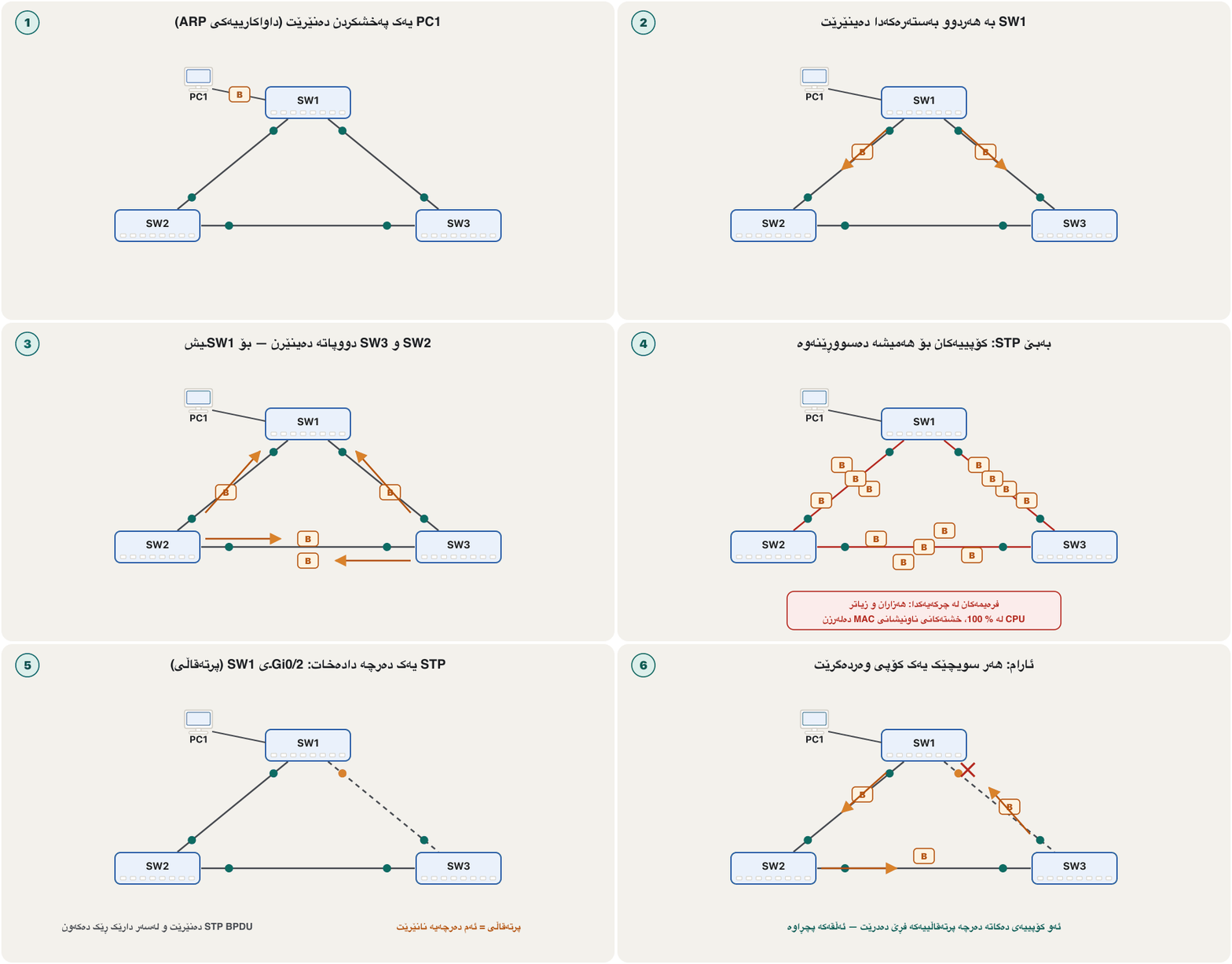
— و هەر بۆ ناونیشانێکی نەناسراو — لە هەموو جگە لەوەی لێیەوە هاتووە دەنێرێت (لافاوکردن). لە سێگۆشەیەکی کۆپییەکان دەسووڕێنەوە و دووپاتە و دووپاتە دەنێردرێنەوە.
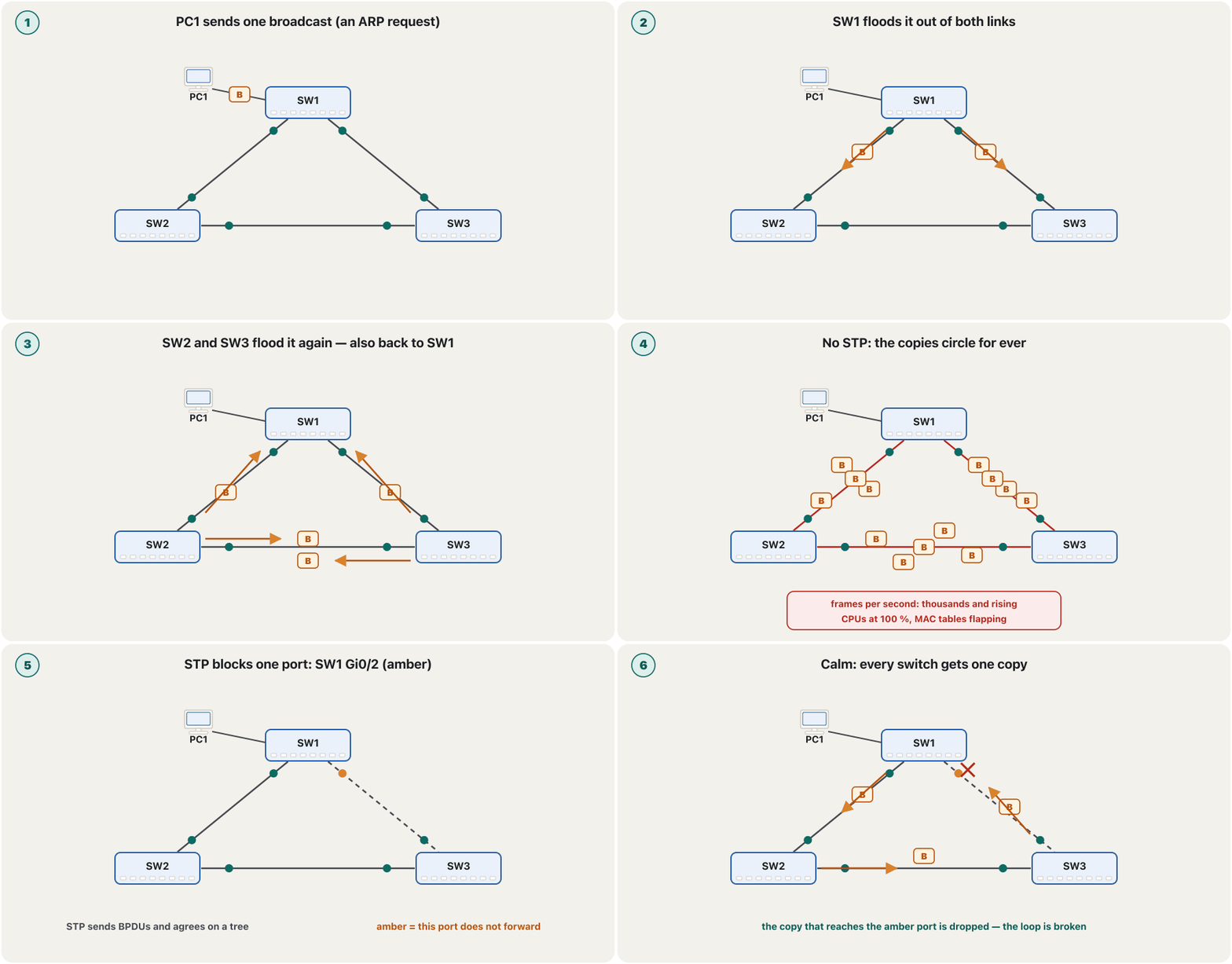
Why do the copies never die? An IP packet carries a TTL that every router lowers until the packet is dropped. An Ethernet frame has no such field, so in a loop it can circle for ever.
بۆچی کۆپییەکان هەرگیز نامرن؟ IP TTLـێک هەڵدەگرێت کە هەر کەمی دەکاتەوە تا فڕێ دەدرێت. هیچ خانەیەکی وای نییە، بۆیە لە ئەڵقەدا دەتوانێت بۆ هەمیشە بسووڕێتەوە.
Three problems at onceسێ کێشە پێکەوە
A loop without STP causes three problems at the same time:
ئەڵقەیەک بەبێ STP لە یەک کاتدا سێ کێشە دروست دەکات:
- Broadcast storm. Every pass makes more copies. Within seconds the links are full, the switches' CPUs are busy and nothing else gets through.
- Unstable MAC address table. The same source address arrives on one port, then on another, so the switch keeps rewriting its table and sends frames the wrong way. Engineers call this MAC flapping.
- Duplicate frames. A PC receives the same frame twice, by two paths; some programs cannot cope with that.
- . هەر سووڕانەوەیەک کۆپیی زیاتر دروست دەکات. لە چەند چرکەیەکدا بەستەرەکان پڕ دەبن، CPUـی سەرقاڵ دەبێت و هیچ شتێکی تر تێناپەڕێت.
- ناجێگیر دەبێت. هەمان ناونیشانی سەرچاوە جارێک لەسەر و جارێک لەسەر یەکێکی تر دەگات، بۆیە بەردەوام خشتەکەی دەنووسێتەوە و بە ڕێگەی هەڵەدا دەنێرێت. ئەندازیاران پێی دەڵێن MAC flapping.
- دووپاتە. PCـێک هەمان دوو جار وەردەگرێت، لە دوو ڕێگەوە؛ هەندێک بەرنامە ناتوانن مامەڵەی لەگەڵ بکەن.
What STP doesSTP چی دەکات
The Spanning Tree Protocol keeps every cable but uses only a tree of them — a set of paths with no circle. The switches talk to each other, choose one switch as the centre, the root bridge, and block each port that would close a loop. A blocked port is not dead: it keeps listening, and when a cable fails STP opens it again.
هەموو کێبڵەکان دەهێڵێتەوە بەڵام تەنیا بەکار دەهێنێت — کۆمەڵێک ڕێگە بەبێ بازنە. قسە لەگەڵ یەکتر دەکەن، وەک ناوەند هەڵدەبژێرن — — و هەر کە ئەڵقەیەک تەواو بکات دادەخەن. دەرچەی داخراو نەمردووە: گوێ دەگرێت و کاتێک کێبڵێک تێک دەچێت STP دووپاتە دەیکاتەوە.
The protocol (IEEE 802.1D; Rapid STP, 802.1w, is the default today) that stops loops between switches with redundant links: the switches elect a root bridge and block the ports that would close a loop, and open them again when a link fails.
ئەو (IEEE 802.1D؛ ئەمڕۆ Rapid STP، 802.1w، بنەڕەتە) کە ڕێگە لە ئەڵقە دەگرێت لە نێوان کە بەستەری یەدەگیان هەیە (): هەڵدەبژێرن و ئەو دەرچانە دادەخەن کە ئەڵقەیەک تەواو دەکەن؛ کاتێک بەستەرێکیش دەپچڕێت دووپاتە دەیانکەنەوە.
A housing project near Sulaymaniyah has three districts joined by three roads in a circle. Delivery vans that are told “take every road except the one you came on” would drive round for ever. So the council puts a barrier on one road: every district can still be reached, nobody circles — and if another road is closed for repairs, the barrier is lifted.
شارۆچکەیەکی نوێ لە نزیک سلێمانی سێ گەڕەکی هەیە کە بە سێ ڕێگا بە شێوەی بازنە بەستراون. ئەو ئۆتۆمبێلانەی کاڵا دەگەیەنن ئەگەر پێیان بوترێت «هەموو ڕێگایەک بگرە جگە لەوەی لێیەوە هاتوویت» بۆ هەمیشە دەسووڕێنەوە. بۆیە شارەوانی بەربەستێک لەسەر یەکێک لە ڕێگاکان دادەنێت: هێشتا دەتوانرێت بگەیتە هەموو گەڕەکێک، کەس ناسووڕێتەوە — و ئەگەر ڕێگایەکی تر بۆ چاککردنەوە دابخرێت، بەربەستەکە لادەبرێت.
Where the analogy stops workingسنووری ئەم نموونەیە
Real drivers have maps and stop; frames have no TTL and no map. The switches also choose the barrier themselves, by rules, not a council.
شۆفێرە ڕاستەقینەکان نەخشەیان هەیە و دەوەستن؛ نە هەیە نە نەخشە. هەروەها خۆیان بەپێی یاسا بەربەستەکە هەڵدەبژێرن، نەک شارەوانی.
BPDUs and the bridge IDBPDU و ناسێنەری پرد
Switches running STP exchange short messages called BPDUs (bridge protocol data units), by default every 2 seconds (the hello time), to the special multicast address 01:80:C2:00:00:00 (Cisco’s per-VLAN versions also use 01:00:0C:CC:CC:CD). A BPDU says who the sender thinks the root is, the cost of its path to the root, the sender's own ID and port, and the timers.
ئەو STP بەکار دەهێنن پەیامی کورت بە ناوی (bridge protocol data unit) ئاڵوگۆڕ دەکەن، بە بنەڕەت هەر 2 چرکە جارێک (hello time)، بۆ ناونیشانی تایبەتی 01:80:C2:00:00:00 (وەشانەکانی Cisco بۆ هەر 01:00:0C:CC:CC:CDـیش بەکار دەهێنن). BPDU دەڵێت نێرەر وا دەزانێت ڕەگ کێیە، کۆستی ڕێگەکەی بۆ ڕەگ، ناسێنەری خودی نێرەر و دەرچەکەی و کاتژمێرەکان.
Every switch has an 8-byte bridge ID: a priority (default 32768, changed only in steps of 4096) plus its MAC address. Cisco adds the VLAN number to the priority — the system ID extension — because each VLAN has its own tree. So in VLAN 1 a default switch shows 32769, in VLAN 10 32778.
هەر ناسێنەرێکی 8 هەیە، ناسێنەری پرد (bridge ID): پێشینەیییەک (بە بنەڕەت 32768، تەنیا بە هەنگاوی 4096 دەگۆڕدرێت) لەگەڵ . Cisco ژمارەی دەخاتە سەر پێشینەییەکە — system ID extension — چونکە هەر خۆی هەیە. بۆیە بنەڕەت لە VLAN 1دا 32769 و لە VLAN 10دا 32778 پیشان دەدات.
Bridge protocol data unit: the short message that switches running the send to each other (every 2 seconds by default). It carries the root bridge's ID, the sender's ID and the cost to the root, so the switches can elect the and decide which ports forward and which block.
Bridge protocol data unit: ئەو پەیامە کورتەی لە بۆ یەکتری دەنێرن (بە بنەڕەت هەر 2 چرکە جارێک). ناسێنەری ، ناسێنەری نێرەر و بەرەو ڕەگ هەڵدەگرێت، بۆ ئەوەی هەڵبژێرن و بڕیار بدەن کام دەرچە بنێرێت و کامیان دابخرێت.
Step 1: electing the root bridgeهەنگاوی 1: هەڵبژاردنی پردی ڕەگ
When the switches start, each one claims to be the root and sends BPDUs saying so. As soon as a switch hears a BPDU with a lower bridge ID, it stops claiming and passes the better news on. After a few seconds all of them agree. The comparison is simple: lowest priority wins; only on a tie, the lowest MAC address wins.
کاتێک دەست بە کار دەکەن، هەریەکەیان دەڵێت «من ڕەگم» و BPDU بەم شێوەیە دەنێرێت. هەر کە BPDUـێک دەبیستێت کە ناسێنەری پردی کەمترە، واز لەو داوایە دەهێنێت و هەواڵە باشترەکە بۆ ئەوانی تر دەنێرێت. دوای چەند چرکەیەک هەموویان ڕێک دەکەون. بەراوردەکە سادەیە: کەمترین پێشینەیی دەباتەوە؛ تەنیا ئەگەر یەکسان بوون، کەمترین دەباتەوە.
Step 2: root, designated and alternate portsهەنگاوی 2: دەرچەی ڕەگ، دەرچەی دیاریکراو و دەرچەی جێگرەوە
Once the root is known, every port gets a role:
کاتێک ڕەگ زانرا، هەر ڕۆڵێک وەردەگرێت:
- Root port — on every switch except the root, the one port with the cheapest path to the root. It forwards.
- Designated port — on every link, the one port that forwards onto that link: the end nearer the root. All the root's ports are designated ports.
- Alternate port — every other port. It is blocked: it receives BPDUs but forwards no frames, and stands by as a backup path.
- — لەسەر هەموو جگە لە ڕەگ، ئەو تاکە دەرچەیەی هەرزانترین ڕێگەی بەرەو ڕەگی هەیە. دەنێرێت.
- — لەسەر هەر بەستەرێک، ئەو تاکە دەرچەیەی دەنێرێتە سەر ئەو بەستەرە: ئەو سەرەی نزیکترە لە ڕەگ. هەموو دەرچەکانی .
- — هەموو دەرچەکانی تر. داخراوە: BPDU وەردەگرێت بەڵام هیچ نانێرێت و وەک ڕێگەیەکی یەدەگ ئامادە دەوەستێت.
Worked example: finding the rolesنموونەی کارکراو: دۆزینەوەی ڕۆڵەکان
Each link has a cost that depends on its speed. The costs below are the default (the short method) on the Catalyst 2960, in Packet Tracer and on Catalyst 9300; a path's cost is the sum of its links' costs.
هەر بەستەرێک کۆستێکی هەیە کە بەندە بە خێراییەکەی. ئەم کۆستانەی خوارەوە بنەڕەتن (ڕێگەی short) لەسەر Catalyst 2960، لە Packet Tracer و لەسەر Catalyst 9300؛ کۆی کۆستی بەستەرەکانیەتی.
| Link speedخێرایی بەستەر | STP costکۆستی STP |
|---|---|
| 10 Mbit/s | 100 |
| 100 Mbit/s (FastEthernet) | 19 |
| 1 Gbit/s (GigabitEthernet) | 4 |
| 10 Gbit/s | 2 |
| 25 and 40 Gbit/s | 1 |
- Rootڕەگ
SW2 has the lowest bridge ID (32769 · …AA01), so SW2 is the root. Both its ports are designated.
ناسێنەری پردی SW2 کەمترینە (32769 · …AA01)، بۆیە SW2 ڕەگە. هەردوو دەرچەکەی .
- SW1's root portدەرچەی ڕەگی SW1
Through Gi0/1 SW1 reaches SW2 at cost 4; through Gi0/2 via SW3 at 4 + 4 = 8. Gi0/1 is the root port.
SW1 لە ڕێگەی Gi0/1ـەوە بە کۆستی 4 دەگاتە SW2؛ لە ڕێگەی Gi0/2 و SW3ـەوە بە . Gi0/1 .
- SW3's root portدەرچەی ڕەگی SW3
In the same way, Gi0/2 (direct to SW2, cost 4) is SW3's root port.
بە هەمان شێوە، Gi0/2 (ڕاستەوخۆ بۆ SW2، کۆستی 4) SW3ـە.
- The SW1–SW3 linkبەستەری SW1–SW3
Both ends are 4 away from the root — a tie. The lower bridge ID wins: SW3 (…AA02) beats SW1 (…AA03). SW3's Gi0/1 is designated; SW1's Gi0/2 becomes the alternate port and blocks.
هەردوو سەر 4 لە ڕەگەوە دوورن — یەکسانن. ناسێنەری پردی کەمتر دەباتەوە: SW3 (…AA02) لە SW1 (…AA03) دەباتەوە. Gi0/1ـی SW3 ؛ Gi0/2ـی SW1 دەبێتە و دادەخرێت.
Port states: why a new port waitsدۆخی دەرچەکان: بۆچی دەرچەیەکی نوێ چاوەڕێ دەکات
Classic STP (IEEE 802.1D) moves a port through states before it forwards: blocking (up to 20 s, the max age), listening (15 s) and learning (15 s, filling the MAC table), then forwarding. A port that is shut down is disabled. After a change, 30 to 50 seconds pass before traffic flows — the amber light you see when you plug in a cable in Packet Tracer.
STPـی کلاسیک (IEEE 802.1D) دەرچەیەک بە چەند دۆخێکدا تێدەپەڕێنێت پێش ئەوەی بنێرێت: blocking (تا 20 چرکە، max age)، listening (15 چرکە) و learning (15 چرکە، پڕکردنەوەی )، پاشان forwarding. دەرچەیەک کە کوژێنراوەتەوە disabledـە. دوای گۆڕانێک 30 تا 50 چرکە تێدەپەڕێت پێش ئەوەی هاتوچۆ بڕوات — ئەو گڵۆپە پرتەقاڵییەی کاتێک لە Packet Tracer کێبڵێک دەبەستیت دەیبینیت.
Rapid STP (RSTP, IEEE 802.1w) keeps only three states — discarding, learning, forwarding — and on point-to-point links a switch simply asks its neighbour (proposal and agreement) instead of waiting for timers. It usually converges in about a second. RSTP also adds a fourth role, the backup port, for the rare case of two ports on one shared segment.
Rapid STP (RSTP، IEEE 802.1w) تەنیا سێ دۆخ دەهێڵێتەوە — discarding، learning، forwarding — و لەسەر بەستەری خاڵ-بۆ-خاڵ بە سادەیی پرسیار لە دراوسێکەی دەکات (proposal و agreement) لەبری چاوەڕوانیی کاتژمێرەکان. بەزۆری لە نزیکەی چرکەیەکدا ڕێک دەکەوێت. هەروەها RSTP ڕۆڵێکی چوارەم زیاد دەکات، backup port، بۆ حاڵەتی دەگمەنی دوو دەرچە لەسەر یەک بەشی هاوبەش.
STP, RSTP and Cisco’s per-VLAN versionsSTP، RSTP و وەشانەکانی Cisco بۆ هەر VLANێک
Radia Perlman designed the spanning-tree algorithm at Digital Equipment Corporation in 1985. IEEE standardised it as 802.1D (1990); 802.1w (2001) added Rapid STP, which replaced the old version in 802.1D-2004; 802.1s added Multiple STP. Since 2014 all of them live in IEEE 802.1Q — 802.1Q-2022 is the current edition as of November 2026.
ڕادیا پێرڵمان (Radia Perlman) ساڵی 1985 لە Digital Equipment Corporation داری داپۆشەری داڕشت. IEEE وەک 802.1D (1990) کردییە ستاندارد؛ 802.1w (2001) Rapid STPـی زیاد کرد کە لە 802.1D-2004ـدا جێگەی وەشانە کۆنەکەی گرتەوە؛ 802.1s Multiple STPـی زیاد کرد. لە 2014ـەوە هەموویان لە ناو IEEE 802.1Qـدان — تا تشرینی دووەمی 2026، 802.1Q-2022 دوایین چاپە.
| Cisco modeباری Cisco | What it runsچی جێبەجێ دەکات | Default onبنەڕەتە لەسەر |
|---|---|---|
pvst | one classic 802.1D tree per VLAN (PVST+)یەک داری 802.1Dـی کلاسیک بۆ هەر (PVST+) | Catalyst 2960 (IOS 15) and Packet TracerCatalyst 2960 (IOS 15) و Packet Tracer |
rapid-pvst | one RSTP tree per VLAN (Rapid PVST+)یەک داری RSTP بۆ هەر (Rapid PVST+) | Catalyst 9000 switches (IOS XE) Catalyst 9000 (IOS XE) |
mst | a few trees shared by groups of VLANs (802.1s)چەند دارێک کە گرووپی هاوبەشیان دەکەن (802.1s) | chosen by the administratorبەڕێوەبەر هەڵیدەبژێرێت |
Turn on the faster version with one command in global configuration; show spanning-tree then says protocol rstp instead of protocol ieee.
وەشانە خێراکە بە یەک لە چالاک بکە؛ پاشان show spanning-tree لەبری protocol ieee دەڵێت protocol rstp.
SW1(config)#spanning-tree mode rapid-pvst
SW1(config)#end
SW1#show spanning-tree
VLAN0001
Spanning tree enabled protocol rstpThe lab: three switches in a triangleتاقیکردنەوەکە: سێ سویچ لە سێگۆشەیەکدا
In Packet Tracer place three 2960-24TT switches, name them SW1–SW3 and join them through their gigabit ports: SW1 Gi0/1–SW2 Gi0/1, SW1 Gi0/2–SW3 Gi0/1, SW2 Gi0/2–SW3 Gi0/2. Put PC1, PC2 and PC3 on Fa0/1 of each switch with 192.168.1.11–13/24. Everything stays in VLAN 1, so no other configuration is needed: STP is already on.
لە Packet Tracer سێ 2960-24TT دابنێ، ناویان بنێ SW1–SW3 و بە گیگابیتیان بیانبەستە: SW1 Gi0/1–SW2 Gi0/1، SW1 Gi0/2–SW3 Gi0/1، SW2 Gi0/2–SW3 Gi0/2. PC1، PC2 و PC3 لەسەر Fa0/1ـی هەر دابنێ بە 192.168.1.11–13/24. هەموو شتێک لە VLAN 1دا دەمێنێتەوە، بۆیە پێویست بە هیچ تر نییە: STP پێشتر چالاکە.
Watch the lights: all of them are amber at first (listening and learning), turn green after about 30 seconds — except one, which stays amber. That is the alternate port. With these MAC addresses it is SW1's Gi0/2. Ping from PC1 to PC3 still works: the frames go round through SW2.
سەیری گڵۆپەکان بکە: سەرەتا هەموویان پرتەقاڵین (listening و learning)، دوای نزیکەی 30 چرکە سەوز دەبن — جگە لە یەکێکیان کە پرتەقاڵی دەمێنێتەوە. ئەوە . بە ئەم ، Gi0/2ـی SW1ـە. لە PC1ـەوە بۆ PC3 هێشتا کار دەکات: بە SW2دا دەسووڕێنەوە.
Reading show spanning-treeخوێندنەوەی show spanning-tree
show spanning-tree (privileged EXEC) prints one block per VLAN. The Root ID is the switch everyone agreed on; the Bridge ID is this switch; the table lists each port's role and state. Here is SW1:
show spanning-tree () بۆ هەر بەشێک چاپ دەکات. Root ID ئەو کە هەمووان لەسەری ڕێک کەوتوون؛ Bridge ID خودی ئەم ؛ خشتەکەش ڕۆڵ و دۆخی هەر دەرچەیەک دەنووسێت. ئەمە SW1ـە:
SW1#show spanning-tree
VLAN0001
  Spanning tree enabled protocol ieee
  Root ID    Priority    32769
             Address     0001.9611.AA01
             Cost        4
             Port        25 (GigabitEthernet0/1)
             Hello Time   2 sec  Max Age 20 sec  Forward Delay 15 sec

  Bridge ID  Priority    32769  (priority 32768 sys-id-ext 1)
             Address     0001.9611.AA03
             Hello Time   2 sec  Max Age 20 sec  Forward Delay 15 sec
             Aging Time  300 sec

Interface           Role Sts Cost      Prio.Nbr Type
------------------- ---- --- --------- -------- --------------------------------
Fa0/1               Desg FWD 19        128.1    P2p
Gi0/1               Root FWD 4         128.25   P2p
Gi0/2               Altn BLK 4         128.26   P2p
Explain the codeڕوونکردنەوەی کۆدەکە
- Lineدێڕی 3
ieee= classic PVST+. With Rapid PVST+ it saysrstp.ieee= PVST+ـی کلاسیک. لەگەڵ Rapid PVST+ دەڵێتrstp.- Lineدێڕی 4-7
The root is …AA01 (SW2), 4 away, reached through port 25 = Gi0/1.
ڕەگ …AA01ـە (SW2)، کۆستی 4 دوورە، لە ڕێگەی دەرچەی 25 = Gi0/1ـەوە.
- Lineدێڕی 10-11
This switch: 32768 + VLAN 1, MAC …AA03.
ئەم : 32768 + VLAN 1، MAC …AA03.
- Lineدێڕی 18-19
Root FWD = root port, forwarding; Altn BLK = alternate port, blocking.
Root FWD = ، دەنێرێت؛ Altn BLK = ، داخراو.
- Lineدێڕی 15
Prio.Nbr = port priority (128) and port number; P2p = a full-duplex point-to-point link.
Prio.Nbr = پێشینەیی دەرچە (128) و ژمارەی دەرچە؛ P2p = بەستەرێکی خاڵ-بۆ-خاڵی full-duplex.
Choosing the root on purposeهەڵبژاردنی ڕەگ بە مەبەست
The root should be the strongest switch in the middle of the network (the core), not the one with the oldest MAC address. Lower the priority of the switch you want. root primary sets 24576 — or 4096 less than the current root, if that is lower still. root secondary sets 28672 on the backup choice. You can also give an exact multiple of 4096.
ڕەگ دەبێت بەهێزترین بێت لە ناوەڕاستی (core)، نەک ئەوەی کۆنترین هەیە. پێشینەیی ئەو دەتەوێت کەم بکەرەوە. root primary 24576 دادەنێت — یان 4096 کەمتر لە ڕەگی ئێستا، ئەگەر ئەو لەوەش کەمتر بێت. root secondary 28672 لەسەر هەڵبژاردەی یەدەگ دادەنێت. دەتوانیت ژمارەیەکی ڕێکی چەند جارەی 4096ـیش بدەیت.
SW1(config)#spanning-tree vlan 1 root primary
SW1(config)#end
SW1#show spanning-tree
VLAN0001
  Spanning tree enabled protocol ieee
  Root ID    Priority    24577
             Address     0001.9611.AA03
             This bridge is the root
             Hello Time   2 sec  Max Age 20 sec  Forward Delay 15 sec

  Bridge ID  Priority    24577  (priority 24576 sys-id-ext 1)
             Address     0001.9611.AA03
Explain the codeڕوونکردنەوەی کۆدەکە
- Lineدێڕی 1
On SW2 type
spanning-tree vlan 1 root secondaryso that it takes over if SW1 fails.لەسەر SW2
spanning-tree vlan 1 root secondaryبنووسە بۆ ئەوەی ئەگەر SW1 تێک چوو جێگەی بگرێتەوە.- Lineدێڕی 8
SW1 is now the root; its ports are all designated.
ئێستا SW1 ڕەگە؛ هەموو دەرچەکانی .
SW1(config)#spanning-tree vlan 1 priority 1000
% Bridge Priority must be in increments of 4096.
% Allowed values are:
  0     4096  8192  12288 16384 20480 24576 28672
32768 36864 40960 45056 49152 53248 57344 61440Access ports: PortFast and BPDU guardدەرچەکانی دەستڕاگەیشتن: PortFast و BPDU guard
A PC cannot cause a loop, yet its port waits 30 seconds in listening and learning — long enough for the PC to give up on DHCP. PortFast lets an access port go straight to forwarding. Use it only on ports to end devices. BPDU guard protects such a port: if a BPDU ever arrives — someone plugged in a switch — the port is shut down at once (err-disabled).
PCـێک ناتوانێت ئەڵقە دروست بکات، کەچی دەرچەکەی 30 چرکە لە listening و learningـدا چاوەڕێ دەکات — ئەوەندە درێژ کە PCـەکە لە بێهیوا دەبێت. PortFast ڕێگە بە دەرچەیەکی دەستڕاگەیشتن دەدات ڕاستەوخۆ بچێتە forwarding. تەنیا لەسەر دەرچەکانی بەکاری بهێنە. BPDU guard ئەو دەرچەیە دەپارێزێت: ئەگەر هەرگیز BPDUـێک گەیشت — کەسێک بەستووە — دەرچەکە یەکسەر دادەخرێت (دۆخی err-disabled).
SW1(config)#interface fastEthernet 0/1
SW1(config-if)#spanning-tree portfast
%Warning: portfast should only be enabled on ports connected to a single
 host. Connecting hubs, concentrators, switches, bridges, etc... to this
 interface  when portfast is enabled, can cause temporary bridging loops.
 Use with CAUTION

%Portfast has been configured on FastEthernet0/1 but will only
 have effect when the interface is in a non-trunking mode.
SW1(config-if)#spanning-tree bpduguard enable
SW1(config-if)#end
Explain the codeڕوونکردنەوەی کۆدەکە
- Lineدێڕی 3-9
IOS warns every time: PortFast on a port to a switch can cause a loop.
IOS هەموو جارێک ئاگادار دەکاتەوە: PortFast لەسەر دەرچەیەک بەرەو دەتوانێت ئەڵقە دروست بکات.
- Lineدێڕی 10
For all access ports at once:
spanning-tree portfast defaultandspanning-tree portfast bpduguard defaultin global configuration.بۆ هەموو پێکەوە:
spanning-tree portfast defaultوspanning-tree portfast bpduguard defaultلە .
%SPANTREE-2-BLOCK_BPDUGUARD: Received BPDU on port FastEthernet0/1 with BPDU Guard enabled. Disabling port.
%PM-4-ERR_DISABLE: bpduguard error detected on Fa0/1, putting Fa0/1 in err-disable stateEtherChannel: many cables, one linkEtherChannel: چەند کێبڵ، یەک بەستەر
A good question to ask: what is EtherChannel? Join SW1 and SW2 with two gigabit cables for more speed and STP blocks one of them — you paid for 2 Gbit/s and get 1. EtherChannel bundles 2 to 8 identical links into one logical interface, a port-channel (Po1). STP sees a single link, so nothing is blocked; traffic is shared over all cables; and if one cable fails, the others carry on without STP recalculating.
پرسیارێکی باش: چییە؟ SW1 و SW2 بە دوو کێبڵی گیگابیت ببەستە بۆ خێرایی زیاتر و STP یەکێکیان دادەخات — پارەی 2 Gbit/sـت داوە و 1 وەردەگریت. 2 تا 8 بەستەری وەک یەک کۆ دەکاتەوە بۆ یەک لۆجیکی، port-channel (Po1). STP تەنیا یەک بەستەر دەبینێت، بۆیە هیچ شتێک داناخرێت؛ هاتوچۆ بەسەر هەموو کێبڵەکاندا دابەش دەکرێت؛ ئەگەر کێبڵێکیش تێک چوو، ئەوانی تر بەردەوام دەبن بەبێ ئەوەی STP دووپاتە بژمێرێتەوە.
Bundling 2 to 8 parallel Ethernet links between two switches into one logical link: more bandwidth, load sharing and no loop, because STP sees only one link. It is negotiated with LACP (IEEE 802.1AX) or Cisco's PAgP.
کۆکردنەوەی 2 تا 8 بەستەری تەریبی لە نێوان دوو بۆ یەک بەستەری لۆجیکی: زیاتر، دابەشکردنی بار و هیچ ئەڵقەیەک، چونکە STP تەنیا یەک بەستەر دەبینێت. بە LACP (IEEE 802.1AX) یان PAgPـی Cisco ڕێک دەخرێت.
LACP, PAgP or onLACP، PAgP یان on
Both ends must agree that the cables form one bundle. Three ways exist:
هەردوو سەر دەبێت ڕێک بکەون کە کێبڵەکان یەک کۆمەڵەن. سێ ڕێگە هەیە:
- LACP — the open standard (IEEE 802.1AX, first published as 802.3ad), works between any vendors. Modes: active (starts the talk) and passive (only answers).
- PAgP — Cisco's own protocol. Modes: desirable (starts) and auto (answers).
- on — no protocol at all: the port joins the bundle without checking the other side. Both ends must be
on.
- LACP — (IEEE 802.1AX، یەکەم جار وەک 802.3ad بڵاو کرایەوە)، لە نێوان هەموو بەرهەمهێنەرێکدا کار دەکات. بارەکان: active (قسەکردن دەست پێ دەکات) و passive (تەنیا وەڵام دەداتەوە).
- PAgP — تایبەتی Cisco. بارەکان: desirable (دەست پێ دەکات) و auto (وەڵام دەداتەوە).
- on — هیچ نییە: دەرچەکە بەبێ پشکنینی لاکەی تر دەچێتە ناو کۆمەڵەکە. دەبێت هەردوو سەر
onبن.
Lab: bundle two links with LACPتاقیکردنەوە: کۆکردنەوەی دوو بەستەر بە LACP
In a new Packet Tracer file, join two switches, SW1 and SW2, with two cables, Gi0/1–Gi0/1 and Gi0/2–Gi0/2. Before you start, check the rules: all member ports need the same speed and duplex and the same switchport settings — the same access VLAN, or trunks with the same native and allowed VLANs. Configure the physical ports first; settings you then give the port-channel are copied to every member.
لە فایلێکی نوێی Packet Tracerـدا دوو ، SW1 و SW2، بە دوو کێبڵ ببەستە، Gi0/1–Gi0/1 و Gi0/2–Gi0/2. پێش دەستپێکردن یاساکان بپشکنە: هەموو دەرچە ئەندامەکان پێویستیان بە هەمان خێرایی و duplex و هەمان ڕێکخستنی switchport هەیە — هەمان access، یان بە هەمان native و allowed VLAN. سەرەتا دەرچە فیزیکییەکان ڕێک بخە؛ ئەو ڕێکخستنانەی دواتر دەیدەیتە port-channel بۆ هەموو ئەندامێک کۆپی دەکرێن.
SW1(config)#vlan 999
SW1(config-vlan)#name Native
SW1(config-vlan)#exit
SW1(config)#interface range gigabitEthernet 0/1 - 2
SW1(config-if-range)#channel-group 1 mode active
Creating a port-channel interface Port-channel 1

SW1(config-if-range)#exit
SW1(config)#interface port-channel 1
SW1(config-if)#switchport mode trunk
SW1(config-if)#switchport trunk native vlan 999
SW1(config-if)#end
SW1#copy running-config startup-config
Explain the codeڕوونکردنەوەی کۆدەکە
- Lineدێڕی 1-3
VLAN 999 stays empty: it is only the trunk's native VLAN — not VLAN 1 and not the management VLAN 99 (native VLAN).
VLAN 999 بەتاڵ دەمێنێتەوە: تەنیا — نە VLAN 1 و نە بەڕێوەبردنی 99 (VLANـی ڕەسەن).
- Lineدێڕی 5-6
The first member creates the logical interface Port-channel 1 by itself.
یەکەم ئەندام لۆجیکیی Port-channel 1 خۆی دروست دەکات.
- Lineدێڕی 10-11
A link between switches usually carries all VLANs, so the bundle is a trunk (trunks); both ends need the same native VLAN, or the members are not bundled. Some switches first need
switchport trunk encapsulation dot1q.بەستەری نێوان زۆرجار هەموو هەڵدەگرێت، بۆیە کۆمەڵەکە (ترەنکەکان)؛ هەردوو سەر پێویستیان بە هەمان هەیە، ئەگینا ئەندامەکان کۆ ناکرێنەوە. هەندێک سەرەتا
switchport trunk encapsulation dot1qـیان پێویستە.- Lineدێڕی 13
Save, as at the end of every lab.
پاشەکەوتی بکە، وەک کۆتایی هەموو تاقیکردنەوەیەک.
Checking the bundle and sharing the loadپشکنینی کۆمەڵەکە و دابەشکردنی بار
SW1#show etherchannel summary
Flags:  D - down        P - bundled in port-channel
        I - stand-alone s - suspended
        H - Hot-standby (LACP only)
        R - Layer3      S - Layer2
        U - in use      f - failed to allocate aggregator

        M - not in use, minimum links not met
        u - unsuitable for bundling
        w - waiting to be aggregated
        d - default port


Number of channel-groups in use: 1
Number of aggregators:           1

Group  Port-channel  Protocol    Ports
------+-------------+-----------+-----------------------------------------------
1      Po1(SU)         LACP      Gi0/1(P)    Gi0/2(P)
Explain the codeڕوونکردنەوەی کۆدەکە
- Lineدێڕی 19
Po1(SU): S = layer 2, U = in use. Each member (P) = bundled. A member with (s) or (I) is not working in the bundle.
Po1(SU): S = چینی 2، U = بەکارە. هەر ئەندامێک (P) = لە ناو کۆمەڵەکەدایە. ئەندامێک بە (s) یان (I) لە ناو کۆمەڵەکەدا کار ناکات.
How is the traffic shared? The switch does not send frame 1 on cable 1 and frame 2 on cable 2 — that could deliver them out of order. It feeds the addresses of each frame into a hash and lets the result choose a cable, so one conversation always uses one cable. A 2960 hashes the source MAC address by default; port-channel load-balance src-dst-ip mixes in both IP addresses and spreads traffic more evenly.
هاتوچۆ چۆن دابەش دەکرێت؟ 1 بە کێبڵی 1 و 2 بە کێبڵی 2دا نانێرێت — ئەوە دەکرێت ڕیزبەندییان تێک بدات. ناونیشانەکانی هەر دەداتە و ئەنجامەکە کێبڵێک هەڵدەبژێرێت، بۆیە یەک گفتوگۆ هەمیشە یەک کێبڵ بەکار دەهێنێت. 2960 بە بنەڕەت سەرچاوە هاش دەکات؛ port-channel load-balance src-dst-ip هەردوو تێکەڵ دەکات و هاتوچۆ یەکسانتر بڵاو دەکاتەوە.
Common mistakesهەڵە باوەکان
Exercisesڕاهێنانەکان
Answer the question in your own words: what is EtherChannel, why would you use it between two switches, and how does it get along with STP?
بە وشەی خۆت وەڵامی ئەم پرسیارە بدەرەوە: چییە، بۆچی لە نێوان دوو بەکاری دەهێنیت و چۆن لەگەڵ STP دەگونجێت؟
Show answerوەڵامەکە پیشان بدە
EtherChannel (link aggregation, IEEE 802.1AX) bundles 2–8 identical Ethernet links between two devices into one logical port-channel. You use it for more total bandwidth, for load sharing and for redundancy: if one cable fails the bundle keeps working. STP treats the port-channel as one link, so it does not block the extra cables. It is negotiated with LACP (any vendor) or PAgP (Cisco), or forced with on.
(کۆکردنەوەی بەستەرەکان، IEEE 802.1AX) 2–8 بەستەری وەک یەک لە نێوان دوو ئامێردا کۆ دەکاتەوە بۆ یەک port-channelـی لۆجیکی. بۆ گشتیی زیاتر، و بەکاری دەهێنیت: ئەگەر کێبڵێک تێک چوو، کۆمەڵەکە هەر کار دەکات. STP port-channel وەک یەک بەستەر دەبینێت، بۆیە کێبڵە زیادەکان داناخات. بە LACP (هەموو بەرهەمهێنەرێک) یان PAgP (Cisco) ڕێک دەخرێت، یان بە on ناچار دەکرێت.
Four switches in VLAN 10: A 32778 · 0060.47AA.0001, B 32778 · 0002.1A00.BBBB, C 24586 · 00D0.5800.0003, D 32778 · 0002.1A00.BBBA. Which is the root? Which would win if C were switched off?
چوار لە VLAN 10دا: A 32778 · 0060.47AA.0001، B 32778 · 0002.1A00.BBBB، C 24586 · 00D0.5800.0003، D 32778 · 0002.1A00.BBBA. کامیان ڕەگە؟ ئەگەر C بکوژێنرێتەوە کامیان دەباتەوە؟
Hintئاماژە
Compare hexadecimal MAC addresses digit by digit from the left.
شازدەیی ڕەنووس بە ڕەنووس لە چەپەوە بەراورد بکە.
Show answerوەڵامەکە پیشان بدە
C is the root: its priority 24586 (24576 + 10) is the lowest. Without C, A, B and D tie on 32778, so the lowest MAC address wins: 0002.1A00.BBBA (D) is lower than 0002.1A00.BBBB (B) and 0060.47AA.0001 (A). D becomes the root.
C ڕەگە: پێشینەییەکەی 24586 (24576 + 10) کەمترینە. بەبێ C، A و B و D لەسەر 32778 یەکسانن، بۆیە کەمترین دەباتەوە: 0002.1A00.BBBA (D) لە 0002.1A00.BBBB (B) و 0060.47AA.0001 (A) کەمترە. D دەبێتە ڕەگ.
In the lab triangle SW1 is now the root (root primary). All links are gigabit. Give the role of every inter-switch port of SW2 and SW3, and say which port blocks.
لە سێگۆشەی تاقیکردنەوەکەدا ئێستا SW1 ڕەگە (root primary). هەموو بەستەرەکان گیگابیتن. ڕۆڵی هەموو دەرچەیەکی نێوان SW2 و SW3 بنووسە و بڵێ کام دەرچە دادەخرێت.
Show answerوەڵامەکە پیشان بدە
- SW1 Gi0/1 and Gi0/2: designated (root bridge).
- SW2 Gi0/1: root port (cost 4, direct to SW1).
- SW3 Gi0/1: root port (cost 4, direct to SW1).
- Link SW2–SW3: both ends are 4 from the root; SW2 has the lower bridge ID (…AA01 < …AA02), so SW2 Gi0/2 is designated and SW3 Gi0/2 is the alternate port (blocking).
- SW1 Gi0/1 و Gi0/2: ().
- SW2 Gi0/1: (کۆستی 4، ڕاستەوخۆ بۆ SW1).
- SW3 Gi0/1: (کۆستی 4، ڕاستەوخۆ بۆ SW1).
- بەستەری SW2–SW3: هەردوو سەر 4 لە ڕەگەوە دوورن؛ ناسێنەری پردی SW2 کەمترە (…AA01 لە …AA02 کەمترە)، بۆیە SW2 Gi0/2 و SW3 Gi0/2 (داخراو).
(1) On the triangle lab: make SW1 the root of VLAN 1 and SW2 the backup root, switch all three switches to Rapid PVST+, put PortFast and BPDU guard on each PC port, and save. (2) On the two-switch EtherChannel lab: build Po1 as a trunk with LACP, active on SW1 and passive on SW2, with the unused native VLAN 999. Write the commands for SW1 and SW2 and say how you check the result.
(1) لەسەر تاقیکردنەوەی سێگۆشەکە: SW1 بکە بە ڕەگی VLAN 1 و SW2 بە ڕەگی یەدەگ، هەر سێ بگۆڕە بۆ Rapid PVST+، PortFast و BPDU guard لەسەر دەرچەی هەر PCـێک دابنێ و پاشەکەوتی بکە. (2) لەسەر تاقیکردنەوەی دوو : Po1 وەک بە LACP دروست بکە، active لەسەر SW1 و passive لەسەر SW2، بە بەکارنەهێنراوی 999. SW1 و SW2 بنووسە و بڵێ چۆن ئەنجامەکە دەپشکنیت.
Hintئاماژە
Lines starting with ! are comments; you do not type them.
ئەو دێڕانەی بە ! دەست پێ دەکەن تێبینین؛ نایاننووسیت.
Show answerوەڵامەکە پیشان بدە
! (1) triangle lab
SW1(config)#spanning-tree mode rapid-pvst
SW1(config)#spanning-tree vlan 1 root primary
SW1(config)#interface fastEthernet 0/1
SW1(config-if)#spanning-tree portfast
SW1(config-if)#spanning-tree bpduguard enable
SW1(config-if)#end
SW1#copy running-config startup-config

SW2(config)#spanning-tree mode rapid-pvst
SW2(config)#spanning-tree vlan 1 root secondary
SW2(config)#interface fastEthernet 0/1
SW2(config-if)#spanning-tree portfast
SW2(config-if)#spanning-tree bpduguard enable
SW2(config-if)#end
SW2#copy running-config startup-config

! (2) EtherChannel lab
SW1(config)#vlan 999
SW1(config-vlan)#name Native
SW1(config-vlan)#exit
SW1(config)#interface range gigabitEthernet 0/1 - 2
SW1(config-if-range)#channel-group 1 mode active
SW1(config-if-range)#exit
SW1(config)#interface port-channel 1
SW1(config-if)#switchport mode trunk
SW1(config-if)#switchport trunk native vlan 999
SW1(config-if)#end
SW1#copy running-config startup-config

SW2(config)#vlan 999
SW2(config-vlan)#name Native
SW2(config-vlan)#exit
SW2(config)#interface range gigabitEthernet 0/1 - 2
SW2(config-if-range)#channel-group 1 mode passive
SW2(config-if-range)#exit
SW2(config)#interface port-channel 1
SW2(config-if)#switchport mode trunk
SW2(config-if)#switchport trunk native vlan 999
SW2(config-if)#end
SW2#copy running-config startup-config
Check the triangle with show spanning-tree: on SW1 This bridge is the root and protocol rstp; on SW3 one port is Altn BLK. Check the bundle with show etherchannel summary: Po1(SU) with both members (P).
سێگۆشەکە بە show spanning-tree بپشکنە: لەسەر SW1 This bridge is the root و protocol rstp؛ لەسەر SW3 یەک دەرچە Altn BLKـە. کۆمەڵەکە بە show etherchannel summary بپشکنە: Po1(SU) بە هەردوو ئەندامەکەیەوە (P).
For each pair say whether an EtherChannel forms: (a) active – passive, (b) auto – auto, (c) desirable – auto, (d) on – desirable, (e) on – on, (f) active – desirable.
بۆ هەر جووتێک بڵێ ئایا دروست دەبێت: (a) active – passive، (b) auto – auto، (c) desirable – auto، (d) on – desirable، (e) on – on، (f) active – desirable.
Show answerوەڵامەکە پیشان بدە
(a) yes, LACP; (b) no, both only answer; (c) yes, PAgP; (d) no, on speaks no protocol; (e) yes, static; (f) no — LACP and PAgP are different protocols.
(a) بەڵێ، LACP؛ (b) نەخێر، هەردووکیان تەنیا وەڵام دەدەنەوە؛ (c) بەڵێ، PAgP؛ (d) نەخێر، on هیچ قسە ناکات؛ (e) بەڵێ، جێگیر؛ (f) نەخێر — LACP و PAgP دوو جیاوازن.
Summaryکورتە
- Redundant switch links remove single points of failure but create loops; Ethernet frames have no TTL, so a loop causes broadcast storms, unstable MAC tables and duplicate frames.
- STP elects the root bridge (lowest bridge ID: priority, then MAC), gives each switch a root port and each link a designated port, and blocks the rest (alternate ports).
- Bridge priority: default 32768 + VLAN number, steps of 4096; costs 19 (100 Mbit/s), 4 (1 Gbit/s). Choose the root with
spanning-tree vlan 1 root primary. - Classic STP needs 30–50 s; RSTP about a second. PVST+ is the 2960/Packet Tracer default, Rapid PVST+ the Catalyst 9000 default. PortFast + BPDU guard on access ports only.
- EtherChannel bundles 2–8 links into one port-channel (LACP active/passive, PAgP desirable/auto, or on); STP sees one link; each flow stays on one cable. Check with
show etherchannel summary.
- بەستەری یەدەگی لادەبەن بەڵام ئەڵقە دروست دەکەن؛ نییە، بۆیە ئەڵقە ، ناجێگیر و دووپاتە دروست دەکات.
- STP هەڵدەبژێرێت (کەمترین ناسێنەری پرد: پێشینەیی، پاشان MAC)، دەداتە هەر و دەداتە هەر بەستەرێک و ئەوانی تر دادەخات ().
- پێشینەیی پرد: بنەڕەت 32768 + ژمارەی ، هەنگاوی 4096؛ کۆست 19 (100 Mbit/s)، 4 (1 Gbit/s). ڕەگ بە
spanning-tree vlan 1 root primaryهەڵبژێرە. - STPـی کلاسیک 30–50 چرکەی پێویستە؛ RSTP نزیکەی چرکەیەک. PVST+ بنەڕەتی 2960/Packet Tracerـە، Rapid PVST+ بنەڕەتی Catalyst 9000. PortFast + BPDU guard تەنیا لەسەر .
- 2–8 بەستەر بۆ یەک port-channel کۆ دەکاتەوە (LACP active/passive، PAgP desirable/auto، یان on)؛ STP یەک بەستەر دەبینێت؛ هەر ڕەوتێک لەسەر یەک کێبڵ دەمێنێتەوە. بە
show etherchannel summaryبیپشکنە.
Next: Switch Port Security — deciding which devices may use an access port at all.
دواتر: ئاسایشی دەرچە — بڕیاردان لەسەر ئەوەی کام ئامێر هەر دەتوانێت بەکار بهێنێت.
Lesson complete!وانەکە تەواو بوو!
Well done. Review the key terms, then go on to the next lesson.دەستخۆش. سەیرێکی زاراوە سەرەکییەکان بکەرەوە، پاشان بڕۆ بۆ وانەی داهاتوو.
Key termsزاراوە سەرەکییەکان
Switch Port Securityئاسایشی دەرچەی سویچ
Related lecturesوانە پەیوەندیدارەکان
- Trunks and 802.1Q Tagsترەنکەکان و تاگەکانی 802.1Q
- Switch Port Securityئاسایشی دەرچەی سویچ
- Inter-VLAN Routing with a Layer-3 Switchڕێدۆزیی نێوان VLANـەکان بە سویچی چینی 3
- Collision Domains and Broadcast Domainsپاوانەکانی پێکدادان و پاوانەکانی پەخش
- The Network Layer and the IPv4 Packetچینی ڕایەڵە و پاکێتی IPv4
- Show Commands, Running and Startup Configurationsفەرمانەکانی show، ڕێکخستنی کارا و ڕێکخستنی دەستپێکردن
References and further readingسەرچاوەکان و خوێندنەوەی زیاتر
- Cisco Catalyst 9300 Switches, IOS XE 17.1 Layer 2 Configuration Guide: Configuring Spanning Tree Protocol — default mode Rapid PVST+, priority 32768 in steps of 4096, extended system ID, short path costs, port roles and states
- Cisco Catalyst 2960 Software Configuration Guide 12.2(55)SE: Configuring STP — PVST+ default, root primary (24576 or 4096 below the root) and root secondary (28672), root-port rules, timers, BPDU contents
- Cisco Catalyst 2960 Software Configuration Guide 12.2(55)SE: Configuring EtherChannels — up to eight ports, PAgP and LACP modes, configuration guidelines, src-mac load balancing
- IEEE 802.1AX-2020: Link Aggregation (active standard)
This lecture is a first edition. The Kurdish text and terminology are waiting for review by Kurdish IT teachers.ئەم وانەیە چاپی یەکەمە. دەقە کوردییەکە و زاراوەکانی چاوەڕێی پێداچوونەوەی مامۆستایانی کوردی بواری IT ن.