Chapterبەش 4 · Lectureوانە 4.2
Bridges and Switchesپردەکانی ڕایەڵە و سویچەکان
Layer-2 devices read MAC addresses. A bridge joins two segments of a LAN and passes a frame across only when it must: it learns source addresses into its table, then filters, forwards or floods. A switch is a multiport bridge — the ‘hub that learns’ — with a collision domain, full duplex and full bandwidth on every port. Bridge types, why it is called a switch (railway points), store-and-forward and cut-through, hub vs switch and bridge vs switch, managed and layer-3 switches.
ئامێرەکانی چینی 2 دەخوێننەوە. دوو پێکەوە دەبەستێتەوە و تەنیا کاتێک پێویست بێت دەپەڕێنێتەوە: ناونیشانی نێرەرەکان لە خشتەکەیدا فێر دەبێت، پاشان فلتەر دەکات، دەپەڕێنێتەوە یان بۆ هەمووان دەنێرێت. فرەدەرچەیە — ‘ کە فێر دەبێت’ — بە ، و تەواو لەسەر هەموو . جۆرەکانی ، بۆچی پێی دەگوترێت سویچ (ئاڕاستەگۆڕی ئاسنەڕێ)، و ، بەرامبەر و بەرامبەر ، و .
What you will learnچی فێر دەبیت
- Explain how a bridge joins two segments and decides, with its MAC address table, to filter, forward or flood a frame.
- Describe transparent learning and the kinds of bridges: simple, transparent, source-route, translational, remote and wireless.
- Explain why a switch is a multiport bridge, how it learns MAC addresses, and why it is called a switch.
- Compare store-and-forward and cut-through switching, and explain why switch ports are full duplex without collisions.
- Compare hubs, bridges and switches, and tell unmanaged, managed and layer-3 switches apart.
- ڕوونی بکەیتەوە چۆن دوو پێکەوە دەبەستێتەوە و بە بڕیار دەدات فلتەر بکات، بیپەڕێنێتەوە یان بۆ هەمووانی بنێرێت.
- فێربوونی ڕوون و جۆرەکانی وەسف بکەیت: سادە، ڕوون، ڕێگای سەرچاوە، وەرگێڕ، دوورەدەست و .
- ڕوونی بکەیتەوە بۆچی فرەدەرچەیە، چۆن فێری دەبێت و بۆچی پێی دەگوترێت .
- و بەراورد بکەیت و ڕوونی بکەیتەوە بۆچی و نییە.
- ، و بەراورد بکەیت و نەبەڕێوەبراو، بەڕێوەبراو و چینی 3 لە یەک جیا بکەیتەوە.
Dividing the crowd: from hubs to bridgesدابەشکردنی قەرەباڵغی: لە هەبەکانەوە بۆ پردەکانی ڕایەڵە
On a hub, every frame reaches every computer, and all of them share one collision domain (Repeaters and Hubs). In the 1980s the first fix was to cut the LAN into two segments, each with its own hub, and join them with a bridge. A bridge checks every frame and lets it cross only when its destination is on the other side. Traffic that stays on one side no longer disturbs the other, so each part of the network works more efficiently.
لەسەر ، هەموو دەگاتە هەموو و هەموویان یەک بەش دەکەن (دووپاتەکەرەوەکان و هەبەکان). لە ساڵانی 1980دا یەکەم چارەسەر ئەوە بوو کە بکرێتە دوو — هەریەکەیان بە خۆیەوە — و بە پێکەوە ببەسترێن. هەموو دەپشکنێت و تەنیا کاتێک ڕێگەی دەدات بپەڕێتەوە کە شوێنی مەبەستەکەی لە لای ترە. ئەو هاتوچۆیەی لە یەک لا دەمێنێتەوە ئیتر لای تر تێک نادات، بۆیە هەر بەشێکی باشتر کار دەکات.
The bridge: two segments, one networkپردی ڕایەڵە: دوو بڕەڕایەڵە، یەک ڕایەڵە
A bridge does what its name says: it joins two small networks — in practice, two segments of one LAN. The classic bridge has only two ports, one for each side. Think of a road bridge over a river: a car crosses only if it needs to reach the other bank.
ئەوە دەکات کە ناوەکەی دەیڵێت: دوو بچووک پێکەوە دەبەستێتەوە — لە ڕاستیدا دوو یەک . کلاسیکی تەنیا دوو هەیە، بۆ هەر لایەک یەکێک. پردێکی ڕێگا بهێنە بەرچاوت کە بەسەر ڕووبارێکدا دروست کراوە: ئۆتۆمبێل تەنیا ئەگەر پێویستی بە گەیشتن بە ئەوبەر بێت دەپەڕێتەوە.
Three facts follow. Both sides must use the same protocol, for example Ethernet on both. The bridge works at layer 2, the data link layer. And so it forwards frames by MAC address, not by IP address: the two segments stay in the same IP network, because the bridge makes them one network. (A translational bridge, on a later screen, joins two different LAN types and converts the frame format.)
سێ ڕاستی لێرەوە دێن. هەردوو لا دەبێت هەمان بەکار بهێنن، بۆ نموونە لە هەردووکیاندا. لە چینی 2، چینی بەستەری دراوە، کار دەکات. بۆیە بەپێی دەنێرێت، نەک بەپێی : دوو لە هەمان IPـدا دەمێننەوە، چونکە دەیانکاتە یەک . ( وەرگێڕ، کە لە شاشەیەکی دواتردا دێت، دوو جۆری جیاوازی پێکەوە دەبەستێتەوە و فۆرماتی دەگۆڕێت.)
How a bridge works: the bridge tableپردی ڕایەڵە چۆن کار دەکات: خشتەی ناونیشانی MAC
Take two segments joined by a bridge: PC1–PC4 on segment 1 (port 1) and PC5–PC8 on segment 2 (port 2). The bridge keeps a bridge table — a MAC address table — that lists which MAC addresses are behind which port. Every frame carries the destination’s MAC address, and the bridge looks it up:
دوو وەربگرە کە بە بەستراون: PC1 تا PC4 لەسەر 1 ( 1) و PC5 تا PC8 لەسەر 2 ( 2). خشتەیەک دەهێڵێتەوە کە پێی دەگوترێت bridge table — — کە دەڵێت کام لە پشت کام . هەموو شوێنی مەبەست هەڵدەگرێت و لە خشتەکەدا بەدوایدا دەگەڕێت:
- PC1 → PC2: both are behind port 1, so the bridge does not pass the frame across. It is filtered: it has already reached its segment.
- PC2 → PC8: PC8 is behind port 2, so the bridge forwards the frame across to segment 2.
- Destination not yet in the table: the bridge sends the frame out of all its other ports, so that it still arrives. This is flooding.
- لە PC1ـەوە بۆ PC2: هەردووکیان لە پشت 1ـن، بۆیە ناپەڕێنێتەوە. فلتەر دەکرێت: پێشتر گەیشتووەتە خۆی.
- لە PC2ـەوە بۆ PC8: PC8 لە پشت 2ـە، بۆیە بۆ 2 دەپەڕێنێتەوە ().
- شوێنی مەبەست هێشتا لە خشتەکەدا نییە: لە هەموو ترییەوە دەنێرێت، بۆ ئەوەی هەر بگات. ئەمە .
So the bridge makes the two segments behave as one network: any PC can reach any other, but each segment only carries the traffic that concerns it. A switch’s MAC address table and a router’s routing table are compared in A switch’s table and a router’s table.
کەواتە وا دەکات دوو وەک یەک ڕەفتار بکەن: هەر دەتوانێت بگاتە هەر تر، بەڵام هەر تەنیا ئەو هاتوچۆیە هەڵدەگرێت کە پەیوەندیی بەوەوە هەیە. و لە خشتەی سویچێک و خشتەی ڕێدۆزێکدا بەراورد کراون.
Where the table comes from: learningخشتەکە لە کوێوە دێت: فێربوون
Nobody types the table in. A transparent bridge learns it by itself: for every frame that arrives, it reads the source MAC address and notes the port it came in on. Then it decides with the destination MAC address:
کەس خشتەکە بە دەست نانووسێت. ڕوون خۆی فێری دەبێت: بۆ هەر کە دەگات، نێرەر دەخوێنێتەوە و ئەو دەنووسێت کە لێیەوە هاتووە. پاشان بە شوێنی مەبەست بڕیار دەدات:
- Learnفێربوون
Write source MAC → arrival port in the table, or refresh the entry. Entries not seen for about 300 seconds are removed, so a computer that moves is found again.
نێرەر ← هاتن لە خشتەکەدا بنووسە، یان تۆمارەکە نوێ بکەرەوە. ئەو تۆمارانەی نزیکەی 300 چرکە نەبینرێن دەسڕدرێنەوە، بۆیە کە شوێنی بگۆڕێت دووپاتە دەدۆزرێتەوە.
- Filterفلتەرکردن
The destination is behind the same port the frame came from: drop it. It has already reached its segment.
شوێنی مەبەست لە پشت هەمان ئەو کە لێیەوە هات: فڕێی بدە. پێشتر گەیشتووەتە .
- Forwardپێشڕۆکردن
The destination is known behind another port: send the frame out of that port only.
شوێنی مەبەست لە پشت تر ناسراوە: تەنیا لەو بنێرە.
- Floodلافاوکردن
The destination is unknown, or the frame is a broadcast (FF-FF-FF-FF-FF-FF): send it out of every other port.
شوێنی مەبەست نەناسراوە، یان (FF-FF-FF-FF-FF-FF): لە هەموو ترەوە بینێرە.
Transparent bridging was invented at Digital Equipment Corporation in 1983 and standardised as IEEE 802.1D. Its rules now live in IEEE 802.1Q, which superseded 802.1D in 2014 — and every switch you will meet follows them.
ڕوون لە 1983دا لە کۆمپانیای Digital Equipment Corporation داهێنرا و وەک IEEE 802.1D کرایە . یاساکانی ئێستا لە IEEE 802.1Qـدان، کە لە 2014دا جێی 802.1Dـی گرتەوە — و هەموو ئەو دەیانبینیت پەیڕەوییان دەکەن.
Kinds of bridgesجۆرەکانی پردی ڕایەڵە
Bridges are named by how many ports they have, how they choose a path, and what they join:
بەپێی ژمارەی ، شێوەی هەڵبژاردنی ڕێگا و ئەوەی پێکەوەی دەبەستن ناو دەنرێن:
- Simple bridge: two ports, one per segment. No longer sold: a ‘bridge’ with four or more ports is what we now call a switch.
- Transparent bridge: joins segments of the same LAN type and learns addresses by itself. Transparent because the computers do not know it is there — the sender ‘sees through’ it to the receiver, as if the two were directly connected. Every switch works this way.
- Source-route bridge: used with IBM’s Token Ring in the 1980s and 1990s. The sending station finds the whole path and writes it into the frame — ‘source’ means where the data starts. History today.
- Translational bridge: joins two different LAN types and converts the frame format. A Wi-Fi access point is one: it turns Wi-Fi frames into Ethernet frames and back.
- Remote bridge: two halves far apart, joined over a telephone line or another long link.
- Wireless bridge: joins networks by radio, for example two school buildings with directional antennas.
- سادە: دوو ، بۆ هەر یەکێک. ئیتر نافرۆشرێت: ‘پرد’ێک بە چوار یان زیاتر ئەوەیە کە ئێستا پێی دەڵێین .
- ڕوون: هەمان جۆری پێکەوە دەبەستێتەوە و خۆی فێری ناونیشانەکان دەبێت. پێی دەگوترێت ڕوون چونکە نازانن لەوێیە — نێرەر بە ناویدا وەرگر دەبینێت، وەک ئەوەی ڕاستەوخۆ پێکەوە بەسترابن. هەموو بەم شێوەیە کار دەکات.
- ڕێگای سەرچاوە: لەگەڵ Token Ringـی IBM لە ساڵانی 1980 و 1990دا بەکار دەهات (). ئامێری نێرەر هەموو ڕێگاکە دەدۆزێتەوە و دەینووسێتە ناو — ‘سەرچاوە’ واتە ئەو شوێنەی لێیەوە دەست پێ دەکات. ئەمڕۆ مێژووە.
- وەرگێڕ: دوو جۆری جیاوازی پێکەوە دەبەستێتەوە و فۆرماتی دەگۆڕێت. یەکێکە لەمانە: دەکاتە و بە پێچەوانەشەوە.
- دوورەدەست: دوو نیوە کە دوورن لە یەکەوە و بە هێڵی تەلەفۆن یان بەستەرێکی درێژی تر پێکەوە بەستراون.
- : بە ڕادیۆ پێکەوە دەبەستێتەوە، بۆ نموونە دوو بینای قوتابخانەیەک بە ئاڕاستەدار.
The switch: a bridge with many portsسویچ: پردێکی ڕایەڵە بە چەندین دەرچەوە
A switch is a multiport bridge: each of its ports acts as a separate bridge. It learns which MAC address is behind each port and sends each frame only out of the port that leads to the destination. That is why people call it a ‘smart hub’: it looks like a hub, but it knows where everybody is. A switch is faster and more advanced than a hub, yet less capable than a router: a layer-2 switch does not read IP addresses.
فرەدەرچەیە: هەریەک لە وەک جیا کار دەکات. فێر دەبێت کام لە پشت هەر و هەر تەنیا لەو دەنێرێت کە دەگاتە شوێنی مەبەست. لەبەر ئەوە خەڵک پێی دەڵێن ‘هەبی زیرەک’: لە دەچێت، بەڵام دەزانێت هەمووان لە کوێن. لە خێراتر و پێشکەوتووترە، بەڵام توانای لە کەمترە: چینی 2 ناخوێنێتەوە.
Take the four PCs again. With a switch, a frame from PC1 to PC2 reaches only PC2; PC3 and PC4 see nothing. That is better for security — the others never receive your frames — and much better for speed: there is no crowd on the wire, and PC3 can talk to PC4 at the same time as PC1 talks to PC2.
دیسان چوار وەربگرە. بە ، لە PC1ـەوە بۆ PC2 تەنیا دەگاتە PC2؛ PC3 و PC4 هیچ نابینن. ئەمە بۆ ئاسایش باشترە — ئەوانی تر هەرگیز تۆ وەرناگرن — و بۆ خێرایی زۆر باشترە: لەسەر وایەرەکە قەرەباڵغی نییە و PC3 دەتوانێت لەگەڵ PC4 قسە بکات لە هەمان کاتدا کە PC1 لەگەڵ PC2 قسە دەکات.
Why “switch”? Railway pointsبۆچی “سویچ”؟ ئاڕاستەگۆڕی ئاسنەڕێ
The device is called a switch because it does switching. Here the English word switching means forwarding: moving each piece of data on towards where it must go. Forward comes from Old English foreweard — fore ‘in front’ and weard ‘towards’ — so it means ‘towards the front’, and that is why Kurdish says .
ئەم ئامێرە پێی دەگوترێت چونکە کاری دەکات. لێرەدا وشەی ئینگلیزیی switching واتە : بردنی هەر پارچەیەکی بەرەو ئەو شوێنەی دەبێت بچێت. وشەی forward لە ئینگلیزیی کۆنی foreweardـەوە هاتووە — fore بە واتای ‘پێش’ و weard بە واتای ‘بەرەو’ — واتە ‘بەرەو پێش’، بۆیە کوردی دەڵێت .
The picture behind the name comes from the railway. A railroad switch — railway points — moves two short rails so that a train runs onto the one track it needs. A network switch does the same with frames: each frame is set onto the one port that leads to its destination, instead of being copied everywhere as on a hub. Most of us in Kurdistan have seen railway points only in films and games, so here is a drawing.
وێنەی پشت ناوەکە لە ئاسنەڕێوە هاتووە. ئاڕاستەگۆڕی ئاسنەڕێ (railroad switch) دوو پارچە ڕێڵی کورت دەجووڵێنێت بۆ ئەوەی شەمەندەفەرەکە بچێتە سەر ئەو یەک هێڵەی پێویستیەتی. هەمان کار بە دەکات: هەر دەخرێتە سەر ئەو یەک دەگاتە شوێنی مەبەستەکەی، لە جیاتی ئەوەی وەک لەسەر بۆ هەموو لایەک کۆپی بکرێت. زۆربەمان لە کوردستان ئاڕاستەگۆڕی ئاسنەڕێمان تەنیا لە فیلم و یارییەکاندا بینیوە، بۆیە ئەمە وێنەیەکیەتی.
Watch a switch learnسەیری فێربوونی سویچێک بکە
A switch learns exactly like a transparent bridge: from the source address of every frame. Nobody has to tell it where a destination is — the destination’s address is learned when that device sends something itself. Follow the CêIT lab’s example network: PC1, PC2, PC3 and a printer on ports Fa0/1 to Fa0/4.
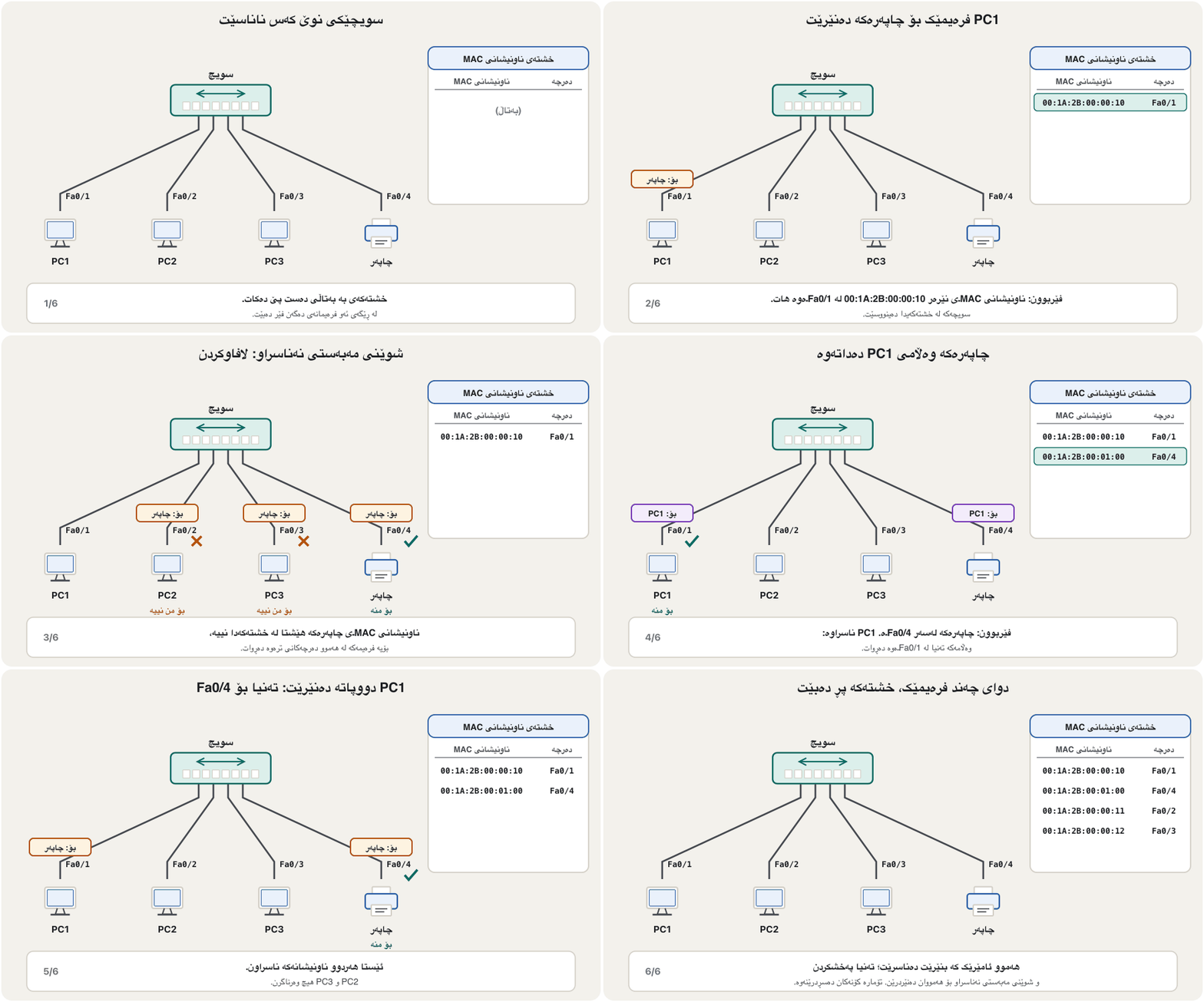
ڕێک وەک ڕوون فێر دەبێت: لە ناونیشانی نێرەری هەموو . پێویست ناکات کەس پێی بڵێت شوێنی مەبەستێک لە کوێیە — ناونیشانی شوێنی مەبەست کاتێک فێر دەبێت کە ئەو ئامێرە خۆی شتێک بنێرێت. نموونەی تاقیگەی CêIT بەدوادا بچە: PC1، PC2، PC3 و لەسەر Fa0/1 تا Fa0/4.
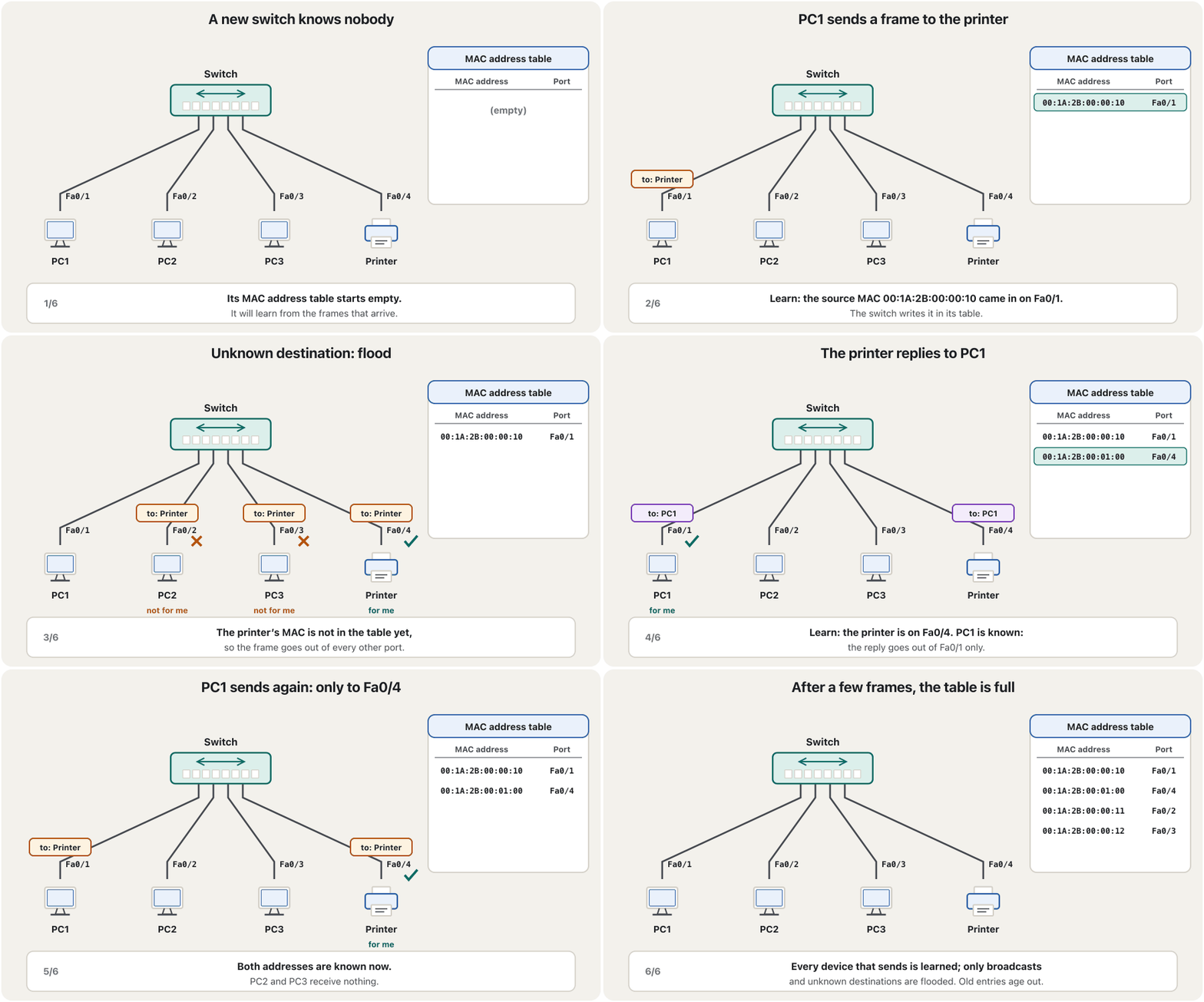
After a few frames the switch rarely floods: only broadcasts and frames for unknown addresses go everywhere. The short IT-course version is How a switch learns where everyone is. Try it in the CêIT network lab: load ‘One network: 3 PCs, a printer and a switch’, select the switch to open its MAC address table, ping the printer from PC1, and watch the table fill.
دوای چەند بە دەگمەن بۆ هەمووان دەنێرێت: تەنیا و ئەو بۆ ناونیشانی نەناسراون بۆ هەموو شوێنێک دەڕۆن. کورتەکەی کۆرسی IT لە سویچ چۆن فێر دەبێت هەمووان لە کوێندایە. لە تاقیگەی ڕایەڵەی CêITدا تاقی بکەرەوە: ‘یەک : ٣ ، و ’ بکەرەوە، هەڵبژێرە بۆ کردنەوەی ، لە PC1ـەوە ping بۆ بکە و سەیری پڕبوونی خشتەکە بکە.
Store-and-forward or cut-through?هەڵگرتن و پێشڕۆکردن یان سویچکردنی کورتبڕ؟
When should a switch start sending a frame out? With store-and-forward, it first receives the whole frame, checks the FCS error code at the end and drops damaged frames — safe, but it must wait for the last byte. With cut-through, it starts as soon as it has read the destination MAC address, the first 6 bytes of the frame — almost no delay, but a damaged frame is passed on and only the receiver drops it. Fragment-free is a middle way: it waits for the first 64 bytes, where damage from a collision would show.
کەی دەبێت دەست بە ناردنی بکات؟ بە ، سەرەتا هەموو وەردەگرێت، کۆدی هەڵەی FCS لە کۆتاییدا دەپشکنێت و تێکچوو فڕێ دەدات — سەلامەتە، بەڵام دەبێت چاوەڕێی دوایین بکات. بە ، هەر کە مەبەستی خوێندەوە دەست پێ دەکات، واتە 6 یەکەمی — دواکەوتنێکی نزیکەی سفر، بەڵام تێکچوو تێدەپەڕێت و تەنیا وەرگرەکە فڕێی دەدات. fragment-free ڕێگایەکی ناوەندە: چاوەڕێی 64 یەکەم دەکات، کە زیانی تێیدا دەردەکەوێت.
How long the switch waits before it can start forwarding, on a 1 Gb/s port.
چەند چاوەڕێ دەکات پێش ئەوەی بتوانێت دەست بە بکات، لەسەر 1 Gb/s.
Most office and school switches store and forward; data-centre switches often cut through to save microseconds. A cut-through switch must buffer the frame anyway when the outgoing port is busy or faster than the incoming one. Routers always store, then forward (Routers store, then forward).
زۆربەی ئۆفیس و قوتابخانە بەکار دەهێنن؛ ناوەندی زۆرجار بەکار دەهێنن بۆ ئەوەی چەند مایکرۆچرکەیەک بپارێزن. کورتبڕیش ناچارە هەڵبگرێت کاتێک دەرچوون سەرقاڵە یان لە هاتن خێراترە. هەمیشە سەرەتا هەڵدەگرن و پاشان دەنێرن (ڕێدۆزەکان هەڵدەگرن، پاشان دەنێرن).
Every port its own lane: full duplexهەر دەرچەیەک ڕێڕەوی خۆی: دوولایەنەی هاوکات
On a switch, each cable joins exactly two devices: a computer and its switch port. Every port is a separate collision domain — the LAN is microsegmented. With separate wire pairs for each direction, the link runs full duplex: it sends and receives at the same time. Collisions cannot happen, so CSMA/CD is switched off, and every port gets the full bandwidth: a gigabit port carries 1 Gb/s in each direction, on every port at once.
لەسەر ، هەر کێبڵێک ڕێک دوو ئامێر پێکەوە دەبەستێت: و . هەر جیایە — بە وردی بەش بەش کراوە. بە جووتە وایەری جیا بۆ هەر ئاڕاستەیەک، بەستەرەکە بە کار دەکات: لە هەمان کاتدا دەنێرێت و وەردەگرێت. ناتوانێت ڕوو بدات، بۆیە دەکوژێنرێتەوە و هەر تەواو وەردەگرێت: گیگابیت بە هەر ئاڕاستەیەک 1 Gb/s دەگوازێتەوە، لەسەر هەموو پێکەوە.
So a modern switch port is full duplex — not ‘half or full’. Half duplex appears only when a port is joined to an old hub, or when one end is set by hand and the other negotiates automatically: a duplex mismatch, which makes the link slow and full of errors.
کەواتە نوێ — نەک ‘نیوە یان تەواو’. تەنیا کاتێک دەردەکەوێت کە بە کۆنەوە ببەسترێت، یان کاتێک لایەکی بە دەست ڕێک بخرێت و لایەکەی تر خۆکارانە ڕێک بکەوێت: ناگونجانی duplex کە بەستەرەکە خاو و پڕ لە هەڵە دەکات.
Hub or switch? Side by sideهەب یان سویچ؟ لە تەنیشت یەک
Here are the two devices side by side, with the facts as they are today (the short IT-course version is Hub or switch?):
ئەمە هەردوو ئامێرەکەیە لە تەنیشت یەک، بە ڕاستییەکانی ئەمڕۆ (کورتەکەی کۆرسی IT: هەب یان سویچ؟):
| Featureتایبەتمەندی | Hub | Switch |
|---|---|---|
| OSI layerچینی | 1, physical1، | 2, data link2، |
| Works withمامەڵە لەگەڵ | electrical signals: bits کارەبایی: | frames (a layer-3 switch also routes packets) ( دەکات) |
| Transmission mode | half duplex | full duplex |
| Collisions | common: one collision domainزۆر: یەک | none on full-duplex ports: one domain per portلەسەر نییە: بۆ هەر یەک پاوان |
| MAC addresses | stores noneهیچ هەڵناگرێت | MAC address table in CAM (content-addressable memory) لە CAMـدا (content-addressable memory) |
| Where a frame goes بۆ کوێ دەچێت | out of every other portلە هەموو ترەوە | only to the destination’s port; floods only unknown and broadcast framesتەنیا بۆ شوێنی مەبەست؛ تەنیا نەناسراو و بۆ هەمووان دەنێرێت |
| Speedخێرایی | 10 or 100 Mb/s, shared (history)10 یان 100 Mb/s، هاوبەش (مێژوو) | 1 Gb/s per desk port in 2026; 2.5–10 Gb/s for Wi-Fi 7 access points; 25–800 Gb/s in data centresلە 2026دا 1 Gb/s بۆ هەر مێز؛ 2.5 تا 10 Gb/s بۆ Wi-Fi 7؛ 25 تا 800 Gb/s لە ناوەندەکانی |
| Securityئاسایش | everybody receives everythingهەمووان هەموو شتێک وەردەگرن | others do not receive your unicast framesئەوانی تر تۆ وەرناگرن |
Bridge or switch? Five rows, checkedپردی ڕایەڵە یان سویچ؟ پێنج ڕیز، پشکنراو
Bridges and switches are often compared in five rows. Here they are, corrected where needed:
و زۆرجار لە پێنج ڕیزدا بەراورد دەکرێن. ئەمە ڕیزەکانن، لە شوێنی پێویستدا ڕاستکراونەتەوە:
| Rowڕیز | Bridge | Switch |
|---|---|---|
| Jobکار | joins two segments into a bigger network; classically two portsدوو دەکاتە گەورەتر؛ بە شێوەی کلاسیکی دوو | joins many devices; every port is its own segmentچەندین ئامێر پێکەوە دەبەستێت؛ هەر خۆیەتی |
| Broadcasts | forwarded out of every portلە هەموو دەنێردرێت | also forwarded out of every port — only routers (and VLANs) stop broadcastsهەروەها لە هەموو دەنێردرێت — تەنیا (و ) ڕادەگرن |
| Filteringفلتەرکردن | by MAC addressبەپێی | by MAC address; filtering by IP needs a layer-3 switch or a routerبەپێی ؛ فلتەرکردن بەپێی IP یان پێویستە |
| Speedخێرایی | slower: early bridges forwarded in softwareخاوتر: سەرەتایی بە دەینارد | wire speed: forwarding in hardware chipsبە خێرایی تەواوی هێڵ: لە پارچە ئەلیکترۆنییەکانی ناو ئامێرەکەدا |
| Costتێچوو | cheaper in its day, being simplerلە سەردەمی خۆیدا هەرزانتر بوو، چونکە سادەتر بوو | depends on features; today even small switches are cheap and stand-alone bridges are rareبەندە بە تایبەتمەندییەکان؛ ئەمڕۆ تەنانەت بچووکەکانیش هەرزانن و سەربەخۆ دەگمەنە |
The broadcast row is the classic trap. A broadcast frame (destination FF-FF-FF-FF-FF-FF) goes out of every port of a bridge and of a switch alike, so a whole switched LAN is one broadcast domain. Neither device joins different IP networks — that is a router’s job (Modems and Routers). Counting the domains is in Layer 2: switches and bridges split collisions, not broadcasts.
ڕیزی داوە کلاسیکییەکەیە. (مەبەست FF-FF-FF-FF-FF-FF) لە هەموو و وەک یەک دەنێردرێت، بۆیە هەموو سویچدار یەک . هیچیان IPـی جیاواز پێکەوە نابەستنەوە — ئەمە کاری (مۆدێمەکان و ڕێدۆزەکان). ژماردنی پاوانەکان لە چینی 2: سویچ و پردی ڕایەڵە پێکدادان دابەش دەکەن، نەک پەخشکردندایە.
Unmanaged, managed and layer-3 switchesسویچەکان: نەبەڕێوەبراو، بەڕێوەبراو و چینی 3
Unmanaged switches — the small boxes in homes and shops — are plug and play: no settings at all. Smart (web-managed) switches have a few settings on a web page. Managed switches can be configured through a command line, a web page or network-management software: VLANs, port security, link aggregation, traffic monitoring and more — the subject of the Routing and Switching course (VLANs, Port security, EtherChannel: many cables, one link). Many switches also power phones, cameras and access points over the cable (PoE).
نەبەڕێوەبراو — سندووقە بچووکەکانی ماڵ و دوکان — هەر بیانبەستیت کار دەکەن: هیچ ڕێکخستنێکیان نییە. زیرەک (بە وێب بەڕێوەدەبرێن) چەند ڕێکخستنێکیان لە پەڕەیەکی وێبدا هەیە. لە ڕێگەی هێڵی فەرمان، پەڕەیەکی وێب یان بەڕێوەبردنی ڕێک دەخرێن: ، ، کۆکردنەوەی بەستەرەکان، چاودێریی هاتوچۆ و زیاتر — بابەتی خولی و (VLAN، ئاسایشی دەرچە، EtherChannel: چەند کێبڵ، یەک بەستەر). زۆرێک لە کارەبا بە کێبڵەکەدا دەدەنە تەلەفۆن، کامێرا و (PoE).
A layer-3 switch (multilayer switch) also reads IP addresses and routes between VLANs at switch speed, so it blurs the line between switch and router (A switch that can also route). Example: a school computer lab in Erbil — 30 student PCs, a teacher PC, a printer and two Wi-Fi access points on one 48-port managed gigabit switch with PoE, joined to the school’s main switch by fibre; VLANs keep students and teachers apart.
(سویچی فرەچین) دەخوێنێتەوە و بە خێرایی لە نێوان دەکات، بۆیە سنووری نێوان و کاڵ دەکاتەوە (سویچێک کە دەتوانێت ڕێدۆزییش بکات). نموونە: تاقیگەی کۆمپیوتەری قوتابخانەیەک لە هەولێر — 30 قوتابی، مامۆستا، و دوو لەسەر یەک 48 گیگابیت بە ، کە بە فایبەر بە سەرەکیی قوتابخانەکەوە بەستراوە؛ قوتابیان و مامۆستایان لە یەک جیا دەکەنەوە.
Common mistakesهەڵە باوەکان
| Mistakeهەڵە | What is trueڕاستییەکە |
|---|---|
| “A switch stores the destination’s MAC address.”« شوێنی مەبەست هەڵدەگرێت.» | It learns the source MAC of every frame and the port it came in on. نێرەری هەموو و ئەو لێیەوە هاتووە فێر دەبێت. |
| “A switch keeps broadcasts inside one segment.”« لە ناو یەک دەهێڵێتەوە.» | Bridges and switches both flood broadcasts to every port; only routers (and VLANs) stop them. و هەردووکیان بۆ هەموو دەنێرن؛ تەنیا (و ) ڕایان دەگرن. |
| “A source-route bridge joins different protocols.”« ڕێگای سەرچاوە جیاواز پێکەوە دەبەستێتەوە.» | It belonged to Token Ring: the sender chose the path. Different LAN types need a translational bridge.هی Token Ring بوو: نێرەر ڕێگاکەی هەڵدەبژارد. جۆری جیاوازی وەرگێڕی پێویستە. |
| “A switch filters by IP address.”« بەپێی فلتەر دەکات.» | A layer-2 switch reads MAC addresses only; IP belongs to layer-3 switches and routers. چینی 2 تەنیا دەخوێنێتەوە؛ IP هی و . |
| “Switch ports are half or full duplex.”« نیوە یان تەواو duplexـن.» | Modern ports are full duplex; half duplex means an old hub or a duplex mismatch. نوێیەکان ؛ واتە کۆن یان ناگونجانی duplex. |
| “Cut-through is always better.”« هەمیشە باشترە.» | It is faster, but it forwards damaged frames; store-and-forward checks the FCS first.خێراترە، بەڵام تێکچوو دەنێرێت؛ سەرەتا FCS دەپشکنێت. |
| “A bridge joins two different IP networks.”« دوو IPـی جیاواز پێکەوە دەبەستێتەوە.» | It joins two segments of one network; routers join different networks.دوو یەک پێکەوە دەبەستێتەوە؛ جیاواز پێکەوە دەبەستنەوە. |
Exercisesڕاهێنانەکان
A bridge joins segment 1 (PC1–PC4, port 1) and segment 2 (PC5–PC8, port 2). Its table is empty. Three frames arrive in this order: PC1 → PC3, PC6 → PC1, PC2 → PC8. For each frame, say what the bridge learns and whether it filters, forwards or floods.
1 (ئامێرەکانی PC1 تا PC4، لەسەر 1) و 2 (ئامێرەکانی PC5 تا PC8، لەسەر 2) پێکەوە دەبەستێتەوە. خشتەکەی بەتاڵە. سێ بەم ڕیزبەندییە دەگەن: لە PC1ـەوە بۆ PC3، لە PC6ـەوە بۆ PC1 و لە PC2ـەوە بۆ PC8. بۆ هەر بڵێ فێری چی دەبێت و فلتەر دەکات، دەپەڕێنێتەوە یان بۆ هەمووان دەنێرێت.
Show answerوەڵامەکە پیشان بدە
| Frame | Learnsفێر دەبێت | Decisionبڕیار |
|---|---|---|
| PC1 → PC3 | PC1 is behind port 1PC1 لە پشت 1ـە | PC3 unknown → flood (out of port 2, the only other port)PC3 نەناسراوە ← (لە 2ـەوە، تاکە تر) |
| PC6 → PC1 | PC6 is behind port 2PC6 لە پشت 2ـە | PC1 known on port 1 → forward out of port 1PC1 لەسەر 1 ناسراوە ← لە 1ـەوە |
| PC2 → PC8 | PC2 is behind port 1PC2 لە پشت 1ـە | PC8 unknown → flood (out of port 2)PC8 نەناسراوە ← (لە 2ـەوە) |
With only two ports, flooding means sending the frame out of the other port. The bridge will learn PC3 and PC8 as soon as they send something.
بە تەنیا دوو ، واتە ناردنی لە ترەوە. هەر کە PC3 و PC8 شتێک بنێرن فێریان دەبێت.
At 100 Mb/s, how long must a store-and-forward switch wait for a 1,518-byte frame before it can start forwarding? How long does a cut-through switch wait for the 6-byte destination address?
لە 100 Mb/sـدا، بە دەبێت چەند چاوەڕێی 1,518 بکات پێش ئەوەی بتوانێت دەست بە بکات؟ بە چەند چاوەڕێی ناونیشانی مەبەستی 6 دەکات؟
Show answerوەڵامەکە پیشان بدە
Ten times slower links mean ten times longer waits; the gap between the two methods grows with the frame size.
بەستەری دە هێندە خاوتر واتە چاوەڕوانیی دە هێندە درێژتر؛ جیاوازیی نێوان دوو ڕێگاکە لەگەڵ قەبارەی گەورەتر دەبێت.
In this small lab topology, PC0 is joined to Switch0 with a straight-through cable, and Laptop0 to Router0 with a crossover cable. Why is a straight-through cable right for PC to switch? And why is the laptop-to-router link shown with red dots at first?
لەم تۆپۆلۆجییە بچووکەی تاقیگەدا، PC0 بە بە Switch0ـەوە بەستراوە و Laptop0 بە بە Router0ـەوە. بۆچی بۆ بەستنی بە دروستە؟ و بۆچی بەستەری نێوان و سەرەتا بە خاڵی سوور پیشان دەدرێت؟
Show answerوەڵامەکە پیشان بدە
A PC and a switch port send on opposite pairs, so a straight-through cable joins them; PC to router is the classic crossover case, although Auto-MDI-X ports accept either (Which cable goes where?). The red dots mean link down: a router’s interfaces stay switched off until someone turns them on — in Packet Tracer with the Port Status: On box on the router’s Config tab, or with a command taught in Your First Router — while switch ports are on by default.
و لەسەر جووتی پێچەوانە دەنێرن، بۆیە پێکیانەوە دەبەستێت؛ بەستنی بە حاڵەتە کلاسیکییەکەی ، هەرچەندە هەردووکیان قبووڵ دەکەن (کام کێبڵ بۆ کوێ دەچێت؟). خاڵە سوورەکان واتە بەستەر کار ناکات: کوژاوە دەمێننەوە تا کەسێک هەڵیان دەکات — لە Packet Tracerـدا بە خانەی Port Status: On لە تابی Configـی ، یان بە فەرمانێک کە لە یەکەم ڕێدۆزی تۆدا فێری دەبیت — بەڵام بە شێوەی بنەڕەتی هەڵکراون.
Why is a transparent bridge called ‘transparent’?بۆچی پردی ڕایەڵەی ڕوون پێی دەگوترێت ‘ڕوون’؟
Because the computers do not know it is there: frames pass as if the two PCs were directly connected.
چونکە نازانن لەوێیە: وا تێدەپەڕن وەک ئەوەی دوو ڕاستەوخۆ پێکەوە بەسترابن.
What four things does a switch do with every frame?سویچ چ چوار کارێک بە هەموو فرەیمێک دەکات؟
It learns the source; then it filters, forwards or floods, depending on the destination.
نێرەرەکە فێر دەبێت؛ پاشان بەپێی شوێنی مەبەست فلتەر دەکات، دەپەڕێنێتەوە یان بۆ هەمووان دەنێرێت.
Why do people call a switch a ‘smart hub’?بۆچی خەڵک بە سویچ دەڵێن ‘هەبی زیرەک’؟
It looks like a hub, but it learns MAC addresses and sends each frame only where it must go.
لە دەچێت، بەڵام فێری دەبێت و هەر تەنیا بۆ ئەو شوێنە دەنێرێت کە دەبێت بچێت.
Name two kinds of bridge you can still meet today.دوو جۆری پردی ڕایەڵە ناو ببە کە ئەمڕۆش دەیانبینیت.
Wireless bridges between buildings, and translational bridges such as Wi-Fi access points; operating systems and virtual machines also contain software bridges.
لە نێوان بیناکاندا و وەرگێڕ وەک ؛ هەروەها لە ناو و وەک هەن.
Summaryپوختە
- A bridge (layer 2) joins two segments of one LAN. Its MAC address table says which addresses are behind which port: frames for the same side are filtered, frames for the other side are forwarded, unknown and broadcast frames are flooded.
- A transparent bridge learns from source addresses (entries age out after about 300 s); IEEE 802.1D, now 802.1Q. Other kinds: simple, source-route (Token Ring, history), translational (e.g. a Wi-Fi access point), remote, wireless.
- A switch is a multiport bridge — a ‘hub that learns’. Its name comes from railway points: each frame is set onto one port. Store-and-forward checks the FCS first; cut-through starts after the destination MAC.
- Every switch port is its own collision domain and runs full duplex at full bandwidth: no collisions. But the whole switched LAN is one broadcast domain — only routers and VLANs stop broadcasts.
- Unmanaged switches are plug and play; managed switches add VLANs, port security and monitoring; layer-3 switches also route between VLANs.
- (چینی 2) دوو یەک پێکەوە دەبەستێتەوە. دەڵێت کام ناونیشان لە پشت کام : هەمان لا فلتەر دەکرێت، هی لای تر دەپەڕێنرێتەوە و نەناسراو و بۆ هەمووان دەنێردرێن.
- ڕوون لە ناونیشانی نێرەرەکانەوە فێر دەبێت (تۆمارەکان دوای نزیکەی 300 چرکە دەسڕدرێنەوە)؛ IEEE 802.1D، ئێستا 802.1Q. جۆرەکانی تر: سادە، ڕێگای سەرچاوە (Token Ring، مێژوو)، وەرگێڕ (وەک )، دوورەدەست، .
- فرەدەرچەیە — ‘ کە فێر دەبێت’. ناوەکەی لە ئاڕاستەگۆڕی ئاسنەڕێوە هاتووە: هەر دەخرێتە سەر یەک . سەرەتا FCS دەپشکنێت؛ دوای مەبەست دەست پێ دەکات.
- هەر خۆیەتی و بە و تەواو کار دەکات: نییە. بەڵام هەموو سویچدار یەک — تەنیا و ڕادەگرن.
- نەبەڕێوەبراو هەر بیبەستیت کار دەکات؛ ، و چاودێری زیاد دەکەن؛ لە نێوان دەکەن.
Lesson complete!وانەکە تەواو بوو!
Well done. Review the key terms, then go on to the next lesson.دەستخۆش. سەیرێکی زاراوە سەرەکییەکان بکەرەوە، پاشان بڕۆ بۆ وانەی داهاتوو.
Key termsزاراوە سەرەکییەکان
Modems and Routersمۆدێمەکان و ڕێدۆزەکان
Related lecturesوانە پەیوەندیدارەکان
- Modems and Routersمۆدێمەکان و ڕێدۆزەکان
- Collision Domains and Broadcast Domainsپاوانەکانی پێکدادان و پاوانەکانی پەخش
- MAC Addresses and Ethernet Framesناونیشانەکانی MAC و فرەیمەکانی Ethernet
- Ethernet: From 10Base-2 to 800 GigabitEthernet: لە 10Base-2ـەوە بۆ 800 گیگابیت
- Physical and Logical Topologiesتۆپۆلۆجیی فیزیکی و تۆپۆلۆجیی لۆجیکی
- VLANs: Many Networks on One SwitchVLAN: چەند ڕایەڵەیەک لەسەر یەک سویچ
- Inter-VLAN Routing with a Layer-3 Switchڕێدۆزیی نێوان VLANـەکان بە سویچی چینی 3
- Switch Port Securityئاسایشی دەرچەی سویچ
- How Fast Is a Network? Delay, Bandwidth and Throughputڕایەڵە چەند خێرایە؟ دواکەوتن، پانایی باند و ڕێژەی تێپەڕین
- Network Hardware: NICs, Switches and Routersڕەقەواڵەی ڕایەڵە: کارتی ڕایەڵە، سویچ و ڕێدۆز
References and further readingسەرچاوەکان و خوێندنەوەی زیاتر
- Wikipedia: Network bridge (transparent bridging invented at DEC in 1983; learning, filtering, forwarding, flooding; simple and multiport bridging; forwarding methods)
- IEEE SA: IEEE 802.1D-2004, MAC Bridges — superseded by IEEE 802.1Q-2014
- Wikipedia: IEEE 802.1D (versions 1990, 1998, 2004; functions incorporated into 802.1Q-2014)
- Cisco: Catalyst 2960 Switch Software Configuration Guide — managing the MAC address table (learning source addresses, flooding unknown destinations, default aging 300 s)
- Wikipedia: Cut-through switching (vs store-and-forward; fragment-free; buffering when the output is busy or faster; cites the Cisco white paper)
- Wikipedia: Network switch (Kalpana EtherSwitch 1989–1990; microsegmentation; unmanaged, smart and managed switches; layer-3 switches)
- Wikipedia: Content-addressable memory (MAC address tables in switches)
- Wikipedia: Railroad switch (turnout, points)
- B. A. Forouzan, Data Communications and Networking with TCP/IP Protocol Suite, 6th ed., McGraw Hill (ch. 6, Connecting Devices and Virtual LANs)
This lecture is a first edition. The Kurdish text and terminology are waiting for review by Kurdish IT teachers.ئەم وانەیە چاپی یەکەمە. دەقە کوردییەکە و زاراوەکانی چاوەڕێی پێداچوونەوەی مامۆستایانی کوردی بواری IT ن.