Chapterبەش 5 · Lectureوانە 5.4
Subnet Masks: Binary, Dotted Decimal and Prefixماسکی ژێرڕایەڵە: دووانی، شێوەی دەییخاڵدار و پێشگر
A subnet mask is a run of 1s over the network part of an address, then 0s over the host part. Learn the rule that makes a number a mask, the nine values a mask octet can have, the three ways to write a mask (binary, dotted decimal and prefix length) and how to convert between them, then use the bitwise AND to find a network ID and to decide whether another computer is on the same network.
ڕیزێک 1ـە لە سەر ناونیشانێک، پاشان 0 لە سەر . فێری ئەو یاسایە ببە کە ژمارەیەک دەکات بە ، ئەو نۆ بەهایەی دەتوانێت هەیبێت، سێ شێوەی نووسینی (، و ) و گۆڕین لە نێوانیاندا، پاشان AND بەکار بهێنە بۆ دۆزینەوەی و بۆ ئەوەی بزانیت تر لەسەر هەمان یان نا.
What you will learnچی فێر دەبیت
- Explain what a subnet mask does and why it is called a mask.
- Tell valid masks from invalid ones, using the rule and the nine octet values.
- Convert a mask between binary, dotted decimal and prefix length.
- Find a network ID with the bitwise AND and decide whether two addresses are on the same network.
- ڕوونی بکەیتەوە چی دەکات و بۆچی بە ئینگلیزی پێی دەگوترێت mask.
- دروست لە هەڵە جیا بکەیتەوە، بە یاساکە و نۆ بەهاکەی .
- لە نێوان ، و بگۆڕیت.
- بە AND بدۆزیتەوە و بزانیت دوو ناونیشان لەسەر هەمان یان نا.
What a subnet mask doesماسکی ژێرڕایەڵە چی دەکات
You met the subnet mask in IP Addresses and MAC Addresses: it tells a device which part of an IP address is the network and which part is the host. Like an IPv4 address it has 32 bits in four octets, but its pattern is special: 1s under the network part, then 0s under the host part. A subnet is a smaller network made by dividing a bigger one; its mask shows where the network part ends (Subnetting Step by Step).
پێشتر لە ناونیشانەکانی IP و ناونیشانەکانی MAC ناسیوە: بە ئامێرێک دەڵێت کام بەشی و کام بەش . وەک ناونیشانێکی 32 هەیە لە چوار ، بەڵام شێوەکەی تایبەتە: 1 لە ژێر ، پاشان 0 لە ژێر . بچووکترە کە بە دابەشکردنی گەورەتر دروست دەبێت؛ نیشان دەدات لە کوێ کۆتایی دێت (ژێرڕایەڵەسازی هەنگاو بە هەنگاو).
Example: the mask 255.255.255.0 is 11111111.11111111.11111111.00000000 in binary — 24 ones, then 8 zeros. So the first 24 bits of the address are the network part, and you can write the address and its mask together as 192.168.1.1/24. In short, the mask separates the network part from the host part, so that a device knows which addresses are on its own network.
نموونە: 255.255.255.0 بە دەبێتە 11111111.11111111.11111111.00000000 — 24 یەک، پاشان 8 سفر. کەواتە 24 یەکەمی ناونیشانەکە و دەتوانیت ناونیشان و پێکەوە وەک 192.168.1.1/24 بنووسیت. بە کورتی، لە جیا دەکاتەوە، بۆ ئەوەی ئامێرەکە بزانێت کام ناونیشانانە لەسەر خۆین.
Why is it called a mask?بۆچی بە ئینگلیزی پێی دەگوترێت mask؟
In computing, a mask is a pattern of bits that covers some bits and lets others through — like a stencil or masking tape when you paint. Where the subnet mask has a 1, the address bit shows through; where it has a 0, the bit is covered and becomes 0. What is left is the network part: the network ID.
لە کۆمپیوتەردا mask شێوەیەکی کە هەندێک دادەپۆشێت و هەندێکی تر تێدەپەڕێنێت — وەک قاڵبێکی ڕەنگکردن یان شریتی چەسپاو کاتێک ڕەنگ دەکەیت. لە شوێنی 1ـی ، ناونیشانەکە دەردەکەوێت؛ لە شوێنی 0، دادەپۆشرێت و دەبێتە 0. ئەوەی دەمێنێتەوە : .
Put a mask over a face and it hides some parts and shows others. Put the subnet mask over an address and the host part is hidden, while the network's real “face” — its network ID — stays visible. So the mask works as a separator: it separates the network part from the host part.
دەمامکێک بخە سەر ڕوخسارێک: هەندێک بەش دەشارێتەوە و هەندێکی تر نیشان دەدات. بخە سەر ناونیشانێک: دەشاردرێتەوە و «ڕوخساری» ڕاستەقینەی — — دیار دەمێنێت. بۆیە وەک لێکجیاکەرەوە کار دەکات: لە جیا دەکاتەوە.
Where the analogy stops workingسنووری ئەم نموونەیە
The idiom “mask off” (showing your true character) is only a memory aid. The technical word comes from bit masks: patterns used with the AND operation.
دەستەواژەی mask off (نیشاندانی ڕاستەقینەی خۆت) تەنیا یارمەتیدەرێکی بیرهێنانەوەیە. وشە تەکنیکییەکە لە ماسکی هاتووە: شێوەگەلێک کە لەگەڵ کاری AND بەکار دێن.
The rule: ones first, then zerosیاساکە: سەرەتا 1ـەکان، پاشان 0ـەکان
Not every 32-bit number is a mask. The rules: 1s and 0s must not be mixed; if there are 1s, they are on the left; if there are 0s, they are on the right. In other words, a mask is one contiguous run of 1s followed by 0s — RFC 4632 says the mask “must be left contiguous”. So 10101010 01010101 11110000 00001111 is not a mask, and neither is 00000000 00000000 00000000 11111111, whose 1s are on the right. 11111111 00000000 00000000 00000000 and 11111111 11111111 11111111 00000000 are valid masks.
هەموو ژمارەیەکی 32 نییە. یاساکان: 1 و 0 نابێت تێکەڵ بن؛ ئەگەر 1 هەبێت، لە لای چەپن؛ ئەگەر 0 هەبێت، لە لای ڕاستن. بە واتایەکی تر، یەک ڕیزی بەتەنیشت یەکەوەی 1ـە کە 0 بە دوایدا دێت — RFC 4632 دەڵێت دەبێت لە چەپەوە بەتەنیشت یەکەوە بێت. بۆیە 10101010 01010101 11110000 00001111 نییە، 00000000 00000000 00000000 11111111ـیش نییە، چونکە 1ـەکانی لە لای ڕاستن. 11111111 00000000 00000000 00000000 و 11111111 11111111 11111111 00000000 دروستن.
Can 255.255.255.32 be a mask? No: 32 is 00100000, and a 1 after 0s breaks the run. A quick test: every octet must be one of the nine values on the next screen, and after the first octet that is not 255, every octet must be 0.
ئایا 255.255.255.32 دەتوانێت بێت؟ نەخێر: 32 دەبێتە 00100000 و 1ـێک لە دوای 0ـەکان ڕیزەکە دەپچڕێنێت. تاقیکردنەوەیەکی خێرا: هەموو دەبێت یەکێک بێت لە نۆ بەهاکەی پەڕەی داهاتوو و لە دوای یەکەم کە 255 نەبێت، هەموو تر دەبێت 0 بن.
Only nine values per octetتەنیا نۆ بەها بۆ هەر هەشتەیەک
Because the 1s must come first, a mask octet can only take nine values. Start with 00000000 = 0 and add one 1 at a time from the left: each new 1 adds the next place value — 128, then 64, 32, 16, 8, 4, 2 and 1 (binary place values). So the nine values are 0, 128, 192, 224, 240, 248, 252, 254 and 255. Learn them by heart: they make every conversion fast.
چونکە دەبێت 1ـەکان یەکەم بن، تەنیا دەتوانێت نۆ بەها وەربگرێت. لە 00000000 = 0 دەست پێ بکە و هەر جارە یەک 1 لە چەپەوە زیاد بکە: هەر 1ـێکی نوێ دواتر زیاد دەکات — 128، پاشان 64، 32، 16، 8، 4، 2 و 1 (بەها خانەییەکانی دووانی). کەواتە نۆ بەهاکە بریتین لە 0، 128، 192، 224، 240، 248، 252، 254 و 255. لەبەریان بکە: هەموو گۆڕینێک خێرا دەکەن.
Three ways to write a maskسێ شێوەی نووسینی ماسکی ژێرڕایەڵە
The same mask can be written in three formats. Binary: 32 bits, such as 11111111.11111111.11110000.00000000. Dotted decimal: four decimal numbers, such as 255.255.240.0 — the form you type on a PC. Prefix: a slash and the number of 1s, such as /20 — the form that routers, Packet Tracer and CIDR addresses use (10.0.0.0/8, 192.168.1.0/24). /8, /16 and /24 are the old class masks, but any value from /0 to /32 is possible: /5 is 248.0.0.0 and /20 is 255.255.240.0.
هەمان بە سێ شێوە دەنووسرێت. : 32 ، وەک 11111111.11111111.11110000.00000000. : چوار ژمارەی ، وەک 255.255.240.0 — ئەو شێوەیەی لەسەر دەینووسیت. پێشگر: هێڵێکی لار و ژمارەی 1ـەکان، وەک /20 — ئەو شێوەیەی ، Packet Tracer و ناونیشانەکانی بەکاری دەهێنن (10.0.0.0/8، 192.168.1.0/24). /8، /16 و /24 بنەڕەتیی پۆلە کۆنەکانن، بەڵام هەر بەهایەک لە /0 تا /32 دەگونجێت: /5 دەبێتە 248.0.0.0 و /20 دەبێتە 255.255.240.0.
Why prefix? The network part is at the beginning — the front — of the address, and the number tells how many bits that front part has. So the number after the slash is the prefix length. It is never a “suffix”: the suffix would be the host part at the end.
بۆچی «پێشگر»؟ چونکە لە سەرەتای ناونیشانەکەدایە و ژمارەکە دەڵێت ئەو بەشەی پێشەوە چەند . بۆیە ئەو ژمارەیەی دوای هێڵە لارەکە دێت . هەرگیز «پاشگر» نییە: پاشگر دەبوو کە لە کۆتاییدایە.
Converting step by stepگۆڕین هەنگاو بە هەنگاو
There are four conversions, and the nine values do most of the work:
چوار جۆر گۆڕین هەیە و نۆ بەهاکە زۆربەی کارەکە دەکەن:
- Binary → prefixدووانی ← پێشگر
Count the 1s and write the total after a slash:
11111111 11111111 11000000 00000000→ 8 + 8 + 2 = /18.1ـەکان بژمێرە و کۆکەیان لە دوای هێڵێکی لار بنووسە:
11111111 11111111 11000000 00000000← ، واتە/18. - Prefix → binaryپێشگر ← دووانی
Write P ones, then 0s until there are 32 bits: /18 → eighteen 1s, then fourteen 0s.
P یەک بنووسە، پاشان 0 تا 32 تەواو دەبێت:
/18← هەژدە 1، پاشان چواردە 0. - Binary ↔ dotted decimalدووانی و شێوەی دەییخاڵدار
Cut the bits into four octets and read each one with the nine values: 11000000 = 192, so the mask above is 255.255.192.0. Backwards, write each number as its 8 bits.
بکە بە چوار و هەریەکەیان بە نۆ بەهاکە بخوێنەوە: 11000000 = 192، بۆیە سەرەوە دەبێتە 255.255.192.0. بە پێچەوانەوە، هەر ژمارەیەک بە 8 بنووسە.
- Dotted decimal ↔ prefixشێوەی دەییخاڵدار و پێشگر
Add the 1s of each octet: 255.248.0.0 → 8 + 5 + 0 + 0 = /13. Backwards, split the prefix into octets: /18 = 8 + 8 + 2 + 0 → 255.255.192.0.
1ـەکانی هەر کۆ بکەرەوە: 255.248.0.0 ← ، واتە
/13. بە پێچەوانەوە، پێشگرەکە بەسەر دابەش بکە: ← 255.255.192.0.
Converting step by stepگۆڕین هەنگاو بە هەنگاو
Worked conversions: /18, /28 and /13نموونەی گۆڕین: /18، /28 و /13
| Binary | Count the 1sژماردنی 1ـەکان | Prefixپێشگر | Dotted decimal |
|---|---|---|---|
11111111 11111111 11000000 00000000 | 8 + 8 + 2 | /18 | 255.255.192.0 |
11111111 11111111 11111111 11110000 | 8 + 8 + 8 + 4 | /28 | 255.255.255.240 |
11111111 11111000 00000000 00000000 | 8 + 5 | /13 | 255.248.0.0 |
Check yourself in each row: the binary has as many 1s as the prefix says, and every decimal number is one of the nine values. Backwards, /13 means thirteen 1s and nineteen 0s; /28 means twenty-eight 1s and four 0s.
لە هەر ڕیزێکدا خۆت بپشکنە: ئەوەندە 1ـی تێدایە کە پێشگرەکە دەڵێت و هەموو ژمارەیەکی یەکێکە لە نۆ بەهاکە. بە پێچەوانەوە، /13 واتە سێزدە 1 و نۆزدە 0؛ /28 واتە بیست و هەشت 1 و چوار 0.
AND: how a computer finds the network IDAND: کۆمپیوتەر چۆن ناسەڕایەڵە دەدۆزێتەوە
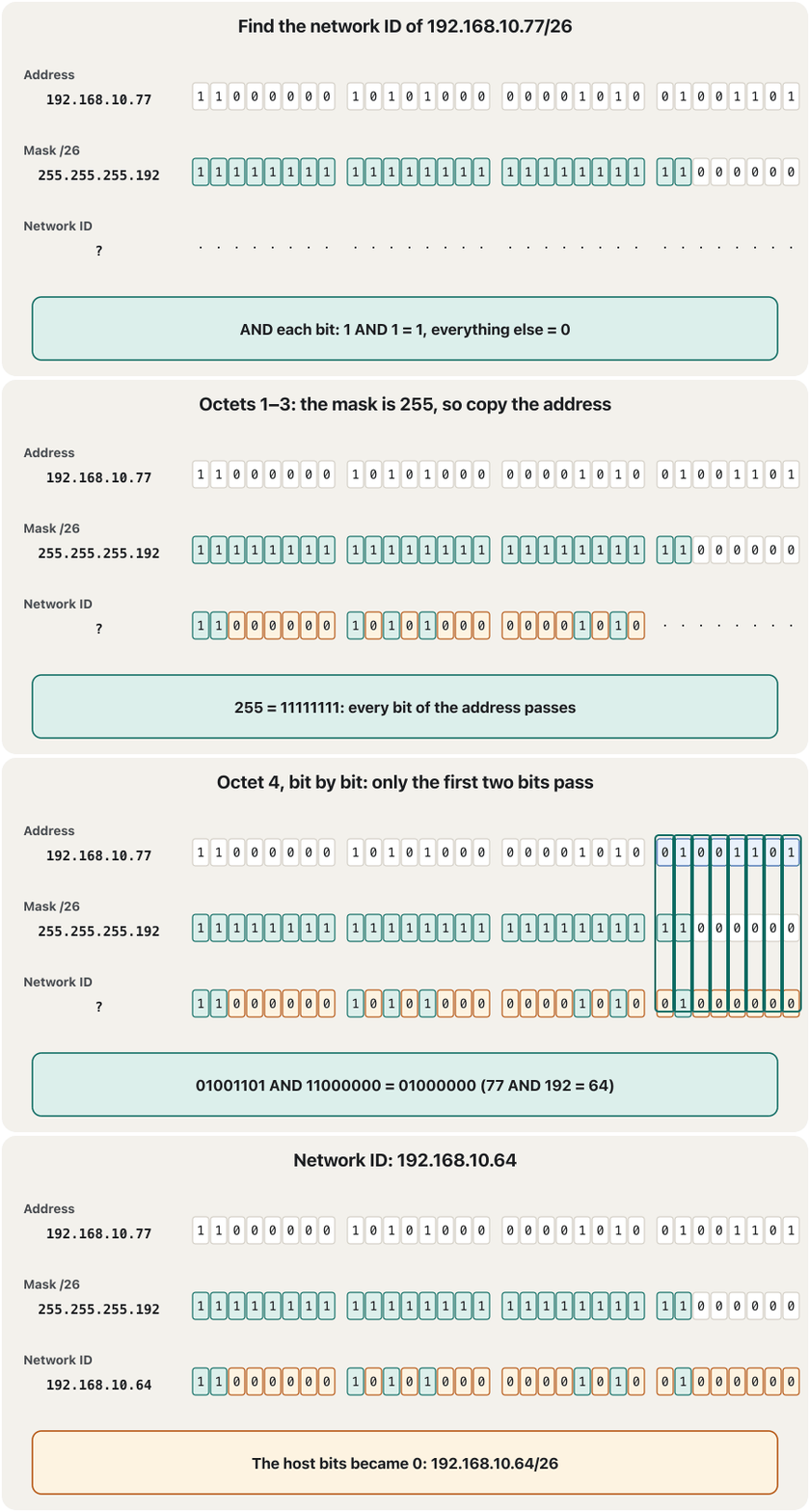
How does a computer use the mask? It does a bitwise AND: it puts the address and the mask one under the other and compares the bits in pairs. 1 AND 1 = 1; every other pair gives 0 — the same rule as an AND gate. The result is the network ID: the network bits stay and the host bits become 0.
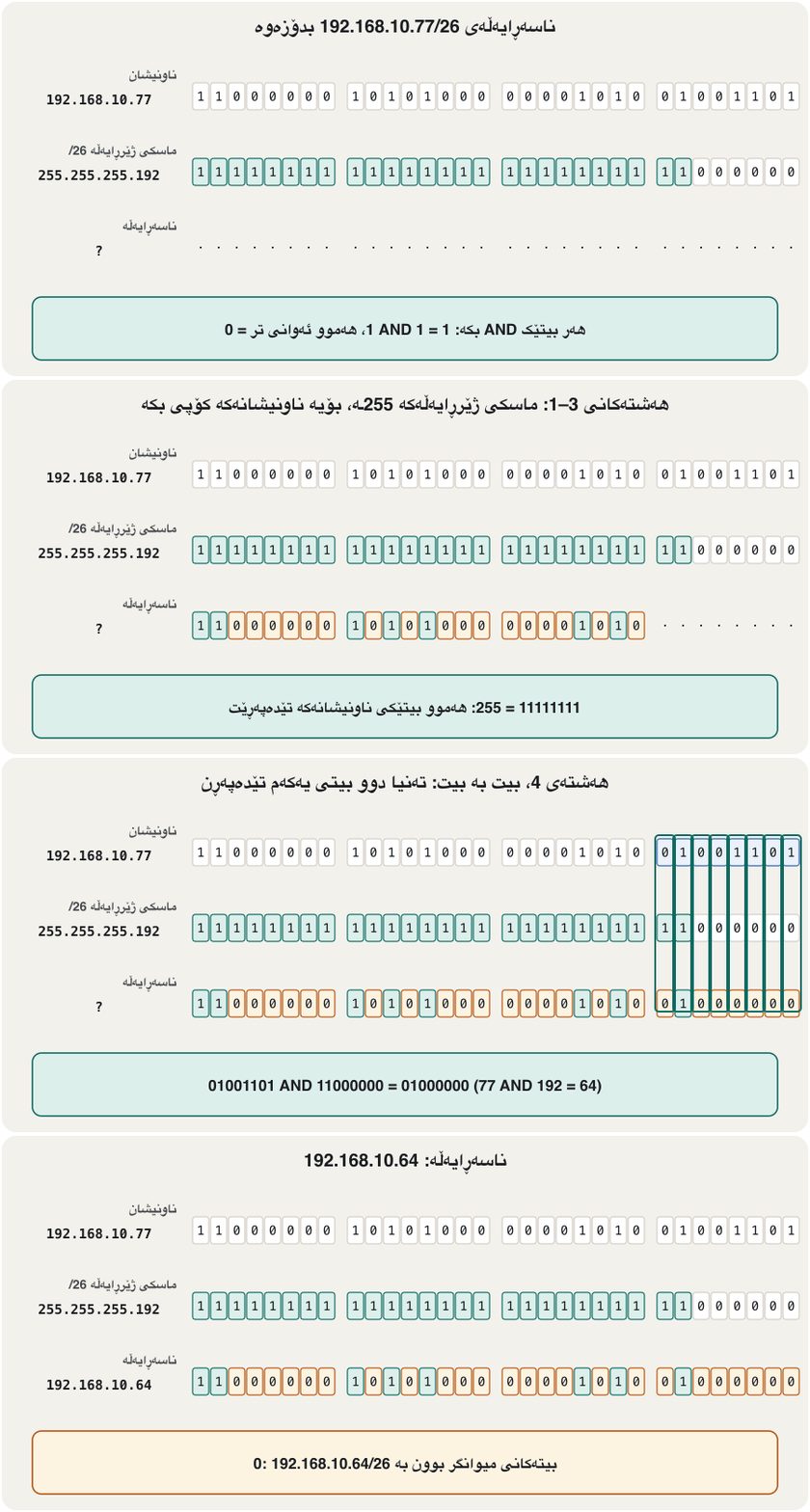
چۆن بەکار دەهێنێت؟ کاری AND لە سەر ئەنجام دەدات: ناونیشان و لە ژێر یەکتر دادەنێت و جووت جووت بەراورد دەکات. 1 AND 1 = 1؛ هەموو جووتەکانی تر 0 دەدەن — هەمان یاسای گەیتی AND. ئەنجامەکە : دەمێننەوە و دەبن بە 0.
A shortcut by octet: where the mask is 255, copy the address octet; where it is 0, write 0; only an octet with another value needs the bits. For 192.168.10.77/26 the mask is 255.255.255.192, so only the last octet needs work: 77 AND 192 = 64. The network ID is 192.168.10.64. The same check tells you whether two PCs joined by one cable can talk (Same network, same mask).
ڕێگەیەکی کورت بە : لە شوێنی 255ـی ، ناونیشانەکە کۆپی بکە؛ لە شوێنی 0، 0 بنووسە؛ تەنیا ئەو بەهایەکی تری هەیە پێویستی بە هەیە. بۆ 192.168.10.77/26، 255.255.255.192ـە، بۆیە تەنیا دوایین کاری دەوێت: . 192.168.10.64ـە. هەمان پشکنین پێت دەڵێت ئایا دوو کە بە یەک کێبڵ بەستراون دەتوانن قسە لەگەڵ یەکتر بکەن (هەمان ڕایەڵە، هەمان ماسک: دوو ناونیشانەکە بپشکنە).
The last octet, bit by bit: only where both bits are 1 does the result have a 1.
دوایین ، بە : تەنیا لە شوێنێک کە هەردوو 1ـن، ئەنجامەکە 1ـە.
Why we need the mask: same network or not?بۆچی پێویستمان بە ماسکی ژێرڕایەڵە هەیە: هەمان ڕایەڵە یان نا؟
Take a small LAN: computer A (10.1.151.2/24) and server B (10.1.151.3/24) on one switch, a router at 10.1.151.1 as the default gateway, and computer C (203.0.113.23) somewhere on the Internet. When A sends something, it must decide: is the receiver on my own network, or must the packet go to the gateway? The mask answers.
وەربگرە: A (10.1.151.2/24) و B (10.1.151.3/24) لەسەر یەک ، لە 10.1.151.1 وەک و C (203.0.113.23) لە شوێنێکی . کاتێک A شتێک دەنێرێت، دەبێت بڕیار بدات: ئایا وەرگرەکە لەسەر خۆمە، یان دەبێت بچێت بۆ ؟ وەڵام دەداتەوە.
A ANDs its own address with its own mask: 10.1.151.0. Then it ANDs the receiver's address with the same mask — its own. For B the result is also 10.1.151.0: the same network, so A delivers directly (it finds B's MAC address with ARP). For C the result is 203.0.113.0: different, so A sends the packet to its default gateway, 10.1.151.1, and the router takes it from there (the sender’s decision).
A ناونیشانی خۆی بە خۆی AND دەکات: 10.1.151.0. پاشان ناونیشانی وەرگرەکە بە هەمان — هی خۆی — AND دەکات. بۆ B ئەنجامەکە دیسان 10.1.151.0ـە: هەمان ، بۆیە A ڕاستەوخۆ دەیگەیەنێت ( B بە ARP دەدۆزێتەوە). بۆ C ئەنجامەکە 203.0.113.0ـە: جیاوازە، بۆیە A بۆ ، 10.1.151.1، دەنێرێت و لەوێوە دەیبات (بڕیاری نێرەر).
How a computer uses its mask to decide whether another address is on its own network or must go through the default gateway.
چۆن بە بڕیار دەدات کە ناونیشانێکی تر لەسەر خۆیەتی یان دەبێت بە بڕوات.
Watch from 3:41: why the mask is needed, and how computer A tells a local address from a remote one.
لە 3:41ـەوە سەیر بکە: بۆچی پێویستە و A چۆن ناونیشانێکی ناوخۆیی لە ناونیشانێکی دوور جیا دەکاتەوە.
Why we need the mask: same network or not?بۆچی پێویستمان بە ماسکی ژێرڕایەڵە هەیە: هەمان ڕایەڵە یان نا؟
Practice: same network or not?ڕاهێنان: هەمان ڕایەڵە یان نا؟
| Addressesناونیشانەکان | Mask | Network IDs | Same network?هەمان ؟ |
|---|---|---|---|
| 192.168.1.100 · 192.168.1.130 | /26 | 192.168.1.64 · 192.168.1.128 | Noنەخێر |
| 192.168.1.100 · 192.168.1.30 | /25 | 192.168.1.0 · 192.168.1.0 | Yesبەڵێ |
| 10.1.151.2 · 10.1.152.2 | /24 | 10.1.151.0 · 10.1.152.0 | Noنەخێر |
| 10.1.151.2 · 10.1.152.2 | /16 | 10.1.0.0 · 10.1.0.0 | Yesبەڵێ |
| 172.16.45.200 · 172.16.47.9 | /20 | 172.16.32.0 · 172.16.32.0 | Yesبەڵێ |
| 172.16.45.200 · 172.16.48.9 | /20 | 172.16.32.0 · 172.16.48.0 | Noنەخێر |
The same two addresses can be on one network with one mask and on two networks with another: the mask, not the address alone, decides.
هەمان دوو ناونیشان دەتوانن بە یەک لە یەک بن و بە تر لە دوو : بڕیار دەدات، نەک تەنیا ناونیشانەکە.
Masks in Packet Tracerماسکی ژێرڕایەڵە لە Packet Tracerـدا
In Packet Tracer you type a PC's address and mask in dotted decimal (Desktop → IP Configuration: 10.1.151.2 and 255.255.255.0). When you rest the pointer on the PC, the tooltip shows the address with its prefix: 10.1.151.2/24. Router commands also print prefixes. So you need both formats, and fast conversion between them. You type them yourself in your first Packet Tracer network.
لە Packet Tracerـدا ناونیشان و PCـێک بە دەنووسیت (تابی Desktop، پاشان IP Configuration: 10.1.151.2 و 255.255.255.0). کاتێک دەخەیتە سەر PCـەکە، پەنجەرە بچووکەکە ناونیشانەکە لەگەڵ پێشگرەکەی نیشان دەدات: 10.1.151.2/24. فەرمانەکانی پێشگر چاپ دەکەن. بۆیە پێویستت بە هەردوو شێوەکە و گۆڕینی خێرا لە نێوانیاندا هەیە. لە یەکەم ڕایەڵەی Packet Tracerـدا خۆت دەیاننووسیت.
Common mistakesهەڵە باوەکان
| Mistakeهەڵە | What is trueڕاستییەکە |
|---|---|
| 255.255.255.32 is a mask.255.255.255.32 . | 32 = 00100000: a 1 after 0s. A mask is 1s, then 0s.32 = 00100000: 1ـێک لە دوای 0. سەرەتا 1ـە، پاشان 0. |
| 00000000 00000000 00000000 11111111 is a mask.00000000 00000000 00000000 11111111 . | Its 1s are on the right; the 1s must start at the left.1ـەکانی لە لای ڕاستن؛ دەبێت 1ـەکان لە چەپەوە دەست پێ بکەن. |
/24 means 24 hosts./24 واتە 24 . | 24 network bits; the 8 host bits give 254 hosts.24 ؛ 8 254 دەدەن. |
| A mask octet can be any number from 0 to 255. دەتوانێت هەر ژمارەیەک بێت لە 0 تا 255. | Only 0, 128, 192, 224, 240, 248, 252, 254 or 255.تەنیا 0، 128، 192، 224، 240، 248، 252، 254 یان 255. |
| AND means adding the two numbers.AND واتە کۆکردنەوەی دوو ژمارەکە. | AND compares bit pairs: only 1 AND 1 gives 1.AND جووت جووت بەراورد دەکات: تەنیا 1 AND 1 دەبێتە 1. |
| Use the receiver's mask on the receiver's address. وەرگر لە سەر ناونیشانی وەرگر بەکار بهێنە. | The sender uses its own mask on both addresses.نێرەر خۆی لە سەر هەردوو ناونیشانەکە بەکار دەهێنێت. |
| The number after the slash is a “suffix”.ئەو ژمارەیەی دوای هێڵە لارەکە «پاشگر»ە. | It is the prefix length: the number of network bits.: ژمارەی . |
Exercisesڕاهێنانەکان
Complete the table. Each row gives one format; write the other two. (1) binary 11111111 11111111 11000000 00000000; (2) 255.255.255.252; (3) /25; (4) /16; (5) 255.0.0.0; (6) binary 11111111 11111111 11111100 00000000; (7) 255.254.0.0; (8) /27.
خشتەکە تەواو بکە. هەر ڕیزێک یەک شێوە دەدات؛ دوو شێوەکەی تر بنووسە. (1) 11111111 11111111 11000000 00000000؛ (2) 255.255.255.252؛ (3) /25؛ (4) /16؛ (5) 255.0.0.0؛ (6) 11111111 11111111 11111100 00000000؛ (7) 255.254.0.0؛ (8) /27.
Hintئاماژە
Count the 1s per octet with the nine values: 255 = 8, 254 = 7, 252 = 6, 248 = 5, 240 = 4, 224 = 3, 192 = 2, 128 = 1.
1ـەکانی هەر بە نۆ بەهاکە بژمێرە: 255 = 8، 254 = 7، 252 = 6، 248 = 5، 240 = 4، 224 = 3، 192 = 2، 128 = 1.
Show answerوەڵامەکە پیشان بدە
| Rowڕیز | Prefixپێشگر | Binary | Dotted decimal |
|---|---|---|---|
| 1 | /18 | 11111111 11111111 11000000 00000000 | 255.255.192.0 |
| 2 | /30 | 11111111 11111111 11111111 11111100 | 255.255.255.252 |
| 3 | /25 | 11111111 11111111 11111111 10000000 | 255.255.255.128 |
| 4 | /16 | 11111111 11111111 00000000 00000000 | 255.255.0.0 |
| 5 | /8 | 11111111 00000000 00000000 00000000 | 255.0.0.0 |
| 6 | /22 | 11111111 11111111 11111100 00000000 | 255.255.252.0 |
| 7 | /15 | 11111111 11111110 00000000 00000000 | 255.254.0.0 |
| 8 | /27 | 11111111 11111111 11111111 11100000 | 255.255.255.224 |
Which of these are valid masks? Give the prefix of each valid one: 255.255.255.128, 255.255.128.255, 255.240.0.0, 255.255.255.250, 252.0.0.0.
کامیان دروستن؟ پێشگری هەر دروستێک بنووسە: 255.255.255.128، 255.255.128.255، 255.240.0.0، 255.255.255.250، 252.0.0.0.
Show answerوەڵامەکە پیشان بدە
- 255.255.255.128 → valid, /25
- 255.255.128.255 → invalid: 1s after 0s
- 255.240.0.0 → valid, /12
- 255.255.255.250 → invalid: 250 is not one of the nine values
- 252.0.0.0 → valid, /6
- 255.255.255.128 ← دروستە،
/25 - 255.255.128.255 ← هەڵەیە: 1 لە دوای 0
- 255.240.0.0 ← دروستە،
/12 - 255.255.255.250 ← هەڵەیە: 250 یەکێک نییە لە نۆ بەهاکە
- 252.0.0.0 ← دروستە،
/6
Find the network ID with AND: (a) 172.16.45.200/20; (b) 10.217.123.7/20.
بە AND بدۆزەوە: (a) 172.16.45.200/20؛ (b) 10.217.123.7/20.
Show answerوەڵامەکە پیشان بدە
- /20 = 255.255.240.0. (a) 45 AND 240 = 32 → network ID 172.16.32.0
- (b) 123 AND 240 = 01111011 AND 11110000 = 01110000 = 112 → network ID 10.217.112.0
/20= 255.255.240.0. (a) 45 AND 240 = 32 ← : 172.16.32.0- (b) 123 AND 240 = 01111011 AND 11110000 = 01110000 = 112 ← : 10.217.112.0
Summaryپوختە
- A subnet mask is 32 bits: 1s over the network part, then 0s over the host part. It separates the two parts.
- The 1s must be one unbroken run from the left; 255.255.255.32 is not a mask.
- A mask octet has nine possible values: 0, 128, 192, 224, 240, 248, 252, 254, 255.
- Three formats: binary, dotted decimal (255.255.240.0) and prefix length (/20 = the number of 1s).
- Address AND mask = network ID: 192.168.10.77 AND 255.255.255.192 = 192.168.10.64.
- A sender ANDs both addresses with its own mask: same result → deliver directly; different → send to the default gateway.
- 32 : 1 لە سەر ، پاشان 0 لە سەر . ئەم دوو بەشە لە یەک جیا دەکاتەوە.
- دەبێت 1ـەکان یەک ڕیزی بێپچڕان بن لە چەپەوە؛ 255.255.255.32 نییە.
- نۆ بەهای هەیە: 0، 128، 192، 224، 240، 248، 252، 254، 255.
- سێ شێوە: ، (255.255.240.0) و (
/20= ژمارەی 1ـەکان). - ناونیشان AND = : 192.168.10.77 AND 255.255.255.192 = 192.168.10.64.
- نێرەر هەردوو ناونیشانەکە بە خۆی AND دەکات: ئەنجامی وەک یەک ← ڕاستەوخۆ بیگەیەنە؛ جیاواز ← بینێرە بۆ .
More words you will meet in the next networking lessons, all in the CêIT term list:
وشەی تر کە لە وانەکانی داهاتووی ئەم کۆرسەدا تووشیان دەبیت، هەموویان لە لیستی زاراوەکانی CêITـدان:
Lesson complete!وانەکە تەواو بوو!
Well done. Review the key terms, then go on to the next lesson.دەستخۆش. سەیرێکی زاراوە سەرەکییەکان بکەرەوە، پاشان بڕۆ بۆ وانەی داهاتوو.
Key termsزاراوە سەرەکییەکان
Subnetting Step by Stepژێرڕایەڵەسازی هەنگاو بە هەنگاو
Related lecturesوانە پەیوەندیدارەکان
- IPv4 Addresses in Depthناونیشانەکانی IPv4 بە وردی
- Subnetting Step by Stepژێرڕایەڵەسازی هەنگاو بە هەنگاو
- More Subnetting: Bigger Networks, Exam Questions and VLSMژێرڕایەڵەسازیی زیاتر: ڕایەڵە گەورەکان، پرسیاری تاقیکردنەوە و VLSM
- How a Packet Finds Its Way: Gateways and Routing Tablesپاکێت چۆن ڕێگای خۆی دەدۆزێتەوە: دەروازەی بنەڕەتی و خشتەکانی ڕێدۆزی
- ARP: From IP Address to MAC AddressARP: لە ناونیشانی IP بۆ ناونیشانی MAC
- Configuring OSPF: Wildcard Masks, Networks and Passive Interfacesڕێکخستنی OSPF: ماسکە پێچەوانەکان، ڕایەڵەکان و نێوبەستە ناچالاکەکان
- The AND Gateگەیتی AND
- From Binary, Octal and Hex to Decimalلە دووانی، هەشتی و شانزەییەوە بۆ دەیی
- From Decimal to Binary, Octal and Hexلە دەییەوە بۆ دووانی، هەشتی و شانزەیی
- Notation in Computing: mod, Bases, Big-O and Code Operatorsهێماکان لە کۆمپیوتەردا: mod، بنچینەکان، نیشانەی O-ی گەورە و کارپێکەرەکانی کۆد
References and further readingسەرچاوەکان و خوێندنەوەی زیاتر
- RFC 950 (1985): Internet Standard Subnetting Procedure — the subnet mask
- RFC 4632 (2006): Classless Inter-domain Routing — §3.1 prefix notation, §5.1 “the mask must be left contiguous”
- Cisco: Configure IP Addresses and Unique Subnets for New Users (masking as a logical AND)
- Python documentation: ipaddress — networks, netmask, hostmask, prefixlen
This lecture is a first edition. The Kurdish text and terminology are waiting for review by Kurdish IT teachers.ئەم وانەیە چاپی یەکەمە. دەقە کوردییەکە و زاراوەکانی چاوەڕێی پێداچوونەوەی مامۆستایانی کوردی بواری IT ن.