Chapterبەش 5 · Lectureوانە 5.11
How a Packet Finds Its Way: Gateways and Routing Tablesپاکێت چۆن ڕێگای خۆی دەدۆزێتەوە: دەروازەی بنەڕەتی و خشتەکانی ڕێدۆزی
Follow a packet from one network to another. Learn how a host decides between local delivery and its default gateway, why MAC addresses change at every hop while IP addresses stay, what a router does with every frame, how a routing table works (next hop, exit interface, metric, longest prefix match, default route), how to read route print and show ip route, and the difference between static and dynamic routing.
بەدوای بڕۆ لە بۆ تر. فێر ببە چۆن لە نێوان گەیاندنی ناوخۆیی و بڕیار دەدات، بۆچی لە هەر دەگۆڕێن بەڵام دەمێننەوە، چی لە هەر دەکات، چۆن کار دەکات (، ، ، ، )، چۆن route print و show ip route دەخوێنیتەوە و جیاوازیی نێوان و .
What you will learnچی فێر دەبیت
- Explain IP routing as a layer-3 job shared by hosts and routers.
- Decide, with the mask, whether a host sends directly (ARP for the target) or to its default gateway (ARP for the gateway).
- Show how MAC addresses change and IP addresses stay at every hop, including serial links without MAC addresses.
- List the router’s five steps and use a routing table: next hop, exit interface, metric, longest prefix match, default route.
- Read route print and show ip route, and compare static and dynamic routing.
- IP وەک کارێکی چینی 3 ڕوون بکەیتەوە کە و بەشی تێدا دەکەن.
- بە بڕیار بدەیت ڕاستەوخۆ دەنێرێت ( بۆ ئامانج) یان بۆ ( بۆ ).
- نیشان بدەیت چۆن دەگۆڕێن و لە هەر دەمێننەوە، لەگەڵ بەستەری زنجیرەیی بەبێ .
- پێنج هەنگاوەکەی بژمێریت و بەکار بهێنیت: ، ، ، ، .
- route print و show ip route بخوێنیتەوە و و بەراورد بکەیت.
IP routing: from the sender to the receiverڕێدۆزیی IP: لە نێرەرەوە بۆ وەرگر
IP routing is the whole process of delivering IP packets from the host that sends them to the host that should receive them, across any number of networks. Its key element is the IP address, which lives in the network layer, so routing is one of the jobs of layer 3. IP addressing names the source and destination of every packet, and its rules group addresses into networks — this grouping is what makes routing possible, because a router can keep one line per network instead of one line per device.
IP هەموو ئەو پرۆسەیەیە کە IP لەو دەیاننێرێت دەگەیەنێتە ئەو دەبێت وەریان بگرێت، بە ناو هەر ژمارەیەک . توخمی سەرەکیی کە لە دەژی، بۆیە یەکێکە لە کارەکانی چینی 3. ناونیشاندانی IP سەرچاوە و مەبەستی هەموو دیاری دەکات و یاساکانی ناونیشانەکان دەکەنە کۆمەڵە — ئەم کۆمەڵکردنە دەکاتە شتێکی گونجاو، چونکە دەتوانێت بۆ هەر یەک دێڕ هەڵبگرێت لە جیاتی یەک دێڕ بۆ هەر ئامێرێک.
Routing needs hosts and routers together. Each device makes one small decision with network-layer logic: the sender decides whether the destination is local or must go to its gateway, and each router decides the next step. The lower layers still do their part: the data-link layer encapsulates the packet in a frame for each link and decapsulates it at the other end, and the physical layer moves the bits (Encapsulation and PDUs).
پێویستی بە و پێکەوە هەیە. هەر ئامێرێک بە لۆژیکی بڕیارێکی بچووک دەدات: نێرەر بڕیار دەدات مەبەستەکە ناوخۆییە یان دەبێت بچێت بۆ ، هەر هەنگاوی داهاتوو هەڵدەبژێرێت. چینەکانی خوارەوەش بەشی خۆیان دەکەن: بۆ هەر بەستەرێک لە دەپێچێتەوە () و لە سەرەکەی تر هەڵیدەوەشێنێتەوە ()، دەگوازێتەوە (پێچانەوە و PDUـەکان).
The sender’s decision: same network or not?بڕیاری نێرەر: هەمان ڕایەڵە یان نا؟
Before a host sends a packet it compares the destination with its own network: it ANDs its own address with its mask, ANDs the destination with the same mask, and compares the two results (how the AND works).
پێش ئەوەی بنێرێت، مەبەستەکە لەگەڵ خۆی بەراورد دەکات: ناونیشانی خۆی لەگەڵ AND دەکات، مەبەستەکەش لەگەڵ هەمان AND دەکات و دوو ئەنجامەکە بەراورد دەکات (AND چۆن کار دەکات).
- Local (same network): the host delivers directly. It finds the destination’s MAC address — from its ARP cache or with an ARP request — and puts the packet in a frame addressed to that MAC.
- Remote (another network): the host sends the packet to its default gateway. It finds the gateway’s MAC address the same way and frames the packet to it. The destination IP address in the packet does not change.
- ناوخۆیی (هەمان ): ڕاستەوخۆ دەیگەیەنێت. مەبەستەکە دەدۆزێتەوە — لە یان بە — و دەخاتە ناو کە بۆ ئەو MACـە ناونیشان کراوە.
- دوور ( تر): بۆ دەنێرێت. بە هەمان ڕێگا دەدۆزێتەوە و لە بۆی دەنێرێت. مەبەست لە ناو ناگۆڕێت.
Why not simply ARP for the far destination? Because ARP works only inside one local network: its request is a broadcast, and routers do not forward broadcasts (ARP for remote destinations). Put simply, the host first gets the MAC address and then “puts the data in a box” — it attaches the MAC addresses: that box is the frame.
بۆچی ڕاستەوخۆ بۆ مەبەستە دوورەکە ناکات؟ چونکە تەنیا لە ناو یەک ناوخۆییدا کار دەکات: و نانێرن (ARP بۆ مەبەستی دوور). بە زمانێکی سادە، سەرەتا بەدەست دەهێنێت، پاشان « لەقتووی دەدات» — واتە پێوە دەلکێنێت: ئەو قتووە .
The default gateway: the way out of a networkدەروازەی بنەڕەتی: ڕێگای دەرچوون لە ڕایەڵەیەک
A host knows only the addresses of its own network. For everything else it follows one simple rule: “If the destination is not on my network, send the packet to my gateway.” The default gateway is the exit point for data going to another network and the entry point for data coming back. It is given as an IP address, such as 192.168.1.1, and it is usually a router — more exactly, the router’s interface inside that LAN. So the IP address of that interface must be set as the default gateway on every host of the LAN.
تەنیا ناونیشانەکانی خۆی دەزانێت. بۆ هەموو شتێکی تر یەک یاسای سادە پەیڕەو دەکات: «ئەگەر مەبەستەکە لە سەر من نەبوو، بۆ بنێرە.» خاڵی دەرچوونی بەرەو تر و خاڵی هاتنەژوورەوەی کاتێک دەگەڕێتەوە. وەک دەدرێت (بۆ نموونە 192.168.1.1) و بە زۆری — بە وردی، ئەو کە لە ناو ئەو . بۆیە ئەو دەبێت لە هەموو ئەو وەک دابنرێت.
Many networks give the gateway the first host address (.1, as in 192.168.0.1 or 192.168.1.1) because it is neat and easy to remember — but this is a habit, not a rule: .254 is also common. And a LAN needs a gateway only if its hosts must reach other networks; an isolated LAN works without one.
زۆر یەکەم ناونیشانی (.1، وەک 192.168.0.1 یان 192.168.1.1) دەدەنە ، چونکە ڕێک و پێکە و ئاسان لە بیر دەمێنێت — بەڵام ئەمە نەریتە، نەک یاسا: .254ـیش باوە. هەروەها تەنیا ئەو کاتە پێویستە کە دەبێت بگەنە تر؛ جیاکراوە بەبێ ئەویش کار دەکات.
The default gateway: the way out of a networkدەروازەی بنەڕەتی: ڕێگای دەرچوون لە ڕایەڵەیەک
A town with one gateشارۆچکەیەک بە یەک دەروازە
Picture each network as an old walled town with one gate, like the citadels of Kurdistan. People inside visit each other directly. Anyone who wants to leave — or to come in from outside — must pass through the gate. The router is that gate, and its address is the one every host writes down as its “default gateway”: the gate it uses by default when it does not know a better way.
هەر وەک شارۆچکەیەکی کۆنی شووراداری یەک دەروازە وێنا بکە، وەک قەڵاکانی کوردستان. خەڵکی ناوەوە ڕاستەوخۆ سەردانی یەکتر دەکەن. هەرکەسێک بیەوێت بچێتە دەرەوە — یان لە دەرەوە بێتە ژوورەوە — دەبێت بە دەروازەکەدا تێپەڕێت. ئەو دەروازەیەیە و ناونیشانەکەی ئەوەیە کە هەموو وەک «» دەینووسێت: ئەو دەروازەیەی بە شێوەی بنەڕەتی بەکاری دەهێنێت کاتێک ڕێگایەکی باشتر نازانێت.
Where the analogy stops workingسنووری ئەم نموونەیە
A real router can have many “gates” — one interface per network — and a big network can have several routers. Each host still has one default gateway.
ڕاستەقینە دەتوانێت چەندین «دەروازە»ی هەبێت — بۆ هەر — و گەورە دەتوانێت چەند هەبێت. هێشتا هەر یەک هەیە.
Where a computer keeps its gatewayکۆمپیوتەر دەروازەی بنەڕەتییەکەی لە کوێ هەڵدەگرێت
Most computers receive their address, mask, gateway and DNS server automatically from DHCP (DHCP). On a computer with fixed settings, in Windows 11 you type them in Settings → Network & internet → Ethernet → IP assignment → Edit → Manual → IPv4 (the older Internet Protocol Version 4 (TCP/IPv4) Properties window still works too). Example: IP address 192.168.1.2, mask 255.255.255.0, gateway 192.168.1.254; its neighbours 192.168.1.3 and 192.168.1.4 use the same gateway. To check the result, run ipconfig:
زۆربەی ناونیشان، ، و بە شێوەی خۆکار لە وەردەگرن (DHCP). لە ڕێکخستنی جێگیردا، لە Windows 11ـدا لە Settings → Network & internet → Ethernet → IP assignment → Edit → Manual → IPv4 دەیاننووسیت (پەنجەرە کۆنەکەی Internet Protocol Version 4 (TCP/IPv4) Propertiesـیش هێشتا کار دەکات). نموونە: 192.168.1.2، 255.255.255.0، 192.168.1.254؛ دراوسێکانی 192.168.1.3 و 192.168.1.4 هەمان بەکار دەهێنن. بۆ پشکنینی ئەنجامەکە، ipconfig جێبەجێ بکە:
ipconfigWindows IP Configuration Ethernet adapter Ethernet: Connection-specific DNS Suffix . : Link-local IPv6 Address . . . . . : fe80::1c4b:2d7e:9a3b:4e10%5 IPv4 Address. . . . . . . . . . . : 192.168.1.2 Subnet Mask . . . . . . . . . . . : 255.255.255.0 Default Gateway . . . . . . . . . : 192.168.1.254
Explain the codeڕوونکردنەوەی کۆدەکە
- Lineدێڕی 1
Run it in Command Prompt or Terminal;
ipconfig /allalso shows the MAC address, DHCP and DNS servers.لە Command Prompt یان Terminalـدا جێبەجێی بکە؛
ipconfig /all، و نیشان دەدات.
Hop by hop: MAC addresses change, IP addresses stayباز بە باز: ناونیشانەکانی MAC دەگۆڕێن، ناونیشانەکانی IP دەمێننەوە
To deliver a packet, both kinds of address are needed. The IP addresses name the original sender and the final receiver. The frame on each link carries two MAC addresses: the MAC of the device that sends it on this link and the MAC of the next device. Follow a packet from PC1 (192.168.1.2) through routers R0, R1 and R2 to PC2 (192.168.4.5): PC1 frames it to R0’s G0/0/0 interface, its default gateway. R0 removes that frame (decapsulation) and builds a new one, from its own outgoing interface to R1’s interface, and so on to PC2.
بۆ گەیاندنی ، هەردوو جۆری ناونیشان پێویستن. نێرەری یەکەم و وەرگری کۆتایی دەناسێنن. سەر هەر بەستەرێک دوو هەڵدەگرێت: MACـی ئەو ئامێرەی لەم بەستەرەدا دەینێرێت و MACـی ئامێری دواتر. لە PC1ـەوە (192.168.1.2) بە R0، R1 و R2دا بۆ PC2 (192.168.4.5) بەدوا بکەوە: PC1 دەیخاتە بۆ G0/0/0ـی R0، کە . R0 ئەو لادەبات () و یەکێکی نوێ دروست دەکات، لە دەرچوونی خۆیەوە بۆ R1. بەم شێوەیە بەردەوام دەبێت تا PC2.
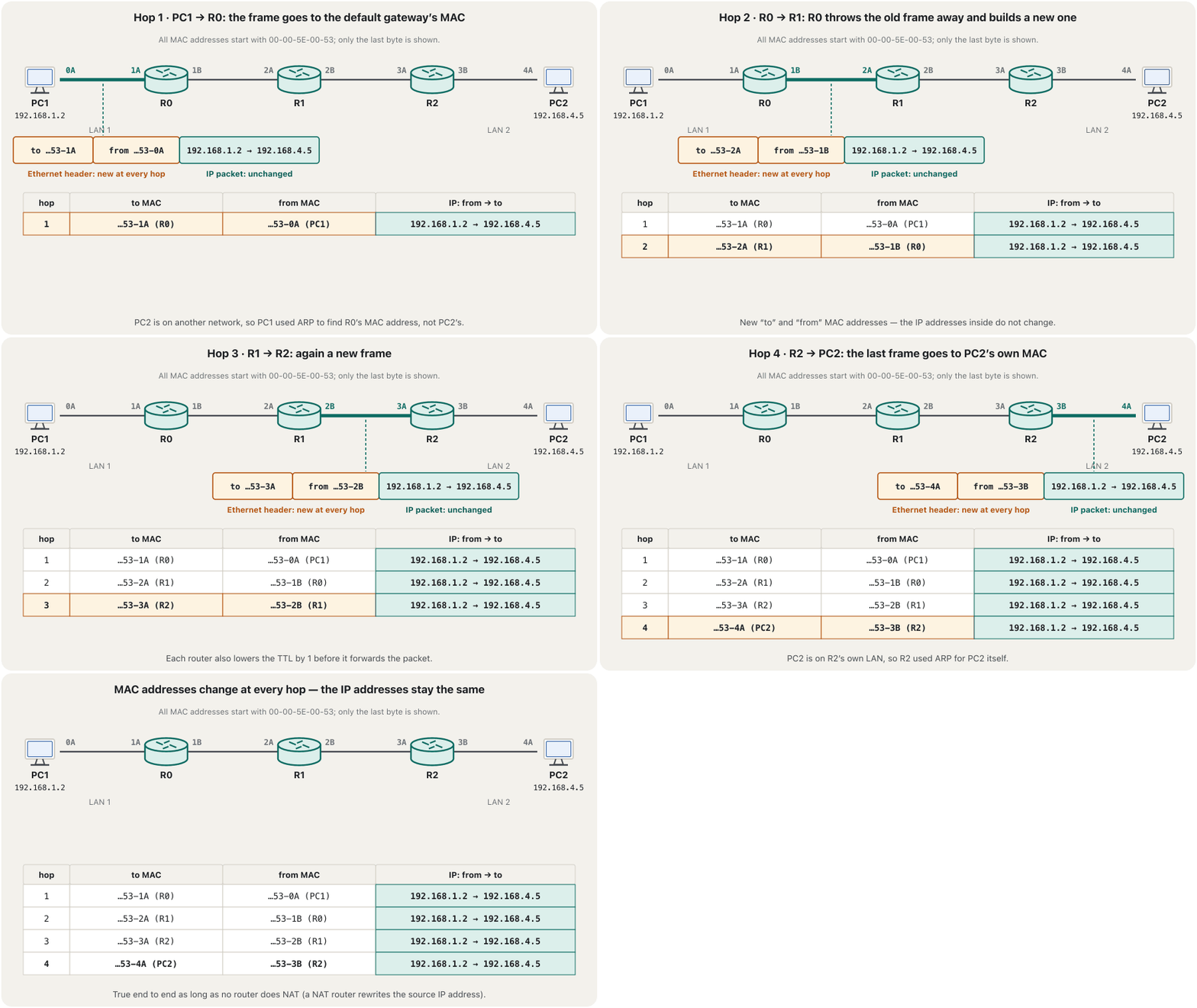
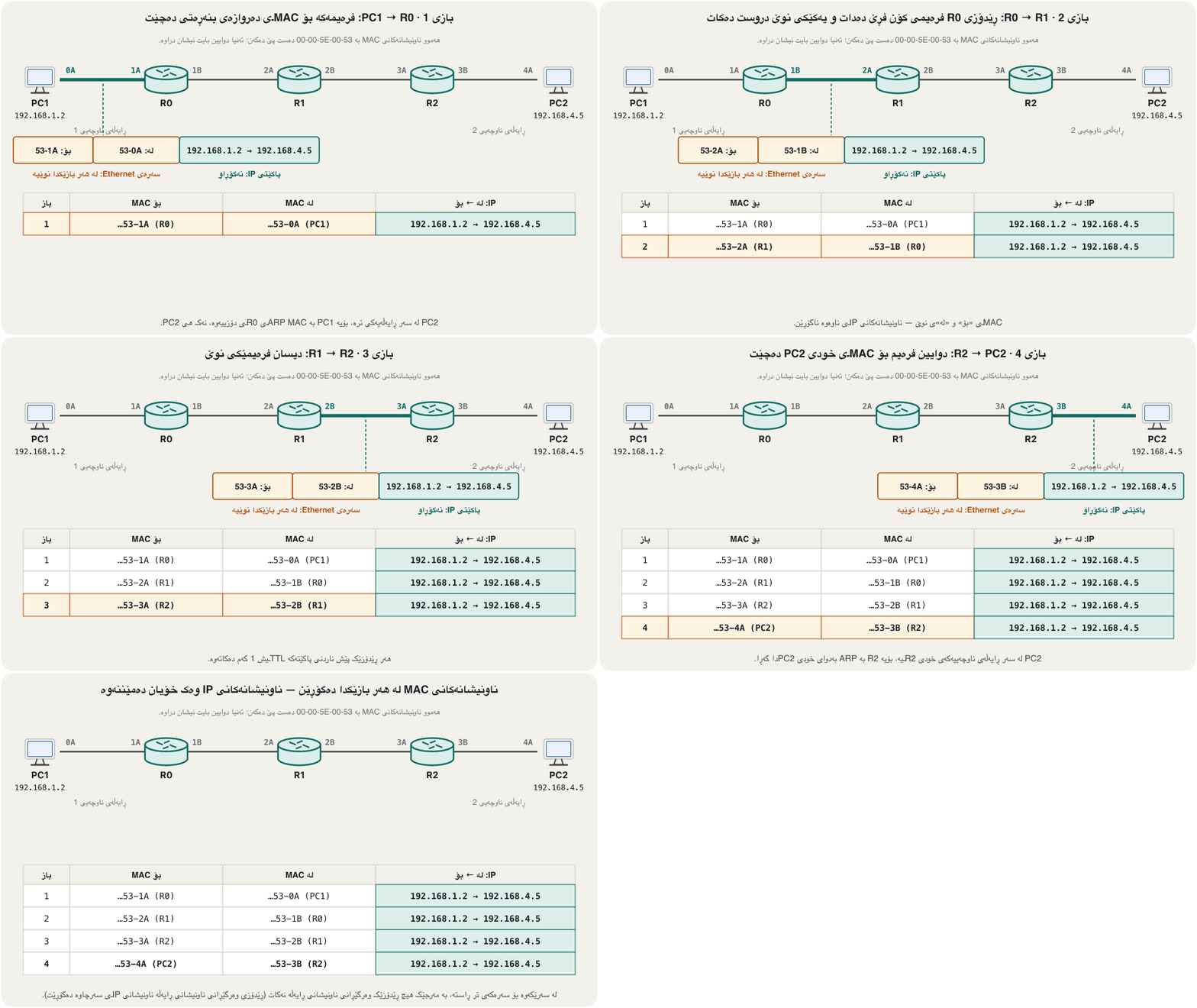
So the MAC addresses change at every hop, while the source and destination IP addresses stay the same for the whole trip. One exception: a router that does NAT, like a home router, rewrites the source IP address of packets going to the Internet (NAT). The same story with letters instead of numbers is in OSI Layers 1–3.
کەواتە لە هەر دەگۆڕێن، بەڵام سەرچاوە و مەبەست بە درێژایی گەشتەکە وەک خۆیان دەمێننەوە. یەک ئاوارتە: کە دەکات، وەک ماڵەوە، سەرچاوەی ئەو دەگۆڕێت کە دەچن بۆ (وەرگێڕانی ناونیشانی ڕایەڵە). هەمان چیرۆک بە پیت لە جیاتی ژمارە لە چینەکانی 1 تا 3ی OSIدایە.
Follow one packet from a host through a switch and a router to another host: ARP, MAC address tables and the routing table, with every address shown at every step.
بەدوای بڕۆ لە بەناو و بۆ تر: ، و ، لەگەڵ هەموو ناونیشانەکان لە هەر هەنگاوێکدا.
Watch 0:45–14:11: the MAC addresses change at every hop, while the IP addresses stay the same.
لە 0:45 تا 14:11 سەیر بکە: لە هەر دەگۆڕێن، بەڵام وەک خۆیان دەمێننەوە.
Not every interface has a MAC addressهەموو نێوبەستەیەک ناونیشانی MACـی نییە
It is often said that every port with an IP address also has a MAC address. That is true for Ethernet and Wi-Fi interfaces, but not for every interface. A serial link between two routers (such as S0/0/0 to S0/0/0) uses HDLC or PPP framing. These links join exactly two devices, so the frame needs no device address at all: PPP’s address field is always FF (“all stations”). A loopback interface has an IP address and no MAC address either.
زۆرجار دەگوترێت هەر کە هەبێت هەیە. ئەمە بۆ و ڕاستە، بەڵام بۆ هەموو نا. بەستەرێکی زنجیرەیی لە نێوان دوو (وەک S0/0/0 بۆ S0/0/0) یان بەکار دەهێنێت. ئەم بەستەرانە ڕێک دوو ئامێر پێکەوە دەبەستن، بۆیە هیچ ناونیشانێکی ئامێری پێویست نییە: خانەی ناونیشانی هەمیشە FFـە («هەموو وێستگەکان»). ـیش هەیە و نییە.
So, in the path PC1 → R0 → R1 → R2 → PC2, if R0 and R1 are joined by a serial cable, R0 does not attach any MAC addresses on that hop: it wraps the packet in an HDLC or PPP frame, “a frame appropriate for the outgoing interface”. MAC addresses appear again on the next Ethernet hop, and ARP is used only on those Ethernet (LAN) interfaces.
کەواتە لە ڕێگای PC1 → R0 → R1 → R2 → PC2، ئەگەر R0 و R1 بە کێبڵێکی زنجیرەیی بەسترابن، R0 لەو هیچ پێوە نالکێنێت: لە یان دەپێچێتەوە، « کە لەگەڵ دەرچوون دەگونجێت». لە دواتردا دەردەکەونەوە و تەنیا لە سەر ئەو () بەکار دەهێنرێت.
What a router does with every frameڕێدۆز چی لە هەر فرەیمێک دەکات
- Check the frameپشکنینی فرەیمەکە
Is it for me, and is it intact? The router processes a frame only if its destination MAC address is the router’s own (or a broadcast or multicast it listens to) and the FCS — a check number in every frame — shows no damage on the way. Otherwise the frame is discarded.
ئایا بۆ منە و تەندروستە؟ تەنیا ئەو پرۆسێس دەکات کە مەبەستی هی خودی بێت (یان یان کە گوێی لێ دەگرێت) و FCS — ژمارەیەکی پشکنین لە هەموو — هیچ تێکچوونێک لە ڕێگادا نیشان نەدات. ئەگینا فڕێ دەدرێت.
- Unwrapهەڵوەشاندن
The router removes the data-link header and trailer — the two old MAC addresses go away — and keeps the packet.
سەرە و کۆتاییی لادەبات — دوو کۆنەکە دەڕۆن — و دەهێڵێتەوە.
- Decideبڕیاردان
It compares the destination IP address with its routing table and finds the best matching route. The route gives the exit interface and, for a remote network, the next-hop router.
IPـی مەبەست لەگەڵ بەراورد دەکات و باشترین ڕێگەی گونجاو دەدۆزێتەوە. ڕێگەکە و، بۆ دوور، دەدات.
- Rewrapپێچانەوە
It lowers the TTL by 1 (a packet that reaches 0 is dropped), updates the header checksum and puts the packet in a new frame that suits the outgoing link: on an Ethernet interface, with its own MAC as the source and the next device’s MAC — found with ARP if needed — as the destination.
1 کەم دەکاتەوە ( کە بگاتە 0 فڕێ دەدرێت)، سەرەکە نوێ دەکاتەوە و دەخاتە ناو نوێ کە لەگەڵ بەستەری دەرچوون دەگونجێت: لە سەر ، بە MACـی خۆی وەک سەرچاوە و MACـی ئامێری دواتر — ئەگەر پێویست بوو بە دەدۆزرێتەوە — وەک مەبەست.
- Sendناردن
It transmits the frame out of the exit interface of the matched route.
لە ڕێگە گونجاوەکەوە دەنێرێت.
What a router does with every frameڕێدۆز چی لە هەر فرەیمێک دەکات
Which route is “best”?کام ڕێگە «باشترینە»؟
When a routing table holds more than one route to the same network, the router must pick one. If the routes come from different sources — say a static route and OSPF — it first trusts the source with the lower administrative distance (administrative distance). Between routes of the same routing protocol it uses the metric — a number that measures how good a path is — and picks the lowest. Each routing protocol measures differently: RIP counts hops (the number of routers on the way; 15 at most), OSPF uses a cost computed from the interface bandwidth (by default 100 Mb/s divided by the interface speed), and EIGRP combines the bandwidth and the delay — the time a packet takes to cross the path — not the delay alone. How these metrics are measured is taught in Routing protocols.
کاتێک زیاتر لە یەک ڕێگەی بۆ هەمان هەبێت، دەبێت یەکێکیان هەڵبژێرێت. ئەگەر ڕێگەکان لە سەرچاوەی جیاوازەوە هاتبن — بۆ نموونە و — سەرەتا متمانە بەو سەرچاوەیە دەکات کە ـی کەمترە (مەودای بەڕێوەبەری). لە نێوان ڕێگەکانی هەمان بەکار دەهێنێت — ژمارەیەک کە باشیی ڕێگایەک دەپێوێت — و کەمترینیان هەڵدەبژێرێت. هەر بە جۆرێکی جیاواز دەپێوێت: دەژمێرێت (ژمارەی سەر ڕێگا؛ زۆرترین 15)، پشت بە دەبەستێت کە لە ـی حیساب دەکرێت (بە بنەڕەت 100 Mb/s دابەش لە سەر خێراییی )، ـیش و دواکەوتن (delay) — ئەو کاتەی دەیبات تا ڕێگاکە ببڕێت — تێکەڵ دەکات، نەک تەنیا دواکەوتن. ئەم چۆن دەپێورێن لە پرۆتۆکۆڵەکانی ڕێدۆزیدا دەخوێنرێت.
The routing tableخشتەی ڕێدۆزی
A routing table is a set of rules, in table form, that tells a router where to send packets. When a device sends data, every packet carries where it comes from and where it goes; the router reads the destination address in the packet header and compares it with the table. Each line — a route — names a destination network, the next hop (the next router, if the network is not directly connected), the exit interface, and a metric for choosing between routes. Together this is the routing information a router needs.
کۆمەڵێک یاسایە بە شێوەی خشتە کە بە دەڵێت بۆ کوێ بنێرێت. کاتێک ئامێرێک دەنێرێت، هەر هەڵگری ئەوەیە لە کوێوە دێت و بۆ کوێ دەچێت؛ ناونیشانی مەبەست لە سەرەی دەخوێنێتەوە و لەگەڵ خشتەکە بەراوردی دەکات. هەر دێڕێک — ڕێگەیەک — ناوی مەبەست، ( دواتر، ئەگەر ڕاستەوخۆ نەبەسترابێت)، و بۆ هەڵبژاردن لە نێوان ڕێگەکاندا دەبات. ئەمانە پێکەوە ئەو زانیارییەی ـن کە پێویستی پێیەتی.
Worked example: a packet arrives at R1 on G0/0 with destination 172.16.2.9. R1 compares it with the networks in its table: 172.16.2.9 belongs to 172.16.2.0/24. The table says, in effect: “Any packet for network 172.16.2.0: send it out of interface S0/0/0 to the next router, 172.16.4.2.” Lines marked “none” are networks R1 is connected to itself; for those it delivers directly on that interface.
نموونەیەکی کارکراو: لە G0/0ـەوە دەگاتە R1 بە مەبەستی 172.16.2.9. R1 بەراوردی دەکات لەگەڵ ناو خشتەکەی: 172.16.2.9 سەر بە 172.16.2.0/24ـە. خشتەکە لە ڕاستیدا دەڵێت: «هەر بۆ 172.16.2.0 هات، لە S0/0/0ـەوە بینێرە بۆ بەرانبەر، 172.16.4.2.» ئەو دێڕانەی «نییە»یان تێدایە ئەو کە R1 خۆی پێیانەوە بەستراوە؛ بۆ ئەوانە ڕاستەوخۆ لە سەر ئەو دەیگەیەنێت.
The routing tableخشتەی ڕێدۆزی
The parcel officeبەشکۆی ناردنی کاڵا
You want to send a parcel from Sulaimani to Erbil, so you write the destination address on it and take it to a parcel office. The staff look only at the destination. Their own instructions say: “Every parcel for Erbil goes to driver no. 3.” They hand it to driver 3, and their job is done. Here the parcel is the packet, the address is the destination IP address, the office is the router, the office’s instructions are the routing table, and driver 3 is the next hop with its exit interface.
دەتەوێت کاڵایەک لە سلێمانییەوە بۆ هەولێر بنێریت، بۆیە ناونیشانی مەبەستی لە سەر دەنووسیت و دەیبەیتە بەشکۆیەکی ناردنی کاڵا. فەرمانبەرەکان تەنیا سەیری مەبەستەکە دەکەن. ڕێنماییەکانی خۆیان دەڵێن: «هەر کاڵایەک بۆ هەولێر بێت دەدرێت بە شۆفێری ژمارە 3.» دەیدەنە شۆفێری 3 و کارەکەیان تەواو دەبێت. لێرەدا کاڵاکە ، ناونیشانەکە مەبەستە، بەشکۆکە ، ڕێنماییەکانی بەشکۆکە و شۆفێری 3 لەگەڵ .
Where the analogy stops workingسنووری ئەم نموونەیە
A real router decides in microseconds, for millions of packets, and its “instructions” can change by themselves when routing protocols learn new paths.
ڕاستەقینە لە چەند میکرۆچرکەیەکدا بۆ ملیۆنان بڕیار دەدات و «ڕێنماییەکانی» دەتوانن بە خۆیان بگۆڕێن کاتێک ڕێگای نوێ فێر دەبن.
The routing tableخشتەی ڕێدۆزی
When several routes matchکاتێک چەند ڕێگەیەک دەگونجێن
A destination can fit more than one route: 10.1.2.7 is inside 10.0.0.0/8, inside 10.1.2.0/24 and — like every address — inside the default route 0.0.0.0/0. Routers always use the most specific route, the one with the longest prefix: here /24. This rule is called longest prefix match. Administrative distance and metric only decide between routes with the same prefix length.
مەبەستێک دەتوانێت لەگەڵ زیاتر لە یەک ڕێگە بگونجێت: 10.1.2.7 لە ناو 10.0.0.0/8دایە، لە ناو 10.1.2.0/24دایە و — وەک هەموو ناونیشانێک — لە ناو 0.0.0.0/0دایە. هەمیشە وردترین ڕێگە بەکار دەهێنن، ئەوەی درێژترین ـی هەیە: لێرەدا /24. ئەم یاسایە پێی دەگوترێت . و تەنیا لە نێوان ڕێگەکانی هەمان درێژیی بڕیار دەدەن.
Hop, next hop and exit interfaceباز، بازی دواتر و نێوبەستەی دەرچوون
In English, to hop is to jump on one foot. In networking, a hop is one jump of a packet from one device to the next: each time it passes a router, “it hopped to the next node”. The next hop in a route is the IP address of the neighbouring router interface that the packet is handed to. An interface is something that sits between two things and joins them — a TV remote is the interface between you and the TV — and a router port is called the exit interface when a route sends packets out of it. An exit interface is always a port of this router, never of the neighbour, even when both routers use the same port name.
لە ئینگلیزیدا hop واتە بازدان لە سەر یەک پێ. لە یەک بازدانی لە ئامێرێکەوە بۆ ئامێرێکی تر: هەر جارێک بە تێدەپەڕێت، «بازی دا بۆ گرێی دواتر». لە ڕێگەیەکدا ئەو دراوسێیە کە دەدرێتێ. شتێکە کە لە نێوان دوو شتدایە و پێکیانەوە دەبەستێت — کۆنترۆڵی تەلەفزیۆن نێوان تۆ و تەلەفزیۆنەکەیە — و کاتێک ڕێگەیەک لەوێوە دەنێرێت، پێی دەگوترێت . هەمیشە ئەم ، هەرگیز هی دراوسێ نییە، تەنانەت ئەگەر هەردوو هەمان ناوی بەکار بهێنن.
A route can name either one, as the two route entries in the picture show. How such routes are typed on a Cisco router is taught in Static routes in the Routing and Switching course.
ڕێگەیەک دەتوانێت ناوی هەر یەکێکیان ببات، وەک دوو ڕێگەکەی ناو وێنەکە نیشانی دەدەن. چۆنیەتیی نووسینی ئەم ڕێگانە لە سەر Cisco لە ڕێگە جێگیرەکانـی خولی و دەخوێنرێت.
Match, default route, or dropگونجان، ڕێگەی بنەڕەتی، یان فڕێدان
After unwrapping a packet and reading its destination, a router meets one of three cases. 1 — A route matches: network 10.1.2.0 is in the table, so the router re-wraps the packet and sends it towards 10.1.2.0. 2 — No matching route, but a default route: 172.16.2.0 is not in the table, but a default route (0.0.0.0/0, “anything else”) points to 192.168.1.2, so the packet goes there. 3 — No route and no default route: the router drops the packet. It does not forward it or return it — but it does tell the sender, with an ICMP Destination Unreachable message (ICMP). How a router gets its default route is taught in The default route.
دوای و خوێندنەوەی مەبەستەکەی، تووشی یەکێک لە سێ حاڵەت دەبێت. 1 — ڕێگەیەک دەگونجێت: 10.1.2.0 لە خشتەکەدایە، بۆیە دووپاتە دەپێچێتەوە و بەرەو 10.1.2.0 دەینێرێت. 2 — ڕێگەی گونجاو نییە، بەڵام هەیە: 172.16.2.0 لە خشتەکەدا نییە، بەڵام (0.0.0.0/0، «هەر شتێکی تر») ئاماژە بە 192.168.1.2 دەکات، بۆیە دەچێت بۆ ئەوێ. 3 — نە ڕێگە، نە : فڕێ دەدات. نایناردات و نایگەڕێنێتەوە — بەڵام بە پەیامی Destination Unreachableـی نێرەر ئاگادار دەکاتەوە (ICMP). چۆن وەردەگرێت لە ڕێگەی بنەڕەتیدا دەخوێنرێت.
Your computer has a routing table tooکۆمپیوتەرەکەتیش خشتەی ڕێدۆزیی هەیە
Hosts also keep a small routing table. Usually it holds only the host’s own network (directly connected) and a default route to the default gateway — hosts usually know no remote networks. In Windows, route print (or netstat -r) shows it. A shortened Windows 11 example for host 192.168.1.2 behind gateway 192.168.1.254:
بچووک هەڵدەگرن. بە زۆری تەنیا خۆی (ڕاستەوخۆ بەستراو) و بۆ تێدایە — بە زۆری هیچ دوور نازانن. لە Windowsـدا route print (یان netstat -r) نیشانی دەدات. نموونەیەکی کورتکراوەی Windows 11 بۆ 192.168.1.2 لە پشت 192.168.1.254:
route print -4===========================================================================
Interface List
5...00 00 5e 00 53 02 ......Intel(R) Ethernet Connection
1...........................Software Loopback Interface 1
===========================================================================
IPv4 Route Table
===========================================================================
Active Routes:
Network Destination Netmask Gateway Interface Metric
0.0.0.0 0.0.0.0 192.168.1.254 192.168.1.2 25
127.0.0.0 255.0.0.0 On-link 127.0.0.1 331
192.168.1.0 255.255.255.0 On-link 192.168.1.2 281
192.168.1.2 255.255.255.255 On-link 192.168.1.2 281
192.168.1.255 255.255.255.255 On-link 192.168.1.2 281
224.0.0.0 240.0.0.0 On-link 192.168.1.2 281
255.255.255.255 255.255.255.255 On-link 192.168.1.2 281
===========================================================================
Persistent Routes:
NoneExplain the codeڕوونکردنەوەی کۆدەکە
- Lineدێڕی 1
route printwithout -4 also prints the IPv6 route table;netstat -rshows the same tables.route printبەبێ -4 IPv6ـیش دەنووسێت؛netstat -rهەمان خشتەکان نیشان دەدات.
On-link means “deliver directly on this link” — no gateway is needed. The metric is set automatically from the interface speed; the lowest metric wins when two routes match equally. Adding and deleting routes on Windows is in route add, delete and change.
On-link واتە «ڕاستەوخۆ لە سەر ئەم بەستەرە بیگەیەنە» — هیچ پێویست نییە. بە شێوەی خۆکار لە خێراییی دادەنرێت؛ کاتێک دوو ڕێگە وەک یەک دەگونجێن، کەمترین دەباتەوە. زیادکردن و سڕینەوەی ڕێگە لە Windowsـدا لە route add، delete و changeدایە.
A router’s table: show ip routeخشتەی ڕێدۆزێک: show ip route
On a Cisco router, show ip route prints the routing table. Here is the table of a local router: its LAN 192.168.1.0/24 on G0/0, a link 192.168.2.0/24 to a remote router (192.168.2.2) on G0/1, and two networks behind that remote router, 10.1.1.0/24 and 10.1.2.0/24, learned with RIP. The next hop for both is 192.168.2.2. In this course we only read the table; configuring routers is in the Routing and Switching course (The routing table and route sources).
لە Ciscoـدا، show ip route دەنووسێت. ئەمە خشتەی ناوخۆییە: 192.168.1.0/24 لە سەر G0/0، بەستەری 192.168.2.0/24 بۆ دوور (192.168.2.2) لە سەر G0/1، هەروەها دوو لە پشت ئەو دوورەوە، 10.1.1.0/24 و 10.1.2.0/24، کە بە فێر بووە. بۆ هەردووکیان 192.168.2.2ـە. لەم خولەدا تەنیا خشتەکە دەخوێنینەوە؛ ڕێکخستنی لە خولی و (خشتەی ڕێدۆزی و سەرچاوەکانی ڕێگە).
R1# show ip routeCodes: L - local, C - connected, S - static, R - RIP, O - OSPF, D - EIGRP ...
Gateway of last resort is not set
10.0.0.0/24 is subnetted, 2 subnets
R 10.1.1.0 [120/1] via 192.168.2.2, 00:00:08, GigabitEthernet0/1
R 10.1.2.0 [120/1] via 192.168.2.2, 00:00:08, GigabitEthernet0/1
192.168.1.0/24 is variably subnetted, 2 subnets, 2 masks
C 192.168.1.0/24 is directly connected, GigabitEthernet0/0
L 192.168.1.1/32 is directly connected, GigabitEthernet0/0
192.168.2.0/24 is variably subnetted, 2 subnets, 2 masks
C 192.168.2.0/24 is directly connected, GigabitEthernet0/1
L 192.168.2.1/32 is directly connected, GigabitEthernet0/1C lines are the router’s own connected networks, L lines its own interface addresses (/32), and R lines routes learned from RIP. In [120/1], 120 is the administrative distance — how much the router trusts RIP — and 1 is the metric, one hop. Current routers show GigabitEthernet interfaces and the L lines; older screenshots show FastEthernet and no L lines. Every code letter is explained in The route codes.
دێڕەکانی C بەستراوی خودی ، دێڕەکانی L ناونیشانی خۆی (/32)، دێڕەکانی Rـیش ئەو ڕێگانەن کە لە فێر بووە. لە [120/1]ـدا، 120 — چەند متمانەی بە هەیە — و 1 ، یەک . ئێستا GigabitEthernet و دێڕەکانی L نیشان دەدەن؛ وێنە کۆنەکان FastEthernet نیشان دەدەن و دێڕی Lـیان نییە. هەموو پیتێکی کۆد لە کۆدەکانی ڕێگەدا ڕوون کراوەتەوە.
How routers learn routes: static and dynamicڕێدۆزەکان چۆن ڕێگەکان فێر دەبن: جێگیر و بزۆک
A router knows its directly connected networks by itself. For remote networks there are two ways. With static routing, an administrator types every route: in a line of routers A–B–C, where C has networks 10.1.1.0/24 and 10.1.2.0/24, router A is told “next hop 192.168.2.2 (B)” and router B “next hop 192.168.1.2 (C)” for both networks. With dynamic routing, the routers run a routing protocol and share the routes they know: C tells B “I have 10.1.1.0 and 10.1.2.0”, B learns them with next hop 192.168.1.2, and A learns them from B with next hop 192.168.2.2. Static routes are simple but do not adapt when a link fails; routing protocols adapt by themselves.
ڕاستەوخۆ بەستراوی خۆی بە خۆی دەناسێت. بۆ دوور دوو ڕێگا هەیە. لە ـدا بەڕێوەبەرێک هەموو ڕێگەیەک دەنووسێت: لە ڕیزێک A–B–Cـدا کە C 10.1.1.0/24 و 10.1.2.0/24ی هەیە، بۆ هەردوو بە A دەگوترێت « 192.168.2.2 (B)» و بە B « 192.168.1.2 (C)». لە ـدا کار پێ دەکەن و ئەو ڕێگانەی دەیانزانن هاوبەش دەکەن: C بە B دەڵێت «10.1.1.0 و 10.1.2.0م هەیە»، B بە 192.168.1.2 فێریان دەبێت و A لە Bـەوە بە 192.168.2.2 فێریان دەبێت. سادەن بەڵام کاتێک بەستەرێک دەپچڕێت خۆیان ناگونجێنن؛ بە خۆیان دەگونجێن.
Configuring both kinds is taught in the Routing and Switching course: Static routes and Routing protocols.
ڕێکخستنی هەردوو جۆرەکە لە خولی و دەخوێنرێت: ڕێگە جێگیرەکان و پرۆتۆکۆڵەکانی ڕێدۆزی.
Try it yourselfخۆت تاقی بکەرەوە
- Watch the addressesسەیری ناونیشانەکان بکە
Open the CêIT network lab, load “Three networks and two routers” and ping from one end to the other. In the event log, follow the packet: the IP addresses stay the same, each router lowers the TTL, reads its routing table and builds a new frame.
تاقیگەی ڕایەڵەی CêIT بکەرەوە، «Three networks and two routers» باربکە و لە سەرێکەوە سەرەکەی تر بکە. لە تۆماری ڕووداوەکاندا بەدوای بڕۆ: وەک خۆیان دەمێننەوە، هەر TTL کەم دەکاتەوە، دەخوێنێتەوە و نوێ دروست دەکات.
- Break the gatewayدەروازەکە تێک بدە
Load “Two networks joined by a router”, delete PC1’s default gateway and ping a PC in the other network. Then ping a PC in PC1’s own network. Which one still works, and why?
«Two networks joined by a router» باربکە، PC1 بسڕەوە و لە تر بکە. پاشان لە خودی PC1 بکە. کامیان هێشتا کار دەکات و بۆچی؟
- Read your own tableخشتەی خۆت بخوێنەرەوە
On your own computer run
ipconfigandroute print -4. Find your default gateway in both, and the 0.0.0.0 line. Then runtracertto a website and see your gateway as hop 1 (tracert).لە سەر خۆت
ipconfigوroute print -4جێبەجێ بکە. لە هەردووکیاندا بدۆزەرەوە، هەروەها دێڕی 0.0.0.0. پاشانtracertبۆ جێبەجێ بکە و وەک 1 ببینە (tracert).
Common mistakesهەڵە باوەکان
| Mistakeهەڵە | What is trueڕاستییەکە |
|---|---|
| “A PC uses ARP to find the MAC address of a server on the Internet.”« بە لە دەدۆزێتەوە.» | ARP works only inside one LAN. For a remote destination the PC ARPs for its default gateway. تەنیا لە ناو یەک کار دەکات. بۆ مەبەستی دوور بۆ دەکات. |
| “The IP addresses change at each router.”« لە هەر دەگۆڕێن.» | The MAC addresses change; the IP addresses stay — unless a router does NAT. دەگۆڕێن؛ دەمێننەوە — مەگەر بکات. |
| “Every interface with an IP address has a MAC address.”«هەر کە هەبێت هەیە.» | Serial (HDLC/PPP) and loopback interfaces have IP addresses but no MAC address. زنجیرەیی (HDLC/PPP) و خۆگەڕانەوە هەیە بەڵام نییە. |
| “The next hop is my router’s own port.”« خودی منە.» | That is the exit interface. The next hop is the neighbour router’s IP address.ئەوە . دراوسێیە. |
| “If there is no route, the router sends the packet back.”«ئەگەر ڕێگە نەبێت، دەگەڕێنێتەوە.» | It drops the packet and sends an ICMP Destination Unreachable message to the source. فڕێ دەدات و پەیامی Destination Unreachableـی بۆ سەرچاوە دەنێرێت. |
| “The first matching line of the routing table wins.”«یەکەم دێڕی گونجاوی دەباتەوە.» | The longest prefix match wins, wherever it is in the table. دەباتەوە، لە هەر شوێنێکی خشتەکەدا بێت. |
| “Every LAN must have a gateway.”«هەموو دەبێت هەبێت.» | Only a LAN whose hosts must reach other networks needs one.تەنیا ئەو دەبێت بگەنە تر پێویستی پێیەتی. |
Exercisesڕاهێنانەکان
Dilan’s PC is 10.20.30.40/24 with gateway 10.20.30.1. For each destination, say whether the PC ARPs for the destination or for the gateway: (a) 10.20.30.99 (b) 10.20.31.5 (c) 8.8.8.8.
دیلان 10.20.30.40/24ـە بە 10.20.30.1. بۆ هەر مەبەستێک بڵێ بۆ مەبەستەکە دەکات یان بۆ : (أ) 10.20.30.99 (ب) 10.20.31.5 (ج) 8.8.8.8.
Show answerوەڵامەکە پیشان بدە
With /24 the network is 10.20.30.0. (a) 10.20.30.99 → 10.20.30.0: local, ARP for 10.20.30.99. (b) 10.20.31.5 → 10.20.31.0: remote, ARP for the gateway 10.20.30.1. (c) 8.8.8.8 → 8.8.8.0: remote, ARP for the gateway.
بە /24 10.20.30.0ـە. (أ) 10.20.30.99 ← 10.20.30.0: ناوخۆیی، بۆ 10.20.30.99. (ب) 10.20.31.5 ← 10.20.31.0: دوور، بۆ 10.20.30.1. (ج) 8.8.8.8 ← 8.8.8.0: دوور، بۆ .
PC1 (192.168.1.2) sends to PC2 (192.168.4.5) through R0, R1 and R2, all joined by Ethernet. Fill in a table with one row per hop: source MAC, destination MAC, source IP, destination IP. What does each device do during encapsulation and decapsulation?
PC1 (192.168.1.2) بۆ PC2 (192.168.4.5) لە ڕێی R0، R1 و R2ـەوە دەنێرێت، هەموویان بە بەستراون. خشتەیەک پڕ بکەرەوە بە یەک دێڕ بۆ هەر : MACـی سەرچاوە، MACـی مەبەست، IPـی سەرچاوە، IPـی مەبەست. هەر ئامێرێک لە کاتی و چی دەکات؟
Show answerوەڵامەکە پیشان بدە
| Hop | Source MACMACـی سەرچاوە | Destination MACMACـی مەبەست | IP |
|---|---|---|---|
| 1 | PC1 | R0 G0/0/0 (the gateway)R0 G0/0/0 () | 192.168.1.2 → 192.168.4.5 |
| 2 | R0 (outgoing interface)R0 ( دەرچوون) | R1 | 192.168.1.2 → 192.168.4.5 |
| 3 | R1 | R2 | 192.168.1.2 → 192.168.4.5 |
| 4 | R2 (interface in PC2’s LAN)R2 ( لە PC2) | PC2 | 192.168.1.2 → 192.168.4.5 |
The host (PC1) decides local or remote, ARPs for the gateway and puts the packet in the first frame; PC2 removes the last frame. Each router checks the frame (FCS, its own MAC), removes it, looks up the route, lowers the TTL, builds a new frame — with ARP for the next MAC — and sends it. Only the MAC addresses change. (If R0–R1 were a serial link, hop 2 would have an HDLC or PPP frame with no MAC addresses.)
(PC1) بڕیار دەدات ناوخۆییە یان دوور، بۆ دەکات و دەخاتە یەکەم ؛ PC2 دوایین لادەبات. هەر دەپشکنێت (FCS، MACـی خۆی)، لای دەبات، بەدوای ڕێگەدا دەگەڕێت، TTL کەم دەکاتەوە، نوێ دروست دەکات — بە بۆ MACـی دواتر — و دەینێرێت. تەنیا دەگۆڕێن. (ئەگەر R0–R1 بەستەرێکی زنجیرەیی بوایە، 2 HDLC یان PPPـی بەبێ دەبوو.)
R1’s table: 172.16.1.0/24 connected G0/0; 172.16.2.0/24 via 172.16.4.2 S0/0/0; 172.16.3.0/24 via 172.16.5.3 S0/0/1; 0.0.0.0/0 via 172.16.4.2. Where does R1 send packets for (a) 172.16.2.9 (b) 172.16.1.77 (c) 203.0.113.50? And without the 0.0.0.0/0 line, what happens to (c)?
خشتەی R1: 172.16.1.0/24 connected G0/0؛ 172.16.2.0/24 via 172.16.4.2 S0/0/0؛ 172.16.3.0/24 via 172.16.5.3 S0/0/1؛ 0.0.0.0/0 via 172.16.4.2. R1 بۆ کوێ دەنێرێت بۆ (أ) 172.16.2.9 (ب) 172.16.1.77 (ج) 203.0.113.50؟ بەبێ دێڕی 0.0.0.0/0، چی بەسەر (ج) دێت؟
Show answerوەڵامەکە پیشان بدە
- (a) Out of S0/0/0 to the next hop 172.16.4.2.
- (b) Directly out of G0/0: 172.16.1.0/24 is connected (R1 uses ARP for 172.16.1.77).
- (c) Only the default route matches: to 172.16.4.2. Without it, R1 drops the packet and sends ICMP Destination Unreachable to the source.
- (أ) لە S0/0/0ـەوە بۆ 172.16.4.2.
- (ب) ڕاستەوخۆ لە G0/0ـەوە: 172.16.1.0/24 بەستراوە (R1 بۆ 172.16.1.77 دەکات).
- (ج) تەنیا دەگونجێت: بۆ 172.16.4.2. بەبێ ئەو، R1 فڕێ دەدات و Destination Unreachableـی بۆ سەرچاوە دەنێرێت.
Explain with the parcel-office picture what a router does with a packet, and name the networking idea behind each part (parcel, address, office, instructions, driver no. 3, “anything else”).
بە وێنەی بەشکۆی کاڵا ڕوونی بکەرەوە چی بە دەکات و ناوی بیرۆکەی لە پشت هەر بەشێک بهێنە (کاڵا، ناونیشان، بەشکۆ، ڕێنمایی، شۆفێری ژمارە 3، «هەر شوێنێکی تر»).
Show answerوەڵامەکە پیشان بدە
Parcel = packet; address = destination IP; office = router; instructions = routing table; driver no. 3 = the next hop and exit interface for that destination; “anything else” = the default route. The office reads only the destination, matches it against its instructions and hands the parcel to one driver — it does not drive to Erbil itself, just as a router only chooses the next hop.
کاڵا = ؛ ناونیشان = IPـی مەبەست؛ بەشکۆ = ؛ ڕێنمایی = ؛ شۆفێری ژمارە 3 = و بۆ ئەو مەبەستە؛ «هەر شوێنێکی تر» = . بەشکۆکە تەنیا مەبەستەکە دەخوێنێتەوە، لەگەڵ ڕێنماییەکانی بەراوردی دەکات و کاڵاکە دەداتە یەک شۆفێر — خۆی ناچێت بۆ هەولێر، هەروەک تەنیا هەڵدەبژێرێت.
Summaryکورتە
- IP routing delivers packets from sender to receiver across networks; it is a layer-3 job done by hosts and routers together, while layer 2 frames each hop.
- A host ANDs with its mask: local → ARP for the destination; remote → ARP for the default gateway, the router interface in its LAN.
- At every hop the MAC addresses change and the IP addresses stay (unless NAT); serial HDLC/PPP hops have no MAC addresses at all.
- A router: check the frame (FCS, MAC) → unwrap → decide with the routing table (longest prefix match) → rewrap (TTL − 1; ARP on LANs) → send.
- A route = destination network + next hop + exit interface + metric. No match → default route; no default route → drop + ICMP Destination Unreachable.
route printshows a host’s table,show ip routea router’s. Routes are typed (static) or shared by routing protocols (dynamic).
- IP لە نێرەرەوە بە ناو دەگەیەنێتە وەرگر؛ کارێکی چینی 3ـیە کە و پێکەوە دەیکەن، چینی 2ـیش هەر لە دەپێچێتەوە.
- لەگەڵ AND دەکات: ناوخۆیی ← بۆ مەبەست؛ دوور ← بۆ ، ئەو کە لە .
- لە هەر دەگۆڕێن و دەمێننەوە (مەگەر هەبێت)؛ زنجیرەیی HDLC/PPP هیچ نییە.
- : پشکنینی (FCS، MAC) ← ← بڕیار بە () ← (TTL − 1؛ لە ) ← ناردن.
- ڕێگە = مەبەست + + + . گونجان نییە ← ؛ نییە ← فڕێدان + Destination Unreachableـی .
route printخشتەی نیشان دەدات،show ip routeهی . ڕێگەکان دەنووسرێن (جێگیر) یان هاوبەشیان دەکەن (بزۆک).
Lesson complete!وانەکە تەواو بوو!
Well done. Review the key terms, then go on to the next lesson.دەستخۆش. سەیرێکی زاراوە سەرەکییەکان بکەرەوە، پاشان بڕۆ بۆ وانەی داهاتوو.
Key termsزاراوە سەرەکییەکان
TCP and UDPTCP و UDP
Related lecturesوانە پەیوەندیدارەکان
- ICMP, Ping and TracerouteICMP، پینگ و بەدواداچوونی ڕێگە
- OSI Layers 1–3: Physical, Data Link and Networkچینەکانی 1 تا 3ی OSI: چینی فیزیکی، چینی بەستەری دراوە و چینی ڕایەڵە
- MAC Addresses and Ethernet Framesناونیشانەکانی MAC و فرەیمەکانی Ethernet
- Modems and Routersمۆدێمەکان و ڕێدۆزەکان
- Encapsulation, PDUs and Addresses at Each Layerپێچانەوە، یەکەکانی دراوەی پرۆتۆکۆڵ و ناونیشانەکان لە هەر چینێکدا
- Reading the Routing Table: Route Sources, Metrics and ADخوێندنەوەی خشتەی ڕێدۆزی: سەرچاوەکانی ڕێگە، پێوانە و مەودای بەڕێوەبەری
- Static Routesڕێگە جێگیرەکان
- How Routers Learn Routes: Routing Protocols, Metrics and Loopsڕێدۆزەکان چۆن ڕێگەکان فێر دەبن: پرۆتۆکۆڵەکانی ڕێدۆزی، پێوانەکان و ئەڵقەکانی ڕێدۆزی
- NAT and PAT: Sharing Public Addressesوەرگێڕانی ناونیشانی ڕایەڵە و وەرگێڕانی ناونیشانی پۆرت: هاوبەشکردنی ناونیشانی گشتی
- DHCP: Automatic Addresses, DORA and LeasesDHCP: ناونیشانی خۆکار، DORA و کرێکانی DHCP
References and further readingسەرچاوەکان و خوێندنەوەی زیاتر
- RFC 1812 (1995): Requirements for IP Version 4 Routers — “the most specific matching route (the longest matching network prefix)”, TTL handling
- Microsoft Learn: route (print, default route 0.0.0.0, gateway = next hop, automatic metrics)
- Microsoft Learn: tracert (the gateway appears as hop 1)
- RFC 4443 / RFC 792: ICMP Destination Unreachable and Time Exceeded
This lecture is a first edition. The Kurdish text and terminology are waiting for review by Kurdish IT teachers.ئەم وانەیە چاپی یەکەمە. دەقە کوردییەکە و زاراوەکانی چاوەڕێی پێداچوونەوەی مامۆستایانی کوردی بواری IT ن.