Chapterبەش 7 · Lectureوانە 7.5
File Transfer and Remote Access: FTP, Telnet, SSH and RDPگواستنەوەی فایل و دەستڕاگەیشتن لە دوورەوە: FTP، Telnet، SSH و RDP
How files move between computers and how people work on computers that are far away. FTP with its control and data connections, active and passive mode and its plain-text passwords; SFTP, FTPS, TFTP for network devices and SMB in one line; Telnet and why its plain text rules it out; SSH with host keys and key pairs; and RDP and VNC for whole desktops — reached only through a VPN or a gateway.
چۆن لە نێوان دەگوازرێنەوە و خەڵک چۆن لەسەر دوور کار دەکەن. بە پەیوەندییەکانی کۆنترۆڵ و ، و و بە ؛ ، FTPS، بۆ ئامێرەکانی و بە یەک ڕستە؛ و بۆچی وا دەکات بەکار نەهێنرێت؛ بە و ؛ و و بۆ پیشاندانی هەموو — تەنیا لە ڕێگەی یان دەروازەیەکەوە.
What you will learnچی فێر دەبیت
- Explain how FTP moves files: the FTP daemon, get and put, the control connection on port 21, data connections, and active versus passive mode.
- Choose a safe way to transfer files — SFTP, FTPS, TFTP or SMB — and say why plain FTP is not one.
- Compare Telnet and SSH: VTY sessions, plain text versus encryption, host keys and key pairs.
- Describe RDP and VNC, and reach a remote desktop safely through a VPN or a gateway.
- ڕوون بکەیتەوە چۆن دەگوازێتەوە: ، get و put، پەیوەندیی کۆنترۆڵ لەسەر 21، پەیوەندییەکانی و بەرامبەر .
- ڕێگایەکی سەلامەت بۆ گواستنەوەی هەڵبژێریت — ، FTPS، یان — و بڵێیت بۆچی ئاسایی ئەو ڕێگایە نییە.
- و بەراورد بکەیت: VTY، بەرامبەر ، و .
- و وەسف بکەیت و بە سەلامەتی لە ڕێگەی یان دەروازەیەکەوە بگەیتە دوور.
Two jobs from a distanceدوو کار لە دوورەوە
Two of the oldest jobs of a network are moving files between computers and working on a computer that is somewhere else. Both are application-layer services, each with its own protocols and ports. Some of these protocols send everything as plain text and now belong only in labs; others encrypt everything and are the ones you use at work.
دوو لە کۆنترین کارەکانی گواستنەوەی لە نێوان و کارکردن لەسەر کە لە شوێنێکی ترە. هەردووکیان خزمەتگوزاریی و هەریەکەیان و خۆی هەیە. هەندێک لەم هەموو شتێک وەک دەنێرن و ئێستا تەنیا شوێنیان تاقیگەیە؛ هەندێکی تریان هەموو شتێک شفرە دەکەن و ئەوانەن کە لە کاردا بەکاریان دەهێنیت.
FTP: get and putFTP: get و put
FTP, the File Transfer Protocol (RFC 959, 1985), was made to move files between a client and a server. The server runs the FTP daemon (FTPd), a background program that waits for clients. The client logs in with a username and password and then pushes files to the server (upload) and pulls files from it (download). Graphical clients such as FileZilla show your own folders and the server's side by side:
، واتە File Transfer Protocol (ستانداردی RFC 959، ساڵی 1985)، بۆ گواستنەوەی لە نێوان و دروست کرا. (FTPd) کار پێ دەکات، پشتەوە کە چاوەڕێی دەکات. بە ناوی و دەچێتە ژوورەوە و پاشان بۆ پاڵ دەنێت () و لێی ڕایاندەکێشێت (). وێنەیی وەک FileZilla خۆت و لای لە تەنیشت یەک پیشان دەدەن:
Command-line clients — the ftp command of Windows and of Packet Tracer's PCs — use two words for this: get downloads a file and put uploads one; dir lists the server's folder and quit ends the session. You will use them in the Packet Tracer server lab.
— فەرمانی ftpـی Windows و Packet Tracer — دوو وشە بۆ ئەمە بەکار دەهێنن: get لە دەهێنێت و put دەنێرێت بۆ ؛ dir لیست دەکات و quit کۆتایی پێ دەهێنێت. لە تاقیگەی ڕاژەکارەکانی Packet Tracerـدا بەکاریان دەهێنیت.
FTP: get and putFTP: get و put
Two kinds of connection: control and dataدوو جۆر پەیوەندی: کۆنترۆڵ و دراوە
FTP is unusual: it uses two kinds of TCP connections. The control connection goes to the server's port 21 and stays open for the whole session; the commands — USER, PASS, LIST, RETR to download, STOR to upload — and the server's three-digit replies travel on it. Every file and every folder listing then travels on its own data connection, which is opened, carries one transfer and is closed.
نائاساییە: دوو جۆر پەیوەندیی بەکار دەهێنێت. پەیوەندیی کۆنترۆڵ دەچێت بۆ 21ی و بە درێژایی هەموو کراوە دەمێنێتەوە؛ فەرمانەکان — USER، PASS، LIST، RETR بۆ ، STOR بۆ — و وەڵامە سێ ژمارەییەکانی بەسەریدا دەڕۆن. پاشان هەر و هەر لیستێکی بە پەیوەندیی خۆی دەڕوات کە دەکرێتەوە، یەک گواستنەوە هەڵدەگرێت و دادەخرێت.
FTP: get and putFTP: get و put
Everything in plain textهەموو شتێک بە دەقی ئاشکرا
This is what a packet capture of the control connection shows when Aram logs in and downloads a file (S = server, C = client):
ئەمە ئەوەیە کە گرتنی پەیوەندیی کۆنترۆڵ پیشانی دەدات کاتێک ئارام دەچێتە ژوورەوە و دابار دەکات (S = ، C = ):
S: 220 Welcome to the course FTP server
C: USER aram
S: 331 Please specify the password.
C: PASS Secr3t!2026
S: 230 Login successful.
C: PASV
S: 227 Entering Passive Mode (203,0,113,20,195,80).
C: RETR report.pdf
S: 150 Opening BINARY mode data connection for report.pdf (48213 bytes).
S: 226 Transfer complete.
Explain the codeڕوونکردنەوەی کۆدەکە
- Lineدێڕی 2-5
The username and the password are readable by anyone who captures the traffic.
ناوی و بۆ هەر کەسێک کە هاتوچۆکە بگرێت دەخوێنرێنەوە.
- Lineدێڕی 6-7
PASV: the server will wait on port 195 × 256 + 80 = 50000 for the data connection.
PASV: لەسەر 195 × 256 + 80 = 50000 چاوەڕێی پەیوەندیی دەکات.
- Lineدێڕی 8-10
RETR asks for the file; it arrives on the data connection — also unencrypted.
RETR داوا دەکات؛ بە پەیوەندیی دێت — ئەویش بێ شفرە.
The username, the password, the file names and — on the data connection — the files themselves cross the network as readable text. So plain FTP must not be used across the Internet. It is also fading: in 2021 Chrome (version 95) and Firefox removed FTP from the browser.
ناوی ، ، ناوی و — بە پەیوەندیی — خودی وەک دەقی خوێندراوە بە دەڕۆن. بۆیە نابێت ئاسایی بە بەکار بهێنرێت. هەروەها لە کۆتاییدایە: لە 2021ـدا Chrome (وەشانی 95) و Firefox لە لابرد.
FTP: get and putFTP: get و put
Active mode and passive modeباری چالاکی FTP و باری ناچالاکی FTP
Who opens the data connection? In active mode, the original design, the client sends PORT with its address and a port, and the server connects back from its port 20. A firewall or NAT router in front of the client normally blocks such incoming connections. In passive mode the client sends PASV (or EPSV, which also works with IPv6), the server answers with a port, and the client opens the data connection itself. Watch both:
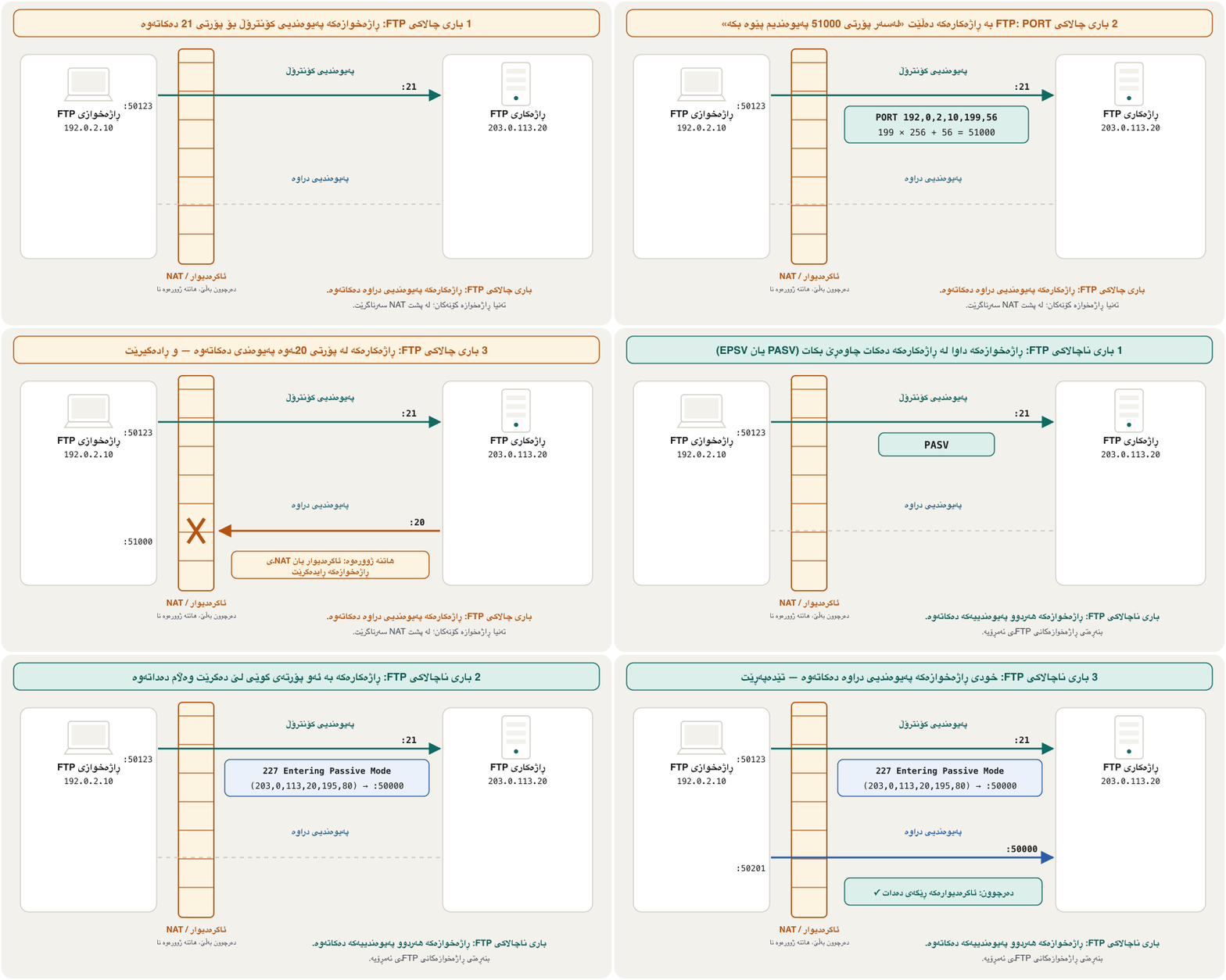
کێ پەیوەندیی دەکاتەوە؟ لە ، دیزاینە ڕەسەنەکە، PORT لەگەڵ ناونیشان و خۆی دەنێرێت و لە 20ـی خۆیەوە پەیوەندی دەکاتەوە بە . یان NAT لە پێش زۆرجار ئەم پەیوەندییە هاتووانە ڕادەگرێت. لە PASV دەنێرێت (یان EPSV کە لەگەڵ کار دەکات)، بە وەڵام دەداتەوە و خودی پەیوەندیی دەکاتەوە. سەیری هەردووکیان بکە:
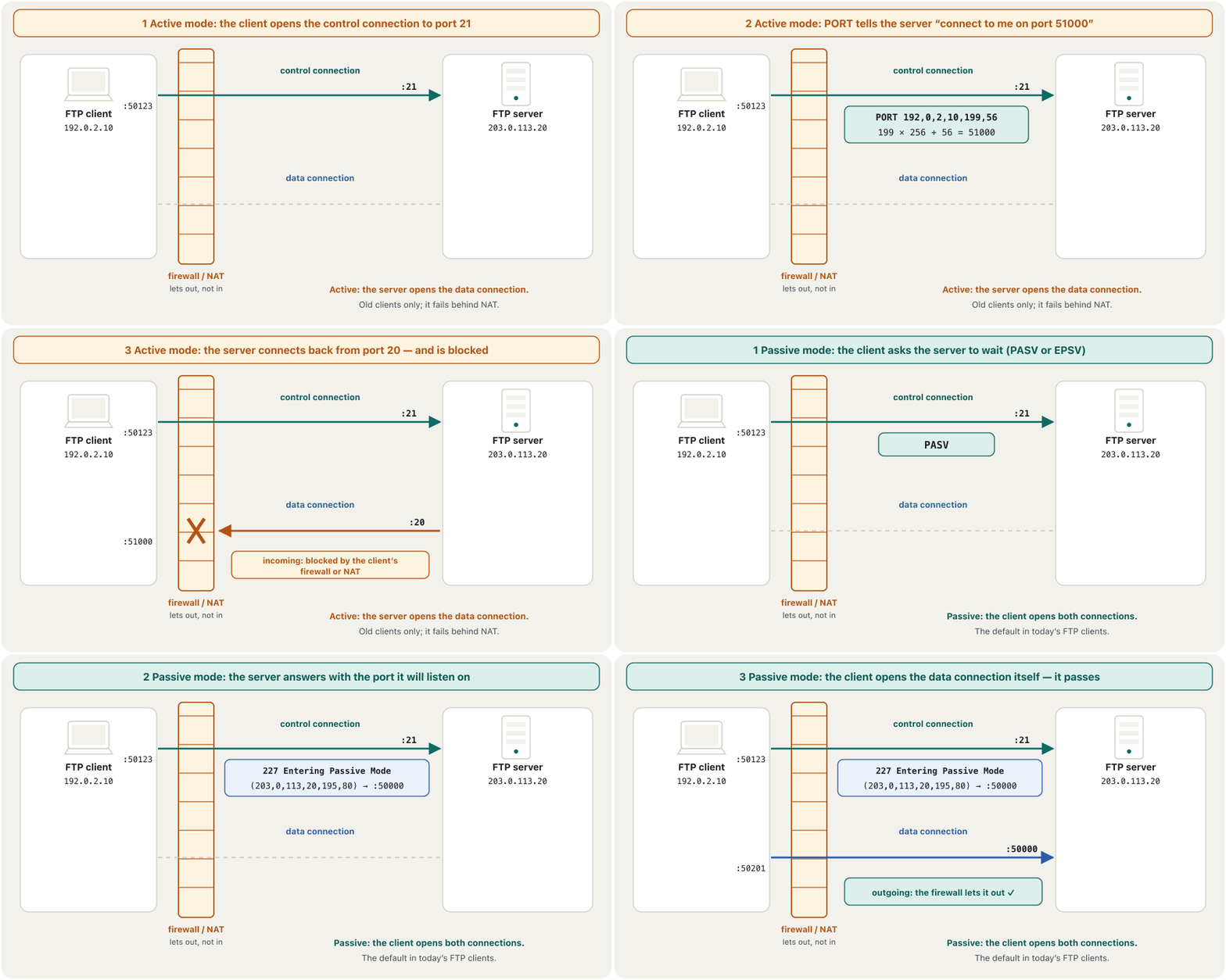
Passive mode is the default in today's FTP clients. The address and port travel as six numbers; the last two give the port as high byte × 256 + low byte, so 195,80 means .
بنەڕەتی ئەمڕۆیە. ناونیشان و وەک شەش ژمارە دەڕۆن؛ دوو دواییەکە دەدەن بەم شێوەیە: بەرز × 256 + نزم، بۆیە 195,80 واتە .
SFTP and FTPS: file transfer with encryptionSFTP و FTPS: گواستنەوەی فایل بە شفرەکردن
Two protocols fix FTP's plain text. FTPS is FTP with TLS added (RFC 4217, 2005): the client sends AUTH TLS on port 21, and the control and data connections are then encrypted — still FTP, still two kinds of connection. SFTP, the SSH File Transfer Protocol, is a different protocol that runs inside an SSH connection on port 22: one connection, encrypted, with SSH's logins and keys. SFTP is the usual choice today; web hosts ask for it, and Windows, macOS and Linux include an sftp command with OpenSSH.
دوو کێشەی چارەسەر دەکەن. FTPS لەگەڵ (RFC 4217، 2005): AUTH TLS لەسەر 21 دەنێرێت و پاشان پەیوەندییەکانی کۆنترۆڵ و شفرە دەکرێن — هەر و هەر دوو جۆر پەیوەندیی هەیە. ، SSH File Transfer Protocol، جیاوازە کە لە ناو پەیوەندییەکی لەسەر 22 کار دەکات: یەک پەیوەندی، شفرەکراو، بە و . هەڵبژاردنی ئاسایی ئەمڕۆیە؛ کۆمپانیاکانی داوای دەکەن و Windows، macOS و Linux فەرمانی sftpـیان لەگەڵ OpenSSH تێدایە.
Inside a Windows network, shared folders and printers use a third protocol, SMB (TCP port 445). Sharing folders is practised in the Windows file-sharing lab; keep port 445 inside the LAN and never open it to the Internet.
لە ناو Windowsـدا، و سێیەم بەکار دەهێنن: ( 445ی ). هاوبەشکردنی لە تاقیگەی هاوبەشکردنی فایلی Windowsـدا ڕاهێنانی لەسەر دەکرێت؛ 445 لە ناو بهێڵەرەوە و هەرگیز بۆ مەیکەرەوە.
TFTP: tiny file transfer for network devicesTFTP: گواستنەوەی بچووکی فایل بۆ ئامێرەکانی ڕایەڵە
TFTP, the Trivial File Transfer Protocol (RFC 1350, 1992), is FTP stripped to the bone. It runs over UDP port 69, sends a file in blocks of 512 bytes and waits for an acknowledgement after every block. It has no login, no encryption and no folder listing. Routers and switches use it to save their configuration to a server or to load a new Cisco IOS image, with commands such as copy running-config tftp: — see Backups on a server.
، Trivial File Transfer Protocol (RFC 1350، 1992)، وەشانێکی زۆر سادەکراوەی . لەسەر 69ی کار دەکات، بە پارچەی 512 دەنێرێت و دوای هەر پارچەیەک چاوەڕێی دەکات. نە هەیە، نە و نە لیستی . و بەکاری دەهێنن بۆ هەڵگرتنی لەسەر یان بارکردنی وێنەیەکی نوێی ، بە فەرمانی وەک copy running-config tftp: — بڕوانە باکئەپ لەسەر ڕاژەکار.
Telnet: a terminal from far awayTelnet: تێرمیناڵێک لە دوورەوە
Telnet (RFC 854, 1983; TCP port 23) lets a user reach the command line of another device — a host, a router or a switch — from far away. The program on your computer imitates a terminal, the screen-and-keyboard machines once wired to big computers. On network devices such a remote session is a VTY session (virtual terminal): what you type goes to the device's command-line interface (CLI), and its answers come back to your window.
(RFC 854، 1983؛ 23ی ) ڕێگە بە دەدات لە دوورەوە بگاتە ئامێرێکی تر — ، یان . سەر لاسایی دەکاتەوە، ئەو ئامێرانەی شاشە و کە جاران بە گەورەوە دەبەسترانەوە. لەسەر ئامێرەکانی ئەم جۆرە دوورە پێی دەگوترێت VTY (تێرمیناڵی گریمانەیی): ئەوەی دەینووسیت دەچێت بۆ ئامێرەکە (CLI) و وەڵامەکانی دەگەڕێنەوە بۆ .
Terminal programs such as PuTTY and Tera Term speak Telnet and SSH. HyperTerminal, which old Windows versions included, is gone, and Windows's own Telnet client is an optional feature that is not installed by default. How a Cisco switch gives out VTY lines is in vty lines.
وەک PuTTY و Tera Term بە و قسە دەکەن. HyperTerminal، کە وەشانە کۆنەکانی Windows تێیاندا بوو، نەماوە و خودی Windows تایبەتمەندییەکی ئارەزوومەندانەیە کە بە بنەڕەت دانەمەزراوە. Cisco چۆن دابەش دەکات لە هێڵەکانی VTYـدایە.
Telnet: a terminal from far awayTelnet: تێرمیناڵێک لە دوورەوە
Telnet's problem: plain textکێشەی Telnet: دەقی ئاشکرا
Telnet does check who you are — it asks for a username and password — but it encrypts nothing. Every key you press, the password included, crosses the network as plain text, and so does every answer. A packet capture shows it plainly:
دەپشکنێت کە تۆ کێیت — ناوی و دەپرسێت — بەڵام هیچ شتێک شفرە ناکات. هەر کە دای دەگریت، ، وەک بە دەڕوات و هەموو وەڵامێکیش هەروا. گرتنی بە ڕوونی پیشانی دەدات:
So Telnet is not acceptable on any real network in 2026 — not even on a “private” office network, because many attacks start inside. Use it only in a lab, to see the danger with your own eyes: the Cisco version of this lab is what an eavesdropper sees.
کەواتە لە 2026ـدا لەسەر هیچ ڕاستەقینە پەسەند نییە — تەنانەت لەسەر «تایبەت»ـی ئۆفیسیش، چونکە زۆر لە ناوەوە دەست پێ دەکەن. تەنیا لە تاقیگەدا بەکاری بهێنە، بۆ ئەوەی مەترسییەکە بە چاوی خۆت ببینیت: وەشانی Ciscoـی ئەم تاقیگەیە ئەوەی گوێگرێکی دزەکی دەیبینێتـە.
SSH: the secure shellSSH: شێڵی پارێزراو
The Secure Shell (SSH) protocol offers an alternative and secure way to reach a server, on TCP port 22: stronger authentication, and every byte encrypted. Its standard (RFC 4251–4254, 2006) has three layers. In the transport layer the server proves itself with its host key, and the connection is encrypted and protected against changes. In user authentication you prove yourself with a password or a key pair. The connection protocol carries several channels — a remote shell, SFTP, SCP copies, port forwarding — through that one encrypted connection.
Secure Shell () ڕێگایەکی جێگرەوە و پارێزراو بۆ گەیشتن بە دەدات، لەسەر 22ی : بەهێزتر و هەموو شفرەکراو. ستانداردەکەی (RFC 4251–4254، 2006) سێ چینی هەیە. لە بە خۆی دەسەلمێنێت و پەیوەندییەکە شفرە دەکرێت و لە گۆڕین دەپارێزرێت. لە پشتڕاستکردنەوەی تۆ بە یان خۆت دەسەلمێنیت. پەیوەندی چەند کەناڵێک — دوور، ، کۆپیی SCP، ناردنی بە تونێل — بەو یەک پەیوەندییە شفرەکراوەدا دەبات.
Configuring SSH on a Cisco switch or router — the RSA key, a local user and SSH-only VTY lines — is taught in What SSH adds and the screens after it.
ڕێکخستنی لەسەر یان Cisco — RSA، ناوخۆیی و کە تەنیا وەردەگرن — لە SSH چی زیاد دەکات و پەڕەکانی دوای ئەوەدا دەخوێنرێت.
SSH: the secure shellSSH: شێڵی پارێزراو
Host keys and key pairsکلیلەکانی میوانگر و جووتە کلیلەکان
The first time you connect, your client has never seen the server's host key, so it shows the key's fingerprint and asks whether to trust it. Compare it with the fingerprint your administrator gave you. After yes, the key is saved in known_hosts; if it ever changes, the client warns you loudly.
یەکەم جار کە پەیوەندی دەکەیت، هەرگیز نەدیوە، بۆیە پەنجەمۆری پیشان دەدات و دەپرسێت متمانەی پێ دەکەیت یان نا. لەگەڵ ئەو پەنجەمۆرەی بەڕێوەبەرەکەت پێی داویت بەراوردی بکە. دوای yes، لە known_hostsـدا هەڵدەگیرێت؛ ئەگەر ڕۆژێک بگۆڕێت، بە توندی ئاگادارت دەکاتەوە.
$ ssh admin@192.0.2.10
The authenticity of host '192.0.2.10 (192.0.2.10)' can't be established.
ED25519 key fingerprint is: SHA256:40yufxz0qGCo7M0tocuYKje4ZgbSrtgN3m5pNNfZrr0
This key is not known by any other names.
Are you sure you want to continue connecting (yes/no/[fingerprint])? yes
Warning: Permanently added '192.0.2.10' (ED25519) to the list of known hosts.
admin@192.0.2.10's password:Better than a password is a key pair of your own: ssh-keygen makes it, you copy the public half to the server once, and from then on your client proves who you are by signing with the private key. No password crosses the network, and password-guessing attacks stop working.
لە باشتر تایبەت بە خۆتە: ssh-keygen دروستی دەکات، نیوە گشتییەکەی یەک جار بۆ کۆپی دەکەیت و لەوە بەدواوە بە واژووکردن بە دەیسەلمێنێت کە تۆ کێیت. هیچ بە ناڕوات و کار ناکات.
RDP and VNC: the whole desktopRDP و VNC: هەموو ڕوومێزەکە
Sometimes you need the whole screen, not just a command line. RDP, Microsoft's Remote Desktop Protocol (port 3389, TCP and UDP), shows a Windows computer's desktop on another device and sends your mouse and keyboard back, encrypted. The computer you connect to must run Windows Pro or a business edition — Home can only connect out — and you connect with Remote Desktop Connection or the Windows App. Network Level Authentication makes you sign in before a session even starts.
هەندێک جار هەموو شاشەکەت دەوێت، نەک تەنیا . ، Remote Desktop Protocolـی Microsoft ( 3389، و )، Windows لەسەر ئامێرێکی تر پیشان دەدات و و بە شفرەکراوی دەگەڕێنێتەوە. ئەو پەیوەندیی پێوە دەکەیت دەبێت Windows Pro یان وەشانێکی بازرگانیی هەبێت — Home تەنیا دەتوانێت پەیوەندی بە دەرەوە بکات — و بە Remote Desktop Connection یان Windows App پەیوەندی دەکەیت. Network Level Authentication وا دەکات پێش دەستپێکردنی بچیتە ژوورەوە.
Never open port 3389 to the Internet. Microsoft warns that forwarding it opens your PC to the Internet and recommends a VPN; exposed RDP is a common way in for attackers (ransomware defences). Connect to a VPN or a Remote Desktop Gateway first. VNC (the RFB protocol, TCP 5900) shares the screen of any operating system, but its own protection is weak, so reach it through SSH or a VPN too. The Windows lab is Turn Remote Desktop on.
هەرگیز 3389 بۆ مەکەرەوە. Microsoft ئاگادار دەکاتەوە کە کردنەوەی ئەم PCـەکەت بۆ دەکاتەوە و پێشنیار دەکات؛ RDPـی کراوە ڕێگایەکی باوی هاتنە ژوورەوەی هێرشبەرانە (بەرگری لە بارمتەواڵە). سەرەتا بە VPN یان Remote Desktop Gateway پەیوەندی بکە. ( RFB، 5900) شاشەی هەر هاوبەش دەکات، بەڵام پاراستنی خۆی لاوازە، بۆیە ئەویش لە ڕێگەی یان بیگە. تاقیگەی Windows Remote Desktop دابگیرسێنەـە.
Which tool for which job?کام ئامراز بۆ کام کار؟
Here is everything in one card: the port, whether it is encrypted, and how it should be used in 2026.
ئەمە هەموو شتێکە لە یەک کارتدا: ، ئایا شفرەکراوە و لە 2026ـدا چۆن بەکار بهێنرێت.
Where to practise: the FTP server lab in Packet Tracer, which ends with why real servers use SFTP; Telnet and SSH to a switch in Remote management with SSH; Remote Desktop and shared folders in the Windows lab; configuration backups in Configuration files. Before testing any service, check that the two computers reach each other with ping — try it in the CêIT network lab.
لە کوێ ڕاهێنان بکەیت: تاقیگەی لە Packet Tracer، کە بە بۆچی ڕاژەکارەکانی ڕاستەقینە SFTP بەکار دەهێنن کۆتایی دێت؛ و بۆ لە بەڕێوەبردنی دوور بە SSH؛ Remote Desktop و لە تاقیگەی Windows؛ لە فایلەکانی ڕێکخستن. پێش تاقیکردنەوەی هەر خزمەتگوزارییەک، بە بپشکنە کە دوو دەگەنە یەکتر — لە تاقیگەی ڕایەڵەی CêITـدا تاقی بکەرەوە.
Common mistakesهەڵە باوەکان
- “Telnet is fine on a private network.” It sends the password as plain text; inside a network is where many attacks begin. Use SSH everywhere, Telnet only in a lab.
- “FTP is safe because it asks for a password.” USER and PASS cross the network readable. Use SFTP (or FTPS).
- “SFTP is FTP over SSL.” SFTP is a different protocol inside SSH (port 22). FTP with TLS is FTPS — and SSL itself is dead.
- “FTP uses only port 21.” Port 21 is the control connection; files travel on data connections — from port 20 in active mode, or to a port the server chooses in passive mode.
- “TFTP is a small FTP over TCP.” TFTP runs over UDP 69, with no login, no encryption and no folder listing.
- “RDP is safe to open because it has a password.” An open 3389 is scanned and attacked from the whole Internet; use a VPN or a gateway.
- Typing
yesto every host-key question without looking. Check the fingerprint; a key that suddenly changes may mean a man in the middle.
- « لەسەر تایبەت باشە.» وەک دەنێرێت؛ زۆر لە ناو دەست پێ دەکەن. لە هەموو شوێنێک بەکار بهێنە، تەنیا لە تاقیگەدا.
- « سەلامەتە چونکە دەپرسێت.» USER و PASS بە خوێندراوەیی بە دەڕۆن. (یان FTPS) بەکار بهێنە.
- « لەسەر SSL.» جیاوازە لە ناو ( 22). لەگەڵ FTPSـە — و SSL خۆی لە مێژە بەسەرچووە.
- « تەنیا 21 بەکار دەهێنێت.» 21 پەیوەندیی کۆنترۆڵە؛ بە پەیوەندییەکانی دەڕۆن — لە 20ـەوە لە ، یان بۆ کە هەڵیدەبژێرێت لە .
- « بچووکە لەسەر .» لەسەر 69 کار دەکات، بێ ، بێ و بێ لیستی .
- «کردنەوەی RDP سەلامەتە چونکە هەیە.» 3389ی کراوە لە هەموو دەپشکنرێت و هێرشی دەکرێتە سەر؛ یان دەروازەیەک بەکار بهێنە.
- نووسینی
yesبۆ هەموو پرسیارێکی بێ سەیرکردن. پەنجەمۆرەکە بپشکنە؛ کە لەناکاو دەگۆڕێت لەوانەیە واتای بێت.
Exercisesڕاهێنانەکان
“The Secure Shell (SSH) protocol offers an alternate and secure method for server access.” True or false? Explain in two sentences.
« Secure Shell () ڕێگایەکی جێگرەوە و پارێزراو بۆ دەستگەیشتن بە دەدات.» ڕاستە یان هەڵە؟ بە دوو ڕستە ڕوونی بکەرەوە.
Show answerوەڵامەکە پیشان بدە
True. SSH is the secure replacement for Telnet: it reaches the same remote command line on TCP port 22, but with stronger authentication (the server proves itself with its host key, you with a password or a key pair) and with every byte encrypted, whereas Telnet sends the password and the whole session as plain text.
ڕاستە. جێگرەوە پارێزراوەکەی : دەگاتە هەمان دوور لەسەر 22ی ، بەڵام بە بەهێزتر ( بە خۆی دەسەلمێنێت و تۆ بە یان ) و هەموو شفرەکراوە، لە کاتێکدا و هەموو وەک دەنێرێت.
An FTP server answers PASV with 227 Entering Passive Mode (198,51,100,7,234,96). To which address and port does the client open the data connection? Show the calculation.
بە 227 Entering Passive Mode (198,51,100,7,234,96) وەڵامی PASV دەداتەوە. پەیوەندیی بۆ کام ناونیشان و دەکاتەوە؟ ژماردنەکە پیشان بدە.
Show answerوەڵامەکە پیشان بدە
The first four numbers are the address, 198.51.100.7; the last two give the port: 60000. The client connects to 198.51.100.7:60000.
چوار ژمارەی یەکەم ناونیشانەکەن، 198.51.100.7؛ دوو دواییەکە دەدەن: 60000. پەیوەندی بە 198.51.100.7:60000ـەوە دەکات.
Aram runs ssh-keygen -t ed25519 -C "aram@laptop" on his laptop and presses Enter at the questions. Which two files appear, and which one does he copy to the server's authorized_keys?
ئارام ssh-keygen -t ed25519 -C "aram@laptop" لەسەر جێبەجێ دەکات و لە پرسیارەکاندا Enter دادەگرێت. کام دوو دروست دەبن و کامیان بۆ authorized_keysـی کۆپی دەکات؟
Hintئاماژە
Which file ends in .pub?
کام بە .pub کۆتایی دێت؟
Show answerوەڵامەکە پیشان بدە
$ ssh-keygen -t ed25519 -C "aram@laptop"
Generating public/private ed25519 key pair.
Enter file in which to save the key (/home/aram/.ssh/id_ed25519):
Enter passphrase for "/home/aram/.ssh/id_ed25519" (empty for no passphrase):
Enter same passphrase again:
Your identification has been saved in /home/aram/.ssh/id_ed25519
Your public key has been saved in /home/aram/.ssh/id_ed25519.pub
The key fingerprint is:
SHA256:SCqhVnxNOCFx6OioC97cWLuhC+2g2o6IfXAbjJ+cZIo aram@laptop
id_ed25519 is the private key — it stays on the laptop, ideally protected with a passphrase. id_ed25519.pub is the public key: its one line (ssh-ed25519 AAAA… aram@laptop) is added to ~/.ssh/authorized_keys on the server.
id_ed25519 — لەسەر دەمێنێتەوە، باشترە بە وشەی نهێنی بپارێزرێت. id_ed25519.pub : یەک هێڵەکەی (ssh-ed25519 AAAA… aram@laptop) بۆ ~/.ssh/authorized_keysـی سەر زیاد دەکرێت.
Choose the protocol (and port) for each job: (a) upload a website to a web host; (b) back up a lab switch's configuration to a server; (c) help a colleague on her Windows desktop from home; (d) manage a Linux server in a data centre.
(و ) بۆ هەر کارێک هەڵبژێرە: (a) بۆ ؛ (b) تاقیگە لەسەر ؛ (c) یارمەتیدانی هاوکارێک لەسەر Windowsـەکەی لە ماڵەوە؛ (d) بەڕێوەبردنی Linux لە .
Show answerوەڵامەکە پیشان بدە
- (a) SFTP on TCP 22 (never plain FTP).
- (b) TFTP on UDP 69 inside the lab's management network — or SCP for a real network.
- (c) RDP on 3389, but only after connecting to the VPN (or through an RD Gateway).
- (d) SSH on TCP 22, ideally with a key pair.
- (a) لەسەر 22 (هەرگیز ئاسایی نا).
- (b) لەسەر 69 لە ناو بەڕێوەبردنی تاقیگە — یان SCP بۆ ڕاستەقینە.
- (c) لەسەر 3389، بەڵام تەنیا دوای پەیوەندیکردن بە (یان لە ڕێگەی RD Gateway).
- (d) لەسەر 22، باشترە بە .
Which port does an FTP control connection use?پەیوەندیی کۆنترۆڵی FTP کام پۆرت بەکار دەهێنێت؟
TCP 21.
21.
In active mode, from which port does the server open the data connection?لە باری چالاکی FTPـدا، ڕاژەکارەکە لە کام پۆرتەوە پەیوەندیی دراوە دەکاتەوە؟
Port 20.
20.
What do Telnet clients such as PuTTY or Tera Term give you?ڕاژەخوازەکانی Telnet وەک PuTTY یان Tera Term چیت دەدەنێ؟
A terminal window connected to a remote device's command line (a VTY session).
کە بە ئامێرێکی دوورەوە بەستراوە ( VTY).
Why is VNC usually tunnelled through SSH or a VPN?بۆچی VNC زۆرجار بە ناو SSH یان VPNـدا دەبرێت؟
Its own protocol (RFB) gives no encryption and only a weak password check.
خۆی (RFB) نادات و تەنیا پشکنینێکی لاوازی هەیە.
Summaryپوختە
- FTP (RFC 959): a client logs in to the FTP daemon and uses get/put; commands on the control connection (TCP 21), files on data connections — active mode from port 20, passive mode to a port the server names. Everything is plain text.
- SFTP (inside SSH, port 22) and FTPS (FTP + TLS) encrypt file transfer; TFTP (UDP 69, no login) backs up network devices inside a trusted network; SMB (445) shares Windows folders inside the LAN.
- Telnet (TCP 23) gives a remote command line (a VTY session) with a login but no encryption — labs only.
- SSH (TCP 22; RFC 4251–4254): host key, user authentication by password or key pair, encrypted channels — the secure way to manage any device.
- RDP (3389) shows a whole Windows desktop and VNC (5900) any desktop — reach both only through a VPN, a gateway or SSH, never through an open port.
- (RFC 959): دەچێتە ژوورەوەی و get/put بەکار دەهێنێت؛ فەرمانەکان لەسەر پەیوەندیی کۆنترۆڵ ( 21)، لەسەر پەیوەندییەکانی — لە 20ـەوە، بۆ کە دیاری دەکات. هەموو شتێک .
- (لە ناو ، 22) و FTPS (واتە FTP + TLS) گواستنەوەی شفرە دەکەن؛ ( 69، بێ ) لە ناو متمانەپێکراودا ئامێرەکانی دەکات؛ (445) Windows لە ناو هاوبەش دەکات.
- ( 23) دوور دەدات ( VTY) بە بەڵام بێ — تەنیا تاقیگە.
- ( 22؛ RFC 4251–4254): ، بە یان ، کەناڵی شفرەکراو — ڕێگای پارێزراوی بەڕێوەبردنی هەر ئامێرێک.
- (3389) هەموو Windows و (5900) هەر پیشان دەدەن — تەنیا لە ڕێگەی ، دەروازە یان پێیان بگە، هەرگیز بە کراوەدا نا.
Lesson complete!وانەکە تەواو بوو!
Well done. Review the key terms, then go on to the next lesson.دەستخۆش. سەیرێکی زاراوە سەرەکییەکان بکەرەوە، پاشان بڕۆ بۆ وانەی داهاتوو.
Key termsزاراوە سەرەکییەکان
Packet Tracer: Your First NetworkPacket Tracer: یەکەم ڕایەڵەکەت
Related lecturesوانە پەیوەندیدارەکان
- Port Numbers and Socketsژمارەی پۆرت و سۆکێتەکان
- Web and E-mail Protocols: HTTP, HTTPS, SMTP, POP3 and IMAPپرۆتۆکۆڵەکانی وێب و ئیمەیڵ: HTTP، HTTPS، SMTP، POP3 و IMAP
- Packet Tracer Lab: DHCP, Web, DNS and FTP Serversتاقیگەی Packet Tracer: ڕاژەکارەکانی DHCP، وێب، DNS و FTP
- Managing Devices Remotely: From Telnet to SSHبەڕێوەبردنی ئامێرەکان لە دوورەوە: لە Telnetـەوە بۆ SSH
- Show Commands, Running and Startup Configurationsفەرمانەکانی show، ڕێکخستنی کارا و ڕێکخستنی دەستپێکردن
- Lab: Connecting Two PCs, Sharing Folders and Remote Desktopتاقیگە: بەستنەوەی دوو کۆمپیوتەر، هاوبەشکردنی فۆڵدەرەکان و Remote Desktop
- Network Defences: Firewalls, Segmentation, Monitoring and SIEMبەرگرییەکانی ڕایەڵە: ئاگرەدیوار، بەشبەشکردنی ڕایەڵە، چاودێریی ئاسایش و SIEM
- Encryption, Hashing and Digital Signaturesشفرەکردن، هاشکردن و واژووە دیجیتاڵییەکان
- Ransomware: WannaCry, NotPetya and Recent Attacksبارمتەواڵە: WannaCry، NotPetya و هێرشە نوێیەکان
References and further readingسەرچاوەکان و خوێندنەوەی زیاتر
- RFC 959: File Transfer Protocol (FTP)
- RFC 4217: Securing FTP with TLS
- RFC 1350: The TFTP Protocol (Revision 2)
- RFC 854: Telnet Protocol Specification
- RFC 4251: The Secure Shell (SSH) Protocol Architecture
- RFC 6143: The Remote Framebuffer Protocol
- Cisco: Configure SSH on Routers (Document ID 4145)
- Microsoft Learn: OpenSSH for Windows overview
- Microsoft Learn: Get started with OpenSSH for Windows
- Microsoft Learn: telnet command
- Microsoft Learn: ftp command
- Microsoft Support: How to use Remote Desktop
- Microsoft Learn: Remote Desktop — allow access to your PC from outside your network
- The Register: Google strips FTP code from Chrome 95 (2021)
This lecture is a first edition. The Kurdish text and terminology are waiting for review by Kurdish IT teachers.ئەم وانەیە چاپی یەکەمە. دەقە کوردییەکە و زاراوەکانی چاوەڕێی پێداچوونەوەی مامۆستایانی کوردی بواری IT ن.