FlutterFlutter · Chapterبەش 8 · Lectureوانە 8.3
Text Fields and Formsخانەکانی دەق و فۆرمەکان
TextField and InputDecoration (label, hint, helper, icons, border, error), the right keyboard and obscureText, reading the text with onChanged or a TextEditingController (created once, disposed), and Form + TextFormField + validator + GlobalKey<FormState> with autovalidateMode — ending in a complete login form.
TextField و InputDecoration (، ڕێنمایی، یارمەتی، ، ، )، گونجاو و obscureText، خوێندنەوەی دەق بە onChanged یان TextEditingController (یەک جار دروست دەکرێت، dispose دەکرێت) و Form + TextFormField + validator + GlobalKey<FormState> لەگەڵ autovalidateMode — کە بە تەواوی کۆتایی دێت.
What you will learnچی فێر دەبیت
- Build a TextField and decorate it with InputDecoration (label, hint, icons, border).
- Choose the keyboard and hide passwords with obscureText.
- Read text with onChanged or a TextEditingController, and dispose the controller.
- Validate a Form with TextFormField validators and a GlobalKey<FormState>.
- Build a login form and explain why the server must validate again.
- TextFieldـێک دروست بکەیت و بە InputDecoration (، ڕێنمایی، ، ) بیڕازێنیتەوە.
- هەڵبژێریت و بە obscureText بشاریتەوە.
- دەق بە onChanged یان TextEditingController بخوێنیتەوە و controllerـەکە dispose بکەیت.
- Formـێک بە validatorـی TextFormField و GlobalKey<FormState> بپشکنیت.
- دروست بکەیت و ڕوون بکەیتەوە بۆچی دەبێت دووبارە بپشکنێتەوە.
Letting the user typeڕێگەدان بە بەکارهێنەر بۆ نووسین
The course defines a text field (also called a text box) as an input element which holds alphanumeric data: letters and numbers such as a name, a password or an address. In Flutter the basic widget is TextField. Its sibling TextFormField is the same field plus validation, made to live inside a Form.
وانەکە (کە پێی دەوترێت یش) وا پێناسە دەکات: توخمێکی کە پیت و ژمارە هەڵدەگرێت: وەک ناو، یان ناونیشان. لە Flutterـدا بنەڕەتی TextFieldـە. هاوشێوەکەی TextFormField هەمان خانەیە لەگەڵ ، کە بۆ ژیان لە ناو Formـێکدا دروست کراوە.
Think of the paper form at a post office: each box has a printed label (Name, Phone), sometimes a small grey example inside (0750…), and the clerk checks every box before accepting the form. A TextField is one box; InputDecoration is everything printed around it; a Form with validators is the clerk.
بیر لە فۆرمێکی کاغەزی لە پۆستەخانەدا بکەرەوە: هەر خانەیەک چاپکراوی هەیە (Name، Phone)، هەندێک جار نموونەیەکی خۆڵەمێشیی بچووک لە ناویدا (0750…). فەرمانبەرەکەش پێش وەرگرتنی فۆرمەکە هەموو خانەیەک دەپشکنێت. TextField یەک خانەیە؛ InputDecoration هەموو ئەو شتانەیە کە بە دەوریدا چاپ کراون؛ Formـێک بە validatorـەکانییەوە فەرمانبەرەکەیە.
Where the analogy stops workingسنووری ئەم نموونەیە
A clerk checks once, at the end. Flutter can check at the end (validate) or while you type (autovalidate).
فەرمانبەر یەک جار، لە کۆتاییدا دەپشکنێت. Flutter دەتوانێت لە کۆتاییدا (validate) یان لە کاتی نووسیندا (autovalidate) بپشکنێت.
Forms on the web work the same way — see HTML form elements if you know HTML.
لە وێبیشدا بە هەمان شێوە کار دەکەن — ئەگەر HTML دەزانیت سەیری توخمەکانی فۆرم لە HTML بکە.
A first TextField and its decorationیەکەم TextField و decorationـەکەی
The course lists the attributes used most with a text field: decoration (the decoration around the field), border (a rounded rectangle around it), labelText (a label shown when the field is selected), hintText (a hint inside the field) and icon (an icon next to the field). One detail matters: only decoration belongs to TextField itself. The other four are properties of the InputDecoration object that you give to decoration.
وانەکە دەژمێرێت کە لەگەڵ زۆرترین بەکار دێن: decoration (ڕازاندنەوەی دەوری خانەکە)، border (لاکێشەیەکی گۆشەخڕ بە دەوریدا)، labelText ( کە کاتی هەڵبژاردنی خانەکە پیشان دەدرێت)، hintText (ڕێنماییەک لە ناو خانەکەدا) و icon ( لە تەنیشت خانەکەوە). وردەکارییەک گرنگە: تەنها decoration هی خودی TextFieldـە. چوارەکەی تر ئەو InputDecorationـەن کە دەیدەیت بە decoration.
import 'package:flutter/material.dart';

class NameField extends StatelessWidget {
  const NameField({super.key});

  @override
  Widget build(BuildContext context) {
    return const Padding(
      padding: EdgeInsets.all(16),
      child: TextField(
        decoration: InputDecoration(
          border: OutlineInputBorder(),
          labelText: 'User Name',
          hintText: 'Enter Your Name',
        ),
      ),
    );
  }
}┌─────────────────────────────┐ │ │ │ ┌─ User Name ─────────────┐│ │ │ Enter Your Name| ││ │ └─────────────────────────┘│ │ │ └─────────────────────────────┘
An outlined box with 'User Name' inside. When tapped, 'User Name' moves up onto the border and the grey hint 'Enter Your Name' appears inside, with a blinking cursor.
سندووقێکی هێڵدار بە 'User Name' لە ناویدا. کاتێک دەستی لێ دەدرێت، 'User Name' بەرز دەبێتەوە بۆ سەر و ڕێنمایی خۆڵەمێشیی 'Enter Your Name' لە ناویدا دەردەکەوێت، لەگەڵ چاوتروکێن.
Explain the codeڕوونکردنەوەی کۆدەکە
- Lineدێڕی 11
Everything drawn around the field goes into one InputDecoration.
هەموو ئەوەی بە دەوری خانەکەدا دەکێشرێت دەچێتە ناو یەک InputDecorationـەوە.
- Lineدێڕی 12
A box with rounded corners instead of the default underline.
سندووقێک بە گۆشەی خڕ لە جیاتی هێڵی ژێرەوەی بنەڕەتی.
- Lineدێڕی 13-14
The label names the field; the hint shows inside it while it is empty.
ناوی خانەکە دەبات؛ ڕێنماییەکە کاتێک بەتاڵە لە ناویدا دەردەکەوێت.
A first TextField and its decorationیەکەم TextField و decorationـەکەی
More InputDecoration propertiesتایبەتمەندییەکانی زیاتری InputDecoration
InputDecoration has many more parts. Each one is optional; use only what helps the user.
InputDecoration بەشی زۆر زیاتری هەیە. هەر یەکێکیان ئارەزوومەندانەیە؛ تەنها ئەوە بەکار بهێنە کە یارمەتیی بەکارهێنەر دەدات.
| Property | What it showsچی پیشان دەدات |
|---|---|
labelText | The field's name; it floats up when the field is focused or filled.ناوی خانەکە؛ کاتێک خانەکە هەڵبژێردراوە یان پڕە بەرز دەبێتەوە. |
hintText | A grey example inside the empty field.نموونەیەکی خۆڵەمێشی لە ناو خانە بەتاڵەکەدا. |
helperText | A small help line under the field.دێڕێکی یارمەتیی بچووک لە ژێر خانەکەوە. |
errorText | A red message under the field (a Form's validator sets it for you).پەیامێکی سوور لە ژێر خانەکەوە (validatorـی Form بۆت دایدەنێت). |
icon | An icon outside the box, at the start. لە دەرەوەی سندووقەکە، لە سەرەتا. |
prefixIcon / suffixIcon | Icons inside the box at the start / end (a suffix can be an IconButton, e.g. clear). لە ناو سندووقەکەدا لە سەرەتا / کۆتایی (پاشگر دەتوانێت IconButton بێت، بۆ نموونە clear). |
prefixText / suffixText | Fixed text such as +964 or IQD.دەقی جێگیر وەک +964 یان IQD. |
border | OutlineInputBorder() (a box), UnderlineInputBorder() (a line, the default), InputBorder.none.OutlineInputBorder() (سندووق)، UnderlineInputBorder() (هێڵ، بنەڕەتی)، InputBorder.none. |
filled / fillColor | A background colour inside the field.ڕەنگێکی پاشبنەما لە ناو خانەکەدا. |
import 'package:flutter/material.dart';
class PhoneField extends StatelessWidget {
const PhoneField({super.key});
@override
Widget build(BuildContext context) {
return const Padding(
padding: EdgeInsets.all(16),
child: TextField(
maxLength: 11, // also shows a counter such as 4/11
decoration: InputDecoration(
icon: Icon(Icons.person), // outside the box
prefixIcon: Icon(Icons.phone), // inside, at the start
suffixIcon: Icon(Icons.check_circle), // inside, at the end
labelText: 'Phone',
hintText: '0750 123 4567',
helperText: 'We call you only about your order',
border: OutlineInputBorder(),
filled: true, // a light background colour
),
),
);
}
}┌─────────────────────────────┐ │ │ │ ☺ ┌ Phone ─────────────────┐│ │ │ ☎ ✓ ││ │ └────────────────────────┘│ │ We call you only about… │ │ 0/11 │ │ │ └─────────────────────────────┘
A person icon, then a filled outlined field 'Phone' with a phone icon at the start and a check at the end; under it 'We call you only about your order' and a counter '0/11'.
کەس، پاشان خانەیەکی پڕکراوەی هێڵداری 'Phone' بە تەلەفۆن لە سەرەتا و نیشانەی ✓ لە کۆتایی؛ لە ژێریدا 'We call you only about your order' و '0/11'.
Explain the codeڕوونکردنەوەی کۆدەکە
- Lineدێڕی 11
maxLengthbelongs to the TextField itself; it stops typing at 11 and shows a counter.maxLengthهی خودی TextFieldـەکەیە؛ لە ١١دا نووسین ڕادەگرێت و پیشان دەدات.- Lineدێڕی 13-15
The three icon places.
سێ شوێنەکەی .
- Lineدێڕی 18
Explain why you ask: users trust the form more.
ڕوونی بکەرەوە بۆچی داوای دەکەیت: بەکارهێنەران زیاتر متمانە بە دەکەن.
A first TextField and its decorationیەکەم TextField و decorationـەکەی
The right keyboard and safe inputکیبۆردی گونجاو و نێوخستەی سەلامەت
A phone shows a soft keyboard when a field gets the focus. Tell it which keyboard to show with keyboardType, what the Enter key should say with textInputAction, and hide a password with obscureText: true. inputFormatters can even stop wrong characters from being typed at all.
مۆبایل کاتێک خانەیەک هەڵدەبژێردرێت سەر شاشە پیشان دەدات. بە keyboardType پێی بڵێ کام پیشان بدات، بە textInputAction دوگمەی Enter چی بنووسێت و بە obscureText: true بشارەوە. inputFormatters تەنانەت دەتوانێت ڕێگە نەدات پیتی هەڵە بنووسرێت.
import 'package:flutter/material.dart';
import 'package:flutter/services.dart';
class KeyboardFields extends StatelessWidget {
const KeyboardFields({super.key});
@override
Widget build(BuildContext context) {
return ListView(
padding: const EdgeInsets.all(16),
children: [
const TextField(
keyboardType: TextInputType.emailAddress, // a keyboard with @
textInputAction: TextInputAction.next, // the Enter key says Next
autocorrect: false,
decoration: InputDecoration(labelText: 'Email'),
),
TextField(
keyboardType: TextInputType.number, // digits only on the keyboard
inputFormatters: [FilteringTextInputFormatter.digitsOnly],
decoration: const InputDecoration(labelText: 'Age'),
),
const TextField(
obscureText: true, // shows dots instead of letters
decoration: InputDecoration(labelText: 'Password'),
),
const TextField(
maxLines: 4, // a bigger box for an address or a message
textCapitalization: TextCapitalization.sentences,
decoration: InputDecoration(labelText: 'Address'),
),
],
);
}
}┌─────────────────────────────┐ │ Email │ │ ───────────────────────── │ │ Age │ │ ───────────────────────── │ │ Password │ │ ───────────────────────── │ │ Address │ │ │ │ │ │ ───────────────────────── │ └─────────────────────────────┘
A scrolling list of four fields: Email (keyboard with @, Enter says Next), Age (number pad), Password (dots), and a four-line Address box.
چوار خانە لە لیستێکدا کە دەکرێت: Email ( بە @، Enter دەڵێت Next)، Age (تەختەی ژمارە)، Password (خاڵ) و سندووقێکی چوار دێڕی Address.
Explain the codeڕوونکردنەوەی کۆدەکە
- Lineدێڕی 13
An email keyboard has @ and . on the first page.
ئیمەیڵ @ و . لە پەڕەی یەکەمدا هەیە.
- Lineدێڕی 20
Even a pasted 'abc' is refused: only digits get in.
تەنانەت 'abc'ـی لکێنراو ڕەت دەکرێتەوە: تەنها ژمارە دەچێتە ناوەوە.
- Lineدێڕی 24
Dots instead of letters: nobody behind you can read it.
خاڵ لە جیاتی پیت: کەس لە پشتتەوە ناتوانێت بیخوێنێتەوە.
- Lineدێڕی 28
Room for four lines.
شوێن بۆ چوار دێڕ.
Two ways to get the textدوو ڕێگە بۆ وەرگرتنی دەقەکە
The course says Flutter lets you retrieve the typed text in mainly two ways: the controller and onChanged. Both work; they suit different jobs.
وانەکە دەڵێت Flutter بە شێوەی سەرەکی بە دوو ڕێگە ڕێگەت پێ دەدات دەقی نووسراو وەربگریت: controller و onChanged. هەردووکیان کار دەکەن؛ بۆ کاری جیاواز دەگونجێن.
| Pointخاڵ | onChanged | TextEditingController | onSubmitted |
|---|---|---|---|
| When you get the textکەی دەقەکە وەردەگریت | After every change.دوای هەموو گۆڕانێک. | Whenever you read .text.هەر کاتێک .text بخوێنیتەوە. | When the user presses Enter/Done.کاتێک بەکارهێنەر Enter/Done دادەگرێت. |
| Can change the fieldدەتوانێت خانەکە بگۆڕێت | No.نا. | Yes: .text = …, .clear().بەڵێ: .text = …، .clear(). | No.نا. |
| Extra workکاری زیادە | None.هیچ. | Create once, dispose() at the end.یەک جار دروستی بکە، لە کۆتاییدا dispose(). | None.هیچ. |
| Good forباشە بۆ | Live search, counters.گەڕانی ڕاستەوخۆ، . | Reading on a button press, filling or clearing a field.خوێندنەوە کاتی داگرتنی ، پڕکردنەوە یان بەتاڵکردنی خانە. | A chat box or a search that runs on Enter.سندووقی گفتوگۆ یان گەڕانێک کە بە Enter کار دەکات. |
Two ways to get the textدوو ڕێگە بۆ وەرگرتنی دەقەکە
onChanged: react to every letteronChanged: وەڵامدانەوە بۆ هەر پیتێک
The course calls onChanged the easiest way to retrieve the text field value. It is a callback: Flutter calls it after every change — each letter typed, deleted or pasted — and passes the whole new text. Use it when something must follow the typing live: a search list, a character counter, a greeting.
وانەکە onChanged ناو دەنێت ئاسانترین ڕێگە بۆ وەرگرتنی بەهای . ئەمە : Flutter دوای هەموو گۆڕانێک بانگی دەکات — هەر پیتێک بنووسرێت، بسڕدرێتەوە یان بلکێنرێت — و هەموو دەقە نوێیەکە دەنێرێت. کاتێک بەکاری بهێنە کە شتێک دەبێت ڕاستەوخۆ شوێن نووسینەکە بکەوێت: لیستی گەڕان، پیت، سڵاوێک.
import 'package:flutter/material.dart';
class LiveGreeting extends StatefulWidget {
const LiveGreeting({super.key});
@override
State<LiveGreeting> createState() => _LiveGreetingState();
}
class _LiveGreetingState extends State<LiveGreeting> {
String _name = '';
@override
Widget build(BuildContext context) {
return Column(
children: [
TextField(
decoration: const InputDecoration(labelText: 'Name'),
// called after every change: each letter typed or deleted
onChanged: (String text) {
setState(() => _name = text);
},
),
const SizedBox(height: 16),
Text('Hello, $_name (${_name.characters.length} letters)'),
],
);
}
}┌─────────────────────────────┐ │ Name │ │ Aram| │ │ ───────────────────── │ │ │ │ Hello, Aram (4 letters) │ └─────────────────────────────┘
A field 'Name' and under it 'Hello, (0 letters)'. Typing A, r, a, m changes the line four times; at the end it says 'Hello, Aram (4 letters)'.
خانەیەکی 'Name' و لە ژێریدا 'Hello, (0 letters)'. نووسینی A، r، a، m دێڕەکە چوار جار دەگۆڕێت؛ لە کۆتاییدا دەڵێت 'Hello, Aram (4 letters)'.
Explain the codeڕوونکردنەوەی کۆدەکە
- Lineدێڕی 20-21
Store the new text in the State and rebuild, so the Text below changes.
دەقە نوێیەکە لە Stateـدا هەڵبگرە و دووبارە دروستی بکەرەوە، بۆ ئەوەی Textـەکەی خوارەوە بگۆڕێت.
- Lineدێڕی 25
characters.lengthcounts letters as people see them: an emoji such as 👍 counts as one, while_name.lengthwould count it as two.characters.lengthپیتەکان وەک ئەوەی خەڵک دەیانبینن دەژمێرێت: وەک 👍 بە یەک دەژمێردرێت، بەڵام_name.lengthبە دووی دەژمێرێت.
Two ways to get the textدوو ڕێگە بۆ وەرگرتنی دەقەکە
TextEditingController: read and write the textTextEditingController: خوێندنەوە و نووسینی دەقەکە
The course's other way is the controller: a TextEditingController object connected to the field with controller:. It always holds the current text in .text, so you can read it whenever you need it (for example when a button is pressed) and write to it (.text = …, .clear()).
ڕێگەکەی تری وانەکە controllerـە: TextEditingController کە بە controller: بە خانەکەوە دەبەسترێت. هەمیشە دەقی ئێستا لە .textـدا هەڵدەگرێت، بۆیە دەتوانیت هەر کاتێک پێویستت بوو بیخوێنیتەوە (بۆ نموونە کاتی داگرتنی ) و بینووسیت (.text = …، .clear()).
import 'package:flutter/material.dart';
class CityForm extends StatefulWidget {
const CityForm({super.key});
@override
State<CityForm> createState() => _CityFormState();
}
class _CityFormState extends State<CityForm> {
// Created once, when the State is created — never inside build().
final TextEditingController _cityController = TextEditingController();
@override
void dispose() {
_cityController.dispose(); // free its resources
super.dispose();
}
void _send() {
final String city = _cityController.text.trim(); // read it now
ScaffoldMessenger.of(context).showSnackBar(
SnackBar(content: Text('Delivery to $city')),
);
}
@override
Widget build(BuildContext context) {
return Column(
children: [
TextField(
controller: _cityController,
decoration: InputDecoration(
labelText: 'City',
suffixIcon: IconButton(
tooltip: 'Clear',
icon: const Icon(Icons.clear),
onPressed: () => _cityController.clear(), // write to it
),
),
),
const SizedBox(height: 16),
FilledButton(onPressed: _send, child: const Text('Send')),
],
);
}
}┌─────────────────────────────┐ │ │ │ City │ │ Duhok ✕ │ │ ───────────────────────── │ │ │ │ ( Send ) │ │ │ │ Delivery to Duhok │ └─────────────────────────────┘
A field 'City' with an ✕ at its end and a 'Send' button. Typing 'Duhok' and pressing Send shows 'Delivery to Duhok' at the bottom; ✕ empties the field.
خانەیەکی 'City' بە ✕ لە کۆتاییەکەیدا و 'Send'. نووسینی 'Duhok' و داگرتنی Send لە خوارەوە 'Delivery to Duhok' پیشان دەدات؛ ✕ خانەکە بەتاڵ دەکاتەوە.
Explain the codeڕوونکردنەوەی کۆدەکە
- Lineدێڕی 12
Created once, with the State. Inside
buildit would be new on every rebuild and lose the text.یەک جار لەگەڵ Stateـەکەدا دروست دەکرێت. لە ناو
buildـدا لە هەموو دووبارە دروستکردنەوەیەکدا نوێ دەبێت و دەقەکە ون دەکات.- Lineدێڕی 15-17
When the screen goes away,
dispose()frees the controller — see the State lifecycle.کاتێک شاشەکە لادەچێت،
dispose()controllerـەکە ئازاد دەکات — سەیری سووڕی ژیانی State بکە.- Lineدێڕی 21
Read the text only when you need it;
trim()removes spaces at both ends.دەقەکە تەنها کاتێک پێویستت بوو بخوێنەرەوە؛
trim()بۆشاییەکانی هەردوو سەر لادەبات.- Lineدێڕی 38
A controller can also change the field.
controller دەتوانێت خانەکەش بگۆڕێت.
Mitch Koko's calm beginner course in Dart and Flutter: variables, operators, if/else, switch, loops, functions, collections, a first screen and a counter.
کۆرسە ئارامەکەی Mitch Koko بۆ سەرەتاییەکان لە و : ، ، if/else، switch، ، ، List/Set/Map، یەکەم شاشە و .
Watch 1:04:58–1:10:28, the 'user input • TEXTFIELD' chapter: a TextField, a TextEditingController and a button that reads controller.text.
لە 1:04:58 تا 1:10:28 سەیر بکە، بەشی user input • TEXTFIELD: TextField، TextEditingController و کە controller.text دەخوێنێتەوە.
Form, TextFormField and validationForm، TextFormField و پشتڕاستکردنەوە
A Form groups fields so they can be checked together. Each TextFormField gets a validator: a function that receives the field's text and returns an error message if something is wrong, or null if it is fine. To reach the form from a button, give the Form a GlobalKey<FormState>; _formKey.currentState!.validate() then runs every validator, shows the messages in red under the fields, and returns true only if all of them returned null.
Form خانەکان کۆ دەکاتەوە بۆ ئەوەی پێکەوە بپشکنرێن. هەر TextFormFieldـێک validatorـێک وەردەگرێت: کە دەقی خانەکە وەردەگرێت و ئەگەر شتێک هەڵە بێت دەگەڕێنێتەوە، یان ئەگەر باش بێت null. بۆ گەیشتن بە لە ، GlobalKey<FormState>ـێک بدە بە Formـەکە؛ پاشان _formKey.currentState!.validate() هەموو validatorـەکان ڕادەکات، پەیامەکان بە سوور لە ژێر خانەکانەوە پیشان دەدات و تەنها ئەگەر هەموویان nullـیان گەڕاندبێتەوە true دەگەڕێنێتەوە.
import 'package:flutter/material.dart';
class NameForm extends StatefulWidget {
const NameForm({super.key});
@override
State<NameForm> createState() => _NameFormState();
}
class _NameFormState extends State<NameForm> {
// The key that lets us reach the Form's state from the button.
final _formKey = GlobalKey<FormState>();
@override
Widget build(BuildContext context) {
return Form(
key: _formKey,
child: Column(
crossAxisAlignment: CrossAxisAlignment.start,
children: [
TextFormField(
decoration: const InputDecoration(labelText: 'Name'),
// Return an error message, or null when the value is fine.
validator: (String? value) {
if (value == null || value.trim().isEmpty) {
return 'Please enter your name';
}
return null;
},
),
const SizedBox(height: 16),
ElevatedButton(
onPressed: () {
// Runs every validator; true only if all return null.
if (_formKey.currentState!.validate()) {
ScaffoldMessenger.of(context).showSnackBar(
const SnackBar(content: Text('Saved')),
);
}
},
child: const Text('Submit'),
),
],
),
);
}
}┌─────────────────────────────┐ │ Name │ │ ───────────────────── (red)│ │ Please enter your name │ │ │ │ [ Submit ] │ └─────────────────────────────┘
A 'Name' field and a Submit button. Submit with an empty field: the field turns red with 'Please enter your name' under it. With a name: a 'Saved' snackbar.
خانەیەکی 'Name' و Submit. Submit بە خانەیەکی بەتاڵ: خانەکە سوور دەبێت و 'Please enter your name' لە ژێریدایە. بە ناوێکەوە: 'Saved'.
Explain the codeڕوونکردنەوەی کۆدەکە
- Lineدێڕی 12
Created once in the State. It is a
GlobalKey<FormState>, not a key of your own State class.یەک جار لە Stateـدا دروست دەکرێت.
GlobalKey<FormState>ـە، نەک Stateـی خۆت.- Lineدێڕی 24-28
An error message, or null for valid.
، یان null بۆ دروست.
- Lineدێڕی 35
Runs all validators; true only if every field is valid.
هەموو validatorـەکان ڕادەکات؛ تەنها ئەگەر هەموو خانەیەک دروست بێت true.
The user presses Submit.
بەکارهێنەر Submit دادەگرێت.
validate()calls every field's validator with its current text.validate()validatorـی هەموو خانەیەک بە دەقی ئێستای بانگ دەکات.Each validator returns a message (wrong) or null (right).
هەر validatorـێک پەیامێک (هەڵە) یان null (ڕاست) دەگەڕێنێتەوە.
The Form rebuilds: messages appear in red under the wrong fields.
Formـەکە دووبارە دروست دەبێتەوە: پەیامەکان بە سوور لە ژێر خانە هەڵەکانەوە دەردەکەون.
validate()returns true only if no field had a message — then save or send the data.validate()تەنها ئەگەر هیچ خانەیەک پەیامی نەبووبێت true دەگەڕێنێتەوە — ئەوکاتە پاشەکەوت بکە یان بینێرە.
Form, TextFormField and validationForm، TextFormField و پشتڕاستکردنەوە
Writing validatorsنووسینی validator
A validator is an ordinary function String? Function(String? value). Keep each rule small, give a message that says how to fix the problem, and reuse the functions in many forms. Three common rules:
validator ئاسایی String? Function(String? value)ـە. هەر یاسایەک بچووک ڕابگرە، پەیامێک بدە کە بڵێت چۆن کێشەکە چاک بکرێت و لە چەند دووبارە بەکار بهێنەوە. سێ یاسای باو:
// Small validator functions you can reuse in many forms.
String? requiredField(String? value) {
if (value == null || value.trim().isEmpty) return 'This field is required';
return null;
}
String? emailField(String? value) {
final v = value?.trim() ?? '';
if (v.isEmpty) return 'Please enter your email';
// A simple check: something@something.something
final ok = RegExp(r'^[^@\s]+@[^@\s]+\.[^@\s]+$').hasMatch(v);
return ok ? null : 'This does not look like an email address';
}
String? ageField(String? value) {
final age = int.tryParse(value ?? ''); // null if it is not a number
if (age == null) return 'Please enter a number';
if (age < 16 || age > 99) return 'Age must be between 16 and 99';
return null;
}requiredField(' ') → This field is required
requiredField('Aram') → null
emailField('aram@example') → This does not look like an email address
emailField('aram@example.com') → null
ageField('abc') → Please enter a number
ageField('12') → Age must be between 16 and 99
ageField('20') → nullExplain the codeڕوونکردنەوەی کۆدەکە
- Lineدێڕی 4
trim()first: a field with only spaces is empty too.سەرەتا
trim(): خانەیەک کە تەنها بۆشایی تێدایە ئەویش بەتاڵە.- Lineدێڕی 12
A
RegExpis a text pattern: here some characters, @, some characters, a dot, some characters (no spaces). It catches typos, but only sending an email proves an address is real.RegExpقاڵبێکی دەقە: لێرەدا چەند پیت یان هێمایەک، @، چەند پیت یان هێمایەک، خاڵ، چەند پیت یان هێمایەک (بێ بۆشایی). هەڵەی نووسین دەگرێت، بەڵام تەنها ناردنی ئیمەیڵێک دەیسەلمێنێت کە ناونیشانێک ڕاستەقینەیە.- Lineدێڕی 17
int.tryParsereturns null instead of crashing on 'abc'.int.tryParseلە جیاتی تەقینەوە بە 'abc'، null دەگەڕێنێتەوە.
Use a validator by name: validator: emailField. To combine it with something else, wrap it: validator: (v) => requiredField(v) ?? ageField(v) — the ?? takes the first message that is not null.
validatorـێک بە ناو بەکار بهێنە: validator: emailField. بۆ تێکەڵکردنی لەگەڵ شتێکی تر، بیپێچەوە: validator: (v) => requiredField(v) ?? ageField(v) — ?? یەکەم پەیام وەردەگرێت کە null نییە.
Form, TextFormField and validationForm، TextFormField و پشتڕاستکردنەوە
When to check: autovalidateModeکەی بپشکنرێت: autovalidateMode
By default a Form checks only when you call validate(). autovalidateMode (on the Form or on one field) checks earlier:
بە شێوەی بنەڕەتی Form تەنها کاتێک validate() بانگ دەکەیت دەپشکنێت. autovalidateMode (لەسەر Form یان لەسەر یەک خانە) زووتر دەپشکنێت:
| AutovalidateMode | Checks…دەپشکنێت… |
|---|---|
disabled | Only on validate() (the default).تەنها لەسەر validate() (بنەڕەتی). |
onUserInteraction | After the user has changed a field, on every change.دوای ئەوەی بەکارهێنەر خانەیەکی گۆڕی، لە هەموو گۆڕانێکدا. |
onUnfocus | When the user leaves a field.کاتێک بەکارهێنەر خانەیەک بەجێ دەهێڵێت. |
always | All the time, even before the user types — red errors on an empty new form.هەمیشە، تەنانەت پێش ئەوەی بەکارهێنەر بنووسێت — سوور لەسەر نوێی بەتاڵ. |
A login form with validationفۆرمێکی چوونەژوورەوە بە پشتڕاستکردنەوەوە
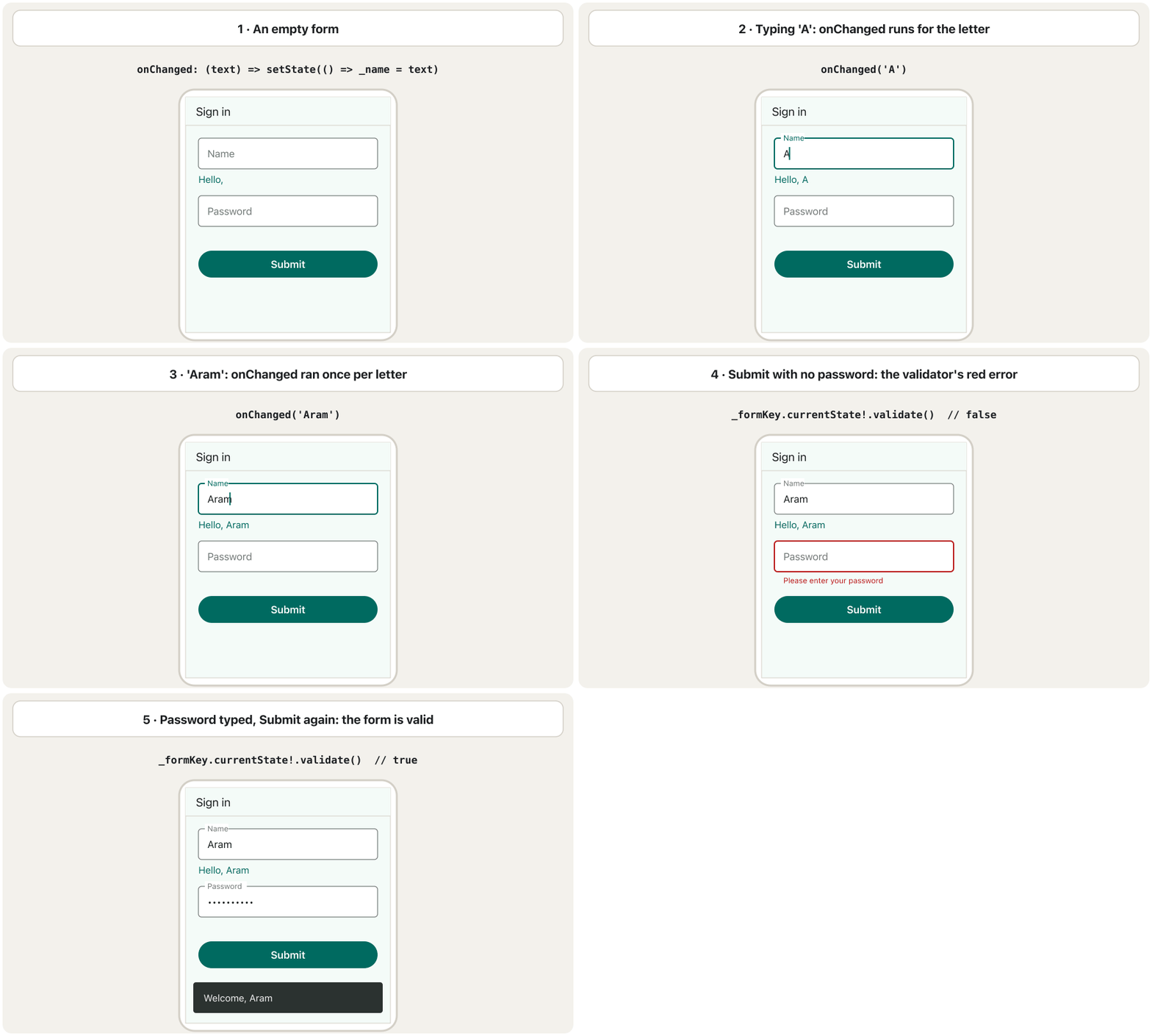
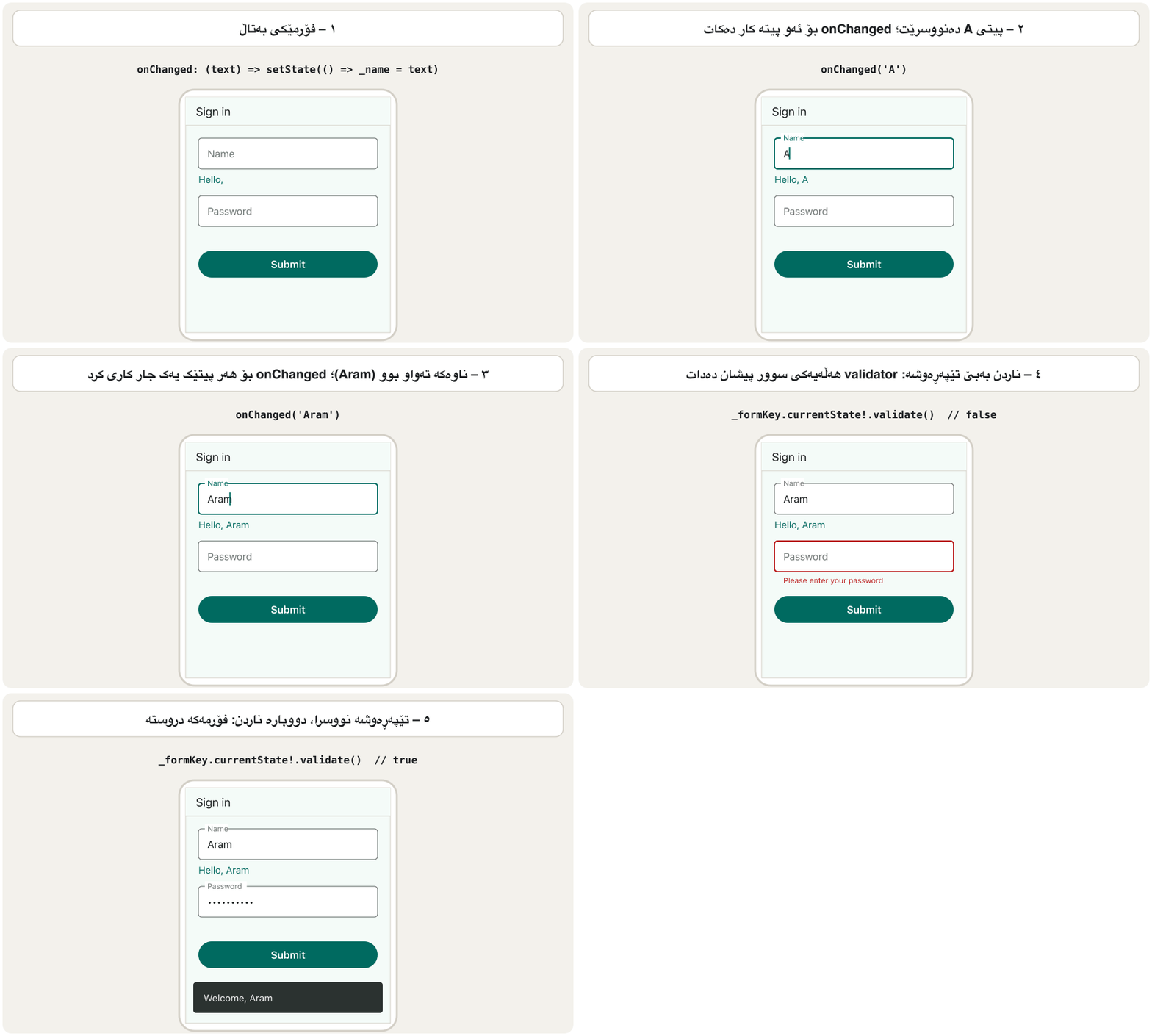
Everything together: two fields with controllers, keyboards and validators, a password that can be shown or hidden, checks while typing, and one button. The animation shows the two ideas of this lesson — onChanged follows every letter, and validate() turns an empty field red:
هەموو شتێک پێکەوە: دوو خانە بە controller، و validatorـەوە، کە دەتوانرێت پیشان بدرێت یان بشاردرێتەوە، پشکنین لە کاتی نووسیندا و یەک . ئەم جووڵەیە دوو بیرۆکەکەی ئەم وانەیە پیشان دەدات — onChanged شوێن هەموو پیتێک دەکەوێت و validate() خانەیەکی بەتاڵ سوور دەکات:
import 'package:flutter/material.dart';
void main() => runApp(const MaterialApp(home: LoginPage()));
class LoginPage extends StatefulWidget {
const LoginPage({super.key});
@override
State<LoginPage> createState() => _LoginPageState();
}
class _LoginPageState extends State<LoginPage> {
final _formKey = GlobalKey<FormState>();
final _emailController = TextEditingController();
final _passwordController = TextEditingController();
bool _hidePassword = true;
@override
void dispose() {
_emailController.dispose();
_passwordController.dispose();
super.dispose();
}
void _logIn() {
if (!_formKey.currentState!.validate()) return; // show the errors
// Here a real app sends the data to its server over HTTPS.
ScaffoldMessenger.of(context).showSnackBar(
SnackBar(content: Text('Welcome, ${_emailController.text.trim()}')),
);
}
@override
Widget build(BuildContext context) {
return Scaffold(
appBar: AppBar(title: const Text('Log in')),
body: SingleChildScrollView(
padding: const EdgeInsets.all(24),
child: Form(
key: _formKey,
autovalidateMode: AutovalidateMode.onUserInteraction,
child: Column(
children: [
TextFormField(
controller: _emailController,
keyboardType: TextInputType.emailAddress,
textInputAction: TextInputAction.next,
autofillHints: const [AutofillHints.email],
decoration: const InputDecoration(
labelText: 'Email',
prefixIcon: Icon(Icons.email_outlined),
border: OutlineInputBorder(),
),
validator: (value) {
final v = value?.trim() ?? '';
if (v.isEmpty) return 'Please enter your email';
if (!v.contains('@')) return 'An email address has an @';
return null;
},
),
const SizedBox(height: 16),
TextFormField(
controller: _passwordController,
obscureText: _hidePassword,
textInputAction: TextInputAction.done,
autofillHints: const [AutofillHints.password],
onFieldSubmitted: (_) => _logIn(),
decoration: InputDecoration(
labelText: 'Password',
prefixIcon: const Icon(Icons.lock_outline),
border: const OutlineInputBorder(),
suffixIcon: IconButton(
tooltip: _hidePassword ? 'Show password' : 'Hide password',
icon: Icon(
_hidePassword ? Icons.visibility : Icons.visibility_off,
),
onPressed: () =>
setState(() => _hidePassword = !_hidePassword),
),
),
// At log-in only check that something was typed:
// length rules belong to the sign-up form.
validator: (value) => (value == null || value.isEmpty)
? 'Please enter your password'
: null,
),
const SizedBox(height: 24),
SizedBox(
width: double.infinity,
child: FilledButton(onPressed: _logIn, child: const Text('Log in')),
),
],
),
),
),
);
}
}┌─────────────────────────────┐ │ Log in │ │─────────────────────────────│ │ ┌ Email ─────────────────┐ │ │ │ ✉ aram@example.com │ │ │ └────────────────────────┘ │ │ ┌ Password ──────────────┐ │ │ │ ⊡ •••••••••• ◉ │ │ │ └────────────────────────┘ │ │ ( Log in ) │ └─────────────────────────────┘
'Log in' page: an Email field with a mail icon, a Password field with a lock and an eye button, and a full-width 'Log in' button. Pressing it with empty fields shows two red messages; with an email and a password a 'Welcome, …' snackbar appears.
پەڕەی 'Log in': خانەیەکی Email بە ئیمەیڵ، خانەیەکی Password بە قوفڵ و چاو و 'Log in'ـی پانیی تەواو. داگرتنی بە خانەی بەتاڵ دوو پەیامی سوور پیشان دەدات؛ بە ئیمەیڵ و ، 'Welcome, …' دەردەکەوێت.
Explain the codeڕوونکردنەوەی کۆدەکە
- Lineدێڕی 13-16
The form key, two controllers and one piece of state, all created once.
، دوو controller و یەک پارچە ، هەموویان یەک جار دروست دەکرێن.
- Lineدێڕی 19-22
Both controllers are disposed.
هەردوو controllerـەکە dispose دەکرێن.
- Lineدێڕی 37
When the keyboard opens, the form can scroll instead of overflowing.
کاتێک دەکرێتەوە، دەتوانێت بکات لە جیاتی ڕژانە دەرەوە.
- Lineدێڕی 41
Check while the user types, after the first change.
لە کاتی نووسیندا بپشکنە، دوای یەکەم گۆڕان.
- Lineدێڕی 48
Lets the phone's password manager fill the field.
ڕێگە دەدات مۆبایلەکە خانەکە پڕ بکاتەوە.
- Lineدێڕی 64
Dots, or the real letters when the eye button is tapped.
خاڵ، یان پیتە ڕاستەقینەکان کاتێک دەست لە چاو دەدرێت.
- Lineدێڕی 83
At log-in only check that a password was typed; length rules belong to the sign-up form.
لە کاتی تەنها بپشکنە کە نووسراوە؛ یاساکانی درێژی هی .
A login form with validationفۆرمێکی چوونەژوورەوە بە پشتڕاستکردنەوەوە
The app checks, the server decidesئەپەکە دەپشکنێت، ڕاژەکارەکە بڕیار دەدات
Common mistakesهەڵە باوەکان
| Mistakeهەڵە | What happensچی ڕوو دەدات | Fixچاککردن |
|---|---|---|
labelText, hintText, border written directly on TextField.labelText، hintText، border ڕاستەوخۆ لەسەر TextField نووسراون. | Compile error: no such parameter.: ئەم نییە. | Put them in decoration: InputDecoration(...).بیانخە ناو decoration: InputDecoration(...). |
A TextEditingController created inside build().TextEditingControllerـێک لە ناو build()ـدا دروست کراوە. | The text disappears after a rebuild.دوای دووبارە دروستکردنەوە دەقەکە ون دەبێت. | Create it once in the State; dispose it.یەک جار لە Stateـدا دروستی بکە؛ disposeـی بکە. |
Forgetting dispose().لەبیرکردنی dispose(). | The controller keeps its resources after the screen is gone.controllerـەکە دوای ڕۆیشتنی شاشەکە خۆی دەهێڵێتەوە. | _controller.dispose() in the State's dispose()._controller.dispose() لە dispose()ـی Stateـدا. |
A validator returns '' for valid input.validatorـێک بۆ دروست '' دەگەڕێنێتەوە. | The form is never valid. هەرگیز دروست نابێت. | Return null when the value is fine.کاتێک بەهاکە باشە null بگەڕێنەوە. |
_formKey.currentState! when the Form is not in the tree._formKey.currentState! کاتێک Form لە درەختەکەدا نییە. | Null check error at run time. پشکنینی null لە کاتی جێبەجێکردندا. | Give the key to the Form that contains the button's fields. بدە بەو Formـەی خانەکانی تێدایە. |
| A TextField directly inside a Row.TextFieldـێک ڕاستەوخۆ لە ناو Rowـێکدا. | Error: An InputDecorator … cannot have an unbounded width.: An InputDecorator … cannot have an unbounded width. | Wrap it in Expanded (or give it a width).بیخە ناو Expanded (یان پانییەکی بدەیتێ). |
| A long form in a plain Column. درێژ لە Columnـێکی سادەدا. | The keyboard covers the lower fields; overflow stripes. خانەکانی خوارەوە دادەپۆشێت؛ هێڵی overflow. | Wrap the form in SingleChildScrollView. بخە ناو SingleChildScrollView. |
| Trusting the app's validation alone.تەنها متمانەکردن بە . | Bad data reaches the server through other paths. خراپ لە ڕێگەی تر دەگاتە . | Validate again on the server.لەسەر دووبارە بپشکنەوە. |
Exercisesڕاهێنانەکان
Make the course's two snippets work: the TextField with border, label and hint, and the controller that reads the text. Put the controller in a StatefulWidget and dispose it.
دوو پارچە کۆدەکەی وانەکە کارا بکە: TextFieldـەکە بە ، و ڕێنماییەوە و ئەو controllerـەی دەقەکە دەخوێنێتەوە. controllerـەکە بخە ناو StatefulWidgetـێکەوە و disposeـی بکە.
TextField (
  decoration: InputDecoration(
  border: OutlineInputBorder(),
  labelText: User Name',
  hintText: 'Enter Your Name'
),)TextEditingController mycontroller = TextEditingController();
TextField(controller: mycontroller)
String data = mycontroller.textShow answerوەڵامەکە پیشان بدە
The field: add the missing quote, close InputDecoration( and TextField( properly. The controller: create it once as a field of the State, read .text when needed (with ;), and dispose it.
خانەکە: ئەو 'ـەی ونبووە زیاد بکە و InputDecoration( و TextField( بە دروستی دابخە. controller: یەک جار وەک خانەیەکی State دروستی بکە، .text کاتێک پێویستە بخوێنەرەوە (بە ;) و disposeـی بکە.
class _NameState extends State<NameBox> {
  final TextEditingController nameController = TextEditingController();

  @override
  void dispose() {
    nameController.dispose();
    super.dispose();
  }

  @override
  Widget build(BuildContext context) {
    return TextField(
      controller: nameController,
      decoration: const InputDecoration(
        border: OutlineInputBorder(),
        labelText: 'User Name',
        hintText: 'Enter Your Name',
      ),
    );
  }

  String readName() => nameController.text; // the typed name
}Show a search field above a list of five Kurdish cities. As the user types, the list shows only the cities that contain the typed text (upper or lower case does not matter).
خانەیەکی گەڕان لە سەرووی لیستێکی پێنج شاری کوردستانەوە پیشان بدە. کاتێک بەکارهێنەر دەنووسێت، لیستەکە تەنها ئەو شارانە پیشان دەدات کە دەقە نووسراوەکەیان تێدایە (پیتی گەورە یان بچووک گرنگ نییە).
Show answerوەڵامەکە پیشان بدە
import 'package:flutter/material.dart';

class CitySearch extends StatefulWidget {
  const CitySearch({super.key});

  @override
  State<CitySearch> createState() => _CitySearchState();
}

class _CitySearchState extends State<CitySearch> {
  static const _cities = ['Erbil', 'Sulaymaniyah', 'Duhok', 'Halabja', 'Zakho'];
  String _query = '';

  @override
  Widget build(BuildContext context) {
    final matches = _cities
        .where((c) => c.toLowerCase().contains(_query.toLowerCase()))
        .toList();
    return Column(
      children: [
        TextField(
          decoration: const InputDecoration(
            prefixIcon: Icon(Icons.search),
            hintText: 'Search a city',
          ),
          onChanged: (text) => setState(() => _query = text),
        ),
        Expanded(
          child: ListView(
            children: [for (final c in matches) ListTile(title: Text(c))],
          ),
        ),
      ],
    );
  }
}
Explain the codeڕوونکردنەوەی کۆدەکە
- Lineدێڕی 17
Compare both in lower case.
هەردووکیان بە پیتی بچووک بەراورد بکە.
- Lineدێڕی 26
onChanged is the right tool: the list follows every letter.
onChanged ئامرازە گونجاوەکەیە: لیستەکە شوێن هەموو پیتێک دەکەوێت.
Build a sign-up form with Password (at least 15 characters) and Repeat password, which must match the first one.
دروست بکە بە Password (لانیکەم ١٥ پیت) و Repeat password کە دەبێت وەک یەکەم بێت.
Show answerوەڵامەکە پیشان بدە
import 'package:flutter/material.dart';

class RegisterForm extends StatefulWidget {
  const RegisterForm({super.key});

  @override
  State<RegisterForm> createState() => _RegisterFormState();
}

class _RegisterFormState extends State<RegisterForm> {
  final _formKey = GlobalKey<FormState>();
  final _passwordController = TextEditingController();

  @override
  void dispose() {
    _passwordController.dispose();
    super.dispose();
  }

  @override
  Widget build(BuildContext context) {
    return Form(
      key: _formKey,
      child: Column(
        children: [
          TextFormField(
            controller: _passwordController,
            obscureText: true,
            decoration: const InputDecoration(labelText: 'Password'),
            validator: (v) => (v == null || v.characters.length < 15)
                ? 'Use at least 15 characters'
                : null,
          ),
          TextFormField(
            obscureText: true,
            decoration: const InputDecoration(labelText: 'Repeat password'),
            // compare with the text of the first field
            validator: (v) => v != _passwordController.text
                ? 'The two passwords are different'
                : null,
          ),
          const SizedBox(height: 16),
          FilledButton(
            onPressed: () => _formKey.currentState!.validate(),
            child: const Text('Create account'),
          ),
        ],
      ),
    );
  }
}
Explain the codeڕوونکردنەوەی کۆدەکە
- Lineدێڕی 30
The length rule belongs here, at sign-up.
یاسای درێژی لێرەدایە، لە کاتی .
- Lineدێڕی 38
The second validator reads the first field through its controller.
validatorـی دووەم خانەی یەکەم لە ڕێگەی controllerـەکەیەوە دەخوێنێتەوە.
Write a TextFormField for an age between 16 and 99 that shows the number keyboard and refuses letters.
TextFormFieldـێک بۆ تەمەنێک لە نێوان ١٦ و ٩٩دا بنووسە کە ژمارە پیشان دەدات و پیت ڕەت دەکاتەوە.
Hintئاماژە
Combine keyboardType, inputFormatters and the ageField validator.
keyboardType، inputFormatters و validatorـی ageField تێکەڵ بکە.
Show answerوەڵامەکە پیشان بدە
TextFormField(
  keyboardType: TextInputType.number,
  inputFormatters: [FilteringTextInputFormatter.digitsOnly],
  decoration: const InputDecoration(labelText: 'Age'),
  validator: ageField, // from the validators above
)A classmate says: My app works without dispose(), so I do not need it. Answer in two or three sentences.
هاوپۆلێک دەڵێت: بەبێ dispose() کار دەکات، بۆیە پێویستم پێی نییە. بە دوو یان سێ ڕستە وەڵام بدەرەوە.
Show answerوەڵامەکە پیشان بدە
A controller holds resources and listeners. Without dispose() they stay alive after the screen is closed; one screen hardly shows it, but opening and closing screens many times wastes memory and can call listeners of widgets that are gone. Flutter's docs say to dispose every controller you create.
controller و گوێگر هەڵدەگرێت. بەبێ dispose() دوای داخستنی شاشەکە زیندوو دەمێننەوە؛ یەک شاشە بە ئەستەم پیشانی دەدات، بەڵام کردنەوە و داخستنی شاشەکان بە چەندین جار بیرگە بەفیڕۆ دەدات و دەتوانێت گوێگری ئەو نەماون بانگ بکات. بەڵگەنامەکانی Flutter دەڵێن هەموو controllerـێک کە دروستی دەکەیت dispose بکە.
Summaryپوختە
TextFieldtakes typed text;TextFormFieldadds a validator and works inside aForm.decoration: InputDecoration(...)holds labelText, hintText, helperText, errorText, icon, prefixIcon/suffixIcon and border; keyboardType, obscureText, maxLength and inputFormatters belong to the field.- Two ways to get the text:
onChanged(after every change) or aTextEditingController(.text,.clear()), created once and disposed. - A validator returns an error message or null;
GlobalKey<FormState>+validate()checks the whole form;autovalidateModechecks earlier. - Validation in the app helps the user; the server must check again.
TextFieldدەقی نووسراو وەردەگرێت؛TextFormFieldvalidatorـێک زیاد دەکات و لە ناوFormـێکدا کار دەکات.decoration: InputDecoration(...)labelText، hintText، helperText، errorText، icon، prefixIcon/suffixIcon و border هەڵدەگرێت؛ keyboardType، obscureText، maxLength و inputFormatters هی خانەکەن.- دوو ڕێگە بۆ وەرگرتنی دەقەکە:
onChanged(دوای هەموو گۆڕانێک) یانTextEditingController(.text،.clear()) کە یەک جار دروست دەکرێت و dispose دەکرێت. - validator یان null دەگەڕێنێتەوە؛
GlobalKey<FormState>+validate()هەموو دەپشکنێت؛autovalidateModeزووتر دەپشکنێت. - لە یارمەتیی بەکارهێنەر دەدات؛ دەبێت دووبارە بپشکنێتەوە.
When do you choose a controller instead of onChanged?کەی controller لە جیاتی onChanged هەڵدەبژێریت؟
When you read the text at a particular moment (a button press) or must change it from code (fill in, clear).
کاتێک دەقەکە لە ساتێکی دیاریکراودا دەخوێنیتەوە (داگرتنی ) یان دەبێت لە کۆدەوە بیگۆڕیت (پڕکردنەوە، بەتاڵکردنەوە).
What does a validator return for a valid value?validator بۆ بەهایەکی دروست چی دەگەڕێنێتەوە؟
null. Any string, even an empty one, is shown as an error.
null. هەر ، تەنانەت بەتاڵیش، وەک پیشان دەدرێت.
Why is the form key a GlobalKey<FormState>?بۆچی کلیلەکەی فۆرم GlobalKey<FormState>ـە؟
It lets code outside the Form (a button's onPressed) reach the Form's state and call validate(), save() or reset().
ڕێگە دەدات کۆدێک لە دەرەوەی Form (onPressedـی ) بگاتە stateـی Formـەکە و validate()، save() یان reset() بانگ بکات.
Lesson complete!وانەکە تەواو بوو!
Well done. Review the key terms, then go on to the next lesson.دەستخۆش. سەیرێکی زاراوە سەرەکییەکان بکەرەوە، پاشان بڕۆ بۆ وانەی داهاتوو.
Key termsزاراوە سەرەکییەکان
Splash Screensشاشەکانی دەستپێک
Related lecturesوانە پەیوەندیدارەکان
References and further readingسەرچاوەکان و خوێندنەوەی زیاتر
This lecture is a first edition. The Kurdish text and terminology are waiting for review by Kurdish IT teachers.ئەم وانەیە چاپی یەکەمە. دەقە کوردییەکە و زاراوەکانی چاوەڕێی پێداچوونەوەی مامۆستایانی کوردی بواری IT ن.