Chapterبەش 8 · Lectureوانە 8.2
Packet Tracer Lab: DHCP, Web, DNS and FTP Serversتاقیگەی Packet Tracer: ڕاژەکارەکانی DHCP، وێب، DNS و FTP
One Packet Tracer server, four services, built and checked step by step: a DHCP pool (and why the PC may get the wrong address), a web page in index.html, a DNS A record so the page opens by name, and an FTP server with users, permissions and put/get from a PC — plus a troubleshooting table and why real networks use SFTP.
یەک Packet Tracer، چوار خزمەتگوزاری، هەنگاو بە هەنگاو دروست و پشکنین کراون: (و بۆچی لەوانەیە ناونیشانی هەڵە وەربگرێت)، لە index.html، A بۆ ئەوەی لاپەڕەکە بە ناو بکرێتەوە و بە بەکارهێنەر، و put/get لە — لەگەڵ خشتەیەکی و بۆچی ڕاستەقینە بەکار دەهێنن.
What you will learnچی فێر دەبیت
- Configure a DHCP pool on a Packet Tracer server and check what the PCs receive.
- Publish a page with the HTTP service and open it by IP address and by name.
- Add a DNS A record and explain why the PC needs a DNS server address.
- Create FTP users with permissions and transfer files with ftp, dir, put and get.
- Find and fix the common faults of the lab, and choose SFTP for real networks.
- لەسەر Packet Tracer ڕێک بخەیت و بپشکنیت چی وەردەگرن.
- لاپەڕەیەک بە خزمەتگوزاریی بڵاو بکەیتەوە و بە و بە ناو بیکەیتەوە.
- A زیاد بکەیت و ڕوونی بکەیتەوە بۆچی پێویستی بە ناونیشانی هەیە.
- بەکارهێنەری بە دروست بکەیت و بە ftp، dir، put و get فایل بگوازیتەوە.
- هەڵە باوەکانی تاقیگەکە بدۆزیتەوە و چاکیان بکەیت و بۆ ڕاستەقینە هەڵبژێریت.
One server, four servicesیەک ڕاژەکار، چوار خزمەتگوزاری
In this lab one Packet Tracer server does four jobs that real networks share between several machines: it gives the PCs their addresses (DHCP), sends them a web page (HTTP), turns a name into an address (DNS) and stores files (FTP). You switch the services on one after the other, and you check each one before moving on.
لەم تاقیگەیەدا یەک Packet Tracer چوار کار دەکات کە ڕاستەقینە لە نێوان چەند ئامێرێکدا دابەشیان دەکەن: ناونیشان دەداتە ()، بۆ دەنێرێت ()، ناوێک دەکاتە ناونیشان () و فایل هەڵدەگرێت (). خزمەتگوزارییەکان یەک لە دوای یەک هەڵدەکەیت و هەریەکەیان دەپشکنیت پێش ئەوەی بچیتە سەر دواتر.
This lesson is the hands-on side. Why each protocol works the way it does is in DHCP, DNS, web protocols and file transfer; building a network and the Packet Tracer window are in Packet Tracer: Your First Network.
ئەم وانەیە لایەنی کرداریـیە. بۆچی هەر بەو شێوەیە کار دەکات لە DHCP، DNS، پرۆتۆکۆڵەکانی وێب و گواستنەوەی فایلدایە؛ دروستکردنی و پەنجەرەی Packet Tracer لە Packet Tracer: یەکەم ڕایەڵەکەتدان.
Step 0: build it and give the server a fixed addressهەنگاوی 0: دروستی بکە و ناونیشانێکی جێگیر بدە ڕاژەکارەکە
Place a PC, a 2960 switch and a Server (End Devices → Server). Join PC–switch and switch–server with Copper Straight-Through cables and wait until every light is green.
PC، 2960 و Server دابنێ (End Devices ← Server). – و – بە Copper Straight-Through پێکەوە ببەستەوە و چاوەڕێ بکە تا هەموو نیشانەکان سەوز دەبن.
Open the server → Desktop → IP Configuration → Static. Type 192.168.1.100 as the IP address and click the Subnet Mask box: 255.255.255.0 appears.
بکەرەوە ← Desktop → IP Configuration → Static. 192.168.1.100 وەک بنووسە و لە خانەی Subnet Mask بکە: 255.255.255.0 دەردەکەوێت.
Why static? Every PC will ask the server for things, so the server must stay at one known address — like a pharmacy that never moves. The PCs can change; the server cannot. That is why servers get static addresses and clients usually get dynamic ones.
بۆچی جێگیر؟ هەموو داوای شت لە دەکات، بۆیە دەبێت لە یەک ناونیشانی ناسراودا بمێنێتەوە — وەک دەرمانخانەیەک کە هەرگیز شوێنی خۆی ناگۆڕێت. دەتوانن بگۆڕێن؛ ناتوانێت. لەبەر ئەوە وەردەگرن و زۆرجار .
Lesson 1: a DHCP serverوانەی 1: ڕاژەکاری DHCP
DHCP hands out addresses and the other settings a device needs, using a client–server model: the PC asks, the server answers. Open the server → Services → DHCP and set Service to On. A pool is described by six fields:
ناونیشان و ڕێکخستنەکانی تری پێویستی ئامێر دابەش دەکات، بە : دەپرسێت، وەڵام دەداتەوە. بکەرەوە ← Services → DHCP و Service بکە بە On. بە شەش خانە دیاری دەکرێت:
- Pool Name — any name, such as serverPool or Home.
- Default Gateway — the router the PCs will use to leave the network (192.168.1.1 here, kept for a router you add later).
- DNS Server — 192.168.1.100, this server, for lesson 3.
- Start IP Address — the first address to lend: 192.168.1.20.
- Subnet Mask — 255.255.255.0.
- Maximum Number of Users — how many addresses the pool may lend: 40.
- Pool Name — هەر ناوێک، وەک serverPool یان Home.
- Default Gateway — ئەو بۆ دەرچوون لە بەکاری دەهێنن (لێرەدا 192.168.1.1، بۆ کە دواتر زیادی دەکەیت).
- DNS Server — 192.168.1.100، هەر ئەم ، بۆ وانەی 3.
- Start IP Address — یەکەم ناونیشان بۆ بەقەرزدان: 192.168.1.20.
- Subnet Mask — ماسکەکە: 255.255.255.0.
- Maximum Number of Users — چەند ناونیشان دەتوانێت بەقەرز بدات: 40.
Packet Tracer already has one pool, serverPool, which cannot be removed. The simplest way is to type your values into it and press Save. You may also type a new name and press Add to create a second pool, but serverPool keeps working too, so make sure the two do not hand out addresses from the same range. Remember: 40 users means 40 addresses, from .20 to .59 — not “from 20 to 40”. More about pools in Pools, exclusions and reservations.
Packet Tracer پێشتر هەیە، serverPool، کە ناسڕدرێتەوە. سادەترین ڕێگا ئەوەیە بەهاکانی خۆتی تێدا بنووسیت و Save دابگریت. دەتوانیت ناوێکی نوێش بنووسیت و Add دابگریت بۆ دروستکردنی دووەم، بەڵام serverPoolـیش هەر کار دەکات، بۆیە دڵنیا بە کە ناونیشانەکانی هەردووکیان تێکەڵ نابن. لەبیرت بێت: 40 بەکارهێنەر واتە 40 ناونیشان، لە .20 تا .59 — نەک «لە 20 تا 40». زیاتر لەبارەی لە پووڵەکانی ناونیشان، دەرهێنان و حیجزکردندایە.
Lesson 1 (2): the PC asks for an addressوانەی 1، بەشی 2: کۆمپیوتەرەکە داوای ناونیشان دەکات
Open PC0 → Desktop → IP Configuration and choose DHCP. After a moment you read “DHCP request successful.” and the four boxes fill in by themselves: the first free address of the pool, the mask, the gateway and the DNS server.
PC0 بکەرەوە ← Desktop ← IP Configuration و DHCP هەڵبژێرە. دوای کەمێک «DHCP request successful.» دەخوێنیتەوە و چوار خانەکە خۆیان پڕ دەبنەوە: یەکەم ناونیشانی بەتاڵی ، ماسک، و .
Check it in PC0’s Command Prompt: ipconfig /all lists the address and the DHCP server, and ipconfig /release then ipconfig /renew give it back and ask again. Behind the screen four messages went back and forth — Discover, Offer, Request, Acknowledge — explained in DORA: four messages. Do the same on PC1: it receives the next address, 192.168.1.21.
لە Command Promptـی PC0 بیپشکنە: ipconfig /all ناونیشانەکە و لیست دەکات و ipconfig /release پاشان ipconfig /renew دەیگەڕێننەوە و دووپاتە داوای دەکەن. لە پشت شاشەکەوە چوار پەیام هاتوچۆیان کرد — Discover، Offer، Request، Acknowledge — کە لە DORA: چوار پەیامدا ڕوون کراونەتەوە. هەمان کار لەسەر PC1 بکە: ناونیشانی دواتر وەردەگرێت، 192.168.1.21.
This pool serves only the server's own network, 192.168.1.0/24. One server can also give addresses to PCs in other networks behind a router: add one more pool for each of those networks (its Default Gateway is the router's address in that network), and type ip helper-address 192.168.1.100 on the router interface on the PCs' side. That lab is in A DHCP server behind a router.
ئەم تەنیا خودی دەگرێتەوە، 192.168.1.0/24. یەک دەتوانێت ناونیشان بە تریش بدات کە لە پشت : بۆ هەر تر زیاد بکە (Default Gatewayـەکەی ناونیشانی لەو ) و لەسەر لە لای ip helper-address 192.168.1.100 بنووسە. ئەو تاقیگەیە لە ڕاژەکارێکی DHCP لە پشت ڕێدۆزێکدایە.
Lesson 1 (2): the PC asks for an addressوانەی 1، بەشی 2: کۆمپیوتەرەکە داوای ناونیشان دەکات
What went wrong here?لێرەدا چی هەڵە بوو؟
This is a real result from building the lab. The pool was set to start at .20, yet the PC received 192.168.1.1, and its gateway and DNS server are 0.0.0.0. Look at the screenshot and think before reading on.
ئەمە ئەنجامێکی ڕاستەقینەیە لە دروستکردنی تاقیگەکە. ڕێک خرابوو لە .20ـەوە دەست پێ بکات، کەچی 192.168.1.1ـی وەرگرت و و 0.0.0.0ـن. سەیری وێنەکە بکە و پێش خوێندنەوەی دواتر بیر بکەرەوە.
The answer: a new pool was added with Add, but serverPool was still on with its own range starting at the bottom of the network, and it answered first. Its gateway and DNS fields were empty, so the PC got 0.0.0.0. The fix: put the values into serverPool itself and press Save (or make the two ranges separate), then click Static and DHCP again on the PC. If instead the PC shows “DHCP failed. APIPA is being used.” and a 169.254.x.x address, no server answered: the DHCP service is off or the cable is wrong — see APIPA.
وەڵام: نوێ بە Add زیاد کرابوو، بەڵام serverPool هێشتا هەڵکرابوو بە ناونیشانەکانی خۆیەوە کە لە سەرەتای دەست پێ دەکەن و ئەو یەکەم جار وەڵامی دایەوە. خانەکانی Default Gateway و DNS Serverـی بەتاڵ بوون، بۆیە 0.0.0.0ـی وەرگرت. چارەسەر: بەهاکان لە خودی serverPoolـدا بنووسە و Save دابگرە (یان ناونیشانەکانی دوو لە یەک جیا بکەرەوە)، پاشان لەسەر دووپاتە لە Static و DHCP بکە. ئەگەر لەبری ئەوە «DHCP failed. APIPA is being used.» و ناونیشانێکی 169.254.x.x پیشان بدات، هیچ وەڵامی نەداوەتەوە: خزمەتگوزاریی کوژاوەتەوە یان کێبڵەکە هەڵەیە — بڕوانە APIPA.
Lesson 2: a web serverوانەی 2: ڕاژەکاری وێب
HTTP is the application-layer protocol that carries web pages (HTML documents) between a browser and a web server. On the server open Services → HTTP and make sure HTTP is On. Its File Manager lists the pages the server can send — index.html, helloworld.html, image.html, copyrights.html and a picture — and lets you edit or delete them. index.html is the page a browser receives when it asks for the server’s address alone. Click edit next to it and replace its text with your own page:
ئەو کە (بەڵگەنامەی ) لە نێوان و دەگوازێتەوە. لەسەر Services → HTTP بکەرەوە و دڵنیا بە کە HTTP Onـە. File Managerـەکەی ئەو لاپەڕانە لیست دەکات کە دەتوانێت بیاننێرێت — index.html، helloworld.html، image.html، copyrights.html و وێنەیەک — و ڕێگەت پێ دەدات دەستکارییان بکەیت یان بیانسڕیتەوە. index.html ئەو لاپەڕەیەیە کە وەری دەگرێت کاتێک تەنیا ناونیشانی دەپرسێت. لە edit لە تەنیشتیەوە بکە و دەقەکەی بە لاپەڕەی خۆت بگۆڕە:
<!DOCTYPE html>
<html>
<body>
  <p style="text-align:center">Kurdistan</p>
</body>
</html>
Explain the codeڕوونکردنەوەی کۆدەکە
- Lineدێڕی 4
Centres the word with CSS; the old
<center>tag still works in Packet Tracer but is obsolete in HTML5.وشەکە بە CSS لە ناوەڕاستدا دادەنێت؛ تاگی کۆنی
<center>هێشتا لە Packet Tracer کار دەکات، بەڵام لە HTML5ـدا کۆن بووە.
<center> tag).دەستکاریکردنی index.html لە File Managerـی (وەشانێکی پێشووی لاپەڕەکە، بە تاگی کۆنی <center>).Course materialLesson 2 (2): open the page by its addressوانەی 2، بەشی 2: کردنەوەی لاپەڕەکە بە ناونیشانەکەی
On PC0 open Desktop → Web Browser, type http://192.168.1.100 in the URL box and press Go. The page from index.html appears. You have just used the client–server model: the browser (client) asked, the web server answered.
لەسەر PC0 Desktop ← Web Browser بکەرەوە، http://192.168.1.100 لە خانەی URL بنووسە و Go دابگرە. لاپەڕەکەی index.html دەردەکەوێت. ئێستا بەکار هێنا: () پرسی و وەڵامی دایەوە.
If the browser shows Request Timeout, check in this order: can PC0 ping 192.168.1.100? Is HTTP On? Is the address typed correctly? A ping that works but a page that does not points at the service, not at the network.
ئەگەر Request Timeout پیشان بدات، بەم ڕیزبەندییە بپشکنە: ئایا PC0 دەتوانێت 192.168.1.100 بکات؟ ئایا HTTP Onـە؟ ئایا ناونیشانەکە بە دروستی نووسراوە؟ کە کار دەکات بەڵام لاپەڕەیەک کە نایەت ئاماژە بە خزمەتگوزارییەکە دەکات، نەک بە .
Lesson 3: a DNS recordوانەی 3: تۆماری DNSـێک
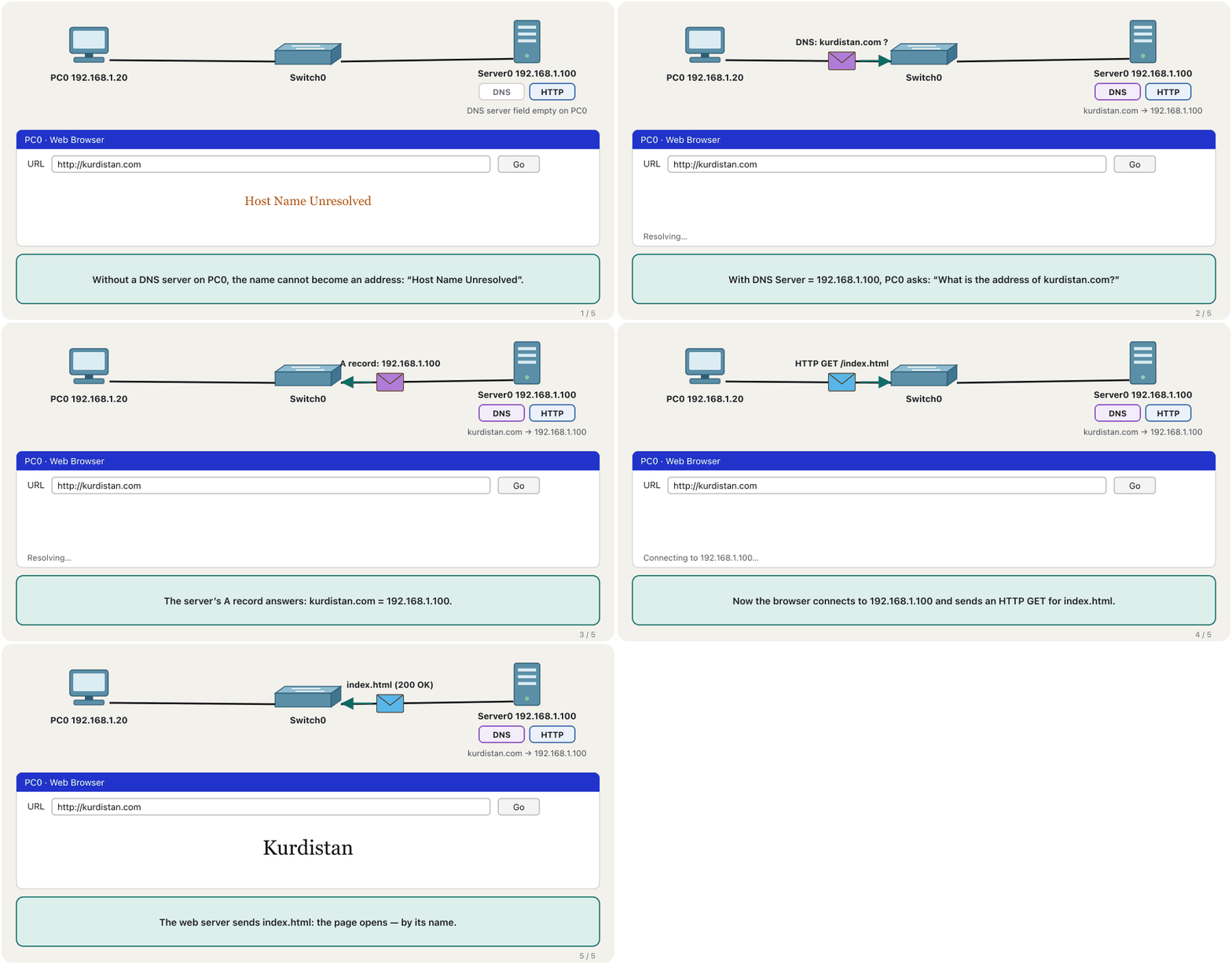
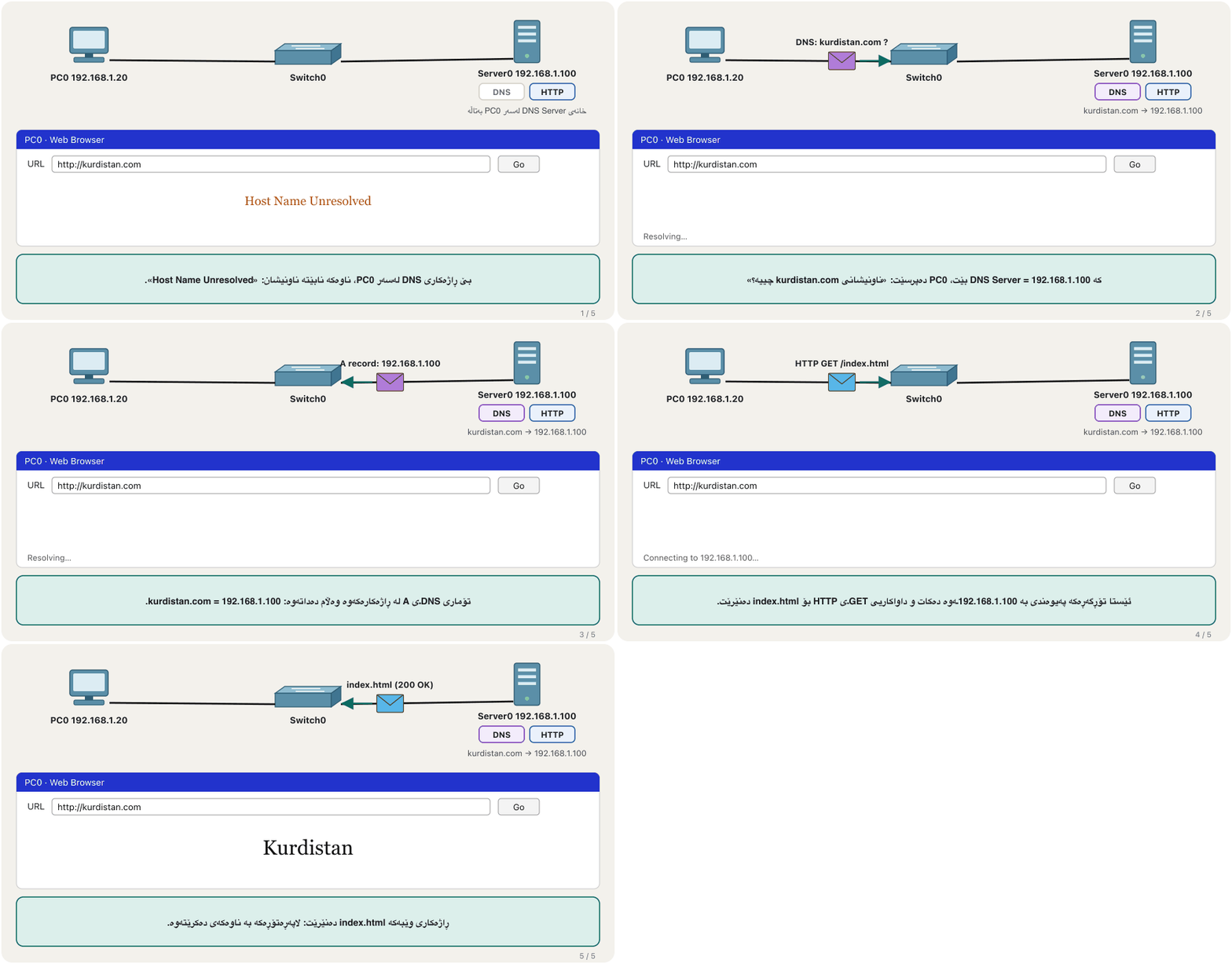
People remember names, computers use numbers. DNS is the Internet’s phone book: you look up a name such as kurdistan.com and get the IP address the browser needs. In this lab the server will also be the DNS server. Open Services → DNS, set DNS Service to On, then type Name kurdistan.com, keep Type A Record, type Address 192.168.1.100 and press Add. The record appears in the list below.
خەڵک ناو لەبیر دەکەن، ژمارە بەکار دەهێنن. دەفتەری تەلەفۆنی : ناوێکی وەک kurdistan.com دەگەڕێیت و ئەو وەردەگریت کە پێویستیەتی. لەم تاقیگەیەدا هەمان دەبێتە . Services → DNS بکەرەوە، DNS Service بکە بە On، پاشان لە Name kurdistan.com بنووسە، Type وەک A Record بهێڵەرەوە، لە Address 192.168.1.100 بنووسە و Add دابگرە. تۆمارەکە لە لیستی خوارەوە دەردەکەوێت.
An A record links a name to an IPv4 address (an AAAA record does the same for IPv6; the other types are in Record types). The name works only inside your Packet Tracer network: on the real Internet kurdistan.com belongs to someone else. For names in a real private network, ICANN set aside the top-level domain .internal in 2024, so a school could use library.internal.
A ناوێک بە ناونیشانێکی دەبەستێتەوە (تۆماری AAAA هەمان کار بۆ دەکات؛ جۆرەکانی تر لە جۆرەکانی تۆماردان). ناوەکە تەنیا لە ناو Packet Tracerـەکەتدا کار دەکات: لەسەر ڕاستەقینە kurdistan.com هی کەسێکی ترە. بۆ ناو لە تایبەتی ڕاستەقینەدا، ICANN لە 2024ـدا .internalـی بۆ ئەم مەبەستە جیا کردەوە، بۆیە قوتابخانەیەک دەتوانێت library.internal بەکاربهێنێت.
Lesson 3 (2): open the page by its nameوانەی 3، بەشی 2: کردنەوەی لاپەڕەکە بە ناوەکەی
The record alone is not enough: PC0 must know which DNS server to ask. If PC0 got its address from the pool above, its DNS Server is already 192.168.1.100. A PC with a static address needs it typed in: for example IP 192.168.1.5 (any free address except the server’s .100), mask 255.255.255.0, DNS Server 192.168.1.100. Now type http://kurdistan.com in PC0’s browser: the same page opens, by its name.
تەنیا تۆمارەکە بەس نییە: PC0 دەبێت بزانێت لە کام بپرسێت. ئەگەر PC0 ناونیشانەکەی لە سەرەوە وەرگرتبێت، DNS Serverـەکەی پێشتر 192.168.1.100ـە. بە پێویستی بەوەیە بنووسرێت: بۆ نموونە IP 192.168.1.5 (هەر ناونیشانێکی بەتاڵ جگە لە .100ـی )، ماسکی 255.255.255.0، DNS Server 192.168.1.100. ئێستا http://kurdistan.com لە PC0 بنووسە: هەمان لاپەڕە دەکرێتەوە، بە ناوەکەی.
Lesson 3 (2): open the page by its nameوانەی 3، بەشی 2: کردنەوەی لاپەڕەکە بە ناوەکەی
Check the name from the Command Promptپشکنینی ناوەکە لە Command Prompt
Two quick checks in PC0’s Command Prompt. ping kurdistan.com first turns the name into an address and then pings it, so the replies come from 192.168.1.100 — a handy trick to learn any site’s address. nslookup kurdistan.com asks the DNS server directly and prints its answer; it still works when a firewall blocks ping. On Windows, PowerShell’s Resolve-DnsName does the same.
دوو پشکنینی خێرا لە Command Promptـی PC0. ping kurdistan.com یەکەم ناوەکە دەکاتە ناونیشان و پاشان دەکات، بۆیە وەڵامەکان لە 192.168.1.100ـەوە دێن — فێڵێکی بەسوودە بۆ زانینی ناونیشانی هەر . nslookup kurdistan.com ڕاستەوخۆ لە دەپرسێت و وەڵامەکەی چاپ دەکات؛ کاتێک ڕێگری دەکات هێشتا کار دەکات. لە Windowsـدا Resolve-DnsNameـی PowerShell هەمان کار دەکات.
C:\>nslookup kurdistan.comServer: [192.168.1.100] Address: 192.168.1.100 Non-authoritative answer: Name: kurdistan.com Address: 192.168.1.100
The answer comes from Server0, which is also the server that holds the record.
وەڵامەکە لە Server0ـەوە دێت، کە هەمان ئەو تۆمارەکەی لایە.
nslookup and the DNS cache are explained in Ask DNS yourself: nslookup.
nslookup و لە خۆت لە DNS بپرسە: nslookupدا ڕوون کراونەتەوە.
Lesson 4: an FTP server and its usersوانەی 4: ڕاژەکاری FTP و بەکارهێنەرەکانی
FTP (File Transfer Protocol) moves files between a client and a server; only users who have been given access can send or fetch files. On the server open Services → FTP and check that the service is On. Under User Setup type a Username (user) and a Password (12345), tick the permissions this user may have, and press Add — on the server’s page, before you go to the PC.
(File Transfer Protocol) فایل لە نێوان و دەگوازێتەوە؛ تەنیا ئەو بەکارهێنەرانەی ڕێگەیان پێ دراوە دەتوانن فایل بنێرن یان بهێنن. لەسەر Services → FTP بکەرەوە و بپشکنە کە خزمەتگوزارییەکە Onـە. لە بەشی User Setup، user وەک Username و 12345 وەک Password بنووسە، ئەو دیاری بکە کە ئەم بەکارهێنەرە دەتوانێت هەیبێت و Add دابگرە — لەسەر لاپەڕەی ، پێش ئەوەی بچیتە سەر .
The five permissions are Write (upload), Read (download), Delete, Rename and List (see the files); the list shows them as the letters RWDNL. Give each user only what they need — a guest with Read and List can fetch files but not change them. Packet Tracer also has a built-in user cisco with the password cisco; on a real server, default and weak passwords such as 12345 are among the first things an attacker tries.
پێنج بریتین لە Write ()، Read ()، Delete (سڕینەوە)، Rename (ناوگۆڕین) و List (بینینی فایلەکان)؛ لیستەکە بە پیتەکانی RWDNL پیشانیان دەدات. بە هەر بەکارهێنەرێک تەنیا ئەوە بدە کە پێویستیەتی — guestێک بە Read و List دەتوانێت فایل بهێنێت، بەڵام ناتوانێت بیانگۆڕێت. Packet Tracer بەکارهێنەرێکی پێشەوەی cisco بە ciscoـی هەیە؛ لەسەر ڕاستەقینە، بنەڕەت و لاوازی وەک 12345 لە یەکەم شتەکانن کە هێرشبەرێک تاقییان دەکاتەوە.
Lesson 4 (2): send and fetch files from the PCوانەی 4، بەشی 2: ناردن و هێنانی فایل لە کۆمپیوتەرەکەوە
On PC0 open Desktop → Command Prompt and type ftp 192.168.1.100 (ftp, then the server’s address). Log in with your username and password; the prompt changes to ftp>. dir lists the server’s files, put uploads a file from the PC, get downloads one to the PC, and quit ends the session. Every Packet Tracer PC has a small file, sampleFile.txt, to practise with.
لەسەر PC0 Desktop ← Command Prompt بکەرەوە و ftp 192.168.1.100 بنووسە (ftp، پاشان ناونیشانی ). بە و بچۆ ژوورەوە؛ نیشانەکە دەبێتە ftp>. dir فایلەکانی لیست دەکات، put فایلێک لە دەکات، get یەکێک بۆ دەکات و quit دانیشتنەکە کۆتایی پێ دەهێنێت. هەموو Packet Tracer فایلێکی بچووکی هەیە، sampleFile.txt، بۆ ڕاهێنان.
C:\>ftp 192.168.1.100
Username:user
Password:
ftp>dir
ftp>put sampleFile.txt
ftp>get sampleFile.txt
ftp>quitTrying to connect...192.168.1.100 Connected to 192.168.1.100 220- Welcome to PT Ftp server Username:user 331- Username ok, need password Password: 230- Logged in (passive mode On) ftp>dir Listing /ftp directory from 192.168.1.100: 0 : asa842-k8.bin 5571584 1 : c1841-advipservicesk9-mz.124-15.T1.bin 33591768 … ftp>put sampleFile.txt Writing file sampleFile.txt to 192.168.1.100: File transfer in progress... [Transfer complete - 26 bytes] 26 bytes copied in 0.05 secs (520 bytes/sec) ftp>get sampleFile.txt Reading file sampleFile.txt from 192.168.1.100: File transfer in progress... [Transfer complete - 26 bytes] 26 bytes copied in 0.03 secs (866 bytes/sec) ftp>quit 221- Service closing control connection.
Explain the codeڕوونکردنەوەی کۆدەکە
- Lineدێڕی 1
ftp followed by the server’s address opens the session.
ftp و لە دوایدا ناونیشانی دانیشتنەکە دەکاتەوە.
- Lineدێڕی 2-3
The password is not shown while you type it.
لە کاتی نووسیندا نیشان نادرێت.
- Lineدێڕی 5
put = upload: PC → server (needs Write).
put = : ← (Writeـی پێویستە).
- Lineدێڕی 6
get = download: server → PC (needs Read).
get = : ← (Readـی پێویستە).
FTP in real life: use SFTPFTP لە ژیانی ڕاستەقینەدا: SFTP بەکاربهێنە
Classic FTP sends everything as plain text, the username and password too. Anyone who can capture the traffic between PC0 and the server can read them. That is acceptable in a closed lab, never on a real network. Real servers use SFTP, which runs inside an encrypted SSH connection on port 22, or FTPS, which is FTP protected by TLS. How the three differ, and FTP’s two connections, are in File transfer and remote access.
کلاسیک هەموو شتێک بە دەنێرێت، و . هەر کەسێک بتوانێت هاتوچۆی نێوان PC0 و بگرێت دەتوانێت بیانخوێنێتەوە. ئەمە لە تاقیگەیەکی داخراودا قبووڵە، هەرگیز لەسەر ڕاستەقینە نا. ڕاستەقینە بەکار دەهێنن، کە لە ناو پەیوەندییەکی شفرەکراوی لەسەر 22 کار دەکات، یان FTPS کە و بە TLS پارێزراوە. جیاوازیی ئەم سێیانە و دوو پەیوەندییەکەی لە گواستنەوەی فایل و دەستگەیشتن لە دوورەوەدان.
Troubleshooting the labچارەسەرکردنی کێشە لە تاقیگەکەدا
Check one layer at a time: link lights first, then addresses, then the service. These are the problems students meet most often in this lab:
چین بە چین بپشکنە: یەکەم نیشانەکانی بەستەر، پاشان ناونیشانەکان، پاشان خزمەتگوزارییەکە. ئەمانە ئەو کێشانەن کە قوتابیان زۆرتر لەم تاقیگەیەدا تووشیان دەبن:
| What you seeئەوەی دەیبینیت | Checkبپشکنە | Fixچارەسەر |
|---|---|---|
| Red trianglesسێگۆشەی سوور | the cable type and the portsجۆری کێبڵ و | Copper Straight-Through between PC/server and switchCopper Straight-Through لە نێوان / و |
| “DHCP failed. APIPA is being used.” (169.254.x.x)پەیامی «DHCP failed. APIPA is being used.» (169.254.x.x) | DHCP On? the server’s own address? the cable? Onـە؟ ناونیشانی خودی ؟ کێبڵەکە؟ | turn DHCP On; pool and server in the same network هەڵبکە؛ و لە هەمان |
| An address outside your poolناونیشانێک لە دەرەوەی | which pool answered — serverPool?کام وەڵامی دایەوە — serverPool؟ | put your values into serverPool and Save; renewبەهاکانت لە serverPoolـدا بنووسە و Save بکە؛ دووپاتە داوا بکەرەوە |
| Gateway or DNS 0.0.0.0 on the PCDefault Gateway یان DNS Server 0.0.0.0 لەسەر | the pool’s Default Gateway and DNS ServerDefault Gateway و DNS Serverـی | fill them in, Save, renew on the PCپڕیان بکەرەوە، Save بکە، لەسەر دووپاتە داوا بکەرەوە |
| Request Timeout in the browserRequest Timeout لە | ping the server; HTTP On? بکە؛ HTTP Onـە؟ | turn HTTP On; type the right addressHTTP هەڵبکە؛ ناونیشانی دروست بنووسە |
| Host Name Unresolvedپەیامی Host Name Unresolved | the PC’s DNS Server field; DNS On; the record’s spellingخانەی DNS Serverـی ؛ Onـە؛ ڕێنووسی تۆمارەکە | DNS Server = 192.168.1.100; correct the A recordDNS Server = 192.168.1.100؛ تۆماری A ڕاست بکەرەوە |
| FTP: login fails or put is refused: چوونەژوورەوە سەرناکەوێت یان put ڕەت دەکرێتەوە | the username, password and permissions، و | Add the user; tick Write for putبەکارهێنەرەکە Add بکە؛ بۆ put Write دیاری بکە |
| Works here, fails from another networkلێرە کار دەکات، لە ترەوە نا | the PCs’ default gateway | gateway = the router’s address in this LAN = ناونیشانی لەم |
A wrong default gateway changes nothing while the PCs and the server share one network; it matters as soon as a router joins two networks. The full method is in Troubleshooting networks.
ئەگەر هەڵە بێت، هیچ ناگۆڕێت تا و لە یەک ؛ هەر کە دوو پێکەوە دەبەستێت گرنگ دەبێت. ڕێگای تەواو لە چارەسەرکردنی کێشەی ڕایەڵەدایە.
Common mistakesهەڵە باوەکان
Exercisesڕاهێنانەکان
Without looking back, build the lab with the network 10.10.10.0/24: the server is 10.10.10.10; the pool starts at .50 for 30 users and gives DNS 10.10.10.10; the web page says your name; the DNS name is school.internal; one FTP user “teacher” has all rights. Which address will the first PC get, and which is the last address the pool can lend?
بێ ئەوەی سەیری دواوە بکەیت، تاقیگەکە بە 10.10.10.0/24 دروست بکە: 10.10.10.10ـە؛ لە .50ـەوە بۆ 30 بەکارهێنەر دەست پێ دەکات و DNS 10.10.10.10 دەدات؛ ناوی تۆ دەڵێت؛ ناوی DNS school.internalـە؛ یەک بەکارهێنەری ، «teacher»، هەموو مافەکانی هەیە. یەکەم کام ناونیشان وەردەگرێت و دوایین ناونیشان کە دەتوانێت بیدات کامەیە؟
Hintئاماژە
Last address = start + users − 1.
دوایین ناونیشان = دەستپێک + بەکارهێنەران − 1.
Show answerوەڵامەکە پیشان بدە
The first PC gets 10.10.10.50. Thirty addresses from .50 end at 10.10.10.79 (50 + 30 − 1). Test in order: ipconfig on the PC, the browser by address, the browser by name, then an FTP put and get.
یەکەم 10.10.10.50 وەردەگرێت. سی ناونیشان لە .50ـەوە لە 10.10.10.79 تەواو دەبن (). بەم ڕیزبەندییە تاقی بکەرەوە: ipconfig لەسەر ، بە ناونیشان، بە ناو، پاشان put و getـی .
PC1 has the static address 192.168.1.6 and no DNS server. Give two different ways to make http://kurdistan.com open on PC1, and say which one is easier when there are 40 PCs.
PC1 ناونیشانی جێگیری 192.168.1.6ـی هەیە و نییە. دوو ڕێگای جیاواز بڵێ بۆ ئەوەی http://kurdistan.com لەسەر PC1 بکرێتەوە و بڵێ کامیان ئاسانترە کاتێک 40 هەن.
Show answerوەڵامەکە پیشان بدە
- Type DNS Server 192.168.1.100 in PC1’s static settings.
- Switch PC1 to DHCP: the pool already gives DNS 192.168.1.100.
- With 40 PCs DHCP is easier: you set the DNS server once, in the pool, instead of 40 times.
- DNS Server 192.168.1.100 لە ڕێکخستنە جێگیرەکانی PC1دا بنووسە.
- PC1 بگۆڕە بۆ : پێشتر DNS 192.168.1.100 دەدات.
- بە 40 ، ئاسانترە: یەک جار لە دادەنێیت، لەبری 40 جار.
Add an FTP user “guest” with the password Guest-2026 and only Read and List. From PC1 log in as guest and try dir, get sampleFile.txt and put sampleFile.txt. Which ones work? Then explain why the password Guest-2026 would still be a bad idea on a real FTP server.
بەکارهێنەرێکی ، «guest»، بە Guest-2026 و تەنیا Read و List زیاد بکە. لە PC1ـەوە وەک guest بچۆ ژوورەوە و dir، get sampleFile.txt و put sampleFile.txt تاقی بکەرەوە. کامیان کار دەکەن؟ پاشان ڕوون بکەرەوە بۆچی Guest-2026 لەسەر ڕاستەقینە هێشتا بیرۆکەیەکی خراپ دەبێت.
Show answerوەڵامەکە پیشان بدە
dir (List) and get (Read) work; put is refused because guest has no Write permission. On a real server the problem is FTP itself: the password crosses the network as plain text, so anyone capturing traffic reads it, however strong it is — use SFTP or FTPS.
dir (List) و get (Read) کار دەکەن؛ put ڕەت دەکرێتەوە چونکە guest مۆڵەتی Writeـی نییە. لەسەر ڕاستەقینە کێشەکە خودی : بە بە دەڕوات، بۆیە هەر کەسێک هاتوچۆ بگرێت دەیخوێنێتەوە، هەرچەند بەهێز بێت — یان FTPS بەکاربهێنە.
For each service of the lab, write one sentence: what the client asks and what the server answers.
بۆ هەر خزمەتگوزارییەکی تاقیگەکە ڕستەیەک بنووسە: چی دەپرسێت و چی وەڵام دەداتەوە.
Show answerوەڵامەکە پیشان بدە
- DHCP: the PC asks “give me an address”; the server lends one from the pool with mask, gateway and DNS.
- HTTP: the browser asks for a page; the web server sends index.html.
- DNS: the PC asks “which address has kurdistan.com?”; the server answers from its A record, 192.168.1.100.
- FTP: the PC logs in and asks to list, send or fetch files; the server checks the user’s permissions and does it.
- : دەپرسێت «ناونیشانێکم بدەرێ»؛ یەکێک لە بە ماسک، و بەقەرز دەدات.
- : داوای لاپەڕەیەک دەکات؛ index.html دەنێرێت.
- : دەپرسێت «kurdistan.com کام ناونیشانی هەیە؟»؛ لە تۆماری Aـەکەیەوە وەڵام دەداتەوە، 192.168.1.100.
- : دەچێتە ژوورەوە و داوای لیستکردن، ناردن یان هێنانی فایل دەکات؛ بەکارهێنەرەکە دەپشکنێت و دەیکات.
Summaryپوختە
- Build server–switch–PCs with straight-through cables and give the server a static address (192.168.1.100).
- DHCP: Services → DHCP → On; fill in serverPool (gateway, DNS, start, mask, maximum users) and Save; PCs choose DHCP. 40 users from .20 = .20–.59.
- HTTP: Services → HTTP → On; edit index.html; browse to http://192.168.1.100.
- DNS: Services → DNS → On; add an A record (kurdistan.com → 192.168.1.100); the PC needs DNS Server = 192.168.1.100, or it says Host Name Unresolved.
- FTP: Services → FTP → user, password, permissions (RWDNL) → Add; on the PC:
ftp 192.168.1.100,dir,put,get,quit. - Check every step before the next; in real life use SFTP, never plain FTP.
- –– بە دروست بکە و ناونیشانی جێگیر بدە (192.168.1.100).
- : Services → DHCP → On؛ serverPool پڕ بکەرەوە (، DNS Server، دەستپێک، ماسک، زۆرترین بەکارهێنەر) و Save بکە؛ DHCP هەڵدەبژێرن. 40 بەکارهێنەر لە
.20ـەوە =.20–.59. - : Services → HTTP → On؛ index.html دەستکاری بکە؛ بڕۆ بۆ http://192.168.1.100.
- : Services → DNS → On؛ تۆمارێکی A زیاد بکە (kurdistan.com ← 192.168.1.100)؛ DNS Server = 192.168.1.100ـی دەوێت، دەنا دەڵێت Host Name Unresolved.
- : Services → FTP ← بەکارهێنەر، ، (RWDNL) ← Add؛ لەسەر :
ftp 192.168.1.100،dir،put،get،quit. - هەموو هەنگاوێک پێش هەنگاوی دواتر بپشکنە؛ لە ژیانی ڕاستەقینەدا بەکاربهێنە، هەرگیز سادە نا.
Next: the same checks on a real computer — Windows network commands.
دواتر: هەمان پشکنینەکان لەسەر ڕاستەقینە — فەرمانەکانی ڕایەڵە لە Windows.
Lesson complete!وانەکە تەواو بوو!
Well done. Review the key terms, then go on to the next lesson.دەستخۆش. سەیرێکی زاراوە سەرەکییەکان بکەرەوە، پاشان بڕۆ بۆ وانەی داهاتوو.
Key termsزاراوە سەرەکییەکان
Windows Network Commandsفەرمانەکانی ڕایەڵە لە Windows
Related lecturesوانە پەیوەندیدارەکان
- Web and E-mail Protocols: HTTP, HTTPS, SMTP, POP3 and IMAPپرۆتۆکۆڵەکانی وێب و ئیمەیڵ: HTTP، HTTPS، SMTP، POP3 و IMAP
- File Transfer and Remote Access: FTP, Telnet, SSH and RDPگواستنەوەی فایل و دەستڕاگەیشتن لە دوورەوە: FTP، Telnet، SSH و RDP
- Windows Network Commandsفەرمانەکانی ڕایەڵە لە Windows
- Troubleshooting a Network, Layer by Layerچارەسەرکردنی کێشەی ڕایەڵە، چین بە چین
- Clients, Servers and Peer-to-Peer: The Application Layerڕاژەخواز، ڕاژەکار و تاکەکان: چینی ئەپ
- HTML Basics: Documents, Links and Tablesبنەماکانی HTML: بەڵگەنامە، بەستەرەکان و خشتەکان
References and further readingسەرچاوەکان و خوێندنەوەی زیاتر
- Cisco Packet Tracer Help: Servers (Services tab — DHCP pools, HTTP, DNS records, FTP users)
- Cisco Packet Tracer Help: My First Packet Tracer Lab (web server and DNS)
- RFC 2131: Dynamic Host Configuration Protocol
- RFC 1035: Domain Names — Implementation and Specification (A records)
- RFC 959: File Transfer Protocol
- ICANN: Reserving .INTERNAL for private-use applications (board resolution, 2024)
- MDN: The center element (deprecated) and text-align
This lecture is a first edition. The Kurdish text and terminology are waiting for review by Kurdish IT teachers.ئەم وانەیە چاپی یەکەمە. دەقە کوردییەکە و زاراوەکانی چاوەڕێی پێداچوونەوەی مامۆستایانی کوردی بواری IT ن.