Chapterبەش 5 · Lectureوانە 5.8
IPv6 in Practice: SLAAC, Neighbour Discovery and Dual StackIPv6 لە کرداردا: SLAAC، دۆزینەوەی دراوسێ و ستاکی دووانە
How a computer gets its IPv6 addresses — a link-local address first, then SLAAC from router advertisements or DHCPv6, each checked by duplicate address detection — how Neighbor Discovery replaces ARP, how IPv4 and IPv6 run side by side (dual stack), what ipconfig and ping show on Windows, why IPv6 needs no NAT but still a firewall, the transition tools, and how far IPv6 has spread in 2026.
چۆن ناونیشانەکانی وەردەگرێت — سەرەتا ، پاشان لە یان DHCPv6، هەریەکەیان بە دەپشکنرێت — چۆن جێگەی دەگرێتەوە، و چۆن شان بە شانی یەک کار دەکەن ()، ipconfig و ping لە Windowsـدا چی پیشان دەدەن، بۆچی پێویستی بە نییە بەڵام هێشتا پێویستە، ئامرازەکانی گواستنەوە و لە 2026دا تا چەند بڵاو بووەتەوە.
What you will learnچی فێر دەبیت
- Describe, in order, how a host gets its IPv6 addresses: link-local, RS and RA, SLAAC or DHCPv6, and DAD.
- Name the five Neighbor Discovery messages and explain how NDP replaces ARP.
- Read the A, M and O flags of a router advertisement and tell SLAAC, stateless DHCPv6 and stateful DHCPv6 apart.
- Explain dual stack and Happy Eyeballs, and read the IPv6 lines of ipconfig and ping on Windows 11.
- Explain why IPv6 needs a firewall but no NAT, name the transition tools, and give the 2026 adoption figures.
- بە ڕیز ڕوونی بکەیتەوە چۆن ناونیشانەکانی وەردەگرێت: ، RS و RA، یان DHCPv6 و .
- پێنج پەیامەکەی بناسیت و ڕوونی بکەیتەوە NDP چۆن جێگەی دەگرێتەوە.
- ئاڵاکانی A، M و Oـی بخوێنیتەوە و ، DHCPv6ـی و DHCPv6ـی دۆخدار لە یەک جیا بکەیتەوە.
- و Happy Eyeballs ڕوون بکەیتەوە و هێڵەکانی لە
ipconfigوpingـی Windows 11 بخوێنیتەوە. - ڕوونی بکەیتەوە بۆچی پێویستی بە هەیە بەڵام بە نییە، ئامرازەکانی گواستنەوە بناسیت و ژمارەکانی بڵاوبوونەوەی 2026 بڵێیت.
One interface, several addressesیەک نێوبەستە، چەند ناونیشانێک
Connect a laptop to a network that has IPv6, and a second later its Wi-Fi interface has not one address but several. IPv6 was designed so that a host can configure itself: it needs no server for its addresses, only the router's advertisement. This lesson follows one laptop in a home in Sulaymaniyah step by step. The address formats and types are in IPv6 Addresses.
بە ببەستە کە هەیە: دوای چرکەیەک Wi-Fiـەکەی یەک ناونیشانی نییە، بەڵکو چەندینی هەیە. وا دیزاین کراوە کە خۆی ڕێکبخات: بۆ ناونیشانەکانی پێویستی بە نییە، تەنیا بەسە. ئەم وانەیە هەنگاو بە هەنگاو بەدوای دەچێت لە ماڵێک لە سلێمانی. شێوە و جۆرەکانی ناونیشان لە ناونیشانەکانی IPv6ـدان.
Each address has a job. The link-local address talks to neighbours and to the router. The stable global address receives connections from the Internet. The temporary address is used for the connections the laptop opens itself. The IPv4 address still reaches the many sites and networks that have no IPv6 yet.
هەر ناونیشانێک کارێکی هەیە. لەگەڵ دراوسێکان و قسە دەکات. جێگیرەکە پەیوەندی لە وەردەگرێت. بۆ ئەو پەیوەندییانە بەکار دێت کە خۆی دەیانکاتەوە. ناونیشانی هێشتا دەگاتە زۆرێک لە و کە هێشتا نییە.
Step 1: the link-local addressهەنگاوی یەکەم: ناونیشانی بەستەری ناوخۆیی
As soon as an interface comes up, the host builds its link-local address: the prefix fe80::/64 plus a 64-bit interface ID. Today that ID is random (random interface IDs); older systems built it from the MAC address with EUI-64. The host checks it for duplicates (DAD), and from then on it can talk to every neighbour on its link — even when there is no router at all.
هەر کە کار دەکات، خۆی دروست دەکات: پێشگری fe80::/64 و 64 . ئەمڕۆ ئەو ناسێنەرە هەڕەمەکییە (ناسێنەری هەڕەمەکی)؛ سیستەمە کۆنەکان بە لە دروستیان دەکرد. سەرەتا دەپشکنێت کە دووپاتە نەبێت (دۆزینەوەی ناونیشانی دووپاتە)، لەوە بەدواوە دەتوانێت لەگەڵ هەموو دراوسێیەکی سەر بەستەرەکەی قسە بکات — تەنانەت ئەگەر هیچ نەبێت.
So two laptops joined by one cable, or a Wi-Fi network whose router has no IPv6, can still reach each other over IPv6 with their fe80:: addresses. They cannot reach the Internet: routers never forward link-local addresses. For that the host needs a global address, and it starts by looking for a router.
بۆیە دوو کە بە یەک کێبڵ بەستراون، یان Wi-Fi کە نییە، هێشتا بە ناونیشانەکانی fe80:: بە دەگەنە یەکتر. بەڵام ناگەنە : هەرگیز ناگوازنەوە. بۆ ئەوە پێویستە و بە گەڕان بەدوای دەست پێ دەکات.
Neighbor Discovery: five ICMPv6 messagesدۆزینەوەی دراوسێ: پێنج پەیامی ICMPv6
IPv6 hosts and routers find each other with Neighbor Discovery (NDP, RFC 4861). It has no packets of its own: its five messages travel inside ICMPv6, the IPv6 version of ICMP (ICMPv6). Two are about routers — router solicitation (RS) and router advertisement (RA). Two are about neighbours — neighbor solicitation (NS) and neighbor advertisement (NA). The fifth, a redirect, tells a host about a better first hop.
و بە (NDP، RFC 4861) یەکتر دەدۆزنەوە. تایبەتی خۆی نییە: پێنج پەیامەکەی لە ناو ICMPv6ـدا دەڕۆن، کە وەشانی (ICMPv6). دووانیان لەبارەی — (RS) و (RA). دووانیان لەبارەی دراوسێکانن — (NS) و (NA). پێنجەمیان، Redirect، ئاگادار دەکاتەوە کە یەکەمی باشتر هەیە.
Every ND message is sent with hop limit 255, and a receiver accepts it only if it still says 255. A router on the way would have lowered it by one, so 255 proves that the message came from the receiver's own link, not from an attacker far away.
هەموو پەیامێکی NDP بە hop limit 255 دەنێردرێت و وەرگر تەنیا ئەو کاتە وەری دەگرێت کە هێشتا 255 بێت. هەر لە ڕێگەدا یەکێکی لێ کەم دەکردەوە، بۆیە 255 دەیسەلمێنێت کە پەیامەکە لە بەستەری خودی وەرگرەوە هاتووە، نەک لە هێرشبەرێکی دوور.
Neighbor Discovery: five ICMPv6 messagesدۆزینەوەی دراوسێ: پێنج پەیامی ICMPv6
Neighbor Discovery instead of ARPدۆزینەوەی دراوسێ لە جیاتی ARP
In IPv4, ARP finds the MAC address that belongs to an IP address (ARP). IPv6 has no ARP (the two side by side). A host that needs a neighbour's MAC address sends a neighbor solicitation, and the owner answers with a neighbor advertisement that carries its MAC address. The answer is kept in the neighbour cache, the IPv6 twin of the ARP cache.
لە ، ئەو دەدۆزێتەوە کە هی (ARP). نییە (هەردووکیان شان بە شانی یەک). کە دراوسێیەکی پێویستە دەنێرێت و خاوەنەکەی بە وەڵام دەداتەوە کە تێدایە. وەڵامەکە لە دراوسێدا هەڵدەگیرێت، کە جووتی .
The difference is who has to listen. An ARP request is a broadcast, so every device on the LAN must read it. A neighbor solicitation goes to a solicited-node multicast group made from the last 24 bits of the wanted address (ff02::1:ff + those 24 bits), so normally only the owner's network card passes it up. On Windows, netsh interface ipv6 show neighbors lists the neighbour cache.
جیاوازییەکە لەوەدایە کێ دەبێت گوێ بگرێت. ، بۆیە هەموو ئامێرێکی سەر دەبێت بیخوێنێتەوە. دەچێتە گرووپێکی solicited-node کە لە دوایین 24 ناونیشانە داواکراوەکە دروست دەکرێت (ff02::1:ff + ئەو 24 )، بۆیە زۆربەی جار تەنیا کارتی خاوەنەکە بەرزی دەکاتەوە. لە Windowsـدا netsh interface ipv6 show neighbors دراوسێ پیشان دەدات.
SLAAC: the router gives the prefix, the host builds the addressSLAAC: ڕێدۆز پێشگر دەدات، میوانگر ناونیشان دروست دەکات
SLAAC (stateless address autoconfiguration, RFC 4862) is how most IPv6 hosts get a global address. The host sends an RS to ff02::2. The router answers with an RA that carries the LAN's /64 prefix. The host puts its own 64-bit interface ID after the prefix, checks the result with DAD and starts to use it. 'Stateless' means that no server keeps a list of who has which address.
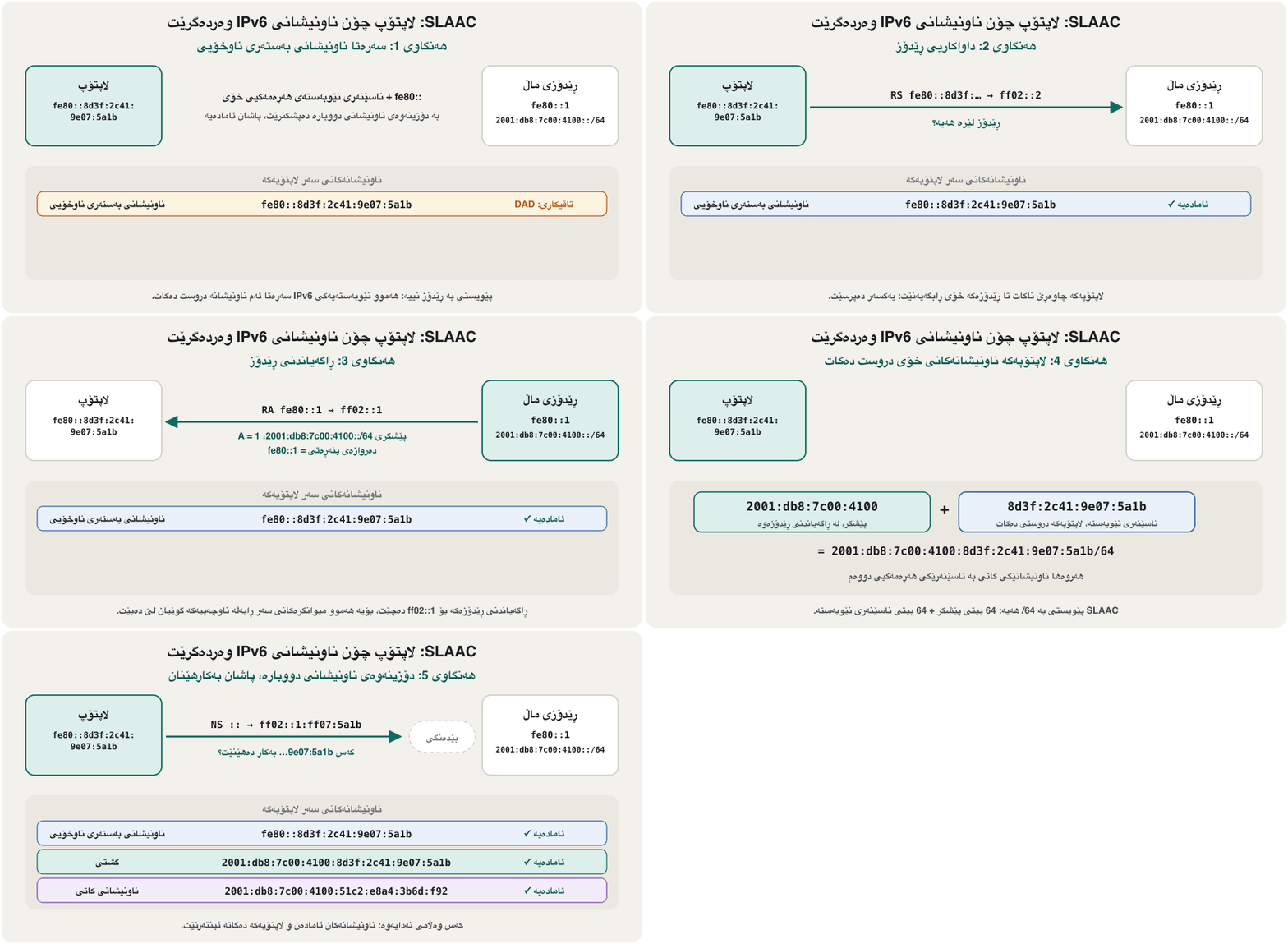
(ڕێکخستنی خۆکاری ناونیشان بەبێ دۆخ، RFC 4862) ئەو ڕێگەیەیە کە زۆربەی پێ وەردەگرن. RS بۆ ff02::2 دەنێرێت. بە وەڵام دەداتەوە کە پێشگری /64ـی تێدایە. 64 خۆی دەخاتە دوای پێشگرەکە، ئەنجامەکە بە دەپشکنێت و دەست بە بەکارهێنانی دەکات. «بێ دۆخ» واتە هیچ لیستی ئەوە ناهێڵێتەوە کە کێ کام ناونیشانی هەیە.
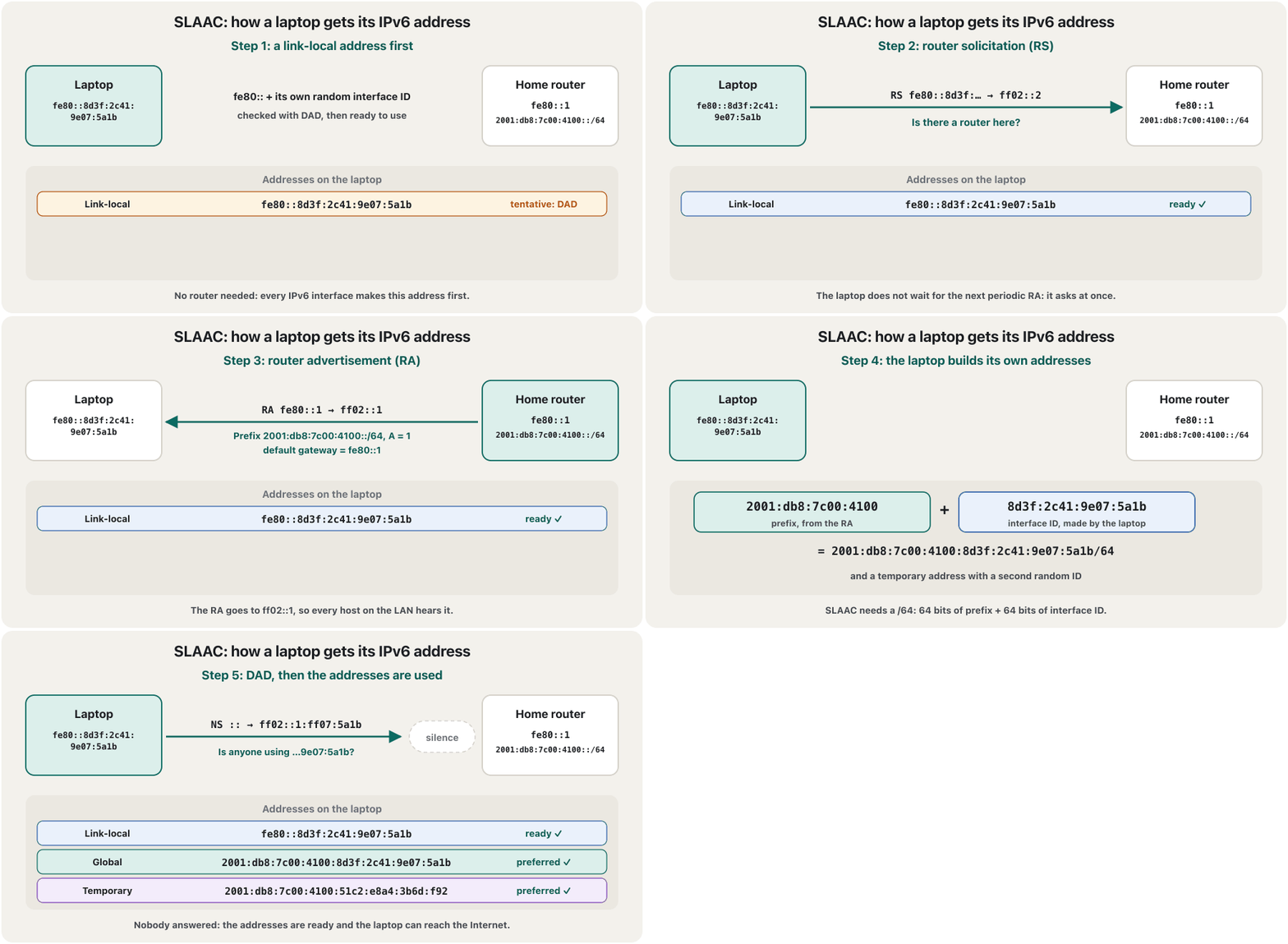
The same RA also gives a temporary address with a second random ID, for privacy (temporary addresses). SLAAC works only with a /64 prefix, because the interface ID is always 64 bits — one reason why every IPv6 LAN is a /64.
هەمان بە ناسێنەرێکی هەڕەمەکیی دووەم دەدات، بۆ تایبەتێتی (ناونیشانە کاتییەکان). تەنیا لەگەڵ پێشگری /64 کار دەکات، چونکە هەمیشە 64 — ئەمە یەکێکە لەو هۆیانەی کە هەموو لە /64ـە.
SLAAC: the router gives the prefix, the host builds the addressSLAAC: ڕێدۆز پێشگر دەدات، میوانگر ناونیشان دروست دەکات
What a router advertisement saysڕاگەیاندنی ڕێدۆز چی دەڵێت
An RA is short but full of information. Its source, the router's link-local address (often fe80::1), becomes the host's default gateway. The prefix information gives the /64 prefix with two lifetimes (valid and preferred) and the A flag: 'build your own address'. Two more flags say whether to ask DHCPv6 as well: M (managed — get the address from DHCPv6) and O (other — get only extra settings such as DNS from DHCPv6). Many RAs also carry the DNS server themselves (RDNSS, RFC 8106).
کورتە بەڵام پڕە لە زانیاری. سەرچاوەکەی، (زۆرجار fe80::1)، دەبێتە . زانیاریی پێشگرەکە پێشگری /64 دەدات لەگەڵ دوو تەمەن (دروست و پەسەند) و ئاڵای A: «ناونیشانی خۆت دروست بکە». دوو ئاڵای تر دەڵێن ئایا DHCPv6ـیش بپرسرێت: M (بەڕێوەبراو — ناونیشان لە DHCPv6ـەوە وەربگرە) و O (تر — تەنیا ڕێکخستنی زیادە وەک لە DHCPv6ـەوە وەربگرە). زۆرێک لە خۆیان هەڵدەگرن (RDNSS، RFC 8106).
Routers send an RA every few minutes (Cisco's default is every 200 seconds) and at once when a host sends an RS. The gateway always comes from the RA, even on a network that uses DHCPv6.
هەموو چەند خولەکێک دەنێرن (بنەڕەتی Cisco هەموو 200 چرکەیەکە) و یەکسەر کاتێک RS دەنێرێت. هەمیشە لە دێت، تەنانەت لەسەر کە DHCPv6 بەکار دەهێنێت.
Duplicate Address Detectionدۆزینەوەی ناونیشانی دووپاتە
Two devices with the same address would break each other's connections. So before using any new IPv6 address — link-local, stable or temporary — a host runs duplicate address detection (DAD, RFC 4862). While it is being checked, the address is tentative: the host may not use it yet.
دوو ئامێر بە هەمان ناونیشان پەیوەندییەکانی یەکتر تێک دەدەن. بۆیە پێش بەکارهێنانی هەر ناونیشانێکی نوێی — ، جێگیر یان کاتی — دەکات (DAD، RFC 4862). تا دەپشکنرێت، ناونیشانەکە تاقیکارییە: هێشتا بۆی نییە بەکاری بهێنێت.
The host sends a neighbor solicitation whose target is the tentative address. Its source is :: (the unspecified address), because the new address may not be used yet, and its destination is the address's solicited-node group. If no neighbor advertisement comes back within about one second, the address is unique and becomes preferred. If one comes back, the address is a duplicate: the host does not use it, and a host with random IDs simply tries a new ID. Windows marks such an address (Duplicate) in ipconfig /all.
دەنێرێت کە ئامانجەکەی ناونیشانە تاقیکارییەکەیە. سەرچاوەکەی ::ـە (ناونیشانی دیارینەکراو)، چونکە ناونیشانە نوێیەکە هێشتا بەکار نایەت و مەبەستەکەی گرووپی solicited-nodeـی ئەو ناونیشانەیە. ئەگەر لە ماوەی نزیکەی یەک چرکەدا هیچ نەگەڕایەوە، ناونیشانەکە بێوێنەیە و پەسەند دەبێت. ئەگەر یەکێک گەڕایەوە، ناونیشانەکە دووپاتەیە: بەکاری ناهێنێت و ئەگەر ناسێنەری هەڕەمەکی بەکار بهێنێت تەنیا ناسێنەرێکی نوێ تاقی دەکاتەوە. Windows ناونیشانێکی وا لە ipconfig /allـدا بە (Duplicate) نیشانە دەکات.
DHCPv6: stateful and statelessDHCPv6: دۆخدار و بێدۆخ
Some networks — for example a company that must log which device had which address — use DHCPv6 (RFC 9915, an Internet Standard since January 2026, which replaced RFC 8415). Stateful DHCPv6 works like DHCPv4's DORA (DHCP) with four messages: Solicit (to the group ff02::1:2), Advertise, Request and Reply. The client uses UDP port 546 and the server port 547. The server keeps a lease record — the 'state' — for every client.
هەندێک — بۆ نموونە کۆمپانیایەک کە دەبێت تۆماری ئەوە بکات کام ئامێر کام ناونیشانی هەبووە — DHCPv6 بەکار دەهێنن (RFC 9915، کە لە کانوونی دووەمی 2026ـەوە ستانداردی و جێگەی RFC 8415ـی گرتەوە). DHCPv6ـی دۆخدار وەک DORAـی DHCPv4 کار دەکات (DHCP) بە چوار پەیام: Solicit (بۆ گرووپی ff02::1:2)، Advertise، Request و Reply. UDP 546 بەکار دەهێنێت و 547. بۆ هەموو تۆمارێکی کرێ دەهێڵێتەوە — ئەمە «دۆخ»ـەکەیە.
Stateless DHCPv6 hands out no addresses: the host still uses SLAAC and asks the server only for extra settings such as DNS (an Information-request and a Reply). A third use is prefix delegation: the ISP's DHCPv6 server gives your home router a whole block — often a /56, room for 256 LANs — and the router advertises one /64 of it on each LAN. And remember: DHCPv6 has no default-gateway option; the gateway always comes from the RA.
DHCPv6ـی هیچ ناونیشانێک نادات: هێشتا بەکار دەهێنێت و تەنیا ڕێکخستنی زیادە وەک لە دەپرسێت (Information-request و Reply). بەکارهێنانی سێیەم پێدانی پێشگرە: DHCPv6ـی بلۆکێکی تەواو دەداتە ماڵەکەت — زۆرجار /56، جێگەی 256 — و لەسەر هەر یەک /64ـی لێ ڕادەگەیەنێت. لەبیرت بێت: DHCPv6 هیچ بژاردەیەکی نییە؛ هەمیشە لە دێت.
Dual stack: IPv4 and IPv6 side by sideستاکی دووانە: IPv4 و IPv6 شان بە شانی یەک
The Internet cannot switch from IPv4 to IPv6 in one night. The normal way today is dual stack: every device and router runs IPv4 and IPv6 at the same time, on the same interface. A home router keeps NAT for IPv4 and routes IPv6 without NAT; the ISP gives it one public IPv4 address and an IPv6 prefix.
ناتوانێت لە شەوێکدا لە بگوازرێتەوە بۆ . ڕێگە ئاساییەکەی ئەمڕۆ : هەموو ئامێر و لە هەمان کاتدا و لەسەر هەمان و بەکار دەهێنێت. ماڵ بۆ دەهێڵێتەوە و بەبێ دەگوازێتەوە؛ یەک ناونیشانی گشتیی و پێشگرێکی دەداتێ.
Which one does a browser use? DNS can answer a name with an A record (IPv4) and an AAAA record (IPv6). With both, the computer tries IPv6 first; if IPv6 has not connected after about 250 ms, it starts an IPv4 attempt as well, and the first connection that works wins. This trick, Happy Eyeballs (RFC 8305), means a broken IPv6 path costs only a quarter of a second. DNS records are taught in DNS.
کامیان بەکار دەهێنێت؟ دەتوانێت بە تۆماری A () و تۆماری AAAA () وەڵامی ناوێک بداتەوە. کاتێک هەردووکیان هەبن، سەرەتا تاقی دەکاتەوە؛ ئەگەر دوای نزیکەی 250 ms نەبەسترا، هەوڵێکی دەست پێ دەکات و یەکەم پەیوەندی کە کار بکات دەباتەوە. ئەم فێڵە، Happy Eyeballs (RFC 8305)، واتای ئەوەیە ڕێگەیەکی تێکچووی تەنیا چارەکە چرکەیەک دەخایەنێت. لە DNSـدا دەخوێندرێن.
What ipconfig showsipconfig چی پیشان دەدات
On Windows 11, open Command Prompt and type ipconfig. On a dual-stack network the Wi-Fi adapter shows up to four IPv6 lines: (1) IPv6 Address, the stable SLAAC address that other computers can connect to; (2) Temporary IPv6 Address, used for the connections your computer opens and replaced about once a day (why); (3) Link-local IPv6 Address with its zone, %12 = interface number 12; and (4) the IPv6 Default Gateway, the router's link-local address from its RA. ipconfig /all adds each address's state (Preferred, Deprecated, Tentative or Duplicate) and the DHCPv6 details.
لە Windows 11ـدا Command Prompt بکەرەوە و ipconfig بنووسە. لەسەر ، Wi-Fi تا چوار هێڵی پیشان دەدات: (1) IPv6 Address، ناونیشانی جێگیری کە تر دەتوانن پەیوەندیی پێوە بکەن؛ (2) Temporary IPv6 Address، بۆ ئەو پەیوەندییانە بەکار دێت کە دەیانکاتەوە و نزیکەی ڕۆژی جارێک دەگۆڕێت (بۆچی)؛ (3) Link-local IPv6 Address بە zoneـەکەیەوە، %12 = ژمارە 12؛ (4) Default Gatewayـی ، لە . ipconfig /all دۆخی هەر ناونیشانێک (Preferred، Deprecated، Tentative یان Duplicate) و وردەکارییەکانی DHCPv6ـیش زیاد دەکات.
What ipconfig showsipconfig چی پیشان دەدات
Testing IPv6 with pingتاقیکردنەوەی IPv6 بە پینگ
ping sends ICMPv6 echo requests over IPv6, just as it sends ICMP echo requests over IPv4 (ping). Test from near to far: ping ::1 tests IPv6 inside your own computer (the loopback address); ping fe80::1%12 tests the link to the router (a link-local address needs its %zone); ping -6 <name> forces IPv6 for a name. Windows prints IPv6 replies without the TTL that IPv4 replies show.
ping لەسەر داواکاریی echoـی ICMPv6 دەنێرێت، هەروەک چۆن لەسەر داواکاریی echoـی دەنێرێت (پینگ). لە نزیکەوە بۆ دوور تاقی بکەرەوە: ping ::1 لە ناو خۆتدا تاقی دەکاتەوە ()؛ ping fe80::1%12 بەستەری تاقی دەکاتەوە ( پێویستی بە %zoneـەکەیەتی)؛ ping -6 <name> بۆ ناوێک بەکار دەهێنێت. Windows وەڵامەکانی بەبێ ئەو TTLـە پیشان دەدات کە لە وەڵامەکانی هەیە.
C:\> ping ::1

Pinging ::1 with 32 bytes of data:
Reply from ::1: time<1ms
Reply from ::1: time<1ms
Reply from ::1: time<1ms
Reply from ::1: time<1ms

Ping statistics for ::1:
    Packets: Sent = 4, Received = 4, Lost = 0 (0% loss),
Approximate round trip times in milli-seconds:
    Minimum = 0ms, Maximum = 0ms, Average = 0ms

C:\> ping -6 -n 2 www.example.com

Pinging www.example.com [2001:db8:5e::10] with 32 bytes of data:
Reply from 2001:db8:5e::10: time=38ms
Reply from 2001:db8:5e::10: time=37ms

Ping statistics for 2001:db8:5e::10:
    Packets: Sent = 2, Received = 2, Lost = 0 (0% loss),
Approximate round trip times in milli-seconds:
    Minimum = 37ms, Maximum = 38ms, Average = 37ms
Explain the codeڕوونکردنەوەی کۆدەکە
- Lineدێڕی 1-11
The loopback ::1 always answers if IPv6 works inside the computer — even with no network at all.
ئەگەر لە ناو کار بکات،
::1هەمیشە وەڵام دەداتەوە — تەنانەت بەبێ هیچ .- Lineدێڕی 13-16
-6 forces IPv6 and -n 2 sends two requests; the name was resolved to its AAAA address in square brackets.
-6بەکار دەهێنێت و-n 2دوو داواکاری دەنێرێت؛ ناوەکە کراوەتە ناونیشانی AAAAـەکەی لە ناو کەوانەی چوارگۆشەدا.
On a network without IPv6, ping -6 answers PING: transmit failed. General failure. — the computer has no IPv6 route to send on. In PowerShell, Get-NetIPAddress -AddressFamily IPv6 and Get-NetNeighbor -AddressFamily IPv6 show the addresses and the neighbour cache.
لەسەر بەبێ ، ping -6 دەڵێت PING: transmit failed. General failure. — هیچ ڕێگەیەکی نییە بۆ ناردن. لە PowerShellـدا Get-NetIPAddress -AddressFamily IPv6 و Get-NetNeighbor -AddressFamily IPv6 ناونیشانەکان و دراوسێ پیشان دەدەن.
ping ::1 works, ping fe80::1%12 works, but ping -6 www.example.com says 'General failure'. Where is the problem?
ping ::1 کار دەکات، ping fe80::1%12 کار دەکات، بەڵام ping -6 www.example.com دەڵێت «General failure». کێشەکە لە کوێیە؟
Hintئاماژە
Follow the three tests from near to far.
سێ تاقیکردنەوەکە لە نزیکەوە بۆ دوور بگرە.
Show answerوەڵامەکە پیشان بدە
IPv6 works inside the computer and on the link to the router, but the computer has no IPv6 route beyond it: no global address or no default route — usually the ISP or the router gives no IPv6 prefix. IPv4 may still work normally (dual stack).
لە ناو و لەسەر بەستەری کار دەکات، بەڵام لەوە دوورتر هیچ ڕێگەیەکی نییە: یان ڕێگەی بنەڕەتی نییە — زۆرجار یان پێشگری نادات. لەوانەیە هێشتا ئاسایی کار بکات ().
No NAT — but still a firewallبێ وەرگێڕانی ناونیشانی ڕایەڵە — بەڵام هێشتا ئاگرەدیوار
In IPv4, NAT lets a whole home share one public address (NAT). IPv6 has enough addresses for every device, so it needs no NAT: each device has its own global address and connections work end to end, which makes calls, games and home servers simpler.
لە ، وا دەکات هەموو ماڵێک یەک ناونیشانی گشتی بەکار بهێنێت (وەرگێڕانی ناونیشانی ڕایەڵە). ناونیشانی بەسی بۆ هەموو ئامێرێک هەیە، بۆیە پێویستی بە نییە: هەر ئامێرێک خۆی هەیە و پەیوەندییەکان ڕاستەوخۆ لە سەرێکەوە بۆ سەرێکی تر کار دەکەن، ئەمەش پەیوەندیی دەنگی، یاری و ماڵەوە ئاسانتر دەکات.
That does not mean every device is open to the Internet. NAT was never meant as protection (NAT is not a firewall); protection comes from the firewall. Home routers run a stateful firewall for IPv6 (; RFC 6092 recommends it as the default): replies to connections your devices opened come back in, while unsolicited packets from outside are dropped. Windows Defender Firewall protects the computer itself as well.
ئەمە واتای ئەوە نییە کە هەموو ئامێرێک بۆ کراوەیە. هەرگیز بۆ پاراستن دانەنرابوو (وەرگێڕانی ناونیشانی ڕایەڵە ئاگرەدیوار نییە)؛ پاراستن لە دێت. ماڵ بۆ دۆخدار بەکار دەهێنن (؛ RFC 6092 وەک بنەڕەت پێشنیاری دەکات): وەڵامی ئەو پەیوەندییانەی ئامێرەکانت کردوویانەتەوە دێنە ژوورەوە، بەڵام داوانەکراو لە دەرەوە فڕێ دەدرێن. Windows Defender Firewallـیش خودی دەپارێزێت.
When one side has no IPv6: tunnels and NAT64کاتێک لایەک IPv6ـی نییە: تونێل و NAT64
Dual stack needs IPv6 on the whole path. Two other tools fill the gaps. A tunnel puts each IPv6 packet inside an IPv4 packet to cross an IPv4-only network (6in4, RFC 4213); the old automatic 6to4 through public anycast relays was deprecated in 2015 (RFC 7526). Translation lets IPv6-only devices reach IPv4-only sites: DNS64 (RFC 6147) builds an AAAA answer by putting the site's IPv4 address after the prefix 64:ff9b::/96, and a NAT64 gateway (RFC 6146) translates the packets between the two versions.
پێویستی بە هەیە لەسەر هەموو ڕێگەکە. دوو ئامرازی تر بۆشاییەکان پڕ دەکەنەوە. تونێل هەر دەخاتە ناو بۆ ئەوەی بە تەنیا بڕوات (6in4، RFC 4213)؛ 6to4ـی خۆکاری کۆن لە ڕێگەی گوازەرەوەی گشتییەوە لە 2015دا وازی لێ هێنرا (RFC 7526). وەرگێڕان وا دەکات ئامێرەکانی تەنیا بگەنە تەنیا : DNS64 (RFC 6147) وەڵامێکی AAAA دروست دەکات بەوەی ناونیشانی دەخاتە دوای پێشگری 64:ff9b::/96 و NAT64 (RFC 6146) لە نێوان دوو وەشانەکەدا وەردەگێڕێت.
Many mobile networks now give phones IPv6 only and use NAT64, often with 464XLAT (RFC 6877) on the phone for the few apps that still need IPv4.
زۆرێک لە ئێستا تەنیا دەدەنە مۆبایل و NAT64 بەکار دەهێنن، زۆرجار لەگەڵ 464XLAT (RFC 6877) لەسەر مۆبایلەکە بۆ ئەو کەمە هێشتا پێویستیان بە .
How much of the Internet uses IPv6 in 2026?IPv6 لە 2026دا چەندە بەکار دێت؟
Google measures the share of its users who reach it over IPv6. It was under 1% at the World IPv6 Launch in June 2012 and has grown every year since: in October 2026 it averaged 48%. On Saturday 28 March 2026 it passed 50% for the first time. Weekends are higher than weekdays (October 2026: about 50.5% against 47%), because phones on mobile networks use IPv6 more than office networks. APNIC, which measures in a different way, counted 42% of users worldwide as IPv6-capable in April 2026.
Google ڕێژەی ئەو بەکارهێنەرانەی دەپێوێت کە بە دەگەنە Google. لە World IPv6 Launchـی حوزەیرانی 2012دا لە 1% کەمتر بوو و لەوە بەدواوە هەموو ساڵێک زیادی کردووە: لە تشرینی یەکەمی 2026دا تێکڕاکەی 48% بوو. لە شەممە 28ی ئاداری 2026دا بۆ یەکەمجار لە 50% تێپەڕی. کۆتایی هەفتە لە ڕۆژانی کار بەرزترە (تشرینی یەکەمی 2026: نزیکەی 50.5% بەرامبەر 47%)، چونکە مۆبایل لەسەر زیاتر لە ئۆفیس بەکار دەهێنن. APNIC، کە بە ڕێگەیەکی تر دەپێوێت، لە نیسانی 2026دا 42%ـی بەکارهێنەرانی جیهانی بە توانای ژمارد.
| Countryوڵات | Users reaching Google over IPv6بەکارهێنەرانی دەگەنە Google بە |
|---|---|
| Franceفەڕەنسا | 87% |
| Germanyئەڵمانیا | 76% |
| Indiaهیندستان | 70% |
| Saudi Arabiaسعوودیە | 69% |
| United Statesئەمریکا | 55% |
| Iranئێران | 26% |
| Türkiyeتورکیا | 19% |
| Iraqعێراق | 3% |
Iraq, including the Kurdistan Region, is still at about 3%: most users here reach the Internet over IPv4. That is exactly why dual stack matters — when a local ISP turns IPv6 on, devices that already speak both are ready at once.
عێراق، لەگەڵ هەرێمی کوردستانیشدا، هێشتا نزیکەی 3%ـە: زۆربەی بەکارهێنەرانی ئێرە بە دەگەنە . هەر بۆیە گرنگە — کاتێک ناوخۆیی دەکاتەوە، ئەو ئامێرانەی پێشتر هەردووکیان دەزانن یەکسەر ئامادەن.
IPv6 on a router and in Packet TracerIPv6 لەسەر ڕێدۆز و لە Packet Tracerـدا
A router is what makes SLAAC work. It sends router advertisements only after IPv6 routing has been switched on, and each LAN interface needs a /64 address of its own, such as 2001:db8:7c00:4100::1/64, plus — usually — the short link-local address fe80::1 that hosts will use as their gateway. Typing these settings into a Cisco router is taught in the Routing and Switching course: IPv6 on a router interface, and IPv6 default routes in Default Routes and Floating Static Routes.
ئەوەی کارپێدەکات . تەنیا دوای ئەوەی تێیدا چالاک کرا دەنێرێت و هەر پێویستی بە ناونیشانێکی /64ـی خۆی هەیە، وەک 2001:db8:7c00:4100::1/64، لەگەڵ — بە زۆری — fe80::1 وەک کورت کە وەک بەکاری دەهێنن. نووسینی ئەم ڕێکخستنانە لە Ciscoـدا لە خولی Routing and Switchingـدا دەخوێندرێت: IPv6 لەسەر نێوبەستەی ڕێدۆز و لە ڕێگە بنەڕەتییەکان و ڕێگە جێگیرە یەدەگەکانـدا.
Packet Tracer shows the result with no commands on the PCs: on each PC open Desktop → IP Configuration and set IPv6 Configuration to Automatic. The PC sends an RS, takes the /64 prefix from the router's RA, builds its address and shows the router's link-local address as its gateway. Packet Tracer builds the interface ID with EUI-64 — look for FF:FE in the middle — while real Windows PCs use random IDs. Routing protocols for IPv6 (OSPFv3, RIPng) come later in the Routing and Switching course.
Packet Tracer ئەنجامەکە بەبێ هیچ فەرمانێک لەسەر PCـەکان پیشان دەدات: لە هەر PCـێکدا Desktop ← IP Configuration بکەرەوە و IPv6 Configuration بکە بە Automatic. PCـەکە RS دەنێرێت، پێشگری /64 لە وەردەگرێت، ناونیشانەکەی دروست دەکات و وەک پیشان دەدات. Packet Tracer بە دروست دەکات — FF:FE لە ناوەڕاستدا دەبینیت — بەڵام ڕاستەقینەی Windows ناسێنەری هەڕەمەکی بەکار دەهێنن. بۆ (OSPFv3، RIPng) دواتر لە خولی Routing and Switchingـدا دێن.
Automatic: لە ناونیشانی خۆی دروست دەکات.CêITCommon mistakesهەڵە باوەکان
| Mistakeهەڵە | What is trueڕاستییەکە |
|---|---|
| 'IPv6 has no NAT, so my devices are open to the Internet.'« نییە، کەواتە ئامێرەکانم بۆ کراوەن.» | The router's stateful firewall drops unsolicited incoming traffic; NAT was never the protection. دۆخدارەکەی هاتووی داوانەکراو فڕێ دەدات؛ هەرگیز پاراستنەکە نەبووە. |
| 'DHCPv6 gives the default gateway, like DHCPv4.'«DHCPv6 وەک DHCPv4 دەدات.» | It has no such option: the gateway always comes from the router advertisement.بژاردەیەکی وای نییە: هەمیشە لە دێت. |
Putting a /56 or /48 on one LAN.دانانی /56 یان /48 لەسەر یەک . | SLAAC needs exactly /64 on every LAN: the /56 belongs to the router, which gives one /64 to each LAN. لەسەر هەموو ڕێک /64ـی پێویستە: /56 هی و ئەو یەک /64 دەداتە هەر . |
'ping fe80::1 fails, so the router is down.'«ping fe80::1 سەرناکەوێت، کەواتە کوژاوەتەوە.» | A link-local address needs its zone on a computer with several interfaces: ping fe80::1%12.لەسەر کە چەند هەیە پێویستی بە zoneـەکەیەتی: ping fe80::1%12. |
| Turning IPv6 off in Windows to 'fix' a network problem.کوژاندنەوەی لە Windowsـدا بۆ «چاککردنی» کێشەیەکی . | Microsoft does not recommend disabling IPv6 — some Windows parts may stop working; find the real fault, or at most prefer IPv4 in the prefix policy.Microsoft پێشنیاری کوژاندنەوەی ناکات — هەندێک بەشی Windows لەوانەیە کار نەکەن؛ هەڵە ڕاستەقینەکە بدۆزەوە، یان لە زۆرترین حاڵەتدا لە سیاسەتی پێشگردا پێش بخە. |
| Trusting every router advertisement.متمانەکردن بە هەموو . | Any device can send an RA and become everyone's gateway; managed switches block RAs from user ports with RA Guard (RFC 6105).هەر ئامێرێک دەتوانێت RA بنێرێت و ببێتە هەمووان؛ بە RA Guard (RFC 6105) RA لە بەکارهێنەران دەگرن. |
Exercisesڕاهێنانەکان
A router advertises 2001:db8:aa10:20::/64 with A = 1. A laptop picks the interface ID 3c81:9a2e:5b17:d4f0. Write (a) its global address, (b) its solicited-node multicast group, (c) the source and destination of its DAD neighbor solicitation.
2001:db8:aa10:20::/64 بە A = 1 ڕادەگەیەنێت. 3c81:9a2e:5b17:d4f0 هەڵدەبژێرێت. بنووسە: (a) ، (b) گرووپی solicited-nodeـەکەی، (c) سەرچاوە و مەبەستی DADـەکەی.
Hintئاماژە
The last 24 bits are the last six hex digits.
دوایین 24 = دوایین شەش هێمای .
Show answerوەڵامەکە پیشان بدە
- (a) 2001:db8:aa10:20:3c81:9a2e:5b17:d4f0 — the 64-bit prefix followed by the 64-bit interface ID.
- (b) ff02::1:ff17:d4f0 — ff02::1:ff plus the last 24 bits, 17:d4f0.
- (c) Source :: (the address is still tentative), destination ff02::1:ff17:d4f0, target 2001:db8:aa10:20:3c81:9a2e:5b17:d4f0.
- (a)
2001:db8:aa10:20:3c81:9a2e:5b17:d4f0— پێشگری 64 و پاشان 64 . - (b)
ff02::1:ff17:d4f0—ff02::1:ff+ دوایین 24 ،17:d4f0. - (c) سەرچاوە
::(ناونیشانەکە هێشتا تاقیکارییە)، مەبەستff02::1:ff17:d4f0، ئامانج2001:db8:aa10:20:3c81:9a2e:5b17:d4f0.
For each RA, say where the host gets its address and its DNS server: (1) A = 1, M = 0, O = 0 with an RDNSS option; (2) A = 1, M = 0, O = 1; (3) A = 0, M = 1. In which case is the default gateway not learned from the RA?
بۆ هەر بڵێ ناونیشان و لە کوێوە وەردەگرێت: (1) A = 1, M = 0, O = 0 لەگەڵ بژاردەی RDNSS؛ (2) A = 1, M = 0, O = 1؛ (3) A = 0, M = 1. لە کام حاڵەتدا لە وەرناگیرێت؟
Show answerوەڵامەکە پیشان بدە
- (1) Address by SLAAC, DNS from the RA itself (RDNSS) — no DHCPv6 at all.
- (2) Address by SLAAC, DNS from stateless DHCPv6.
- (3) Address and DNS from stateful DHCPv6.
- None: in all three the gateway comes from the RA, because DHCPv6 has no gateway option.
- (1) ناونیشان بە ، لە خودی (RDNSS) — هیچ DHCPv6ـێک نییە.
- (2) ناونیشان بە ، لە DHCPv6ـی .
- (3) ناونیشان و لە DHCPv6ـی دۆخدارەوە.
- هیچیان: لە هەر سێکیاندا لە دێت، چونکە DHCPv6 بژاردەی دەروازەی نییە.
ipconfigـێک ڕوون بکەرەوەShilan's ipconfig shows an IPv6 Address, a Temporary IPv6 Address, a Link-local IPv6 Address fe80::…%9 and Default Gateway fe80::1%9 and 192.168.0.1. (a) Is her network dual stack? (b) Which address does her browser use for an IPv6 site? (c) What does %9 mean? (d) Why is the IPv6 gateway an fe80:: address?
ipconfigـی شیلان IPv6 Address، Temporary IPv6 Address، Link-local IPv6 Address fe80::…%9 و Default Gateway fe80::1%9 و 192.168.0.1 پیشان دەدات. (a) ئایا ؟ (b) بۆ کام ناونیشان بەکار دەهێنێت؟ (c) %9 واتای چییە؟ (d) بۆچی ناونیشانێکی fe80::ـە؟
Show answerوەڵامەکە پیشان بدە
- (a) Yes: it has IPv6 addresses and an IPv4 gateway, so both versions run.
- (b) The temporary address, for privacy.
- (c) The zone: interface number 9, the link on which fe80:: is valid.
- (d) Hosts learn the gateway from the RA's source address, which is the router's link-local address.
- (a) بەڵێ: ناونیشانی و هەیە، بۆیە هەردوو وەشان کار دەکەن.
- (b) ، بۆ تایبەتێتی.
- (c) zone: ژمارە 9، ئەو بەستەرەی
fe80::ـەکەی لەسەر دروستە. - (d) لە ناونیشانی سەرچاوەی فێر دەبن، کە .
What replaced ARP in IPv6, and which two messages do its job?چی لە IPv6ـدا جێگەی ARPـی گرتەوە و کام دوو پەیام کارەکەی دەکەن؟
Neighbor Discovery: a neighbor solicitation (to a solicited-node multicast group) asks, and a neighbor advertisement answers with the MAC address.
: (بۆ گرووپێکی solicited-node) دەپرسێت و بە وەڵام دەداتەوە.
What does 'stateless' mean in SLAAC?«بێ دۆخ» لە SLAACـدا واتای چییە؟
No server keeps a record of which host has which address: every host builds its own from the RA's prefix.
هیچ تۆماری ئەوە ناهێڵێتەوە کام کام ناونیشانی هەیە: هەموو ناونیشانی خۆی لە پێشگری دروست دەکات.
Why does a DAD message use :: as its source?بۆچی پەیامی DAD :: وەک سەرچاوە بەکار دەهێنێت؟
The address being checked is tentative and may not be used yet, not even as a source.
ناونیشانە پشکنراوەکە تاقیکارییە و هێشتا بەکار نایەت، تەنانەت وەک سەرچاوەش.
Name two ways an IPv6-only device can reach an IPv4-only site.دوو ڕێگە بنووسە کە ئامێرێکی تەنیا IPv6 پێی دەگاتە تۆڕگەیەکی تەنیا IPv4.
NAT64 with DNS64 (the network translates), or 464XLAT on the device together with NAT64.
NAT64 لەگەڵ DNS64 ( وەردەگێڕێت)، یان 464XLAT لەسەر ئامێرەکە لەگەڵ NAT64.
Summaryپوختە
- A host makes its link-local address first (fe80:: + its own interface ID), then asks for a router with an RS.
- The RA gives the /64 prefix, the A, M and O flags, often the DNS server, and its source becomes the default gateway.
- SLAAC: prefix + own 64-bit ID, plus a temporary address; DAD checks every new address from :: first.
- Neighbor Discovery (RS, RA, NS, NA, redirect) runs over ICMPv6 and replaces ARP with multicast.
- DHCPv6: stateful (addresses + leases), stateless (DNS only), prefix delegation (a /56 for a home); never the gateway.
- Dual stack runs both versions; Happy Eyeballs tries IPv6 first. Tunnels and NAT64/DNS64 fill the gaps.
- No NAT in IPv6, but a stateful firewall. In 2026 about half of Google's users use IPv6; Iraq is near 3%.
- سەرەتا خۆی دروست دەکات (
fe80::+ خۆی)، پاشان بە RS بەدوای دەگەڕێت. - پێشگری
/64، ئاڵاکانی A، M و O و زۆرجار دەدات و سەرچاوەکەی دەبێتە . - : پێشگر + ناسێنەری 64 خۆی، لەگەڵ ؛ سەرەتا هەموو ناونیشانێکی نوێ لە
::ـەوە دەپشکنێت. - (RS، RA، NS، NA، Redirect) لەسەر ICMPv6 کار دەکات و بە جێگەی دەگرێتەوە.
- DHCPv6: دۆخدار (ناونیشان + کرێ)، (تەنیا )، پێدانی پێشگر (
/56بۆ ماڵێک)؛ هەرگیز نا. - هەردوو وەشان بەکار دەهێنێت؛ Happy Eyeballs سەرەتا تاقی دەکاتەوە. تونێل و NAT64/DNS64 بۆشاییەکان پڕ دەکەنەوە.
- لە نییە، بەڵام دۆخدار هەیە. لە 2026دا نزیکەی نیوەی بەکارهێنەرانی Google بەکار دەهێنن؛ عێراق نزیکەی 3%ـە.
Lesson complete!وانەکە تەواو بوو!
Well done. Review the key terms, then go on to the next lesson.دەستخۆش. سەیرێکی زاراوە سەرەکییەکان بکەرەوە، پاشان بڕۆ بۆ وانەی داهاتوو.
Key termsزاراوە سەرەکییەکان
ARP: From IP Address to MAC AddressARP: لە ناونیشانی IP بۆ ناونیشانی MAC
Related lecturesوانە پەیوەندیدارەکان
- ARP: From IP Address to MAC AddressARP: لە ناونیشانی IP بۆ ناونیشانی MAC
- DHCP: Automatic Addresses, DORA and LeasesDHCP: ناونیشانی خۆکار، DORA و کرێکانی DHCP
- ICMP, Ping and TracerouteICMP، پینگ و بەدواداچوونی ڕێگە
- NAT and PAT: Sharing Public Addressesوەرگێڕانی ناونیشانی ڕایەڵە و وەرگێڕانی ناونیشانی پۆرت: هاوبەشکردنی ناونیشانی گشتی
- DNS: How Names Become AddressesDNS: ناو چۆن دەبێتە ناونیشان
- Windows Network Commandsفەرمانەکانی ڕایەڵە لە Windows
- IP Addresses and MAC Addressesناونیشانەکانی IP و ناونیشانەکانی MAC
- Default Routes and Floating Static Routesڕێگە بنەڕەتییەکان و ڕێگە جێگیرە یەدەگەکان
- Your First Router: Interfaces and Addressesیەکەم ڕێدۆز: نێوبەستەکان و ناونیشانەکان
References and further readingسەرچاوەکان و خوێندنەوەی زیاتر
- RFC 4861 (2007): Neighbor Discovery for IP version 6 — RS, RA, NS, NA, redirect, hop limit 255, M and O flags
- RFC 4862 (2007): IPv6 Stateless Address Autoconfiguration — SLAAC, tentative addresses, DAD
- RFC 8981 (2021): Temporary Address Extensions for SLAAC in IPv6
- RFC 9915 (January 2026, STD 102): Dynamic Host Configuration Protocol for IPv6 (DHCPv6) — ports 546/547, Solicit/Advertise/Request/Reply, prefix delegation; obsoletes RFC 8415
- RFC 8106 (2017): IPv6 Router Advertisement Options for DNS Configuration (RDNSS)
- RFC 8305 (2017): Happy Eyeballs Version 2 — Better Connectivity Using Concurrency
- RFC 6092 (2011): Recommended Simple Security Capabilities in Customer Premises Equipment for Providing Residential IPv6 Internet Service
- RFC 6146 (NAT64), RFC 6147 (DNS64), RFC 6052 (64:ff9b::/96), RFC 6877 (464XLAT)
- RFC 7526 (2015): Deprecating the Anycast Prefix for 6to4 Relay Routers
- RFC 6105 (2011): IPv6 Router Advertisement Guard
- Google IPv6 statistics (adoption.js and worldmap.js read 8 November 2026: daily data to 6 November 2026; per-country map as of 6 November 2026)
- APNIC Blog, 28 April 2026: Google hits 50% IPv6 (APNIC measured 42% worldwide IPv6 capability)
- Microsoft Learn: Configure IPv6 in Windows for advanced users (do not disable IPv6; Windows prefers IPv6 global addresses)
This lecture is a first edition. The Kurdish text and terminology are waiting for review by Kurdish IT teachers.ئەم وانەیە چاپی یەکەمە. دەقە کوردییەکە و زاراوەکانی چاوەڕێی پێداچوونەوەی مامۆستایانی کوردی بواری IT ن.