Chapterبەش 7 · Lectureوانە 7.3
DHCP: Automatic Addresses, DORA and LeasesDHCP: ناونیشانی خۆکار، DORA و کرێکانی DHCP
Why almost every device gets its address automatically. The lesson compares static and dynamic addressing, lists what a DHCP server hands out and where it lives, follows the four DORA messages with their addresses and UDP ports 67 and 68, and explains leases with the T1 and T2 timers, ipconfig /release and /renew, pools, exclusions and reservations, the 169.254 APIPA address when no server answers, relay agents across routers and the danger of rogue DHCP servers.
بۆچی نزیکەی هەموو ئامێرێک ناونیشانەکەی بە خۆکاری وەردەگرێت. وانەکە و بەراورد دەکات، ئەوەی دەیدات و شوێنەکەی دەناسێنێت، بە دوای چوار پەیامەکەی دەڕوات لەگەڵ ناونیشانەکانیان و UDP 67 و 68، هەروەها بە T1 و T2، ipconfig /release و /renew، ، جیاکراوە و تەرخانکراو، ناونیشانی 169.254ـی کاتێک هیچ وەڵام نادات، بە نێوان و مەترسیی ناشەرعی ڕوون دەکاتەوە.
What you will learnچی فێر دەبیت
- Compare static and dynamic addressing and list the advantages of DHCP.
- Describe the four DORA messages with their source and destination addresses and UDP ports.
- Explain leases, T1 and T2, and use ipconfig /all, /release and /renew.
- Explain pools, exclusions, reservations and the 169.254 APIPA address.
- Explain why relay agents are needed and why rogue DHCP servers are dangerous.
- و بەراورد بکەیت و سوودەکانی بژمێریت.
- چوار پەیامەکەی لەگەڵ ناونیشانی سەرچاوە و مەبەست و UDP وەسف بکەیت.
- ، T1 و T2 ڕوون بکەیتەوە و ipconfig /all، /release و /renew بەکار بهێنیت.
- ، جیاکراوە، تەرخانکراو و ناونیشانی 169.254ـی ڕوون بکەیتەوە.
- ڕوون بکەیتەوە بۆچی پێویستن و بۆچی ناشەرعی مەترسیدارن.
Static or dynamic: two ways to get an addressجێگیر یان بزۆک: دوو ڕێگا بۆ وەرگرتنی ناونیشان
A computer cannot send or receive anything on a network without an IP address — and with it a subnet mask, a default gateway and DNS servers. At home, every phone and laptop on your Internet line needs these settings. A new device has none of them: no IPv4 address, no mask, no default router and no DNS server. There are two ways to set them. Static (manual): a person types the settings into each device. Dynamic: the device asks a DHCP server (Dynamic Host Configuration Protocol) and receives them automatically.
بێ ناتوانێت هیچ شتێک لە بنێرێت یان وەربگرێت — و لەگەڵیدا ، و . لە ماڵەوە، هەموو مۆبایل و کە لەسەر هێڵی پێویستی بەم ڕێکخستنانەیە. ئامێرێکی نوێ هیچیانی نییە: نە ناونیشانی IPv4، نە ، نە بنەڕەتی و نە . دوو ڕێگا بۆ دانانیان هەیە. (دەستی): کەسێک ڕێکخستنەکان لە هەر ئامێرێکدا دەنووسێت. : ئامێرەکە داوا لە (Dynamic Host Configuration Protocol) دەکات و بە خۆکاری وەریاندەگرێت.
Static addressing is hard for whoever sets it up: every address must be typed into every computer and phone, and it gets harder as the number of devices grows. So almost every device uses DHCP, a standard application-layer protocol that answers the broadcast questions of clients and gives each connected device its settings through four messages called DORA. Older Windows called the two choices Obtain an IP address automatically and Use the following IP address. A short version is in DHCP: addresses given automatically.
بۆ ئەو کەسەی دایدەنێت قورسە: دەبێت هەموو ناونیشانێک لە هەموو و مۆبایلێکدا بنووسرێت و هەتا ژمارەی ئامێرەکان زیاد بێت قورستر دەبێت. بۆیە نزیکەی هەموو ئامێرێک بەکار دەهێنێت، ستانداردی کە وەڵامی پرسیارە دەداتەوە و بە چوار پەیام کە پێیان دەڵێن ڕێکخستنەکان دەداتە هەر ئامێرێکی بەستراو. Windowsـی کۆن ئەم دوو هەڵبژاردەیەی ناو دەنا Obtain an IP address automatically و Use the following IP address. کورتەکەی لە DHCP: ناونیشان بە خۆکاریـدایە.
Why DHCP: the advantagesبۆچی DHCP: سوودەکانی
- No duplicate addresses: the server manages its addresses and lends each one to one device at a time.
- Fewer configuration errors: no typing slips, no address given to two computers by hand.
- Lease times are set by the administrator — even for addresses given out to fixed devices.
- New clients need no set-up: a guest’s phone works as soon as it joins.
- Control by MAC address: the server can decide which MAC addresses get an address.
- Pools: a pool can be a whole subnet, and it need not be one unbroken block.
- Many networks, one server: pools for several subnets can live on one server.
- ناونیشانی دووپاتە نییە: ناونیشانەکانی بەڕێوە دەبات و هەر یەکێکیان لە هەر کاتێکدا بە یەک ئامێر دەدات.
- هەڵەی کەمتر: نە هەڵەی نووسین، نە ناونیشانێک کە بە دەست درابێتە دوو .
- ماوەی کرێ بەڕێوەبەری دیاری دەکات — تەنانەت بۆ ئەو ناونیشانانەش کە بۆ ئامێری دیاریکراو تەرخان کراون.
- نوێ پێویستیان بە ڕێکخستن نییە: مۆبایلی میوانێک هەر کە بەسترایەوە کار دەکات.
- کۆنترۆڵ بە : دەتوانێت بڕیار بدات کام ناونیشان وەربگرن.
- : پووڵێک دەتوانێت هەموو ژێرڕایەڵەیەک بێت و پێویست ناکات یەک پارچەی پچڕنەبوو بێت.
- چەند ، یەک : پووڵی چەند ژێرڕایەڵەیەک دەتوانن لەسەر یەک بن.
The lease time is the time a device may use an address — the server can set it in seconds, minutes, hours or days (leases).
ماوەی کرێ ئەو کاتەیە کە ئامێرێک دەتوانێت ناونیشانێک بەکار بهێنێت — دەتوانێت بە چرکە، خولەک، کاتژمێر یان ڕۆژ دیاریی بکات (کرێکانی DHCP).
What a DHCP server hands outئەوەی ڕاژەکاری DHCP دەیدات
A DHCP server is a network server that automatically provides and assigns network settings to client devices. Its answer can include the IP address, subnet mask, default gateway, DNS servers, the domain name and the lease time. Everything after the address travels as an option with a number (RFC 2132): 1 is the mask, 3 the router, 6 the DNS servers, 15 the domain name, 51 the lease time. A server can send many more options, for example the address of a time server. How to set such options on a Cisco router is shown in More pool settings.
کە بە خۆکاری ڕێکخستنەکانی بۆ ئامێرەکانی دابین دەکات و دیاریان دەکات. وەڵامەکەی دەتوانێت ، ، ، ، و ماوەی کرێ بگرێتەوە. هەموو شتێکی دوای ناونیشانەکە وەک هەڵبژاردەیەک بە ژمارەیەکەوە دەڕوات (RFC 2132): 1 ، 3 ، 6 ، 15 و 51 ماوەی کرێ. دەتوانێت زۆر هەڵبژاردەی تریش بنێرێت، بۆ نموونە ناونیشانی کات. چۆنیەتیی دانانی ئەم جۆرە هەڵبژاردانە لەسەر Cisco لە ڕێکخستنی زیاتری پووڵی ناونیشاندا پیشان دراوە.
Where the DHCP server livesڕاژەکاری DHCP لە کوێیە
The DHCP server can be one of three things. A router: at home and in a café the Wi-Fi router does the job — a router as DHCP server is useful in small networks where no dedicated server is available. A server on the LAN: companies and universities run DHCP on Windows Server or Linux, often for many LANs at once. A server at the ISP: it gives your home router its outside address. Whoever runs it, the protocol and the messages are the same.
دەتوانێت یەکێک لەم سێ شتە بێت. : لە ماڵەوە و لە چایخانە ئەم کارە دەکات — وەک بۆ بچووک بەسوودە کە تایبەتی تێدا نییە. لە : کۆمپانیا و زانکۆکان لەسەر Windows Server یان Linux کار پێ دەکەن، زۆرجار بۆ چەند پێکەوە. لە : ناونیشانی دەرەوە دەداتە ماڵەوەت. هەر کەسێک بەڕێوەی ببات، و پەیامەکان هەمان شتن.
DORA: four messagesDORA: چوار پەیام
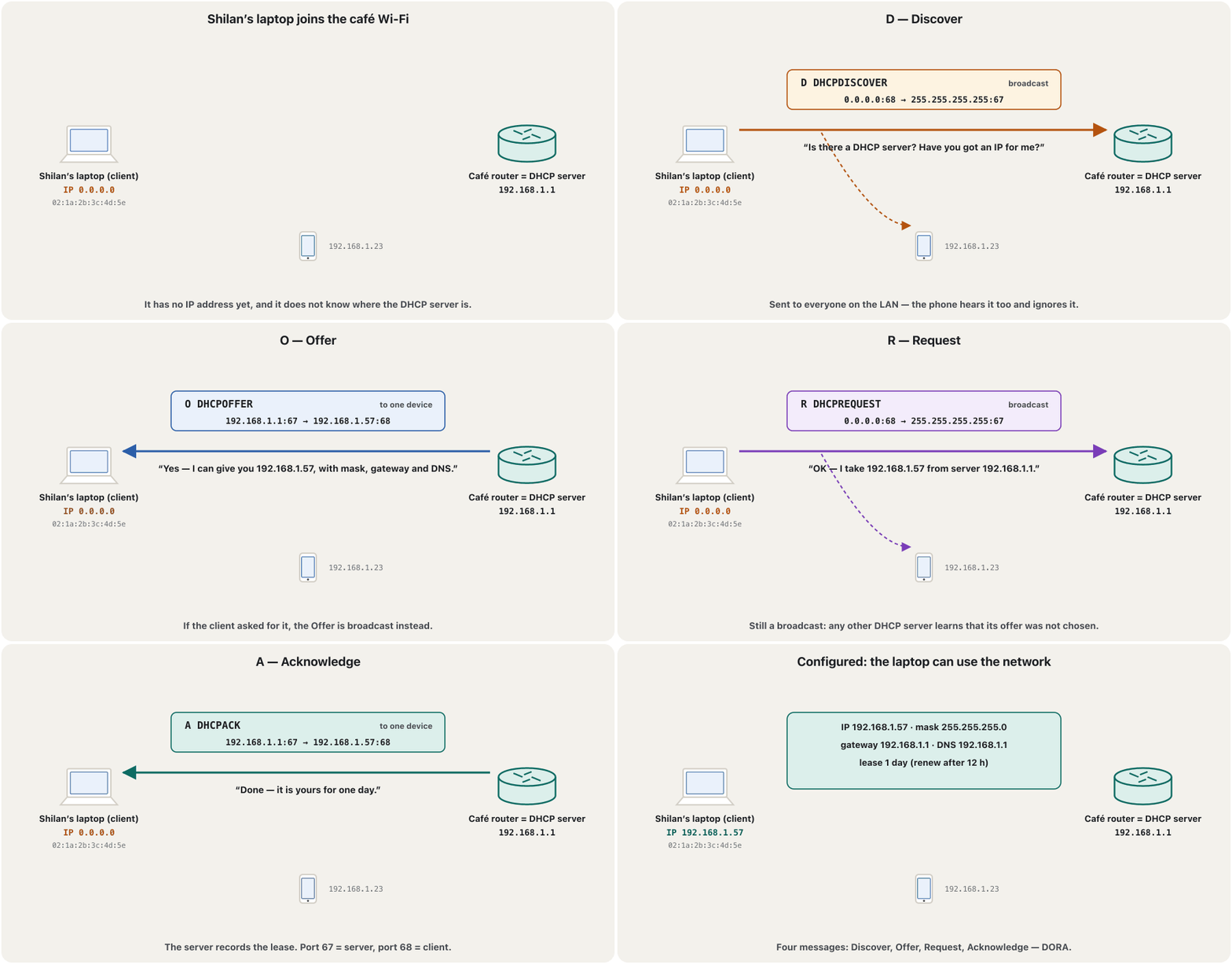
Every time a client needs a new lease, it and the server exchange four messages: Discover, Offer, Request, Acknowledge — DORA. In plain words: “Have you got an IP for me?” — “Yes, I have this one.” — “OK, give me that one.” — “Done, here you are.” This is how the server hands out addresses and settings dynamically, so that every device has a unique address and the right configuration.
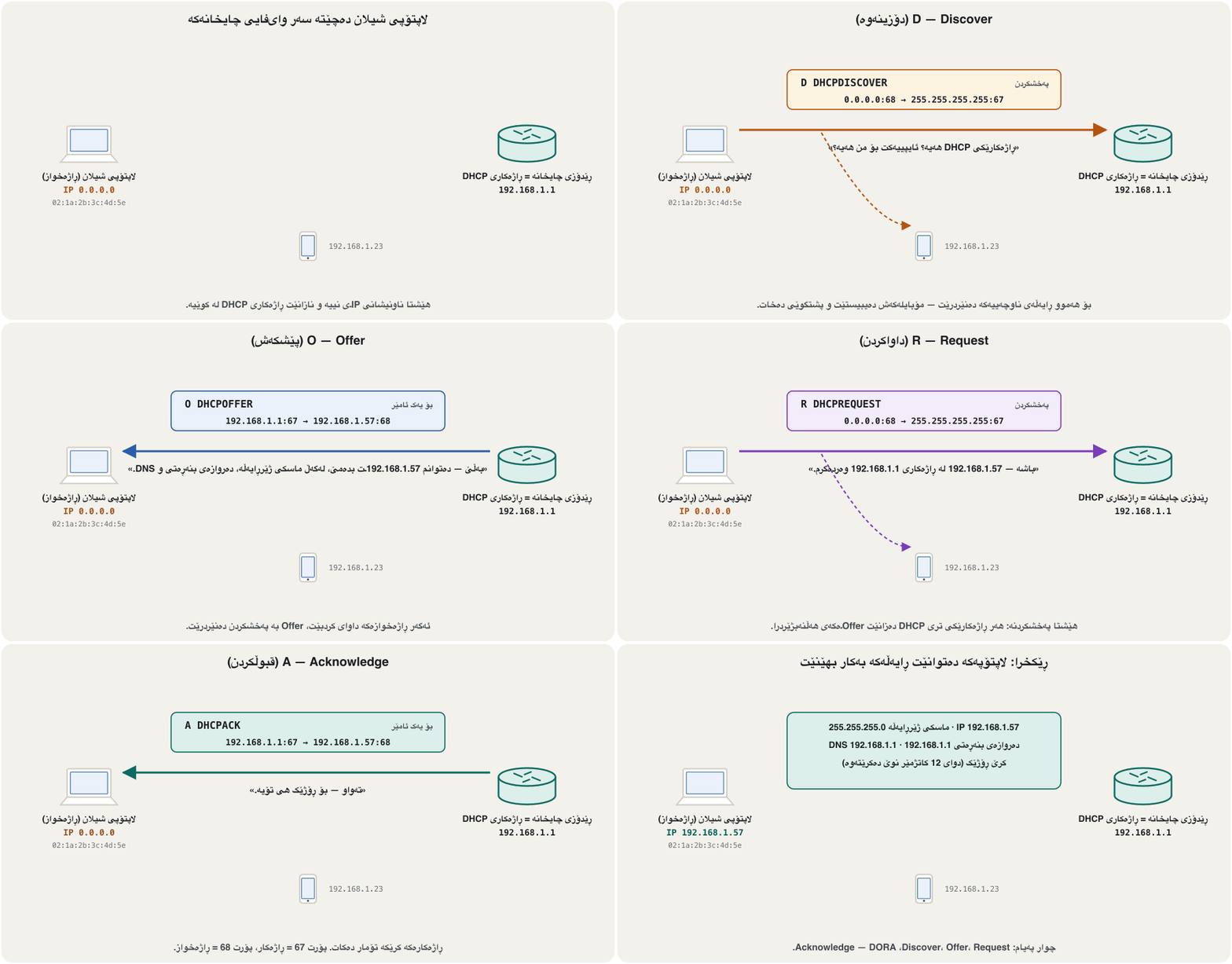
هەر جارێک پێویستی بە کرێیەکی نوێ بێت، خۆی و چوار پەیام ئاڵوگۆڕ دەکەن: Discover، Offer، Request، Acknowledge — . بە وشەی سادە: «هیچ ئایپییەکت هەیە؟» — «بەڵێ، ئەمەم هەیە.» — «دەی باشە ئەوەم بەرێ.» — «تەواوە، فەرموو.» بەم شێوەیە ناونیشان و ڕێکخستن بە شێوەی بزۆک دابەش دەکات، بۆ ئەوەی هەموو ئامێرێک ناونیشانێکی بێوێنە و دروستی هەبێت.
- DiscoverDiscover (دۆزینەوە)
The device that needs an address broadcasts a DHCP Discover to find a DHCP server. It does not know the server’s address, so the destination is 255.255.255.255; it has no address yet, so the source is 0.0.0.0.
ئەو ئامێرەی پێویستی بە ناونیشانە پەیامی DHCP Discover دەکات بۆ دۆزینەوەی DHCP. ناونیشانی نازانێت، بۆیە مەبەست 255.255.255.255ـە؛ هێشتا ناونیشانی نییە، بۆیە سەرچاوە 0.0.0.0ـە.
- OfferOffer (پێشکەش)
A server answers with one free address for the device, and the mask, default gateway, DNS servers and lease time.
بە ناونیشانێکی بەتاڵ بۆ ئامێرەکە وەڵام دەداتەوە، لەگەڵ ، ، و ماوەی کرێ.
- RequestRequest (داواکردن)
The device asks for the offered address — still as a broadcast, naming the server it chose.
ئامێرەکە داوای ناونیشانە پێشکەشکراوەکە دەکات — هێشتا بە ، بە ناوهێنانی ئەو هەڵیبژاردووە.
- AcknowledgeAcknowledge (قبوڵکردن)
The server confirms and records the lease. Now the device may use the address.
پشتڕاستی دەکاتەوە و کرێکە تۆمار دەکات. ئێستا ئامێرەکە دەتوانێت ناونیشانەکە بەکار بهێنێت.
DORA: four messagesDORA: چوار پەیام
Addresses and ports of each messageناونیشان و پۆرتەکانی هەر پەیامێک
| Messageپەیام | IP from → toIP لە ← بۆ | UDP ports UDP | Sent asچۆن دەنێردرێت |
|---|---|---|---|
| D Discover | 0.0.0.0 → 255.255.255.255 | 68 → 67 | broadcast |
| O Offer | 192.168.1.1 → 192.168.1.57 | 67 → 68 | to the offered address, or broadcast if the client asksبۆ ناونیشانە پێشکەشکراوەکە، یان ئەگەر داوای بکات |
| R Request | 0.0.0.0 → 255.255.255.255 | 68 → 67 | broadcast |
| A Ack | 192.168.1.1 → 192.168.1.57 | 67 → 68 | like the Offerوەک Offer |
0.0.0.0 is the source address of a device that has no address yet. 255.255.255.255 is the limited broadcast: every device on the local network receives it, and routers never forward it to other networks (see broadcast messages). The Request is a broadcast so that any other server that made an offer learns it was not chosen and keeps that address free. Before using the address, a careful client checks with ARP that nobody else has it; if someone does, it sends a DHCPDECLINE and starts again. DHCP runs on UDP because only UDP can send to everyone on the LAN (Finding each other on a LAN).
0.0.0.0 ناونیشانی سەرچاوەی ئامێرێکە کە هێشتا ناونیشانی نییە. 255.255.255.255 سنووردارە: هەموو ئامێرێکی ناوخۆیی وەریدەگرێت و هەرگیز بۆ تری نانێرن (بڕوانە پەیامەکانی پەخشکردن). Request بۆ ئەوەی هەر تر کە Offerـی کردبێت بزانێت هەڵنەبژێردراوە و ئەو ناونیشانە بەتاڵ بهێڵێتەوە. پێش بەکارهێنانی ناونیشانەکە، وریا بە دەپشکنێت کە کەسی تر هەیەتی یان نا؛ ئەگەر هەبوو، DHCPDECLINE دەنێرێت و لە سەرەتاوە دەست پێ دەکاتەوە. لەسەر کار دەکات، چونکە تەنیا دەتوانێت بۆ هەموو ئامێرەکانی بنێرێت (دۆزینەوەی یەکتر لە ڕایەڵەی ناوچەییدا).
An application-layer protocol on UDP 67 and 68پرۆتۆکۆڵێکی چینی ئەپ لەسەر UDP 67 و 68
DHCP works in the application layer, like DNS: its messages are made by the DHCP client and the DHCP server programs, and it gives hosts a dynamic way of leasing addresses. Underneath, it travels in UDP: the server listens on port 67 and the client on port 68. It could not use TCP — a TCP connection needs addresses on both sides, and the client has none yet; and only a UDP datagram can be sent to everyone as a broadcast.
لە کار دەکات، وەک : پەیامەکانی و دروستیان دەکەن و ڕێگایەکی بزۆک بە دەدات بۆ بەکرێگرتنی ناونیشان. لە خوارەوە بە UDP دەڕوات: گوێ لە 67 دەگرێت و لە 68. نەیدەتوانی TCP بەکار بهێنێت — پەیوەندیی TCP پێویستی بە ناونیشان لە هەردوو لا هەیە و هێشتا هیچی نییە؛ هەروەها تەنیا UDP دەتوانێت وەک بۆ هەمووان بنێردرێت.
IPv6 hosts get their addresses with SLAAC or DHCPv6 (UDP ports 546 and 547) — see DHCPv6: stateful and stateless. Port numbers in general are in ports and sockets.
IPv6 ناونیشانەکانیان بە یان DHCPv6 وەردەگرن ( UDP 546 و 547) — بڕوانە DHCPv6: دۆخدار و بێدۆخ. ژمارەی بە گشتی لە پۆرتەکان و سۆکێتەکانـدایە.
Leases: addresses on loanکرێکانی DHCP: ناونیشانی بە قەرز
A DHCP lease is the time for which a server lends an address and its settings to a client; the administrator sets its length on the server. During the lease the client may use them. The client does not wait for the end. At T1, by default 50 % of the lease, it asks the same server to renew, with a Request sent straight to it; the server answers with an Ack and the lease starts again. If that server does not answer, at T2 — by default 87.5 % — the client asks any server by broadcast (rebinding). If the lease runs out with no answer, the client must stop using the address and start DORA again.
ئەو کاتەیە کە ناونیشانێک و ڕێکخستنەکانی بە قەرز دەداتە ؛ بەڕێوەبەری درێژییەکەی لەسەر دیاری دەکات. لە ماوەی کرێکەدا دەتوانێت بەکاریان بهێنێت. چاوەڕێی کۆتایی ناکات. لە T1، کە بە شێوەی بنەڕەت 50%ـی کرێکەیە، داوا لە هەمان دەکات نوێی بکاتەوە، بە Requestـێک کە ڕاستەوخۆ بۆی دەنێرێت؛ بە Ack وەڵام دەداتەوە و کرێکە لە سەرەتاوە دەست پێ دەکاتەوە. ئەگەر ئەو وەڵام نەداتەوە، لە T2 — بە شێوەی بنەڕەت 87.5% — بە لە هەر دەپرسێت (دووپاتە بەستنەوە). ئەگەر کرێکە بێ وەڵام تەواو بێت، دەبێت واز لە ناونیشانەکە بهێنێت و دیسان دەست پێ بکاتەوە.
See and control your lease: ipconfigبینین و کۆنترۆڵکردنی کرێکەت: ipconfig
On Windows you can see the lease and act on it. ipconfig /all shows whether DHCP is enabled, which server gave the address and when the lease was obtained and when it expires. ipconfig /release sends a DHCPRELEASE to the server and gives the address back; ipconfig /renew asks for a lease again. Do not use /release over a remote connection: it cuts you off. The rest of ipconfig is in Windows network commands. The 3D network lab has no DHCP server — its devices use fixed addresses — so DHCP is practised in Packet Tracer (a DHCP server in Packet Tracer).
لە Windowsـدا دەتوانیت کرێکە ببینیت و کاری لەسەر بکەیت. ipconfig /all پیشان دەدات چالاکە یان نا، کام ناونیشانەکەی داوە و کرێکە کەی وەرگیراوە و کەی تەواو دەبێت. ipconfig /release پەیامی DHCPRELEASE بۆ دەنێرێت و ناونیشانەکە دەگەڕێنێتەوە؛ ipconfig /renew دیسان داوای کرێ دەکاتەوە. /release لە پەیوەندییەکی دوورەوە بەکار مەهێنە: پەیوەندییەکەت دەپچڕێنێت. بەشەکانی تری ipconfig لە فەرمانەکانی ڕایەڵەی Windowsـدان. تاقیگەی سێ ڕەهەندیی ڕایەڵە تێدا نییە — ئامێرەکانی ناونیشانی جێگیر بەکار دەهێنن — بۆیە لە Packet Tracer ڕاهێنانی لەسەر دەکرێت (ڕاژەکاری DHCP لە Packet Tracer).
ipconfig /all
ipconfig /release
ipconfig /renewC:\Users\Shilan>ipconfig /all … Wireless LAN adapter Wi-Fi: Connection-specific DNS Suffix . : home.arpa Description . . . . . . . . . . . : Intel(R) Wi-Fi 6E AX211 160MHz Physical Address. . . . . . . . . : 02-1A-2B-3C-4D-5E DHCP Enabled. . . . . . . . . . . : Yes Autoconfiguration Enabled . . . . : Yes Link-local IPv6 Address . . . . . : fe80::4c1d:92ab:7e30:15f2%12(Preferred) IPv4 Address. . . . . . . . . . . : 192.168.1.57(Preferred) Subnet Mask . . . . . . . . . . . : 255.255.255.0 Lease Obtained. . . . . . . . . . : Saturday, November 7, 2026 9:12:40 AM Lease Expires . . . . . . . . . . : Sunday, November 8, 2026 9:12:40 AM Default Gateway . . . . . . . . . : 192.168.1.1 DHCP Server . . . . . . . . . . . : 192.168.1.1 DHCPv6 IAID . . . . . . . . . . . : 117570187 DHCPv6 Client DUID. . . . . . . . : 00-01-00-01-2E-5A-11-3C-02-1A-2B-3C-4D-5E DNS Servers . . . . . . . . . . . : 192.168.1.1 NetBIOS over Tcpip. . . . . . . . : Enabled
Pools, exclusions and reservationsپووڵی ناونیشان، جیاکراوە و تەرخانکراو
On the server, the range of addresses it may lend on one subnet is a pool (Windows Server calls it a scope). Addresses that must not be lent — the router and the servers set by hand — are excluded. A reservation ties one address to one MAC address, so a printer or a camera always gets the same address while still using DHCP. One server can hold pools for several subnets, and a pool need not be one unbroken block. The administrator can also limit which MAC addresses are served.
لەسەر ، ئەو ناونیشانانەی دەتوانێت لە یەک ژێرڕایەڵەدا بە قەرزیان بدات ـە (Windows Server پێی دەڵێت scope). ئەو ناونیشانانەی نابێت بدرێن — و ئەو بە دەست ڕێکخراون — جیا دەکرێنەوە. تەرخانکردن یەک ناونیشان بە یەک دەبەستێتەوە، بۆیە یان کامێرایەک هەمیشە هەمان ناونیشان وەردەگرێت و هێشتا بەکار دەهێنێت. یەک دەتوانێت پووڵی چەند ژێرڕایەڵەیەک هەڵبگرێت و پێویست ناکات پووڵێک یەک پارچەی پچڕنەبوو بێت. بەڕێوەبەریش دەتوانێت دیاری بکات کام خزمەت دەکرێن.
No answer: APIPA and 169.254وەڵام نییە: APIPA و 169.254
If no DHCP server answers — the cable is out, the Wi-Fi password was wrong, the server is down — a computer does not stay without an address. It gives itself a link-local address from 169.254.0.0/16; Microsoft calls this APIPA (Automatic Private IP Addressing) and the standard is RFC 3927. It picks a random address between 169.254.1.0 and 169.254.254.255, checks with three ARP probes that no neighbour uses it, and keeps asking DHCP in the background. Such an address reaches only devices on the same link: there is no gateway, and routers never forward these packets.
ئەگەر هیچ وەڵام نەداتەوە — کێبڵەکە دەرهاتووە، هەڵە بوو، کوژاوەتەوە — بێ ناونیشان نامێنێتەوە. لە 169.254.0.0/16 بە خۆی دەدات؛ Microsoft پێی دەڵێت (Automatic Private IP Addressing) و ستانداردەکەی RFC 3927ـە. ناونیشانێکی هەڕەمەکی لە نێوان 169.254.1.0 و 169.254.254.255 هەڵدەبژێرێت، بە سێ پشکنینی دڵنیا دەبێتەوە کە هیچ دراوسێیەک بەکاری ناهێنێت و لە پشتەوە هەر داوای دەکات. ناونیشانێکی وا تەنیا دەگاتە ئامێرەکانی هەمان بەستەر: نییە و هەرگیز ئەم نانێرن.
So when ipconfig shows Autoconfiguration IPv4 Address . . : 169.254.37.112, read it as “DHCP failed”: check the cable or Wi-Fi, then the router or server. The address itself was introduced in loopback and APIPA. For practice, follow a real case in an address in 169.254.x.x, and see a Packet Tracer pool that handed out wrong addresses in What went wrong here?
کەواتە کاتێک ipconfig پیشان دەدات Autoconfiguration IPv4 Address . . : 169.254.37.112، وای بخوێنەوە « سەرکەوتوو نەبوو»: سەرەتا کێبڵ یان ، پاشان یان بپشکنە. خودی ناونیشانەکە لە loopback و APIPAـدا ناسێنرا. بۆ ڕاهێنان، دۆخێکی ڕاستەقینە لە ناونیشانێک لە 169.254.x.xـدا ببینە و پووڵێکی Packet Tracer کە ناونیشانی هەڵەی دابەش کرد لە لێرەدا چی هەڵە بوو؟
A server on another network: relay agentsڕاژەکارێک لە ڕایەڵەیەکی تر: گوازەرەوەکانی DHCP
The Discover is a broadcast, and routers do not forward broadcasts — so how can one DHCP server in a university serve every LAN? A router (or layer-3 switch) on the client’s LAN acts as a DHCP relay agent: it receives the broadcast, sends it on as a unicast to the server’s address and writes the address of its own interface into the message (the giaddr field). The server uses that address to choose the right pool, and its reply goes back through the relay to the client. On Cisco routers this is the ip helper-address command, configured in DHCP on a Cisco router.
Discover و نانێرن — کەواتە چۆن یەک لە زانکۆیەکدا دەتوانێت خزمەتی هەموو بکات؟ (یان چینی 3) لە وەک کار دەکات: وەردەگرێت، وەک بۆ ناونیشانی دەینێرێت و ناونیشانی خۆی دەنووسێتە ناو پەیامەکە (خانەی giaddr). بەو ناونیشانە پووڵە دروستەکە هەڵدەبژێرێت و وەڵامەکەی لە ڕێگەی گوازەرەوەکەوە دەگەڕێتەوە بۆ . لەسەر Cisco ئەمە فەرمانی ip helper-addressـە کە لە DHCP لەسەر ڕێدۆزی Ciscoـدا ڕێک دەخرێت.
Rogue DHCP serversڕاژەکارەکانی DHCPـی ناشەرعی
A client believes the first Offer it accepts. A rogue DHCP server — a home router plugged into an office wall socket by mistake, or an attacker’s laptop — can answer before the real one and hand out a wrong gateway or DNS server. Then nothing works, or worse, the victim’s traffic passes through the attacker: a man-in-the-middle attack. Switches defend against this with DHCP snooping: only the port towards the real server is trusted, and server messages (Offer, Ack) that arrive on other ports are dropped. It is configured with switch port security.
باوەڕ بە یەکەم Offer دەکات کە وەریدەگرێت. ناشەرعی — ماڵەوە کە بە هەڵە لە پریزێکی دیواری ئۆفیسدا دانراوە، یان — دەتوانێت پێش ڕاستەقینەکە وەڵام بداتەوە و یان هەڵە بدات. ئەوکات هیچ شتێک کار ناکات، یان خراپتر، هاتوچۆی قوربانییەکە بە تێدەپەڕێت: هێرشی کەسی ناوەڕاست. بە بەرگری لەمە دەکەن: تەنیا ئەو بەرەو ڕاستەقینەکەیە متمانەپێکراوە و پەیامەکانی (Offer، Ack) کە لە ترەوە دێن فڕێ دەدرێن. لەگەڵ ئاسایشی دەرچەکانی سویچـدا ڕێک دەخرێت.
Exam practiceڕاهێنانی تاقیکردنەوە
A midterm asked: “Explain DHCP.” Write a full-marks answer.
تاقیکردنەوەیەکی نیوەی وەرز پرسی: « ڕوون بکەرەوە.» وەڵامێکی نمرە تەواو بنووسە.
Show answerوەڵامەکە پیشان بدە
Model answer. DHCP (Dynamic Host Configuration Protocol) is a standard application-layer protocol that answers the broadcast queries of clients. A DHCP server is a network server that automatically assigns network settings to clients — an IP address, subnet mask, default gateway and DNS servers — for a limited time, the lease. DHCP runs over UDP (server port 67, client port 68) and takes four steps, DORA:
وەڵامی نموونە. (Dynamic Host Configuration Protocol) ستانداردی کە وەڵامی پرسیارە دەداتەوە. کە بە خۆکاری ڕێکخستنەکانی دەداتە — ، ، و — بۆ ماوەیەکی سنووردار، واتە . لەسەر UDP کار دەکات ( 67، 68) و چوار هەنگاوی هەیە، :
- Discover — the client broadcasts (from 0.0.0.0 to 255.255.255.255) to find a DHCP server.
- Offer — a server offers one free IP address with the other settings.
- Request — the client asks for that address, again by broadcast.
- Acknowledge — the server confirms; the client may now use the address until the lease ends, renewing at half the lease.
- Discover — دەکات (لە 0.0.0.0ـەوە بۆ 255.255.255.255) بۆ دۆزینەوەی .
- Offer — یەک بەتاڵ لەگەڵ ڕێکخستنەکانی تر پێشکەش دەکات.
- Request — داوای ئەو ناونیشانە دەکات، دیسان بە .
- Acknowledge — پشتڕاستی دەکاتەوە؛ ئێستا دەتوانێت ناونیشانەکە تا کۆتایی کرێکە بەکار بهێنێت و لە نیوەی کرێکەدا نوێی دەکاتەوە.
Note that the Offer carries one address (several servers may each make an offer), not a list to choose from.
ئاگاداربە کە Offer یەک ناونیشان هەڵدەگرێت (چەند دەتوانن هەریەکە Offerـێک بکەن)، نەک لیستێک بۆ هەڵبژاردن.
A Packet Tracer lab uses a DHCP server at 7.7.7.7 that offers 7.7.7.51. For each DORA message, write the source and destination IP address and UDP port.
تاقیگەیەکی Packet Tracer بە 7.7.7.7 بەکار دەهێنێت کە 7.7.7.51 پێشکەش دەکات. بۆ هەر پەیامێکی ، و UDPـی سەرچاوە و مەبەست بنووسە.
Show answerوەڵامەکە پیشان بدە
| Messageپەیام | Sourceسەرچاوە | Destinationمەبەست |
|---|---|---|
| Discover | 0.0.0.0 : 68 | 255.255.255.255 : 67 |
| Offer | 7.7.7.7 : 67 | 7.7.7.51 : 68 |
| Request | 0.0.0.0 : 68 | 255.255.255.255 : 67 |
| Ack | 7.7.7.7 : 67 | 7.7.7.51 : 68 |
The client always speaks from port 68 to port 67, the server from 67 to 68. Note: 7.7.7.x is a public block that the lab only borrows inside Packet Tracer; a real network would use private addresses such as 192.168.1.x.
هەمیشە لە 68ـەوە بۆ 67 قسە دەکات و لە 67ـەوە بۆ 68. تێبینی: بلۆکی 7.7.7.x ناونیشانی گشتییە و تاقیگەکە تەنیا لە ناو Packet Tracerـدا بەکاری دەهێنێت؛ ڕاستەقینە وەک 192.168.1.x بەکار دەهێنێت.
Common mistakesهەڵە باوەکان
- “DHCP runs over TCP.” It runs over UDP: server port 67, client port 68. A client without an address cannot open a TCP connection.
- “Port 67 is the client.” 67 is the server, 68 the client.
- “The Request goes only to the chosen server.” In DORA it is a broadcast, so the other servers learn they were not chosen. (Later renewals at T1 are sent straight to the server.)
- “The Offer is a list of addresses to choose from.” Each Offer carries one address; several servers may each send one.
- “My DHCP address is mine forever.” It is lent for the lease time; the client renews at T1 = 50 %.
- “DHCP resolves IP addresses.” DHCP configures hosts; ARP finds a MAC address for an IP address, DNS an IP address for a name.
- “169.254.x.y means the Internet provider is down.” It means no DHCP server answered on your own link — start with the cable, the Wi-Fi and the router.
- “One DHCP server can only serve its own LAN.” With relay agents it serves many LANs.
- « لەسەر TCP کار دەکات.» لەسەر UDP کار دەکات: 67، 68. بێ ناونیشان ناتوانێت پەیوەندیی TCP بکاتەوە.
- « 67 هی .» 67 هی و 68 هی .
- «Request تەنیا بۆ ئەو دەچێت کە هەڵبژێردراوە.» لە ، بۆ ئەوەی تر بزانن هەڵنەبژێردراون. (نوێکردنەوەکانی دواتر لە T1 ڕاستەوخۆ بۆ دەنێردرێن.)
- «Offer لیستێکی ناونیشانە بۆ هەڵبژاردن.» هەر Offerـێک یەک ناونیشان هەڵدەگرێت؛ چەند دەتوانن هەریەکە یەکێک بنێرن.
- «ناونیشانی بۆ هەمیشە هی منە.» بۆ ماوەی کرێکە بە قەرز دراوە؛ لە T1 = 50% نوێی دەکاتەوە.
- « دەدۆزێتەوە.» ڕێک دەخات؛ بۆ دەدۆزێتەوە و بۆ ناوێک.
- «169.254.x.y واتە کوژاوەتەوە.» واتە هیچ لەسەر بەستەری خۆت وەڵامی نەدایەوە — لە کێبڵ، و دەست پێ بکە.
- «یەک تەنیا دەتوانێت خزمەتی خۆی بکات.» بە خزمەتی زۆر دەکات.
Exercisesڕاهێنانەکان
A server gives 8-day leases. When does a client first try to renew, and when does it start asking any server?
کرێی 8 ڕۆژی دەدات. یەکەم جار کەی هەوڵی نوێکردنەوە دەدات و کەی دەست دەکات بە پرسیار لە هەر ؟
Show answerوەڵامەکە پیشان بدە
: after 4 days (renew with the same server). : after 7 days (rebind with any server). After 8 days without an answer the address must be given up.
: دوای 4 ڕۆژ (نوێکردنەوە لەگەڵ هەمان ). : دوای 7 ڕۆژ (دووپاتە بەستنەوە لەگەڵ هەر ). دوای 8 ڕۆژ بێ وەڵام، دەبێت واز لە ناونیشانەکە بهێنرێت.
Put the DHCP messages of a full life in order: Request, Release, Discover, Ack, Offer, Request (renewal at T1), Ack.
پەیامەکانی DHCP بۆ ژیانێکی تەواو ڕیز بکە: Request، Release، Discover، Ack، Offer، Request (نوێکردنەوە لە T1)، Ack.
Show answerوەڵامەکە پیشان بدە
Discover → Offer → Request → Ack → (at T1) Request → Ack → … → Release (when the client is finished with the address).
ڕیزبەندیی دروست: Discover → Offer → Request → Ack؛ پاشان لە T1دا: Request → Ack (دووپاتە دەبێتەوە)؛ لە کۆتاییدا Release، کاتێک ئیشی بە ناونیشانەکە نامێنێت.
True or false? (a) DHCP is an application-layer protocol. (b) The Discover is sent to the server’s IP address. (c) A router can be a DHCP server. (d) The Ack tells the client it may use the address.
ڕاست یان هەڵە؟ (a) . (b) Discover بۆ دەنێردرێت. (c) دەتوانێت بێت. (d) Ack بە دەڵێت دەتوانێت ناونیشانەکە بەکار بهێنێت.
Show answerوەڵامەکە پیشان بدە
- (a) True — it runs over UDP 67/68 below it.
- (b) False — the client does not know it yet; the Discover goes to 255.255.255.255.
- (c) True — home and small-office routers do it.
- (d) True — after the Ack the address is leased to the client.
- (a) ڕاستە — لە خوارییەوە لەسەر UDP 67/68 کار دەکات.
- (b) هەڵەیە — هێشتا نایزانێت؛ Discover دەچێت بۆ 255.255.255.255.
- (c) ڕاستە — ماڵەوە و ئۆفیسی بچووک ئەمە دەکەن.
- (d) ڕاستە — دوای Ack ناونیشانەکە بە کرێ دەدرێتە .
What can a DHCP server give besides the IP address?ڕاژەکاری DHCP جگە لە ناونیشانی IP چی تر دەتوانێت بدات؟
The subnet mask, default gateway, DNS servers, domain name, lease time and many other options.
، ، ، ، ماوەی کرێ و زۆر هەڵبژاردەی تر.
What is the difference between a pool, an exclusion and a reservation?جیاوازیی نێوان پووڵی ناونیشان، جیاکراوە و تەرخانکراو چییە؟
The pool is the range lent to clients; an exclusion is an address the server must never lend; a reservation always gives one address to one MAC address.
پووڵ ئەو ناونیشانانەیە کە بە دەدرێن؛ جیاکراوە ناونیشانێکە کە هەرگیز نابێت بیدات؛ تەرخانکراو هەمیشە یەک ناونیشان دەداتە یەک .
Why is a DHCP relay agent needed in a large network?بۆچی لە ڕایەڵەیەکی گەورەدا گوازەرەوەی DHCP پێویستە؟
Because the Discover is a broadcast that stops at routers; the relay forwards it as a unicast to a central server.
چونکە Discover کە لە دەوەستێت؛ گوازەرەوەکە وەک بۆ ناوەندی دەینێرێت.
Summaryپوختە
- Every device needs an address, mask, gateway and DNS servers: typed by hand (static) or received from a DHCP server (dynamic).
- DHCP avoids typing mistakes and duplicate addresses, sets lease times, uses pools and can filter by MAC address.
- The server can be a router, a server on the LAN or the ISP’s server.
- DORA: Discover (0.0.0.0:68 → 255.255.255.255:67), Offer, Request (broadcast), Acknowledge.
- DHCP is an application-layer protocol over UDP: server 67, client 68.
- A lease is renewed at T1 = 50 % (same server) and rebound at T2 = 87.5 % (any server);
ipconfig /releaseand/renewcontrol it. - Pools (scopes), exclusions and reservations by MAC address organise the addresses.
- No answer → APIPA 169.254.x.y, usable only on the local link.
- Relay agents carry DHCP across routers; DHCP snooping stops rogue servers.
- هەموو ئامێرێک پێویستی بە ناونیشان، ، و هەیە: بە دەست نووسراو () یان لە وەرگیراو ().
- ڕێگە لە هەڵەی نووسین و ناونیشانی دووپاتە دەگرێت، ماوەی کرێ دیاری دەکات، پووڵ بەکار دەهێنێت و دەتوانێت بە جیاکاری بکات.
- دەتوانێت ، لە یان بێت.
- : Discover (0.0.0.0:68 → 255.255.255.255:67)، Offer، Request ()، Acknowledge.
- لەسەر UDP: 67، 68.
- لە T1 = 50% نوێ دەکرێتەوە (هەمان ) و لە T2 = 87.5% دووپاتە دەبەسترێتەوە (هەر )؛
ipconfig /releaseو/renewکۆنترۆڵی دەکەن. - پووڵ (scope)، جیاکراوە و تەرخانکردن بە ناونیشانەکان ڕێک دەخەن.
- وەڵام نییە ← 169.254.x.y، تەنیا لەسەر بەستەری ناوخۆیی بەکار دێت.
- بە تێدەپەڕێنن؛ ناشەرعی ڕادەگرێت.
Lesson complete!وانەکە تەواو بوو!
Well done. Review the key terms, then go on to the next lesson.دەستخۆش. سەیرێکی زاراوە سەرەکییەکان بکەرەوە، پاشان بڕۆ بۆ وانەی داهاتوو.
Key termsزاراوە سەرەکییەکان
Web and E-mail Protocols: HTTP, HTTPS, SMTP, POP3 and IMAPپرۆتۆکۆڵەکانی وێب و ئیمەیڵ: HTTP، HTTPS، SMTP، POP3 و IMAP
Related lecturesوانە پەیوەندیدارەکان
- IP Addresses and MAC Addressesناونیشانەکانی IP و ناونیشانەکانی MAC
- DNS: How Names Become AddressesDNS: ناو چۆن دەبێتە ناونیشان
- Collision Domains and Broadcast Domainsپاوانەکانی پێکدادان و پاوانەکانی پەخش
- ARP: From IP Address to MAC AddressARP: لە ناونیشانی IP بۆ ناونیشانی MAC
- Port Numbers and Socketsژمارەی پۆرت و سۆکێتەکان
- IPv6 in Practice: SLAAC, Neighbour Discovery and Dual StackIPv6 لە کرداردا: SLAAC، دۆزینەوەی دراوسێ و ستاکی دووانە
- Packet Tracer Lab: DHCP, Web, DNS and FTP Serversتاقیگەی Packet Tracer: ڕاژەکارەکانی DHCP، وێب، DNS و FTP
- DHCP on a Cisco Router and DHCP RelayDHCP لەسەر ڕێدۆزێکی Cisco و گوازەرەوەی DHCP
- Switch Port Securityئاسایشی دەرچەی سویچ
- Windows Network Commandsفەرمانەکانی ڕایەڵە لە Windows
- Network Defences: Firewalls, Segmentation, Monitoring and SIEMبەرگرییەکانی ڕایەڵە: ئاگرەدیوار، بەشبەشکردنی ڕایەڵە، چاودێریی ئاسایش و SIEM
References and further readingسەرچاوەکان و خوێندنەوەی زیاتر
This lecture is a first edition. The Kurdish text and terminology are waiting for review by Kurdish IT teachers.ئەم وانەیە چاپی یەکەمە. دەقە کوردییەکە و زاراوەکانی چاوەڕێی پێداچوونەوەی مامۆستایانی کوردی بواری IT ن.