Chapterبەش 5 · Lectureوانە 5.10
ICMP, Ping and TracerouteICMP، پینگ و بەدواداچوونی ڕێگە
IP cannot report problems by itself — ICMP does. Learn what ICMP is and how it travels inside IP, its main messages, how ping uses Echo Request and Echo Reply, how to read a ping result (time and TTL) and its failure messages, why a silent host is not always down, how tracert and traceroute map a path by raising the TTL, what pathping adds, and what ICMPv6 does for IPv6.
IP خۆی ناتوانێت کێشەکان ڕاپۆرت بکات — دەیکات. فێر ببە چییە و چۆن لە ناو IPـدا دەڕوات، پەیامە سەرەکییەکانی، ping چۆن Echo و وەڵامی Echo بەکار دەهێنێت، چۆن ئەنجامی (کات و ) و پەیامەکانی شکستی دەخوێنیتەوە، بۆچی بێدەنگ هەمیشە کوژاوە نییە، tracert و traceroute چۆن بە بەرزکردنەوەی نەخشەی ڕێگایەک دەکێشن، pathping چی زیاد دەکات و ICMPv6 بۆ چی دەکات.
What you will learnچی فێر دەبیت
- Explain what ICMP is, why IP needs it and how it is carried (inside IP, protocol 1).
- Name the main ICMP messages — Echo Request and Reply, Destination Unreachable, Time Exceeded, Redirect — and who sends them.
- Use ping with an IP address, a name and the loopback address, its main options, and read its time, TTL and failure messages.
- Explain how tracert and traceroute find the routers on a path, read their output and compare them with pathping.
- Explain why no reply does not prove a host is down, and what ICMPv6 adds in IPv6.
- ڕوونی بکەیتەوە چییە، بۆچی IP پێویستی پێیەتی و چۆن هەڵدەگیرێت (لە ناو IP، 1).
- ناوی پەیامە سەرەکییەکانی بهێنیت — و وەڵامی Echo، Destination Unreachable، Time Exceeded، Redirect — و کێ دەیاننێرێت.
pingلەگەڵ ، ناو و و هەڵبژاردە سەرەکییەکانی بەکار بهێنیت و کات، و پەیامەکانی شکستی بخوێنیتەوە.- ڕوونی بکەیتەوە
tracertوtracerouteچۆن سەر ڕێگایەک دەدۆزنەوە، دەرئەنجامەکەیان بخوێنیتەوە و لەگەڵpathpingبەراوردیان بکەیت. - ڕوونی بکەیتەوە بۆچی وەڵام نەبوون نایسەلمێنێت کوژاوەتەوە و ICMPv6 لە چی زیاد دەکات.
ICMP: the network layer’s messengerICMP: پەیامبەری چینی ڕایەڵە
IP delivers packets on a best-effort basis: it tries, but it never promises delivery and it has no way of its own to say what went wrong (The Network Layer and IPv4). That job belongs to ICMP, the Internet Control Message Protocol (RFC 792, September 1981). ICMP is a network-layer protocol that reports on the success or failure of delivery: a router that has to drop a packet, or a host that cannot pass it on, sends an ICMP error message back to the sender — for example “this host cannot be reached” or “this service is not available”. ICMP also carries simple test messages, and the ping and tracert tools are built on them.
IP بە شێوەی هەوڵی باش دەگەیەنێت: هەوڵ دەدات، بەڵام هەرگیز بەڵێنی گەیاندن نادات و ڕێگایەکی خۆی نییە بۆ ئەوەی بڵێت چی هەڵە بوو (چینی ڕایەڵە و IPv4). ئەو کارە هی ، Internet Control Message Protocol (RFC 792، ئەیلوولی 1981). کە ڕاپۆرتی سەرکەوتن یان شکستی گەیاندن دەدات: کە ناچارە فڕێ بدات، یان کە ناتوانێت بیگەیەنێت، پەیامێکی هەڵەی بۆ نێرەر دەگەڕێنێتەوە — بۆ نموونە «ناتوانرێت بگەیت بەم » یان «ئەم خزمەتگوزارییە بەردەست نییە». هەروەها پەیامی تاقیکردنەوەی سادە هەڵدەگرێت و ئامرازەکانی ping و tracert لە سەر ئەوان دروست کراون.
ICMP has no ports and does not use TCP or UDP. Its message rides directly inside an IP packet, and the IPv4 header’s protocol field says 1 (the protocol field). So ICMP belongs to the network layer, next to IP, even though it is carried inside IP.
هیچ نییە و TCP یان UDP بەکار ناهێنێت. پەیامەکەی ڕاستەوخۆ لە ناو IPـدا دەڕوات و خانەی سەرەی دەڵێت 1 (خانەی پرۆتۆکۆڵ). بۆیە سەر بە ، لە تەنیشت IP، هەرچەندە لە ناو IPـدا هەڵدەگیرێت.
The ICMP messages you will meetئەو پەیامانەی ICMP کە دەیانبینیت
Every ICMP message starts with a type number (what kind of message) and a code (the exact reason). There are two families: query messages that ask and answer, and error messages that report a problem with a packet. These are the ones you will meet:
هەموو پەیامێکی بە ژمارەی جۆر (Type: چ جۆرە پەیامێکە) و کۆد (Code: هۆکاری ورد) دەست پێ دەکات. دوو خێزانیان هەیە: پەیامی پرسیار کە دەپرسن و وەڵام دەدەنەوە، پەیامی هەڵە کە کێشەیەکی ڕاپۆرت دەکەن. ئەمانەن ئەوانەی دەیانبینیت:
| Typeجۆر | Messageپەیام | Sent when…کەی دەنێردرێت… |
|---|---|---|
| 8 | Echo Request | ping asks “are you there?” دەپرسێت «لەوێیت؟» |
| 0 | Echo Reply | the target answers “yes, I am here”ئامانجەکە وەڵام دەداتەوە «بەڵێ، لێرەم» |
| 3 | Destination Unreachable | a router or host cannot deliver: code 0 network, 1 host, 3 port, 4 “fragmentation needed” یان ناتوانێت بیگەیەنێت: کۆدی 0 ، 1 ، 3 ، 4 «پێویستی بە هەیە» |
| 11 | Time Exceeded | a router lowered the TTL to 0 (code 0); or the pieces of a packet did not all arrive in time (code 1) کردە 0 (کۆدی 0)؛ یان پارچەکانی هەموویان لە کاتی خۆیدا نەگەیشتن (کۆدی 1) |
| 5 | Redirect | a router tells a host on its LAN: “use that other router, it is closer to the destination” بە سەر دەڵێت: «ئەو تر بەکار بهێنە، لە مەبەستەکەوە نزیکترە» |
| 12 | Parameter Problem | something in the IP header is wrongشتێک لە سەرەی IPـدا هەڵەیە |
One safety rule: no ICMP error is ever sent about an ICMP error message, so two devices can never get stuck sending errors to each other for ever.
یاسایەکی پاراستن: هەرگیز پەیامی هەڵەی لەبارەی پەیامێکی هەڵەی نانێردرێت، بۆیە دوو ئامێر هەرگیز ناکەونە ناو ناردنی بێکۆتایی هەڵە بۆ یەکتر.
Ping: “Are you there?” — “Yes, I am here!”پینگ: «لەوێیت؟» — «بەڵێ، لێرەم!»
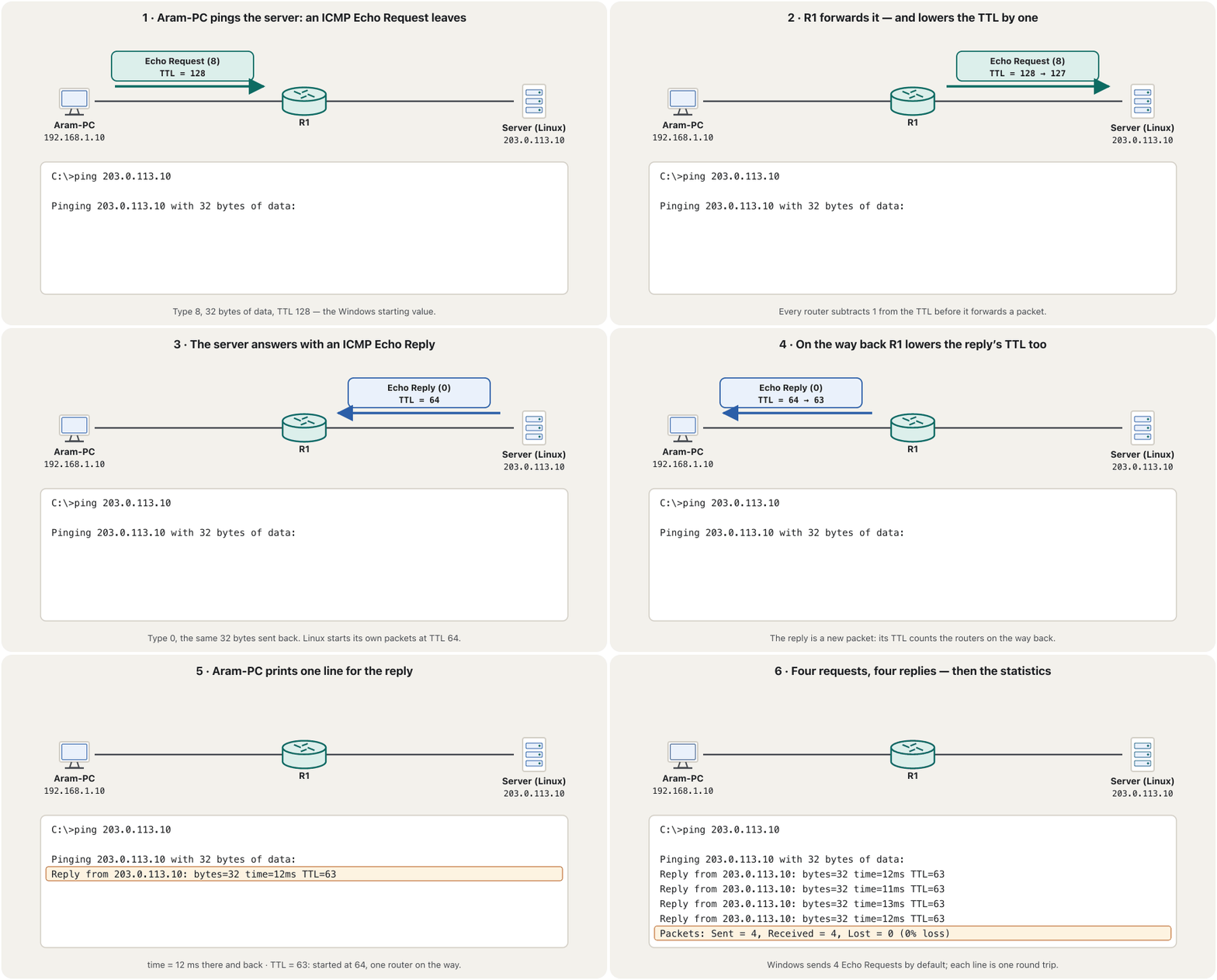
ping is the most used command for checking connectivity: it tells you whether your computer and another IP address can reach each other. It sends a series of ICMP Echo Request messages to the target and waits for an Echo Reply to each one. For every reply it shows the round-trip time — how long the request took to go and the reply to come back. On Windows, ping sends four echo requests, each carrying 32 bytes of data, and then prints statistics. Routers can ping too: ping from IOS, in the Routing and Switching course.
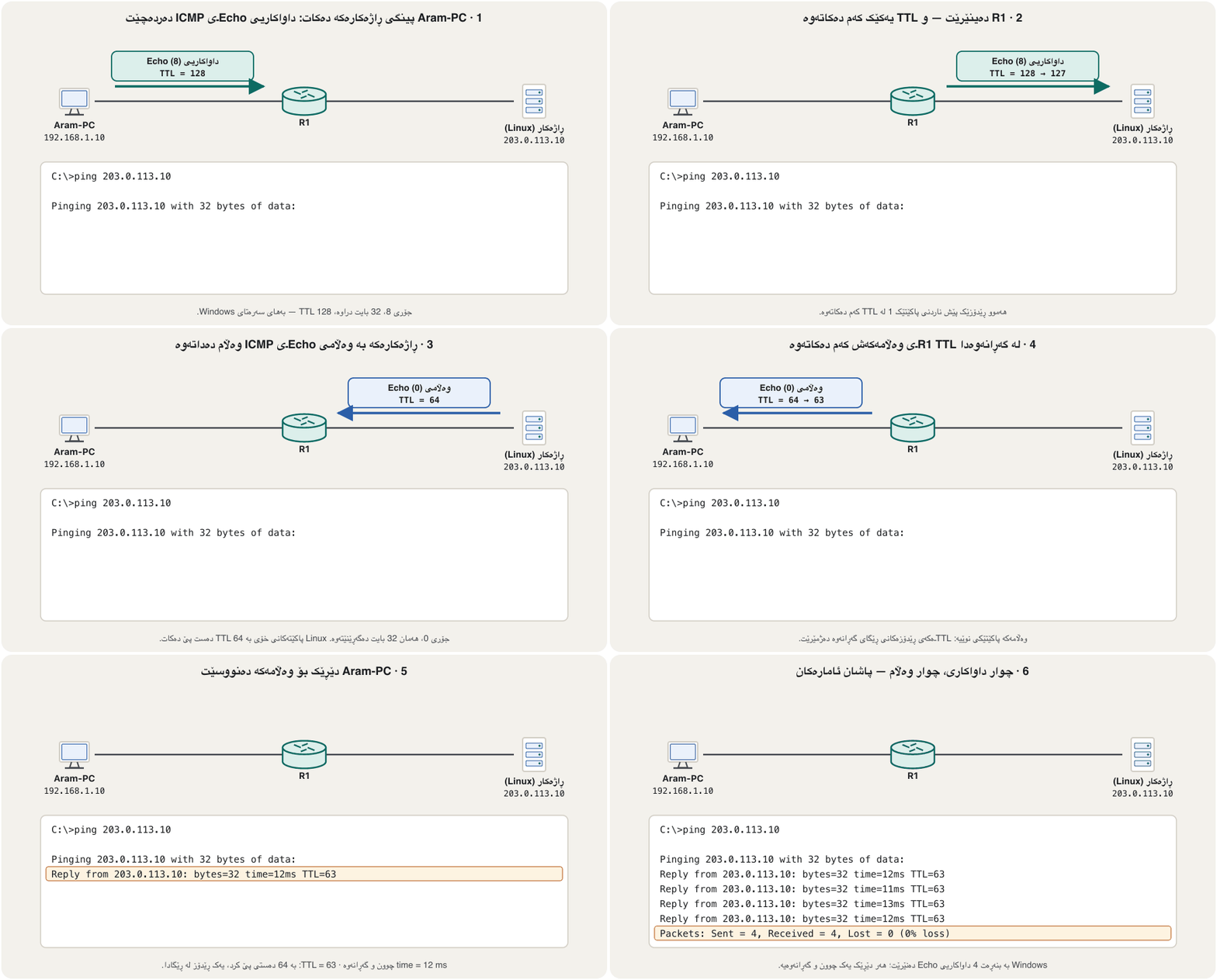
ping باوترین فەرمانە بۆ پشکنینی پەیوەندی: پێت دەڵێت داخۆ و تر دەتوانن بگەنە یەکتر. زنجیرەیەک پەیامی Echoـی بۆ ئامانجەکە دەنێرێت و بۆ هەر یەکێکیان چاوەڕێی وەڵامی Echo دەکات. بۆ هەر وەڵامێک نیشان دەدات — ماوەی چوونی و گەڕانەوەی وەڵامەکە. لە Windowsـدا ping چوار Echo دەنێرێت، هەریەکەیان 32 هەڵدەگرێت، پاشان ئامارەکان دەنووسێت. دەتوانن بکەن: پینگ لە IOSـەوە، لە خولی Routing and Switchingـدا.
Reading the result of a pingخوێندنەوەی ئەنجامی پینگێک
This is what Windows 11 shows when Aram pings another computer on the same LAN. The command, then one line per reply, then the statistics:
ئەمە ئەوەیە کە Windows 11 نیشانی دەدات کاتێک ئارام تری سەر هەمان دەکات. فەرمانەکە، پاشان بۆ هەر وەڵامێک دێڕێک، پاشان ئامارەکان:
ping 192.168.1.20Pinging 192.168.1.20 with 32 bytes of data:
Reply from 192.168.1.20: bytes=32 time=3ms TTL=128
Reply from 192.168.1.20: bytes=32 time=1ms TTL=128
Reply from 192.168.1.20: bytes=32 time=1ms TTL=128
Reply from 192.168.1.20: bytes=32 time=2ms TTL=128
Ping statistics for 192.168.1.20:
Packets: Sent = 4, Received = 4, Lost = 0 (0% loss),
Approximate round trip times in milli-seconds:
Minimum = 1ms, Maximum = 3ms, Average = 1msbytes is the size of the data in the reply. time is the round-trip time in milliseconds (time<1ms means less than one millisecond — normal on a LAN). TTL is the Time to Live left in the reply when it arrived: Windows starts its packets at 128, Linux, Android and macOS at 64, and every router on the way subtracts 1. A reply from a Windows PC on your own LAN crosses no router, so it still shows TTL=128; a reply with TTL=57 from a Linux server has crossed about 7 routers (). How TTL works is explained in TTL: a packet’s hop limit.
bytes قەبارەی ناو وەڵامەکەیە. time بە میلیچرکە (time<1ms واتە کەمتر لە یەک میلیچرکە — لە ئاساییە). TTL ئەو کە لە کاتی گەیشتنی وەڵامەکەدا ماوە: Windows خۆی بە 128 دەست پێ دەکات، Linux و Android و macOS بە 64، هەر سەر ڕێگاش 1 کەم دەکاتەوە. وەڵامێک لە Windows لە سەر خۆت بە هیچ تێناپەڕێت، بۆیە هێشتا TTL=128 نیشان دەدات؛ وەڵامێک بە TTL=57 لە Linuxـەوە نزیکەی 7 بڕیوە (). چۆن کار دەکات لە TTL: سنووری بازەکانی پاکێت ڕوون کراوەتەوە.
Ping an address, a name or yourselfپینگی ناونیشانێک، ناوێک یان خۆت
You can give ping four kinds of target, and each one tests something different:
دەتوانیت چوار جۆر ئامانج بدەیتە ping و هەریەکەیان شتێکی جیاواز تاقی دەکاتەوە:
When you ping a name, Windows first turns it into an address and shows that address in square brackets. If the name fails but its IP address works, the problem is name resolution (DNS or the hosts file), not the network. 127.0.0.1 is the loopback address: the echo request never leaves your computer, so a reply proves that your own TCP/IP software works — it says nothing about the cable or the LAN.
کاتێک ناوێک دەکەیت، Windows سەرەتا دەیکات بە ناونیشان و ئەو ناونیشانە لە ناو کەوانەی چوارگۆشەدا نیشان دەدات. ئەگەر ناوەکە سەرکەوتوو نەبوو بەڵام کاری کرد، کێشەکە لە دۆزینەوەی ناودایە ( یان فایلی hosts)، نەک لە . 127.0.0.1 : Echo هەرگیز لە دەرناچێت، بۆیە وەڵامێک دەیسەلمێنێت TCP/IPـی خۆت کار دەکات — هیچ شتێک لەبارەی کێبڵ یان ناڵێت.
ping printer-2
ping 127.0.0.1C:\>ping printer-2 Pinging printer-2 [192.168.1.30] with 32 bytes of data: Reply from 192.168.1.30: bytes=32 time=2ms TTL=64 … C:\>ping 127.0.0.1 Pinging 127.0.0.1 with 32 bytes of data: Reply from 127.0.0.1: bytes=32 time<1ms TTL=128 …
Useful ping optionsهەڵبژاردە بەسوودەکانی پینگ
Options go between ping and the target (Windows accepts / or - in front of them):
هەڵبژاردەکان لە نێوان ping و ئامانجەکەدا دەنووسرێن (Windows / یان - لە پێشیانەوە قبووڵ دەکات):
| Optionهەڵبژاردە | What it doesچی دەکات |
|---|---|
/t | keep pinging until you press Ctrl+C (Ctrl+Break shows the statistics and goes on)بەردەوام دەکات تا Ctrl+C دادەگریت (Ctrl+Break ئامارەکان نیشان دەدات و بەردەوام دەبێت) |
/n 10 | send 10 echo requests instead of the default 410 Echo دەنێرێت لە جیاتی 4ی بنەڕەت |
/l 1000 | put 1000 bytes of data in each request (default 32, maximum 65,500)لە هەر 1000 دادەنێت (بنەڕەت 32، زۆرترین 65,500) |
/4 | use IPv4 (needed only when the target is a name) بەکار دەهێنێت (تەنیا کاتێک ئامانجەکە ناو بێت پێویستە) |
/6 | use IPv6 (needed only when the target is a name) بەکار دەهێنێت (تەنیا کاتێک ئامانجەکە ناو بێت پێویستە) |
/a | show the host name of an IP addressناوی نیشان دەدات |
/w 4000 | wait this many milliseconds for each reply (default 4000 = 4 s)ئەوەندە میلیچرکە بۆ هەر وەڵامێک چاوەڕێ دەکات (بنەڕەت 4000 = 4 چرکە) |
/i 5 | send the requests with this TTL (maximum 255) بەم دەنێرێت (زۆرترین 255) |
When ping fails: what the message tells youکاتێک پینگ سەرناکەوێت: پەیامەکە چیت پێ دەڵێت
A failed ping is still useful, because the message shows where the trouble is. Read it before you guess:
سەرنەکەوتووش بەسوودە، چونکە پەیامەکە نیشان دەدات کێشەکە لە کوێیە. پێش ئەوەی مەزندە بکەیت بیخوێنەرەوە:
- Destination host unreachable from your own address means your PC asked with ARP and nobody answered: the target is off or not on this LAN. From a router’s address it means that router cannot deliver.
- Request timed out only says that no reply came back within 4 seconds. The host may be off — or a firewall dropped the request or the reply.
- Destination host unreachable لە ناونیشانی خۆتەوە واتە بە ARP پرسیاری کرد و کەس وەڵامی نەدایەوە: ئامانجەکە کوژاوەتەوە یان لە سەر ئەم نییە. لە ناونیشانی واتە ئەو ناتوانێت بیگەیەنێت.
- Request timed out تەنیا دەڵێت لە ماوەی 4 چرکەدا هیچ وەڵامێک نەگەڕایەوە. لەوانەیە کوژابێتەوە — یان یان وەڵامەکەی فڕێ دابێت.
Which test to run next, and where to start, is taught in Divide and conquer.
کام تاقیکردنەوە دواتر بکەیت و لە کوێوە دەست پێ بکەیت لە دابەشکردن و زاڵبووندا فێر دەبیت.
Firewalls and ping: silence is not proofئاگرەدیوار و پینگ: بێدەنگی بەڵگە نییە
Many computers and servers are set not to answer ping. On many Windows PCs the built-in firewall does not answer echo requests from other computers until an administrator allows them, and many websites and company networks drop ICMP at their firewalls. So a ping that gets replies proves the host is up, but a ping that gets no reply does not prove the host is down. In the two-PC lab you will see this happen and let ping through Windows Defender Firewall yourself (Why the first ping often fails: the firewall), if you like with one rule that allows only ping.
زۆر و وا ڕێک خراون کە وەڵامی نەدەنەوە. لە زۆر Windowsـدا ناوخۆیی وەڵامی Echo لە ترەوە ناداتەوە تا بەڕێوەبەرێک ڕێگەی پێ دەدات؛ هەروەها زۆر و کۆمپانیا لە خۆیاندا فڕێ دەدەن. بۆیە کە وەڵامی هەبێت دەیسەلمێنێت کار دەکات، بەڵام کە هیچ وەڵامی نەبێت نایسەلمێنێت کوژاوەتەوە. لە تاقیگەی دوو ئەمە دەبینیت و خۆت ڕێگە بە دەدەیت لە Windows Defenderـدا تێپەڕێت (بۆچی یەکەم پینگ زۆرجار سەرناکەوێت: ئاگرەدیوار)، ئەگەر بتەوێت بە یەک یاسای ئاگرەدیوار کە تەنیا ڕێگە بە پینگ دەدات.
Tracert: which routers are on the way?tracert: کام ڕێدۆز لە سەر ڕێگاکەن؟
tracert (on Linux and macOS traceroute) is a diagnostic tool that shows the path packets take from your computer to a destination: the list of routers they cross, one per line. Because it measures the time to each router, it also shows where the trip fails or slows down — so you can tell which router, or which part of the network, causes a problem.
tracert (لە Linux و macOSـدا traceroute) ئامرازێکی دۆزینەوەی کێشەیە کە ڕێگای لە بۆ مەبەستێک نیشان دەدات: لیستی ئەو پێیاندا تێدەپەڕن، هەر یەکێک لە دێڕێکدا. چونکە کاتی گەیشتن بە هەر دەپێوێت، هەروەها نیشان دەدات گەشتەکە لە کوێ دەوەستێت یان خاو دەبێتەوە — بۆیە دەزانیت کام ، یان کام بەشی ، کێشەکە دروست دەکات.
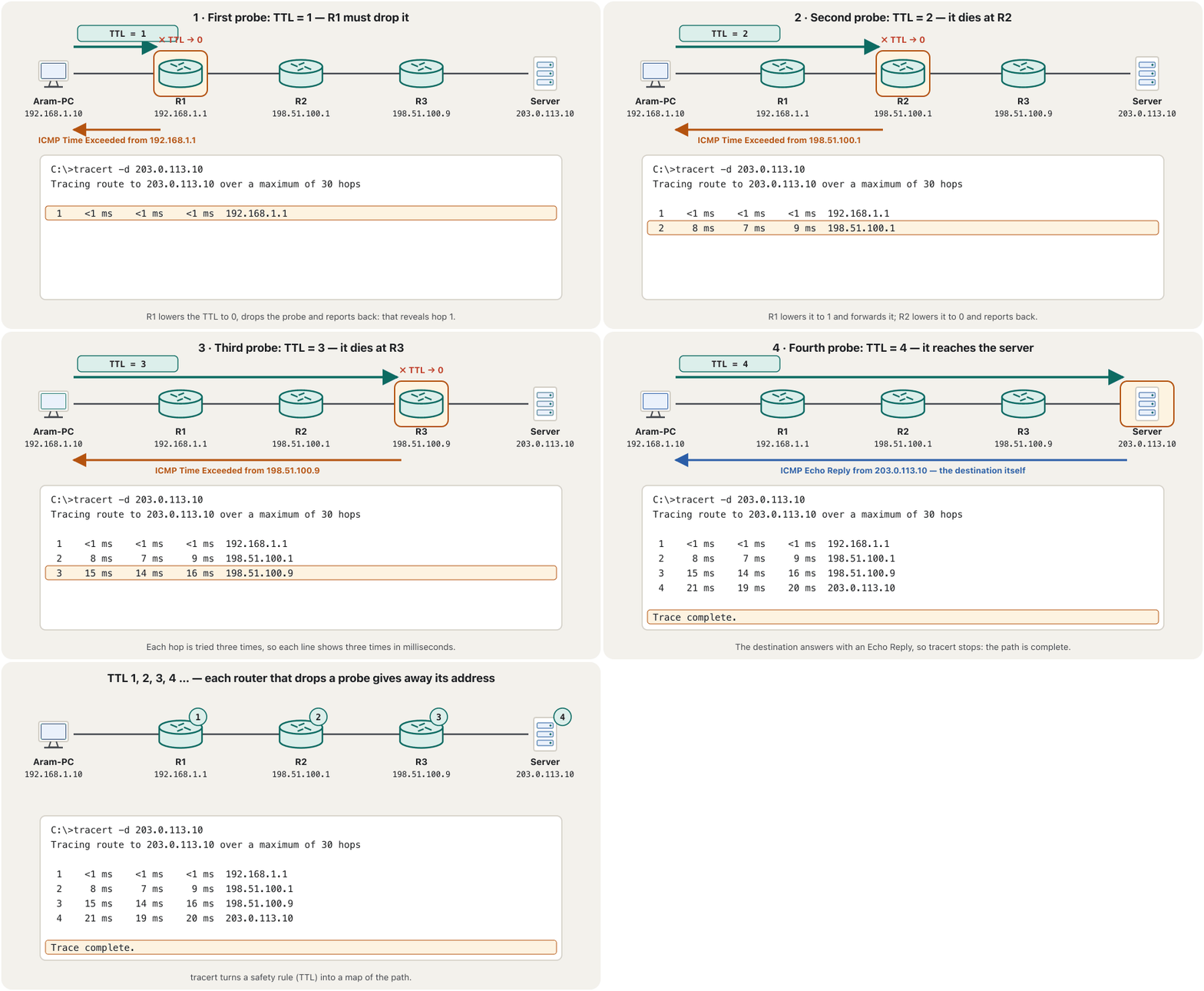
The trick is the TTL. tracert first sends a probe with TTL = 1: the first router lowers it to 0, drops it and sends back an ICMP Time Exceeded — and that message carries the router’s address. Then it sends TTL = 2, which dies at the second router, then 3, and so on, until the destination itself answers with an Echo Reply. Each hop is tried three times, and the search stops after 30 hops at most. A Cisco router can run the same trace: traceroute from IOS.
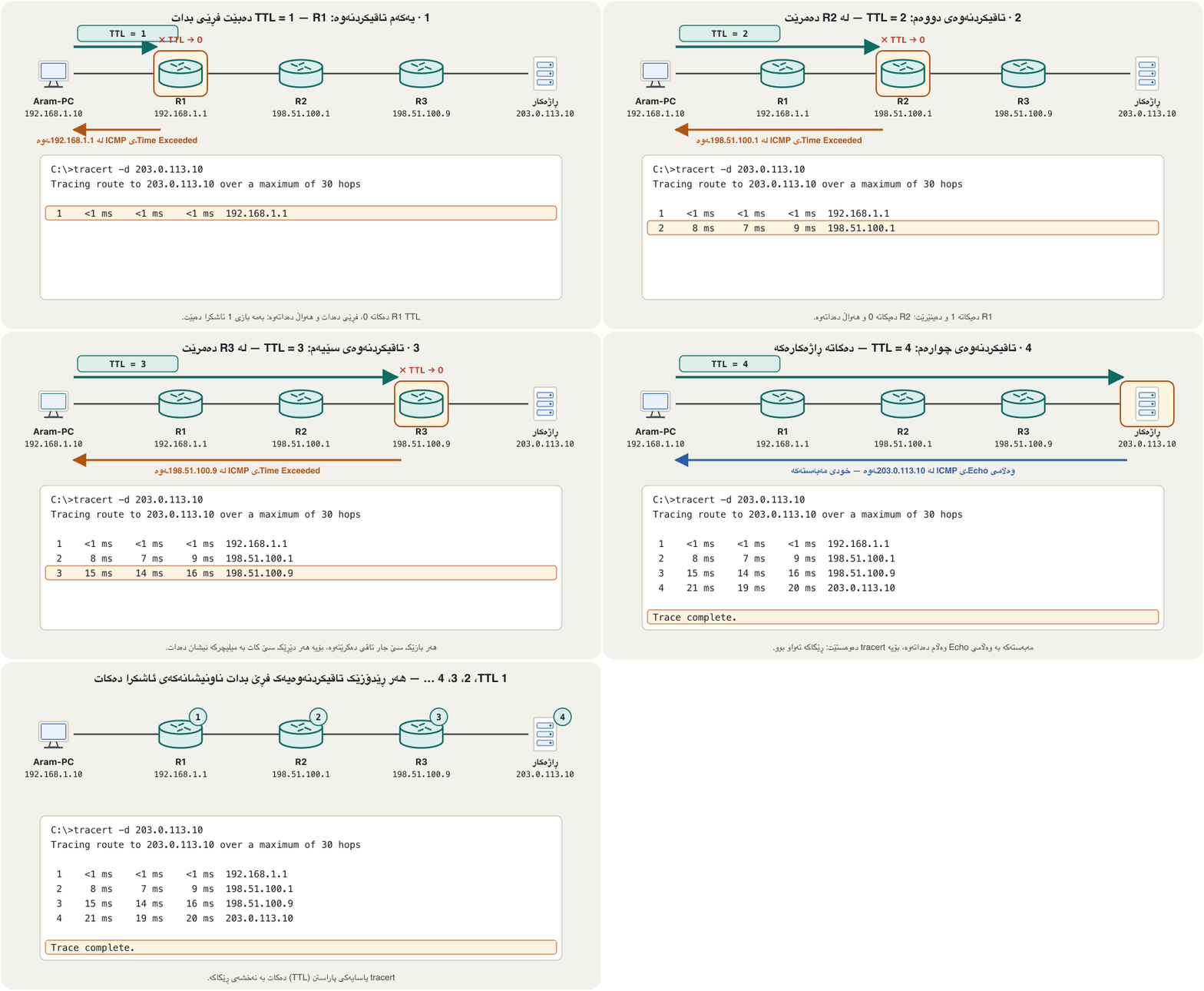
فێڵەکە . tracert سەرەتا تاقیکردنەوەیەک بە TTL = 1 دەنێرێت: یەکەم دەیکاتە 0، فڕێی دەدات و Time Exceededـی دەگەڕێنێتەوە — ئەو پەیامەش ناونیشانی هەڵدەگرێت. پاشان TTL = 2 دەنێرێت کە لە دووەمدا دەمرێت، پاشان 3 و بەم شێوەیە، تا خودی مەبەستەکە بە وەڵامی Echo وەڵام دەداتەوە. هەر سێ جار تاقی دەکرێتەوە و گەڕانەکە لە زۆرترین 30 دەوەستێت. Ciscoـش دەتوانێت هەمان ڕێگادۆزینەوە بکات: بەدواداچوونی ڕێگە لە IOSـەوە.
Reading a tracertخوێندنەوەی tracert
The syntax is tracert [/d] [/h MaximumHops] [/j HostList] [/w Timeout] [/4] [/6] TargetName. /d does not look up router names, so the result comes faster; /h changes the 30-hop limit; /w changes the 4-second wait. For example, tracert www.example.com traces the path to that host and tracert /d www.example.com does the same without names. Here is a trace from Windows 11 (the addresses are documentation examples):
ڕێسای نووسینی ئەمەیە: tracert [/d] [/h MaximumHops] [/j HostList] [/w Timeout] [/4] [/6] TargetName. /d بەدوای ناوی ناگەڕێت، بۆیە ئەنجامەکە خێراتر دێت؛ /h سنووری 30 دەگۆڕێت؛ /w چاوەڕوانیی 4 چرکە دەگۆڕێت. بۆ نموونە، tracert www.example.com ڕێگای ئەو دەدۆزێتەوە و tracert /d www.example.com هەمان کار بەبێ ناوەکان دەکات. ئەمە ڕێگادۆزینەوەیەکە لە Windows 11ـەوە (ناونیشانەکان نموونەی بەڵگەنامەن):
tracert www.example.comTracing route to www.example.com [203.0.113.10] over a maximum of 30 hops: 1 <1 ms <1 ms <1 ms 192.168.1.1 2 8 ms 7 ms 9 ms 198.51.100.1 3 * * * Request timed out. 4 15 ms 14 ms 16 ms 198.51.100.9 5 21 ms 19 ms 20 ms www.example.com [203.0.113.10] Trace complete.
Network administrators read a trace the same way after they add a route to a router: Checking static routes.
بەڕێوەبەرانی دوای زیادکردنی ڕێگەیەک بۆ بە هەمان شێوە ڕێگادۆزینەوەیەک دەخوێننەوە: پشکنینی ڕێگە جێگیرەکان.
tracert on Windows, traceroute on Linux and macOStracert لە Windows، traceroute لە Linux و macOS
Both tools use the same TTL trick, but they send different probes. Windows tracert sends ICMP Echo Requests, so the destination ends the trace with an Echo Reply. Linux and macOS traceroute send UDP datagrams by default, to unusual high ports starting at 33434; the routers still answer with Time Exceeded, and the destination ends the trace with ICMP Port Unreachable (type 3, code 3), because nothing listens on that port. On Linux, traceroute -I uses ICMP like Windows and traceroute -T uses TCP SYN packets — handy when a firewall blocks one kind of probe.
هەردوو ئامرازەکە هەمان فێڵی بەکار دەهێنن، بەڵام تاقیکردنەوەی جیاواز دەنێرن. tracertـی Windows Echoـی دەنێرێت، بۆیە مەبەستەکە بە وەڵامی Echo ڕێگادۆزینەوەکە تەواو دەکات. tracerouteـی Linux و macOS بە بنەڕەت UDP دەنێرن، بۆ بەرزی نائاسایی کە لە 33434ـەوە دەست پێ دەکەن؛ هەر بە Time Exceeded وەڵام دەدەنەوە و مەبەستەکە بە Port Unreachableـی (جۆری 3، کۆدی 3) کۆتایی پێ دەهێنێت، چونکە هیچ شتێک گوێ لەو ناگرێت. لە Linuxـدا traceroute -I وەک Windows بەکار دەهێنێت و traceroute -T TCP SYN — بەسوودە کاتێک جۆرێک لە تاقیکردنەوەکان دەگرێت.
pathping: tracert and ping togetherpathping: tracert و ping پێکەوە
Windows also has pathping. It first lists the routers on the path, like tracert, then sends 100 echo requests to every router (one every 250 ms) and computes the packet loss at each router and on each link. This takes a while — about 25 seconds per hop — but it tells you exactly where packets get lost:
Windows pathpingـیشی هەیە. سەرەتا وەک tracert لیستی سەر ڕێگاکە دەنووسێت، پاشان 100 Echo بۆ هەر دەنێرێت (هەر 250 میلیچرکە یەکێک) و لە هەر و لە سەر هەر بەستەرێک حیساب دەکات. ئەمە کاتێکی دەوێت — نزیکەی 25 چرکە بۆ هەر — بەڵام بە وردی پێت دەڵێت لە کوێ ون دەبن:
pathping لە Windows 11 (نموونە)BATType in a terminalلە تێرمیناڵدا بینووسەpathping /n 203.0.113.10Tracing route to 203.0.113.10 over a maximum of 30 hops
0 192.168.1.10
1 192.168.1.1
2 198.51.100.1
3 203.0.113.10
Computing statistics for 75 seconds...
Source to Here This Node/Link
Hop RTT Lost/Sent = Pct Lost/Sent = Pct Address
0 192.168.1.10
0/ 100 = 0% |
1 1ms 0/ 100 = 0% 0/ 100 = 0% 192.168.1.1
12/ 100 = 12% |
2 9ms 12/ 100 = 12% 0/ 100 = 0% 198.51.100.1
0/ 100 = 0% |
3 20ms 12/ 100 = 12% 0/ 100 = 0% 203.0.113.10
Trace complete.ICMPv6: the same idea for IPv6ICMPv6: هەمان بیرۆکە بۆ IPv6
IPv6 has its own version, ICMPv6 (RFC 4443, 2006), identified by Next Header 58. It does the same jobs with new numbers — Echo Request 128 and Echo Reply 129, so ping and tracert work over IPv6 too — and it adds Packet Too Big, because IPv6 routers never fragment packets. ICMPv6 also carries Neighbor Discovery, the IPv6 replacement for ARP. That is why a firewall must never block all ICMPv6: IPv6 would stop working. More in Neighbor Discovery: five ICMPv6 messages and Testing IPv6 with ping.
وەشانی خۆی هەیە، ICMPv6 (RFC 4443، 2006)، کە بە Next Header 58 دەناسرێتەوە. هەمان کارەکان بە ژمارەی نوێ دەکات — Echo 128 و وەڵامی Echo 129، بۆیە ping و tracert لە سەر کار دەکەن — هەروەها Packet Too Big زیاد دەکات، چونکە هەرگیز پارچە پارچە ناکەن. ICMPv6 هەروەها هەڵدەگرێت، جێگرەوەی ARP لە . بۆیە نابێت هەرگیز هەموو ICMPv6 بگرێت: لە کار دەکەوێت. زیاتر لە دۆزینەوەی دراوسێ: پێنج پەیامی ICMPv6 و تاقیکردنەوەی IPv6 بە پینگدا.
Try it yourselfخۆت تاقی بکەرەوە
- In the labلە تاقیگەکەدا
Open the CêIT network lab, load “Three networks and two routers” and ping from one network to another. The event log shows the echo request, every router lowering the TTL, and the echo reply. Delete a PC’s default gateway and ping again: you will see “Destination unreachable”.
تاقیگەی ڕایەڵەی CêIT بکەرەوە، «Three networks and two routers» باربکە و لە تر بکە. تۆماری ڕووداوەکان Echo، کەمکردنەوەی TTL لە لایەن هەر و وەڵامی Echo نیشان دەدات. بسڕەوە و دووپاتە بکە: «Destination unreachable» دەبینیت.
- On your own computerلە سەر کۆمپیوتەرەکەی خۆت
Open Command Prompt and run, one after the other:
ping 127.0.0.1, thenpingyour default gateway (find it withipconfig), thenping www.example.com. Note which ones answer and the TTL of each reply.Command Prompt بکەرەوە و یەک لە دوای یەک ئەمانە جێبەجێ بکە:
ping 127.0.0.1، پاشانpingـی (بەipconfigبیدۆزەرەوە)، پاشانping www.example.com. تێبینی بکە کامیان وەڵام دەدەنەوە و TTLـی هەر وەڵامێک چەندە. - Trace a pathڕێگایەک بدۆزەرەوە
Run
tracert /d www.example.com. Count the hops, find your gateway on line 1, and look for lines with*. Then compare withpathping /n www.example.com(be patient).tracert /d www.example.comجێبەجێ بکە. بژمێرە، لە دێڕی 1دا بدۆزەرەوە و بەدوای دێڕی*ـدا بگەڕێ. پاشان لەگەڵpathping /n www.example.comبەراوردی بکە (ئارام بگرە).
More Windows commands (ipconfig, nslookup, netstat) are in Windows Network Commands, and a step-by-step way to find faults in Troubleshooting Networks.
فەرمانی زیاتری Windows (ipconfig، nslookup، netstat) لە فەرمانەکانی ڕایەڵەی Windowsدان، ڕێگایەکی هەنگاو بە هەنگاویش بۆ دۆزینەوەی کێشەکان لە چارەسەرکردنی کێشەکانی ڕایەڵەدا.
Common mistakesهەڵە باوەکان
| Mistakeهەڵە | What is trueڕاستییەکە |
|---|---|
| “No reply, so the computer is off.”«وەڵام نییە، کەواتە کوژاوەتەوە.» | A firewall may drop ICMP. A reply proves the host is up; silence proves nothing. لەوانەیە فڕێ بدات. وەڵام دەیسەلمێنێت کار دەکات؛ بێدەنگی هیچ ناسەلمێنێت. |
“Ping does not send ICMP echo requests; it only checks connectivity.”«ping Echoـی نانێرێت؛ تەنیا پەیوەندی دەپشکنێت.» | Both are true together: ping checks connectivity by sending ICMP Echo Requests.هەردووکیان پێکەوە ڕاستن: ping بە ناردنی Echoـی پەیوەندی دەپشکنێت. |
| “ICMP uses a port, like TCP and UDP.”« وەک TCP و UDP بەکار دەهێنێت.» | ICMP has no ports; it rides directly in IP (protocol 1). هیچ نییە؛ ڕاستەوخۆ لە ناو IPـدا دەڕوات ( 1). |
| “TTL=128 in the reply means 128 hops.”«TTL=128 لە وەڵامەکەدا واتە 128 .» | TTL is what is left: the starting value (128 on Windows) minus one per router. ئەوەیە کە ماوە: بەهای سەرەتا (لە Windows 128) کەم یەک بۆ هەر . |
“* * * in tracert means the path is broken there.”«* * * لە tracertـدا واتە ڕێگاکە لەوێ پچڕاوە.» | Only if no later hop answers. Many routers simply do not send Time Exceeded.تەنیا ئەگەر هیچ دواتر وەڵام نەداتەوە. زۆر هەر Time Exceeded نانێرن. |
“ping 127.0.0.1 tests my cable and my LAN.”«ping 127.0.0.1 کێبڵ و تاقی دەکاتەوە.» | Loopback never leaves the computer: it tests only the TCP/IP software.خۆگەڕانەوە هەرگیز لە دەرناچێت: تەنیا TCP/IP تاقی دەکاتەوە. |
Exercisesڕاهێنانەکان
Shilan runs ping 203.0.113.50 and sees four lines like “Reply from 203.0.113.50: bytes=32 time=45ms TTL=52”. (a) How much data did each request carry? (b) What does 45ms measure? (c) The server runs Linux. About how many routers are between them?
شیلان ping 203.0.113.50 جێبەجێ دەکات و چوار دێڕی وەک «Reply from 203.0.113.50: bytes=32 time=45ms TTL=52» دەبینێت. (أ) هەر چەند هەڵگرتبوو؟ (ب) 45ms چی دەپێوێت؟ (ج) Linuxـە. نزیکەی چەند لە نێوانیاندایە؟
Show answerوەڵامەکە پیشان بدە
(a) 32 bytes, the Windows default. (b) The round-trip time: the request going and the reply coming back, together. (c) Linux starts at 64: 64 − 52 = 12 routers on the way back.
(أ) 32 ، بنەڕەتی Windows. (ب) : چوونی و گەڕانەوەی وەڵامەکە پێکەوە. (ج) Linux بە 64 دەست پێ دەکات: لە ڕێگای گەڕانەوەدا.
Karwan cannot open any website. Put these tests in a sensible order and say what each one tells him: ping www.example.com, ping 127.0.0.1, ping 192.168.1.1 (his gateway), ping 203.0.113.10 (a server’s IP address).
کاروان ناتوانێت هیچ بکاتەوە. ئەم تاقیکردنەوانە بە ڕیزبەندییەکی لۆژیکی دابنێ و بڵێ هەریەکەیان چیی پێ دەڵێت: ping www.example.com، ping 127.0.0.1، ping 192.168.1.1 ()، ping 203.0.113.10 ( ).
Show answerوەڵامەکە پیشان بدە
ping 127.0.0.1— is my own TCP/IP software working?ping 192.168.1.1— can I reach my gateway across my LAN?ping 203.0.113.10— can I reach the Internet by address?ping www.example.com— does name resolution (DNS) work too? If the address works but the name fails, the problem is DNS. (Remember: some servers never answer ping.)
ping 127.0.0.1— ئایا TCP/IPـی خۆم کار دەکات؟ping 192.168.1.1— دەتوانم بە بگەمە ؟ping 203.0.113.10— دەتوانم بە ناونیشان بگەمە ؟ping www.example.com— ئایا دۆزینەوەی ناو ()ـیش کار دەکات؟ ئەگەر ناونیشانەکە کار بکات بەڵام ناوەکە نا، کێشەکە . (لە بیرت بێت: هەندێک هەرگیز وەڵامی نادەنەوە.)
Explain in four sentences how tracert finds the routers on a path, and name the ICMP messages it receives.
بە چوار ڕستە ڕوونی بکەرەوە tracert چۆن سەر ڕێگایەک دەدۆزێتەوە و ناوی ئەو پەیامانەی بهێنە کە وەریان دەگرێت.
Show answerوەڵامەکە پیشان بدە
It sends probes (ICMP Echo Requests on Windows) with TTL 1, then 2, then 3 and so on, three per hop. The router where the TTL reaches 0 drops the probe and sends back ICMP Time Exceeded (type 11), which reveals its address. Raising the TTL one step at a time reveals one router after another. The destination itself answers with an Echo Reply (type 0), and the trace stops — or after 30 hops at most.
تاقیکردنەوە دەنێرێت ( Echoـی لە Windowsـدا) بە TTL 1، پاشان 2، پاشان 3 و بەم شێوەیە، سێ دانە بۆ هەر . ئەو TTL تێیدا دەگاتە 0 تاقیکردنەوەکە فڕێ دەدات و Time Exceededـی (جۆری 11) دەگەڕێنێتەوە کە ناونیشانەکەی ئاشکرا دەکات. بەرزکردنەوەی TTL هەنگاو بە هەنگاو لە دوای یەکێکی تر ئاشکرا دەکات. خودی مەبەستەکە بە وەڵامی Echo (جۆری 0) وەڵام دەداتەوە و ڕێگادۆزینەوەکە دەوەستێت — یان لە زۆرترین 30 .
Mark each statement true or false and correct the false ones. (1) “The ping command sends a sequence of ICMP echo request packets to the specified host.” (2) “ICMP is a transport-layer protocol.” (3) “tracert -d shows router names.”
هەر ڕستەیەک بە ڕاست یان هەڵە دیاری بکە و هەڵەکان ڕاست بکەرەوە. (1) «فەرمانی ping زنجیرەیەک Echoـی بۆ دیاریکراو دەنێرێت.» (2) « چینی گواستنەوەیە.» (3) «tracert -d ناوی نیشان دەدات.»
Show answerوەڵامەکە پیشان بدە
- (1) True — that is exactly what ping does.
- (2) False — ICMP is a network-layer protocol carried inside IP.
- (3) False —
/d(or-d) stops tracert from looking up names, so it shows only addresses and is faster.
- (1) ڕاستە — ڕێک ئەوەیە کە
pingدەیکات. - (2) هەڵەیە — کە لە ناو IPـدا هەڵدەگیرێت.
- (3) هەڵەیە —
/d(یان-d) ڕێ لەtracertدەگرێت بەدوای ناودا بگەڕێت، بۆیە تەنیا ناونیشان نیشان دەدات و خێراترە.
Summaryکورتە
- ICMP (RFC 792) is the network layer’s messenger: it reports delivery problems and carries test messages, inside IP with protocol number 1, without ports.
- Main messages: Echo Request 8, Echo Reply 0, Destination Unreachable 3, Time Exceeded 11, Redirect 5. Errors go back to the source.
- ping sends Echo Requests (Windows: 4 × 32 bytes) and shows time and TTL for each reply;
/t,/n,/l,/4,/6change it.127.0.0.1tests only your own computer. - No reply does not prove a host is down: firewalls often drop ICMP. Read the failure message to see where the trouble is.
- tracert / traceroute raise the TTL 1, 2, 3 … so each router reveals itself with Time Exceeded; Windows probes with ICMP, Linux and macOS with UDP.
*means a silent router. pathping adds loss statistics. - IPv6 uses ICMPv6 (Next Header 58), which also carries Neighbor Discovery — never block all of it.
- (RFC 792) پەیامبەری : کێشەکانی گەیاندن ڕاپۆرت دەکات و پەیامی تاقیکردنەوە هەڵدەگرێت، لە ناو IPـدا بە ژمارەی 1، بەبێ .
- پەیامە سەرەکییەکان: Echo 8، وەڵامی Echo 0، Destination Unreachable 3، Time Exceeded 11، Redirect 5. هەڵەکان بۆ سەرچاوە دەگەڕێنەوە.
pingEcho دەنێرێت (Windows: ) و بۆ هەر وەڵامێک کات و نیشان دەدات؛/t،/n،/l،/4،/6دەیگۆڕن.127.0.0.1تەنیا خۆت تاقی دەکاتەوە.- وەڵام نەبوون نایسەلمێنێت کوژاوەتەوە: زۆرجار فڕێ دەدەن. پەیامی شکستەکە بخوێنەرەوە بۆ ئەوەی بزانیت کێشەکە لە کوێیە.
tracert/tracerouteبەرز دەکەنەوە 1، 2، 3 … تا هەر بە Time Exceeded خۆی ئاشکرا بکات؛ Windows بە تاقی دەکاتەوە، Linux و macOS بە UDP.*واتە بێدەنگ.pathpingئاماری زیاد دەکات.- ICMPv6 بەکار دەهێنێت (Next Header 58) کە هەڵدەگرێت — هەرگیز هەمووی مەگرە.
Lesson complete!وانەکە تەواو بوو!
Well done. Review the key terms, then go on to the next lesson.دەستخۆش. سەیرێکی زاراوە سەرەکییەکان بکەرەوە، پاشان بڕۆ بۆ وانەی داهاتوو.
Key termsزاراوە سەرەکییەکان
How a Packet Finds Its Way: Gateways and Routing Tablesپاکێت چۆن ڕێگای خۆی دەدۆزێتەوە: دەروازەی بنەڕەتی و خشتەکانی ڕێدۆزی
Related lecturesوانە پەیوەندیدارەکان
- How a Packet Finds Its Way: Gateways and Routing Tablesپاکێت چۆن ڕێگای خۆی دەدۆزێتەوە: دەروازەی بنەڕەتی و خشتەکانی ڕێدۆزی
- Windows Network Commandsفەرمانەکانی ڕایەڵە لە Windows
- Troubleshooting a Network, Layer by Layerچارەسەرکردنی کێشەی ڕایەڵە، چین بە چین
- IPv6 in Practice: SLAAC, Neighbour Discovery and Dual StackIPv6 لە کرداردا: SLAAC، دۆزینەوەی دراوسێ و ستاکی دووانە
- TCP and UDPTCP و UDP
- Network Defences: Firewalls, Segmentation, Monitoring and SIEMبەرگرییەکانی ڕایەڵە: ئاگرەدیوار، بەشبەشکردنی ڕایەڵە، چاودێریی ئاسایش و SIEM
- IP Addresses and MAC Addressesناونیشانەکانی IP و ناونیشانەکانی MAC
References and further readingسەرچاوەکان و خوێندنەوەی زیاتر
- RFC 792 (September 1981): Internet Control Message Protocol — message types and codes
- RFC 6633 (2012): Deprecation of ICMP Source Quench Messages
- RFC 4443 (2006): ICMPv6 for the Internet Protocol Version 6
- Microsoft Learn: ping (options /t /n /l /4 /6 /a /w /i; defaults 4 requests, 32 bytes, 4000 ms)
- Microsoft Learn: tracert (ICMP echo with increasing TTL, 30 hops, 4000 ms, /d, asterisks)
- Microsoft Learn: pathping (100 queries per hop, 250 ms period, per-node and per-link loss)
- Linux man page traceroute(8): UDP probes from port 33434, -I (ICMP), -T (TCP SYN), 30 hops, 3 probes
This lecture is a first edition. The Kurdish text and terminology are waiting for review by Kurdish IT teachers.ئەم وانەیە چاپی یەکەمە. دەقە کوردییەکە و زاراوەکانی چاوەڕێی پێداچوونەوەی مامۆستایانی کوردی بواری IT ن.