Chapterبەش 5 · Lectureوانە 5.9
ARP: From IP Address to MAC AddressARP: لە ناونیشانی IP بۆ ناونیشانی MAC
Before a computer can send a frame on a LAN it needs the receiver’s MAC address. Learn how ARP finds it from a known IP address — a broadcast request, a unicast reply and the ARP cache — what an ARP message holds, how long entries live, why the first ping can fail, why a host asks for its gateway’s MAC address when the destination is far away, and what gratuitous ARP, proxy ARP, ARP spoofing and IPv6 Neighbor Discovery are.
پێش ئەوەی بتوانێت لە سەر بنێرێت، وەرگری پێویستە. فێر ببە چۆن لە زانراوەوە دەیدۆزێتەوە — ، وەڵامێکی و — پەیامێکی چی تێدایە، تۆمارەکان چەند دەمێنن، بۆچی یەکەم لەوانەیە سەرنەکەوێت، بۆچی کاتێک مەبەست دوورە دەپرسێت و ، ، و چین.
What you will learnچی فێر دەبیت
- Explain why a frame needs a MAC address and how ARP finds it from a known IP address.
- Describe the ARP request (broadcast), the ARP reply (unicast) and the fields of an ARP message.
- Read an ARP cache with
arp -aand explain dynamic and static entries and their timeouts. - Decide whose MAC address a host asks for: the destination’s on the same LAN, the default gateway’s for any other network.
- Explain gratuitous ARP, proxy ARP, RARP, ARP spoofing and its defences, and IPv6 Neighbor Discovery at concept level.
- ڕوونی بکەیتەوە بۆچی پێویستە و چۆن لە زانراوەوە دەیدۆزێتەوە.
- ()، وەڵامی () و خانەکانی پەیامێکی وەسف بکەیت.
- بە
arp -aبخوێنیتەوە و تۆماری بزۆک و جێگیر و ماوەکانیان ڕوون بکەیتەوە. - بڕیار بدەیت کێ دەپرسێت: هی مەبەست لە سەر هەمان ، هی بۆ هەر تر.
- ، ، ، و بەرگرییەکانی و لە ئاستی بیرۆکەدا ڕوون بکەیتەوە.
Two addresses, one of them missingدوو ناونیشان، یەکێکیان ونە
To send data to a device on the same LAN, a computer needs two addresses of the receiver. The IP address names the device on the network; most devices get it automatically from a DHCP server (DHCP), and administrators type it by hand only on servers, printers and routers. The MAC address names the device’s network card; the card’s maker writes it into the card (MAC Addresses and Ethernet Frames).
بۆ ناردنی بۆ ئامێرێک لە سەر هەمان ، دوو ناونیشانی وەرگرەکەی پێویستە. ئامێرەکە لە سەر دەناسێنێت؛ زۆربەی ئامێرەکان بە شێوەی خۆکار لە وەریدەگرن (DHCP)، بەڕێوەبەرانیش تەنیا بۆ ، و بە دەست دەینووسن. ئامێرەکە دەناسێنێت؛ دروستکەری کارتەکە لە ناو کارتەکەدا دەینووسێت (ناونیشانەکانی MAC و فرەیمەکانی Ethernet).
Aram-PC (192.168.1.10) wants to send something to PC-B (192.168.1.20). It knows PC-B’s IP address — the user typed it, or DNS found it. But the packet travels inside an Ethernet frame, and switches deliver frames by MAC address. Until the “to MAC” box of the frame header is filled, the frame cannot leave. Finding that missing MAC address is the job of ARP, and without it devices on a LAN could not reach each other at all.
Aram-PC (192.168.1.10) دەیەوێت شتێک بۆ PC-B (192.168.1.20) بنێرێت. PC-B دەزانێت — بەکارهێنەر نووسیویەتی، یان دۆزیویەتییەوە. بەڵام لە ناو دەڕوات و بەپێی دەگەیەنن. تا خانەی «بۆ MAC»ـی سەرەی پڕ نەکرێتەوە، ناتوانێت بڕوات. دۆزینەوەی ئەو ونە کاری ؛ بەبێ ئەو، ئامێرەکانی هەرگیز نەیاندەتوانی بگەنە یەکتر.
ARP: from a known IP address to a MAC addressARP: لە ناونیشانێکی IPـی زانراوەوە بۆ ناونیشانی MAC
ARP — Address Resolution Protocol — is the protocol that any host or router on a LAN uses to learn, while the network runs, the MAC address that belongs to a known IP address on the same LAN. It was published in November 1982 as RFC 826, and every IPv4 device still uses it. It has two messages: the ARP request and the ARP reply.
— Address Resolution Protocol — ئەو کە هەر یان سەر بەکاری دەهێنێت بۆ ئەوەی لە کاتی کارکردنی ئەو فێر ببێت کە هی زانراوە لە سەر هەمان . لە تشرینی دووەمی 1982 وەک RFC 826 بڵاو کرایەوە و هێشتا هەموو ئامێرێکی بەکاری دەهێنێت. دوو پەیامی هەیە: و وەڵامی .
Address Resolution Protocol: inside a , a device that knows an asks everyone «who has this address?»; the owner answers with its , and the asker remembers the pair for a while.
پرۆتۆکۆڵی دۆزینەوەی ناونیشان: لەناو ، ئامێرێک کە دەزانێت لە هەمووان دەپرسێت «ئەم ناونیشانە هی کێیە؟»؛ خاوەنەکەی بە وەڵام دەداتەوە و پرسیارکەر ئەو جووتە بۆ ماوەیەک لە بیر دەگرێت.
Mind the direction. ARP starts from the IP address, which the sender already knows, and finds the MAC address. It never turns a MAC address into an IP address; that opposite job belonged to RARP, which is history now (see below). ARP also stays inside one LAN: it serves IP, the layer-3 protocol, but its messages travel in layer-2 frames and never cross a router.
ئاگاداری ئاڕاستەکە بە. لە دەست پێ دەکات، کە نێرەر پێشتر دەیزانێت. پاشان دەدۆزێتەوە. هەرگیز ناکات بە ؛ ئەو کارە پێچەوانەیە هی بوو کە ئێستا مێژووە (لە خوارەوە). هەروەها لە ناو یەک دەمێنێتەوە: خزمەتی دەکات کە چینی 3ـیە، بەڵام پەیامەکانی لە ناو چینی 2دا دەڕۆن و هەرگیز لە ناپەڕنەوە.
The request and the reply, step by stepداواکاری و وەڵام، هەنگاو بە هەنگاو
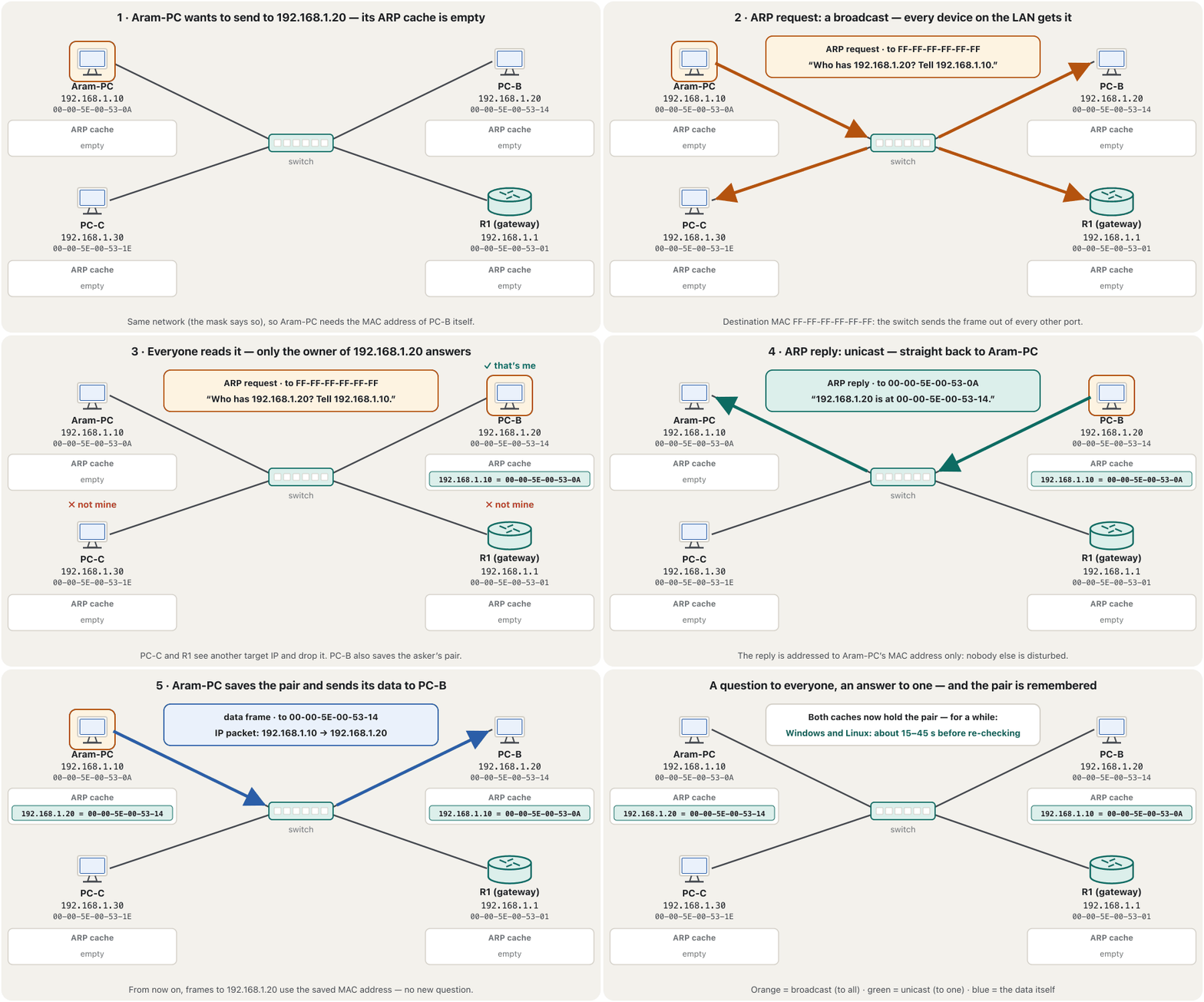
Aram-PC (192.168.1.10) is about to send its first frame to PC-B (192.168.1.20) on the same switch. Here is the whole conversation:
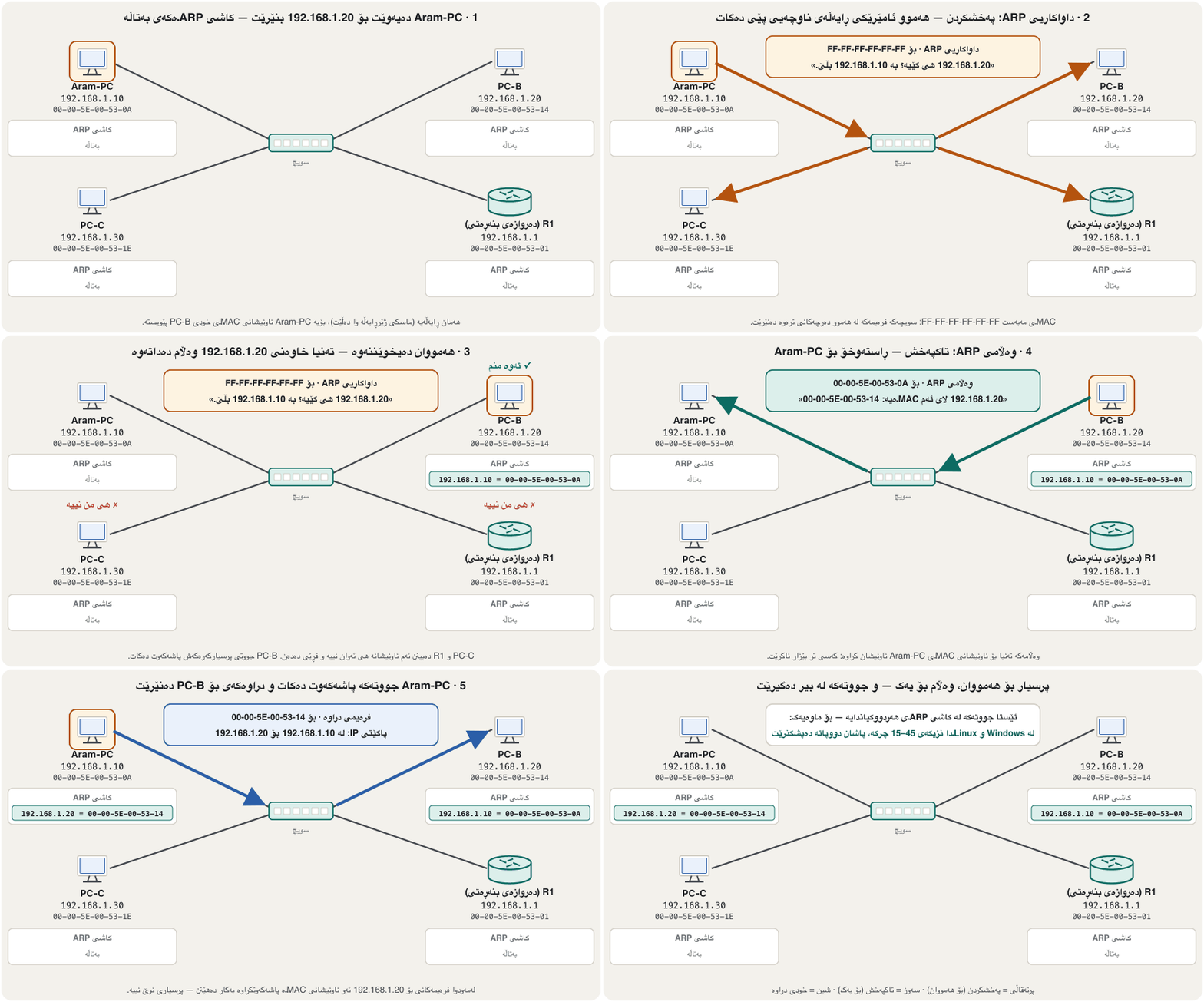
Aram-PC (192.168.1.10) خەریکە یەکەم بۆ PC-B (192.168.1.20) لە سەر هەمان دەنێرێت. هەموو گفتوگۆکە ئەمەیە:
- Look in the cache firstسەرەتا سەیری کاش بکە
Aram-PC checks its ARP cache, its list of IP-to-MAC pairs learned recently. If 192.168.1.20 is there, it uses that MAC address at once and sends no ARP message.
Aram-PC سەیری دەکات، کە لیستی ئەو جووتە IP و MACـانەیە کە تازە فێریان بووە. ئەگەر 192.168.1.20 تێیدا بێت، یەکسەر ئەو بەکار دەهێنێت و هیچ پەیامێکی نانێرێت.
- Ask everyone: the ARP requestلە هەمووان بپرسە: داواکاریی ARP
If the pair is not there, Aram-PC broadcasts an ARP request: a frame to FF-FF-FF-FF-FF-FF that says “Who has 192.168.1.20? Tell 192.168.1.10.” It carries Aram-PC’s own IP and MAC addresses and the target IP address.
ئەگەر جووتەکە تێیدا نەبێت، Aram-PC پەخش دەکات: بۆ FF-FF-FF-FF-FF-FF کە دەڵێت «192.168.1.20 هی کێیە؟ بە 192.168.1.10 بڵێ.» و خودی Aram-PC و مەبەستی تێدایە.
- Only the owner answersتەنیا خاوەنەکەی وەڵام دەداتەوە
Every device on the LAN receives and reads the request. Only PC-B, whose IP address matches the target, answers; the others see that the address is not theirs and drop it.
هەموو ئامێرێکی وەردەگرێت و دەیخوێنێتەوە. تەنیا PC-B، کە وەک مەبەستەکەیە، وەڵام دەداتەوە؛ ئەوانی تر دەبینن ناونیشانەکە هی ئەوان نییە و فڕێی دەدەن.
- The reply goes to one: unicastوەڵامەکە بۆ یەک دەچێت: تاکپەخش
PC-B sends an ARP reply as a unicast, straight to Aram-PC’s MAC address: “192.168.1.20 is at 00-00-5E-00-53-14.” PC-B also saves Aram-PC’s pair from the request, because traffic usually comes back soon.
PC-B وەڵامی وەک ڕاستەوخۆ بۆ Aram-PC دەنێرێت: «192.168.1.20 لای 00-00-5E-00-53-14ـە.» هەروەها PC-B جووتەکەی Aram-PC لە پاشەکەوت دەکات، چونکە زۆربەی جار بەم زووانە بۆی دەگەڕێتەوە.
- Remember and sendلە بیری بگرە و بینێرە
Aram-PC stores the pair in its ARP cache and finally sends its frame to PC-B. The next frames use the stored pair without asking again.
Aram-PC جووتەکە لە هەڵدەگرێت و لە کۆتاییدا بۆ PC-B دەنێرێت. دواتر بەبێ پرسیاری نوێ جووتە هەڵگیراوەکە بەکار دەهێنن.
In plain words: Aram-PC calls out to the whole network, “Which of you devices has this IP address? Whoever has it, I need your MAC address — send it back to me.” Everyone hears the question; only the owner answers, and only to the one who asked.
بە زمانێکی سادەتر: Aram-PC بە دەنگی بەرز بە هەموو دەڵێت: «کام لە ئێوە، ئەی ئامێرەکان، ئەم هەیە؟ هەر کامێکتان هەیەتی، پێویستە — بۆم بنێرەوە.» هەمووان پرسیارەکە دەبیستن؛ تەنیا خاوەنەکەی وەڵام دەداتەوە، ئەویش تەنیا بۆ پرسیارکەرەکە.
At a wedding hall, someone at the door speaks into the microphone: “Whose is the white car with the plate ending 20? Please come to the door.” Everybody hears the call, but only the owner of that car gets up — and walks to the person who asked, not to everyone. Next time, the person at the door already knows whose car it is.
لە هۆڵێکی ئاهەنگدا، کەسێک لە بەردەم دەرگاکە بە مایکرۆفۆن دەڵێت: «ئۆتۆمبێلە سپییەکە کە ژمارەکەی بە 20 کۆتایی دێت هی کێیە؟ تکایە وەرە بەردەم دەرگا.» هەمووان بانگەکە دەبیستن، بەڵام تەنیا خاوەنی ئەو ئۆتۆمبێلە هەڵدەستێت — و دەچێت بۆ لای پرسیارکەرەکە، نەک بۆ لای هەمووان. جاری داهاتوو، کەسەکەی بەردەم دەرگا دەزانێت ئۆتۆمبێلەکە هی کێیە.
Where the analogy stops workingسنووری ئەم نموونەیە
The doorman remembers for hours; a PC remembers a pair for only 15–45 seconds before it checks again. And ARP believes any answer — a dishonest guest could claim the car (see ARP spoofing below).
دەرگاوانەکە بۆ چەند کاتژمێرێک لە بیری دەمێنێت؛ تەنیا 15–45 چرکە جووتێک لە بیر دەگرێت، پاشان دووپاتە دەپشکنێت. هەروەها باوەڕ بە هەر وەڵامێک دەکات — میوانێکی درۆزن دەتوانێت بڵێت ئۆتۆمبێلەکە هی منە (بڕوانە لە خوارەوە).
Inside an ARP messageناوەوەی پەیامێکی ARP
An ARP message is small: 28 bytes for IPv4 over Ethernet. It rides directly inside an Ethernet frame whose EtherType is 0x0806 (an IPv4 packet has 0x0800); there is no IP header, because ARP works below IP. Request and reply have the same fields; only the contents change:
پەیامێکی بچووکە: 28 بۆ لە سەر . ڕاستەوخۆ لە ناو دەڕوات کە 0x0806ـە ( 0x0800ـی هەیە)؛ سەرەی نییە، چونکە لە خوار کار دەکات. و وەڵام هەمان خانەیان هەیە؛ تەنیا ناوەڕۆکەکەیان دەگۆڕێت:
- Hardware type 1 = Ethernet, protocol type 0x0800 = IPv4, and their lengths: 6 bytes for a MAC address, 4 for an IPv4 address.
- Opcode: 1 = request, 2 = reply.
- Sender MAC and IP address, target MAC and IP address. In a request the target MAC address is unknown, so it is all zeros.
- Hardware type 1 = ، protocol type 0x0800 = و درێژییەکانیان: 6 بۆ ، 4 بۆ ناونیشانێکی .
- Opcode: 1 = ، 2 = وەڵام.
- و نێرەر، و مەبەست. لە مەبەست نەزانراوە، بۆیە هەمووی سفرە.
In the example below, router R1 (192.168.1.1) asks for PC2 (192.168.1.20). In the reply, PC2 swaps sender and target and fills in the missing address: the answer is in the reply’s sender MAC field.
لە نموونەکەی خوارەوەدا R1 (192.168.1.1) بۆ PC2 (192.168.1.20) دەپرسێت. لە وەڵامەکەدا PC2 جێی نێرەر و مەبەست دەگۆڕێتەوە و ناونیشانە ونەکە پڕ دەکاتەوە: وەڵامەکە لە خانەی Sender MACـی وەڵامەکەدایە.
The ARP cache: remembering the answersکاشی ARP: لە بیرگرتنی وەڵامەکان
Asking before every frame would fill the LAN with broadcasts, so every host and router keeps an ARP cache (also called the ARP table): a short list of the IP-to-MAC pairs it has learned. It is the first place a device looks. On Windows, arp -a shows it:
پرسیارکردن پێش هەموو پڕ دەکات لە ، بۆیە هەموو و هەڵدەگرێت (پێی دەگوترێت خشتەی ): لیستێکی کورتی ئەو جووتە IP و MACـانەی فێریان بووە. یەکەم شوێنە کە ئامێرێک سەیری دەکات. لە Windowsـدا arp -a نیشانی دەدات:
arp -aInterface: 192.168.1.10 --- 0x9 Internet Address Physical Address Type 192.168.1.1 00-00-5e-00-53-01 dynamic 192.168.1.20 00-00-5e-00-53-14 dynamic 192.168.1.255 ff-ff-ff-ff-ff-ff static 224.0.0.22 01-00-5e-00-00-16 static 224.0.0.251 01-00-5e-00-00-fb static 239.255.255.250 01-00-5e-7f-ff-fa static 255.255.255.255 ff-ff-ff-ff-ff-ff static
- dynamic = learned from an ARP reply; it ages and disappears by itself. Here: the default gateway (192.168.1.1) and PC-B.
- static = never ages. Windows adds these itself for broadcast and multicast addresses, whose MAC addresses are calculated, never asked for. An administrator can add one with
arp -s 192.168.1.20 00-00-5e-00-53-14. arp -d *empties the cache (open Command Prompt as administrator). Routers keep the same kind of table: a router needs its neighbours’ MAC addresses just like a PC.
- dynamic = لە وەڵامێکی فێر بووە؛ بەسەر دەچێت و خۆی نامێنێت. لێرەدا: (192.168.1.1) و PC-B.
- static = هەرگیز بەسەر ناچێت. Windows خۆی ئەمانە بۆ ناونیشانەکانی و زیاد دەکات، کە دەژمێردرێت و هەرگیز پرسیاری لێ ناکرێت. بەڕێوەبەر دەتوانێت بە
arp -s 192.168.1.20 00-00-5e-00-53-14یەکێک زیاد بکات. arp -d *بەتاڵ دەکات (Command Prompt وەک بەڕێوەبەر بکەرەوە). هەمان خشتەیان هەیە: وەک پێویستی بە دراوسێکانی هەیە.
The ARP cache: remembering the answersکاشی ARP: لە بیرگرتنی وەڵامەکان
How long an entry livesتۆمارێک چەند دەمێنێت
Why not keep a pair for ever? Because networks change: a laptop leaves, a network card is replaced, a backup router takes over an address. An old pair would send frames to the wrong card. So entries age. Since Windows Vista, Windows follows the same rules as IPv6 Neighbor Discovery, and Linux does the same: a new entry is Reachable for a random 15 to 45 seconds (30 seconds times a random factor between 0.5 and 1.5). Then it becomes Stale: it is still kept, but the next time it is needed the device checks it with a new ARP request before trusting it. Entries that stay unused are deleted later, or when the cache is full (on Windows PCs, 256 entries by default).
بۆچی جووتێک بۆ هەمیشە هەڵنەگیرێت؟ چونکە دەگۆڕێن: لاپتۆپێک دەڕوات، دەگۆڕدرێت، یەدەگ ناونیشانێک وەردەگرێت. جووتێکی کۆن بۆ کارتی هەڵە دەنێرێت. بۆیە تۆمارەکان بەسەر دەچن. لە Windows Vistaـوە، Windows هەمان یاساکانی پەیڕەو دەکات و Linuxـیش وا دەکات: تۆمارێکی نوێ بۆ ماوەیەکی هەڕەمەکیی 15 تا 45 چرکە بەردەستە (Reachable) (30 چرکە جارانی لە نێوان 0.5 و 1.5). پاشان دەبێتە کۆن (Stale): هێشتا هەڵدەگیرێت، بەڵام جاری داهاتوو کە پێویست بوو، ئامێرەکە پێش متمانەکردن بە نوێ دەیپشکنێت. ئەو تۆمارانەی بەکار نایەن دواتر دەسڕدرێنەوە، یان کاتێک پڕ دەبێت (لە Windowsـدا بە شێوەی بنەڕەت 256 تۆمار).
Routers trust their entries much longer: a Cisco router keeps an ARP entry for 4 hours by default. A static entry never ages; on Windows, arp -s adds one, and it lasts until it is deleted or the TCP/IP stack restarts.
زۆر زیاتر متمانە بە تۆمارەکانیان دەکەن: Cisco بە شێوەی بنەڕەت تۆمارێکی بۆ 4 کاتژمێر هەڵدەگرێت. تۆمارێکی جێگیر (static) هەرگیز بەسەر ناچێت؛ لە Windowsـدا arp -s یەکێک زیاد دەکات و دەمێنێتەوە تا دەسڕدرێتەوە یان دووپاتە دەست پێ دەکاتەوە.
Why the first ping sometimes failsبۆچی یەکەم پینگ هەندێک جار سەرناکەوێت
In Packet Tracer you will often see this: device A sends to device B, and the first attempt fails — “Request timed out” in the Command Prompt, “Failed” in the simulation list — while the next ones succeed. Nothing is broken. A knows B’s IP address but not its MAC address, so its first job is ARP. A device that has a packet but no MAC address for the next device sends an ARP request first; Cisco routers and Packet Tracer devices throw away the packet that started the ARP. The reply fills the cache, and the next packets go through. Ping again and you will see 4 of 4 replies.
لە Packet Tracerـدا زۆرجار ئەمە دەبینیت: ئامێری A بۆ ئامێری B دەنێرێت و یەکەم هەوڵ سەرناکەوێت — لە Command Promptـدا «Request timed out» و لە لیستی هاوشێوەکردندا «Failed» — بەڵام هەوڵەکانی دواتر سەردەکەون. هیچ شتێک تێک نەچووە. A B دەزانێت بەڵام نازانێت، بۆیە یەکەم کاری . ئامێرێک کە هەیە بەڵام ئامێری دواتری نییە، سەرەتا دەنێرێت؛ Cisco و ئامێرەکانی Packet Tracer ئەو دەست پێ کرد فڕێ دەدەن. وەڵامەکە پڕ دەکاتەوە و دواتر دەڕۆن. دووپاتە بکە و 4 لە 4 وەڵام دەبینیت.
Windows and Linux PCs are more patient: they keep the waiting packet until the ARP reply comes (RFC 1122 asks hosts to keep at least one), so on real PCs the first ping usually succeeds, only a few milliseconds slower. A Cisco router’s own ping shows the lost first packet as a dot: .!!!!. You will meet the same lost echo again when you test an SSH lab (Why the first ping fails).
Windows و Linux پشووداترن: چاوەڕوانەکە ڕادەگرن تا وەڵامی دێت (RFC 1122 داوا لە دەکات لانیکەم یەکێک ڕابگرن)، بۆیە لە ڕاستەقینەدا یەکەم زۆربەی جار سەردەکەوێت، تەنیا چەند میلیچرکەیەک هێواشتر. خودی Cisco ئەو ونبووەی یەکەم وەک خاڵێک نیشان دەدات: .!!!!. هەمان Echoـی ونبوو لە تاقیگەی SSHـیشدا دەبینیتەوە (بۆچی یەکەم پینگ سەرناکەوێت).
Another network? Ask for the gatewayڕایەڵەیەکی تر؟ پرسیار بۆ دەروازەی بنەڕەتی بکە
ARP works only inside one LAN: its request is a broadcast, and routers do not pass broadcasts on (broadcast domains). So when Aram-PC (192.168.1.10/24) sends to PC-B on another network (192.168.2.20), it cannot learn PC-B’s MAC address with ARP — and it does not need it.
تەنیا لە ناو یەک کار دەکات: و تێناپەڕێنن (پاوانەکانی پەخش). بۆیە کاتێک Aram-PC (192.168.1.10/24) بۆ PC-B لە سەر تر (192.168.2.20) دەنێرێت، ناتوانێت بە PC-B بزانێت — پێویستیشی پێی نییە.
Aram-PC compares the two addresses with its mask, sees “another network”, and asks instead for the MAC address of its default gateway, 192.168.1.1. The frame goes to the router; the router then runs its own ARP on the next network, hop by hop. How the router chooses where to send the packet is in How a Packet Finds Its Way.
Aram-PC بە دوو ناونیشانەکە بەراورد دەکات، دەبینێت « ترە» و لەبری ئەوە دەپرسێت، کە 192.168.1.1ـە. بۆ دەچێت؛ پاشان خۆی لە سەر دواتر دەکات، بە . چۆن بڕیار دەدات بۆ کوێ بنێرێت لە پاکێتێک چۆن ڕێگەکەی دەدۆزێتەوەدایە.
Gratuitous ARP: an answer nobody asked forARPـی خۆبەخش: وەڵامێک کە کەس پرسیاری نەکردووە
A gratuitous ARP is an ARP message that nobody asked for: a device announces its own IP-to-MAC pair to the whole LAN, with its own address as both sender IP and target IP. It has two everyday jobs:
پەیامێکی کە کەس داوای نەکردووە: ئامێرێک جووتی IP و MACـی خۆی بۆ هەموو ڕادەگەیەنێت و ناونیشانی خۆی هەم وەک IPـی نێرەر و هەم وەک IPـی مەبەست دادەنێت. دوو کاری ڕۆژانەی هەیە:
- Joining a network (RFC 5227). Before using a new address, a device sends three ARP probes — “Is anyone using 192.168.1.50?” — with sender IP 0.0.0.0, so that no cache stores a pair yet. If nobody answers, it announces the address with gratuitous ARPs. If another device answers, the address is already taken: Windows shows an “IP address conflict” warning and does not use it.
- A changed MAC address. When a network card is replaced, or a backup router takes over the gateway address, a gratuitous ARP updates every ARP cache at once, instead of leaving old pairs for up to 45 seconds or more.
- هاتنە ناو (RFC 5227). پێش بەکارهێنانی ناونیشانێکی نوێ، ئامێرێک سێ پشکنینی دەنێرێت — «کەس 192.168.1.50 بەکار دەهێنێت؟» — بە IPـی نێرەری 0.0.0.0، بۆ ئەوەی هیچ هێشتا جووتێک هەڵنەگرێت. ئەگەر کەس وەڵام نەداتەوە، ناونیشانەکە بە ڕادەگەیەنێت. ئەگەر ئامێرێکی تر وەڵام بداتەوە، ناونیشانەکە گیراوە: Windows ئاگادارکردنەوەی «IP address conflict» نیشان دەدات و بەکاری ناهێنێت.
- گۆڕاو. کاتێک دەگۆڕدرێت، یان یەدەگ ناونیشانی وەردەگرێت، یەکسەر هەموو نوێ دەکاتەوە، لەبری ئەوەی جووتە کۆنەکان تا 45 چرکە یان زیاتر بمێننەوە.
Two older ideas: proxy ARP and RARPدوو بیرۆکەی کۆنتر: ARPـی بریکار و RARP
Proxy ARP (RFC 1027, 1987): a router answers an ARP request for a host on another network with its own MAC address, then routes the frames it receives. It rescues hosts that have a wrong mask or no default gateway. Cisco routers have it switched on by default; many administrators switch it off on their router interfaces, because it hides configuration mistakes, makes ARP caches bigger and lets one device answer for others.
(RFC 1027، 1987): وەڵامی بۆ سەر تر بە خۆی دەداتەوە، پاشان ئەو وەریاندەگرێت دەیانگەیەنێت. ڕزگار دەکات کە هەڵەیان هەیە یان نییە. Cisco بە شێوەی بنەڕەت چالاکیان کردووە؛ زۆر بەڕێوەبەر لەسەر ناچالاکی دەکەن، چونکە هەڵەی ڕێکخستن دەشارێتەوە، گەورەتر دەکات و ڕێگە دەدات ئامێرێک لەبری ئەوانی تر وەڵام بداتەوە.
RARP (Reverse ARP, RFC 903, 1984) went the other way: a computer without a disk knew only its MAC address and asked a server for its own IP address. BOOTP and then DHCP replaced it long ago, so you will meet RARP only in history and in exam questions about “which protocol does the reverse of ARP”.
(Reverse ARP، RFC 903، 1984) بە پێچەوانەوە کاری دەکرد: بێ دیسک تەنیا خۆی دەزانی و خۆی لە دەپرسی. BOOTP و پاشان زۆر لەمەوبەر جێیان گرتەوە، بۆیە تەنیا لە مێژوو و لە پرسیاری تاقیکردنەوەدا دەبینیت: «کام پێچەوانەی دەکات؟».
ARP spoofing: when a device liesهەڵخەڵەتاندنی ARP: کاتێک ئامێرێک درۆ دەکات
ARP has no proof of identity: a device believes any reply, even one it never asked for. A device on the same LAN can abuse this. In ARP spoofing (also called ARP poisoning) it keeps sending fake replies that say “192.168.1.1 is at my MAC address”. The victims’ ARP caches now hold a wrong pair, so their frames for the gateway go to that device, which can read them and pass them on — a man-in-the-middle attack. Because ARP never crosses a router, this works only from inside the same broadcast domain.
هیچ بەڵگەیەکی ناسنامەی نییە: ئامێرێک باوەڕ بە هەر وەڵامێک دەکات، تەنانەت ئەوەیشی هەرگیز داوای نەکردووە. ئامێرێک لە سەر هەمان دەتوانێت ئەمە بەکار بهێنێت. لە ـدا (پێی دەگوترێت ژەهراویکردنی ) بەردەوام وەڵامی ساختە دەنێرێت کە دەڵێن «192.168.1.1 لای MACـی منە». ئێستا قوربانییەکان جووتێکی هەڵەیان تێدایە، بۆیە ئەوان بۆ دەچنە لای ئەو ئامێرە، کە دەتوانێت بیانخوێنێتەوە و ئینجا تێیانپەڕێنێت — هێرشێکی کەسی ناوەڕاست. چونکە هەرگیز لە ناپەڕێتەوە، ئەمە تەنیا لە ناو هەمان کار دەکات.
Networks defend themselves in layers:
بە چەند چینێک بەرگری لە خۆیان دەکەن:
- Dynamic ARP Inspection (DAI) on managed switches: the switch checks every ARP message against the list of addresses that DHCP really handed out (DHCP snooping) and drops the lies.
- Static entries for a few critical pairs, for example the gateway’s MAC address on an important server.
- Port security and 802.1X: only known devices may plug in (Port Security, DAI and 802.1X).
- Encryption (HTTPS, a VPN): even if traffic takes a detour, the device in the middle cannot read or change it unnoticed (TLS).
- (DAI) لە بەڕێوەبراودا: هەموو پەیامێکی لەگەڵ لیستی ئەو ناونیشانانەی بەڕاستی دابەشی کردوون () بەراورد دەکات و درۆکان فڕێ دەدات.
- تۆماری جێگیر بۆ چەند جووتێکی گرنگ، بۆ نموونە لە سەر گرنگ.
- و 802.1X: تەنیا ئامێرە ناسراوەکان دەتوانن ببەسترێنەوە (ئاسایشی دەرچە، DAI و 802.1X).
- (HTTPS، ): تەنانەت ئەگەر هاتوچۆکە ڕێگەیەکی لاوەکی بگرێت، ئامێرەکەی ناوەڕاست ناتوانێت بیخوێنێتەوە یان بەبێ ئەوەی هەست پێ بکرێت بیگۆڕێت (TLS).
IPv6 has no ARP: Neighbor DiscoveryIPv6 ARPـی نییە: دۆزینەوەی دراوسێ
IPv6 does not use ARP at all. Its Neighbor Discovery protocol (NDP, RFC 4861) does the same job with ICMPv6 messages: a neighbor solicitation asks for the MAC address, and a neighbor advertisement answers. The question is not a broadcast — IPv6 has none. It goes to a solicited-node multicast address built from the last 24 bits of the target address, so usually only the owner has to read it. NDP also finds routers and checks that a new address is not already in use. The whole story is in Neighbor Discovery instead of ARP.
هەرگیز بەکار ناهێنێت. (NDP، RFC 4861) هەمان کار بە پەیامەکانی ICMPv6 دەکات: دەپرسێت و وەڵام دەداتەوە. پرسیارەکە نییە — نییە. دەچێتە ناونیشانێکی solicited-node کە لە 24 کۆتایی ناونیشانی مەبەست دروست دەکرێت، بۆیە زۆربەی جار تەنیا خاوەنەکەی دەبێت بیخوێنێتەوە. NDP هەروەها دەدۆزێتەوە و دەپشکنێت کە ناونیشانێکی نوێ پێشتر بەکار نەهاتبێت. هەموو چیرۆکەکە لە دۆزینەوەی دراوسێ لە جیاتی ARPدایە.
Try it: watch ARP at workتاقی بکەرەوە: سەیری کاری ARP بکە
- On Windowsلە Windowsـدا
Open Command Prompt and type
arp -a. Runipconfigand find your default gateway’s address in the list — it is almost always there, because every packet to the Internet needs its MAC address.Command Prompt بکەرەوە و
arp -aبنووسە.ipconfigلێبدە و ناونیشانی لە لیستەکەدا بدۆزەوە — نزیکەی هەمیشە لەوێیە، چونکە هەموو بۆ پێویستە. - A new entryتۆمارێکی نوێ
Ping another device on your own network (a phone or a printer, for example), then run
arp -aagain: a new dynamic entry has appeared.ئامێرێکی تر لە سەر خۆت بکە (بۆ نموونە مۆبایلێک یان )، پاشان دووپاتە
arp -aلێبدە: تۆمارێکی dynamicـی نوێ دەرکەوتووە. - Empty the cacheبەتاڵکردنی کاش
In a Command Prompt opened as administrator,
arp -d *deletes the entries. Runarp -aa few seconds later: the gateway’s entry is back, learned again with ARP.لە Command Promptـێک کە وەک بەڕێوەبەر کراوەتەوە،
arp -d *تۆمارەکان دەسڕێتەوە. چەند چرکەیەک دواترarp -aلێبدە: تۆماری گەڕاوەتەوە، دووپاتە بە فێری بووەتەوە. - In Packet Tracerلە Packet Tracerـدا
Switch to Simulation mode, show only ARP and ICMP in the event filter, and ping from one PC to another: you see the ARP request go to every device, the reply come back to one, and only then the ICMP echo. Step by step: Watch ARP and ICMP in Simulation mode.
بڕۆ بۆ Simulation mode، لە فلتەری ڕووداوەکاندا تەنیا ARP و ICMP نیشان بدە و لە یەکێکی تر بکە: دەبینیت بۆ هەموو ئامێرێک دەچێت، وەڵامەکە بۆ یەک دەگەڕێتەوە و تەنیا پاشان Echoـی دەڕوات. هەنگاو بە هەنگاو: بینینی ARP و ICMP لە باری Simulation.
- In the CêIT labلە تاقیگەی CêITـدا
Open the CêIT network lab, load “One network: 3 PCs, a printer and a switch” and send a ping. The event log shows “Who has …? Tell …”, the reply, and the pair being written into the ARP table; select a PC to see its table.
تاقیگەی ڕایەڵەی CêIT بکەرەوە، «One network: 3 PCs, a printer and a switch» باربکە و بنێرە. تۆماری ڕووداوەکان «Who has …? Tell …»، وەڵامەکە و نووسینی جووتەکە لە خشتەی نیشان دەدات؛ هەڵبژێرە بۆ بینینی خشتەکەی.
Common mistakesهەڵە باوەکان
| Mistakeهەڵە | What is trueڕاستییەکە |
|---|---|
| ARP maps a MAC address to an IP address. دەکات بە . | ARP finds the MAC address for a known IP address. The reverse was RARP — history. بۆ زانراو دەدۆزێتەوە. پێچەوانەکەی بوو — مێژووە. |
| The ARP reply is a broadcast too.وەڵامی . | Request: broadcast. Reply: unicast, straight to the asker.: . وەڵام: ، ڕاستەوخۆ بۆ پرسیارکەر. |
| To reach a server on the Internet, a PC asks for the server’s MAC address.بۆ گەیشتن بە لە ، دەپرسێت. | It asks for its default gateway’s MAC address. ARP never leaves the LAN. دەپرسێت. هەرگیز لە دەرناچێت. |
| ARP requests cross routers. لە دەپەڕێتەوە. | Routers stop broadcasts; each router does its own ARP on each network. ڕادەگرن؛ هەر لە سەر هەر خۆی دەکات. |
| The first ping failed, so the network is broken.یەکەم سەرنەکەوت، کەواتە تێکچووە. | Often it is only ARP (especially in Packet Tracer and through Cisco routers). Ping again.زۆرجار تەنیا (بەتایبەت لە Packet Tracer و بە ناو Ciscoـدا). دووپاتە بکە. |
| The administrator gives every device its IP address.بەڕێوەبەر بە هەموو ئامێرێک دەدات. | Most hosts get it from DHCP; administrators type it only on servers, printers and routers.زۆربەی لە وەریدەگرن؛ بەڕێوەبەر تەنیا بۆ ، و دەینووسێت. |
| ARP entries stay for ever.تۆمارەکانی بۆ هەمیشە دەمێننەوە. | Dynamic entries age: 15–45 s reachable on Windows and Linux, 4 hours on Cisco routers. Only static entries stay.تۆمارە بزۆکەکان بەسەر دەچن: لە Windows و Linuxـدا 15–45 چرکە بەردەستن و لە Ciscoـدا 4 کاتژمێر. تەنیا تۆمارە جێگیرەکان دەمێننەوە. |
| IPv6 uses ARP too. بەکار دەهێنێت. | IPv6 uses Neighbor Discovery (ICMPv6, multicast). بەکار دەهێنێت (ICMPv6، ). |
Exercisesڕاهێنانەکان
Device A sends data to device B on the same LAN for the first time. Put these steps in order: (a) B answers with an ARP reply that contains its MAC address; (b) A broadcasts an ARP request that holds B’s IP address and A’s MAC address; (c) A checks its ARP cache and does not find B; (d) A saves B’s pair and sends the data; (e) the other devices see that the IP address is not theirs and drop the request.
ئامێری A بۆ یەکەم جار بۆ ئامێری B لە سەر هەمان دەنێرێت. ئەم هەنگاوانە ڕیز بکە: (a) B بە وەڵامێکی کە تێدایە وەڵام دەداتەوە؛ (b) A پەخش دەکات کە B و Aی تێدایە؛ (c) A سەیری دەکات و B نادۆزێتەوە؛ (d) A جووتەکەی B پاشەکەوت دەکات و دەنێرێت؛ (e) ئامێرەکانی تر دەبینن هی ئەوان نییە و فڕێ دەدەن.
Show answerوەڵامەکە پیشان بدە
c → b → e → a → d. (e) and (a) happen almost at the same moment: every device reads the request, only B answers. In Packet Tracer the first attempt may show “Failed” while this happens.
c → b → e → a → d. (e) و (a) نزیکەی لە یەک کاتدا ڕوو دەدەن: هەموو ئامێرێک دەخوێنێتەوە، تەنیا B وەڵام دەداتەوە. لە Packet Tracerـدا لەوانەیە یەکەم هەوڵ «Failed» نیشان بدات لە کاتێکدا ئەمە ڕوو دەدات.
Host H1 (10.0.0.5, MAC 00-00-5E-00-53-05) needs the MAC address of H2 (10.0.0.9, MAC 00-00-5E-00-53-09) on the same LAN. For the request and for the reply, give: the frame’s destination MAC, the opcode, sender MAC, sender IP, target MAC and target IP.
H1 (10.0.0.5، MAC 00-00-5E-00-53-05) H2 (10.0.0.9، MAC 00-00-5E-00-53-09)ی لە سەر هەمان پێویستە. بۆ و بۆ وەڵامەکە بنووسە: MACـی مەبەستی ، opcode، sender MAC، sender IP، target MAC و target IP.
Hintئاماژە
The reply swaps sender and target and fills in the unknown MAC address.
وەڵامەکە جێی نێرەر و مەبەست دەگۆڕێتەوە و نەزانراوەکە پڕ دەکاتەوە.
Show answerوەڵامەکە پیشان بدە
| Fieldخانە | ARP request | ARP replyوەڵامی |
|---|---|---|
| Frame to بۆ | FF-FF-FF-FF-FF-FF | 00-00-5E-00-53-05 |
| Opcode | 1 | 2 |
| Sender MAC | 00-00-5E-00-53-05 | 00-00-5E-00-53-09 |
| Sender IP | 10.0.0.5 | 10.0.0.9 |
| Target MAC | 00-00-00-00-00-00 | 00-00-5E-00-53-05 |
| Target IP | 10.0.0.9 | 10.0.0.5 |
Aram-PC is 192.168.1.10/24 with default gateway 192.168.1.1. Its cache is empty. For each destination, which IP address does its ARP request ask about? (a) 192.168.1.77, (b) 192.168.2.5, (c) 203.0.113.80, (d) 192.168.1.1.
Aram-PC 192.168.1.10/24ـە و 192.168.1.1ـە. بەتاڵە. بۆ هەر مەبەستێک، پرسیار لە کام دەکات؟ (a) 192.168.1.77، (b) 192.168.2.5، (c) 203.0.113.80، (d) 192.168.1.1.
Show answerوەڵامەکە پیشان بدە
- (a) 192.168.1.77 — the same network (192.168.1.0/24), so it asks for the destination itself.
- (b) 192.168.1.1 — 192.168.2.5 is another network, so it asks for the gateway.
- (c) 192.168.1.1 — the Internet is another network too.
- (d) 192.168.1.1 — the gateway itself is on the LAN, so it is asked for directly; and after (b) or (c) its pair would already be in the cache.
- (a) 192.168.1.77 — هەمان (192.168.1.0/24)، بۆیە بۆ خودی مەبەستەکە دەپرسێت.
- (b) 192.168.1.1 — 192.168.2.5 ترە، بۆیە بۆ دەپرسێت.
- (c) 192.168.1.1 — ترە.
- (d) 192.168.1.1 — خودی لە سەر ، بۆیە ڕاستەوخۆ پرسیاری لێ دەکرێت؛ دوای (b) یان (c) جووتەکەی پێشتر لە دەبێت.
In two or three sentences: why is the ARP request a broadcast, while the reply is a unicast? And why do both the asker and the target store a pair?
بە دوو یان سێ ڕستە: بۆچی ، بەڵام وەڵامەکە ؟ بۆچی هەم پرسیارکەر و هەم مەبەست جووتێک هەڵدەگرن؟
Show answerوەڵامەکە پیشان بدە
The asker does not know who owns the IP address or its MAC address, so it can only ask everyone (FF-FF-FF-FF-FF-FF). The request already carries the asker’s MAC address, so the owner can answer it alone and disturb nobody else. Both store a pair because they will almost certainly talk again in a moment: the asker sends its data, and the target soon answers.
پرسیارکەر نازانێت هی کێیە و چییە، بۆیە تەنیا دەتوانێت لە هەمووان بپرسێت (FF-FF-FF-FF-FF-FF). پێشتر پرسیارکەری تێدایە، بۆیە خاوەنەکە دەتوانێت تەنیا وەڵامی ئەو بداتەوە و کەسی تر بێزار نەکات. هەردووکیان جووتێک هەڵدەگرن چونکە بە دڵنیاییەوە بەم زووانە دووپاتە قسە دەکەن: پرسیارکەر دەنێرێت و مەبەست بەم زووانە وەڵام دەداتەوە.
Look at Aram-PC’s arp -a output in The ARP cache. (1) What is the default gateway’s MAC address? (2) Which entries did ARP learn? (3) Why is 255.255.255.255 listed with ff-ff-ff-ff-ff-ff and type static?
سەیری دەرچوونی arp -aـی Aram-PC لە کاشی ARP بکە. (1) چییە؟ (2) فێری کام تۆمار بووە؟ (3) بۆچی 255.255.255.255 لەگەڵ ff-ff-ff-ff-ff-ff و جۆری static هاتووە؟
Show answerوەڵامەکە پیشان بدە
- (1) 00-00-5e-00-53-01 (the entry for 192.168.1.1).
- (2) The two dynamic ones: 192.168.1.1 and 192.168.1.20.
- (3) It is the limited broadcast address: its frames always go to the broadcast MAC address, so Windows writes the pair itself and never asks.
- (1) 00-00-5e-00-53-01 (تۆماری 192.168.1.1).
- (2) دوو تۆمارە dynamicـەکە: 192.168.1.1 و 192.168.1.20.
- (3) سنووردارە: هەمیشە بۆ MACـی دەچن، بۆیە Windows خۆی جووتەکە دەنووسێت و هەرگیز ناپرسێت.
Summaryپوختە
- A frame needs the receiver’s MAC address; ARP (RFC 826, 1982) finds it from a known IP address, inside one LAN.
- Cache first. Then an ARP request as a broadcast (“Who has 192.168.1.20? Tell 192.168.1.10.”); only the owner answers with a unicast ARP reply; both sides store the pair.
- The message (28 bytes, EtherType 0x0806): opcode 1/2, sender MAC and IP, target MAC and IP.
arp -ashows the cache; dynamic entries are reachable for 15–45 s on Windows and Linux (4 hours on Cisco routers); static entries never age.- Another network → ARP for the default gateway, never for the remote host. Routers do their own ARP, hop by hop.
- The first ping may fail because of ARP (Packet Tracer, Cisco routers).
- Gratuitous ARP announces a pair (address conflicts, changed MACs); proxy ARP answers for others; RARP is history.
- ARP trusts every reply, so spoofing is possible inside a LAN; defences: DAI, static entries, port security, encryption.
- IPv6 uses Neighbor Discovery (ICMPv6, multicast) instead of ARP.
- وەرگری پێویستە؛ (RFC 826، 1982) لە زانراوەوە دەیدۆزێتەوە، لە ناو یەک .
- سەرەتا . پاشان وەک («192.168.1.20 هی کێیە؟ بە 192.168.1.10 بڵێ.»)؛ تەنیا خاوەنەکەی بە وەڵامێکی وەڵام دەداتەوە؛ هەردوو لا جووتەکە هەڵدەگرن.
- پەیامەکە (28 ، EtherType 0x0806): opcode 1/2، MAC و IPـی نێرەر، MAC و IPـی مەبەست.
arp -aنیشان دەدات؛ تۆمارە dynamicـەکان لە Windows و Linuxـدا 15–45 چرکە بەردەستن ( Cisco: 4 کاتژمێر)؛ تۆمارە staticـەکان بەسەر ناچن.- تر ← بۆ ، هەرگیز بۆ دوورەکە نا. خۆیان دەکەن، بە .
- یەکەم لەوانەیە بەهۆی سەرنەکەوێت (Packet Tracer، Cisco).
- جووتێک ڕادەگەیەنێت (ناکۆکیی ناونیشان، MACـی گۆڕاو)؛ لەبری ئەوانی تر وەڵام دەداتەوە؛ مێژووە.
- متمانە بە هەموو وەڵامێک دەکات، بۆیە لە ناو دەکرێت؛ بەرگرییەکان: DAI، تۆماری جێگیر، ، .
- لەبری بەکار دەهێنێت (ICMPv6، ).
Lesson complete!وانەکە تەواو بوو!
Well done. Review the key terms, then go on to the next lesson.دەستخۆش. سەیرێکی زاراوە سەرەکییەکان بکەرەوە، پاشان بڕۆ بۆ وانەی داهاتوو.
Key termsزاراوە سەرەکییەکان
ICMP, Ping and TracerouteICMP، پینگ و بەدواداچوونی ڕێگە
Related lecturesوانە پەیوەندیدارەکان
- How a Packet Finds Its Way: Gateways and Routing Tablesپاکێت چۆن ڕێگای خۆی دەدۆزێتەوە: دەروازەی بنەڕەتی و خشتەکانی ڕێدۆزی
- ICMP, Ping and TracerouteICMP، پینگ و بەدواداچوونی ڕێگە
- IPv6 in Practice: SLAAC, Neighbour Discovery and Dual StackIPv6 لە کرداردا: SLAAC، دۆزینەوەی دراوسێ و ستاکی دووانە
- Collision Domains and Broadcast Domainsپاوانەکانی پێکدادان و پاوانەکانی پەخش
- OSI Layers 1–3: Physical, Data Link and Networkچینەکانی 1 تا 3ی OSI: چینی فیزیکی، چینی بەستەری دراوە و چینی ڕایەڵە
- DHCP: Automatic Addresses, DORA and LeasesDHCP: ناونیشانی خۆکار، DORA و کرێکانی DHCP
- Switch Port Securityئاسایشی دەرچەی سویچ
- Network Defences: Firewalls, Segmentation, Monitoring and SIEMبەرگرییەکانی ڕایەڵە: ئاگرەدیوار، بەشبەشکردنی ڕایەڵە، چاودێریی ئاسایش و SIEM
References and further readingسەرچاوەکان و خوێندنەوەی زیاتر
- RFC 826 (November 1982): An Ethernet Address Resolution Protocol — packet fields, request/reply, the merge rule
- RFC 5227 (2008): IPv4 Address Conflict Detection — ARP probes, ARP announcements (gratuitous ARP)
- Microsoft Learn: arp command (-a, -d, -s; static entries removed when TCP/IP restarts)
- Microsoft Learn: Address Resolution Protocol caching behavior (Reachable 15–45 s, Stale, neighbor cache limit 256)
- Linux man page arp(7): base_reachable_time_ms, gc_stale_time
- Cisco: Proxy ARP (RFC 1027; enabled by default on Cisco IOS; no ip proxy-arp)
- RFC 4861 (2007): Neighbor Discovery for IP version 6
- RFC 903 (1984): A Reverse Address Resolution Protocol
This lecture is a first edition. The Kurdish text and terminology are waiting for review by Kurdish IT teachers.ئەم وانەیە چاپی یەکەمە. دەقە کوردییەکە و زاراوەکانی چاوەڕێی پێداچوونەوەی مامۆستایانی کوردی بواری IT ن.