Troubleshooting a Network, Layer by Layerچارەسەرکردنی کێشەیڕایەڵە، چین بە چین
How to find and fix network faults with a method instead of guesses: the seven troubleshooting steps applied to networks (CompTIA Network+ N10-009), the OSI layers as a checklist, bottom-up, top-down, divide-and-conquer, follow-the-path and swapping components, symptoms that point to a layer, the toolbox from earlier lessons, five real cases, practice in Packet Tracer and the CêIT lab, and documenting the fix.
چۆن هەڵەکانی بە ڕێبازێک بدۆزیتەوە و چاکیان بکەیتەوە نەک بە پێشبینی: حەوت هەنگاوەکەی لەسەر (CompTIA Network+ N10-009)، چینەکانی OSI وەک لیستی پشکنین، ، ، ، و ، ئەو نیشانانەی ئاماژە بە چینێک دەکەن، سندوقی ئامرازەکانی وانەکانی پێشوو، پێنج دۆخی ڕاستەقینە، ڕاهێنان لە Packet Tracer و تاقیگەی CêIT و نووسینەوەی چارەسەرەکە.
21 min read24 خولەک خوێندنەوە · 24 stepsهەنگاو
What you will learnچی فێر دەبیت
Apply the seven troubleshooting steps to a network problem, starting with the scope: who is affected, since when and what changed.
Use the OSI layers as a checklist and choose between bottom-up, top-down and divide-and-conquer, with follow-the-path and swapping as helpers.
Link common symptoms (no link light, 169.254.x.x, gateway unreachable, no Internet, name fails, one site fails) to a likely layer and a first test.
Pick the right tool from the toolbox (ipconfig, ping, tracert, pathping, arp, nslookup, netstat, Test-NetConnection, a cable tester) and read its result.
Escalate with evidence, verify with the user, prevent repeats and document the fix.
“The network is down!” — where do you start?«ڕایەڵەکە کار ناکات!» — لە کوێوە دەست پێ دەکەیت؟
A user says “the Internet does not work”. Behind that one sentence hides a long chain: the cable or Wi-Fi, the network card, the switch, the IP settings, the default gateway, the router and its NAT, the ISP, the DNS server and finally the web server. Any link can break, and from the user’s chair they all look the same.
دەڵێت « کار ناکات». لە پشت ئەو یەک ڕستەیەوە زنجیرەیەکی درێژ هەیە: کێبڵ یان ، ، ، ڕێکخستنەکانی IP، ، و NATـەکەی، ، و لە کۆتاییدا . هەر ئەڵقەیەک دەکرێت بشکێت و لە کورسیی هەموویان وەک یەک دەردەکەون.
The path of one request: Aram’s laptop, a switch or Wi-Fi, the router (gateway, NAT), the modem or ONT, the ISP and Internet, and DNS and web servers. Under each part, what can break there and its OSI layer: L1 cable, NIC, Wi-Fi signal; L1–2 port, VLAN, Wi-Fi password; L3 IP settings, gateway, DHCP; L1–2 WAN link, fibre; L3 outage, routing; L4–7 name, service, firewall. Any of these gives the same complaint, “the Internet does not work”; guessing jumps around, a method checks them in order.ڕێگای یەک داواکاری: لاپتۆپی ئارام، سویچ یان وایفای، ڕێدۆز (دەروازەی بنەڕەتی، NAT)، مۆدێم یان ONT، دابینکەری ئینتەرنێت و ئینتەرنێت، ڕاژەکارەکانی DNS و وێب. لە ژێر هەر بەشێک ئەوەی دەکرێت لەوێ تێک بچێت و چینی OSIـی: L1 کێبڵ، کارت، هێزی وایفای؛ L1–2 دەرچە، VLAN، تێپەڕەوشەی وایفای؛ L3 ڕێکخستنی IP، دەروازەی بنەڕەتی، DHCP؛ L1–2 هێڵی WAN، فایبەر؛ L3 وەستان، ڕێدۆزی؛ L4–7 ناو، خزمەتگوزاری، ئاگرەدیوار. هەر یەکێک لەمانە هەمان سکاڵا دروست دەکات: «ئینتەرنێت کار ناکات»؛ پێشبینیکردن باز دەدات، ڕێبازێک بە ڕیز دەیانپشکنێت.
One complaint, many suspects: this lesson teaches you to check them in a sensible order.یەک سکاڵا، چەندین گوماناوی: ئەم وانەیە فێرت دەکات بە ڕیزێکی ژیرانە بیانپشکنیت.CêIT
This lesson gives you a method: the seven troubleshooting steps applied to networks, the OSI layers as a checklist, five ways to search, the tools from earlier lessons and five real cases. Troubleshooting is the biggest part of the CompTIA Network+ exam: 24 % of the exam (N10-009, launched June 2024 and still the current version as of November 2026).
The seven steps, applied to networksحەوت هەنگاوەکە، لەسەر ڕایەڵە
You already know the seven troubleshooting steps from the IT course (The seven steps of troubleshooting). CompTIA Network+ uses exactly the same method. Here is what each step means when the patient is a network:
Seven boxes in a loop. 1 Identify the problem: who is affected, since when, what changed, can you repeat it. 2 Theory of probable cause: question the obvious, pick an approach such as bottom-up or top-down. 3 Test the theory: ping, ipconfig, nslookup, a known-good cable; a dashed arrow from 3 back to 2 says “theory wrong? make a new one”. 4 Plan the fix and its effects: who loses the network and when, back up the configuration. 5 Implement or escalate: fix it, or pass it on with your test results to the ISP or a server admin. 6 Verify and prevent: the user tests it, fix the same fault on other PCs. 7 Document: findings, actions, outcomes, lessons learned. A note: the same seven steps as the IT course, used here on a network, layer by layer.حەوت سندوق لە بازنەیەکدا. 1 کێشەکە دیاری بکە: کێ کاریگەرە، لە کەیەوە، چی گۆڕاوە، دەتوانیت دووپاتەی بکەیتەوە. 2 گریمانەی هۆکاری ئەگەری: سادەترینەکان بپرسە، ڕێبازێک هەڵبژێرە وەک خوارەوە بۆ سەرەوە یان سەرەوە بۆ خوارەوە. 3 گریمانەکە تاقی بکەرەوە: ping، ipconfig، nslookup، کێبڵێکی باش؛ تیرێکی پچڕپچڕ لە 3ـەوە بۆ 2 دەڵێت «گریمانە هەڵە بوو؟ یەکێکی نوێ دابنێ». 4 پلانی چارەسەر و کاریگەرییەکانی: کێ ڕایەڵە لەدەست دەدات و کەی، باکئەپی ڕێکخستن بگرە. 5 جێبەجێی بکە یان بەرزکردنەوەی کێشە: چاکی بکە، یان لەگەڵ ئەنجامی تاقیکردنەوەکانت بینێرە بۆ دابینکەری ئینتەرنێت یان بەڕێوەبەری ڕاژەکار. 6 دڵنیا ببەرەوە و ڕێگری بکە: بەکارهێنەرەکە تاقی دەکاتەوە، هەمان هەڵە لەسەر کۆمپیوتەرەکانی تر چاک بکە. 7 بینووسەوە: دۆزراوەکان، کردارەکان، ئەنجامەکان، وانە فێربووەکان. تێبینییەک: هەمان حەوت هەنگاوی وانەی IT، لێرەدا لەسەر ڕایەڵە، چین بە چین.
The method does not change; the questions and tools become network ones.ڕێبازەکە ناگۆڕێت؛ پرسیار و ئامرازەکان دەبنە هی .CêIT
The seven steps, applied to networksحەوت هەنگاوەکە، لەسەر ڕایەڵە
Step 1 on a network: who, since when, what changed?هەنگاوی 1 لەسەر ڕایەڵە: کێ، لە کەیەوە، چی گۆڕاوە؟
Network+ lists what “identify the problem” means: read the error messages and logs, question the users, list the symptoms, find out what changed (a new cable, an update, a moved desk), reproduce the problem, take one problem at a time, and narrow the scope. The quickest scope question is: who is affected?
Three small office diagrams with one router, two switches and four PCs. One PC: only one PC is highlighted — suspect that PC, its cable, port and settings. One room or one switch: one switch and its two PCs are highlighted — suspect that switch, access point or VLAN. Everyone: the router, both switches and all PCs are highlighted — suspect the router, the ISP, or the DNS or DHCP server. Bottom: ask early, “does it work for the person next to you?”سێ هێڵکاریی بچووکی نووسینگە بە یەک ڕێدۆز، دوو سویچ و چوار کۆمپیوتەر. یەک کۆمپیوتەر: تەنیا یەک کۆمپیوتەر دیاریکراوە — گومانت لە ئەو کۆمپیوتەرە، کێبڵ، دەرچە و ڕێکخستنەکانی بێت. یەک ژوور یان یەک سویچ: سویچێک و دوو کۆمپیوتەرەکەی دیاریکراون — گومانت لەو سویچ، خاڵی دەستڕاگەیشتن یان VLANـە بێت. هەمووان: ڕێدۆز، هەردوو سویچ و هەموو کۆمپیوتەرەکان دیاریکراون — گومانت لە ڕێدۆز، دابینکەری ئینتەرنێت، یان ڕاژەکاری DNS یان DHCP بێت. خوارەوە: زوو بپرسە، «بۆ ئەو کەسەی لە تەنیشتتە کار دەکات؟»
The wider the problem, the closer to the core of the network the cause usually is.تا کێشەکە فراوانتر بێت، هۆکارەکە زۆرجار نزیکتر لە ناوەڕاستی .CêIT
The OSI model as a checklistمۆدێلی OSI وەک لیستی پشکنین
The layers you learned in The three lower layers and The TCP/IP model are also a troubleshooting checklist. Each layer needs the one below it: no link light, no frames; no frames, no IP; no IP, no DNS. So a fault low down can look like a fault high up — a broken cable makes the browser say “site cannot be reached”.
Five bands from top to bottom with a question and tools for each. Application 5–7: does DNS answer, is the service running, right URL — nslookup, browser. Transport 4: is the port open, does a firewall allow it — Test-NetConnection -Port, netstat. Network 3: right IP, mask and gateway, can you ping the gateway — ipconfig, ping, tracert. Data link 2: switch port up, right VLAN or Wi-Fi network, ARP entry — arp -a, port lights. Physical 1: link light on, cable plugged and tested, Wi-Fi signal — eyes, cable tester. An arrow up the side; bottom: if a lower layer fails everything above it fails too.پێنج پشتێن لە سەرەوە بۆ خوارەوە بە پرسیار و ئامراز بۆ هەریەکە. چینی ئەپ 5–7: DNS وەڵام دەداتەوە، خزمەتگوزارییەکە کار دەکات، URL ڕاستە — nslookup، تۆڕگەڕ. چینی گواستنەوە 4: پۆرتەکە کراوەیە، ئاگرەدیوار ڕێگە دەدات — Test-NetConnection -Port، netstat. چینی ڕایەڵە 3: IP، ماسک و دەروازەی بنەڕەتی ڕاستن، دەتوانیت پینگی دەروازەی بنەڕەتی بکەیت — ipconfig، ping، tracert. چینی بەستەری دراوە 2: دەرچەی سویچ کار دەکات، VLAN یان ڕایەڵەی وایفای ڕاستە، تۆماری ARP — arp -a، گڵۆپەکانی دەرچە. چینی فیزیکی 1: گڵۆپی بەستن داگیرساوە، کێبڵ بەستراو و پشکنراوە، هێزی وایفای — چاو، پشکنەری کێبڵ. تیرێک بە لایدا بەرەو سەرەوە؛ خوارەوە: ئەگەر چینێکی خوارەوە تێک بچێت هەموو ئەوانەی سەرەوەی تێک دەچن.
One question per layer — and the tool that answers it.یەک پرسیار بۆ هەر چینێک — و ئەو ئامرازەی وەڵامی دەداتەوە.CêIT
Ways to search: bottom-up, top-down, divide and conquerڕێگاکانی گەڕان: خوارەوە بۆ سەرەوە، سەرەوە بۆ خوارەوە، دابەشکردن و زاڵبوون
Network+ says: when you form a theory, consider several approaches — top-to-bottom or bottom-to-top through the OSI layers, or divide and conquer. Cisco’s troubleshooting books add follow the path and swap components. The first three walk through the layers:
Three stacks of the seven OSI layers. Bottom-up: an arrow climbs from 1 Physical to 7 Application — start at the cable and climb; good when hardware is suspect, slow on a big network. Top-down: an arrow goes from 7 down to 1 — start at the app the user complains about; good for one failing application. Divide and conquer: 3 Network is highlighted with “ping” beside it, one arrow goes up and one goes down — start in the middle with ping; works, go up; fails, go down; often the fastest.سێ کۆگای حەوت چینی OSI. خوارەوە بۆ سەرەوە: تیرێک لە 1 چینی فیزیکییەوە بۆ 7 چینی ئەپ سەر دەکەوێت — لە کێبڵەوە دەست پێ بکە و سەر بکەوە؛ باشە کاتێک گومانت لە ڕەقەواڵەیە، لە ڕایەڵەیەکی گەورەدا هێواشە. سەرەوە بۆ خوارەوە: تیرێک لە 7ـەوە بۆ 1 دادەبەزێت — لەو ئەپەوە دەست پێ بکە کە بەکارهێنەرەکە سکاڵای لێ دەکات؛ باشە بۆ یەک ئەپ کە کار ناکات. دابەشکردن و زاڵبوون: 3 چینی ڕایەڵە دیاریکراوە و «ping»ی لە تەنیشتە، تیرێک بەرەو سەرەوە و یەکێک بەرەو خوارەوە دەچێت — لە ناوەڕاستەوە بە پینگ دەست پێ بکە؛ کار دەکات، بڕۆ سەرەوە؛ کار ناکات، بڕۆ خوارەوە؛ زۆرجار خێراترینە.
Pick the start layer that fits the symptom; you can change approach as you learn more.ئەو چینەی دەستپێک هەڵبژێرە کە لەگەڵ نیشانەکە دەگونجێت؛ کاتێک زیاتر دەزانیت دەتوانیت ڕێبازەکە بگۆڕیت.CêIT
Ways to search: bottom-up, top-down, divide and conquerڕێگاکانی گەڕان: خوارەوە بۆ سەرەوە، سەرەوە بۆ خوارەوە، دابەشکردن و زاڵبوون
Bottom-up or top-down?خوارەوە بۆ سەرەوە یان سەرەوە بۆ خوارەوە؟
Bottom-up starts at the physical layer — link lights, cables, the network card — and climbs layer by layer. It is thorough and a good choice when hardware is suspect: a PC that has no network at all, a new cable, old equipment. On a large network it is slow, because it always starts at the bottom.
لە دەست پێ دەکات — ، کێبڵەکان، — و چین بە چین سەر دەکەوێت. وردە و هەڵبژاردنێکی باشە کاتێک گومانت لە : کە هیچ نییە، کێبڵێکی نوێ، ئامێری کۆن. لەسەر گەورە هێواشە، چونکە هەمیشە لە خوارەوە دەست پێ دەکات.
Top-down starts at the application the user complains about and goes down. It suits problems with one application, such as “e-mail does not sync, but the web works”: the lower layers obviously work, so start where the trouble is. Its weakness: you need access to that application, and it can be slow when the real fault is a cable.
Ways to search: bottom-up, top-down, divide and conquerڕێگاکانی گەڕان: خوارەوە بۆ سەرەوە، سەرەوە بۆ خوارەوە، دابەشکردن و زاڵبوون
Divide and conquer: start in the middleدابەشکردن و زاڵبوون: لە ناوەڕاستەوە دەست پێ بکە
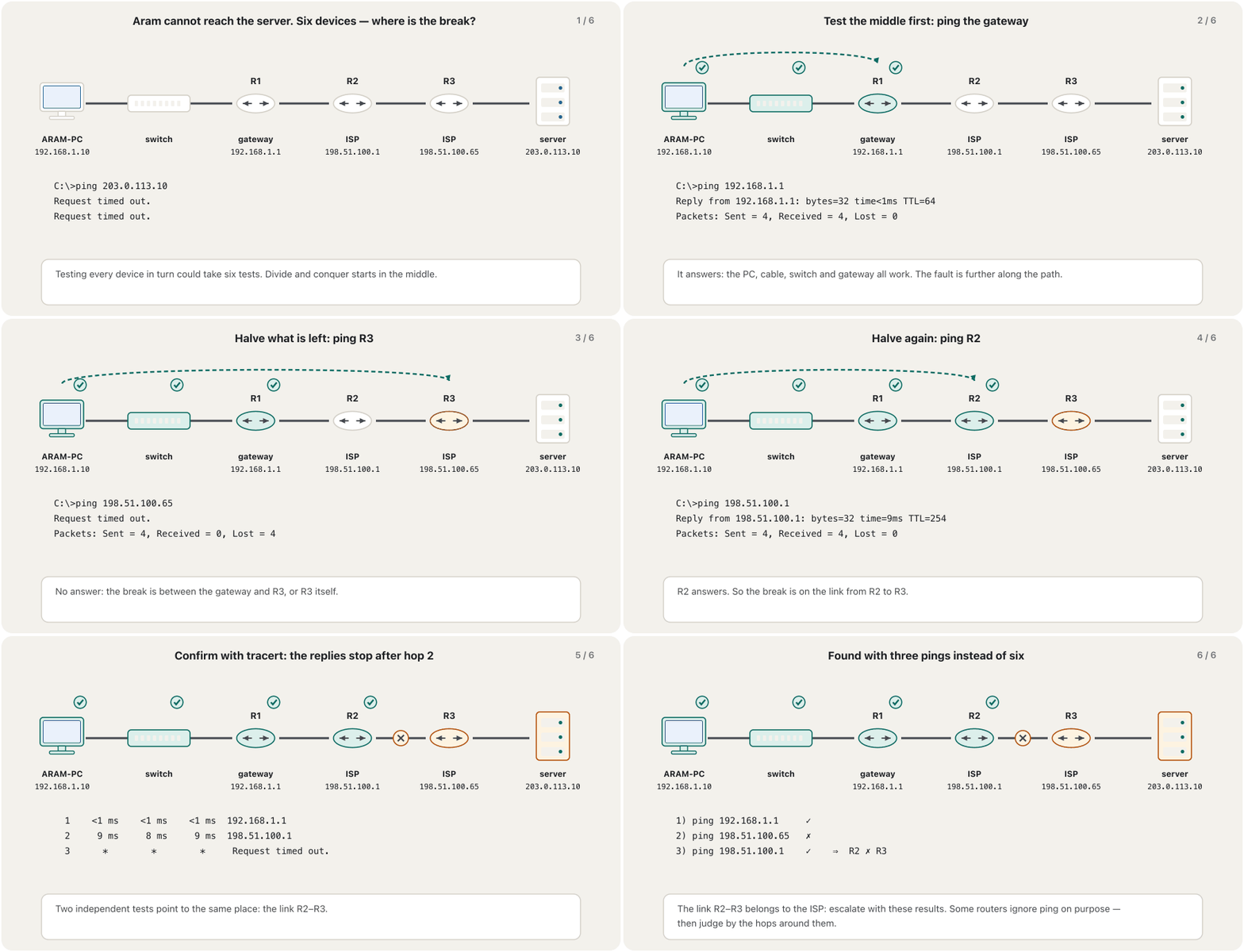
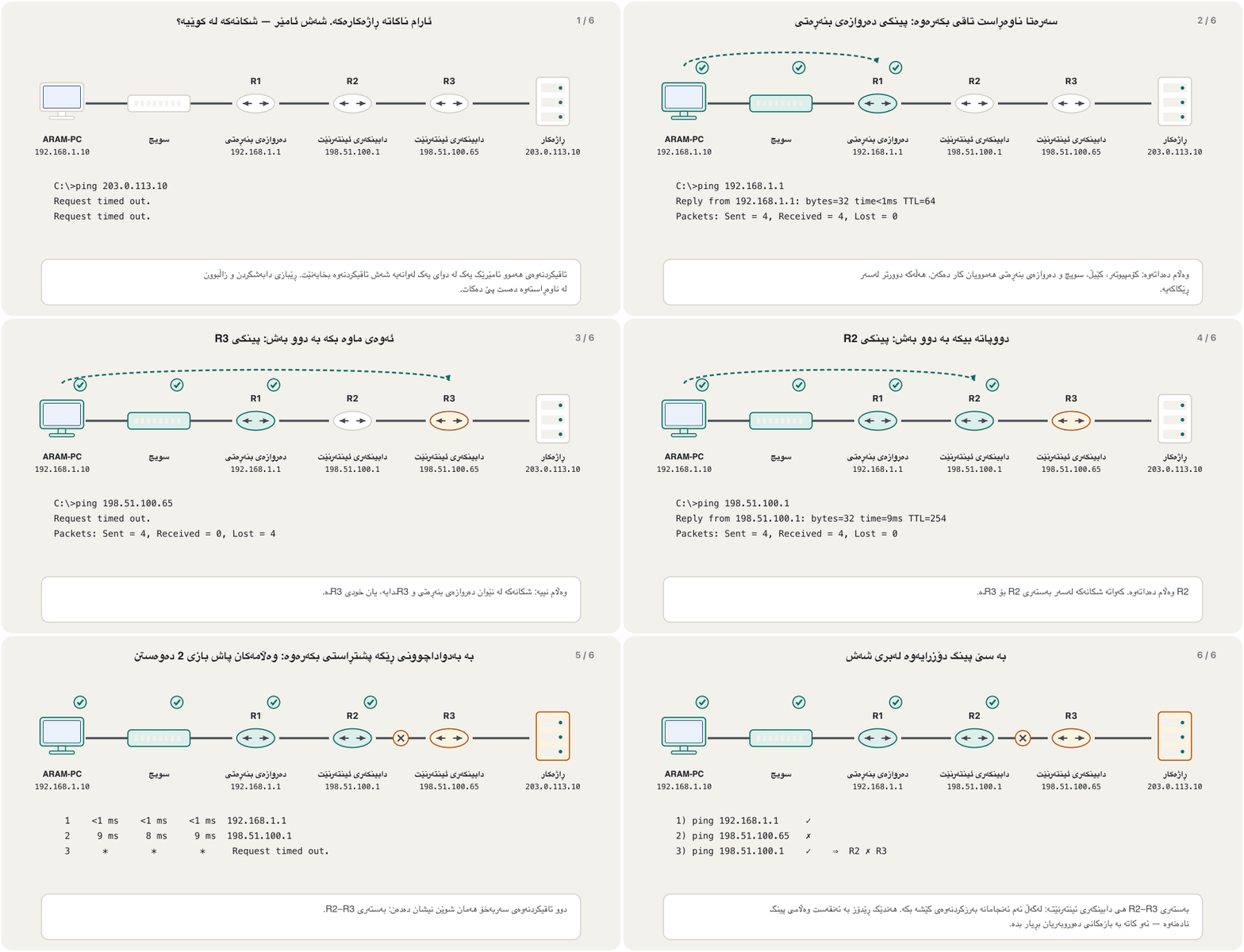
Divide and conquer starts in the middle of the stack, usually at the network layer with ping. If the ping works, layers 1–3 are fine: go up. If it fails, go down. The same idea works along a path: ping a device in the middle; whichever half fails, test its middle next. Each test halves the suspects, which is why many engineers start this way.
Each ping halves the suspects: three tests find the broken link among six devices.هەر گوماناوییەکان دەکات بە نیوە: سێ تاقیکردنەوە بەستەرە پچڕاوەکە لە نێوان شەش ئامێردا دەدۆزنەوە.CêIT
Ways to search: bottom-up, top-down, divide and conquerڕێگاکانی گەڕان: خوارەوە بۆ سەرەوە، سەرەوە بۆ خوارەوە، دابەشکردن و زاڵبوون
Follow the path, swap and compareشوێنکەوتنی ڕێگە، گۆڕینەوە و بەراوردکردن
Follow the path: find the real route the packets take — tracert shows each router — and check only the devices and links on it (tracert). It usually helps another approach. Swap components: replace a suspect cable, port or PC with one you know works and watch whether the problem stays, moves or disappears. It needs no passwords, but it tells you little about why. Compare a working PC with the broken one — ipconfig /all side by side often shows the difference at once.
Left, follow the path: PC, R1, R2, R3 and a server in a row, PC to R2 green, a cross after R2; a tracert listing with replies from 192.168.1.1 and 198.51.100.1 and “Request timed out” at hop 3; check only the devices and links on that path — here the link after R2. Right, swap components: a PC and a switch joined by cable A (orange) and a known-good cable B (green); problem stays — not the cable; moves with cable A — the cable; disappears — replace A. Below, compare with a working PC: “works: Gateway 192.168.1.1” next to “broken: Gateway 192.168.1.11”; ipconfig /all on both shows the difference.چەپ، ڕێبازی شوێنکەوتنی ڕێگە: کۆمپیوتەر، R1، R2، R3 و ڕاژەکارێک لە ڕیزێکدا، لە کۆمپیوتەرەوە تا R2 سەوزە، خاچێک دوای R2؛ لیستی tracert بە وەڵامی 192.168.1.1 و 198.51.100.1 و «Request timed out» لە بازی 3؛ تەنیا ئامێر و بەستەرەکانی سەر ئەو ڕێگایە بپشکنە — لێرەدا بەستەری دوای R2. ڕاست، گۆڕینەوەی پارچە: کۆمپیوتەرێک و سویچێک بە کێبڵی A (پرتەقاڵی) و کێبڵی باشی B (سەوز) بەستراون؛ کێشەکە دەمێنێت — کێبڵەکە نییە؛ لەگەڵ کێبڵی A دەڕوات — کێبڵەکەیە؛ نامێنێت — A بگۆڕە. خوارەوە، بەراورد لەگەڵ کۆمپیوتەرێکی کارا: «کار دەکات: Gateway 192.168.1.1» لە تەنیشت «تێکچووە: Gateway 192.168.1.11»؛ ipconfig /all لەسەر هەردووکیان جیاوازییەکە نیشان دەدات.
Follow the path narrows where; swapping and comparing narrow what. شوێنەکە تەسک دەکاتەوە؛ گۆڕینەوە و بەراوردکردن شتەکە تەسک دەکەنەوە.CêIT
Symptoms point to a layerنیشانەکان ئاماژە بە چینێک دەکەن
With experience, the first symptom already suggests a layer and a first test. This table is a starting point for your theory — always test it before you change anything.
Beyond your network, or now and then: from symptom to first test. The lessons that teach each tool are linked in the toolbox below.لە دەرەوەی ، یان جار جار: لە نیشانەوە بۆ یەکەم تاقیکردنەوە. ئەو وانانەی هەر ئامرازێک فێر دەکەن لە سندوقی ئامرازەکانی خوارەوەدا بەستراون.
Symptoms point to a layerنیشانەکان ئاماژە بە چینێک دەکەن
A decision tree by layerدارێکی بڕیار بە پێی چین
For the most common complaint — “I can’t open a website” — the table becomes a short series of yes/no questions, from the bottom up. Each “no” stops at a likely cause; each “yes” climbs one layer.
Six yes/no questions down the left, each with a “no” arrow to a likely cause on the right. 1 Link light on or Wi-Fi connected? No: layer 1 — cable, port, Wi-Fi signal or password. 2 ipconfig shows a real address, not 169.254.x.x? No: DHCP — check the server and VLAN, then ipconfig /renew. 3 Can you ping the default gateway? No: local layer 2–3 — IP, mask, gateway, switch port. 4 Can you ping a known Internet address? No: router, NAT or ISP — tracert, modem lights. 5 Does nslookup find the name? No: DNS — check the DNS server setting, then ipconfig /flushdns. 6 Do other websites open? No: browser, proxy or app on this PC. Yes at the end: only that site fails — its server or firewall; test port 443, try another network, escalate.شەش پرسیاری بەڵێ/نەخێر بە لای چەپدا، هەریەکە تیرێکی «نا»ی هەیە بۆ هۆکارێکی ئەگەری لە ڕاست. 1 گڵۆپی بەستن داگیرساوە یان وایفای پەیوەستە؟ نا: چینی 1 — کێبڵ، دەرچە، هێز یان تێپەڕەوشەی وایفای. 2 ipconfig ناونیشانی ڕاستەقینە نیشان دەدات، نەک 169.254.x.x؟ نا: DHCP — ڕاژەکارەکە و VLAN بپشکنە، پاشان ipconfig /renew. 3 دەتوانیت پینگی دەروازەی بنەڕەتی بکەیت؟ نا: چینی 2–3ـی ناوخۆیی — IP، ماسک، دەروازەی بنەڕەتی، دەرچەی سویچ. 4 دەتوانیت پینگی ناونیشانێکی ناسراوی ئینتەرنێت بکەیت؟ نا: ڕێدۆز، NAT یان دابینکەری ئینتەرنێت — tracert، گڵۆپەکانی مۆدێم. 5 nslookup ناوەکە دەدۆزێتەوە؟ نا: DNS — ڕێکخستنی ڕاژەکاری DNS بپشکنە، پاشان ipconfig /flushdns. 6 تۆڕگەکانی تر دەکرێنەوە؟ نا: تۆڕگەڕ، proxy یان ئەپ لەسەر ئەم کۆمپیوتەرە. بەڵێ لە کۆتاییدا: تەنیا ئەو تۆڕگەیە تێکچووە — ڕاژەکار یان ئاگرەدیواری خۆی؛ پۆرتی 443 تاقی بکەرەوە، لە ڕایەڵەیەکی ترەوە هەوڵ بدە، بەرزکردنەوەی کێشە.
Bottom-up with a purpose: one question per layer, and every “no” names a suspect.خوارەوە بۆ سەرەوە بە مەبەستەوە: یەک پرسیار بۆ هەر چینێک و هەر «نا»یەک گوماناوییەک ناو دەبات.CêIT
Your toolbox — every tool from earlier lessonsسندوقی ئامرازەکانت — هەموو ئامرازەکانی وانەکانی پێشوو
You have already met every tool you need. Here they are arranged by the layer they test — start with the layer your symptom points to:
Five real cases, layer by layerپێنج دۆخی ڕاستەقینە، چین بە چین
Each case below follows the same card: symptom → test → finding → fix. Read the symptom, decide which layer and which test you would start with, then check the card. The order runs from layer 1 up to the application.
هەر دۆخێکی خوارەوە هەمان کارت پەیڕەو دەکات: نیشانە ← تاقیکردنەوە ← دۆزینەوە ← چارەسەر. نیشانەکە بخوێنەوە، بڕیار بدە بە کام چین و کام تاقیکردنەوە دەست پێ دەکەیت، پاشان کارتەکە بپشکنە. ڕیزەکە لە چینی 1ـەوە بەرەو دەڕوات.
Case 1 — layer 1: “Network cable unplugged”
Case 2 — DHCP: an address in 169.254.x.x
Case 3 — DNS: the address works, the name does not
Case 4 — gateway and ISP: the LAN works, the Internet does not
Case 5 — server or firewall: only one website fails
دۆخی 1 — چینی 1: «Network cable unplugged»
دۆخی 2 — : ناونیشانێک لە 169.254.x.x
دۆخی 3 — DNS: ناونیشانەکە کار دەکات، ناوەکە نا
دۆخی 4 — و : کار دەکات، نا
دۆخی 5 — یان : تەنیا یەک تێکچووە
Five real cases, layer by layerپێنج دۆخی ڕاستەقینە، چین بە چین
Case 1: “Network cable unplugged”دۆخی 1: «Network cable unplugged»
Dilan’s PC has no network, while the PCs beside it work: one PC, so suspect its own cable, port or card — and start at the bottom.
دیلان هیچ نییە، لە کاتێکدا تەنیشتی کار دەکەن: یەک ، بۆیە گومانت لە کێبڵ، یان کارتی خۆی بێت — و لە خوارەوە دەست پێ بکە.
A scenario card, layer 1. Symptom: Dilan’s desktop PC shows no network, the PCs next to it work; ipconfig shows “Media disconnected”. Test: look at the link lights on the PC and the switch port, swap in a known-good cable, test the old one. Finding: no light with the old cable, light with the new one; the cable tester shows wire 3 open. Fix: replace the patch cable, check that the network works, log the fault and throw the bad cable away.کارتی دۆخ، چینی 1. نیشانە: کۆمپیوتەری مێزیی دیلان هیچ ڕایەڵەیەک نیشان نادات، کۆمپیوتەرەکانی تەنیشتی کار دەکەن؛ ipconfig «Media disconnected» نیشان دەدات. تاقیکردنەوە: سەیری گڵۆپەکانی بەستن لەسەر کۆمپیوتەرەکە و دەرچەی سویچ بکە، کێبڵێکی باش دابنێ، کۆنەکە بپشکنە. دۆزینەوە: بە کێبڵە کۆنەکە ڕووناکی نییە، بە نوێیەکە هەیە؛ پشکنەری کێبڵەکە نیشان دەدات تەلی 3 پچڕاوە. چارەسەر: کێبڵەکە بگۆڕە، دڵنیا ببەرەوە ڕایەڵەکە کار دەکات، هەڵەکە تۆمار بکە و کێبڵە خراپەکە فڕێ بدە.
Layer 1: the link light and a known-good cable answer the question in a minute.چینی 1: و کێبڵێکی باش لە خولەکێکدا وەڵامی پرسیارەکە دەدەنەوە.CêITDilan’s PC: Windows sees no linkکۆمپیوتەری دیلان: Windows هیچ بەستنێک نابینێتBATType in a terminalلە تێرمیناڵدا بینووسە
ipconfig
Outputدەرئەنجام
Ethernet adapter Ethernet:

   Media State . . . . . . . . . . . : Media disconnected
   Connection-specific DNS Suffix  . :
Five real cases, layer by layerپێنج دۆخی ڕاستەقینە، چین بە چین
Case 2: an address in 169.254.x.xدۆخی 2: ناونیشانێک لە 169.254.x.x
Hana’s laptop shows “No internet” and an address that starts with 169.254. That is APIPA: Windows asked DHCP and got no answer (No answer: APIPA and 169.254). The link works, so the question is: why does DHCP not reach this port?
هانا «No internet» و ناونیشانێک نیشان دەدات کە بە 169.254 دەست پێ دەکات. ئەوە : Windows داوای لە DHCP کرد و وەڵامی وەرنەگرت (وەڵام نییە: APIPA و 169.254). بەستنەکە کار دەکات، بۆیە پرسیارەکە ئەمەیە: بۆچی DHCP ناگاتە ئەم ؟
A scenario card, DHCP and layer 3. Symptom: Hana’s laptop on a wall port says “No internet” with IPv4 169.254.12.7; everyone else is fine. Test: renew the address — ipconfig /renew answers “unable to contact your DHCP server” — then try the port the next desk uses. Finding: on the other port she gets 192.168.1.57 at once; her wall port is patched into the wrong VLAN. Fix: ask the network admin to move the port to the staff VLAN (escalate), then renew and test.کارتی دۆخ، DHCP و چینی 3. نیشانە: لاپتۆپی هانا لەسەر دەرچەیەکی دیوار دەڵێت «No internet» بە IPv4 169.254.12.7؛ هەموو ئەوانی تر باشن. تاقیکردنەوە: ناونیشانەکە نوێ بکەرەوە — ipconfig /renew وەڵام دەداتەوە «unable to contact your DHCP server» — پاشان دەرچەی مێزی تەنیشت تاقی بکەرەوە. دۆزینەوە: لەسەر دەرچەکەی تر یەکسەر 192.168.1.57 وەردەگرێت؛ دەرچەی دیوارەکەی بە VLANـی هەڵە بەستراوە. چارەسەر: داوا لە بەڕێوەبەری ڕایەڵە بکە دەرچەکە بخاتە VLANـی کارمەندان (بەرزکردنەوەی کێشە)، پاشان نوێی بکەرەوە و تاقی بکەرەوە.
169.254.x.x always means “no DHCP answer” — find out why the answer does not arrive.169.254.x.x هەمیشە واتە «DHCP وەڵامی نەدایەوە» — بزانە بۆچی وەڵامەکە ناگات.CêITRenewing fails on the wrong portنوێکردنەوە لەسەر دەرچەی هەڵە سەرناکەوێتBATType in a terminalلە تێرمیناڵدا بینووسە
ipconfig /renew
Outputدەرئەنجام
An error occurred while renewing interface Ethernet : unable to contact your DHCP server. Request has timed out.
Five real cases, layer by layerپێنج دۆخی ڕاستەقینە، چین بە چین
Case 3: the address works, the name does notدۆخی 3: ناونیشانەکە کار دەکات، ناوەکە نا
Rebin can ping 203.0.113.10 but not www.example.com: layers 1–3 and the way to the Internet are fine; only the name fails. That points straight at DNS (Ask DNS yourself: nslookup).
ڕێبین دەتوانێت 203.0.113.10 بکات بەڵام نەک www.example.com: چینەکانی 1–3 و ڕێگای باشن؛ تەنیا ناوەکە تێکچووە. ئەمە ڕاستەوخۆ ئاماژە بە DNS دەکات (ڕاستەوخۆ لە DNS بپرسە: nslookup).
A scenario card, DNS. Symptom: Rebin cannot open any website by name; ping 203.0.113.10 works, ping www.example.com fails. Test: ask DNS directly — nslookup times out — and read the DNS server in ipconfig /all: 192.168.1.53. Finding: someone typed an old DNS server by hand last week, and it no longer exists. Fix: set DNS back to automatic (DHCP), run ipconfig /flushdns and test again.کارتی دۆخ، DNS. نیشانە: ڕێبین ناتوانێت هیچ تۆڕگەیەک بە ناو بکاتەوە؛ ping 203.0.113.10 کار دەکات، ping www.example.com نا. تاقیکردنەوە: ڕاستەوخۆ لە DNS بپرسە — nslookup کاتی تەواو دەبێت — و ڕاژەکاری DNS لە ipconfig /all بخوێنەوە: 192.168.1.53. دۆزینەوە: هەفتەی ڕابردوو کەسێک ڕاژەکارێکی کۆنی DNSـی بە دەست نووسیوە و ئیتر نەماوە. چارەسەر: DNS بگەڕێنەوە سەر خۆکار (DHCP)، ipconfig /flushdns بکە و دووپاتە تاقی بکەرەوە.
When the address works and the name fails, the network is fine and DNS is not.کاتێک ناونیشان کار دەکات و ناو نا، باشە و DNS نا.CêITThe name fails, and the DNS server does not answerناوەکە سەرناکەوێت و ڕاژەکاری DNS وەڵام ناداتەوەBATType in a terminalلە تێرمیناڵدا بینووسە
ping www.example.comnslookup www.example.com
Outputدەرئەنجام
Ping request could not find host www.example.com. Please check the name and try again.

DNS request timed out.
    timeout was 2 seconds.
Server:  UnKnown
Address:  192.168.1.53

DNS request timed out.
    timeout was 2 seconds.
DNS request timed out.
    timeout was 2 seconds.
DNS request timed out.
    timeout was 2 seconds.
DNS request timed out.
    timeout was 2 seconds.
*** Request to UnKnown timed-out
Five real cases, layer by layerپێنج دۆخی ڕاستەقینە، چین بە چین
Case 4: the LAN works, the Internet does notدۆخی 4: ڕایەڵەی ناوچەیی کار دەکات، ئینتەرنێت نا
The whole office lost the Internet at once, but shared folders and the printer still work. Everyone is affected and the LAN is fine, so look at the gateway and beyond — divide and conquer from the gateway outwards.
هەموو نووسینگە یەکسەر لەدەست دا، بەڵام و هێشتا کار دەکەن. هەمووان کاریگەرن و باشە، بۆیە سەیری و دوای ئەو بکە — لە بەرەو دەرەوە.
A scenario card, gateway and ISP. Symptom: the whole office — shared folders and the printer work, but no website opens. Test: ping the gateway 192.168.1.1 (it works), trace the path (tracert stops after hop 1) and look at the ONT’s lights. Finding: the LAN and the router are fine; the ONT’s fibre light is red, the link to the ISP is down. Fix: escalate to the ISP with your results and the start time; when it is back, verify and log the outage.کارتی دۆخ، دەروازەی بنەڕەتی و دابینکەری ئینتەرنێت. نیشانە: هەموو نووسینگە — فۆڵدەرە هاوبەشەکان و چاپەرەکە کار دەکەن، بەڵام هیچ تۆڕگەیەک ناکرێتەوە. تاقیکردنەوە: پینگی دەروازەی بنەڕەتی 192.168.1.1 (کار دەکات)، ڕێگاکە بپشکنە (tracert پاش بازی 1 دەوەستێت) و سەیری گڵۆپەکانی ONT بکە. دۆزینەوە: ڕایەڵەی ناوچەیی و ڕێدۆزەکە باشن؛ گڵۆپی فایبەری ONT سوورە، بەستەر بۆ دابینکەری ئینتەرنێت پچڕاوە. چارەسەر: بە ئەنجامەکانت و کاتی دەستپێکردن بەرزکردنەوەی کێشە بۆ دابینکەری ئینتەرنێت بکە؛ کاتێک گەڕایەوە دڵنیا ببەرەوە و وەستانەکە تۆمار بکە.
Beyond your gateway the fix is often someone else’s: escalate with evidence.دوای چارەسەر زۆرجار هی کەسێکی ترە: بە بەڵگەوە بکە.CêITReplies stop after the gatewayوەڵامەکان پاش دەروازەی بنەڕەتی دەوەستنBATType in a terminalلە تێرمیناڵدا بینووسە
tracert 203.0.113.10
Outputدەرئەنجام
Tracing route to 203.0.113.10 over a maximum of 30 hops

  1    <1 ms    <1 ms    <1 ms  192.168.1.1
  2     *        *        *     Request timed out.
  3     *        *        *     Request timed out.
Five real cases, layer by layerپێنج دۆخی ڕاستەقینە، چین بە چین
Case 5: only one website failsدۆخی 5: تەنیا یەک تۆڕگە تێکچووە
Every site opens except the university portal. DNS gives its address, so test the service itself: does TCP port 443 answer? Then try from another network, such as a phone on mobile data. If it fails there too, the problem is the server, not you.
A scenario card, layers 4–7. Symptom: only the university portal fails; every other site opens. Test: resolve the name (nslookup works), test port 443 with Test-NetConnection (False), and try from a phone on mobile data. Finding: DNS and our network are fine; the portal’s server, or a firewall in front of it, does not answer on 443. Fix: escalate to the portal’s admins with the results, tell the users, and test again later.کارتی دۆخ، چینەکانی 4–7. نیشانە: تەنیا پۆرتاڵی زانکۆ کار ناکات؛ هەموو تۆڕگەکانی تر دەکرێنەوە. تاقیکردنەوە: ناوەکە بدۆزەوە (nslookup کار دەکات)، پۆرتی 443 بە Test-NetConnection تاقی بکەرەوە (False) و لە مۆبایلێک بە ئینتەرنێتی مۆبایل هەوڵ بدە. دۆزینەوە: DNS و ڕایەڵەکەی ئێمە باشن؛ ڕاژەکاری پۆرتاڵەکە، یان ئاگرەدیوارێک لە بەردەمیدا، لەسەر 443 وەڵام ناداتەوە. چارەسەر: لەگەڵ ئەنجامەکان بەرزکردنەوەی کێشە بۆ بەڕێوەبەرانی پۆرتاڵەکە بکە، بە بەکارهێنەرەکان بڵێ و دواتر دووپاتە تاقی بکەرەوە.
A test from a second network tells you whose problem it is.تاقیکردنەوەیەک لە دووەمەوە پێت دەڵێت کێشەکە هی کێیە.CêITPowerShell: the name resolves, but port 443 does not answerPowerShell: ناوەکە دەدۆزرێتەوە، بەڵام پۆرتی 443 وەڵام ناداتەوەPOWERSHELLType in a terminalلە تێرمیناڵدا بینووسە
Troubleshooting is learned by doing. Work in pairs in the CêIT network lab (choose the “three” example: two routers, two LANs, a server) or in Packet Tracer. One partner secretly breaks one thing; the other finds it with the seven steps and the layer checklist, then fixes it and writes a short note. In Packet Tracer, simulation mode shows where each packet stops (Real-time and simulation mode).
بە کردن فێر دەبیت. بە جووت لە تاقیگەی ڕایەڵەی CêIT (نموونەی «three» هەڵبژێرە: دوو ، دوو و ) یان لە Packet Tracer کار بکەن. هاوبەشێک بە نهێنی یەک شت تێک دەدات؛ ئەوی تر بە حەوت هەنگاوەکە و لیستی چینەکان دەیدۆزێتەوە، پاشان چاکی دەکاتەوە و تێبینییەکی کورت دەنووسێت. لە Packet Tracer، باری هاوشێوەسازی نیشان دەدات هەر لە کوێ دەوەستێت (باری ڕاستەوخۆ و باری هاوشێوەسازی).
A lab topology: routers R1 and R2 joined by a cable; switch 1 with PC1 (.10) and PC2 (.11) on 192.168.1.0/24; switch 2 with PC3 (.10) and a server (.100) on 192.168.2.0/24. Numbered faults: 1 delete the cable between R1 and R2; 2 give PC2 a wrong default gateway; 3 change PC3’s mask to 255.255.0.0; 4 give PC1 the same address as PC2; 5 unplug the server. Bottom: one partner breaks one thing; the other finds it with ping and tracert, layer by layer.تۆپۆلۆجیی تاقیگەیەک: ڕێدۆزەکان R1 و R2 بە کێبڵێک بەستراون؛ سویچی 1 لەگەڵ PC1 (.10) و PC2 (.11) لەسەر 192.168.1.0/24؛ سویچی 2 لەگەڵ PC3 (.10) و ڕاژەکارێک (.100) لەسەر 192.168.2.0/24. هەڵە ژمارەکراوەکان: 1 کێبڵی نێوان R1 و R2 بسڕەوە؛ 2 دەروازەی بنەڕەتیی PC2 بگۆڕە بۆ ناونیشانێکی هەڵە؛ 3 ماسکی PC3 بکە بە 255.255.0.0؛ 4 هەمان ناونیشانی PC2 بدە بە PC1؛ 5 کێبڵی ڕاژەکارەکە دەربهێنە. خوارەوە: هاوبەشێک یەک شت تێک دەدات؛ ئەوی تر بە ping و tracert، چین بە چین، دەیدۆزێتەوە.
Five faults to plant and find — the same kinds you will meet at work.پێنج هەڵە بۆ چاندن و دۆزینەوە — هەمان جۆری ئەوانەی لە کاردا دەیانبینیت.CêIT
Verify, prevent and documentدڵنیابوونەوە، ڕێگری و نووسینەوە
A fix is finished only when the user confirms that everything works — not just the one test you ran. Then prevent it: fix the same setting on the other PCs, label the patch panel, replace the other old cables. Finally document it, while you still remember: the findings, the actions, the outcome and what you learned. The next person — maybe you — solves the same problem in minutes. How to write a good ticket is in Write a useful ticket.
A ticket card marked closed, with eight ticked rows. Reported: 7 Nov 2026, 09:12, Hana, staff room. Symptom: laptop “No internet”, 169.254.12.7. Scope: one wall port, other users fine. Tests: ipconfig /renew failed, the next port worked. Cause: port 2-14 patched into VLAN 30 (guests). Fix: the admin moved 2-14 to VLAN 10 (escalated). Verified: Hana has 192.168.1.57, web and printer OK. Prevent: labelled the patch panel, updated the port list. Bottom: findings, actions, outcomes, lessons learned — written while you still remember.کارتی تیکێتی پشتگیری کە داخراوە، بە هەشت ڕیزی نیشانەکراو. ڕاپۆرت کرا: 7ی تشرینی دووەم 2026، 09:12، هانا، ژووری کارمەندان. نیشانە: لاپتۆپ «No internet»، 169.254.12.7. سنوور: یەک دەرچەی دیوار، بەکارهێنەرەکانی تر باشن. تاقیکردنەوەکان: ipconfig /renew سەرنەکەوت، دەرچەی تەنیشت کاری کرد. هۆکار: دەرچەی 2-14 بە VLAN 30 (میوان) بەستراوە. چارەسەر: بەڕێوەبەر 2-14ـی گواستەوە بۆ VLAN 10 (بەرزکردنەوەی کێشە). پشتڕاستکرایەوە: هانا 192.168.1.57ـی هەیە، وێب و چاپەر باشن. ڕێگری: پانێڵی پاچەکە نیشانە کرا، لیستی دەرچەکان نوێ کرایەوە. خوارەوە: دۆزراوەکان، کردارەکان، ئەنجامەکان، وانە فێربووەکان — کاتێک هێشتا لە بیرتە بینووسەوە.
Step 7 in practice: one card per problem, filled in at once.هەنگاوی 7 لە کرداردا: یەک کارت بۆ هەر کێشەیەک، یەکسەر پڕ دەکرێتەوە.CêIT
Common mistakesهەڵە باوەکان
Exercisesڕاهێنانەکان
ExerciseڕاهێنانWhich layer?کام چین؟
For each symptom, name the most likely layer and your first test: (a) the switch port’s light is off; (b) ipconfig shows 169.254.40.9; (c) ping 192.168.1.1 times out but the PC has a correct-looking address; (d) ping 203.0.113.10 works, ping www.example.com does not; (e) only one web application fails for everyone.
ExerciseڕاهێنانDivide and conquer on paperدابەشکردن و زاڵبوون لەسەر کاغەز
The path from Shilan’s PC to a server has eight links (seven switches and routers in between), and one link is broken. Using divide and conquer, how many pings do you need at most to find it? Explain.
ڕێگای نێوان شیلان و هەشت بەستەری هەیە (حەوت سویچ و لە نێوانیاندا) و یەکێکیان پچڕاوە. بە ، لانیزۆر چەند پێویستە بۆ دۆزینەوەی؟ ڕوونی بکەرەوە.
Show answerوەڵامەکە پیشان بدە
Three. Ping the device in the middle (after link 4): each answer halves the suspect links, 8 → 4 → 2 → 1, so log28=3 pings. Testing every device in order could take seven. (If some routers ignore ping, use tracert to see the hops.)
ExerciseڕاهێنانWrite the ticketتیکێتی پشتگیرییەکە بنووسە
Write the documentation card for Case 3 (Rebin’s DNS problem) with the eight rows of the checklist card: reported, symptom, scope, tests, cause, fix, verified, prevent.
پشتڕاستکرایەوە: ڕێبین سێ کردەوە. ڕێگری: تر بۆ DNSـی دەستی پشکنران؛ بە کارمەندان گوترا DNS بە دەست مەنووسن.
ExerciseڕاهێنانSpot the stepهەنگاوەکە بدۆزەوە
Karwan’s PC lost the network. He immediately reinstalls the network driver, changes the IP address and restarts the router, and then the network works again. Which steps of the method did he skip, and what risk did he take?
کاروان لەدەست دا. یەکسەر دووپاتە دادەنێت، دەگۆڕێت و دەکات، پاشان دووپاتە کار دەکات. کام هەنگاوەکانی ڕێبازەکەی بازداوە و چ مەترسییەکی کرد؟
Show answerوەڵامەکە پیشان بدە
He skipped identifying the problem (scope: was it only his PC?), forming and testing a theory, and planning the effects — restarting the router cut off everyone. He changed three things at once, so he does not know the real cause, and he did not verify or document it. The fault may return.
بازی دا بەسەر دیاریکردنی کێشەکە (سنوور: تەنیا خۆی بوو؟)، دانان و تاقیکردنەوەی گریمانە و پلانی کاریگەرییەکان. هەمووانی پچڕاند. سێ شتی بە یەکجار گۆڕی، بۆیە هۆکارە ڕاستەقینەکە نازانێت، هەروەها پشتڕاستی نەکردەوە و نەینووسییەوە. لەوانەیە هەڵەکە بگەڕێتەوە.
Summaryپوختە
Use the seven steps on networks: identify (who, since when, what changed), theory, test, plan, implement or escalate, verify and prevent, document.
The OSI layers are a checklist: each layer needs the one below, so a low fault can look like a high one.
Search bottom-up for hardware, top-down for one application, divide and conquer (start with ping) when unsure; follow the path, swap and compare to narrow it down.
Symptoms point to layers: no light → 1; 169.254 → DHCP; gateway fails → local 2–3; LAN but no Internet → gateway, NAT, ISP; name fails → DNS; one site → its server or firewall.
Your toolbox: link lights and a cable tester, ipconfig, ping, tracert, pathping, arp, nslookup, netstat, Test-NetConnection — and Packet Tracer or the CêIT lab to practise.
Change one thing at a time, escalate with evidence, verify with the user and write it down.
This lecture is a first edition. The Kurdish text and terminology are waiting for review by Kurdish IT teachers.ئەم وانەیە چاپی یەکەمە. دەقە کوردییەکە و زاراوەکانی چاوەڕێی پێداچوونەوەی مامۆستایانی کوردی بواری IT ن.