Chapterبەش 6 · Lectureوانە 6.7
IP Addresses and MAC Addressesناونیشانەکانی IP و ناونیشانەکانی MAC
How devices are found on a network: MAC addresses and private Wi-Fi addresses, IPv4 and its octets, the subnet mask and default gateway, private and public addresses with NAT, DHCP, IPv6, DNS and ARP, and how to see your own addresses on Windows, macOS and phones.
ئامێرەکان چۆن لەسەر دەدۆزرێنەوە: و ناونیشانی تایبەتی ، و ، و ، و لەگەڵ NAT، ، ، و ، هەروەها چۆن ناونیشانەکانی خۆت لەسەر Windows، macOS و مۆبایل ببینیت.
What you will learnچی فێر دەبیت
- Explain the difference between a MAC address and an IP address and where each is used.
- Read an IPv4 address, its octets and its subnet mask, and decide whether two devices are on the same network.
- Recognise private addresses and explain how NAT and the default gateway connect a home to the Internet.
- Describe how DHCP gives addresses, and how DNS and ARP find the next address.
- Write IPv6 addresses in short form and find your own addresses on a computer or phone.
- جیاوازیی نێوان و و شوێنی بەکارهێنانی هەریەکەیان ڕوون بکەیتەوە.
- ناونیشانێکی ، و بخوێنیتەوە و بڕیار بدەیت ئایا دوو ئامێر لەسەر هەمان .
- بناسیتەوە و ڕوون بکەیتەوە NAT و چۆن ماڵێک بە دەبەستن.
- وەسف بکەیت چۆن ناونیشان دەدات، هەروەها و چۆن ناونیشانی دواتر دەدۆزنەوە.
- ناونیشانەکانی بە شێوەی کورت بنووسیت و ناونیشانەکانی خۆت لەسەر یان مۆبایلێک بدۆزیتەوە.
Two addresses for every deviceدوو ناونیشان بۆ هەموو ئامێرێک
The course mentions TCP/IP and says that a switch reads "the physical device address" of a message, but it never explains addresses. This whole lesson is a supplement that fills that gap.
کۆرسەکە باسی دەکات و دەڵێت «ناونیشانی فیزیکیی ئامێر»ی نامەیەک دەخوێنێتەوە، بەڵام هەرگیز ناونیشانەکان ڕوون ناکاتەوە. هەموو ئەم وانەیە تەواوکەرێکە بۆ پڕکردنەوەی ئەو کەلێنە.
Every device on a network has two different addresses. Its MAC address is fixed in its network card at the factory and is used to deliver data inside one local network. Its IP address is given to it by the network it joins and is used to find it across networks, all the way through the Internet.
هەموو ئامێرێک لەسەر دوو ناونیشانی جیاوازی هەیە. لە کارگەوە لە جێگیر کراوە و بۆ گەیاندنی لەناو یەک بەکار دێت. ئەو پێی دەبەسترێت دەیداتێ و بۆ دۆزینەوەی لە نێوان بەکار دێت، تا تەواوی .
Think of a student at Salahaddin University. Her name stays the same all her life, wherever she goes: that is like the MAC address. Her address — Erbil, Ankawa, street 40, house 12 — changes when the family moves, and it is what the post office uses to reach her from another city: that is like the IP address. Inside her own classroom the teacher just calls her by name.
خوێندکارێکی زانکۆی سەڵاحەددین بهێنە بەرچاو. ناوەکەی هەموو ژیانی، لە هەر کوێیەک بێت، وەک خۆی دەمێنێتەوە: ئەمە وەک . ناونیشانی ماڵەکەی — هەولێر، عەنکاوە، شەقامی 40، ماڵی 12 — کاتێک خێزانەکەی بار دەکەن دەگۆڕێت. پۆستە ئەم ناونیشانە بەکار دەهێنێت بۆ ئەوەی لە شارێکی ترەوە پێی بگات: ئەمە وەک . لەناو پۆلەکەی خۆیدا مامۆستاکە تەنها بە ناو بانگی دەکات.
Where the analogy stops workingسنووری ئەم نموونەیە
A name can be shared by two people, but a MAC address is meant to be unique. And phones can now show a different "name" (MAC address) to each Wi-Fi network for privacy.
دوو کەس دەتوانن هەمان ناویان هەبێت، بەڵام بۆ ئەوەیە تاک بێت. هەروەها مۆبایلەکان ئێستا دەتوانن بۆ پاراستنی «ناوێکی» جیاواز () بە هەر پیشان بدەن.
Two addresses for every deviceدوو ناونیشان بۆ هەموو ئامێرێک
MAC address and IP address comparedبەراوردی ناونیشانی MAC و ناونیشانی IP
| Propertyتایبەتمەندی | MAC address | IP address |
|---|---|---|
| Given byکێ دەیدات | The maker of the network cardدروستکەری | The network the device joins (usually DHCP)ئەو ئامێرەکە دەچێتە سەری (زۆرجار DHCP) |
| Sizeقەبارە | 48 bits (6 bytes)48 (شەش ) | IPv4: 32 bits; IPv6: 128 bits: 32 ؛ : 128 |
| Used byکێ بەکاری دەهێنێت | Switches, inside one LAN، لەناو یەک | Routers, between networks، لە نێوان |
| Changes when you move?کە شوێنت دەگۆڕیت دەگۆڕێت؟ | No (except private Wi-Fi addresses)نەخێر (جگە لە ناونیشانی تایبەتی ) | Yes: a new network gives a new addressبەڵێ: نوێ ناونیشانێکی نوێ دەدات |
MAC addressesناونیشانەکانی MAC
A MAC address (Media Access Control address) is 48 bits long. It is written as 12 hexadecimal digits in six pairs, separated by colons or hyphens, for example 00:00:5E:00:53:2A. One hexadecimal digit stands for exactly four bits, which is why network addresses are printed in hex (see Hex to binary in Logic Design).
(Media Access Control) 48 درێژە. بە 12 ژمارەی لە شەش جووتدا دەنووسرێت کە بە دوو خاڵ یان هێڵی کورت لێک جیا دەکرێنەوە، بۆ نموونە 00:00:5E:00:53:2A. هەر ژمارەیەکی ڕێک چوار نیشان دەدات، بۆیە ناونیشانەکانی بە چاپ دەکرێن (بڕوانە شانزەیی بۆ دووانی لە دیزاینی ).
MAC addressesناونیشانەکانی MAC
Who gives MAC addresses, and who uses themکێ ناونیشانەکانی MAC دەدات و کێ بەکاریان دەهێنێت
- The first half (24 bits) is the maker's code, the OUI. The IEEE Registration Authority sells these codes to manufacturers and publishes the list, so the first half tells you who made the card.
- The second half is a number the maker gives each card, so that no two cards have the same address.
- Every network interface has its own MAC address: a laptop has one for Wi-Fi, one for Ethernet and one for Bluetooth.
- A switch learns which MAC address is on which of its ports and sends each frame only to the right port (the switch in the course notes reads this "physical device address"). MAC addresses are used only inside one LAN: a router does not pass them on to the next network.
- نیوەی یەکەم (24 ) کۆدی دروستکەرە، واتە OUI. دەسەڵاتی تۆمارکردنی IEEE ئەم کۆدانە بە دروستکەرەکان دەفرۆشێت و لیستەکەیان بڵاو دەکاتەوە، بۆیە نیوەی یەکەم پێت دەڵێت کێ کارتەکەی دروست کردووە.
- نیوەی دووەم ژمارەیەکە کە دروستکەرەکە دەیداتە هەر کارتێک، بۆ ئەوەی هیچ دوو کارتێک هەمان ناونیشانیان نەبێت.
- هەموو خۆی هەیە: یەکێکی بۆ ، یەکێک بۆ Ethernet و یەکێک بۆ هەیە.
- فێر دەبێت هەر لە پشت کام . پاشان هەر تەنها بۆ دروستەکە دەنێرێت ( تێبینییەکانی کۆرسەکە ئەم «ناونیشانی فیزیکیی ئامێر»ـە دەخوێنێتەوە). تەنها لەناو یەک بەکار دێن: نایانگوازێتەوە بۆ دواتر.
The network card itself is introduced in The network interface card and the MAC address, and how a switch learns MAC addresses is shown in Network Hardware: NICs, Switches and Routers.
خۆی لە کارتی ڕایەڵە و ناونیشانی MAC ناساندراوە و چۆنیەتیی فێربوونی لەلایەن لە ڕەقەواڵەی ڕایەڵە: کارتی ڕایەڵە، سویچ و ڕێدۆز پیشان دراوە.
MAC addressesناونیشانەکانی MAC
Private Wi-Fi addressesناونیشانی تایبەتی وایفای
A fixed MAC address has a privacy problem: phones send it in the open whenever they look for Wi-Fi, so shops, cafés or anyone listening could recognise the same phone again and again and follow its owner. Modern phones therefore show a different, random MAC address to each Wi-Fi network.
جێگیر کێشەیەکی هەیە: مۆبایلەکان هەر کاتێک بەدوای دەگەڕێن بە ئاشکرا دەینێرن، بۆیە دوکان، کافێ یان هەر کەسێک گوێ بگرێت دەتوانێت هەمان مۆبایل جار لە دوای جار بناسێتەوە و بەدوای خاوەنەکەیدا بڕوات. لەبەر ئەوە مۆبایلە نوێیەکان جیاواز و هەڕەمەکی بە هەر پیشان دەدەن.
- iPhone and iPad: "Private Wi-Fi Address" has been used by default since iOS 14. Since iOS 18 you choose Off, Fixed or Rotating: Fixed is the default on networks with WPA2 or stronger security, and Rotating, which changes the address every two weeks, on open or weakly protected networks. Macs with macOS 15 or later have the same choice.
- Android: since Android 10, each saved Wi-Fi network gets its own randomized MAC address by default; you can turn it off per network.
- Windows 10 and 11: the same idea is called Random hardware addresses (Settings › Network & internet › Wi-Fi). You turn it on for all networks or for one known network; it appears only if the Wi-Fi adapter supports it.
- iPhone و iPad: «Private Wi-Fi Address» لە iOS 14ـەوە بە شێوەی بنەڕەتی بەکار دێت. لە iOS 18ـەوە Off، Fixed یان Rotating هەڵدەبژێریت: Fixed بنەڕەتییە بۆ کە بە WPA2 یان بەهێزتر پارێزرابێت؛ Rotating، کە هەموو دوو هەفتە جارێک ناونیشانەکە دەگۆڕێت، بنەڕەتییە لە کراوە یان کەمپارێزراوەکاندا. ئامێرەکانی Mac بە macOS 15 یان دواتر هەمان هەڵبژاردنیان هەیە.
- Android: لە Android 10ـەوە، هەر پاشەکەوتکراو بە شێوەی بنەڕەتی هەڕەمەکیی خۆی هەیە؛ دەتوانیت بۆ هەر بیکوژێنیتەوە.
- Windows 10 و 11: هەمان بیرۆکە ناوی Random hardware addressesـە (Settings › Network & internet › Wi-Fi). بۆ هەموو یان بۆ یەک ناسراو هەڵیدەکەیت؛ تەنها کاتێک دەردەکەوێت کە پشتگیری بکات.
MAC addressesناونیشانەکانی MAC
Phones: MAC address and IMEIمۆبایل: ناونیشانی MAC و IMEI
Do phones have a MAC address? Yes: one for Wi-Fi and one for Bluetooth, like every device with a network card. But a phone has a second number that a laptop does not have: the IMEI (International Mobile Equipment Identity), 15 digits that identify the phone itself on the cellular network. Dial *#06# to see it; a dual-SIM phone shows two. Your phone number belongs to the SIM card; the IMEI belongs to the handset. (How phones use that network: What is a cellular network?)
ئایا مۆبایل هەیە؟ بەڵێ: یەکێک بۆ و یەکێک بۆ ، وەک هەموو ئامێرێک کە هەبێت. بەڵام مۆبایل ژمارەیەکی دووەمی هەیە کە نییەتی: (International Mobile Equipment Identity)، 15 ڕەقەم کە خودی مۆبایلەکە لەسەر دەناسێنن. بۆ بینینی *#06# لێبدە؛ مۆبایلی دوو سیمکارتی دوو ژمارە پیشان دەدات. ژمارە تەلەفۆنەکەت هی سیمکارتەکەیە؛ هی خودی ئامێرەکەیە. (مۆبایل چۆن ئەو ڕایەڵەیە بەکار دەهێنێت: ڕایەڵەی مۆبایل چییە؟)
| Questionپرسیار | MAC address | IMEI |
|---|---|---|
| What does it identify?چی دەناسێنێت؟ | one network interface (Wi-Fi, Ethernet or Bluetooth), seen only on the local networkیەک (، Ethernet یان )، تەنها لەسەر ناوخۆیی دەبینرێت | the phone itself, seen by the mobile operator's networkخودی مۆبایلەکە، کە کۆمپانیای مۆبایل لەسەر دەیبینێت |
| What does it look like?چۆن دەردەکەوێت؟ | 48 bits: 12 hexadecimal digits48 : 12 ڕەقەمی | 15 decimal digits; the last one is a check digit15 ڕەقەمی ؛ دوایینیان ڕەقەمی پشکنینە |
| Can it change?دەگۆڕێت؟ | yes: phones show a random MAC address to each Wi-Fi networkبەڵێ: مۆبایلەکان هەڕەمەکی بە هەر پیشان دەدەن | it is meant to stay fixed; the operator can block a stolen phone by its IMEIبڕیار وایە جێگیر بمێنێت؛ کۆمپانیای مۆبایل دەتوانێت مۆبایلێکی دزراو بە ڕابگرێت |
IPv4 addressesناونیشانەکانی IPv4
An IPv4 address is a 32-bit number. Thirty-two ones and zeros are hard to read, so we cut them into four groups of 8 bits, called octets (bytes), and write each octet as a decimal number from 0 to 255, with dots in between. This is called dotted decimal: 192.168.1.23.
ناونیشانێکی ژمارەیەکی 32 . خوێندنەوەی سی و دوو یەک و سفر قورسە، بۆیە دەیکەینە چوار گرووپی 8 کە پێیان دەوترێت octet ()؛ پاشان هەر گرووپێک وەک ژمارەیەکی دەیی لە 0 تا 255 دەنووسین، بە خاڵ لە نێوانیاندا. ئەمە پێی دەوترێت دەیی بە خاڵ (dotted decimal): 192.168.1.23.
Turning each octet into binary uses the method in Decimal to binary; the weights 128, 64, 32 … 1 of an 8-bit number are explained in The weights of a binary number. For example , so its octet is 11000000.
گۆڕینی هەر بۆ ئەو ڕێگایە بەکار دەهێنێت کە لە دەیی بۆ دووانیدایە؛ کێشەکانی 128، 64، 32 … 1ـی ژمارەیەکی 8 لە کێشەکانی ژمارەیەکی دووانی ڕوون کراونەتەوە. بۆ نموونە ، بۆیە 11000000ـە.
With 32 bits there are about 4.3 billion IPv4 addresses — fewer than the number of people on Earth, and far fewer than their phones, laptops and TVs.
بە 32 نزیکەی 4.3 ملیار ناونیشانی هەیە — کەمتر لە ژمارەی خەڵکی سەر زەوی و زۆر کەمتر لە مۆبایل، و تەلەفزیۆنەکانیان.
Network part, host part and the subnet maskبەشی ڕایەڵە، بەشی ئامێر و ماسکی ژێرڕایەڵە
An IP address has two parts, like a postal address: the network part says which network (the street) and the host part says which device on it (the house). The subnet mask tells where the split is. It is another 32-bit number whose bits are 1 under the network part and 0 under the host part. The common home mask 255.255.255.0 is 24 ones and 8 zeros, so it is also written /24.
وەک ناونیشانی پۆستە دوو بەشی هەیە: بەشی دەڵێت کام (شەقامەکە) و بەشی ئامێر دەڵێت کام ئامێرە لەسەری (ماڵەکە). دەڵێت جیاکەرەوەکە لە کوێیە. ژمارەیەکی تری 32 کە لە ژێر بەشی 1ـن و لە ژێر بەشی ئامێر 0. ماسکە باوەکەی ماڵان 255.255.255.0 بیست و چوار یەک و هەشت سفرە، بۆیە بە /24ـیش دەنووسرێت.
| Addressناونیشان | Network part (mask /24)بەشی (ماسکی /24) | Same network as 192.168.1.23?هەمان 192.168.1.23ـیە؟ |
|---|---|---|
192.168.1.23 | 192.168.1 | — |
192.168.1.50 | 192.168.1 | Yes: the printer next doorبەڵێ: تەنیشت |
192.168.2.7 | 192.168.2 | No: another network, reached through the routerنەخێر: ترە، لە ڕێگەی دەگاتێ |
With a /24 mask the host part has 8 bits, which gives 256 combinations. Two of them are reserved: host part all zeros (192.168.1.0) names the network itself, and all ones (192.168.1.255) means "everyone on this network" (broadcast). That leaves 254 addresses for devices:
بە ماسکی /24 بەشی ئامێر 8 هەیە، کە 256 تێکەڵە دەدات. دووانیان تەرخان کراون: بەشی ئامێر هەمووی سفر (192.168.1.0) ناوی خودی و هەمووی یەک (192.168.1.255) واتە «هەمووان لەسەر ئەم » (broadcast). 254 ناونیشان بۆ ئامێرەکان دەمێننەوە:
The default gatewayدەروازەی بنەڕەتی
Before a device sends anything, it compares the destination address with its own, using the mask. Same network? It sends the data straight to the destination inside the LAN. Another network? It sends the data to its default gateway: the router that joins the LAN to other networks. At home the gateway is the home router, usually at an address such as 192.168.1.1.
پێش ئەوەی ئامێرێک هیچ شتێک بنێرێت، بە ماسکەکە ناونیشانی شوێنی مەبەست بە ناونیشانی خۆی بەراورد دەکات. هەمان ؟ ڕاستەوخۆ لەناو دەنێرێت بۆ شوێنی مەبەست. تر؟ دەنێرێت بۆ : ئەو بە ترەوە دەبەستێت. لە ماڵەوە دەروازەکە ماڵەوەیە، زۆرجار لەسەر ناونیشانێکی وەک 192.168.1.1.
The address of the that a device sends data to when the destination is outside its own network, for example 192.168.1.1 in many homes.
ناونیشانی ئەو کە ئامێرێک بۆ دەنێرێت کاتێک شوێنی مەبەست لە دەرەوەی ڕایەڵەکەی خۆیەتی، بۆ نموونە 192.168.1.1 لە زۆرێک لە ماڵەکاندا.
In a village, you hand a letter for your neighbour straight to the neighbour. A letter for Duhok goes to the village post office, which knows how to send it on. The default gateway is the network's post office.
لە گوندێکدا، نامەیەک بۆ دراوسێکەت ڕاستەوخۆ دەدەیتە دەستی دراوسێکەت. نامەیەک بۆ دهۆک دەچێتە پۆستەی گوندەکە، کە دەزانێت چۆن بینێرێتە پێشەوە. پۆستەی .
Where the analogy stops workingسنووری ئەم نموونەیە
A post office reads the whole address; a router mostly looks only at the network part to choose the next router.
پۆستە هەموو ناونیشانەکە دەخوێنێتەوە؛ زۆرجار تەنها سەیری بەشی دەکات بۆ هەڵبژاردنی دواتر.
Private and public addressesناونیشانەکانی IPـی تایبەت و ناونیشانەکانی IPـی گشتی
IPv4 addresses ran out. On 3 February 2011 IANA, which shares out the world's address blocks, gave its last free IPv4 blocks to the five regional registries (RIPE NCC is the one for Europe and the Middle East, including Iraq). Two ideas kept IPv4 working: private addresses and NAT.
ناونیشانەکانی تەواو بوون. لە 3ی شوباتی 2011دا IANA، کە کۆمەڵە ناونیشانەکانی جیهان دابەش دەکات، دوایین کۆمەڵە ناونیشانی ئازادی دایە پێنج تۆمارگە هەرێمییەکە (RIPE NCC ئەوەیە کە بۆ ئەوروپا و ڕۆژهەڵاتی ناوەڕاستە، لەوانە عێراق). دوو بیرۆکە بە کارکردوویی هێشتەوە: و NAT.
Private addresses are three blocks that anyone may use inside their own network, set aside by RFC 1918. They are never routed on the Internet, so the same private address can be used in millions of homes at once:
سێ کۆمەڵە ناونیشانن کە هەر کەسێک دەتوانێت لەناو خۆیدا بەکاریان بهێنێت؛ RFC 1918 تەرخانی کردوون. هەرگیز لەسەر ناگوازرێنەوە، بۆیە هەمان دەکرێت لە هەمان کاتدا لە ملیۆنان ماڵدا بەکار بێت:
| Private blockکۆمەڵەی تایبەت | Rangeلە … تا … | Addressesژمارەی ناونیشان | Typical useبەکارهێنانی باو |
|---|---|---|---|
10.0.0.0/8 | 10.0.0.0 – 10.255.255.255 | 16,777,216 | Large companies, mobile operatorsکۆمپانیا گەورەکان، کۆمپانیاکانی |
172.16.0.0/12 | 172.16.0.0 – 172.31.255.255 | 1,048,576 | Medium networks مامناوەندەکان |
192.168.0.0/16 | 192.168.0.0 – 192.168.255.255 | 65,536 | Home and small-office routers ماڵ و ئۆفیسی بچووک |
A public address is unique on the whole Internet. Your internet provider gets public addresses from the regional registry and gives one to your home router. Every device inside your home has a private address, and all of them reach the Internet through that one public address:
لە تەواوی تاکە. لە تۆمارگە هەرێمییەکە وەردەگرێت و یەکێکیان دەداتە ماڵەکەت. هەموو ئامێرێکی ناو ماڵەکەت هەیە و هەموویان لە ڕێگەی ئەو یەک دەگەنە :
Public addresses are unique on the internet, private ones are reused inside homes, and NAT in the router swaps between them.
لەسەر تاکن، لەناو ماڵەکاندا دووبارە بەکار دەهێنرێنەوە و لەناو لە نێوانیاندا دەیانگۆڕێتەوە.
Plays 0:00-3:49: public and private IP addresses and NAT; stops before the class table with the wrong masks.
لە 0:00 تا 3:49 پەخش دەبێت: ، و ؛ پێش خشتەی کلاسەکان ڕادەوەستێت، کە ماسکەکانی تێیدا هەڵەن.
Private and public addressesناونیشانەکانی IPـی تایبەت و ناونیشانەکانی IPـی گشتی
NAT: many devices, one public addressNAT: زۆر ئامێر، یەک ناونیشانی IPـی گشتی
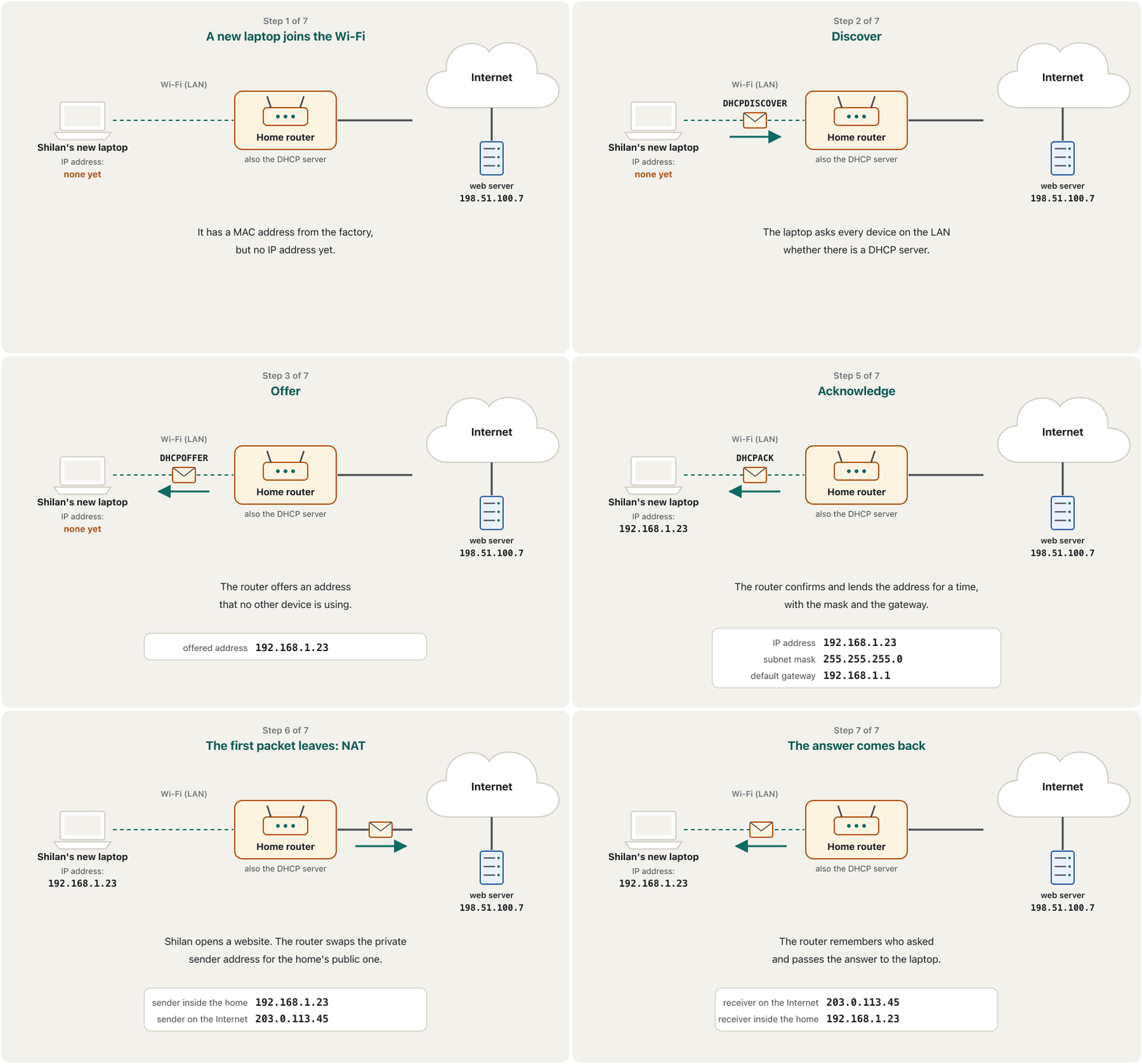
Network address translation (NAT) is the trick the home router uses. When a packet leaves the home, the router replaces the private sender address with its own public address and writes the swap in a table. When the answer comes back, the router looks in the table and passes it to the right device inside.
(NAT) ئەو فێڵەیە کە ماڵەوە بەکاری دەهێنێت. کاتێک لە ماڵەکە دەچێتە دەرەوە، ناونیشانی نێرەری تایبەت بە خۆی دەگۆڕێت و ئەم گۆڕینە لە خشتەیەکدا دەنووسێت. کاتێک وەڵامەکە دەگەڕێتەوە، سەیری خشتەکە دەکات و دەیداتە ئامێرە دروستەکەی ناوەوە.
A job done by the . On the way out it swaps the of home or office devices for its one , and it swaps them back for the replies. So many devices share one public address.
کارێکە کە دەیکات: ئامێرەکانی ماڵ یان نووسینگە لە کاتی دەرچووندا بە تاکە خۆی دەگۆڕێت و بۆ وەڵامەکان دەیانگەڕێنێتەوە، بۆیە چەندین ئامێر یەک ناونیشانی گشتی بەکار دەهێنن.
- One public address serves a whole home, café or company, which saved IPv4 from running out completely.
- Devices behind NAT cannot be reached directly from the Internet unless the router is told to forward a port. This hides them, but it is not a replacement for a firewall.
- Mobile operators often put thousands of phones behind one public address (carrier-grade NAT).
- یەک خزمەتی هەموو ماڵێک، کافێیەک یان کۆمپانیایەک دەکات، ئەمەش لە تەواوبوونی تەواو ڕزگار کرد.
- ئامێرەکانی پشت NAT ڕاستەوخۆ لە ناگەنێ، مەگەر بە بوترێت بگوازێتەوە (port forwarding). ئەمە دەیانشارێتەوە، بەڵام جێگرەوەی نییە.
- کۆمپانیاکانی زۆرجار هەزاران مۆبایل لە پشت یەک دادەنێن (carrier-grade NAT).
DHCP: addresses given automaticallyDHCP: ناونیشان بە خۆکاری دەدرێت
Nobody types an IP address into a phone in a café. When a device joins a network, a DHCP server (at home, the router) gives it everything it needs: an IP address, the subnet mask, the default gateway and the DNS servers. The address is only lent for a time, called a lease (often a few hours or a day); the device renews it while it stays, and when it leaves, the address returns to the pool for someone else.
کەس لە کافێیەکدا بە دەست ناخاتە ناو مۆبایلەوە. کاتێک ئامێرێک دەچێتە سەر ، DHCP (لە ماڵەوە، ) هەموو ئەوەی پێویستیەتی پێی دەدات: ، ، و . ناونیشانەکە تەنها بۆ ماوەیەک بە قەرز دەدرێت، کە پێی دەوترێت lease (زۆرجار چەند کاتژمێرێک یان ڕۆژێک)؛ ئامێرەکە تا لەوێ بمێنێتەوە نوێی دەکاتەوە و کاتێک دەڕوات، ناونیشانەکە دەگەڕێتەوە بۆ کۆگاکە بۆ کەسێکی تر.
Dynamic Host Configuration Protocol: when a device joins a network, a DHCP server (usually the router) gives it an , the , the and the servers automatically.
پرۆتۆکۆڵی ڕێکخستنی داینامیکیی خانەخوێ: کاتێک ئامێرێک دەچێتە سەر ڕایەڵەیەک، ڕاژەکاری DHCP (زۆرجار ) بە خۆکاری ، ، و ڕاژەکارەکانی پێ دەدات.
- Discoverدۆزینەوە
The new device broadcasts to the whole LAN: is there a DHCP server?
ئامێرە نوێیەکە بۆ هەموو دەنێرێت: ئایا DHCP هەیە؟
- Offerپێشنیار
The DHCP server offers a free address and the other settings.
DHCP ناونیشانێکی بەتاڵ و ڕێکخستنەکانی تر پێشنیار دەکات.
- Requestداواکردن
The device asks for the offered address (if several servers answered, it picks one).
ئامێرەکە داوای ناونیشانە پێشنیارکراوەکە دەکات (ئەگەر چەند وەڵامیان دابێتەوە، یەکێکیان هەڵدەبژێرێت).
- Acknowledgeپەسەندکردن
The server confirms and records the lease. The device can now use the address.
پەسەندی دەکات و ماوەکە تۆمار دەکات. ئێستا ئامێرەکە دەتوانێت ناونیشانەکە بەکار بهێنێت.
Static and dynamic IP addresses, and how a DHCP server gives each device an address, mask and gateway for a limited lease.
جێگیر و داینامیک؛ هەروەها چۆن ناونیشان، و بۆ کاتێکی دیاریکراو (lease) دەداتە هەر ئامێرێک.
Plays 0:00-5:36: static vs dynamic IP, a DHCP example, scope, lease and a short demo.
لە 0:00 تا 5:36 پەخش دەبێت: جێگیر بەراورد بە داینامیک، نموونەیەکی ، scope و lease، لەگەڵ نمایشێکی کورت.
DHCP: addresses given automaticallyDHCP: ناونیشان بە خۆکاری دەدرێت
DHCP and NAT in actionDHCP و NAT لە کاتی کارکردندا
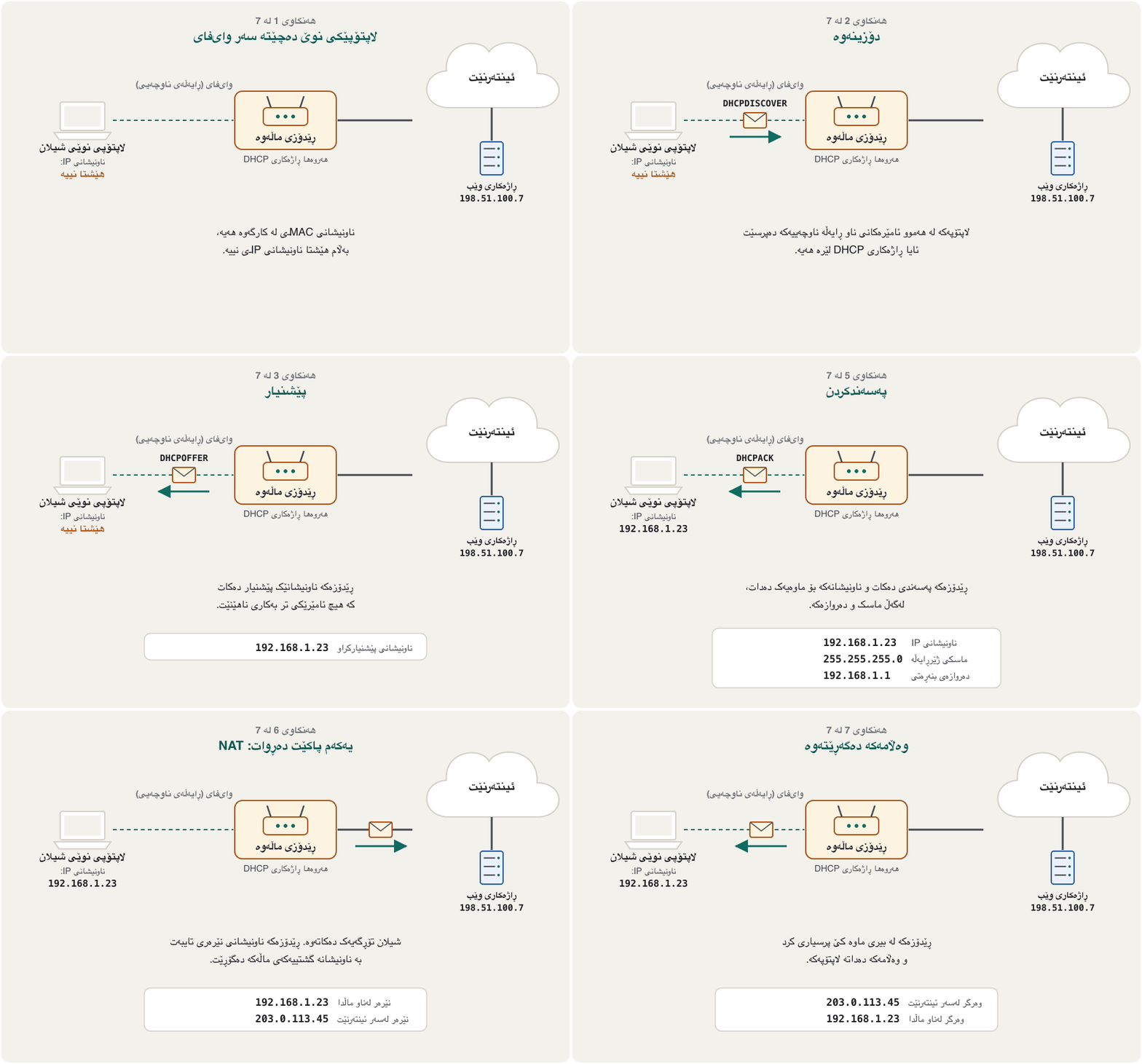
Watch the four DHCP messages when Shilan's new laptop joins the home Wi-Fi, and then its first packet going out through NAT:
سەیری چوار نامەکەی بکە کاتێک نوێی شیلان دەچێتە سەر ماڵەوە، پاشان یەکەم کە لە ڕێگەی NATـەوە دەچێتە دەرەوە:
IPv6: the bigger addressIPv6: ناونیشانی گەورەتر
The long-term answer to the shortage is IPv6 (standard RFC 8200, 2017). An IPv6 address has 128 bits instead of 32. It is written as eight groups of four hexadecimal digits separated by colons:
وەڵامی درێژخایەنی کەمییەکە ـە (ستانداردی RFC 8200، 2017). ناونیشانێکی لە جیاتی 32، 128 هەیە. بە هەشت گرووپی چوار ژمارەیی دەنووسرێت کە بە دوو خاڵ لێک جیا دەکرێنەوە:
Two rules make it shorter: leading zeros in a group may be dropped (0db8 → db8, 0008 → 8), and one run of groups that are all zero may be replaced by ::. So the address above becomes 2001:db8::8:800:200c:417a. The :: may appear only once, otherwise nobody could tell how many zero groups each one hides.
دوو یاسا کورتی دەکەنەوە: سفرەکانی سەرەتای گرووپێک دەتوانرێت لاببرێن (0db8 ← db8، 0008 ← 8)؛ هەروەها یەک زنجیرە گرووپی تەواو سفر دەتوانرێت بە :: بگۆڕدرێت. بۆیە ناونیشانەکەی سەرەوە دەبێتە 2001:db8::8:800:200c:417a. :: تەنها یەک جار دەتوانێت بێت، دەنا کەس نازانێت هەریەکەیان چەند گرووپی سفر دەشارێتەوە.
That is enough to give every grain of sand on Earth many addresses, so IPv6 does not need NAT to save addresses.
ئەمە بەسە بۆ ئەوەی هەموو دەنکە لمێکی سەر زەوی چەندین ناونیشانی پێ بدرێت، بۆیە بۆ پاشەکەوتکردنی ناونیشان پێویستی بە NAT نییە.
- Most phones and computers today run both IPv4 and IPv6 at the same time (dual stack) and use IPv6 whenever the other side supports it.
- Addresses that start
fe80:are link-local: every device makes one for itself, and it works only on the local network. ::1means "this computer itself" (loopback), like127.0.0.1in IPv4. Addresses starting2001:db8:are reserved for examples, like the ones on this screen.
- زۆربەی مۆبایل و ئەمڕۆ لە هەمان کاتدا هەردوو و بەکار دەهێنن (dual stack) و هەر کاتێک لایەنەکەی تر پشتگیری بکات بەکار دەهێنن.
- ئەو ناونیشانانەی بە
fe80:دەست پێ دەکەن link-localـن: هەموو ئامێرێک یەکێک بۆ خۆی دروست دەکات و تەنها لەسەر ناوخۆیی کار دەکات. ::1واتە «خودی ئەم » (loopback)، وەک127.0.0.1لە . ئەو ناونیشانانەی بە2001:db8:دەست پێ دەکەن بۆ نموونە تەرخان کراون، وەک ئەوانەی سەر ئەم شاشەیە.
IPv6 addresses: 128 bits written as eight groups of hexadecimal digits, and how four binary digits become one hex digit.
ناونیشانەکانی : 128 کە وەک هەشت گرووپی ژمارەی دەنووسرێن؛ هەروەها چۆن چوار ژمارەی دەبنە یەک ژمارەی .
Plays 4:33-9:23: IPv6 as a 128-bit hexadecimal address (eight groups, over 340 undecillion addresses) and binary-to-hex conversion.
لە 4:33 تا 9:23 پەخش دەبێت: وەک ناونیشانێکی 128 بە (هەشت گرووپ، زیاتر لە ناونیشان) و گۆڕینی بۆ .
From a name to a MAC address: DNS and ARPلە ناوێکەوە بۆ ناونیشانێکی MAC: DNS و ARP
People type names, routers need IP addresses, and switches need MAC addresses. Two helpers translate between them:
خەڵک ناو دەنووسن، پێویستیان بە و پێویستیان بە . دوو یارمەتیدەر لە نێوانیاندا وەریدەگێڕن:
- DNS turns a name such as
example.cominto an IP address. It is taught in Web Programming: DNS: the Internet's phone book. - ARP (Address Resolution Protocol, 1982) works inside one LAN. A device that knows an IP address but not the MAC address asks everyone: "Who has 192.168.1.1?" Only the owner answers with its MAC address, and the asker remembers the pair for a while in its ARP table.
- ناوێکی وەک
example.comدەکاتە . لە کۆرسی وێبدا فێر دەکرێت: DNS: دەفتەری تەلەفۆنی ئینتەرنێت. - (Address Resolution Protocol، 1982) لەناو یەک کار دەکات. ئامێرێک کە دەزانێت بەڵام نازانێت لە هەمووان دەپرسێت: ئەم ناونیشانە هی کێیە؟ تەنها خاوەنەکەی بە وەڵام دەداتەوە و پرسیارکەرەکە ئەو جووتە بۆ ماوەیەک لە خشتەی ARPـی خۆیدا لە بیر دەگرێت.
Address Resolution Protocol: inside a , a device that knows an asks everyone «who has this address?»; the owner answers with its , and the asker remembers the pair for a while.
پرۆتۆکۆڵی دۆزینەوەی ناونیشان: لەناو ، ئامێرێک کە دەزانێت لە هەمووان دەپرسێت «ئەم ناونیشانە هی کێیە؟»؛ خاوەنەکەی بە وەڵام دەداتەوە و پرسیارکەر ئەو جووتە بۆ ماوەیەک لە بیر دەگرێت.
Shilan types
example.com. DNS answers with the server's IP address,198.51.100.7.شیلان
example.comدەنووسێت. بە وەڵام دەداتەوە،198.51.100.7.The laptop compares it with its own address and mask: another network, so the data must go to the default gateway,
192.168.1.1.بەراوردی دەکات بە ناونیشان و ماسکی خۆی: ترە، بۆیە دەبێت بچێت بۆ ،
192.168.1.1.ARP asks the LAN who has
192.168.1.1; the router answers with its MAC address.لە دەپرسێت
192.168.1.1هی کێیە؛ بە وەڵام دەداتەوە.The laptop sends the frame to that MAC address. The router passes the packet on, network by network, to
198.51.100.7.بۆ ئەو دەنێرێت. ، بە ، دەگوازێتەوە بۆ
198.51.100.7.
From a name to a MAC address: DNS and ARPلە ناوێکەوە بۆ ناونیشانێکی MAC: DNS و ARP
How DNS finds an addressDNS چۆن ناونیشانێک دەدۆزێتەوە
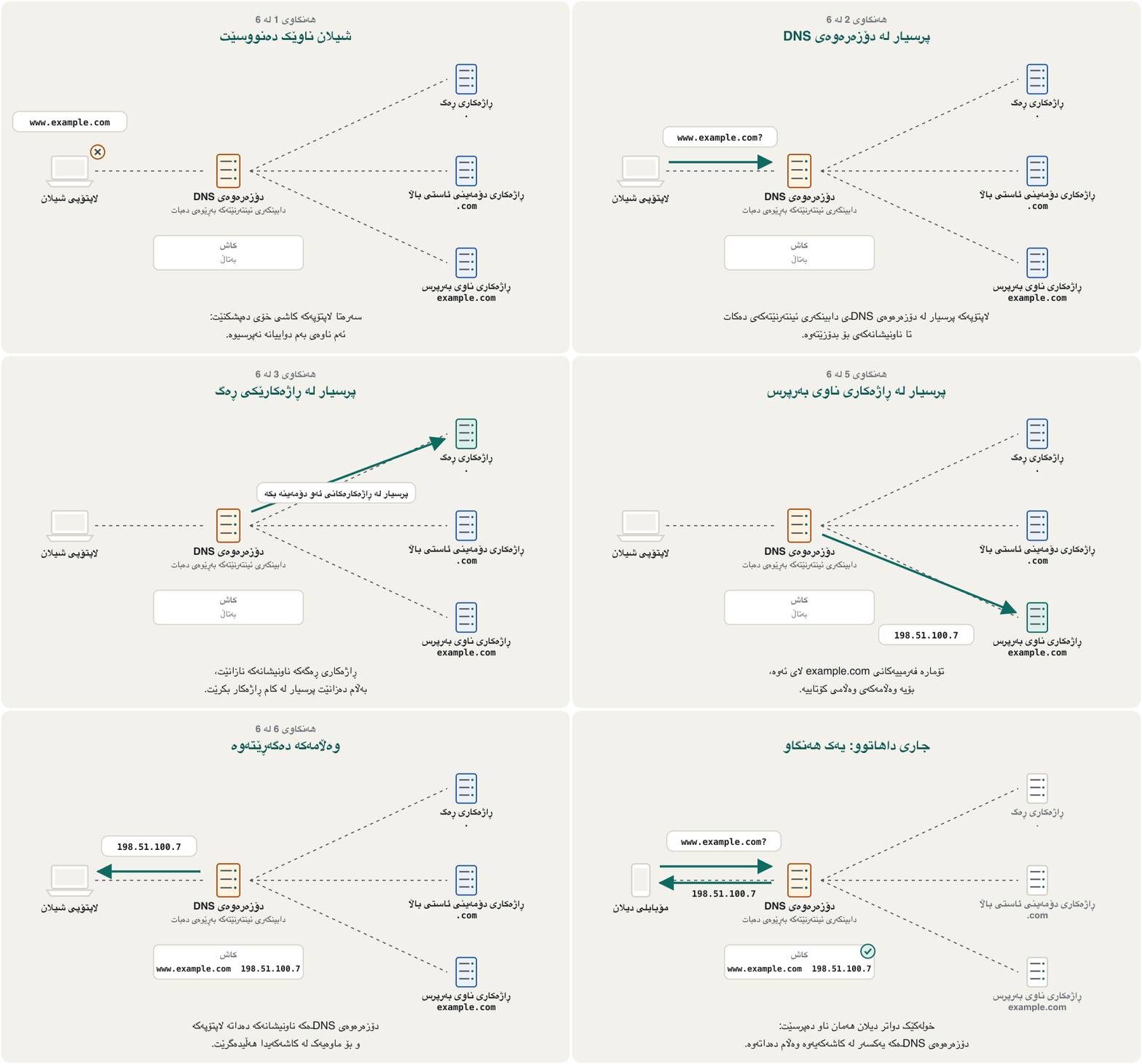
No single computer knows every name on the Internet. DNS is a tree of servers, searched in the order a name is read, from right to left: first .com, the top-level domain, then example (see Domain names):
هیچ هەموو ناوەکانی سەر نازانێت. دارێکە لە و بەو ڕیزبەندییە دەگەڕێت کە ناوەکە دەخوێنرێتەوە، لە ڕاستەوە بۆ چەپ: سەرەتا .com کە ، پاشان example (بڕوانە ناوەکانی دۆمەین):
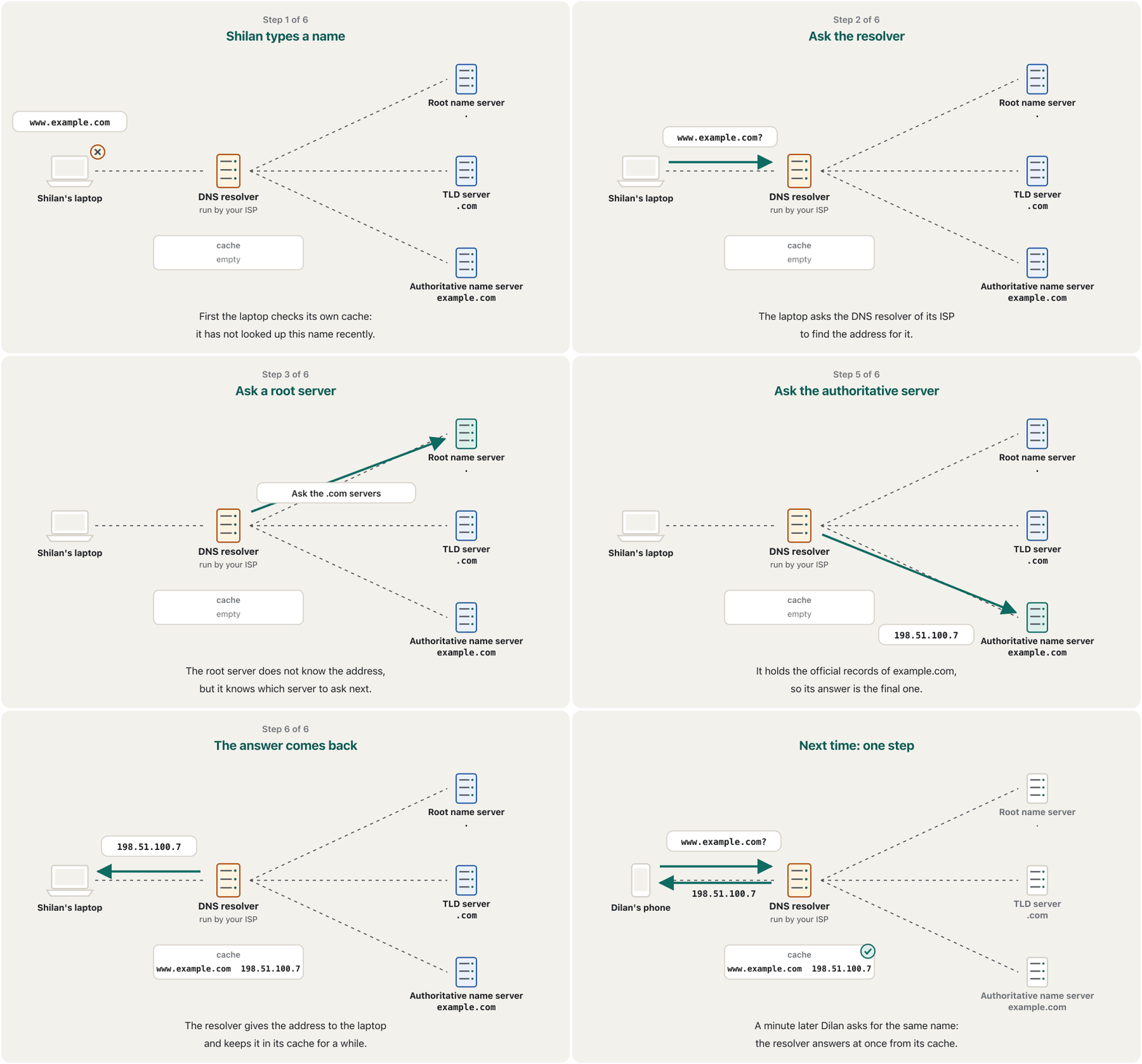
- Cache. The device first checks whether it looked the name up recently.
- Resolver. If not, it asks a DNS resolver, usually run by the ISP, to search for it.
- Root. A root name server does not know the address, but it knows the servers for
.com. - Top-level domain. The
.comserver points to the name server of example.com. - Final answer. The authoritative name server of example.com gives the IP address. The resolver passes it back and keeps it in its cache for a while.
- . ئامێرەکە سەرەتا دەپشکنێت ئایا بەم دواییانە ئەم ناوەی پرسیوە.
- . ئەگەر نا، داوا لە دەکات کە زۆرجار بەڕێوەی دەبات، بۆی بگەڕێت.
- ڕەگ. ناونیشانەکە نازانێت، بەڵام
.comدەناسێت. - .
.comئاماژە بۆ example.com دەکات. - وەڵامی کۆتایی. example.com دەدات. دەیگەڕێنێتەوە و بۆ ماوەیەک لە هەڵیدەگرێت.
From a name to a MAC address: DNS and ARPلە ناوێکەوە بۆ ناونیشانێکی MAC: DNS و ARP
Thirteen root servers, thousands of copiesسیانزە ڕاژەکاری ڕەگ، هەزاران کۆپی
There are only 13 root server identities, named A to M and run by 12 organisations. But each identity is not one machine: it is many copies of the same server in many countries, all answering at the same address. In October 2026 there were about 2,000 copies, and your resolver reaches a nearby one. So if a copy breaks or a cable is cut, the questions simply go to another copy: the root of DNS is not a single machine that can stop the whole Internet.
تەنها 13 ناسنامەی هەیە، بە ناوەکانی A تا M کە 12 ڕێکخراو بەڕێوەیان دەبەن. بەڵام هەر ناسنامەیەک یەک ئامێر نییە: چەندین کۆپیی هەمان لە چەندین وڵاتدا کە هەموویان لەسەر هەمان ناونیشان وەڵام دەدەنەوە. لە ئۆکتۆبەری 2026دا نزیکەی 2,000 کۆپی هەبوو و دەگاتە کۆپییەکی نزیک. بۆیە ئەگەر کۆپییەک تێک بچێت یان کێبڵێک بپچڕێت، پرسیارەکان بە ئاسانی دەچن بۆ کۆپییەکی تر: ڕەگی تاکە ئامێرێک نییە کە بتوانێت هەموو بوەستێنێت.
See your own addressesناونیشانەکانی خۆت ببینە
You can read all of these settings on your own device. Menu names change a little between versions and phone makers; the words to look for are the same everywhere.
دەتوانیت هەموو ئەم ڕێکخستنانە لەسەر ئامێرەکەی خۆت بخوێنیتەوە. ناوی لیستەکان لە نێوان وەشانەکان و دروستکەرانی مۆبایلدا کەمێک دەگۆڕێن؛ ئەو وشانەی بەدوایاندا دەگەڕێیت لە هەموو شوێنێک وەک یەکن.
| Deviceئامێر | Where to lookلە کوێ بگەڕێیت | What you seeچی دەبینیت |
|---|---|---|
| Windows 11 | Settings › Network & internet › Wi-Fi (or Ethernet) › your network's propertiesSettings › Network & internet › Wi-Fi (یان Ethernet) › تایبەتمەندییەکانی | IPv4 address, IPv6 address; further down (in some versions under Hardware properties) the physical (MAC) addressIPv4 address، IPv6 address؛ لە خوارەوەتر (لە هەندێک وەشاندا لە ژێر Hardware properties) ناونیشانی فیزیکی (MAC) |
| Windows, Command PromptWindows، Command Prompt | type ipconfig (or ipconfig /all for more); how to open Command Prompt: The Command Lineipconfig بنووسە (یان ipconfig /all بۆ زیاتر)؛ کردنەوەی Command Prompt: ڕووکاری هێڵی فەرمان | IPv4 Address, Subnet Mask, Default Gateway; with /all also Physical Address, DHCP and DNS serversIPv4 Address، Subnet Mask، Default Gateway؛ بە /all هەروەها Physical Address، DHCP و DNS |
| macOS | System Settings › Network › Wi-Fi › Details › TCP/IP | IP address, Subnet mask, Router (the gateway)IP address، Subnet mask، Router (دەروازەکە) |
| iPhone / iPad | Settings › Wi-Fi › ⓘ next to the networkSettings › Wi-Fi › ⓘ لە تەنیشت | IP Address, Subnet Mask, Router; Wi-Fi Address (the private MAC for this network). Settings › General › About shows the phone's own Wi-Fi AddressIP Address، Subnet Mask، Router؛ Wi-Fi Address ( تایبەتەکەی ئەم ). Settings › General › About خودی مۆبایلەکە پیشان دەدات |
| Android | Settings › Network & internet › Internet (Samsung: Connections › Wi-Fi) › the gear next to your networkSettings › Network & internet › Internet (لە Samsung: Connections › Wi-Fi) › نیشانەی چەرخ لە تەنیشت | IP address, Gateway, MAC address (names differ by maker)IP address، Gateway، MAC address (ناوەکان بەپێی دروستکەر جیاوازن) |
Common mistakesهەڵە باوەکان
| Mistakeهەڵە | What is trueڕاستییەکە |
|---|---|
| "My IP address is fixed to my laptop."« بە جێگیرە.» | The IP address comes from the network you join; the MAC address belongs to the network card. لەو دێت کە پێی دەبەسترێیت؛ هی . |
| "An octet can be 256."« دەتوانێت 256 بێت.» | 8 bits hold 0 to 255 only.8 تەنها 0 تا 255 هەڵدەگرن. |
| "192.168.1.10 is my address on the Internet."«192.168.1.10 ناونیشانەکەمە لەسەر .» | It is private; the Internet sees your router's public address (NAT).تایبەتە؛ دەبینێت (NAT). |
| "A MAC address crosses the Internet with my data."« لەگەڵ بە ناو دەڕوات.» | MAC addresses are used only inside one LAN; each router puts a new one on the frame. تەنها لەناو یەک بەکار دێن؛ هەر ناونیشانێکی نوێ لەسەر دادەنێت. |
| "An IPv6 address may contain :: twice."«ناونیشانێکی دەتوانێت دوو جار :: ی تێدا بێت.» | Only once; otherwise the number of hidden zero groups is unknown.تەنها یەک جار؛ دەنا ژمارەی گرووپە سفرە شاراوەکان نازانرێت. |
| "DNS gives my phone its IP address."« دەداتە مۆبایلەکەم.» | DHCP gives addresses; DNS turns names into addresses. ناونیشان دەدات؛ ناو دەکاتە ناونیشان. |
Exercisesڕاهێنانەکان
Your laptop is 192.168.1.23 with mask 255.255.255.0. For each destination, say whether the laptop sends directly or through the default gateway: (a) 192.168.1.50; (b) 192.168.10.5; (c) 198.51.100.7; (d) 192.168.1.1.
192.168.1.23ـە بە ماسکی 255.255.255.0. بۆ هەر شوێنێکی مەبەست بڵێ ڕاستەوخۆ دەنێرێت یان لە ڕێگەی : (أ) 192.168.1.50؛ (ب) 192.168.10.5؛ (ج) 198.51.100.7؛ (د) 192.168.1.1.
Show answerوەڵامەکە پیشان بدە
- (a) Directly: same network part 192.168.1.
- (b) Through the gateway: 192.168.10 is a different network.
- (c) Through the gateway: a different network on the Internet.
- (d) Directly: it is the gateway itself, on the same network.
- (أ) ڕاستەوخۆ: هەمان بەشی ، 192.168.1.
- (ب) لە ڕێگەی دەروازەکەوە: 192.168.10 جیاوازە.
- (ج) لە ڕێگەی دەروازەکەوە: جیاوازە لەسەر .
- (د) ڕاستەوخۆ: خودی دەروازەکەیە، لەسەر هەمان .
Which of these addresses are private (RFC 1918)? 10.4.7.1; 172.15.0.9; 172.31.200.4; 192.168.100.100; 203.0.113.45.
کام لەم ناونیشانانە تایبەتن (RFC 1918)؟ 10.4.7.1؛ 172.15.0.9؛ 172.31.200.4؛ 192.168.100.100؛ 203.0.113.45.
Show answerوەڵامەکە پیشان بدە
Private: 10.4.7.1 (10.0.0.0/8), 172.31.200.4 (172.16–172.31) and 192.168.100.100 (192.168.0.0/16). Not private: 172.15.0.9 (just below 172.16) and 203.0.113.45 (a documentation block that stands for a public address).
تایبەت: 10.4.7.1 (10.0.0.0/8)، 172.31.200.4 (172.16–172.31) و 192.168.100.100 (192.168.0.0/16). تایبەت نین: 172.15.0.9 (کەمێک لە خوار 172.16ـەوە) و 203.0.113.45 (کۆمەڵەیەکی نموونەیە کە لە جیاتی بەکار دێت).
Write the IPv4 address 10.0.5.200 in binary, octet by octet.
ناونیشانی 10.0.5.200 بە بنووسە، بە .
Hintئاماژە
Use the weights 128, 64, 32, 16, 8, 4, 2, 1.
کێشەکانی 128، 64، 32، 16، 8، 4، 2، 1 بەکار بهێنە.
Show answerوەڵامەکە پیشان بدە
.
.
Write the shortest correct form of 2001:0db8:0000:0042:0000:0000:0000:0007.
کورتترین شێوەی دروستی 2001:0db8:0000:0042:0000:0000:0000:0007 بنووسە.
Show answerوەڵامەکە پیشان بدە
2001:db8:0:42::7. Drop leading zeros in every group, then replace the longest run of zero groups (the three groups before 7) with ::. The single zero group after db8 stays as 0, because :: may be used only once.
2001:db8:0:42::7. سفرەکانی سەرەتای هەموو گرووپێک لاببە، پاشان درێژترین زنجیرەی گرووپی سفر (سێ گرووپەکەی پێش 7) بە :: بگۆڕە. تاکە گرووپی سفری دوای db8 وەک 0 دەمێنێتەوە، چونکە :: تەنها یەک جار بەکار دێت.
Dilan's Windows laptop shows the IPv4 address 169.254.33.10 and cannot open any website. What does this address tell you, and what would you check first?
Windowsـی دیلان ناونیشانی 169.254.33.10 پیشان دەدات و هیچ ناکاتەوە. ئەم ناونیشانە چیت پێ دەڵێت و سەرەتا چی دەپشکنیت؟
Show answerوەڵامەکە پیشان بدە
A 169.254.x.x address means the laptop asked for an address but no DHCP server answered, so it made one up for itself. Check that the Wi-Fi is really connected (or the cable is plugged in) and that the router is on; then renew the address (ipconfig /renew) or restart the router.
ناونیشانی 169.254.x.x واتە داوای ناونیشانی کردووە بەڵام هیچ DHCP وەڵامی نەداوەتەوە، بۆیە خۆی ناونیشانێکی بۆ خۆی دروست کردووە. بپشکنە کە بە ڕاستی پەیوەستە (یان کێبڵەکە لێدراوە) و هەڵکراوە؛ پاشان ناونیشانەکە نوێ بکەرەوە (ipconfig /renew) یان دووبارە دەست پێ بکەرەوە.
Summaryپوختە
- Every device has a MAC address (48 bits, hex, from the factory, used inside a LAN) and an IP address (given by the network, used between networks).
- IPv4: 32 bits, four octets of 0–255, about 4.3 billion addresses. The subnet mask splits network part and host part; /24 leaves 254 device addresses.
- Same network → send directly; another network → send to the default gateway (the router).
- Private blocks 10/8, 172.16/12, 192.168/16 stay inside; NAT lets a whole home share one public address.
- DHCP lends addresses automatically: Discover, Offer, Request, Acknowledge.
- IPv6: 128 bits in hex groups; drop leading zeros and use :: once.
- DNS: name → IP address; ARP: IP address → MAC address inside the LAN.
- هەموو ئامێرێک (48 ، ، لە کارگەوە، لەناو ) و هەیە ( دەیدات، لە نێوان ).
- : 32 ، چوار لە 0 تا 255، نزیکەی 4.3 ملیار ناونیشان. بەشی و بەشی ئامێر لێک جیا دەکاتەوە؛ ماسکی /24 جێگەی 254 ئامێر دەهێڵێتەوە.
- هەمان ← ڕاستەوخۆ بنێرە؛ تر ← بۆ () بنێرە.
- کۆمەڵە تایبەتەکانی 10/8، 172.16/12 و 192.168/16 لە ناوەوە دەمێننەوە؛ NAT ڕێگە دەدات هەموو ماڵێک یەک هاوبەش بکات.
- بە خۆکاری ناونیشان بە قەرز دەدات: Discover، Offer، Request، Acknowledge.
- : 128 لە گرووپی ؛ سفرەکانی سەرەتا لاببە و :: تەنها یەک جار بەکار بهێنە.
- : ناو ← ؛ : ← لەناو .
Why can millions of homes all use 192.168.1.1?بۆچی ملیۆنان ماڵ دەتوانن هەموویان 192.168.1.1 بەکار بهێنن؟
It is a private address: it is used only inside each home network and never appears on the Internet, where NAT shows the public address instead.
: تەنها لەناو هەر ماڵێکدا بەکار دێت و هەرگیز لەسەر دەرناکەوێت، لەوێ NAT لە جیاتی ئەو پیشان دەدات.
What four settings does DHCP give a new device?DHCP چ چوار ڕێکخستنێک دەداتە ئامێرێکی نوێ؟
An IP address, the subnet mask, the default gateway and the DNS servers.
، ، و .
How many IPv4 addresses exist in total?بە گشتی چەند ناونیشانی IPv4 هەیە؟
, about 4.3 billion.
، نزیکەی 4.3 ملیار.
Videoڤیدیۆ
Watch a videoسەیری ڤیدیۆیەک بکە
A video that viewers liked a lot and praised in their comments, chosen for this lesson.ڤیدیۆیەک کە بینەران زۆریان پێ خۆش بووە و لە کۆمێنتەکانیاندا ستایشیان کردووە، بۆ ئەم وانەیە هەڵبژێردراوە.
What a MAC address is and how it is written, why devices also need an IP address, and how both work together.
چییە و چۆن دەنووسرێت، بۆچی ئامێرەکان پێویستە؛ هەروەها هەردووکیان چۆن پێکەوە کار دەکەن.
Plays 0:00-7:45: MAC address format and purpose, IP address purpose, how they work together, finding your MAC.
لە 0:00 تا 7:45 پەخش دەبێت: شێوە و مەبەستی ، مەبەستی ، چۆن پێکەوە کار دەکەن و دۆزینەوەی خۆت.
Lesson complete!وانەکە تەواو بوو!
Well done. Review the key terms, then go on to the next lesson.دەستخۆش. سەیرێکی زاراوە سەرەکییەکان بکەرەوە، پاشان بڕۆ بۆ وانەی داهاتوو.
Key termsزاراوە سەرەکییەکان
How Search Engines Workبزوێنەرەکانی گەڕان چۆن کار دەکەن
Related lecturesوانە پەیوەندیدارەکان
- Network Hardware: NICs, Switches and Routersڕەقەواڵەی ڕایەڵە: کارتی ڕایەڵە، سویچ و ڕێدۆز
- The Internet and the Webئینتەرنێت و وێب
- Browsers, Web Servers and URLsتۆڕگەڕەکان، ڕاژەکارەکانی وێب و URL
- Binary, Octal and Hex Shortcutsڕێگا کورتەکانی دووانی، هەشتی و شانزەیی
- From Decimal to Binary, Octal and Hexلە دەییەوە بۆ دووانی، هەشتی و شانزەیی
- Mobile Technology and Wireless Networksتەکنەلۆژیای مۆبایل و ڕایەڵە بێتەلەکان
- Networksڕایەڵەکان
References and further readingسەرچاوەکان و خوێندنەوەی زیاتر
- Microsoft Learn: TCP/IP addressing and subnetting (32-bit address, octets, subnet mask, default gateway, 254 hosts)
- RFC 1918: Address Allocation for Private Internets (10/8, 172.16/12, 192.168/16)
- RFC 8200: Internet Protocol, Version 6 (IPv6) Specification (128-bit addresses)
- RFC 4291: IP Version 6 Addressing Architecture (text form, ::, ::1, fe80::/10)
- RFC 2131: Dynamic Host Configuration Protocol (Discover, Offer, Request, Ack; leases)
- RFC 826: An Ethernet Address Resolution Protocol (ARP), 1982
- RFC 5737: IPv4 Address Blocks Reserved for Documentation
- RFC 9542: IANA considerations for IEEE 802 parameters (EUI-48 documentation values)
- IEEE Registration Authority (MA-L / OUI assignments)
- NRO: Free pool of IPv4 address space depleted (3 February 2011)
- Microsoft Support: Find your IP address in Windows
- Microsoft Learn: ipconfig command reference
- Apple Support: Enter TCP/IP settings on Mac
- Apple Support: Use private Wi-Fi addresses on Apple devices
- Android Open Source Project: MAC randomization behavior
- Microsoft Support: How to use random hardware addresses in Windows
- Android Help: Connect to Wi-Fi networks (Settings › Network & internet › Internet)
- Wikipedia: International Mobile Equipment Identity
- AWS: What is DNS? (how DNS routes traffic)
- Root Server Technical Operations: root-servers.org
- IANA: Root Servers
This lecture is a first edition. The Kurdish text and terminology are waiting for review by Kurdish IT teachers.ئەم وانەیە چاپی یەکەمە. دەقە کوردییەکە و زاراوەکانی چاوەڕێی پێداچوونەوەی مامۆستایانی کوردی بواری IT ن.