Chapterبەش 6 · Lectureوانە 6.2
Port Numbers and Socketsژمارەی پۆرت و سۆکێتەکان
How one IP address serves many programs: port numbers, physical vs logical ports, the three IANA ranges, the well-known ports, sockets and socket pairs, demultiplexing and reading netstat on Windows 11.
چۆن یەک خزمەت بە چەندین بەرنامە دەکات: ژمارەی ، و ، سێ بەشەکەی ، ، و جووتە ، دیمەڵتیپلێکسکردن و خوێندنەوەی netstat لەسەر Windows 11.
What you will learnچی فێر دەبیت
- Explain why port numbers are needed and tell physical ports from port numbers.
- Name the three IANA port ranges and the well-known ports of common services.
- Write sockets and socket pairs and explain demultiplexing.
- Read the local address, foreign address, state and PID in netstat -ano.
- ڕوونی بکەیتەوە بۆچی ژمارەی پێویستە و لە ژمارەی جیا بکەیتەوە.
- سێ بەشەکەی و خزمەتگوزارییە باوەکان ناو ببەیت.
- و جووتە بنووسیت و دیمەڵتیپلێکسکردن ڕوون بکەیتەوە.
- ناونیشانی ناوخۆ، ناونیشانی دەرەکی، دۆخ و PID لە netstat -anoدا بخوێنیتەوە.
One IP address, many programsیەک ناونیشانی IP، چەندین بەرنامە
Your laptop has one IP address, yet a browser, a mail app and a game all use the network at the same moment. When a segment arrives, which program should get it? The IP address only brings it to the right host. To reach the right program, the transport layer gives every conversation a second address: a port number, a 16-bit number from 0 to 65,535 in the TCP or UDP header. With port numbers many programs can share one IP address.
یەک هەیە، کەچی ، ئیمەیڵ و یارییەک هەموویان لە هەمان ساتدا بەکار دەهێنن. کاتێک دەگات، دەبێت بدرێت بە کام بەرنامە؟ تەنیا دەیگەیەنێتە دروستەکە. بۆ گەیشتن بە بەرنامە دروستەکە، ناونیشانێکی دووەم بە هەر گفتوگۆیەک دەدات: ژمارەی ، ژمارەیەکی 16 لە 0 تا 65,535 لە سەردێڕی یان . بە ژمارەی چەندین بەرنامە دەتوانن یەک بەش بکەن.
A courier brings a parcel to a building in Erbil: the street address gets it to the building, and the flat number gets it to the right family. On a network the IP address is the street address of the host and the port number is the flat number of the program.
نامەبەرێک پاکێتێک دەباتە باڵەخانەیەک لە هەولێر: ناونیشانی شەقامەکە دەیگەیەنێتە باڵەخانەکە و ژمارەی شوقەکە دەیگەیەنێتە خێزانە دروستەکە. لە ناونیشانی شەقامی و ژمارەی ژمارەی شوقەی بەرنامەکەیە.
Where the analogy stops workingسنووری ئەم نموونەیە
Flats keep their numbers for years. A client program gets a new port number for almost every conversation.
شوقەکان ساڵانێک ژمارەکەیان دەمێنێت. بەرنامەیەکی بۆ نزیکەی هەموو گفتوگۆیەک ژمارەیەکی نوێ وەردەگرێت.
The idea of multiplexing was introduced in OSI layers 4 and 5; this lesson shows the numbers that make it work.
بیرۆکەی لە چینەکانی 4 و 5ی OSI ناسێنرا؛ ئەم وانەیە ئەو ژمارانە پیشان دەدات کە کاری پێ دەکەن.
In Kurdish: one server offers web, email and DNS at the same time, and the port number tells the server which program a message is for.
بە کوردی: لە یەک کاتدا وێب، و پێشکەش دەکات؛ ژمارەی بە دەڵێت نامەکە بۆ کام .
Whole video, in Kurdish: one server, many programs, told apart by port numbers. The addresses in the drawing are only labels.
هەموو ڤیدیۆکە، بە کوردی: یەک و چەند ، کە بە ژمارەی لێک جیا دەکرێنەوە. ناونیشانەکانی ناو وێنەکە تەنیا ناون.
Physical ports and logical portsدەرچەکان و پۆرتەکان
The word “port” has two meanings. A physical port is a socket on a device that you can touch and plug a connector into: the RJ45 Ethernet port of a network card, a USB port, or the old serial (RS-232) port, which modern PCs rarely have — Cisco console cables today use USB or RJ45. A logical port is the port number: only software, a number in the transport header. In Kurdish CêIT keeps the two apart: «» for the physical one, «» for the number. Physical ports and connectors are taught in ports and connectors.
وشەی «port» دوو واتای هەیە. کونێکە لەسەر ئامێرێک کە دەتوانیت دەستی لێ بدەیت و گەیەنەرێکی تێدا دابنێیت: RJ45ـی Ethernet لە ، USB، یان زنجیرەیی کۆن (RS-232) کە کۆمپیوتەرە نوێیەکان کەم جار هەیانە — Cisco ئەمڕۆ USB یان RJ45 بەکار دەهێنن. ژمارەی : تەنیا نەرمەکاڵایە، ژمارەیەکە لە سەردێڕی گواستنەوەدا. لە کوردیدا CêIT هەردووکیان لێک جیا دەکاتەوە: «» بۆ فیزیکییەکە، «» بۆ ژمارەکە. و گەیەنەرەکان لە دەرچەکان و گەیەنەرەکان دەخوێندرێن.
Source port and destination portپۆرتی سەرچاوە و پۆرتی مەبەست
Every TCP segment and UDP datagram carries two port numbers. The destination port names the program on the remote host that should receive it; the source port names the program on the local host that sent it. A server program waits on a fixed, well-known port — a web server on 443 for HTTPS. The client's operating system gives each new conversation a temporary ephemeral port, chosen from a range of high numbers. In the reply the two numbers simply swap places.
هەموو و دوو ژمارەی هەڵدەگرن. مەبەست ئەو بەرنامەیە ناو دەبات لەسەر دوورەکە کە دەبێت وەری بگرێت؛ سەرچاوە ئەو بەرنامەیە ناو دەبات لەسەر ناوخۆییەکە کە ناردوویەتی. بەرنامەیەکی لەسەر جێگیر و ناسراو چاوەڕێ دەکات — لەسەر 443 بۆ . بە هەر گفتوگۆیەکی نوێ دەدات، لە ژمارە بەرزەکانەوە. لە وەڵامدا دوو ژمارەکە تەنیا جێ دەگۆڕنەوە.
The three port rangesسێ بەشی ژمارەی پۆرت
Port numbers are 16 bits, so there are 65,536 of them: 0 to 65,535. IANA, the Internet Assigned Numbers Authority, keeps the official list and splits the numbers into three ranges (RFC 6335). System or well-known ports, 0–1023, belong to standard services: 22 SSH, 53 DNS, 67/68 DHCP, 80 HTTP, 443 HTTPS. User or registered ports, 1024–49151, are registered for vendors' and newer services: 1883 MQTT, 3389 Remote Desktop, 46999 MediaBox. Dynamic, private or ephemeral ports, 49152–65535, are never assigned to anyone: operating systems take client ports from here. Both TCP and UDP (and the rarer SCTP and DCCP) use the same numbering, but TCP port 53 and UDP port 53 are separate doors.
ژمارەی 16 ، بۆیە 65,536 دانە هەن: 0 تا 65,535. (Internet Assigned Numbers Authority) لیستە فەرمییەکە دەپارێزێت و ژمارەکان دەکاتە سێ بەش (RFC 6335). یان سیستەم، 0–1023، هی خزمەتگوزارییە ستانداردەکانن: 22 ، 53 ، 67/68 ، 80 ، 443 . یان بەکارهێنەر، 1024–49151، بۆ کۆمپانیاکان و خزمەتگوزارییە نوێترەکان تۆمار دەکرێن: 1883 ، 3389 Remote Desktop، 46999 MediaBox. ، دینامیکی یان تایبەت، 49152–65535، هەرگیز بە کەس نادرێن: لێرەوە وەردەگرن. و (و SCTP و DCCPـی دەگمەنتریش) هەمان ژمارەکردن بەکار دەهێنن، بەڵام 53ی و 53ی دوو دەرگای جیاوازن.
The three port rangesسێ بەشی ژمارەی پۆرت
Where client ports come fromپۆرتەکانی ڕاژەخواز لە کوێوە دێن
When a program opens a connection, the operating system picks a free port from its dynamic range and gives it to that conversation only. Windows, since Vista, uses 49152–65535, as IANA recommends; older Windows versions used 1025–5000. Linux uses 32768–60999 by default. You can see the Windows range in the Command Prompt:
کاتێک بەرنامەیەک پەیوەندییەک دەکاتەوە، بەتاڵ لە بەشە دینامیکییەکەی هەڵدەبژێرێت و تەنیا بەو گفتوگۆیەی دەدات. Windows لە Vistaـوە 49152–65535 بەکار دەهێنێت، وەک پێشنیاری دەکات؛ وەشانە کۆنەکانی Windows 1025–5000یان بەکار دەهێنا. Linux بە شێوەی بنەڕەت 32768–60999 بەکار دەهێنێت. دەتوانیت ئەم بەشەی Windows لە Command Promptـدا ببینیت:
netsh int ipv4 show dynamicport tcpProtocol tcp Dynamic Port Range --------------------------------- Start Port : 49152 Number of Ports : 16384
49152 + 16384 − 1 = 65535: the whole dynamic range. This is why netstat on Windows shows client ports such as 49731 or 50112.
49152 + 16384 − 1 = 65535: هەموو بەشە دینامیکییەکە. لەبەر ئەمەیە netstat لەسەر Windows وەک 49731 یان 50112 پیشان دەدات.
The three port rangesسێ بەشی ژمارەی پۆرت
Looking up a port in the IANA registryدۆزینەوەی پۆرتێک لە تۆماری IANAـدا
The official answer to “what is port N?” is the IANA Service Name and Transport Protocol Port Number Registry, which anyone can search online. It lists each number separately for TCP and UDP. For example, port 1027: TCP 1027 is Reserved, and UDP 1027 is 6a44 (“IPv6 Behind NAT44 CPEs”). Lists copied from old websites often give wrong names, so check the registry before you trust a port table.
وەڵامی فەرمیی « N چییە؟» تۆماری Service Name and Transport Protocol Port Number Registryـی ، کە هەموو کەسێک دەتوانێت بە ئۆنلاین تێیدا بگەڕێت. هەر ژمارەیەک بۆ و بە جیا دەنووسێت. بۆ نموونە 1027: 1027ی Reserved (پارێزراو)ـە و 1027ی 6a44ـە («IPv6 Behind NAT44 CPEs»). ئەو لیستانەی لە ماڵپەڕە کۆنەکانەوە کۆپی کراون زۆر جار ناوی هەڵە دەدەن، بۆیە پێش ئەوەی متمانە بە خشتەیەکی بکەیت، تۆمارەکە بپشکنە.
Ports you will meet every dayئەو پۆرتانەی هەموو ڕۆژێک دەیانبینیت
Every common service has a fixed port, so a client knows where to knock. In this picture the application is on the left, its port in the middle and the transport protocol it uses on the right. Most services use one protocol; DNS uses both, and HTTPS adds UDP 443 for HTTP/3.
هەموو خزمەتگوزارییەکی باو جێگیری هەیە، بۆیە دەزانێت لە کوێ لە دەرگا بدات. لەم وێنەیەدا لای چەپ ، لە ناوەڕاست و لای ڕاست ئەو گواستنەوەیەی بەکاری دەهێنێت. زۆربەی خزمەتگوزارییەکان یەک بەکار دەهێنن؛ هەردووکیان و 443ی بۆ HTTP/3 زیاد دەکات.
Ports you will meet every dayئەو پۆرتانەی هەموو ڕۆژێک دەیانبینیت
The well-known ports tableخشتەی پۆرتە ناسراوەکان
| Port | Transportگواستنەوە | Serviceخزمەتگوزاری | Used forبۆ چی |
|---|---|---|---|
| 20, 21 | TCP | FTP | File transfer: 21 commands, 20 data (active mode)گواستنەوەی : 21 فەرمان، 20 (شێوازی چالاک) |
| 22 | TCP | SSH | Secure remote loginچوونەژوورەوەی پارێزراو لە دوورەوە |
| 23 | TCP | Telnet | Remote login without encryption — replaced by SSHچوونەژوورەوە لە دوورەوە بێ — جێی گرتۆتەوە |
| 25 | TCP | SMTP | E-mail between mail servers لە نێوان ئیمەیڵدا |
| 53 | UDP, TCP | DNS | Name lookups (TCP for big answers and zone transfers)گەڕان بە دوای ناودا ( بۆ وەڵامی گەورە و zone transfer) |
| 67, 68 | UDP | DHCP | 67 server, 68 client: getting an IP address67 ، 68 : وەرگرتنی |
| 69 | UDP | TFTP | Simple file transfer, e.g. router imagesگواستنەوەی سادەی ، بۆ نموونە وێنەی سیستەمی |
| 80 | TCP | HTTP | Web pages without encryption بێ |
| 110 | TCP | POP3 | Downloading mail ئیمەیڵ |
| 123 | UDP | NTP | Setting the clockڕێکخستنی کاتژمێر |
| 143 | TCP | IMAP | Reading mail on the serverخوێندنەوەی ئیمەیڵ لەسەر |
| 161 | UDP | SNMP | Monitoring network devicesچاودێریکردنی ئامێرەکانی |
| 443 | TCP (UDP for HTTP/3) | HTTPS | Encrypted web pages |
| 465, 587 | TCP | SMTP submission | Your mail app sends a message to its server ئیمەیڵەکەت نامە دەنێرێت بۆ |
| 520 | UDP | RIP | A routing protocol (RIPv2) (RIPv2) |
| 993 | TCP | IMAPS | IMAP over TLS بە سەر |
| 3389 | TCP, UDP | RDP | Remote Desktop (a registered port, not well-known)Remote Desktop (، نەک ناسراو) |
Sockets and socket pairsسۆکێتەکان و جووتە سۆکێتەکان
An IP address together with a port number is called a socket, written with a colon: 192.0.2.10:49888, or 203.0.113.25:443 for an HTTPS server. Every service has its own port, so each one is its own socket. One conversation has two ends, so it is identified by a socket pair: the protocol, the source IP and port, and the destination IP and port. No two conversations on the Internet have the same socket pair at the same moment. Two hosts may even use the same source port: their IP addresses differ, so the pairs still differ. A home router uses socket pairs to share one public address among all its devices: PAT.
لەگەڵ ژمارەی پێی دەگوترێت و بە دوو خاڵ دەنووسرێت: 192.0.2.10:49888، یان 203.0.113.25:443 بۆ . هەر خزمەتگوزارییەک خۆی هەیە، بۆیە هەریەکەیان خۆیەتی. هەر گفتوگۆیەک دوو سەری هەیە، بۆیە بە جووتێک دەناسرێتەوە: ، IP و سەرچاوە و IP و مەبەست. لە هەمان ساتدا هیچ دوو گفتوگۆیەک لە هەمان جووتە نییە. تەنانەت دوو دەتوانن هەمان سەرچاوە بەکار بهێنن: جیاوازە، بۆیە جووتەکان هێشتا جیاوازن. ماڵەوە بە جووتە یەک ناونیشانی گشتی لە نێوان هەموو ئامێرەکانیدا بەش دەکات: وەرگێڕانی ناونیشانی پۆرت.
Sockets and socket pairsسۆکێتەکان و جووتە سۆکێتەکان
Try it: two sockets in Pythonتاقی بکەرەوە: دوو سۆکێت لە Pythonـدا
Programs use sockets through the operating system. This short Python program starts a tiny TCP server on the loopback address 127.0.0.1, port 50007 (a free test port, as in Python's own documentation), connects a client to it on the same computer and prints both sockets. Python 3.13 printed:
بەرنامەکان لە ڕێگەی بەکار دەهێنن. ئەم بەرنامە کورتەی Python بچووکی لەسەر 127.0.0.1 و 50007 دەکاتەوە ( بەتاڵی تاقیکردنەوە، وەک بەڵگەنامەکانی خودی Python)، لەسەر هەمان کۆمپیوتەر پێیەوە دەبەستێت و هەردوو چاپ دەکات. Python 3.13 ئەمەی چاپ کرد:
import socket, threading

server = socket.socket(socket.AF_INET, socket.SOCK_STREAM)    # TCP
server.bind(("127.0.0.1", 50007))      # the server's socket: IP + port
server.listen()
print("server listening on", server.getsockname())

def serve_one():
    conn, peer = server.accept()       # the handshake is finished here
    print("server: connection from", peer)
    conn.sendall(b"hello " + conn.recv(100))
    conn.close()

threading.Thread(target=serve_one).start()

client = socket.create_connection(("127.0.0.1", 50007))
print("client socket:", client.getsockname())   # port chosen by the OS
print("server socket:", client.getpeername())
client.sendall(b"Aram")
print("client got:", client.recv(100).decode())
client.close()
server.close()server listening on ('127.0.0.1', 50007)
client socket: ('127.0.0.1', 58491)
server socket: ('127.0.0.1', 50007)
server: connection from ('127.0.0.1', 58491)
client got: hello AramExplain the codeڕوونکردنەوەی کۆدەکە
- Lineدێڕی 4
bind()gives the server its socket: IP 127.0.0.1, port 50007.bind()دیاری دەکات: IP 127.0.0.1، 50007.- Lineدێڕی 16
create_connection()runs the three-way handshake; the client's port is chosen by the operating system.create_connection()ئەنجام دەدات؛ هەڵیدەبژێرێت.- Lineدێڕی 17
Your client port will be different: the operating system picks any free ephemeral port.
تۆ جیاواز دەبێت: هەر بەتاڵ هەڵدەبژێرێت.
Demultiplexing: sorting arriving segmentsدیمەڵتیپلێکسکردن: جیاکردنەوەی بڕەکانی گەیشتوو
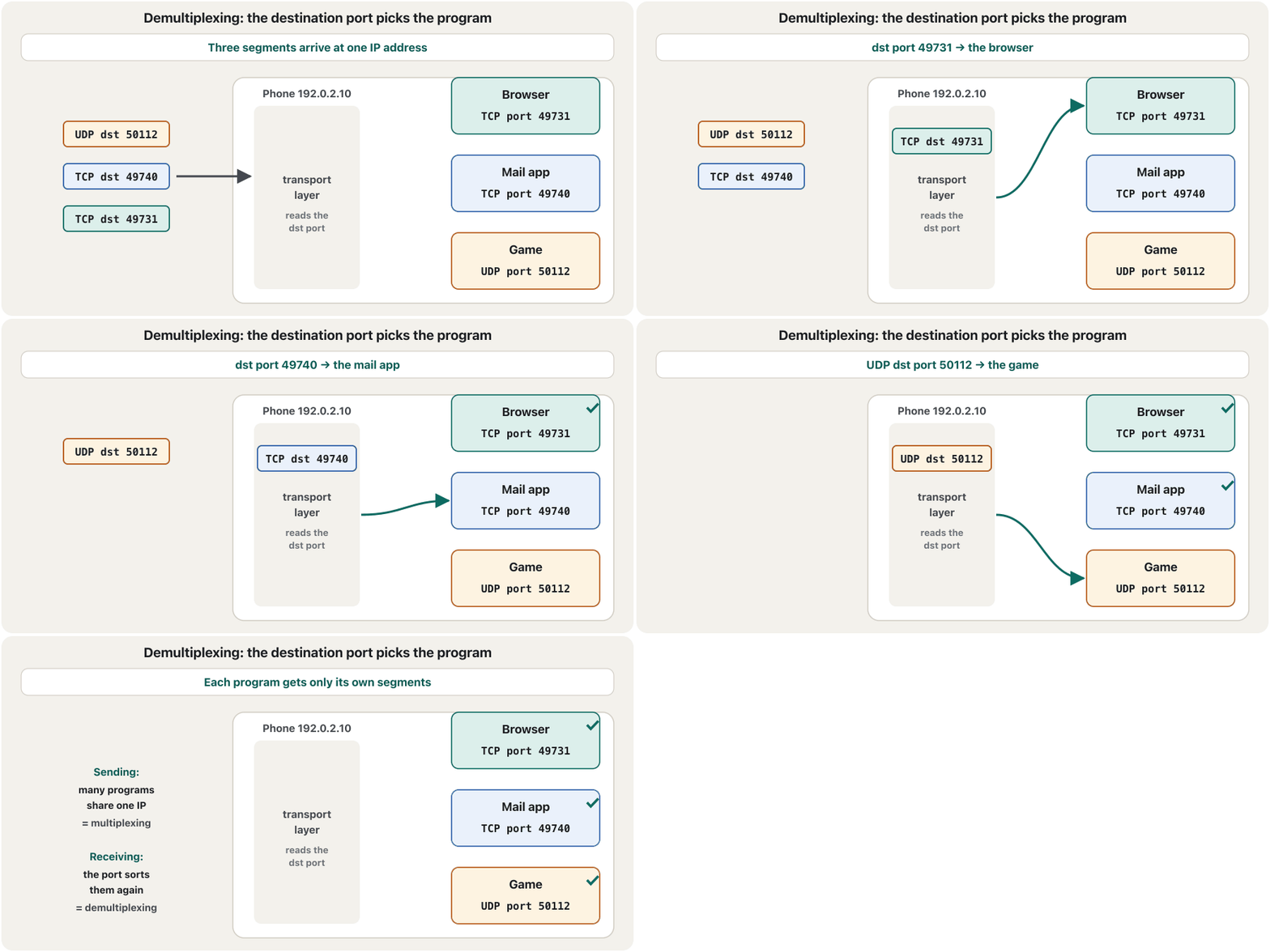
Sending side: the transport layer accepts data from many programs, labels each piece with its ports and sends everything through one IP address — multiplexing. Receiving side: it reads the destination port in each arriving segment and hands the data to the right program — demultiplexing. In this way TCP and UDP turn one network connection into many logical channels. For UDP the destination port is enough; for TCP the operating system looks at the whole socket pair, because one server port (443) carries many clients at once.
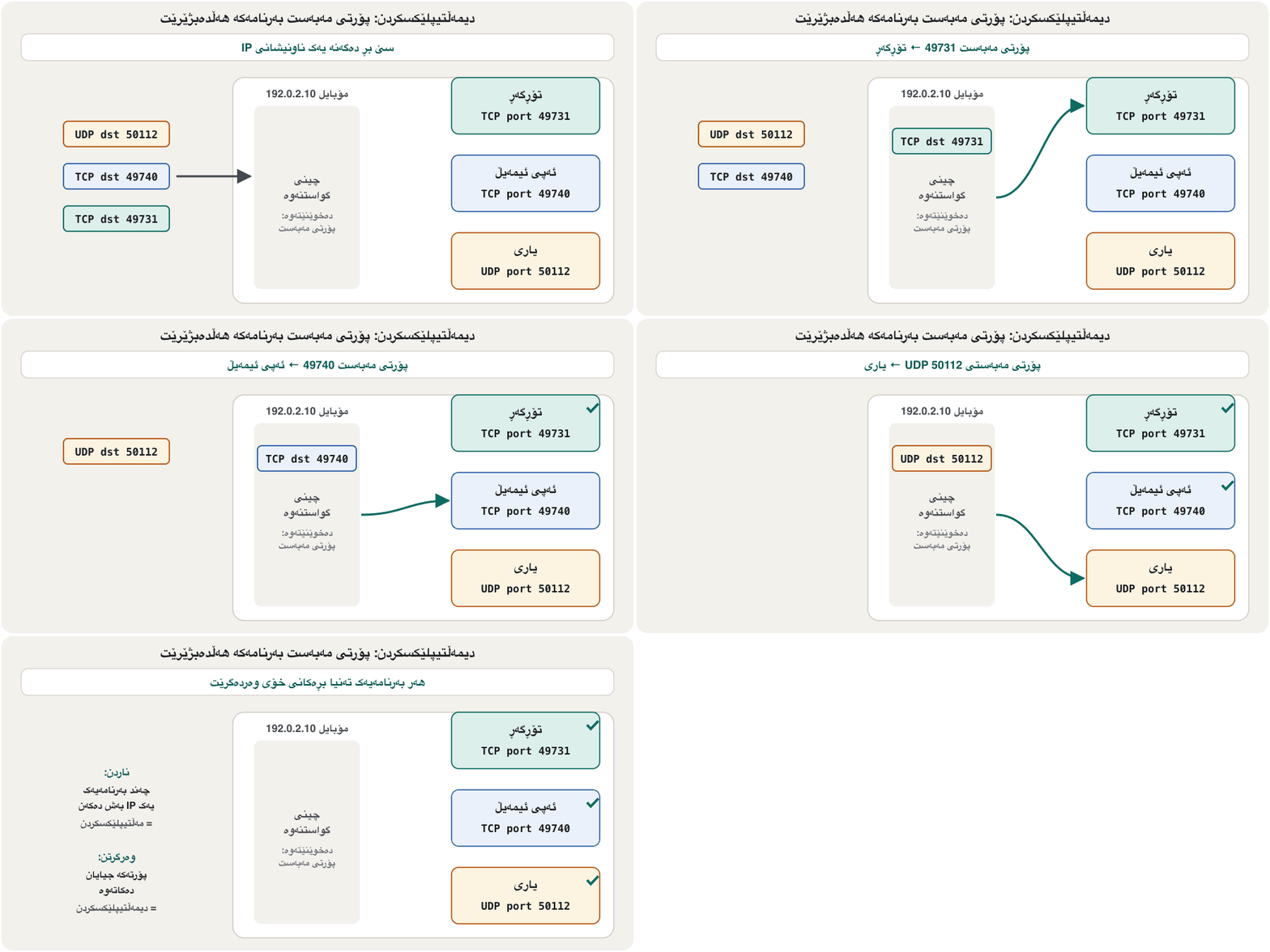
لای نێرەر: لە چەندین بەرنامەوە وەردەگرێت، هەر پارچەیەک بە نیشانە دەکات و هەمووی بە یەک دەنێرێت — . لای وەرگر: مەبەست لە هەر گەیشتوودا دەخوێنێتەوە و دەداتە بەرنامە دروستەکە — . بەم شێوەیە و یەک پەیوەندیی دەکەن بە چەندین کەناڵی مەنتیقی. بۆ مەبەست بەسە؛ بۆ سەیری هەموو جووتە دەکات، چونکە یەک (443) لە یەک کاتدا چەندین هەڵدەگرێت.
Seeing your sockets with netstatبینینی سۆکێتەکانت بە netstat
Windows shows every socket in use with netstat. -n prints numbers instead of names, -a adds the listening ports, and -o adds the process ID (PID) of the program, which you can find in Task Manager. Each line gives the protocol, the local address (your IP and port), the foreign address (the other side's IP and port) and, for TCP, the connection's state. Opening one web page usually creates several TCP connections, each with its own client port.
Windows هەموو کە بەکار دێت بە netstat پیشان دەدات. -n لەبری ناو ژمارە چاپ دەکات، -a ئەو زیاد دەکات کە گوێ دەگرن و -o ناسنامەی پرۆسە (PID)ی بەرنامەکە زیاد دەکات، کە دەتوانیت لە Task Managerـدا بیدۆزیتەوە. هەر دێڕێک ، ناونیشانی ناوخۆ (IP و تۆ)، ناونیشانی دەرەکی (IP و لایەکەی تر) و بۆ دۆخی پەیوەندییەکە دەدات. کردنەوەی یەک زۆر جار چەند پەیوەندییەکی دروست دەکات، هەریەکەیان بە خۆی.
netstat -anoActive Connections Proto Local Address Foreign Address State PID TCP 0.0.0.0:135 0.0.0.0:0 LISTENING 1172 TCP 0.0.0.0:445 0.0.0.0:0 LISTENING 4 TCP 192.0.2.10:49702 203.0.113.80:443 TIME_WAIT 0 TCP 192.0.2.10:49731 203.0.113.25:443 ESTABLISHED 8124 TCP 192.0.2.10:49733 203.0.113.25:443 ESTABLISHED 8124 TCP 192.0.2.10:49740 198.51.100.20:993 ESTABLISHED 6420 TCP 192.0.2.10:49755 198.51.100.44:443 CLOSE_WAIT 9310 UDP 0.0.0.0:5353 *:* 2216 UDP 192.0.2.10:50112 *:* 7712
Two connections (49731 and 49733) go to the same HTTPS server from the same program (PID 8124): one page, two connections. 49740 talks to port 993, IMAP over TLS: a mail app. UDP lines have no foreign address (*:*) and no state, because UDP has no connections. TIME_WAIT and CLOSE_WAIT are stages of closing a TCP connection, explained in TCP states. All the other netstat options are in Windows network commands.
دوو پەیوەندی (49731 و 49733) لە هەمان بەرنامەوە (PID 8124) بۆ هەمان دەچن: یەک لاپەڕە، دوو پەیوەندی. 49740 لەگەڵ 993 قسە دەکات، واتە بە سەر : ئیمەیڵ. دێڕەکانی ناونیشانی دەرەکی (*:*) و دۆخیان نییە، چونکە پەیوەندیی نییە. TIME_WAIT و CLOSE_WAIT قۆناغەکانی داخستنی پەیوەندییەکی و لە دۆخەکانی TCP ڕوون کراونەتەوە. هەموو هەڵبژاردەکانی تری netstat لە فەرمانەکانی ڕایەڵە لە Windowsـدان.
Common mistakesهەڵە باوەکان
Exercisesڕاهێنانەکان
Put each port in its range — well-known, registered or dynamic: 25, 443, 1023, 1024, 1883, 3389, 49151, 49152, 50112, 65535.
هەر بخەرە بەشەکەی خۆی — ناسراو، تۆمارکراو یان دینامیکی: 25، 443، 1023، 1024، 1883، 3389، 49151، 49152، 50112، 65535.
Show answerوەڵامەکە پیشان بدە
- Well-known (0–1023): 25, 443, 1023.
- Registered (1024–49151): 1024, 1883, 3389, 49151.
- Dynamic (49152–65535): 49152, 50112, 65535.
- ناسراو (
0–1023): 25، 443، 1023. - تۆمارکراو (
1024–49151): 1024، 1883، 3389، 49151. - دینامیکی (
49152–65535): 49152، 50112، 65535.
Dilan's laptop (198.51.100.23) opens a connection to an SSH server at 203.0.113.9; Windows gives it client port 51002. Write the socket pair of the request and of the reply.
دیلان (198.51.100.23) پەیوەندییەک بە لە 203.0.113.9 دەکاتەوە؛ Windows 51002ی پێ دەدات. جووتە داواکارییەکە و وەڵامەکە بنووسە.
Hintئاماژە
SSH listens on a well-known TCP port.
لەسەر گوێ دەگرێت.
Show answerوەڵامەکە پیشان بدە
Request: TCP 198.51.100.23:51002 → 203.0.113.9:22. Reply: TCP 203.0.113.9:22 → 198.51.100.23:51002 — the same pair, read from the other end.
داواکاری: TCP، لە 198.51.100.23:51002ـەوە بۆ 203.0.113.9:22. وەڵام: TCP، لە 203.0.113.9:22ـەوە بۆ 198.51.100.23:51002 — هەمان جووت، لە سەرەکەی ترەوە خوێندراوەتەوە.
From the netstat example above: (a) which program has two HTTPS connections? (b) which line shows a service waiting for clients on port 445? (c) why do the UDP lines have no state?
لە نموونەی netstatـی سەرەوە: (a) کام بەرنامە دوو پەیوەندیی هەیە؟ (b) کام دێڕ خزمەتگوزارییەک پیشان دەدات کە لەسەر 445 چاوەڕێی دەکات؟ (c) بۆچی دێڕەکانی دۆخیان نییە؟
Show answerوەڵامەکە پیشان بدە
- (a) PID 8124, with client ports 49731 and 49733 to 203.0.113.25:443.
- (b) TCP 0.0.0.0:445 … LISTENING (PID 4, the Windows file-sharing service).
- (c) UDP is connectionless: there is no connection, so there is no state and no fixed foreign address.
- (a) PID 8124، بە 49731 و 49733 بۆ 203.0.113.25:443.
- (b) TCP 0.0.0.0:445 … LISTENING (PID 4، خزمەتگوزاریی هاوبەشکردنی Windows).
- (c) : هیچ پەیوەندییەک نییە، بۆیە نە دۆخ هەیە و نە ناونیشانی دەرەکیی جێگیر.
Summaryپوختە
- The IP address finds the host; the 16-bit port number (0–65,535) finds the program.
- A physical port is a socket for a cable; a logical port is a number in the TCP or UDP header.
- IANA ranges (RFC 6335): well-known 0–1023, registered 1024–49151, dynamic 49152–65535 (Windows client ports).
- A socket is IP:port; a socket pair (protocol + both sockets) identifies one conversation.
- Multiplexing sends many programs through one IP; demultiplexing sorts arriving segments by port. netstat -ano shows it all.
- دەدۆزێتەوە؛ ژمارەی 16 (0–65,535) بەرنامەکە.
- کونێکە بۆ کێبڵ؛ ژمارەیەکە لە سەردێڕی یان .
- بەشەکانی (RFC 6335): ناسراو 0–1023، تۆمارکراو 1024–49151، دینامیکی 49152–65535 ( Windows).
- IP:؛ جووتێک ( و هەردوو ) یەک گفتوگۆ دەناسێنێت.
- چەند بەرنامەیەک بە یەک IPـدا دەنێرێت؛ دیمەڵتیپلێکسکردن گەیشتوو بەپێی جیا دەکاتەوە. netstat -ano هەمووی پیشان دەدات.
Next: inside a TCP connection — how the handshake, the windows and the states you saw in netstat work.
دواتر: ناو پەیوەندییەکی TCP — ، و ئەو دۆخانەی لە netstatـدا بینیت چۆن کار دەکەن.
Lesson complete!وانەکە تەواو بوو!
Well done. Review the key terms, then go on to the next lesson.دەستخۆش. سەیرێکی زاراوە سەرەکییەکان بکەرەوە، پاشان بڕۆ بۆ وانەی داهاتوو.
Key termsزاراوە سەرەکییەکان
Inside a TCP Connection: Handshake, Windows and Reliabilityناو پەیوەندییەکی TCP: سێ ڕێی تەوقەکردن، پەنجەرەکان و پشتپێبەستراوی
Related lecturesوانە پەیوەندیدارەکان
- Inside a TCP Connection: Handshake, Windows and Reliabilityناو پەیوەندییەکی TCP: سێ ڕێی تەوقەکردن، پەنجەرەکان و پشتپێبەستراوی
- OSI Layers 4 and 5: Transport and Sessionچینەکانی 4 و 5ی OSI: چینی گواستنەوە و چینی سێشن
- Encapsulation, PDUs and Addresses at Each Layerپێچانەوە، یەکەکانی دراوەی پرۆتۆکۆڵ و ناونیشانەکان لە هەر چینێکدا
- Windows Network Commandsفەرمانەکانی ڕایەڵە لە Windows
- Ports and Connectorsدەرچەکان و سەرەکانی کێبڵ
- Network Defences: Firewalls, Segmentation, Monitoring and SIEMبەرگرییەکانی ڕایەڵە: ئاگرەدیوار، بەشبەشکردنی ڕایەڵە، چاودێریی ئاسایش و SIEM
- Access Control Lists: Filtering TrafficACLـەکان: فلتەرکردنی هاتوچۆ
References and further readingسەرچاوەکان و خوێندنەوەی زیاتر
- RFC 6335: IANA procedures for the port number registry (the three ranges)
- IANA Service Name and Transport Protocol Port Number Registry
- Microsoft Learn: The default dynamic port range for TCP/IP (49152–65535)
- Microsoft Learn: netstat
- Linux kernel documentation: ip_local_port_range
- Python documentation: socket — low-level networking interface
This lecture is a first edition. The Kurdish text and terminology are waiting for review by Kurdish IT teachers.ئەم وانەیە چاپی یەکەمە. دەقە کوردییەکە و زاراوەکانی چاوەڕێی پێداچوونەوەی مامۆستایانی کوردی بواری IT ن.