Chapterبەش 3 · Lectureوانە 3.5
MAC Addresses and Ethernet Framesناونیشانەکانی MAC و فرەیمەکانی Ethernet
What the 48 bits of a MAC address mean — the IEEE's OUI, the unicast/group and universal/local bits, broadcast — what MAC addresses are used for, whether they can be changed, private Wi-Fi addresses, and every field of the Ethernet II frame.
واتای 48 — OUIـی IEEE، تاک/گرووپ و گشتی/ناوخۆیی، — بۆ چی بەکار دێن، ئایا دەگۆڕدرێن، ناونیشانە تایبەتییەکانی و هەموو خانەیەکی Ethernet II.
What you will learnچی فێر دەبیت
- Read a MAC address: its OUI, its device part and its unicast/group and universal/local bits.
- Tell unicast, multicast and broadcast frames apart, and say which cards keep each one.
- Explain what MAC addresses are used for and how an IP address differs from a MAC address.
- Answer correctly whether a MAC address can be changed: burned-in address, software address, spoofing and private Wi-Fi addresses.
- Name every field of an Ethernet II frame with its size, and explain the 64-byte minimum, padding, EtherType and the FCS.
- بخوێنیتەوە: OUIـەکەی، بەشی ئامێرەکەی و تاک/گرووپ و گشتی/ناوخۆیی.
- ، و لە یەک جیا بکەیتەوە و بڵێیت کام کارتانە هەریەکەیان هەڵدەگرن.
- ڕوون بکەیتەوە بۆ چی بەکار دێن و چ جیاوازییەکی لەگەڵ هەیە.
- بە دروستی وەڵام بدەیتەوە کە ئایا دەگۆڕدرێت: ناونیشانی ناو کارت، ناونیشانی ، و ناونیشانی تایبەتیی .
- هەموو خانەیەکی Ethernet II بە قەبارەکەیەوە بناسێنیت و کەمترین قەبارەی 64 ، پڕکەرەوە، و FCS ڕوون بکەیتەوە.
Two addresses, one device: a quick recapدوو ناونیشان، یەک ئامێر: پێداچوونەوەیەکی خێرا
Every network interface has a MAC address: 48 bits, written as 12 hexadecimal digits in six pairs, such as 00-00-5E-00-53-01. A laptop's Ethernet port, its Wi-Fi card and its Bluetooth radio each have one. You met it in MAC addresses: it names the card inside its own local network, while the IP address says where the device is in the wider network. A packet needs both to arrive: the IP address to cross networks, the MAC address for each hop inside one network.
هەموو هەیە: 48 ، کە بە 12 ژمارەی لە شەش جووتدا دەنووسرێت، وەک 00-00-5E-00-53-01. ، کارتی و ڕادیۆی هەریەکەیان یەکێکیان هەیە. لە ناونیشانەکانی MACدا بینیت: کارتەکە لە ناو ناوخۆیی خۆیدا دەناسێنێت، لە کاتێکدا دەڵێت ئامێرەکە لە فراوانتردا لە کوێیە. بۆ گەیشتن پێویستی بە هەردووکیانە: بۆ تێپەڕین بە ناو ، بۆ هەر بازێک لە ناو یەک .
Think of a school. Inside Room 12 the teacher calls Shilan by her name — that is enough in one room, like a MAC address inside one LAN. A letter from Erbil needs “Room 12, Duhok Secondary School, Duhok” — where she is, like an IP address. If Shilan moves to another school, her room number changes, but her name stays.
قوتابخانەیەک بهێنە بەرچاوت. لە ناو ژووری 12دا مامۆستا بە ناوی خۆی بانگی شیلان دەکات — ئەوە لە یەک ژووردا بەسە، وەک لە ناو یەک . نامەیەک لە هەولێرەوە پێویستی بە «ژووری 12، ئامادەیی دهۆک، دهۆک» هەیە — شیلان لە کوێیە، وەک . ئەگەر شیلان بگوازرێتەوە بۆ قوتابخانەیەکی تر، ژمارەی ژوورەکەی دەگۆڕێت، بەڵام ناوەکەی دەمێنێتەوە.
Where the analogy stops workingسنووری ئەم نموونەیە
Two people can share a name, and a name can be faked; a MAC address can be copied too. And phones now show a different “name” to each Wi-Fi network for privacy — more on that below.
دوو کەس دەتوانن هەمان ناویان هەبێت و ناو دەتوانرێت ساختە بکرێت؛ دەتوانرێت کۆپی بکرێت. هەروەها مۆبایلەکان ئێستا لەبەر «ناوێکی» جیاواز بە هەر نیشان دەدەن — لە خوارەوە زیاتر.
Who hands out MAC addresses? The OUIکێ ناونیشانەکانی MAC دابەش دەکات؟ OUI
A MAC address has two halves. The first 24 bits are the OUI (Organizationally Unique Identifier). Makers of network cards buy OUIs from the IEEE Registration Authority, which publishes who owns each block — so the first half tells you who made a card. The maker numbers the other 24 bits itself, a different number for every card. It is the IEEE that hands out these blocks, not IANA, which looks after IP address blocks and port numbers.
دوو نیوەی هەیە. یەکەم 24 OUIـیە (Organizationally Unique Identifier). دروستکەرانی OUI لە دەسەڵاتی تۆمارکردنی IEEE دەکڕن، کە بڵاوی دەکاتەوە هەر بلۆکێک هی کێیە — بۆیە نیوەی یەکەم پێت دەڵێت کارتەکە کێ دروستی کردووە. دروستکەرەکە خۆی 24 تر ژمارە دەکات، ژمارەیەکی جیاواز بۆ هەر کارتێک. IEEE ئەم بلۆکانە دابەش دەکات، نەک IANA کە ئاگای لە بلۆکەکانی و ژمارەی هەیە.
One OUI gives a maker addresses; smaller companies can buy smaller blocks (MA-M and MA-S). Books and this course use 00-00-5E-00-53-00 to 00-00-5E-00-53-FF as examples: the OUI 00-00-5E belongs to IANA, and these 256 addresses are reserved for documentation, so no real card has them.
یەک OUI ناونیشان دەداتە دروستکەرێک؛ کۆمپانیا بچووکەکان دەتوانن بلۆکی بچووکتر بکڕن (MA-M و MA-S). کتێبەکان و ئەم خولە 00-00-5E-00-53-00 تا 00-00-5E-00-53-FF وەک نموونە بەکار دەهێنن: OUIـی 00-00-5E هی IANAـیە و ئەم 256 ناونیشانە بۆ بەڵگەنامە پارێزراون، بۆیە هیچ کارتێکی ڕاستەقینە ئەمانەی نییە.
Two special bits: one or many, global or localدوو بیتی تایبەت: یەک یان زۆر، گشتی یان ناوخۆیی
The two lowest bits of the first byte have meanings of their own. Bit 0, I/G (individual/group): 0 = the address belongs to one card (unicast); 1 = it is a group address (multicast or broadcast). Bit 1, U/L (universal/local): 0 = a universal address, given by the maker from its OUI; 1 = a locally administered address, set by software or by an administrator.
دوو نزمترین یەکەم واتای تایبەتی خۆیان هەیە. 0، I/G (تاک/گرووپ): 0 = ناونیشانەکە هی یەک کارتە ()؛ 1 = ناونیشانی گرووپە ( یان ). 1، U/L (گشتی/ناوخۆیی): 0 = ناونیشانێکی گشتی کە دروستکەر لە OUIـەکەی خۆیەوە دەیدات؛ 1 = ناونیشانێکی ناوخۆیی کە یان بەڕێوەبەرێک دایدەنێت.
You can read both bits from the second hexadecimal digit (Hex to binary): 0, 4, 8 or C = universal unicast, a normal card; 2, 6, A or E = local unicast, for example a private Wi-Fi address; an odd digit = a group address. Ethernet sends each byte lowest bit first, so the I/G bit is the very first bit of the destination: a card knows at once whether a frame is for one device or for many.
دەتوانیت هەردوو لە دووەم ژمارەی ـەوە بخوێنیتەوە (لە شانزەییەوە بۆ دووانی): 0، 4، 8 یان C = گشتی، کارتێکی ئاسایی؛ 2، 6، A یان E = ناوخۆیی، بۆ نموونە ناونیشانی تایبەتیی ؛ ژمارەی تاک = ناونیشانی گرووپ. هەر لە نزمترین دەنێرێت، بۆیە I/G یەکەم ناونیشانی مەبەستە: کارت یەکسەر دەزانێت بۆ یەک ئامێرە یان بۆ چەند ئامێرێک.
Unicast, multicast and broadcastتاکپەخش، فرەپەخش و پەخشکردن
Every frame goes to one of three kinds of destination (IP addresses have the same three kinds: Unicast, broadcast and multicast):
هەموو بۆ یەکێک لەم سێ جۆرە مەبەستە دەچێت ( هەمان سێ جۆریان هەیە: تاکپەخش، پەخشکردن و فرەپەخش):
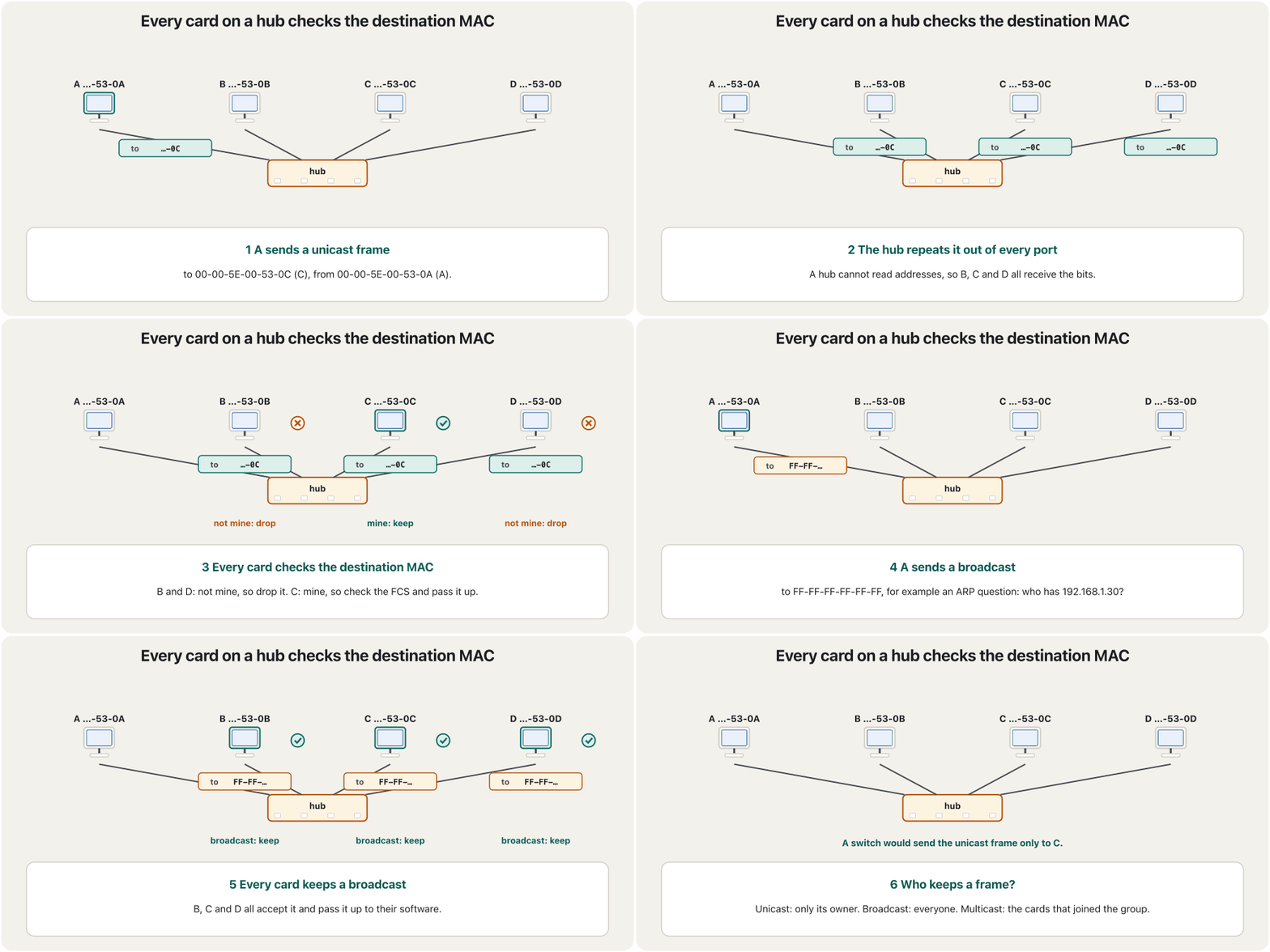
- Unicast: one card, for example
00-00-5E-00-53-0C. Most frames are unicast. - Multicast: a group of cards that asked to receive it. IPv4 multicast frames start with
01-00-5E, IPv6 multicast frames with33-33. - Broadcast: every card on the local network:
FF-FF-FF-FF-FF-FF, all 48 bits 1. ARP questions and DHCP Discover messages are broadcasts. Routers do not pass them on — see Collision Domains and Broadcast Domains.
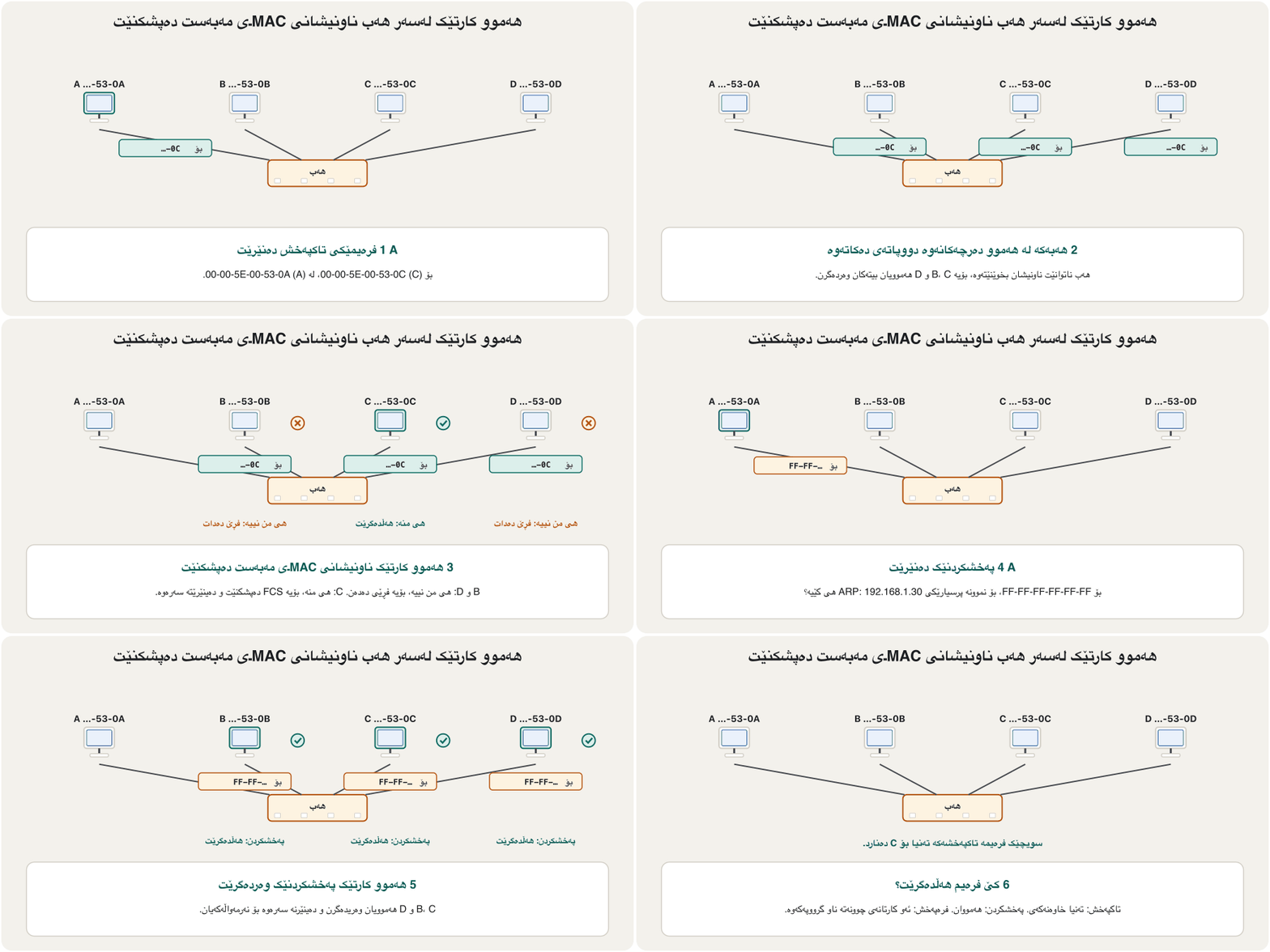
- : یەک کارت، بۆ نموونە
00-00-5E-00-53-0C. زۆربەی . - : گرووپێک کارت کە داوای وەرگرتنیان کردووە. IPv4 بە
01-00-5Eدەست پێ دەکەن و هی IPv6 بە33-33. - : هەموو کارتێکی سەر ناوخۆیی:
FF-FF-FF-FF-FF-FF، هەموو 48 1ـن. پرسیارەکانی و پەیامی Discoverـی . ئەمانە بۆ تر نانێرن — بڕوانە پاوانەکانی پێکدادان و پاوانەکانی پەخش.
On a shared cable or a hub, every card receives every frame and compares its destination with its own address and the groups it has joined. In the CêIT network lab load ‘A hub next to a switch’ and ping a PC on the switch from a PC on the hub: the log shows the ARP question going to FF:FF:FF:FF:FF:FF, the hub copying every frame to every port, and the other PC on the hub ignoring the frames that are not for it.
لەسەر کێبڵێکی هاوبەش یان ، هەموو کارتێک هەموو وەردەگرێت و مەبەستەکەی لەگەڵ ناونیشانی خۆی و ئەو گرووپانەی چووەتە ناویانەوە بەراورد دەکات. لە تاقیگەی ڕایەڵەی CêIT ‘ لە تەنیشت ’ بکەرەوە و لە PCـیەکی سەر بۆ PCـیەکی سەر بنێرە: تۆمارەکە نیشان دەدات پرسیاری بۆ FF:FF:FF:FF:FF:FF دەچێت، هەموو بۆ هەموو کۆپی دەکات و PCـەکەی تری سەر ئەو پشتگوێ دەخات کە بۆ ئەو نین.
What MAC addresses are used forناونیشانەکانی MAC بۆ چی بەکار دێن
Every person has a name by which others know them — in class, at work, and even in a court, where the judge calls people by name. Every network card likewise has a number by which the devices around it know it: its MAC address.
هەموو مرۆڤێک ناوێکی هەیە کە خەڵکی پێی دەیناسنەوە — لە پۆلدا، لە کاردا و تەنانەت لە دادگادا، کە دادوەر بە ناو بانگی خەڵک دەکات. هەموو بە هەمان شێوە ژمارەیەکی هەیە کە ئامێرەکانی دەوروبەری پێی دەیناسنەوە: .
Where the analogy stops workingسنووری ئەم نموونەیە
A name can be shared or faked, and so can a MAC address: it identifies a card, it does not prove who is using it.
ناو دەتوانرێت هاوبەش بێت یان ساختە بکرێت، هەروا: کارتێک دەناسێنێت، بەڵام ناسەلمێنێت کێ بەکاری دەهێنێت.
- Delivery inside one LAN: a card keeps only frames for its own address, broadcasts and its multicast groups.
- Switch tables: a switch learns which MAC address is on which port and sends frames only there (Bridges and Switches).
- DHCP reservations: a router can give one MAC address the same IP address every time — handy for a printer (DHCP).
- Allow and block lists: a home router can block a device by its MAC address, or let only listed addresses join its Wi-Fi — weak protection, because an address can be copied.
- گەیاندن لە ناو یەک : کارت تەنیا ئەو هەڵدەگرێت کە بۆ ناونیشانی خۆین، و گرووپە .
- خشتەی : فێر دەبێت کام لەسەر کام و تەنیا بۆ ئەوێ دەنێرێت (پردەکانی ڕایەڵە و سویچەکان).
- تەرخانکردن لە : دەتوانێت هەموو جارێک هەمان بداتە یەک — بۆ سوودبەخشە (DHCP).
- لیستی ڕێگەپێدان و بلۆککردن: ماڵەوە دەتوانێت ئامێرێک بە بلۆک بکات، یان تەنیا ڕێگە بە ناونیشانە تۆمارکراوەکان بدات بچنە سەر — پاراستنێکی لاوازە، چونکە ناونیشان دەتوانرێت کۆپی بکرێت.
IP address or MAC address?ناونیشانی IP یان ناونیشانی MAC؟
The two addresses do different jobs. Here they are side by side:
ئەم دوو ناونیشانە دوو کاری جیاواز دەکەن. ئەمە بەراوردیانە:
| Featureتایبەتمەندی | IP address | MAC address |
|---|---|---|
| Kindجۆر | logical: given by the networkلۆجیکی: دەیدات | physical: set in the card by its makerفیزیکی: دروستکەر لە کارتەکەدا دایناوە |
| Can it change?دەگۆڕێت؟ | yes: every network gives its ownبەڵێ: هەر هی خۆی دەدات | the burned-in address no; the address in use yesناونیشانی ناو کارت نا؛ ئەو ناونیشانەی بەکار دێت بەڵێ |
| Where it worksلە کوێ کار دەکات | across networks, through the Internetلە نێوان ، بە ناو | only inside one LANتەنیا لە ناو یەک |
| Classes?پۆل؟ | no: classful A–E addressing was replaced by classless CIDR in 1993; IPv6 never had classesنا: ناونیشاندانی پۆلی A تا E لە 1993دا بە CIDRـی بێپۆل گۆڕدرا؛ IPv6 هەرگیز پۆلی نەبووە | no classes: an OUI and a device partپۆلی نییە: OUI و بەشی ئامێر |
| Sizeقەبارە | IPv4 32 bits, IPv6 128 bitsIPv4 32 ، IPv6 128 | 48 bits, written in hexadecimal48 ، بە دەنووسرێت |
| OSI layerچینی OSI | network layer (3) (3) | data link layer (2) (2) |
| Exampleنموونە | 198.51.100.98 | 00-00-5E-00-53-2A |
Why a device needs both addresses: the IP address says where it is, and the MAC address says which network card it is on the local link.
بۆچی ئامێرێک هەردوو ناونیشانی پێویستە: دەڵێت لە کوێیە و دەڵێت لەناو کام .
Whole video: where (IP) and who (MAC), with a simple analogy.
هەموو ڤیدیۆکە: لە کوێ () و کێ ()، بە نموونەیەکی سادە.
One network, two kinds of addressیەک ڕایەڵە، دوو جۆر ناونیشان
In this network two LANs are joined by a router. PCs A and B sit on network 1 (192.168.1.0/24) and PC E on network 2 (192.168.2.0/24). Their IP addresses show which network each one is on; their MAC addresses only name their cards. The router belongs to both networks, so it has two interfaces, each with its own IP address and its own MAC address.
لەم دوو بە پێکەوە بەستراون. PCـەکانی A و B لەسەر 1 (192.168.1.0/24)ن و PCـی E لەسەر 2 (192.168.2.0/24). نیشان دەدەن هەریەکەیان لەسەر کام ؛ تەنیا کارتەکانیان دەناسێنن. هی هەردوو ، بۆیە دوو هەیە، هەریەکەیان و تایبەتی خۆی هەیە.
When A sends to E, the packet says “from 192.168.1.10 to 192.168.2.20”, but A puts it into a frame for the router's MAC address, because E is on another network. A finds that MAC address with ARP; how the router chooses the way on is in How Packets Are Routed.
کاتێک A بۆ E دەنێرێت، دەڵێت «لە 192.168.1.10ـەوە بۆ 192.168.2.20»، بەڵام A دەیخاتە ناو بۆ ، چونکە E لەسەر ترە. A ئەو بە ARP دەدۆزێتەوە؛ چۆن ڕێگەی دواتر هەڵدەبژێرێت، لە پاکێتەکان چۆن ڕێدۆزی دەکرێندا هەیە.
Can a MAC address be changed?ئایا ناونیشانی MAC دەگۆڕدرێت؟
Yes and no. The burned-in address (BIA) is stored in the card's memory at the factory and cannot be changed — that is why it is also called the physical address. But the card does not have to use it: the driver and the operating system can tell it to use another, locally administered address, and every frame then carries the new one.
هەم بەڵێ، هەم نا. ناونیشانی ناو کارت (BIA) لە کارگەدا لە بیرگەی کارتەکەدا هەڵگیراوە و ناگۆڕدرێت — هەر بۆیە پێشی دەوترێت ناونیشانی فیزیکی. بەڵام کارتەکە ناچار نییە ئەو بەکار بهێنێت: و دەتوانن پێی بڵێن ناونیشانێکی تر، ناونیشانێکی ناوخۆیی، بەکار بهێنێت و ئیتر هەموو ناونیشانە نوێیەکە هەڵدەگرێت.
A common claim is that a MAC address “can never be changed” and is a fixed ID from the maker. In 2026 that is only half true. Changing the address in use is a normal feature: phones and laptops do it on their own for privacy, virtual machines get addresses of their own, and an administrator can put an old card's address on its replacement. Doing it to pretend to be another device is spoofing, a first step of attacks such as man-in-the-middle.
بیروبۆچوونێکی باو دەڵێت «هەرگیز ناگۆڕدرێت» و ناسێنەرێکی جێگیری دروستکەرە. لە 2026دا ئەمە تەنیا نیوەی ڕاستە. گۆڕینی ئەو ناونیشانەی بەکار دێت تایبەتمەندییەکی ئاساییە: مۆبایل و لەبەر خۆیان دەیکەن، ناونیشانی تایبەتی خۆیان وەردەگرن و بەڕێوەبەرێک دەتوانێت ناونیشانی کارتێکی کۆن بخاتە سەر کارتە نوێیەکە. ئەگەر بۆ ئەوە بکرێت خۆی وەک ئامێرێکی تر نیشان بدات، ـە، کە دەکرێت هەنگاوی یەکەمی هێرشی کەسی ناوەڕاست بێت.
Can a MAC address be changed?ئایا ناونیشانی MAC دەگۆڕدرێت؟
Changing the address on Windows 11گۆڕینی ناونیشانەکە لە Windows 11
Right-click Start and open Device Manager.
کرتەی ڕاست لەسەر Start بکە و Device Manager بکەرەوە.
Open Network adapters, right-click the card and choose Properties.
Network adapters بکەرەوە، کرتەی ڕاست لەسەر کارتەکە بکە و Properties هەڵبژێرە.
On the Advanced tab, choose Network Address or Locally Administered Address — the name depends on the driver, and some cards, especially Wi-Fi cards, do not offer it.
لە تابی Advancedدا، Network Address یان Locally Administered Address هەڵبژێرە — ناوەکە بەپێی دەگۆڕێت و هەندێک کارت، بەتایبەت کارتەکانی ، ئەم ڕێکخستنەیان نییە.
Choose Value and type 12 hexadecimal digits without dashes or colons, such as
025A3C7E1109. Use a local address: the second digit must be 2, 6, A or E. Not Present brings back the burned-in address.Value هەڵبژێرە و 12 ژمارەی بەبێ هێڵی کورت و دوو خاڵ بنووسە، وەک
025A3C7E1109. ناونیشانێکی ناوخۆیی بەکار بهێنە: دووەم ژمارە دەبێت 2، 6، A یان E بێت. Not Present ناونیشانی ناو کارت دەگەڕێنێتەوە.Check the result: in Command Prompt run
ipconfig /alland read the Physical Address line.ئەنجامەکە بپشکنە: لە Command Prompt فەرمانی
ipconfig /allبنووسە و دێڕی Physical Address بخوێنەرەوە.
ipconfig /allEthernet adapter Ethernet: Description . . . . . . . . . . . : USB Ethernet Adapter Physical Address. . . . . . . . . : 02-5A-3C-7E-11-09 DHCP Enabled. . . . . . . . . . . : Yes IPv4 Address. . . . . . . . . . . : 192.168.1.31(Preferred) Subnet Mask . . . . . . . . . . . : 255.255.255.0 Default Gateway . . . . . . . . . : 192.168.1.1
Older guides open the same page from Control Panel › Network and Sharing Center › Change adapter settings › Properties › Configure. Wi-Fi has a simpler switch, Random hardware addresses (next screen).
ڕێنماییە کۆنەکان هەمان پەڕە لە Control Panel › Network and Sharing Center › Change adapter settings › Properties › Configureـەوە دەکەنەوە. سویچێکی سادەتری هەیە، Random hardware addresses (پەڕەی دواتر).
Private Wi-Fi addressesناونیشانە تایبەتییەکانی وایفای
Phones send their MAC address in the open whenever they look for Wi-Fi, so a fixed address lets shops, cafés or anyone listening recognise the same phone again and again. Modern devices therefore use MAC address randomization: a different, locally administered address for each Wi-Fi network. The vendor settings are in Private Wi-Fi addresses: iPhone and iPad since iOS 14 (Off, Fixed or Rotating since iOS 18), Android since version 10, and Windows 10 and 11 with Random hardware addresses when the Wi-Fi card supports it.
مۆبایلەکان هەر کاتێک بەدوای دەگەڕێن بە ئاشکرا دەنێرن، بۆیە ناونیشانێکی جێگیر ڕێگە دەدات دوکان، چایخانە یان هەر کەسێک کە گوێ دەگرێت هەمان مۆبایل جار لە دوای جار بناسێتەوە. بۆیە ئامێرە نوێیەکان بەکار دەهێنن: ناونیشانێکی جیاوازی ناوخۆیی بۆ هەر . ڕێکخستنەکانی هەر کۆمپانیایەک لە ناونیشانی تایبەتی وایفایدا هەن: iPhone و iPad لە iOS 14ـەوە (Off، Fixed یان Rotating لە iOS 18ـەوە)، Android لە وەشانی 10ـەوە، هەروەها Windows 10 و 11 بە Random hardware addresses ئەگەر کارتی پشتگیری بکات.
You can spot such an address by its second hexadecimal digit: 2, 6, A or E. The price: a network that recognises devices by MAC address — a DHCP reservation, or a school's allow list — may not recognise the phone. The fix is to turn the private address off for that one network, not for all of them.
ئەم جۆرە ناونیشانە لە دووەم ژمارەی دەناسیتەوە: 2، 6، A یان E. نرخەکەی: کە ئامێرەکان بە دەناسێتەوە — تەرخانکردن لە ، یان لیستی ڕێگەپێدانی قوتابخانەیەک — لەوانەیە مۆبایلەکە نەناسێتەوە. چارەسەر ئەوەیە ناونیشانی تایبەت تەنیا بۆ ئەو یەک بکوژێنیتەوە، نەک بۆ هەموویان.
Inside an Ethernet II frameناو فرەیمێکی Ethernet II
You met the frame as header, data and trailer in Layer 2: the data link layer. Almost every Ethernet frame today uses the Ethernet II format — the DIX format, which IEEE 802.3 also allows. Field by field:
وەک سەردێڕ، و لە چینی 2: چینی بەستەری دراوەدا ناسی. نزیکەی هەموو ئەمڕۆ شێوەی Ethernet II بەکار دەهێنێت — شێوەی DIX کە IEEE 802.3ـیش ڕێگەی پێ دەدات. خانە بە خانە:
The destination comes first, so a card can drop a frame that is not for it after only 6 bytes. The source is the sender's own MAC address, which switches learn. EtherType names the protocol inside. The data is the packet, 46 to 1500 bytes, and the FCS finds damage. Before the frame the physical layer sends the preamble and the SFD; they do not count in the frame's size.
مەبەست یەکەمە، بۆیە کارت دەتوانێت تەنیا دوای 6 کە بۆ ئەو نییە فڕێ بدات. سەرچاوە خودی نێرەرە کە فێری دەبن. ناوەوە دەناسێنێت. (46 تا 1500 ) و FCS تێکچوون دەدۆزێتەوە. پێش و SFD دەنێرێت؛ ئەمانە لە قەبارەی ناژمێردرێن.
Inside an Ethernet II frameناو فرەیمێکی Ethernet II
Preamble and SFDپێشەکیی فرەیم و SFD
Every frame starts with 7 bytes of 10101010: a steady beat that lets the receiver lock its clock onto the signal. Then comes the start frame delimiter (SFD), 10101011. The two 1s at its end say that the frame starts now: the next bit is the first bit of the destination address. These 8 bytes also take time on the wire, which is counted in How many bytes are headers?
هەموو بە 7 لە 10101010 دەست پێ دەکات: لێدانێکی ڕێک کە ڕێگە دەدات وەرگر کاتژمێرەکەی لەگەڵ ڕێک بخات. پاشان SFD (start frame delimiter) دێت، 10101011. دوو 1ـەکەی کۆتایی دەڵێن ئێستا دەست پێ دەکات: دواتر یەکەم ناونیشانی مەبەستە. ئەم 8 لەسەر وایەر کات دەبەن، کە لە چەند بایت سەردێڕن؟دا ژمێردراوە.
Inside an Ethernet II frameناو فرەیمێکی Ethernet II
EtherType: what is inside?EtherType: چی لە ناوەوەیە؟
The 2-byte EtherType tells the receiving card which software should get the data: 0x0800 = IPv4, 0x86DD = IPv6, 0x0806 = ARP. The value 0x8100 means that a 4-byte VLAN tag follows (VLANs in Routing and Switching; the tag itself is drawn in The 802.1Q tag inside the frame). Values of 1536 (0x0600) and more are types; values of 1500 and less are lengths, used by the older IEEE 802.3 frame with an LLC header (Two sublayers: LLC and MAC).
ـی 2 بە کارتی وەرگر دەڵێت کام دەبێت وەربگرێت: 0x0800 = IPv4، 0x86DD = IPv6، 0x0806 = . بەهای 0x8100 واتە 4 دوای دێت (VLAN لە خولی و ؛ خودی تاگەکە لە تاگی VLAN لە ناو فرەیمدادا کێشراوە). بەهای 1536 (0x0600) و زیاتر جۆرن؛ بەهای 1500 و کەمتر درێژی نیشان دەدەن، کە کۆنەکەی IEEE 802.3 لەگەڵ سەردێڕی LLC بەکاریان دەهێنێت (دوو ژێرچین: LLC و MAC).
Inside an Ethernet II frameناو فرەیمێکی Ethernet II
46 to 1500 bytes: padding, the minimum and the MTU46 تا 1500 بایت: پڕکەرەوە، کەمترین قەبارە و MTU
The data field holds 46 to 1500 bytes, so a whole frame is 64 to 1518 bytes. The minimum comes from the shared-cable days: a frame must last at least 512 bit times, so that its sender is still sending when a collision is reported (Why a frame is at least 64 bytes). Shorter data gets padding: an ARP message of 28 bytes travels with 18 bytes of padding. The maximum, 1500 bytes, is Ethernet's MTU: bigger packets must be split or made smaller by IP.
خانەی 46 تا 1500 هەڵدەگرێت، بۆیە هەموو 64 تا 1518 . کەمترین قەبارە لە سەردەمی کێبڵی هاوبەشەوە ماوەتەوە: دەبێت لانیکەم هێندەی ناردنی 512 بخایەنێت، بۆ ئەوەی نێرەرەکەی هێشتا بنێرێت کاتێک ڕادەگەیەنرێت (بۆچی فرەیم لانیکەم 64 بایتە). کورتتر پڕکەرەوە وەردەگرێت: پەیامێکی 28 لەگەڵ 18 پڕکەرەوە دەڕوات. زۆرترین قەبارە، 1500 ، : گەورەتر دەبێت IP دابەشیان بکات یان بچووکیان بکاتەوە.
The smallest and the largest frame without a VLAN tag (preamble and SFD not counted).
بچووکترین و گەورەترین بەبێ ( و SFD ناژمێردرێن).
Inside an Ethernet II frameناو فرەیمێکی Ethernet II
FCS: catching damaged framesFCS: دۆزینەوەی فرەیمەکانی تێکچوو
The last 4 bytes, the frame check sequence (FCS), hold a CRC-32 checksum computed over everything from the destination address to the end of the data. The receiver computes it again. If the values differ, a bit was damaged on the way and the frame is dropped silently: Ethernet sends no message back and corrects nothing. If the data mattered, TCP or the application sends it again. How error checking works on one hop is in Five jobs of the data link layer.
4 کۆتایی، FCS (frame check sequence)، CRC-32 هەڵدەگرن کە لەسەر هەموو شتێک لە ناونیشانی مەبەستەوە تا کۆتایی حیساب کراوە. وەرگر دووپاتە حیسابی دەکاتەوە. ئەگەر بەهاکان جیاواز بن، لە ڕێگادا تێکچووە و بێدەنگ فڕێ دەدرێت: هیچ پەیامێک ناگەڕێنێتەوە و هیچ شتێک چاک ناکاتەوە. ئەگەر گرنگ بێت، TCP یان ئەپەکە دووپاتە دەینێرێتەوە. پشکنینی هەڵە لە یەک بازدا چۆن کار دەکات، لە پێنج کاری چینی بەستەری دراوەدا هەیە.
A new frame at every hopفرەیمێکی نوێ لە هەر بازێکدا
A frame lives on one link only. When A's frame reaches the router, the router checks the FCS, removes the frame, reads the packet's destination IP address and builds a new frame for the next link: new source and destination MAC addresses and a new FCS, but the same packet inside. The whole walk across three networks is the A-to-P example in OSI Layers 1–3, and which addresses stay or change is summed up in An address at every layer. How each sender finds the next hop, and why serial links between routers have no MAC address at all, is in Hop by hop and Not every interface has a MAC address.
تەنیا لەسەر یەک بەستەر دەژی. کاتێک A دەگاتە ، FCS دەپشکنێت، لادەبات، مەبەستی دەخوێنێتەوە و نوێ بۆ بەستەری دواتر دروست دەکات: سەرچاوە و مەبەستی نوێ و FCSـی نوێ، بەڵام هەمان لە ناوەوە. هەموو ڕێگاکە بە ناو سێ نموونەی A بۆ Pـیە لە چینەکانی 1 تا 3ی OSI، هەروەها کام ناونیشان دەمێنێتەوە یان دەگۆڕێت لە ناونیشانێک لە هەر چینێکدادا کورت کراوەتەوە. هەر نێرەرێک چۆن دواتر دەدۆزێتەوە و بۆچی بەستەرە زنجیرەییەکانی نێوان هیچ نییە، لە باز بە باز و هەموو نێوبەستەیەک ناونیشانی MACـی نییەدا هەیە.
See your own MAC addressبینینی ناونیشانی MACـی خۆت
Every system shows the same 48 bits in its own style. On Windows run ipconfig /all (or getmac) and read Physical Address. On Linux, ip link prints a line such as link/ether 00:00:5e:00:53:01 brd ff:ff:ff:ff:ff:ff — your address and, after brd, the broadcast address. On macOS, ifconfig en0 shows it after ether.
هەموو سیستەمێک هەمان 48 بە شێوەی خۆی نیشان دەدات. لە Windows ipconfig /all (یان getmac) بنووسە و Physical Address بخوێنەرەوە. لە Linux، ip link دێڕێکی وەک link/ether 00:00:5e:00:53:01 brd ff:ff:ff:ff:ff:ff چاپ دەکات — ناونیشانەکەی خۆت و دوای brd . لە macOS، ifconfig en0 دوای ether نیشانی دەدات.
What a MAC address is and how it is written, why devices also need an IP address, and how both work together.
چییە و چۆن دەنووسرێت، بۆچی ئامێرەکان پێویستە؛ هەروەها هەردووکیان چۆن پێکەوە کار دەکەن.
Watch 6:57–7:45: finding your own MAC address.
لە 6:57 تا 7:45 سەیر بکە: دۆزینەوەی خۆت.
Common mistakesهەڵە باوەکان
| Mistakeهەڵە | What is trueئەوەی ڕاستە |
|---|---|
| “IANA gives out MAC addresses.”«IANA دابەش دەکات.» | The IEEE Registration Authority assigns OUIs; IANA manages IP addresses and port numbers.دەسەڵاتی تۆمارکردنی IEEE OUI دابەش دەکات؛ IANA و ژمارەی بەڕێوە دەبات. |
| “A MAC address can never be changed.”« هەرگیز ناگۆڕدرێت.» | The burned-in address stays; the address in use can be replaced, and phones do it for privacy.ناونیشانی ناو کارت دەمێنێتەوە؛ ئەو ناونیشانەی بەکار دێت دەگۆڕدرێت و مۆبایلەکان لەبەر دەیکەن. |
| “A MAC address finds a device across the Internet.”« ئامێرێک بە ناو دەدۆزێتەوە.» | It works only inside one LAN; every router builds a new frame.تەنیا لە ناو یەک کار دەکات؛ هەموو نوێ دروست دەکات. |
| “IP addresses have classes A to E.”« پۆلی A تا Eـیان هەیە.» | Classful addressing ended with CIDR in 1993; IPv6 never had classes.ناونیشاندانی پۆلی لە 1993دا بە CIDR کۆتایی هات؛ IPv6 هەرگیز پۆلی نەبووە. |
| “An Ethernet frame is 46 to 1500 bytes.”« 46 تا 1500 .» | The data field is 46–1500 bytes; the whole frame is 64–1518 bytes.خانەی 46 تا 1500 ؛ هەموو 64 تا 1518 . |
| “The preamble counts in the 64-byte minimum.”« لە کەمترین قەبارەی 64 دەژمێردرێت.» | Preamble and SFD come before the frame and are not counted. و SFD پێش دێن و ناژمێردرێن. |
| “A bad FCS makes the receiver ask for the frame again.”«FCSـی خراپ وا لە وەرگر دەکات دووپاتە داوای بکات.» | Ethernet drops it silently; TCP or the application resends if needed. بێدەنگ فڕێی دەدات؛ TCP یان ئەپەکە ئەگەر پێویست بێت دووپاتە دەینێرێتەوە. |
| “MAC filtering keeps intruders off my Wi-Fi.”« بە لە دوور دەخاتەوە.» | A MAC address can be copied; use WPA3, or WPA2 with a strong password (Wireless LANs). کۆپی دەکرێت؛ WPA3 بەکار بهێنە، یان WPA2 لەگەڵ بەهێز (ڕایەڵە بێتەلەکان). |
Exercisesڕاهێنانەکان
Can a MAC address be changed? Answer in four or five sentences, as in an exam.
ئایا دەگۆڕدرێت؟ بە چوار یان پێنج ڕستە وەڵام بدەرەوە، وەک لە تاقیکردنەوەدا.
Show answerوەڵامەکە پیشان بدە
The burned-in address (BIA) is written into the network card at the factory and cannot be changed; that is why it is called the physical address. But the driver and the operating system can make the card use another, locally administered address (second hex digit 2, 6, A or E), and frames then carry that address — on Windows through the Network Address field of the card, checked with ipconfig /all. Phones and laptops do this by themselves for privacy, giving each Wi-Fi network a different private address. So the address in use can change, which is also why a MAC address is no proof of identity: changing it to pretend to be another device is spoofing.
ناونیشانی ناو کارت (BIA) لە کارگەدا لە نووسراوە و ناگۆڕدرێت؛ بۆیە پێی دەوترێت ناونیشانی فیزیکی. بەڵام و دەتوانن وا لە کارتەکە بکەن ناونیشانێکی تری ناوخۆیی بەکار بهێنێت (دووەم ژمارەی 2، 6، A یان E) و ئیتر ئەو ناونیشانە هەڵدەگرن — لە Windows لە ڕێگەی خانەی Network Addressـی کارتەکەوە، کە بە ipconfig /all دەپشکنرێت. مۆبایل و لەبەر خۆیان ئەمە دەکەن و ناونیشانێکی تایبەتی جیاواز دەدەنە هەر . کەواتە ئەو ناونیشانەی بەکار دێت دەگۆڕێت، هەر بۆیە بەڵگەی ناسنامە نییە: گۆڕینی بۆ ئەوەی خۆت وەک ئامێرێکی تر نیشان بدەیت .
For each address say: unicast or group? Universal or local? 00-00-5E-00-53-2A, 01-00-5E-00-00-FB, 33-33-00-00-00-01, FF-FF-FF-FF-FF-FF, DA-6B-21-4F-90-3C.
بۆ هەر ناونیشانێک بڵێ: یان گرووپ؟ گشتی یان ناوخۆیی؟ 00-00-5E-00-53-2A، 01-00-5E-00-00-FB، 33-33-00-00-00-01، FF-FF-FF-FF-FF-FF، DA-6B-21-4F-90-3C.
Show answerوەڵامەکە پیشان بدە
| Addressناونیشان | Second hex digitدووەم ژمارە | Meaningواتا |
|---|---|---|
00-00-5E-00-53-2A | 0 | universal unicast: a normal card گشتی: کارتێکی ئاسایی |
01-00-5E-00-00-FB | 1 | universal group: IPv4 multicastگرووپی گشتی: IPv4 |
33-33-00-00-00-01 | 3 | local group: IPv6 multicastگرووپی ناوخۆیی: IPv6 |
FF-FF-FF-FF-FF-FF | F | all bits 1: the broadcast addressهەموو 1: |
DA-6B-21-4F-90-3C | A | local unicast: e.g. a private Wi-Fi address ناوخۆیی: وەک ناونیشانی تایبەتیی |
Give five differences between an IP address and a MAC address.
پێنج جیاوازیی نێوان و بنووسە.
Show answerوەڵامەکە پیشان بدە
- IP is logical, given by the network; MAC is physical, set by the maker.
- IP changes from network to network; the burned-in MAC stays (only the address in use can be changed).
- IP works across networks and the Internet; MAC only inside one LAN.
- IPv4 has 32 bits and IPv6 128; a MAC address has 48 bits in hexadecimal.
- IP belongs to the network layer (3), MAC to the data link layer (2).
- IP لۆجیکییە و دەیدات؛ MAC فیزیکییە و دروستکەر دایدەنێت.
- IP لە بۆ تر دەگۆڕێت؛ MACـی ناو کارت دەمێنێتەوە (تەنیا ئەو ناونیشانەی بەکار دێت دەگۆڕدرێت).
- IP لە نێوان و کار دەکات؛ MAC تەنیا لە ناو یەک .
- IPv4 32 و IPv6 128 هەیە؛ 48 بە .
- IP هی (3)، MAC هی (2).
How big is each Ethernet frame, without preamble and SFD? (a) It carries a 100-byte IPv4 packet. (b) A 1500-byte packet. (c) A 28-byte ARP message.
هەر بەبێ و SFD چەند گەورەیە؟ (a) IPv4ـی 100 هەڵدەگرێت. (b) 1500 . (c) پەیامێکی 28 .
Show answerوەڵامەکە پیشان بدە
In (c) the 28 bytes are padded with 18 bytes to reach the 46-byte minimum.
لە (c)دا 28 بە 18 پڕ دەکرێنەوە تا بگەنە کەمترین قەبارەی 46 .
Which software gets the data of a frame with EtherType (a) 0x0806, (b) 0x0800, (c) 0x86DD? And what does (d) 0x8100 mean?
بە (a) 0x0806، (b) 0x0800، (c) 0x86DD دەدرێتە کام ؟ (d) 0x8100 واتای چییە؟
Show answerوەڵامەکە پیشان بدە
- (a) ARP, (b) IPv4, (c) IPv6.
- (d) A 4-byte 802.1Q VLAN tag follows; the real EtherType comes after the tag.
- (a) ، (b) IPv4، (c) IPv6.
- (d) 802.1Qـی 4 دوای دێت؛ ڕاستەقینە دوای تاگەکە دێت.
What is the broadcast MAC address, and who keeps a broadcast frame?ناسەپەخشی MAC چییە و کێ فرەیمێکی پەخشکردن هەڵدەگرێت؟
FF-FF-FF-FF-FF-FF; every card on the LAN keeps it, but routers do not pass it to other networks.
FF-FF-FF-FF-FF-FF؛ هەموو کارتێکی سەر هەڵیدەگرێت، بەڵام نایدەنە تر.
Why does the destination MAC come before the source?بۆچی ناونیشانی MACـی مەبەست پێش سەرچاوە دێت؟
So that a card can decide after 6 bytes whether to keep the frame, and a switch can start choosing the port early.
بۆ ئەوەی کارت دوای 6 بڕیار بدات هەڵبگرێت یان نا و زوو دەست بکات بە هەڵبژاردنی .
What does a router change when it forwards a packet from one LAN to another?ڕێدۆز کاتێک پاکێتێک لە ڕایەڵەیەکی ناوچەییەوە بۆ یەکێکی تر دەنێرێت چی دەگۆڕێت؟
It builds a new frame: new source and destination MAC addresses and a new FCS; the packet and its IP addresses stay the same.
نوێ دروست دەکات: سەرچاوە و مەبەستی نوێ و FCSـی نوێ؛ و وەک خۆیان دەمێننەوە.
Summaryپوختە
- A MAC address has 48 bits (12 hex digits): a 24-bit OUI from the IEEE Registration Authority and a 24-bit device part from the maker.
- Bit 0 of the first byte: unicast (0) or group (1). Bit 1: universal (0) or local (1). Broadcast = FF-FF-FF-FF-FF-FF.
- MAC addresses deliver frames inside one LAN and feed switch tables, DHCP reservations and (weak) block lists; IP addresses work across networks.
- The burned-in address cannot change, but the address in use can: private Wi-Fi addresses (iOS 14+, Android 10+, Windows) and, when misused, spoofing.
- Ethernet II frame: preamble 7 + SFD 1 (not counted), destination 6, source 6, EtherType 2, data 46–1500, FCS 4 → 64 to 1518 bytes; padding fills short data; 1500 is the MTU.
- Every router builds a new frame: new MAC addresses and FCS, the same packet and IP addresses.
- 48 (12 ژمارەی ): OUIـێکی 24 لە دەسەڵاتی تۆمارکردنی IEEEـەوە و بەشێکی ئامێری 24 لە دروستکەرەوە.
- 0ـی یەکەم : (0) یان گرووپ (1). 1: گشتی (0) یان ناوخۆیی (1). = FF-FF-FF-FF-FF-FF.
- لە ناو یەک دەگەیەنن و خشتەی ، تەرخانکردنی و لیستی بلۆکی (لاواز) پڕ دەکەنەوە؛ لە نێوان کار دەکەن.
- ناونیشانی ناو کارت ناگۆڕێت، بەڵام ئەو ناونیشانەی بەکار دێت دەگۆڕێت: ناونیشانی تایبەتیی (iOS 14+، Android 10+، Windows) و، ئەگەر خراپ بەکار بهێنرێت، .
- Ethernet II: 7 + SFD 1 (ناژمێردرێن)، مەبەست 6، سەرچاوە 6، 2، 46 تا 1500، FCS 4، کەواتە 64 تا 1518 ؛ پڕکەرەوە کورت پڕ دەکاتەوە؛ 1500 .
- هەموو نوێ دروست دەکات: نوێ و FCSـی نوێ، هەمان و هەمان .
Lesson complete!وانەکە تەواو بوو!
Well done. Review the key terms, then go on to the next lesson.دەستخۆش. سەیرێکی زاراوە سەرەکییەکان بکەرەوە، پاشان بڕۆ بۆ وانەی داهاتوو.
Key termsزاراوە سەرەکییەکان
Wireless LANs: Wi-Fi Standards, Access Points and Securityڕایەڵەی بێتەلی ناوچەیی: ستانداردەکانی وایفای، خاڵەکانی دەستڕاگەیشتن و ئاسایش
Related lecturesوانە پەیوەندیدارەکان
- Encapsulation, PDUs and Addresses at Each Layerپێچانەوە، یەکەکانی دراوەی پرۆتۆکۆڵ و ناونیشانەکان لە هەر چینێکدا
- Ethernet: From 10Base-2 to 800 GigabitEthernet: لە 10Base-2ـەوە بۆ 800 گیگابیت
- ARP: From IP Address to MAC AddressARP: لە ناونیشانی IP بۆ ناونیشانی MAC
- How a Packet Finds Its Way: Gateways and Routing Tablesپاکێت چۆن ڕێگای خۆی دەدۆزێتەوە: دەروازەی بنەڕەتی و خشتەکانی ڕێدۆزی
- Bridges and Switchesپردەکانی ڕایەڵە و سویچەکان
- Repeaters and Hubsدووپاتەکەرەوەکان و هەبەکان
- Collision Domains and Broadcast Domainsپاوانەکانی پێکدادان و پاوانەکانی پەخش
- DHCP: Automatic Addresses, DORA and LeasesDHCP: ناونیشانی خۆکار، DORA و کرێکانی DHCP
- Wireless LANs: Wi-Fi Standards, Access Points and Securityڕایەڵەی بێتەلی ناوچەیی: ستانداردەکانی وایفای، خاڵەکانی دەستڕاگەیشتن و ئاسایش
- Address Classes, and Why CIDR Replaced Themپۆلەکانی ناونیشانی IP و بۆچی CIDR جێگەیانی گرتەوە
- VLANs: Many Networks on One SwitchVLAN: چەند ڕایەڵەیەک لەسەر یەک سویچ
- Switch Port Securityئاسایشی دەرچەی سویچ
- Network Defences: Firewalls, Segmentation, Monitoring and SIEMبەرگرییەکانی ڕایەڵە: ئاگرەدیوار، بەشبەشکردنی ڕایەڵە، چاودێریی ئاسایش و SIEM
- Binary, Octal and Hex Shortcutsڕێگا کورتەکانی دووانی، هەشتی و شانزەیی
References and further readingسەرچاوەکان و خوێندنەوەی زیاتر
- IEEE Registration Authority (MAC address blocks MA-L, MA-M, MA-S)
- RFC 9542: IANA considerations and IETF use of IEEE 802 parameters (I/G and U/L bits, documentation addresses)
- Wikipedia: Ethernet frame (preamble, SFD, EtherType, sizes, FCS)
- Apple Support: Use private Wi-Fi addresses on Apple devices
- Android Open Source Project: MAC randomization behaviour
- Microsoft Support: How to use random hardware addresses in Windows
- Intel Ethernet Adapters User Guide: Locally Administered Address
- Wikipedia: Carrier-sense multiple access with collision detection (slot time and the 64-byte minimum)
This lecture is a first edition. The Kurdish text and terminology are waiting for review by Kurdish IT teachers.ئەم وانەیە چاپی یەکەمە. دەقە کوردییەکە و زاراوەکانی چاوەڕێی پێداچوونەوەی مامۆستایانی کوردی بواری IT ن.