Chapterبەش 7 · Lectureوانە 7.2
DNS: How Names Become AddressesDNS: ناو چۆن دەبێتە ناونیشان
People remember names; computers need IP addresses. This lesson follows the Domain Name System from the name tree to the servers that answer: stub and recursive resolvers, the 13 root identities and their 2,048 copies (November 2026), TLD servers and authoritative servers. It walks through recursive and iterative queries in eight steps, caching and TTL, the record types, DNS on UDP and TCP port 53 and encrypted DNS, and how to use nslookup and ipconfig /displaydns and /flushdns.
خەڵک ناو لەبیر دەمێنێت؛ پێویستیان بە . ئەم وانەیە بە دوای دەڕوات لە درەختی ناوەکانەوە تا ئەو وەڵام دەدەنەوە: سادە و ڕاسپێردراو، 13 ناسنامەی ڕەگ و 2,048 کۆپییەکەیان (تشرینی دووەمی 2026)، و . و بە هەشت هەنگاو، و TTL، جۆرەکانی تۆمار، لەسەر UDP و TCP 53 و شفرەکراو و بەکارهێنانی nslookup و ipconfig /displaydns و /flushdns ڕوون دەکاتەوە.
What you will learnچی فێر دەبیت
- Explain why DNS is needed and read a domain name as a path in the name tree.
- Describe the jobs of the stub resolver, recursive resolver, root, TLD and authoritative servers.
- Explain a name resolution in eight steps, separating recursive and iterative queries.
- Explain caching and TTL, and use ipconfig /displaydns, /flushdns and nslookup.
- Name the main record types and say how DNS travels (UDP/TCP 53, DoT, DoH).
- ڕوون بکەیتەوە بۆچی پێویستە و وەک ڕێگایەک لە درەختی ناوەکاندا بخوێنیتەوە.
- کاری سادە، ڕاسپێردراو، ، و وەسف بکەیت.
- دۆزینەوەی ناوێک بە هەشت هەنگاو ڕوون بکەیتەوە و لە جیا بکەیتەوە.
- و TTL ڕوون بکەیتەوە و ipconfig /displaydns، /flushdns و nslookup بەکار بهێنیت.
- جۆرە سەرەکییەکانی تۆمار ناو ببەیت و بڵێیت چۆن دەڕوات (UDP/TCP 53، DoT، DoH).
Names for people, numbers for computersناو بۆ مرۆڤ، ژمارە بۆ کۆمپیوتەر
When you phone a friend you tap a name, but the phone dials a number: the name only makes the person easy to find and remember. The Internet works the same way. People remember names such as www.example.com; computers and routers use numbers — IP addresses such as 203.0.113.10. When you type a name, your computer does not send a packet “to www.example.com”: it first finds the server’s IP address and then sends its packets to that number. The Domain Name System (DNS) is the service that turns a domain name into an IP address — the phone book of the Internet. Turning a name into its address is called resolving the name.
کاتێک پەیوەندی بە هاوڕێیەکەوە دەکەیت، دەست لە ناوێک دەدەیت، بەڵام مۆبایلەکە ژمارەیەک لێدەدات: ناوەکە تەنیا دۆزینەوە و لەبیرمانی کەسەکە ئاسان دەکات. بە هەمان شێوە کار دەکات. خەڵک ناوی وەک www.example.com لەبیر دەمێنێت؛ و ژمارە بەکار دەهێنن — وەک 203.0.113.10. کاتێک ناوێک دەنووسیت، «بۆ www.example.com» نانێرێت: سەرەتا دەدۆزێتەوە و پاشان بۆ ئەو ژمارەیە دەنێرێت. (Domain Name System) ئەو خزمەتگوزارییەیە کە دەکات بە — لیستی ناوەکانی . گۆڕینی ناوێک بۆ ناونیشانەکەی پێی دەگوترێت دۆزینەوەی ناوەکە.
Without DNS you would have to memorise an address for every site, and when a company moved its site to a new server everybody would need the new number. An IP address finds a device the way a street address finds a house; the name is only what people remember. You met the idea in DNS: the Internet’s phone book; this lesson follows the whole system.
بێ دەبوو ناونیشانی هەموو لەبەر بکەیت و کاتێک کۆمپانیایەک بۆ نوێ دەگواستەوە، هەمووان پێویستیان بە ژمارە نوێیەکە دەبوو. ئامێرێک دەدۆزێتەوە وەک چۆن ناونیشانی شەقام ماڵێک دەدۆزێتەوە؛ ناوەکە تەنیا ئەوەیە کە خەڵک لەبیری دەمێنێت. ئەم بیرۆکەیەت لە DNS: لیستی ناوەکانی ئینتەرنێتـدا بینیوە؛ ئەم وانەیە بە دوای هەموو سیستەمەکەدا دەڕوات.
Ask, answer, connectپرسیار، وەڵام، پەیوەندی
Seen from your computer, DNS is a short question and answer. Your computer knows the address of a DNS server — the machine that runs the DNS protocol and answers name questions for the hosts of a network (it usually learns that address from DHCP). It sends a query: “what is the IP address of www.example.com?” The DNS server answers with the address from its records. Only then does the real traffic begin.
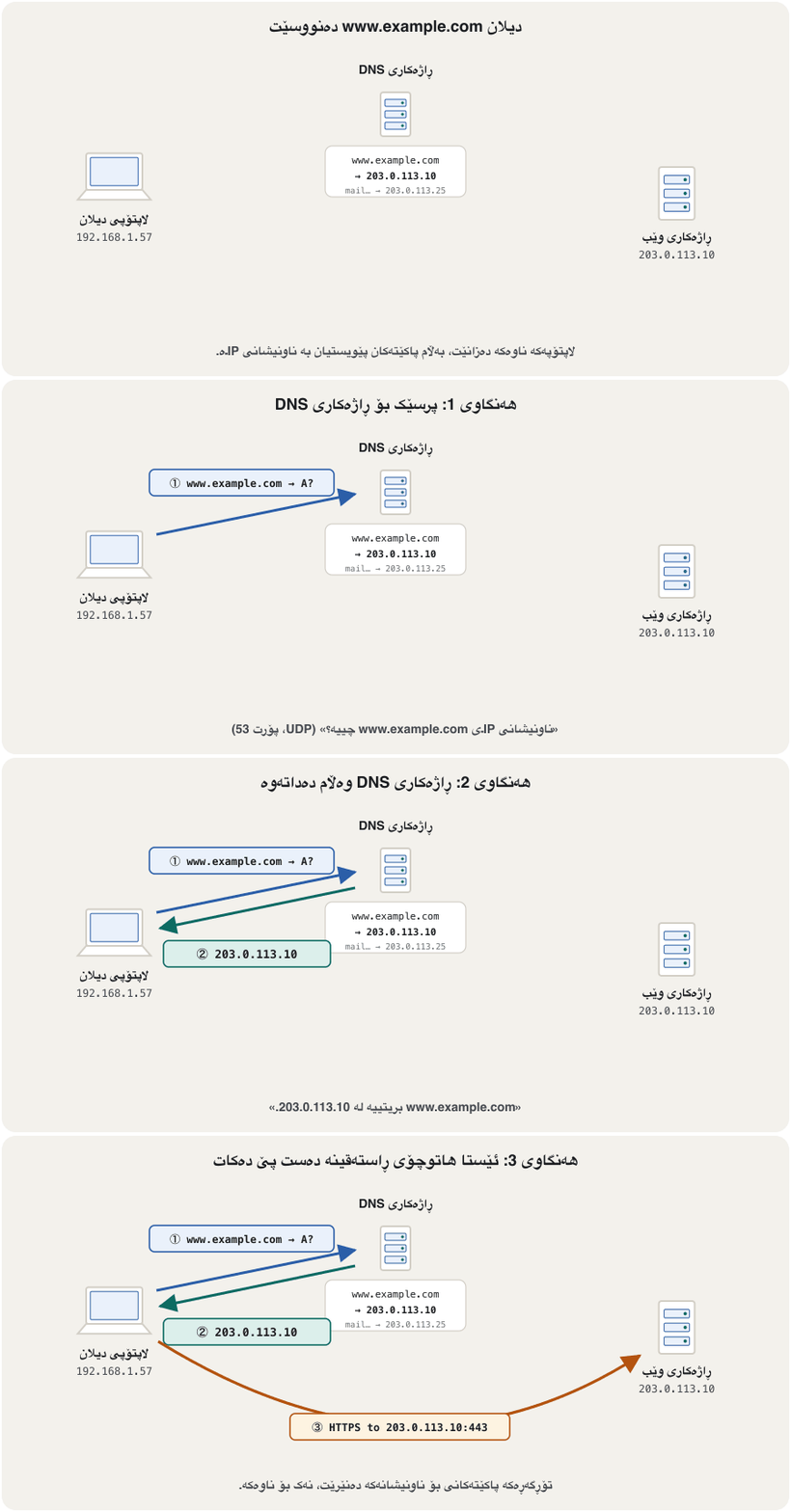
لە ڕوانگەی ، پرسیار و وەڵامێکی کورتە. ناونیشانی دەزانێت — ئەو ئامێرەی کار پێ دەکات و وەڵامی پرسیاری ناو بۆ دەداتەوە (زۆرجار ئەو ناونیشانە لە DHCPـەوە وەردەگرێت). دەنێرێت: « www.example.com چییە؟» بە ناونیشانەکە لە تۆمارەکانی خۆیەوە وەڵام دەداتەوە. تەنیا ئەوکات هاتوچۆی ڕاستەقینە دەست پێ دەکات.
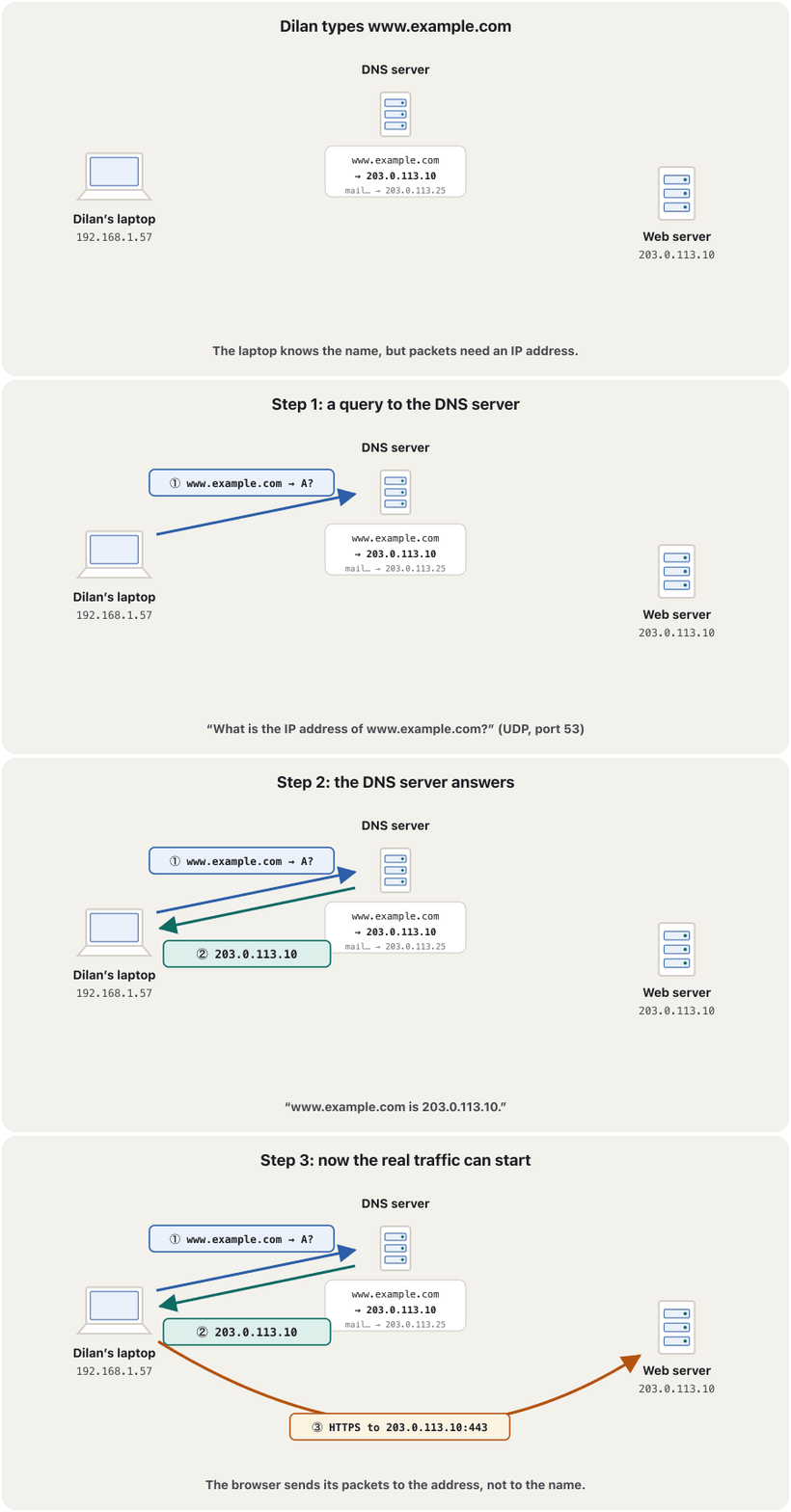
The program inside your computer that asks is called the resolver; the machine that answers is a DNS server, also called a name server. Like HTTP, DNS is an application-layer (layer 7) protocol: its messages are written and read by programs on the two hosts. How those messages travel — UDP or TCP, port 53 — is on the screen DNS on port 53.
ئەو لە ناو دەپرسێت پێی دەگوترێت ؛ ئەو ئامێرەی وەڵام دەداتەوە ، کە هەروەها پێی دەگوترێت ناو. وەک ، (چینی 7): پەیامەکانی سەر هەردوو دەیاننووسن و دەیانخوێننەوە. ئەو پەیامانە چۆن دەڕۆن — UDP یان TCP، 53 — لە شاشەی DNS لەسەر پۆرت 53ـدایە.
See how DNS works like a phone book, turning a domain name such as google.com into the IP address your computer needs.
ببینە چۆن وەک دەفتەری تەلەفۆن کار دەکات: وەک google.com دەگۆڕێت بۆ ، کە پێویستی پێیەتی.
Watch from 0:44: what DNS is, and how one question brings back the IP address.
لە 0:44ـەوە سەیر بکە: چییە و یەک پرسیار چۆن دەهێنێتەوە.
The name treeدرەختی ناوەکان
No single server could hold every name on the Internet, and no single organisation could manage them all. So DNS names form a tree. At the top is the nameless root. Under it are the top-level domains (TLDs): generic ones such as .com, .org, .net and .edu, country-code ones such as .iq, .uk, .jp and .fr, and newer ones such as .krd, the domain of the Kurdistan Region. Under a TLD, a person or company registers a second-level domain such as example in example.com; the owner can then make subdomains such as www.example.com or mail.example.com.
هیچ ناتوانێت هەموو ناوەکانی هەڵبگرێت و هیچ ڕێکخراوێکیش ناتوانێت هەموویان بەڕێوە ببات. بۆیە ناوەکانی درەختێک پێک دەهێنن. لە سەرەوە ڕەگێکی بێناو هەیە. لە ژێریدا (TLD) هەن: گشتییەکانی وەک .com، .org، .net و .edu، هی وڵاتەکانی وەک .iq، .uk، .jp و .fr و نوێترەکانی وەک .krd، دۆمەینی هەرێمی کوردستان. لە ژێر TLDـێکدا، کەسێک یان کۆمپانیایەک دۆمەینێکی ئاستی دووەم تۆمار دەکات، وەک example لە example.comـدا؛ پاشان خاوەنەکەی دەتوانێت دروست بکات، وەک www.example.com یان mail.example.com.
Each level is run by its own owner: the root zone by IANA, .com by its registry, example.com by whoever registered it. That is why DNS scales — nobody has to know everything. A full name such as www.example.com. even ends with a dot for the root, which we normally leave out. Domain names and their endings were introduced in domain names.
هەر ئاستێک خاوەنی خۆی بەڕێوەی دەبات: ناوچەی ڕەگ ، .com تۆمارخانەکەی و example.com ئەو کەسەی تۆماری کردووە. بۆیە دەتوانێت گەورە ببێت — پێویست ناکات کەس هەموو شتێک بزانێت. ناوێکی تەواوی وەک www.example.com. تەنانەت بە خاڵێک بۆ ڕەگ کۆتایی دێت کە بە ئاسایی نایننووسین. و کۆتاییەکانیان لە ناوەکانی دۆمەینـدا ناسێنران.
Who is who: resolvers and name serversکێ کێیە: دۆزەرەوەکانی DNS و ڕاژەکارەکانی ناو
Four kinds of DNS machine work together. The stub resolver is a small part of your operating system: it asks one question and waits. The recursive resolver — run by your ISP, your home router, or a public service such as 1.1.1.1, 8.8.8.8 or 9.9.9.9 — takes that question and does the searching, like a librarian you ask to find a book. The root servers are the library index: they do not know the answer, but they know which servers handle each TLD. The TLD servers know the name servers of every domain under their TLD — the right shelf. The domain’s authoritative name server holds its records — the book itself — and gives the final answer.
چوار جۆر ئامێری پێکەوە کار دەکەن. سادە بەشێکی بچووکی : یەک پرسیار دەکات و چاوەڕێ دەکات. ڕاسپێردراو — کە ، ماڵەوەت یان خزمەتگوزارییەکی گشتیی وەک 1.1.1.1، 8.8.8.8 یان 9.9.9.9 بەڕێوەی دەبات — ئەو پرسیارە وەردەگرێت و گەڕانەکە دەکات، وەک کتێبدارێک کە داوای لێ دەکەیت کتێبێکت بۆ بدۆزێتەوە. پێڕستی کتێبخانەکەن: وەڵامەکە نازانن، بەڵام دەزانن کام بەرپرسی هەر TLDـێکن. ناوی هەموو دۆمەینێکی ژێر TLDـەکەیان دەزانن — ڕەفە دروستەکە. دۆمەینەکە تۆمارەکانی هەڵدەگرێت — خودی کتێبەکە — و وەڵامی کۆتایی دەداتەوە.
So a resolver is the DNS client: the software that asks DNS servers for a program — it turns www.example.com into an address such as 192.0.2.1. It may run on a computer, a phone, a router or a firewall; it is usually built into the operating system and set up with the addresses of one or more DNS servers. The word resolver separates this asking side from the DNS servers that store and share a domain’s records. On a small LAN with no DNS server, devices can still find each other’s names with mDNS (Peer names today).
کەواتە : ئەو کە بۆ لە دەپرسێت — www.example.com دەکات بە ناونیشانێکی وەک 192.0.2.1. دەتوانێت لەسەر ، مۆبایل، یان کار بکات؛ زۆرجار لە ناو دروست کراوە و ناونیشانی یەک یان چەند پێ دراوە. وشەی ئەم لایەنە پرسیارکەرە لەو جیا دەکاتەوە کە تۆمارەکانی دۆمەینێک هەڵدەگرن و دەیدەن. لە بچووکدا کە نییە، ئامێرەکان هێشتا دەتوانن بە mDNS ناوی یەکتر بدۆزنەوە (ناوی تاکەکان ئەمڕۆ).
Who is who: resolvers and name serversکێ کێیە: دۆزەرەوەکانی DNS و ڕاژەکارەکانی ناو
Thirteen root identities, two thousand copies13 ناسنامەی ڕەگ، دوو هەزار کۆپی
People often say there are 13 root servers. More exactly there are 13 root server identities, named A to M (a.root-servers.net … m.root-servers.net) and run by 12 organisations — Verisign runs both A and J. Each identity is many machines: on 8 November 2026 root-servers.org counted 2,048 instances around the world. All the copies of one letter answer at the same IP address — this is anycast — and the network carries each question to a nearby copy. The root does not hold the address of www.example.com, or even the servers of example.com: it only points to the TLD servers, which also have redundant copies all over the world.
زۆرجار دەگوترێت 13 هەیە. بە وردی، 13 ناسنامەی هەیە، بە ناوەکانی A تا M (a.root-servers.net … m.root-servers.net) کە 12 ڕێکخراو بەڕێوەیان دەبەن — Verisign هەردوو A و J بەڕێوە دەبات. هەر ناسنامەیەک زۆر ئامێرە: لە 8ی تشرینی دووەمی 2026دا root-servers.org 2,048 کۆپی لە سەرانسەری جیهان ژمارد. هەموو کۆپییەکانی یەک پیت لە هەمان وەڵام دەدەنەوە — ئەمە ـە — و هەر پرسیارێک دەگەیەنێتە کۆپییەکی نزیک. ڕەگ ناونیشانی www.example.com و تەنانەت example.comـیش هەڵناگرێت: تەنیا ئاماژە بە دەکات، کە ئەوانیش کۆپیی یەدەگیان لە هەموو جیهاندا هەیە.
A short history of root-server pictures: older slides show 13 dots on a map of the United States and Europe, one per letter. That map has been out of date for twenty years — anycast copies now run in Asia, Africa, Latin America and the Middle East, and you can see the current sites on root-servers.org. The short version is in thirteen root servers.
مێژوویەکی کورتی وێنەی : سلایدە کۆنەکان 13 خاڵ لەسەر نەخشەی ئەمریکا و ئەوروپا نیشان دەدەن، بۆ هەر پیتێک یەکێک. ئەو نەخشەیە بیست ساڵە کۆن بووە — ئێستا کۆپییەکانی لە ئاسیا، ئەفریقا، ئەمریکای لاتین و ڕۆژهەڵاتی ناوەڕاستیش کار دەکەن و دەتوانیت شوێنە ئێستاییەکان لە root-servers.org ببینیت. کورتکراوەکەی لە سێزدە ڕاژەکاری ڕەگـدایە.
Recursive and iterative queriesپرسی ڕاسپێردراو و پرسی هەنگاوبەهەنگاو
A DNS resolver — a DNS client, or a DNS server asking on someone’s behalf — can make two kinds of query. A recursive query means “find the answer for me”: the host sends it to its local DNS server, and that server is responsible for the whole job — it must return the final answer or an error, and it may not refer the client to another server. An iterative query means “tell me what you know”: the local DNS server sends these to other DNS servers, and each one either answers or refers it to servers closer to the answer.
— ، یان کە لە جیاتی کەسێکی تر دەپرسێت — دەتوانێت دوو جۆر بکات. واتە «وەڵامەکەم بۆ بدۆزەرەوە»: دەینێرێت بۆ ناوخۆیی و ئەو بەرپرسی هەموو کارەکەیە — دەبێت وەڵامی کۆتایی یان هەڵەیەک بگەڕێنێتەوە و بۆی نییە بۆ تر ڕەوانە بکات. واتە «ئەوەی دەیزانیت پێم بڵێ»: ناوخۆیی ئەمانە بۆ تری دەنێرێت و هەریەکەیان یان وەڵام دەداتەوە یان بۆ ئەو نزیکترن لە وەڵامەکە ڕەوانەی دەکات.
Resolving www.example.com in eight stepsدۆزینەوەی www.example.com بە هەشت هەنگاو
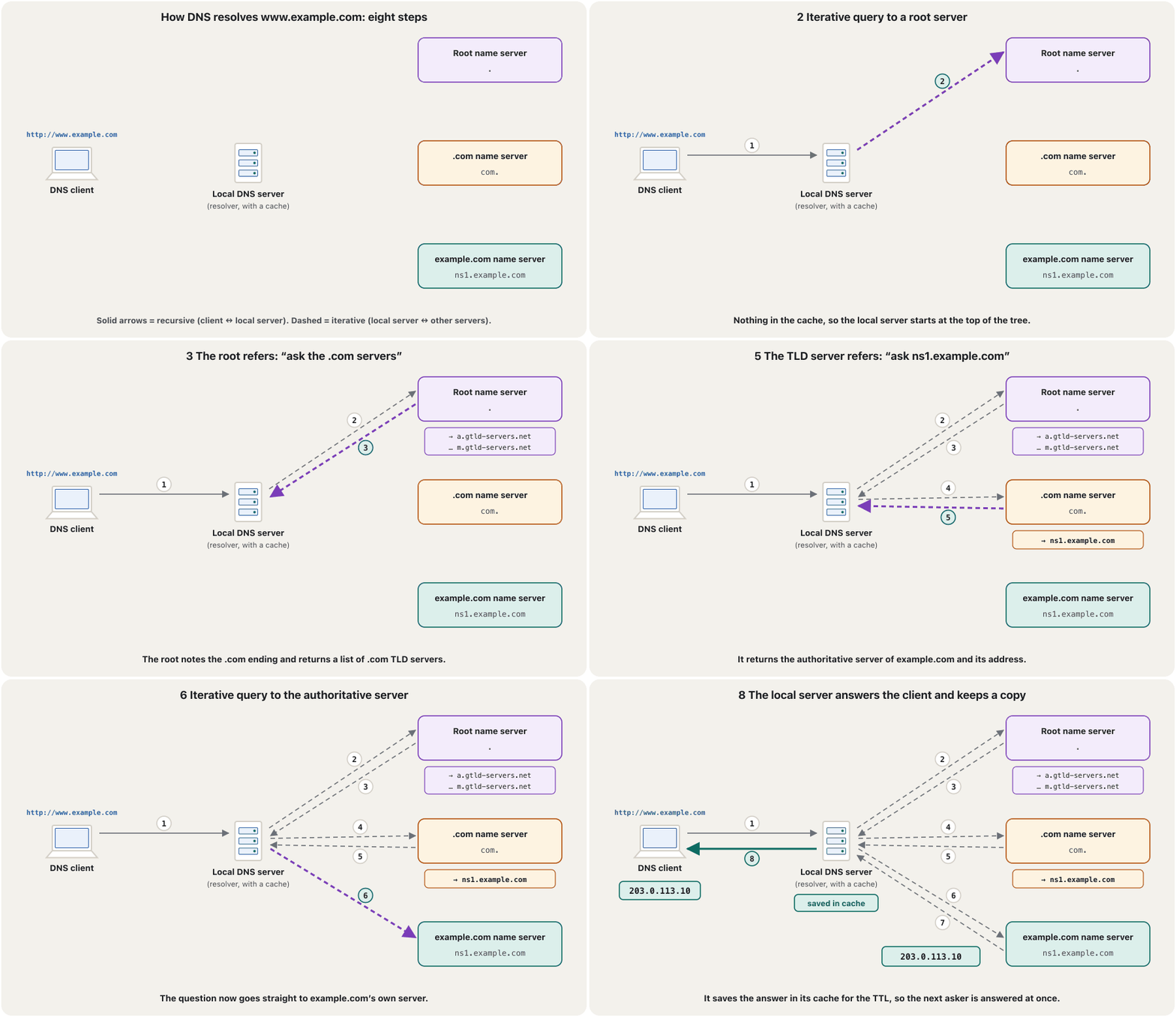
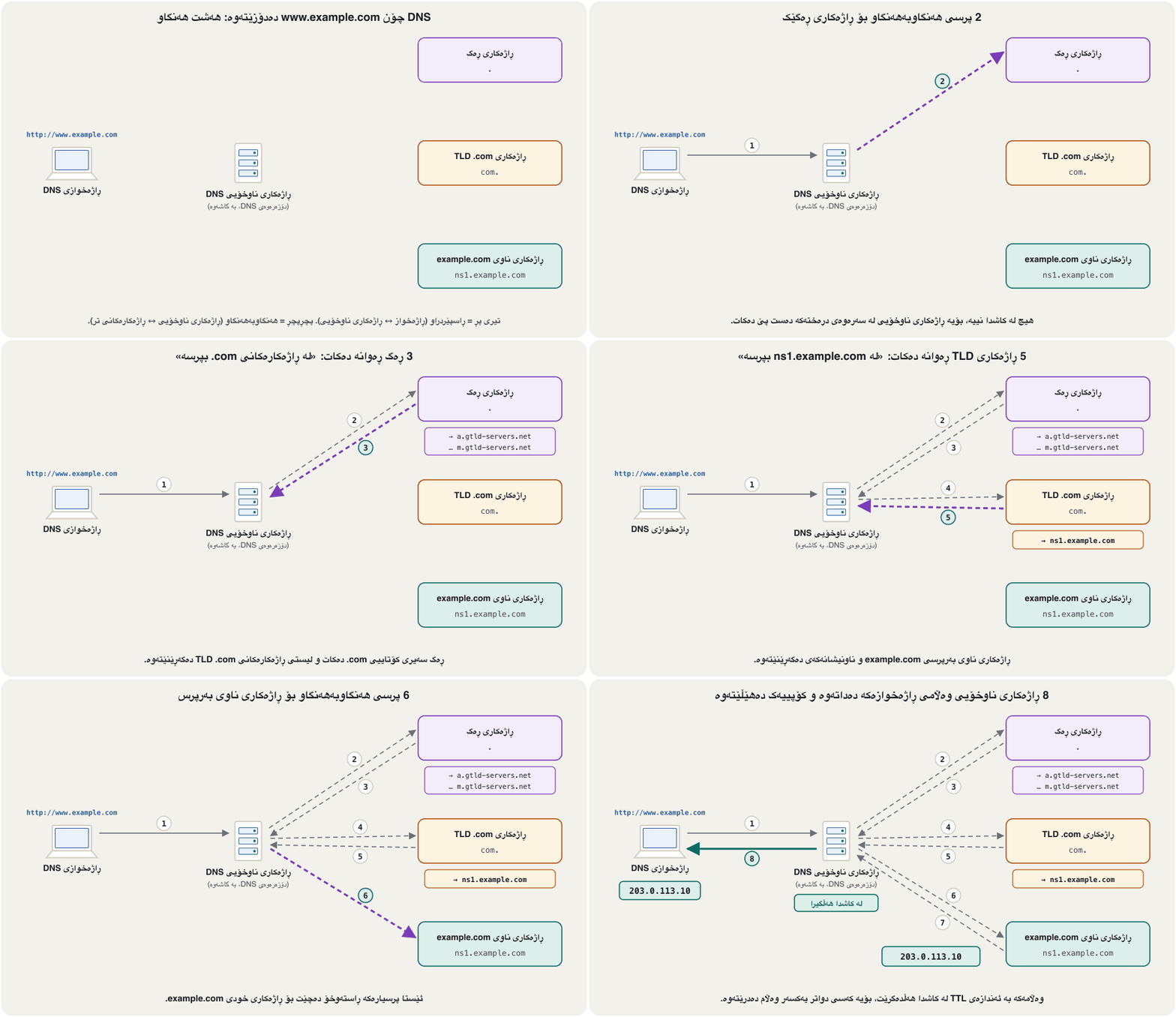
The user types
http://www.example.com. The resolver on the client sends a recursive query forwww.example.comto its local DNS server.http://www.example.comدەنووسێت. سەر بۆwww.example.comدەنێرێت بۆ ناوخۆیی .The local server has nothing in its cache, so it asks a root server.
ناوخۆیی هیچی لە نییە، بۆیە لە دەپرسێت.
The root notes the
.comending and returns a list of the .com TLD servers.ڕەگ سەیری کۆتاییی
.comدەکات و لیستی .com دەگەڕێنێتەوە.The local server sends the query to one of the .com servers.
ناوخۆیی بۆ یەکێک لە .com دەنێرێت.
The .com server notes
example.comand returns its authoritative server,ns1.example.com, with its address..com سەیری
example.comدەکات و ،ns1.example.com، لەگەڵ ناونیشانەکەی دەگەڕێنێتەوە.The local server asks
ns1.example.comdirectly.ناوخۆیی ڕاستەوخۆ لە
ns1.example.comدەپرسێت.ns1.example.comanswers:www.example.comis203.0.113.10.ns1.example.comوەڵام دەداتەوە:www.example.comبریتییە لە203.0.113.10.The local server sends the address to the client and keeps it in its cache. The browser can now connect to
203.0.113.10(port 443 for HTTPS).ناوخۆیی ناونیشانەکە بۆ دەنێرێت و لە هەڵیدەگرێت. ئێستا دەتوانێت بە
203.0.113.10ببەسترێتەوە ( 443 بۆ HTTPS).
Caching and TTLکاش و TTL
Eight steps for every page would be slow. So when a DNS server receives a reply that maps a host name to an IP address, it can cache the answer — keep it in its memory — and answer the next person at once. Your computer and browser keep small caches of their own too. But an answer must not live forever, because the owner may move the site. Every record carries a TTL (time to live): the number of seconds a resolver may keep it. With a TTL of 1800 seconds, every cache must throw the answer away after 30 minutes, and the next question goes the whole way again.
هەشت هەنگاو بۆ هەموو لاپەڕەیەک هێواش دەبوو. بۆیە کاتێک وەڵامێک وەردەگرێت کە بە دەبەستێتەوە، دەتوانێت وەڵامەکە لە هەڵبگرێت — لە بیرگەی خۆیدا ڕایبگرێت — و یەکسەر وەڵامی کەسی دواتر بداتەوە. و بچووکی خۆیان هەیە. بەڵام وەڵامێک نابێت بۆ هەمیشە بژی، چونکە خاوەنەکەی لەوانەیە بگوازێتەوە. هەموو تۆمارێک هەیە (Time to Live، کاتی ژیان): ئەو ژمارە چرکەیەی دەتوانێت ڕایبگرێت. بە TTLـی 1800 چرکە، هەموو دەبێت دوای 30 خولەک وەڵامەکە فڕێ بدات و پرسیاری دواتر دیسان هەموو ڕێگاکە دەبڕێت.
The domain owner chooses each record’s TTL: short TTLs (a few minutes) let changes spread fast; long ones (a day is 86,400 s) save lookups. Do not confuse this with the TTL field in every IP packet, which counts router hops and is what ping and tracert show (see ping and traceroute) — the same name for a different idea.
خاوەنی دۆمەینەکە TTLـی هەر تۆمارێک هەڵدەبژێرێت: TTLـی کورت (چەند خولەکێک) ڕێگە دەدات گۆڕانکاری خێرا بڵاو ببێتەوە؛ درێژەکان (ڕۆژێک 86,400 چرکەیە) گەڕان کەم دەکەنەوە. ئەمە لەگەڵ خانەی TTL لە هەموو IPـدا تێکەڵ مەکە، کە بازەکانی دەژمێرێت و ئەوەیە کە ping و tracert نیشانی دەدەن (بڕوانە پینگ و traceroute) — هەمان ناو بۆ بیرۆکەیەکی جیاواز.
See and clear your computer’s DNS cacheبینین و سڕینەوەی کاشی DNSـی کۆمپیوتەرەکەت
Windows keeps its own resolver cache, which also holds any entries preloaded from the computer’s hosts file. ipconfig /displaydns lists it: for each entry you see the record name, its type as a number (1 = A, 28 = AAAA, 5 = CNAME, 12 = PTR), the TTL left in seconds and the data. ipconfig /flushdns empties it — useful when a site has moved but your computer still remembers the old address. Both run in Command Prompt or PowerShell on Windows 11 (the output below is an original example); all the Windows network commands are together in Windows network commands.
Windows خۆی هەیە، کە ئەو تۆمارانەش دەگرێتەوە کە لە فایلی hostsـی پێشتر بار کراون. ipconfig /displaydns لیستەکەی پیشان دەدات: بۆ هەر تۆمارێک ناوی تۆمارەکە، جۆرەکەی وەک ژمارە (1 = A، 28 = AAAA، 5 = CNAME، 12 = PTR)، ئەو TTLـەی ماوەتەوە بە چرکە و دەبینیت. ipconfig /flushdns بەتاڵی دەکاتەوە — بەسوودە کاتێک گوازراوەتەوە بەڵام هێشتا ناونیشانە کۆنەکەی لەبیرە. هەردووکیان لە Command Prompt یان PowerShellـی Windows 11 کار دەکەن (ئەنجامی خوارەوە نموونەیەکی دروستکراوە)؛ هەموو فەرمانەکانی Windows پێکەوە لە فەرمانەکانی ڕایەڵەی Windowsـدان.
ipconfig /displaydns
ipconfig /flushdnsC:\Users\Aram>ipconfig /displaydns
Windows IP Configuration
www.example.com
----------------------------------------
Record Name . . . . . : www.example.com
Record Type . . . . . : 1
Time To Live . . . . : 1612
Data Length . . . . . : 4
Section . . . . . . . : Answer
A (Host) Record . . . : 203.0.113.10
www.example.com
----------------------------------------
Record Name . . . . . : www.example.com
Record Type . . . . . : 28
Time To Live . . . . : 1612
Data Length . . . . . : 16
Section . . . . . . . : Answer
AAAA Record . . . . . : 2001:db8::10
C:\Users\Aram>ipconfig /flushdns
Windows IP Configuration
Successfully flushed the DNS Resolver Cache.Caches also remember “no”. If a name does not exist (the answer NXDOMAIN), resolvers keep that negative answer for a while too, so a mistyped name is not looked up again and again. RFC 2308 takes its TTL from the domain’s SOA record and suggests one to three hours; /flushdns throws these away as well. Very old Windows (Windows 2000) also had its own limits — at most one day (86,400 s) for an answer and 300 s for a “no” — but today it is each record’s own TTL that decides.
«نەخێر»ـیش لەبیر دەکەن. ئەگەر ناوێک بوونی نەبێت (وەڵامی NXDOMAIN)، ئەو وەڵامە نەرێنییەش بۆ ماوەیەک ڕادەگرن، بۆ ئەوەی ناوێکی هەڵە نووسراو دووپاتە و دووپاتە نەگەڕێندرێت. RFC 2308 TTLـەکەی لە تۆماری SOAـی دۆمەینەکەوە وەردەگرێت و یەک تا سێ کاتژمێر پێشنیار دەکات؛ /flushdns ئەمانەش فڕێ دەدات. Windowsـی زۆر کۆن (Windows 2000) سنووری خۆشی هەبوو — زۆرترین ڕۆژێک (86,400 چرکە) بۆ وەڵامێک و 300 چرکە بۆ «نەخێر»ێک — بەڵام ئەمڕۆ TTLـی خودی هەر تۆمارێک بڕیار دەدات.
Inside the answer: record typesلە ناو وەڵامەکەدا: جۆرەکانی تۆمار
An authoritative server holds its domain’s resource records. Each record has a name, a type, a TTL and data. Seven types you will meet most: A (name → IPv4 address), AAAA (name → IPv6 address), CNAME (an alias that points to the real name), MX (the mail server of the domain, with a preference number), NS (the name servers of the domain — what TLD servers hand out), TXT (free text, used for e-mail checks such as SPF and for proving who owns a domain) and PTR (reverse lookup: address → name, under in-addr.arpa).
دۆمەینەکەی هەڵدەگرێت. هەر تۆمارێک ناو، جۆر، TTL و هەیە. حەوت جۆر کە زۆرتر دەیانبینیت: A (ناو ← ناونیشانی IPv4)، AAAA (ناو ← ناونیشانی IPv6)، CNAME (نازناوێک کە ئاماژە بە ناوە ڕاستەقینەکە دەکات)، MX ( دۆمەینەکە، لەگەڵ ژمارەی پێشینەیی)، NS ( ناوی ئەو دۆمەینە — ئەوەی دەیدەن)، TXT (دەقی ئازاد، بۆ پشکنینی وەک SPF و بۆ سەلماندنی خاوەنی دۆمەین بەکار دێت) و PTR (گەڕانی پێچەوانە: ناونیشان ← ناو، لە ژێر in-addr.arpa).
A name is not tied to one address. A busy site can have several A records (several servers share the load) plus AAAA records for IPv6 — RFC 1034’s own example gives one host two addresses. A computer with both IPv4 and IPv6 (dual stack) asks for both and usually tries the IPv6 address first. And one IP address can carry many names, for example hundreds of small websites on one hosting server. In the Windows cache these types appear as numbers: type 1 is A and type 12 is PTR (for example 127.0.0.1 → localhost).
ناوێک بە یەک ناونیشانەوە نەبەستراوە. قەرەباڵغ دەتوانێت چەند تۆمارێکی Aـی هەبێت (چەند بارەکە دابەش دەکەن) لەگەڵ تۆماری AAAA بۆ IPv6 — نموونەی خودی RFC 1034 دوو ناونیشان دەداتە یەک . کە هەم IPv4 و هەم IPv6ـی هەیە (ستاکی دووانە) داوای هەردووکیان دەکات و زۆرجار سەرەتا ناونیشانی IPv6 تاقی دەکاتەوە. هەروەها یەک دەتوانێت زۆر ناو هەڵبگرێت، بۆ نموونە سەدان بچووک لەسەر یەک هۆستینگ. لە Windowsـدا ئەم جۆرانە وەک ژمارە دەردەکەون: جۆری 1 بریتییە لە A و جۆری 12 بریتییە لە PTR (بۆ نموونە 127.0.0.1 ← localhost).
DNS on port 53 — and encrypted DNSDNS لەسەر پۆرت 53 — و DNSـی شفرەکراو
DNS is an application-layer protocol, but its messages still need a transport. A normal question travels in one UDP datagram to port 53 and the answer comes back the same way — no connection to set up, so it is fast; if an answer is lost, the resolver simply asks again. TCP port 53 is used when an answer is too big for UDP and when servers copy whole zones to each other (zone transfers); RFC 7766 requires every DNS implementation to support both. Classic DNS is not encrypted: on café Wi-Fi anyone on the path can see which names you look up. Two standards fix that: DNS over TLS (DoT, TCP port 853, RFC 7858, 2016) and DNS over HTTPS (DoH, port 443, RFC 8484, 2018), supported by browsers and Windows 11.
، بەڵام پەیامەکانی هێشتا پێویستیان بە گواستنەوە هەیە. پرسیارێکی ئاسایی لە یەک UDPـدا بۆ 53 دەڕوات و وەڵامەکە بە هەمان شێوە دەگەڕێتەوە — هیچ پەیوەندییەک دانانرێت، بۆیە خێرایە؛ ئەگەر وەڵامێک ون بێت، تەنیا دووپاتە دەپرسێتەوە. TCP لەسەر 53 بەکار دێت کاتێک وەڵامێک بۆ UDP زۆر گەورەیە و کاتێک هەموو ناوچەیەک بۆ یەکتر کۆپی دەکەن (zone transfer)؛ RFC 7766 داوا دەکات هەموو پشتگیریی هەردووکیان بکات. کلاسیک شفرە ناکرێت: لە چایخانەدا هەر کەسێک لەسەر ڕێگاکە دەتوانێت ببینێت بەدوای چ ناوێکدا دەگەڕێیت. دوو ستاندارد ئەمە چارەسەر دەکەن: DNS over TLS (DoT، TCP 853، RFC 7858، 2016) و DNS over HTTPS (DoH، 443، RFC 8484، 2018) کە و Windows 11 پشتگیرییان دەکەن.
So the statement “DNS is a layer 7 protocol” is true — and it is completed by saying that DNS uses UDP and TCP port 53 below it. Transport protocols and port numbers are taught in TCP and UDP and ports and sockets.
کەواتە دەستەواژەی « چینی 7ـە» ڕاستە — و تەواو دەبێت ئەگەر بڵێین لە خوارییەوە UDP و TCP لەسەر 53 بەکار دەهێنێت. گواستنەوە و ژمارەی لە TCP و UDP و پۆرتەکان و سۆکێتەکانـدا دەخوێندرێن.
Ask DNS yourself: nslookupخۆت لە DNS بپرسە: nslookup
nslookup (name server lookup) asks DNS directly; it is in Windows, macOS and Linux. Typed alone, it shows the default DNS server of your computer and opens an interactive > prompt; followed by a name, it answers at once. The picture shows a typical Windows 11 result.
nslookup (name server lookup) ڕاستەوخۆ لە دەپرسێت؛ لە Windows، macOS و Linuxـدا هەیە. ئەگەر بە تەنیا بنووسرێت، بنەڕەتیی پیشان دەدات و نیشانەی > دەردەخات و چاوەڕێی پرسیار دەکات؛ ئەگەر ناوێکی بەدوادا بێت، یەکسەر وەڵام دەداتەوە. وێنەکە ئەنجامێکی ئاسایی Windows 11 نیشان دەدات.
Read it line by line. Server and Address name the resolver that answered (a home router often shows UnKnown because it has no name of its own). Non-authoritative answer means the answer came from a resolver’s cache, not from the domain’s authoritative server — it is still correct until its TTL ends. Aliases shows that www.example.com is a CNAME of web1.example.com. You can ask for another record type or another server: nslookup -type=mx example.com, nslookup www.example.com 9.9.9.9. The 3D network lab has no DNS server, so try these on a real computer; the Packet Tracer DNS lab is in server services in Packet Tracer.
دێڕ بە دێڕ بیخوێنەوە. Server و Address ئەو دەناسێنن کە وەڵامی دایەوە ( ماڵەوە زۆرجار UnKnown نیشان دەدات چونکە ناوی خۆی نییە). Non-authoritative answer واتە وەڵامەکە لە هاتووە، نەک لە دۆمەینەکە — هێشتا دروستە تا TTLـەکەی تەواو دەبێت. Aliases نیشان دەدات کە www.example.com CNAMEـی web1.example.comـە. دەتوانیت جۆرێکی تری تۆمار یان تر بپرسیت: nslookup -type=mx example.com، nslookup www.example.com 9.9.9.9. تاقیگەی سێ ڕەهەندیی ڕایەڵە تێدا نییە، بۆیە ئەمانە لەسەر ڕاستەقینە تاقی بکەرەوە؛ تاقیگەی لە Packet Tracer لە خزمەتگوزارییەکانی ڕاژەکار لە Packet Tracerـدایە.
Exam practiceڕاهێنانی تاقیکردنەوە
A 2022 midterm asked: true or false? (a) “Root DNS servers are responsible for domains such as .com, .edu, .org, .net, .uk, .jp and .fr; there are redundant servers throughout the world.” (b) “When a DNS server receives a DNS reply (mapping a host name to an IP address), it can cache the information in its local memory.” (c) “Resolver: DNS client programs used to look up DNS name information.”
تاقیکردنەوەیەکی نیوەی وەرزی 2022 پرسی: ڕاست یان هەڵە؟ (a) « بەرپرسی دۆمەینەکانی وەک .com، .edu، .org، .net، .uk، .jp و .frـن؛ یەدەگ لە سەرانسەری جیهاندا هەن.» (b) «کاتێک وەڵامێکی وەردەگرێت ( بە دەبەستێتەوە)، دەتوانێت زانیارییەکە لە بیرگەی خۆیدا لە هەڵبگرێت.» (c) «: ئەو کە بۆ گەڕانی زانیاریی ناوی بەکار دێن.»
Show answerوەڵامەکە پیشان بدە
- (a) False. The TLD servers are responsible for .com, .org, .uk and the others. Root servers only refer resolvers to the TLD servers. (Both kinds do have redundant copies around the world.)
- (b) True. This is DNS caching; the answer is kept for its TTL.
- (c) True. This is the definition of a resolver. Tools such as
nslookupandipconfig /displaydnsuse or show the resolver, but they are not the definition — answering “false” because of them loses the mark.
- (a) هەڵەیە. بەرپرسی .com، .org، .uk و ئەوانی ترن. تەنیا بۆ ڕەوانە دەکەن. (هەردوو جۆرەکەش کۆپیی یەدەگیان لە سەرانسەری جیهاندا هەیە.)
- (b) ڕاستە. ئەمە ؛ وەڵامەکە بە ئەندازەی TTLـەکەی ڕادەگیرێت.
- (c) ڕاستە. ئەمە پێناسەی . ئامرازەکانی وەک
nslookupوipconfig /displaydnsبەکار دەهێنن یان پیشانی دەدەن، بەڵام پێناسەکە نین — وەڵامی «هەڵە» بەهۆی ئەوانەوە نمرەکە لەدەست دەدات.
The same exam asked: “How does DNS resolve a name into an IP address? Explain your answer in detail.” Write the answer, with a labelled drawing.
هەمان تاقیکردنەوە پرسی: « چۆن ناوێک دەکات بە ؟ وەڵامەکەت بە وردی ڕوون بکەرەوە.» وەڵامەکە بنووسە، لەگەڵ وێنەیەکی ناوزەدکراو.
Hintئاماژە
Two kinds of query, three kinds of server, one cache.
دوو جۆر ، سێ جۆر ، یەک .
Show answerوەڵامەکە پیشان بدە
- 1. The DNS client sends a recursive query for www.example.com to its local DNS server.
- 2. If the answer is not in its cache, the local server sends an iterative query to a root server.
- 3. The root server notes .com and returns the list of .com TLD servers.
- 4. The local server asks a .com TLD server.
- 5. The TLD server returns the authoritative server of example.com.
- 6. The local server asks example.com’s server.
- 7. That server answers with the IP address of www.example.com.
- 8. The local server caches the answer for its TTL and sends it to the client; the browser can now open the site.
- 1. بۆ www.example.com دەنێرێت بۆ ناوخۆیی .
- 2. ئەگەر وەڵامەکە لە نەبێت، ناوخۆیی بۆ دەنێرێت.
- 3. سەیری .com دەکات و لیستی .com دەگەڕێنێتەوە.
- 4. ناوخۆیی لە .com دەپرسێت.
- 5. example.com دەگەڕێنێتەوە.
- 6. ناوخۆیی لە example.com دەپرسێت.
- 7. ئەو بە www.example.com وەڵام دەداتەوە.
- 8. ناوخۆیی وەڵامەکە بە ئەندازەی TTLـەکەی لە هەڵدەگرێت و بۆ دەنێرێت؛ ئێستا دەتوانێت بکاتەوە.
Drawing: the client and the local DNS server joined by arrows 1 and 8, labelled recursive; the local server joined to the root, .com and example.com servers by arrows 2–7, labelled iterative — as in the eight-step animation. For full marks, name the query types and mention the cache.
وێنە: و ناوخۆیی بە تیرەکانی 1 و 8 بەستراون، بە ناوی ڕاسپێردراو؛ ناوخۆیی بە تیرەکانی 2 تا 7 بە ڕەگ، .com و example.comـەوە بەستراوە، بە ناوی هەنگاوبەهەنگاو — وەک ئەنیمەیشنی هەشت هەنگاوەکە. بۆ نمرەی تەواو، ناوی جۆرەکانی ببە و باسی بکە.
Common mistakesهەڵە باوەکان
- “There are 13 root servers.” There are 13 root identities (A–M) run by 12 operators, answered by 2,048 machines worldwide (8 November 2026).
- “Root servers know the address of every .com site.” They only point to the TLD servers; TLD servers point to each domain’s authoritative server, and only that server knows the address.
- “DNS means Domain Name Server.” The S is System — the whole worldwide service. The machines are DNS servers or name servers.
- “One name has one IP address.” A name can have several A and AAAA records, and one address can carry many names.
- “DNS uses only UDP.” UDP 53 for most questions, TCP 53 for big answers and zone transfers, and DoT/DoH for encrypted DNS.
- “DNS TTL counts router hops.” That is the IP packet’s TTL. A DNS TTL is a number of seconds a cache may keep an answer.
- “A non-authoritative answer is wrong.” It only came from a cache and is correct until its TTL ends.
- “
ipconfig /flushdnsrepairs the Internet connection.” It only empties the DNS cache; it does not touch the address, cable or Wi-Fi.
- «13 هەیە.» 13 ناسنامەی ڕەگ (A تا M) هەیە کە 12 بەڕێوەبەر بەڕێوەیان دەبەن و 2,048 ئامێر لە سەرانسەری جیهان وەڵامیان دەدەنەوە (8ی تشرینی دووەمی 2026).
- « ناونیشانی هەموو .com دەزانن.» تەنیا ئاماژە بە دەکەن؛ ئاماژە بە هەر دۆمەینێک دەکەن و تەنیا ئەو ناونیشانەکە دەزانێت.
- « واتە Domain Name Server.» S واتە System — هەموو خزمەتگوزارییە جیهانییەکە. ئامێرەکان یان ناون.
- «یەک ناو یەک هەیە.» ناوێک دەتوانێت چەند تۆمارێکی A و AAAAـی هەبێت و یەک ناونیشان دەتوانێت زۆر ناو هەڵبگرێت.
- « تەنیا UDP بەکار دەهێنێت.» UDP 53 بۆ زۆربەی پرسیارەکان، TCP 53 بۆ وەڵامی گەورە و گواستنەوەی ناوچە و DoT/DoH بۆ شفرەکراو.
- «TTLـی بازەکانی دەژمێرێت.» ئەوە TTLـی IPـە. TTLـی ژمارە چرکەیەکە کە دەتوانێت وەڵامێک ڕابگرێت.
- «وەڵامی non-authoritative هەڵەیە.» تەنیا لە هاتووە و تا TTLـەکەی تەواو دەبێت دروستە.
- «
ipconfig /flushdnsپەیوەندیی چاک دەکاتەوە.» تەنیا بەتاڵ دەکاتەوە؛ دەست لە ناونیشان، کێبڵ یان نادات.
Exercisesڕاهێنانەکان
Label every part of ftp.example.org.: the root, the TLD, the second-level domain and the host (subdomain).
هەموو بەشێکی ftp.example.org. ناو ببە: ڕەگ، TLD، دۆمەینی ئاستی دووەم و ().
Show answerوەڵامەکە پیشان بدە
Read from the right: the final . is the root; org is the TLD; example is the second-level domain; ftp is the host / subdomain of example.org.
لە ڕاستەوە بخوێنەوە: .ـی کۆتایی ڕەگـە؛ org TLDـیە؛ example دۆمەینی ئاستی دووەمـە؛ ftp / ـی example.orgـە.
A resolver caches www.example.com at 10:00 with a TTL of 3600 s. What happens when someone asks at 10:45, and at 11:05?
لە کاتژمێر 10:00دا www.example.com بە TTLـی 3600 چرکە لە هەڵدەگرێت. کاتێک کەسێک لە 10:45 و لە 11:05 دەپرسێت چی ڕوو دەدات؟
Show answerوەڵامەکە پیشان بدە
3600 s = 60 minutes, so the record lives until 11:00. At 10:45 it is answered from the cache, with 15 minutes (900 s) left. At 11:05 the record has been thrown away, so the resolver does a full lookup again and caches the new answer for another 3600 s.
3600 چرکە = 60 خولەک، کەواتە تۆمارەکە تا 11:00 دەژی. لە 10:45دا لە وەڵام دەدرێتەوە، 15 خولەک (900 چرکە) ماوە. لە 11:05دا تۆمارەکە فڕێ دراوە، بۆیە دیسان گەڕانی تەواو دەکات و وەڵامە نوێیەکە بۆ 3600 چرکەی تر لە هەڵدەگرێت.
Put the steps in order: (A) the TLD server names ns1.example.com; (B) the client sends a recursive query; (C) the root lists the .com servers; (D) ns1.example.com gives the address; (E) the local server caches the answer and replies.
هەنگاوەکان ڕیز بکە: (A) ناوی ns1.example.com دەڵێت؛ (B) دەنێرێت؛ (C) ڕەگ لیستی .com دەدات؛ (D) ns1.example.com ناونیشانەکە دەدات؛ (E) ناوخۆیی وەڵامەکە لە هەڵدەگرێت و وەڵام دەداتەوە.
Show answerوەڵامەکە پیشان بدە
B → C → A → D → E.
ڕیزبەندیی دروست: B → C → A → D → E.
What is the difference between a recursive and an iterative query?جیاوازیی نێوان پرسی ڕاسپێردراو و پرسی هەنگاوبەهەنگاو چییە؟
Recursive: “find the final answer for me” — the server that receives it must do the whole search. Iterative: “tell me what you know” — the server answers or refers the asker to another server.
ڕاسپێردراو: «وەڵامی کۆتاییم بۆ بدۆزەرەوە» — ئەو وەریدەگرێت دەبێت هەموو گەڕانەکە بکات. هەنگاوبەهەنگاو: «ئەوەی دەیزانیت پێم بڵێ» — وەڵام دەداتەوە یان پرسیارکەرەکە بۆ تر ڕەوانە دەکات.
What are TLD servers responsible for?ڕاژەکارەکانی TLD بەرپرسی چین؟
For a top-level domain such as .com, .org, .uk or .iq: they know the name servers of every domain registered under it and refer resolvers to them.
بۆ وەک .com، .org، .uk یان .iq: ناوی هەموو دۆمەینێکی تۆمارکراو لە ژێریدا دەزانن و بۆ ئەوان ڕەوانە دەکەن.
Why is DNS caching useful, and what limits it?بۆچی کاشی DNS بەسوودە و چی سنووری بۆ دادەنێت؟
It answers repeated questions at once and takes load off the root, TLD and authoritative servers. The record’s TTL limits how long a cache may keep it, so changes still spread.
یەکسەر وەڵامی پرسیارە دووپاتەکان دەداتەوە و بار لەسەر ڕەگ، TLD و بەرپرس کەم دەکاتەوە. TTLـی تۆمارەکە سنووری ئەوە دادەنێت تا کەی دەتوانێت ڕایبگرێت، بۆیە گۆڕانکارییەکان هەر بڵاو دەبنەوە.
Summaryپوختە
- DNS turns domain names into IP addresses: people use names, packets use numbers.
- Names form a tree: root → TLDs (.com, .org, .iq, .krd…) → second-level domains → subdomains; read a name from right to left.
- The stub resolver asks; the recursive resolver searches; root servers point to TLD servers; TLD servers point to authoritative servers; the authoritative server answers.
- 13 root identities (A–M), 12 operators, 2,048 anycast instances on 8 November 2026.
- Client → local server: recursive (steps 1 and 8). Local server → root, TLD, authoritative: iterative (steps 2–7).
- Answers are cached for their TTL (seconds); “no” answers are cached too.
ipconfig /displaydnsshows the Windows cache,/flushdnsempties it. - Records: A, AAAA, CNAME, MX, NS, TXT, PTR. One name can have several addresses.
- DNS is a layer 7 protocol over UDP and TCP port 53; DoT (853) and DoH (443) encrypt it.
nslookupasks DNS yourself.
- دەکات بە : خەڵک ناو بەکار دەهێنن، ژمارە.
- ناوەکان درەختێک پێک دەهێنن: ڕەگ ← (.com، .org، .iq، .krd…) ← دۆمەینی ئاستی دووەم ← ؛ ناو لە ڕاستەوە بۆ چەپ بخوێنەوە.
- سادە دەپرسێت؛ ڕاسپێردراو دەگەڕێت؛ ئاماژە بە دەکەن؛ ئاماژە بە دەکەن؛ وەڵام دەداتەوە.
- 13 ناسنامەی ڕەگ (A تا M)، 12 بەڕێوەبەر، 2,048 کۆپیی لە 8ی تشرینی دووەمی 2026دا.
- ← ناوخۆیی: ڕاسپێردراو (هەنگاوەکانی 1 و 8). ناوخۆیی ← ڕەگ، TLD، بەرپرس: هەنگاوبەهەنگاو (هەنگاوەکانی 2 تا 7).
- وەڵامەکان بە ئەندازەی TTLـەکەیان (بە چرکە) لە هەڵدەگیرێن؛ وەڵامی «نەخێر»ـیش.
ipconfig /displaydnsWindows پیشان دەدات و/flushdnsبەتاڵی دەکاتەوە. - تۆمارەکان: A، AAAA، CNAME، MX، NS، TXT، PTR. یەک ناو دەتوانێت چەند ناونیشانێکی هەبێت.
- چینی 7ـە لەسەر UDP و TCP 53؛ DoT (853) و DoH (443) شفرەی دەکەن. بە
nslookupخۆت لە دەپرسیت.
Lesson complete!وانەکە تەواو بوو!
Well done. Review the key terms, then go on to the next lesson.دەستخۆش. سەیرێکی زاراوە سەرەکییەکان بکەرەوە، پاشان بڕۆ بۆ وانەی داهاتوو.
Key termsزاراوە سەرەکییەکان
DHCP: Automatic Addresses, DORA and LeasesDHCP: ناونیشانی خۆکار، DORA و کرێکانی DHCP
Related lecturesوانە پەیوەندیدارەکان
- Browsers, Web Servers and URLsتۆڕگەڕەکان، ڕاژەکارەکانی وێب و URL
- IP Addresses and MAC Addressesناونیشانەکانی IP و ناونیشانەکانی MAC
- TCP and UDPTCP و UDP
- Port Numbers and Socketsژمارەی پۆرت و سۆکێتەکان
- DHCP: Automatic Addresses, DORA and LeasesDHCP: ناونیشانی خۆکار، DORA و کرێکانی DHCP
- ICMP, Ping and TracerouteICMP، پینگ و بەدواداچوونی ڕێگە
- Packet Tracer Lab: DHCP, Web, DNS and FTP Serversتاقیگەی Packet Tracer: ڕاژەکارەکانی DHCP، وێب، DNS و FTP
- Windows Network Commandsفەرمانەکانی ڕایەڵە لە Windows
- Web and E-mail Protocols: HTTP, HTTPS, SMTP, POP3 and IMAPپرۆتۆکۆڵەکانی وێب و ئیمەیڵ: HTTP، HTTPS، SMTP، POP3 و IMAP
References and further readingسەرچاوەکان و خوێندنەوەی زیاتر
- RFC 1034: Domain Names — Concepts and Facilities
- RFC 1035: Domain Names — Implementation and Specification
- Root Server Technical Operations Association: root-servers.org (instances, 8 November 2026)
- IANA Root Zone Database: .krd
- RFC 2308: Negative Caching of DNS Queries
- RFC 7766: DNS Transport over TCP — Implementation Requirements
- RFC 7858: DNS over TLS
- RFC 8484: DNS Queries over HTTPS (DoH)
- Microsoft Learn: nslookup
- Microsoft Learn: ipconfig
- Microsoft: DNS caching in Windows 2000 (MaxCacheEntryTtlLimit, NegativeCacheTime)
- RFC 5737: IPv4 Address Blocks Reserved for Documentation
This lecture is a first edition. The Kurdish text and terminology are waiting for review by Kurdish IT teachers.ئەم وانەیە چاپی یەکەمە. دەقە کوردییەکە و زاراوەکانی چاوەڕێی پێداچوونەوەی مامۆستایانی کوردی بواری IT ن.