Chapterبەش 3 · Lectureوانە 3.2
Lab: Straight-Through, Crossover and Rollover Cablesتاقیگە: کێبڵی ڕاستەوخۆ، کێبڵی خاچی و کێبڵی rollover
A hands-on lab: the T568A and T568B colour orders, straight-through, crossover and rollover (console) cables and where each one goes, why Auto-MDI-X has made crossover cables rare, the tools of the job, crimping an RJ-45 plug step by step with good and bad examples, reading a cable tester, and safety.
تاقیگەیەکی کرداری: ، ، و کێبڵی rollover () و شوێنی بەکارهێنانی هەریەکەیان، بۆچی کەم کردووەتەوە، ئامرازەکانی کار، کریمپکردنی سەری هەنگاو بە هەنگاو بە نموونەی باش و خراپ، خوێندنەوەی و سەلامەتی.
What you will learnچی فێر دەبیت
- Write the T568A and T568B colour orders for pins 1 to 8 and say how they differ.
- Tell straight-through, crossover and rollover cables apart, and choose the right one for each link by the classic rule.
- Explain why Auto-MDI-X and Gigabit Ethernet have made crossover cables rarely needed.
- Make and check a patch cable with a stripper, a crimper and a cable tester, safely.
- Read a tester's lights to find open, shorted and crossed wires.
- بۆ پینی 1 تا 8 بنووسیت و بڵێیت چۆن جیاوازن.
- جیاوازیی ، و کێبڵی rollover بزانیت و بە یاسای کلاسیک بۆ هەر بەستەرێک دروستەکەیان هەڵبژێریت.
- ڕوونی بکەیتەوە بۆچی و Gigabit Ethernet کەم پێویست کردووە.
- بە ، و کێبڵێکی پاچ بە سەلامەتی دروست بکەیت و بیپشکنیت.
- گڵۆپەکانی پشکنەرێک بخوێنیتەوە بۆ دۆزینەوەی وایەری پچڕاو، و تێکچوو.
What you will make in this labلەم تاقیگەیەدا چی دروست دەکەیت
In this lab you make an Ethernet patch cable from a piece of UTP cable and two RJ-45 plugs, and you test it. Along the way you learn the three ways the eight wires can be connected: straight-through, crossover and rollover. The cable itself — its pairs, categories and the RJ-45 pin numbers — is explained in Copper Cables, Connectors and Cabling Hardware.
لەم تاقیگەیەدا لە پارچەیەک کێبڵی UTP و دوو سەری کێبڵێکی پاچی Ethernet دروست دەکەیت و دەیپشکنیت. لە ڕێگادا فێری سێ شێوەکەی بەستنەوەی هەشت وایەرەکە دەبیت: ، و rollover. خودی کێبڵەکە — جووتەکانی، پۆلەکانی و ژمارەی پینەکانی — لە کێبڵی مس، سەرەکانی کێبڵ و کەرەستەکانی کێبڵکاریدا ڕوون کراوەتەوە.
Tools and materialsئامراز و کەرەستەکان
You need a length of UTP cable (Cat 5e or Cat 6) and two RJ-45 plugs made for that cable — plugs for solid-core cable and for flexible stranded cable are different. The network tools of a cabling job are:
پارچەیەک کێبڵی UTP (Cat 5e یان Cat 6) و دوو سەری ـت پێویستە کە بۆ ئەو کێبڵە دروست کرابن — سەر بۆ کێبڵی ناوکڕەق و بۆ کێبڵی نەرمی چەند ڕیشاڵە جیاوازن. ئامرازەکانی کاری کێبڵکاری ئەمانەن:
- Cable stripper — cuts round the outer jacket so you can pull it off. Many have a round blade for cable, a slot for flat wire, an adjustable depth and a hard-wearing blade.
- Crimping tool — attaches the plug to the end of the cable: its die presses the eight gold pins into the wires. A good one has a ratchet that will not open until the squeeze is complete, and a safety release.
- Flush cutter — trims the wires straight.
- Cable tester — a master unit and a remote unit with eight lights that check the cable pin by pin.
- Punch-down tool — pushes wires into patch panels and wall jacks; tone generator and probe — finds one cable in a bundle (both at the end of this lesson).
- — بەرگی دەرەوە بە دەوریدا دەبڕێت بۆ ئەوەی دایبماڵیت. زۆربەیان تیغێکی خڕیان هەیە بۆ کێبڵ، کونێک بۆ وایەری تەخت، قووڵیی گۆڕاو و تیغێکی بەرگەگر.
- — بە کۆتایی کێبڵەکەوە دەبەستێت: قاڵبەکەی هەشت پینە زەردەکە دەپەستێتە ناو وایەرەکانەوە. باشەکەی قوفڵێکی (ratchet) هەیە کە تا پەستانەکە تەواو نەبێت ناکرێتەوە، لەگەڵ دوگمەیەکی کردنەوەی سەلامەتی.
- بڕەری تیژ — وایەرەکان ڕێک دەبڕێت.
- — یەکەیەکی سەرەکی و یەکەیەکی دوور بە هەشت گڵۆپەوە کە کێبڵەکە پین بە پین دەپشکنن.
- — وایەر دەپەستێتە ناو و جەکی دیوارەوە؛ و پشکنەرەکەی — یەک کێبڵ لە ناو کۆمەڵێکدا دەدۆزێتەوە (هەردووکیان لە کۆتایی ئەم وانەیەدا).
Tools and materialsئامراز و کەرەستەکان
Before you start: work safelyپێش دەستپێکردن: بە سەلامەتی کار بکە
T568A and T568B: the two colour ordersڕیزبەندیی ڕەنگی T568A و T568B: دوو ڕیزبەندیی ڕەنگەکە
The standard TIA-568 gives two colour orders for pins 1 to 8, T568A and T568B. Only the orange and green pairs change places; blue (pins 4–5) and brown (7–8) are the same in both. The standard lists T568A first and allows T568B; both carry data equally well, and many installers — and this lab — use T568B. What matters is to use one order throughout a building.
TIA-568 دوو ڕیزبەندیی ڕەنگ بۆ پینی 1 تا 8 دەدات، T568A و T568B. تەنیا جووتی پرتەقاڵی و سەوز شوێنیان دەگۆڕن؛ شین (پینی 4–5) و قاوەیی (7–8) لە هەردووکیاندا وەک یەکن. T568A یەکەم دەنووسێت و ڕێگە بە T568B دەدات؛ هەردووکیان وەک یەک دەگوازنەوە و زۆرێک لە دامەزرێنەران — هەروەها ئەم تاقیگەیە — T568B بەکار دەهێنن. ئەوەی گرنگە بەکارهێنانی یەک ڕیزبەندییە لە هەموو بیناکەدا.
| Pinپین | T568A | T568B |
|---|---|---|
| 1 | white-greenسپی-سەوز | white-orangeسپی-پرتەقاڵی |
| 2 | greenسەوز | orangeپرتەقاڵی |
| 3 | white-orangeسپی-پرتەقاڵی | white-greenسپی-سەوز |
| 4 | blueشین | blueشین |
| 5 | white-blueسپی-شین | white-blueسپی-شین |
| 6 | orangeپرتەقاڵی | greenسەوز |
| 7 | white-brownسپی-قاوەیی | white-brownسپی-قاوەیی |
| 8 | brownقاوەیی | brownقاوەیی |
Straight-through cableکێبڵی ڕاستەوخۆ
A straight-through cable has the same order on both ends — T568B and T568B (or A and A) — so pin 1 goes to pin 1, pin 2 to pin 2, and so on. It connects different kinds of device: a switch to a router, a switch to a PC or a server, and in old networks a hub to a PC or server. Every patch cord you buy is straight-through.
لە هەردوو سەریدا هەمان ڕیزبەندیی هەیە — T568B و T568B (یان A و A) — بۆیە پینی 1 دەچێت بۆ پینی 1، پینی 2 بۆ پینی 2 و هەروەها. ئامێری جۆرجیاواز دەبەستێتەوە: بە ، بە یان و لە کۆندا بە یان . هەموو کێبڵێکی پاچ کە دەیکڕیت .
Why it works: at 10 and 100 Mb/s a PC (an MDI port) sends on pins 1–2 and receives on 3–6, while a switch port (MDI-X) does the opposite — it receives on 1–2 and sends on 3–6. So a straight cable already joins one side's send to the other side's receive. Pins 4, 5, 7 and 8 are unused only at 10/100 Mb/s; Gigabit Ethernet uses all eight.
بۆچی کار دەکات: لە 10 و 100 Mb/sـدا ( MDI) بە پینی 1–2 دەنێرێت و بە 3–6 وەردەگرێت، لە کاتێکدا (MDI-X) پێچەوانەکەی دەکات — بە 1–2 وەردەگرێت و بە 3–6 دەنێرێت. بۆیە کێبڵێکی ڕاست خۆی ناردنی لایەک بە وەرگرتنی لاکەی ترەوە دەبەستێتەوە. پینی 4، 5، 7 و 8 تەنیا لە 10/100 Mb/sـدا بەکار نایەن؛ Gigabit Ethernet هەر هەشتیان بەکار دەهێنێت.
Crossover cableکێبڵی خاچی
A crossover cable has T568A on one end and T568B on the other. That swaps the orange and green pairs: pin 1 goes to 3, 2 to 6, 3 to 1 and 6 to 2, while 4, 5, 7 and 8 stay the same. One side's send pair now meets the other side's receive pair even when both devices send on the same pins.
لە سەرێکیدا T568A و لە سەرەکەی تریدا T568Bـی هەیە. ئەمە جووتی پرتەقاڵی و سەوز دەگۆڕێتەوە: پینی 1 دەچێت بۆ 3، 2 بۆ 6، 3 بۆ 1 و 6 بۆ 2، لە کاتێکدا 4، 5، 7 و 8 وەک خۆیان دەمێننەوە. ئێستا جووتی ناردنی لایەک دەگاتە جووتی وەرگرتنی لاکەی تر، تەنانەت ئەگەر هەردوو ئامێرەکە بە هەمان پین بنێرن.
It was made for devices of the same kind: switch to switch, switch to hub, hub to hub, router to router, PC to PC (a server counts as a PC) — and router to PC, because a router port and a PC port both send on pins 1–2. A full Gigabit crossover would also swap the blue and brown pairs (4↔7, 5↔8), but Gigabit ports do not need one, as the next screen shows.
بۆ ئامێری هاوجۆر دروست کرابوو: بۆ ، بۆ ، بۆ ، بۆ ، بۆ ( وەک دەژمێردرێت) — هەروەها بۆ ، چونکە و هەردووکیان بە پینی 1–2 دەنێرن. خاچیی تەواوی Gigabit جووتی شین و قاوەییش دەگۆڕێتەوە (4 بۆ 7، 5 بۆ 8)، بەڵام Gigabit پێویستیان پێی نییە، وەک شاشەی داهاتوو پیشانی دەدات.
Why crossover cables are rare now: Auto-MDI-Xبۆچی ئێستا کێبڵی خاچی کەم بەکار دێت: Auto-MDI-X
Why are crossover cables rarely used nowadays? Because almost every Ethernet port has Auto-MDI-X: when a cable is plugged in, the port finds out which pairs it should send on and swaps them inside itself if needed. Hewlett-Packard engineers developed it, and it spread from 1998 with Gigabit Ethernet.
بۆچی ئەمڕۆ کەم بەکار دێت؟ چونکە نزیکەی هەموو Ethernet ـی هەیە: کاتێک کێبڵێک تێدەخرێت، دەزانێت دەبێت بە کام جووت بنێرێت و ئەگەر پێویست بێت لە ناو خۆیدا دەیانگۆڕێت. ئەندازیارانی Hewlett-Packard دروستیان کرد و لە 1998ـەوە لەگەڵ Gigabit Ethernet بڵاو بووەوە.
Gigabit Ethernet (1000BASE-T) also sends and receives on all four pairs at the same time, so there are no fixed send and receive pairs to cross. Auto-MDI-X is optional in the standard but built into nearly every Gigabit port; Cisco switches have it on by default (it needs speed and duplex set to auto). So in 2026 a straight-through cable works between any two modern devices. The classic rule is still worth knowing: exams ask it, old 10/100 equipment needs it, and simulators still follow it: Packet Tracer wants Copper Cross-Over between a PC and a router (Build the lab in Packet Tracer). In the CêIT network lab every cable simply works, like ports with Auto-MDI-X.
Gigabit Ethernet (1000BASE-T) هەروەها بە هەر چوار جووتەکە لە یەک کاتدا دەنێرێت و وەردەگرێت، بۆیە هیچ جووتێکی جێگیری ناردن و وەرگرتن نییە کە بگۆڕدرێتەوە. لە ئارەزوومەندانەیە، بەڵام لە نزیکەی هەموو Gigabitـدا هەیە؛ Cisco بە شێوەی بنەڕەتی هەڵیان کردووە (پێویستە خێرایی و duplex لەسەر auto بن). بۆیە لە 2026دا لە نێوان هەر دوو ئامێرێکی نوێدا کار دەکات. یاسا کلاسیکەکە هێشتا شایەنی زانینە: تاقیکردنەوەکان دەیپرسن، ئامێری کۆنی 10/100 پێویستی پێیەتی و هێشتا پەیڕەوی دەکەن: Packet Tracer لە نێوان و Copper Cross-Overـی دەوێت (تاقیکردنەوەکە لە Packet Tracer دروست بکە). لە تاقیگەی ڕایەڵەی CêIT هەموو کێبڵێک ڕاستەوخۆ کار دەکات، وەک .
Rollover (console) cableکێبڵی rollover (کێبڵی کۆنسۆڵ)
A rollover cable reverses the pins: 1 goes to 8, 2 to 7, 3 to 6, 4 to 5 — the colours at one end are the mirror image of the other end. It is not for data between devices: it joins a computer acting as a terminal to the console port of a router or switch, to configure it on the spot, even before it has an IP address.
کێبڵی rollover پینەکان پێچەوانە دەکاتەوە: 1 دەچێت بۆ 8، 2 بۆ 7، 3 بۆ 6، 4 بۆ 5 — ڕەنگەکانی سەرێک وێنەی ئاوێنەیی سەرەکەی ترن. بۆ نێوان ئامێرەکان نییە: وەک بە یان دەبەستێتەوە، بۆ ڕێکخستنی لە نزیکەوە، تەنانەت پێش ئەوەی هەبێت.
The classic console cable has an RJ-45 plug on one end and a DB-9 plug for the PC's serial (COM) port on the other — or it is an RJ-45 to RJ-45 rollover with an RJ-45-to-DB-9 adapter marked TERMINAL. Laptops no longer have serial ports, so today you use a USB-to-RJ-45 console cable, or the USB console port (a mini-USB socket) that many newer Cisco devices have. In the terminal program (PuTTY, Tera Term) choose 9600 bit/s, 8 data bits, no parity, 1 stop bit, no flow control. How to connect, and what you type there, is taught in Connecting a console cable.
کلاسیک لە سەرێکیدا و لە سەرەکەی تریدا سەری DB-9ـی هەیە بۆ (COM)ی — یان کێبڵێکی rolloverـی RJ-45 بۆ RJ-45ـە لەگەڵ ئەداپتەرێکی RJ-45 بۆ DB-9 کە TERMINALـی لەسەر نووسراوە. چیتر نییە، بۆیە ئەمڕۆ USB بۆ RJ-45 بەکار دەهێنیت، یان ئەو USBـیەی (سۆکێتێکی mini-USB) کە زۆرێک لە ئامێرە نوێیەکانی Cisco هەیانە. لە بەرنامەی (PuTTY، Tera Term) 9600 bit/s، 8 data bits، بێ parity، 1 stop bit، بێ flow control هەڵبژێرە. چۆنیەتی بەستنەوە و ئەوەی لەوێ دەینووسیت لە بەستنەوەی کێبڵی کۆنسۆڵدا فێر دەکرێت.
Which cable goes where?کام کێبڵ بۆ کوێ؟
Here is a small company network: a router, two switches, servers and PCs, and an administrator's laptop at the router's console. With the classic rule — different kinds of device: straight-through; the same kind: crossover; console: rollover — you can name every cable. (With Auto-MDI-X, link 2 works with a straight-through cable too.) In Packet Tracer you pick these cables yourself — see Choosing the cable.
ئەمە بچووکی کۆمپانیایەکە: ، دوو ، و و بەڕێوەبەر لەسەر کۆنسۆڵی . بە یاسای کلاسیک — ئامێری جۆرجیاواز: ؛ هاوجۆر: ؛ کۆنسۆڵ: rollover — دەتوانیت ناوی هەموو کێبڵێک ببەیت. (بە ، بەستەری 2 بە کار دەکات.) لە Packet Tracerـدا خۆت ئەم کێبڵانە هەڵدەبژێریت — بڕوانە هەڵبژاردنی کێبڵ.
Count the links: five of the seven join different kinds of device. Most networks look like this — PCs, printers and access points plug into a switch, or into the switch ports of a home router — so most cables were straight-through even before Auto-MDI-X. Together with Auto-MDI-X, that is why crossover cables became rare.
بەستەرەکان بژمێرە: پێنج لە حەوتەکە ئامێری جۆرجیاواز دەبەستنەوە. زۆربەی بەم شێوەیەن — ، و بە دەبەسترێن، یان بە ناو ماڵەوە — بۆیە تەنانەت پێش زۆربەی کێبڵەکان بوون. ئەمە و Auto-MDI-X پێکەوە هۆکاری ئەوەن کە دەگمەن بوو.
Making a straight-through cable, step by stepدروستکردنی کێبڵێکی ڕاستەوخۆ، هەنگاو بە هەنگاو
- Stripداماڵین
With the cable stripper, cut round the jacket about 2.5–3 cm from the end and pull it off. Do not nick the insulation of the wires.
بە ، بەرگەکە نزیکەی 2.5 تا 3 سانتیمەتر لە کۆتاییەوە بە دەوریدا ببڕە و دایبماڵە. وایەرەکان برین مەکە.
- Untwistکردنەوە
Untwist the four pairs and straighten each wire between your fingers.
چوار جووتەکە بکەرەوە و هەر وایەرێک لە نێوان پەنجەکانتدا ڕێک بکە.
- Arrangeڕیزکردن
Lay the eight wires flat in T568B order, left to right: white-orange, orange, white-green, blue, white-blue, green, white-brown, brown.
هەشت وایەرەکە بە تەختی بە ڕیزبەندیی T568B دابنێ، لە چەپەوە بۆ ڕاست: سپی-پرتەقاڵی، پرتەقاڵی، سپی-سەوز، شین، سپی-شین، سەوز، سپی-قاوەیی، قاوەیی.
- Cut straightڕێک بڕین
Hold them flat and cut straight across (90°), leaving about 13 mm (½ inch) of wire out of the jacket — no more than that may be untwisted.
بە تەختی بیانگرە و ڕێک ببڕە (90°)، نزیکەی 13 mm (نیو ئینج) وایەر لە دەرەوەی بەرگەکە بهێڵەرەوە — لەوە زیاتر نابێت بانەدراو بێت.
- Insertتێخستن
Hold the plug with the clip underneath and the contacts facing you, and push the wires in, white-orange on the left, until every wire touches the front of the plug.
بە شێوەیەک بگرە کە قولاپەکەی لە ژێرەوە بێت و پەیوەندکارەکانی بەرەو تۆ. پاشان وایەرەکان بپەستە ژوورەوە، سپی-پرتەقاڵی لە لای چەپ، تا هەموو وایەرێک دەگاتە پێشەوەی .
- Checkپشکنین
Look through the clear plastic: the order is right, every wire reaches the end, and the jacket is inside the plug, under the wedge.
بە ناو پلاستیکە ڕوونەکەدا سەیر بکە: ڕیزبەندییەکە دروستە، هەموو وایەرێک دەگاتە کۆتایی و بەرگەکە لە ناو ، لە ژێر قوفڵەکەدا.
- Crimpکریمپکردن
Put the plug in the crimper's die and squeeze hard until the handle reaches its full swing and the ratchet lets go.
بخەرە ناو قاڵبی و بە هێز بیپەستە تا دەسکەکە بە تەواوی دادەخرێت و قوفڵەکە بەری دەدات.
- Other end, then testسەرەکەی تر، پاشان پشکنین
Make the other end the same way — T568B again for straight-through, T568A for a crossover — and test the cable.
سەرەکەی تر بە هەمان شێوە دروست بکە — دیسان T568B بۆ ، T568A بۆ — و کێبڵەکە بپشکنە.
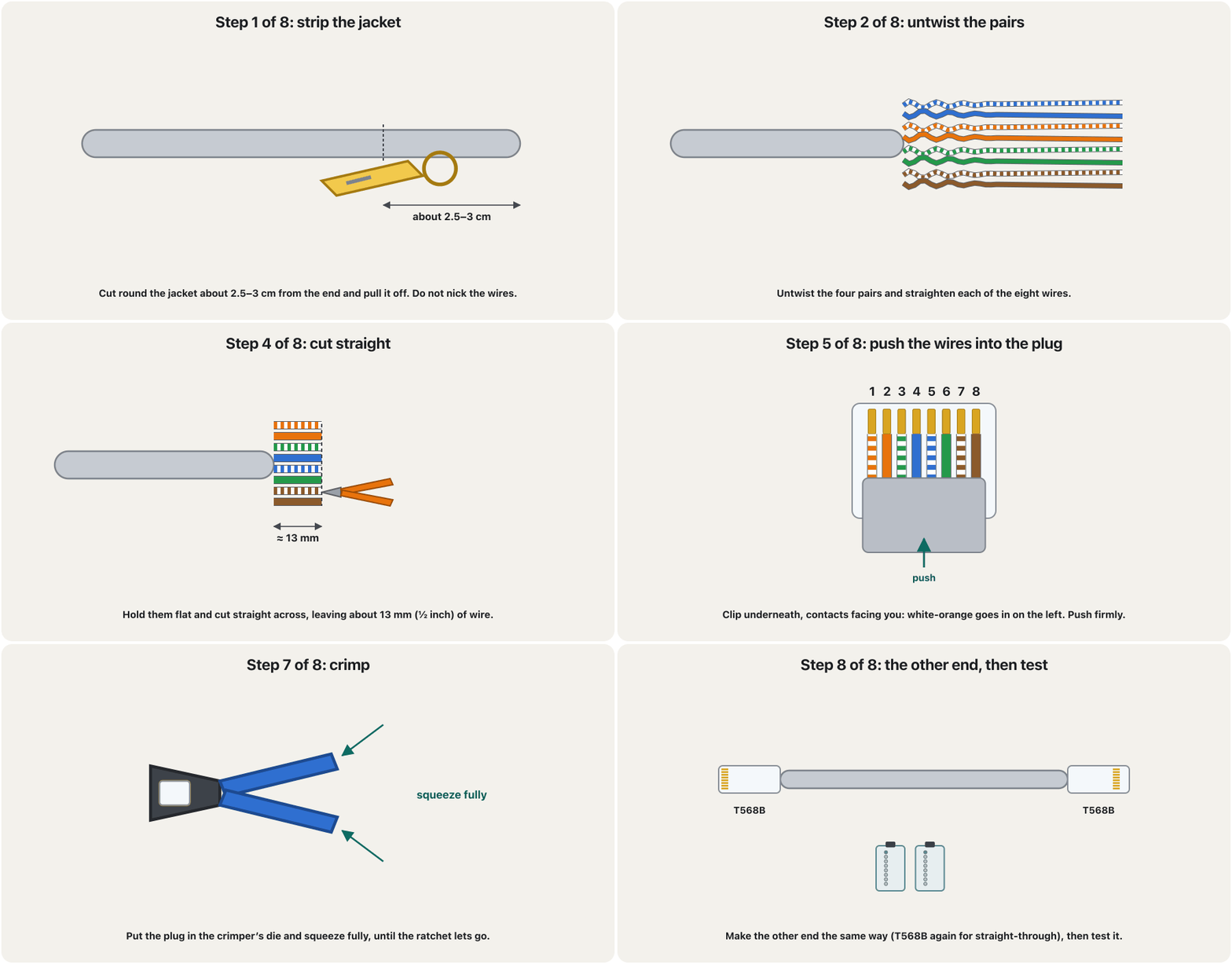
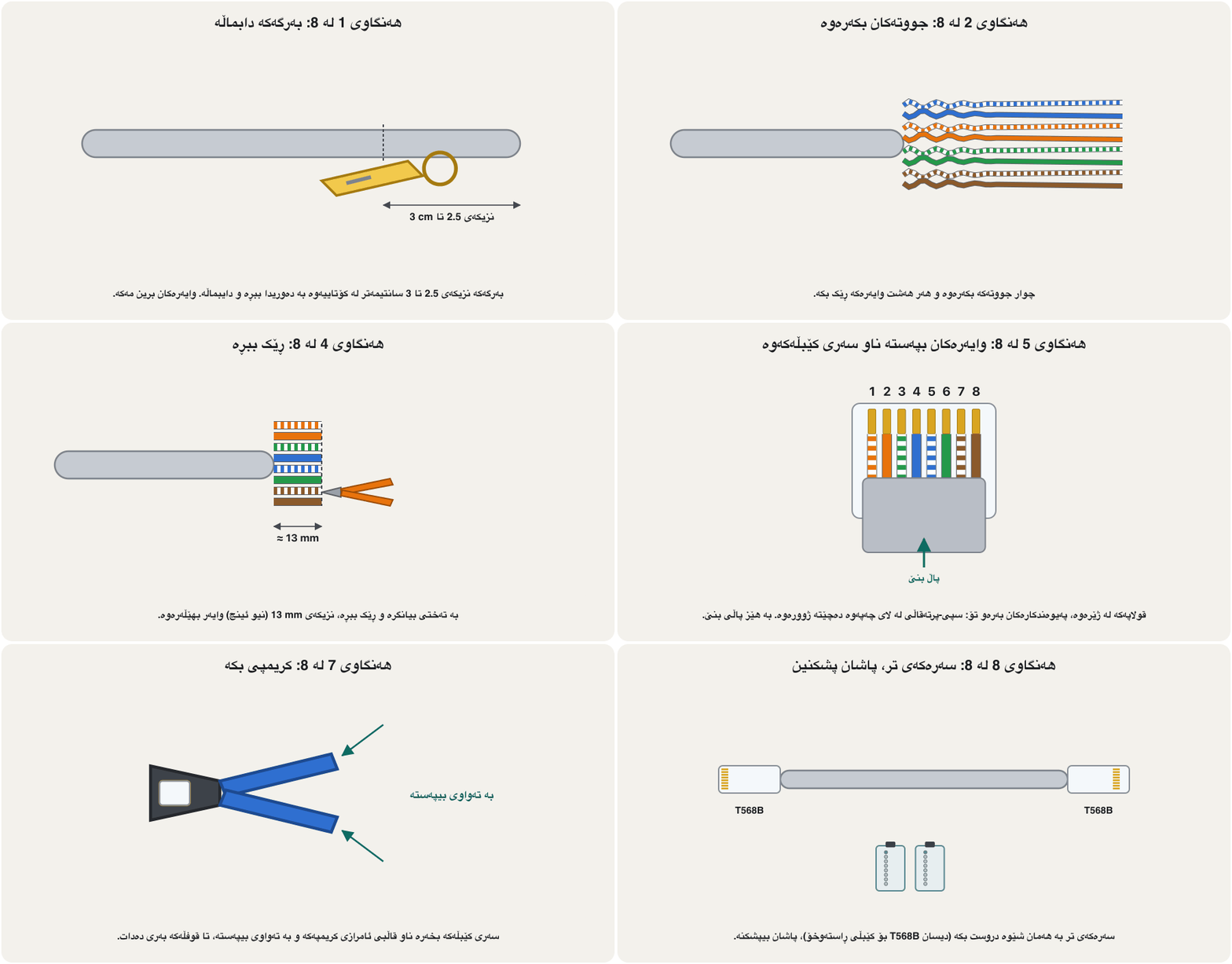
Making a straight-through cable, step by stepدروستکردنی کێبڵێکی ڕاستەوخۆ، هەنگاو بە هەنگاو
Good crimp, bad crimpکریمپی باش، کریمپی خراپ
A good crimp has every wire pushed to the end of the plug, the colours in the right order and the jacket inside the plug, where the plastic wedge presses on it and holds the cable (strain relief). A bad crimp has long untwisted wires, the jacket outside, or wires that stop short of the contacts.
کریمپی باش هەموو وایەرێکی تا کۆتایی پاڵنراوە، ڕەنگەکان بە ڕیزی دروستن و بەرگەکە لە ناو ، لەو شوێنەی قوفڵە پلاستیکییەکە دەپەستێتە سەری و کێبڵەکە ڕادەگرێت. کریمپی خراپ وایەری درێژی بانەدراوی هەیە، بەرگەکەی لە دەرەوەیە یان وایەرەکانی پێش گەیشتن بە پەیوەندکارەکان دەوەستن.
Testing with a cable testerپشکنین بە پشکنەری کێبڵ
A simple cable tester has two parts: the master unit and the remote unit, each with an RJ-45 socket and eight lights. Plug one end of the cable into each and switch on. The master sends a signal on pin 1, then pin 2, and so on, and the remote lights up the pin where each signal arrives.
سادە دوو بەشی هەیە: یەکەی سەرەکی و یەکەی دوور، هەریەکەیان و هەشت گڵۆپی هەیە. هەر سەرێکی کێبڵەکە بخەرە ناو یەکێکیانەوە و هەڵی بکە. یەکەی سەرەکی لەسەر پینی 1 دەنێرێت، پاشان لەسەر پینی 2 و بە هەمان شێوە تا 8. یەکەی دوور ئەو پینە ڕووناک دەکاتەوە کە هەر دەگاتێی.
- Straight-through: the lights come on in the same order on both units — 1-1, 2-2, 3-3 … 8-8.
- Crossover: 1-3, 2-6, 3-1, 4-4, 5-5, 6-2, 7-7, 8-8.
- Rollover: 1-8, 2-7, 3-6 … 8-1.
- : گڵۆپەکان بە هەمان ڕیز لەسەر هەردوو یەکەکە هەڵدەکەن — 1-1، 2-2، 3-3 … 8-8.
- : 1-3، 2-6، 3-1، 4-4، 5-5، 6-2، 7-7، 8-8.
- Rollover: 1-8، 2-7، 3-6 … 8-1.
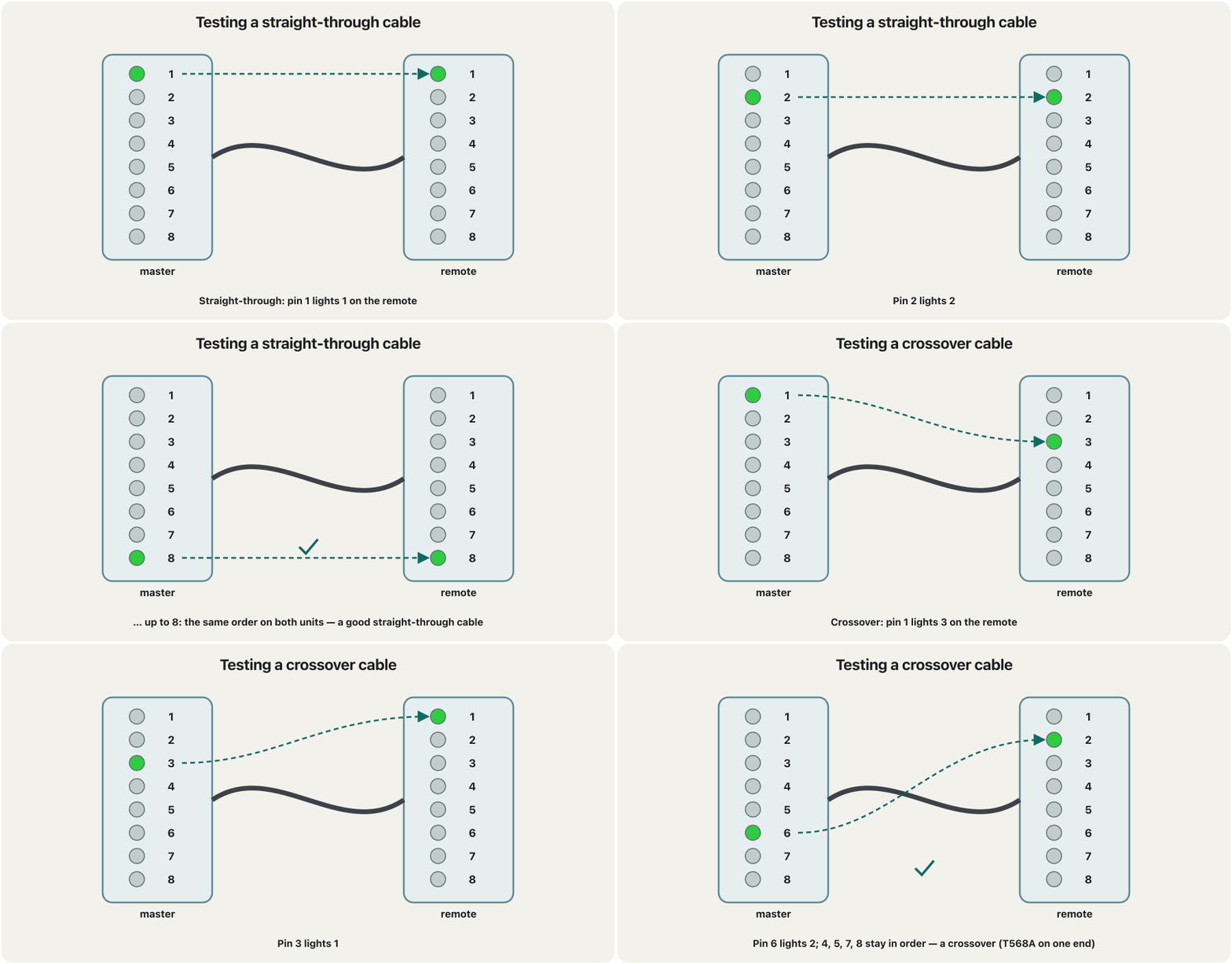
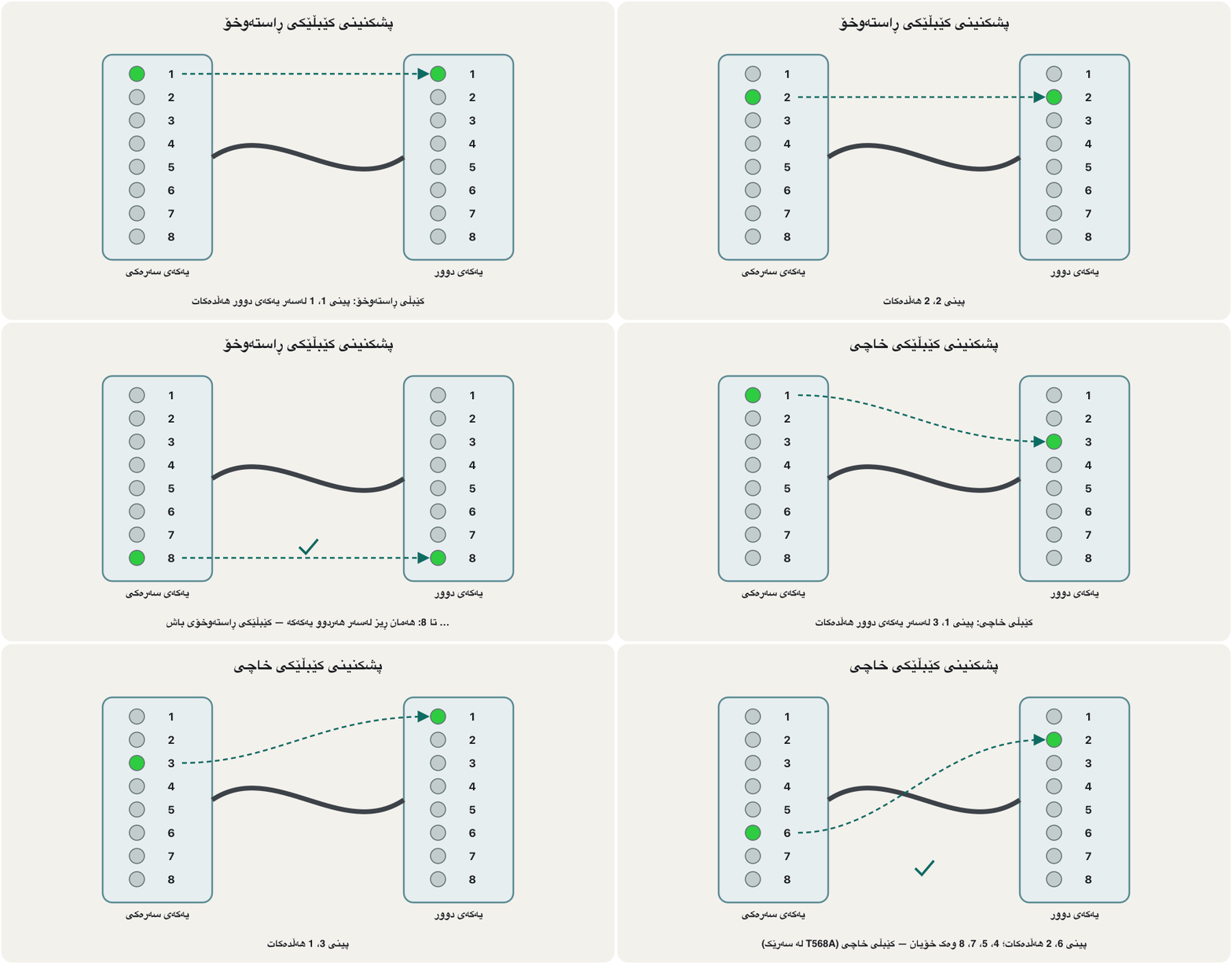
Testing with a cable testerپشکنین بە پشکنەری کێبڵ
Reading the faultsخوێندنەوەی هەڵەکان
When the lights do not follow the expected order, the tester is showing a fault: an open wire (a light never comes on), a short (two lights at once), or crossed wires (lights in the wrong places — usually a wrong colour order at one end). Cut the plug off and crimp that end again. Do it even if the link light comes on: a Gigabit port can work around a reversed pair (the two wires of one pair swapped) or swapped pairs by itself, but other equipment may not. A split pair — the right pins but wires from different pairs — passes a simple tester yet causes heavy crosstalk; only a certification tester that measures crosstalk finds it.
کاتێک گڵۆپەکان ڕیزی چاوەڕوانکراو نابەن، پشکنەرەکە هەڵەیەک پیشان دەدات: وایەرێکی پچڕاو (گڵۆپێک هەرگیز هەڵناکات)، (دوو گڵۆپ پێکەوە) یان وایەری تێکچوو (گڵۆپ لە شوێنی هەڵەدا — زۆرجار ڕیزبەندیی ڕەنگی هەڵە لە سەرێکدا). ببڕە و ئەو سەرە دووپاتە کریمپ بکەرەوە. ئەمە بکە تەنانەت ئەگەر داگیرسا: Gigabit دەتوانێت خۆی چارەسەری جووتێکی پێچەوانە (دوو وایەری یەک جووت جێگۆڕکراو) یان جووتی جێگۆڕکراو بکات، بەڵام لەوانەیە ئامێری تر نەتوانێت. جووتی لەتبوو — پینی دروست بەڵام وایەر لە جووتی جیاواز — لە پشکنەرێکی سادەدا دەردەچێت، بەڵام زۆر دروست دەکات؛ تەنیا پشکنەری پەسەندکردن کە دەپێوێت دەیدۆزێتەوە.
Two more tools: punch-down tool and tone generatorدوو ئامرازی تر: ئامرازی پەنچداون و دەنگنێری کێبڵ
Patch panels and wall jacks are not crimped: each wire is laid in a colour-marked slot (labelled T568A or T568B) and pushed down with a punch-down tool, which also cuts off the extra wire. To find one cable among dozens — in a ceiling or at a patch panel — a tone generator sends a tone into it, and its probe beeps when it is held near that cable.
و جەکی دیوار کریمپ ناکرێن: هەر وایەرێک لە کونێکی ڕەنگنیشانکراودا (بە ناونیشانی T568A یان T568B) دادەنرێت و بە دەپەسترێتە خوارەوە، کە وایەرە زیادەکەش دەبڕێت. بۆ دۆزینەوەی یەک کێبڵ لە نێوان دەیاندا — لە بنمیچدا یان لە — دەنگێک دەنێرێتە ناوی و پشکنەرەکەی کاتێک لە نزیک ئەو کێبڵە ڕادەگیرێت دەزرینگێتەوە.
Common mistakesهەڵە باوەکان
| Mistakeهەڵە | What is trueڕاستییەکە |
|---|---|
| “PC to PC always needs a crossover cable.”« بۆ هەمیشە پێویستە.» | Only on old 10/100 ports without Auto-MDI-X; Gigabit ports work with a straight-through cable.تەنیا لە کۆنی 10/100 بێ ؛ Gigabit بە کار دەکەن. |
| “Pins 4, 5, 7 and 8 are never used.”«پینی 4، 5، 7 و 8 هەرگیز بەکار نایەن.» | True only for 10/100 Mb/s; Gigabit and faster use all four pairs in both directions.تەنیا بۆ 10/100 Mb/s ڕاستە؛ Gigabit و خێراتر هەر چوار جووتەکە بە هەردوو ئاڕاستە بەکار دەهێنن. |
| Mixing T568A and T568B by accidentتێکەڵکردنی T568A و T568B بە هەڵە | A on one end and B on the other makes a crossover. Pick one order and use it on both ends of every patch cable.A لە سەرێک و B لە سەرەکەی تر دروست دەکات. یەک ڕیزبەندی هەڵبژێرە و لە هەردوو سەری هەموو کێبڵێکی پاچدا بەکاری بهێنە. |
| Leaving the jacket outside the plugهێشتنەوەی بەرگ لە دەرەوەی | Trim the wires to about 13 mm so the jacket is crimped inside the plug.وایەرەکان بۆ نزیکەی 13 mm کورت بکەرەوە بۆ ئەوەی بەرگەکە لە ناو کریمپ بکرێت. |
| “The tester shows 1 to 8, so the cable is perfect.”«پشکنەرەکە 1 تا 8 پیشان دەدات، کەواتە کێبڵەکە تەواوە.» | A continuity tester cannot see split pairs or crosstalk; long untwisted ends can still fail at speed.پشکنەری بەردەوامی جووتی لەتبوو و نابینێت؛ کۆتایی درێژی بانەدراو هێشتا لە خێرایی بەرزدا دەشکێت. |
| Using a rollover cable for dataبەکارهێنانی کێبڵی rollover بۆ | Rollover is only for the console port; data between devices needs a straight-through (or crossover) cable.rollover تەنیا بۆ ؛ نێوان ئامێرەکان (یان ) پێویستە. |
| Cutting a cable that is plugged into a PoE switchبڕینی کێبڵێک کە بە PoEـەوە بەستراوە | Unplug first: PoE puts up to 57 V on the pairs.یەکەم جار دەری بهێنە: تا 57 V دەخاتە سەر جووتەکان. |
Exercisesڕاهێنانەکان
Name the cable for each numbered link of the network in Which cable goes where?, using the classic rule.
بە یاسای کلاسیک، ناوی کێبڵی هەر بەستەرێکی ژمارەداری کام کێبڵ بۆ کوێ؟ ببە.
Show answerوەڵامەکە پیشان بدە
- 1 router – switch 1: straight-through.
- 2 switch 1 – switch 2: crossover (a straight-through cable also works with Auto-MDI-X).
- 3 and 4 switch 1 – servers: straight-through.
- 5 and 6 switch 2 – PCs: straight-through.
- 7 admin laptop – router console: rollover, today usually a USB console cable.
- 1 – 1: .
- 2 1 – 2: ( بە کار دەکات).
- 3 و 4 1 – : .
- 5 و 6 2 – : .
- 7 بەڕێوەبەر – کۆنسۆڵی : rollover، ئەمڕۆ زۆرجار USB.
Sort these links into straight-through and crossover by the classic rule: switch–router, switch–switch, hub–PC, router–router, switch–server, PC–PC, switch–hub, router–PC, hub–hub, switch–PC.
بە یاسای کلاسیک ئەم بەستەرانە بۆ و پۆلێن بکە: –، –، –، –، –، –، –، –، –، –.
Show answerوەڵامەکە پیشان بدە
Straight-through (different kinds): switch–router, hub–PC, switch–server, switch–PC. Crossover (the same kind, and router–PC): switch–switch, router–router, PC–PC, switch–hub, router–PC, hub–hub. Remember that a router port and a PC port behave alike (both MDI).
(جۆرجیاواز): –، –، –، –. (هاوجۆر، هەروەها –): –، –، –، –، –، –. لەبیرت بێت کە و وەک یەک ڕەفتار دەکەن (هەردووکیان MDI).
Read these tester results. (a) 1-1, 2-2, 3-3, 4-4, 5-5, 6-6, 7-7, 8-8. (b) 1-8, 2-7, 3-6, 4-5, 5-4, 6-3, 7-2, 8-1. (c) 1-1, 2-2, 3-6, 4-4, 5-5, 6-3, 7-7, 8-8. (d) light 5 never comes on.
ئەم ئەنجامانەی پشکنەر بخوێنەرەوە. (a) 1-1، 2-2، 3-3، 4-4، 5-5، 6-6، 7-7، 8-8. (b) 1-8، 2-7، 3-6، 4-5، 5-4، 6-3، 7-2، 8-1. (c) 1-1، 2-2، 3-6، 4-4، 5-5، 6-3، 7-7، 8-8. (d) گڵۆپی 5 هەرگیز هەڵناکات.
Show answerوەڵامەکە پیشان بدە
- (a) A good straight-through cable.
- (b) A rollover (console) cable.
- (c) Crossed wires: white-green and green — the two wires of one pair — are swapped at one end (a reversed pair). Re-make that end.
- (d) An open wire 5 (white-blue): it does not reach a contact. Re-crimp.
- (a) باش.
- (b) کێبڵێکی rollover ().
- (c) وایەری تێکچوو: سپی-سەوز و سەوز — دوو وایەرەکەی یەک جووت — لە سەرێکدا شوێنیان گۆڕاوە (جووتی پێچەوانەبوو). ئەو سەرە دووپاتە دروست بکەرەوە.
- (d) وایەری 5 (سپی-شین) پچڕاوە: ناگاتە پەیوەندکارێک. دووپاتە کریمپ بکەرەوە.
You crimped one end in T568B. Write the colour order, pins 1 to 8, for the other end of (a) a straight-through cable and (b) a crossover cable.
سەرێکت بە T568B کریمپ کردووە. ڕیزبەندیی ڕەنگ، پینی 1 تا 8، بۆ سەرەکەی تری (a) و (b) بنووسە.
Show answerوەڵامەکە پیشان بدە
- (a) T568B again: white-orange, orange, white-green, blue, white-blue, green, white-brown, brown.
- (b) T568A: white-green, green, white-orange, blue, white-blue, orange, white-brown, brown.
- (a) دیسان T568B: سپی-پرتەقاڵی، پرتەقاڵی، سپی-سەوز، شین، سپی-شین، سەوز، سپی-قاوەیی، قاوەیی.
- (b) T568A: سپی-سەوز، سەوز، سپی-پرتەقاڵی، شین، سپی-شین، پرتەقاڵی، سپی-قاوەیی، قاوەیی.
Why are crossover cables rarely used today?بۆچی ئەمڕۆ کێبڵی خاچی کەم بەکار دێت؟
Auto-MDI-X ports detect the pairs and swap them themselves, and Gigabit Ethernet uses all four pairs in both directions, so a straight-through cable works between any two modern devices.
جووتەکان دەناسنەوە و خۆیان دەیانگۆڕن و Gigabit Ethernet هەر چوار جووتەکە بە هەردوو ئاڕاستە بەکار دەهێنێت، بۆیە لە نێوان هەر دوو ئامێرێکی نوێدا کار دەکات.
What does a rollover cable connect, and what replaces the DB-9 end today?کێبڵی rollover چی دەبەستێتەوە و ئەمڕۆ چی جێی سەری DB-9 دەگرێتەوە؟
A terminal (PC) to the console port of a router or switch. Today a USB-to-RJ-45 console cable or the device's USB console port replaces the DB-9 serial connection.
() بە یان . ئەمڕۆ USB بۆ RJ-45 یان USBـی خودی ئامێرەکە جێی بەستنەوەی زنجیرەیی DB-9 دەگرێتەوە.
What do a cable stripper and a crimper do?داماڵەری کێبڵ و ئامرازی کریمپ چی دەکەن؟
The stripper removes the outer jacket of the cable; the crimper attaches the connector to the end of the cable.
بەرگی دەرەوەی کێبڵەکە لادەبات؛ بە کۆتایی کێبڵەکەوە دەبەستێت.
Summaryپوختە
- T568A and T568B differ only in the orange and green pairs. Same order on both ends = straight-through; A on one end, B on the other = crossover; colours reversed = rollover.
- Classic rule: different kinds of device → straight-through; the same kind (and router–PC) → crossover; console port → rollover.
- Auto-MDI-X and four-pair Gigabit make crossover cables legacy: in 2026 a straight-through cable works between any two devices — but exams and old 10/100 gear still use the rule.
- Crimping: strip 2.5–3 cm, untwist, arrange, cut to about 13 mm, insert (clip underneath, white-orange left), check, crimp until the ratchet lets go, then test.
- The cable tester lights 1–8 in order for straight-through and 1-3, 2-6, 3-1, 6-2 for crossover; a dark light is an open wire, two lights together a short.
- Work safely: unplug PoE cables before cutting, keep fingers out of the crimper, collect the offcuts.
- T568A و T568B تەنیا لە جووتی پرتەقاڵی و سەوزدا جیاوازن. هەمان ڕیز لە هەردوو سەر = ؛ A لە سەرێک، B لە سەرەکەی تر = ؛ ڕەنگی پێچەوانە = rollover.
- یاسای کلاسیک: ئامێری جۆرجیاواز ← ؛ هاوجۆر (هەروەها –) ← ؛ ← rollover.
- و Gigabitـی چوار جووتی دەکەنە کەرەستەی کۆن: لە 2026دا لە نێوان هەر دوو ئامێرێکدا کار دەکات — بەڵام تاقیکردنەوەکان و ئامێری کۆنی 10/100 هێشتا یاساکە بەکار دەهێنن.
- کریمپکردن: 2.5 تا 3 سانتیمەتر دابماڵە، بیکەرەوە، ڕیزی بکە، بۆ نزیکەی 13 mm بیبڕە، تێی بخە (قولاپ لە ژێرەوە، سپی-پرتەقاڵی لە چەپ)، بیپشکنە، کریمپی بکە تا قوفڵەکە بەری دەدات، پاشان تاقی بکەرەوە.
- بۆ گڵۆپی 1 تا 8 بە ڕیز هەڵدەکات و بۆ 1-3، 2-6، 3-1، 6-2؛ گڵۆپێکی کوژاوە وایەرێکی پچڕاوە، دوو گڵۆپ پێکەوە .
- بە سەلامەتی کار بکە: پێش بڕین کێبڵی دەربهێنە، پەنجەت لە دوور بخەرەوە، پارچە بڕاوەکان کۆ بکەرەوە.
Videoڤیدیۆ
Watch a videoسەیری ڤیدیۆیەک بکە
A video that viewers liked a lot and praised in their comments, chosen for this lesson.ڤیدیۆیەک کە بینەران زۆریان پێ خۆش بووە و لە کۆمێنتەکانیاندا ستایشیان کردووە، بۆ ئەم وانەیە هەڵبژێردراوە.
A Kurdish class on twisted-pair cables: UTP, the T568A and T568B colour orders, and straight-through, crossover and rollover cables.
وانەیەکی کوردی لەبارەی : ، ، ، و (rollover).
Watch 0:00–11:50, in Kurdish: UTP, T568A/B and the three kinds of cable. Today Auto-MDI-X means a crossover cable is rarely needed.
لە 0:00 تا 11:50 سەیر بکە، بە کوردی: ، و سێ جۆرە کێبڵەکە. ئەمڕۆ بەهۆی کەم پێویست دەبێت.
Lesson complete!وانەکە تەواو بوو!
Well done. Review the key terms, then go on to the next lesson.دەستخۆش. سەیرێکی زاراوە سەرەکییەکان بکەرەوە، پاشان بڕۆ بۆ وانەی داهاتوو.
Key termsزاراوە سەرەکییەکان
Fibre-Optic Cables: Single-Mode and Multimodeکێبڵەکانی فایبەر ئۆپتیک: تاکمۆد و فرەمۆد
Related lecturesوانە پەیوەندیدارەکان
- Fibre-Optic Cables: Single-Mode and Multimodeکێبڵەکانی فایبەر ئۆپتیک: تاکمۆد و فرەمۆد
- Packet Tracer: Your First NetworkPacket Tracer: یەکەم ڕایەڵەکەت
- Cisco IOS and the Command LineCisco IOS و نێوبەستەی هێڵی فەرمان
- Bridges and Switchesپردەکانی ڕایەڵە و سویچەکان
- Troubleshooting a Network, Layer by Layerچارەسەرکردنی کێشەی ڕایەڵە، چین بە چین
- Ports and Connectorsدەرچەکان و سەرەکانی کێبڵ
- Cables and Wireless: Transmission Mediaکێبڵ و بێتەل: هۆکارەکانی گواستنەوە
References and further readingسەرچاوەکان و خوێندنەوەی زیاتر
- Wikipedia: ANSI/TIA-568 (T568A and T568B pin and colour assignments)
- Wikipedia: Ethernet crossover cable (10/100 and Gigabit crossover maps; Auto-MDI-X from 1998, optional in 1000BASE-T)
- Wikipedia: Medium-dependent interface (MDI/MDI-X, Auto-MDI-X; no crossover needed for 1000BASE-T; 1000BASE-T works even with swapped pairs or an inverted pair polarity)
- Wikipedia: Ethernet over twisted pair (10BASE-T/100BASE-TX use pins 1-2 and 3-6; 1000BASE-T uses four pairs)
- Cisco: Catalyst 2960 Software Configuration Guide — Configuring Interface Characteristics (Auto-MDIX on by default; USB mini-B console port)
- Cisco: Cable Guide for Console and AUX Ports (rolled cable pinout, RJ-45-to-DB-9 adapter, 9600 baud)
- The Fiber Optic Association: UTP cable — no more than 13 mm should be untwisted
- Fluke Networks: Wire map testing — open, short, reversed, crossed and split pairs
- Wikipedia: Modular connector (8P8C plug pin numbering)
- Wikipedia: Power over Ethernet (PoE voltages up to 57 V)
- Cisco Press: Introduction to Networks Companion Guide (CCNAv7), module 4 Physical Layer
This lecture is a first edition. The Kurdish text and terminology are waiting for review by Kurdish IT teachers.ئەم وانەیە چاپی یەکەمە. دەقە کوردییەکە و زاراوەکانی چاوەڕێی پێداچوونەوەی مامۆستایانی کوردی بواری IT ن.