Chapterبەش 4 · Lectureوانە 4.3
Modems and Routersمۆدێمەکان و ڕێدۆزەکان
The two boxes between a home and the Internet. A modem (modulator–demodulator) turns digital data into the line’s signal and back by changing the amplitude, frequency or phase of a carrier — today with QAM and OFDM; the kinds of modem in 2026 with correct units (dial-up, DSL, DOCSIS cable, fibre ONT, satellite, 4G/5G), their features, and modem vs router. A router joins different networks by IP address: it finds the best path with a routing table, builds a new frame for every link, and with many other routers forms the Internet’s backbone. Router vs switch, and the home ‘router’ box, where DHCP is a service, not the router itself.
ئەو دوو سندووقەی لە نێوان ماڵێک و . (مۆدیولەیتەر و دیمۆدیولەیتەر) دەکاتە هێڵەکە و بە پێچەوانەشەوە، بە گۆڕینی ، یان — ئەمڕۆ بە و ؛ جۆرەکانی لە 2026دا بە یەکەی دروست (dial-up، ، کێبڵی ، فایبەر، مانگی دەستکرد، 4G/5G)، تایبەتمەندییەکانیان و بەرامبەر . جیاواز بەپێی پێکەوە دەبەستێتەوە: بە باشترین ڕێگا دەدۆزێتەوە، بۆ هەر بەستەرێک نوێ دروست دەکات و لەگەڵ زۆر تر پێک دەهێنێت. بەرامبەر و سندووقی ‘’ی ماڵەوە، کە تێیدا ڕاژەیەکە، نەک خودی .
What you will learnچی فێر دەبیت
- Explain what a modem does — modulation and demodulation of a carrier wave — and the difference between analog and digital signals.
- Name the kinds of modem in 2026 (dial-up, DSL, cable, fibre ONT, satellite, 4G/5G) with correct speeds in bits per second, and their features.
- Tell a modem from a router, and explain how a router joins different networks and forwards each packet with its routing table.
- Compare a router with a switch, and describe the parts of the home ‘router’ box, including DHCP as a service.
- ڕوونی بکەیتەوە چی دەکات — و — و جیاوازیی نێوان و .
- جۆرەکانی لە 2026دا ناو ببەیت (dial-up، ، کێبڵ، فایبەر، مانگی دەستکرد، 4G/5G) بە خێرایی دروست بە لە چرکەیەکدا و تایبەتمەندییەکانیان.
- و لە یەک جیا بکەیتەوە و ڕوونی بکەیتەوە چۆن جیاواز پێکەوە دەبەستێتەوە و هەر بە دەنێرێت.
- لەگەڵ بەراورد بکەیت و بەشەکانی سندووقی ‘’ی ماڵەوە وەسف بکەیت، لەوانە وەک ڕاژەیەک.
Two boxes between you and the Internetدوو سندووق لە نێوان تۆ و ئینتەرنێتدا
This lesson closes the devices chapter with the two boxes that bring the Internet into a home or an office. The modem speaks the language of the provider’s line — telephone copper, TV coax, fibre or radio. The router joins your own network to the provider’s network and sends each packet the right way. Both are needed, but they do different jobs.
ئەم وانەیە بەشی ئامێرەکان بەو دوو سندووقە تەواو دەکات کە دەهێننە ناو ماڵ یان ئۆفیسێکەوە. بە زمانی هێڵی قسە دەکات — مسی تەلەفۆن، کۆئەکسی تیڤی، فایبەر یان ڕادیۆ. خۆت بە دەبەستێتەوە و هەر بە ڕێگای دروستدا دەنێرێت. هەردووکیان پێویستن، بەڵام کاری جیاواز دەکەن.
In most homes in 2026 the two are inside one box, often with a switch and a Wi-Fi access point as well; the last screen opens that box. The short version is in the IT course: Communications devices and The “router” at home.
لە زۆربەی ماڵەکاندا لە 2026دا ئەم دووانە لە ناو یەک سندووقدان، زۆرجار لەگەڵ و ؛ دوایین شاشە ئەو سندووقە دەکاتەوە. کورتەکەی لە کۆرسی ITـدایە: ئامێرەکانی پەیوەندی و «ڕێدۆز»ی ماڵەوە.
Modem = modulator + demodulatorمۆدێم = مۆدیولەیتەر + دیمۆدیولەیتەر
The word modem joins modulator and demodulator. The modulator turns the digital signal of a computer or router into an analog signal that can travel over a telephone line or another analog medium — that is modulation. The demodulator does the opposite: it turns the analog signal from the line back into digital data that computers understand — demodulation. Every modem does both, because data travels both ways. Modems are still in use everywhere; which kind you have depends on the place.
وشەی لە modulator و demodulator پێکهاتووە. مۆدیولەیتەر یان دەکاتە کە بتوانێت بە هێڵی تەلەفۆن یان تردا بڕوات — ئەمە . دیمۆدیولەیتەر پێچەوانەکەی دەکات: هێڵەکە دەکاتەوە بە کە لێی تێدەگەن — . هەموو هەردووکیان دەکات، چونکە بە هەردوو ئاڕاستەدا دەڕوات. هێشتا لە هەموو شوێنێک بەکار دەهێنرێن؛ جۆرەکەی بەندە بە شوێنەکە.
Digital comes from digit, in Kurdish: digital means working with signals written as digits — in binary, 0s and 1s. Note the direction, because it is easy to swap: modulation goes from digital to the line, demodulation from the line back to digital.
لە digitـەوە هاتووە، بە کوردی : واتە کارکردن بە کە وەک نووسراون — بە ، 0 و 1. ئاگاداری ئاڕاستەکە بە، چونکە ئاسانە تێکەڵ بکرێت: لە بۆ هێڵەکە دەچێت، لە هێڵەکەوە بۆ .
Analog and digital signalsسیگناڵی ئەنالۆگی و دیجیتاڵی
An analog signal is continuous: it changes smoothly in time and can take any value in a range — infinitely many values. It can be written as a continuous function of time, such as a sine wave. A digital signal has only a few fixed levels; inside a computer, two: 0 and 1, sent as voltage pulses. Analog signals carry sound, video and data over radio waves, electrical wires and optical fibres.
بەردەوامە: بە نەرمی لەگەڵ کاتدا دەگۆڕێت و دەتوانێت هەر بەهایەک لە نێوان دوو سنووردا وەربگرێت — ژمارەیەکی بێکۆتا بەها. دەتوانرێت وەک نەخشەیەکی بەردەوامی کات بنووسرێت، وەک . تەنیا چەند ئاستێکی جێگیری هەیە؛ لە ناو دوو: 0 و 1، کە وەک لێدانی ڤۆڵتیە دەنێردرێن. دەنگ، ڤیدیۆ و بە ، وایەری کارەبا و فایبەری ڕووناکیدا دەگوازنەوە.
A computer’s pulses cannot travel over a telephone line or a radio channel as they are: those media need continuous waves of changing frequency and amplitude. That is the modem’s whole reason to exist. Why digital resists noise is taught in Logic Design: Analog and digital.
لێدانەکانی وەک خۆیان ناتوانن بە هێڵی تەلەفۆن یان کەناڵێکی ڕادیۆییدا بڕۆن: ئەو شەپۆلی بەردەوامیان پێویستە کە و دەگۆڕێت. ئەمە هەموو هۆکاری بوونی . بۆچی بەرگەی دەگرێت لە دیزاینی فێر دەکرێت: ئەنالۆگ و دیجیتاڵ.
How modulation worksمۆدیولەیشن چۆن کار دەکات
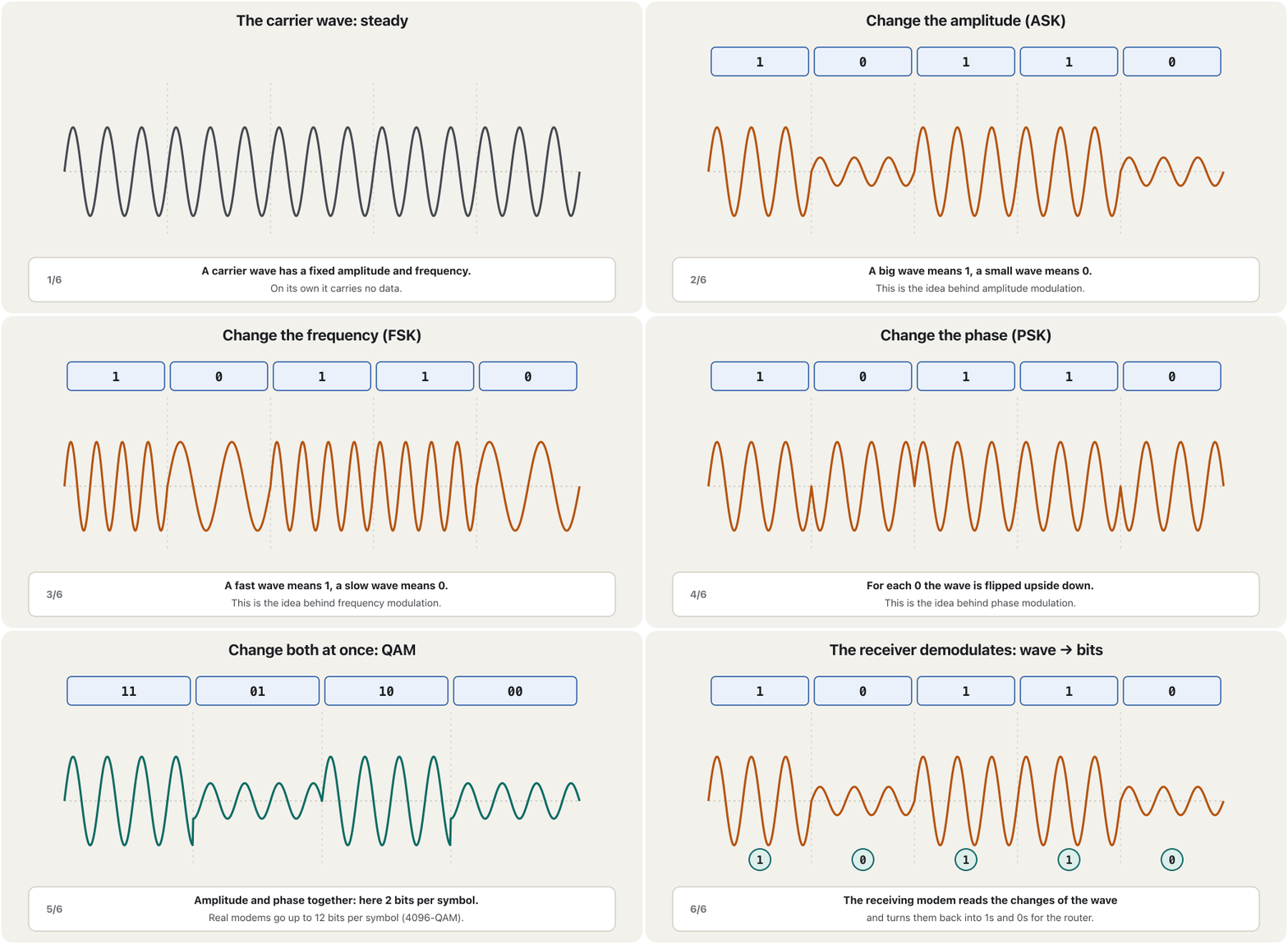
A modem starts with a carrier wave: a steady wave of fixed frequency and amplitude, which on its own carries nothing. To send bits, it changes one property of the carrier for each bit: its amplitude (amplitude-shift keying, the digital form of AM), its frequency (FSK, the digital form of FM) or its phase (phase-shift keying, PSK). The modem at the other end reads the changes and demodulates them back into the original bits.
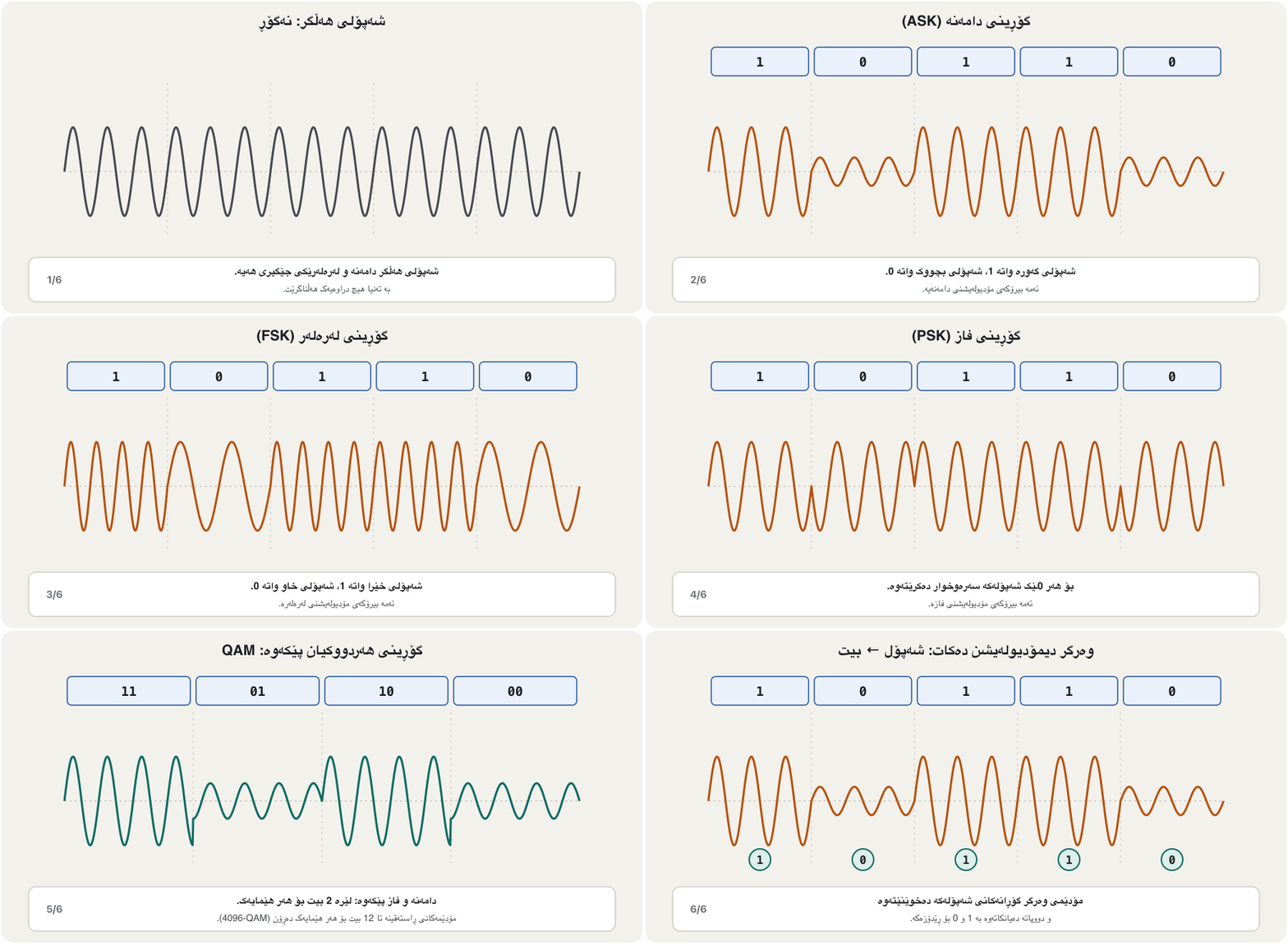
بە دەست پێ دەکات: شەپۆلێکی نەگۆڕ بە و جێگیر، کە بە تەنیا هیچ هەڵناگرێت. بۆ ناردنی ، بۆ هەر یەکێک لە تایبەتمەندییەکانی دەگۆڕێت: (ASK، شێوە AM)، (FSK، شێوە FM) یان (PSK). سەری تر گۆڕانەکان دەخوێنێتەوە و بە دەیانکاتەوە بە سەرەتاییەکان.
When you upload, your modem modulates; when you download, it receives the provider’s signal and demodulates it. Radio links such as Wi-Fi and 4G/5G use the same ideas — the IoT course explains modulation for radio in How bits ride on radio waves.
کاتێک دەکەیت، دەکات؛ کاتێک دەکەیت، وەردەگرێت و بۆ دەکات. بەستەرە ڕادیۆییەکانی وەک و 4G/5G هەمان بیرۆکە بەکار دەهێنن — کۆرسی IoT بۆ ڕادیۆ ڕوون دەکاتەوە: بیتەکان چۆن سواری شەپۆلە ڕادیۆییەکان دەبن.
What real modems use: QAM and OFDMئەوەی مۆدێمەکانی ڕاستەقینە بەکاری دەهێنن: QAM و OFDM
AM, FM and PSK are the basic ideas, but today’s DSL, cable and Wi-Fi modems combine them. QAM (quadrature amplitude modulation) changes the amplitude and the phase together, so each change of the wave — a symbol — carries several bits. With M possible points, a symbol carries bits:
AM، FM و PSK بیرۆکە بنەڕەتییەکانن، بەڵام ، کێبڵ و ئەمڕۆ تێکەڵیان دەکەن. (quadrature amplitude modulation) و پێکەوە دەگۆڕێت، بۆیە هەر گۆڕانێکی شەپۆلەکە — هێمایەک — چەند هەڵدەگرێت. بە M خاڵی گونجاو، هەر هێمایەک هەڵدەگرێت:
16-QAM carries 4 bits per symbol; 4096-QAM — used by DOCSIS 3.1 cable modems and Wi-Fi 7 — carries 12.
16-QAM بۆ هەر هێمایەک 4 هەڵدەگرێت؛ 4096-QAM — کە کێبڵی DOCSIS 3.1 و Wi-Fi 7 بەکاری دەهێنن — 12.
OFDM goes further: it splits the line into hundreds or thousands of narrow carriers side by side and runs QAM on each one at the same time. DSL (where it is called DMT), DOCSIS 3.1 cable, Wi-Fi, 4G and 5G all use it. More points need a cleaner line, so modems pick the largest QAM the line’s noise allows — and fall back when the line gets worse.
زیاتر دەڕوات: هێڵەکە دابەش دەکات بۆ سەدان یان هەزاران تەسک لە تەنیشت یەک و لەسەر هەریەکەیان پێکەوە بەکار دەهێنێت. (کە لەوێ پێی دەڵێن DMT)، کێبڵی DOCSIS 3.1، ، 4G و 5G هەموویان بەکاری دەهێنن. خاڵی زیاتر هێڵێکی پاکتری پێویستە، بۆیە گەورەترین QAM هەڵدەبژێرن کە هێڵەکە ڕێگەی پێ بدات — و کاتێک هێڵەکە خراپتر دەبێت دادەبەزن.
Kinds of modem, then and nowجۆرەکانی مۆدێم، دوێنێ و ئەمڕۆ
The kind of modem depends on the place and the budget — mostly on which line reaches the building. Here are the common kinds, with speeds written correctly: kbit/s, Mb/s and Gb/s are kilo-, mega- and gigabits per second, never bytes.
جۆری بەندە بە شوێن و بودجە — زۆرتر بەوەی کام هێڵ دەگاتە بیناکە. ئەمانە جۆرە باوەکانن، بە خێرایی کە بە دروستی نووسراوە: kbit/s، Mb/s و Gb/s واتە کیلۆ، مێگا و گیگابیت لە چرکەیەکدا، هەرگیز بایت نا.
| Modem | Lineهێڵ | Speed (as of 2026)خێرایی (لە 2026دا) |
|---|---|---|
| Dial-up modem تەلەفۆنی (dial-up) | telephone line; dials a number every timeهێڵی تەلەفۆن؛ هەموو جارێک ژمارەیەک دەگرێت | at most 56 kbit/s — obsoleteبەلای زۆرەوە 56 kbit/s — بەسەرچووە |
| DSL modem | the same telephone line, on high frequenciesهەمان هێڵی تەلەفۆن، لەسەر بەرز | depends on line quality and distance: ADSL2+ up to about 24 Mb/s, VDSL2 about 100 Mb/s near the street cabinetبەندە بە کوالیتیی هێڵ و دووری: ADSL2+ تا نزیکەی 24 Mb/s، VDSL2 نزیکەی 100 Mb/s لە نزیک کابینەی شەقام |
| Cable modem کێبڵ | TV coaxial cable تیڤی | DOCSIS 3.1: up to 10 Gb/s down; DOCSIS 4.0: up to 10 Gb/s down and 6 Gb/s up (specification maximums, shared)DOCSIS 3.1: تا 10 Gb/s ؛ DOCSIS 4.0: تا 10 Gb/s و 6 Gb/s (بەرزترینی ، هاوبەش) |
| Fibre ‘modem’ (ONT)‘’ فایبەر (ONT) | fibre to the homeفایبەر تا ماڵ | GPON 2.5 Gb/s down, XGS-PON 10 Gb/s, shared by a few dozen homesGPON 2.5 Gb/s ، XGS-PON 10 Gb/s، کە چەند دەیان ماڵ هاوبەشی دەکەن |
| Satellite modem مانگی دەستکرد | a dish pointing at a satelliteدیشێک کە ڕووی لە مانگێکی دەستکردە | for remote areas; low-orbit services reach hundreds of Mb/sبۆ ناوچە دوورەدەستەکان؛ خزمەتگوزاریی خولگەی نزم دەگاتە سەدان Mb/s |
| Mobile broadband (4G/5G) modem مۆبایل (4G/5G) | radio to the nearest base stationڕادیۆ بۆ نزیکترین | tens to hundreds of Mb/s; 5G peaks are higherدەیان تا سەدان Mb/s؛ لووتکەی 5G زیاترە |
Dial-up is history: it was slow and blocked the phone while online. Each line is explained in more depth in the IT course (DSL and cable, fibre and fixed wireless, mobile and satellite); DOCSIS cable is in Coax then and now and the mobile generations in Mobile generations.
dial-up بووەتە مێژوو: خاو بوو و لە کاتی ئۆنلاین بووندا تەلەفۆنەکەی دادەخست. هەر هێڵێک بە وردی لە کۆرسی ITـدا ڕوون کراوەتەوە (DSL و کێبڵ، فایبەر و بێتەلی جێگیر، مۆبایل و مانگی دەستکرد)؛ کێبڵی لە کێبڵی هاوتەوەر دوێنێ و ئەمڕۆدایە و لە نەوەکانی ڕایەڵەی مۆبایلدا.
Each line, its own boxهەر هێڵێک، سندووقی خۆی
Why so many kinds? Because a modem must match the line the provider uses — the compatibility rule. Each box converts between the line’s own signal and the Ethernet that goes to your router. Modems are used in homes, businesses and public places such as libraries and cafés, and the choice depends on the place and on which provider is available: in cities fibre is now common, while villages and remote areas may rely on 4G/5G or satellite.
بۆچی ئەوەندە جۆر هەیە؟ چونکە دەبێت لەگەڵ ئەو هێڵەی بەکاری دەهێنێت بگونجێت — یاسای گونجان. هەر سندووقێک لە نێوان تایبەتی هێڵەکە و ئەو دەچێت بۆ دەگۆڕێت. لە ماڵ، شوێنی بازرگانی و شوێنە گشتییەکانی وەک کتێبخانە و قاوەخانەدا بەکار دەهێنرێن و هەڵبژاردنەکە بەندە بە شوێنەکە و ئەوەی کام بەردەستە: لە شارەکاندا فایبەر ئێستا باوە، لە کاتێکدا گوند و ناوچە دوورەدەستەکان لەوانەیە پشت بە 4G/5G یان مانگی دەستکرد ببەستن.
Satellites come in two kinds. A geostationary satellite hangs 35,786 km above the equator, so every packet travels about 72,000 km up and down — long delay. Low-orbit satellites fly a few hundred kilometres up (in January 2026 Starlink announced that it would move about 4,400 of its satellites from about 550 km down to about 480 km during that year), so the delay is far lower.
مانگی دەستکرد دوو جۆرە. مانگێکی دەستکردی خولگەی جێگیر 35,786 km لە سەرووی هێڵی یەکسانەوەیە، بۆیە هەر نزیکەی 72,000 km بۆ سەرەوە و خوارەوە دەبڕێت — زۆر. مانگە دەستکردەکانی خولگەی نزم چەند سەد کیلۆمەتر لە سەرەوە دەفڕن (Starlink لە کانوونی دووەمی 2026دا ڕایگەیاند کە لە ماوەی ئەو ساڵەدا نزیکەی 4,400 مانگی دەستکردی خۆی لە نزیکەی 550 km بۆ نزیکەی 480 km دادەبەزێنێت)، بۆیە زۆر کەمترە.
Fibre: the ONT is not quite a modemفایبەر: ONT بە تەواوی مۆدێم نییە
People call the fibre box a ‘fibre modem’, but strictly it is an ONT (optical network terminal): it turns the provider’s light signals into electrical Ethernet and back, rather than modulating a wave the way a telephone modem does. Most fibre homes are on a passive optical network — GPON gives 2.5 Gb/s down shared by the homes on one splitter, and XGS-PON 10 Gb/s (Fibre to the home).
خەڵک بە سندووقی فایبەر دەڵێن ‘ فایبەر’، بەڵام بە وردی (optical network terminal)ـە: ڕووناکیی دەکاتە کارەبایی و بە پێچەوانەشەوە، لە جیاتی ئەوەی وەک تەلەفۆن شەپۆلێک بکات. زۆربەی ماڵە فایبەرییەکان لەسەر ڕووناکیی ناچالاکن — GPON 2.5 Gb/s دەدات کە ماڵەکانی سەر یەک دابەشکەر هاوبەشی دەکەن و XGS-PON 10 Gb/s (فایبەر تا ماڵ).
A Kurdistan example: in a flat in Sulaymaniyah, the provider’s fibre ends in a small ONT on the wall. A green PON light means it is registered with the provider; a red LOS light (loss of signal) means no light arrives — the fibre is cut or unplugged, so call the provider. An Ethernet cable joins the ONT to the Wi-Fi router; some providers give one box that is both.
میناکێکی کوردستانی: لە شوقەیەک لە سلێمانی، فایبەری لە بچووک لەسەر دیوار کۆتایی دێت. گڵۆپی سەوزی PON واتە لای تۆمار کراوە؛ گڵۆپی سووری LOS (loss of signal) واتە هیچ ڕووناکییەک ناگات — فایبەرەکە پچڕاوە یان دەرهاتووە، بۆیە پەیوەندی بە بکە. کێبڵێکی بە دەبەستێتەوە؛ هەندێک یەک سندووق دەدەن کە هەردووکیانە.
What to look for in a modemلە مۆدێمێکدا بەدوای چیدا بگەڕێیت
- Connection type: dial-up, DSL, cable, fibre, satellite or mobile — it must be the provider’s type.
- Speed in bits per second: from 56 kbit/s for dial-up up to 10 Gb/s for the newest cable and fibre — a speed the line and the plan must also allow.
- Compatibility: the modem must support the provider’s standard (for example the right DOCSIS version), or it will not connect.
- Security: two different things — a firewall that filters traffic (usually in the router part of the box) and encryption of the Wi-Fi with WPA2 or WPA3.
- Connectivity: extra Ethernet or USB ports to connect several devices.
- Reliability: error correction and noise handling that keep the connection stable.
- جۆری پەیوەندی: dial-up، ، کێبڵ، فایبەر، مانگی دەستکرد یان مۆبایل — دەبێت هەمان جۆری بێت.
- خێرایی بە لە چرکەیەکدا: لە 56 kbit/s بۆ dial-up تا 10 Gb/s بۆ نوێترین کێبڵ و فایبەر — خێراییەک کە هێڵەکە و پاکێجەکەش دەبێت ڕێگەی پێ بدەن.
- گونجان: دەبێت پشتگیریی بکات (بۆ نموونە وەشانی دروستی DOCSIS)، ئەگەرنا پەیوەندی ناکات.
- ئاسایش: دوو شتی جیاواز — کە هاتوچۆ فلتەر دەکات (زۆرجار لە بەشی سندووقەکەدا) و بە یان .
- پێکەوەبەستن: زیادەی یان USB بۆ بەستنی چەند ئامێرێک.
- متمانەپێکراوی: چاککردنی هەڵە و مامەڵەکردن لەگەڵ کە پەیوەندییەکە جێگیر دەهێڵنەوە.
Modem or router?مۆدێم یان ڕێدۆز؟
Both are network devices and both are needed to put devices on the Internet, but each has its own job. The modem connects a computer or a router to the Internet: it converts the router’s digital data into the line’s signal, and the provider’s signal back into data. The router joins several devices into one network, lets them talk to each other, and lets them reach the Internet or another network.
هەردووکیان و هەردووکیان پێویستن بۆ بەستنی ئامێرەکان بە ، بەڵام هەریەکەیان کاری خۆی هەیە. یان بە دەبەستێتەوە: دەکاتە هێڵەکە و دەکاتەوە بە . چەند ئامێرێک دەکاتە یەک ، ڕێگەیان پێ دەدات لەگەڵ یەکتر قسە بکەن و بگەنە یان تر.
| Featureتایبەتمەندی | Modem | Router |
|---|---|---|
| Brings the Internet… دەهێنێت… | into your homeبۆ ناو ماڵەکەت | to every device in itبۆ هەموو ئامێرێکی ناوی |
| Facesڕووی لە | the provider’s network (WAN side) (لای ) | your network (LAN side) — and the WAN on the other side (لای ) — و لە لاکەی تر |
| Addressesناونیشانەکان | reads no IP addressesهیچ ناخوێنێتەوە | holds the public address on its WAN side; gives local (private) addresses to your devices through its DHCP server لەسەر لای هەڵدەگرێت؛ ناونیشانی ناوخۆیی (تایبەت) لە ڕێگەی ڕاژەکاری دەداتە ئامێرەکانت |
The router: joining networksڕێدۆز: پێکەوەبەستنی ڕایەڵەکان
Hubs and switches move data only inside their own network; a layer-2 switch does not read IP addresses. To send data from one network to another — to the Internet, for example — you need a device that reads the IP address: the router. Its name says its job: routing, finding the best path so that the data reaches its destination. A router is like a gate from one network to another.
و تەنیا لە ناو خۆیاندا دەگوازنەوە؛ چینی 2 ناخوێنێتەوە. بۆ ناردنی لە بۆ تر — بۆ نموونە بۆ — پێویستت بە ئامێرێکە کە بخوێنێتەوە: . ناوەکەی کارەکەی دەڵێت: ، دۆزینەوەی باشترین ڕێگا بۆ ئەوەی بگاتە شوێنی مەبەست. وەک دەروازەیەکە لە بۆ تر.
So a router connects different networks and works with IP addresses. Its two general roles are best path selection — choosing the best path for each packet — and packet forwarding — sending the packet out of the right interface towards its destination. To do them, it builds and keeps a routing table and connects different LANs (and WANs). Because the Internet is thousands of networks joined by routers, the router is called the backbone of the Internet. The routing table itself is taught in How a packet finds its way. Why a router also stops broadcasts is shown in Collision Domains and Broadcast Domains, and setting up a real Cisco router in Your First Router.
کەواتە جیاواز پێکەوە دەبەستێتەوە و بە کار دەکات. دوو ئەرکی گشتیی هەیە: هەڵبژاردنی باشترین ڕێگا — دیاریکردنی باشترین ڕێگا بۆ هەر — و — ناردنی لە دروستەوە بەرەو شوێنی مەبەست. بۆ ئەم دوو ئەرکە، دروست دەکات و دەیپارێزێت و (و ) پێکەوە دەبەستێتەوە. چونکە هەزاران کە بە پێکەوە بەستراون، بە دەگوترێت . خودی لە وانەیەکی دواتردا فێر دەکرێت: پاکێتێک چۆن ڕێگای خۆی دەدۆزێتەوە. بۆچی ڕادەگرێت لە پاوانەکانی پێکدادان و پاوانەکانی پەخشدا ڕوون کراوەتەوە و ڕێکخستنی ڕاستەقینەی Cisco لە یەکەم ڕێدۆزدا.
Switches build networks, routers connect themسویچەکان ڕایەڵە دروست دەکەن، ڕێدۆزەکان پێکیانەوە دەبەستن
Here is the whole picture in one sentence: hubs and switches are used to build networks; routers are used to connect networks. Each coloured LAN below is built around a switch. Routers join the LANs, and between them they offer more than one path, so traffic can go around a broken link. Repeat that thousands of times — providers’ routers joined by fibre in cities and across countries — and you have the Internet. The big routers in the middle are the core routers of the Internet’s backbone.
ئەمە هەموو وێنەکەیە لە یەک ڕستەدا: و بۆ دروستکردنی بەکار دێن؛ بۆ پێکەوەبەستنی . هەر ڕەنگاوڕەنگی خوارەوە لە دەوری دروست کراوە. پێکەوە دەبەستن و لە نێوانیاندا زیاتر لە یەک ڕێگا پێشکەش دەکەن، بۆیە هاتوچۆ دەتوانێت بە دەوری بەستەرێکی پچڕاودا بسووڕێتەوە. ئەمە هەزاران جار دووپاتە بکەرەوە — کە لە شار و وڵاتاندا بە فایبەر پێکەوە بەستراون — و هەیە. گەورەکانی ناوەڕاست ناوەندییەکانی .
How the routers choose among several paths — routing protocols — is the subject of the Routing and Switching course (Routing protocols).
ئەوەی چۆن لە نێوان چەند ڕێگایەکدا هەڵدەبژێرن — — بابەتی کۆرسی ڕێدۆزی و سویچکردنە (پرۆتۆکۆڵەکانی ڕێدۆزی).
What a router does with each packetڕێدۆز چی بە هەر پاکێتێک دەکات
The purpose of a router is to examine each incoming packet, choose the best path for it and switch it to the proper outgoing port — all based on the IP address. Step by step:
ئامانجی ئەوەیە هەر کە دەگات بپشکنێت، باشترین ڕێگای بۆ هەڵبژێرێت و بیخاتە سەر دەرچوونی دروست — هەمووی بەپێی . هەنگاو بە هەنگاو:
- A frame for the router arrivesفرەیمێک بۆ ڕێدۆزەکە دەگات
The sending PC puts the packet in a frame addressed to the router’s MAC address (the router is its default gateway).
نێرەر دەخاتە ناو کە بۆ ناونیشان کراوە ( ئەوە).
- Read the destination IPناونیشانی IPـی مەبەست بخوێنەوە
The router removes the frame and reads the destination IP address in the packet — the address of the final host, not of the router.
لادەبات و مەبەست لە ناو دەخوێنێتەوە — ناونیشانی کۆتایی، نەک هی .
- Look it upبەدوایدا بگەڕێ
It finds the best matching entry in its routing table: which interface, and which next router, lead towards that network (every step in detail).
باشترین تۆماری گونجاو لە دەدۆزێتەوە: کام و کام دواتر بەرەو ئەو دەچن (هەموو هەنگاوەکان بە وردی).
- Send it on in a new frameلە فرەیمێکی نوێدا بینێرە
It builds a new frame for the next link and sends it out. The IP addresses stay the same all the way (unless a NAT router rewrites them, as a home router does); the MAC addresses change at every hop (From X to Y through three routers).
نوێ بۆ بەستەری دواتر دروست دەکات و دەینێرێت. بە درێژایی ڕێگاکە وەک خۆیان دەمێننەوە (مەگەر بە بیانگۆڕێت، وەک ماڵەوە)؛ لە هەموو دەگۆڕێن (لە X بۆ Y بە ناو سێ ڕێدۆزدا).
Different cables, different framesکێبڵی جیاواز، فرەیمی جیاواز
A router can join networks that use different kinds of cabling or frames: Ethernet on copper inside the building, fibre to the provider, a DSL line or a 5G backup link. It has several ports of different technologies; on each link it unwraps the incoming frame and builds the outgoing one in that link’s own format. Old routers also had Token Ring, FDDI and ATM ports — history now. Many Cisco routers also take serial WAN cards (DB-60 and Smart Serial ports), made for leased lines; labs still use them (a serial link between routers), but in 2026 links between sites mostly run Ethernet over fibre. Routers identify themselves and other networks by logical addresses: every interface has its own IP address in its own network.
دەتوانێت ئەو پێکەوە ببەستێتەوە کە جۆری جیاوازی کێبڵ یان بەکار دەهێنن: لەسەر مس لە ناو بیناکەدا، فایبەر بۆ ، هێڵی یان بەستەرێکی یەدەگی 5G. چەند تەکنەلۆجیای جیاوازی هەیە؛ لەسەر هەر بەستەرێک هاتوو دەکاتەوە و ئەوەی دەڕوات بە فۆرماتی تایبەتی ئەو بەستەرە دروست دەکات. کۆنەکان Token Ring، FDDI و ATMـیشیان هەبوو — ئێستا مێژوون. زۆرێک لە Ciscoـیش کارتی زنجیرەیی وەردەگرن (پۆرتە زنجیرەییەکانی DB-60 و Smart Serial) کە بۆ دروست کراون؛ تاقیکردنەوەکان هێشتا بەکاریان دەهێنن (بەستەرێکی زنجیرەیی لە نێوان ڕێدۆزەکاندا)، بەڵام لە 2026دا بەستەرەکانی نێوان شوێنەکان زۆربەیان لەسەر فایبەر بەکار دەهێنن. خۆیان و تر بە ناونیشانی لۆجیکی دەناسێننەوە: هەر خۆی لە خۆیدا هەیە.
Router or switch? Side by sideڕێدۆز یان سویچ؟ لە تەنیشت یەک
Hub, switch and router look alike and are often said to differ only in how they move data — the real difference is the layer they work at and what they read. Here is the router next to the switch:
، و لە یەک دەچن و زۆرجار دەگوترێت تەنیا لە شێوازی گواستنەوەی جیاوازن — جیاوازییە ڕاستەقینەکە ئەو چینەیە کە تێیدا کار دەکەن و ئەوەی دەیخوێننەوە. ئەمە لە تەنیشت :
| Featureتایبەتمەندی | Router | Switch (layer 2) (چینی 2) |
|---|---|---|
| OSI layerچینی | 3, network3، | 2, data link2، |
| Readsدەخوێنێتەوە | IP addresses | MAC addresses |
| Moves data as وەک … دەگوازێتەوە | packets | frames |
| Joinsپێکەوە دەبەستێتەوە | networks: LANs and WANs: و | devices inside one LANئامێرەکان لە ناو یەک |
| Broadcasts | stops them: each interface is its own broadcast domainڕایان دەگرێت: هەر خۆیەتی | floods them to every portبۆ هەموو دەیاننێرێت |
| Ports | few, often of different typesکەم، زۆرجار جۆری جیاواز | many of one type: 8, 24 or 48زۆر و یەک جۆر: 8، 24 یان 48 |
| Transmission mode | full duplex | full duplex on every modern port لەسەر هەموو نوێ |
A router has only a few ports, so in an office one port goes to a switch with 24 or 48 ports, and all the computers plug into the switch. A layer-3 switch blurs the line: it also routes by IP address between VLANs (Layer 3 switching).
تەنیا چەند کەمی هەیە، بۆیە لە ئۆفیسێکدا یەک دەچێت بۆ بە 24 یان 48 و هەموو بە دەبەسترێن. سنوورەکە کاڵ دەکاتەوە: ئەویش بەپێی لە نێوان دەکات (سویچکردنی چینی 3).
The home “router”: four devices in one«ڕێدۆز»ی ماڵەوە: چوار ئامێر لە یەکدا
The box most homes call ‘the router’ is really four devices in one: a modem or ONT for the provider’s line, a router between the home network and the Internet, a small switch with LAN ports, and a Wi-Fi access point. Inside the router part run some software services: NAT, which shares one public address with all your devices; a firewall; and a DHCP server, which hands out local addresses.
ئەو سندووقەی زۆربەی ماڵەکان پێی دەڵێن ‘’ لە ڕاستیدا چوار ئامێرە لە یەکدا: یان بۆ هێڵی ، لە نێوان ماڵەکە و ، بچووک بە و . لە ناو بەشی چەند ڕاژەیەکی کار دەکەن: ، کە یەک بەسەر هەموو ئامێرەکانتدا بەش دەکات؛ ؛ و ڕاژەکاری ، کە ناونیشانی ناوخۆیی دابەش دەکات.
The Wi-Fi side of this box is explained in Wireless LANs, and the short version of the whole box in The “router” at home.
لایەنی ئەم سندووقە لە ڕایەڵە ناوچەییەکانی بێتەلدا ڕوون کراوەتەوە و کورتەی هەموو سندووقەکە لە «ڕێدۆز»ی ماڵەوەدا.
Common mistakesهەڵە باوەکان
| Mistakeهەڵە | What is trueڕاستییەکە |
|---|---|
| “Modulation turns the analog line signal into digital data.”« هێڵەکە دەکاتە .» | That is demodulation. Modulation goes from digital data to the line’s signal.ئەوە . لە بۆ هێڵەکە دەچێت. |
| “A dial-up modem reaches 56KB per second.”« dial-up دەگاتە 56KB لە چرکەیەکدا.» | 56 kbit/s — kilobits. Fibre and cable speeds are Gb/s (gigabits), not GB.56 kbit/s — کیلۆبیت. خێرایی فایبەر و کێبڵ Gb/sـە (گیگابیت)، نەک GB. |
| “A fibre modem is just like a phone modem.”« فایبەر وەک تەلەفۆن وایە.» | It is an ONT: it converts light ⇄ Ethernet.ئەوە : ڕووناکی ⇄ دەگۆڕێت. |
| “Modems mostly use AM, FM and PSK.”« زۆرتر AM، FM و PSK بەکار دەهێنن.» | Those are the basic ideas; real modems use QAM, usually inside OFDM.ئەوانە بیرۆکە بنەڕەتییەکانن؛ ڕاستەقینە بەکار دەهێنن، زۆرجار لە ناو . |
| “The router accepts only data carrying its own IP.”« تەنیا ئەو وەردەگرێت کە خۆی هەڵگرتووە.» | Packets carry the final destination’s IP; the router accepts frames sent to its MAC and forwards by its routing table. شوێنی مەبەستی کۆتایی هەڵدەگرن؛ ئەو وەردەگرێت کە بۆ نێردراون و بەپێی دەیاننێرێت. |
| “The router hands out IP addresses — that is what a router is.”« دابەش دەکات — ئەمە واتای .» | Routing is the router’s job; DHCP is a service it may run. کاری ؛ ڕاژەیەکە کە لەوانەیە بەڕێوەی ببات. |
| “Switch and router ports work in half duplex, like a hub.”« و وەک بە کار دەکەن.» | Router and switch ports today are full duplex; only hubs and old shared links were half duplex. و ئەمڕۆ ؛ تەنیا و بەستەرە هاوبەشە کۆنەکان بوون. |
| “Firewall Encryption is one feature.”«Firewall Encryption یەک تایبەتمەندییە.» | Two things: a firewall filters traffic; encryption (WPA2/WPA3) protects Wi-Fi.دوو شت: هاتوچۆ فلتەر دەکات؛ (/) دەپارێزێت. |
Exercisesڕاهێنانەکان
True or false? Explain: “Routers use logical addresses as their unique identifiers.”
ڕاست یان هەڵە؟ ڕوونی بکەرەوە: « ناونیشانی لۆجیکی وەک ناسێنەری بێوێنەی خۆیان بەکار دەهێنن.»
Show answerوەڵامەکە پیشان بدە
True. A router works with IP addresses — logical addresses — and every one of its interfaces has its own IP address in the network it joins. (A router interface also has a MAC address on Ethernet links, but routing decisions use the IP addresses.)
ڕاستە. بە کار دەکات — ناونیشانی لۆجیکی — و هەریەک لە خۆی لەو هەیە کە پێیەوە دەبەستێت. ( لەسەر بەستەری هەیە، بەڵام بڕیاری بەکار دەهێنێت.)
Convert and compare: (a) a dial-up line at 56 kbit/s, in bytes per second; (b) a 1 Gbit/s fibre line, in megabytes per second; (c) how many times faster is (b) than (a)?
بیگۆڕە و بەراوردی بکە: (a) هێڵێکی dial-up بە 56 kbit/s، بە لە چرکەیەکدا؛ (b) هێڵێکی فایبەری 1 Gbit/s، بە لە چرکەیەکدا؛ (c) (b) چەند هێندە لە (a) خێراترە؟
Show answerوەڵامەکە پیشان بدە
Always divide bits by 8 to get bytes.
هەمیشە دابەش بکە بەسەر 8دا بۆ ئەوەی دەربچێت.
Correct this sentence from a student’s notes: “A modem converts the analog signal from the computer into digital data for the telephone line.”
ئەم ڕستەیەی ناو تێبینییەکانی قوتابییەک ڕاست بکەرەوە: « دەکاتە بۆ هێڵی تەلەفۆن.»
Show answerوەڵامەکە پیشان بدە
The directions are swapped. The computer produces a digital signal; the modem modulates it into an analog signal for the line. On the way back it demodulates the analog signal into digital data.
ئاڕاستەکان پێچەوانە کراونەتەوە. دروست دەکات؛ بە دەیکاتە بۆ هێڵەکە. لە گەڕانەوەدا بە دەکاتەوە بە .
Why does a home need both a modem and a router (or one box with both)?بۆچی ماڵێک هەم مۆدێم و هەم ڕێدۆزی پێویستە (یان یەک سندووق کە هەردووکی تێدایە)؟
The modem connects to the provider’s line; the router joins the home devices into one network and connects that network to the Internet.
بە هێڵی دەبەسترێت؛ ئامێرەکانی ماڵ دەکاتە یەک و ئەو بە دەبەستێتەوە.
Name three jobs of a router.سێ ئەرکی ڕێدۆز ناو ببە.
Choosing the best path for each packet; forwarding the packet on that path; building and keeping the routing table that both need. It does all this to connect different networks (LANs and WANs).
هەڵبژاردنی باشترین ڕێگا بۆ هەر ؛ بەو ڕێگایەدا؛ دروستکردن و پاراستنی ئەو هەردووکیان پێویستیان پێیەتی. هەموو ئەمانە دەکات بۆ ئەوەی جیاواز ( و ) پێکەوە ببەستێتەوە.
Why is the router called the backbone of the Internet?بۆچی بە ڕێدۆز دەگوترێت بڕبڕەی ڕایەڵەی ئینتەرنێت؟
Because the Internet is many networks joined by routers; the core routers of providers carry the traffic between them.
چونکە چەندین کە بە پێکەوە بەستراون؛ ناوەندییەکانی هاتوچۆی نێوانیان دەگوازنەوە.
What do the PON and LOS lights on an ONT tell you?گڵۆپەکانی PON و LOS لەسەر ONT چیت پێ دەڵێن؟
PON green: registered with the provider. LOS red: no light — the fibre is cut or unplugged.
PON سەوز: لای تۆمار کراوە. LOS سوور: ڕووناکی نییە — فایبەرەکە پچڕاوە یان دەرهاتووە.
Summaryپوختە
- A modem (modulator–demodulator) converts digital data into the line’s signal (modulation, upload) and back (demodulation, download), using a carrier wave whose amplitude, frequency or phase changes; real modems use QAM inside OFDM.
- Kinds in 2026: dial-up (56 kbit/s, history), DSL (ADSL2+/VDSL2), cable (DOCSIS 3.1/4.0, up to 10 Gb/s down), fibre ONT (GPON/XGS-PON), satellite (GEO or low orbit) and 4G/5G. Speeds are in bits per second.
- A modem must match the provider’s line; security means a firewall and encryption — two different things.
- A router (layer 3) joins different networks by IP address: it finds the best path with its routing table and builds a new frame for every link, on any kind of medium. Switches build networks; routers connect them — the backbone of the Internet.
- The home ‘router’ = modem/ONT + router + switch + Wi-Fi access point, with NAT, a firewall and a DHCP server as services. DHCP is a service the router may run, not the router itself.
- (مۆدیولەیتەر و دیمۆدیولەیتەر) دەکاتە هێڵەکە (، ) و بە پێچەوانەشەوە (، )، بە کە ، یان دەگۆڕێت؛ ڕاستەقینە لە ناو بەکار دەهێنن.
- جۆرەکان لە 2026دا: dial-up (56 kbit/s، مێژوو)، (ADSL2+/VDSL2)، کێبڵ ( 3.1/4.0، تا 10 Gb/s )، ـی فایبەر (GPON/XGS-PON)، مانگی دەستکرد (GEO یان خولگەی نزم) و 4G/5G. خێرایی بە لە چرکەیەکدا دەپێورێت.
- دەبێت لەگەڵ هێڵی بگونجێت؛ ئاسایش واتە و — دوو شتی جیاواز.
- (چینی 3) جیاواز بەپێی پێکەوە دەبەستێتەوە: بە باشترین ڕێگا دەدۆزێتەوە و بۆ هەر بەستەرێک نوێ دروست دەکات، لەسەر هەر جۆرە . دروست دەکەن؛ پێکیانەوە دەبەستن — .
- ‘’ی ماڵەوە = / + + + ، لەگەڵ ، و ڕاژەکاری وەک ڕاژە. ڕاژەیەکە کە لەوانەیە بەڕێوەی ببات، نەک خودی .
Lesson complete!وانەکە تەواو بوو!
Well done. Review the key terms, then go on to the next lesson.دەستخۆش. سەیرێکی زاراوە سەرەکییەکان بکەرەوە، پاشان بڕۆ بۆ وانەی داهاتوو.
Key termsزاراوە سەرەکییەکان
Collision Domains and Broadcast Domainsپاوانەکانی پێکدادان و پاوانەکانی پەخش
Related lecturesوانە پەیوەندیدارەکان
- Repeaters and Hubsدووپاتەکەرەوەکان و هەبەکان
- Collision Domains and Broadcast Domainsپاوانەکانی پێکدادان و پاوانەکانی پەخش
- How a Packet Finds Its Way: Gateways and Routing Tablesپاکێت چۆن ڕێگای خۆی دەدۆزێتەوە: دەروازەی بنەڕەتی و خشتەکانی ڕێدۆزی
- DHCP: Automatic Addresses, DORA and LeasesDHCP: ناونیشانی خۆکار، DORA و کرێکانی DHCP
- Wireless LANs: Wi-Fi Standards, Access Points and Securityڕایەڵەی بێتەلی ناوچەیی: ستانداردەکانی وایفای، خاڵەکانی دەستڕاگەیشتن و ئاسایش
- Fibre-Optic Cables: Single-Mode and Multimodeکێبڵەکانی فایبەر ئۆپتیک: تاکمۆد و فرەمۆد
- Copper Cables, Connectors and Cabling Hardwareکێبڵی مس، سەرەکانی کێبڵ و کەرەستەکانی کێبڵکاری
- Encapsulation, PDUs and Addresses at Each Layerپێچانەوە، یەکەکانی دراوەی پرۆتۆکۆڵ و ناونیشانەکان لە هەر چینێکدا
- How Fast Is a Network? Delay, Bandwidth and Throughputڕایەڵە چەند خێرایە؟ دواکەوتن، پانایی باند و ڕێژەی تێپەڕین
- Computer Communicationsپەیوەندیی کۆمپیوتەر
- Network Hardware: NICs, Switches and Routersڕەقەواڵەی ڕایەڵە: کارتی ڕایەڵە، سویچ و ڕێدۆز
- Cellular Networks and Mobile Generationsڕایەڵەکانی مۆبایل و نەوەکانی ڕایەڵەی مۆبایل
- How Bits Ride on Radio Waves: Modulationبیتەکان چۆن سواری شەپۆلە ڕادیۆییەکان دەبن: مۆدیولەیشن
References and further readingسەرچاوەکان و خوێندنەوەی زیاتر
- Wikipedia: Modem (modulation of a carrier; V.90/V.92 56 kbit/s; DSL, cable, fibre ONT, mobile; QAM, PSK, FSK, OFDM; residential gateways)
- CableLabs: DOCSIS 4.0 Technology (up to 10 Gb/s downstream and 6 Gb/s upstream; first issued 2019; DOCSIS 3.1 10 Gb/s down, 1–2 Gb/s up)
- Wikipedia: DOCSIS (DOCSIS 3.1: OFDM with 4096-QAM, first released October 2013; DOCSIS 4.0 full spectrum to ~1.8 GHz)
- Wikipedia: Very high speed digital subscriber line 2 (ITU-T G.993.2, 2006; 100 Mbit/s near 500 m; DMT; profile 35b)
- Wikipedia: Router (computing) (forwards packets between networks by IP; routing table; home units combine router, switch, AP and modem; NAT, DHCP; core routers)
- SpaceX/Starlink plans to lower about 4,400 satellites from ~550 km to ~480 km during 2026 (news reports, January 2026)
- Wikipedia: Network switch (layer-3 switches)
- B. A. Forouzan, Data Communications and Networking with TCP/IP Protocol Suite, 6th ed., McGraw Hill (ch. 2 physical layer; ch. 6 connecting devices)
This lecture is a first edition. The Kurdish text and terminology are waiting for review by Kurdish IT teachers.ئەم وانەیە چاپی یەکەمە. دەقە کوردییەکە و زاراوەکانی چاوەڕێی پێداچوونەوەی مامۆستایانی کوردی بواری IT ن.