Chapterبەش 5 · Lectureوانە 5.1
Software and Operating Systemsنەرمەواڵە و سیستەمەکانی وەگەڕخەر
What software is and why processors need machine code; the three families of software (system, application, programming); the six jobs of an operating system — process, memory, file and device management, security and the user interface — with an animation of the CPU being shared; the layers from the user down to the hardware; the operating systems of 2026; device drivers, firmware (BIOS and UEFI) and utility programs; other ways books group software and user interfaces (command-driven, menu-driven, GUI, touch, voice, gesture); one-user and many-user systems; and a short history of Windows.
چییە و بۆچی پێویستی بە هەیە؛ سێ خێزانەکەی (سیستەم، بەکارهێنان، بەرنامەسازی)؛ شەش کارەکەی — بەڕێوەبردنی ، ، و ئامێرەکان، و ڕووکاری — بە جوڵەوێنەیەک کە بەشکردنی پیشان دەدات؛ چینەکان لە تا ؛ 2026؛ ، ( و ) و ؛ ڕێگەکانی تری کتێبەکان بۆ پۆلێنکردنی و ڕووکارەکانی (بە فەرمان، بە ، ، دەستلێدان، دەنگ، جوڵەی دەست)؛ سیستەمی یەک و زۆر ؛ و مێژوویەکی کورتی Windows.
What you will learnچی فێر دەبیت
- Explain what software is and why programs must be translated into machine code.
- Sort programs into system software (OS, utilities, drivers, firmware), application software and programming software.
- Describe the six jobs of an operating system and how it shares the CPU between processes.
- Draw the layers from the user to the hardware and follow a request through them.
- Name the current operating systems for computers, servers and phones.
- Explain what device drivers, firmware and utility programs do.
- Name six kinds of user interface and sort operating systems by the number of users.
- ڕوون بکەیتەوە چییە و بۆچی دەبێت وەربگێڕدرێنە سەر .
- پۆلێن بکەیت بۆ (، ، ، )، و .
- شەش کارەکەی وەسف بکەیت و بڵێیت چۆن لە نێوان بەش دەکات.
- چینەکان لە تا بکێشیت و داواکارییەک بە ناویاندا بەدوادا بچیت.
- ناوی ئێستا بۆ ، و مۆبایل بهێنیت.
- ڕوون بکەیتەوە ، و چی دەکەن.
- شەش جۆری ڕووکاری ناو ببەیت و بەپێی ژمارەی پۆلێن بکەیت.
Hardware needs instructionsڕەقەواڵە پێویستی بە ڕێکارنامەکان هەیە
A new laptop without software is a box of parts that can do nothing. Software is the set of programs — step-by-step instructions — that tell the hardware which tasks to do and how to do them. You can touch a keyboard, but you cannot touch software: it is stored as data and only lives in the machine.
نوێ بەبێ سندووقێکی پڕ پارچەیە کە هیچ کارێک ناکات. کۆمەڵەی ە — هەنگاو بە هەنگاو — کە بە دەڵێن کام کار بکات و چۆن بیکات. دەتوانیت دەست لە بدەیت، بەڵام ناتوانیت دەست لە بدەیت: وەک هەڵدەگیرێت و تەنها لەناو ئامێرەکەدا دەژی.
Software is as necessary as the mouse, the monitor or the drive: they let you reach the computer, and software lets you use it. You meet dozens of programs every day — Microsoft Word, Google Chrome, Adobe Acrobat Reader, Photoshop, Gmail, PowerPoint, VLC, WhatsApp. The list never ends, so it is more useful to understand the kinds of software and how they work together.
هێندەی ، یان درایڤ پێویستە: ئەوان ڕێگەت پێدەدەن بگەیتە ، ڕێگەت پێدەدات بەکاری بهێنیت. هەموو ڕۆژێک دەیان دەبینیت — Microsoft Word، Google Chrome، Adobe Acrobat Reader، Photoshop، Gmail، PowerPoint، VLC، WhatsApp. لیستەکە کۆتایی نایەت، بۆیە بەسوودترە کە جۆرەکانی و چۆنیەتی هاوکاریکردنیان تێبگەیت.
The and instructions that tell a what to do. You cannot touch software; it is stored as .
بریتییە لە و ئەو ڕێنماییانەی کە بە دەڵێن چی بکات. ناتوانیت دەست لە نەرمەواڵە بدەیت؛ وەک هەڵدەگیرێت.
From the programmer's language to the machine'sلە زمانی بەرنامەسازەوە بۆ زمانی ئامێر
A processor understands only machine code: instructions written as patterns of 0s and 1s. People do not write programs that way. They write in high-level languages such as Python, Java, C, C++, C# or JavaScript, which use words and symbols close to English and maths. Before the program can run, a translator program turns it into machine code.
تەنها لە تێدەگات: کە وەک نەخشەی 0 و 1 نووسراون. خەڵک بەو شێوەیە نانووسن. بە دەنووسن وەک Python، Java، C، C++، C# یان JavaScript کە وشە و هێمای نزیک لە ئینگلیزی و بیرکاری بەکار دەهێنن. پێش ئەوەی کار بکات، وەرگێڕ دەیکاتە .
| Translatorوەرگێڕ | What it translatesچی وەردەگێڕێت | Howچۆن |
|---|---|---|
| A high-level program | All at once, before running; the result can be saved as an executable fileهەمووی پێکەوە، پێش کارپێکردن؛ ئەنجامەکە دەتوانرێت وەک هەڵبگیرێت | |
| A high-level program | Statement by statement, while it runs; no separate machine-code fileڕستە بە ڕستە، لە کاتی کارکردندا؛ هیچ جیای دروست ناکات | |
(short codes such as ADD, MOV) (کۆدی کورتی وەک ADD، MOV) | One assembly line becomes one machine instructionهەر دێڕێکی ئەسێمبلی دەبێتە یەک ئامێر |
From the programmer's language to the machine'sلە زمانی بەرنامەسازەوە بۆ زمانی ئامێر
Assemblers, Python and where to learn moreئەسێمبلەر، Python و فێربوونی زیاتر
How compilers and interpreters really work, with examples, is taught in How Code Becomes a Running Program. How the processor then runs the machine instructions, step by step, is shown in How a Computer Runs a Program.
و لە ڕاستیدا چۆن کار دەکەن، بە نموونەوە، لە چۆن کۆد دەبێت بە بەرنامەیەک کە کار دەکاتدا فێر دەکرێت. پاشان چۆن ئامێر هەنگاو بە هەنگاو جێبەجێ دەکات، لە کۆمپیوتەر چۆن بەرنامەیەک کارپێدەکاتدا پیشان دراوە.
The kinds of softwareجۆرەکانی نەرمەواڵە
Software falls into two big families. System software runs and looks after the computer itself. Application software does the jobs you want done: writing, calculating, chatting, editing photos. A third, smaller family, programming software, is what programmers use to make the other two.
دەکەوێتە ناو دوو خێزانی گەورە. خودی بەڕێوە دەبات و چاودێری دەکات. ئەو کارانە دەکات کە تۆ دەتەوێت: نووسین، ژماردن، چات، دەستکاریکردنی وێنە. خێزانێکی سێیەمی بچووکتر، ، ئەوەیە کە بۆ دروستکردنی ئەو دووانەی تر بەکاری دەهێنن.
In a restaurant, the manager, the cleaners and the electricians keep the place running — that is system software. The cooks make the dishes the customers ordered — that is application software. The workshop that builds the ovens and knives is programming software.
لە چێشتخانەیەکدا، بەڕێوەبەر، پاککەرەوەکان و کارەباچییەکان شوێنەکە بە کارکردوویی دەهێڵنەوە — ئەوە . چێشتلێنەرەکان ئەو خواردنانە دروست دەکەن کە میوانەکان داوایان کردووە — ئەوە . ئەو کارگەیەی فڕن و چەقۆکان دروست دەکات .
Where the analogy stops workingسنووری ئەم نموونەیە
Programming software is not a separate world: a code editor is itself an application, used by programmers.
جیهانێکی جیا نییە: دەستکاریکەری کۆد خۆی کە بەکاری دەهێنن.
The kinds of softwareجۆرەکانی نەرمەواڵە
Another way books split system softwareڕێگەیەکی تری کتێبەکان بۆ دابەشکردنی نەرمەواڵەی سیستەم
Some textbooks, and the older slides of this course, divide system software by the job each part does. The programs are the same as in the tree; only the boxes are drawn differently:
هەندێک کتێب و سلایدە کۆنەکانی ئەم کۆرسە، بەپێی ئەو کارەی هەر بەشێک دەیکات دابەش دەکەن. هەمان ئەوانەن کە لە دارەکەدان؛ تەنها سندووقەکان بە شێوەیەکی تر کێشراون:
| Groupگرووپ | Its jobکارەکەی | Examplesنموونە |
|---|---|---|
| System management programs بەڕێوەبردنی سیستەم | Control the hardware, the software and the data while your work runs، و کۆنترۆڵ دەکەن لە کاتێکدا کارەکەت بەڕێوە دەچێت | The operating system, network-management programs, database management systems (DBMS)، بەڕێوەبردنی ، |
| System support programs پشتگیریی سیستەم | Keep the system healthy and watch itسیستەمەکە بە تەندروستی دەهێڵنەوە و چاودێری دەکەن | Utilities, performance monitors (Task Manager), security monitors (antivirus)، چاودێری کارایی ()، چاودێری () |
| System development programs گەشەپێدانی سیستەم | Help programmers build programsیارمەتی دەدەن دروست بکەن | Code editors, compilers, interpreters, debuggers, IDEs — this course's programming softwareدەستکاریکەری کۆد، ، ، ئامرازی دۆزینەوەی هەڵە، — ئەم کۆرسە |
What the operating system doesسیستەمی وەگەڕخەر چی دەکات
Every computer needs an operating system (OS). It is the first big program that starts when you switch the computer on, and it runs until you switch it off. It tells the computer how to operate: it finds, opens and processes information, and when you choose an app, it is the OS that loads the app from the drive and starts it.
هەموو پێویستی بە (OS) هەیە. یەکەم گەورەیە کە کاتێک هەڵدەکەیت دەست پێدەکات و تا دەیکوژێنیتەوە کار دەکات. بە دەڵێت چۆن کار بکات: دەدۆزێتەوە، دەیکاتەوە و چارەسەری دەکات و کاتێک هەڵدەبژێریت، کە لە درایڤەکەوە بار دەکات و دەستی پێدەکات.
| Jobکار | What the OS does چی دەکات | You notice it when…کەی هەستی پێدەکەیت… |
|---|---|---|
| Process managementبەڕێوەبردنی | Shares the CPU between the running programs لە نێوان هەموو کارپێکراودا بەش دەکات | music plays while you browseمۆسیقا لێدەدرێت لە کاتێکدا دەگەڕێیت |
| Memory managementبەڕێوەبردنی | Gives each program its own part of RAM and takes it backبەشی خۆی لە RAM دەداتە هەر و وەریدەگرێتەوە | a closed app frees memory داخراو ئازاد دەکات |
| File managementبەڕێوەبردنی | Keeps files and folders in a file system و لە هەڵدەگرێت | you save, find or delete a file پاشەکەوت دەکەیت، دەیدۆزیتەوە یان دەیسڕیتەوە |
| Device managementبەڕێوەبردنی ئامێرەکان | Controls the hardware through driversبە کۆنترۆڵ دەکات | you print, plug in a mouse, join Wi-Fiچاپ دەکەیت، دەبەستیتەوە، دەچیتە سەر |
| Security | Accounts, passwords, permissions, updates، ، مۆڵەتەکان، | you sign in or lock the screenدەچیتە ژوورەوە یان شاشەکە قفڵ دەکەیت |
| User interfaceڕووکاری | Lets you give commands and see resultsڕێگەت پێدەدات فەرمان بدەیت و ئەنجام ببینیت | you click, tap, speak or type a commandکلیک دەکەیت، دەستی لێ دەدەیت، قسە دەکەیت یان فەرمانێک دەنووسیت |
In short, the OS is a manager: it coordinates the hardware and the applications, handles the conversation with the user, controls the devices and controls the applications. The next three screens look at the jobs one by one.
بە کورتی، بەڕێوەبەرێکە: هاوئاهەنگی لە نێوان و دەکات، گفتوگۆ لەگەڵ بەڕێوە دەبات، ئامێرەکان کۆنترۆڵ دەکات و کۆنترۆڵ دەکات. سێ شاشەی داهاتوو کارەکان یەک بە یەک دەبینن.
How an operating system lets several programs run at the same time by quickly switching between them.
: چۆن چەند لە یەک کاتدا کار پێدەکات، بەوەی بە خێرایی لە نێوانیاندا دەگوازێتەوە.
Plays 2:16-8:46: drivers, multitasking, memory allocation and protection.
لە 2:16 تا 8:46 پەخش دەبێت: ، ، دابەشکردنی و پاراستنی .
What the operating system doesسیستەمی وەگەڕخەر چی دەکات
Process management: taking turns on the CPUبەڕێوەبردنی پرۆسێسەکان: نۆرەگرتن لەسەر CPU
A running program is called a process. Right now your laptop may run a browser, a music player, a chat app and fifty small background processes of the system — far more than it has processor cores. The OS solves this with CPU scheduling: it gives one process a time slice of a few milliseconds, stops it, saves where it was, and gives the next process its turn.
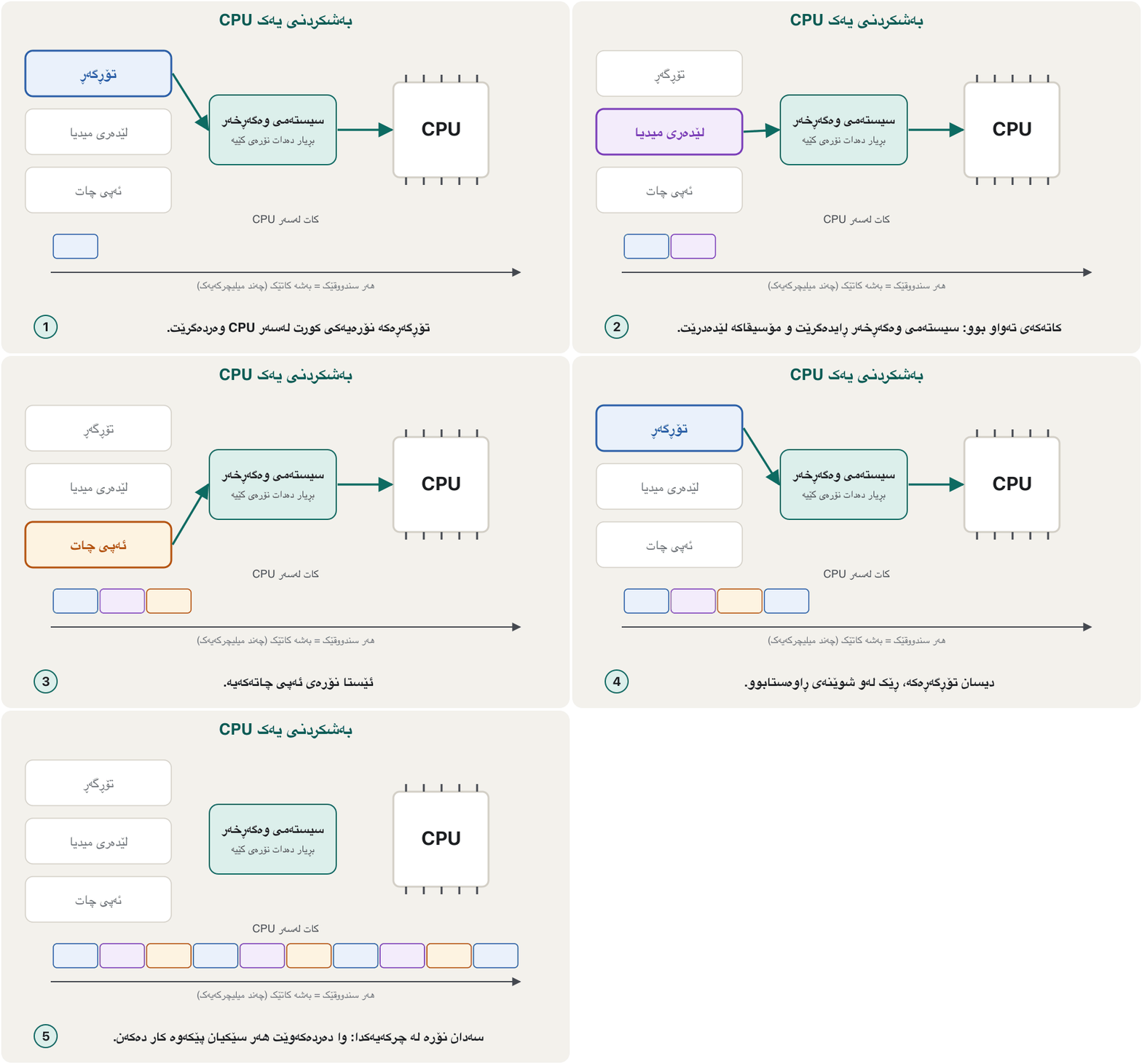
کە کار دەکات پێی دەوترێت . ئێستا لەوانەیە ، ، ئەپێکی چات و پەنجا بچووکی پشتەوەی سیستەم کارپێبکات — زۆر زیاتر لە ژمارەی ناوکەکانی . ئەمە بە چارەسەر دەکات: چەند میلیچرکەیی دەداتە ، ڕایدەگرێت، شوێنەکەی تۆمار دەکات و نۆرە دەداتە دواتر.
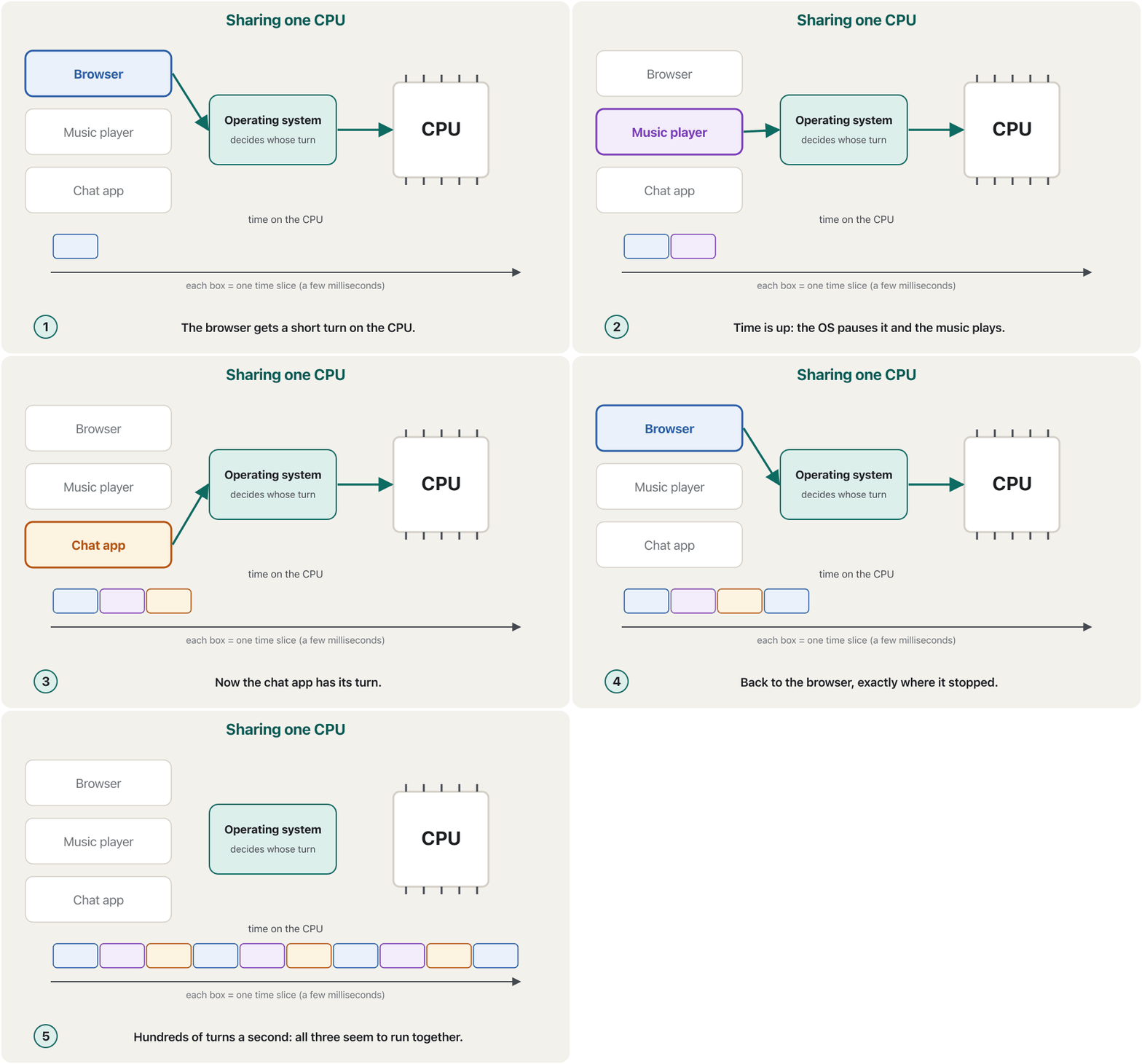
One waiter serves twenty tables in a busy tea house. He pours a glass at one table, moves on, pours at the next, and comes back again. He is so quick that every table feels served all the time. The OS treats the CPU the same way.
یەک چایچی لە چایخانەیەکی قەرەباڵغدا خزمەتی بیست مێز دەکات. پەرداخێک لە مێزێک تێدەکات، دەڕوات، لە مێزی دواتر تێدەکات و دیسان دەگەڕێتەوە. هێندە خێرایە کە هەموو مێزێک هەست دەکات هەمیشە خزمەتی دەکرێت. بە هەمان شێوە مامەڵە لەگەڵ دەکات.
Where the analogy stops workingسنووری ئەم نموونەیە
A modern CPU has several cores — several «waiters» — and the OS also decides which core each process uses.
نوێ چەند ناوکێکی هەیە — چەند «چایچییەک» — و بڕیاریش دەدات هەر کام ناوک بەکار بهێنێت.
A process that is waiting for something slow — a key press, a file from the disk, data from the network — does not get turns. The OS puts it aside and wakes it up when the data arrives. That is why one frozen app does not freeze the whole computer.
کە چاوەڕێی شتێکی خاوە — پەنجەنان بە ، لە دیسکەوە، لە — نۆرە وەرناگرێت. لایدەنێت و کاتێک گەیشت هەڵیدەستێنێتەوە. بۆیە ڕاوەستاو هەموو ڕاناگرێت.
What the operating system doesسیستەمی وەگەڕخەر چی دەکات
Memory and file managementبەڕێوەبردنی بیرگە و فایلەکان
Memory management. When you open an app, the OS finds free space in RAM, copies the program there from the SSD and gives the process its own private area. One app cannot read or overwrite another app's memory. When you close the app, the OS takes the space back. If RAM fills up, it moves parts that are not in use to the SSD for a while (virtual memory), which is slower.
بەڕێوەبردنی . کاتێک دەکەیتەوە، شوێنی بەتاڵ لە RAMـدا دەدۆزێتەوە، لە SSDـەوە بۆ ئەوێ کۆپی دەکات و ناوچەیەکی تایبەت دەداتە . ناتوانێت ئەپێکی تر بخوێنێتەوە یان بەسەریدا بنووسێت. کاتێک دادەخەیت، شوێنەکە وەردەگرێتەوە. ئەگەر RAM پڕ بوو، ئەو بەشانەی لە کاردا نین بۆ کاتێک دەگوازێتەوە بۆ SSD ()، کە خاوترە.
File management. The OS keeps everything on the drive as named files inside folders, using a file system. It remembers where each file's pieces lie on the disk, who may open it, and when it was changed. Apps just ask: open notes.docx, save it. File names, extensions and paths are the topic of Application Software and File Types.
بەڕێوەبردنی . هەموو شتێکی سەر درایڤەکە وەک ناونراو لەناو هەڵدەگرێت، بە بەکارهێنانی . لە بیری دەمێنێت پارچەکانی هەر لە کوێی دیسکەکەدان، کێ بۆی هەیە بیکاتەوە و کەی گۆڕاوە. تەنها داوا دەکەن: notes.docx بکەرەوە، پاشەکەوتی بکە. ناوی ، و بابەتی نەرمەواڵەی بەکارهێنان و جۆرەکانی فایلن.
What the operating system doesسیستەمی وەگەڕخەر چی دەکات
Devices, security and the user interfaceئامێرەکان، ئاسایش و ڕووکاری بەکارهێنەر
- Device management. The OS controls the keyboard, mouse, screen (through the graphics card), printer, Wi-Fi and every other device, each through its device driver. Apps never talk to the hardware directly.
- Security. User accounts with passwords, PINs or fingerprints; permissions that decide who may open which file; a firewall and antivirus; and security updates that close holes attackers could use.
- User interface. The OS gives you a way to talk to the computer: a graphical user interface (GUI) with windows, icons and menus, a touch screen, voice, or a command-line interface (CLI) where you type commands — practised in The Command Line.
- بەڕێوەبردنی ئامێرەکان. ، ، شاشە (لە ڕێگەی )، ، و هەموو ئامێرێکی تر کۆنترۆڵ دەکات، هەریەکەیان لە ڕێگەی . هەرگیز ڕاستەوخۆ لەگەڵ قسە ناکەن.
- . بە ، PIN یان پەنجەمۆر؛ مۆڵەت کە بڕیار دەدات کێ بۆی هەیە کام بکاتەوە؛ و ؛ و کە ئەو کونانە دادەخەن کە هێرشبەران دەتوانن بەکاریان بهێنن.
- ڕووکاری . ڕێگەیەکت دەداتێ بۆ قسەکردن لەگەڵ : بە ، و ، شاشەی دەستلێدان، دەنگ، یان کە فەرمانەکانی تێدا دەنووسیت — لە ڕووکاری هێڵی فەرماندا ڕاهێنانی لەسەر دەکرێت.
The English words for the desktop, windows, menus and the GUI and CLI are practised in Technical English: Operating Systems. How a phone's OS adds radios, battery saving, app sandboxes and permissions is taught in Mobile Operating Systems.
وشە ئینگلیزییەکانی ، ، ، و لە ئینگلیزیی تەکنیکی: سیستەمەکانی وەگەڕخەردا ڕاهێنانیان لەسەر دەکرێت. ئەوەی مۆبایل چۆن ڕادیۆ، پاشەکەوتی پاتری، و زیاد دەکات لە سیستەمەکانی وەگەڕخەری مۆبایلدا فێر دەکرێت.
Six ways to talk to a computerشەش ڕێگە بۆ قسەکردن لەگەڵ کۆمپیوتەر
Books group user interfaces by how you give the order. Older books name three kinds — command-driven, menu-driven and graphical — and newer ones add touch, voice and gesture:
کتێبەکان ڕووکارەکانی بەپێی ئەوەی چۆن فەرمان دەدەیت پۆلێن دەکەن. کتێبە کۆنەکان سێ جۆر ناو دەبەن — بە فەرمان، بە و وێنەیی — و نوێیەکان دەستلێدان، دەنگ و جوڵەی دەستیش زیاد دەکەن:
| Interfaceڕووکار | You…تۆ… | Where you meet itلە کوێ دەیبینیت |
|---|---|---|
| Command-driven (CLI)بە فەرمان () | type a command and press Enter دەنووسیت و Enter دادەگریت | Command Prompt, PowerShell, a Mac or Linux terminal, serversCommand Prompt، PowerShell، Mac یان Linux، |
| Menu-drivenبە | choose one option from a list, step by stepهەنگاو بە هەنگاو یەک هەڵبژاردە لە هەڵدەبژێریت | an ATM, the menu you get after dialling a short *…# code on a phone, a UEFI setup screen, a printer's control panelئامێری ATM، ئەو دوای لێدانی کۆدێکی کورتی *…# لە مۆبایلدا دەردەکەوێت، شاشەی ڕێکخستنی UEFI، شاشە و دوگمەکانی سەر |
| Graphical (GUI)وێنەیی () | point and click on windows, icons and menus لەسەر ، و دەکەیت | Windows 11, macOS, Linux desktopsWindows 11، macOS، Linux |
| Touchدەستلێدان | tap, swipe and pinchدەستی لێ دەدەیت، ڕایدەکێشیت و دوو پەنجە نزیک دەکەیتەوە | phones, tablets, kiosksمۆبایل، ، کیۆسک |
| Voiceدەنگ | speakقسە دەکەیت | Siri, Google Assistant, Alexa, Windows voice typingSiri، Google Assistant، Alexa، نووسین بە دەنگی Windows |
| Gestureجوڵەی دەست | move your hand; a camera or sensors read itدەستت دەجووڵێنیت؛ کامێرا یان دەیخوێنێتەوە | VR headsets, some game consoles and smart TVs، هەندێک کۆنسۆڵی یاری و تەلەفزیۆنی زیرەک |
The layers: from you down to the hardwareچینەکان: لە تۆوە بۆ خوارەوە تا ڕەقەواڵە
It helps to picture a computer as layers. You talk to the applications. The applications ask the operating system. The OS's core, the kernel, decides what happens and uses device drivers to talk to each piece of hardware. Under everything, the motherboard's firmware starts the machine. Each layer only talks to the layer next to it.
یارمەتیدەرە وەک چەند چینێک بهێنیتە بەرچاو. تۆ لەگەڵ قسە دەکەیت. داوا لە دەکەن. ناوەڕۆکی ، واتە ، بڕیار دەدات چی ڕووبدات و بەکار دەهێنێت بۆ قسەکردن لەگەڵ هەر پارچەیەکی . لە ژێر هەموویانەوە، ئامێرەکە دەست پێدەکات. هەر چینێک تەنها لەگەڵ چینی تەنیشتی قسە دەکات.
- Youتۆ
In Word you press Ctrl + P and choose Print.
لە Wordـدا
Ctrl + Pدادەگریت و Print هەڵدەبژێریت. - The appئەپەکە
Word does not know your printer. It asks the OS: print these pages.
Word ناناسێت. داوا لە دەکات: ئەم لاپەڕانە چاپ بکە.
- The OSسیستەمی وەگەڕخەر
The OS puts the job in the print queue and hands it to the printer driver.
کارەکە دەخاتە ڕیزی چاپەوە و دەیداتە درایڤەری .
- The driverدرایڤەرەکە
The driver turns the pages into the commands this printer model understands.
درایڤەرەکە لاپەڕەکان دەکاتە ئەو فەرمانانەی ئەم مۆدێلە لێیان تێدەگات.
- The hardwareڕەقەواڵە
The printer prints, then reports «done» (or «out of paper») back up through the layers.
چاپ دەکات، پاشان «تەواو بوو» (یان «کاغەز نەما») بە چینەکاندا بەرەو سەرەوە ڕادەگەیەنێت.
Operating systems in 2026سیستەمەکانی وەگەڕخەر لە 2026دا
Different devices use different operating systems. These are the ones you will meet today:
ئامێرە جیاوازەکان جیاواز بەکار دەهێنن. ئەمانە ئەوانەن کە ئەمڕۆ دەیانبینیت:
| Whereلە کوێ | Operating system | Good to knowباشە بزانیت |
|---|---|---|
| PCs and laptopsPC و | Windows 11 | Microsoft; runs on most PCs; the current version of WindowsMicrosoft؛ لەسەر زۆربەی PCـەکان کار دەکات؛ وەشانی ئێستای Windows |
| Mac computers Mac | macOS | Apple; only on Macs (macOS 27 came out in 2026)Apple؛ تەنها لەسەر Mac (macOS 27 لە 2026دا دەرچوو) |
| PCs, servers, supercomputersPC، ، | Linux: Ubuntu, Fedora, Linux Mint…Linux: Ubuntu، Fedora، Linux Mint… | Free and open source; comes in many versions called distributionsبێبەرانبەر و ؛ بە زۆر وەشانەوە دێت کە پێیان دەوترێت distribution |
| Chromebooks Chromebook | ChromeOS | Google; light, built around the Chrome browser and web appsGoogle؛ سووک، لەسەر بنەمای Chrome و |
| Servers | Windows Server; Ubuntu Server; Red Hat Enterprise LinuxWindows Server؛ Ubuntu Server؛ Red Hat Enterprise Linux | Run websites, databases and company networksماڵپەڕ، و کۆمپانیا بەڕێوە دەبەن |
| Phones and tabletsمۆبایل و | Android; iOS and iPadOSAndroid؛ iOS و iPadOS | Google / Apple — see Mobile Operating SystemsGoogle / Apple — سەیری بکە |
Android and iOS — how they are built, their history and why almost every phone uses one of them — are taught in Mobile Operating Systems.
Android و iOS — چۆن دروست کراون، مێژوویان و بۆچی نزیکەی هەموو مۆبایلێک یەکێکیان بەکار دەهێنێت — لە سیستەمەکانی وەگەڕخەری مۆبایلدا فێر دەکرێن.
Operating systems in 2026سیستەمەکانی وەگەڕخەر لە 2026دا
Names that changed since the slidesئەو ناوانەی لە دوای سلایدەکانەوە گۆڕاون
Operating systems in 2026سیستەمەکانی وەگەڕخەر لە 2026دا
One user or many?یەک بەکارهێنەر یان زۆر؟
Books also sort operating systems by the computer they run on and by how many users they serve at the same time:
کتێبەکان بەپێی ئەو لەسەری کار دەکەن و بەپێی ژمارەی ئەو لە یەک کاتدا خزمەتیان دەکەن پۆلێنیش دەکەن:
| Kindجۆر | Users | Examplesنموونە |
|---|---|---|
| Mobile-device OS | one person, one device in the handیەک کەس، یەک ئامێر لە دەستدا | Android, iOS, iPadOS |
| Small-computer (PC) OS بچووک (PC) | usually one person at a time; others can have their own accountsزۆرجار یەک کەس لە یەک کاتدا؛ کەسانی تر دەتوانن خۆیان هەبێت | Windows 11, macOS, ChromeOS, Linux |
| Large-computer OS گەورە | many users and programs at the same timeزۆر و لە یەک کاتدا | Windows Server, Linux on servers, IBM z/OS on mainframesWindows Server، Linux لەسەر ، IBM z/OS لەسەر |
A large-computer OS must do more: stay reliable for years, take backups, keep every user's data apart and safe, keep working when a part fails (fault tolerance) and process thousands of requests a second. Banks and airlines run such systems — see Mainframes.
گەورە دەبێت زیاتر بکات: بۆ چەندین ساڵ جێی متمانە بێت، بگرێت، هەر جیا و سەلامەت ڕابگرێت، کاتێک بەشێک تێکدەچێت بەردەوام بێت () و لە چرکەیەکدا هەزاران داواکاری جێبەجێ بکات. بانک و کۆمپانیاکانی فڕۆکەوانی سیستەمی وا بەکار دەهێنن — سەیری مەینفرەیمەکان بکە.
Operating systems in 2026سیستەمەکانی وەگەڕخەر لە 2026دا
Windows through the years: 1981–1998Windows بە درێژایی ساڵان: 1981–1998
Operating systems in 2026سیستەمەکانی وەگەڕخەر لە 2026دا
Windows from 2000 to todayWindows لە 2000ـەوە تا ئەمڕۆ
| Yearساڵ | Versionوەشان | What was newچی نوێ بوو |
|---|---|---|
| 2000 | Windows 2000, Windows ME | ME added System Restore: go back to an earlier working stateME، System Restoreـی زیاد کرد: گەڕانەوە بۆ دۆخێکی پێشووی کارکردوو |
| 2001 | Windows XP | The NT core reached home PCs; a new Start menu and taskbarناوکی NT گەیشتە PCـی ماڵەوە؛ Start و نوێ |
| 2007 | Windows Vista | A search box in the Start menu (Windows Search)خانەیەکی گەڕان لە Startـدا (Windows Search) |
| 2009 | Windows 7 | Faster start and better window handlingدەستپێکردنی خێراتر و ڕێکخستنی باشتری |
| 2012 | Windows 8 | A Start screen of tiles; faster start-upشاشەی Start بە خانەی چوارگۆشە؛ دەستپێکردنی خێراتر |
| 2013 | Windows 8.1 | The Start button came back; better searchدوگمەی Start گەڕایەوە؛ گەڕانی باشتر |
| 2015 | Windows 10 | The Start menu came back Start گەڕایەوە |
| 2021 | Windows 11 | A centred Start menu; needs TPM 2.0 (Installing Windows) Start لە ناوەڕاست؛ پێویستی بە TPM 2.0 هەیە (جێگیرکردن و ڕێکخستنی Windows) |
Device driversدرایڤەرەکانی ئامێر
A device driver is a small piece of software that lets the operating system recognise, control and use one hardware device. The OS speaks one general language («print this», «give me the mouse movement»); the driver translates it for one particular device and translates the device's answers back.
پارچە بچووکە کە ڕێگە بە دەدات یەک ئامێری بناسێت، کۆنترۆڵی بکات و بەکاری بهێنێت. بە یەک زمانی گشتی قسە دەکات («ئەمە چاپ بکە»، «جوڵەی بدەرێ»)؛ درایڤەرەکە بۆ یەک ئامێری دیاریکراو وەریدەگێڕێت و وەڵامەکانی ئامێرەکەش وەردەگێڕێتەوە.
Examples from the course: the printer driver, the mouse driver, the network card driver, the sound card driver and the display (graphics) card driver.
نموونەکانی کۆرسەکە: درایڤەری ، درایڤەری ، درایڤەری ، درایڤەری و درایڤەری .
Device driversدرایڤەرەکانی ئامێر
Drivers in everyday useدرایڤەرەکان لە کاری ڕۆژانەدا
- Drivers are specific. A driver is made for one device (or family) and one operating system. A Windows printer driver does not work on macOS.
- Many come built in. Devices that follow a published standard — most USB keyboards, mice and flash drives — work with the OS's own standard drivers, with nothing to install.
- Where to get the others: Windows Update installs most drivers by itself; for the rest (often graphics cards and printers) use the maker's own website — never a random «driver download» site.
- A missing or old driver is a common reason why a device «does not work» or a game runs badly. Device Manager shows which devices have a driver problem.
- درایڤەرەکان تایبەتن. درایڤەرێک بۆ یەک ئامێر (یان خێزانێک) و یەک دروست دەکرێت. درایڤەری Windows لەسەر macOS کار ناکات.
- زۆریان لەناو سیستەمەکەدان. ئەو ئامێرانەی ستانداردێکی بڵاوکراوە پەیڕەو دەکەن — زۆربەی ، و USB — بە درایڤەرە ستانداردەکانی خودی کار دەکەن و هیچ شتێک جێگیر ناکرێت.
- ئەوانی تر لە کوێ وەربگریت: Windows Update زۆربەی درایڤەرەکان خۆی جێگیر دەکات؛ بۆ ئەوانی تر (زۆرجار و ) ماڵپەڕی خودی دروستکەرەکە بەکار بهێنە — هەرگیز ماڵپەڕێکی هەڕەمەکیی «دابەزاندنی درایڤەر» نا.
- درایڤەرێکی نەبوو یان کۆن هۆیەکی باوە بۆ ئەوەی ئامێرێک «کار ناکات» یان یارییەک خراپ کار دەکات. Device Manager پیشان دەدات کام ئامێر کێشەی درایڤەری هەیە.
Firmware: software inside a chipپتەوواڵە: نەرمەواڵە لەناو چیپێکدا
Firmware sits between hardware and software: it is software stored inside a chip on a device. The chip is hardware; the program inside it is software. The classic example is the PC's BIOS chip, the first program that runs when you press the power button. Routers, printers, SSDs, TVs and phones all have firmware too.
لە نێوان و : کە لەناو ئامێرێکدا هەڵگیراوە. ؛ ناوی . نموونە ناسراوەکە PCـیە، یەکەم کە کاتێک دوگمەی هەڵکردن دادەگریت کار دەکات. ڕاوتەر، ، SSD، تەلەفزیۆن و مۆبایلیش هەموویان هەیە.
What the firmware does when the PC starts — the power-on self-test, the boot order and handing over to the OS — is shown in The System Unit, Motherboard and Power Supply; why firmware lives in non-volatile memory is in Memory: RAM, ROM and Cache.
ئەوەی کاتێک PC دەست پێدەکات دەیکات — تاقیکردنەوەی خۆیی، ڕیزبەندیی و ڕادەستکردن بە — لە کەیس، بۆردی سەرەکی و سەرچاوەی وزەدا پیشان دراوە؛ بۆچی لە دەژی لە بیرگە: RAM، ROM و کاشدایە.
What the BIOS does when a PC starts, its old limits, and why UEFI replaced it.
کاتێک دەست پێدەکات چی دەکات، سنوورە کۆنەکانی و بۆچی جێگەی گرتەوە.
Plays 0:00-3:56: BIOS, the boot process, its limits and UEFI; stops before the sponsor.
لە 0:00 تا 3:56 پەخش دەبێت: ، قۆناغەکانی ، سنوورەکانی و ؛ پێش ڕیکلامی سپۆنسەر ڕادەوەستێت.
Utility programsبەرنامەکانی خزمەتگوزاری
Utility programs are small system programs that look after the computer, its files and its safety. Many come with the operating system:
بچووکی سیستەمن کە چاودێریی ، و سەلامەتییەکەی دەکەن. زۆریان لەگەڵ دێن:
| Utility | Jobکار | Exampleنموونە |
|---|---|---|
| Backup | Copies files to another drive or the cloud بۆ درایڤێکی تر یان هەور کۆپی دەکات | Windows Backup, Time Machine (Mac) |
| Antivirus | Finds and removes malware دەدۆزێتەوە و لای دەبات | Microsoft Defender |
| File compression | Packs files into a smaller .zip دەپەستێنێت بۆ .zipـێکی بچووکتر | Built into File Explorer and Finderلەناو File Explorer و Finderـدایە |
| Disk clean-upپاککردنەوەی دیسک | Deletes temporary files to free space کاتییەکان دەسڕێتەوە بۆ ئازادکردنی شوێن | Storage Sense (Windows) |
| Disk check and repairپشکنین و چاککردنەوەی دیسک | Finds and fixes errors on a driveهەڵەکانی سەر درایڤێک دەدۆزێتەوە و چاکیان دەکاتەوە | chkdsk (Windows); First Aid in Disk Utility (Mac)chkdsk (Windows)؛ First Aid لە Disk Utility (Mac) |
| File manager | Shows, copies, moves and deletes files and folders و پیشان دەدات، کۆپی دەکات، دەیانگوازێتەوە و دەیانسڕێتەوە | File Explorer, Finder |
How does compression save space? A ZIP tool looks for pieces of data that repeat — the same words in a long report, the same colour across many pixels — stores each piece once and puts a short code wherever it repeats. Unzipping gives back every bit exactly. Plain text, CSV files and BMP pictures often shrink a lot; JPG photos, MP4 videos and even .docx files are already compressed, so they hardly shrink. How to zip and unzip on Windows: Using Windows.
چۆن شوێن دەگەڕێنێتەوە؟ ئامرازی ZIP بەدوای ئەو بەشانەی دەگەڕێت کە دووبارە دەبنەوە — هەمان وشە لە ڕاپۆرتێکی درێژدا، هەمان ڕەنگ لە زۆر — هەر بەشێک یەک جار هەڵدەگرێت و لە هەر شوێنێک دووبارە ببێتەوە کۆدێکی کورت دادەنێت. کردنەوەی ZIPـەکە هەموو وەک خۆیان دەگەڕێنێتەوە. دەقی سادە، CSV و وێنەی BMP زۆرجار زۆر بچووک دەبنەوە؛ وێنەی JPG، ڤیدیۆی MP4 و تەنانەت .docx پێشتر پەستێنراون، بۆیە بە زەحمەت بچووک دەبنەوە. چۆن لە Windowsـدا ZIP دروست بکەیت و بیکەیتەوە: بەکارهێنانی Windows.
Utility programsبەرنامەکانی خزمەتگوزاری
Monitors and other helpersچاودێرەکان و یارمەتیدەرەکانی تر
- Performance monitors show how busy the CPU, memory, disk and network are, and can end a frozen app: Task Manager on Windows (Ctrl + Shift + Esc) and Activity Monitor on a Mac. Reading them is taught in Troubleshooting and Task Manager.
- Security monitors watch for attacks and malware: Windows Security, with Microsoft Defender Antivirus and the firewall, does this on every Windows 11 PC.
- Customising tools — fonts, colour themes, screen savers — are small utilities too: they look after how the system looks.
- چاودێری کارایی پیشان دەدەن ، ، دیسک و چەند سەرقاڵن و دەتوانن ڕاوەستاو دابخەن: لە Windowsـدا (
Ctrl + Shift + Esc) و Activity Monitor لە Macـدا. خوێندنەوەیان لە چارەسەرکردنی کێشە و بەڕێوەبەری ئەرکەکاندا فێر دەکرێت. - چاودێری چاودێریی هێرش و دەکەن: Windows Security، لەگەڵ Microsoft Defender Antivirus و ، ئەم کارە لەسەر هەموو PCێکی Windows 11 دەکات.
- ئامرازەکانی گۆڕینی ڕووخسار — فۆنت، ڕەنگی ڕووخسار، — ئەوانیش بچووکن: چاودێریی شێوەی سیستەمەکە دەکەن.
Utility programsبەرنامەکانی خزمەتگوزاری
Programming softwareنەرمەواڵەی بەرنامەسازی
Programming software is the set of tools programmers use to write programs: code editors, compilers and interpreters, debuggers that help find mistakes, and IDEs (integrated development environments) that put all of these in one window, such as Visual Studio Code or Android Studio. A programmer is the person who writes the instructions that turn data into information.
ئەو ئامرازانەیە کە بۆ نووسینی بەکاریان دەهێنن: دەستکاریکەری کۆد، و ، ئامرازی دۆزینەوەی هەڵە (debugger) کە یارمەتی دەدەن هەڵەکان بدۆزیتەوە و کە هەموو ئەمانە لە یەک کۆ دەکاتەوە، وەک Visual Studio Code یان Android Studio. ئەو کەسەیە کە دەنووسێت بۆ ئەوەی بکرێتە .
What programming is and how programs are designed is the subject of the course Fundamentals of Programming; web languages start in Introduction to PHP.
بەرنامەسازی چییە و چۆن دیزاین دەکرێن بابەتی کۆرسی بنەماکانی بەرنامەسازیـیە؛ زمانەکانی وێب لە ناساندنی PHPـەوە دەست پێدەکەن.
Common mistakesهەڵە باوەکان
| Mistakeهەڵە | What is trueڕاستییەکە |
|---|---|
| «Windows is an application.»«Windows .» | Windows is an operating system — system software that runs the applications.Windows — کە کارپێدەکات. |
| Apps talk to the hardware directly. ڕاستەوخۆ لەگەڵ قسە دەکەن. | Apps ask the OS; the OS uses drivers to control the hardware. داوا لە دەکەن؛ بە کۆنترۆڵ دەکات. |
| A driver is a piece of hardware.درایڤەر پارچەیەکی . | A driver is software that lets the OS use one device.درایڤەر کە ڕێگە بە دەدات یەک ئامێر بەکار بهێنێت. |
| Programs really run at the same time on one core. لەسەر یەک ناوک بەڕاستی لە یەک کاتدا کار دەکەن. | One core runs one process at a time; the OS switches so fast that they look simultaneous.یەک ناوک لە یەک کاتدا یەک کارپێدەکات؛ هێندە خێرا دەیگۆڕێت کە پێکەوە دەردەکەون. |
| Windows 10 is the current Windows.Windows 10 وەشانی ئێستای Windowsـە. | Its support ended in October 2025; the current version is Windows 11.پشتگیرییەکەی لە ئۆکتۆبەری 2025 کۆتایی هات؛ وەشانی ئێستا Windows 11ـە. |
| Firmware never changes. هەرگیز ناگۆڕێت. | Today's firmware (UEFI, router and SSD firmware) is in flash memory and can be updated. ئەمڕۆ (UEFI، ڕاوتەر و SSD) لە و دەتوانرێت نوێ بکرێتەوە. |
Exercisesڕاهێنانەکان
Put each item in the right family (operating system, utility, driver, firmware, application, programming software): (a) macOS (b) the UEFI of a laptop (c) Google Chrome (d) Microsoft Defender (e) the graphics card driver (f) Visual Studio Code (g) Android (h) WinRAR or the built-in ZIP tool (i) Telegram (j) a Python interpreter.
هەر یەکێک بخە ناو خێزانی ڕاستی خۆی (، ، درایڤەر، ، ، ): (أ) macOS (ب) UEFIـی (ج) Google Chrome (د) Microsoft Defender (هـ) درایڤەری (و) Visual Studio Code (ز) Android (ح) WinRAR یان ئامرازی ZIPـی ناو سیستەم (ط) Telegram (ی) Python.
Show answerوەڵامەکە پیشان بدە
- Operating systems: (a) macOS, (g) Android.
- Firmware: (b) UEFI.
- Utilities: (d) Defender (antivirus), (h) ZIP tool (file compression).
- Driver: (e) the graphics card driver.
- Applications: (c) Chrome, (i) Telegram.
- Programming software: (f) VS Code, (j) the Python interpreter.
- : (أ) macOS، (ز) Android.
- : (ب) UEFI.
- : (د) Defender ()، (ح) ئامرازی ZIP ().
- درایڤەر: (هـ) درایڤەری .
- : (ج) Chrome، (ط) Telegram.
- : (و) VS Code، (ی) Python.
Which job of the OS is at work? (a) You type your PIN to unlock the laptop. (b) A video keeps playing while a download runs. (c) A new printer works as soon as you plug it in. (d) You find last week's report in the Documents folder. (e) Closing a big game makes the computer faster.
کام کاری لە کاردایە؟ (أ) PINـەکەت دەنووسیت بۆ کردنەوەی قفڵی . (ب) ڤیدیۆیەک بەردەوام لێدەدرێت لە کاتێکدا بەڕێوە دەچێت. (ج) نوێ هەر کە دەیبەستیتەوە کار دەکات. (د) ڕاپۆرتی هەفتەی ڕابردوو لە فۆڵدەری Documentsـدا دەدۆزیتەوە. (هـ) داخستنی یارییەکی گەورە خێراتر دەکات.
Show answerوەڵامەکە پیشان بدە
- (a) Security.
- (b) Process management (CPU scheduling).
- (c) Device management (the driver).
- (d) File management.
- (e) Memory management: the OS takes the game's RAM back.
- (أ) .
- (ب) بەڕێوەبردنی ().
- (ج) بەڕێوەبردنی ئامێرەکان (درایڤەرەکە).
- (د) بەڕێوەبردنی .
- (هـ) بەڕێوەبردنی : RAMـی یارییەکە وەردەگرێتەوە.
Aram opens a photo in the Photos app. Write the layers the request passes through, from Aram down to the hardware, and say what each layer does.
ئارام وێنەیەک لە ئەپی Photosـدا دەکاتەوە. ئەو چینانە بنووسە کە داواکارییەکە لە ئارامەوە تا پێیاندا تێدەپەڕێت و بڵێ هەر چینێک چی دەکات.
Show answerوەڵامەکە پیشان بدە
Aram double-clicks the photo (user).
ئارام دوو کلیک لە وێنەکە دەکات ().
The Photos app asks the OS to read the file (application).
ئەپی Photos داوا لە دەکات بخوێنێتەوە ().
The OS finds the file in the file system and asks the storage driver for it; it gives the app memory (kernel).
لە دەدۆزێتەوە و داوای لە درایڤەری دەکات؛ دەداتە ئەپەکە ().
The SSD sends the data; the graphics driver and card draw the picture (drivers and hardware).
SSD دەنێرێت؛ درایڤەر و وێنەکە دەکێشن ( و ).
Write true or false and correct the false ones. (a) Microsoft Office is an important system software package for any computer. (b) An antivirus program such as Microsoft Defender is a utility program. (c) Every Windows since XP is built on the Windows NT core.
ڕاست یان هەڵە بنووسە و هەڵەکان ڕاست بکەرەوە. (أ) Microsoft Office پاکێجێکی گرنگی بۆ هەموو . (ب) وەک Microsoft Defender . (ج) هەموو Windowsێک لە XPـەوە لەسەر ناوکی Windows NT دروست کراوە.
Show answerوەڵامەکە پیشان بدە
- (a) False. Office is application software; the operating system is the essential system software.
- (b) True. Antivirus programs look after the computer, so they are utilities (system support programs).
- (c) True. XP brought the NT core to home PCs, and Vista, 7, 8, 10 and 11 kept it.
- (أ) هەڵەیە. Office ؛ ئەو کە پێویستە.
- (ب) ڕاستە. چاودێریی دەکات، بۆیە ( پشتگیریی سیستەم).
- (ج) ڕاستە. XP ناوکی NTـی هێنایە سەر PCـی ماڵەوە و Vista، 7، 8، 10 و 11 هێشتیانەوە.
An exam matched words with two sentences like these. (A) «It makes the computer as productive as possible by running it in the most efficient way.» (B) «It supports the operations, management and users of the computer with many support services.» Which sentence is the operating system, and what does the other describe?
تاقیکردنەوەیەک وشەکانی لەگەڵ دوو ڕستەی وەک ئەمانە جووت کرد. (A) « بە کاراترین شێوە بەڕێوە دەبات تا هێندەی بکرێت بەرهەمدار بێت.» (B) «بە زۆر خزمەتگوزاریی یارمەتیدەر پشتگیریی کارەکان، بەڕێوەبردن و دەکات.» کام ڕستە و ئەوی تر چی وەسف دەکات؟
Show answerوەڵامەکە پیشان بدە
(A) is the operating system: it manages the CPU, memory, files and devices so the whole computer works efficiently. (B) describes system support programs — utilities and monitors. An old answer key matched the OS with (B); that is the wrong way round.
(A) : ، ، و ئامێرەکان بەڕێوە دەبات تا هەموو بە کارایی کار بکات. (B) پشتگیریی سیستەم وەسف دەکات — و چاودێرەکان. وەڵامنامەیەکی کۆن لەگەڵ (B) جووت کردبوو؛ ئەمە پێچەوانەیە.
Summaryپوختە
- Software is the programs that tell hardware what to do; processors run only machine code, so translators convert high-level programs.
- System software (OS, utilities, drivers, firmware) runs the computer; application software does the user's jobs; programming software builds both.
- The OS manages processes (CPU turns), memory, files, devices, security and the user interface.
- You give orders by command, menu, GUI, touch, voice or gesture; Windows' desktop is a GUI, an ATM is menu-driven.
- Layers: user → apps → OS kernel → drivers → firmware → hardware.
- In 2026: Windows 11, macOS, Linux and ChromeOS on computers; Windows Server and Linux on servers; Android and iOS on phones.
- Windows grew from MS-DOS (1981) through Windows 95's Start button and XP's NT core to Windows 11 (2021).
- بریتییە لە : کە بە دەڵێن چی بکات؛ تەنها کارپێدەکات، بۆیە وەرگێڕەکان ئاستبەرز دەگۆڕن.
- (، ، ، ) بەڕێوە دەبات؛ کارەکانی دەکات؛ هەردووکیان دروست دەکات.
- (نۆرەی )، ، ، ئامێرەکان، و ڕووکاری بەڕێوە دەبات.
- فەرمان بە نووسین، بە ، بە ، بە دەستلێدان، بە دەنگ یان بە جوڵەی دەست دەدەیت؛ Windows ، ATM بە کار دەکات.
- چینەکان: ← ← ← ← ← .
- لە 2026دا: Windows 11، macOS، Linux و ChromeOS لەسەر ؛ Windows Server و Linux لەسەر ؛ Android و iOS لەسەر مۆبایل.
- Windows لە MS-DOS (1981)ـەوە، بە دوگمەی Startـی Windows 95 و ناوکی NTـی XPـدا، گەیشتە Windows 11 (2021).
What is the difference between system software and application software?جیاوازیی نێوان نەرمەواڵەی سیستەم و نەرمەواڵەی بەکارهێنان چییە؟
System software runs and looks after the computer itself; application software does tasks the user wants, such as writing or browsing.
خودی بەڕێوە دەبات و چاودێری دەکات؛ ئەو کارانە دەکات کە دەیەوێت، وەک نووسین یان گەڕان.
Why does each device need a driver?بۆچی هەر ئامێرێک پێویستی بە درایڤەرە؟
The OS speaks one general language; the driver translates it into the commands of one particular device, for one particular OS.
بە یەک زمانی گشتی قسە دەکات؛ درایڤەرەکە دەیکاتە فەرمانەکانی یەک ئامێری دیاریکراو، بۆ یەک دیاریکراو.
How can one CPU core run many programs «at once»?چۆن یەک ناوکی CPU دەتوانێت «پێکەوە» چەندین بەرنامە کارپێبکات؟
The OS gives each process a short time slice in turn and switches hundreds of times a second.
بە نۆرە کورت دەداتە هەر و لە چرکەیەکدا سەدان جار دەیگۆڕێت.
Lesson complete!وانەکە تەواو بوو!
Well done. Review the key terms, then go on to the next lesson.دەستخۆش. سەیرێکی زاراوە سەرەکییەکان بکەرەوە، پاشان بڕۆ بۆ وانەی داهاتوو.
Key termsزاراوە سەرەکییەکان
Application Software and File Typesنەرمەواڵەی بەکارهێنان و جۆرەکانی فایل
Related lecturesوانە پەیوەندیدارەکان
- Application Software and File Typesنەرمەواڵەی بەکارهێنان و جۆرەکانی فایل
- Mobile Operating Systemsسیستەمەکانی وەگەڕخەری مۆبایل
- Operating Systems and the Desktopسیستەمەکانی وەگەڕخەر و ڕوومێز
- How Code Becomes a Running Program: Compilers and Interpretersچۆن کۆد دەبێت بە بەرنامەیەک کە کار دەکات: کۆمپایلەرەکان و ئینتەرپرێتەرەکان
- The System Unit, Motherboard and Power Supplyکەیس، بۆردی سەرەکی و سەرچاوەی وزە
- Memory: RAM, ROM and Cacheبیرگە: RAM، ROM و کاش
- Building Softwareدروستکردنی نەرمەواڵە
- The Command Line: Command Prompt Basicsڕووکاری هێڵی فەرمان: بنەماکانی Command Prompt
- Using Windows: Desktop, Files and Everyday Toolsبەکارهێنانی Windows: ڕوومێز، فایلەکان و ئامرازە ڕۆژانەکان
- Troubleshooting and Task Managerچارەسەرکردنی کێشە و بەڕێوەبەری ئەرکەکان
References and further readingسەرچاوەکان و خوێندنەوەی زیاتر
- Arpaci-Dusseau: Operating Systems: Three Easy Pieces — Introduction to Operating Systems (virtualizing the CPU and memory, the OS as resource manager)
- Microsoft Learn: What is a driver?
- Microsoft Learn: UEFI firmware requirements (UEFI replaces BIOS; Secure Boot; drives over 2 TB)
- Microsoft: Windows 10 end of support (14 October 2025)
- Microsoft Support: Windows 10 Mobile end of support FAQ
- Apple Support: macOS versions (from Mac OS X 10.0 to macOS 27)
- Microsoft Learn: Use WinGet (Windows 10, Windows 11 and Windows Server 2025)
- Microsoft: Windows 10 end of support and consumer Extended Security Updates (to 12 October 2027)
- Microsoft Learn: Extended Security Updates (ESU) program for Windows 10 (organisations: up to three years)
- Wikipedia: Microsoft Windows version history
- Wikipedia: Windows 98 (ACPI standby and hibernate, USB)
- Wikipedia: Utility software (system monitors, disk checkers, archivers, file managers, screensavers)
- Microsoft Learn: chkdsk
- Apple Disk Utility User Guide: Repair a storage device (First Aid)
This lecture is a first edition. The Kurdish text and terminology are waiting for review by Kurdish IT teachers.ئەم وانەیە چاپی یەکەمە. دەقە کوردییەکە و زاراوەکانی چاوەڕێی پێداچوونەوەی مامۆستایانی کوردی بواری IT ن.