Chapterبەش 3 · Lectureوانە 3.6
Wireless LANs: Wi-Fi Standards, Access Points and Securityڕایەڵەی بێتەلی ناوچەیی: ستانداردەکانی وایفای، خاڵەکانی دەستڕاگەیشتن و ئاسایش
What a wireless network is and its four everyday kinds; Wi-Fi as IEEE 802.11; access points, wireless routers, SSID, BSS, ESS and roaming; the 2.4, 5 and 6 GHz bands and their channels; CSMA/CA, the hidden node problem and RTS/CTS; what Wi-Fi 6 and 7 add and where Wi-Fi 8 stands; and Wi-Fi security from WEP to WPA3.
چییە و چوار جۆرە ڕۆژانەکەی؛ وەک IEEE 802.11؛ ، ، ، ، و ؛ 2.4، 5 و 6 GHz و ؛ ، و RTS/CTS؛ 6 و 7 چی زیاد دەکەن و 8 لە کوێیە؛ هەروەها لە بۆ .
What you will learnچی فێر دەبیت
- Define a wireless network, name its four everyday kinds and explain how Wi-Fi (IEEE 802.11) differs from Ethernet.
- Tell an access point from a wireless router, and explain SSID, BSS, BSSID, ESS and roaming.
- Choose a band and a channel for a network, using range, overlap and interference.
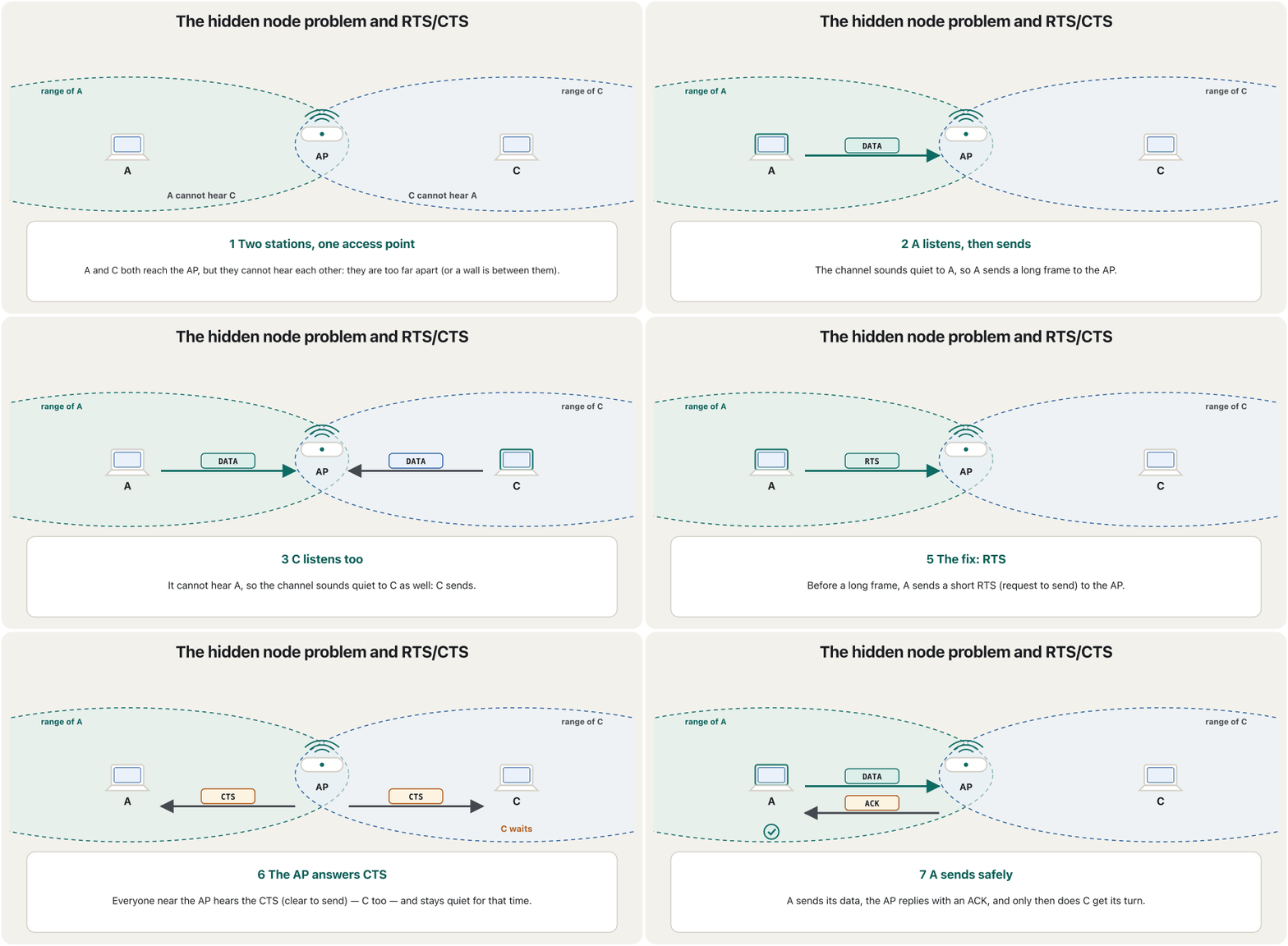
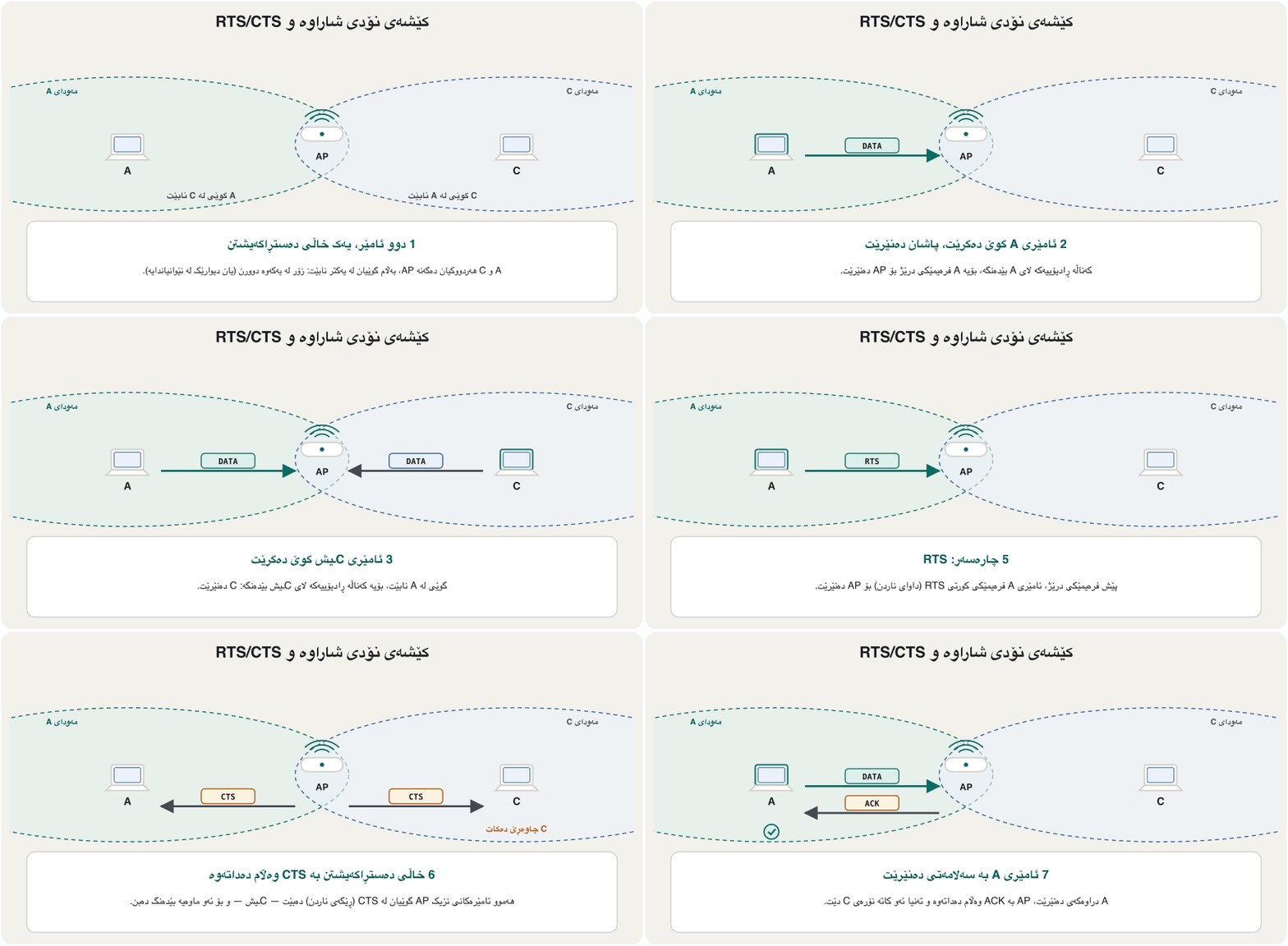
- Explain CSMA/CA, why Wi-Fi cannot detect collisions, and how RTS/CTS solves the hidden node problem.
- Name what Wi-Fi 6 and Wi-Fi 7 add and the status of Wi-Fi 8, and secure a Wi-Fi network with WPA3, a long password and WPS switched off.
- پێناسە بکەیت، ناوی چوار جۆرە ڕۆژانەکەی بهێنیت و ڕوون بکەیتەوە (IEEE 802.11) چ جیاوازییەکی لەگەڵ هەیە.
- لە جیا بکەیتەوە و ، ، BSSID، و ڕوون بکەیتەوە.
- و بۆ هەڵبژێریت بە بەکارهێنانی مەودا، بەسەریەکداکەوتن و .
- ڕوون بکەیتەوە، بۆچی ناتوانێت بدۆزێتەوە و چۆن RTS/CTS چارەسەر دەکات.
- بڵێیت 6 و 7 چی زیاد دەکەن و 8 لە چ قۆناغێکدایە و بە ، درێژ و WPSـی کوژاوە بپارێزیت.
What a wireless network isڕایەڵەی بێتەل چییە؟
A wireless network joins devices with radio waves or other wireless signals through the air, without wires or cables. At home it is the Internet that reaches your laptop or phone with no cable at all; on a campus it is the Wi-Fi that follows you from the library to the lecture hall.
ئامێرەکان بە یان تر لە ڕێگەی هەواوە بە یەکەوە دەبەستێت، بەبێ تەل یان کێبڵ. لە ماڵەوە بەبێ هیچ کێبڵێک دەگاتە یان مۆبایلەکەت؛ لە زانکۆدا لە کتێبخانەوە تا هۆڵی وانەکان لەگەڵت دێت.
You meet four kinds of wireless network every day:
ڕۆژانە چوار جۆر دەبینیت:
| Kindجۆر | How far it reachesتا کوێ دەگات | Examplesنموونە |
|---|---|---|
| Bluetooth network | a few metresچەند مەترێک | earbuds, keyboards, smartwatchesگوێگرە بچووکەکان، ، کاتژمێری هۆشمەند |
| Wi-Fi network (a WLAN) (WLAN) | a home, a school buildingماڵێک، باڵەخانەیەکی قوتابخانە | laptops, phones, printers، مۆبایل، |
| Cellular (mobile) network | kilometres: a city, a countryچەند کیلۆمەترێک: شارێک، وڵاتێک | 4G and 5G phonesمۆبایلی 4G و 5G |
| Satellite network مانگی دەستکرد | anywhere under the open skyهەر شوێنێک لە ژێر ئاسمانی کراوەدا | ships, planes, far villagesکەشتی، فڕۆکە، گوندی دوورەدەست |
This lesson is about Wi-Fi, the wireless LAN. How the four compare as media is in Bluetooth, mobile networks and satellites, and their sizes in Four sizes of wireless network. Usually only the last part of the journey is wireless: the router is joined to the provider by cable or fibre, and access points are joined to switches by cables (Wireless networks). Which Wi-Fi and Bluetooth versions suit small battery-powered sensors is in Wi-Fi and Bluetooth Low Energy for IoT.
ئەم وانەیە لەبارەی ، ناوچەیی. بەراوردی ئەم چوارە وەک لە Bluetooth، ڕایەڵەی مۆبایل و مانگی دەستکرددا هەیە و قەبارەکانیان لە چوار قەبارەی ڕایەڵەی بێتەلدا. زۆربەی جار تەنیا کۆتا بەشی ڕێگاکە : بە کێبڵ یان فایبەر بە دابینکەرەکەوە بەستراوە و بە کێبڵ بە بەستراون (ڕایەڵە بێتەلەکان). کام وەشانی و بۆ بچووکی بە گونجاوە، لە وایفای و بلووتووسی کەموزە بۆ IoTدا هەیە.
Wi-Fi is IEEE 802.11وایفای هەمان IEEE 802.11ـە
Wi-Fi is the everyday name of the IEEE 802.11 family of standards, the wireless partner of Ethernet, IEEE 802.3 (Ethernet: From 10Base-2 to 800 Gigabit). The first 802.11 standard appeared in 1997 with 2 Mb/s. Two groups share the work: the IEEE 802.11 working group writes the technical standards (802.11n, ac, ax, be…), and the Wi-Fi Alliance, a group of companies, tests products, certifies them and owns the name Wi-Fi. Since 2018 the Alliance gives the generations simple numbers — Wi-Fi 4, 5, 6, 6E and 7 (Wi-Fi generations).
ناوی ڕۆژانەی خێزانی IEEE 802.11ـە، هاوبەشی کە IEEE 802.3ـە (Ethernet: لە 10Base-2ـەوە بۆ 800 گیگابیت). یەکەم 802.11 لە 1997دا بە 2 Mb/s دەرچوو. دوو دەستە کارەکە بەش دەکەن: گرووپی کاری IEEE 802.11 دەنووسێت (802.11n، ac، ax، be…) و Wi-Fi Alliance، کە کۆمەڵێک کۆمپانیایە، بەرهەمەکان تاقی دەکاتەوە، بڕوانامەیان پێ دەدات و خاوەنی ناوی Wi-Fiـیە. لە 2018ـەوە Alliance ژمارەی سادە دەداتە نەوەکان — 4، 5، 6، 6E و 7 (نەوەکانی وایفای).
Wi-Fi uses the same 48-bit MAC addresses as Ethernet (MAC Addresses and Ethernet Frames), so the two work together easily. But the air is a very different medium from a cable:
هەمان 48 بەکار دەهێنێت (ناونیشانەکانی MAC و فرەیمەکانی Ethernet)، بۆیە ئەم دووانە بە ئاسانی پێکەوە کار دەکەن. بەڵام هەوا زۆر جیاوازە لە کێبڵ:
| Featureتایبەتمەندی | Ethernet (IEEE 802.3) (IEEE 802.3) | Wi-Fi (IEEE 802.11) (IEEE 802.11) |
|---|---|---|
| Medium | a cable for each device, to a switch portکێبڵێک بۆ هەر ئامێرێک، بۆ | radio waves in the air, shared by every device on the channel لە هەوادا، کە هەموو ئامێرێکی سەر هاوبەشیان دەکەن |
| Sending and receivingناردن و وەرگرتن | full duplex on switch ports لەسەر | half duplex: on one channel, one device sends at a time: لەسەر یەک لە هەر کاتێکدا یەک ئامێر دەنێرێت |
| Taking turnsنۆرەگرتن | not needed with switches (CSMA/CD only on old shared cables)لەگەڵ پێویست نییە ( تەنیا لەسەر کێبڵە هاوبەشە کۆنەکان) | always: CSMA/CAهەمیشە: |
| Who can listenکێ دەتوانێت گوێ بگرێت | only whoever reaches the cableتەنیا ئەوەی دەستی بە کێبڵەکە دەگات | everyone in range, even through walls — encryption is a mustهەموو کەسێک لە ناو مەودادا، تەنانەت بە ناو دیواردا — پێویستە |
| Speed in practiceخێرایی لە کرداردا | steadyجێگیر | changes with distance, walls and neighboursبە دووری، دیوار و دراوسێکان دەگۆڕێت |
The access point: radio on one side, cable on the otherخاڵی دەستڕاگەیشتن: ڕادیۆ لە لایەک، کێبڵ لە لایەکی تر
A device that sends and receives signals so that devices can join a wired . Large buildings use many access points; at home the usually does this job too.
ئامێرێکە کە شەپۆلی دەنێرێت و وەردەگرێت، تا ئامێرە بچنە ناو وایەرداری. باڵەخانە گەورەکان چەندین دانەیان بەکاردەهێنن؛ لە ماڵدا زۆرجار ئەم کارەش دەکات.
An access point (AP) has a radio on one side and an Ethernet port on the other. It passes frames between the two worlds, turning 802.11 frames into Ethernet frames and back — so it is a kind of bridge, a translational bridge (Kinds of bridges). It works at layers 1 and 2 only: it does not route, and it does not give out IP addresses.
(AP) لە لایەکەوە ڕادیۆیەکی هەیە و لە لایەکەی ترەوە . لە نێوان ئەم دوو جیهانەدا دەگوازێتەوە و 802.11 دەکاتە و بە پێچەوانەوە — بۆیە جۆرێکە لە ، وەرگێڕ (جۆرەکانی پردی ڕایەڵە). تەنیا لە و کار دەکات: ناکات و نادات بە کەس.
The access point can be a box of its own — a hardware access point — or software on a computer or phone that shares its connection — a software access point. Your phone's mobile hotspot is one.
دەکرێت سندووقێکی سەربەخۆ بێت — — یان لەسەر یان مۆبایلێک کە پەیوەندییەکەی خۆی هاوبەش دەکات — . مۆبایلـەکەت یەکێکە لەمانە.
In schools, hospitals and offices the access points sit on the ceiling, often one for every classroom or two. Each one gets data and power through a single Ethernet cable (PoE, Power over Ethernet), and a central wireless LAN controller or a cloud service sets them all up at once.
لە قوتابخانە، نەخۆشخانە و ئۆفیسەکاندا لە بنمیچەوە دادەنرێن، زۆرجار یەکێک بۆ هەر یەک یان دوو پۆل. هەریەکەیان و کارەبا لە ڕێگەی یەک کێبڵی وەردەگرێت (، Power over Ethernet) و یان لەسەر هەموویان پێکەوە ڕێک دەخات.
Access point or wireless router?خاڵی دەستڕاگەیشتن یان ڕێدۆزی بێتەل؟
At home you rarely see a separate access point. The box from the internet provider is four devices in one — modem, router, switch and access point (The home “router”: four devices in one; short version: The “router” at home). People call the whole box a Wi-Fi router, but only one of its four parts is the access point.
لە ماڵەوە بە دەگمەن جیا دەبینیت. ئەو سندووقەی دایدەنێت چوار ئامێرە لە یەکدا — ، ، و («ڕێدۆزی» ماڵەوە: چوار ئامێر لە یەکدا؛ کورتەکەی: «ڕێدۆزی» ماڵەوە). خەڵک بە هەموو سندووقەکە دەڵێن ، بەڵام تەنیا یەکێک لە چوار بەشەکەی .
So an access point only joins Wi-Fi to the wired LAN, while a wireless router also routes between your LAN and the Internet, shares one public address among all devices (NAT) and hands out local addresses (DHCP).
کەواتە تەنیا بە وایەردارەوە دەبەستێت، لە کاتێکدا لە نێوان و دەکات، یەک ناونیشانی گشتی لە نێوان هەموو ئامێرەکاندا هاوبەش دەکات (NAT) و ناونیشانی ناوخۆیی دابەش دەکات ().
SSID, BSS and ESS: one name, many access pointsSSID، BSS و ESS: یەک ناو، چەندین خاڵی دەستڕاگەیشتن
Every Wi-Fi network has a name, the SSID (Service Set Identifier), up to 32 bytes long, such as School-WiFi. The access point announces it about ten times a second in short beacon frames; that is the list your phone shows.
هەموو ناوێکی هەیە، (Service Set Identifier)، تا 32 درێژ، وەک School-WiFi. نزیکەی دە جار لە چرکەیەکدا لە کورتی ڕاگەیاندندا (beacon) ڕایدەگەیەنێت؛ ئەوە ئەو لیستەیە کە مۆبایلەکەت نیشانی دەدات.
One access point with its clients is a BSS (Basic Service Set). Each BSS has its own ID, the BSSID: the MAC address of the access point's radio. When one access point is not enough, several APs on the same wired LAN send the same SSID; together they form an ESS (Extended Service Set).
یەک لەگەڵ (Basic Service Set). هەر ناسێنەری خۆی هەیە، BSSID: ڕادیۆی . کاتێک یەک بەس نییە، چەند APـێک لەسەر هەمان وایەردار هەمان دەنێرن؛ پێکەوە دروست دەکەن (Extended Service Set).
In an ESS your phone roams: walking down the corridor, it notices that another AP is stronger and moves to it, keeping the same network and the same IP address. The phone, not the access point, decides when to move; extra standards (802.11k, v and r) help it choose quickly and log in again in a fraction of a second. Example: a school in Sulaymaniyah has 12 ceiling access points, all sending School-WiFi — one ESS with 12 BSSs and 12 BSSIDs.
لە مۆبایلەکەت دەکات: کاتێک بە ڕاڕەوەکەدا دەڕۆیت، هەست دەکات APـێکی تر بەهێزترە و دەچێتە سەری، بە هەمان و هەمان . مۆبایلەکە، نەک ، بڕیار دەدات کەی بگوازرێتەوە؛ زیادە (802.11k، v و r) یارمەتی دەدەن خێرا هەڵبژێرێت و لە بەشێکی چرکەیەکدا دووپاتە بچێتە ژوورەوە. نموونە: قوتابخانەیەک لە سلێمانی 12 بنمیچی هەیە کە هەموویان School-WiFi دەنێرن — یەک بە 12 و 12 BSSID.
No access point, or many: ad hoc and meshبێ خاڵی دەستڕاگەیشتن یان زۆر خاڵی دەستڕاگەیشتن: ad hoc و ڕایەڵەی چنراو
Wi-Fi can also work without an access point. In ad hoc mode (an IBSS, independent BSS) devices talk to each other directly. Today you meet the idea as Wi-Fi Direct: a phone sends a photo straight to a printer, or shows its screen on a TV. Strictly, Wi-Fi Direct lets one of the two devices play the access point for a moment, but no separate box is needed.
دەتوانێت بەبێ کار بکات. لە دۆخی ad hocـدا (IBSS، سەربەخۆ) ئامێرەکان ڕاستەوخۆ قسە لەگەڵ یەکتر دەکەن. ئەمڕۆ ئەم بیرۆکەیە وەک Wi-Fi Direct دەبینیت: مۆبایلێک وێنەیەک ڕاستەوخۆ بۆ دەنێرێت، یان شاشەکەی لەسەر تیڤییەک نیشان دەدات. بە وردی، لە Wi-Fi Directـدا یەکێک لە دوو ئامێرەکە بۆ ماوەیەک ڕۆڵی دەگێڕێت، بەڵام پێویست بە سندووقێکی جیا ناکات.
At the other end are homes too big for one box. Mesh Wi-Fi puts two or three nodes around the house; they send one SSID and pass traffic to each other by radio (or, better, by cable), and only the main node needs a cable to the router. Why mesh beats a simple range extender is in Repeaters today: Wi-Fi extenders and mesh. The Wi-Fi Alliance's EasyMesh programme lets nodes from different makers work together. Why a mesh keeps working when one node fails is in Where meshes shine.
لە لایەکەی ترەوە ماڵی زۆر گەورە هەن کە یەک سندووق بەشیان ناکات. دوو یان سێ خاڵ لە ماڵەکەدا دادەنێت؛ یەک دەنێرن و هاتوچۆی بە ڕادیۆ (یان باشتر، بە کێبڵ) بۆ یەکتر دەگوازنەوە و تەنیا خاڵە سەرەکییەکە پێویستی بە کێبڵ هەیە بۆ . بۆچی لە سادەی باشترە لە دووپاتەکەرەوەکان ئەمڕۆ: درێژکەرەوەی وایفای و ڕایەڵەی چنراودا هەیە. بەرنامەی EasyMeshـی Wi-Fi Alliance ڕێگە دەدات خاڵی دروستکەرانی جیاواز پێکەوە کار بکەن. بۆچی کاتێک خاڵێکی تێک دەچێت هەر کار دەکات، لە کوێ ڕایەڵەی چنراو باشترەدا هەیە.
Three bands: 2.4, 5 and 6 GHzسێ باندی لەرەلەر: 2.4، 5 و 6 GHz
Wi-Fi uses three frequency bands. All three are unlicensed: anyone may use them without a licence, within power limits — so your router shares them with the neighbours, with Bluetooth and even with microwave ovens.
سێ بەکار دەهێنێت. هەر سێکیان : هەر کەسێک دەتوانێت بەبێ مۆڵەت بەکاریان بهێنێت، لە ناو سنووری هێزدا — بۆیە هاوبەشیان دەکات لەگەڵ دراوسێکان، لەگەڵ و تەنانەت لەگەڵ فڕنی مایکرۆوەیڤ.
The rule of thumb: lower frequency, longer range; higher frequency, more room and more speed. 2.4 GHz waves pass walls better, but the band is narrow and crowded. 5 GHz has many more channels; some of them must give way to weather and airport radar (DFS). 6 GHz is wide and quiet but reaches least far, works only with Wi-Fi 6E and 7 devices — and accepts only WPA3 security. Most routers today are dual-band or tri-band: one radio per band, often with one SSID, and the router steers each device to the best band.
یاسایەکی سادە: نزمتر، مەودای درێژتر؛ بەرزتر، شوێنی زیاتر و خێرایی زیاتر. شەپۆلەکانی 2.4 GHz باشتر بە ناو دیواردا تێدەپەڕن، بەڵام تەسک و قەرەباڵغە. 5 GHz زۆر زیاتری هەیە؛ هەندێکیان دەبێت ڕێگە بۆ کەشناسی و فڕۆکەخانە چۆڵ بکەن (DFS). 6 GHz پان و بێدەنگە بەڵام کەمترین مەودای هەیە، تەنیا لەگەڵ ئامێرەکانی 6E و 7 کار دەکات — و تەنیا وەک قبووڵ دەکات. زۆربەی ئەمڕۆ دوو باندی یان سێ باندیـن: بۆ هەر ڕادیۆیەک، زۆرجار بە یەک ؛ هەر ئامێرێک دەنێرێتە سەر باشترین .
Channels: why 1, 6 and 11کەناڵە ڕادیۆییەکان: بۆچی 1، 6 و 11
A band is divided into channels. At 2.4 GHz the channel numbers are only 5 MHz apart, but each Wi-Fi signal is about 20 MHz wide (22 MHz for old 802.11b) — so neighbouring channels overlap. Of the 13 channels most countries allow, only 1, 6 and 11 do not overlap at all.
هەر دابەش دەکرێت بۆ . لە 2.4 GHzـدا ژمارەی تەنیا 5 MHz لە یەکەوە دوورن، بەڵام هەر نزیکەی 20 MHz پانە (22 MHz بۆ 802.11bـی کۆن) — بۆیە دراوسێکان بەسەر یەکدا دەکەون. زۆربەی وڵاتان ڕێگە بە 13 دەدەن، بەڵام تەنیا 1، 6 و 11 هیچ بەسەر یەکدا ناکەون.
Two networks on the same channel take turns politely with CSMA/CA, so they share the time. Two networks on overlapping channels — say 1 and 3 — cannot read each other's frames: each one is just interference for the other, and errors and resends go up. So in a building in Erbil, three flats' routers should use 1, 6 and 11 — never a channel in between. Other sources of interference at 2.4 GHz are microwave ovens, Bluetooth, baby monitors and wireless cameras.
دوو لەسەر هەمان بە بە ڕێکی نۆرە دەگرن، بۆیە کاتەکە هاوبەش دەکەن. دوو لەسەر بەسەریەکداکەوتوو — بۆ نموونە 1 و 3 — ناتوانن یەکتر بخوێننەوە: هەریەکەیان تەنیا بۆ ئەوی تر و هەڵە و زیاد دەبن. بۆیە لە باڵەخانەیەکی هەولێر، سێ شوقە دەبێت 1، 6 و 11 بەکار بهێنن — هەرگیز نێوانیان. سەرچاوەکانی تری لە 2.4 GHzـدا فڕنی مایکرۆوەیڤ، ، ئامێری چاودێریی منداڵ و کامێرای .
Channels: why 1, 6 and 11کەناڵە ڕادیۆییەکان: بۆچی 1، 6 و 11
Wider channels at 5 and 6 GHzکەناڵی ڕادیۆیی پانتر لە 5 و 6 GHzـدا
At 5 and 6 GHz the 20 MHz channels sit side by side without overlap, and routers join neighbours into wider channels of 40, 80 or 160 MHz — and 320 MHz with Wi-Fi 7 at 6 GHz. Each doubling of the width roughly doubles the speed of one network, but halves the number of channels left for the neighbours.
لە 5 و 6 GHzـدا 20 MHz لە تەنیشت یەکەوەن بەبێ ئەوەی بەسەر یەکدا بکەون و دراوسێکان دەکەنە پانتری 40، 80 یان 160 MHz — و 320 MHz لەگەڵ 7 لە 6 GHzـدا. هەر جارێک پانییەکە دوو هێندە بکرێت، خێرایی یەک نزیکەی دوو هێندە دەبێت، بەڵام ژمارەی بەتاڵ بۆ دراوسێکان نیوە دەبێت.
CSMA/CA: taking turns on the airCSMA/CA: نۆرەگرتن لە هەوادا
Ethernet on a shared coax cable used CSMA/CD: send, and if you hear a collision, stop and try again later (CSMA/CD). Wi-Fi cannot do that. A radio cannot listen while it sends — at its own antenna its signal is millions of times stronger than anyone else's — and some stations cannot hear each other at all. So Wi-Fi tries to avoid collisions instead: CSMA/CA, carrier sense multiple access with collision avoidance.
لەسەر هاوبەش بەکار دەهێنا: بنێرە و ئەگەر بیست، ڕابوەستە و دواتر دووپاتە هەوڵ بدەرەوە (CSMA/CD). ناتوانێت ئەوە بکات. ڕادیۆ ناتوانێت لە کاتی ناردندا گوێ بگرێت — لە خۆیدا ملیۆنان جار بەهێزترە لە هی هەر کەسێکی تر — و هەندێک ئامێر هەر یەکتر نابیستن. بۆیە لە جیاتی ئەوە هەوڵ دەدات خۆی لە لابدات: ، carrier sense multiple access with collision avoidance.
CSMA/CA: taking turns on the airCSMA/CA: نۆرەگرتن لە هەوادا
The four steps of CSMA/CAچوار هەنگاوەکەی CSMA/CA
- Listenگوێ بگرە
If the channel is busy, wait until it is free.
ئەگەر سەرقاڵە، چاوەڕێ بکە تا بەتاڵ دەبێت.
- Random countdownژماردنی هەڕەمەکی
Wait a short fixed gap, then count down a random number of short time slots. If someone else starts sending, freeze the count and go on later.
ماوەیەکی کورتی دیاریکراو چاوەڕێ بکە، پاشان لە ماوە کورتەکان بۆ دواوە بژمێرە. ئەگەر کەسێکی تر دەستی بە ناردن کرد، ژماردنەکە ڕابگرە و دواتر بەردەوام بە.
- Sendبنێرە
At zero, send the whole frame.
کاتێک گەیشتیتە سفر، هەموو بنێرە.
- Acknowledgementدانپێدانان
The receiver checks the frame and answers with an ACK after a very short gap. No ACK means a collision or a lost frame: the sender picks a random number from a range twice as large and tries again.
وەرگر دەپشکنێت و دوای ماوەیەکی زۆر کورت بە ACK وەڵام دەداتەوە. نەهاتنی ACK واتە یان ونبوو: نێرەر لە مەودایەکی دوو هێندە گەورەتر هەڵدەبژێرێت و دووپاتە هەوڵ دەداتەوە.
The random countdown avoids most collisions: two stations waiting for the same quiet moment almost never pick the same number. The ACKs are the price — every frame is answered — which is one reason why real Wi-Fi speed is well below the number printed on the box.
ژماردنی هەڕەمەکی ڕێگە لە زۆربەی دەگرێت: دوو ئامێر کە چاوەڕێی هەمان ساتی بێدەنگ دەکەن بە دەگمەن هەمان ژمارە هەڵدەبژێرن. ACKـەکان نرخەکەن — وەڵامی هەموو دەدرێتەوە — ئەمەش یەکێکە لە هۆکارەکانی ئەوەی خێرایی ڕاستەقینەی زۆر کەمترە لەو ژمارەیەی لەسەر سندووقەکە نووسراوە.
What Wi-Fi 6 and Wi-Fi 7 addوایفای 6 و وایفای 7 چی زیاد دەکەن
The generations with their dates are listed in Wi-Fi generations. Here is what the two newest ones actually changed. More than raw speed, it is about sharing the air among many devices:
نەوەکان لەگەڵ مێژووەکانیان لە نەوەکانی وایفایدا ڕیز کراون. لێرەدا ئەوەی دوو نوێترینیان بە ڕاستی گۆڕییان دەبینیت. زیاتر لە خێرایی ڕووت، مەسەلەکە هاوبەشکردنی هەوایە لە نێوان ئامێرێکی زۆردا:
| Featureتایبەتمەندی | Fromلە | What it doesچی دەکات |
|---|---|---|
| OFDMAتەکنیکی OFDMA | Wi-Fi 6 6 | splits one transmission into small resource units, so several devices get data at onceیەک ناردن دابەش دەکات بۆ یەکەی سەرچاوەی بچووک، بۆیە چەند ئامێرێک پێکەوە وەردەگرن |
| MU-MIMOتەکنیکی MU-MIMO | Wi-Fi 5 down; Wi-Fi 6 up and down 5 بۆ خوارەوە؛ 6 بۆ سەرەوە و خوارەوە | several antennas send to (or hear) several devices at the same timeچەند لە هەمان کاتدا بۆ چەند ئامێرێک دەنێرن (یان گوێیان لێ دەگرن) |
| 1024-QAM 1024-QAM | Wi-Fi 6 6 | each change of the wave carries 10 bits instead of 8هەر گۆڕانێکی شەپۆل لە جیاتی 8، 10 هەڵدەگرێت |
| Target wake timeکاتی دیاریکراوی بەئاگاهاتن (Target wake time) | Wi-Fi 6 6 | devices agree when to wake up, so phones and sensors save batteryئامێرەکان ڕێک دەکەون کەی بەئاگا بێن، بۆیە مۆبایل و دەپارێزن |
| BSS colouringڕەنگکردنی BSS | Wi-Fi 6 6 | frames carry a ‘colour’, so a device can ignore a neighbour's network and send sooner «ڕەنگێک» هەڵدەگرن، بۆیە ئامێر دەتوانێت دراوسێ پشتگوێ بخات و زووتر بنێرێت |
| 6 GHz band 6 GHz | Wi-Fi 6E 6E | a new, quiet band with room for wide channels نوێ و بێدەنگ بە شوێنەوە بۆ پان |
| 320 MHz channels 320 MHz | Wi-Fi 7 7 | twice the widest channel of Wi-Fi 6 (at 6 GHz only)دوو هێندەی پانترین 6 (تەنیا لە 6 GHz) |
| 4096-QAM 4096-QAM | Wi-Fi 7 7 | 12 bits per change of the wave instead of 10لە جیاتی 10، 12 بۆ هەر گۆڕانێکی شەپۆل |
| Multi-link operation (MLO)کارکردن لەسەر چەند (MLO) | Wi-Fi 7 7 | one device uses two or three bands at once — faster, and it keeps going when one band is busyیەک ئامێر لە یەک کاتدا دوو یان سێ بەکار دەهێنێت — خێراتر و کاتێک سەرقاڵە بەردەوام دەبێت |
| Puncturingکونکردنی (Puncturing) | Wi-Fi 7 7 | uses a wide channel even when a small part of it is busy پان بەکار دەهێنێت تەنانەت کاتێک بەشێکی بچووکی سەرقاڵە |
QAM is explained in What real modems use: QAM and OFDM. With M points, each change of the wave carries bits, so:
QAM لە ئەوەی مۆدێمە ڕاستەقینەکان بەکاری دەهێنن: QAM و OFDMدا ڕوون کراوەتەوە. بە M خاڵ، هەر گۆڕانێکی شەپۆل هەڵدەگرێت، کەواتە:
4096-QAM carries 20 % more data in the same time — but only with a very clean signal, close to the access point.
4096-QAM لە هەمان کاتدا 20 % زیاتر هەڵدەگرێت — بەڵام تەنیا بە زۆر پاک، نزیک لە .
Dates: Wi-Fi 6 certification began in 2019 and the IEEE 802.11ax standard was published in 2021. The Wi-Fi Alliance began certifying Wi-Fi 7 in January 2024; the IEEE approved 802.11be in September 2024 and published it on 22 July 2025. A Wi-Fi 7 router helps only the devices that also have Wi-Fi 7.
مێژووەکان: بڕوانامەدانی 6 لە 2019دا دەستی پێ کرد و IEEE 802.11ax لە 2021دا بڵاوکرایەوە. Wi-Fi Alliance لە کانوونی دووەمی 2024دا دەستی کرد بە بڕوانامەدانی 7؛ IEEE لە ئەیلوولی 2024دا 802.11beـی پەسەند کرد و لە 22ی تەممووزی 2025دا بڵاوی کردەوە. 7 تەنیا یارمەتی ئەو ئامێرانە دەدات کە ئەوانیش 7یان هەیە.
What Wi-Fi 6 and Wi-Fi 7 addوایفای 6 و وایفای 7 چی زیاد دەکەن
Wi-Fi 8 (802.11bn): still a draftوایفای 8 (802.11bn): هێشتا ڕەشنووسە
Wi-Fi 8 is IEEE 802.11bn, still a draft as of November 2026 (draft D2.10); the IEEE 802.11 working group’s timeline plans final approval for May 2028. Its aim is not a higher top speed — it keeps Wi-Fi 7's widest channels and 4096-QAM — but ultra-high reliability: fewer lost frames, lower delay, smoother roaming between access points, and neighbouring access points that coordinate instead of getting in each other's way. A router sold as “Wi-Fi 8” before the standard is final follows a draft.
8 هەمان IEEE 802.11bnـە کە تا نۆڤەمبەری 2026 هێشتا ڕەشنووسە (ڕەشنووسی D2.10)؛ خشتەی کاتی گرووپی کاری IEEE 802.11 پەسەندکردنی کۆتایی بۆ ئایاری 2028 داناوە. ئامانجەکەی خێرایی بەرزتر نییە — پانترین و 4096-QAMـی 7 دەهێڵێتەوە — بەڵکو زۆر بەرزە: ونبووی کەمتر، کەمتر، نەرمتر لە نێوان و دراوسێ کە هاوئاهەنگ دەبن لە جیاتی ئەوەی ڕێگەی یەکتر بگرن. کە پێش تەواوبوونی بە ناوی « 8» دەفرۆشرێت پەیڕەوی ڕەشنووسێک دەکات.
Securing Wi-Fi: from WEP to WPA3ئاسایشی وایفای: لە WEPـەوە بۆ WPA3
Is wireless networking insecure? Not as a rule — it depends on the settings. Radio waves pass through walls, so anyone in range can receive the frames; what protects you is encryption. An open network, or one with WEP, is insecure; a network with WPA3, or WPA2 with a long random password, is secure enough for everyday use.
ئایا نییە؟ وەک یاسایەکی گشتی نا — بەستراوە بە ڕێکخستنەکانەوە. بە ناو دیواردا تێدەپەڕن، بۆیە هەر کەسێک لە ناو مەودادا بێت دەتوانێت وەربگرێت؛ ئەوەی تۆ دەپارێزێت . کراوە، یان یەکێک بە ، نییە؛ بە ، یان لەگەڵ درێژ و هەڕەمەکی، بۆ بەکارهێنانی ڕۆژانە بەسە.
Enhanced Open gives cafés and airports encryption without a password, so nobody can simply listen to your traffic. It does not prove that the network is the real one, though, so on any public Wi-Fi keep to HTTPS, or use a VPN (Man-in-the-middle, VPNs).
Enhanced Open بەبێ دەداتە چایخانە و فڕۆکەخانەکان، بۆیە کەس ناتوانێت بە سادەیی گوێ لە هاتوچۆکەت بگرێت. بەڵام ناسەلمێنێت کە ڕاستەقینەیە، بۆیە لە هەموو گشتیدا تەنیا بەکار بهێنە یان (هێرشی کەسی ناوەڕاست، VPN).
Securing Wi-Fi: from WEP to WPA3ئاسایشی وایفای: لە WEPـەوە بۆ WPA3
From WEP to WPA3, step by stepلە WEPـەوە بۆ WPA3، هەنگاو بە هەنگاو
- Open: no encryption — anyone nearby can read everything that HTTPS does not protect.
- WEP (1997): broken in 2001, cracked in minutes today. Never use it.
- WPA (2003): a quick stopgap (TKIP) until WPA2 was ready; retired.
- WPA2 (2004): strong AES encryption. Its weak point is the password: an attacker who records one device logging in can try millions of passwords per second on his own computer, offline. A long random password defeats that.
- WPA3 (2018): its log-in, SAE, needs a live exchange with the access point for every guess, so offline guessing does not work; it protects management frames, so attackers can no longer send fake ‘disconnect’ frames; and recorded traffic stays secret even if the password leaks later. Required for new Wi-Fi certified devices since July 2020, and the only choice at 6 GHz.
- کراوە: بێ — هەر کەسێکی نزیک دەتوانێت هەموو ئەو شتانە بخوێنێتەوە کە نایانپارێزێت.
- (1997): لە 2001دا شکێنرا، ئەمڕۆ لە چەند خولەکێکدا دەشکێنرێت. هەرگیز بەکاری مەهێنە.
- WPA (2003): چارەسەرێکی کاتی (TKIP) تا ئامادە بوو؛ وازی لێ هێنراوە.
- (2004): بەهێزی . خاڵە لاوازەکەی : کە یەک ئامێر تۆمار بکات دەتوانێت لەسەر خۆی، لە دەرەوەی هێڵ، ملیۆنان لە چرکەیەکدا تاقی بکاتەوە. درێژ و هەڕەمەکی ئەمە پووچەڵ دەکاتەوە.
- (2018): ، SAE، بۆ هەر تاقیکردنەوەیەک پێویستی بە ئاڵوگۆڕێکی ڕاستەوخۆ لەگەڵ هەیە، بۆیە تاقیکردنەوە لە دەرەوەی هێڵ کار ناکات؛ بەڕێوەبردن دەپارێزێت، بۆیە ئیتر ناتوانن ساختەی «پچڕاندن» بنێرن؛ و هاتوچۆی تۆمارکراو نهێنی دەمێنێتەوە تەنانەت ئەگەر دواتر ئاشکرا بێت. لە تەممووزی 2020ـەوە بۆ ئامێرە نوێ بڕوانامەدارەکانی پێویستە و لە 6 GHzـدا تاکە هەڵبژاردنە.
Securing Wi-Fi: from WEP to WPA3ئاسایشی وایفای: لە WEPـەوە بۆ WPA3
Personal or Enterprise: 802.1XPersonal یان Enterprise: IEEE 802.1X
Home networks use Personal mode: one shared password for everyone. A university cannot work like that: whenever one student leaves, the password would have to change for thousands of people. Enterprise mode (WPA2-Enterprise or WPA3-Enterprise) uses IEEE 802.1X: each person logs in with their own user name and password (or a certificate), the access point passes the log-in to an authentication server (RADIUS), and each device gets its own encryption key.
ماڵەوە دۆخی Personal بەکار دەهێنن: یەک هاوبەش بۆ هەمووان. زانکۆیەک ناتوانێت وا کار بکات: هەر کاتێک قوتابییەک بڕوات، دەبێت بۆ هەزاران کەس بگۆڕدرێت. دۆخی Enterprise (WPA2-Enterprise یان WPA3-Enterprise) بەکار دەهێنێت: هەر کەسێک بە و خۆی (یان ) دەچێتە ژوورەوە، دەداتە (RADIUS) و هەر ئامێرێک خۆی وەردەگرێت.
eduroam, the Wi-Fi of universities in many countries, works this way: a student or lecturer logs in with the home university's account on the campus of any member university.
eduroam، زانکۆکان لە زۆر وڵاتدا، بەم شێوەیە کار دەکات: قوتابی یان مامۆستا بە زانکۆکەی خۆی لە ناو کەمپی هەر زانکۆیەکی ئەندامدا دەچێتە ژوورەوە.
Securing a home Wi-Fi in Duhokپاراستنی وایفایی ماڵێک لە دهۆک
Hana's family in Duhok went through the settings page of their Wi-Fi router. These are the settings that matter:
خێزانەکەی هانا لە دهۆک لاپەڕەی ڕێکخستنەکانی پشکنی. ئەمانە ئەو ڕێکخستنانەن کە گرنگن:
Change the router's own admin password — the one for the settings page — from the factory default.
بەڕێوەبردنی خودی — ئەوەی لاپەڕەی ڕێکخستنەکان — لەوەی کارگە داینابوو بگۆڕە.
Choose WPA3-Personal, or the mixed WPA2/WPA3 mode if an old device cannot use WPA3.
WPA3-Personal هەڵبژێرە، یان دۆخی تێکەڵی WPA2/WPA3 ئەگەر ئامێرێکی کۆن ناتوانێت بەکار بهێنێت.
Use a long Wi-Fi password, 16 characters or more — for example four random words (Why length beats complexity).
درێژی بەکار بهێنە، 16 یان زیاتر — بۆ نموونە چوار وشەی هەڕەمەکی (بۆچی درێژی لە ئاڵۆزی باشترە).
Turn WPS off. Its 8-digit PIN is checked in two halves, so an attacker needs at most about 11,000 guesses — a few hours. The flaw was found in 2011.
WPS بکوژێنەوە. PINـە 8 ژمارەییەکەی بە دوو نیوە دەپشکنرێت، بۆیە زۆرترین پێویستی بە نزیکەی 11,000 تاقیکردنەوە هەیە — چەند کاتژمێرێک. ئەم کەموکورتییە لە 2011دا دۆزرایەوە.
Put visitors and smart gadgets (TV, cameras, plugs) on the guest network, away from your laptops.
میوان و ئامێرە هۆشمەندەکان (تیڤی، کامێرا، پلاک) بخەرە سەر میوان، دوور لە .
Turn on automatic firmware updates.
خۆکار چالاک بکە.
Securing a home Wi-Fi in Duhokپاراستنی وایفایی ماڵێک لە دهۆک
Two settings that only look like protectionدوو ڕێکخستن کە تەنیا لە پاراستن دەچن
Two popular settings give no real protection. A hidden SSID still travels in other frames, and phones that look for a hidden network call its name everywhere they go. A MAC filter lets only listed MAC addresses in, but an attacker can read an allowed address from the air and copy it (Can a MAC address be changed?) — and private Wi-Fi addresses make the list hard to keep anyway.
دوو ڕێکخستنی باو هیچ پاراستنێکی ڕاستەقینە نادەن. شاراوە هێشتا لە تردا دەگوازرێتەوە و ئەو مۆبایلانەی بە دوای شاراوەدا دەگەڕێن ناوەکەی لە هەر شوێنێک بن بانگ دەکەن. MAC تەنیا ڕێگە بە ناو لیستەکە دەدات، بەڵام دەتوانێت ناونیشانێکی ڕێگەپێدراو لە هەواوە بخوێنێتەوە و کۆپی بکات (ئایا ناونیشانی MAC دەگۆڕدرێت؟) — هەروەها ناونیشانە تایبەتییەکانی ڕاگرتنی لیستەکە قورس دەکەن.
You will set all of this up yourself — SSID, WPA2/WPA3 password and DHCP — in Lab: Building a Wireless LAN in Packet Tracer in the Routing and Switching course; its checklist Before it goes live: hardening repeats these settings.
هەموو ئەمانە خۆت ڕێک دەخەیت — ، WPA2/WPA3 و — لە تاقیگە: دروستکردنی ڕایەڵەیەکی بێتەلی ناوچەیی لە Packet Tracerـی خولی و ؛ لیستی پشکنینی پێش کەوتنە کار: بەهێزکردنی ئاسایش هەمان ڕێکخستنەکان دووپاتە دەکاتەوە.
Common mistakesهەڵە باوەکان
| Mistakeهەڵە | What is trueئەوەی ڕاستە |
|---|---|
| “An access point is a router.”« .» | An access point only joins Wi-Fi to the wired LAN (a bridge). The home box contains both an AP and a router. تەنیا بە وایەردارەوە دەبەستێت (). سندووقی ماڵەوە هەم AP و هەم تێدایە. |
| “Wi-Fi uses CSMA/CD like old Ethernet.”« وەک کۆن بەکار دەهێنێت.» | Wi-Fi uses CSMA/CA: a radio cannot detect a collision while it is sending. بەکار دەهێنێت: ڕادیۆ لە کاتی ناردندا ناتوانێت بدۆزێتەوە. |
| “Any two different channels are fine for neighbours.”«هەر دوو جیاواز بۆ دراوسێکان باشن.» | At 2.4 GHz only 1, 6 and 11 do not overlap; 1 and 3 interfere.لە 2.4 GHzـدا تەنیا 1، 6 و 11 بەسەر یەکدا ناکەون؛ 1 و 3 دروست دەکەن. |
| “5 GHz is always better than 2.4 GHz.”«5 GHz هەمیشە لە 2.4 GHz باشترە.» | 5 GHz is faster but reaches less far; through several walls 2.4 GHz may win.5 GHz خێراترە بەڵام کەمتر دەڕوات؛ بە ناو چەند دیوارێکدا 2.4 GHz لەوانەیە باشتر بێت. |
| “Wireless networking is insecure.”« نییە.» | Only open and WEP networks are; WPA3, or WPA2 with a strong password, is fine for normal use.تەنیا کراوە و وان؛ ، یان لەگەڵ بەهێز، بۆ بەکارهێنانی ئاسایی باشە. |
| “A hidden SSID and a MAC filter keep strangers out.”« شاراوە و MAC بێگانەکان دوور دەخەنەوە.» | Both are easy to get around; use WPA3 and a strong password.تێپەڕاندنی هەردووکیان ئاسانە؛ و بەهێز بەکار بهێنە. |
| “Wi-Fi 8 is the newest standard.”« 8 نوێترین .» | In November 2026 802.11bn is still a draft; the newest approved one is 802.11be (Wi-Fi 7).لە نۆڤەمبەری 2026دا 802.11bn هێشتا ڕەشنووسە؛ نوێترینی پەسەندکراو 802.11beـیە ( 7). |
| “A Wi-Fi 7 router makes every device faster.”« 7 هەموو ئامێرێک خێراتر دەکات.» | Only devices that also have Wi-Fi 7 use its new features.تەنیا ئەو ئامێرانەی ئەوانیش 7یان هەیە تایبەتمەندییە نوێیەکانی بەکار دەهێنن. |
Exercisesڕاهێنانەکان
Define a wireless network and name four kinds of wireless network, with an example of each.
پێناسە بکە و ناوی چوار جۆری بهێنە، بە نموونەیەک بۆ هەریەکەیان.
Show answerوەڵامەکە پیشان بدە
A wireless network joins devices with radio waves or other wireless signals through the air, without wires or cables.
ئامێرەکان بە یان تر لە ڕێگەی هەواوە بە یەکەوە دەبەستێت، بەبێ تەل یان کێبڵ.
- Wi-Fi network: the Wi-Fi of a home or a school.
- Cellular network: a 4G or 5G phone line.
- Satellite network: Internet for a ship or a far village.
- Bluetooth network: earbuds joined to a phone.
- : ماڵێک یان قوتابخانەیەک.
- : هێڵی مۆبایلی 4G یان 5G.
- مانگی دەستکرد: بۆ کەشتییەک یان گوندێکی دوورەدەست.
- : گوێگرەیەک کە بە مۆبایلەوە بەستراوە.
Four flats in one building each have a 2.4 GHz router. Plan their channels. What do you do with the fourth router?
چوار شوقە لە یەک باڵەخانەدا هەریەکەیان 2.4 GHzـیان هەیە. پلان بکە. چی لە چوارەم دەکەیت؟
Hintئاماژە
Only three channels at 2.4 GHz do not overlap.
تەنیا سێ لە 2.4 GHzـدا بەسەر یەکدا ناکەون.
Show answerوەڵامەکە پیشان بدە
Put three routers on 1, 6 and 11. The fourth shares one of these channels — best the one used by the flat farthest away — because a shared channel is divided fairly by CSMA/CA, while an in-between channel such as 3 or 9 only adds interference. Better still: move the fourth (or all of them) to 5 GHz, where there are many more channels.
سێ لەسەر 1، 6 و 11 دابنێ. چوارەم هەمان لەگەڵ یەکێک لەم سێیە هاوبەش دەکات — باشترە ئەوەی دوورترین شوقە بەکاری دەهێنێت — چونکە هاوبەش بە بە دادپەروەری دابەش دەکرێت، لە کاتێکدا نێوان وەک 3 یان 9 تەنیا زیاد دەکات. لەوەش باشتر: چوارەم (یان هەموویان) بگوازەرەوە بۆ 5 GHz، کە زۆر زیاتری تێدایە.
Choose a band for each device and say why: (a) a smart plug in the garden; (b) a Wi-Fi 7 laptop next to the router, used for video calls; (c) a Wi-Fi 5 phone in the living room.
بۆ هەر ئامێرێک هەڵبژێرە و بڵێ بۆچی: (a) لە باخچەکەدا؛ (b) 7 لە تەنیشت بۆ پەیوەندیی ڤیدیۆیی؛ (c) مۆبایلێکی 5 لە ژووری دانیشتن.
Show answerوەڵامەکە پیشان بدە
- (a) 2.4 GHz: it is far away, behind walls, and needs very little speed.
- (b) 6 GHz: close to the router, so the short range does not matter; wide, quiet channels.
- (c) 5 GHz: a Wi-Fi 5 phone has no 6 GHz radio, and 5 GHz is faster than 2.4 GHz at that distance.
- (a) 2.4 GHz: دوورە، لە پشت دیوارەوەیە و پێویستی بە خێراییەکی زۆر کەم هەیە.
- (b) 6 GHz: نزیکی ، بۆیە مەودای کورت گرنگ نییە؛ پان و بێدەنگ.
- (c) 5 GHz: مۆبایلی 5 ڕادیۆی 6 GHzـی نییە و 5 GHz لەو دوورییەدا لە 2.4 GHz خێراترە.
Compare CSMA/CD (old Ethernet) and CSMA/CA (Wi-Fi) in three rows.
( کۆن) و () لە سێ ڕیزدا بەراورد بکە.
Show answerوەڵامەکە پیشان بدە
| Featureتایبەتمەندی | CSMA/CD | CSMA/CA |
|---|---|---|
| Ideaبیرۆکە | detect a collision while sending, then stopلە کاتی ناردندا بدۆزەرەوە، پاشان ڕابوەستە | avoid collisions before sendingپێش ناردن خۆت لە لابدە |
| Random wait | only after a collision (backoff)تەنیا دوای () | before every frame, even when the channel is freeپێش هەموو ، تەنانەت کاتێک بەتاڵە |
| How the sender knowsنێرەر چۆن دەزانێت | no collision heard = successنەبیستنی = سەرکەوتن | an ACK comes backACKـێک دەگەڕێتەوە |
A café in Erbil wants Wi-Fi for its customers without handing out a password, and the owner's office PC must be safe. What do you suggest?
چایخانەیەک لە هەولێر بۆ میوانەکانی دەوێت بەبێ ئەوەی بدات بە کەس و ئۆفیسی خاوەنەکەی دەبێت پارێزراو بێت. چی پێشنیار دەکەیت؟
Show answerوەڵامەکە پیشان بدە
- A customer SSID with Enhanced Open: encrypted, but no password.
- A separate SSID for the office with WPA3-Personal and a long password — or a cable — kept apart from the customer network.
- WPS off, the router's admin password changed, firmware updates on.
- Customers should still use HTTPS, because Enhanced Open does not prove the network is the real one.
- بۆ میوانەکان بە Enhanced Open: بە پارێزراو، بەڵام بێ .
- جیا بۆ ئۆفیس بە WPA3-Personal و درێژ — یان کێبڵ — جیا لە میوانەکان.
- WPS کوژاوە، بەڕێوەبردنی گۆڕاو، چالاک.
- میوانەکان هێشتا دەبێت بەکار بهێنن، چونکە Enhanced Open ناسەلمێنێت کە ڕاستەقینەیە.
What is a BSSID?BSSID چییە؟
The MAC address of the access point's radio; it identifies one BSS.
ڕادیۆی ؛ یەک دەناسێنێت.
Why does an access point send beacon frames?بۆچی خاڵی دەستڕاگەیشتن فرەیمەکانی ڕاگەیاندن (beacon) دەنێرێت؟
To announce its SSID and settings about ten times a second, so that devices can find and join the network.
بۆ ئەوەی نزیکەی دە جار لە چرکەیەکدا و ڕێکخستنەکانی ڕابگەیەنێت، تا ئامێرەکان بدۆزنەوە و بچنە ناوی.
What do protected management frames (WPA3) stop?فرەیمەکانی بەڕێوەبردنی پارێزراو (WPA3) ڕێگە لە چی دەگرن؟
Fake management frames, such as forged ‘disconnect’ messages that attackers used to kick devices off a network.
بەڕێوەبردنی ساختە، وەک پەیامی «پچڕاندن»ـی ساختە کە بۆ دەرکردنی ئامێرەکان لە بەکاریان دەهێنا.
Summaryپوختە
- A wireless network joins devices by radio without cables; the four everyday kinds are Wi-Fi, cellular, satellite and Bluetooth networks. Wi-Fi is the wireless LAN, IEEE 802.11.
- An access point bridges Wi-Fi and Ethernet; a home ‘Wi-Fi router’ is modem + router + switch + access point.
- SSID = the network name; BSS = one AP and its clients (BSSID = the AP radio's MAC); ESS = many APs, one SSID, one wired LAN, so devices roam.
- Bands: 2.4 GHz (range, crowded, channels 1, 6, 11), 5 GHz (more channels), 6 GHz (Wi-Fi 6E/7, widest channels, WPA3 only).
- CSMA/CA: listen, random countdown, send, ACK; RTS/CTS solves the hidden node problem.
- Wi-Fi 6 added OFDMA, uplink MU-MIMO, 1024-QAM and target wake time; Wi-Fi 7 (802.11be, published July 2025) adds 320 MHz channels, 4096-QAM and multi-link operation; Wi-Fi 8 (802.11bn) is still a draft.
- Security: open and WEP are insecure; WPA2 needs a long password; WPA3 (SAE, protected management frames) is required since 2020; Enterprise (802.1X) gives every user an own log-in; turn WPS off.
- ئامێرەکان بە ڕادیۆ بەبێ کێبڵ دەبەستێت؛ چوار جۆرە ڕۆژانەکە ، ، مانگی دەستکرد و . ناوچەییە، IEEE 802.11.
- و بە یەکەوە دەبەستێت؛ « »ـی ماڵەوە + + + .
- = ناوی ؛ = یەک AP و (BSSID = ڕادیۆی AP)؛ = چەندین AP، یەک ، یەک وایەردار، بۆیە ئامێرەکان دەکەن.
- : 2.4 GHz (مەودا، قەرەباڵغ، 1، 6، 11)، 5 GHz ( زیاتر)، 6 GHz ( 6E/7، پانترین ، تەنیا ).
- : گوێ بگرە، ژماردنی هەڕەمەکی، بنێرە، ACK؛ RTS/CTS چارەسەر دەکات.
- 6 OFDMA، MU-MIMOـی بۆ سەرەوە، 1024-QAM و target wake timeـی زیاد کرد؛ 7 320 MHz، 4096-QAM و multi-link operation زیاد دەکات (802.11be، لە تەممووزی 2025دا بڵاوکرایەوە)؛ 8 (802.11bn) هێشتا ڕەشنووسە.
- : کراوە و نییە؛ پێویستی بە درێژە؛ (SAE، بەڕێوەبردنی پارێزراو) لە 2020ـەوە پێویستە؛ Enterprise () تایبەت دەداتە هەر ؛ WPS بکوژێنەوە.
Lesson complete!وانەکە تەواو بوو!
Well done. Review the key terms, then go on to the next lesson.دەستخۆش. سەیرێکی زاراوە سەرەکییەکان بکەرەوە، پاشان بڕۆ بۆ وانەی داهاتوو.
Key termsزاراوە سەرەکییەکان
Repeaters and Hubsدووپاتەکەرەوەکان و هەبەکان
Related lecturesوانە پەیوەندیدارەکان
- Mobile Technology and Wireless Networksتەکنەلۆژیای مۆبایل و ڕایەڵە بێتەلەکان
- Network Hardware: NICs, Switches and Routersڕەقەواڵەی ڕایەڵە: کارتی ڕایەڵە، سویچ و ڕێدۆز
- Modems and Routersمۆدێمەکان و ڕێدۆزەکان
- Bridges and Switchesپردەکانی ڕایەڵە و سویچەکان
- Repeaters and Hubsدووپاتەکەرەوەکان و هەبەکان
- Lab: Building a Wireless LAN in Packet Tracerتاقیگە: دروستکردنی ڕایەڵەیەکی بێتەلی ناوچەیی لە Packet Tracer
- Wi-Fi and Bluetooth Low Energy for IoTوایفای و بلووتووسی کەموزە بۆ IoT
- Network Defences: Firewalls, Segmentation, Monitoring and SIEMبەرگرییەکانی ڕایەڵە: ئاگرەدیوار، بەشبەشکردنی ڕایەڵە، چاودێریی ئاسایش و SIEM
- Passwords, MFA and Access Controlتێپەڕەوشەکان، MFA و کۆنترۆڵی دەستڕاگەیشتن
- Links: Point-to-Point, Multipoint and Transmission Modesبەستنەوەکان: پەیوەندیی خاڵ بۆ خاڵ، پەیوەندیی فرەخاڵ و شێوازەکانی ناردن
- Physical and Logical Topologiesتۆپۆلۆجیی فیزیکی و تۆپۆلۆجیی لۆجیکی
- IP Addresses and MAC Addressesناونیشانەکانی IP و ناونیشانەکانی MAC
References and further readingسەرچاوەکان و خوێندنەوەی زیاتر
- IEEE 802.11 Working Group (official timelines of 802.11be and 802.11bn)
- IEEE SA: IEEE 802.11be-2024 (Wi-Fi 7)
- Wi-Fi Alliance: Wi-Fi CERTIFIED 7
- Wi-Fi Alliance: Wi-Fi CERTIFIED 6
- Wi-Fi Alliance: Security (WPA3, Enhanced Open)
- Wikipedia: Service set (802.11 network) — SSID, BSS, BSSID, ESS
- Wikipedia: List of WLAN channels
- Wikipedia: Hidden node problem
- Wikipedia: Wired Equivalent Privacy (WEP)
- Wikipedia: Wi-Fi Protected Setup (the 2011 PIN flaw)
- eduroam: how it works
This lecture is a first edition. The Kurdish text and terminology are waiting for review by Kurdish IT teachers.ئەم وانەیە چاپی یەکەمە. دەقە کوردییەکە و زاراوەکانی چاوەڕێی پێداچوونەوەی مامۆستایانی کوردی بواری IT ن.