Chapterبەش 7 · Lectureوانە 7.4
Web and E-mail Protocols: HTTP, HTTPS, SMTP, POP3 and IMAPپرۆتۆکۆڵەکانی وێب و ئیمەیڵ: HTTP، HTTPS، SMTP، POP3 و IMAP
How the Web and e-mail really travel across a network. The lesson recaps HTTP and URLs, then shows how HTTPS wraps HTTP in TLS on port 443, how a TLS 1.3 handshake runs, what HTTP/2 and HTTP/3 changed, and how web caches and proxy servers save trips — and why browsers and CDNs do that job today. For e-mail it follows a message from sender to receiver: SMTP pushes it, POP3 or IMAP pulls it, each with its own ports.
وێب و بەڕاستی چۆن بە دەڕۆن. وانەکە و دووپاتە دەکاتەوە، پاشان پیشان دەدات چۆن لە ناو لەسەر 443 دەپێچێتەوە، 1.3 چۆن ڕوو دەدات، HTTP/2 و HTTP/3 چییان گۆڕی و وێب و چۆن گەشت کەم دەکەنەوە — و بۆچی ئەمڕۆ و ئەم کارە دەکەن. بۆ ، نامەیەک لە نێرەرەوە تا وەرگر دەگرێتە بەر: پاڵی دەنێت، یان ڕایدەکێشێت، هەریەکە بە خۆی.
What you will learnچی فێر دەبیت
- Describe an HTTP exchange between a browser (the user agent) and a web server, the objects of a page and the parts of a URL.
- Explain HTTPS as HTTP inside TLS on port 443, follow a TLS 1.3 handshake, and compare HTTP with HTTPS correctly.
- Say what HTTP/2 and HTTP/3 changed, and how proxy caches, browser caches and CDNs keep copies.
- Trace an e-mail from MUA to MTA to MDA, and choose the right protocol and port for sending (SMTP) and reading (POP3 or IMAP).
- ئاڵوگۆڕێکی لە نێوان (بریکاری ) و ، شتەکانی و بەشەکانی وەسف بکەیت.
- وەک لە ناو لەسەر 443 ڕوون بکەیتەوە، 1.3 هەنگاو بە هەنگاو ببینیت و و بە دروستی بەراورد بکەیت.
- بڵێیت HTTP/2 و HTTP/3 چییان گۆڕی و ، و چۆن کۆپی هەڵدەگرن.
- لە MUA بۆ MTA بۆ MDA بگریتە بەر و و گونجاو بۆ ناردن () و خوێندنەوە ( یان ) هەڵبژێریت.
The Web in one exchange: HTTPوێب لە یەک ئاڵوگۆڕدا: HTTP
The Web runs on HTTP, the HyperText Transfer Protocol, and two programs take part. The HTTP client is the web browser — the user agent for the Web: it asks for pages, shows them, and gives you links, tabs and settings to move around and change how it works. The HTTP server is a web server program that holds the pages. The browser sends a request, the server sends back a response, and both travel over a TCP connection — to port 80 for plain HTTP.
وێب لەسەر کار دەکات و دوو بەشدارن. — بریکاری بۆ وێب: داوا دەکات، پیشانیان دەدات و ، تاب و ڕێکخستنت دەداتێ بۆ گەڕان و گۆڕینی شێوەی کارکردنی. کە هەڵدەگرێت. دەنێرێت، دەگەڕێنێتەوە و هەردووکیان بە پەیوەندییەکی دەڕۆن — بۆ 80 بۆ ئاسایی.
On the wire, one HTTP message is packed like a parcel inside a parcel: the HTTP header and the page are inside a TCP segment, which is inside an IP packet — the encapsulation you already know. The methods (GET, POST…), the status codes (200, 404…) and the headers are taught in HTTP and the request–response cycle; this lesson is about what carries them. To run a web server yourself, try a web server in Packet Tracer.
لەسەر هێڵ، یەک پەیامی وەک بەستەیەک لە ناو بەستەیەکدا دەپێچرێت: سەردێڕی و لە ناو و ئەویش لە ناو IPـدا — هەمان پێچانەوە کە دەیناسیت. (GET، POST…)، (200، 404…) و سەردێڕەکان لە HTTP و خولی داواکاری–وەڵامـدا دەخوێنرێن؛ ئەم وانەیە باسی ئەو شتانە دەکات کە هەڵیاندەگرن. بۆ ئەوەی خۆت کار پێ بکەیت، ڕاژەکاری وێب لە Packet Tracer تاقی بکەرەوە.
The Web in one exchange: HTTPوێب لە یەک ئاڵوگۆڕدا: HTTP
A web page is many objectsلاپەڕەتۆڕێک چەندین شتە
A web page is not one file. It is an HTML document plus the objects it points to: pictures (JPEG, PNG, WebP, AVIF), style sheets (CSS), JavaScript files, fonts, audio and video. The browser first fetches the HTML, finds the other objects in it and asks for each one with a request of its own:
یەک نییە. بەڵگەنامەیەکی لەگەڵ ئەو شتانەی ئاماژەیان بۆ دەکات: وێنە (JPEG، PNG، WebP، AVIF)، ، ، ، دەنگ و ڤیدیۆ. سەرەتا دەهێنێت، شتەکانی تر لە ناویدا دەدۆزێتەوە و هەریەکەیان بە جیا داوا دەکات:
Older lists of web objects also name Java applets: small Java programs that ran inside a browser plug-in. They are history — browsers dropped the Java plug-in years ago, and Java itself removed the Applet API in JDK 26 (JEP 504). What applets did is now done with JavaScript and WebAssembly.
لیستە کۆنەکانی شتەکانی وێب Java appletـیش دەژمێرن: بچووکی Java کە لە ناو پێوەکراوێکی کاریان دەکرد. ئەمانە مێژوون — چەند ساڵێکە پێوەکراوی Javaیان لابردووە و خودی Java لە JDK 26ـدا Applet APIـی لابرد (JEP 504). ئەوەی applet دەیکرد ئەمڕۆ بە و WebAssembly دەکرێت.
The Web in one exchange: HTTPوێب لە یەک ئاڵوگۆڕدا: HTTP
The URL: which protocol, which portURL: کام پرۆتۆکۆڵ، کام پۆرت
Every request starts from a URL. In https://www.example.com:443/file.html?key1=value1&key2=value2#fragment, https:// is the scheme (the protocol), www a sub-domain, example.com the domain name, :443 the port, /file.html the path, ? starts the query and key1=value1&key2=value2 are its parameters; #fragment points to a place inside the page and never leaves the browser. Each part is explained in URLs: the address of every page.
هەموو لە دەست پێ دەکات. لە https://www.example.com:443/file.html?key1=value1&key2=value2#fragmentـدا، https:// شێوازەکەیە ()، www ژێردۆمەینێکە، example.com ، :443 ، /file.html ، ? پرسیار دەست پێ دەکات و key1=value1&key2=value2 پارامەتەرەکانین؛ #fragment ئاماژە بۆ شوێنێک لە ناو دەکات و هەرگیز لە دەرناچێت. هەر بەشێک لە URL: ناونیشانی هەموو لاپەڕەتۆڕێکـدا ڕوون کراوەتەوە.
The scheme already chooses the port: http means port 80 and https means port 443, so the port is normally left out. Writing https://example.com:80/ is a mistake: the browser would try to speak TLS to the door where plain HTTP listens, and the page would not load.
شێوازەکە خۆی هەڵدەبژێرێت: http واتە 80 و https واتە 443، بۆیە زۆرجار نانووسرێت. نووسینی https://example.com:80/ هەڵەیە: هەوڵ دەدات بە قسە لەگەڵ ئەو دەرگایە بکات کە ئاسایی گوێی لێ دەگرێت و ناکرێتەوە.
HTTPS: HTTP inside TLSHTTPS: HTTP لە ناو TLSـدا
HTTPS (HyperText Transfer Protocol Secure) is not a new set of messages. It is the same HTTP — the same GET, the same 200 OK — sent through a TLS connection. TLS (Transport Layer Security) does three jobs: it encrypts the messages, so someone listening on the café Wi-Fi sees only scrambled bytes; it detects any change made on the way; and with the server's digital certificate it proves that you are really talking to bank.example. HTTPS URLs begin with https://, and the server listens on port 443 instead of 80.
(HyperText Transfer Protocol Secure) کۆمەڵە پەیامێکی نوێ نییە. هەمان — هەمان GET، هەمان 200 OK — کە بە پەیوەندییەکی دەنێردرێت. (Transport Layer Security) سێ کار دەکات: پەیامەکان شفرە دەکات، بۆیە کەسێک کە لەسەر چایخانەکە گوێ دەگرێت تەنیا تێکەڵوپێکەڵ دەبینێت؛ هەر گۆڕانکارییەک لە ڕێگادا دەدۆزێتەوە؛ و بە دەیسەلمێنێت کە بەڕاستی قسە لەگەڵ bank.example دەکەیت. بە https:// دەست پێ دەکەن و لە جیاتی 80 گوێ لە 443 دەگرێت.
Where does TLS sit? Between HTTP and TCP: HTTP hands its message to TLS, TLS encrypts it and hands it to TCP. So HTTP — and therefore HTTPS — stays an application-layer protocol; HTTPS does not “work at the transport layer”, even though TLS has transport in its name. The whole picture is in where TLS really sits, and certificates in Certificates and TLS.
لە کوێیە؟ لە نێوان و : پەیامەکەی دەداتە ، شفرەی دەکات و دەیداتە . کەواتە — و هەروەها — هەر ؛ «لە کار ناکات»، هەرچەندە وشەی transport لە ناوی . وێنە تەواوەکە لە TLS بەڕاستی لە کوێیەـدایە و لە بڕوانامەکان و TLSـدا.
HTTPS: HTTP inside TLSHTTPS: HTTP لە ناو TLSـدا
Starting HTTPS: the TLS handshakeدەستپێکردنی HTTPS: تەوقەکردنی TLS
Before the first HTTPS request, the browser and the server run a short TLS handshake on port 443. Watch it message by message:
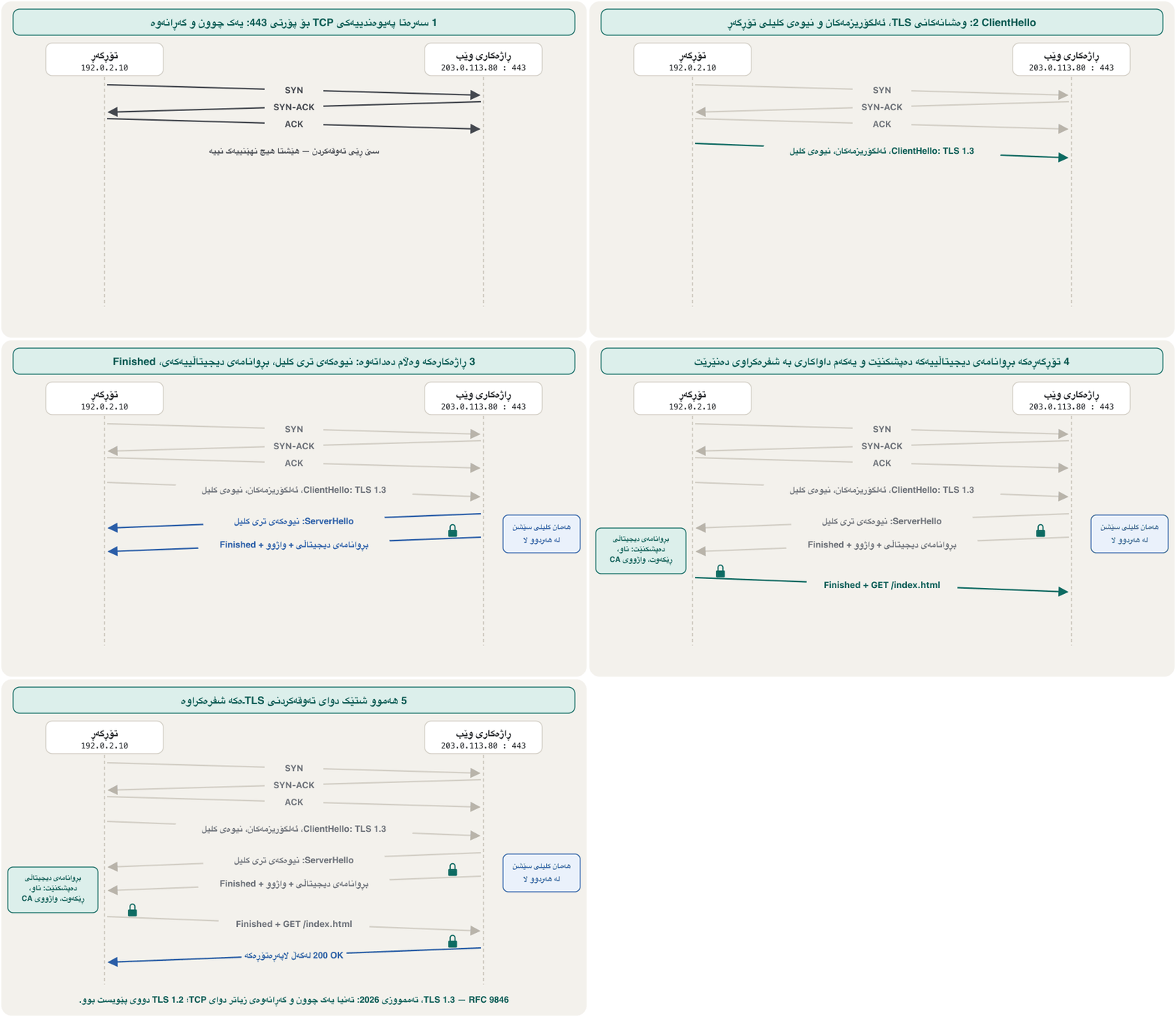
پێش یەکەم ، و کورت لەسەر 443 ئەنجام دەدەن. پەیام بە پەیام سەیری بکە:
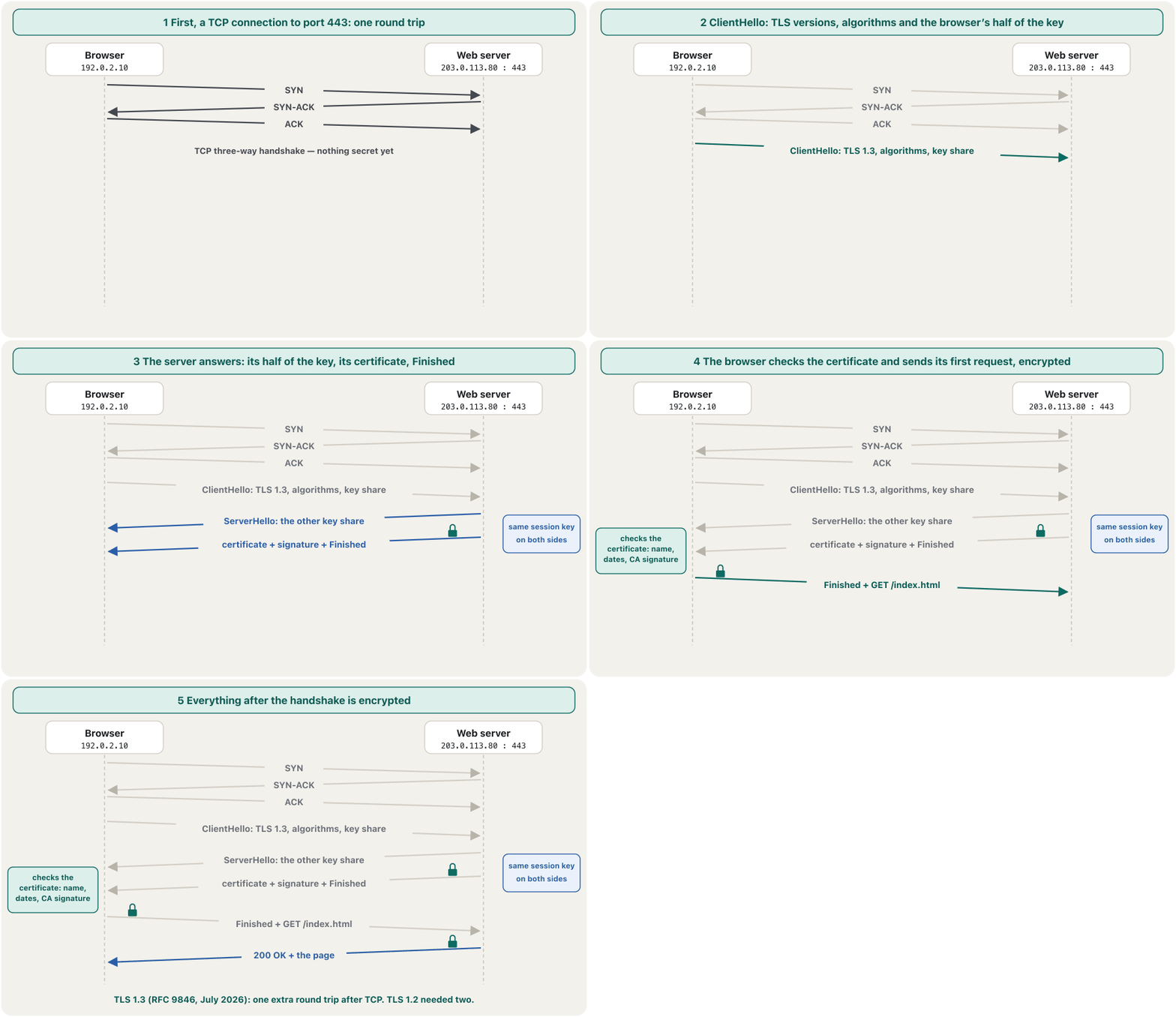
With TLS 1.3 the handshake costs only one round trip after the TCP connection, and the browser's first request already travels encrypted; TLS 1.2 needed two round trips. Today TLS 1.3 is defined in RFC 9846 (July 2026), which replaced RFC 8446 of 2018. The key exchange and the certificate check inside the handshake are explained in The TLS handshake.
بە TLS 1.3، دوای پەیوەندیی تەنیا یەک چوون و گەڕانەوە دەخایەنێت و یەکەم پێشتر بە شفرەکراوی دەڕوات؛ TLS 1.2 دوو چوون و گەڕانەوەی دەویست. ئەمڕۆ TLS 1.3 لە RFC 9846ـدا (تەممووزی 2026) پێناسە کراوە کە جێگەی RFC 8446ـی ساڵی 2018ی گرتەوە. ئاڵوگۆڕی و پشکنینی لە ناو لە تەوقەکردنی TLSـدا ڕوون کراونەتەوە.
HTTPS: HTTP inside TLSHTTPS: HTTP لە ناو TLSـدا
HTTP and HTTPS side by sideHTTP و HTTPS لە تەنیشت یەک
A classic homework question asks you to differentiate between HTTP and HTTPS. Here is the comparison as it is true in 2026:
پرسیارێکی ناسراوی ئەرکی ماڵەوە داوا دەکات جیاوازیی و بکەیت. ئەمە بەراوردەکەیە وەک لە 2026ـدا ڕاستە:
| Compareبەراورد | HTTP | HTTPS |
|---|---|---|
| Full nameناوی تەواو | HyperText Transfer Protocol | HyperText Transfer Protocol Secure |
| URL begins with دەست پێ دەکات بە | http:// | https:// |
| Port | 80 | 443 (also UDP 443 for HTTP/3)443 (هەروەها UDP 443 بۆ HTTP/3) |
| Securityپاراستن | None: anyone on the path can read or change the data (eavesdropping)هیچ: هەر کەسێک لەسەر ڕێگاکە دەتوانێت بخوێنێتەوە یان بیگۆڕێت () | TLS 1.2 or 1.3 encrypts every request and response; the certificate proves the serverTLS 1.2 یان 1.3 هەموو و شفرە دەکات؛ دەسەلمێنێت |
| Layerچین | Application layer | Application layer, carried inside TLS, which sits between HTTP and TCP، لە ناو دەڕوات کە لە نێوان و |
| Speedخێرایی | No encryption stepبێ هەنگاوی شفرەکردن | One extra round trip with TLS 1.3 (none with HTTP/3); encryption costs today's processors very littleیەک چوون و گەڕانەوەی زیاتر بە TLS 1.3 (بە HTTP/3 هیچ)؛ شفرەکردن کەمێکی زۆر کەم لە پرۆسێسەرەکانی ئەمڕۆ وەردەگرێت |
| In browsers todayلە ئەمڕۆدا | Marked “Not secure”; never for logins or formsبە «Not secure» نیشان دەکرێت؛ هەرگیز بۆ و فۆرم نا | The normal case; HTTP/2 and HTTP/3 in browsers need itدۆخی ئاسایی؛ HTTP/2 و HTTP/3 لە پێویستیان پێیەتی |
HTTP/1.1, HTTP/2 and HTTP/3HTTP/1.1، HTTP/2 و HTTP/3
The requests and responses have hardly changed in thirty years, but the way they are carried has. HTTP/1.1 (1997, today RFC 9112) sends text messages, one request at a time on each TCP connection, so browsers open several connections. HTTP/2 (2015, today RFC 9113) cuts the messages into binary frames and sends many requests at once over one TCP connection; browsers use it only with HTTPS. HTTP/3 (RFC 9114, 2022) runs over QUIC on UDP port 443, with TLS 1.3 built in.
و لە سی ساڵدا زۆر کەم گۆڕاون، بەڵام ڕێگای گواستنەوەیان گۆڕاوە. HTTP/1.1 (1997، ئەمڕۆ RFC 9112) پەیامی دەقی دەنێرێت، لەسەر هەر پەیوەندییەکی یەک لە یەک کاتدا، بۆیە چەند پەیوەندییەک دەکەنەوە. HTTP/2 (2015، ئەمڕۆ RFC 9113) پەیامەکان دەکات بە چوارچێوەی و چەندین پێکەوە لەسەر یەک پەیوەندیی دەنێرێت؛ تەنیا لەگەڵ بەکاری دەهێنن. HTTP/3 (RFC 9114، 2022) لەسەر لە 443ی کار دەکات و TLS 1.3ـی تێدا دروست کراوە.
Why HTTP/3? With HTTP/2, one lost TCP packet makes every request on the connection wait until it is resent (head-of-line blocking). QUIC keeps each request in its own stream, so a loss holds up only that stream, and it sets up transport and encryption in one handshake. How QUIC is reliable on top of UDP is in QUIC and HTTP/3. If a network blocks UDP, the browser simply falls back to HTTP/2.
بۆچی HTTP/3؟ لە HTTP/2ـدا، یەک ونبووی وا دەکات هەموو سەر پەیوەندییەکە چاوەڕێ بکەن تا دووپاتە دەنێردرێتەوە (ڕێگیریی سەری ڕیز). هەر لە ڕێڕەوی خۆیدا دادەنێت، بۆیە ونبوونێک تەنیا ئەو ڕێڕەوە ڕادەگرێت؛ هەروەها گواستنەوە و شفرەکردن بە یەک تەوقەکردن ئامادە دەکات. چۆن لەسەر متمانەپێکراو دەبێت لە QUIC و HTTP/3ـدایە. ئەگەر ڕابگرێت، بە سادەیی دەگەڕێتەوە بۆ HTTP/2.
Web caching: a proxy server keeps copiesکاشی وێب: ڕاژەکارێکی بریکار کۆپی هەڵدەگرێت
In one school or company many people ask for the same objects — the same logo, the same news page. A web cache, also called a proxy server, sits between their browsers and the Internet and keeps copies. The object's real home is the origin server. Watch two people ask for the same picture:
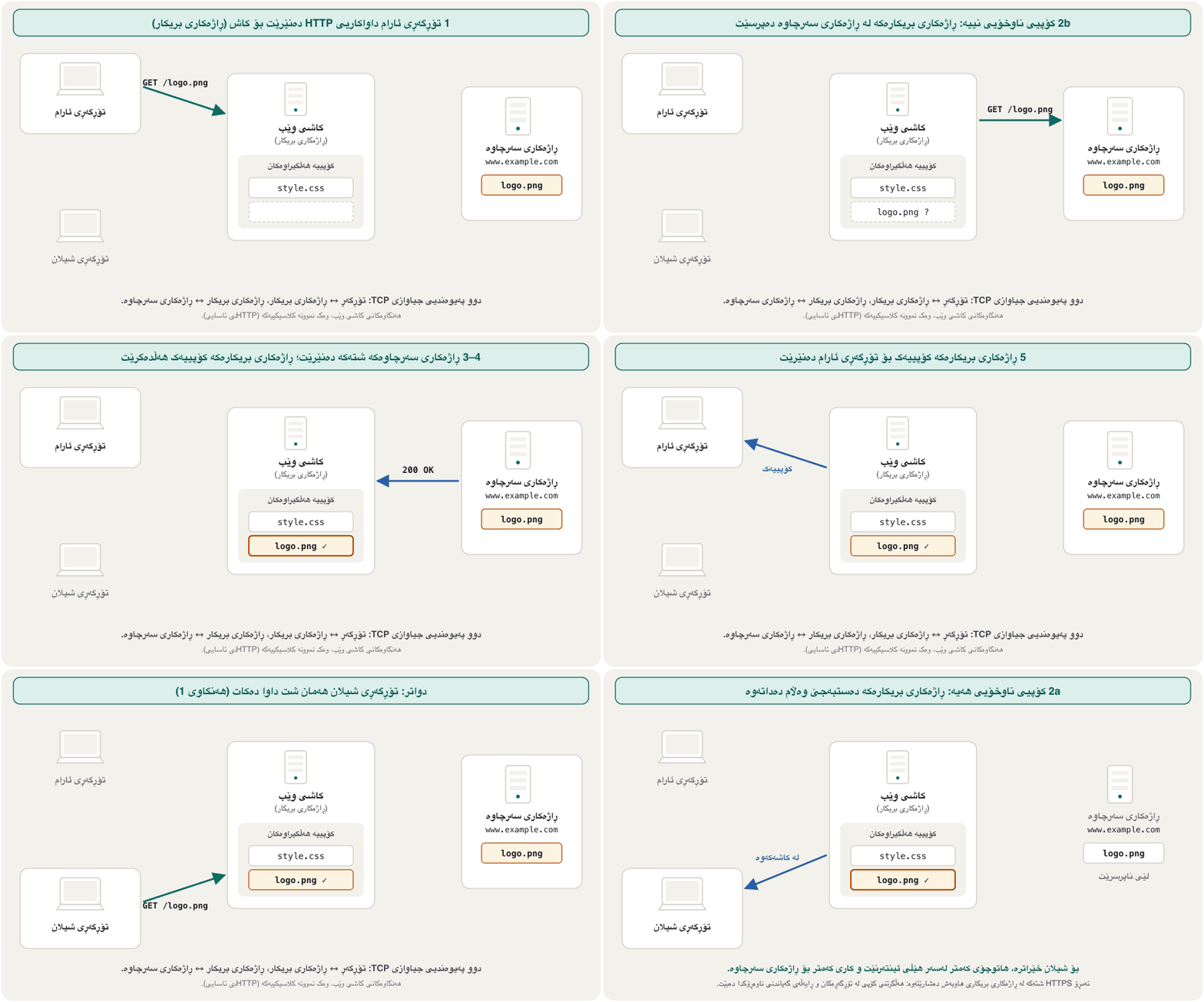
لە قوتابخانەیەک یان کۆمپانیایەکدا زۆر کەس هەمان شت داوا دەکەن — هەمان لۆگۆ، هەمان هەواڵ. وێب، کە ناوێکی تری ، لە نێوان و دادەنیشێت و کۆپی هەڵدەگرێت. ماڵی ڕاستەقینەی شتەکە . سەیر بکە چۆن دوو کەس هەمان وێنە داوا دەکەن:
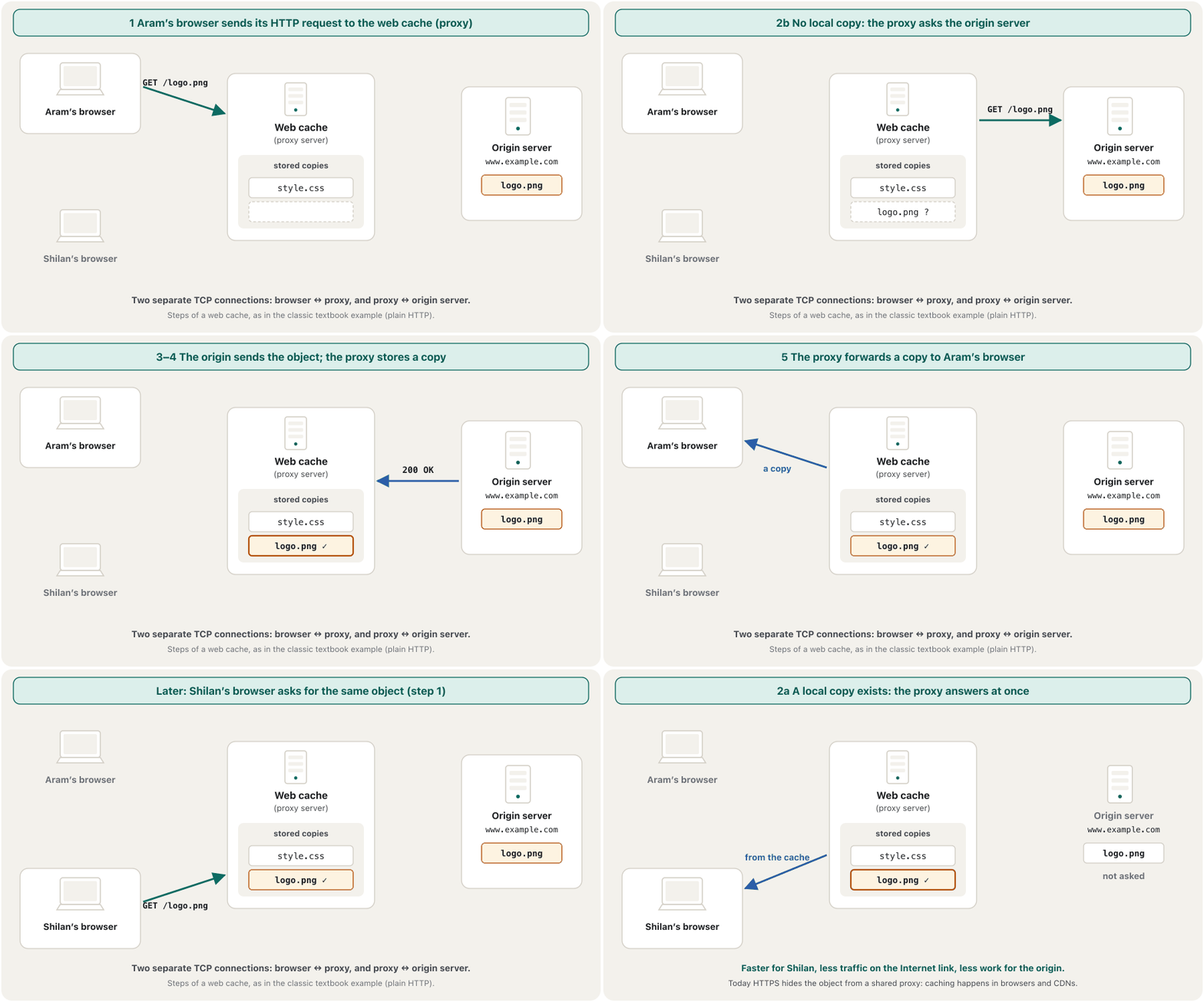
The browser sends its HTTP request to the web cache (proxy), not to the origin server.
بۆ وێب () دەنێرێت، نەک بۆ .
The cache checks for a local copy. 2a It has one: it sends the object to the browser at once. 2b It has none: it sends its own HTTP request to the origin server.
بۆ کۆپییەکی ناوخۆیی دەگەڕێت. 2a هەیەتی: دەستبەجێ شتەکە بۆ دەنێرێت. 2b نییەتی: خۆی بۆ دەنێرێت.
The origin server sends the object to the cache.
شتەکە بۆ دەنێرێت.
The cache stores a local copy of the object.
کۆپییەکی ناوخۆیی شتەکە هەڵدەگرێت.
The cache forwards a copy to the browser.
کۆپییەک بۆ دەنێرێت.
There are two TCP connections: browser ↔ cache and cache ↔ origin server. To the origin the proxy is a client; to the browser it is the server.
دوو پەیوەندیی هەن: ↔ و ↔ . بۆ ، ؛ بۆ ، .
Web caching: a proxy server keeps copiesکاشی وێب: ڕاژەکارێکی بریکار کۆپی هەڵدەگرێت
Caches today: browsers and CDNsکاش لە ئەمڕۆدا: تۆڕگەڕەکان و ڕایەڵەی گەیاندنی ناوەڕۆک
A shared proxy cache helps much less today. Almost all web traffic is HTTPS, and an ordinary proxy in the path sees only encrypted bytes: it can pass the connection through, but it cannot read or store the objects. So the old figures about how much traffic proxies saved belong to the plain-HTTP years. Copies are now kept in three places: the browser cache on your own device, the servers of a CDN (content delivery network) in cities close to the users, and the origin server itself.
هاوبەشی ئەمڕۆ زۆر کەمتر یارمەتی دەدات. نزیکەی هەموو هاتوچۆی وێب و ئاسایی لەسەر ڕێگاکە تەنیا شفرەکراو دەبینێت: دەتوانێت پەیوەندییەکە تێپەڕێنێت، بەڵام ناتوانێت شتەکان بخوێنێتەوە یان هەڵیانبگرێت. بۆیە ئەو ژمارە کۆنانەی دەیانگوت چەند هاتوچۆیان پاشەکەوت دەکرد هی سەردەمی ئاساییە. ئێستا کۆپییەکان لە سێ شوێندا هەڵدەگیرێن: لەسەر ئامێرەکەی خۆت، لە شارانی نزیک لە و خودی .
The origin server decides how long a copy may be used, with a header such as Cache-Control: max-age=86400 (one day). Organisations still run proxy servers, but mostly to filter and log traffic, not to save it.
بە سەردێڕێکی وەک Cache-Control: max-age=86400 (یەک ڕۆژ) بڕیار دەدات کۆپییەک بۆ چەند کات بەکار بێت. دامەزراوەکان هێشتا بەکار دەهێنن، بەڵام زیاتر بۆ پاڵاوتن و تۆمارکردنی هاتوچۆ، نەک بۆ پاشەکەوتکردنی.
E-mail: push with SMTP, pull with POP3 or IMAPئیمەیڵ: پاڵنان بە SMTP، ڕاکێشان بە POP3 یان IMAP
Internet mail needs two kinds of programs. User agents are the mail apps people use to read, reply to, write, forward and save messages. Mail servers keep the users' mailboxes and talk both to their own users' apps and to other mail servers. A message is pushed from the sender's app to her mail server, and from there to the receiver's mail server, always with SMTP. The receiver's app then pulls it out of the mailbox with POP3 or IMAP.
پێویستی بە دوو جۆر هەیە. بریکارەکانی ئەو نامەن کە خەڵک بۆ خوێندنەوە، وەڵامدانەوە، نووسین، ناردنەوە بۆ کەسێکی تر و هەڵگرتنی نامە بەکاریان دەهێنن. سندووقی نامەی هەڵدەگرن و هەم لەگەڵ خۆیان هەم لەگەڵ تر قسە دەکەن. نامەیەک لە نێرەرەوە بۆ پاڵ دەنرێت و لەوێشەوە بۆ وەرگر، هەمیشە بە . پاشان وەرگر بە یان لە سندووقەکە ڕایدەکێشێت.
The same journey in five steps — with the submission server that checks your password, the DNS MX record and the “envelope” — is in How a message travels.
هەمان گەشت بە پێنج هەنگاو — لەگەڵ ئەو ناردن کە دەپشکنێت، و «زەرف» — لە نامەیەک چۆن دەگاتـدایە.
E-mail: push with SMTP, pull with POP3 or IMAPئیمەیڵ: پاڵنان بە SMTP، ڕاکێشان بە POP3 یان IMAP
MUA, MTA and MDA: the mail softwareMUA، MTA و MDA: نەرمەواڵەی نامە
Mail software has three short names. Each is a job, not a brand:
نامە سێ ناوی کورتی هەیە. هەریەکەیان کارێکە، نەک ناوی کۆمپانیایەک:
| Nameناو | What it doesچی دەکات | Examples in 2026نموونە لە 2026ـدا |
|---|---|---|
| MUA — mail user agentMUA — بریکاری نامەی | The e-mail client: writes, sends and shows mail.: نامە دەنووسێت، دەنێرێت و پیشانی دەدات. | Outlook, Thunderbird, Apple Mail, the Gmail app |
| MTA — mail transfer agentMTA — بریکاری گواستنەوەی نامە | Receives mail from the sender's MUA, passes it between mail servers with SMTP, and hands it to the MDA for final delivery.نامە لە MUAـی نێرەر وەردەگرێت، بە لە نێوان دەیگوازێتەوە و بۆ گەیاندنی کۆتایی دەیداتە MDA. | Postfix, Exim, Sendmail, Microsoft Exchange Server |
| MDA — mail delivery agentMDA — بریکاری گەیاندنی نامە | Takes the message from the last MTA and puts it into the receiver's mailbox, where the client collects it.نامەکە لە دوایین MTA وەردەگرێت و دەیخاتە سندووقی نامەی وەرگر، کە لەوێ وەریدەگرێت. | procmail and maildrop on Unix; the delivery service of Dovecotprocmail و maildrop لەسەر Unix؛ خزمەتگوزاریی گەیاندنی Dovecot |
So the short rule holds: SMTP forwards mail and POP3 or IMAP delivers it to the reader. Eudora and Netscape Messenger, the mail apps of the 1990s, are history — Eudora's development stopped in 2006.
کەواتە یاسا کورتەکە ڕاستە: نامە دەگوازێتەوە و یان دەیگەیەنێتە خوێنەر. Eudora و Netscape Messenger، نامەی ساڵانی نەوەدەکان، مێژوون — پەرەپێدانی Eudora لە 2006ـدا وەستا.
E-mail: push with SMTP, pull with POP3 or IMAPئیمەیڵ: پاڵنان بە SMTP، ڕاکێشان بە POP3 یان IMAP
SMTP: ports and encryptionSMTP: پۆرتەکان و شفرەکردن
SMTP, the Simple Mail Transfer Protocol, is the principal application-layer protocol of Internet mail. It always runs over TCP, never UDP, because a message must arrive whole and in order. It uses three ports, and each connection gets its encryption in a different way:
، Simple Mail Transfer Protocol، سەرەکیی . هەمیشە لەسەر کار دەکات، هەرگیز نا، چونکە نامە دەبێت تەواو و بە ڕیز بگات. سێ بەکار دەهێنێت و هەر پەیوەندییەک بە ڕێگایەکی جیاواز شفرە دەکرێت:
Port 25 is for relay between servers. Your app submits mail on 465, encrypted from the first byte, or on 587, which starts in plain text and switches to TLS with the STARTTLS command; both need your login, and since 2018 RFC 8314 prefers 465. Receiving servers also check the sender with SPF, DKIM and DMARC — see how receivers check senders.
25 بۆ گواستنەوە لە نێوان . نامە لەسەر 465 دەنێرێت، لە یەکەم شفرەکراو، یان لەسەر 587 کە بە دەست پێ دەکات و بە فەرمانی STARTTLS دەگۆڕێت بۆ ؛ هەردووکیان تۆیان دەوێت و RFC 8314 لە 2018ـەوە 465 باشتر دەزانێت. وەرگریش نێرەر بە ، و دەپشکنن — بڕوانە وەرگرەکان چۆن نێرەر دەپشکنن.
E-mail: push with SMTP, pull with POP3 or IMAPئیمەیڵ: پاڵنان بە SMTP، ڕاکێشان بە POP3 یان IMAP
POP3 and IMAP: download or synchronisePOP3 و IMAP: دابارکردن یان هاوکاتکردن
To read a mailbox, the client uses a mail access protocol: POP3, IMAP — or HTTP, when you read webmail in a browser (today always HTTPS).
بۆ خوێندنەوەی سندووقی نامە، دەستگەیشتن بە نامە بەکار دەهێنێت: ، — یان ، کاتێک لە دەخوێنیتەوە (ئەمڕۆ هەمیشە ).
POP3 (Post Office Protocol 3; port 110, with TLS 995) downloads the messages and usually deletes them from the server. IMAP (Internet Message Access Protocol; port 143, with TLS 993; today IMAP4rev2, RFC 9051 of 2021) keeps the mail on the server with folders and read marks, so phone and laptop show the same mailbox. Which to choose in everyday use is in POP3 or IMAP?
(Post Office Protocol 3؛ 110، بە 995) نامەکان دابار دەکات و زۆرجار لە دەیانسڕێتەوە. (Internet Message Access Protocol؛ 143، بە 993؛ ئەمڕۆ IMAP4rev2، RFC 9051ـی ساڵی 2021) نامەکان لەسەر لەگەڵ و نیشانەی خوێندنەوە دەهێڵێتەوە، بۆیە مۆبایل و هەمان سندووق پیشان دەدەن. لە بەکارهێنانی ڕۆژانەدا کامیان هەڵبژێریت لە POP3 یان IMAP؟ـدایە.
All the ports in one pictureهەموو پۆرتەکان لە یەک وێنەدا
Each protocol of this lesson has a well-known port for its plain version and a port (or STARTTLS) for its encrypted version. Today the encrypted column is the one to use. How ports and sockets work is in Ports and sockets.
هەر ئەم وانەیە بۆ وەشانە ئاشکراکەی هەیە و (یان STARTTLS) بۆ وەشانە شفرەکراوەکەی. ئەمڕۆ ستوونی شفرەکراو ئەوەیە کە بەکار دێت. و چۆن کار دەکەن لە پۆرتەکان و سۆکێتەکانـدایە.
Common mistakesهەڵە باوەکان
- “HTTPS uses SSL.” HTTPS uses TLS 1.2 or 1.3. SSL 3.0 is forbidden (RFC 7568), and so are TLS 1.0 and 1.1 (RFC 8996).
- “HTTPS works at the transport layer.” HTTPS is HTTP — an application-layer protocol — carried inside TLS, which sits between HTTP and TCP.
- “HTTPS is much slower.” TLS 1.3 adds one round trip, and HTTP/3 none; since HTTP/2 and HTTP/3 come only with HTTPS, an HTTPS site is often the faster one.
https://…:80. The https scheme already means port 443; port 80 is for plain http.- “SMTP runs over UDP.” All mail protocols run over TCP: a message must arrive whole.
- “POP3 sends mail.” POP3 and IMAP only read a mailbox; SMTP sends.
- “A proxy can cache any website.” Only plain-HTTP objects; HTTPS objects are cached by the browser and by the CDN the site chooses.
- “Web pages contain Java applets.” Applets are history: browsers dropped them and JDK 26 removed the Applet API.
- « SSL بەکار دەهێنێت.» TLS 1.2 یان 1.3 بەکار دەهێنێت. SSL 3.0 قەدەغەیە (RFC 7568) و هەروەها TLS 1.0 و 1.1 (RFC 8996).
- « لە کار دەکات.» هەمان — — کە لە ناو دەڕوات و لە نێوان و .
- « زۆر خاوترە.» TLS 1.3 یەک چوون و گەڕانەوە زیاد دەکات و HTTP/3 هیچ؛ لەبەر ئەوەی HTTP/2 و HTTP/3 تەنیا لەگەڵ دێن، زۆرجار خێراترە.
https://…:80. شێوازی https خۆی واتە 443؛ 80 بۆ httpـی ئاساییە.- « لەسەر کار دەکات.» هەموو نامە لەسەر کار دەکەن: نامە دەبێت تەواو بگات.
- « نامە دەنێرێت.» و تەنیا سندووقی نامە دەخوێننەوە؛ دەنێرێت.
- « دەتوانێت کۆپیی هەر هەڵبگرێت.» تەنیا شتەکانی ئاسایی؛ کۆپیی شتەکانی لە و ئەو هەڵیدەبژێرێت هەڵدەگیرێن.
- « Java appletـیان تێدایە.» applet مێژووە: لایانبردن و JDK 26 Applet APIـی لابرد.
Exercisesڕاهێنانەکان
Differentiate between HTTP and HTTPS in a table with at least six rows.
لە خشتەیەکدا بە لانیکەم شەش ڕیز جیاوازیی نێوان و بکە.
Hintئاماژە
Name, URL, port, security, layer, speed.
ناو، ، ، پاراستن، چین، خێرایی.
Show answerوەڵامەکە پیشان بدە
| Compareبەراورد | HTTP | HTTPS |
|---|---|---|
| Nameناو | HyperText Transfer Protocol | HyperText Transfer Protocol Secure |
| URL | http:// | https:// |
| Port | 80 | 443 |
| Securityپاراستن | None; eavesdropping and changes are possibleهیچ؛ و گۆڕین دەکرێن | TLS 1.2/1.3: encryption, integrity, the server proved by its certificateTLS 1.2/1.3: شفرەکردن، ، بە دەسەلمێنرێت |
| Layerچین | Application | Application, inside TLS (between HTTP and TCP)، لە ناو (لە نێوان و ) |
| Speedخێرایی | No TLS set-upبێ ئامادەکردنی | One extra round trip with TLS 1.3; HTTP/2 and HTTP/3 only with HTTPSیەک چوون و گەڕانەوەی زیاتر بە TLS 1.3؛ HTTP/2 و HTTP/3 تەنیا بە |
Three slips to avoid in such an answer: writing SSL instead of TLS, saying that HTTPS works at the transport layer, and calling HTTPS “much slower”.
سێ هەڵە کە لەم وەڵامەدا خۆتیان لێ بپارێزە: نووسینی SSL لە جیاتی ، گوتنی ئەوەی لە کار دەکات و ناونانی بە «زۆر خاوتر».
30 students in a lab open the same plain-HTTP page, which has a 2 MB picture, through the school's proxy cache. The picture stays fresh all lesson. (a) How many times does the picture cross the school's Internet link? (b) How many megabytes does the cache save? (c) What changes if the site uses HTTPS?
30 قوتابی لە تاقیگەیەکدا هەمان ئاسایی دەکەنەوە کە وێنەیەکی 2 MBـی تێدایە، لە ڕێگەی قوتابخانەوە. وێنەکە بە درێژایی وانەکە تازە دەمێنێتەوە. (a) وێنەکە چەند جار بە هێڵی قوتابخانەدا تێدەپەڕێت؟ (b) چەند مێگابایت پاشەکەوت دەکات؟ (c) ئەگەر بەکار بهێنێت چی دەگۆڕێت؟
Show answerوەڵامەکە پیشان بدە
- (a) Once: the first request is a miss (steps 2b–5); the other 29 are answered from the cache (step 2a).
- (b) 29 × 2 MB = 58 MB that never cross the Internet link.
- (c) The proxy sees only encrypted bytes, so all 30 downloads (60 MB) cross the link; copies can only come from each browser's own cache or from the site's CDN.
- (a) یەک جار: یەکەم کۆپیی نییە (هەنگاوەکانی 2b–5)؛ 29ـەکەی تر لە وەڵام دەدرێنەوە (هەنگاوی 2a).
- (b) 29 × 2 MB = 58 MB کە هەرگیز بە هێڵی تێناپەڕن.
- (c) تەنیا شفرەکراو دەبینێت، بۆیە هەر 30 (60 MB) بە هێڵەکەدا تێدەپەڕن؛ کۆپی تەنیا لە خودی هەر یان لە دێت.
Karwan adds his university account to a mail app on his laptop and his phone. Choose the incoming protocol and port, and the outgoing port, for a safe set-up that keeps both devices the same.
کاروان هەژماری زانکۆکەی بۆ نامە لەسەر و مۆبایلەکەی زیاد دەکات. و هاتنە ژوورەوە و ناردن بۆ ڕێکخستنێکی سەلامەت هەڵبژێرە کە هەردوو ئامێرەکە وەک یەک بهێڵێتەوە.
Show answerوەڵامەکە پیشان بدە
Incoming: IMAP on 993 (TLS), so both devices see the same mailbox. Outgoing: SMTP submission on 465 (TLS from the first byte), or 587 with STARTTLS if the university offers only that — with his username and password. Never port 25 from a client, and never the plain ports 143 or 110.
هاتنە ژوورەوە: لەسەر 993 ()، بۆ ئەوەی هەردوو ئامێرەکە هەمان سندووق ببینن. ناردن: ناردنی لەسەر 465 ( لە یەکەم )، یان 587 بە STARTTLS ئەگەر زانکۆکە تەنیا ئەوەی هەبێت — بە ناوی و . هەرگیز 25 لە و هەرگیز ئاشکراکانی 143 یان 110 نا.
What is the user agent of the Web?بریکاری بەکارهێنەر بۆ وێب چییە؟
The web browser: it requests and shows pages and gives navigation and settings.
: داوا دەکات و پیشانیان دەدات و ئامرازی گەڕان و ڕێکخستن دەدات.
Which two TCP connections does a web cache use?کاشی وێب کام دوو پەیوەندیی TCP بەکار دەهێنێت؟
Browser ↔ cache, and cache ↔ origin server.
↔ و ↔ .
What does Cache-Control: max-age=3600 tell a cache?Cache-Control: max-age=3600 چی بە کاش دەڵێت؟
That the copy may be used for 3,600 seconds (one hour) without asking the origin again.
کە کۆپییەکە دەکرێت 3,600 چرکە (یەک کاتژمێر) بەکار بێت بێ ئەوەی دووپاتە لە بپرسرێت.
Which protocol and port does a mail server use to pass mail to another mail server?ڕاژەکاری ئیمەیڵ بۆ ناردنی نامە بۆ ڕاژەکاری ئیمەیڵێکی تر کام پرۆتۆکۆڵ و پۆرت بەکار دەهێنێت؟
SMTP on TCP port 25, with STARTTLS when both servers support it.
لەسەر 25ی ، بە STARTTLS کاتێک هەردوو پشتگیری دەکەن.
Summaryپوختە
- HTTP: the browser (the user agent) requests, the web server responds; a page is many objects, each fetched with its own request; plain HTTP uses TCP port 80.
- HTTPS = HTTP inside TLS on port 443: encrypted, protected against changes, the server proved by its certificate. TLS sits between HTTP and TCP; say TLS, never SSL.
- The TLS 1.3 handshake (RFC 9846, 2026) adds one round trip after TCP; HTTP/2 multiplexes one TCP connection, HTTP/3 runs over QUIC on UDP 443.
- A proxy server caches objects in five steps with two TCP connections; with HTTPS everywhere, copies now live in the browser cache and in CDNs.
- E-mail: SMTP pushes (25 between servers, 465 or 587 from your app with a login); POP3 (110/995) downloads, IMAP (143/993) keeps and synchronises.
- MUA = the mail app, MTA = moves mail between servers, MDA = delivers into the mailbox.
- : (بریکاری ) داوا دەکات، وەڵام دەداتەوە؛ چەندین شتە و هەریەکە بە خۆی دەهێنرێت؛ ئاسایی 80ی بەکار دەهێنێت.
- = لە ناو لەسەر 443: شفرەکراو، پارێزراو لە گۆڕین، بە دەسەلمێنرێت. لە نێوان و ؛ بڵێ ، هەرگیز SSL.
- 1.3 (RFC 9846، 2026) دوای یەک چوون و گەڕانەوە زیاد دەکات؛ HTTP/2 یەک پەیوەندیی بۆ چەندین بەکار دەهێنێت و HTTP/3 لەسەر لە 443ی کار دەکات.
- بە پێنج هەنگاو و دوو پەیوەندیی کۆپیی شتەکان هەڵدەگرێت؛ ئێستا کە لە هەموو شوێنێکە، کۆپییەکان لە و لە .
- : پاڵ دەنێت (25 لە نێوان ، 465 یان 587 لە بە )؛ (110/995) داباریان دەکات، (143/993) دەیهێڵێتەوە و هاوکاتی دەکات.
- MUA = نامە، MTA = نامە لە نێوان دەگوازێتەوە، MDA = دەیخاتە سندووقی نامەوە.
Lesson complete!وانەکە تەواو بوو!
Well done. Review the key terms, then go on to the next lesson.دەستخۆش. سەیرێکی زاراوە سەرەکییەکان بکەرەوە، پاشان بڕۆ بۆ وانەی داهاتوو.
Key termsزاراوە سەرەکییەکان
File Transfer and Remote Access: FTP, Telnet, SSH and RDPگواستنەوەی فایل و دەستڕاگەیشتن لە دوورەوە: FTP، Telnet، SSH و RDP
Related lecturesوانە پەیوەندیدارەکان
- HTTP and the Request–Response CycleHTTP و سووڕی داواکاری و وەڵام
- Browsers, Web Servers and URLsتۆڕگەڕەکان، ڕاژەکارەکانی وێب و URL
- How E-mail Worksئیمەیڵ چۆن کار دەکات
- Encryption, Hashing and Digital Signaturesشفرەکردن، هاشکردن و واژووە دیجیتاڵییەکان
- OSI Layers 6 and 7: Presentation and Applicationچینەکانی 6 و 7ی OSI: چینی پێشکەشکردن و چینی ئەپ
- Port Numbers and Socketsژمارەی پۆرت و سۆکێتەکان
- Encapsulation, PDUs and Addresses at Each Layerپێچانەوە، یەکەکانی دراوەی پرۆتۆکۆڵ و ناونیشانەکان لە هەر چینێکدا
- DNS: How Names Become AddressesDNS: ناو چۆن دەبێتە ناونیشان
- File Transfer and Remote Access: FTP, Telnet, SSH and RDPگواستنەوەی فایل و دەستڕاگەیشتن لە دوورەوە: FTP، Telnet، SSH و RDP
- Packet Tracer Lab: DHCP, Web, DNS and FTP Serversتاقیگەی Packet Tracer: ڕاژەکارەکانی DHCP، وێب، DNS و FTP
References and further readingسەرچاوەکان و خوێندنەوەی زیاتر
- RFC 9846: The Transport Layer Security (TLS) Protocol Version 1.3 (July 2026)
- IETF Datatracker: RFC 9846
- RFC 7568: Deprecating Secure Sockets Layer Version 3.0
- RFC 8996: Deprecating TLS 1.0 and TLS 1.1
- RFC 9112: HTTP/1.1
- RFC 9113: HTTP/2
- RFC 9114: HTTP/3
- MDN: HTTP caching
- RFC 5321: Simple Mail Transfer Protocol
- RFC 6409: Message Submission for Mail
- RFC 8314: Cleartext Considered Obsolete — Use of TLS for Email Submission and Access
- RFC 1939: Post Office Protocol — Version 3
- RFC 9051: IMAP Version 4rev2
- OpenJDK JEP 504: Remove the Applet API
- Eudora (email client) — Wikipedia
- Procmail — Wikipedia
This lecture is a first edition. The Kurdish text and terminology are waiting for review by Kurdish IT teachers.ئەم وانەیە چاپی یەکەمە. دەقە کوردییەکە و زاراوەکانی چاوەڕێی پێداچوونەوەی مامۆستایانی کوردی بواری IT ن.