Chapterبەش 1 · Lectureوانە 1.1
What a Network Is Made Ofڕایەڵە لە چی پێکدێت؟
Welcome to Computer Networks. What a network is, why we build networks, and its parts: end devices (hosts), intermediary devices, media and services; nodes, hosts and servers; the network interface card; and the symbols of network diagrams.
بەخێربێیت بۆ کۆمپیوتەر. چییە، بۆچی دروست دەکەین و بەشەکانی: ()، ، و خزمەتگوزارییەکان؛ ، و ؛ ؛ هەروەها هێماکانی .
What you will learnچی فێر دەبیت
- Say what the two networking courses teach and how they continue the IT course.
- Define a network and explain why homes, schools and businesses build networks.
- Sort the parts of any network into end devices, intermediary devices, media and services.
- Tell nodes, hosts and servers apart.
- Explain what a network interface card does and read the symbols of a network diagram.
- بڵێیت دوو کۆرسەکەی چی فێر دەکەن و چۆن درێژە بە کۆرسی دەدەن.
- پێناسە بکەیت و ڕوونی بکەیتەوە بۆچی ماڵ، قوتابخانە و کۆمپانیاکان دروست دەکەن.
- بەشەکانی هەر دابەش بکەیت بۆ ، ، و خزمەتگوزارییەکان.
- جیاوازیی نێوان ، و بزانیت.
- ڕوونی بکەیتەوە چی دەکات و هێماکانی بخوێنیتەوە.
Welcome to Computer Networksبەخێربێیت بۆ ڕایەڵەکانی کۆمپیوتەر
In 2025 about 6 billion people — three in every four on Earth — used the Internet (ITU’s latest count, as of November 2026). Their messages, videos and card payments all travel over computer networks. This course explains how networks work, from the cable in the wall to the Internet, for every brand of equipment.
لە ساڵی 2025دا نزیکەی 6 ملیار کەس — سێ کەس لە هەر چوار کەسی سەر زەوی — بەکار هێنا (دوایین ژماردنی ITU، تا نۆڤەمبەری 2026). نامە، ڤیدیۆ و پارەدان بە کارتیان هەموویان بە ناو دەڕۆن. ئەم کۆرسە ڕوونی دەکاتەوە کە چۆن کار دەکەن، لە کێبڵی ناو دیوارەوە تا ، بۆ ئامێری هەموو کۆمپانیایەک.
CêIT has two networking courses. Computer Networks (this course) teaches the ideas that are the same in every network: devices, cables and Wi-Fi, layers and protocols, IP addresses, TCP and UDP, DNS and DHCP, with hands-on practice in Packet Tracer and Windows. Routing and Switching comes next: there you type commands into Cisco routers and switches (Cisco IOS) to build VLANs, static and dynamic routes, NAT and access lists.
CêIT دوو کۆرسی هەیە. کۆمپیوتەر (ئەم کۆرسە) ئەو بیرۆکانە فێر دەکات کە لە هەموو وەک یەکن: ئامێرەکان، کێبڵ و ، چینەکان و ، ، TCP و UDP، و ، لەگەڵ ڕاهێنانی کرداری لە Packet Tracer و Windowsـدا. و دوای ئەو دێت: لەوێدا فەرمان لە و Ciscoـدا (Cisco IOS) دەنووسیت بۆ دروستکردنی VLAN، و ، و لیستی دەستڕاگەیشتن.
Some of these ideas appear briefly in the Information Technology course: Types of Networks, Network Hardware, Cables and Wireless, Data Communication and IP and MAC addresses. Here we go deeper. When a topic is already explained there, this course gives a short reminder and a link instead of repeating it. From today you can also practise in the CêIT 3D network lab: put PCs, switches and routers on a table, cable them and watch a ping travel.
هەندێک لەم بیرۆکانە بە کورتی لە کۆرسی هاتوون: جۆرەکانی ڕایەڵە، ڕەقەواڵەی ڕایەڵە، کێبڵ و بێتەل، پەیوەندیی دراوە و ناونیشانی IP و ناونیشانی MAC. لێرەدا قووڵتر دەچینە ناویانەوە. کاتێک بابەتێک لەوێ ڕوون کراوەتەوە، ئەم کۆرسە بیرخستنەوەیەکی کورت و دەدات لە جیاتی ئەوەی دووپاتەی بکاتەوە. لە ئەمڕۆوە دەتوانیت لە تاقیگەی سێڕەهەندیی ڕایەڵەی CêITـیشدا ڕاهێنان بکەیت: ، و دابنێ سەر مێزێک، کێبڵیان بۆ دابنێ و سەیری ڕۆیشتنی بکە.
Welcome to Computer Networksبەخێربێیت بۆ ڕایەڵەکانی کۆمپیوتەر
Nine big ideas of the courseنۆ بیرۆکەی گەورەی کۆرسەکە
Nine big ideas run through the whole course. Each one has its own lesson, so you can come back to it at any time:
نۆ بیرۆکەی گەورە بە هەموو کۆرسەکەدا دەڕۆن. هەریەکەیان وانەی تایبەتی خۆی هەیە، بۆیە لە هەر کاتێکدا دەتوانیت بگەڕێیتەوە سەری:
- The communication model — how a message becomes a signal and back again: Data Communication.
- What a network is — this lesson.
- The parts of a network — this lesson.
- Topologies, the shape of a network: Physical and Logical Topologies.
- Types of network — LAN, MAN, WAN and the Internet: LANs, MANs, WANs and the Internet.
- Reference models, OSI and TCP/IP: The TCP/IP Model.
- Protocols, the rules of communication: Protocols, Layers and the OSI Idea.
- Encapsulation and PDUs — how data is wrapped layer by layer: Encapsulation and PDUs.
- Addressing — MAC and IP addresses: MAC Addresses and Frames and IPv4 Addresses.
- مۆدێلی پەیوەندی — نامەیەک چۆن دەبێتە و دواتر دەگەڕێتەوە بۆ نامە: پەیوەندیی دراوە.
- چییە — ئەم وانەیە.
- بەشەکانی — ئەم وانەیە.
- ، شێوەی : تۆپۆلۆجییەکانی ڕایەڵەی فیزیکی و لۆجیکی.
- جۆرەکانی — ، ، و : ڕایەڵەی ناوچەیی، ڕایەڵەی شاری، ڕایەڵەی فراوان و ئینتەرنێت.
- مۆدێلە پێوەرەکان، OSI و TCP/IP: مۆدێلی TCP/IP.
- ، یاساکانی پەیوەندی: پرۆتۆکۆڵەکان، چینەکان و بیرۆکەی OSI.
- و PDU — چۆن چین بە چین دەپێچرێتەوە: پێچانەوە و PDU.
- ناونیشانکردن — و : ناونیشانەکانی MAC و فرەیمەکان و ناونیشانەکانی IPv4.
Every lesson has short screens, pictures and exercises with answers. The Kurdish technical words come from one shared word list, so a word looks the same in every CêIT course: tap a word to see its meaning.
هەموو وانەیەک پەردەی کورت، وێنە و ڕاهێنانی وەڵامدراوەی هەیە. وشە تەکنیکییە کوردییەکان لە یەک لیستی هاوبەشەوە دێن، بۆیە وشەیەک لە هەموو کۆرسێکی CêITـدا وەک یەک دەردەکەوێت: دەست لە وشەیەک بدە بۆ ئەوەی واتاکەی ببینیت.
What is a network?ڕایەڵە چییە؟
A network is a group of devices — computers, phones, printers, servers and the boxes between them — joined together so that they can exchange data and give their users a service: a web page, a shared printer, a video call. The devices can be in one room or anywhere in the world.
کۆمەڵێک ئامێرە — ، مۆبایل، ، و ئەو ئامێرانەی لە نێوانیاندان — کە پێکەوە بەستراون بۆ ئەوەی ئاڵوگۆڕ بکەن و خزمەتگوزارییەک بدەنە : ، هاوبەش، پەیوەندییەکی ڤیدیۆیی. ئامێرەکان دەکرێت لە یەک ژووردا بن یان لە هەر شوێنێکی جیهاندا.
The smallest network is two computers joined by one cable. The largest is the Internet, a network of networks. A home network sits in between:
بچووکترین دوو کە بە یەک کێبڵ پێکەوە بەستراون. گەورەترینیان ، لە . ماڵەوە لە نێوان ئەم دووانەدایە:
A group of computers and other devices that are connected so they can share data.
کۆمەڵێک کۆمپیوتەر و ئامێری ترە کە پێکەوە بەستراون بۆ ئەوەی بتوانن دراوە هاوبەش بکەن.
What is a network?ڕایەڵە چییە؟
The word: things tied togetherوشەکە: شتی بەیەکەوەبەستراو
The Kurdish word ڕایەڵە carries the idea of tying two things together. The same picture lives in an everyday word: a child who listens to good advice is گوێڕایەڵ, as if the child’s ear were tied to the advice. A network ties devices together so that they can talk (What is a network?).
وشەی کوردیی «ڕایەڵە» بیرۆکەی بەستنی دوو شت بە یەکەوە هەڵدەگرێت. هەمان وێنە لە وشەیەکی ڕۆژانەشدا هەیە: بە منداڵێک کە گوێ لە ئامۆژگاریی باش دەگرێت دەڵێن «گوێڕایەڵ»، وەک ئەوەی گوێی بە ئامۆژگارییەکەوە بەسترابێت. ئامێرەکان پێکەوە دەبەستێت تا گفتوگۆ بکەن (ڕایەڵە چییە؟).
English tells a similar story: network is net + work, “something made like a net”, with threads that cross and are tied at knots. Picture every knot as a device and every thread as a link. The whole history of the word is on its term page.
ئینگلیزیش چیرۆکێکی هاوشێوە دەگێڕێتەوە: network لە net («تۆڕ») و work («شتی دروستکراو») پێکهاتووە، واتە «شتێک کە وەک تۆڕ دروست کراوە»، بە دەزووگەلێکەوە کە یەکتر دەبڕن و لە گرێکاندا بە یەکەوە بەستراون. هەر گرێیەک وەک ئامێرێک و هەر دەزوویەک وەک بەستنەوەیەک وێنا بکە. مێژووی تەواوی وشەکە لە لاپەڕەی زاراوەکەدا هەیە.
A network is like a room where several people sit together and talk: each one can speak to the others and hear them. Two connected computers do the same when they send each other files, messages or anything else.
وەک ژوورێکە کە چەند کەسێک تێیدا پێکەوە دانیشتوون و گفتوگۆ دەکەن: هەر یەکێکیان دەتوانێت قسە لەگەڵ ئەوانی تر بکات و گوێی لێیان بێت. دوو پێکەوەبەستراو هەمان شت دەکەن کاتێک ، نامە یان هەر شتێکی تر بۆ یەکتر دەنێرن.
Where the analogy stops workingسنووری ئەم نموونەیە
In a room everyone hears everything. In most networks today a message goes only to the device it is meant for, and devices need shared rules (protocols) to understand each other.
لە ژوورێکدا هەمووان گوێیان لە هەموو شتێک دەبێت. لە زۆربەی ئەمڕۆدا نامەیەک تەنیا بۆ ئەو ئامێرە دەچێت کە بۆی نێردراوە، هەروەها ئامێرەکان پێویستیان بە یاسای هاوبەشە () بۆ ئەوەی لە یەکتر تێبگەن.
Why build a network?بۆچی ڕایەڵە دروست دەکەین؟
Data networks were born from a practical need. Before them, moving data from one computer to another meant carrying it by hand: floppy disks, then CDs, today USB sticks. People joke that such a “network” runs on shoes — sneakernet. It works, but it is slow, a disk can be lost or broken, a big file may need several disks copied in the right order, and a disk carries viruses as easily as files. Data can also be stolen on the way.
لە پێویستییەکی کردارییەوە لەدایک بوون. پێش ئەوان، گواستنەوەی لە بۆ تر واتای ئەوە بوو کە بە دەست هەڵیبگریت و ببەیت: سەرەتا فلۆپی دیسک، پاشان CD، ئەمڕۆ فلاشی USB. خەڵک بە گاڵتەوە دەڵێن ئەم جۆرە «» بە پێڵاو کار دەکات — sneakernet. کار دەکات، بەڵام خاوە، دیسکەکە ون دەبێت یان دەشکێت، گەورە لەوانەیە چەند دیسکێکی پێویست بێت کە بە ڕیزی دروست کۆپی بکرێن و دیسکەکە بە هەمان ئاسانی و دەگوازێتەوە. لە ڕێگاشدا دەدزرێت.
Why build a network?بۆچی ڕایەڵە دروست دەکەین؟
What a network gives youڕایەڵە چیت پێ دەدات
A network removes those problems. Homes, schools and companies build one because it lets them:
ئەو کێشانە لادەبات. ماڵ، قوتابخانە و کۆمپانیاکان دروست دەکەن چونکە ڕێگەیان پێ دەدات:
- share information: send data from one computer to another and work on the same, up-to-date files;
- share expensive devices and resources: one printer, one storage server and one Internet line for a whole office;
- communicate with programs such as e-mail, chat, IP telephony (phone calls over the network) and video conferencing;
- reach the Internet from every device;
- work in real time: data arrives in moments, not after a walk down the corridor;
- spend less, because fewer devices are needed;
- keep backups on a storage device in one safe place, so a broken laptop does not mean lost work.
- هاوبەش بکەن: لە بۆ تر بنێرن و لەسەر هەمان نوێکراوە کار بکەن؛
- ئامێر و سەرچاوە گرانەکان هاوبەش بکەن: یەک ، یەک و یەک هێڵی بۆ هەموو ئۆفیسێک؛
- پەیوەندی بکەن بە وەک ، چات، تەلەفۆنی IP (پەیوەندیی تەلەفۆنی بە ناو ) و ؛
- بگەنە لە هەموو ئامێرێکەوە؛
- لە کار بکەن: لە چەند ساتێکدا دەگات، نەک دوای ڕۆیشتنێک بە ڕاڕەودا؛
- کەمتر خەرج بکەن، چونکە ئامێری کەمتر پێویستە؛
- هەڵبگرن لەسەر لە یەک شوێنی پارێزراودا، بۆیە تێکچوو واتای لەدەستدانی کارەکە نییە.
Why build a network?بۆچی ڕایەڵە دروست دەکەین؟
Network applicationsئەپەکانی ڕایەڵە
The services people use over a network are called network applications. Some are old, some arrived in the last few years:
ئەو خزمەتگوزارییانەی خەڵک بە ناو بەکاریان دەهێنن پێیان دەوترێت . هەندێکیان کۆنن و هەندێکیان لەم چەند ساڵەی دواییدا هاتوون:
| Applicationئەپ | What travels over the networkچی بە ناو دەڕوات | An exampleنموونەیەک |
|---|---|---|
| E-mail, chat and instant messages، چات و | text, pictures, voice notesدەق، وێنە، دەنگی تۆمارکراو | a voice note from Duhok to Erbilدەنگێکی تۆمارکراو لە دهۆکەوە بۆ هەولێر |
| The web and searchable dataوێب و گەڕانبۆکراو | web pages, search results، ئەنجامی گەڕان | a university timetable onlineخشتەی کاتی زانکۆ بە ئۆنلاین |
| E-commerce, marketing and sales، بازاڕگەری و فرۆشتن | orders, payments, bookingsداواکاری، پارەدان، گرتنی شوێن | booking a hotel roomگرتنی ژووری هۆتێل |
| IP telephony (VoIP) and video conferencingتەلەفۆنی IP () و | voice and video in real timeدەنگ و ڤیدیۆ لە | an online lectureوانەیەکی ئۆنلاین |
| Financial servicesخزمەتگوزارییە داراییەکان | account and card data هەژمار و کارت | an ATM, mobile banking, a mobile walletATM، بانکی مۆبایل، جزدانی مۆبایل |
| Working togetherکاری پێکەوەیی | one shared project fileیەک هاوبەشی پڕۆژە | engineers editing one design at the same timeئەندازیارانێک کە لە هەمان کاتدا یەک دیزاین دەستکاری دەکەن |
| Streaming and cloud storage و | video, music, filesڤیدیۆ، مۆسیقا، | watching a match, keeping photos onlineسەیرکردنی یارییەک، هەڵگرتنی وێنە بە ئۆنلاین |
| Internet of Things | sensor readings and commandsخوێندنەوەی و فەرمان | a smart electricity meter |
Behind each application are protocols: HTTP (Hypertext Transfer Protocol) for the web, SMTP and POP3 for e-mail, FTP for file transfer and the old Telnet for remote logins. They are rules used by programs on the end devices, not devices themselves. Each has a lesson in the chapter Application-Layer Services.
لە پشت هەر هەن: HTTP (Hypertext Transfer Protocol) بۆ وێب، SMTP و POP3 بۆ ، FTP بۆ گواستنەوەی و Telnetـی کۆن بۆ لە دوورەوە. ئەمانە یاسان کە سەر بەکاریان دەهێنن، نەک خۆیان ئامێر بن. هەریەکەیان لە بەشی خزمەتگوزارییەکانی چینی ئەپدا وانەی خۆی هەیە.
The parts of every networkبەشەکانی هەموو ڕایەڵەیەک
Look at any network — a home, an Internet café in Duhok, the computer lab of a university in Erbil — and you find the same three kinds of parts:
سەیری هەر بکە — ماڵێک، لە دهۆک، تاقیگەی زانکۆیەک لە هەولێر — هەمان سێ جۆر بەش دەبینیت:
- End devices, also called hosts: the computers, phones, printers and servers that people use. Messages start and end here.
- Intermediary devices: switches, access points, routers and firewalls. They connect the end devices and pass messages along.
- Media: the copper cables, fibre-optic cables and radio waves that carry the signals between the devices.
- ، کە ـیشیان پێ دەوترێت: ئەو ، مۆبایل، و کە خەڵک بەکاریان دەهێنن. نامەکان لێرە دەست پێ دەکەن و لێرە کۆتاییان دێت.
- : ، ، و . پێکەوە دەبەستن و نامەکان دەگوازنەوە.
- : کێبڵی مس، و کە لە نێوان ئامێرەکاندا دەگوازنەوە.
A fourth part is invisible: the services, the software that runs on the devices and gives people something useful — web pages, e-mail, file sharing, an address for every new device.
بەشێکی چوارەم نابینرێت: خزمەتگوزارییەکان، ئەو لەسەر ئامێرەکان کار دەکات و شتێکی بەسوود دەداتە خەڵک — ، ، هاوبەشکردنی ، ناونیشانێک بۆ هەر ئامێرێکی نوێ.
The parts of every networkبەشەکانی هەموو ڕایەڵەیەک
End devices: the hostsئامێرە کۆتاییەکان: میوانگرەکان
End devices are the devices people use, and the places where messages begin and end. A device that is the source or the destination of a message is called a host.
ئەو ئامێرانەن کە خەڵک بەکاریان دەهێنێت، هەروەها ئەو شوێنانەن کە نامەکان لێیانەوە دەست پێ دەکەن و لایان کۆتاییان دێت. ئامێرێک کە سەرچاوە یان جێی مەبەستی نامەیەک بێت، پێی دەوترێت .
Older books list workstations, file servers, PDAs, wireless barcode scanners and mainframes. In 2026 the list is longer: desktop PCs and laptops, smartphones and tablets, servers (web, file, e-mail), network printers, IP phones, security cameras, smart TVs, smartwatches and Internet of Things sensors such as a smart electricity meter.
کتێبە کۆنەکان ، ، PDA، و دەژمێرن. لە 2026دا لیستەکە درێژترە: و ، و ، (وێب، ، )، ، تەلەفۆنی IP، کامێرای چاودێری، ، کاتژمێری هۆشمەند و وەک کارەبا.
Any end device that sends or receives data on a network and has an , such as a computer, a phone, a or a . Every server is a host, but not every host is a server.
هەر کە لەسەر دەنێرێت یان وەردەگرێت و هەیە، وەک کۆمپیوتەر، مۆبایل، یان . هەموو میوانگرە، بەڵام هەموو میوانگرێک نییە.
The parts of every networkبەشەکانی هەموو ڕایەڵەیەک
Intermediary devices: the go-betweensئامێرە نێوەندگیرەکان: ئەوانەی لە نێوەنددان
Intermediary devices sit between the end devices. They do not create the messages; they connect devices and pass messages on, choosing where each one should go. They fall into three groups:
لە نێوان دانراون. نامەکان دروست ناکەن؛ ئامێرەکان پێکەوە دەبەستن و نامەکان دەگوازنەوە، هەروەها بڕیار دەدەن هەر نامەیەک بۆ کوێ بچێت. دەبنە سێ گرووپ:
- Network access devices connect end devices to a network: switches and wireless access points (and, in old networks, hubs).
- Internetworking devices connect different networks to each other: routers. The router of your home joins your home network to your provider’s network.
- Security devices check the traffic and stop what is not allowed: firewalls.
- ئامێرەکانی گەیاندن بە بە دەبەستن: و (لە ).
- ئامێرەکانی بەستنی بە یەکترەوە دەبەستن: . ماڵەکەت ماڵەوە بە دابینکەرەکەتەوە دەبەستێت.
- ئامێرەکانی هاتوچۆکە دەپشکنن و ڕێگە لەوە دەگرن کە ڕێگەپێنەدراوە: .
Older lists call these network devices or interconnecting devices and also name the repeater, the hub, the bridge, the modem and the network card: Repeaters and Hubs, Bridges and Switches and Modems and Routers explain them. At home, the box your provider installs is four of them in one: a modem, a router, a small switch and a Wi-Fi access point (The “router” at home).
لیستە کۆنەکان بەمانە دەڵێن ئامێرەکانی یان ئامێرەکانی پێکەوەبەستن و ، ، ، و دەژمێرن: دووپاتەکەرەوەکان و هەبەکان، پردەکانی ڕایەڵە و سویچەکان و مۆدێمەکان و ڕێدۆزەکان ڕوونیان دەکەنەوە. لە ماڵەوە، ئەو سندووقەی دابینکەرەکەت دایدەنێت چوار دانەیان لە یەکێکدایە: ، ، بچووک و («ڕێدۆز»ـی ماڵەوە).
The parts of every networkبەشەکانی هەموو ڕایەڵەیەک
Media: the paths for the signalهۆکارەکانی گواستنەوە: ڕێگاکانی سیگناڵ
The medium is the channel a message travels on from its source to its destination. The same data is encoded in a different way for each medium:
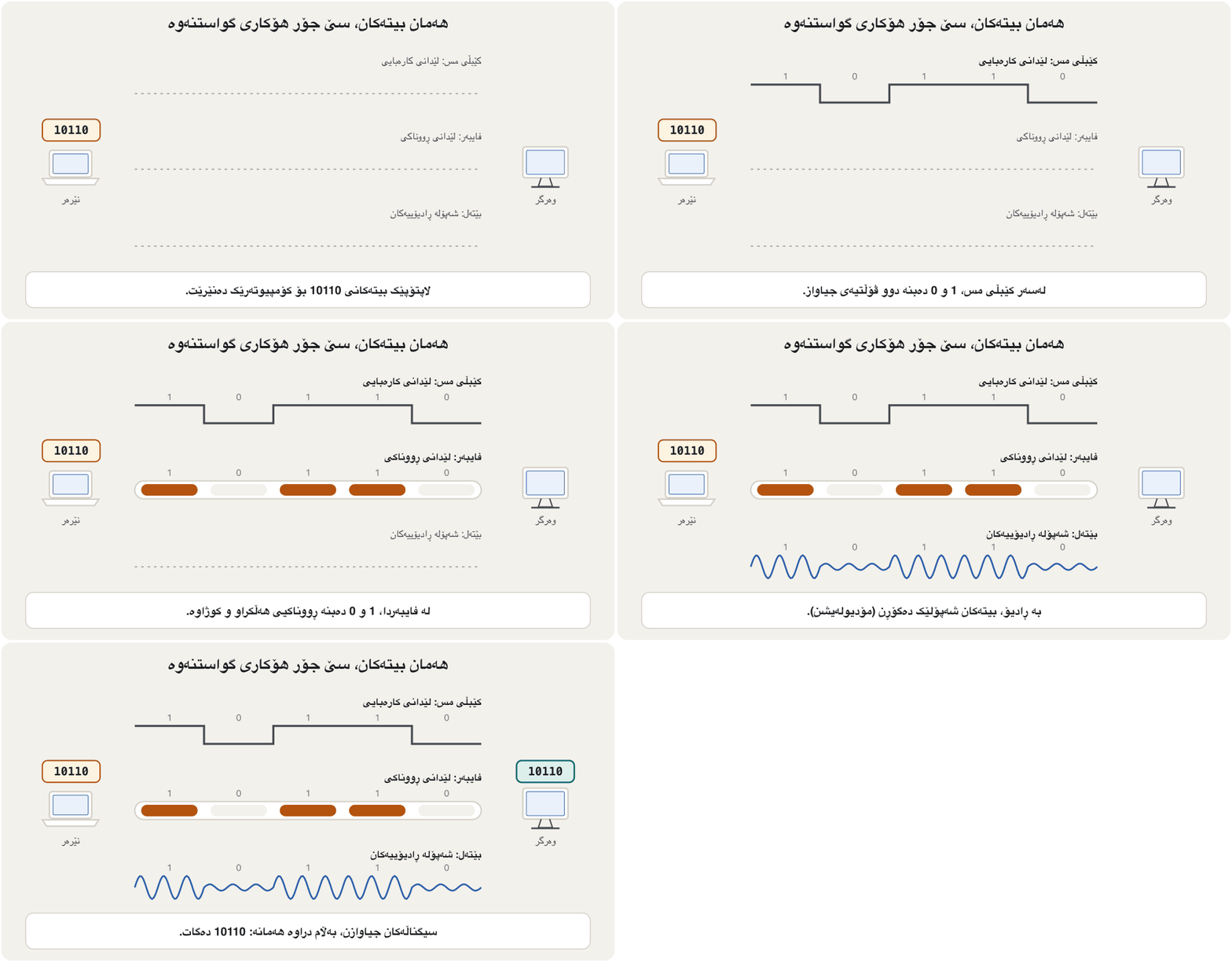
ئەو کەناڵەیە کە نامەیەک پێیدا لە سەرچاوەکەیەوە دەڕوات بۆ جێی مەبەستەکەی. هەمان بۆ هەر بە شێوەیەکی جیاواز دەکرێتە :
- Metal wires (copper cables): patterns of electrical pulses.
- Fibre-optic cables: pulses of light, infrared or visible.
- Wireless: patterns of electromagnetic waves — radio waves for Wi-Fi, Bluetooth and mobile networks.
- وایەری کانزایی (کێبڵی مس): نەخشەی لێدانی کارەبایی.
- : لێدانی ڕووناکی، یان بینراو.
- : نەخشەی — بۆ ، و .
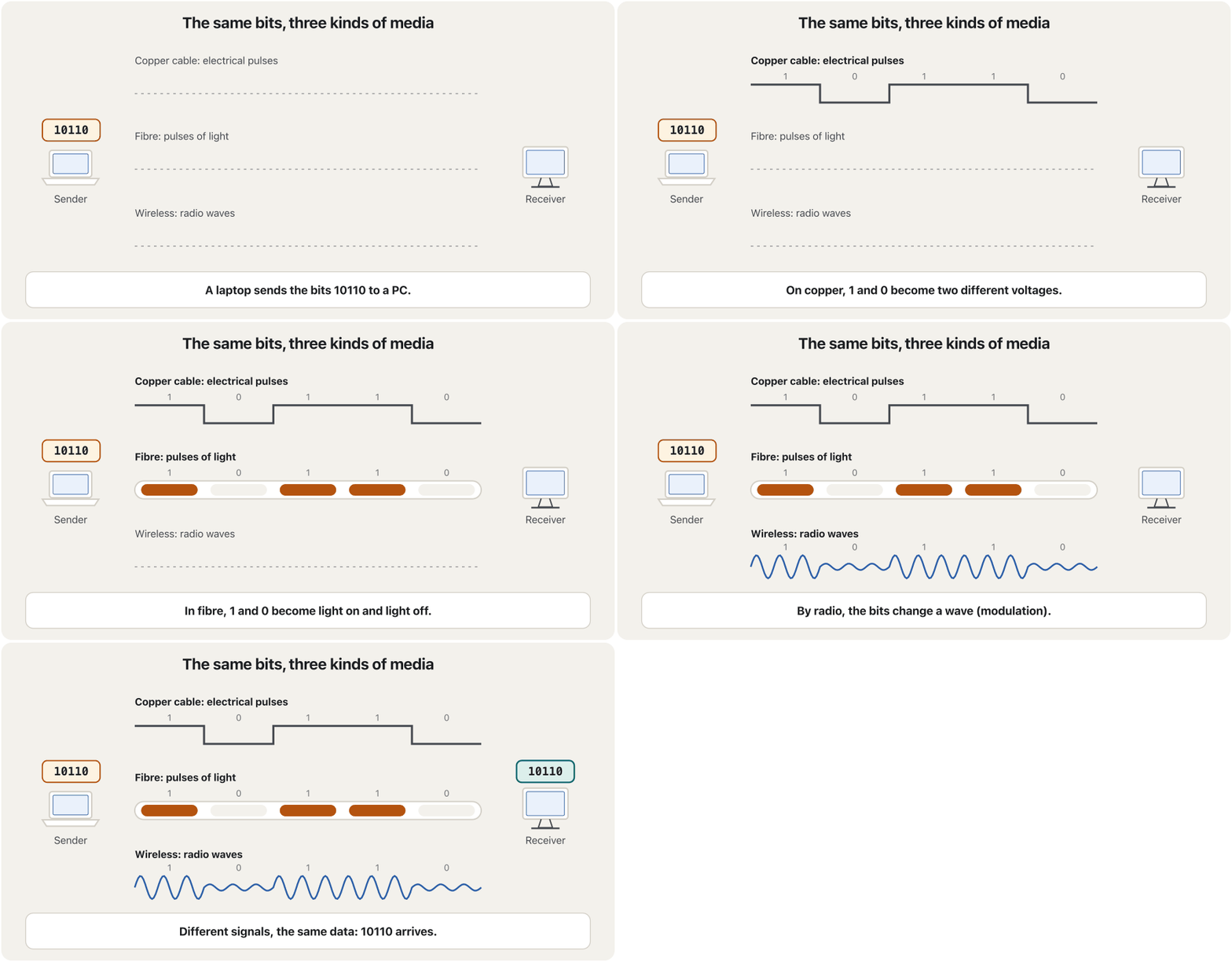
How bits become pulses is the job of the physical layer: see OSI Layers 1–3. The cables themselves come in Copper Cables and Connectors and Fibre-Optic Cables; a short tour is in Cables and Wireless.
گۆڕینی بۆ لێدان کاری : بڕوانە چینەکانی 1–3ـی OSI. خودی کێبڵەکان لە کێبڵی مس و سەرەکان و کێبڵەکانی فایبەر ئۆپتیکدا دێن؛ گەشتێکی کورتیش لە کێبڵ و بێتەلدا هەیە.
The parts of every networkبەشەکانی هەموو ڕایەڵەیەک
Choosing a mediumهەڵبژاردنی هۆکارێکی گواستنەوە
No medium is best for every job. Network designers weigh five things:
هیچ بۆ هەموو کارێک باشترین نییە. دیزاینەرانی پێنج شت لەبەرچاو دەگرن:
- Distance: how far the medium carries the signal. A copper Ethernet link reaches 100 m; fibre reaches many kilometres.
- Environment: heat, damp, electrical noise from machines, lightning between buildings. A shielded twisted-pair (STP) cable wraps its pairs in foil to keep noise out; it costs more than unshielded cable but suits noisy places.
- Bandwidth: how much data it can carry each second.
- Cost of the medium and its installation: the cable, digging, ceilings, labour.
- Cost of connectors and equipment at each end: plugs, ports, fibre transceivers, access points.
- دووری: تا چەند دەبات. بەستنەوەیەکی Ethernetـی مس تا 100 مەتر دەڕوات؛ فایبەر تا چەندین کیلۆمەتر.
- ژینگە: گەرما، شێ، ئامێرەکان، هەورەبروسکە لە نێوان بیناکاندا. (STP) جووتەکانی بە پەڕەیەکی کانزایی دەپێچێت تا نەچێتە ژوورەوە؛ لە کێبڵی نەپارێزراو گرانترە، بەڵام بۆ شوێنی پڕ لە دەگونجێت.
- : لە هەر چرکەیەکدا چەند دەگوازێتەوە.
- تێچووی و دامەزراندنی: کێبڵ، هەڵکەندن، بنمیچ، کرێی کار.
- تێچووی سەرەکان و ئامێرەکان لە هەر سەرێکدا: پلاک، ، نێرەر-وەرگری فایبەر، .
Example. A university in Erbil joins two buildings 400 m apart. Copper Ethernet stops at 100 m and picks up noise outdoors, so the designers choose fibre: it covers the distance, ignores electrical noise and carries 10 Gb/s or more. Inside each building, cheaper copper cables run to the desks — today’s shielded Cat 6A cables carry 10 Gb/s up to 100 m — and Wi-Fi covers the corridors where students move. A full comparison is in Choosing a medium.
نموونە. زانکۆیەک لە هەولێر دوو بینا دەبەستێت کە 400 مەتر لە یەکترەوە دوورن. Ethernetـی مس لە 100 مەتردا دەوەستێت و لە دەرەوە وەردەگرێت، بۆیە دیزاینەرەکان فایبەر هەڵدەبژێرن: دوورییەکە دەبڕێت، کاری تێناکات و 10 Gb/s یان زیاتر دەگوازێتەوە. لە ناو هەر بینایەکدا کێبڵی مسی هەرزانتر بۆ سەر مێزەکان ڕادەکێشرێن — کێبڵی Cat 6Aـی پارێزراوی ئەمڕۆ 10 Gb/s تا 100 مەتر دەگوازێتەوە — و ئەو ڕاڕەوانە دەگرێتەوە کە خوێندکاران تێیدا دەجووڵێن. بەراوردێکی تەواو لە هەڵبژاردنی هۆکارێکدا هەیە.
The parts of every networkبەشەکانی هەموو ڕایەڵەیەک
Two ways to list the partsدوو ڕێگا بۆ ژماردنی بەشەکان
You will meet two ways of listing the parts of a network. They describe the same thing, so either is a right answer — just say which one you use:
دوو ڕێگا بۆ ژماردنی بەشەکانی دەبینیت. هەردووکیان هەمان شت وەسف دەکەن، بۆیە هەر یەکێکیان وەڵامێکی دروستە — تەنیا بڵێ کامیان بەکار دەهێنیت:
| Three groups and servicesسێ گرووپ و خزمەتگوزارییەکان | Five componentsپێنج پێکهاتە | In the Erbil labلە تاقیگەکەی هەولێردا |
|---|---|---|
| End devices (hosts) () | Computers | the PCs, the server, the printer، ، |
| Intermediary devices | Interconnecting devicesئامێرەکانی پێکەوەبەستن | the switch, the access point, the router, the firewall، ، ، |
| Media | Physical media فیزیکی | the copper cables, the fibre, the Wi-Fi radioکێبڵەکانی مس، فایبەرەکە، ڕادیۆی |
| Servicesخزمەتگوزارییەکان | Networking software and applications و | the operating system’s network software and drivers; e-mail, the web, file sharing و ؛ ، وێب، هاوبەشکردنی |
A third list — message, sender, receiver, medium and protocol — has another purpose: it describes one act of communication, not the whole network. It is in the next lesson, Data Communication.
لیستێکی سێیەم — نامە، نێرەر، وەرگر، و — مەبەستێکی تری هەیە: یەک کرداری پەیوەندی وەسف دەکات، نەک هەموو . لە وانەی داهاتوودایە، پەیوەندیی دراوە.
Nodes: every point of the networkنۆدەکانی ڕایەڵە: هەموو خاڵێکی ڕایەڵە
In English, node means a knot. Botanists use it for the point on a stem where a leaf grows. In mathematics, in graph theory, a node is a point where lines meet. In a network, a node is any device that can send, receive or forward data: computers and servers, but also switches, routers, access points and printers.
وشەی ئینگلیزیی node واتای «گرێ» دەدات. ڕووەکناسەکان بۆ ئەو خاڵەی سەر قەدی ڕووەک بەکاری دەهێنن کە گەڵای لێ دەڕوێت. لە بیرکاریدا، لە ، گرێ ئەو خاڵەیە کە هێڵەکان تێیدا بە یەک دەگەن. لە ، هەر ئامێرێکە کە بتوانێت بنێرێت یان وەربگرێت، یان بکات: و ، هەروەها ، ، و .
Every node has an address so that the others can reach it: a MAC address on its network card, and usually an IP address too.
هەموو ناونیشانێکی هەیە تا ئەوانی تر بیگەنێ: لەسەر ، زۆرجاریش .
Hosts and serversمیوانگرەکان و ڕاژەکارەکان
The English word host comes from parties: the host invites the guests and serves them. On ARPANET in 1969 the “hosts” were the big computers that offered their programs and information to the others — the first technical note of the Internet, RFC 1, is called Host Software. The meaning grew: today a host is any end device that sends or receives data on a network, usually with its own IP address.
وشەی ئینگلیزیی host لە ئاهەنگەوە هاتووە: خانەخوێ میوانەکان بانگهێشت دەکات و خزمەتیان دەکات. لە ARPANETـدا لە 1969 «host»ـەکان ئەو بوون کە و خۆیان دەخستە بەردەستی ئەوانی تر — یەکەم تێبینیی تەکنیکیی ، RFC 1، ناوی Host Softwareـە. واتاکەی فراوانتر بوو: ئەمڕۆ هەر کە لەسەر دەنێرێت یان وەردەگرێت، زۆرجار بە تایبەتی خۆیەوە.
In Kurdish, a host is میوانگر, میواندار or خانەخوێ — the one in whose house you eat salt, that is, where you are served; some dictionaries also give یانەوان, “the owner of the house”. When you connect to a big website, its servers are your hosts in exactly this sense. CêIT uses میوانگر, the general word, because a host can be a client, a server or both.
لە کوردیدا بە host دەوترێت «میوانگر»، «میواندار» یان «خانەخوێ» — ئەو کەسەی لە ماڵەکەیدا خوێ (نمەک) دەخۆیت، واتە خزمەتت دەکات؛ هەندێک فەرهەنگیش «یانەوان» دەنووسن، بە واتای «خاوەن ماڵ». کاتێک پەیوەندی بە گەورەوە دەکەیت، ڕێک بەم واتایە خانەخوێی تۆن. CêIT وشەی گشتگیری «میوانگر» بەکار دەهێنێت، چونکە دەکرێت ، یان هەردووکیان بێت.
So the words fit inside each other: every server is a host, every host is a node, but a switch is a node and not a host. Client/server and peer-to-peer are explained in Clients, Servers and Peer-to-Peer; a first look is in Who serves whom?.
کەواتە وشەکان لە ناو یەکدا جێ دەبنەوە: هەموو و هەموو ، بەڵام و نییە. / و لە ڕاژەخوازەکان، ڕاژەکارەکان و ڕایەڵەی تاک بۆ تاکـدا ڕوون کراونەتەوە؛ یەکەم سەیرکردنیش لە کێ خزمەتی کێ دەکات؟ـدایە.
Any device that sends or receives data on a network, like a computer, phone, printer, server or smart TV, is called a host.
هەر ئامێرێک کە لە بنێرێت یان وەربگرێت، وەک ، ، ، یان ، پێی دەوترێت host ().
Watch 0:33–3:32: hosts, clients and servers, and server software.
لە 0:33 تا 3:32 سەیر بکە: ، و ، هەروەها .
The network interface cardکارتی ڕایەڵە
To join a network, a device needs a network interface card (NIC): the circuit board that gives a computer its networking ability. The NIC turns the computer’s data into signals for the cable or the air, sends them, and receives the signals meant for this device. Each NIC has its own MAC address.
ئامێرێک بۆ ئەوەی بچێتە ناو پێویستی بە (NIC) هەیە: ئەو تەختە سووڕەی توانای دەداتە . دەکاتە بۆ کێبڵ یان هەوا، دەیاننێرێت و ئەو وەردەگرێت کە بۆ ئەم ئامێرە هاتوون. هەر تایبەتی خۆی هەیە.
Older PCs had the NIC as a separate card in a slot of the motherboard, and laptops used credit-card-sized PCMCIA adapters. Today the Ethernet port and the Wi-Fi radio are built into the motherboard or the phone’s chip, and a thin laptop without a cable port uses a small USB-C Ethernet adapter. Routers and switches have many network interfaces, one for every port.
وەک کارتێکی جیا لە کەلێنێکی هەبوو و ئەداپتەری PCMCIAـیان بەکار دەهێنا کە بە قەبارەی کارتی بانک بوون. ئەمڕۆ Ethernet و ڕادیۆی لە ناو یان مۆبایلەکەدا دروست کراون، تەنکیش کە کێبڵی نییە ئەداپتەرێکی بچووکی Ethernetـی بەکار دەهێنێت. و چەندین هەیە، یەکێک بۆ هەر .
The part that connects a computer to a , by cable () or by radio (Wi-Fi). It sends and receives the data and has its own ; today it is usually built into the .
ئەو بەشەیە کە کۆمپیوتەرێک بە دەبەستێتەوە، بە کێبڵ () یان بە ڕادیۆ (). دەنێرێت و وەردەگرێت و خۆی هەیە؛ ئەمڕۆ زۆرجار لەسەر دانراوە.
More about the NIC and the MAC address: The network interface card and the MAC address; in depth: MAC Addresses and Frames.
زیاتر لەبارەی و : کارتی ڕایەڵە و ناونیشانی MAC؛ بە قووڵی: ناونیشانەکانی MAC و فرەیمەکان.
Reading a network diagramخوێندنەوەی هێڵکارییەکی ڕایەڵە
Network engineers draw networks with small symbols, and Packet Tracer uses similar ones. CêIT’s diagrams use the symbols below in every lesson. Old icon tables also show a mainframe, hubs of different speeds (10BASE-T and 100BASE-T) and a network cloud: a network whose inside does not matter for the picture, such as the Internet.
ئەندازیارانی بە هێمای بچووک دەکێشن و Packet Tracer هێمای هاوشێوە بەکار دەهێنێت. هێڵکارییەکانی CêIT لە هەموو وانەیەکدا ئەم هێمایانەی خوارەوە بەکار دەهێنن. خشتە کۆنەکانی هێما ، خێرایی جیاواز (10BASE-T و 100BASE-T) و هەوری ـیش پیشان دەدەن: کە ناوەوەی بۆ وێنەکە گرنگ نییە، وەک .
Try it. Open the CêIT 3D network lab, choose the example “One network: 3 PCs, a printer and a switch” and name every device as an end device or an intermediary device. Then send a ping from one PC to the printer and watch the message cross the switch.
تاقی بکەرەوە. تاقیگەی سێڕەهەندیی ڕایەڵەی CêIT بکەرەوە، نموونەی «یەک : 3 ، و » هەڵبژێرە و ناوی هەموو ئامێرێک وەک یان بنووسە. پاشان لە بۆ بنێرە و سەیری پەڕینەوەی نامەکە بە ناو بکە.
Common mistakesهەڵە باوەکان
- Calling a switch an end device. A switch only passes messages on, so it is an intermediary device. Phones, PCs, printers and servers are end devices.
- Calling a printer an interconnecting device. A printer is a peripheral and an end device: print jobs end there.
- Thinking “host” means “server”. Every end device is a host; servers are only one kind of host.
- Thinking only computers are nodes. Routers and switches are nodes too: they forward data.
- Learning “the three types of network device” as hub, switch and repeater. Those are only examples. The groups are access devices (switches, access points), internetworking devices (routers) and security devices (firewalls); hubs and repeaters are history in most networks today.
- Calling HTTP, FTP or SMTP devices. They are protocols used by programs on the end devices. HTTP is the Hypertext Transfer Protocol.
- Giving two nodes the same IP address. Each needs its own; only the network part of the address matches.
- Believing a network makes data safe by itself. Security comes from accounts, passwords, encryption, updates and backups.
- بە دانان. تەنیا نامەکان دەگوازێتەوە، بۆیە . مۆبایل، ، و .
- بە ئامێری پێکەوەبەستن دانان. و : کارەکانی چاپ لەوێ کۆتاییان دێت.
- وا بزانیت «» واتە «». هەموو ؛ تەنیا جۆرێکن لە .
- وا بزانیت تەنیا . و : پێشڕۆ دەکەن.
- وەک «سێ جۆری ئامێری » ، و لەبەر کردن. ئەوانە تەنیا نموونەن. گرووپەکان ئەمانەن: ئامێرەکانی گەیاندن (، )، ئامێرەکانی بەستنی () و ئامێرەکانی ()؛ و لە زۆربەی ئەمڕۆدا بوونەتە مێژوو.
- HTTP، FTP یان SMTP بە ئامێر دانان. ئەمانە کە سەر بەکاریان دەهێنن. HTTP واتە Hypertext Transfer Protocol.
- هەمان دان بە دوو . هەریەکەیان پێویستی بە ناونیشانی خۆیەتی؛ تەنیا بەشی ناونیشانەکە وەک یەکە.
- باوەڕکردن بەوەی خۆی دەپارێزێت. لە ، ، ، و دێت.
Exercisesڕاهێنانەکان
What is a computer network? Write a one-sentence definition and give an example from your home.
چییە؟ پێناسەیەکی یەک ڕستەیی بنووسە و نموونەیەک لە ماڵەکەتەوە بهێنەرەوە.
Show answerوەڵامەکە پیشان بدە
A computer network is a group of computers and other devices joined by transmission media (cables or radio) and intermediary devices, so that they can exchange data and share resources and services. Example: at home, the phones, the laptop, the smart TV and the printer are joined to the Wi-Fi router and through it to the Internet.
کۆمەڵێک و ئامێری ترە کە بە (کێبڵ یان ڕادیۆ) و پێکەوە بەستراون، بۆ ئەوەی ئاڵوگۆڕ بکەن و سەرچاوە و خزمەتگوزارییەکان هاوبەش بکەن. نموونە: لە ماڵەوە مۆبایلەکان، ، و بە بەستراون و بە ڕێگەی ئەوەوە بە .
Why are people and businesses interested in computer networks? Give four reasons, and one problem of moving data without a network.
بۆچی خەڵک و کۆمپانیاکان گرنگی بە دەدەن؟ چوار هۆکار بنووسە، لەگەڵ کێشەیەکی گواستنەوەی بەبێ .
Show answerوەڵامەکە پیشان بدە
- Sharing information and moving data quickly from one computer to another.
- Sharing expensive devices and resources: printers, storage, one Internet line.
- Communication: e-mail, chat, IP telephony, video conferencing.
- Lower cost, real-time work and central backups.
- Problem without a network (sneakernet): slow, disks get lost or broken, size limits, viruses and theft on the way.
- هاوبەشکردنی و گواستنەوەی خێرای لە بۆ تر.
- هاوبەشکردنی ئامێر و سەرچاوە گرانەکان: ، شوێنی ، یەک هێڵی .
- پەیوەندی: ، چات، تەلەفۆنی IP، .
- تێچووی کەمتر، کاری و ناوەندی.
- کێشەی بەبێ (sneakernet): خاوی، ونبوون یان شکانی دیسک، سنووری قەبارە، و دزی لە ڕێگادا.
What are the components of a network? Answer with the three groups and services, then match them to the five-component list.
پێکهاتەکانی چین؟ بە سێ گرووپەکە و خزمەتگوزارییەکان وەڵام بدەرەوە، پاشان بەراوردیان بکە بە لیستی پێنج پێکهاتەکە.
Show answerوەڵامەکە پیشان بدە
Three groups and services: end devices (hosts), intermediary devices, media — and the services (software) that run on them. Five components: computers (= end devices), interconnecting devices (= intermediary devices), physical media (= media), networking software and applications (= services).
سێ گرووپ و خزمەتگوزارییەکان: ()، ، — لەگەڵ خزمەتگوزارییەکان () کە لەسەریان کار دەکەن. پێنج پێکهاتە: (= )، ئامێرەکانی پێکەوەبەستن (= )، فیزیکی (= )، و (= خزمەتگوزارییەکان).
Which of these is not an end-user device: PC, smartphone, server, switch?کامیان ئامێری بەکارهێنەری کۆتایی نییە: کۆمپیوتەر، مۆبایلی هۆشمەند، ڕاژەکار، سویچ؟
The switch: it is an intermediary (network) device.
: (ئامێری ).
True or false: “A printer is an interconnecting device.” Correct it if it is false.ڕاست یان هەڵە: «چاپەر ئامێرێکی پێکەوەبەستنە.» ئەگەر هەڵەیە ڕاستی بکەرەوە.
False. A printer is a peripheral, an end device; interconnecting devices are switches, routers, access points and similar.
هەڵەیە. ، ؛ ئامێرەکانی پێکەوەبەستن ، ، و هاوشێوەکانیانن.
Fill the gaps: “The three types of network device are ___, ___ and ___.”بۆشاییەکان پڕ بکەرەوە: «سێ جۆری ئامێری ڕایەڵە بریتین لە ___، ___ و ___.»
By group: access devices (switch, access point), internetworking devices (router) and security devices (firewall). An answer of hub, switch and repeater names three examples from older lists, not the three groups.
بەپێی گرووپ: ئامێرەکانی گەیاندن (، )، ئامێرەکانی بەستنی () و ئامێرەکانی (). وەڵامی ، و سێ نموونە لە لیستە کۆنەکان دەهێنێت، نەک سێ گرووپەکە.
Draw the network of an Internet café in Duhok: 12 PCs, a printer, a Wi-Fi access point for customers’ phones, a switch, a router and a fibre line to the provider. Label every part as an end device, an intermediary device or a medium.
هێڵکاریی لە دهۆک بکێشە: 12 ، ، بۆ مۆبایلی مشتەرییەکان، ، و هێڵێکی فایبەر بۆ دابینکەرەکە. هەموو بەشێک وەک ، یان ناو ببە.
Hintئاماژە
Ask of each part: does it create or use the data (end device), pass it on (intermediary device) or carry the signal (medium)?
لەبارەی هەر بەشێک بپرسە: دروست دەکات یان بەکاری دەهێنێت ()، دەیگوازێتەوە () یان دەبات ()؟
Show answerوەڵامەکە پیشان بدە
| Partبەش | Groupگرووپ |
|---|---|
| 12 PCs, the printer, the customers’ phones12 ، ، مۆبایلی مشتەرییەکان | End devices (hosts) () |
| Switch, access point, router، ، | Intermediary devices |
| Copper cables to the switch, Wi-Fi radio, fibre to the providerکێبڵی مس بۆ ، ڕادیۆی ، فایبەر بۆ دابینکەرەکە | Media |
Draw the switch in the middle with the PCs and the printer cabled to it, the access point cabled to the switch, and the router between the switch and the provider’s fibre. Compare your drawing with the Internet café figure.
لە ناوەڕاستدا بکێشە و و بە کێبڵ پێیەوە ببەستە، بە کێبڵ بە ببەستە و لە نێوان و فایبەری دابینکەرەکەدا دابنێ. هێڵکارییەکەت بەراورد بکە بە وێنەی کافێی ئینتەرنێتەکە.
Open the 3D network lab and load the example “Two networks joined by a router”. Count the nodes, the hosts and the servers.
تاقیگەی سێڕەهەندیی ڕایەڵە بکەرەوە و نموونەی «دوو کە پێکیانەوە دەبەستێت» بار بکە. ، و بژمێرە.
Show answerوەڵامەکە پیشان بدە
The example has a router, two switches, three PCs and a laptop. Nodes: all 7 devices. Hosts: the 3 PCs and the laptop, 4 in all. Servers: none. The router and the two switches are nodes but not hosts.
نموونەکە ، دوو ، سێ و تێدایە. : هەر 7 ئامێرەکە. : 3 و ، بە گشتی 4. : هیچ. و دوو بەڵام نین.
Summaryپوختە
- A network joins devices so that they can exchange data and give users services; the Kurdish ڕایەڵە and the English net + work both picture things tied together.
- Networks replaced sneakernet: they share information and expensive devices, carry e-mail, calls and video, save money and keep backups — but they are secure only when they are protected.
- Every network has end devices (hosts), intermediary devices (access, internetworking and security) and media (copper, fibre, radio), plus the services that run on them.
- A node is any device that sends, receives or forwards data; a host is an end device, the source or destination of data; every server is a host, not every host is a server.
- Every device joins the network through a network interface card with its own MAC address; today it is usually built in.
- ئامێرەکان پێکەوە دەبەستێت تا ئاڵوگۆڕ بکەن و خزمەتگوزاری بدەنە ؛ «ڕایەڵە»ی کوردی و net + workـی ئینگلیزی هەردووکیان وێنەی شتی بەیەکەوەبەستراو دەکێشن.
- جێی sneakernetـیان گرتەوە: و ئامێری گران هاوبەش دەکەن، ، پەیوەندی و ڤیدیۆ دەگوازنەوە، پارە دەپارێزن و هەڵدەگرن — بەڵام تەنیا کاتێک پارێزراون کە بپارێزرێن.
- هەموو ()، (گەیاندن، بەستنی و ) و (مس، فایبەر، ڕادیۆ)ی هەیە، لەگەڵ ئەو خزمەتگوزارییانەی لەسەریان کار دەکەن.
- هەر ئامێرێکە کە دەنێرێت، وەردەگرێت یان پێشڕۆی دەکات؛ ، سەرچاوە یان جێی مەبەستی ؛ هەموو ، بەڵام هەموو نییە.
- هەموو ئامێرێک بە ڕێگەی دەچێتە ناو کە تایبەتی خۆی هەیە؛ ئەمڕۆ زۆرجار لە ناو ئامێرەکەدا دروست کراوە.
Lesson complete!وانەکە تەواو بوو!
Well done. Review the key terms, then go on to the next lesson.دەستخۆش. سەیرێکی زاراوە سەرەکییەکان بکەرەوە، پاشان بڕۆ بۆ وانەی داهاتوو.
Key termsزاراوە سەرەکییەکان
Data Communication and What Makes a Network Goodپەیوەندیی دراوە و پێوەرەکانی ڕایەڵەیەکی باش
Related lecturesوانە پەیوەندیدارەکان
- Data Communication and What Makes a Network Goodپەیوەندیی دراوە و پێوەرەکانی ڕایەڵەیەکی باش
- Links: Point-to-Point, Multipoint and Transmission Modesبەستنەوەکان: پەیوەندیی خاڵ بۆ خاڵ، پەیوەندیی فرەخاڵ و شێوازەکانی ناردن
- Clients, Servers and Peer-to-Peer: The Application Layerڕاژەخواز، ڕاژەکار و تاکەکان: چینی ئەپ
- Types of Networks: LAN, WAN and Moreجۆرەکانی ڕایەڵە: ڕایەڵەی ناوچەیی، ڕایەڵەی فراوان و زیاتر
- Network Hardware: NICs, Switches and Routersڕەقەواڵەی ڕایەڵە: کارتی ڕایەڵە، سویچ و ڕێدۆز
- Cables and Wireless: Transmission Mediaکێبڵ و بێتەل: هۆکارەکانی گواستنەوە
- Networksڕایەڵەکان
References and further readingسەرچاوەکان و خوێندنەوەی زیاتر
- Cisco Press: Introduction to Networks Companion Guide (CCNAv7), chapter 1 “Networking Today”, 1.2 Network Components
- ITU: Facts and Figures 2025 — 6 billion people online (press release, 17 November 2025)
- RFC 1: Host Software (S. Crocker, April 1969)
- Wikipedia: Sneakernet
- Forouzan, Data Communications and Networking with TCP/IP Protocol Suite, 6th ed. (McGraw Hill)
This lecture is a first edition. The Kurdish text and terminology are waiting for review by Kurdish IT teachers.ئەم وانەیە چاپی یەکەمە. دەقە کوردییەکە و زاراوەکانی چاوەڕێی پێداچوونەوەی مامۆستایانی کوردی بواری IT ن.