FlutterFlutter · Chapterبەش 10 · Lectureوانە 10.1
Getting Data from the Internet: HTTP and JSONوەرگرتنی دراوە لە ئینتەرنێت: HTTP و JSON
How a Flutter app talks to a web API: the http package and the Android INTERNET permission, http.get and status codes, jsonDecode, a model class with a fromJson factory (by hand, with pattern matching, or generated by json_serializable), a fetch function that throws on failure, and FutureBuilder screens with waiting, error, data and empty states.
Flutter چۆن قسە لەگەڵ وێب دەکات: http و INTERNETـی Android، http.get و ، jsonDecode، بە factoryـی fromJson (بە دەست، بە ناساندنەوەی شێوە یان دروستکراو بە json_serializable)، هێنانی دراوە کە لە شکستدا فڕێ دەدات و شاشەکانی FutureBuilder بە دۆخەکانی چاوەڕوانی، ، دراوە و بەتاڵ.
What you will learnچی فێر دەبیت
- Add the http package, declare the INTERNET permission and send a GET request with http.get.
- Check a response's status code and decode its JSON body with jsonDecode.
- Write a model class with a fromJson factory, and explain when to generate it with json_serializable.
- Show network data with FutureBuilder, handling waiting, error, data and empty states, with a retry.
- http زیاد بکەیت، INTERNET ڕابگەیەنیت و بە http.get GET بنێریت.
- بپشکنیت و جەستە بە jsonDecode بکەیتەوە.
- بە
factoryـی fromJson بنووسیت و ڕوون بکەیتەوە کەی بە json_serializable دروستی بکەیت. - دراوەی بە FutureBuilder پیشان بدەیت و مامەڵە لەگەڵ دۆخەکانی چاوەڕوانی، ، دراوە و بەتاڵ بکەیت، لەگەڵ دووبارە هەوڵدانەوە.
Apps that ask a serverئەو ئەپانەی پرسیار لە ڕاژەکار دەکەن
Open a weather app, a prayer-times app or a currency app. The numbers you see were not written into the app when it was built. The app asks a server on the internet, the server answers, and the app shows the answer. This happens every time you pull to refresh.
کەشوهەوا، کاتەکانی بانگ یان نرخی دراو بکەرەوە. ئەو ژمارانەی دەیانبینیت لە کاتی دروستکردنی نەنووسراون. پرسیار لە لەسەر دەکات، وەڵام دەداتەوە و وەڵامەکە پیشان دەدات. هەر جارێک شاشەکە بۆ نوێکردنەوە ڕابکێشیت ئەمە ڕوو دەدات.
The question is an HTTP request and the answer is an HTTP response with a status code; you met them in Inside a request and a response. The server's door for apps is an API, and the answer is almost always written in JSON. Those lessons explain HTTP and JSON themselves; this lesson shows only the Flutter side: how a Dart app sends the request, reads the JSON and shows it on the screen.
پرسیارەکە و وەڵامەکە کە لەگەڵدایە؛ لە ناوەوەی داواکاری و وەڵامێک ناسیتن. دەرگای بۆ APIـە و وەڵامەکە نزیکەی هەمیشە بە JSON دەنووسرێت. ئەو وانانە خودی و ڕوون دەکەنەوە؛ ئەم وانەیە تەنها لایەنی Flutter پیشان دەدات: Dart چۆن دەنێرێت، دەخوێنێتەوە و لەسەر شاشە پیشانی دەدات.
String ← Map ← Album ← .CêITThe http packageکتێبخانەی http
Dart's core has no short get(url) function for apps. The Flutter team's answer is the http package: a small library that works the same on Android, iOS, the web and desktop. (Dart's own dart:io client does not run on the web, which is why the Flutter docs tell you to use http.) Add it from the terminal in your project folder:
ناوەکی Dart کورتی get(url)ـی بۆ نییە. وەڵامی تیمی Flutter httpـە: بچووک کە لەسەر Android، iOS، وێب و وەک یەک کار دەکات. ( dart:ioـی خودی Dart لەسەر وێب کار ناکات، بۆیە بەڵگەنامەکانی Flutter پێت دەڵێن http بەکار بهێنە.) لە ، لەناو پڕۆژەکەتدا زیادی بکە:
$ flutter pub add httpThe command adds a line under dependencies: in pubspec.yaml and downloads the package (see pubspec.yaml). Then import it with a prefix:
فەرمانەکە دێڕێک لەژێر dependencies: لە pubspec.yamlـدا زیاد دەکات و دەکات (بڕوانە pubspec.yaml). پاشان لە بە پێشگرێکەوە importـی بکە:
import 'package:http/http.dart' as http;

// later: http.get(...), http.post(...), http.Response
Explain the codeڕوونکردنەوەی کۆدەکە
- Lineدێڕی 1
as httpgives the package a short name. You writehttp.get(...), so a reader always knows the function comes from this package and it cannot clash with anotherget.as httpناوێکی کورت دەدات بە .http.get(...)دەنووسیت، بۆیە خوێنەر هەمیشە دەزانێت لەم دێت و لەگەڵgetـێکی تر تێکەڵ نابێت.
The http packageکتێبخانەی http
Permission to use the internetمۆڵەتی ئەپ بۆ بەکارهێنانی ئینتەرنێت
An Android app may use the internet only if it declares it. Add this line to android/app/src/main/AndroidManifest.xml, inside <manifest> and before <application>:
Android تەنها کاتێک دەتوانێت بەکار بهێنێت کە ڕایبگەیەنێت. ئەم دێڕە بۆ android/app/src/main/AndroidManifest.xml زیاد بکە، لەناو <manifest> و پێش <application>:
<manifest xmlns:android="http://schemas.android.com/apk/res/android">
    <!-- Required to fetch data from the internet. -->
    <uses-permission android:name="android.permission.INTERNET" />
    <application
        ...
    </application>
</manifest>- iOS needs no permission for normal HTTPS requests.
- macOS apps must add
com.apple.security.network.client(valuetrue) tomacos/Runner/DebugProfile.entitlementsandRelease.entitlements. - Use
https://. Plainhttp://is unencrypted. Since Android 9 (API 28) and iOS 9, the phone's own network libraries (WebViews, video players, native clients) block it by default. Dart'shttpclient does not check that rule, so anhttp://request may work while other parts of the app fail. Always usehttps://.
- iOS بۆ ئاسایی هیچ ناوێت.
- macOS دەبێت
com.apple.security.network.client(بە نرخیtrue) بۆmacos/Runner/DebugProfile.entitlementsوRelease.entitlementsزیاد بکەن. https://بەکار بهێنە.http://ـی سادە بەبێ . لە Android 9 (API 28) و iOS 9ـەوە، خودی مۆبایلەکە (WebView، لێدەری ڤیدیۆ، ڕەسەن) بە شێوەی بنەڕەتی ڕایدەگرن.httpـی Dart ئەم یاسایە ناپشکنێت، بۆیە لەوانەیەhttp://کار بکات و بەشەکانی تری شکست بهێنن. هەمیشەhttps://بەکار بهێنە.
Sending a GET requestناردنی داواکارییەکی GET
The examples from here on use JSONPlaceholder, a free practice API that returns fake albums, posts and users. It needs no key and no account, so you can try every request yourself. The outputs in this lesson are live data, fetched from JSONPlaceholder in October 2026: the fake data rarely changes, but if it does, your titles will differ.
نموونەکانی ئێرە بەدواوە JSONPlaceholder بەکار دەهێنن، بەخۆڕایی بۆ ڕاهێنان کە ئەلبوم، پۆست و ساختە دەگەڕێنێتەوە. نە و نە هەژماری پێویستە، بۆیە دەتوانیت هەموو خۆت تاقی بکەیتەوە. دەرخستەکانی ئەم وانەیە دراوەی ڕاستەوخۆن کە لە ئۆکتۆبەری 2026دا لە JSONPlaceholderـەوە هێنراون: دراوە ساختەکەی بە دەگمەن دەگۆڕێت، بەڵام ئەگەر بگۆڕێت ناونیشانەکانی تۆ جیاواز دەبن.
http.get takes a Uri (the address) and returns a Future<http.Response>: the request goes out at once, and the response arrives later. So you await it inside an async function, exactly as in async and await. This short program runs with dart run, no phone needed:
http.get (ناونیشانەکە) وەردەگرێت و Future<http.Response> دەگەڕێنێتەوە: دەستبەجێ دەڕوات و دواتر دەگات. بۆیە لەناو asyncـدا awaitـی دەکەیت، ڕێک وەک async و await. ئەم بەرنامە کورتە بە dart run کار دەکات، پێویستی بە مۆبایل نییە:
import 'package:http/http.dart' as http;

Future<void> main() async {
  final url = Uri.parse('https://jsonplaceholder.typicode.com/albums/1');

  final response = await http.get(url);

  print('Status code: ${response.statusCode}');
  print('Content type: ${response.headers['content-type']}');
  print('Body: ${response.body}');
}Status code: 200
Content type: application/json; charset=utf-8
Body: {
"userId": 1,
"id": 1,
"title": "quidem molestiae enim"
}Explain the codeڕوونکردنەوەی کۆدەکە
- Lineدێڕی 4
Uri.parseturns the text address into aUriobject.Uri.https('jsonplaceholder.typicode.com', '/albums/1')builds the same address from parts and encodes it safely. (See three ways to build the same URI.)Uri.parseناونیشانە دەقییەکە دەکات بەUri.Uri.https('jsonplaceholder.typicode.com', '/albums/1')هەمان ناونیشان لە بەشەکانەوە دروست دەکات و بە دروستی ئەنجام دەدات. (بڕوانە سێ ڕێگا بۆ دروستکردنی هەمان URI.)- Lineدێڕی 6
awaitwaits for the response without freezing the app.awaitچاوەڕێی دەکات بەبێ ئەوەی ڕابوەستێنێت.- Lineدێڕی 8
statusCodeis a number: 200 means OK.statusCodeژمارەیەکە: 200 واتە OK.- Lineدێڕی 9
headersis a Map of the response's headers.headersMapـێکە کە تێدایە.- Lineدێڕی 10
bodyis the content as one String. It looks like JSON, but Dart sees only text so far.bodyناوەڕۆکەکەیە وەک یەک . وەک دەردەکەوێت، بەڵام Dart تا ئێستا تەنها دەق دەبینێت.
| Status code | Meaningواتا | What your app should do چی بکات |
|---|---|---|
200 | OK: the body has the dataOK: جەستەکە دراوەکەی تێدایە | Decode the body and show itجەستەکە بکەرەوە و پیشانی بدە |
201 | Created (answer to a POST)دروستکرا (وەڵامی POST) | Show successسەرکەوتن پیشان بدە |
404 | Not found: wrong address or idنەدۆزرایەوە: ناونیشان یان ناسێنەری هەڵە | Throw an error; show “not found” فڕێ بدە؛ «نەدۆزرایەوە» پیشان بدە |
401 / 403 | Not signed in (401) / signed in but not allowed (403)نەچوویتە ژوورەوە (401) / چوویتە ژوورەوە بەڵام ڕێگەپێدراو نیت (403) | Ask the user to sign in (401) or explain they have no access (403)داوا لە بکە بچێتە ژوورەوە (401) یان ڕوونی بکەرەوە کە دەستڕاگەیشتنی نییە (403) |
500 | The server failed شکستی هێنا | Throw an error; offer “Try again” فڕێ بدە؛ «دووبارە هەوڵبدەرەوە» پیشنیار بکە |
Send a GET request to JSONPlaceholder with the http package, check the status code and turn the JSON body into model objects.
ناردنی GET بۆ JSONPlaceholder بە پاکێجی http، پشکنینی و گۆڕینی ناوەڕۆکی بۆ Post.
Watch 5:03–9:18, the 'Http call' chapter: http.Client, Uri.parse, get(), a statusCode == 200 check and decoding with the generated postFromJson.
لە 5:03 تا 9:18 سەیر بکە، بەشی Http call: http.Client، Uri.parse، get()، پشکنینی statusCode == 200 و گۆڕینی بە postFromJson، کە خۆکارانە دروست کراوە.
From text to a Map: jsonDecodeلە دەقەوە بۆ Map: jsonDecode
jsonDecode comes from dart:convert (part of Dart, nothing to install). It reads a JSON string and builds Dart values from it. Its return type is dynamic, so you tell Dart what you expect with as:
jsonDecode لە dart:convertـەوە دێت (بەشێکە لە Dart، هیچ شتێک دامەزراندنی ناوێت). دەخوێنێتەوە و نرخی Dartـی لێ دروست دەکات. جۆری dynamicـە، بۆیە بە as بە Dart دەڵێیت چیت چاوەڕوان دەکرد:
import 'dart:convert';

void main() {
  // The body of a response is one long String.
  const body = '{"id": 7, "title": "Kurdish songs", "price": 2.5, '
      '"tags": ["music", "folk"], "isNew": true, "owner": null}';

  final data = jsonDecode(body) as Map<String, dynamic>;

  print(data['title']);
  for (final entry in data.entries) {
    print('${entry.key}: ${entry.value.runtimeType}');
  }

  // The other way: a Dart Map becomes a JSON String.
  final back = jsonEncode({'id': 8, 'title': 'Tea house'});
  print(back);
}Kurdish songs
id: int
title: String
price: double
tags: List<dynamic>
isNew: bool
owner: Null
{"id":8,"title":"Tea house"}Explain the codeڕوونکردنەوەی کۆدەکە
- Lineدێڕی 8
A JSON object
{...}becomes aMap<String, dynamic>: keys are always strings, values can be anything.{...}دەبێت بەMap<String, dynamic>: هەمیشە ، نرخەکان دەکرێت هەر شتێک بن.- Lineدێڕی 10
Read a value with its key, like any Map.
نرخێک بە بخوێنەرەوە، وەک هەر
Mapـێک.- Lineدێڕی 16
jsonEncodegoes the other way: Dart values → JSON text, for example to send in a POST.jsonEncodeبە پێچەوانەوە دەڕوات: نرخەکانی Dart ← دەقی ، بۆ نموونە بۆ ناردن لە POSTـێکدا.
| In JSONلە | In Dart after jsonDecodeلە Dartـدا دوای jsonDecode |
|---|---|
{ "a": 1 } | Map<String, dynamic> |
[1, 2, 3] | List<dynamic> |
"text" | String |
7 | int |
2.5 | double |
true / false | bool |
null | null |
A model class with fromJsonکلاسێکی مۆدێل بە fromJson
Working with data['title'] everywhere is risky: a typo like data['titel'] compiles and returns null at runtime. The usual fix is a small model class with real, typed fields, and a factory constructor fromJson that turns the Map into an object, exactly as in factory constructors and fromJson. Read the whole JSON once, check it, and from then on the compiler helps you.
کارکردن بە data['title'] لە هەموو شوێنێکدا مەترسیدارە: نووسینی وەک data['titel'] کۆمپایل دەبێت و لە null دەگەڕێنێتەوە. چارەسەری باو بچووکی بە ڕاستەقینە و جۆردار، لەگەڵ factory بە ناوی fromJson کە Mapـەکە دەکات بە ، ڕێک وەک دروستکەری factory و fromJson. هەموو یەک جار بخوێنەرەوە، بیپشکنە و لەوە بەدواوە یارمەتیت دەدات.
import 'dart:convert';

class Album {
  final int userId;
  final int id;
  final String title;

  const Album({required this.userId, required this.id, required this.title});

  // JSON Map -> Album
  factory Album.fromJson(Map<String, dynamic> json) {
    return Album(
      userId: json['userId'] as int,
      id: json['id'] as int,
      title: json['title'] as String,
    );
  }

  // Album -> JSON Map (for sending or saving)
  Map<String, dynamic> toJson() => {'userId': userId, 'id': id, 'title': title};
}

void main() {
  const body = '{"userId": 1, "id": 1, "title": "quidem molestiae enim"}';

  final album = Album.fromJson(jsonDecode(body) as Map<String, dynamic>);
  print('Album ${album.id}: ${album.title}');

  print(jsonEncode(album)); // jsonEncode calls toJson() for you
}Album 1: quidem molestiae enim
{"userId":1,"id":1,"title":"quidem molestiae enim"}Explain the codeڕوونکردنەوەی کۆدەکە
- Lineدێڕی 3-8
The model: the same three fields the JSON has, with real types.
: هەمان سێ کە هەیەتی، بە جۆری ڕاستەقینە.
- Lineدێڕی 11-17
fromJsonreads each key once and checks its type withas. A wrong type throws an error here, at one known place.fromJsonهەر یەک جار دەخوێنێتەوە و جۆرەکەی بەasدەپشکنێت. جۆرێکی هەڵە لێرە فڕێ دەدات، لە یەک شوێنی ناسراودا.- Lineدێڕی 20
toJsonis the way back, for saving or sending.toJsonڕێگای گەڕانەوەیە، بۆ پاشەکەوتکردن یان ناردن.- Lineدێڕی 26
From now on:
album.titleis aString, with autocomplete, and a typo is a compile error.لەمەودوا:
album.title، بە تەواوکردنی خۆکار و نووسین .- Lineدێڕی 29
jsonEncodecallstoJson()itself.jsonEncodeخۆی بانگیtoJson()دەکات.
The Flutter cookbook writes fromJson with Dart 3 pattern matching instead. The switch checks the keys and their types in one step, and throws a FormatException if the data does not fit. Both styles are correct; pattern matching is stricter and shorter when there are many fields:
کتێبی ڕێنماییەکانی Flutter (cookbook) fromJson بە ناساندنەوەی شێوە (pattern matching)ـی Dart 3 دەنووسێت. switchـەکە و جۆرەکانیان بە یەک هەنگاو دەپشکنێت و ئەگەر دراوەکە نەگونجێت FormatException فڕێ دەدات. هەردوو شێوازەکە دروستن؛ ناساندنەوەی شێوە توندترە و کاتێک زۆرن کورترە:
class Album {
  final int userId;
  final int id;
  final String title;

  const Album({required this.userId, required this.id, required this.title});

  factory Album.fromJson(Map<String, dynamic> json) {
    return switch (json) {
      {'userId': int userId, 'id': int id, 'title': String title} =>
        Album(userId: userId, id: id, title: title),
      _ => throw const FormatException('Failed to load album.'),
    };
  }
}

void main() {
  final good = Album.fromJson({'userId': 1, 'id': 1, 'title': 'quidem'});
  print('OK: ${good.title}');

  try {
    Album.fromJson({'userId': 1, 'id': '1', 'title': 'quidem'}); // id is a String!
  } on FormatException catch (e) {
    print('Rejected: ${e.message}');
  }
}OK: quidem Rejected: Failed to load album.
Explain the codeڕوونکردنەوەی کۆدەکە
- Lineدێڕی 10-11
The pattern matches only a Map whose
userIdandidareintand whosetitleis aString, and binds them to variables.شێوەکە تەنها لەگەڵ
Mapـێک دەگونجێت کەuserIdوidـیintبن وtitleـیStringبێت. هەروەها بە دەیانبەستێتەوە.- Lineدێڕی 12
_matches everything else: wrong types or missing keys._لەگەڵ هەموو شتێکی تر دەگونجێت: جۆری هەڵە یان ونبوو.- Lineدێڕی 22
'1'(a String) is not anint, so the album is rejected instead of breaking later.'1'()intنییە، بۆیە ئەلبومەکە ڕەت دەکرێتەوە لە جیاتی ئەوەی دواتر تێکبشکێت.
Putting it together: a fetch functionکۆکردنەوەی پارچەکان: کردارێکی هێنانی دراوە
A good fetch function does four things: send the request, check the status code, decode the body into a model, and throw an exception when anything goes wrong. It never returns null for a failure: an exception is the clear signal that the screen (and FutureBuilder, below) needs. This program runs both a good and a bad request, and also loads a whole list:
باشی هێنانی دراوە چوار کار دەکات: دەنێرێت، دەپشکنێت، جەستەکە دەکاتەوە و دەیکات بە و کاتێک هەر شتێک هەڵە بچێت فڕێ دەدات. هەرگیز بۆ شکست null ناگەڕێنێتەوە: ئەو ئاماژە ڕوونەیە کە شاشەکە (و FutureBuilder، لە خوارەوە) پێویستی پێیەتی. ئەم بەرنامەیە باش و یەکێکی خراپ جێبەجێ دەکات و تەواویش بار دەکات:
import 'dart:convert';

import 'package:http/http.dart' as http;

class Album {
  final int userId;
  final int id;
  final String title;

  const Album({required this.userId, required this.id, required this.title});

  factory Album.fromJson(Map<String, dynamic> json) {
    return Album(
      userId: json['userId'] as int,
      id: json['id'] as int,
      title: json['title'] as String,
    );
  }
}

Future<Album> fetchAlbum(int id) async {
  final response = await http.get(
    Uri.https('jsonplaceholder.typicode.com', '/albums/$id'),
    headers: {'Accept': 'application/json'},
  );

  if (response.statusCode == 200) {
    return Album.fromJson(jsonDecode(response.body) as Map<String, dynamic>);
  } else {
    throw Exception('Failed to load album $id (status ${response.statusCode})');
  }
}

Future<List<Album>> fetchAlbums() async {
  final response =
      await http.get(Uri.https('jsonplaceholder.typicode.com', '/albums'));
  if (response.statusCode != 200) {
    throw Exception('Failed to load albums (status ${response.statusCode})');
  }
  final list = jsonDecode(response.body) as List<dynamic>;
  return list
      .map((item) => Album.fromJson(item as Map<String, dynamic>))
      .toList();
}

Future<void> main() async {
  final album = await fetchAlbum(1);
  print('Got: ${album.title}');

  try {
    await fetchAlbum(9999);
  } catch (e) {
    print('Caught: $e');
  }

  final albums = await fetchAlbums();
  print('${albums.length} albums; the first two:');
  for (final a in albums.take(2)) {
    print('  ${a.id}. ${a.title}');
  }
}Got: quidem molestiae enim Caught: Exception: Failed to load album 9999 (status 404) 100 albums; the first two: 1. quidem molestiae enim 2. sunt qui excepturi placeat culpa
Explain the codeڕوونکردنەوەی کۆدەکە
- Lineدێڕی 21-25
Uri.https(host, path)builds the address; theAcceptheader asks politely for JSON.Uri.https(host, path)ناونیشانەکە دروست دەکات؛Acceptکە بە ڕێزەوە داوای دەکات.- Lineدێڕی 27-28
Only
200is decoded.تەنها
200دەکرێتەوە.- Lineدێڕی 29-31
Any other status code becomes an exception with a useful message.
هەر تر دەبێت بە بە پەیامێکی بەسوود.
- Lineدێڕی 40-43
A JSON array becomes a
List<dynamic>;mapturns every item into anAlbum.ڕیزێکی دەبێت بە
List<dynamic>؛mapهەموو بڕگەیەک دەکات بەAlbum.- Lineدێڕی 50-54
The caller decides what to do with the error. Here it is printed; on a screen it becomes an error message.
بانگکەرەکە بڕیار دەدات چی لە بکات. لێرە چاپ دەکرێت؛ لەسەر شاشە دەبێت بە پەیامی .
Putting it together: a fetch functionکۆکردنەوەی پارچەکان: کردارێکی هێنانی دراوە
No internet, slow internetبێ ئینتەرنێت، ئینتەرنێتی خاو
No internet is a different failure from a bad status code. With no connection there is no response at all: http.get itself throws (an http.ClientException, or a SocketException on mobile). Your try/catch, or FutureBuilder's error branch, catches both kinds. To stop waiting forever on a slow network, add a time limit: await http.get(url).timeout(const Duration(seconds: 10)); throws a TimeoutException after 10 seconds.
نەبوونی شکستێکی جیاوازە لە خراپ. بەبێ پەیوەندی هیچ نییە: خودی http.get فڕێ دەدات (http.ClientException، یان لەسەر مۆبایل SocketException). try/catchـەکەت، یان لقی FutureBuilder، هەردوو جۆرەکە دەگرێت. بۆ ئەوەی لەسەر خاو بۆ هەمیشە چاوەڕێ نەکەیت، سنووری کات زیاد بکە: await http.get(url).timeout(const Duration(seconds: 10)); دوای 10 چرکە TimeoutException فڕێ دەدات.
Showing it: FutureBuilder with three statesپیشاندانی: FutureBuilder بە سێ دۆخ
You met FutureBuilder in Preview: FutureBuilder and StreamBuilder. Now it gets real network data. A screen that waits for the internet must always be ready for three situations: still waiting, finished with data, finished with an error. Read the notes line by line:
FutureBuilderـت لە یەکەم سەیر: FutureBuilder و StreamBuilder ناسی. ئێستا دراوەی ڕاستەقینەی وەردەگرێت. شاشەیەک کە چاوەڕێی دەکات دەبێت هەمیشە ئامادەی سێ حاڵەت بێت: هێشتا چاوەڕێ دەکات، بە دراوە تەواو بووە، بە تەواو بووە. تێبینییەکان دێڕ بە دێڕ بخوێنەرەوە:
import 'dart:convert';

import 'package:flutter/material.dart';
import 'package:http/http.dart' as http;

class Album {
  final int userId;
  final int id;
  final String title;

  const Album({required this.userId, required this.id, required this.title});

  factory Album.fromJson(Map<String, dynamic> json) {
    return Album(
      userId: json['userId'] as int,
      id: json['id'] as int,
      title: json['title'] as String,
    );
  }
}

Future<Album> fetchAlbum() async {
  final response = await http.get(
    Uri.https('jsonplaceholder.typicode.com', '/albums/1'),
  );
  if (response.statusCode == 200) {
    return Album.fromJson(jsonDecode(response.body) as Map<String, dynamic>);
  }
  throw Exception('Failed to load album (status ${response.statusCode})');
}

void main() => runApp(const MaterialApp(home: AlbumScreen()));

class AlbumScreen extends StatefulWidget {
  const AlbumScreen({super.key});

  @override
  State<AlbumScreen> createState() => _AlbumScreenState();
}

class _AlbumScreenState extends State<AlbumScreen> {
  late Future<Album> _album;

  @override
  void initState() {
    super.initState();
    _album = fetchAlbum(); // start the request once
  }

  void _retry() {
    setState(() {
      _album = fetchAlbum(); // a new Future: the builder starts waiting again
    });
  }

  @override
  Widget build(BuildContext context) {
    return Scaffold(
      appBar: AppBar(title: const Text('Album')),
      body: Center(
        child: FutureBuilder<Album>(
          future: _album,
          builder: (context, snapshot) {
            // 1. Still waiting for the server
            if (snapshot.connectionState != ConnectionState.done) {
              return const CircularProgressIndicator();
            }
            // 2. Finished with an error
            if (snapshot.hasError) {
              return Column(
                mainAxisSize: MainAxisSize.min,
                children: [
                  Text(
                    'Could not load the album.',
                    style: TextStyle(color: Theme.of(context).colorScheme.error),
                  ),
                  const SizedBox(height: 12),
                  FilledButton(onPressed: _retry, child: const Text('Try again')),
                ],
              );
            }
            // 3. Finished with data
            final album = snapshot.data!;
            return Text(
              album.title,
              style: Theme.of(context).textTheme.headlineSmall,
            );
          },
        ),
      ),
    );
  }
}
Explain the codeڕوونکردنەوەی کۆدەکە
- Lineدێڕی 42
The Future is kept in the State object.
لە هەڵدەگیرێت.
- Lineدێڕی 44-48
initStatestarts the request once. CallingfetchAlbum()inbuildwould send a new request on every rebuild.initStateیەک جار دەست پێ دەکات. بانگکردنیfetchAlbum()لەbuildـدا لە هەر دووبارە دروستکردنەوەیەکدا نوێ دەنێرێت.- Lineدێڕی 50-54
Try again = a new Future inside
setState. FutureBuilder sees the new Future and starts waiting again.دووبارە هەوڵدانەوە = نوێ لەناو
setStateـدا. FutureBuilder نوێیەکە دەبینێت و دووبارە دەست بە چاوەڕوانی دەکاتەوە.- Lineدێڕی 62-63
future:is the Future to watch;builder:runs again every time its state changes.future:ئەو کە چاودێری دەکرێت؛builder:هەر جارێک دۆخەکەی بگۆڕێت دووبارە جێبەجێ دەبێتەوە.- Lineدێڕی 64-67
State 1: not done yet → a spinner.
دۆخی 1: هێشتا تەواو نەبووە ← بازنەی چاوەڕوانی.
- Lineدێڕی 68-81
State 2: done with an error → a red message and a Try again button.
دۆخی 2: بە تەواو بووە ← پەیامێکی سوور و Try again.
- Lineدێڕی 82-87
State 3: done with data →
snapshot.data!is the Album.دۆخی 3: بە دراوە تەواو بووە ←
snapshot.data!ئەلبومەکەیە.
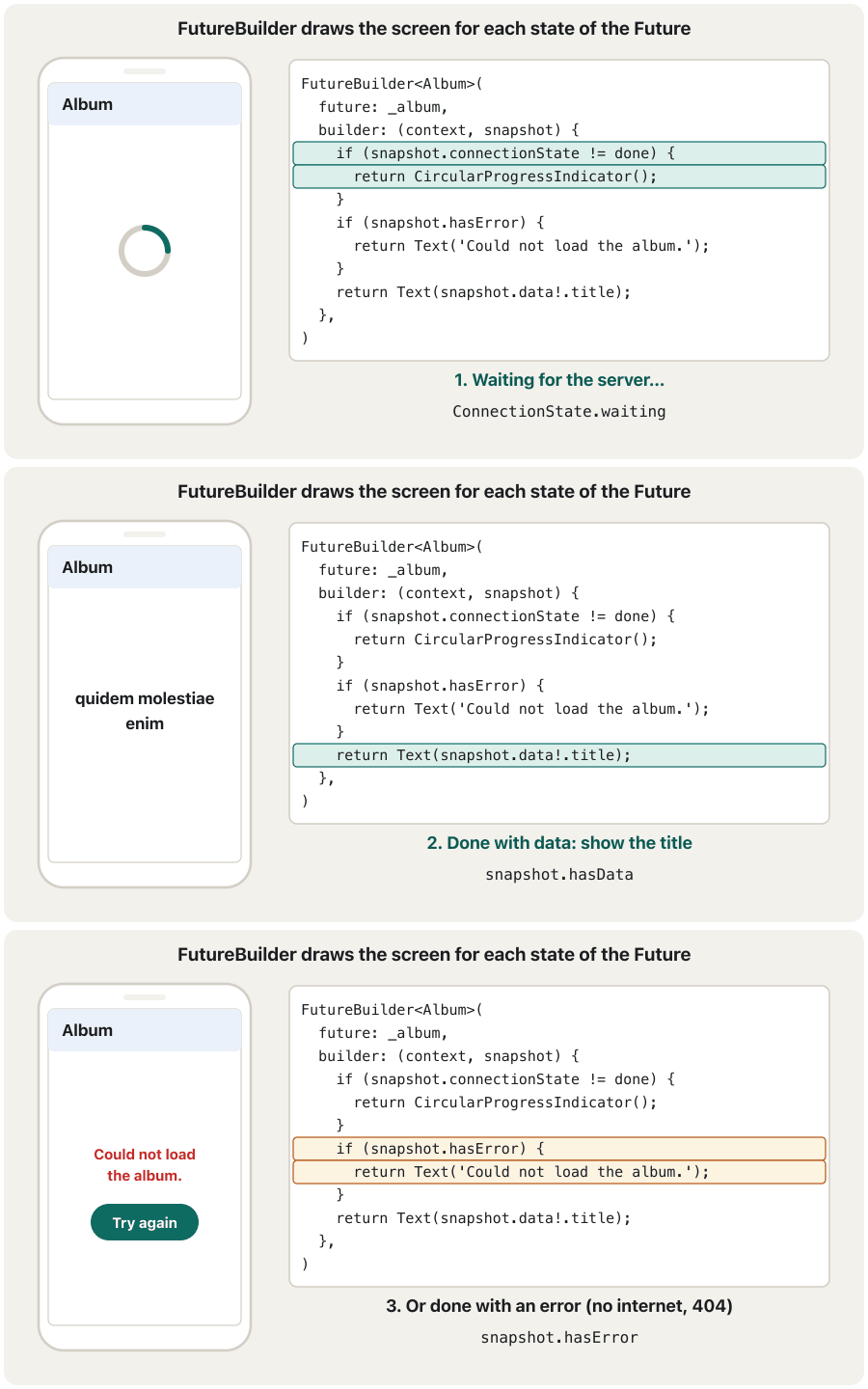
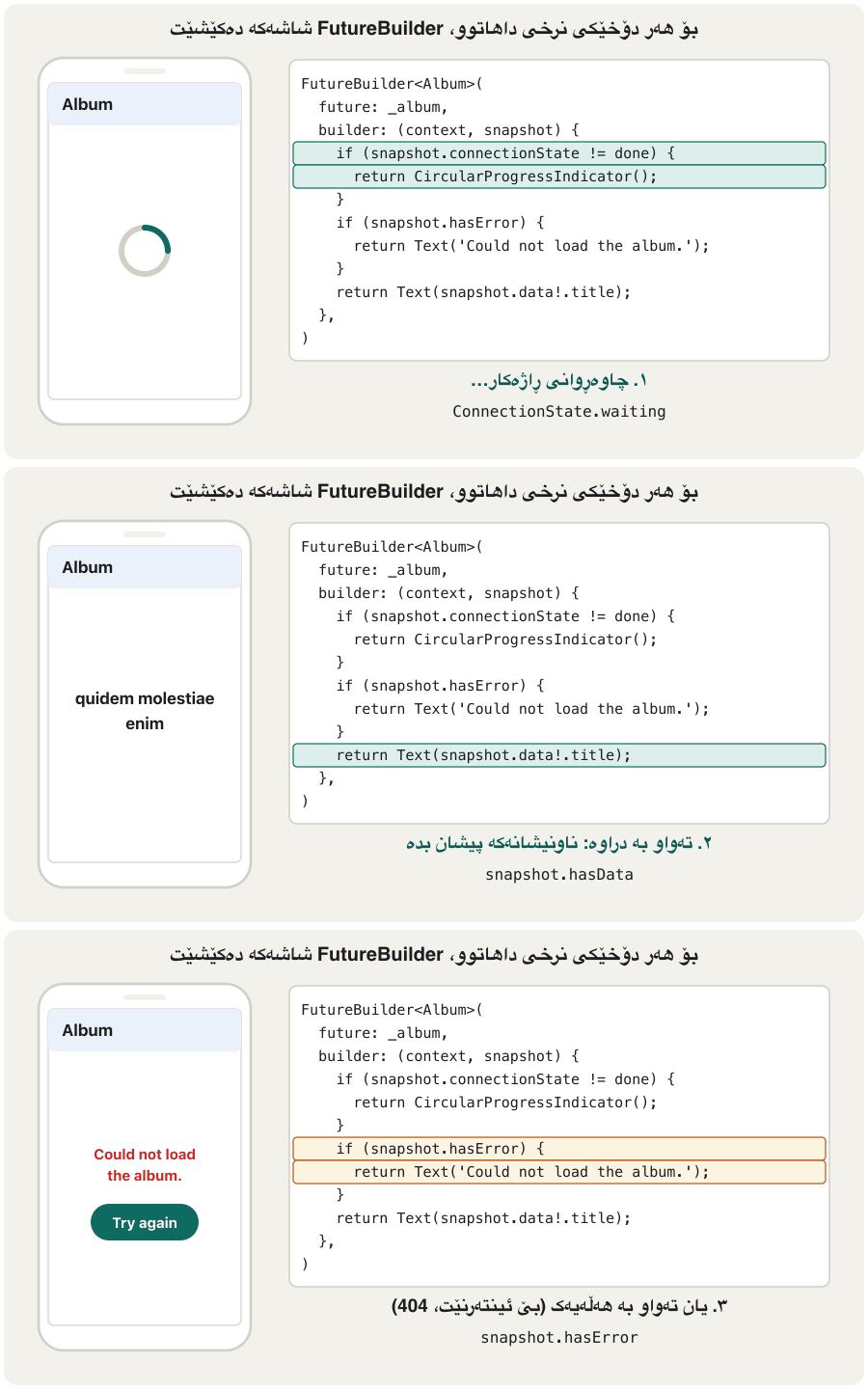
Showing it: FutureBuilder with three statesپیشاندانی: FutureBuilder بە سێ دۆخ
A list from the serverلیستێک لە ڕاژەکارەوە
Most screens show a list: messages, products, albums. The pattern is the same, with Future<List<Album>> and a ListView.builder that makes rows only for the items on screen. Add a fourth state: the request worked but the list is empty.
زۆربەی شاشەکان پیشان دەدەن: نامەکان، کاڵاکان، ئەلبومەکان. شێوازەکە هەمان شتە، بە Future<List<Album>> و ListView.builder کە تەنها بۆ ئەو بڕگانەی لەسەر شاشەن ڕیز دروست دەکات. دۆخێکی چوارەم زیاد بکە: سەرکەوتوو بوو بەڵام بەتاڵە.
import 'dart:convert';

import 'package:flutter/material.dart';
import 'package:http/http.dart' as http;

class Album {
  final int id;
  final String title;

  const Album({required this.id, required this.title});

  factory Album.fromJson(Map<String, dynamic> json) =>
      Album(id: json['id'] as int, title: json['title'] as String);
}

Future<List<Album>> fetchAlbums() async {
  final response =
      await http.get(Uri.https('jsonplaceholder.typicode.com', '/albums'));
  if (response.statusCode != 200) {
    throw Exception('Failed to load albums (status ${response.statusCode})');
  }
  final list = jsonDecode(response.body) as List<dynamic>;
  return list
      .map((item) => Album.fromJson(item as Map<String, dynamic>))
      .toList();
}

class AlbumListScreen extends StatefulWidget {
  const AlbumListScreen({super.key});

  @override
  State<AlbumListScreen> createState() => _AlbumListScreenState();
}

class _AlbumListScreenState extends State<AlbumListScreen> {
  late final Future<List<Album>> _albums = fetchAlbums();

  @override
  Widget build(BuildContext context) {
    return Scaffold(
      appBar: AppBar(title: const Text('Albums')),
      body: FutureBuilder<List<Album>>(
        future: _albums,
        builder: (context, snapshot) {
          if (snapshot.connectionState != ConnectionState.done) {
            return const Center(child: CircularProgressIndicator());
          }
          if (snapshot.hasError) {
            return Center(child: Text('Error: ${snapshot.error}'));
          }
          final albums = snapshot.data!;
          if (albums.isEmpty) {
            return const Center(child: Text('No albums yet.'));
          }
          return ListView.builder(
            itemCount: albums.length,
            itemBuilder: (context, index) => ListTile(
              leading: CircleAvatar(child: Text('${albums[index].id}')),
              title: Text(albums[index].title),
            ),
          );
        },
      ),
    );
  }
}
Explain the codeڕوونکردنەوەی کۆدەکە
- Lineدێڕی 16-26
The list fetch from the previous screen, now with
Album.fromJsonfor each item.هێنانی لە شاشەی پێشوو، ئێستا بە
Album.fromJsonبۆ هەر بڕگەیەک.- Lineدێڕی 36
late finalwith an initializer: the request starts the first time_albumsis read (during the first build) and never again.late finalبە نرخی سەرەتاییەوە: یەکەم جار کە_albumsدەخوێنرێتەوە (لە یەکەم buildـدا) دەست پێ دەکات و هەرگیز دووبارە نابێتەوە.- Lineدێڕی 52-54
Empty is not an error: tell the user plainly.
بەتاڵ نییە: بە ڕوونی بە بڵێ.
- Lineدێڕی 55-61
ListView.builderbuilds oneListTileper album, only when it scrolls into view.ListView.builderبۆ هەر ئەلبومێک یەکListTileدروست دەکات، تەنها کاتێک دێتە ناو شاشەوە.
Writing fromJson by hand or generating itنووسینی fromJson بە دەست یان دروستکردنی خۆکاری
Some languages read JSON into objects automatically by inspecting classes while the program runs (reflection). Flutter turns this off: if the tools cannot see which code is used, they cannot remove unused code from your app, and the app gets bigger. So in Flutter you either write fromJson yourself or let a tool generate it before the app is built.
هەندێک زمان خۆکارانە دەکەن بە بە پشکنینی لە کاتی کارکردنی بەرنامەدا (reflection). Flutter ئەمە ناچالاک دەکات: ئەگەر ئامرازەکان نەتوانن ببینن کام کۆد بەکار دێت، ناتوانن کۆدی بەکارنەهاتوو لە لاببەن و گەورەتر دەبێت. بۆیە لە Flutterـدا یان fromJson خۆت دەنووسیت یان ڕێگە دەدەیت ئامرازێک پێش دروستی بکات.
| Questionپرسیار | By hand (dart:convert)بە دەست (dart:convert) | Generated (json_serializable)خۆکاری (json_serializable) |
|---|---|---|
| Setupئامادەکردن | Noneهیچ | Three packages and a build commandسێ و فەرمانێکی build |
| Typing workکاری نووسین | Grows with every fieldلەگەڵ هەر زیاد دەکات | One annotation per classیەک نیشانە بۆ هەر |
| A misspelled key بە هەڵە نووسراو | Found at runtimeلە دەدۆزرێتەوە | Impossible: the tool writes the keysمەحاڵە: ئامرازەکە دەنووسێت |
| Best forباشترین بۆ | Small apps, a few models, learning بچووک، چەند ، فێربوون | Medium and large apps with many models مامناوەند و گەورە بە زۆر |
Code generation in three steps (shown for the same Album):
دروستکردنی خۆکاری کۆد بە سێ هەنگاو (بۆ هەمان Album):
$ flutter pub add json_annotation dev:build_runner dev:json_serializableimport 'package:json_annotation/json_annotation.dart';
part 'album.g.dart';
@JsonSerializable()
class Album {
final int userId;
final int id;
final String title;
const Album({required this.userId, required this.id, required this.title});
factory Album.fromJson(Map<String, dynamic> json) => _$AlbumFromJson(json);
Map<String, dynamic> toJson() => _$AlbumToJson(this);
}Explain the codeڕوونکردنەوەی کۆدەکە
- Lineدێڕی 3
partlinks the file the generator will write. Until you run it, the editor shows an error here; that is expected.partئەو دەبەستێتەوە کە دروستکەرەکە دەینووسێت. تا جێبەجێی نەکەیت، دەستکاریکەرەکە لێرە پیشان دەدات؛ ئەمە چاوەڕوانکراوە.- Lineدێڕی 5
@JsonSerializable()asks the tool to write the code for this class.@JsonSerializable()داوا لە ئامرازەکە دەکات کۆدی ئەم بنووسێت.- Lineدێڕی 13, 15
Your class only forwards to the generated functions
_$AlbumFromJsonand_$AlbumToJson.تەنها دەینێرێت بۆ ئەو ئامرازەکە دروستی کردوون:
_$AlbumFromJsonو_$AlbumToJson.
$ dart run build_runner build --delete-conflicting-outputs// lib/album.g.dart (generated: do not edit by hand)
Album _$AlbumFromJson(Map<String, dynamic> json) => Album(
userId: (json['userId'] as num).toInt(),
id: (json['id'] as num).toInt(),
title: json['title'] as String,
);
Map<String, dynamic> _$AlbumToJson(Album instance) => <String, dynamic>{
'userId': instance.userId,
'id': instance.id,
'title': instance.title,
};Look at what the tool wrote: (json['userId'] as num).toInt(). It accepts 1 and 1.0 alike, which avoids the classic int/double mistake you will see under Common mistakes. Use build_runner watch instead of build to regenerate every time you save.
سەیری ئەوە بکە کە ئامرازەکە نووسیویەتی: (json['userId'] as num).toInt(). 1 و 1.0 وەک یەک وەردەگرێت، کە ڕێگری لە هەڵە بەناوبانگەکەی int/double دەکات کە لە بەشی هەڵە باوەکاندا دەیبینیت. لە جیاتی build، build_runner watch بەکار بهێنە بۆ ئەوەی هەر جارێک پاشەکەوتی دەکەیت سەرلەنوێ دروستی بکاتەوە.
Common mistakesهەڵە باوەکان
One mistake catches almost everyone: a number in JSON has no separate “int” and “double” type. If the server sends 2000 for a price, Dart decodes an int, and as double throws:
هەڵەیەک نزیکەی هەمووان دەگرێت: ژمارە لە جۆری جیای «int» و «double»ـی نییە. ئەگەر بۆ نرخێک 2000 بنێرێت، Dart intـێک دەکاتەوە و as double فڕێ دەدات:
void main() {
  final json = {'name': 'Notebook', 'price': 2000}; // the server sent 2000, not 2000.0

  try {
    final price = json['price'] as double; // wrong: the value is an int
    print(price);
  } catch (e) {
    print('Error: $e');
  }

  final price = (json['price'] as num).toDouble(); // right: accept int or double
  print('Price: $price');
}Error: type 'int' is not a subtype of type 'double' in type cast Price: 2000.0
Explain the codeڕوونکردنەوەی کۆدەکە
- Lineدێڕی 5
Wrong:
2000is anint, not adouble.هەڵە:
2000intـە، نەکdouble.- Lineدێڕی 11
Right: read it as
num(int or double), then convert.دروست: وەک
num(int یان double) بیخوێنەرەوە، پاشان بیگۆڕە.
| Mistakeهەڵە | What happensچی ڕوو دەدات | Fixچاکردنەوە |
|---|---|---|
| No INTERNET permission in the main AndroidManifest.xml INTERNET لە AndroidManifest.xmlـی سەرەکیدا نییە | Debug works; the release app gets only errorsdebug کار دەکات؛ release تەنها وەردەگرێت | Add <uses-permission android:name="android.permission.INTERNET" /><uses-permission android:name="android.permission.INTERNET" /> زیاد بکە |
Calling the fetch function inside buildبانگکردنی هێنانی دراوە لەناو build | A new request on every rebuild; flicker; wasted data نوێ لە هەر دووبارە دروستکردنەوەیەکدا؛ لەرزین؛ بەفیڕۆدانی دراوە | Start it in initState and keep the Future in a fieldلە initStateـدا دەستی پێ بکە و لە هەڵبگرە |
Not checking statusCodeنەپشکنینی statusCode | A 404 or 500 page is decoded as if it were dataپەڕەیەکی 404 یان 500 وەک دراوە دەکرێتەوە | Decode only on 200; throw otherwiseتەنها لە 200ـدا بیکەرەوە؛ ئەگەرنا فڕێ بدە |
Returning null on failureگەڕاندنەوەی null لە کاتی شکستدا | The screen spins or shows nothing; the real error is lostشاشەکە دەسووڕێتەوە یان هیچ پیشان نادات؛ ڕاستەقینەکە ون دەبێت | Throw an exception; let hasError show it فڕێ بدە؛ با hasError پیشانی بدات |
Forgetting awaitلەبیرکردنی await | response is a Future, so .body does not existresponse Futureـێکە، بۆیە .bodyـی نییە | final response = await http.get(url);final response = await http.get(url); |
as double for a JSON numberas double بۆ ژمارەیەکی | Crash when the server sends 2000تێکشکان کاتێک 2000 دەنێرێت | (json['price'] as num).toDouble()(json['price'] as num).toDouble() |
Using http://بەکارهێنانی http:// | Data travels unencrypted; WebViews and native clients block it on Android 9+ and iOSدراوە بەبێ دەگوازرێتەوە؛ WebView و ڕەسەن لە Android 9+ و iOSـدا ڕایدەگرن | Use https://https:// بەکار بهێنە |
| Building URLs by joining stringsدروستکردنی URL بە لکاندنی | Spaces and Kurdish letters break the addressبۆشایی و پیتی کوردی ناونیشانەکە تێک دەدەن | Uri.https(host, path, {'q': text}) encodes for youUri.https(host, path, {'q': text}) خۆی دەکات |
Exercisesڕاهێنانەکان
Decode {"name": "Shilan", "address": {"city": "Erbil", "street": "100m"}} and print Shilan lives in Erbil. (The address is a JSON object inside a JSON object.)
{"name": "Shilan", "address": {"city": "Erbil", "street": "100m"}} بکەرەوە و Shilan lives in Erbil. چاپ بکە. (ناونیشانەکە لەناو .)
Hintئاماژە
user['address'] is itself a Map.
user['address'] خۆی Mapـێکە.
Show answerوەڵامەکە پیشان بدە
import 'dart:convert';

void main() {
  const body = '{"name": "Shilan", "address": {"city": "Erbil", "street": "100m"}}';

  final user = jsonDecode(body) as Map<String, dynamic>;
  final address = user['address'] as Map<String, dynamic>; // a nested object

  print('${user['name']} lives in ${address['city']}.');
}Shilan lives in Erbil.
A nested JSON object is a Map inside the Map, so read it with as Map<String, dynamic> before using its keys.
ناوەکی Mapـێکە لەناو Mapـدا، بۆیە پێش بەکارهێنانی ، بە as Map<String, dynamic> بیخوێنەرەوە.
https://jsonplaceholder.typicode.com/posts/1 returns userId, id, title and body. Write a Post class with a pattern-matching fromJson, a fetchPost(int id) function that checks the status code, and print the post's title.
https://jsonplaceholder.typicode.com/posts/1 userId، id، title و body دەگەڕێنێتەوە. Post بنووسە بە fromJsonـێکی ناساندنەوەی شێوە، fetchPost(int id) کە دەپشکنێت. پاشان ناونیشانی پۆستەکە چاپ بکە.
Show answerوەڵامەکە پیشان بدە
import 'dart:convert';

import 'package:http/http.dart' as http;

class Post {
  final int userId;
  final int id;
  final String title;
  final String body;

  const Post({
    required this.userId,
    required this.id,
    required this.title,
    required this.body,
  });

  factory Post.fromJson(Map<String, dynamic> json) {
    return switch (json) {
      {
        'userId': int userId,
        'id': int id,
        'title': String title,
        'body': String body,
      } =>
        Post(userId: userId, id: id, title: title, body: body),
      _ => throw const FormatException('Not a post.'),
    };
  }
}

Future<Post> fetchPost(int id) async {
  final response =
      await http.get(Uri.https('jsonplaceholder.typicode.com', '/posts/$id'));
  if (response.statusCode != 200) {
    throw Exception('Post $id: status ${response.statusCode}');
  }
  return Post.fromJson(jsonDecode(response.body) as Map<String, dynamic>);
}

Future<void> main() async {
  final post = await fetchPost(1);
  print('Post ${post.id} by user ${post.userId}: ${post.title}');
}Post 1 by user 1: sunt aut facere repellat provident occaecati excepturi optio reprehenderit
Request /todos with the query parameter userId=1 (use the third argument of Uri.https). Print the full URL, the number of to-dos and how many have completed equal to true.
داوای /todos بکە بە userId=1 (ئارگیومێنتی سێیەمی Uri.https بەکار بهێنە). URLـە تەواوەکە، ژمارەی ئەرکەکان و چەندیان completedـیان trueـە چاپ بکە.
Show answerوەڵامەکە پیشان بدە
import 'dart:convert';

import 'package:http/http.dart' as http;

Future<void> main() async {
  final url = Uri.https('jsonplaceholder.typicode.com', '/todos', {'userId': '1'});
  final response = await http.get(url);
  if (response.statusCode != 200) {
    throw Exception('Status ${response.statusCode}');
  }

  final todos = jsonDecode(response.body) as List<dynamic>;
  final done = todos.where((t) => (t as Map<String, dynamic>)['completed'] == true);

  print(url);
  print('User 1 has ${todos.length} to-dos; ${done.length} are completed.');
}https://jsonplaceholder.typicode.com/todos?userId=1 User 1 has 20 to-dos; 11 are completed.
Uri.https added ?userId=1 for you. The body is a JSON array, so it decodes to a List, and where keeps the completed ones.
Uri.https خۆی ?userId=1ـی زیاد کرد. جەستەکە ڕیزێکی ، بۆیە دەبێت بە List و where تەواوبووەکان دەهێڵێتەوە.
Write String messageFor(int statusCode) that returns a short message a user can understand for 200, 401/403, 404, any 5xx code, and anything else. Test it with 200, 403, 404, 503 and 418.
String messageFor(int statusCode) بنووسە کە پەیامێکی کورت و تێگەیشتوو بۆ دەگەڕێنێتەوە بۆ 200، 401/403، 404، هەر کۆدێکی 5xx و هەر شتێکی تر. بە 200، 403، 404، 503 و 418 تاقیی بکەرەوە.
Show answerوەڵامەکە پیشان بدە
String messageFor(int statusCode) => switch (statusCode) {
      200 => 'OK',
      401 || 403 => 'Please sign in, or ask for access.',
      404 => 'We could not find that item.',
      >= 500 && < 600 => 'The server has a problem. Try again later.',
      _ => 'Unexpected answer ($statusCode).',
    };

void main() {
  for (final code in [200, 403, 404, 503, 418]) {
    print('$code -> ${messageFor(code)}');
  }
}200 -> OK 403 -> Please sign in, or ask for access. 404 -> We could not find that item. 503 -> The server has a problem. Try again later. 418 -> Unexpected answer (418).
A Dart 3 switch expression can test several values (401 || 403) and ranges (>= 500 && < 600).
دەربڕینی switchـی Dart 3 دەتوانێت چەند نرخێک (401 || 403) و هەموو نرخەکانی نێوان دوو سنوور (>= 500 && < 600) تاقی بکاتەوە.
Build UserScreen(userId: 3) that loads /users/3 and shows the name and e-mail in a ListTile. While waiting show a spinner; on error show a button that loads again.
UserScreen(userId: 3) دروست بکە کە /users/3 بار دەکات و ناو و ئیمەیڵ لە ListTileـێکدا پیشان دەدات. لە کاتی چاوەڕوانیدا بازنەی چاوەڕوانی پیشان بدە؛ لە کاتی پیشان بدە کە دووبارە بار دەکاتەوە.
Show answerوەڵامەکە پیشان بدە
import 'dart:convert';

import 'package:flutter/material.dart';
import 'package:http/http.dart' as http;

class User {
  final String name;
  final String email;

  const User({required this.name, required this.email});

  factory User.fromJson(Map<String, dynamic> json) =>
      User(name: json['name'] as String, email: json['email'] as String);
}

Future<User> fetchUser(int id) async {
  final response =
      await http.get(Uri.https('jsonplaceholder.typicode.com', '/users/$id'));
  if (response.statusCode != 200) {
    throw Exception('User $id: status ${response.statusCode}');
  }
  return User.fromJson(jsonDecode(response.body) as Map<String, dynamic>);
}

class UserScreen extends StatefulWidget {
  const UserScreen({super.key, required this.userId});

  final int userId;

  @override
  State<UserScreen> createState() => _UserScreenState();
}

class _UserScreenState extends State<UserScreen> {
  late Future<User> _user;

  @override
  void initState() {
    super.initState();
    _user = fetchUser(widget.userId);
  }

  @override
  Widget build(BuildContext context) {
    return Scaffold(
      appBar: AppBar(title: const Text('User')),
      body: Center(
        child: FutureBuilder<User>(
          future: _user,
          builder: (context, snapshot) {
            if (snapshot.connectionState != ConnectionState.done) {
              return const CircularProgressIndicator();
            }
            if (snapshot.hasError) {
              return TextButton(
                onPressed: () =>
                    setState(() => _user = fetchUser(widget.userId)),
                child: const Text('Could not load. Tap to try again.'),
              );
            }
            final user = snapshot.data!;
            return ListTile(
              leading: const Icon(Icons.person),
              title: Text(user.name),
              subtitle: Text(user.email),
            );
          },
        ),
      ),
    );
  }
}
The retry button assigns a new Future inside setState; widget.userId reads the value the parent passed in.
دووبارە هەوڵدانەوە نوێ لەناو setStateـدا دادەنێت؛ widget.userId ئەو نرخە دەخوێنێتەوە کە ناردوویەتی.
Summaryپوختە
- Add the
httppackage (flutter pub add http) and import it ashttp. Declare the INTERNET permission in the main AndroidManifest.xml, and use https. await http.get(uri)gives anhttp.Response:statusCode,headersandbody(a String).jsonDecodeturns the body intoMap<String, dynamic>orList<dynamic>;jsonEncodegoes back.- A model class with a
fromJsonfactory checks the JSON once and gives typed fields; write it by hand or generate it with json_serializable. - A fetch function checks the status code and throws on failure; it never returns
null. - Start the Future in
initState; draw it with FutureBuilder: waiting → spinner, error → message + Try again, data → the content (and an empty-list message).
-
httpزیاد بکە (flutter pub add http) و بە پێشگریas httpimportـی بکە. INTERNET لە AndroidManifest.xmlـی سەرەکیدا ڕابگەیەنە و https بەکار بهێنە. await http.get(uri)http.Responseـێک دەدات:statusCode،headersوbody().jsonDecodeجەستەکە دەکات بەMap<String, dynamic>یانList<dynamic>؛jsonEncodeبە پێچەوانەوە.- بە
factoryـیfromJsonیەک جار دەپشکنێت و جۆردار دەدات؛ بە دەست بینووسە یان بە json_serializable دروستی بکە. - هێنانی دراوە دەپشکنێت و لە کاتی شکستدا فڕێ دەدات؛ هەرگیز
nullناگەڕێنێتەوە. - لە
initStateـدا دەست پێ بکە؛ بە FutureBuilder بیکێشە: چاوەڕوانی ← بازنەی چاوەڕوانی، ← پەیام + Try again، دراوە ← ناوەڕۆکەکە (و پەیامی بەتاڵ).
Why does a release app need the INTERNET line when the debug app works without it?بۆچی ئەپی release پێویستی بە دێڕی INTERNET هەیە کاتێک ئەپی debug بەبێ ئەو کار دەکات؟
The debug manifest already declares INTERNET for the Flutter tool. The release build reads only the main manifest.
src/debug/AndroidManifest.xml پێشتر INTERNET بۆ ئامرازی Flutter ڕادەگەیەنێت. release تەنها src/main/AndroidManifest.xml دەخوێنێتەوە.
What does jsonDecode return for a JSON object, and why use fromJson after it?jsonDecode بۆ ئۆبجێکتێکی JSON چی دەگەڕێنێتەوە و بۆچی دوای ئەو fromJson بەکار دەهێنین؟
A Map<String, dynamic>. fromJson checks the keys and types once and gives a typed object, so mistakes are found early.
Map<String, dynamic>. fromJson و جۆرەکان یەک جار دەپشکنێت و جۆردار دەدات، بۆیە هەڵەکان زوو دەدۆزرێنەوە.
Name the three states a FutureBuilder screen must handle.سێ دۆخەکە ناو ببە کە شاشەیەکی FutureBuilder دەبێت مامەڵەیان لەگەڵ بکات.
Waiting (not done), done with an error, done with data.
چاوەڕوانی (تەواو نەبووە)، تەواو بە ، تەواو بە دراوە.
Lesson complete!وانەکە تەواو بوو!
Well done. Review the key terms, then go on to the next lesson.دەستخۆش. سەیرێکی زاراوە سەرەکییەکان بکەرەوە، پاشان بڕۆ بۆ وانەی داهاتوو.
Key termsزاراوە سەرەکییەکان
Saving Data on the Deviceپاشەکەوتکردنی دراوە لەسەر ئامێرەکە
Related lecturesوانە پەیوەندیدارەکان
- HTTP and the Request–Response CycleHTTP و سووڕی داواکاری و وەڵام
- Web APIs and JSONAPIـی وێب و JSON
- Mobile Cloud and Backend-as-a-Serviceهەورەژمێرکاریی مۆبایل و BaaS
- App Architecture: the MVVM Patternتەلارسازیی نەرمەواڵە: شێوازی MVVM
- Saving Data on the Deviceپاشەکەوتکردنی دراوە لەسەر ئامێرەکە
- Firebase and Cloud FirestoreFirebase و Cloud Firestore
References and further readingسەرچاوەکان و خوێندنەوەی زیاتر
- Flutter cookbook: Fetch data from the internet
- Flutter docs: JSON and serialization
- Flutter docs: Cross-platform HTTP networking
- Flutter learning pathway: Make HTTP requests
- Flutter docs: Insecure HTTP connections on iOS and Android (Flutter 2.0 check, reverted in 2.2; Dart sockets are not policed)
- Android Developers: Network security configuration (cleartext traffic)
- JSONPlaceholder: free fake REST API
This lecture is a first edition. The Kurdish text and terminology are waiting for review by Kurdish IT teachers.ئەم وانەیە چاپی یەکەمە. دەقە کوردییەکە و زاراوەکانی چاوەڕێی پێداچوونەوەی مامۆستایانی کوردی بواری IT ن.