FlutterFlutter · Chapterبەش 10 · Lectureوانە 10.2
Loading States and Skeleton Screensدۆخەکانی بارکردن و شاشەکانی ئێسکەپەیکەر
Design the wait: how long people will wait, the five states of a screen that loads data, spinners and progress bars, skeleton screens built by hand with a gentle pulse or a shimmer, pull to refresh, empty and error screens with Try again, and what screen readers hear. All in a bazaar app that loads from a fake 2-second Future.
دیزاینکردنی چاوەڕوانی: خەڵک چەند چاوەڕێ دەکەن، پێنج دۆخی شاشەیەک کە دراوە بار دەکات، بازنەی چاوەڕوانی و هێڵی پێشکەوتن، کە بە دەست دروست دەکرێن بە کاڵ و تۆخبوونەوەیەکی نەرم یان ، ڕاکێشان بۆ نوێکردنەوە، شاشەکانی بەتاڵ و بە Try again و ئەوەی دەیبیستن. هەمووی لە بازاڕدا کە لە ساختەی 2 چرکەییەوە بار دەکات.
What you will learnچی فێر دەبیت
- Explain perceived performance and choose nothing, a spinner, a skeleton or a progress bar from the length and kind of a wait.
- Tell a skeleton screen from a splash screen, and plan the five states of a loading screen.
- Use determinate and indeterminate
CircularProgressIndicatorandLinearProgressIndicator, and mapFutureBuildersnapshots to screens. - Build a skeleton by hand and animate it with a pulse or a shimmer that respects reduced motion.
- Add pull to refresh, empty and error states with Try again, and labels for screen readers.
- ڕوون بکەیتەوە و بەپێی درێژی و جۆری چاوەڕوانییەک هیچ، بازنەی چاوەڕوانی، یان هێڵی پێشکەوتن هەڵبژێریت.
- لە جیا بکەیتەوە و پێنج دۆخی شاشەیەکی بارکردن پلان بکەیت.
CircularProgressIndicatorوLinearProgressIndicatorـی دیاریکراو و نادیار بەکار بهێنیت و snapshotـەکانیFutureBuilderبە شاشەکان ببەستیتەوە.- بە دەست دروست بکەیت و بە کاڵ و تۆخبوونەوە یان بیجووڵێنیت کە ڕێز لە بگرێت.
- ڕاکێشان بۆ نوێکردنەوە، دۆخەکانی بەتاڵ و بە Try again و بۆ زیاد بکەیت.
Waiting is part of the designچاوەڕوانیش بەشێکە لە دیزاین
Rebin opens a bazaar app to buy a copper teapot. The products live on a , so the needs about two seconds to get them. What should the screen show in those two seconds? A white page? A turning circle? Grey shapes of the list? This lesson is about designing that wait.
ڕێبین بازاڕ دەکاتەوە بۆ کڕینی قۆرییەکی مسین. کاڵاکان لەسەر ، بۆیە نزیکەی دوو چرکەی پێویستە بۆ هێنانیان. شاشەکە لەو دوو چرکەیەدا چی پیشان بدات؟ پەڕەیەکی سپی؟ بازنەیەکی سووڕاو؟ شێوە خۆڵەمێشییەکانی لیستەکە؟ ئەم وانەیە باسی دیزاینکردنی ئەو چاوەڕوانییە دەکات.
The wait takes the same time whatever you show, but it does not feel the same. How fast an app feels is its , and a good loading screen improves it. In Getting Data from the Internet you already showed a spinner while a FutureBuilder waited. Now you learn to choose the right sign, to draw a , and to design the empty and error screens too.
چاوەڕوانییەکە هەمان کات دەخایەنێت هەرچی پیشان بدەیت، بەڵام هەمان هەست نادات. ئەوەی چەند خێرا هەست پێ دەکرێت پێی دەوترێت و شاشەیەکی چاوەڕوانیی باش باشتری دەکات. لە وەرگرتنی دراوە لە ئینتەرنێت بازنەی چاوەڕوانیت پیشان دا تا FutureBuilder چاوەڕێی دەکرد. ئێستا فێر دەبیت نیشانەی گونجاو هەڵبژێریت، بکێشیت و شاشەکانی بەتاڵ و دیزاین بکەیت.
How long is the wait?چاوەڕوانییەکە چەندە؟
Usability research gives three useful limits. If a result takes less than 0.1 second, it feels instant. Up to about 1 second, people notice the delay but keep thinking; no loading sign is needed, and a sign that flashes for a moment only distracts. After about 10 seconds, attention drifts and people leave the task. Between 1 and 10 seconds a spinner or a skeleton keeps them company; for longer jobs show a progress bar with a percentage and a way to cancel.
توێژینەوەکانی سێ سنووری بەسوود دەدەن. ئەگەر ئەنجامێک لە 0.1 چرکە کەمتر بخایەنێت، وەک دەستبەجێ هەست پێ دەکرێت. تا نزیکەی 1 چرکە، خەڵک دواکەوتنەکە دەبینن بەڵام بیرکردنەوەیان ناوەستێت؛ هیچ نیشانەیەکی چاوەڕوانی پێویست نییە و نیشانەیەک کە بۆ ساتێک دەردەکەوێت و ون دەبێت تەنیا سەرنج پەرت دەکات. دوای نزیکەی 10 چرکە، سەرنج بڵاو دەبێتەوە و خەڵک کارەکە جێدەهێڵن. لە نێوان 1 و 10 چرکەدا بازنەی چاوەڕوانی یان هاوڕێیان دەبێت؛ بۆ کاری درێژتر هێڵێکی پێشکەوتن بە ڕێژەی سەدی و ڕێگایەک بۆ هەڵوەشاندنەوە پیشان بدە.
In a study that Nielsen Norman Group reports, people who saw a moving progress indicator were willing to wait about three times longer than people who saw nothing. Material Design 3 gives similar numbers for apps: nothing under 200 ms, a loading indicator up to 5 s, a progress indicator after that.
لە توێژینەوەیەکدا کە Nielsen Norman Group باسی دەکات، ئەو کەسانەی جووڵاویان دەبینی ئامادە بوون نزیکەی سێ ئەوەندە زیاتر چاوەڕێ بکەن لەوانەی هیچیان نەدەبینی. Material Design 3 ژمارەی هاوشێوە بۆ دەدات: کەمتر لە 200 ms هیچ، تا 5 s بازنەی چاوەڕوانی، دوای ئەوە .
Not the splash screenئەمە شاشەی دەستپێک نییە
Two screens appear while something loads, and they are easy to mix up. The (launch screen) appears once, from the tap on the icon until Flutter draws its first frame; it is taught in Splash Screens. A appears inside the running app, every time a screen waits for its data: opening the product list, a new search, a retry after an error. Never use a splash screen to hide slow data: open the app, then show a skeleton where the data will be.
دوو شاشە هەن کە لە کاتی بارکردندا دەردەکەون و ئاسانە تێکەڵیان بکەیت. تەنیا یەک جار دەردەکەوێت، لە دەستلێدان لە تا Flutter یەکەم دیمەنی دەکێشێت؛ لە وانەی شاشەکانی دەستپێک باس کراوە. لەناو کارپێکراوەکەدا دەردەکەوێت، هەر جارێک شاشەیەک چاوەڕێی دەکات: کردنەوەی لیستی کاڵاکان، گەڕانێکی نوێ، دووپاتە هەوڵدانەوە دوای . هەرگیز بۆ شاردنەوەی دراوەی هێواش بەکار مەهێنە: بکەرەوە، پاشان لەو شوێنە پیشان بدە کە دراوەکەی تێدا دەبێت.
One screen, five statesیەک شاشە، پێنج دۆخ
A screen that loads data is not just “loading” or “done”. Plan five states before you write any code. Together they are the screen's :
شاشەیەک کە دراوە بار دەکات تەنیا «بار دەبێت» یان «تەواو بوو» نییە. پێش نووسینی هەر کۆدێک پێنج دۆخ پلان بکە. ئەم پێنجە پێکەوە شاشەکەن:
- Initial: nothing has been asked yet, for example a search screen before the first search. Show a hint of what to do.
- Loading: the request is on its way. Show a skeleton screen or a spinner.
- Data: the answer arrived with items. Show them.
- Empty: the request worked, but there are no items. Say so kindly and show the next step.
- Error: the request failed. Say what happened in plain words and offer Try again (a retry).
- سەرەتا: هێشتا هیچ داوا نەکراوە، بۆ نموونە شاشەی گەڕان پێش یەکەم گەڕان. ئاماژە بدە کە چی بکات.
- بارکردن: لە ڕێگادایە. یان بازنەی چاوەڕوانی پیشان بدە.
- دراوە: وەڵامەکە بە کاڵاوە گەیشت. پیشانیان بدە.
- بەتاڵ: سەرکەوتوو بوو، بەڵام هیچ کاڵایەک نییە. بە نەرمی بیڵێ و هەنگاوی داهاتوو پیشان بدە.
- : شکستی هێنا. بە وشەی سادە بڵێ چی ڕوویدا و Try again (دووپاتە هەوڵدانەوە) پێشکەش بکە.
One screen, five statesیەک شاشە، پێنج دۆخ
Moving between the statesگواستنەوە لە نێوان دۆخەکاندا
The states follow each other like a small map. The screen starts and goes to loading; then the Future decides: data, an empty list, or an exception. From the error state, Try again creates a new Future, so the screen loads again. From the data state, pull to refresh asks again, but the old list stays while a small spinner turns at the top. Jumping back to a full skeleton would hide what the user was reading.
دۆخەکان وەک نەخشەیەکی بچووک بەدوای یەکدا دێن. شاشەکە دەست پێ دەکات و دەچێتە بارکردن؛ پاشان بڕیار دەدات: دراوە، لیستێکی بەتاڵ یان . لە دۆخی ، Try again نوێ دروست دەکات، بۆیە شاشەکە دووپاتە بار دەبێتەوە. لە دۆخی دراوەوە، ڕاکێشان بۆ نوێکردنەوە دووپاتە داوا دەکات، بەڵام لیستە کۆنەکە دەمێنێتەوە و بازنەیەکی بچووک لە سەرەوە دەسووڕێتەوە. گەڕانەوە بۆ تەواو ئەوە دەشارێتەوە کە دەیخوێندەوە.
Spinners and progress barsبازنەی چاوەڕوانی و هێڵی پێشکەوتن
A small moving sign that tells the person the app is working. A determinate one (a bar or ring that fills from 0 to 100%) shows how much is done; an indeterminate one (a spinner) only says “working, please wait”.
نیشانەیەکی بچووکی جووڵاوە کە بە کەسەکە دەڵێت خەریکی کارە. جۆری دیاریکراو (هێڵێک یان ئەڵقەیەک کە لە 0 تا 100% پڕ دەبێتەوە) پیشان دەدات چەندی تەواو بووە؛ جۆری نادیار (بازنەی چاوەڕوانی) تەنیا دەڵێت «خەریکی کارم، چاوەڕێ بکە».
Flutter's Material library has two: CircularProgressIndicator (a ring) and LinearProgressIndicator (a bar). One parameter, value, decides their kind. With no value (null) the indicator is indeterminate: it keeps moving and only says “working”. With a value from 0.0 to 1.0 it is determinate: it fills up and shows how much is done. Use the determinate kind only when you can really measure the progress, for example the bytes of a download.
Materialـی Flutter دووانی هەیە: CircularProgressIndicator (ئەڵقەیەک) و LinearProgressIndicator (هێڵێک). یەک ، value، جۆرەکەیان دیاری دەکات. بەبێ نرخ (null) نیشانەکە نادیار دەبێت: بەردەوام دەجووڵێت و تەنیا دەڵێت «خەریکی کارم». بە نرخێک لە 0.0 تا 1.0 دیاریکراو دەبێت: پڕ دەبێتەوە و پیشان دەدات چەندی تەواو بووە. جۆری دیاریکراو تەنیا کاتێک بەکار بهێنە کە بەڕاستی دەتوانیت پێشکەوتنەکە بپێویت، بۆ نموونە .
Spinners and progress barsبازنەی چاوەڕوانی و هێڵی پێشکەوتن
From “connecting” to 40%لە «پەیوەندیکردن»ـەوە بۆ 40%
Material 3 adds one more rule: when you do not know the size yet, start indeterminate, and switch to determinate as soon as you can measure. This price-list download does exactly that. Timers pretend the download, so the example runs anywhere:
Material 3 یاسایەکی تر زیاد دەکات: کاتێک هێشتا قەبارەکە نازانیت، بە نادیار دەست پێ بکە و هەر کە توانیت بیپێویت بیگۆڕە بۆ دیاریکراو. ئەم لیستی نرخەکان ڕێک ئەوە دەکات. لاسایی دەکەنەوە، بۆیە نموونەکە لە هەموو شوێنێک کار دەکات:
import 'dart:async';

import 'package:flutter/material.dart';

void main() => runApp(
  const MaterialApp(home: Scaffold(body: Center(child: PriceListDownload()))),
);

class PriceListDownload extends StatefulWidget {
  const PriceListDownload({super.key});

  @override
  State<PriceListDownload> createState() => _PriceListDownloadState();
}

class _PriceListDownloadState extends State<PriceListDownload> {
  static const _totalParts = 10;
  int? _partsDone; // null: the size is not known yet
  Timer? _timer;

  @override
  void initState() {
    super.initState();
    // First second: still connecting, so we cannot say how far we are.
    _timer = Timer(const Duration(seconds: 1), _startCounting);
  }

  void _startCounting() {
    setState(() => _partsDone = 0);
    _timer = Timer.periodic(const Duration(milliseconds: 300), (timer) {
      setState(() => _partsDone = _partsDone! + 1);
      if (_partsDone == _totalParts) timer.cancel();
    });
  }

  @override
  void dispose() {
    _timer?.cancel();
    super.dispose();
  }

  @override
  Widget build(BuildContext context) {
    final double? value = _partsDone == null ? null : _partsDone! / _totalParts;
    return Padding(
      padding: const EdgeInsets.all(24),
      child: Column(
        mainAxisSize: MainAxisSize.min,
        crossAxisAlignment: CrossAxisAlignment.start,
        children: [
          Text(
            value == null
                ? 'Connecting…'
                : 'Price list: ${(value * 100).round()}%',
          ),
          const SizedBox(height: 12),
          LinearProgressIndicator(
            value: value, // null = indeterminate, 0.0 to 1.0 = determinate
            semanticsLabel: 'Downloading the price list',
          ),
          const SizedBox(height: 24),
          const CircularProgressIndicator(semanticsLabel: 'Loading'),
        ],
      ),
    );
  }
}0.0 s value: null text: "Connecting…" 1.0 s value: 0.0 text: "Price list: 0%" 2.2 s value: 0.4 text: "Price list: 40%" 4.0 s value: 1.0 text: "Price list: 100%"
Explain the codeڕوونکردنەوەی کۆدەکە
- Lineدێڕی 18
nullmeans “we do not know the size yet”.nullواتە «هێشتا قەبارەکە نازانین».- Lineدێڕی 25
For one second the download is “connecting”.
بۆ یەک چرکە «پەیوەندی دەکات».
- Lineدێڕی 28-32
Now the size is known: count 10 parts, one every 0.3 s, and stop at the last one.
ئێستا قەبارەکە زانراوە: 10 بەش بژمێرە، هەر 0.3 چرکە یەکێک و لە دوایینیاندا بوەستە.
- Lineدێڕی 37-40
Cancel the timer when the screen goes away.
کاتێک شاشەکە لادەچێت هەڵبوەشێنەوە.
- Lineدێڕی 58
null→ indeterminate;0.0to1.0→ determinate.null← نادیار؛0.0تا1.0← دیاریکراو.- Lineدێڕی 59
A label for screen readers: what is happening, and to what.
بۆ : چی ڕوو دەدات و بۆ چی.
What a skeleton screen isشاشەی ئێسکەپەیکەر چییە
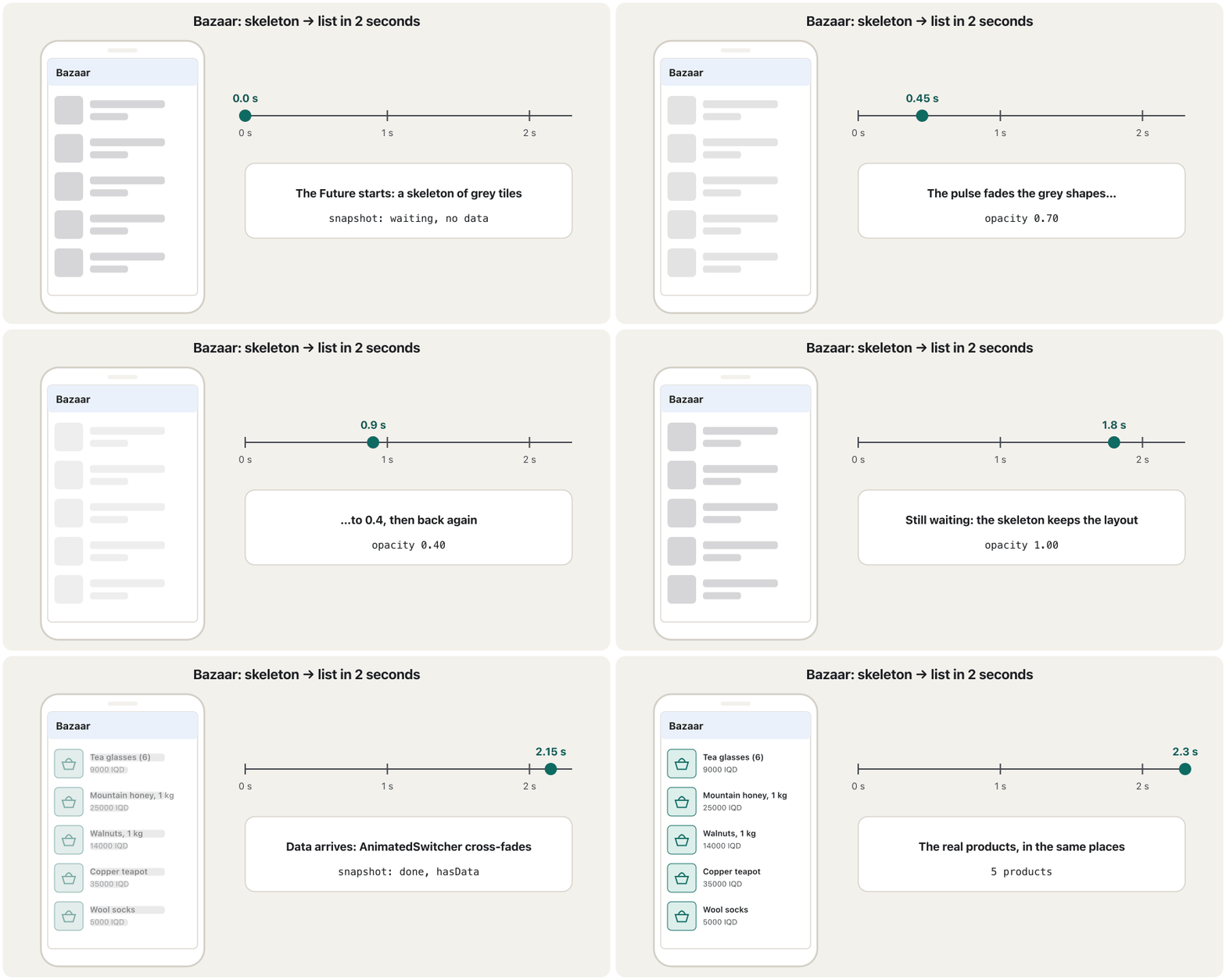
A loading screen that shows grey shapes in the of the content that is coming: a box where a picture will be, bars where the text will be. The person sees the screen take shape instead of a blank page or a lone spinner.
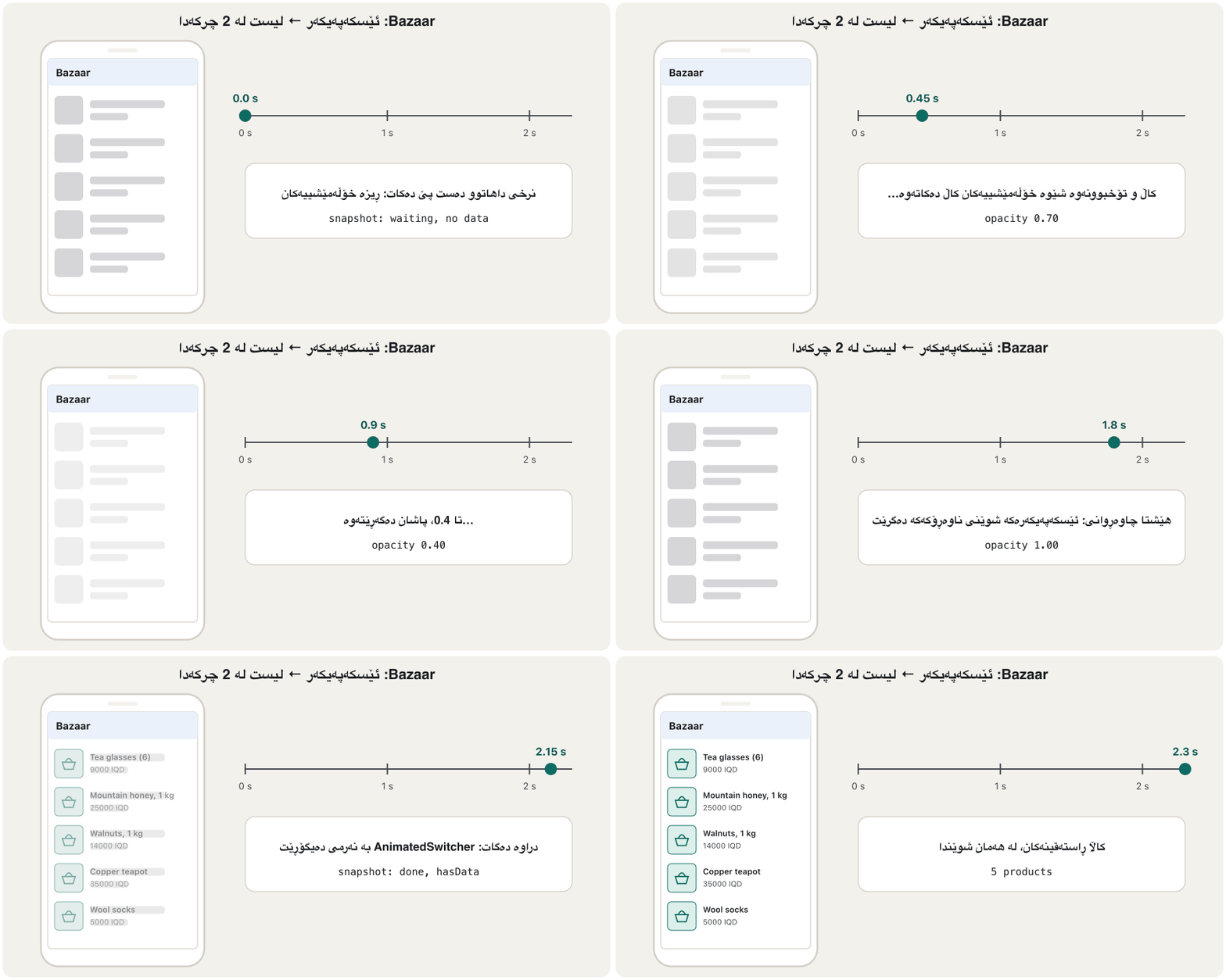
شاشەیەکی چاوەڕوانییە کە شێوەی خۆڵەمێشی لە ئەو ناوەڕۆکەدا پیشان دەدات کە خەریکە دێت: چوارگۆشەیەک لە شوێنی وێنەکە و هێڵی ئەستوور لە شوێنی دەقەکان. کەسەکە دەبینێت شاشەکە شێوە دەگرێت، لە جیاتی پەڕەیەکی بەتاڵ یان بازنەیی بە تەنیا.
Nielsen Norman Group describes three kinds. A static skeleton shows still grey boxes in the layout of the page. An animated skeleton adds a slow pulse or a , to show that loading goes on; keep that motion gentle. A frame-only skeleton shows just the top bar and the background. It tells the user nothing about what is coming, so it is not recommended. A skeleton helps because the user already sees where things will be, and when they arrive there is no .
Nielsen Norman Group سێ جۆر باس دەکات. وەستاو چوارگۆشەی خۆڵەمێشیی وەستاو لە پەڕەکەدا پیشان دەدات. جووڵاو کاڵ و تۆخبوونەوەیەکی هێواش یان زیاد دەکات، بۆ ئەوەی پیشان بدات بارکردن بەردەوامە؛ ئەو جووڵەیە نەرم بهێڵەرەوە. جۆری تەنیا چوارچێوە تەنیا شریتی سەرەوە و پاشبنەما پیشان دەدات. هیچ شتێک لەبارەی ئەوەی دێت بە ناڵێت، بۆیە پێشنیار ناکرێت. یارمەتی دەدات چونکە لە پێشدا دەبینێت شتەکان لە کوێ دەبن و کاتێک دەگەن هیچ ڕوو نادات.
Spinner, progress bar or skeleton?بازنەی چاوەڕوانی، هێڵی پێشکەوتن یان ئێسکەپەیکەر؟
Choose by the length of the wait and by what is loading:
بەپێی درێژیی چاوەڕوانییەکە و ئەوەی چی بار دەبێت هەڵبژێرە:
- Under about 1 second: nothing; just show the result.
- A file job (upload, download, converting a video) or more than 10 seconds: a determinate progress bar with a percentage and a Cancel button. A skeleton would confuse here, because no page of content is coming.
- A whole screen of content, about 2 to 10 seconds: a skeleton screen.
- One small part (a button that is saving, one card, one picture): a small spinner in that part, not over the whole screen.
- کەمتر لە نزیکەی 1 چرکە: هیچ؛ تەنیا ئەنجامەکە پیشان بدە.
- کارێکی فایل (، ، گۆڕینی ڤیدیۆیەک) یان زیاتر لە 10 چرکە: هێڵێکی پێشکەوتنی دیاریکراو بە ڕێژەی سەدی و Cancel. لێرەدا سەرلێشێوێنەرە، چونکە هیچ پەڕەیەکی ناوەڕۆک نایەت.
- شاشەیەکی تەواو لە ناوەڕۆک، نزیکەی 2 تا 10 چرکە: .
- بەشێکی بچووک ( کە پاشەکەوت دەکات، ، وێنەیەک): بازنەیەکی بچووک لەو بەشەدا، نەک بەسەر هەموو شاشەکەدا.
And show one sign for one wait: twelve spinners for twelve cards look busy, one skeleton for the list is calm.
هەروەها بۆ یەک چاوەڕوانی یەک نیشانە پیشان بدە: دوازدە بازنە بۆ دوازدە قەرەباڵغ دەردەکەون، یەک بۆ لیستەکە ئارامە.
The states in code: FutureBuilderدۆخەکان لە کۆددا: FutureBuilder
You need no new tool for the states. FutureBuilder gives you a snapshot every time its Future changes; Future, async and await themselves are taught in Futures, async and await. Read two things from the snapshot: its connectionState, and whether it holds data or an error. (When several screens share one Future, the same states appear with FutureProvider.)
بۆ دۆخەکان پێویستت بە ئامرازی نوێ نییە. FutureBuilder هەر جارێک بگۆڕێت snapshotـێکت دەداتێ؛ خودی Future، async و await لە Future، async و await باس کراون. دوو شت لە snapshotـەکە بخوێنەرەوە: connectionStateـەکەی و ئەوەی دراوە یان تێدایە. (کاتێک چەند شاشەیەک یەک هاوبەش دەکەن، هەمان دۆخەکان بە FutureProvider دەردەکەون.)
| Valueنرخ | Meaning for a FutureBuilderواتای بۆ FutureBuilder |
|---|---|
ConnectionState.none | No Future was given (future: null).هیچ نەدراوە (future: null). |
ConnectionState.waiting | The Future has started and has not finished. Even a Future that is already complete shows one waiting frame. دەستی پێ کردووە و تەواو نەبووە. تەنانەت کە پێشتر تەواو بووە یەک دیمەنی چاوەڕوانی پیشان دەدات. |
ConnectionState.active | Only for streams (StreamBuilder); FutureBuilder does not use it.تەنیا بۆ (StreamBuilder)؛ FutureBuilder بەکاری ناهێنێت. |
ConnectionState.done | Finished: hasData or hasError tells you how.تەواو بوو: hasData یان hasError پێت دەڵێت چۆن. |
Building a skeleton by handدروستکردنی ئێسکەپەیکەر بە دەست
A skeleton needs no package. It is a few Containers with a grey colour and rounded corners (borderRadius), placed in the same Row and Column as the real tile. Put the real tile's measurements into shared constants, so the two can never drift apart. The grey comes from the theme (surfaceContainerHighest), so it also works in dark mode.
پێویستی بە هیچ نییە. چەند Containerـێکە بە ڕەنگی خۆڵەمێشی و گۆشەی خڕ (borderRadius)، کە لە هەمان Row و Columnـی ڕیزە ڕاستەقینەکەدا دانراون. پێوانەکانی ڕیزە ڕاستەقینەکە بخەرە نێو ، بۆ ئەوەی هەرگیز لە یەک دوور نەکەونەوە. ڕەنگە خۆڵەمێشییەکە لە ڕووکاری دێت (surfaceContainerHighest)، بۆیە لە کار دەکات.
import 'package:flutter/material.dart';

import 'bazaar_api.dart';

// The real tile and its skeleton use the SAME sizes,
// so nothing jumps when the data arrives.
const double kPictureSize = 56;
const EdgeInsets kTilePadding = EdgeInsets.symmetric(horizontal: 16, vertical: 10);

class ProductTile extends StatelessWidget {
  const ProductTile({super.key, required this.product});

  final Product product;

  @override
  Widget build(BuildContext context) {
    final colors = Theme.of(context).colorScheme;
    return Padding(
      padding: kTilePadding,
      child: Row(
        children: [
          Container(
            width: kPictureSize,
            height: kPictureSize,
            decoration: BoxDecoration(
              color: colors.primaryContainer,
              borderRadius: BorderRadius.circular(8),
            ),
            child: Icon(Icons.shopping_basket, color: colors.onPrimaryContainer),
          ),
          const SizedBox(width: 16),
          Expanded(
            child: Column(
              crossAxisAlignment: CrossAxisAlignment.start,
              children: [
                Text(product.name, style: Theme.of(context).textTheme.titleMedium),
                const SizedBox(height: 4),
                Text('${product.price} IQD'),
              ],
            ),
          ),
        ],
      ),
    );
  }
}

/// One grey shape with rounded corners.
class SkeletonBox extends StatelessWidget {
  const SkeletonBox({
    super.key,
    required this.width,
    required this.height,
    this.radius = 8,
  });

  final double width;
  final double height;
  final double radius;

  @override
  Widget build(BuildContext context) {
    return Container(
      width: width,
      height: height,
      decoration: BoxDecoration(
        color: Theme.of(context).colorScheme.surfaceContainerHighest,
        borderRadius: BorderRadius.circular(radius),
      ),
    );
  }
}

/// The shape of a ProductTile, before its data exists.
class ProductTileSkeleton extends StatelessWidget {
  const ProductTileSkeleton({super.key});

  @override
  Widget build(BuildContext context) {
    return const Padding(
      padding: kTilePadding,
      child: Row(
        children: [
          SkeletonBox(width: kPictureSize, height: kPictureSize), // picture
          SizedBox(width: 16),
          Expanded(
            child: Column(
              crossAxisAlignment: CrossAxisAlignment.start,
              children: [
                SkeletonBox(width: 180, height: 16, radius: 4), // name
                SizedBox(height: 8),
                SkeletonBox(width: 90, height: 14, radius: 4), // price
              ],
            ),
          ),
        ],
      ),
    );
  }
}
Explain the codeڕوونکردنەوەی کۆدەکە
- Lineدێڕی 7-8
Shared measurements: the picture size and the padding.
پێوانە هاوبەشەکان: قەبارەی وێنەکە و بۆشایی دەوروبەر.
- Lineدێڕی 10-47
The real tile: a 56 × 56 picture, then the name and the price.
ڕیزە ڕاستەقینەکە: وێنەیەکی 56 × 56، پاشان ناو و نرخ.
- Lineدێڕی 49-73
One grey shape: a
Containerwith a theme grey and rounded corners.یەک شێوەی خۆڵەمێشی:
Containerـێک بە خۆڵەمێشیی ڕووکارەکە و گۆشەی خڕ.- Lineدێڕی 84-92
The same
RowandColumnas the real tile, with grey boxes in place of the picture, the name and the price.هەمان
RowوColumnـی ڕیزە ڕاستەقینەکە، بە چوارگۆشەی خۆڵەمێشی لە شوێنی وێنە، ناو و نرخدا.
A gentle pulse with AnimationControllerکاڵ و تۆخبوونەوەیەکی نەرم بە AnimationController
After a few seconds a still skeleton can look stuck. A slow pulse, fading out and back in, says “still working”. An AnimationController produces a number from 0.0 to 1.0 during its duration, and repeat(reverse: true) runs it forwards and backwards for ever. A Tween turns that number into an opacity from 1.0 to 0.4, and FadeTransition paints the skeleton with it without rebuilding the list on every frame.
دوای چەند چرکەیەک، وەستاو دەکرێت وا دەربکەوێت کە گیری خواردووە. کاڵ و تۆخبوونەوەیەکی هێواش (pulse)، کاڵبوون و دووپاتە تۆخبوونەوە، دەڵێت «هێشتا خەریکی کارم». AnimationController لە ماوەی durationـەکەیدا ژمارەیەک لە 0.0 تا 1.0 دروست دەکات و repeat(reverse: true) بۆ هەمیشە بەرەو پێش و بەرەو دواوە دەیبات. Tween ئەو ژمارەیە دەکات بە ڕوونییەک لە 1.0 تا 0.4 و FadeTransition پێ دەکێشێت، بەبێ ئەوەی لە هەر دیمەنێکدا لیستەکە دووپاتە دروست بکاتەوە.
import 'package:flutter/material.dart';

/// True when the person asked the phone for less motion.
bool motionIsReduced(BuildContext context) =>
    MediaQuery.disableAnimationsOf(context) || // Android: Remove animations
    View.of(context).platformDispatcher.accessibilityFeatures.reduceMotion; // iOS: Reduce Motion

/// Fades its child gently in and out, again and again.
class Pulse extends StatefulWidget {
  const Pulse({super.key, required this.child});

  final Widget child;

  @override
  State<Pulse> createState() => _PulseState();
}

class _PulseState extends State<Pulse> with SingleTickerProviderStateMixin {
  late final AnimationController _controller = AnimationController(
    vsync: this,
    duration: const Duration(milliseconds: 900),
  );

  late final Animation<double> _opacity = Tween<double>(begin: 1.0, end: 0.4)
      .animate(CurvedAnimation(parent: _controller, curve: Curves.easeInOut));

  @override
  void didChangeDependencies() {
    super.didChangeDependencies();
    if (motionIsReduced(context)) {
      _controller.value = 0; // stop, fully visible: a still skeleton
    } else if (!_controller.isAnimating) {
      _controller.repeat(reverse: true); // 0 → 1 → 0 → 1 …
    }
  }

  @override
  void dispose() {
    _controller.dispose(); // stop the ticker before the State goes away
    super.dispose();
  }

  @override
  Widget build(BuildContext context) {
    return FadeTransition(opacity: _opacity, child: widget.child);
  }
}
Explain the codeڕوونکردنەوەی کۆدەکە
- Lineدێڕی 4-6
True when the person asked for less motion (next screen).
ڕاستە کاتێک کەسەکە داوای جووڵەی کەمتری کردووە (شاشەی داهاتوو).
- Lineدێڕی 18
The mixin gives the controller its
vsync: a ticker that beats once per frame.vsyncدەدات بە کۆنترۆڵەرەکە: tickerـێک کە لە هەر دیمەنێکدا جارێک لێ دەدات.- Lineدێڕی 19-22
0.0 → 1.0 in 0.9 seconds.
0.0 ← 1.0 لە 0.9 چرکەدا.
- Lineدێڕی 24-25
Value 0 → opacity 1.0 (dark), value 1 → opacity 0.4 (light), with a soft curve.
نرخی 0 ← ڕوونیی 1.0 (تۆخ)، نرخی 1 ← ڕوونیی 0.4 (کاڵ)، بە چەماوەیەکی نەرم.
- Lineدێڕی 33
Start the loop only when motion is allowed.
تەنیا کاتێک جووڵە ڕێگەپێدراوە دەست پێ بکە.
- Lineدێڕی 38-41
Always dispose the controller: it stops the ticker.
هەمیشە کۆنترۆڵەرەکە dispose بکە: tickerـەکە ڕادەگرێت.
- Lineدێڕی 45
FadeTransitionchanges only the opacity; the list itself is not rebuilt.FadeTransitionتەنیا ڕوونییەکە دەگۆڕێت؛ خودی لیستەکە دووپاتە دروست ناکرێتەوە.
A gentle pulse with AnimationControllerکاڵ و تۆخبوونەوەیەکی نەرم بە AnimationController
Respect reduced motionڕێز لە جووڵەی کەمکراو بگرە
Moving things on a screen make some people dizzy or sick, so phones have a setting for : Remove animations on Android and Reduce Motion on iOS. Flutter reports the Android setting as MediaQuery.disableAnimationsOf(context); the iOS one is a separate flag, accessibilityFeatures.reduceMotion. The helper motionIsReduced checks both. When it is true, Pulse never starts its loop and shows a still skeleton, which is still a perfectly good loading screen. Because the check runs in didChangeDependencies, the pulse also stops when the Android setting changes while the screen is open.
جووڵەی شت لەسەر شاشە سەری هەندێک کەس دەسووڕێنێت یان نەخۆشیان دەکات، بۆیە مۆبایلەکان ڕێکخستنێکیان بۆ هەیە: Remove animations لە Androidـدا و Reduce Motion لە iOSـدا. Flutter ڕێکخستنەکەی Android وەک MediaQuery.disableAnimationsOf(context) ڕادەگەیەنێت؛ هی iOS ئاڵایەکی جیایە، accessibilityFeatures.reduceMotion. یاریدەدەری motionIsReduced هەردووکیان دەپشکنێت. کاتێک ڕاست بێت، Pulse هەرگیز دەست پێ ناکات و وەستاو پیشان دەدات، کە هێشتا شاشەیەکی چاوەڕوانیی تەواو باشە. لەبەر ئەوەی پشکنینەکە لە didChangeDependenciesـدا دەکرێت، ئەگەر ڕێکخستنەکەی Android لە کاتی کراوەیی شاشەکەدا بگۆڕێت، کاڵ و تۆخبوونەوەکەش دەوەستێت.
A gentle pulse with AnimationControllerکاڵ و تۆخبوونەوەیەکی نەرم بە AnimationController
From pulse to shimmerلە کاڵ و تۆخبوونەوەوە بۆ بریسکەی جووڵاو
A light band that sweeps again and again across the grey shapes of a , to show that something is still happening. One band should cross the whole list, and it should stop when the person has asked for .
پشتێنەیەکی ڕووناکە کە جار لە دوای جار بەسەر شێوە خۆڵەمێشییەکانی تێدەپەڕێت، بۆ ئەوەی پیشان بدات کە هێشتا شتێک ڕوو دەدات. دەبێت یەک پشتێنە بەسەر هەموو لیستەکەدا تێپەڕێت و کاتێک کەسەکە داوای کردبێت ڕابگیرێت.
A shimmer needs one trick: the band must cross the whole list as one band, not start again in every tile. Flutter's cookbook uses a ShaderMask: it paints a moving LinearGradient only where its child has painted something (BlendMode.srcATop), so the light falls on the grey shapes and not on the background. Wrap the whole skeleton list in one Shimmer, in place of Pulse:
پێویستی بە یەک فێڵە: پشتێنەکە دەبێت وەک یەک پشتێنە بەسەر هەموو لیستەکەدا تێپەڕێت، نەک لە هەر ڕیزێکدا لە سەرەتاوە دەست پێ بکاتەوە. ڕێنماییەکانی cookbookـی Flutter ShaderMask بەکار دەهێنن: جووڵاو (LinearGradient) تەنیا لەو شوێنانە دەکێشێت کە ناوەوەی شتێکی تێدا کێشاوە (BlendMode.srcATop)، بۆیە ڕووناکییەکە دەکەوێتە سەر شێوە خۆڵەمێشییەکان نەک پاشبنەماکە. هەموو لیستی بخەرە ناو یەک Shimmer، لە جیاتی Pulse:
import 'package:flutter/material.dart';

import 'pulse.dart';

/// Sweeps a light band across its child: one band for the whole list.
class Shimmer extends StatefulWidget {
  const Shimmer({super.key, required this.child});

  final Widget child;

  @override
  State<Shimmer> createState() => _ShimmerState();
}

class _ShimmerState extends State<Shimmer> with SingleTickerProviderStateMixin {
  late final AnimationController _controller = AnimationController(
    vsync: this,
    duration: const Duration(milliseconds: 1200),
  );

  @override
  void didChangeDependencies() {
    super.didChangeDependencies();
    if (motionIsReduced(context)) {
      _controller.value = 0; // the band waits off-screen: plain grey
    } else if (!_controller.isAnimating) {
      _controller.repeat(); // 0 → 1, then start again at 0
    }
  }

  @override
  void dispose() {
    _controller.dispose();
    super.dispose();
  }

  @override
  Widget build(BuildContext context) {
    final colors = Theme.of(context).colorScheme;
    return AnimatedBuilder(
      animation: _controller,
      child: widget.child,
      builder: (context, child) => ShaderMask(
        blendMode: BlendMode.srcATop, // paint only on the grey shapes
        shaderCallback: (bounds) => LinearGradient(
          colors: [
            colors.surfaceContainerHighest,
            colors.surface,
            colors.surfaceContainerHighest,
          ],
          stops: const [0.35, 0.5, 0.65],
          transform: _Slide(bounds.width * (_controller.value * 2 - 1)),
        ).createShader(bounds),
        child: child,
      ),
    );
  }
}

/// Moves the gradient sideways by [dx] pixels.
class _Slide extends GradientTransform {
  const _Slide(this.dx);

  final double dx;

  @override
  Matrix4 transform(Rect bounds, {TextDirection? textDirection}) =>
      Matrix4.translationValues(dx, 0, 0);
}
Explain the codeڕوونکردنەوەی کۆدەکە
- Lineدێڕی 27
repeat()withoutreverse: the band always moves the same way.repeat()بەبێreverse: پشتێنەکە هەمیشە بە یەک ئاڕاستە دەجووڵێت.- Lineدێڕی 41
AnimatedBuilderrepaints the mask on every tick;child(the list) is built only once.AnimatedBuilderلە هەر لێدانێکدا ماسکەکە دووپاتە دەکێشێتەوە؛child(لیستەکە) تەنیا یەک جار دروست دەکرێت.- Lineدێڕی 44
Paint the gradient only on top of what the child drew.
تەنیا لەسەر ئەوەی ناوەوەکە کێشاویەتی بکێشە.
- Lineدێڕی 46-51
Grey, light, grey: the light band is the middle 30%.
خۆڵەمێشی، ڕووناک، خۆڵەمێشی: پشتێنە ڕووناکەکە 30%ـی ناوەڕاستە.
- Lineدێڕی 52
Slide the gradient from one width left of the list to one width right of it.
لە پانییەک لە چەپی لیستەکەوە بۆ پانییەک لە ڕاستییەوە بخلیسکێنە.
Pull to refresh: RefreshIndicatorڕاکێشان بۆ نوێکردنەوە: RefreshIndicator
To let people ask for fresh data, wrap a scrollable list in a RefreshIndicator. When the user pulls down and lets go, it calls onRefresh, which must return a Future; its spinner turns until that Future completes. Two rules: the child must be a vertical scroll view, and it must be able to even when its content is short, so give it AlwaysScrollableScrollPhysics. (RefreshIndicator.adaptive draws the iOS-style spinner on Apple devices.)
بۆ ئەوەی خەڵک بتوانن داوای دراوەی نوێ بکەن، لیستێک کە دەکرێت بخەرە ناو RefreshIndicator. کاتێک بۆ خوارەوە ڕای دەکێشێت و بەری دەدات، onRefresh بانگ دەکات، کە دەبێت Futureـێک بگەڕێنێتەوە؛ بازنەکەی دەسووڕێتەوە تا ئەو Futureـە تەواو دەبێت. دوو یاسا: ناوەوە دەبێت بە ستوونی بکرێت و دەبێت تەنانەت کاتێک ناوەڕۆکەکەی کورتە هەر بکرێت، بۆیە AlwaysScrollableScrollPhysicsـی پێ بدە. (RefreshIndicator.adaptive لەسەر ئامێرەکانی Apple بازنەیەکی شێوە iOS دەکێشێت.)
import 'package:flutter/material.dart';

void main() => runApp(const MaterialApp(home: BakeryScreen()));

class BakeryScreen extends StatefulWidget {
  const BakeryScreen({super.key});

  @override
  State<BakeryScreen> createState() => _BakeryScreenState();
}

class _BakeryScreenState extends State<BakeryScreen> {
  int _loavesLeft = 120;

  Future<void> _refresh() async {
    await Future<void>.delayed(const Duration(seconds: 1)); // ask the server
    setState(() => _loavesLeft = (_loavesLeft * 0.8).round());
  }

  @override
  Widget build(BuildContext context) {
    return Scaffold(
      appBar: AppBar(title: const Text('Bakery')),
      body: RefreshIndicator(
        onRefresh: _refresh, // must return a Future
        child: ListView(
          physics: const AlwaysScrollableScrollPhysics(), // short list: still pullable
          children: [
            ListTile(
              leading: const Icon(Icons.bakery_dining),
              title: const Text('Loaves left today'),
              trailing: Text('$_loavesLeft'),
            ),
          ],
        ),
      ),
    );
  }
}after one pull: 1 tile shows 96 RefreshIndicator around a Center: onRefresh calls = 0
Explain the codeڕوونکردنەوەی کۆدەکە
- Lineدێڕی 15-17
Ask again (here a 1-second pretend request), then update the state.
دووپاتە داوا بکە (لێرە 1 چرکەیی ساختە)، پاشان دۆخەکە نوێ بکەرەوە.
- Lineدێڕی 25
The spinner stays until this Future completes.
بازنەکە دەمێنێتەوە تا ئەم
Futureـە تەواو دەبێت.- Lineدێڕی 27
One tile is too short to scroll; this makes the pull work anyway.
یەک ڕیز زۆر کورتە بۆ ؛ ئەمە وا دەکات ڕاکێشانەکە هەر کار بکات.
Empty and error states with a retry buttonدۆخی بەتاڵ و دۆخی هەڵە بە دوگمەی دووپاتە هەوڵدانەوە
An empty or failed screen should never be blank. Nielsen Norman Group's advice fits both: say what happened in plain words (no SocketException, no codes), say what to do next, and give a direct way to do it: a Try again button after an error, a hint and a pull after an empty result. Never show “No products” while the data is still loading; that message would be false.
شاشەیەکی بەتاڵ یان شکستخواردوو هەرگیز نابێت سپی بێت. ئامۆژگارییەکانی Nielsen Norman Group بۆ هەردووکیان دەگونجێن: بە وشەی سادە بڵێ چی ڕوویدا (نە SocketException، نە کۆد)، بڵێ دواتر چی بکات و ڕێگایەکی ڕاستەوخۆ بدە بۆ کردنی: Try again دوای ، ئاماژەیەک و ڕاکێشانێک دوای ئەنجامێکی بەتاڵ. هەرگیز تا دراوەکە هێشتا بار دەبێت «No products» پیشان مەدە؛ ئەو پەیامە ڕاست نییە.
import 'package:flutter/material.dart';

/// Shown when loading failed: what happened, what to do, and a button.
class ErrorView extends StatelessWidget {
  const ErrorView({super.key, required this.message, required this.onRetry});

  final String message;
  final VoidCallback onRetry;

  @override
  Widget build(BuildContext context) {
    final theme = Theme.of(context);
    return Center(
      child: Padding(
        padding: const EdgeInsets.all(32),
        child: Column(
          mainAxisSize: MainAxisSize.min,
          children: [
            Icon(Icons.wifi_off, size: 48, color: theme.colorScheme.error),
            const SizedBox(height: 16),
            Text(
              'Could not load the products',
              style: theme.textTheme.titleMedium,
              textAlign: TextAlign.center,
            ),
            const SizedBox(height: 8),
            Text(message, textAlign: TextAlign.center),
            const SizedBox(height: 24),
            FilledButton.icon(
              onPressed: onRetry,
              icon: const Icon(Icons.refresh),
              label: const Text('Try again'),
            ),
          ],
        ),
      ),
    );
  }
}

/// Shown when loading worked but there is nothing to show.
class EmptyView extends StatelessWidget {
  const EmptyView({super.key, required this.onRefresh});

  final Future<void> Function() onRefresh;

  @override
  Widget build(BuildContext context) {
    final theme = Theme.of(context);
    return RefreshIndicator(
      onRefresh: onRefresh,
      child: ListView(
        physics: const AlwaysScrollableScrollPhysics(), // pull works on a short page
        padding: const EdgeInsets.all(32),
        children: [
          const SizedBox(height: 80),
          Icon(Icons.storefront, size: 48, color: theme.colorScheme.primary),
          const SizedBox(height: 16),
          Text(
            'No products yet',
            style: theme.textTheme.titleMedium,
            textAlign: TextAlign.center,
          ),
          const SizedBox(height: 8),
          const Text(
            'The shop has not added anything today. Pull down to check again.',
            textAlign: TextAlign.center,
          ),
        ],
      ),
    );
  }
}
Explain the codeڕوونکردنەوەی کۆدەکە
- Lineدێڕی 19
An icon as well as colour, so the message does not depend on red alone.
جگە لە ڕەنگ، بۆ ئەوەی پەیامەکە تەنیا پشت بە سوور نەبەستێت.
- Lineدێڕی 22-27
What happened, then what to do (the screen passes a friendly
message).چی ڕوویدا، پاشان چی بکات (شاشەکە
messageـێکی دۆستانە دەنێرێت).- Lineدێڕی 29-32
The direct way: the retry button calls
onRetry.ڕێگا ڕاستەوخۆکە: دووپاتە هەوڵدانەوە
onRetryبانگ دەکات.- Lineدێڕی 50-53
The empty view can be pulled to check again.
شاشەی بەتاڵ دەتوانرێت ڕابکێشرێت بۆ دووپاتە پشکنینەوە.
Telling screen readers that content is loadingپێگوتنی خوێنەرەوەکانی شاشە کە ناوەڕۆک بار دەبێت
People who use a screen reader (TalkBack on Android, VoiceOver on iOS) cannot see grey boxes. Three steps make the wait clear. Give every progress indicator a semanticsLabel that names the process and the content, such as 'Loading products'; without it the spinner has no label at all. Hide the meaningless grey shapes with ExcludeSemantics and put one label on the skeleton with Semantics. Set liveRegion: true, so the label is announced politely even when the user's focus is elsewhere.
ئەو کەسانەی بەکار دەهێنن (TalkBack لە Androidـدا، VoiceOver لە iOSـدا) ناتوانن چوارگۆشە خۆڵەمێشییەکان ببینن. سێ هەنگاو چاوەڕوانییەکە ڕوون دەکەنەوە. semanticsLabelـێک بدە بە هەموو کە پرۆسەکە و ناوەڕۆکەکە ناو بنێت، وەک 'Loading products'؛ بەبێ ئەوە بازنەکە هیچ نییە. شێوە خۆڵەمێشییە بێواتاکان بە ExcludeSemantics بشارەوە و بە Semantics یەک بخەرە سەر . liveRegion: true دابنێ، بۆ ئەوەی بە نەرمی ڕابگەیەنرێت تەنانەت کاتێک فۆکەسی لە شوێنێکی ترە.
import 'package:flutter/material.dart';

import 'product_tile.dart';
import 'pulse.dart';

/// What the bazaar screen shows while the products are on the way.
class ProductListSkeleton extends StatelessWidget {
  const ProductListSkeleton({super.key});

  @override
  Widget build(BuildContext context) {
    return Semantics(
      container: true,
      liveRegion: true, // screen readers say it even without focus
      label: 'Loading products',
      child: ExcludeSemantics(
        // the grey shapes mean nothing to a screen reader
        child: Pulse(
          child: ListView.builder(
            physics: const NeverScrollableScrollPhysics(),
            itemCount: 6,
            itemBuilder: (context, index) => const ProductTileSkeleton(),
          ),
        ),
      ),
    );
  }
}0.0 s "Loading products" nodes: 1 live region: true 2.3 s "Loading products" nodes: 0, "Copper teapot": 1 teapot node label: "Copper teapot / 35000 IQD"
Explain the codeڕوونکردنەوەی کۆدەکە
- Lineدێڕی 13
Its own node in the semantics tree.
گرێیەکی تایبەت بە خۆی لە داری واتاکاندا (semantics tree).
- Lineدێڕی 14
A polite announcement on Android and iOS, even without focus.
ڕاگەیاندنێکی نەرم لە Android و iOSـدا، تەنانەت بەبێ فۆکەس.
- Lineدێڕی 15
Name the process (“Loading”) and the content (“products”), as Material 3 advises.
پرۆسەکە («Loading») و ناوەڕۆکەکە («products») ناو بنێ، وەک Material 3 ئامۆژگاری دەکات.
- Lineدێڕی 16
The grey boxes are hidden from screen readers.
چوارگۆشە خۆڵەمێشییەکان لە دەشاردرێنەوە.
Worked example: a bazaar product listنموونەی کارپێکراو: لیستی کاڵاکانی بازاڕ
Now everything works together in one small app. It needs no network: FakeBazaarApi waits 2 seconds and then answers, and two switches let you see the other states. The project has seven files in lib/. You have met five of them: product_tile.dart, pulse.dart, shimmer.dart, states.dart and loading_list.dart. Here is the fake server:
ئێستا هەموو شتێک لە بچووکدا پێکەوە کار دەکەن. پێویستی بە نییە: FakeBazaarApi 2 چرکە چاوەڕێ دەکات و پاشان وەڵام دەداتەوە و دوو سویچ ڕێگەت دەدەن دۆخەکانی تر ببینیت. پرۆژەکە حەوت لە lib/ـدا هەیە. پێنجیانت ناسیوە: product_tile.dart، pulse.dart، shimmer.dart، states.dart و loading_list.dart. ئەمەش ساختەکەیە:
/// One product in the bazaar.
class Product {
  const Product({required this.name, required this.price});

  final String name;
  final int price; // Iraqi dinars
}

/// A fake server: no network needed. It waits 2 seconds, then answers.
class FakeBazaarApi {
  bool failNextTime = false; // set to true to see the error state
  bool emptyShop = false; // set to true to see the empty state

  Future<List<Product>> fetchProducts() async {
    await Future<void>.delayed(const Duration(seconds: 2));
    if (failNextTime) {
      failNextTime = false; // fail once, so "Try again" works
      throw Exception('No connection to the bazaar server');
    }
    if (emptyShop) return const [];
    return const [
      Product(name: 'Tea glasses (6)', price: 9000),
      Product(name: 'Mountain honey, 1 kg', price: 25000),
      Product(name: 'Walnuts, 1 kg', price: 14000),
      Product(name: 'Copper teapot', price: 35000),
      Product(name: 'Wool socks', price: 5000),
    ];
  }
}
Explain the codeڕوونکردنەوەی کۆدەکە
- Lineدێڕی 11-12
Two switches: fail once (error state) or answer with an empty list (empty state).
دوو سویچ: یەک جار شکست (دۆخی ) یان وەڵام بە لیستێکی بەتاڵ (دۆخی بەتاڵ).
- Lineدێڕی 15
The pretend network: wait 2 seconds.
ساختەکە: 2 چرکە چاوەڕێ بکە.
- Lineدێڕی 16-18
Fail only once, so that Try again can succeed.
تەنیا یەک جار شکست بهێنە، بۆ ئەوەی Try again سەربکەوێت.
Worked example: a bazaar product listنموونەی کارپێکراو: لیستی کاڵاکانی بازاڕ
The screen: one builder, every stateشاشەکە: یەک builder، هەموو دۆخەکان
main.dart keeps the Future in the State, starts it once, and lets one FutureBuilder choose among the skeleton, the error view, the empty view and the list. An AnimatedSwitcher, an implicit animation, cross-fades from one to the next:
main.dart لە هەڵدەگرێت، یەک جار دەستی پێ دەکات و دەهێڵێت یەک FutureBuilder لە نێوان ، شاشەی ، شاشەی بەتاڵ و لیستەکەدا هەڵبژێرێت. AnimatedSwitcher، کە ناڕاستەوخۆیە (implicit)، بە نەرمی لە یەکێکەوە دەگوازێتەوە بۆ ئەوی تر:
import 'package:flutter/material.dart';

import 'bazaar_api.dart';
import 'loading_list.dart';
import 'product_tile.dart';
import 'states.dart';

void main() => runApp(BazaarApp(api: FakeBazaarApi()));

class BazaarApp extends StatelessWidget {
  const BazaarApp({super.key, required this.api});

  final FakeBazaarApi api;

  @override
  Widget build(BuildContext context) {
    return MaterialApp(
      title: 'Bazaar',
      theme: ThemeData(colorSchemeSeed: Colors.teal),
      home: BazaarScreen(api: api),
    );
  }
}

class BazaarScreen extends StatefulWidget {
  const BazaarScreen({super.key, required this.api});

  final FakeBazaarApi api;

  @override
  State<BazaarScreen> createState() => _BazaarScreenState();
}

class _BazaarScreenState extends State<BazaarScreen> {
  late Future<List<Product>> _products;

  @override
  void initState() {
    super.initState();
    _products = widget.api.fetchProducts(); // start once, never in build
  }

  void _retry() {
    setState(() {
      _products = widget.api.fetchProducts(); // a new Future: loading again
    });
  }

  Future<void> _refresh() async {
    final next = widget.api.fetchProducts();
    setState(() {
      _products = next;
    });
    try {
      await next; // the pull spinner turns until the answer arrives
    } catch (_) {
      // FutureBuilder shows the error screen; nothing more to do here.
    }
  }

  @override
  Widget build(BuildContext context) {
    return Scaffold(
      appBar: AppBar(title: const Text('Bazaar')),
      body: FutureBuilder<List<Product>>(
        future: _products,
        builder: (context, snapshot) {
          final waiting = snapshot.connectionState != ConnectionState.done;
          final Widget body;
          if (waiting && !snapshot.hasData) {
            body = const ProductListSkeleton(); // first load, or Try again
          } else if (snapshot.hasError) {
            body = ErrorView(
              message: 'Check your internet connection and try again.',
              onRetry: _retry,
            );
          } else if (snapshot.data!.isEmpty) {
            body = EmptyView(onRefresh: _refresh);
          } else {
            body = RefreshIndicator(
              onRefresh: _refresh, // old list stays while it refreshes
              child: ProductList(products: snapshot.data!),
            );
          }
          return AnimatedSwitcher(
            duration: const Duration(milliseconds: 300), // a soft cross-fade
            child: body,
          );
        },
      ),
    );
  }
}

class ProductList extends StatelessWidget {
  const ProductList({super.key, required this.products});

  final List<Product> products;

  @override
  Widget build(BuildContext context) {
    return ListView.builder(
      physics: const AlwaysScrollableScrollPhysics(),
      itemCount: products.length,
      itemBuilder: (context, index) => ProductTile(product: products[index]),
    );
  }
}[happy] 0.0 s skeleton tiles: 6, products: 0, error: 0, empty: 0 [happy] 1.0 s skeleton tiles: 6, products: 0, error: 0, empty: 0 [happy] 2.3 s skeleton tiles: 0, products: 5, error: 0, empty: 0 [error] 2.3 s skeleton tiles: 0, products: 0, error: 1, empty: 0 [error] tap +0.3 s skeleton tiles: 6, products: 0, error: 0, empty: 0 [error] tap +2.6 s skeleton tiles: 0, products: 5, error: 0, empty: 0 [empty] 2.3 s skeleton tiles: 0, products: 0, error: 0, empty: 1 [refresh] pulled +0.5 s skeleton tiles: 0, products: 5, error: 0, empty: 0, pull spinner: 1 [refresh] pulled +3.5 s skeleton tiles: 0, products: 5, error: 0, empty: 0, pull spinner: 0
Explain the codeڕوونکردنەوەی کۆدەکە
- Lineدێڕی 35-40
The Future lives in the State and starts once.
لە دەژی و یەک جار دەست پێ دەکات.
- Lineدێڕی 43-47
Try again: a new Future inside
setState, written as a block (see Common mistakes).Try again: نوێ لەناو
setStateـدا، بە شێوەی بلۆک نووسراوە (بڕوانە هەڵە باوەکان).- Lineدێڕی 49-58
Refresh: start the new Future, then wait for it, so the pull spinner knows when to stop.
نوێکردنەوە: نوێیەکە دەست پێ بکە، پاشان چاوەڕێی بکە، بۆ ئەوەی بازنەی ڕاکێشانەکە بزانێت کەی بوەستێت.
- Lineدێڕی 68-71
Skeleton only when there is nothing to show yet: a first load or a retry. A refresh has old data, so it skips this.
تەنیا کاتێک هێشتا هیچ شتێک نییە بۆ پیشاندان: یەکەم بارکردن یان دووپاتە هەوڵدانەوە. نوێکردنەوە دراوەی کۆنی هەیە، بۆیە ئەمە تێدەپەڕێنێت.
- Lineدێڕی 72-76
Error: a friendly message for people; the technical exception is not shown.
: پەیامێکی دۆستانە بۆ خەڵک؛ تەکنیکییەکە پیشان نادرێت.
- Lineدێڕی 77-78
Empty: worked, but nothing to show.
بەتاڵ: سەرکەوتوو بوو، بەڵام هیچ شتێک نییە بۆ پیشاندان.
- Lineدێڕی 85-87
A soft cross-fade between states; Flutter shortens it by itself when animations are turned off.
گۆڕینێکی نەرم لە نێوان دۆخەکاندا؛ کاتێک کوژاونەتەوە Flutter خۆی کورتی دەکاتەوە.
Worked example: a bazaar product listنموونەی کارپێکراو: لیستی کاڵاکانی بازاڕ
Testing every state without waitingتاقیکردنەوەی هەموو دۆخێک بەبێ چاوەڕوانی
You do not need to wait 2 real seconds to check each state. In a widget test, tester.pump(const Duration(seconds: 2)) moves the test clock forward, so the fake server answers at once. These two tests check the skeleton, the list, the error and Try again (the test file is in test/, and bazaar is the project's name):
پێویست ناکات بۆ پشکنینی هەر دۆخێک 2 چرکەی ڕاستەقینە چاوەڕێ بکەیت. لە تاقیکردنەوەیەکی ، tester.pump(const Duration(seconds: 2)) کاتژمێری تاقیکردنەوەکە بەرەو پێش دەبات، بۆیە ساختەکە یەکسەر وەڵام دەداتەوە. ئەم دوو تاقیکردنەوەیە ، لیست، و Try again دەپشکنن ( تاقیکردنەوەکە لە test/ـدایە و bazaar ناوی پرۆژەکەیە):
import 'package:bazaar/bazaar_api.dart';
import 'package:bazaar/main.dart';
import 'package:bazaar/product_tile.dart';
import 'package:flutter_test/flutter_test.dart';

void main() {
  testWidgets('skeleton first, then the products', (tester) async {
    await tester.pumpWidget(BazaarApp(api: FakeBazaarApi()));
    expect(find.byType(ProductTileSkeleton), findsWidgets);
    expect(find.byType(ProductTile), findsNothing);

    await tester.pump(const Duration(seconds: 2)); // the fake server answers
    await tester.pump(const Duration(milliseconds: 300)); // the cross-fade ends
    expect(find.byType(ProductTileSkeleton), findsNothing);
    expect(find.text('Copper teapot'), findsOneWidget);
  });

  testWidgets('error, then Try again', (tester) async {
    await tester.pumpWidget(BazaarApp(api: FakeBazaarApi()..failNextTime = true));
    await tester.pump(const Duration(seconds: 2));
    await tester.pump(const Duration(milliseconds: 300));
    expect(find.text('Try again'), findsOneWidget);

    await tester.tap(find.text('Try again'));
    await tester.pump();
    expect(find.byType(ProductTileSkeleton), findsWidgets); // loading again

    await tester.pump(const Duration(seconds: 2));
    await tester.pump(const Duration(milliseconds: 300));
    expect(find.text('Copper teapot'), findsOneWidget);
  });
}00:00 +0: skeleton first, then the products 00:00 +1: error, then Try again 00:01 +2: All tests passed!
Explain the codeڕوونکردنەوەی کۆدەکە
- Lineدێڕی 8
Build the app with a fresh fake server.
بە ساختەی نوێوە دروست بکە.
- Lineدێڕی 12
Move the clock 2 s: the Future completes.
کاتژمێرەکە 2 چرکە ببە پێشەوە: تەواو دەبێت.
- Lineدێڕی 13
And 300 ms more for the
AnimatedSwitcher.و 300 ms زیاتر بۆ
AnimatedSwitcher.- Lineدێڕی 24
Tap the button like a user.
وەک دەست لە بدە.
Packages that do it for youپاکێجەکان کە بۆت دەیکەن
You built the skeleton by hand to understand it. In bigger apps, people often use a package. Two popular ones are below; this course does not install them.
بە دەست دروست کرد بۆ ئەوەی تێی بگەیت. لە گەورەتردا خەڵک زۆرجار بەکار دەهێنن. دوو دانەی بەناوبانگ لە خوارەوەن؛ ئەم کۆرسە دایان نامەزرێنێت.
Common mistakesهەڵە باوەکان
The most surprising mistake hides in Try again. An arrow function returns the value of its expression, and an assignment's value is the new Future. So setState(() => _greeting = loadGreeting()) hands a Future to setState, and Flutter stops you:
سەرسوڕهێنەرترین هەڵە لە Try againـدا خۆی دەشارێتەوە. تیر (=>) نرخی دەربڕینەکەی دەگەڕێنێتەوە و نرخی دانانێکیش نوێیەکەیە. کەواتە setState(() => _greeting = loadGreeting()) دەدات بە setState و Flutter ڕێت لێ دەگرێت:
  void _retryWrong() {
    setState(() => _greeting = loadGreeting()); // WRONG: the arrow returns the Future
  }

  void _retryRight() {
    setState(() {
      _greeting = loadGreeting(); // RIGHT: a block returns nothing
    });
}setState() callback argument returned a Future. The setState() method on _RetryDemoState#7e2d9 was called with a closure or method that returned a Future. Maybe it is marked as "async". Instead of performing asynchronous work inside a call to setState(), first execute the work (without updating the widget state), and then synchronously update the state inside a call to setState().
Explain the codeڕوونکردنەوەی کۆدەکە
- Lineدێڕی 2
Wrong: the arrow returns the assigned Future.
هەڵە: تیرەکە ئەو دەگەڕێنێتەوە کە دانرا.
- Lineدێڕی 6-8
Right: a block body returns nothing.
دروست: جەستەیەکی بلۆک هیچ ناگەڕێنێتەوە.
| Mistakeهەڵە | What happensچی ڕوو دەدات | Fixچاکردنەوە |
|---|---|---|
Starting the fetch inside buildدەستپێکردنی هێنانی دراوە لەناو build | A new request on every rebuild; the skeleton keeps coming back نوێ لە هەر دووپاتە دروستکردنەوەیەکدا؛ هەر دەگەڕێتەوە | Start it once in initState (why)یەک جار لە initStateـدا دەستی پێ بکە (بۆچی) |
RefreshIndicator around a widget that cannot scrollRefreshIndicator بە دەوری کە ناکرێت | The pull does nothing (onRefresh calls = 0)ڕاکێشان هیچ ناکات (onRefresh calls = 0) | A ListView with AlwaysScrollableScrollPhysicsListView بە AlwaysScrollableScrollPhysics |
| Skeleton sizes different from the real tileقەبارەی جیاواز لە ڕیزە ڕاستەقینەکە | The list jumps when the data arrivesکاتێک دراوەکە دەگات لیستەکە باز دەدات | Shared constants such as kPictureSize وەک kPictureSize |
| “No products” shown while still loadingپیشاندانی «No products» لە کاتێکدا هێشتا بار دەبێت | A false message; people leaveپەیامێکی هەڵە؛ خەڵک دەڕۆن | Check connectionState before checking for an empty listپێش پشکنینی لیستی بەتاڵ connectionState بپشکنە |
A spinner with no semanticsLabelبازنەیەکی چاوەڕوانی بەبێ semanticsLabel | Screen readers get no label هیچ وەرناگرن | semanticsLabel: 'Loading products'semanticsLabel: 'Loading products' |
A repeat() loop with animations turned off repeat() لە کاتێکدا کوژاونەتەوە | It keeps moving (0.00 → 0.50 → 1.00)هەر دەجووڵێت (0.00 ← 0.50 ← 1.00) | Check motionIsReduced firstسەرەتا motionIsReduced بپشکنە |
| One spinner per itemبازنەیەک بۆ هەر کاڵایەک | A busy, noisy screenشاشەیەکی قەرەباڵغ و پڕ ژاوەژاو | One skeleton for the whole listیەک بۆ هەموو لیستەکە |
| Using the splash screen to hide slow dataبەکارهێنانی بۆ شاردنەوەی دراوەی هێواش | The app seems slow to start وا دەردەکەوێت کە درەنگ دەست پێ دەکات | Open the app, then show a skeleton where the data goes بکەرەوە، پاشان لە شوێنی دراوەکە پیشان بدە |
Exercisesڕاهێنانەکان
For each wait, choose nothing, a spinner, a skeleton screen or a determinate progress bar: (a) opening the news list, about 3 s; (b) the “Like” button saving, about 0.3 s; (c) uploading 40 photos, about 2 minutes; (d) one product picture loading inside a card that is already shown.
بۆ هەر چاوەڕوانییەک یەکێک هەڵبژێرە: هیچ، بازنەی چاوەڕوانی، یان هێڵێکی پێشکەوتنی دیاریکراو: (a) کردنەوەی لیستی هەواڵەکان، نزیکەی 3 چرکە؛ (b) پاشەکەوتکردنی «Like»، نزیکەی 0.3 چرکە؛ (c) 40 وێنە، نزیکەی 2 خولەک؛ (d) بارکردنی وێنەی کاڵایەک لەناو کە پێشتر پیشان دراوە.
Show answerوەڵامەکە پیشان بدە
- (a) A skeleton screen: a whole screen of content for a few seconds.
- (b) Nothing: under 1 second; just show that the tap worked (the heart turns red).
- (c) A determinate progress bar, with “12 of 40” or a percentage and a Cancel button: a long file job.
- (d) A small spinner (or a grey box) in the picture's place only, not over the whole screen.
- (a) : شاشەیەکی تەواو لە ناوەڕۆک بۆ چەند چرکەیەک.
- (b) هیچ: کەمتر لە 1 چرکە؛ تەنیا پیشان بدە کە دەستلێدانەکە کاری کرد (دڵەکە سوور دەبێت).
- (c) هێڵێکی پێشکەوتنی دیاریکراو بە «12 of 40» یان ڕێژەی سەدی و Cancel: کارێکی درێژی فایل.
- (d) بازنەیەکی بچووک (یان چوارگۆشەیەکی خۆڵەمێشی) تەنیا لە شوێنی وێنەکەدا، نەک بەسەر هەموو شاشەکەدا.
The shop's home page shows products in a two-column GridView: a square picture on top, then the name and the price. Write GridCardSkeleton and a GridSkeleton with six cards, using SkeletonBox and Pulse from this lesson, and one label for screen readers.
دوکانەکە کاڵاکان لە GridViewـێکی دوو ستوونیدا پیشان دەدات: وێنەیەکی چوارگۆشە لە سەرەوە، پاشان ناو و نرخ. GridCardSkeleton و GridSkeletonـێک بە شەش بنووسە، بە بەکارهێنانی SkeletonBox و Pulseـی ئەم وانەیە و یەک بۆ .
Hintئاماژە
AspectRatio(aspectRatio: 1, …) keeps the picture square; reuse the Semantics + ExcludeSemantics pattern of loading_list.dart.
AspectRatio(aspectRatio: 1, …) وێنەکە بە چوارگۆشەیی دەهێڵێتەوە؛ شێوازی Semantics + ExcludeSemanticsـی loading_list.dart دووپاتە بەکار بهێنەرەوە.
Show answerوەڵامەکە پیشان بدە
import 'package:flutter/material.dart';

import 'bazaar/product_tile.dart';
import 'bazaar/pulse.dart';

// Exercise 2: a skeleton for a two-column grid of product cards.
class GridCardSkeleton extends StatelessWidget {
  const GridCardSkeleton({super.key});

  @override
  Widget build(BuildContext context) {
    return const Padding(
      padding: EdgeInsets.all(8),
      child: Column(
        crossAxisAlignment: CrossAxisAlignment.start,
        children: [
          AspectRatio(
            aspectRatio: 1, // a square picture, like the real card
            child: SkeletonBox(width: double.infinity, height: double.infinity),
          ),
          SizedBox(height: 8),
          SkeletonBox(width: 120, height: 14, radius: 4), // name
          SizedBox(height: 6),
          SkeletonBox(width: 60, height: 12, radius: 4), // price
        ],
      ),
    );
  }
}

class GridSkeleton extends StatelessWidget {
  const GridSkeleton({super.key});

  @override
  Widget build(BuildContext context) {
    return Semantics(
      container: true,
      liveRegion: true,
      label: 'Loading products',
      child: ExcludeSemantics(
        child: Pulse(
          child: GridView.builder(
            physics: const NeverScrollableScrollPhysics(),
            gridDelegate: const SliverGridDelegateWithFixedCrossAxisCount(
              crossAxisCount: 2,
              childAspectRatio: 0.75,
            ),
            itemCount: 6,
            itemBuilder: (context, index) => const GridCardSkeleton(),
          ),
        ),
      ),
    );
  }
}Write the title, the explanation and the button text for (1) the error state of a prayer-times app that has no internet, and (2) the empty state of a “My orders” screen for a new user.
ناونیشان، ڕوونکردنەوە و دەقی بنووسە بۆ (1) دۆخی کاتەکانی بانگ کە نییە و (2) دۆخی بەتاڵی شاشەی «My orders» بۆ نوێ.
Show answerوەڵامەکە پیشان بدە
- (1) Title: “Could not update the prayer times”. Explanation: “Check your internet connection. The times you saw last are still shown below.” Button: “Try again”.
- (2) Title: “No orders yet”. Explanation: “When you buy something, you can follow it here.” Button: “Browse the shop”.
- Both say what happened, what to do, and give a direct way to do it, without codes or blame.
- (1) ناونیشان: «کاتەکانی بانگ نوێ نەکرانەوە». ڕوونکردنەوە: «پەیوەندیی بپشکنە. دوایین کاتەکان کە بینیتن هێشتا لە خوارەوە پیشان دەدرێن.» : «دووپاتە هەوڵ بدەرەوە».
- (2) ناونیشان: «هێشتا هیچ کڕینێک نییە». ڕوونکردنەوە: «کاتێک شتێک دەکڕیت، لێرە بەدواداچوونی بۆ دەکەیت.» : «سەیری دوکانەکە بکە».
- هەردووکیان دەڵێن چی ڕوویداوە، چی بکرێت و ڕێگایەکی ڕاستەوخۆ دەدەن، بەبێ کۆد و بەبێ تاوانبارکردن.
This orders screen compiles and runs, but it has four mistakes from this lesson. Find them and fix them.
ئەم شاشەی داواکارییانە compile دەبێت و کار دەکات، بەڵام چوار هەڵەی ئەم وانەیەی تێدایە. بیاندۆزەرەوە و چاکیان بکە.
import 'package:flutter/material.dart';

Future<List<String>> loadOrders() async {
  await Future<void>.delayed(const Duration(seconds: 1));
  return ['Order 1021: tea glasses', 'Order 1022: walnuts'];
}

class BuggyOrdersScreen extends StatefulWidget {
  const BuggyOrdersScreen({super.key});

  @override
  State<BuggyOrdersScreen> createState() => _BuggyOrdersScreenState();
}

class _BuggyOrdersScreenState extends State<BuggyOrdersScreen> {
  Future<void> _refresh() async => setState(() {});

  @override
  Widget build(BuildContext context) {
    return FutureBuilder<List<String>>(
      future: loadOrders(),
      builder: (context, snapshot) {
        if (snapshot.connectionState != ConnectionState.done) {
          return const Center(child: CircularProgressIndicator());
        }
        final orders = snapshot.data ?? [];
        if (orders.isEmpty) {
          return RefreshIndicator(
            onRefresh: _refresh,
            child: const Center(child: Text('No orders yet')),
          );
        }
        return ListView(children: [for (final o in orders) ListTile(title: Text(o))]);
      },
    );
  }
}Hintئاماژە
Look at where the Future starts, what a screen reader hears, what happens on an error, and whether the empty state can be pulled.
سەیری ئەوە بکە کە لە کوێ دەست پێ دەکات، چی دەبیستێت، لە کاتی چی ڕوو دەدات و ئایا دۆخی بەتاڵ ڕادەکێشرێت.
Show answerوەڵامەکە پیشان بدە
- 1.
loadOrders()is called inbuild: keep the Future in a field. - 2. The spinner has no
semanticsLabel. - 3. An error falls into
snapshot.data ?? []and shows “No orders yet”: a false message. - 4.
RefreshIndicatorwraps aCenter, which cannot scroll; and_refreshmakes no new Future.
- 1.
loadOrders()لەbuildـدا بانگ دەکرێت: لە هەڵبگرە. - 2. بازنەکە
semanticsLabelـی نییە. - 3. دەکەوێتە ناو
snapshot.data ?? []و «No orders yet» پیشان دەدات: پەیامێکی هەڵە. - 4.
RefreshIndicatorCenterـێک دەپێچێتەوە کە ناکرێت؛ هەروەها_refreshهیچ نوێ دروست ناکات.
class OrdersScreen extends StatefulWidget {
  const OrdersScreen({super.key});

  @override
  State<OrdersScreen> createState() => _OrdersScreenState();
}

class _OrdersScreenState extends State<OrdersScreen> {
  late Future<List<String>> _orders = loadOrders(); // 1. started once

  Future<void> _refresh() async {
    final next = loadOrders();
    setState(() {
      _orders = next;
    });
    await next;
  }

  @override
  Widget build(BuildContext context) {
    return FutureBuilder<List<String>>(
      future: _orders,
      builder: (context, snapshot) {
        if (snapshot.connectionState != ConnectionState.done && !snapshot.hasData) {
          return const Center(
            child: CircularProgressIndicator(semanticsLabel: 'Loading orders'), // 2.
          );
        }
        if (snapshot.hasError) {
          // 3. an error is not "no orders"
          return Center(
            child: FilledButton(
              onPressed: () => setState(() {
                _orders = loadOrders();
              }),
              child: const Text('Try again'),
            ),
          );
        }
        final orders = snapshot.data!;
        return RefreshIndicator(
          onRefresh: _refresh,
          child: ListView(
            physics: const AlwaysScrollableScrollPhysics(), // 4. pullable when empty
            children: orders.isEmpty
                ? const [ListTile(title: Text('No orders yet'))]
                : [for (final o in orders) ListTile(title: Text(o))],
          ),
        );
      },
    );
  }
}Write a widget test that sets emptyShop = true and checks that the screen shows “No products yet” and no ProductTile.
تاقیکردنەوەیەکی بنووسە کە emptyShop = true دادەنێت و دەپشکنێت کە شاشەکە «No products yet» پیشان دەدات و هیچ ProductTileـێک نا.
Show answerوەڵامەکە پیشان بدە
import 'package:bazaar/bazaar_api.dart';
import 'package:bazaar/main.dart';
import 'package:bazaar/product_tile.dart';
import 'package:flutter_test/flutter_test.dart';

void main() {
  testWidgets('an empty shop shows the empty state', (tester) async {
    await tester.pumpWidget(BazaarApp(api: FakeBazaarApi()..emptyShop = true));
    await tester.pump(const Duration(seconds: 2));
    await tester.pump(const Duration(milliseconds: 300));
    expect(find.text('No products yet'), findsOneWidget);
    expect(find.byType(ProductTile), findsNothing);
  });
}00:00 +0: an empty shop shows the empty state 00:00 +1: All tests passed!
Summaryکورتە
- A wait takes the same time whatever you show, but a good loading screen improves the perceived performance.
- Under 1 s show nothing; 1 to 10 s a spinner or a skeleton; long or file jobs a determinate progress bar with Cancel.
- The splash screen is for starting the app once; a skeleton screen is for every data wait inside it.
- Plan five states: initial, loading, data, empty and error with Try again. A refresh keeps the old data on screen.
value: nullmakes a progress indicator indeterminate;0.0to1.0makes it determinate.- Build a skeleton from grey
Containers with the real tile's sizes; animate it gently with anAnimationController, dispose it, and never loop when motion is reduced. RefreshIndicatorneeds a vertical scroll view that can always scroll, and anonRefreshFuture.- Tell screen readers:
semanticsLabel, oneSemanticslabel withliveRegion, andExcludeSemanticsfor the grey shapes.
- چاوەڕوانی هەمان کات دەخایەنێت هەرچی پیشان بدەیت، بەڵام شاشەیەکی چاوەڕوانیی باش باشتر دەکات.
- کەمتر لە 1 چرکە هیچ پیشان مەدە؛ 1 تا 10 چرکە بازنەی چاوەڕوانی یان ؛ کاری درێژ یان کاری فایل هێڵێکی پێشکەوتنی دیاریکراو بە Cancel.
- بۆ یەک جار دەستپێکردنی ؛ بۆ هەموو چاوەڕوانییەکی دراوەیە لەناویدا.
- پێنج دۆخ پلان بکە: سەرەتا، بارکردن، دراوە، بەتاڵ و لەگەڵ Try again. نوێکردنەوە دراوە کۆنەکە لەسەر شاشە دەهێڵێتەوە.
value: nullنادیار دەکات؛0.0تا1.0دیاریکراوی دەکات.- لە
Containerـی خۆڵەمێشی بە قەبارەکانی ڕیزە ڕاستەقینەکە دروست بکە؛ بەAnimationControllerبە نەرمی بیجووڵێنە، dispose بکە و هەرگیز کاتێک جووڵە کەم کراوەتەوە دەست پێ مەکە. RefreshIndicatorپێویستی بە ستوونیی هەمیشە وFutureـێکیonRefreshهەیە.- بە بڵێ:
semanticsLabel، یەکSemanticsبەliveRegionوExcludeSemanticsبۆ شێوە خۆڵەمێشییەکان.
What is the difference between a skeleton screen and a splash screen?جیاوازیی نێوان شاشەی ئێسکەپەیکەر و شاشەی دەستپێک چییە؟
The splash (launch) screen appears once, while the app starts. A skeleton screen appears inside the running app every time a screen waits for its data, in the shape of the coming content.
یەک جار دەردەکەوێت، تا دەست پێ دەکات. لەناو کارپێکراوەکەدا هەر جارێک شاشەیەک چاوەڕێی دراوەکەی بکات دەردەکەوێت، بە شێوەی ئەو ناوەڕۆکەی دێت.
Why does the bazaar screen show a skeleton on Try again but not on pull to refresh?بۆچی شاشەی بازاڕ لە Try againـدا ئێسکەپەیکەر پیشان دەدات بەڵام لە ڕاکێشان بۆ نوێکردنەوەدا نا؟
After an error there is no data to show, so the skeleton fills the screen. During a refresh the snapshot still holds the old list, so it stays and only the pull spinner turns.
دوای هیچ دراوەیەک نییە بۆ پیشاندان، بۆیە شاشەکە پڕ دەکاتەوە. لە کاتی نوێکردنەوەدا snapshotـەکە هێشتا لیستە کۆنەکەی تێدایە، بۆیە دەمێنێتەوە و تەنیا بازنەی ڕاکێشانەکە دەسووڕێتەوە.
What two things must every pulse or shimmer do besides moving?هەموو کاڵ و تۆخبوونەوەیەک یان بریسکەیەکی جووڵاو جگە لە جووڵان دەبێت چ دوو شتێک بکات؟
Dispose its AnimationController when the widget goes away, and stay still when the phone asks for reduced motion.
کاتێک لادەچێت AnimationControllerـەکەی dispose بکات و کاتێک مۆبایلەکە داوای دەکات وەستاو بمێنێتەوە.
Lesson complete!وانەکە تەواو بوو!
Well done. Review the key terms, then go on to the next lesson.دەستخۆش. سەیرێکی زاراوە سەرەکییەکان بکەرەوە، پاشان بڕۆ بۆ وانەی داهاتوو.
Key termsزاراوە سەرەکییەکان
Saving Data on the Deviceپاشەکەوتکردنی دراوە لەسەر ئامێرەکە
Related lecturesوانە پەیوەندیدارەکان
- Splash Screensشاشەکانی دەستپێک
- FutureProvider and StreamProviderFutureProvider و StreamProvider
- Futures, async and await in DartFuture،
asyncوawaitلە Dartـدا - Decorating a Container: Border, Radius, Shadow, Transformڕازاندنەوەی Container: سنوور، گۆشەی خڕ، سێبەر، transform
- Synchronous and Asynchronous Workکاری هاوکات و ناهاوکات
- Effects, Transitions and Animationsکاریگەرییەکان، گۆڕانە نەرمەکان و ئەنیمەیشنەکان
- Web Accessibility: WCAG 2.2 in Practiceدەستڕاگەیشتنی وێب: WCAG 2.2 لە کرداردا
- User Experience: Users, Wireframes and Prototypesئەزموونی بەکارهێنەر: بەکارهێنەران، وایەرفرەیمەکان و نموونە سەرەتاییەکان
- Saving Data on the Deviceپاشەکەوتکردنی دراوە لەسەر ئامێرەکە
References and further readingسەرچاوەکان و خوێندنەوەی زیاتر
- Nielsen Norman Group: Response Times: The 3 Important Limits (Jakob Nielsen; 0.1 s, 1 s, 10 s)
- Nielsen Norman Group: Progress Indicators Make a Slow System Less Insufferable (Katie Sherwin, 2014)
- Nielsen Norman Group: Skeleton Screens 101 (Samhita Tankala, 2023, reviewed 2026)
- Nielsen Norman Group: Designing Empty States in Complex Applications (Kate Kaplan, 2021)
- Nielsen Norman Group: Error-Message Guidelines (2023)
- Material Design 3: Progress indicators — guidelines (wait times, determinate and indeterminate, right to left)
- Material Design 3: Progress indicators — accessibility (labels such as “Loading news article”)
- Flutter API: FutureBuilder class
- Flutter API: CircularProgressIndicator class (value, semanticsLabel, year2023)
- Flutter API: LinearProgressIndicator class
- Flutter API: RefreshIndicator class
- Flutter API: AnimationController class
- Flutter API: MediaQueryData.disableAnimations (Android Remove animations; iOS reduceMotion is separate)
- Flutter API: Semantics class (label, liveRegion; ExcludeSemantics)
- Flutter docs: Accessibility (screen reader testing with TalkBack and VoiceOver)
- Flutter cookbook: Create a shimmer loading effect
- pub.dev: skeletonizer 3.0.0
- pub.dev: shimmer 4.0.0 (changelog: Flutter 3.44+ and Dart 3.12+)
This lecture is a first edition. The Kurdish text and terminology are waiting for review by Kurdish IT teachers.ئەم وانەیە چاپی یەکەمە. دەقە کوردییەکە و زاراوەکانی چاوەڕێی پێداچوونەوەی مامۆستایانی کوردی بواری IT ن.