FlutterFlutter · Chapterبەش 9 · Lectureوانە 9.3
Opening Links and Other Apps with url_launcherکردنەوەی بەستەرەکان و ئەپەکانی تر بە url_launcher
Packages and plugins; adding url_launcher 6.3; opening a website with launchUrl and handling failures; launch modes; starting a phone call with a tel: link; the schemes url_launcher supports; and the Android <queries> and iOS LSApplicationQueriesSchemes settings, and when canLaunchUrl needs them.
و ؛ زیادکردنی url_launcher 6.3؛ کردنەوەی بە launchUrl و مامەڵەکردن لەگەڵ شکست؛ شێوازەکانی کردنەوە؛ دەستپێکردنی پەیوەندیی تەلەفۆنی بە tel:؛ ئەو url_launcher پشتگیرییان دەکات؛ و ڕێکخستنەکانی <queries>ـی Android و LSApplicationQueriesSchemesـی iOS؛ هەروەها کەی canLaunchUrl پێویستی پێیانە.
What you will learnچی فێر دەبیت
- Explain what a plugin is, and add url_launcher to a project.
- Open a website with launchUrl, choose a launch mode, and handle both kinds of failure.
- Open the phone app with a tel: link, and say what the user still has to do.
- Write the Android <queries> and iOS LSApplicationQueriesSchemes entries, and say when canLaunchUrl needs them.
- ڕوون بکەیتەوە چییە و url_launcher بۆ پڕۆژەیەک زیاد بکەیت.
- بە launchUrl بکەیتەوە، شێوازێکی کردنەوە هەڵبژێریت و مامەڵە لەگەڵ هەردوو جۆری شکست بکەیت.
- پەیوەندیکردن بە tel: بکەیتەوە و بڵێیت هێشتا دەبێت چی بکات.
- تۆمارەکانی <queries>ـی Android و LSApplicationQueriesSchemesـی iOS بنووسیت و بڵێیت کەی canLaunchUrl پێویستی پێیانە.
Opening other apps from your appکردنەوەی ئەپەکانی تر لە ئەپەکەتەوە
Many apps need a "Visit our website", "Call us" or "Send an e-mail" button. Your app does not contain a browser, a phone dialer or an e-mail program, and it should not. It asks the phone to open the right app instead. In Flutter this is done with the url_launcher package: it opens websites, creates e-mails, opens maps, starts a phone call, sends an SMS, and more. It lets your app interact with apps outside it.
زۆر پێویستیان بە «سەردانی بکە»، «پەیوەندیمان پێوە بکە» یان « بنێرە» هەیە. ، پەیوەندیکردن یان تێدا نییە و نابێت تێیدا بێت. لە جیاتی ئەوە داوا لە مۆبایلەکە دەکات گونجاوەکە بکاتەوە. لە ئەمە بە url_launcher دەکرێت: دەکاتەوە، دروست دەکات، نەخشە دەکاتەوە، پەیوەندیی تەلەفۆنی دەست پێ دەکات، دەنێرێت و زیاتر. ڕێگە بە دەدات لەگەڵ دەرەوەی خۆی کار بکات.
The key is the link itself. Your app hands the operating system a URI such as https://flutter.dev or tel:07500000000. The system looks at the scheme (the part before the colon) and opens the app that handles it. What URIs and schemes are is explained in the shared lesson URL, URI and URN.
کلیلەکە خودی . وەک https://flutter.dev یان tel:07500000000 دەداتە . سیستەمەکە سەیری (بەشی پێش دوو خاڵەکە) دەکات و ئەو دەکاتەوە کە کاری پێ دەکات. و چین لە وانە هاوبەشەکەدا ڕوون کراونەتەوە: URL، URI و URN.
Opening other apps from your appکردنەوەی ئەپەکانی تر لە ئەپەکەتەوە
The taxi officeنووسینگەی تاکسی
You do not drive yourself to every place; you give the taxi office a note with an address. The office sends the right car: a small taxi for the city, a minibus for a trip to another town. url_launcher is the note: your app writes the address (the URI), and the operating system sends the right app.
خۆت بۆ هەموو شوێنێک لێ ناخوڕیت؛ کاغەزێک بە ناونیشانێکەوە دەدەیتە نووسینگەی تاکسی. نووسینگەکە ئۆتۆمبێلی گونجاو دەنێرێت: تاکسییەکی بچووک بۆ ناو شار، مینیبۆسێک بۆ گەشتێک بۆ شارێکی تر. url_launcher ئەو کاغەزەیە: ناونیشانەکە () دەنووسێت و گونجاوەکە دەنێرێت.
Where the analogy stops workingسنووری ئەم نموونەیە
If the phone has two browsers, the user may be asked which one to use. And if there is no car for that trip, for example no e-mail app on the phone, nothing opens and your app must tell the user.
ئەگەر مۆبایلەکە دوو هەبێت، لەوانەیە پرسیار لە بکرێت کامیان بەکار بهێنێت. ئەگەر هیچ ئۆتۆمبێلێک بۆ ئەو گەشتە نەبێت، بۆ نموونە هیچ لەسەر مۆبایلەکە نەبێت، هیچ شتێک ناکرێتەوە و دەبێت بە بڵێت.
Packages and pluginsکتێبخانەکان و پاشکۆکان
Flutter apps use many ready-made packages (dependencies), so you do not write everything yourself and the work goes faster and easier. Packages are published on pub.dev. A plugin is a package that also contains platform code, in Kotlin or Java for Android and Swift or Objective-C for iOS, to reach the phone's own features. url_launcher is a plugin: opening another app needs Android and iOS code.
زۆر ئامادە () بەکار دەهێنن، بۆ ئەوەی خۆت هەموو شتێک نەنووسیت و کارەکە خێراتر و ئاسانتر بێت. لە pub.dev بڵاو دەکرێنەوە. کە کۆدی تێدایە، بە Kotlin یان Java بۆ Android و Swift یان Objective-C بۆ iOS، بۆ گەیشتن بە تایبەتمەندییەکانی خودی مۆبایلەکە. url_launcher : کردنەوەی تر پێویستی بە کۆدی Android و iOS هەیە.
An add-on that gives a program extra features. In Flutter, a plugin is a package that also contains platform code (Kotlin, Swift…) to reach phone features such as the camera, the dialer or Firebase.
پێوەکراوێکە کە تایبەتمەندیی زیادە دەداتە . لە ، پاشکۆ پاکێجێکە کە کۆدی تایبەت بە تێدایە (Kotlin، Swift…) بۆ گەیشتن بە تایبەتمەندییەکانی مۆبایل وەک کامێرا، ئەپی پەیوەندیکردن یان Firebase.
$ flutter pub add url_launcher+ url_launcher 6.3.3 ... Changed 23 dependencies!
dependencies:
  flutter:
    sdk: flutter
url_launcher: ^6.3.3import 'package:url_launcher/url_launcher.dart';Because a plugin brings Android and iOS code, stop the app and run it again after adding it. Hot reload only reloads Dart code; without a full rebuild you get a MissingPluginException. How pubspec.yaml and flutter pub add work in general is in pubspec.yaml: the project ID card.
چونکە کۆدی Android و iOS دەهێنێت، دوای زیادکردنی ڕابگرە و دووبارە کاری پێ بکەرەوە. تەنها کۆدی بار دەکاتەوە؛ بەبێ تەواو MissingPluginException وەردەگریت. pubspec.yaml و flutter pub add بە گشتی لە بەشی pubspec.yamlـدا ڕوون کراونەتەوە.
Opening a websiteکردنەوەی تۆڕگەیەک
To open a URL in the browser, write a function and call it when the user taps a button that is linked to that URL. This is the notes' function (the notes open a university's website; here we use flutter.dev):
بۆ کردنەوەی لە ، بنووسە و کاتێک دەست لە دەدات کە بەو بەستراوە بانگی بکە. ئەمە تێبینییەکانە (تێبینییەکان زانکۆیەک دەکەنەوە؛ لێرەدا flutter.dev بەکار دەهێنین):
Future<void> _launchURL() async {
  String url = 'https://flutter.dev';
  if (!await launchUrl(Uri.parse(url))) {
    throw 'Could not launch $url';
  }
}
Explain the codeڕوونکردنەوەی کۆدەکە
- Lineدێڕی 1
Future<void>andasync: launching takes time, so the function is asynchronous.Future<void>وasync: کردنەوە کاتی دەوێت، بۆیە .- Lineدێڕی 3
Uri.parseturns the text into aUriobject;launchUrlreturnstrueif it opened.Uri.parseدەقەکە دەکاتەUri؛launchUrlئەگەر کردییەوەtrueدەگەڕێنێتەوە.- Lineدێڕی 4
If it returned
false, stop with an error.ئەگەر
falseـی گەڕاندەوە، بە بوەستە.
A complete app with this function behind a button. The function is written the way the url_launcher README writes it today:
تەواو کە ئەم لە پشت . بەو شێوەیە نووسراوە کە READMEـی url_launcher ئەمڕۆ دەینووسێت:
import 'package:flutter/material.dart';
import 'package:url_launcher/url_launcher.dart';

void main() => runApp(const MaterialApp(home: LinksScreen()));

final Uri _website = Uri.parse('https://flutter.dev');

Future<void> _launchURL() async {
  if (!await launchUrl(_website)) {
    throw Exception('Could not launch $_website');
  }
}

class LinksScreen extends StatelessWidget {
  const LinksScreen({super.key});

  @override
  Widget build(BuildContext context) {
    return Scaffold(
      appBar: AppBar(title: const Text('Links')),
      body: const Center(
        child: ElevatedButton(
          onPressed: _launchURL,
          child: Text('Open flutter.dev'),
        ),
      ),
    );
  }
}
Explain the codeڕوونکردنەوەی کۆدەکە
- Lineدێڕی 6
Build the
Urionce.Uriـەکە یەک جار دروست بکە.- Lineدێڕی 9-11
launchUrlreturnsFuture<bool>;awaitgets the bool. On failure, throw anException, not a plain String.launchUrlFuture<bool>دەگەڕێنێتەوە؛awaitبوولیانەکە وەردەگرێت. لە کاتی شکستداExceptionفڕێ بدە، نەک سادە.- Lineدێڕی 23
The button calls the function. It can be
constbecause_launchURLis a top-level function.بانگی دەکات. دەتوانێت
constبێت چونکە_launchURLئاستی سەرەوەیە.
Opening a websiteکردنەوەی تۆڕگەیەک
When nothing can open the linkکاتێک هیچ شتێک ناتوانێت بەستەرەکە بکاتەوە
Throwing an exception is fine while you develop, but in a real app it only stops your code. A user wants a message. Note also that launchUrl can fail in two ways: it can return false, or it can throw a PlatformException. Which one you get depends on the platform: on iOS a link that no app can open gives false, while on Android url_launcher 6.3 throws a PlatformException with the code ACTIVITY_NOT_FOUND instead. So catch both:
فڕێدانی لە کاتی گەشەپێداندا باشە، بەڵام لە ڕاستەقینەدا تەنها کۆدەکەت ڕادەگرێت. پەیامێکی دەوێت. هەروەها سەرنج بدە کە launchUrl بە دوو شێوە شکست دەهێنێت: دەکرێت false بگەڕێنێتەوە، یان PlatformException فڕێ بدات. کامیان ڕوو دەدات بە دەگۆڕێت: لە iOSـدا کە هیچ ناتوانێت بیکاتەوە false دەدات، بەڵام لە Androidـدا url_launcher 6.3 لە جیاتی ئەوە PlatformExceptionـێک بە کۆدی ACTIVITY_NOT_FOUND فڕێ دەدات. بۆیە هەردووکیان بگرە:
import 'package:flutter/material.dart';
import 'package:url_launcher/url_launcher.dart';

class WebsiteButton extends StatelessWidget {
  const WebsiteButton({super.key});

  Future<void> _openWebsite(BuildContext context) async {
    final url = Uri.parse('https://flutter.dev');
    bool opened;
    try {
      opened = await launchUrl(url);
    } catch (e) {
      opened = false; // some failures throw instead of returning false
    }

    if (opened || !context.mounted) return;
    ScaffoldMessenger.of(context).showSnackBar(
      SnackBar(content: Text('Could not open $url')),
    );
  }

  @override
  Widget build(BuildContext context) {
    return ElevatedButton.icon(
      onPressed: () => _openWebsite(context),
      icon: const Icon(Icons.open_in_browser),
      label: const Text('Website'),
    );
  }
}
Explain the codeڕوونکردنەوەی کۆدەکە
- Lineدێڕی 9-14
try/catchturns a thrown error intofalseas well.try/catchفڕێدراویش دەکاتەfalse.- Lineدێڕی 16
Nothing to do if it opened, or if this button is no longer on screen.
ئەگەر کرایەوە، یان ئەگەر ئەم چیتر لەسەر شاشە نییە، هیچ کارێک نییە.
- Lineدێڕی 17-19
Otherwise show a SnackBar instead of crashing.
ئەگەرنا لە جیاتی تەقینەوە پیشان بدە.
SnackBars are explained in MaterialApp and Scaffold, and try/catch with await in Futures and async.
لە MaterialApp و Scaffold ڕوون کراونەتەوە و try/catch لەگەڵ await لە Futures و async.
Opening a websiteکردنەوەی تۆڕگەیەک
Where should the page open? Launch modesلاپەڕەکە لە کوێ بکرێتەوە؟ شێوازەکانی کردنەوە
A web page can open in the phone's browser app or inside your app. With the default mode, Android and iOS open http and https links inside your app, in a browser view (Custom Tabs on Android, SFSafariViewController on iOS). launchUrl takes a mode: to choose:
دەکرێت لە مۆبایلەکەدا یان لەناو بکرێتەوە. بە شێوازی بنەڕەتی، Android و iOS http و https لەناو دەکەنەوە، لە پیشاندەرێکی (Custom Tabs لە Androidـدا، SFSafariViewController لە iOSـدا). launchUrl بۆ هەڵبژاردن mode:ـێک وەردەگرێت:
| LaunchModeشێوازی LaunchMode | Where it opensلە کوێ دەکرێتەوە |
|---|---|
platformDefault | The platform decides (the default). On Android and iOS: web links in an in-app browser view, other links in another app. بڕیار دەدات (بنەڕەتی). لە Android و iOSـدا: وێب لە پیشاندەرێکی لەناو ، تر لە تردا. |
externalApplication | Another app, outside yours, such as the browser app. تر لە دەرەوەی ، وەک . |
externalNonBrowserApplication | Another app that is not a browser, such as the YouTube app for a YouTube link. تر کە نییە، وەک YouTube بۆ YouTube. |
inAppBrowserView | A browser view inside your app: Custom Tabs on Android, SFSafariViewController on iOS.پیشاندەرێکی لەناو : Custom Tabs لە Androidـدا، SFSafariViewController لە iOSـدا. |
inAppWebView | A plain web view inside your app (iOS shows it like inAppBrowserView).WebViewـێکی سادە لەناو (iOS وەک inAppBrowserView پیشانی دەدات). |
import 'package:url_launcher/url_launcher.dart';

Future<void> openInBrowser() async {
  final url = Uri.parse('https://flutter.dev');
  // Ask for the phone's own browser app, outside our app
  await launchUrl(url, mode: LaunchMode.externalApplication);
}

Future<void> openInsideApp() async {
  final url = Uri.parse('https://flutter.dev');
  // Custom Tabs (Android) or SFSafariViewController (iOS)
  await launchUrl(url, mode: LaunchMode.inAppBrowserView);
}
Explain the codeڕوونکردنەوەی کۆدەکە
- Lineدێڕی 6
Leave your app and open the browser app.
جێ بهێڵە و بکەرەوە.
- Lineدێڕی 12
Stay in your app, in a browser view with a Close button.
لە بمێنەرەوە، لە پیشاندەرێکی بە Close.
If a platform cannot do the mode you asked for, it falls back to one it can do, usually platformDefault. The two in-app modes accept only http and https links: any other scheme throws an ArgumentError. tel:, sms: and mailto: links always go to another app.
ئەگەر نەتوانێت ئەو شێوازە بکات کە داوات کردووە، دەگەڕێتەوە بۆ یەکێک کە دەتوانێت، زۆرجار platformDefault. هەردوو شێوازی ناو تەنها http و https وەردەگرن: هەر تر ArgumentError فڕێ دەدات. tel:، sms: و mailto: هەمیشە دەچن بۆ تر.
Making a phone callپەیوەندیکردنی تەلەفۆنی
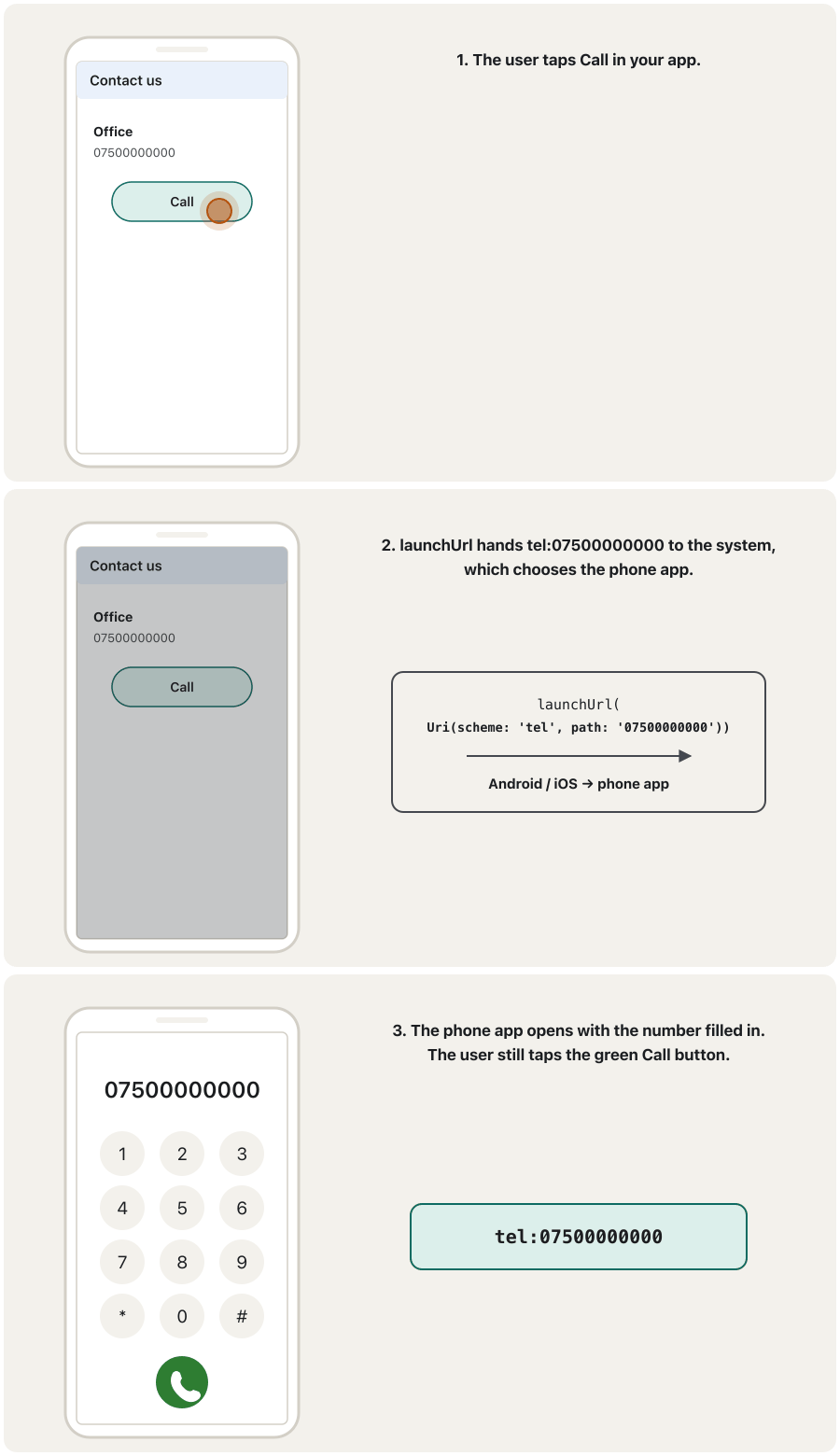
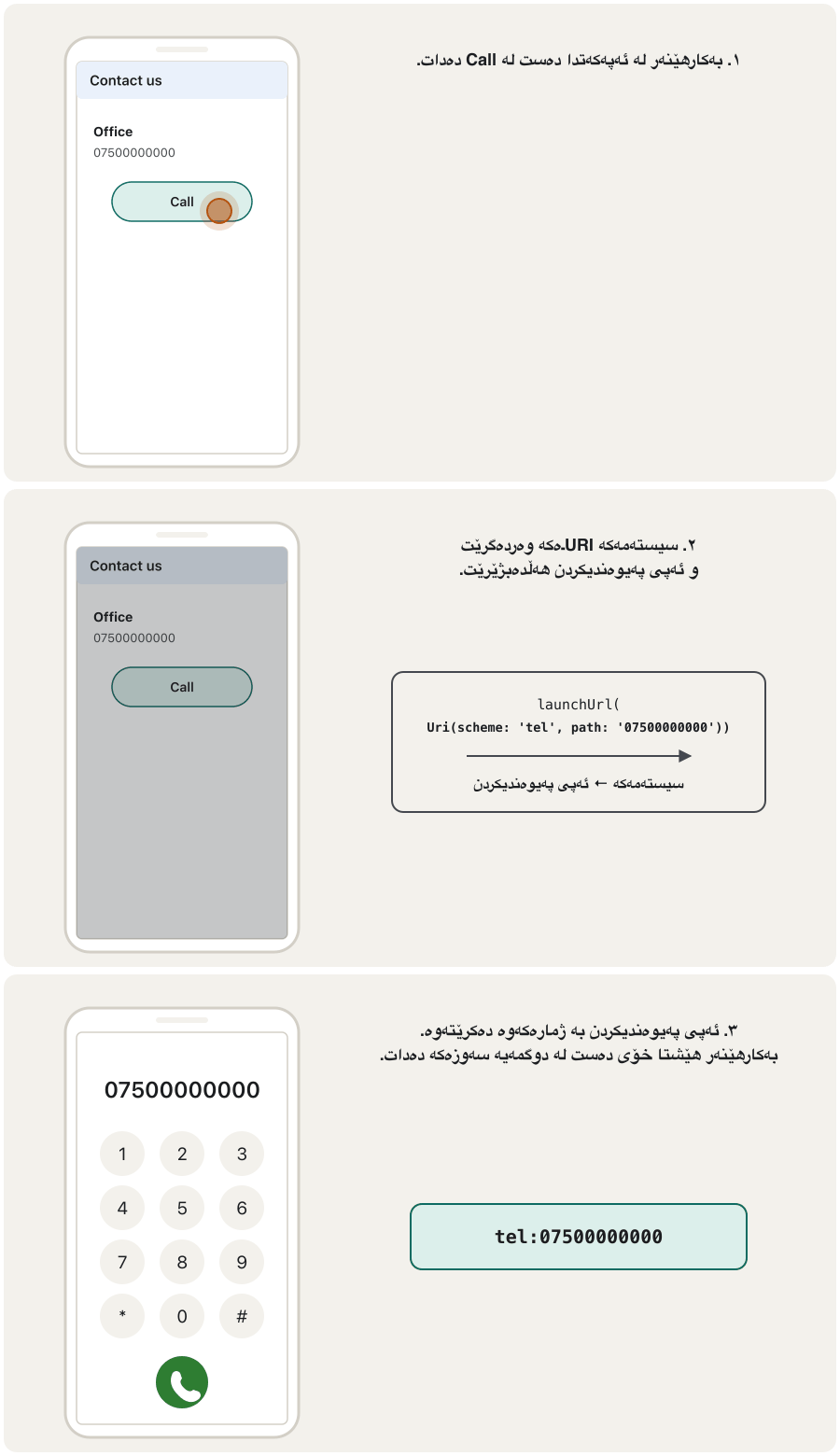
url_launcher can do more than websites. The first example in the notes: the user picks a phone number in the app and calls it. The link uses the tel scheme, and the number is the path:
url_launcher زیاتر لە دەکات. یەکەم نموونەی تێبینییەکان: ژمارە تەلەفۆنێک لە هەڵدەبژێرێت و پەیوەندیی پێوە دەکات. tel بەکار دەهێنێت و ژمارەکە :
phoneCall() async{

  final Uri callURL = Uri(
    scheme: 'tel',
    path: '077210'
  );

  await launchUrl(callURL);
}tel:077210
The same idea, written for today's Flutter, with a return type and an error:
هەمان بیرۆکە، نووسراو بۆ ئەمڕۆ، بە جۆری و :
import 'package:flutter/material.dart';
import 'package:url_launcher/url_launcher.dart';

Future<void> phoneCall() async {
  final Uri callUrl = Uri(scheme: 'tel', path: '07500000000');

  if (!await launchUrl(callUrl)) {
    throw Exception('Could not open the phone app for $callUrl');
  }
}

class CallButton extends StatelessWidget {
  const CallButton({super.key});

  @override
  Widget build(BuildContext context) {
    return FilledButton.icon(
      onPressed: phoneCall,
      icon: const Icon(Icons.call),
      label: const Text('Call'),
    );
  }
}tel:07500000000
Explain the codeڕوونکردنەوەی کۆدەکە
- Lineدێڕی 4
Future<void>: the notes'phoneCall() asynchad no return type.Future<void>:phoneCall() asyncـی تێبینییەکان جۆری نەبوو.- Lineدێڕی 5
tel:07500000000. No//and no host: the whole number is the path.tel:07500000000. نە//و نە : هەموو ژمارەکە .- Lineدێڕی 7-9
Tell the developer if no phone app could open it.
ئەگەر هیچ پەیوەندیکردن نەیتوانی بیکاتەوە بە بڵێ.
SMS, e-mail and the other schemesنامەی کورت، ئیمەیڵ و سکیمەکانی تر
The notes list two more launchers: send an SMS, where the user sends a message to a number, and send an e-mail, where the user chooses whom to write to, enters a subject and a body, and sends it. The url_launcher README lists the schemes it supports:
تێبینییەکان دوو کردنەوەی تر ڕیز دەکەن: ناردنی ، کە نامەیەک بۆ ژمارەیەک دەنێرێت؛ هەروەها ناردنی ، کە هەڵدەبژێرێت بۆ کێ بنووسێت، بابەت و دەقێک دەنووسێت و دەینێرێت. READMEـی url_launcher ئەو ڕیز دەکات کە پشتگیرییان دەکات:
| Scheme | Exampleنموونە | What opensچی دەکرێتەوە |
|---|---|---|
https: | https://flutter.dev | The browser |
mailto: | mailto:teacher@example.com?subject=News&body=Hello | A new e-mail in the e-mail app نوێ لە |
tel: | tel:07500000000 | The phone app, ready to call پەیوەندیکردن، ئامادە بۆ پەیوەندی |
sms: | sms:07500000000 | The messaging app نامەکان |
file: | file:/home | A file or folder with its default app (desktop only) یان بە بنەڕەتییەکەی (تەنها ڕوومێز) |
An SMS or e-mail link with text inside it (?body=…, ?subject=…) must be percent-encoded correctly, and the course's own examples get this wrong in a subtle way. That is the whole next lesson: Building URIs in Dart: SMS and e-mail links.
یان کە دەقی تێدایە (?body=…، ?subject=…) دەبێت بە دروستی بە بنووسرێت و نموونەکانی خودی وانەکە لەمەدا هەڵەیەکی ورد دەکەن. ئەمە هەموو وانەی داهاتووە: دروستکردنی URI لە Dartـدا: بەستەرەکانی نامەی کورت و ئیمەیڵ.
Android and iOS settings: when are they needed?ڕێکخستنەکانی Android و iOS: کەی پێویستن؟
Sometimes an app wants to know before the tap whether a link can open, for example to hide an SMS button on a tablet with no SMS app. url_launcher has canLaunchUrl(uri) for this. But phones protect their users' privacy: an app may not freely look at which other apps are installed. So for canLaunchUrl you must declare, in each platform's manifest, which kinds of links you will ask about. The notes show both files:
هەندێک جار دەیەوێت پێش دەستلێدان بزانێت ئایا دەکرێتەوە، بۆ نموونە بۆ شاردنەوەی لەسەر تابلێتێک کە نییە. url_launcher بۆ ئەمە canLaunchUrl(uri)ـی هەیە. بەڵام مۆبایلەکان دەپارێزن: ناتوانێت بە ئازادی سەیری ئەوە بکات کە کام تر دامەزراون. بۆیە بۆ canLaunchUrl دەبێت لە هەر ڕابگەیەنیت کە پرسیار دەربارەی کام جۆرە دەکەیت. تێبینییەکان هەردوو پیشان دەدەن:
<queries>
    <!-- If your app opens https URLs -->
    <intent>
        <action android:name="android.intent.action.VIEW"/>
        <data android:scheme="https"/>
    </intent>
    <!-- If your app makes calls -->
    <intent>
        <action android:name="android.intent.action.DIAL"/>
        <data android:scheme="tel"/>
    </intent>
    <!-- If your sends SMS messages -->
    <intent>
        <action android:name="android.intent.action.SENDTO"/>
        <data android:scheme="smsto"/>
    </intent>
    <!-- If your app sends emails -->
    <intent>
        <action android:name="android.intent.action.SEND"/>
        <data android:mimetype="*/*"/>
    </intent>
</queries><key>LSApplicationQueriesSchemes</key>
<array>
<string>https</string>
<string>http</string>
<string>tel</string>
<string>mailto</string>
</array>Android and iOS settings: when are they needed?ڕێکخستنەکانی Android و iOS: کەی پێویستن؟
What url_launcher needs todayurl_launcher ئەمڕۆ چی پێویستە
- Android 11 (API 30) and newer hides other apps from yours unless the manifest's
<queries>element (a child of<manifest>, not of<application>) names the kinds of link you check. Without it,canLaunchUrlusually returnsfalse. - iOS needs every scheme you pass to
canLaunchUrlinLSApplicationQueriesSchemesinInfo.plist; otherwise it returnsfalse. launchUrlitself does not need these entries. Android's documentation says that starting another app's activity, including opening a URL, needs no<queries>. If your app simply callslaunchUrland handles a failure, you can leave the files alone.
- Android 11 (API 30) و نوێتر تر لە دەشارێتەوە مەگەر توخمی
<queries>ـی (منداڵی<manifest>، نەک<application>) ئەو جۆرە ناو ببات کە دەیانپشکنیت. بەبێ ئەو،canLaunchUrlزۆرجارfalseدەگەڕێنێتەوە. - iOS پێویستی بە هەموو ئەو هەیە کە دەیدەیتە
canLaunchUrlلەLSApplicationQueriesSchemesـیInfo.plistـدا؛ ئەگەرناfalseدەگەڕێنێتەوە. - خودی
launchUrlپێویستی بەم تۆمارانە نییە. بەڵگەنامەکانی Android دەڵێن دەستپێکردنی چالاکییەکی تر، لەوانە کردنەوەی ، هیچ<queries>ـێکی ناوێت. ئەگەر تەنها بانگیlaunchUrlدەکات و مامەڵە لەگەڵ شکست دەکات، دەتوانیت وەک خۆیان بهێڵیتەوە.
<manifest xmlns:android="http://schemas.android.com/apk/res/android">
    <queries>
        <!-- If your app checks for https support -->
        <intent>
            <action android:name="android.intent.action.VIEW" />
            <data android:scheme="https" />
        </intent>
        <!-- If your app checks for call support -->
        <intent>
            <action android:name="android.intent.action.VIEW" />
            <data android:scheme="tel" />
        </intent>
        <!-- If your app checks for SMS support -->
        <intent>
            <action android:name="android.intent.action.VIEW" />
            <data android:scheme="sms" />
        </intent>
        <!-- If your app checks for e-mail support -->
        <intent>
            <action android:name="android.intent.action.VIEW" />
            <data android:scheme="mailto" />
        </intent>
    </queries>
    <application ...>
        ...
    </application>
</manifest>
Explain the codeڕوونکردنەوەی کۆدەکە
- Lineدێڕی 2
<queries>sits directly inside<manifest>, before<application>.<queries>ڕاستەوخۆ لەناو<manifest>ـدایە، پێش<application>.- Lineدێڕی 5-6
url_launcher checks a link with the VIEW action, so each entry uses VIEW and the link's scheme.
url_launcher بە
actionـیVIEWدەپشکنێت، بۆیە هەر تۆمارێکVIEWو بەکار دەهێنێت.
Android and iOS settings: when are they needed?ڕێکخستنەکانی Android و iOS: کەی پێویستن؟
canLaunchUrl in codecanLaunchUrl لە کۆددا
With the entries in place, canLaunchUrl can answer. This button asks once, when it appears, and hides itself if no app can send an SMS:
کاتێک تۆمارەکان هەبن، canLaunchUrl دەتوانێت وەڵام بداتەوە. ئەم کاتێک دەردەکەوێت یەک جار پرسیار دەکات و ئەگەر هیچ نەتوانێت بنێرێت خۆی دەشارێتەوە:
import 'package:flutter/material.dart';
import 'package:url_launcher/url_launcher.dart';

class SmsButton extends StatefulWidget {
  const SmsButton({super.key});

  @override
  State<SmsButton> createState() => _SmsButtonState();
}

class _SmsButtonState extends State<SmsButton> {
  final Uri _sms = Uri(scheme: 'sms', path: '07500000000');
  bool _canSendSms = false;

  @override
  void initState() {
    super.initState();
    _check();
  }

  Future<void> _check() async {
    // Needs <queries> (Android) and LSApplicationQueriesSchemes (iOS)
    final bool result = await canLaunchUrl(_sms);
    if (!mounted) return;
    setState(() => _canSendSms = result);
  }

  @override
  Widget build(BuildContext context) {
    if (!_canSendSms) return const SizedBox.shrink(); // hide the button
    return OutlinedButton(
      onPressed: () => launchUrl(_sms),
      child: const Text('Send SMS'),
    );
  }
}
Explain the codeڕوونکردنەوەی کۆدەکە
- Lineدێڕی 21-26
Ask once, when the widget appears. Remember the answer with setState.
یەک جار پرسیار بکە، کاتێک دەردەکەوێت. وەڵامەکە بە setState لەبیر بکە.
- Lineدێڕی 30
Hide the button when no app can send SMS.
کاتێک هیچ ناتوانێت بنێرێت بشارەوە.
Common mistakesهەڵە باوەکان
| Mistakeهەڵە | What happensچی ڕوو دەدات | Fixچاککردن |
|---|---|---|
| Hot reload after adding url_launcher دوای زیادکردنی url_launcher | MissingPluginExceptionMissingPluginException | Stop the app and run it again ڕابگرە و دووبارە کاری پێ بکەرەوە |
Only checking the bool from launchUrlتەنها پشکنینی boolـی launchUrl | A PlatformException on Android when no app handles the linkPlatformException لە Androidـدا کاتێک هیچ کار بە ناکات | Wrap it in try/catch and show a messageبیخە ناو try/catch و پەیامێک پیشان بدە |
throw 'Could not launch $url';throw 'Could not launch $url'; | A String is thrown; catch blocks and tools expect exceptions فڕێ دەدرێت؛ بلۆکەکانی catch و ئامرازەکان چاوەڕێی دەکەن | throw Exception('Could not launch $url');throw Exception('Could not launch $url'); |
canLaunchUrl without manifest entriescanLaunchUrl بەبێ تۆماری | It returns false, so the button never showsfalse دەگەڕێنێتەوە، بۆیە هەرگیز دەرناکەوێت | Add <queries> (Android) and LSApplicationQueriesSchemes (iOS), or just try launchUrl<queries> (Android) و LSApplicationQueriesSchemes (iOS) زیاد بکە، یان تەنها launchUrl تاقی بکەرەوە |
<queries> inside <application><queries> لەناو <application>ـدا | Ignoredپشتگوێ دەخرێت | Put it directly inside <manifest>ڕاستەوخۆ بیخە ناو <manifest> |
Testing tel: or mailto: on the iOS Simulatorتاقیکردنەوەی tel: یان mailto: لەسەر iOS | Nothing opensهیچ شتێک ناکرێتەوە | Test on a real phoneلەسەر مۆبایلێکی ڕاستەقینە تاقی بکەرەوە |
Expecting tel: to call by itselfچاوەڕوانیی ئەوەی tel: خۆی پەیوەندی بکات | The phone app opens and waits پەیوەندیکردن دەکرێتەوە و چاوەڕێ دەکات | This is correct behaviour: the user taps Callئەمە هەڵسوکەوتی دروستە: دەست لە Call دەدات |
Exercisesڕاهێنانەکان
Write the three things you do, in order, to use url_launcher in a new project.
ئەو سێ شتەی دەیکەیت، بە ڕیز، بنووسە بۆ بەکارهێنانی url_launcher لە پڕۆژەیەکی نوێدا.
Show answerوەڵامەکە پیشان بدە
- Run
flutter pub add url_launcher(it addsurl_launcher: ^6.3.3topubspec.yaml). - Add
import 'package:url_launcher/url_launcher.dart';to the Dart file. - Stop the app and run it again (a plugin needs a full build).
flutter pub add url_launcherجێبەجێ بکە (url_launcher: ^6.3.3بۆpubspec.yamlزیاد دەکات).import 'package:url_launcher/url_launcher.dart';بۆ زیاد بکە.- ڕابگرە و دووبارە کاری پێ بکەرەوە ( پێویستی بە تەواو هەیە).
Write a function openCourseSite() that opens https://www.example.com/courses in the phone's browser app (not inside your app) and throws an Exception if it fails.
openCourseSite() بنووسە کە https://www.example.com/courses لە مۆبایلەکەدا (نەک لەناو ) بکاتەوە و ئەگەر شکستی هێنا Exceptionـێک فڕێ بدات.
Show answerوەڵامەکە پیشان بدە
Future<void> openCourseSite() async {
  final url = Uri.parse('https://www.example.com/courses');
  if (!await launchUrl(url, mode: LaunchMode.externalApplication)) {
    throw Exception('Could not launch $url');
  }
}Fix the notes' phoneCall for today's Dart: give it a return type, use the number 07500000000, and report a failure.
phoneCallـی تێبینییەکان بۆ ئەمڕۆ چاک بکە: جۆری بدەرێ، ژمارەی 07500000000 بەکار بهێنە و شکست ڕابگەیەنە.
Show answerوەڵامەکە پیشان بدە
Future<void> phoneCall() async {
  final Uri callUrl = Uri(scheme: 'tel', path: '07500000000');
  if (!await launchUrl(callUrl)) {
    throw Exception('Could not open the phone app for $callUrl');
  }
}
The Uri is tel:07500000000. The phone app opens with the number; the user taps Call.
tel:07500000000ـە. پەیوەندیکردن بە ژمارەکەوە دەکرێتەوە؛ دەست لە Call دەدات.
Your app shows a Call button only if canLaunchUrl(Uri(scheme: 'tel', path: '1')) is true, on Android and iOS. Write the Android <queries> entry and the iOS Info.plist entry it needs.
Call تەنها کاتێک پیشان دەدات کە canLaunchUrl(Uri(scheme: 'tel', path: '1')) ڕاست بێت، لە Android و iOSـدا. ئەو تۆمارەی <queries>ـی Android و تۆماری Info.plistـی iOS بنووسە کە پێویستیەتی.
Show answerوەڵامەکە پیشان بدە
<!-- AndroidManifest.xml, inside <manifest> -->
<queries>
    <intent>
        <action android:name="android.intent.action.VIEW" />
        <data android:scheme="tel" />
    </intent>
</queries><!-- ios/Runner/Info.plist -->
<key>LSApplicationQueriesSchemes</key>
<array>
<string>tel</string>
</array>Write a link for each: (a) open the website www.example.com; (b) open the phone app with 07500000000; (c) open Messages to 07500000000 with no text; (d) start an e-mail to office@example.com.
بۆ هەر یەکێک بنووسە: (أ) کردنەوەی www.example.com؛ (ب) کردنەوەی پەیوەندیکردن بە 07500000000ـەوە؛ (ج) کردنەوەی نامەکان بۆ 07500000000 بەبێ دەق؛ (د) دەستپێکردنی بۆ office@example.com.
Show answerوەڵامەکە پیشان بدە
- (a)
https://www.example.com - (b)
tel:07500000000 - (c)
sms:07500000000 - (d)
mailto:office@example.com
- (أ)
https://www.example.com - (ب)
tel:07500000000 - (ج)
sms:07500000000 - (د)
mailto:office@example.com
Summaryپوختە
- url_launcher (6.3.3) is a plugin: a package with Android and iOS code. Add it with
flutter pub add url_launcher, importpackage:url_launcher/url_launcher.dart, and restart the app. launchUrl(uri)hands a URI to the operating system, which opens the app for its scheme:https:browser,tel:phone,sms:messages,mailto:e-mail.- It returns
Future<bool>; it can also throwPlatformException. Handle both and show the user a message. mode:chooses where web pages open (externalApplication,inAppBrowserView…).- A
tel:link fills in the number; the user still taps Call. <queries>(Android 11+) andLSApplicationQueriesSchemes(iOS) are needed only forcanLaunchUrl.
- url_launcher (6.3.3) : بە کۆدی Android و iOSـەوە. بە
flutter pub add url_launcherزیادی بکە،package:url_launcher/url_launcher.dartimport بکە و دووبارە دەست پێ بکەرەوە. launchUrl(uri)دەداتە ، کە دەکاتەوە:https:،tel:پەیوەندیکردن،sms:نامەکان،mailto:.Future<bool>دەگەڕێنێتەوە؛ دەشتوانێتPlatformExceptionفڕێ بدات. مامەڵە لەگەڵ هەردووکیان بکە و پەیامێک بە پیشان بدە.mode:هەڵدەبژێرێت لە کوێ بکرێنەوە (externalApplication،inAppBrowserView…).-
tel:ژمارەکە دەنووسێت؛ هێشتا خۆی دەست لە Call دەدات. <queries>(Android 11+) وLSApplicationQueriesSchemes(iOS) تەنها بۆcanLaunchUrlپێویستن.
Why is url_launcher called a plugin and not just a package?بۆچی بە url_launcher دەوترێت پاشکۆ نەک تەنها کتێبخانە؟
Because it contains platform code (Kotlin/Java and Swift/Objective-C) to talk to Android and iOS.
چونکە کۆدی (Kotlin/Java و Swift/Objective-C) تێدایە بۆ قسەکردن لەگەڵ Android و iOS.
Does a tel: link start the call?ئایا بەستەرێکی tel: پەیوەندییەکە دەست پێ دەکات؟
No. It opens the phone app with the number; the user decides and taps Call.
نەخێر. پەیوەندیکردن بە ژمارەکەوە دەکاتەوە؛ بڕیار دەدات و دەست لە Call دەدات.
When do you need <queries> in AndroidManifest.xml?کەی پێویستت بە <queries> لە AndroidManifest.xmlـدا هەیە؟
When your app calls canLaunchUrl on Android 11 or newer. Plain launchUrl does not need it.
کاتێک لەسەر Android 11 یان نوێتر بانگی canLaunchUrl دەکات. launchUrlـی سادە پێویستی پێی نییە.
Videoڤیدیۆ
Watch a videoسەیری ڤیدیۆیەک بکە
A video that viewers liked a lot and praised in their comments, chosen for this lesson.ڤیدیۆیەک کە بینەران زۆریان پێ خۆش بووە و لە کۆمێنتەکانیاندا ستایشیان کردووە، بۆ ئەم وانەیە هەڵبژێردراوە.
In Central Kurdish, by CêIT's author: url_launcher in a Flutter app: opening a website, a phone call, an e-mail and an SMS with launchUrl.
بە کوردیی ناوەندی، لەلایەن نووسەری CêITـەوە: url_launcher لە — کردنەوەی ، پەیوەندییەکی تەلەفۆنی، و بە launchUrl.
Whole video (12:22): the buttons of this lesson (a website, a call, an e-mail and an SMS) built step by step with launchUrl on an Android emulator.
هەموو ڤیدیۆکە (12:22): ئەم وانەیە — ، پەیوەندیی تەلەفۆنی، و — هەنگاو بە هەنگاو بە launchUrl لەسەر Android دروست دەکرێن.
Lesson complete!وانەکە تەواو بوو!
Well done. Review the key terms, then go on to the next lesson.دەستخۆش. سەیرێکی زاراوە سەرەکییەکان بکەرەوە، پاشان بڕۆ بۆ وانەی داهاتوو.
Key termsزاراوە سەرەکییەکان
Building URIs in Dart: SMS and E-mail Linksدروستکردنی URI لە Dartـدا: بەستەرەکانی نامەی کورت و ئیمەیڵ
Related lecturesوانە پەیوەندیدارەکان
- Building URIs in Dart: SMS and E-mail Linksدروستکردنی URI لە Dartـدا: بەستەرەکانی نامەی کورت و ئیمەیڵ
- Setting Up Flutter and Your First Projectئامادەکردنی Flutter و یەکەم پڕۆژەکەت
- Navigation: Moving Between Screensڕێنیشاندان: جووڵان لە نێوان شاشەکاندا
- Mobile Operating Systemsسیستەمەکانی وەگەڕخەری مۆبایل
- MaterialApp and ScaffoldMaterialApp و Scaffold
References and further readingسەرچاوەکان و خوێندنەوەی زیاتر
This lecture is a first edition. The Kurdish text and terminology are waiting for review by Kurdish IT teachers.ئەم وانەیە چاپی یەکەمە. دەقە کوردییەکە و زاراوەکانی چاوەڕێی پێداچوونەوەی مامۆستایانی کوردی بواری IT ن.