FlutterFlutter · Chapterبەش 7 · Lectureوانە 7.3
Main-Axis and Cross-Axis Alignmentڕێکخستنی شوێن لەسەر تەوەرەی سەرەکی و تەوەرەی ئاوەڵ
Where the free space of a Row or Column goes: the six MainAxisAlignment values with their gap formulas, MainAxisSize.min and max, the five CrossAxisAlignment values (baseline needs textBaseline, stretch needs a bounded height), the same values in a Column, start and end in Kurdish apps, and WidgetStateProperty instead of MaterialStateProperty.
بۆشایی بەتاڵی Row یان Column دەچێتە کوێ: شەش نرخەکەی MainAxisAlignment لەگەڵ هاوکێشەی بۆشاییەکانیان، MainAxisSize.min و max، پێنج نرخەکەی CrossAxisAlignment (baseline پێویستی بە textBaseline هەیە، stretch پێویستی بە بەرزیی سنووردار هەیە)، هەمان نرخەکان لە Columnـدا، start و end لە کوردیدا و WidgetStateProperty لە جیاتی MaterialStateProperty.
What you will learnچی فێر دەبیت
- Explain free space and predict where each MainAxisAlignment value puts the children, including the gap sizes.
- Choose MainAxisSize.max or min, and know why min leaves nothing to align.
- Use the five CrossAxisAlignment values, with textBaseline for baseline and a bounded height for stretch.
- Align the children of a Column, and read start and end correctly in a Kurdish app.
- بۆشایی بەتاڵ ڕوون بکەیتەوە و پێشبینی بکەیت هەر نرخێکی MainAxisAlignment منداڵەکان لە کوێ دادەنێت، لەگەڵ قەبارەی بۆشاییەکان.
- MainAxisSize.max یان min هەڵبژێریت و بزانیت بۆچی min هیچ بۆ ناهێڵێت.
- پێنج نرخەکەی CrossAxisAlignment بەکار بهێنیت، لەگەڵ textBaseline بۆ baseline و بەرزیی سنووردار بۆ stretch.
- منداڵەکانی Column ڕێک بخەیت و start و end لە کوردیدا بە دروستی بخوێنیتەوە.
Free space: what alignment moves aroundبۆشایی بەتاڵ: ئەوەی ڕێکخستنی شوێن دەیجووڵێنێت
A Row is usually wider than its children together. The width that is left over is the free space. Alignment decides where that free space goes: before the children, after them, between them, or around them. The course starts with this Row of two buttons, an icon and a big round button:
Row زۆرجار لە کۆی منداڵەکانی پانترە. ئەو پانییەی دەمێنێتەوە پێی دەوترێت بۆشایی بەتاڵ. دیاری دەکات ئەو بۆشاییە بەتاڵە دەچێتە کوێ: پێش منداڵەکان، دوایان، لە نێوانیان یان بە دەوریاندا. وانەکان بەم Rowـە دەست پێ دەکەن کە دوو ، و خڕی گەورەی تێدایە:
return Center(
  child: Row(
    children: [
      ElevatedButton(onPressed: () {}, child: const Text('BTN 1')),
      const Icon(Icons.ac_unit, size: 64, color: Colors.blue),
      ElevatedButton(
        onPressed: () {},
        style: ElevatedButton.styleFrom(
          minimumSize: const Size.square(100),
        ),
        child: const Text('Button2'),
      ),
      ElevatedButton(onPressed: () {}, child: const Text('BTN3')),
    ],
  ),
);
Explain the codeڕوونکردنەوەی کۆدەکە
- Lineدێڕی 5
An icon 64 pixels big.
٦٤ .
- Lineدێڕی 8-10
minimumSize: Size.square(100)makes Button2 at least 100 × 100. In Material 3 buttons have a 'stadium' shape, so a square button is a circle.minimumSize: Size.square(100)وا دەکات Button2 لانیکەم بێت. لە Material 3ـدا شێوەی یاریگا (stadium)ـیان هەیە، بۆیە چوارگۆشە دەبێتە بازنە.
MainAxisAlignment: six ways to place childrenMainAxisAlignment: شەش ڕێگا بۆ دانانی منداڵەکان
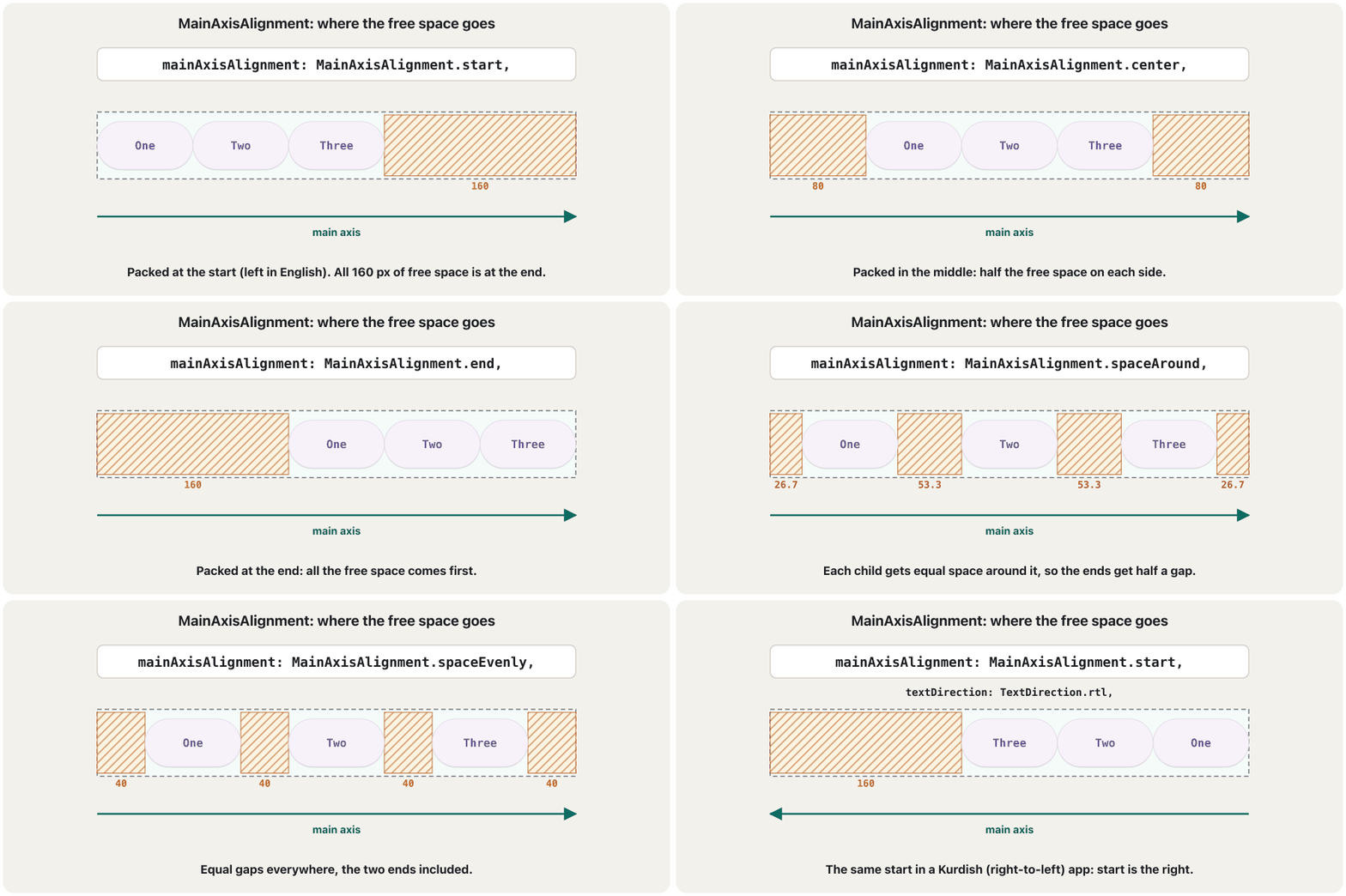
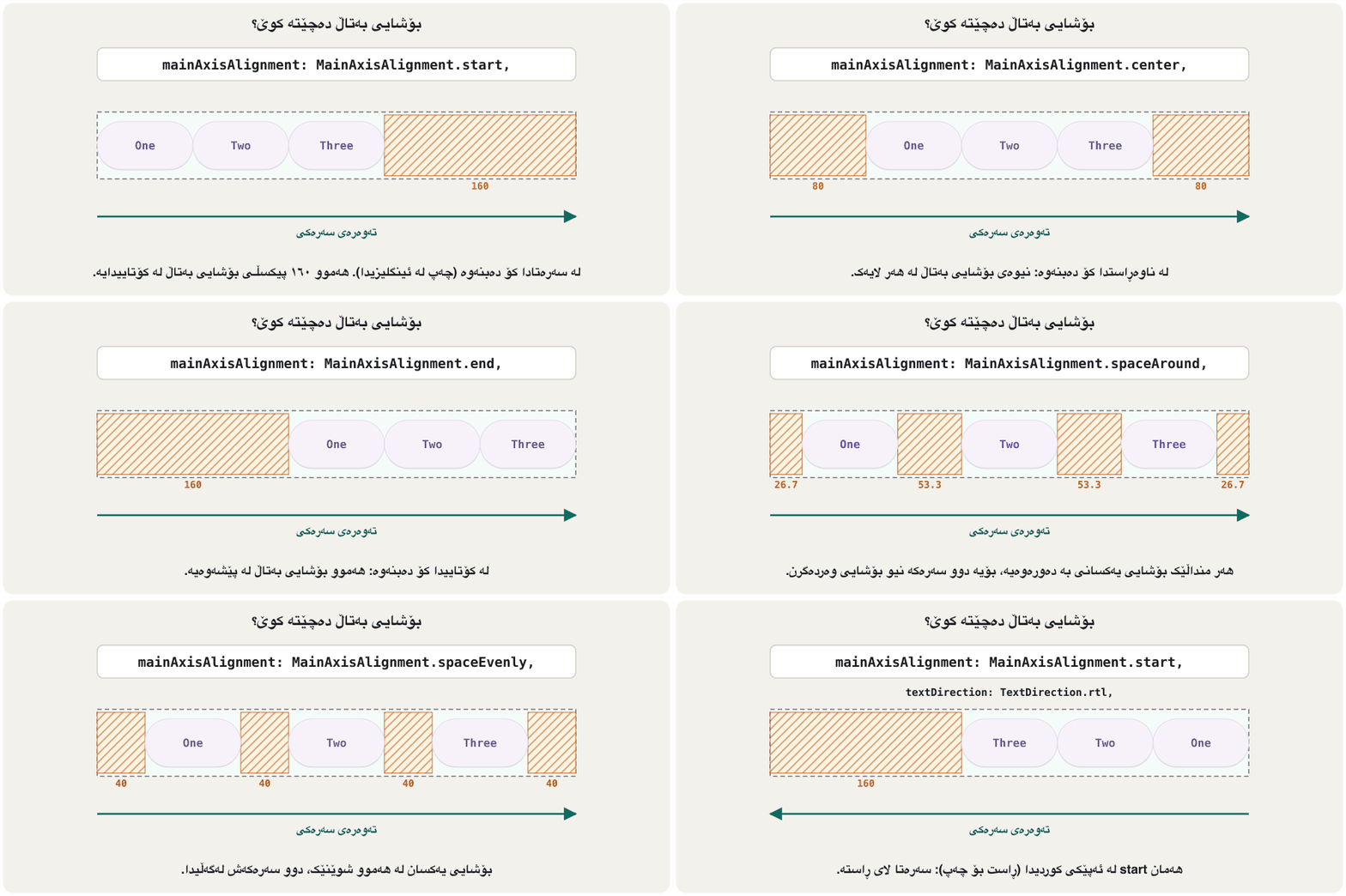
mainAxisAlignment places the children along the main axis (across in a Row, down in a Column). It has six values:
mainAxisAlignment منداڵەکان بە درێژایی دادەنێت (ئاسۆیی لە Rowـدا، بەرەو خوار لە Columnـدا). شەش نرخی هەیە:
| Valueنرخ | Where the free space goesبۆشایی بەتاڵ دەچێتە کوێ |
|---|---|
start | All at the end: children packed at the start (the default).هەمووی لە کۆتایی: منداڵەکان لە سەرەتادا کۆ دەبنەوە (بنەڕەت). |
center | Half before, half after: children packed in the middle.نیوەی لە پێش و نیوەی لە دوا: منداڵەکان لە ناوەڕاستدا کۆ دەبنەوە. |
end | All at the start: children packed at the end.هەمووی لە سەرەتا: منداڵەکان لە کۆتاییدا کۆ دەبنەوە. |
spaceBetween | Only between the children; none at the two ends.تەنها لە نێوان منداڵەکاندا؛ لە دوو سەرەکە هیچ. |
spaceAround | Equal space around each child, so the ends get half a gap.بۆشایی یەکسان بە دەوری هەر منداڵێکدا، بۆیە دوو سەرەکە نیو بۆشایی وەردەگرن. |
spaceEvenly | Equal gaps everywhere, the two ends included.بۆشایی یەکسان لە هەموو شوێنێک، دوو سەرەکەش. |
return Row(
  mainAxisAlignment: alignment, // try start, center, end, spaceBetween…
  children: [
    ElevatedButton(onPressed: () {}, child: const Text('Button 1')),
    ElevatedButton(
      onPressed: () {},
      style: ElevatedButton.styleFrom(
        minimumSize: const Size.square(100),
      ),
      child: const Text('Button 2'),
    ),
    ElevatedButton(
      onPressed: () {},
      child: const Text('Very Long Button 3'),
    ),
  ],
);
Explain the codeڕوونکردنەوەی کۆدەکە
- Lineدێڕی 2
Change this one line to see all six values.
ئەم یەک دێڕە بگۆڕە تا هەر شەش نرخەکە ببینیت.
MainAxisAlignment: six ways to place childrenMainAxisAlignment: شەش ڕێگا بۆ دانانی منداڵەکان
start, center and endstart، center و end
The first three values pack the children together and move the whole group. The course shows start (the default) and center:
یەکەم سێ نرخ منداڵەکان پێکەوە کۆ دەکەنەوە و هەموو گرووپەکە دەجووڵێنن. وانەکان start (بنەڕەت) و center پیشان دەدەن:
return Row(
  mainAxisAlignment: MainAxisAlignment.start,
  children: [
    ElevatedButton(onPressed: () {}, child: const Text('Button 1')),
    ElevatedButton(onPressed: () {}, child: const Text('Button 2')),
  ],
);

return Row(
  mainAxisAlignment: MainAxisAlignment.center,
  children: [
    ElevatedButton(onPressed: () {}, child: const Text('Button 1')),
    ElevatedButton(onPressed: () {}, child: const Text('Button 2')),
  ],
);
Explain the codeڕوونکردنەوەی کۆدەکە
- Lineدێڕی 2
start: the buttons sit at the start of the Row.
start: لە سەرەتای Rowـەکەدان.
- Lineدێڕی 10
center: the same buttons, together in the middle.
center: هەمان ، پێکەوە لە ناوەڕاستدا.
MainAxisAlignment: six ways to place childrenMainAxisAlignment: شەش ڕێگا بۆ دانانی منداڵەکان
spaceBetween, spaceAround and spaceEvenlyspaceBetween، spaceAround و spaceEvenly
The three space values spread the children out. Each divides the free space among the gaps in its own way. With children:
سێ نرخە spaceـەکە منداڵەکان بڵاو دەکەنەوە. هەر یەکەیان بە شێوەی خۆی بۆشایی بەتاڵ بەسەر بۆشاییەکاندا دابەش دەکات. بە منداڵ:
| Valueنرخ | Gap between childrenبۆشایی لە نێوان منداڵەکان | Space at each endبۆشایی لە هەر سەرێک |
|---|---|---|
spaceBetween | ||
spaceAround | ||
spaceEvenly |
A 400-wide Row holds three children 80 wide each. Find the free space.
Rowـێکی ٤٠٠ پان سێ منداڵی ٨٠ پانی تێدایە. بۆشایی بەتاڵ بدۆزەرەوە.
spaceBetween: two gaps share it.
spaceBetween: دوو بۆشایی دابەشی دەکەن.
between the children; nothing at the ends
لە نێوان منداڵەکاندا؛ لە سەرەکان هیچ
spaceAround: each child gets an equal share around it.
spaceAround: هەر منداڵێک بەشێکی یەکسان بە دەوریدا وەردەگرێت.
53.3 between two children; half of it, 26.7, at each end
لە نێوان دوو منداڵدا؛ نیوەی ئەوە، ، لە هەر سەرێک
spaceEvenly: four equal gaps (two ends and two between).
spaceEvenly: چوار بۆشایی یەکسان (دوو سەر و دوو لە نێوان).
at both ends and between the children
لە هەردوو سەرەکە و لە نێوان منداڵەکاندا
A widget test on a 400-pixel-wide Row gives exactly these positions: with spaceAround the children start at , and .
تاقیکردنەوەیەکی لەسەر Rowـێکی ٤٠٠ پان ڕێک ئەم شوێنانە دەدات: بە spaceAround منداڵەکان لە ، و دەست پێ دەکەن.
MainAxisSize: as big as allowed, or just big enoughMainAxisSize: هێندەی ڕێگە پێدراو، یان تەنها هێندەی پێویست
mainAxisSize decides how long the Row or Column itself is on its main axis:
mainAxisSize دیاری دەکات خودی Row یان Column لەسەر چەند درێژ بێت:
MainAxisSize.max(the default): as long as its parent allows — the whole width for a Row. There is free space to align in.MainAxisSize.min: only as long as its children. There is no free space, somainAxisAlignmenthas nothing to move.
MainAxisSize.max(بنەڕەت): هێندەی ڕێگە بدات — هەموو پانییەکە بۆ Row. بۆشایی بەتاڵ هەیە بۆ .MainAxisSize.min: تەنها هێندەی منداڵەکانی. بۆشایی بەتاڵ نییە، بۆیەmainAxisAlignmentهیچی نییە بیجووڵێنێت.
return DecoratedBox(
  decoration: BoxDecoration(border: Border.all(color: Colors.grey)),
  child: Row(
    mainAxisSize: MainAxisSize.min, // the Row hugs its children
    children: [
      ElevatedButton(onPressed: () {}, child: const Text('Yes')),
      ElevatedButton(onPressed: () {}, child: const Text('No')),
    ],
  ),
);
Explain the codeڕوونکردنەوەی کۆدەکە
- Lineدێڕی 1-2
A grey border shows how big the Row really is.
خۆڵەمێشی پیشان دەدات Rowـەکە بە ڕاستی چەند گەورەیە.
- Lineدێڕی 4
min: the border is only as wide as the two buttons.
min: تەنها هێندەی دوو پانە.
A common use: a small group that a Center should centre. Both the Column and the Row use min, so Center gets a small box to place in the middle:
بەکارهێنانێکی باو: گرووپێکی بچووک کە Center دەبێت بیخاتە ناوەڕاست. هەم Column و هەم Row min بەکار دەهێنن، بۆیە Center سندووقێکی بچووک وەردەگرێت بۆ دانانی لە ناوەڕاست:
return Center(
  child: Column(
    mainAxisSize: MainAxisSize.min,
    children: [
      const Text('Delete this photo?'),
      Row(
        mainAxisSize: MainAxisSize.min,
        children: [
          TextButton(onPressed: () {}, child: const Text('Cancel')),
          FilledButton(onPressed: () {}, child: const Text('Delete')),
        ],
      ),
    ],
  ),
);
Explain the codeڕوونکردنەوەی کۆدەکە
- Lineدێڕی 3
Without
minthe Column would be as tall as the screen and its children would sit at the top.بەبێ
min، Column هێندەی شاشەکە بەرز دەبوو و منداڵەکانی لە سەرەوە دەبوون.- Lineدێڕی 7
The Row also hugs its two buttons, so the Column centres them under the text.
Rowـەکەش تەنها بە دەوری دوو ، بۆیە Column لە ژێر دەقەکەدا دەیانخاتە ناوەڕاست.
CrossAxisAlignment: lining children up acrossCrossAxisAlignment: ڕێککردنی منداڵەکان لەسەر تەوەرەی ئاوەڵ
crossAxisAlignment places each child on the cross axis — up and down in a Row. It matters when the children have different heights, like the course's Row with one big button. The values:
crossAxisAlignment هەر منداڵێک لەسەر دادەنێت — سەرەوە و خوارەوە لە Rowـدا. کاتێک گرنگە کە منداڵەکان بەرزیی جیاوازیان هەبێت، وەک Rowـەکەی وانەکان بە گەورەوە. نرخەکان:
center(the default): the middles line up.start: the tops line up (in a Row; in a Column, the start side).end: the bottoms line up.baseline: the text baselines line up — the line the letters sit on. NeedstextBaselinetoo.stretch: every child is stretched to fill the cross axis.
center(بنەڕەت): ناوەڕاستەکان ڕێک دەبن.start: سەرەکان ڕێک دەبن (لە Rowـدا؛ لە Columnـدا لای سەرەتا).end: خوارەوەکان ڕێک دەبن.baseline: هێڵی ژێرەوەی دەقەکان ڕێک دەبن — ئەو هێڵەی پیتەکان لەسەری دادەنیشن.textBaselineـیشی پێویستە.stretch: هەموو منداڵێک ڕادەکێشرێت تا پڕ بکاتەوە.
return Row(
  crossAxisAlignment: CrossAxisAlignment.start,
  children: [
    ElevatedButton(onPressed: () {}, child: const Text('Button 1')),
    ElevatedButton(
      onPressed: () {},
      style: ElevatedButton.styleFrom(
        minimumSize: const Size.square(100),
      ),
      child: const Text('Button 2'),
    ),
    ElevatedButton(
      onPressed: () {},
      child: const Text('Very Long Button 3'),
    ),
  ],
);
Explain the codeڕوونکردنەوەی کۆدەکە
- Lineدێڕی 2
The tops of the three buttons line up with the top of the 100-pixel Button 2.
سەرەوەی هەر سێ لەگەڵ سەرەوەی Button 2ـی ١٠٠ ڕێک دەبن.
CrossAxisAlignment: lining children up acrossCrossAxisAlignment: ڕێککردنی منداڵەکان لەسەر تەوەرەی ئاوەڵ
baseline and stretch need a little morebaseline و stretch کەمێکی زیاتریان پێویستە
baseline must know which baseline to use, so you also give textBaseline (TextBaseline.alphabetic for Latin and Kurdish text). Without it Flutter stops with the message textBaseline is required if you specify the crossAxisAlignment with CrossAxisAlignment.baseline — and in a const Row the code does not even compile.
baseline دەبێت بزانێت کام هێڵی ژێرەوە بەکار بهێنێت، بۆیە textBaselineـیش دەدەیت (TextBaseline.alphabetic بۆ دەقی لاتینی و کوردی). بەبێ ئەو، Flutter بەم پەیامە دەوەستێت: textBaseline is required if you specify the crossAxisAlignment with CrossAxisAlignment.baseline — و لە Rowـێکی constـدا تەنانەت کۆدەکە قبووڵیش ناکات.
return const Row(
  crossAxisAlignment: CrossAxisAlignment.baseline,
  textBaseline: TextBaseline.alphabetic, // required with baseline
  children: [
    Text('12,000', style: TextStyle(fontSize: 40)),
    Text(' IQD', style: TextStyle(fontSize: 16)),
  ],
);
Explain the codeڕوونکردنەوەی کۆدەکە
- Lineدێڕی 3
Required with baseline: which baseline to line up.
لەگەڵ baseline پێویستە: کام هێڵی ژێرەوە ڕێک بخرێت.
stretch makes every child as tall as the Row. The Row must therefore have a fixed height: inside a SizedBox(height: …) it works, but in a place with unlimited height (for example inside a ListView) there is nothing to stretch to and Flutter reports an error.
stretch هەموو منداڵێک هێندەی Rowـەکە بەرز دەکات. بۆیە Row دەبێت بەرزییەکی دیاریکراوی هەبێت: لە ناو SizedBox(height: …)ـدا کار دەکات، بەڵام لە شوێنێکی بەرزیی بێسنووردا (بۆ نموونە لە ناو ListViewـدا) هیچ شتێک نییە بۆ ڕاکێشان و Flutter ڕادەگەیەنێت.
return SizedBox(
  height: 120,
  child: Row(
    crossAxisAlignment: CrossAxisAlignment.stretch,
    children: [
      ElevatedButton(onPressed: () {}, child: const Text('Btn 1')),
      ElevatedButton(onPressed: () {}, child: const Text('Btn 2')),
    ],
  ),
);
Explain the codeڕوونکردنەوەی کۆدەکە
- Lineدێڕی 1-2
A fixed height for the Row.
بەرزییەکی دیاریکراو بۆ Row.
- Lineدێڕی 4
Both buttons become 120 pixels tall.
هەردوو ١٢٠ بەرز دەبن.
The same values in a Columnهەمان نرخەکان لە Columnـێکدا
A Column uses exactly the same properties, but its axes are turned: mainAxisAlignment works vertically and crossAxisAlignment works horizontally.
Column ڕێک هەمان بەکار دەهێنێت، بەڵام تەوەرەکانی سووڕاون: mainAxisAlignment بە ستوونی کار دەکات و crossAxisAlignment بە ئاسۆیی.
MainAxisAlignment.center: the children in the vertical middle;end: at the bottom;spaceBetween: first at the top, last at the bottom.CrossAxisAlignment.start: at the start side (left in English, right in Kurdish);end: the other side;stretch: every child as wide as the Column.
MainAxisAlignment.center: منداڵەکان لە ناوەڕاستی ستوونی؛end: لە خوارەوە؛spaceBetween: یەکەمیان لە سەرەوە و دوایینیان لە خوارەوە.CrossAxisAlignment.start: لە لای سەرەتا (چەپ لە ئینگلیزیدا، ڕاست لە کوردیدا)؛end: لای بەرامبەر؛stretch: هەموو منداڵێک هێندەی Column پان.
return SizedBox(
  width: double.infinity, // the Column gets the full width to align in
  child: Column(
    mainAxisAlignment: MainAxisAlignment.spaceBetween,
    crossAxisAlignment: CrossAxisAlignment.end,
    children: [
      ElevatedButton(onPressed: () {}, child: const Text('Button 1')),
      ElevatedButton(onPressed: () {}, child: const Text('Button 2')),
      ElevatedButton(
        onPressed: () {},
        child: const Text('Very Long Button 3'),
      ),
    ],
  ),
);
Explain the codeڕوونکردنەوەی کۆدەکە
- Lineدێڕی 2
Full width, so there is room for cross-axis alignment.
پانیی تەواو، بۆ ئەوەی شوێن هەبێت بۆ لەسەر .
- Lineدێڕی 4
First button at the top, last at the bottom.
یەکەم لە سەرەوە و دوایینیان لە خوارەوە.
- Lineدێڕی 5
All buttons at the end side: the right in English, the left in Kurdish.
هەموو لە لای کۆتایی: ڕاست لە ئینگلیزیدا، چەپ لە کوردیدا.
A real screen that uses both: a sign-in form, centred vertically, with fields and a button as wide as the screen.
شاشەیەکی ڕاستەقینە کە هەردووکیان بەکار دەهێنێت: چوونەژوورەوە، بە ستوونی لە ناوەڕاست، بە خانەکان و هێندەی پانیی شاشەکە.
return Padding(
  padding: const EdgeInsets.all(24),
  child: Column(
    mainAxisAlignment: MainAxisAlignment.center,
    crossAxisAlignment: CrossAxisAlignment.stretch,
    children: [
      const TextField(decoration: InputDecoration(labelText: 'Email')),
      const SizedBox(height: 12),
      const TextField(
        obscureText: true,
        decoration: InputDecoration(labelText: 'Password'),
      ),
      const SizedBox(height: 24),
      FilledButton(onPressed: () {}, child: const Text('Sign in')),
    ],
  ),
);
Explain the codeڕوونکردنەوەی کۆدەکە
- Lineدێڕی 4
The whole form sits in the vertical middle of the screen.
هەموو لە ناوەڕاستی ستوونیی شاشەکەدایە.
- Lineدێڕی 5
stretch: the fields and the button fill the width (minus the 24-pixel padding).
stretch: خانەکان و پانییەکە پڕ دەکەنەوە (کەم ٢٤ ).
Common mistakesهەڵە باوەکان
| Mistakeهەڵە | Whyبۆچی | Fixچارەسەر |
|---|---|---|
| mainAxisAlignment does nothingmainAxisAlignment هیچ ناکات | mainAxisSize: min (or the children fill the line): no free space.mainAxisSize: min (یان منداڵەکان هێڵەکە پڕ دەکەنەوە): بۆشایی بەتاڵ نییە. | Use max, or align the Row with its parent.max بەکار بهێنە، یان Row بە ڕێک بخە. |
| crossAxisAlignment does nothing in a ColumncrossAxisAlignment لە Columnـدا هیچ ناکات | The Column is only as wide as its widest child.Column تەنها هێندەی پانترین منداڵی پانە. | SizedBox(width: double.infinity) around it, or stretch.SizedBox(width: double.infinity) بە دەوریدا، یان stretch. |
baseline without textBaselinebaseline بەبێ textBaseline | Flex needs to know which baseline.Flex دەبێت بزانێت کام هێڵی ژێرەوە. | Add textBaseline: TextBaseline.alphabetic.textBaseline: TextBaseline.alphabetic زیاد بکە. |
stretch in a Row with unlimited heightstretch لە Rowـێکی بەرزیی بێسنووردا | There is no height to stretch to.هیچ بەرزییەک نییە بۆ ڕاکێشان. | Give the Row a height (SizedBox) or use another value.بەرزییەک بدە بە Row (SizedBox) یان نرخێکی تر بەکار بهێنە. |
| Thinking start always means leftوا بیرکردنەوە کە start هەمیشە واتە چەپ | start follows the reading direction.start ئاڕاستەی خوێندنەوە دەگرێتە بەر. | In Kurdish, start is the right; test your screen right-to-left.لە کوردیدا start ڕاستە؛ شاشەکەت بە تاقی بکەرەوە. |
Using MaterialStatePropertyبەکارهێنانی MaterialStateProperty | Renamed in Flutter 3.22.لە Flutter 3.22ـدا ناوی گۆڕدرا. | styleFrom(...) or WidgetStatePropertyAll(...).styleFrom(...) یان WidgetStatePropertyAll(...). |
Exercisesڕاهێنانەکان
A Row is 360 pixels wide and holds three children, each 80 wide. Give the gaps for center, spaceBetween, spaceAround and spaceEvenly.
Rowـێک ٣٦٠ پانە و سێ منداڵی تێدایە، هەر یەکە ٨٠ پان. بۆشاییەکان بۆ center، spaceBetween، spaceAround و spaceEvenly بنووسە.
Hintئاماژە
First find the free space F; then count how many gaps share it.
سەرەتا بۆشایی بەتاڵ F بدۆزەرەوە؛ پاشان بژمێرە چەند بۆشایی دابەشی دەکەن.
Show answerوەڵامەکە پیشان بدە
The free space: the Row’s width minus the three children.
بۆشایی بەتاڵ: پانیی Rowـەکە کەم پانیی سێ منداڵەکە.
| Valueنرخ | Space at each endبۆشایی لە هەر سەرێک | Gap between childrenبۆشایی لە نێوان منداڵەکان |
|---|---|---|
center | ||
spaceBetween | ||
spaceAround | ||
spaceEvenly |
Put a Cancel TextButton and an OK FilledButton side by side at the end of a Row, 8 pixels apart. Where do they appear in a Kurdish app?
TextButtonـی Cancel و FilledButtonـی OK لە تەنیشت یەکەوە لە کۆتایی Rowـێکدا دابنێ، ٨ لە یەکتر دوور. لە کوردیدا لە کوێ دەردەکەون؟
Show answerوەڵامەکە پیشان بدە
@override
Widget build(BuildContext context) {
  return Row(
    mainAxisAlignment: MainAxisAlignment.end,
    spacing: 8,
    children: [
      TextButton(onPressed: () {}, child: const Text('Cancel')),
      FilledButton(onPressed: () {}, child: const Text('OK')),
    ],
  );
}
Explain the codeڕوونکردنەوەی کۆدەکە
- Lineدێڕی 4
end: the right in English, the left in Kurdish.
end: ڕاست لە ئینگلیزیدا، چەپ لە کوردیدا.
In a Kurdish app they sit on the left, and Cancel (the first child) is the one nearer the right.
لە کوردیدا لە چەپ دادەنرێن و Cancel (یەکەم منداڵ) ئەوەیە کە نزیکترە لە ڕاست.
This Row should line up 'Tea' and '500 IQD' on one baseline, but Flutter reports an error: Row(crossAxisAlignment: CrossAxisAlignment.baseline, children: [Text('Tea', …), Spacer(), Text('500 IQD', …)]). Fix it.
ئەم Rowـە دەبێت 'Tea' و '500 IQD' لەسەر یەک هێڵی ژێرەوە ڕێک بخات، بەڵام Flutter ڕادەگەیەنێت: Row(crossAxisAlignment: CrossAxisAlignment.baseline, children: [Text('Tea', …), Spacer(), Text('500 IQD', …)]). چاکی بکەرەوە.
Show answerوەڵامەکە پیشان بدە
@override
Widget build(BuildContext context) {
  return const Row(
    crossAxisAlignment: CrossAxisAlignment.baseline,
    textBaseline: TextBaseline.alphabetic,
    children: [
      Text('Tea', style: TextStyle(fontSize: 32)),
      Spacer(),
      Text('500 IQD', style: TextStyle(fontSize: 14)),
    ],
  );
}
Explain the codeڕوونکردنەوەی کۆدەکە
- Lineدێڕی 5
The missing piece: which baseline to use.
پارچە کەمەکە: کام هێڵی ژێرەوە بەکار بهێنرێت.
Show three numbers with labels (12 Posts, 340 Followers, 180 Following) across the screen with equal space everywhere, the edges included.
سێ ژمارە لەگەڵ ناونیشان (12 Posts، 340 Followers، 180 Following) بە پانیی شاشەکەدا پیشان بدە بە بۆشایی یەکسان لە هەموو شوێنێک، لێوارەکانیش.
Show answerوەڵامەکە پیشان بدە
@override
Widget build(BuildContext context) {
  return const Row(
    mainAxisAlignment: MainAxisAlignment.spaceEvenly,
    children: [
      _Stat(value: '12', label: 'Posts'),
      _Stat(value: '340', label: 'Followers'),
      _Stat(value: '180', label: 'Following'),
    ],
  );
}
Explain the codeڕوونکردنەوەی کۆدەکە
- Lineدێڕی 4
spaceEvenly: the same gap before, between and after.
spaceEvenly: هەمان بۆشایی لە پێش، نێوان و دوا.
- Lineدێڕی 6-8
_Statis a small Column: the number above its label._StatColumnـێکی بچووکە: ژمارەکە لە سەرووی ناونیشانەکەیەوە.
class _Stat extends StatelessWidget {
  const _Stat({required this.value, required this.label});

  final String value;
  final String label;

  @override
  Widget build(BuildContext context) {
    return Column(
      children: [
        Text(value, style: const TextStyle(fontSize: 20, fontWeight: FontWeight.bold)),
        Text(label),
      ],
    );
  }
}
Explain the codeڕوونکردنەوەی کۆدەکە
- Lineدێڕی 2
A
constconstructor, so the Row above can beconsttoo.const، بۆ ئەوەی Rowـەکەی سەرەوەش بتوانێتconstبێت.
Centre an inbox icon, the text 'No messages yet' and a 'Write one' button as one group in the middle of the screen, 12 pixels apart.
سندووقی نامە، دەقی 'No messages yet' و 'Write one' وەک یەک گرووپ لە ناوەڕاستی شاشەکەدا دابنێ، ١٢ لە یەکتر دوور.
Show answerوەڵامەکە پیشان بدە
@override
Widget build(BuildContext context) {
  return Center(
    child: Column(
      mainAxisSize: MainAxisSize.min,
      spacing: 12,
      children: [
        const Icon(Icons.inbox, size: 64),
        const Text('No messages yet'),
        FilledButton(onPressed: () {}, child: const Text('Write one')),
      ],
    ),
  );
}
Explain the codeڕوونکردنەوەی کۆدەکە
- Lineدێڕی 5
min: the Column hugs its children, so Center can centre the group.
min: Column تەنها بە دەوری منداڵەکانیدایە، بۆیە Center دەتوانێت گرووپەکە بخاتە ناوەڕاست.
- Lineدێڕی 6
spacing: 12 pixels between the three children.
spacing: ١٢ لە نێوان سێ منداڵەکەدا.
Summaryپوختە
- Free space is the main-axis length of the Row or Column minus the sizes of its children. Alignment moves only the free space, never the children's sizes.
- MainAxisAlignment: start (default), center, end pack the children; spaceBetween (), spaceAround (, half of it at the ends) and spaceEvenly () spread them.
- MainAxisSize.max (default) fills the line; min hugs the children and leaves no free space.
- CrossAxisAlignment: center (default), start, end, stretch (needs a bounded cross axis) and baseline (needs textBaseline).
- In a Column the same values work vertically (main axis) and horizontally (cross axis); give the Column the full width for cross-axis alignment.
- start and end follow the reading direction: in Kurdish, start is the right. MaterialStateProperty is now WidgetStateProperty.
- بۆشایی بەتاڵ بریتییە لە درێژیی Row یان Column لەسەر ، کەم قەبارەی منداڵەکانی. تەنها بۆشاییە بەتاڵەکە دەجووڵێنێت، هەرگیز قەبارەی منداڵەکان ناگۆڕێت.
- MainAxisAlignment: start (بنەڕەت)، center و end منداڵەکان کۆ دەکەنەوە؛ spaceBetween ()، spaceAround (، نیوەی ئەوە لە سەرەکان) و spaceEvenly () بڵاویان دەکەنەوە.
- MainAxisSize.max (بنەڕەت) هێڵەکە پڕ دەکاتەوە؛ min تەنها بە دەوری منداڵەکاندایە و بۆشایی بەتاڵ ناهێڵێت.
- CrossAxisAlignment: center (بنەڕەت)، start، end، stretch ( سنووردار پێویستە) و baseline (textBaseline پێویستە).
- لە Columnـدا هەمان نرخەکان بە ستوونی () و بە ئاسۆیی () کار دەکەن؛ بۆ لەسەر پانیی تەواو بدە بە Column.
- start و end ئاڕاستەی خوێندنەوە دەگرنە بەر: لە کوردیدا start ڕاستە. MaterialStateProperty ئێستا WidgetStatePropertyـە.
What is the difference between spaceAround and spaceEvenly?جیاوازیی نێوان spaceAround و spaceEvenly چییە؟
spaceEvenly makes every gap equal, ends included. spaceAround gives each child equal space on both sides, so the ends get half the gap between children.
spaceEvenly هەموو بۆشاییەکان یەکسان دەکات، سەرەکانیش. spaceAround بۆشایی یەکسان دەداتە هەر دوو لای هەر منداڵێک، بۆیە سەرەکان نیوەی بۆشایی نێوان منداڵەکان وەردەگرن.
Why might CrossAxisAlignment.end not move the children of a Column?بۆچی لەوانەیە CrossAxisAlignment.end منداڵەکانی Column نەجووڵێنێت؟
Because the Column is only as wide as its widest child, so there is no space across. Give it the full width.
چونکە Column تەنها هێندەی پانترین منداڵی پانە، بۆیە بە ئاسۆیی شوێن نییە. پانیی تەواوی بدەرێ.
Where does MainAxisAlignment.end put the buttons of a Row in a Kurdish app?MainAxisAlignment.end لە ئەپێکی کوردیدا دوگمەکانی Row لە کوێ دادەنێت؟
On the left: end is the opposite of start, and start is the right in a right-to-left app.
لە چەپ: end پێچەوانەی startـە و start لە ڕاستە.
Videoڤیدیۆ
Watch a videoسەیری ڤیدیۆیەک بکە
A video that viewers liked a lot and praised in their comments, chosen for this lesson.ڤیدیۆیەک کە بینەران زۆریان پێ خۆش بووە و لە کۆمێنتەکانیاندا ستایشیان کردووە، بۆ ئەم وانەیە هەڵبژێردراوە.
Mitch Koko's calm beginner course in Dart and Flutter: variables, operators, if/else, switch, loops, functions, collections, a first screen and a counter.
کۆرسە ئارامەکەی Mitch Koko بۆ سەرەتاییەکان لە و : ، ، if/else، switch، ، ، List/Set/Map، یەکەم شاشە و .
Watch 37:57-39:36: mainAxisAlignment (center, end, spaceEvenly, spaceBetween) moves three boxes along a Column, then crossAxisAlignment (start, end, center) lines them up across it.
لە 37:57 تا 39:36 سەیر بکە: mainAxisAlignment (center، end، spaceEvenly، spaceBetween) سێ سندووق لەسەر Column دەجووڵێنێت، پاشان crossAxisAlignment (start، end، center) لەسەر ڕیزیان دەکات.
Lesson complete!وانەکە تەواو بوو!
Well done. Review the key terms, then go on to the next lesson.دەستخۆش. سەیرێکی زاراوە سەرەکییەکان بکەرەوە، پاشان بڕۆ بۆ وانەی داهاتوو.
Key termsزاراوە سەرەکییەکان
Lists and Gridsلیست و تۆڕ
Related lecturesوانە پەیوەندیدارەکان
References and further readingسەرچاوەکان و خوێندنەوەی زیاتر
This lecture is a first edition. The Kurdish text and terminology are waiting for review by Kurdish IT teachers.ئەم وانەیە چاپی یەکەمە. دەقە کوردییەکە و زاراوەکانی چاوەڕێی پێداچوونەوەی مامۆستایانی کوردی بواری IT ن.