FlutterFlutter · Chapterبەش 11 · Lectureوانە 11.4
ChangeNotifier, ChangeNotifierProvider and MultiProviderChangeNotifier، ChangeNotifierProvider و MultiProvider
How a ChangeNotifier (a built-in mixin class) holds state and calls its listeners, notifyListeners versus setState, ValueNotifier, the Counter app end to end with ChangeNotifierProvider (and without a package), the lecture's dark-mode checkbox, and several providers nested or in one MultiProvider.
ChangeNotifier (mixin classـێکی ناوەکی) چۆن هەڵدەگرێت و بانگ دەکات، notifyListeners بەرامبەر setState، ValueNotifier، Counter لە سەرەتاوە تا کۆتایی بە ChangeNotifierProvider (و بەبێ )، وانەکە و چەند provider لەناو یەکدا یان لە یەک MultiProviderـدا.
What you will learnچی فێر دەبیت
- Say which classes are built into Flutter and which come from the provider package.
- Write a ChangeNotifier model with private state and notifyListeners, using extends or with.
- Explain how notifyListeners differs from setState and when ValueNotifier is enough.
- Build the Counter app with ChangeNotifierProvider, watch and read, and without a package.
- Provide several values with MultiProvider and explain why it equals nesting.
- بڵێیت کام لەناو Flutterـدان و کامیان لە providerـەوە دێن.
- ChangeNotifier بە تایبەت و notifyListeners بنووسیت، بە extends یان with.
- ڕوون بکەیتەوە notifyListeners چۆن لە setState جیاوازە و کەی ValueNotifier بەسە.
- Counter بە ChangeNotifierProvider، watch و read دروست بکەیت، هەروەها بەبێ هیچ .
- بە MultiProvider چەند نرخێک دابین بکەیت و ڕوون بکەیتەوە بۆچی یەکسانە بە لەناو یەکدانان.
Data that changes and tells everyoneدراوەیەک کە دەگۆڕێت و هەمووان ئاگادار دەکاتەوە
In State Management with Provider you saw a cart model that calls notifyListeners(), and in the last two lessons Consumers and Selectors that listen to such models. This lesson looks at the model side closely: ChangeNotifier and its small brother ValueNotifier, then ChangeNotifierProvider, which puts one into the tree, and MultiProvider, which gives an app several providers at once.
لە بەڕێوەبردنی دۆخ بە Provider سەبەتەت بینی کە بانگی notifyListeners() دەکات و لە دوو وانەی ڕابردوودا Consumer و Selectorـت بینی کە گوێ لەو جۆرە دەگرن. ئەم وانەیە بە وردی سەیری لایەنی دەکات: ChangeNotifier و برا بچووکەکەی ValueNotifier، پاشان ChangeNotifierProvider کە یەکێکیان دەخاتە نێو و MultiProvider کە لە یەک کاتدا چەند providerـێک دەدات بە .
Keep one fact clear from the start, because the course notes mix it up: some of these classes are built into Flutter and some come from the provider package:
لە سەرەتاوە یەک ڕاستی ڕوون بهێڵەرەوە، چونکە تێبینییەکانی کۆرسەکە تێکەڵی دەکەن: هەندێک لەم لەناو خودی Flutterـدان و هەندێکیان لە providerـەوە دێن:
| Class | Comes fromلە کوێوە دێت | Jobئەرک |
|---|---|---|
ChangeNotifier, ValueNotifier | Flutter itself (package:flutter/foundation.dart)خودی Flutter (package:flutter/foundation.dart) | Hold state and notify listeners هەڵدەگرن و ئاگاداری دەکەنەوە |
ListenableBuilder, ValueListenableBuilder | Flutter itself (widgets library)خودی Flutter ( widgets) | Rebuild a part of the screen when a notifier notifiesکاتێک notifierـێک ئاگادار دەکاتەوە بەشێک لە شاشەکە دووبارە دروست دەکەنەوە |
ChangeNotifierProvider, MultiProvider, Consumer, context.watch | The provider package (flutter pub add provider) provider (flutter pub add provider) | Put notifiers into the tree and let widgets find them by typenotifierـەکان دەخەنە نێو و ڕێگە دەدەن بەپێی جۆر بیاندۆزنەوە |
ChangeNotifier: state plus a list of listenersChangeNotifier: دۆخ لەگەڵ لیستێک لە گوێگرەکان
A ChangeNotifier is a class that tells its listeners when its data changes. You do not use it alone: you write your own class that extends it, put the state inside it as private fields, and call notifyListeners() after every change. Here is the lecture's Counter, with a small program that adds two listeners by hand:
ChangeNotifier کە کاتێک دراوەکەی دەگۆڕێت ئاگاداری دەکاتەوە. بە تەنها بەکاری ناهێنیت: خۆت دەنووسیت کە extendsـی دەکات، دەخەیتە ناوی وەک تایبەت و دوای هەر گۆڕانێک بانگی notifyListeners() دەکەیت. ئەمە Counterـەکەی وانەکەیە، لەگەڵ بەرنامەیەکی بچووک کە بە دەست دوو زیاد دەکات:
import 'package:flutter/foundation.dart';

class Counter extends ChangeNotifier {
  int _count = 0; // the state lives inside the notifier

  int get count => _count;

  void increment() {
    _count++;
    notifyListeners(); // call every registered listener
  }
}

void main() {
  final counter = Counter();

  void listenerA() => debugPrint('A sees ${counter.count}');
  counter.addListener(listenerA);
  counter.addListener(() => debugPrint('B sees ${counter.count}'));

  counter.increment(); // both listeners run
  counter.removeListener(listenerA);
  counter.increment(); // only B runs now

  counter.dispose(); // finished: free the listener list
}A sees 1 B sees 1 B sees 2
Explain the codeڕوونکردنەوەی کۆدەکە
- Lineدێڕی 4
The state lives inside the notifier, private (
_), so only its methods can change it.لەناو notifierـەکەدایە و تایبەتە (
_)، بۆیە تەنها خۆی دەتوانن بیگۆڕن.- Lineدێڕی 10
After the change, call every listener on the list.
دوای گۆڕانەکە، هەموو ناو لیستەکە بانگ بکە.
- Lineدێڕی 18
addListenerputs a function on the list. Widgets such as ListenableBuilder do this for you.addListenerدەخاتە ناو لیستەکەوە. وەک ListenableBuilder ئەمە بۆ تۆ دەکەن.- Lineدێڕی 25
disposeends the notifier's life; it must not be used after this.disposeژیانی notifierـەکە کۆتایی پێ دەهێنێت؛ دوای ئەمە نابێت بەکار بهێنرێت.
When increment() runs, _count becomes 1 and every listener on the list is called: A and B. After A is removed, only B hears the second change. Each listener then reads counter.count itself; the notifier sends no data, only the message “I changed”.
کاتێک increment() جێبەجێ دەبێت، _count دەبێت بە 1 و هەموو ناو لیستەکە بانگ دەکرێت: A و B. دوای لابردنی A، تەنها B گۆڕانی دووەم دەبیستێت. پاشان هەر خۆی counter.count دەخوێنێتەوە؛ notifierـەکە هیچ دراوەیەک نانێرێت، تەنها پەیامی «گۆڕام».
Flutter's official two-minute clip: a ChangeNotifier keeps the state and calls notifyListeners(); then ListenableBuilder rebuilds the UI.
کلیپی فەرمیی : ChangeNotifier هەڵدەگرێت و notifyListeners() بانگ دەکات؛ پاشان ListenableBuilder ڕووکارەکە دووبارە دروست دەکاتەوە.
Whole clip (1:47). Careful: its increment() and decrement() write count++ and count--, but count is only a getter, so that code does not compile; write _count++ and _count-- as on this screen.
هەموو کلیپەکە (1:47). ئاگاداربە: increment() و decrement() تێیدا count++ و count-- دەنووسن، بەڵام count تەنها ، بۆیە ئەو کۆدە کۆمپایل نابێت؛ وەک ئەم شاشەیە _count++ و _count-- بنووسە.
ChangeNotifier: state plus a list of listenersChangeNotifier: دۆخ لەگەڵ لیستێک لە گوێگرەکان
The listener list, picturedلیستی گوێگرەکان بە وێنە
At the department, a sheet on the notice board says: “Write your phone number to hear about exam dates.” When the date changes, the secretary sends a short message to every number on the sheet, and each student then walks to the board and reads the new date. The sheet is the listener list, the message is notifyListeners(), and reading the board is each widget reading the new value.
لە بەشەکەدا، کاغەزێک لەسەر تەختەی ئاگاداری دەڵێت: «ژمارەی مۆبایلەکەت بنووسە بۆ ئەوەی ئاگاداری بەرواری تاقیکردنەوەکان بیت.» کاتێک بەروارەکە دەگۆڕێت، سکرتێرەکە پەیامێک بۆ هەموو ژمارەیەکی سەر کاغەزەکە دەنێرێت و پاشان هەر قوتابییەک دەچێتە لای تەختەکە و بەروارە نوێیەکە دەخوێنێتەوە. کاغەزەکە لیستی ، نامەکە notifyListeners()ـە و خوێندنەوەی تەختەکە ئەوەیە کە هەر نرخە نوێیەکە دەخوێنێتەوە.
Where the analogy stops workingسنووری ئەم نموونەیە
The secretary waits for nothing: the calls are made straight away, one after another, in the order the names were written. And a number that is never crossed out stays on the sheet, which is why widgets remove themselves and the owner calls dispose().
سکرتێرەکە چاوەڕێی هیچ ناکات: بانگکردنەکان یەکسەر و یەک لە دوای یەک دەکرێن، بە هەمان ڕیزبەندیی نووسینی ناوەکان. هەروەها ژمارەیەک کە هەرگیز ڕەش نەکرێتەوە لەسەر کاغەزەکە دەمێنێتەوە، بۆیە خۆیان لادەبەن و خاوەنەکەی بانگی dispose() دەکات.
ChangeNotifier: state plus a list of listenersChangeNotifier: دۆخ لەگەڵ لیستێک لە گوێگرەکان
extends or with: ChangeNotifier is a mixin classextends یان with: ChangeNotifier کلاسێکی mixinـە
The lecture says a custom ChangeNotifier is made with a mixin or by extending the class. Both work because Flutter declares it as mixin class ChangeNotifier implements Listenable: a mixin class can be used after extends or after with. Use with when your class already extends something else, because Dart allows only one superclass:
وانەکە دەڵێت ChangeNotifierـی تایبەت بە یان بە extendsکردنی دروست دەکرێت. هەردووکیان کار دەکەن چونکە Flutter بەم شێوەیە دەیناسێنێت: mixin class ChangeNotifier implements Listenable؛ mixin class دەتوانرێت دوای extends یان دوای with بەکار بێت. کاتێک پێشتر شتێکی تر extends دەکات with بەکار بهێنە، چونکە Dart تەنها یەک ڕێگە پێ دەدات:
import 'package:flutter/foundation.dart';
class Person {
Person(this.name);
final String name;
}
// Player already extends Person, and Dart allows only one superclass,
// so the notifying ability comes in with `with`.
class Player extends Person with ChangeNotifier {
Player(super.name);
int _goals = 0;
int get goals => _goals;
void score() {
_goals++;
notifyListeners();
}
}Explain the codeڕوونکردنەوەی کۆدەکە
- Lineدێڕی 11
The superclass is
Person;withmixes in the notifying ability.Personـە؛withتوانای ئاگادارکردنەوە تێکەڵ دەکات.
notifyListeners() and setState(): alike, not the samenotifyListeners() و setState(): لە یەک دەچن، بەڵام وەک یەک نین
The lecture compares notifyListeners() with setState: both say “the state changed, update the screen”. That is a good first picture, but they differ in who is told:
وانەکە notifyListeners() بە setState بەراورد دەکات: هەردووکیان دەڵێن « گۆڕا، شاشەکە نوێ بکەرەوە». ئەمە وێنەیەکی سەرەتایی باشە، بەڵام جیاوازن لەوەدا کە کێ ئاگادار دەکرێتەوە:
| Pointخاڵ | setState() | notifyListeners() |
|---|---|---|
| Belongs toهی کێیە | A State object (a stateful widget) () | Your ChangeNotifier class (no widget) ChangeNotifierـەکەت ( نییە) |
| Who rebuildsکێ دووبارە دروست دەبێتەوە | Only that one widgetتەنها ئەو یەک | Every listener: ListenableBuilder, Consumer, context.watch, Selector (if its part changed)هەموو : ListenableBuilder، Consumer، context.watch، Selector (ئەگەر بەشەکەی گۆڕابێت) |
| Where the state lives لە کوێ دەژی | Inside the widget's Stateلەناو Stateـی | Outside any widget, shared by manyلە دەرەوەی هەموو ، هاوبەش لە نێوان زۆرێکدا |
| Test it without widgets?بەبێ تاقی بکرێتەوە؟ | Noنەخێر | Yes: it is a plain Dart classبەڵێ: سادەی Dartـە |
- Call
notifyListeners()after the change, once per change (not once per field if several change together). - Never call it from inside a
buildmethod: listeners would ask for a new build while one is running. - Never use a notifier after
dispose(); in debug mode Flutter stops with an error.
- بانگی
notifyListeners()دوای گۆڕانەکە بکە، یەک جار بۆ هەر گۆڕانێک (نەک یەک جار بۆ هەر ئەگەر چەندێک پێکەوە بگۆڕێن). - هەرگیز لەناو
buildـەوە بانگی مەکە: لە کاتێکدا buildـێک کار دەکات داوای buildـێکی نوێ دەکەن. - هەرگیز notifierـێک دوای
dispose()بەکار مەهێنە؛ لە دۆخی debugـدا Flutter بە دەوەستێت.
ValueNotifier: a ChangeNotifier for one valueValueNotifier: ChangeNotifierـێک بۆ یەک نرخ
ValueNotifier is a built-in child class of ChangeNotifier (ValueNotifier<T> extends ChangeNotifier). It holds one value in a field called value, and it calls notifyListeners() for you whenever you replace that value with a different one. For a single bool, int or String you need no class of your own. Flutter also has a matching widget, ValueListenableBuilder, that gives its builder the current value:
ValueNotifier ناوەکیی ChangeNotifierـە (ValueNotifier<T> extends ChangeNotifier). یەک نرخ لە بە ناوی value هەڵدەگرێت و هەر کاتێک ئەو نرخە بە نرخێکی جیاواز بگۆڕیتەوە، خۆی بۆ تۆ بانگی notifyListeners() دەکات. بۆ تەنها یەک bool، int یان String پێویستت بە تایبەت نییە. Flutter گونجاویشی هەیە، ValueListenableBuilder، کە نرخی ئێستا دەدات بە builderـەکەی:
import 'package:flutter/material.dart';
// Built into Flutter: one value, and it notifies when the value is replaced.
final darkMode = ValueNotifier<bool>(false);
void main() => runApp(const SettingsApp());
class SettingsApp extends StatelessWidget {
const SettingsApp({super.key});
@override
Widget build(BuildContext context) {
return ValueListenableBuilder<bool>(
valueListenable: darkMode,
builder: (context, dark, child) => MaterialApp(
theme: ThemeData(colorSchemeSeed: Colors.teal),
darkTheme: ThemeData(
colorSchemeSeed: Colors.teal,
brightness: Brightness.dark,
),
themeMode: dark ? ThemeMode.dark : ThemeMode.light,
home: Scaffold(
appBar: AppBar(title: const Text('Settings')),
body: SwitchListTile(
title: const Text('Dark mode'),
value: dark,
onChanged: (on) => darkMode.value = on, // the setter notifies
),
),
),
);
}
}Explain the codeڕوونکردنەوەی کۆدەکە
- Lineدێڕی 4
One
bool, wrapped in a ValueNotifier.یەک
bool، لەناو ValueNotifierـێکدا پێچراوە.- Lineدێڕی 14
ValueListenableBuilder listens and passes the value as
dark.ValueListenableBuilder گوێ دەگرێت و نرخەکە وەک
darkدەنێرێت.- Lineدێڕی 27
Replacing
valuenotifies; there is nonotifyListeners()to write.گۆڕینەوەی
valueئاگادار دەکاتەوە؛ هیچnotifyListeners()ـێک نییە بینووسیت.
ValueNotifier compares with ==. Setting the same value again notifies nobody, and changing an object inside the value (adding to a list in place) is not noticed either, because the value itself was not replaced:
ValueNotifier بە == بەراورد دەکات. دانانەوەی هەمان نرخ کەس ئاگادار ناکاتەوە. هەروەها گۆڕینی لەناو نرخەکەدا (زیادکردن بۆ لە شوێنی خۆیدا) نابینرێت، چونکە خودی نرخەکە نەگۆڕدراوەتەوە:
final names = ValueNotifier<List<String>>(['Aram']);
names.addListener(() => debugPrint('notified: ${names.value}'));
names.value.add('Hana'); // same list, changed inside
debugPrint('after add in place: ${names.value} (no notification above)');
names.value = [...names.value, 'Soran']; // a new list
final flag = ValueNotifier<bool>(false);
flag.addListener(() => debugPrint('flag notified: ${flag.value}'));
flag.value = false; // same value
flag.value = true;after add in place: [Aram, Hana] (no notification above) notified: [Aram, Hana, Soran] flag notified: true
The Counter, end to endCounter، لە سەرەتاوە تا کۆتایی
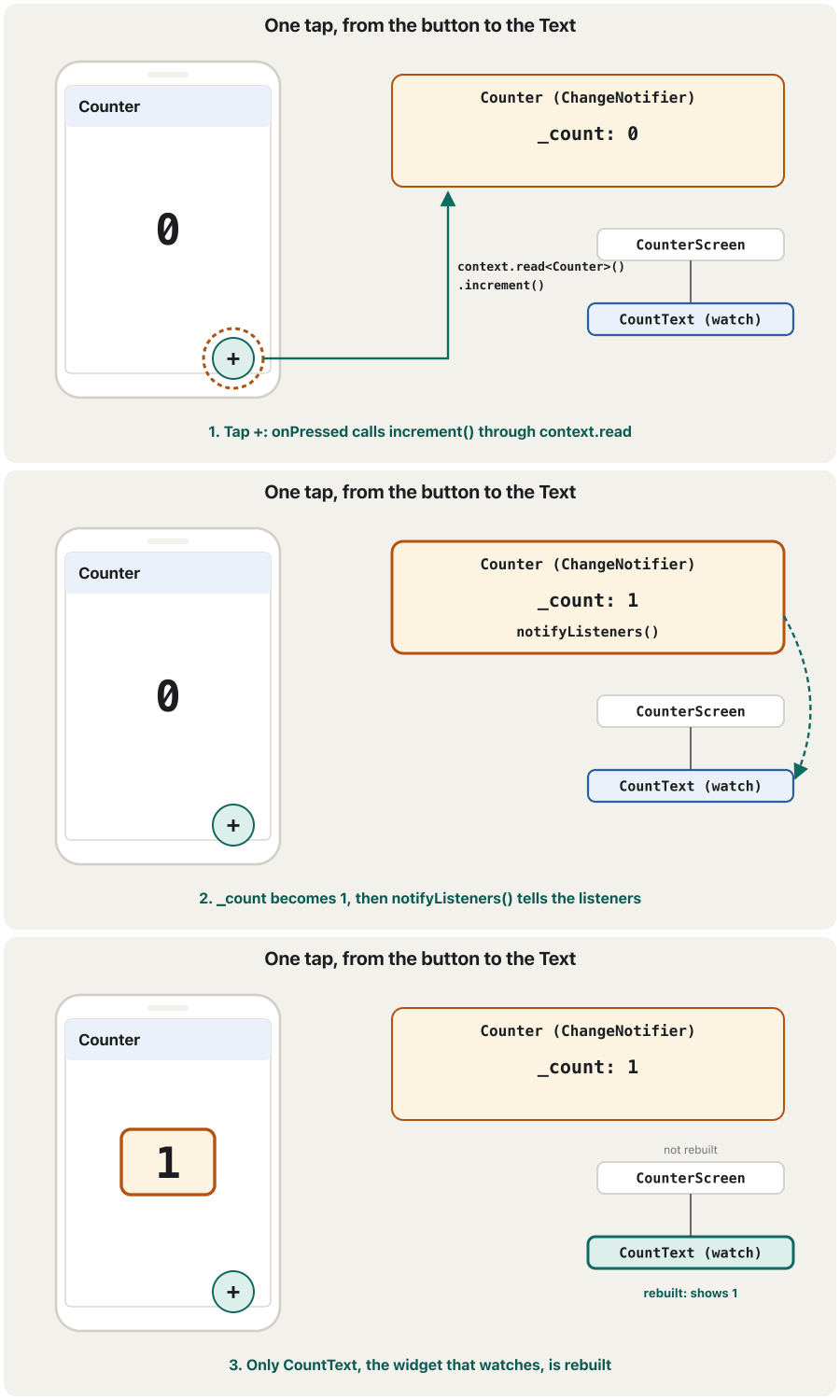
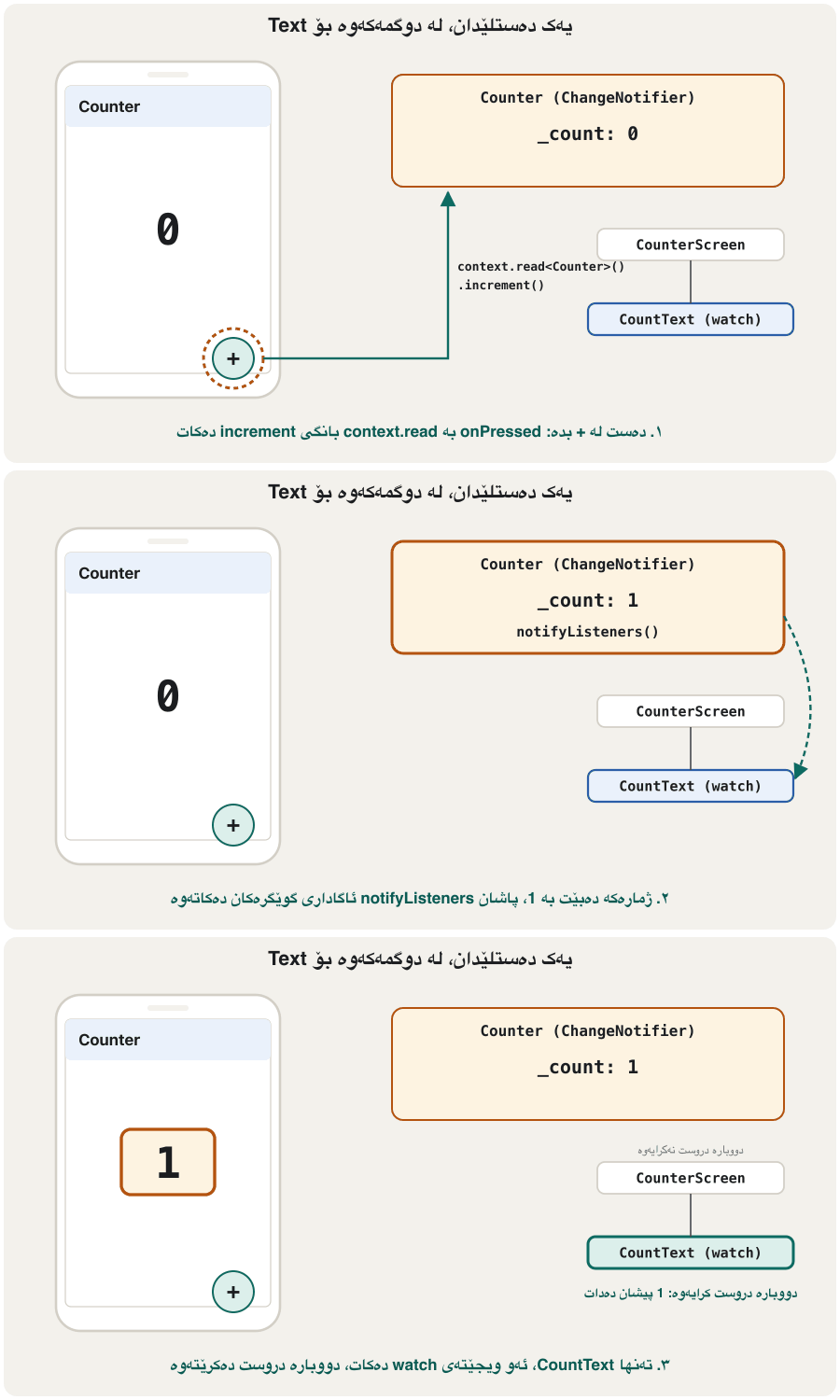
Now put the pieces together into a whole app. The lecture's Counter needs four steps: write the model, provide it with ChangeNotifierProvider above the app (so the Counter is available to the whole app), show it with context.watch, and change it with context.read:
ئێستا پارچەکان پێکەوە دابنێ بۆ تەواو. Counterـەکەی وانەکە پێویستی بە چوار هەنگاوە: بنووسە، بە ChangeNotifierProvider لە سەرووی دابینی بکە (بۆ ئەوەی Counter بۆ هەموو بەردەست بێت)، بە context.watch پیشانی بدە و بە context.read بیگۆڕە:
import 'package:flutter/material.dart';
import 'package:provider/provider.dart';
// 1. The model: built-in ChangeNotifier
class Counter extends ChangeNotifier {
int _count = 0;
int get count => _count;
void increment() {
_count++;
notifyListeners();
}
}
// 2. Provide it: ChangeNotifierProvider from the provider package
void main() {
runApp(
ChangeNotifierProvider(
create: (context) => Counter(), // made once, disposed for you
child: const MyApp(),
),
);
}
class MyApp extends StatelessWidget {
const MyApp({super.key});
@override
Widget build(BuildContext context) {
return const MaterialApp(home: CounterScreen());
}
}
class CounterScreen extends StatelessWidget {
const CounterScreen({super.key});
@override
Widget build(BuildContext context) {
return Scaffold(
appBar: AppBar(title: const Text('Counter')),
body: const Center(child: CountText()),
floatingActionButton: FloatingActionButton(
// 4. Change it: read, because a button only calls a method
onPressed: () => context.read<Counter>().increment(),
child: const Icon(Icons.add),
),
);
}
}
class CountText extends StatelessWidget {
const CountText({super.key});
@override
Widget build(BuildContext context) {
// 3. Show it: watch, so this Text rebuilds after notifyListeners()
final count = context.watch<Counter>().count;
return Text('$count', style: Theme.of(context).textTheme.displayLarge);
}
}Explain the codeڕوونکردنەوەی کۆدەکە
- Lineدێڕی 5
Step 1: the model, a built-in ChangeNotifier.
هەنگاوی ١: ، ChangeNotifierـێکی ناوەکی.
- Lineدێڕی 19
Step 2: one Counter for the whole app, created once and disposed by the provider.
هەنگاوی ٢: یەک Counter بۆ هەموو ، یەک جار دروست دەکرێت و providerـەکە فڕێی دەدات.
- Lineدێڕی 44
Step 4: a button only calls a method, so it reads without listening.
هەنگاوی ٤: تەنها بانگ دەکات، بۆیە بەبێ گوێگرتن دەخوێنێتەوە.
- Lineدێڕی 57
Step 3: this small widget listens and is the only thing rebuilt.
هەنگاوی ٣: ئەم بچووکە گوێ دەگرێت و تاکە شتە کە دووبارە دروست دەبێتەوە.
A widget test tapped the button twice and counted the builds:
تاقیکردنەوەیەکی دوو جار دەستی لە دا و buildـەکانی ژمارد:
start: 1 "0", builds {CounterScreen: 1, CountText: 1}
after tap: 1 "1", builds {CounterScreen: 1, CountText: 2}
after 2 taps: 1 "2", builds {CounterScreen: 1, CountText: 3}The difference between context.watch and context.read in Provider, shown on a small example.
جیاوازیی نێوان context.watch و context.read لە Providerـدا، بە نموونەیەکی بچووک.
Plays 'Step 2: Practical exercise' (4:37-9:43): a CounterProvider extends ChangeNotifier with increment and decrement, is added as a second ChangeNotifierProvider in MultiProvider, shown with context.watch and changed with context.read. Its value field is public; the lesson keeps state private.
بەشی Step 2: Practical exercise پەخش دەکات (4:37 تا 9:43): CounterProviderـێک (extends ChangeNotifier) بە increment و decrement، وەک دووەم ChangeNotifierProvider لە MultiProviderـدا زیاد دەکرێت، بە context.watch پیشان دەدرێت و بە context.read دەگۆڕدرێت. value تێیدا گشتییە (public)؛ وانەکە بە تایبەتی (private) دەهێڵێتەوە.
The Counter, end to endCounter، لە سەرەتاوە تا کۆتایی
The same Counter without a packageهەمان Counter بەبێ کتێبخانە
You met the built-in way before: Flutter's official learning pathway builds this kind of app with no package, using the same Counter class, owned by a stateful screen, and a ListenableBuilder around the number. Compare the two versions side by side:
ڕێگا ناوەکییەکە پێشتر ناسێنرا: ڕێڕەوی فێربوونی فەرمیی Flutter ئەم جۆرە بەبێ هیچ دروست دەکات، بە هەمان Counter، کە شاشەیەکی دۆخدار خاوەنیەتی و ListenableBuilderـێک بە دەوری ژمارەکەدا. هەردوو وەشانەکە لە تەنیشت یەک بەراورد بکە:
import 'package:flutter/material.dart';
class Counter extends ChangeNotifier {
int _count = 0;
int get count => _count;
void increment() {
_count++;
notifyListeners();
}
}
void main() => runApp(const MaterialApp(home: CounterScreen()));
class CounterScreen extends StatefulWidget {
const CounterScreen({super.key});
@override
State<CounterScreen> createState() => _CounterScreenState();
}
class _CounterScreenState extends State<CounterScreen> {
final _counter = Counter(); // this screen owns the model
@override
void dispose() {
_counter.dispose(); // so it must dispose it too
super.dispose();
}
@override
Widget build(BuildContext context) {
return Scaffold(
appBar: AppBar(title: const Text('Counter')),
body: Center(
child: ListenableBuilder(
listenable: _counter,
builder: (context, child) => Text(
'${_counter.count}',
style: Theme.of(context).textTheme.displayLarge,
),
),
),
floatingActionButton: FloatingActionButton(
onPressed: _counter.increment,
child: const Icon(Icons.add),
),
);
}
}Explain the codeڕوونکردنەوەی کۆدەکە
- Lineدێڕی 23
The screen creates the model…
شاشەکە دروست دەکات…
- Lineدێڕی 27
…so it must dispose it. ChangeNotifierProvider did this for us.
…بۆیە دەبێت فڕێیشی بدات. ChangeNotifierProvider ئەمەی بۆ ئێمە دەکرد.
- Lineدێڕی 37
ListenableBuilder plays the role of
context.watch.ListenableBuilder ڕۆڵی
context.watchدەبینێت.
| Stepهەنگاو | Built in onlyتەنها ناوەکی | With providerبە provider |
|---|---|---|
| Model | class Counter extends ChangeNotifier | class Counter extends ChangeNotifier |
| Create and disposeدروستکردن و فڕێدان | You, in a State objectخۆت، لەناو | ChangeNotifierProvider(create: …) |
| Reach it from a widgetگەیشتن پێی لە | Pass it through constructorsبە ناو بینێرە | context.watch / context.read |
| Rebuild the numberدووبارە دروستکردنەوەی ژمارەکە | ListenableBuilder | context.watch, Consumer |
Both are correct. The built-in way is enough when the model is used in one screen and its children; provider pays off when many screens need the same model.
هەردووکیان دروستن. ڕێگا ناوەکییەکە بەسە کاتێک لە یەک شاشە و منداڵەکانیدا بەکار دێت؛ provider کاتێک سوودی هەیە کە زۆر شاشە پێویستیان بە هەمان بێت.
What ChangeNotifierProvider addsChangeNotifierProvider چی زیاد دەکات
A ChangeNotifierProvider is a widget that holds a ChangeNotifier and provides it to the widgets below it. Compared with a plain Provider, it does three extra jobs:
ChangeNotifierProvider کە ChangeNotifierـێک هەڵدەگرێت و دابینی دەکات بۆ ئەو لە خوارییەوەن. بە بەراورد لەگەڵ Providerـی سادە، سێ کاری زیاتر دەکات:
- It listens to the notifier. When
notifyListeners()runs, every widget that usedwatch,Provider.of, a Consumer or a Selector on it is rebuilt. - It creates the notifier lazily, the first time a widget asks for it, with your
createfunction. - It disposes the notifier when the provider leaves the tree, so its listener list does not leak.
- گوێ لە notifierـەکە دەگرێت. کاتێک
notifyListeners()جێبەجێ دەبێت، هەموو ئەوwatch،Provider.of، Consumer یان Selectorـیان لەسەری بەکار هێناوە دووبارە دروست دەبنەوە. - notifierـەکە بە دواخراوی دروست دەکات، یەکەم جار کە داوای دەکات، بە
createـی تۆ. - notifierـەکە فڕێ دەدات کاتێک providerـەکە لە دەردەچێت، بۆیە لیستی بە بێسوودی نامێنێتەوە.
A plain Provider does none of the listening. Provider even stops you in debug mode if you give it a ChangeNotifier. A widget test that tried Provider<Counter>(create: (_) => Counter(), …) got:
Providerـی سادە هیچ گوێگرتنێک ناکات. Provider تەنانەت لە دۆخی debugـدا ڕێگەت لێ دەگرێت ئەگەر ChangeNotifierـێکی پێ بدەیت. تاقیکردنەوەیەکی کە Provider<Counter>(create: (_) => Counter(), …)ـی تاقی کردەوە ئەمەی وەرگرت:
Tried to use Provider with a subtype of Listenable/Stream (Counter).
This is likely a mistake, as Provider will not automatically update dependentsThe lecture's example: a dark-mode checkboxنموونەکەی وانەکە: چێکبۆکسی دۆخی تاریک
The lecture's ChangeNotifierProvider example adds dark mode to the to-do app. A ChangeNotifierProvider holding a ValueNotifier<bool> sits above MaterialApp. MaterialApp reads it to choose its theme. A checkbox in the app's drawer changes the value, the ValueNotifier calls notifyListeners(), and MaterialApp rebuilds in the new colours:
نموونەی ChangeNotifierProviderـی وانەکە زیاد دەکات بۆ ئەرکەکان. ChangeNotifierProviderـێک کە ValueNotifier<bool>ـێکی هەڵگرتووە لە سەرووی MaterialAppـەوەیە. MaterialApp دەیخوێنێتەوە بۆ هەڵبژاردنی . لە نرخەکە دەگۆڕێت، ValueNotifier بانگی notifyListeners() دەکات و MaterialApp بە ڕەنگە نوێیەکان دووبارە دروست دەبێتەوە:
import 'package:flutter/material.dart';
import 'package:provider/provider.dart';
void main() {
runApp(
// The lecture's tree: a ValueNotifier<bool> (a ChangeNotifier) above MaterialApp
ChangeNotifierProvider(
create: (_) => ValueNotifier<bool>(false), // dark mode starts off
child: const TodoApp(),
),
);
}
class TodoApp extends StatelessWidget {
const TodoApp({super.key});
@override
Widget build(BuildContext context) {
// MaterialApp listens: the theme changes when the checkbox changes
final dark = context.watch<ValueNotifier<bool>>().value;
return MaterialApp(
theme: ThemeData(colorSchemeSeed: Colors.green),
darkTheme: ThemeData(
colorSchemeSeed: Colors.green,
brightness: Brightness.dark,
),
themeMode: dark ? ThemeMode.dark : ThemeMode.light,
home: const TodoListScreen(),
);
}
}
class TodoListScreen extends StatelessWidget {
const TodoListScreen({super.key});
@override
Widget build(BuildContext context) {
return Scaffold(
appBar: AppBar(title: const Text('My to-dos')),
drawer: const SettingsDrawer(),
body: ListView(
children: const [
ListTile(title: Text('Read chapter 8')),
ListTile(title: Text('Practise Flutter layouts')),
ListTile(title: Text('Call Hana about the project')),
],
),
);
}
}
class SettingsDrawer extends StatelessWidget {
const SettingsDrawer({super.key});
@override
Widget build(BuildContext context) {
final dark = context.watch<ValueNotifier<bool>>().value;
return Drawer(
child: ListView(
children: [
const DrawerHeader(child: Text('Settings')),
CheckboxListTile(
title: const Text('Turn on dark theme colour'),
value: dark,
// setting .value calls notifyListeners() inside ValueNotifier
onChanged: (on) =>
context.read<ValueNotifier<bool>>().value = on ?? false,
),
],
),
);
}
}before: ThemeMode.light after tapping the checkbox: ThemeMode.dark
Explain the codeڕوونکردنەوەی کۆدەکە
- Lineدێڕی 8
A ValueNotifier is a ChangeNotifier, so ChangeNotifierProvider can hold it.
ValueNotifier ChangeNotifierـە، بۆیە ChangeNotifierProvider دەتوانێت هەڵیبگرێت.
- Lineدێڕی 20
TodoApp, the small widget around MaterialApp, listens; the theme follows the value.TodoApp، بچووکەکەی دەوری MaterialApp، گوێ دەگرێت؛ شوێن نرخەکە دەکەوێت.- Lineدێڕی 67
The checkbox replaces the value; ValueNotifier notifies by itself.
نرخەکە دەگۆڕێتەوە؛ ValueNotifier خۆی ئاگادار دەکاتەوە.
Build a light/dark switch: a ThemeProvider with ChangeNotifier, a ChangeNotifierProvider above MaterialApp, and a tap that toggles the theme.
گۆڕین لە نێوان ڕووناک و تاریکدا: ThemeProviderـێک بە ChangeNotifier، ChangeNotifierProvider لە سەرووی MaterialAppـەوە و دەستلێدانێک کە دەگۆڕێت.
Plays only the chapter 'Themes: light vs dark mode' (about 8 minutes). The video swaps two ThemeData objects with a tap instead of a ValueNotifier<bool> and a checkbox.
تەنها بەشی Themes: light vs dark mode پەخش دەکات (نزیکەی 8 خولەک). ڤیدیۆکە بە دەستلێدانێک دوو ThemeData دەگۆڕێتەوە، لە جیاتی ValueNotifier<bool> و .
Several providers: nested or MultiProviderچەند provider: لەناو یەکدا یان MultiProvider
Real apps need several providers: a user, a cart, settings. The first way is to nest them: each provider is the child of the one above, and the app is at the bottom. It works, but every new provider adds one more level of brackets, and the code gets messy:
ڕاستەقینە پێویستیان بە چەند providerـێکە: ، سەبەتەیەک، ڕێکخستنەکان. ڕێگای یەکەم ئەوەیە کە لەناو یەکدا دایان بنێیت: هەر providerـێک منداڵی ئەوەی سەرووی خۆیەتی و لە خوارەوەیە. کار دەکات، بەڵام هەر providerـێکی نوێ ئاستێکی تری کەوانە زیاد دەکات و کۆدەکە تێکەڵ دەبێت:
// Nested: each provider is the child of the one above it.
Widget nestedProviders() {
return Provider<AppInfo>(
create: (_) => const AppInfo('Class counter'),
child: ChangeNotifierProvider<Counter>(
create: (_) => Counter(),
child: ChangeNotifierProvider<ValueNotifier<bool>>(
create: (_) => ValueNotifier<bool>(false),
child: const MyApp(),
),
),
);
}MultiProvider holds a list of providers in one widget. The same three providers become flat and easy to read:
MultiProvider لیستێک لە providerـەکان لە یەک هەڵدەگرێت. هەمان سێ provider تەخت و ئاسانی خوێندنەوە دەبن:
// MultiProvider: the same three providers as one flat list.
Widget multiProvider() {
return MultiProvider(
providers: [
Provider<AppInfo>(create: (_) => const AppInfo('Class counter')),
ChangeNotifierProvider<Counter>(create: (_) => Counter()),
ChangeNotifierProvider<ValueNotifier<bool>>(
create: (_) => ValueNotifier<bool>(false),
),
],
child: const MyApp(),
);
}![Animation in three frames. Frame 1: three coloured boxes inside each other, Provider<AppInfo>, ChangeNotifierProvider<Counter> and ChangeNotifierProvider<ValueNotifier<bool>>, each with 'child:', and MyApp() in the middle: 'Nested: each provider is the child of the one above'. Frame 2: the three boxes are taken out of each other and lined up, with child: MyApp() below. Frame 3: one MultiProvider( providers: [ the three providers ], child: MyApp() ); under it, the tree from a real widget test: Scope<AppInfo?> > Scope<Counter?> > Scope<ValueNotifier<bool>?>, 'same tree, easier code'.](/_astro/flutter-changenotifier-and-multiprovider-multiprovider.en.DK2e06UL.gif)
![Animation in three frames. Frame 1: three coloured boxes inside each other, Provider<AppInfo>, ChangeNotifierProvider<Counter> and ChangeNotifierProvider<ValueNotifier<bool>>, each with 'child:', and MyApp() in the middle: 'Nested: each provider is the child of the one above'. Frame 2: the three boxes are taken out of each other and lined up, with child: MyApp() below. Frame 3: one MultiProvider( providers: [ the three providers ], child: MyApp() ); under it, the tree from a real widget test: Scope<AppInfo?> > Scope<Counter?> > Scope<ValueNotifier<bool>?>, 'same tree, easier code'.](/_astro/flutter-changenotifier-and-multiprovider-multiprovider.ckb.BMY6w-Yg.gif)
Several providers: nested or MultiProviderچەند provider: لەناو یەکدا یان MultiProvider
Inside, it is the same treeلە ناوەوە، هەمان داری ویجێتەکانە
Is a MultiProvider really the same? A widget test built both versions and listed the provider scopes above MyApp: the hidden InheritedWidgets that hold the values (the test prints the class _InheritedProviderScope as Scope):
ئایا MultiProvider بە ڕاستی هەمانە؟ تاقیکردنەوەیەکی هەردوو وەشانەکەی دروست کرد و scopeـەکانی provider لە سەرووی MyAppـەوە ژمارد: ئەو InheritedWidgetـە شاراوانەی نرخەکان هەڵدەگرن (تاقیکردنەوەکە _InheritedProviderScope بە کورتی وەک Scope چاپ دەکات):
nested: Scope<AppInfo?> > Scope<Counter?> > Scope<ValueNotifier<bool>?>
MultiProvider: Scope<AppInfo?> > Scope<Counter?> > Scope<ValueNotifier<bool>?>Common mistakesهەڵە باوەکان
| Mistakeهەڵە | What happensچی ڕوو دەدات | Fixچاکردنەوە |
|---|---|---|
Changing a field and forgetting notifyListeners()گۆڕینی و لەبیرچوونی notifyListeners() | The screen keeps the old valueشاشەکە نرخە کۆنەکە دەهێڵێتەوە | Call it at the end of every method that changes stateلە کۆتایی هەموو کە دەگۆڕێت بانگی بکە |
A ChangeNotifier in a plain ProviderChangeNotifierـێک لەناو Providerـی سادەدا | Debug error; without it, nothing rebuilds debug؛ بەبێ ئەو، هیچ شتێک دووبارە دروست نابێتەوە | ChangeNotifierProvider |
Public fields (int count = 0;) changed from widgets گشتی (int count = 0;) کە لە دەگۆڕدرێن | Changes without notification; state spread everywhereگۆڕان بەبێ ئاگادارکردنەوە؛ لە هەموو شوێنێکدا بڵاوە | Private field + getter + methods that notify تایبەت + + کە ئاگادار دەکەنەوە |
names.value.add('Hana') on a ValueNotifiernames.value.add('Hana') لەسەر ValueNotifierـێک | No notification: the list object is the sameئاگادارکردنەوە نییە: هەمانە | names.value = [...names.value, 'Hana'] |
| Creating a notifier in a State and never disposing itدروستکردنی notifierـێک لە Stateـێکدا و هەرگیز فڕێنەدانی | Its listener list stays in memoryلیستی لە دەمێنێتەوە | dispose() it in the State's dispose, or let ChangeNotifierProvider own itلە disposeـی Stateـەکەدا dispose()ـی بکە، یان با ChangeNotifierProvider خاوەنی بێت |
| Two providers of the same type in one MultiProviderدوو providerـی هەمان جۆر لە یەک MultiProviderـدا | Widgets see only the inner one (the later in the list) تەنها ناوەکییەکە دەبینن (ئەوەی دواتر لە لیستەکەدایە) | One provider per type; wrap values in different classesیەک provider بۆ هەر جۆرێک؛ نرخەکان لە جیاوازدا بپێچە |
Exercisesڕاهێنانەکان
Write a LikeCounter ChangeNotifier with a likes count and a like() method. Provide it above the app, show “… likes” in the middle of the screen, and add a heart button that likes the post.
ChangeNotifierـێکی LikeCounter بنووسە بە ژمارەی likes و like(). لە سەرووی دابینی بکە، «… likes» لە ناوەڕاستی شاشەکەدا پیشان بدە و دڵ زیاد بکە کە پۆستەکە پەسەند دەکات.
Hintئاماژە
Follow the four Counter steps: model, provide, show with watch, change with read.
شوێن چوار هەنگاوەکەی Counter بکەوە: ، دابینکردن، پیشاندان بە watch، گۆڕین بە read.
Show answerوەڵامەکە پیشان بدە
import 'package:flutter/material.dart';
import 'package:provider/provider.dart';
class LikeCounter extends ChangeNotifier {
int _likes = 0;
int get likes => _likes;
void like() {
_likes++;
notifyListeners();
}
}
void main() {
runApp(
ChangeNotifierProvider(
create: (_) => LikeCounter(),
child: const MaterialApp(home: PostScreen()),
),
);
}
class PostScreen extends StatelessWidget {
const PostScreen({super.key});
@override
Widget build(BuildContext context) {
return Scaffold(
appBar: AppBar(title: const Text('Photo of the day')),
body: const Center(child: LikesText()),
floatingActionButton: FloatingActionButton(
onPressed: () => context.read<LikeCounter>().like(),
child: const Icon(Icons.favorite),
),
);
}
}
class LikesText extends StatelessWidget {
const LikesText({super.key});
@override
Widget build(BuildContext context) {
final likes = context.watch<LikeCounter>().likes;
return Text('$likes likes');
}
}LikesText watches, so only it rebuilds; the button reads, because it only calls like().
LikesText watch دەکات، بۆیە تەنها ئەو دووبارە دروست دەبێتەوە؛ read دەکات، چونکە تەنها بانگی like() دەکات.
A Counter starts at 0. Listener A prints A sees … and listener B prints B sees …, both added in that order. The program calls increment(), removes A, then calls increment() again. Write the output.
Counterـێک لە 0ـەوە دەست پێ دەکات. A A sees … چاپ دەکات و B B sees …، هەردووکیان بەو ڕیزبەندییە زیاد کراون. بەرنامەکە بانگی increment() دەکات، A لادەبات، پاشان دووبارە بانگی increment() دەکات. دەرخستەکە بنووسە.
Show answerوەڵامەکە پیشان بدە
A sees 1
B sees 1
B sees 2This is the real output of the program at the start of this lesson. Listeners are called in the order they were added; after removeListener, A is no longer on the list.
ئەمە دەرخستەی ڕاستەقینەی بەرنامەکەی سەرەتای ئەم وانەیەیە. بە هەمان ڕیزبەندیی زیادکردنیان بانگ دەکرێن؛ دوای removeListener، A چیتر لە لیستەکەدا نییە.
Rewrite the nested providers of this lesson (AppInfo, Counter, dark mode) as one MultiProvider. Does the order in the list matter?
providerـە لەناو یەکەکانی ئەم وانەیە (AppInfo، Counter، ) وەک یەک MultiProvider بنووسەرەوە. ئایا ڕیزبەندی لە لیستەکەدا گرنگە؟
Show answerوەڵامەکە پیشان بدە
// MultiProvider: the same three providers as one flat list.
Widget multiProvider() {
  return MultiProvider(
    providers: [
      Provider<AppInfo>(create: (_) => const AppInfo('Class counter')),
      ChangeNotifierProvider<Counter>(create: (_) => Counter()),
      ChangeNotifierProvider<ValueNotifier<bool>>(
        create: (_) => ValueNotifier<bool>(false),
      ),
    ],
    child: const MyApp(),
  );
}The list order is the nesting order: the first provider is the outermost. That matters only when a provider's create reads another provider; then the one it reads must come earlier in the list.
ڕیزبەندیی لیستەکە هەمان ڕیزبەندیی لەناو یەکدابوونە: یەکەم provider دەرەوەترینیانە. ئەمە تەنها کاتێک گرنگە کە createـی providerـێک providerـێکی تر بخوێنێتەوە؛ ئەو کاتە ئەوەی دەیخوێنێتەوە دەبێت پێشتر لە لیستەکەدا بێت.
Someone wrote Provider<ValueNotifier<bool>>(create: (_) => ValueNotifier(false), child: const TodoApp()). Explain what goes wrong and fix it.
کەسێک ئەمەی نووسیوە: Provider<ValueNotifier<bool>>(create: (_) => ValueNotifier(false), child: const TodoApp()). ڕوونی بکەرەوە چی هەڵە دەبێت و چاکی بکە.
Show answerوەڵامەکە پیشان بدە
A plain Provider does not listen to the notifier, so TodoApp would never rebuild; in debug mode provider stops at once with “Tried to use Provider with a subtype of Listenable/Stream”. Use ChangeNotifierProvider(create: (_) => ValueNotifier<bool>(false), child: const TodoApp()).
Providerـی سادە گوێ لە notifierـەکە ناگرێت، بۆیە TodoApp هەرگیز دووبارە دروست نابێتەوە؛ لە دۆخی debugـدا provider یەکسەر بە «Tried to use Provider with a subtype of Listenable/Stream» دەوەستێت. ChangeNotifierProvider(create: (_) => ValueNotifier<bool>(false), child: const TodoApp()) بەکار بهێنە.
Summaryپوختە
- ChangeNotifier and ValueNotifier are built into Flutter; ChangeNotifierProvider and MultiProvider come from the provider package.
- Your model extends (or mixes in) ChangeNotifier, keeps the state in private fields and calls
notifyListeners()after each change. setStateupdates one State object;notifyListenerscalls every listener, wherever it is.- ValueNotifier holds one value and notifies when it is replaced by a different one; ValueListenableBuilder shows it.
- ChangeNotifierProvider creates, listens to and disposes a notifier: provide → watch to show → read to change.
- MultiProvider lists several providers; the tree inside is the same as nesting them, only the code is cleaner.
- ChangeNotifier و ValueNotifier لەناو خودی Flutterـدان؛ ChangeNotifierProvider و MultiProvider لە providerـەوە دێن.
- ChangeNotifier extends (یان تێکەڵ) دەکات، لە تایبەتدا هەڵدەگرێت و دوای هەر گۆڕانێک بانگی
notifyListeners()دەکات. setStateیەک نوێ دەکاتەوە؛notifyListenersهەموو بانگ دەکات، لە هەر شوێنێک بێت.- ValueNotifier یەک نرخ هەڵدەگرێت و کاتێک بە نرخێکی جیاواز دەگۆڕدرێتەوە ئاگادار دەکاتەوە؛ ValueListenableBuilder پیشانی دەدات.
- ChangeNotifierProvider notifierـێک دروست دەکات، گوێی لێ دەگرێت و فڕێی دەدات: دابینکردن ←
watchبۆ پیشاندان ←readبۆ گۆڕین. - MultiProvider چەند provider ڕیز دەکات؛ ناوەوە وەک لەناو یەکدانانیانە، تەنها کۆدەکە پاکترە.
Lesson complete!وانەکە تەواو بوو!
Well done. Review the key terms, then go on to the next lesson.دەستخۆش. سەیرێکی زاراوە سەرەکییەکان بکەرەوە، پاشان بڕۆ بۆ وانەی داهاتوو.
Key termsزاراوە سەرەکییەکان
FutureProvider and StreamProviderFutureProvider و StreamProvider
Related lecturesوانە پەیوەندیدارەکان
References and further readingسەرچاوەکان و خوێندنەوەی زیاتر
This lecture is a first edition. The Kurdish text and terminology are waiting for review by Kurdish IT teachers.ئەم وانەیە چاپی یەکەمە. دەقە کوردییەکە و زاراوەکانی چاوەڕێی پێداچوونەوەی مامۆستایانی کوردی بواری IT ن.