FlutterFlutter · Chapterبەش 6 · Lectureوانە 6.1
Widgets and the Widget Treeویجێتەکان و داری ویجێتەکان
Everything in Flutter is a widget: immutable descriptions nested into a tree. The course's Hello World app modernised and drawn as a tree, build() and BuildContext, the element and render trees behind the widgets, keys, visible and invisible widgets, the common widget categories and the anatomy of a screen built step by step.
لە Flutterـدا هەموو شتێک : وەسفی کە لەنێو یەکتردا دارێک پێک دەهێنن. Hello Worldـی وانەکە بە نوێکراوەیی و وەک دار، build() و BuildContext، و داری وێناکردن لە پشت ، ، دیار و نادیار، پۆلە باوەکان و توێکاریی شاشەیەک کە هەنگاو بە هەنگاو دروست دەکرێت.
What you will learnچی فێر دەبیت
- Explain 'everything is a widget' and why widgets are immutable.
- Read a Flutter app's code and draw its widget tree, naming the property that holds each child.
- Describe what
buildandBuildContextdo, and the roles of the widget, element and render trees. - Classify common widgets (visible/invisible, the six categories) using today's names.
- «هەموو شتێک » ڕوون بکەیتەوە و بۆچی .
- کۆدی Flutter بخوێنیتەوە و بکێشیت، بە ناوی ئەو هەر هەڵدەگرێت.
- وەسفی کاری
buildوBuildContextبکەیت و ڕۆڵی ، و داری وێناکردن. - باوەکان پۆلێن بکەیت (دیار/نادیار، شەش پۆلەکە) بە ناوەکانی ئەمڕۆ.
Everything is a widgetهەموو شتێک ویجێتە
In Flutter, a building block of the user interface: an immutable description of one part of the screen, such as some text, a button, padding or a whole page. Widgets are nested inside each other to form the ; 'everything is a widget'.
لە ، یەکەیەکی بنیاتنانی ڕووکاری بەکارهێنەرە: وەسفێکی بەشێکی شاشەکە، وەک دەقێک، دوگمەیەک، بۆشایی یان لاپەڕەیەکی تەواو. ویجێتەکان لە ناو یەکتردا دادەنرێن و پێک دەهێنن؛ 'هەموو شتێک ویجێتە'.
- Widgets are the building blocks that construct a Flutter app.
- Each element on the screen of a Flutter app is a widget: a piece of text, an icon, a button, but also the padding around them and the page itself.
- Widgets in Flutter are immutable (next screen).
- What the screen looks like depends completely on which widgets you choose and in which order you put them.
- The structure of the app's code is a tree of widgets.
- Widgets are nested inside each other. The root of your app is a widget, and so is everything below it, all the way down.
- ئەو بلۆکە بنیاتنەرانەن کە Flutter دروست دەکەن.
- هەر توخمێک لەسەر شاشەی Flutter : پارچە دەقێک، ، ، بەڵام هەروەها ئەو بۆشاییەی دەوریانە و خودی پەڕەکەش.
- لە Flutterـدا (شاشەی داهاتوو).
- شێوەی شاشەکە تەواو پشت بەوە دەبەستێت کە کام هەڵدەبژێریت و بە چ ڕیزبەندییەک دایاندەنێیت.
- پێکهاتەی کۆدی .
- لەنێو یەکتردا دادەنرێن. و هەموو شتێکی خوارەوەشی تا کۆتایی هەروایە.
Everything is a widgetهەموو شتێک ویجێتە
Small widgets, nested like boxesویجێتەکانی بچووک، وەک سندوق لەناو سندوقدا
Flutter builds big things from many small widgets. There is no 'centre' setting on a Text: you wrap the Text in a Center widget. There is no 'spacing' setting on a Column: you put a SizedBox between its children. Small widgets that each do one job are combined, like letters into words.
Flutter شتی گەورە لە زۆر بچووک دروست دەکات. Text ڕێکخستنێکی «ناوەڕاست»ـی نییە: Textـەکە لەنێو Centerـدا دادەنێیت. Column ڕێکخستنێکی «بۆشایی»ـی نییە: SizedBoxـێک لە نێوان دادەنێیت. بچووک کە هەریەکەیان یەک کار دەکات پێکەوە دەلکێنرێن، وەک پیت کە دەبنە وشە.
A sweet shop packs a gift: a big box holds a tray, the tray holds small paper cups, each cup holds one piece of baklava. Ask "what is inside what?" and you get a tree: box → tray → cups → baklava. A Flutter screen is packed the same way: MaterialApp → Scaffold → Center → Text.
دوکانێکی شیرینی دیارییەک دەپێچێتەوە: سندوقێکی گەورە سینییەک لەخۆ دەگرێت، سینییەکە کوپی بچووکی کاغەزی و هەر کوپێک پارچەیەک بەقڵاوە. پرسیار بکە «چی لەنێو چیدایە؟» و وەردەگریت: سندوق ← سینی ← کوپەکان ← بەقڵاوە. شاشەیەکی Flutter بە هەمان شێوە پێچراوەتەوە: MaterialApp ← Scaffold ← Center ← Text.
Where the analogy stops workingسنووری ئەم نموونەیە
In a gift box only the baklava is eaten; on a screen even the 'boxes' are widgets that may draw something (a background, a bar) or only arrange their children.
لە سندوقی دیارییەکدا تەنها بەقڵاوەکە دەخورێت؛ لەسەر شاشە تەنانەت «سندوقەکان»ـیش کە لەوانەیە شتێک بکێشن (باکگراوندێک، شریتێک) یان تەنها خۆیان ڕێک بخەن.
Widgets are immutable descriptionsویجێتەکان وەسفی گۆڕانهەڵنەگرن
Immutable means that once a widget object is made, its properties never change: every field is final. A widget is not the thing you see; it is a description of what you want to see, like a recipe, not the meal.
واتە کاتێک دروست کرا، هەرگیز ناگۆڕێن: هەموو finalـە. ئەو شتە نییە کە دەیبینیت؛ وەسفێکە بۆ ئەوەی دەتەوێت ببینیت، وەک ڕێچکەی چێشتلێنان، نەک خودی خواردنەکە.
So how can a screen change, if widgets cannot? Flutter builds new widgets with the new values and swaps them in. Making a widget object is very cheap, so Flutter can do this many times a second. This is the declarative way explained in App State and Declarative UI; the next lesson shows the Flutter code for it.
کەواتە شاشە چۆن دەگۆڕێت، ئەگەر نەگۆڕێن؟ Flutter نوێ بە نرخە نوێیەکان دروست دەکات و دەیانخاتە شوێنی کۆنەکان. دروستکردنی زۆر هەرزانە، بۆیە Flutter دەتوانێت لە یەک چرکەدا چەندین جار ئەمە بکات. ئەمە ڕێگا وەسفییەکەیە کە لە دۆخ و ڕووکاری وەسفی ڕوون کراوەتەوە؛ وانەی داهاتوو کۆدی Flutterـی بۆ پیشان دەدات.
Hello World, line by lineHello World، دێڕ بە دێڕ
The course notes show this Hello World app. It is written for an old version of Flutter:
تێبینییەکانی وانەکە ئەم Hello Worldـە پیشان دەدەن. بۆ وەشانێکی کۆنی Flutter نووسراوە:
class MyApp extends StatelessWidget{
  // This widget is the root of your application.
  @override
  Widget build(BuildContext context){
    return MaterialApp(
      title: 'Hello World App',
      theme: ThemeData(
        primarySwatch: Colors.blue,),
      home: MyHomePage(title: 'Home page'),
    ); } }
class MyHomePage extends StatelessWidget {
  MyHomePage({Key key, this.title}) : super(key: key);
  @override
  Widget build(BuildContext context){
    return Scaffold(
      appBar: AppBar(title: Text(this.title), ),
      body: Center(child: Text( 'Hello World',)),
); } }import 'package:flutter/material.dart';
void main() => runApp(const MyApp());
class MyApp extends StatelessWidget {
const MyApp({super.key});
// This widget is the root of your application.
@override
Widget build(BuildContext context) {
return MaterialApp(
title: 'Hello World App',
theme: ThemeData(colorScheme: ColorScheme.fromSeed(seedColor: Colors.blue)),
home: const MyHomePage(title: 'Home page'),
);
}
}
class MyHomePage extends StatelessWidget {
const MyHomePage({super.key, required this.title});
final String title;
@override
Widget build(BuildContext context) {
return Scaffold(
appBar: AppBar(title: Text(title)),
body: const Center(child: Text('Hello World')),
);
}
}Explain the codeڕوونکردنەوەی کۆدەکە
- Lineدێڕی 3
runAppmakesMyAppthe root of the widget tree and fills the screen with it.runAppMyAppدەکات بە و شاشەکەی پێ پڕ دەکاتەوە.- Lineدێڕی 11-15
MaterialApp: the app's title, its colour theme and its first screen (home).MaterialApp: ناونیشانی ، ڕووکاری ڕەنگەکانی و یەکەم شاشەکەی (home).- Lineدێڕی 20-22
MyHomePage receives its title from its parent and keeps it in a
finalfield.MyHomePage ناونیشانەکەی لە وەردەگرێت و لە
finalـدا هەڵیدەگرێت.- Lineدێڕی 26-29
Scaffold: the page frame, with anAppBarat the top and abodybelow it.Scaffold: چوارچێوەی پەڕەکە، لە سەرەوە وbodyلە خوارەوەی.- Lineدێڕی 28
Centerputs its child in the middle of the free space.Centerلە ناوەڕاستی بۆشاییە ئازادەکەدا دادەنێت.
A Kurdish beginner course: what Flutter is, making an Android emulator, creating and running a project in VS Code, Hello World and hot reload.
کۆرسێکی کوردی بۆ سەرەتاییەکان: چییە، دروستکردنی Android، دروستکردن و کارپێکردنی پرۆژەیەک لە VS Codeـدا، Hello World و .
Kurdish, plays 12:53-19:49: main() and runApp, MaterialApp, Scaffold, an AppBar and a Text, written line by line.
بە کوردی، لە 12:53 تا 19:49 پەخش دەبێت: main() و runApp، MaterialApp، Scaffold، AppBar و Text، کە دێڕ بە دێڕ دەنووسرێن.
Hello World, line by lineHello World، دێڕ بە دێڕ
The widget tree of Hello Worldداری ویجێتەکانی Hello World
Draw the code as a tree: each widget is a node, and the line to its child is labelled with the property that holds the child.
کۆدەکە وەک بکێشە: هەر و هێڵی نێوان ئەو و بە ناوی ئەو نیشانە دەکرێت کە هەڵدەگرێت.
- MyApp is the top level, the root of the tree.
- MyApp builds a MaterialApp, whose
homeproperty holds MyHomePage. - MyHomePage builds a Scaffold. Its
appBarproperty holds an AppBar (whosetitleis a Text), and itsbodyholds a Center. - The Center's
childproperty holds the Text 'Hello World'.
- MyApp ئاستی سەرەوەیە، دارەکە.
- MyApp MaterialAppـێک دروست دەکات کە
homeـی MyHomePage هەڵدەگرێت. - MyHomePage Scaffoldـێک دروست دەکات.
appBarـی AppBarـێک هەڵدەگرێت (کەtitleـەکەی Textـێکە) وbodyـەکەی Centerـێک. -
childـی Centerـەکە Textـی 'Hello World' هەڵدەگرێت.
build() and BuildContextbuild() و BuildContext
Every widget you write has a build method that returns more widgets. Flutter calls build to find out what this part of the screen should look like, then asks each returned widget to build, and so on, until the whole tree is made of widgets that know how to draw themselves.
هەموو کە دەینووسیت buildـی هەیە کە زیاتر دەگەڕێنێتەوە. Flutter بانگی build دەکات بۆ ئەوەی بزانێت ئەم بەشەی شاشەکە دەبێت چۆن بێت، پاشان داوا لە هەر گەڕاوە دەکات کە خۆی دروست بکات و هەروا، تا هەموو دارەکە لەو پێک دێت کە دەزانن چۆن خۆیان بکێشن.
buildcan run many times: whenever the widget must be redrawn, even once per frame. Keep it fast.buildshould only describe the UI: no downloads, no timers, no saving files inside it.
buildدەکرێت چەندین جار جێبەجێ ببێت: هەر کاتێک پێویستی بە دووبارە کێشانەوە بێت، تەنانەت جارێک بۆ هەر وێنەیەک. خێرای بهێڵەوە.buildتەنها دەبێت وەسف بکات: نە ، نە کاتژمێر، نە پاشەکەوتکردنی لەنێویدا.
The object that tells a widget's build method where the widget sits in the . Code uses it to find things above the widget, such as Theme.of(context), Navigator.of(context) or a provider.
ئەو ئۆبجێکتەیە کە بە میتۆدی buildـی ویجێتێک دەڵێت ویجێتەکە لە کوێی . کۆد بەکاری دەهێنێت بۆ دۆزینەوەی ئەو شتانەی لە سەرووی ویجێتەکەوەن، وەک Theme.of(context)، Navigator.of(context) یان providerـێک.
The context given to build tells the widget where it is in the tree. With it, a widget can look up the tree for things its ancestors provide: the theme, the screen size, the navigator.
ئەو contextـەی دەدرێتە build بە دەڵێت لە کوێی دارەکەدایە. بە یارمەتیی ئەو، دەتوانێت بەرەو سەرەوەی دارەکە بگەڕێت بۆ ئەو شتانەی باپیرانی دابینی دەکەن: ڕووکاری ڕەنگەکان، قەبارەی شاشە، Navigator.
import 'package:flutter/material.dart';

class PageTitle extends StatelessWidget {
  const PageTitle({super.key, required this.text});

  final String text;

  @override
  Widget build(BuildContext context) {
    // context = where this widget sits in the tree.
    // Theme.of(context) looks UP the tree for the nearest Theme
    // (MaterialApp put one there).
    final style = Theme.of(context).textTheme.headlineMedium;
    return Text(text, style: style);
  }
}
Explain the codeڕوونکردنەوەی کۆدەکە
- Lineدێڕی 10-13
Theme.of(context)walks up from this widget's place and finds the nearest Theme, the one MaterialApp created.Theme.of(context)لە شوێنی ئەم بەرەو سەرەوە دەڕوات و نزیکترین Theme دەدۆزێتەوە، ئەوەی MaterialApp دروستی کردووە.
Widget tree, element tree, render treeداری ویجێتەکان، داری توخمەکان و داری وێناکردن
If widgets are thrown away and rebuilt all the time, how does Flutter stay fast and remember things? Behind the widget tree it keeps two more trees:
ئەگەر هەموو کاتێک فڕێ بدرێن و سەرلەنوێ دروست بکرێنەوە، Flutter چۆن خێرا دەمێنێتەوە و شتەکان لەبیر دەکات؟ لە پشت دوو داری تر هەڵدەگرێت:
| Treeدار | Made ofلە چی پێک دێت | Livesتەمەن | Jobکار |
|---|---|---|---|
| Widget tree | Your widgets (Center, Text…) تۆ (Center، Text…) | Short: rebuilt oftenکورت: زۆر جار دووبارە دروست دەکرێتەوە | Describe the UI (immutable)وەسفکردنی () |
| Element tree | One element per widget in useیەک توخم بۆ هەر بەکارهاتوو | Long: kept between framesدرێژ: لە نێوان وێنەکاندا دەمێنێتەوە | Remember the place, the State, the BuildContextلەبیرکردنی شوێن، State و BuildContext |
| Render treeداری وێناکردن | Render objects | Long: updated, not rebuiltدرێژ: نوێ دەکرێتەوە، دووبارە دروست ناکرێتەوە | Measure, place and paintپێوان، دانان و کێشان |
On a rebuild, Flutter compares each new widget with the element in the same place. Same type? It just updates the element and its render object with the new values. Only what really changed is laid out and painted again. That is why rebuilding the widget tree is cheap. BuildContext is, in fact, the element: a handle to the widget's place in this persistent tree.
لە کاتی دووبارە دروستکردنەوەدا، Flutter هەر نوێ لەگەڵ ئەو توخمەدا بەراورد دەکات کە لە هەمان شوێندایە. هەمان جۆرە؟ تەنها توخمەکە و بە نرخە نوێیەکان نوێ دەکاتەوە. تەنها ئەوەی بە ڕاستی گۆڕاوە دووبارە ڕێک دەخرێت و دەکێشرێتەوە. لەبەر ئەوە دووبارە دروستکردنەوەی هەرزانە. BuildContext لە ڕاستیدا خودی توخمەکەیە: دەسکێک بۆ شوێنی لەم دارە بەردەوامەدا.
Video: the official "The Three Trees" talk is on the architecture lesson's three-trees screen.
ڤیدیۆ: وتاری فەرمیی «The Three Trees» لە پەڕەی سێ دارەکەی وانەی تەلارسازیی Flutterدایە.
Widget tree, element tree, render treeداری ویجێتەکان، داری توخمەکان و داری وێناکردن
Keys: telling widgets apartکلیلەکان: جیاکردنەوەی ویجێتەکان
In Flutter, an identifier given to a so that Flutter can tell which old widget matches which new one when a list changes. A GlobalKey<FormState> also lets code reach a form's state.
لە ، ناسێنەرێکە کە دەدرێتە بۆ ئەوەی بزانێت کاتێک لیستێک دەگۆڕێت کام ویجێتی کۆن لەگەڵ کام ویجێتی نوێ یەک دەگرێتەوە. GlobalKey<FormState> ڕێگەش دەدات کۆد بگاتە دۆخی فۆرمێک.
When Flutter compares the new widgets with the elements, it normally matches them by type and position. In a list where items move, are inserted or deleted, that is not enough: a key (for example ValueKey(student.id)) tells Flutter which new widget belongs to which old element, so each item keeps its own state. This is why every widget constructor accepts {super.key}.
کاتێک Flutter نوێیەکان لەگەڵ توخمەکاندا بەراورد دەکات، بە شێوەی ئاسایی بە جۆر و شوێن پێکیان دەگرێت. لە لیستێکدا کە بڕگەکانی دەجوڵێن، زیاد دەکرێن یان دەسڕدرێنەوە، ئەمە بەس نییە: (بۆ نموونە ValueKey(student.id)) بە Flutter دەڵێت کام نوێ هی کام توخمی کۆنە، بۆ ئەوەی هەر بڕگەیەک دۆخی خۆی بپارێزێت. لەبەر ئەمە هەموو {super.key} وەردەگرێت.
Visible and invisible widgetsویجێتەکانی دیار و نادیار
The course notes split widgets into two groups:
تێبینییەکانی وانەکە دەکەن بە دوو گرووپ:
| Groupگرووپ | What they doچی دەکەن | Examplesنموونە |
|---|---|---|
| Visible (input and output)دیار ( و ) | Show data to the user and take data from the user.دراوە بە پیشان دەدەن و دراوە لە وەردەگرن. | Text, buttons, Image, Icon, Checkbox, Radio, SwitchText، ، Image، Icon، Checkbox، Radio، Switch |
| Invisible (layout and control)نادیار ( و کۆنترۆڵ) | Decide how other widgets are placed and behave on the screen.دیاری دەکەن تر چۆن لەسەر شاشە دادەنرێن و ڕەفتار دەکەن. | Column, Row, Center, Padding, SizedBox, StackColumn، Row، Center، Padding، SizedBox، Stack |
import 'package:flutter/material.dart';

class SpacingDemo extends StatelessWidget {
  const SpacingDemo({super.key});

  @override
  Widget build(BuildContext context) {
    return Column(
      children: [
        const Text('A'),
        const SizedBox(height: 16), // empty space between A and B
        const Padding(
          padding: EdgeInsets.all(8), // space inside, around B
          child: Text('B'),
        ),
        Container(
          margin: const EdgeInsets.all(8), // margin is a Container property
          color: Colors.amber,
          child: const Text('C'),
        ),
      ],
    );
  }
}
Explain the codeڕوونکردنەوەی کۆدەکە
- Lineدێڕی 11
SizedBox: a fixed gap of 16 pixels.SizedBox: بۆشاییەکی جێگیری 16 پیکسڵ.- Lineدێڕی 12-15
Padding: 8 pixels of space around B.Padding: 8 پیکسڵ بۆشایی لە دەوری B.- Lineدێڕی 17
margin:is a property of Container, not a widget.margin:Containerـە، نەک .
Categories of common widgetsپۆلەکانی ویجێتە باوەکان
Flutter has hundreds of widgets. The course notes group the common ones into six categories (updated to today's names):
Flutter سەدان هەیە. تێبینییەکانی وانەکە باوەکانیان لە شەش پۆلدا کۆ دەکەنەوە (بە ناوەکانی ئەمڕۆ نوێ کراونەتەوە):
| Categoryپۆل | Examplesنموونە | What forبۆ چی |
|---|---|---|
| App widgets | MaterialApp (also CupertinoApp)MaterialApp (هەروەها CupertinoApp) | The root: theme, first screen, navigation: ڕووکاری ڕەنگەکان، یەکەم شاشە، گواستنەوە |
| Convenience (structure) widgets ئاسانکاری (پێکهاتە) | Scaffold, AppBar, NavigationBarScaffold، AppBar، NavigationBar | The standard page frameچوارچێوەی ستانداردی پەڕە |
| Layout widgets | Column, Row, ListViewColumn، Row، ListView | Arrange childrenڕیزکردنی |
| Text widgets دەق | Text, RichTextText، RichText | Show styled textپیشاندانی دەقی ڕازێنراو |
| Button widgets | ElevatedButton, FilledButton, OutlinedButton, TextButton, IconButton, FloatingActionButtonElevatedButton، FilledButton، OutlinedButton، TextButton، IconButton، FloatingActionButton | React to tapsوەڵامدانەوەی دەستلێدان |
| Graphics widgets گرافیک | Image, IconImage، Icon | Pictures and symbolsوێنە و هێما |
import 'package:flutter/material.dart';

class ButtonGallery extends StatelessWidget {
  const ButtonGallery({super.key});

  @override
  Widget build(BuildContext context) {
    return Wrap(
      spacing: 8,
      children: [
        ElevatedButton(onPressed: () {}, child: const Text('Elevated')),
        FilledButton(onPressed: () {}, child: const Text('Filled')),
        OutlinedButton(onPressed: () {}, child: const Text('Outlined')),
        TextButton(onPressed: () {}, child: const Text('Text')),
        IconButton(onPressed: () {}, icon: const Icon(Icons.favorite)),
        FloatingActionButton(onPressed: () {}, child: const Icon(Icons.add)),
      ],
    );
  }
}
Each of these widgets gets its own lesson later in this course: MaterialApp and Scaffold, Row and Column, Text, Images and Icons and Buttons.
هەریەک لەم دواتر لەم کۆرسەدا وانەی تایبەتی خۆی هەیە: MaterialApp و Scaffold، Row و Column، دەق، وێنە و ئایکۆنەکان و دوگمەکان.
Anatomy of a Flutter app: building a screen step by stepتوێکاریی ئەپێکی Flutter: دروستکردنی شاشەیەک هەنگاو بە هەنگاو
Everything inside a Flutter app is a widget. Watch a screen grow, and its tree with it:
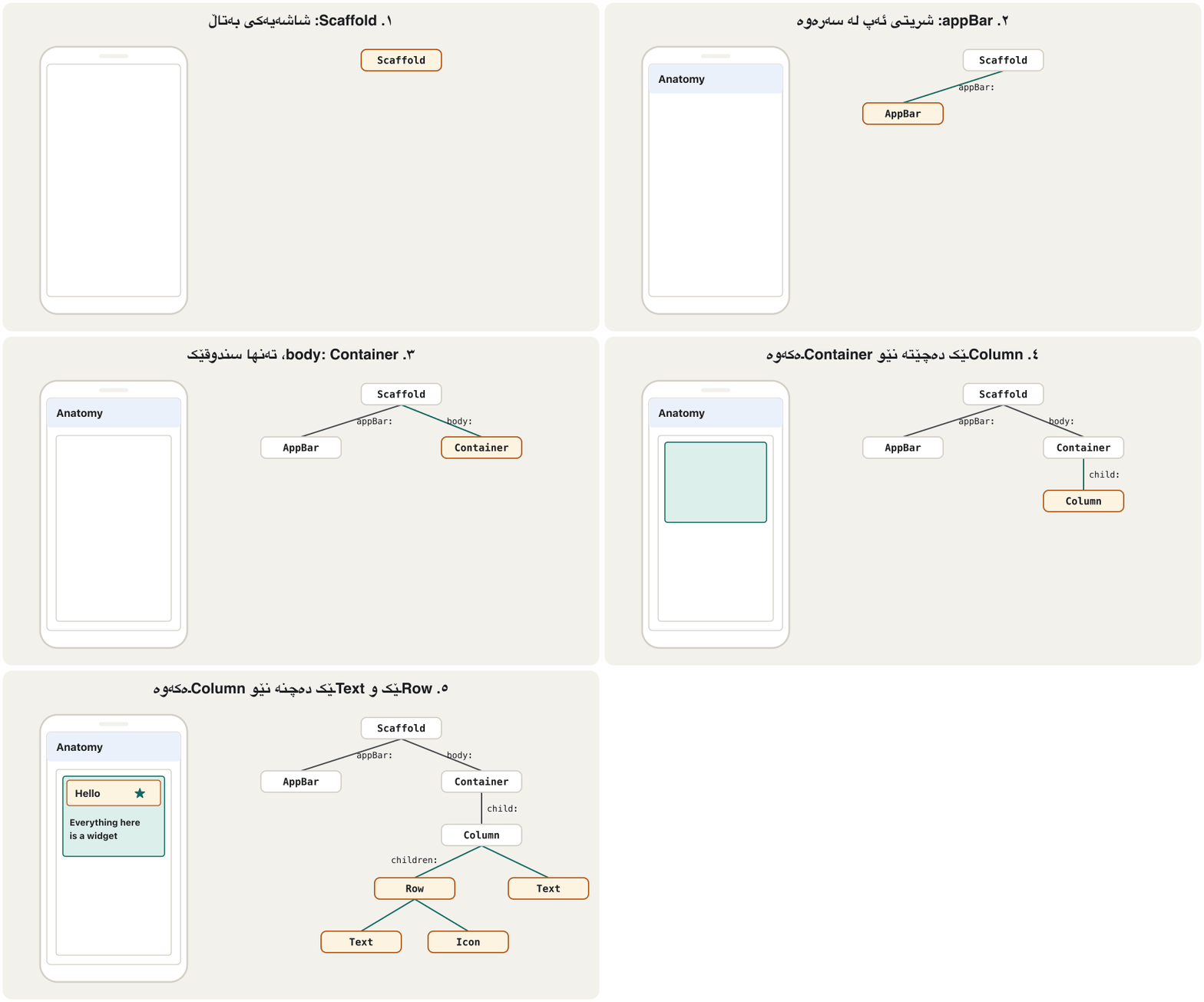
هەموو شتێک لەنێو Flutterـدا . سەیری گەشەکردنی شاشەیەک بکە، لەگەڵ دارەکەیدا:
- a) Scaffoldهەنگاوی a: Scaffold
Start with a
Scaffold: just a blank screen for the app.بە
Scaffoldـێک دەست پێ بکە: تەنها شاشەیەکی بەتاڵ بۆ . - b) AppBarهەنگاوی b: AppBar
Add an app bar at the top. It is a ready-made widget that looks like an app bar.
لە سەرەوە زیاد بکە. ئامادەیە کە وەک دەردەکەوێت.
- c) Containerهەنگاوی c: Container
Put a
Containerinto the Scaffold's body. It is just a box that will contain the app's content.Containerـێک بخە نێو bodyـی Scaffoldـەکەوە. تەنها سندوقێکە کە ناوەڕۆکی لەخۆ دەگرێت. - d) Columnهەنگاوی d: Column
Give the Container a
Column. Now widgets can be placed inside the column, one below the other.Columnـێک بدە بە Containerـەکە. ئێستا دەتوانرێت لەنێو ستوونەکەدا دابنرێن، یەک لە ژێر یەکەوە. - e) Row and Textهەنگاوی e: Row و Text
Put a
Rowat the top of the column (with a Text and an Icon side by side), and aTextas the second item.Rowـێک لە سەرەوەی ستوونەکەدا دابنێ (Textـێک و Iconـێک لە تەنیشت یەکەوە) وTextـێک وەک بڕگەی دووەم.
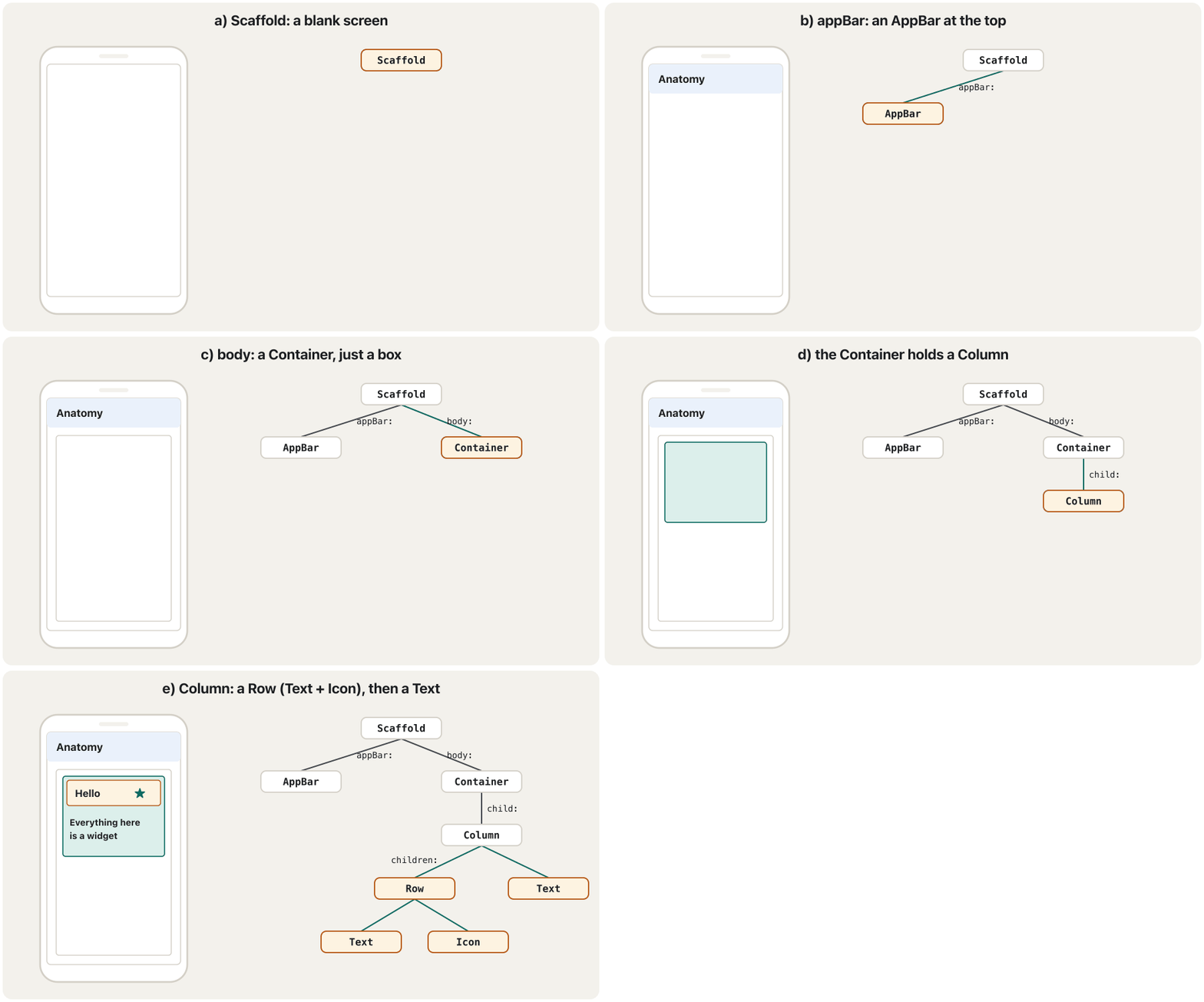
The notes write the finished tree as a sketch:
تێبینییەکان دارە تەواوەکە وەک ڕەشنووسێک دەنووسن:
Scaffold(
  appBar: AppBar(),
  body: Container(
    child: Column(
      children: [
        Row(
          Text(),
          Icon(),
        ),
        Text(),
      ]
    )
  ),
)import 'package:flutter/material.dart';
class AnatomyScreen extends StatelessWidget {
const AnatomyScreen({super.key});
@override
Widget build(BuildContext context) {
return Scaffold(
appBar: AppBar(title: const Text('Anatomy')),
body: Container(
padding: const EdgeInsets.all(16),
child: const Column(
children: [
Row(
children: [
Text('Hello'),
Icon(Icons.star),
],
),
Text('Everything here is a widget'),
],
),
),
);
}
}Explain the codeڕوونکردنەوەی کۆدەکە
- Lineدێڕی 9
a + b: a Scaffold with an AppBar.
a + b: Scaffoldـێک لەگەڵ AppBarـێک.
- Lineدێڕی 10-11
c: the Container (with 16 pixels of padding).
c: Containerـەکە (بە 16 پیکسڵ padding).
- Lineدێڕی 12-13
d: the Column and its list of children.
d: Columnـەکە و لیستی .
- Lineدێڕی 14-19
e: a Row with a Text and an Icon, then a Text.
e: Rowـێک بە Textـێک و Iconـێکەوە، پاشان Textـێک.
Mitch Koko's calm beginner course in Dart and Flutter: variables, operators, if/else, switch, loops, functions, collections, a first screen and a counter.
کۆرسە ئارامەکەی Mitch Koko بۆ سەرەتاییەکان لە و : ، ، if/else، switch، ، ، List/Set/Map، یەکەم شاشە و .
Plays 29:38-41:53: a screen built widget by widget: Scaffold, Container, Text, Icon, AppBar, Column and Row.
لە 29:38 تا 41:53 پەخش دەبێت: شاشەیەک بە دروست دەکرێت: Scaffold، Container، Text، Icon، AppBar، Column و Row.
Common mistakesهەڵە باوەکان
| Mistakeهەڵە | Why it is wrongبۆچی هەڵەیە | Do thisئەمە بکە |
|---|---|---|
Margin(child: ...) | There is no Margin widget. Margin نییە. | Padding, SizedBox, or Container(margin: ...).Padding، SizedBox یان Container(margin: ...). |
Row(Text('a'), Icon(Icons.star)) | Row takes a list in children:.Row لیستێک لە children:ـدا وەردەگرێت. | Row(children: [Text('a'), Icon(Icons.star)])Row(children: [Text('a'), Icon(Icons.star)]) |
RaisedButton(...) | Removed from Flutter.لە Flutter لابراوە. | ElevatedButton(...)ElevatedButton(...) |
MyHomePage({Key key, this.title}) | Not null-safe; title is not declared. تێدا نییە؛ title نەناسێنراوە. | const MyHomePage({super.key, required this.title}); final String title;const MyHomePage({super.key, required this.title}); final String title; |
Downloading data or starting a timer inside build دراوە یان دەستپێکردنی کاتژمێر لەنێو buildـدا | build runs many times; the work repeats.build چەندین جار جێبەجێ دەبێت؛ کارەکە دووبارە دەبێتەوە. | Start it once (in initState, see the State lifecycle) and only describe the UI in build.یەک جار دەستی پێ بکە (لە initState، سەیری سووڕی ژیانی State بکە) و لە buildـدا تەنها وەسف بکە. |
| Trying to change a widget's field laterهەوڵدان بۆ گۆڕینی دواتر | Widgets are immutable. . | Keep changing data in a State object and rebuild (next lesson).دراوەی گۆڕاو لە هەڵبگرە و دووبارە دروستی بکەرەوە (وانەی داهاتوو). |
Exercisesڕاهێنانەکان
Draw the widget tree of this code. Write the property name (body, child, children…) on each line.
ئەم کۆدە بکێشە. ناوی (body، child، children…) لەسەر هەر هێڵێک بنووسە.
Scaffold(
  appBar: AppBar(title: const Text('Profile')),
  body: const Padding(
    padding: EdgeInsets.all(16),
    child: Column(
      children: [
        Icon(Icons.person),
        Text('Shilan'),
      ],
    ),
  ),
)
Show answerوەڵامەکە پیشان بدە
Scaffold
├─ appBar: AppBar
│   └─ title: Text('Profile')
└─ body: Padding
    └─ child: Column
        ├─ children[0]: Icon(Icons.person)
        └─ children[1]: Text('Shilan')
Scaffold is the root here. Padding is invisible (layout); Icon and both Texts are visible.
لێرەدا Scaffold . Padding نادیارە ()؛ Icon و هەردوو Textـەکە دیارن.
Sort these widgets into visible (input/output) and invisible (layout/control): Text, Row, Checkbox, Center, Image, Padding, Switch, Stack, Icon, Column.
ئەم بکە بە دیار (/) و نادیار (/کۆنترۆڵ): Text، Row، Checkbox، Center، Image، Padding، Switch، Stack، Icon، Column.
Show answerوەڵامەکە پیشان بدە
| Visibleدیار | Invisibleنادیار |
|---|---|
Text | Row |
Checkbox | Center |
Image | Padding |
Switch | Stack |
Icon | Column |
Exercisesڕاهێنانەکان
More exercisesڕاهێنانی زیاتر
Without looking at the corrected version above, list everything you must change in the notes' Hello World so that it compiles with today's Flutter. Then compare.
بەبێ سەیرکردنی وەشانە چاککراوەکەی سەرەوە، هەموو ئەو شتانە بنووسە کە دەبێت لە Hello Worldـەکەی تێبینییەکاندا بیگۆڕیت تا لەگەڵ Flutterـی ئەمڕۆ کۆمپایل ببێت. پاشان بەراوردی بکە.
Show answerوەڵامەکە پیشان بدە
MyHomePage({Key key, this.title}) : super(key: key);→const MyHomePage({super.key, required this.title});- Declare the field:
final String title;and useText(title). primarySwatch: Colors.blue→colorScheme: ColorScheme.fromSeed(seedColor: Colors.blue).- Add
const MyApp({super.key});,void main() => runApp(const MyApp());andconstwhere possible.
MyHomePage({Key key, this.title}) : super(key: key);←const MyHomePage({super.key, required this.title});- بناسێنە:
final String title;وText(title)بەکار بهێنە. primarySwatch: Colors.blue←colorScheme: ColorScheme.fromSeed(seedColor: Colors.blue).const MyApp({super.key});،void main() => runApp(const MyApp());و لە هەر شوێنێک بکرێتconstزیاد بکە.
Write the build method of a widget that shows an AppBar titled 'Tea House' and, in the middle of the body, a Column with an Icon(Icons.local_cafe) and the text 'Open'. Then draw its tree.
buildـی بنووسە کە AppBarـێک بە ناونیشانی 'Tea House' و لە ناوەڕاستی bodyـدا Columnـێک بە Icon(Icons.local_cafe) و دەقی 'Open' پیشان دەدات. پاشان دارەکەی بکێشە.
Show answerوەڵامەکە پیشان بدە
@override
Widget build(BuildContext context) {
  return Scaffold(
    appBar: AppBar(title: const Text('Tea House')),
    body: const Center(
      child: Column(
        mainAxisSize: MainAxisSize.min,
        children: [
          Icon(Icons.local_cafe),
          Text('Open'),
        ],
      ),
    ),
  );
}Scaffold
├─ appBar: AppBar ── title: Text('Tea House')
└─ body: Center
└─ child: Column
├─ Icon(Icons.local_cafe)
└─ Text('Open')mainAxisSize: MainAxisSize.min makes the Column only as tall as its children, so Center can really centre it (more in Row and Column).
mainAxisSize: MainAxisSize.min وا دەکات Columnـەکە تەنها هێندەی بەرز بێت، بۆ ئەوەی Center بە ڕاستی بیخاتە ناوەڕاستەوە (زیاتر لە Row و Columnـدا).
Summaryپوختە
- In Flutter everything on the screen, and the app itself, is a widget; widgets are nested into a widget tree with one root.
- Widgets are immutable descriptions. To change the screen, Flutter builds new widgets;
constwidgets can be reused. build(BuildContext context)returns the widgets for one part of the screen;contextis the widget's place in the tree.- Behind the widget tree are the element tree (keeps place and State) and the render tree (size, position, paint). Keys help match widgets to elements in lists.
- Visible widgets show and take data; invisible ones arrange. There is no Margin widget; RaisedButton is gone (use ElevatedButton).
- Anatomy:
Scaffold→AppBar+Container→Column→Row(Text,Icon) andText.
- لە Flutterـدا هەموو شتێکی سەر شاشە و خودی ؛ لەنێو یەکتردا دادەنرێن و پێک دەهێنن کە یەک هەیە.
- وەسفی . بۆ گۆڕینی شاشە، Flutter نوێ دروست دەکات؛
constدووبارە بەکار دێنەوە. build(BuildContext context)بەشێکی شاشە دەگەڕێنێتەوە؛contextشوێنی لە دارەکەدا.- لە پشت (شوێن و State هەڵدەگرێت) و داری وێناکردن (قەبارە، شوێن، کێشان) هەن. لە لیستەکاندا یارمەتیی پێکگرتنی و توخمەکان دەدەن.
- دیار دراوە پیشان دەدەن و وەردەگرن؛ نادیارەکان ڕێک دەخەن. Margin نییە؛ RaisedButton نەماوە (ElevatedButton بەکار بهێنە).
- توێکاری:
Scaffold←AppBarوContainer←Column←Row(TextوIcon) وText.
What does 'everything is a widget' mean?«هەموو شتێک ویجێتە» واتای چییە؟
Every part of the UI, visible (text, buttons) or not (padding, centring, rows), and the app itself, is a widget object nested in one tree.
هەموو بەشێکی ، چ دیار (دەق، ) چ نادیار (padding، ناوەڕاستکردن، ڕیز)، هەروەها خودی ، کە لە یەک داردا دانراوە.
If widgets are immutable, how does the screen change?ئەگەر ویجێتەکان گۆڕانهەڵنەگر بن، شاشە چۆن دەگۆڕێت؟
Flutter builds new widgets with new values; the element tree updates only what changed.
Flutter نوێ بە نرخی نوێ دروست دەکات؛ تەنها ئەوە نوێ دەکاتەوە کە گۆڕاوە.
Lesson complete!وانەکە تەواو بوو!
Well done. Review the key terms, then go on to the next lesson.دەستخۆش. سەیرێکی زاراوە سەرەکییەکان بکەرەوە، پاشان بڕۆ بۆ وانەی داهاتوو.
Key termsزاراوە سەرەکییەکان
Stateless and Stateful Widgetsویجێتە بێدۆخەکان و ویجێتە دۆخدارەکان
Related lecturesوانە پەیوەندیدارەکان
References and further readingسەرچاوەکان و خوێندنەوەی زیاتر
- Flutter docs: Building user interfaces with Flutter (widgets intro)
- Flutter docs: Architectural overview (widgets, elements, render objects)
- Flutter docs: Material components widgets
- Flutter breaking changes: new buttons replace RaisedButton, FlatButton, OutlineButton
- Flutter breaking changes: Material 3 by default
This lecture is a first edition. The Kurdish text and terminology are waiting for review by Kurdish IT teachers.ئەم وانەیە چاپی یەکەمە. دەقە کوردییەکە و زاراوەکانی چاوەڕێی پێداچوونەوەی مامۆستایانی کوردی بواری IT ن.