FlutterFlutter · Chapterبەش 6 · Lectureوانە 6.3
MaterialApp and ScaffoldMaterialApp و Scaffold
What MaterialApp gives a Flutter app (theme, routes, home, localization) with Material 3 colours and right-to-left layout; what Scaffold gives one screen; the app bar, body and floating action button; SnackBars through ScaffoldMessenger; and today's Scaffold constructor.
ئەوەی MaterialApp دەیدات بە Flutter (، ، home و ) لەگەڵ ڕەنگەکانی Material 3 و ڕێکخستنی ؛ ئەوەی Scaffold دەیدات بە یەک شاشە؛ ، body و ؛ لە ڕێگەی ScaffoldMessengerـەوە؛ و Scaffold لە ئەمڕۆدا.
What you will learnچی فێر دەبیت
- Explain what MaterialApp provides and set a Material 3 theme with ColorScheme.fromSeed.
- Explain how localization and right-to-left layout change a Flutter screen.
- Build a screen with Scaffold, AppBar (leading, title, actions), body and a floating action button.
- Show a SnackBar with ScaffoldMessenger and avoid the outdated Scaffold properties.
- ڕوونی بکەیتەوە MaterialApp چی دابین دەکات و بە ColorScheme.fromSeed Material 3 دابنێیت.
- ڕوونی بکەیتەوە و ڕێکخستنی چۆن شاشەیەکی Flutter دەگۆڕن.
- شاشەیەک بە Scaffold، AppBar (leading، title، actions)، body و دروست بکەیت.
- بە ScaffoldMessenger پیشان بدەیت و خۆت لە کۆنەکانی Scaffold بپارێزیت.
MaterialApp and Scaffold: the frame of an appMaterialApp و Scaffold: چوارچێوەی ئەپێک
In a typical Flutter app, runApp() receives a MaterialApp, and every screen inside it is a Scaffold. The MaterialApp looks after the whole app: its colours, its screens and its language. The Scaffold builds the layout of one screen: a bar at the top, the main content, a button in a corner and bars at the bottom.
لە ئاسایی Flutterـدا، runApp() MaterialAppـێک وەردەگرێت و هەر شاشەیەک لە ناویدا Scaffoldـێکە. MaterialApp چاودێریی هەموو دەکات: ڕەنگەکانی، شاشەکانی و زمانەکەی. Scaffold یەک شاشە دروست دەکات: شریتێک لە سەرەوە، ناوەڕۆکی سەرەکی، دوگمەیەک لە گۆشەیەکدا و شریتێک لە خوارەوە.
MyApp
 └─ MaterialApp          ← the whole app: theme, screens, language
     └─ Scaffold          ← one screen
         ├─ appBar: AppBar
         ├─ body: ...
         └─ floatingActionButton: ...
You met the widget tree in Widgets and the Widget Tree. Here you learn what each of these two widgets does today and how it behaves in a Kurdish (right-to-left) app.
لە ویجێتەکان و داری ویجێتەکان ناسی. لێرەدا فێر دەبیت هەریەک لەم دوو ئەمڕۆ چی دەکات و لە کوردیدا () چۆن ڕەفتار دەکات.
MaterialApp is like a school: it decides what is the same in every room — the uniform colours (the theme), the rooms and the corridors between them (the routes), the first room you enter (home) and the teaching language (localization). Scaffold is the plan of one classroom: the board at the front (the app bar), the desks (the body), the bell on the teacher's table (the floating action button) and a cupboard at the side (the drawer).
MaterialApp وەک قوتابخانەیەک وایە: ئەوە دیاری دەکات کە لە هەموو ژوورێکدا وەک یەکە — ڕەنگی جلی قوتابیان ()، ژوورەکان و ڕاڕەوەکانی نێوانیان ()، یەکەم ژوور کە دەچیتە ناوی (home) و زمانی خوێندن (). Scaffold نەخشەی یەک پۆلە: تەختەڕەشەکە لە پێشەوە ()، مێزەکان (body)، زەنگەکەی سەر مێزی مامۆستا () و کەنتۆرێک لە لاتەنیشت ().
Where the analogy stops workingسنووری ئەم نموونەیە
Unlike a classroom, a Scaffold may leave any part out: a screen can have no app bar, no button and no drawer.
بە پێچەوانەی پۆلێک، Scaffold دەتوانێت هەر بەشێک نەبێت: شاشەیەک دەکرێت نە هەبێت، نە دوگمە و نە .
What MaterialApp gives youMaterialApp چیت پێ دەدات
MaterialApp is a convenience widget: instead of you putting a dozen helper widgets together by hand, it wraps all the widgets an app needs when it follows Material Design, Google's design system. It also organises the app's screens. The course lists four things it provides:
MaterialApp ئاسانکارە: لە جیاتی ئەوەی خۆت دوازدە یارمەتیدەر بە دەست پێکەوە ببەستیتەوە، هەموو ئەو لە خۆ دەگرێت کە پێویستی پێیانە کاتێک پەیڕەوی Material Design دەکات، کە سیستەمی دیزاینی Googleـە. هەروەها شاشەکانی ڕێک دەخات. وانەکە چوار شت دەژمێرێت کە دابینی دەکات:
| It provides…دابین دەکات… | Property | What it meansواتاکەی |
|---|---|---|
| 1. Theming١. | theme, darkTheme, themeMode | One set of colours, text styles and shapes for every screen.یەک کۆمەڵە ڕەنگ، شێوازی دەق و شێوە بۆ هەموو شاشەکان. |
| 2. Routing٢. | routes, onGenerateRoute | A list of the app's screens and a Navigator to move between them (Navigation).لیستی شاشەکانی و Navigatorـێک بۆ ڕۆیشتن لە نێوانیاندا (ڕێنیشاندان). |
| 3. Main route (home)٣. سەرەکی (home) | home | The first screen the user sees.یەکەم شاشە کە دەیبینێت. |
| 4. Localization٤. | locale, supportedLocales, localizationsDelegates | The app's language and region, including the text direction.زمان و ناوچەی ، لەگەڵ ئاڕاستەی نووسین. |
Two more properties you will see often: title (the name the phone shows in its list of open apps) and debugShowCheckedModeBanner: false (hides the red DEBUG ribbon while you develop).
دوو تر کە زۆر دەیانبینیت: title (ئەو ناوەی مۆبایلەکە لە لیستی کراوەکاندا پیشانی دەدات) و debugShowCheckedModeBanner: false (ئەو شریتە سوورەی DEBUG دەشارێتەوە کە لە کاتی گەشەپێداندا دەردەکەوێت).
The course's first example puts a Scaffold with an app bar straight into MaterialApp. Here it is complete and runnable:
یەکەم نموونەی وانەکە Scaffoldـێک لەگەڵ ڕاستەوخۆ دەخاتە ناو MaterialApp. ئەمە تەواوکراوەکەیەتی و جێبەجێ دەکرێت:
import 'package:flutter/material.dart';

void main() {
  runApp(
    MaterialApp(
      home: Scaffold(
        appBar: AppBar(
          title: const Text('Kurdistan Bazaar'),
          centerTitle: true,
        ), // AppBar
      ), // Scaffold
    ), // MaterialApp
  );
}┌─────────────────────────────┐ │ Kurdistan Bazaar │ ├─────────────────────────────┤ │ │ │ │ │ │ │ │ └─────────────────────────────┘
A white page with a bar at the top. The words 'Kurdistan Bazaar' sit in the middle of the bar.
پەڕەیەکی سپی بە شریتێک لە سەرەوە. وشەکانی 'Kurdistan Bazaar' لە ناوەڕاستی شریتەکەدان.
Explain the codeڕوونکردنەوەی کۆدەکە
- Lineدێڕی 4
runApp()makes this widget the root of the app.runApp()ئەم دەکاتە ڕەگی .- Lineدێڕی 6
home: the first screen.home: یەکەم شاشە.- Lineدێڕی 8-9
The title, centred on every platform.
ناونیشانەکە، لە هەموو لە ناوەڕاستە.
What MaterialApp gives youMaterialApp چیت پێ دەدات
The material importimportـی material
Every file that uses MaterialApp, Scaffold, AppBar, Colors or Icons starts with this line:
هەر فایلێک کە MaterialApp، Scaffold، AppBar، Colors یان Icons بەکار بهێنێت بەم دێڕە دەست پێدەکات:
import 'package:flutter/material.dart';The material library contains Flutter's Material Design widgets: the app and page widgets, bars, buttons, dialogs, the Colors and Icons collections and the theme classes. It also brings in Flutter's basic widgets library, so Text, Row, Column, Container and Center come with it — you import it once and then just use the widgets.
material Material Designـی Flutter لە خۆ دەگرێت: و پەڕە، شریتەکان، ، ، کۆمەڵەکانی Colors و Icons و . هەروەها بنەڕەتیی Flutter لەگەڵ خۆی دەهێنێت، بۆیە Text، Row، Column، Container و Center لەگەڵیدا دێن — یەک جار importـی دەکەیت و پاشان تەنها بەکار دەهێنیت.
Without the line, the compiler stops with errors such as Undefined name 'Colors' or The method 'Scaffold' isn't defined.
بەبێ ئەم دێڕە، بە هەڵەی وەک Undefined name 'Colors' یان The method 'Scaffold' isn't defined دەوەستێت.
Theming with Material 3تێم لە Material 3ـدا
Since Flutter 3.16, every new app uses Material 3, the newest version of Material Design. In Material 3 the colours of the whole app come from a ColorScheme: a set of named colour roles such as primary, onPrimary, surface and error. You rarely pick every role by hand. You give one seed colour, and ColorScheme.fromSeed makes matching light and dark colours for every role.
لە Flutter 3.16ـەوە هەموو نوێ Material 3 بەکار دەهێنێت، کە نوێترین وەشانی Material Designـە. لە Material 3ـدا ڕەنگەکانی هەموو لە ColorSchemeـێکەوە دێن: کۆمەڵێک ڕۆڵی ڕەنگیی ناونراو وەک primary، onPrimary، surface و error. کەم جار هەموو ڕۆڵەکان بە دەست هەڵدەبژێریت. یەک ڕەنگی تۆو دەدەیت و ColorScheme.fromSeed بۆ هەموو ڕۆڵێک ڕەنگی ڕووناک و تاریکی گونجاو دروست دەکات.
onX colour is for text and icons drawn on top of X, so they always contrast.هەر ڕەنگێکی onX بۆ دەق و کە لەسەر X دەکێشرێن، بۆیە هەمیشە جیاوازییان دیارە.CêITA widget reads the theme with Theme.of(context). It finds the nearest theme above the widget in the tree — usually the one in MaterialApp. Theme.of(context).colorScheme gives the colours and Theme.of(context).textTheme gives ready text styles such as headlineMedium and bodyLarge.
بە Theme.of(context) دەخوێنێتەوە. نزیکترین لە سەرووی لە دەدۆزێتەوە — زۆربەی جار ئەوەی ناو MaterialApp. Theme.of(context).colorScheme ڕەنگەکان دەدات و Theme.of(context).textTheme شێوازی ئامادەی دەق دەدات، وەک headlineMedium و bodyLarge.
import 'package:flutter/material.dart';

void main() => runApp(const MyApp());

class MyApp extends StatelessWidget {
  const MyApp({super.key});

  @override
  Widget build(BuildContext context) {
    return MaterialApp(
      title: 'Mobile App Course',
      theme: ThemeData(
        colorScheme: ColorScheme.fromSeed(seedColor: Colors.teal),
      ),
      darkTheme: ThemeData(
        colorScheme: ColorScheme.fromSeed(
          seedColor: Colors.teal,
          brightness: Brightness.dark,
        ),
      ),
      themeMode: ThemeMode.system,
      home: const HomePage(),
    );
  }
}

class HomePage extends StatelessWidget {
  const HomePage({super.key});

  @override
  Widget build(BuildContext context) {
    final colors = Theme.of(context).colorScheme;
    final textTheme = Theme.of(context).textTheme;
    return Scaffold(
      appBar: AppBar(
        title: const Text('Mobile App Course'),
        backgroundColor: colors.primaryContainer,
      ),
      body: Center(
        child: Text(
          'IT Dept!',
          style: textTheme.headlineMedium?.copyWith(color: colors.primary),
        ),
      ),
    );
  }
}┌─────────────────────────────┐ │ Mobile App Course │ ├─────────────────────────────┤ │ │ │ IT Dept! │ │ │ │ │ └─────────────────────────────┘
On a phone in light mode: the app bar 'Mobile App Course' on a pale teal background and 'IT Dept!' in large dark-teal letters in the centre. With the phone in dark mode the same screen turns dark by itself.
لەسەر مۆبایلێک لە دۆخی ڕووناکدا: 'Mobile App Course' لەسەر پاشبنەمایەکی شینی سەوزباوی کاڵ و 'IT Dept!' بە پیتی گەورەی شینی سەوزباوی تۆخ لە ناوەڕاستدا. کاتێک مۆبایلەکە لە ، هەمان شاشە خۆی تاریک دەبێت.
Explain the codeڕوونکردنەوەی کۆدەکە
- Lineدێڕی 12-14
The light theme: every colour is made from teal.
ڕووناک: هەموو ڕەنگێک لە سەوزی تۆخ دروست دەکرێت.
- Lineدێڕی 15-20
The dark theme: the same seed with
Brightness.dark.: هەمان تۆو لەگەڵ
Brightness.dark.- Lineدێڕی 21
ThemeMode.systemfollows the phone's setting.ThemeMode.systemشوێن ڕێکخستنی مۆبایلەکە دەکەوێت.- Lineدێڕی 32-33
Read the colours and text styles from the theme.
ڕەنگەکان و شێوازەکانی دەق لە بخوێنەوە.
- Lineدێڕی 42
?.because a text style may be missing (null safety).?.چونکە دەکرێت شێوازێکی دەق نەبێت ().
Localization and right-to-left layoutخۆماڵیکردن و ڕێکخستنی ڕاست بۆ چەپ
Localization means making an app fit a language and a region: translated text, number and date formats, and the right writing direction. Kurdish (Sorani), Arabic and Persian are written right-to-left (RTL). When the app's locale is right-to-left, Flutter mirrors the layout: what was on the left moves to the right.
واتە گونجاندنی لەگەڵ زمان و ناوچەیەک: دەقی وەرگێڕدراو، شێوەی نووسینی ژمارە و ڕێکەوت و ئاڕاستەی نووسینی دروست. کوردی (سۆرانی)، عەرەبی و فارسی (RTL) دەنووسرێن. کاتێک زمانی بێت، Flutter پێچەوانە دەکاتەوە: ئەوەی لە چەپ بوو دەچێتە ڕاست.
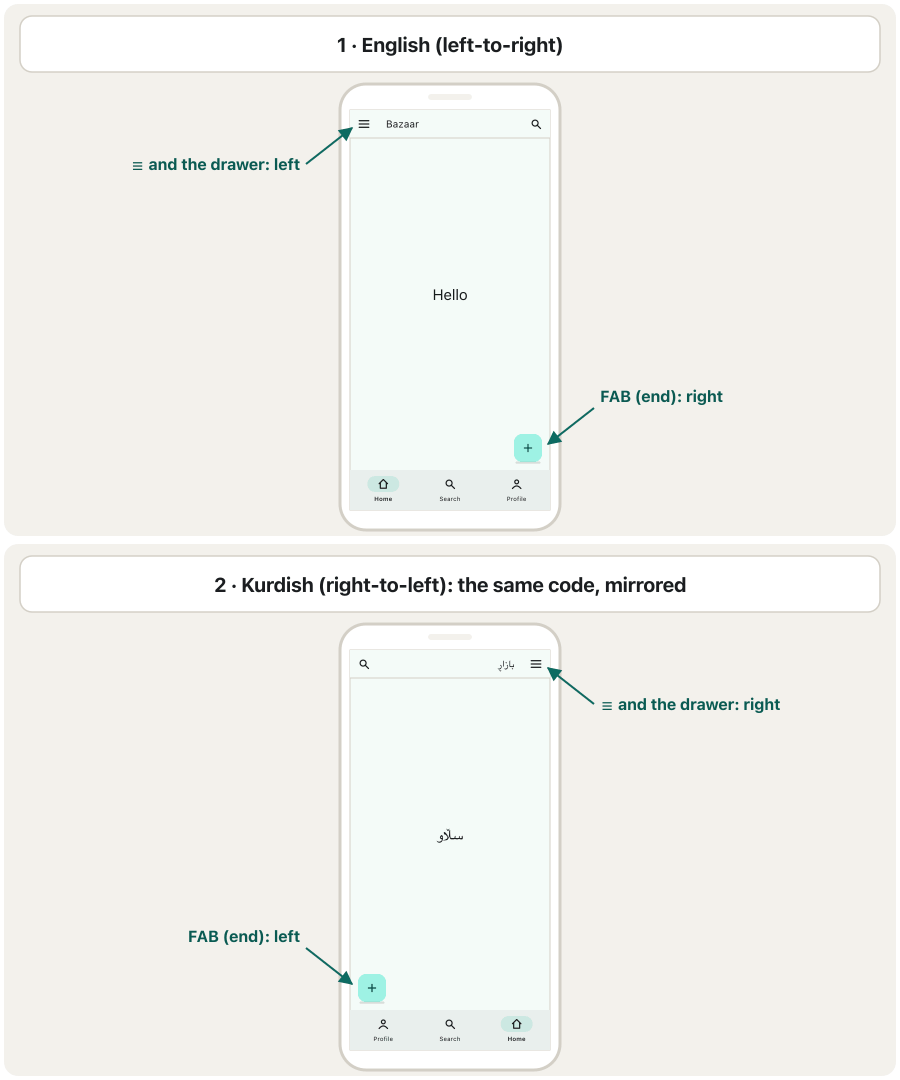
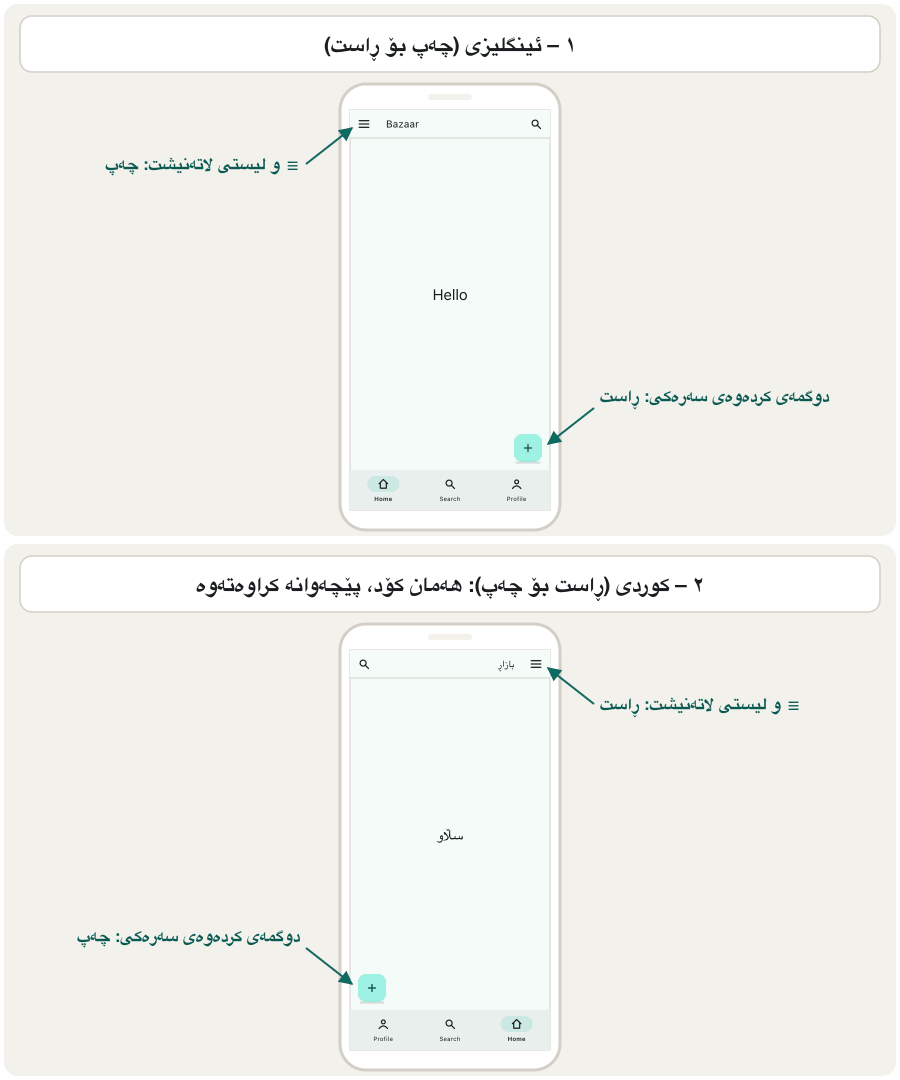
That is why Flutter widgets speak of start and end instead of left and right. Start is where reading begins: the left in English, the right in Kurdish. A widget written with start and end works in both directions without changes.
بۆیە Flutter باسی سەرەتا (start) و کۆتایی (end) دەکەن لە جیاتی چەپ و ڕاست. سەرەتا ئەو شوێنەیە کە خوێندنەوەی لێ دەست پێدەکات: لە ئینگلیزیدا چەپ و لە کوردیدا ڕاست. کە بە سەرەتا و کۆتایی نووسرابێت بەبێ گۆڕانکاری لە هەردوو ئاڕاستەدا کار دەکات.
To support languages, you add the flutter_localizations package and give MaterialApp its localizationsDelegates and supportedLocales. These delegates translate Material's own words (tooltips such as Open navigation menu, Back, dates in pickers) into many languages, including Arabic and Persian. Central Kurdish (ckb) is not among them today, so a Kurdish app adds its own small delegate (the Flutter docs show how under Adding support for a new language).
بۆ پشتگیریکردنی زمانەکان، flutter_localizations زیاد دەکەیت و localizationsDelegates و supportedLocales دەدەیت بە MaterialApp. ئەم delegateـانە وشەکانی خودی Material (ڕوونکردنەوەی وەک Open navigation menu، Back، ڕێکەوت لە هەڵبژێرەرەکاندا) وەردەگێڕن بۆ زۆر زمان، لەوانە عەرەبی و فارسی. کوردیی ناوەندی (ckb) ئەمڕۆ لە ناویاندا نییە، بۆیە کوردی delegateـێکی بچووکی خۆی زیاد دەکات (بەڵگەنامەکانی Flutter لە بەشی Adding support for a new language ڕێگاکەی پیشان دەدەن).
To see the mirrored layout while you practise, you can force the direction for the whole app with MaterialApp's builder:
بۆ ئەوەی لە کاتی ڕاهێناندا پێچەوانەکراوە ببینیت، دەتوانیت بە builderـی MaterialApp ئاڕاستەکە بۆ هەموو دیاری بکەیت:
import 'package:flutter/material.dart';

void main() {
  runApp(
    MaterialApp(
      // Practice only: force a right-to-left layout for the whole app.
      builder: (context, child) => Directionality(
        textDirection: TextDirection.rtl,
        child: child!,
      ),
      home: Scaffold(
        appBar: AppBar(title: const Text('بازاڕ')),
        drawer: const Drawer(child: Center(child: Text('Drawer'))),
        body: const Center(child: Text('سڵاو')),
        floatingActionButton: FloatingActionButton(
          onPressed: () {},
          child: const Icon(Icons.add),
        ),
      ),
    ),
  );
}┌─────────────────────────────┐ │ بازا…│ ├─────────────────────────────┤ │ │ │ سڵاو │ │ │ │ (+) │ └─────────────────────────────┘
The title 'بازاڕ' on the right with the ☰ button at the far right; 'سڵاو' in the centre; the + button at the bottom left.
ناونیشانی 'بازاڕ' لە ڕاستە و دوگمەی ☰ لە دوورترین شوێنی ڕاستدایە؛ 'سڵاو' لە ناوەڕاستدا؛ دوگمەی + لە خوارەوەی چەپ.
Explain the codeڕوونکردنەوەی کۆدەکە
- Lineدێڕی 7-10
Directionalitysets the text direction for everything below it.Directionalityئاڕاستەی نووسین بۆ هەموو شتێکی ژێر خۆی دیاری دەکات.- Lineدێڕی 13
The drawer now opens from the right edge.
ئێستا لە لێواری ڕاستەوە دەکرێتەوە.
- Lineدێڕی 15-18
The floating action button moves to the bottom left.
دەچێتە خوارەوەی چەپ.
Scaffold: the layout of one screenScaffold: ڕێکخستنی ڕووکاری یەک شاشە
A Scaffold implements the basic Material Design visual layout of a screen. You usually build one Scaffold for each screen of the app. It fills the whole device screen and has a named slot for every common part of a mobile screen; you put a widget into a slot and the Scaffold places it in the right spot.
Scaffold بینراوی بنەڕەتیی Material Designـی شاشەیەک جێبەجێ دەکات. زۆربەی جار بۆ هەر شاشەیەکی یەک Scaffold دروست دەکەیت. هەموو شاشەی ئامێرەکە پڕ دەکاتەوە و بۆ هەر بەشێکی باوی شاشەی مۆبایل شوێنێکی ناونراوی هەیە؛ دەخەیتە ناو شوێنێک و Scaffold لە جێی خۆیدا دایدەنێت.
Scaffold() is just a blank page.هەموو شوێنێک ئارەزوومەندانەیە: Scaffold()ـێکی بەتاڵ تەنها پەڕەیەکی سپییە.CêIT| Property | What goes thereچی دەچێتە ئەوێ | Taught inلە کوێ فێر دەبیت |
|---|---|---|
appBar | The bar at the top: title, buttons.شریتەکەی سەرەوە: ناونیشان و . | this lessonئەم وانەیە |
body | The main content of the screen.ناوەڕۆکی سەرەکیی شاشەکە. | this lessonئەم وانەیە |
floatingActionButton | The floating button for the screen's main action.ئەو لەسەر ناوەڕۆکەکە دەمێنێتەوە، بۆ کردەوەی سەرەکیی شاشەکە. | this lessonئەم وانەیە |
drawer, endDrawer | Side panels that slide in.پانێڵی لاتەنیشت کە دێنە ژوورەوە. | Drawers, Bottom Bars and Sheetsلیستە لاتەنیشتەکان، شریتەکانی خوارەوە و پەڕەی خوارەوە |
bottomNavigationBar | A bar at the bottom with the main sections.شریتێک لە خوارەوە بۆ بەشە سەرەکییەکان. | Drawers, Bottom Bars and Sheetsلیستە لاتەنیشتەکان، شریتەکانی خوارەوە و پەڕەی خوارەوە |
persistentFooterButtons | Buttons that stay at the bottom. کە لە خوارەوە دەمێننەوە. | Drawers, Bottom Bars and Sheetsلیستە لاتەنیشتەکان، شریتەکانی خوارەوە و پەڕەی خوارەوە |
bottomSheet, backgroundColor, resizeToAvoidBottomInset | Extra bottom content, page colour, keyboard behaviour.ناوەڕۆکی زیادەی خوارەوە، ڕەنگی پەڕە، ڕەفتار لەگەڵ . | Drawers, Bottom Bars and Sheetsلیستە لاتەنیشتەکان، شریتەکانی خوارەوە و پەڕەی خوارەوە |
A Kurdish beginner course: what Flutter is, making an Android emulator, creating and running a project in VS Code, Hello World and hot reload.
کۆرسێکی کوردی بۆ سەرەتاییەکان: چییە، دروستکردنی Android، دروستکردن و کارپێکردنی پرۆژەیەک لە VS Codeـدا، Hello World و .
In Kurdish. Watch 15:32-23:03: MaterialApp, Scaffold, the AppBar and styling it.
بە کوردی. لە 15:32 تا 23:03 سەیر بکە: MaterialApp، Scaffold، و ڕازاندنەوەی.
Scaffold: the layout of one screenScaffold: ڕێکخستنی ڕووکاری یەک شاشە
Why use a Scaffold?بۆچی Scaffold بەکار بهێنین؟
- It gives the basic Material layout. The app bar, body, buttons and bars are placed exactly where Material Design expects them, with the right spacing.
- It contains almost everything a screen needs to make a functional, responsive app: you fill slots instead of measuring positions yourself.
- It controls the screen from top to bottom, including the 'invisible' areas. These are the system areas: the status bar at the top, the gesture area at the bottom and the space the on-screen keyboard takes. The app bar keeps its content below the status bar.
- Its body is resized to make room for the keyboard, so a text field does not hide behind it (the property
resizeToAvoidBottomInset, true by default).
- بنەڕەتیی Material دەدات. ، body، و شریتەکان ڕێک لەو شوێنەدا دادەنرێن کە Material Design چاوەڕێی دەکات، بە بۆشایی گونجاو.
- نزیکەی هەموو ئەوەی شاشەیەک پێویستیەتی لە خۆ دەگرێت بۆ دروستکردنی کارا و : شوێنەکان پڕ دەکەیتەوە لە جیاتی ئەوەی خۆت شوێنەکان بپێویت.
- شاشەکە لە سەرەوە تا خوارەوە کۆنترۆڵ دەکات، ناوچە 'نادیار'ەکانیشی. ئەمانە ناوچەکانی سیستەمن: شریتی سەرەوەی مۆبایل (کات و باتری)، ناوچەی لە خوارەوە و ئەو شوێنەی سەر شاشە دەیگرێت. ناوەڕۆکەکەی لە خوارەوەی شریتی سیستەم دەهێڵێتەوە.
- bodyـەکەی قەبارەی دەگۆڕێت بۆ ئەوەی جێ بۆ بکاتەوە، بۆیە لە پشتیدا ون نابێت (
resizeToAvoidBottomInset، کە بە بنەڕەت trueـە).
Scaffold: the layout of one screenScaffold: ڕێکخستنی ڕووکاری یەک شاشە
The Scaffold constructor todayدروستکەری Scaffold لە ئەمڕۆدا
The course shows the Scaffold constructor of an early Flutter version. Today's constructor (Flutter 3.44) has more parameters, and every one is a named parameter that may be left out:
وانەکە Scaffoldـی وەشانێکی سەرەتایی Flutter پیشان دەدات. ئەمڕۆ (Flutter 3.44) زیاترە و هەموویان ن کە دەکرێت نەنووسرێن:
const Scaffold({
  super.key,
  this.appBar,
  this.body,
  this.floatingActionButton,
  this.floatingActionButtonLocation,
  this.floatingActionButtonAnimator,
  this.persistentFooterButtons,
  this.persistentFooterAlignment = AlignmentDirectional.centerEnd,
  this.drawer,
  this.onDrawerChanged,
  this.endDrawer,
  this.onEndDrawerChanged,
  this.bottomNavigationBar,
  this.bottomSheet,
  this.backgroundColor,
  this.resizeToAvoidBottomInset,
  this.primary = true,
  this.extendBody = false,
  this.extendBodyBehindAppBar = false,
  this.drawerEnableOpenDragGesture = true,
  this.endDrawerEnableOpenDragGesture = true,
  this.restorationId,
  // … and a few more drawer settings
});
Explain the codeڕوونکردنەوەی کۆدەکە
- Lineدێڕی 2
super.keyreplaces the oldKey key.super.keyجێگەیKey keyـی کۆن دەگرێتەوە.- Lineدێڕی 17
Only
resizeToAvoidBottomInsetexists today;resizeToAvoidBottomPaddingis gone.ئەمڕۆ تەنها
resizeToAvoidBottomInsetهەیە؛resizeToAvoidBottomPaddingنەماوە.
appBar: the bar at the topappBar: شریتی ئەپەکە لە سەرەوە
appBar is a horizontal bar shown at the top of the Scaffold. It usually holds the screen's title and a few buttons. The widget you put there is almost always an AppBar. The course's example:
appBar شریتێکی ئاسۆییە کە لە سەرەوەی Scaffold پیشان دەدرێت. زۆربەی جار ناونیشانی شاشەکە و چەند لە خۆ دەگرێت. ئەو دەیخەیتە ئەوێ نزیکەی هەمیشە AppBarـە. نموونەی وانەکە:
Widget build(BuildContext context) {
  return Scaffold(
    appBar: AppBar(
      title: const Text('Mobile App Course'),
      backgroundColor: Colors.blue,
    ), // AppBar
  ); // Scaffold
}┌─────────────────────────────┐ │ Mobile App Course │ ├─────────────────────────────┤ │ │ │ │ │ │ │ │ └─────────────────────────────┘
A blue bar across the top with the words 'Mobile App Course'; the rest of the page is empty.
شریتێکی شین بە درێژایی سەرەوە بە وشەکانی 'Mobile App Course'؛ باقیی پەڕەکە بەتاڵە.
In Material 3 an AppBar without backgroundColor takes the theme's surface colour (almost white), not blue. Prefer colours from the theme, e.g. backgroundColor: Theme.of(context).colorScheme.primaryContainer, so light and dark mode both look right.
لە Material 3ـدا AppBarـێک کە backgroundColorـی نەبێت ڕەنگی surfaceـی وەردەگرێت (نزیکەی سپی)، نەک شین. باشترە ڕەنگەکان لە بهێنیت، بۆ نموونە backgroundColor: Theme.of(context).colorScheme.primaryContainer، بۆ ئەوەی هەم ڕووناک و هەم دروست دەربکەون.
appBar: the bar at the topappBar: شریتی ئەپەکە لە سەرەوە
Leading, title and actionsleading و title و actions
An AppBar has three main parts. leading is one widget at the start (often a menu ☰ or back ← button). title comes next. actions is a list of buttons at the end.
AppBar سێ بەشی سەرەکیی هەیە. leading یەک لە سەرەتادا (زۆربەی جار دوگمەی ☰ یان گەڕانەوە ←). title بە دوایدا دێت. actions لیستێکە لە لە کۆتاییدا.
import 'package:flutter/material.dart';

class AppBarDemo extends StatelessWidget {
  const AppBarDemo({super.key});

  @override
  Widget build(BuildContext context) {
    return Scaffold(
      appBar: AppBar(
        leading: IconButton(
          icon: const Icon(Icons.menu),
          tooltip: 'Menu',
          onPressed: () {},
        ),
        title: const Text('AppName'),
        actions: [
          IconButton(
            icon: const Icon(Icons.search),
            tooltip: 'Search',
            onPressed: () {},
          ),
          IconButton(
            icon: const Icon(Icons.more_vert),
            tooltip: 'More',
            onPressed: () {},
          ),
        ],
      ),
      body: const Center(child: Text('Body')),
    );
  }
}
Explain the codeڕوونکردنەوەی کۆدەکە
- Lineدێڕی 10-14
leading: one widget at the start.leading: یەک لە سەرەتادا.- Lineدێڕی 15
title: usually aText.title: زۆربەی جارTextـێک.- Lineدێڕی 16-27
actions: a list, so several buttons fit.actions: لیستێکە، بۆیە چەند جێی دەبێتەوە.- Lineدێڕی 12
A
tooltipis read aloud by screen readers and shown on a long press.tooltipدەخوێنێتەوە و بە پەنجەنانی درێژیش پیشان دەدرێت.
- If you leave
leadingempty, Flutter fills it for you: a ☰ button when the Scaffold has adrawer, or a ← back button on a page that was opened from another page (automaticallyImplyLeading, true by default). centerTitle: truecentres the title. Without it, Android puts the title at the start, while iOS centres it when there are fewer than two actions.
- ئەگەر
leadingبەتاڵ بهێڵیتەوە، Flutter خۆی پڕی دەکاتەوە: دوگمەی ☰ کاتێک Scaffolddrawerـی هەبێت، یان دوگمەی گەڕانەوەی ← لە پەڕەیەکدا کە لە پەڕەیەکی ترەوە کراوەتەوە (automaticallyImplyLeading، بە بنەڕەت true). centerTitle: trueناونیشانەکە دەخاتە ناوەڕاست. بەبێ ئەوە، Android ناونیشانەکە لە سەرەتادا دادەنێت، بەڵام iOS کاتێک کەمتر لە دوو action هەبێت دەیخاتە ناوەڕاست.
body: the main contentbody: ناوەڕۆکی سەرەکی
body displays the main or primary content of the screen. It gets all the space between the app bar and the bottom bars. The course's example centres one line of text:
body ناوەڕۆکی سەرەکی یان بنەڕەتیی شاشەکە پیشان دەدات. هەموو ئەو شوێنە وەردەگرێت کە لە نێوان و شریتەکانی خوارەوەدایە. نموونەی وانەکە یەک دێڕ دەق دەخاتە ناوەڕاست:
body: const Center(
  child: Text(
    'IT Dept!',
    style: TextStyle(
      color: Colors.black,
      fontSize: 30.0,
    ),
  ),
),┌─────────────────────────────┐ │ │ │ │ │ IT Dept! │ │ │ │ │ └─────────────────────────────┘
'IT Dept!' in large black letters in the middle of the page.
'IT Dept!' بە پیتی گەورەی ڕەش لە ناوەڕاستی پەڕەکەدا.
Explain the codeڕوونکردنەوەی کۆدەکە
- Lineدێڕی 1
One
constcovers everything inside, because none of it changes.یەک
constهەموو ناوەوە دەگرێتەوە، چونکە هیچ شتێکی ناگۆڕێت.
The body holds one widget. To show more, that widget is a layout widget such as Column, Row, ListView or Container, which holds the rest. The next lessons build bodies with Container.
body یەک هەڵدەگرێت. بۆ پیشاندانی زیاتر، ئەو وەک Column، Row، ListView یان Container کە باقییەکان هەڵدەگرێت. وانەکانی داهاتوو body بە Container دروست دەکەن.
floatingActionButtonfloatingActionButton: دوگمەی کردەوەی سەرەکی لە گۆشەدا
A floating action button (FAB) is a button for the screen's most important action, such as add, write or call. It floats over the content at a fixed place: when you scroll the body, the button stays where it is.
(FAB) بۆ گرنگترین کردەوەی شاشەکە، وەک زیادکردن، نووسین یان پەیوەندیکردن. لەسەر ناوەڕۆکەکە دەمێنێتەوە لە شوێنێکی جێگیردا: کاتێک body دەکەیت، لە شوێنی خۆی دەمێنێتەوە.
import 'package:flutter/material.dart';

void main() => runApp(const MaterialApp(home: CoursePage()));

class CoursePage extends StatelessWidget {
  const CoursePage({super.key});

  @override
  Widget build(BuildContext context) {
    return Scaffold(
      appBar: AppBar(
        title: const Text('Mobile App Course'),
        backgroundColor: Colors.blue,
      ), // AppBar
      body: const Center(
        child: Text(
          'IT Dept!',
          style: TextStyle(
            color: Colors.black,
            fontSize: 30.0,
          ),
        ),
      ),
      floatingActionButton: FloatingActionButton(
        elevation: 10.0,
        tooltip: 'Home',
        onPressed: () {
          // action on button press
        },
        child: const Icon(Icons.home),
      ),
    ); // Scaffold
  }
}┌─────────────────────────────┐ │ Mobile App Course │ ├─────────────────────────────┤ │ │ │ IT Dept! │ │ │ │ [home] │ └─────────────────────────────┘
A blue app bar 'Mobile App Course', 'IT Dept!' in the centre and a small rounded-square button with a house icon in the bottom-right corner.
شین بە 'Mobile App Course'، 'IT Dept!' لە ناوەڕاستدا و دوگمەیەکی بچووکی چوارگۆشەی گۆشەخڕ بە ماڵ لە گۆشەی خوارەوەی ڕاستدا.
Explain the codeڕوونکردنەوەی کۆدەکە
- Lineدێڕی 24-31
The FAB: an icon, a raised shadow (elevation) and a callback.
FAB: ، سێبەرێکی بەرز (elevation) و .
- Lineدێڕی 26
tooltipnames the button for screen readers.tooltipناوی بۆ دیاری دەکات.- Lineدێڕی 30
childcomes last: the Flutter style for widget arguments.childلە کۆتاییدا دێت: شێوازی Flutter بۆ .
In Material 3 the FAB is a rounded square (not a circle), filled with the theme's primaryContainer colour. FloatingActionButton.small, .large and .extended (an icon with a label) give other sizes. Other positions (centre, docked on a bottom bar) are in Drawers, Bottom Bars and Sheets.
لە Material 3ـدا FAB چوارگۆشەیەکی گۆشەخڕە (نەک بازنە) و بە ڕەنگی primaryContainerـی پڕ کراوەتەوە. FloatingActionButton.small، .large و .extended (ئایکۆنێک لەگەڵ ناوێک) قەبارەی تر دەدەن. شوێنەکانی تر (ناوەڕاست، نووساو بە شریتی خوارەوە) لە لیستە لاتەنیشتەکان، شریتەکانی خوارەوە و پەڕەی خوارەوەـدان.
A friendly 2025 course whose short chapters show one Flutter widget at a time: layouts, the app frame, bars, buttons, lists and pictures.
کۆرسێکی دۆستانەی 2025 کە بەشە کورتەکانی هەر جارە یەک پیشان دەدەن: ، چوارچێوەی ، شریتەکان، ، و وێنەکان.
Watch 53:53-56:11 ('FloatingActionButton'): adding the floating button to a Scaffold.
لە 53:53 تا 56:11 سەیر بکە (FloatingActionButton): زیادکردنی بۆ Scaffold.
SnackBars come from ScaffoldMessengerسناکبارەکان لە ScaffoldMessengerـەوە دێن
A SnackBar is a short message at the bottom of the screen, such as Note deleted, sometimes with one button such as Undo. A SnackBar without a button disappears by itself after about 4 seconds.
پەیامێکی کورتە لە خوارەوەی شاشە، وەک Note deleted، هەندێک جار لەگەڵ یەک دوگمە وەک Undo. کە دوگمەی نەبێت نزیکەی دوای ٤ چرکە خۆی ون دەبێت.
You do not put a SnackBar into the Scaffold. You ask for it: ScaffoldMessenger.of(context).showSnackBar(...). MaterialApp already contains one ScaffoldMessenger for the whole app. It shows the message at the bottom of the current Scaffold, lifts the FAB out of the way and shows several messages one after another.
SnackBar ناخەیتە ناو Scaffold. داوای دەکەیت: ScaffoldMessenger.of(context).showSnackBar(...). MaterialApp خۆی یەک ScaffoldMessenger بۆ هەموو لە خۆ دەگرێت. پەیامەکە لە خوارەوەی Scaffoldـی ئێستادا پیشان دەدات، FAB بەرز دەکاتەوە بۆ ئەوەی ڕێگری نەکات و چەند پەیامێک یەک لە دوای یەک پیشان دەدات.
A friendly 2025 course whose short chapters show one Flutter widget at a time: layouts, the app frame, bars, buttons, lists and pictures.
کۆرسێکی دۆستانەی 2025 کە بەشە کورتەکانی هەر جارە یەک پیشان دەدەن: ، چوارچێوەی ، شریتەکان، ، و وێنەکان.
Watch 2:23:11-2:26:00: ScaffoldMessenger.of(context).showSnackBar, a duration, and a floating SnackBar.
لە 2:23:11 تا 2:26:00 سەیر بکە: ScaffoldMessenger.of(context).showSnackBar، کاتی مانەوە (duration) و بە SnackBarBehavior.floating.
SnackBars come from ScaffoldMessengerسناکبارەکان لە ScaffoldMessengerـەوە دێن
Showing a SnackBar in codeپیشاندانی سناکبار لە کۆددا
import 'package:flutter/material.dart';

void main() => runApp(const MaterialApp(home: NotesPage()));

class NotesPage extends StatelessWidget {
  const NotesPage({super.key});

  @override
  Widget build(BuildContext context) {
    return Scaffold(
      appBar: AppBar(title: const Text('Class Notes')),
      body: const Center(child: Text('3 notes')),
      floatingActionButton: FloatingActionButton(
        tooltip: 'Delete note',
        onPressed: () {
          ScaffoldMessenger.of(context).showSnackBar(
            SnackBar(
              content: const Text('Note deleted'),
              action: SnackBarAction(
                label: 'Undo',
                onPressed: () {
                  // put the note back
                },
              ),
            ),
          );
        },
        child: const Icon(Icons.delete),
      ),
    );
  }
}┌─────────────────────────────┐ │ Class Notes │ ├─────────────────────────────┤ │ │ │ 3 notes │ │ │ │ [del] │ │▓ Note deleted Undo ▓ │ └─────────────────────────────┘
Tapping the delete button shows a dark bar 'Note deleted Undo' at the bottom. Because it has an action, it stays until you tap Undo or close it.
دەست لێدانی دوگمەی سڕینەوە شریتێکی تاریک بە 'Note deleted Undo' لە خوارەوە پیشان دەدات. چونکە actionـی هەیە، دەمێنێتەوە تا دەست لە Undo دەدەیت یان دایدەخەیت.
Explain the codeڕوونکردنەوەی کۆدەکە
- Lineدێڕی 16
Find the app's messenger above this widget.
ScaffoldMessengerـی لە سەرووی ئەم بدۆزەوە.
- Lineدێڕی 18
content: the message (usually aText).content: پەیامەکە (زۆربەی جارTextـێک).- Lineدێڕی 19-24
action: one optional button.action: یەک ئارەزوومەندانە.
Putting it togetherکۆکردنەوەی هەمووی پێکەوە
Now build a whole screen part by part, the way the course's anatomy of an app describes it: start with a blank Scaffold, then add the bar at the top, the content, the floating button and a bar at the bottom.
ئێستا شاشەیەکی تەواو بەش بە بەش دروست بکە، بەو شێوەیەی پێکهاتەی ی وانەکە باسی دەکات: بە Scaffoldـێکی بەتاڵ دەست پێبکە، پاشان شریتی سەرەوە، ناوەڕۆک، سەرکەوتووەکە و شریتێک لە خوارەوە زیاد بکە.
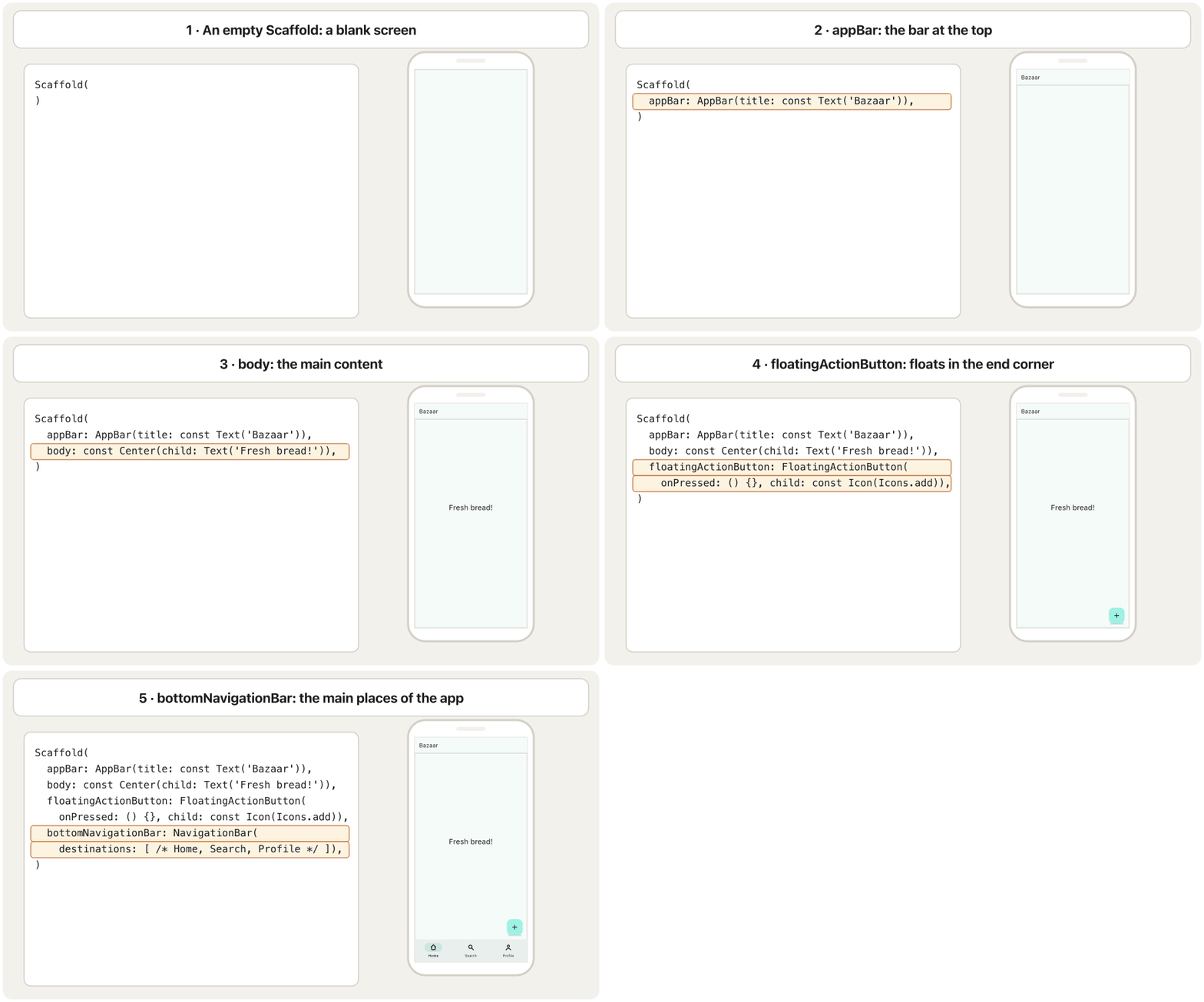
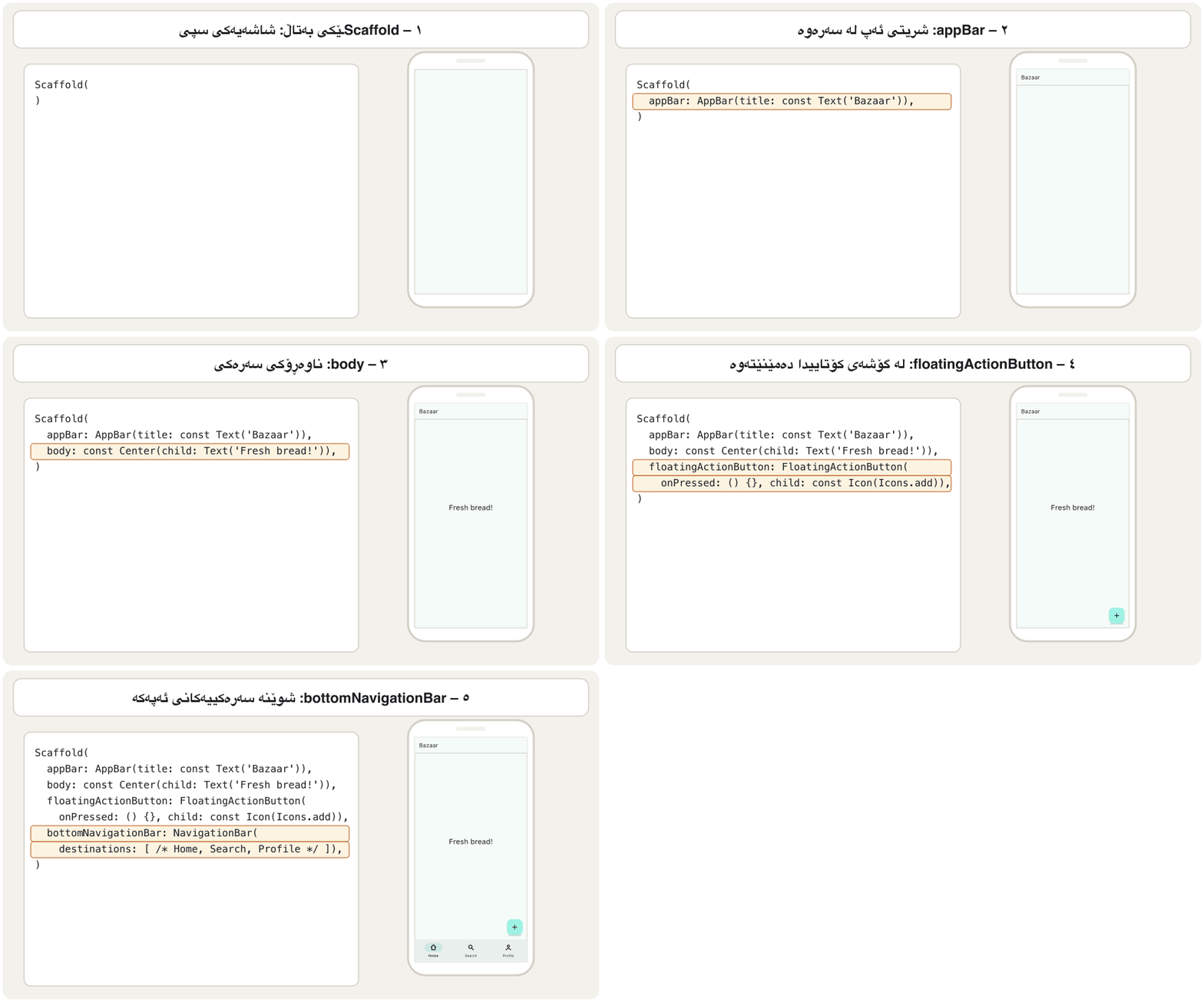
import 'package:flutter/material.dart';

void main() => runApp(const BazaarApp());

class BazaarApp extends StatelessWidget {
  const BazaarApp({super.key});

  @override
  Widget build(BuildContext context) {
    return MaterialApp(
      title: 'Bazaar',
      theme: ThemeData(
        colorScheme: ColorScheme.fromSeed(seedColor: Colors.teal),
      ),
      home: const BazaarHome(),
    );
  }
}

class BazaarHome extends StatelessWidget {
  const BazaarHome({super.key});

  @override
  Widget build(BuildContext context) {
    return Scaffold(
      appBar: AppBar(                                   // 1. app bar
        title: const Text('Bazaar'),
        actions: [
          IconButton(
            icon: const Icon(Icons.search),
            tooltip: 'Search',
            onPressed: () {},
          ),
        ],
      ),
      body: const Center(                               // 2. body
        child: Text('Fresh bread today!'),
      ),
      floatingActionButton: FloatingActionButton(       // 3. FAB
        tooltip: 'Add to basket',
        onPressed: () {
          ScaffoldMessenger.of(context).showSnackBar(
            const SnackBar(content: Text('Added to basket')),
          );
        },
        child: const Icon(Icons.add_shopping_cart),
      ),
      bottomNavigationBar: NavigationBar(               // 4. bottom bar
        // Tapping does not switch pages yet: that needs state (next lesson).
        destinations: const [
          NavigationDestination(icon: Icon(Icons.home), label: 'Home'),
          NavigationDestination(icon: Icon(Icons.search), label: 'Search'),
          NavigationDestination(icon: Icon(Icons.person), label: 'Profile'),
        ],
      ),
    );
  }
}┌─────────────────────────────┐ │ Bazaar [Q]│ ├─────────────────────────────┤ │ │ │ Fresh bread today! │ │ │ │ [cart] │ ├─────────────────────────────┤ │ (Home) Search Profile │ └─────────────────────────────┘
The bar 'Bazaar' with a search icon; 'Fresh bread today!' in the centre; a cart button above a bottom bar with Home, Search and Profile. Tapping the cart shows 'Added to basket' at the bottom.
شریتی 'Bazaar' بە گەڕان؛ 'Fresh bread today!' لە ناوەڕاستدا؛ دوگمەی سەبەتە لە سەرووی شریتێکی خوارەوە بە Home، Search و Profile. دەست لێدانی سەبەتەکە 'Added to basket' لە خوارەوە پیشان دەدات.
Explain the codeڕوونکردنەوەی کۆدەکە
- Lineدێڕی 12-14
One seed colour themes everything.
یەک ڕەنگی تۆو هەموو شتێک ڕەنگ دەکات.
- Lineدێڕی 41-45
The FAB asks the messenger for a SnackBar.
FAB داوای SnackBar لە ScaffoldMessenger دەکات.
- Lineدێڕی 48-56
A Material 3 bottom bar; the next lesson makes it switch pages.
شریتێکی خوارەوەی Material 3؛ وانەی داهاتوو وای لێ دەکات پەڕەکان بگۆڕێت.
Common mistakesهەڵە باوەکان
| Mistakeهەڵە | Fixچارەسەر |
|---|---|
Looking for a snackBar: property on Scaffold.گەڕان بە دوای snackBar: لە Scaffoldـدا. | Call ScaffoldMessenger.of(context).showSnackBar(...).ScaffoldMessenger.of(context).showSnackBar(...) بانگ بکە. |
Calling ScaffoldMessenger.of(context) with the context that builds MaterialApp.بانگکردنی ScaffoldMessenger.of(context) بە ئەو contextـەی MaterialApp دروست دەکات. | Move the screen into its own widget class so its context is below MaterialApp.شاشەکە بگوازەوە بۆ خۆی بۆ ئەوەی contextـەکەی لە خوارەوەی MaterialApp بێت. |
Using resizeToAvoidBottomPadding from old tutorials.بەکارهێنانی resizeToAvoidBottomPadding لە فێرکارییە کۆنەکانەوە. | It was removed; use resizeToAvoidBottomInset.لابراوە؛ resizeToAvoidBottomInset بەکار بهێنە. |
Colouring a Material 3 app with primarySwatch.ڕەنگکردنی Material 3 بە primarySwatch. | Use ColorScheme.fromSeed(seedColor: …) in ThemeData.ColorScheme.fromSeed(seedColor: …) لە ناو ThemeData بەکار بهێنە. |
Putting a Scaffold inside another Scaffold for each tab.دانانی Scaffoldـێک لە ناو Scaffoldـێکی تر بۆ هەر تابێک. | Keep one Scaffold per screen and change its body.بۆ هەر شاشەیەک یەک Scaffold بهێڵەوە و bodyـەکەی بگۆڕە. |
| Forgetting the material import.لەبیرچوونی importـی material. | Start the file with import 'package:flutter/material.dart';.فایلەکە بە import 'package:flutter/material.dart'; دەست پێبکە. |
| Thinking the FAB is always on the right.وا بزانیت FAB هەمیشە لە ڕاستە. | It is at the end: the left in Kurdish apps.لە کۆتاییدایە: لە کوردیدا چەپە. |
Forgetting ; after return Scaffold(...).لەبیرچوونی ; دوای return Scaffold(...). | End every statement with a semicolon.هەموو ڕستەیەک بە کۆتایی پێبهێنە. |
Exercisesڕاهێنانەکان
The course's code stops like this: void main() { runApp(MaterialApp( home: Scaffold( appBar: AppBar( title: Text("Polytechnic University"), centerTitle: true, ), // AppBar ), // Scaffold. Finish it so that it compiles, and use the title My College.
کۆدەکەی وانەکە بەم شێوەیە دەوەستێت: void main() { runApp(MaterialApp( home: Scaffold( appBar: AppBar( title: Text("Polytechnic University"), centerTitle: true, ), // AppBar ), // Scaffold. تەواوی بکە بۆ ئەوەی کۆمپایل بکرێت و ناونیشانی My College بەکار بهێنە.
Hintئاماژە
Count the opening brackets: each one needs a closing partner.
کەوانە کراوەکان بژمێرە: هەریەکەیان پێویستی بە هاوبەشێکی داخەر هەیە.
Show answerوەڵامەکە پیشان بدە
import 'package:flutter/material.dart';

void main() {
  runApp(
    MaterialApp(
      home: Scaffold(
        appBar: AppBar(
          title: const Text('My College'),
          centerTitle: true,
        ), // AppBar
      ), // Scaffold
    ), // MaterialApp
  );
}
Three things were missing: the closing ) of MaterialApp, the ); of runApp and the } of main. The import line is needed too.
سێ شت ون بوون: )ـی کۆتایی MaterialApp، );ـی runApp و }ـی main. دێڕی importـیش پێویستە.
Make an AppBar titled Bazaar with a ☰ button at the start and two actions: a search button and a shopping-cart button. Each button needs a tooltip.
AppBarـێک بە ناونیشانی Bazaar دروست بکە کە دوگمەی ☰ لە سەرەتادا و دوو actionـی هەبێت: دوگمەی گەڕان و دوگمەی سەبەتەی کڕین. هەر دوگمەیەک پێویستی بە tooltip هەیە.
Show answerوەڵامەکە پیشان بدە
appBar: AppBar(
  leading: IconButton(
    icon: const Icon(Icons.menu),
    tooltip: 'Menu',
    onPressed: () {},
  ),
  title: const Text('Bazaar'),
  actions: [
    IconButton(icon: const Icon(Icons.search), tooltip: 'Search', onPressed: () {}),
    IconButton(icon: const Icon(Icons.shopping_cart), tooltip: 'Cart', onPressed: () {}),
  ],
),
If the Scaffold had a drawer, you could leave leading out: Flutter would add the ☰ button itself.
ئەگەر Scaffold drawerـی هەبوایە، دەتوانی leading نەنووسیت: Flutter خۆی دوگمەی ☰ زیاد دەکرد.
Give the course's screen (app bar Mobile App Course, body IT Dept!) a FAB with an Icons.add icon. Pressing it shows the SnackBar Student added with an Undo action.
FABـێک بە Icons.add بدە بە شاشەکەی وانەکە ( Mobile App Course، body IT Dept!). کاتێک دەستی لێ دەدرێت SnackBarـی Student added لەگەڵ دوگمەی Undo پیشان بدات.
Hintئاماژە
Copy the pattern of NotesPage in the SnackBar screen.
شێوەی NotesPage لە شاشەی SnackBarـەوە کۆپی بکە.
Show answerوەڵامەکە پیشان بدە
floatingActionButton: FloatingActionButton(
  tooltip: 'Add student',
  onPressed: () {
    ScaffoldMessenger.of(context).showSnackBar(
      SnackBar(
        content: const Text('Student added'),
        action: SnackBarAction(label: 'Undo', onPressed: () {}),
      ),
    );
  },
  child: const Icon(Icons.add),
),
This code must sit in the build method of a page widget (like CoursePage), whose context is below MaterialApp.
ئەم کۆدە دەبێت لە میتۆدی buildـی پەڕەدا بێت (وەک CoursePage)، کە contextـەکەی لە خوارەوەی MaterialApp بێت.
Change the theme example above (the app made from Colors.teal) so that it uses an orange seed colour and always shows the dark theme, whatever the phone's setting is.
نموونەی بگۆڕە بۆ ئەوەی ڕەنگی تۆوی پرتەقاڵی بەکار بهێنێت و هەمیشە پیشان بدات، ڕێکخستنی مۆبایلەکە هەرچی بێت.
Show answerوەڵامەکە پیشان بدە
theme: ThemeData(
  colorScheme: ColorScheme.fromSeed(seedColor: Colors.orange),
),
darkTheme: ThemeData(
  colorScheme: ColorScheme.fromSeed(
    seedColor: Colors.orange,
    brightness: Brightness.dark,
  ),
),
themeMode: ThemeMode.dark, // always darkSummaryپوختە
MaterialAppwraps the whole app: theme (theme,darkTheme), routes, the home screen and localization.- Material 3 is the default; build colours with
ColorScheme.fromSeedand read them withTheme.of(context). Scaffoldis the layout of one screen:appBar,body,floatingActionButton, drawers and bottom bars, all optional.- An
AppBarhasleading,titleandactions; Flutter adds ☰ or ← whenleadingis empty. - The FAB floats at the bottom end corner: right in English apps, left in Kurdish apps.
- SnackBars are shown with
ScaffoldMessenger.of(context).showSnackBar(...), not with a Scaffold property.
MaterialAppهەموو دەگرێتەوە: (theme،darkTheme)، ، شاشەی home و .- Material 3 بنەڕەتە؛ ڕەنگەکان بە
ColorScheme.fromSeedدروست بکە و بەTheme.of(context)بیانخوێنەوە. Scaffoldیەک شاشەیە:appBar،body،floatingActionButton، و شریتەکانی خوارەوە، هەموویان ئارەزوومەندانە.AppBarleading،titleوactionsـی هەیە؛ کاتێکleadingبەتاڵ بێت Flutter ☰ یان ← زیاد دەکات.- FAB لە گۆشەی خوارەوەی کۆتاییدا دەمێنێتەوە: لە ئینگلیزیدا ڕاست و لە کوردیدا چەپ.
- بە
ScaffoldMessenger.of(context).showSnackBar(...)پیشان دەدرێن، نەک بە Scaffold.
What four things does MaterialApp provide, according to the course?بەپێی وانەکە MaterialApp چ چوار شتێک دابین دەکات؟
Theming, routing, the main route (home) and localization.
، ، سەرەکی (home) و .
Give four reasons to use a Scaffold.چوار هۆکار بۆ بەکارهێنانی Scaffold بنووسە.
It gives the basic Material layout; it contains almost everything a screen needs; it controls the whole screen including system areas; its body resizes for the keyboard.
بنەڕەتیی Material دەدات؛ نزیکەی هەموو ئەوەی شاشەیەک پێویستیەتی لە خۆ دەگرێت؛ هەموو شاشەکە لەوانە ناوچەکانی سیستەم کۆنترۆڵ دەکات؛ bodyـەکەی بۆ قەبارە دەگۆڕێت.
What is the default FAB location called?شوێنی بنەڕەتیی FAB ناوی چییە؟
FloatingActionButtonLocation.endFloat.
FloatingActionButtonLocation.endFloat.
Which line must every Material file import?هەموو فایلێکی Material دەبێت چ دێڕێک import بکات؟
import 'package:flutter/material.dart';
import 'package:flutter/material.dart';
Videoڤیدیۆ
Watch a videoسەیری ڤیدیۆیەک بکە
A video that viewers liked a lot and praised in their comments, chosen for this lesson.ڤیدیۆیەک کە بینەران زۆریان پێ خۆش بووە و لە کۆمێنتەکانیاندا ستایشیان کردووە، بۆ ئەم وانەیە هەڵبژێردراوە.
A friendly 2025 course whose short chapters show one Flutter widget at a time: layouts, the app frame, bars, buttons, lists and pictures.
کۆرسێکی دۆستانەی 2025 کە بەشە کورتەکانی هەر جارە یەک پیشان دەدەن: ، چوارچێوەی ، شریتەکان، ، و وێنەکان.
Watch 43:17-50:05 ('MaterialApp & Scaffold' and 'AppBar'): the frame of the app, one screen, and the bar at the top.
لە 43:17 تا 50:05 سەیر بکە (MaterialApp & Scaffold و AppBar): چوارچێوەی ، یەک شاشە و لە سەرەوە.
Lesson complete!وانەکە تەواو بوو!
Well done. Review the key terms, then go on to the next lesson.دەستخۆش. سەیرێکی زاراوە سەرەکییەکان بکەرەوە، پاشان بڕۆ بۆ وانەی داهاتوو.
Key termsزاراوە سەرەکییەکان
Drawers, Bottom Bars and Sheetsلیستە لاتەنیشتەکان، شریتەکانی خوارەوە و پەڕەی خوارەوە
Related lecturesوانە پەیوەندیدارەکان
- Drawers, Bottom Bars and Sheetsلیستە لاتەنیشتەکان، شریتەکانی خوارەوە و پەڕەی خوارەوە
- Container: Size, Padding, Margin and AlignmentContainer: قەبارە، بۆشایی ناوەوە، پەراوێز و ڕێکخستنی شوێن
- Stateless and Stateful Widgetsویجێتە بێدۆخەکان و ویجێتە دۆخدارەکان
- App State and Declarative UIدۆخ و ڕووکاری وەسفی
- Navigation: Moving Between Screensڕێنیشاندان: جووڵان لە نێوان شاشەکاندا
References and further readingسەرچاوەکان و خوێندنەوەی زیاتر
- Flutter API: Scaffold class
- Flutter API: AppBar class
- Flutter API: FloatingActionButtonLocation class
- Flutter docs: Use themes to share colors and font styles
- Flutter docs: Material 3 by default (breaking change)
- Flutter docs: Display a snackbar
- Flutter docs: Internationalizing Flutter apps
- Flutter docs: Material Design for Flutter
This lecture is a first edition. The Kurdish text and terminology are waiting for review by Kurdish IT teachers.ئەم وانەیە چاپی یەکەمە. دەقە کوردییەکە و زاراوەکانی چاوەڕێی پێداچوونەوەی مامۆستایانی کوردی بواری IT ن.