FlutterFlutter · Chapterبەش 10 · Lectureوانە 10.3
Firebase and Cloud FirestoreFirebase و Cloud Firestore
Connecting a Flutter app to Firebase with FlutterFire (flutterfire configure, DefaultFirebaseOptions.currentPlatform), Cloud Firestore's collections, documents and fields, reading live with snapshots() and StreamBuilder, create with add/set, update with update or merge, delete with delete(), choosing document ids, Security Rules, and the lecture's student CRUD app corrected and rebuilt.
بەستنەوەی Flutter بە Firebaseـەوە بە FlutterFire (flutterfire configure، DefaultFirebaseOptions.currentPlatform)، ، و Cloud Firestore، خوێندنەوەی ڕاستەوخۆ بە snapshots() و StreamBuilder، دروستکردن بە add/set، نوێکردنەوە بە update یان merge، سڕینەوە بە delete()، هەڵبژاردنی ، Security Rules و قوتابییانی وانەکە کە چاک کراوە و دووبارە دروست کراوەتەوە.
What you will learnچی فێر دەبیت
- Set up FlutterFire with flutterfire configure and initialise Firebase in main().
- Describe Firestore's data model: collections, documents, fields and document ids.
- Show a collection live with snapshots() and StreamBuilder, handling errors, loading and empty data.
- Create, update and delete documents with add, set, update, merge and delete, and handle FirebaseException.
- Explain why Security Rules, not hidden keys, protect a Firestore database.
- FlutterFire بە flutterfire configure ئامادە بکەیت و Firebase لە main()ـدا دەست پێ بکەیت.
- Firestore وەسف بکەیت: ، ، و .
- بە snapshots() و StreamBuilder بە ڕاستەوخۆ پیشان بدەیت و مامەڵە لەگەڵ ، چاوەڕوانی و دراوەی بەتاڵ بکەیت.
- بە add، set، update، merge و delete دروست بکەیت، نوێ بکەیتەوە و بسڕیتەوە و مامەڵە لەگەڵ FirebaseException بکەیت.
- ڕوون بکەیتەوە بۆچی Security Rules، نەک شاراوە، Firestore دەپارێزن.
Data that lives in the cloudئەو دراوەیەی لە هەوردا دەژی
In the last lesson the data stayed on one phone. Many apps need more: a class list that every teacher sees, a chat, a shop's stock. That data must live on a server that every phone can reach, and the screens should update by themselves when someone else changes it.
لە وانەی پێشوودا دراوەکە لەسەر یەک مۆبایل مایەوە. زۆر پێویستیان بە زیاترە: لیستی پۆلێک کە هەموو مامۆستایەک دەیبینێت، چاتێک، کاڵای کۆگای دوکانێک. ئەو دراوەیە دەبێت لەسەر بژی کە هەموو مۆبایلێک پێی بگات. شاشەکانیش دەبێت کاتێک کەسێکی تر دەیگۆڕێت خۆیان نوێ ببنەوە.
Building and running such a server yourself is a lot of work. Firebase is Google's Backend-as-a-Service: it runs the servers, and your app talks to them through a ready-made library (see Firebase: an example of BaaS). Its main database for apps is Cloud Firestore. This lesson connects a Flutter app to Firebase and builds the lecture's student app: create, read, update and delete (CRUD) students, live.
دروستکردن و بەڕێوەبردنی وا بە خۆت کارێکی زۆرە. Firebase BaaSـی Googleـە: بەڕێوە دەبات و لە ڕێگەی ئامادەوە قسەیان لەگەڵ دەکات (بڕوانە Firebase: نموونەیەکی BaaS). سەرەکیی بۆ Cloud Firestoreـە. ئەم وانەیە Flutter بە Firebaseـەوە دەبەستێتەوە و قوتابییەکانی وانەکە دروست دەکات: قوتابی دروست دەکات، دەخوێنێتەوە، نوێ دەکاتەوە و دەسڕێتەوە ()، بە شێوەی ڕاستەوخۆ.
FlutterFire: connecting the app to FirebaseFlutterFire: بەستنەوەی ئەپەکە بە Firebaseـەوە
FlutterFire is the set of official Flutter plugins that connect a Flutter app to Firebase: firebase_core (always needed), cloud_firestore, firebase_auth, and one plugin for each other product. Before you start you need a Flutter project and a Google account to create a Firebase project in the Firebase console. Then the setup is done from the terminal:
FlutterFire کۆمەڵە فەرمییەکانی Flutterـە کە Flutter بە Firebaseـەوە دەبەستنەوە: firebase_core (هەمیشە پێویستە)، cloud_firestore، firebase_auth و یەک بۆ هەر بەرهەمێکی تر. پێش دەستپێکردن پێویستت بە پڕۆژەیەکی Flutter و هەژمارێکی Google هەیە بۆ دروستکردنی پڕۆژەیەکی Firebase لە کۆنسۆڵی Firebaseـدا. پاشان ئامادەکردنەکە لە دەکرێت:
- Install the Firebase CLI, then sign inFirebase CLI دابمەزرێنە، پاشان بچۆ ژوورەوە
Run
firebase loginand choose your Google account.firebase loginجێبەجێ بکە و هەژماری Googleـەکەت هەڵبژێرە. - Install the FlutterFire CLIFlutterFire CLI دابمەزرێنە
Run
dart pub global activate flutterfire_clionce, from any folder.یەک جار، لە هەر ،
dart pub global activate flutterfire_cliجێبەجێ بکە. - Configure the projectپڕۆژەکە ڕێکبخە
In your project folder run
flutterfire configure. Pick (or create) the Firebase project and the platforms. The tool registers an Android, iOS and web app in Firebase and writeslib/firebase_options.dart.لەناو پڕۆژەکەتدا
flutterfire configureجێبەجێ بکە. پڕۆژەی Firebaseـەکە و هەڵبژێرە (یان دروستیان بکە). ئامرازەکە Android، iOS و وێب لە Firebaseـدا تۆمار دەکات وlib/firebase_options.dartدەنووسێت. - Add the pluginsپاشکۆکان زیاد بکە
flutter pub add firebase_core cloud_firestore, then runflutterfire configureagain whenever you add a platform or a Firebase product.flutter pub add firebase_core cloud_firestore، پاشان هەر کاتێک یان بەرهەمێکی Firebase زیاد دەکەیت دووبارەflutterfire configureجێبەجێ بکە.
$ firebase login
$ dart pub global activate flutterfire_cli
$ flutterfire configure
$ flutter pub add firebase_core cloud_firestoreFlutterFire: connecting the app to FirebaseFlutterFire: بەستنەوەی ئەپەکە بە Firebaseـەوە
Starting Firebase in main()دەستپێکردنی Firebase لە main()ـدا
Firebase must be started once, before the app runs. main becomes async, makes sure Flutter's plugin system is ready, and waits for Firebase.initializeApp:
Firebase دەبێت یەک جار، پێش کارکردنی دەست پێ بکات. main دەبێت بە async، دڵنیا دەبێتەوە کە سیستەمی Flutter ئامادەیە و چاوەڕێی Firebase.initializeApp دەکات:
import 'package:firebase_core/firebase_core.dart';
import 'package:flutter/material.dart';

import 'firebase_options.dart'; // written by `flutterfire configure`

Future<void> main() async {
  WidgetsFlutterBinding.ensureInitialized();
  await Firebase.initializeApp(
    options: DefaultFirebaseOptions.currentPlatform,
  );
  runApp(const MaterialApp(home: Scaffold(body: Center(child: Text('Ready')))));
}
Explain the codeڕوونکردنەوەی کۆدەکە
- Lineدێڕی 4
The file
flutterfire configurewrote.ئەو
flutterfire configureنووسیویەتی.- Lineدێڕی 7
Needed before any plugin call that comes before
runApp.پێویستە پێش هەر بانگکردنێکی کە پێش
runAppدێت.- Lineدێڕی 8-10
currentPlatformpicks the Android, iOS or web settings automatically.currentPlatformخۆکارانە Android، iOS یان وێب هەڵدەبژێرێت.
The generated file looks like this (shortened; the values here are placeholders):
دروستکراوەکە بەم شێوەیە دەردەکەوێت (کورتکراوەتەوە؛ نرخەکانی ئێرە ساختەن):
// A SHORTENED example of the file `flutterfire configure` writes.
// The values below are placeholders, not a real project.
import 'package:firebase_core/firebase_core.dart' show FirebaseOptions;
import 'package:flutter/foundation.dart'
    show defaultTargetPlatform, kIsWeb, TargetPlatform;

class DefaultFirebaseOptions {
  static FirebaseOptions get currentPlatform {
    if (kIsWeb) return web;
    switch (defaultTargetPlatform) {
      case TargetPlatform.android:
        return android;
      case TargetPlatform.iOS:
        return ios;
      default:
        throw UnsupportedError('This platform is not configured.');
    }
  }

  static const FirebaseOptions android = FirebaseOptions(
    apiKey: 'YOUR-ANDROID-API-KEY',
    appId: '1:000000000000:android:0000000000000000',
    messagingSenderId: '000000000000',
    projectId: 'your-project-id',
  );

  static const FirebaseOptions ios = FirebaseOptions(
    apiKey: 'YOUR-IOS-API-KEY',
    appId: '1:000000000000:ios:0000000000000000',
    messagingSenderId: '000000000000',
    projectId: 'your-project-id',
    iosBundleId: 'com.example.students',
  );

  static const FirebaseOptions web = FirebaseOptions(
    apiKey: 'YOUR-WEB-API-KEY',
    appId: '1:000000000000:web:0000000000000000',
    messagingSenderId: '000000000000',
    projectId: 'your-project-id',
  );
}
Explain the codeڕوونکردنەوەی کۆدەکە
- Lineدێڕی 8-18
currentPlatformreturns the options for the platform the app is running on.currentPlatformئەو دەگەڕێنێتەوە کە بۆ ئەو لەسەر کار دەکات.- Lineدێڕی 20-25
The
apiKey,appIdandprojectIdidentify your Firebase project and app.apiKey،appIdوprojectIdپڕۆژە و Firebaseـەکەت دەناسێننەوە.
In Kurdish: how a Flutter app starts Firebase in main() before runApp.
بە کوردی: چۆن Firebase لە main()ـدا پێش runApp دەست پێ دەکات.
Watch 10:41–12:45 (Kurdish): main() becomes async, WidgetsFlutterBinding.ensureInitialized() and await Firebase.initializeApp(). The video set Android up by hand, so it passes no options; after flutterfire configure, add options: DefaultFirebaseOptions.currentPlatform as this screen shows.
لە 10:41 تا 12:45 سەیر بکە (بە کوردی): main() دەبێتە async، WidgetsFlutterBinding.ensureInitialized() و await Firebase.initializeApp(). ڤیدیۆکە Android بە دەست ئامادە دەکات، بۆیە هیچ optionsـێک نانێرێت؛ دوای flutterfire configure، options: DefaultFirebaseOptions.currentPlatform زیاد بکە، وەک ئەم شاشەیە پیشانی دەدات.
Collections, documents and fieldsکۆکراوەکان، بەڵگەنامەکان و جووتەکانی کلیل و نرخ
A database that stores each record as a document, usually in or BSON, with its own fields. It suits catalogues, user profiles and content management systems.
جۆرێکە لە بنکەدراوەی کە هەر تۆمارێک وەک بەڵگەنامەیەک هەڵدەگرێت، زۆرجار بە یان BSON، لەگەڵ ستوونەکانی خۆی. بۆ کاتالۆگ، پرۆفایلی بەکارهێنەر و گونجاوە.
Cloud Firestore is a NoSQL, document-oriented database. Unlike an SQL database it has no tables and no rows. Data is stored in documents, and documents are grouped into collections. Each document is a small set of key–value pairs (fields), much like a JSON object. (The general idea of document databases is explained in Document databases.)
Cloud Firestore ـە و . بە پێچەوانەی SQL، هیچ و نییە. دراوە لە هەڵدەگیرێت و لە کۆ دەکرێنەوە. هەر کۆمەڵەیەکی بچووکی ـە، زۆر وەک . (بیرۆکە گشتییەکەی لە بنکەدراوە بەڵگەنامەییەکان ڕوون کراوەتەوە.)
Think of the school office. A drawer labelled Students is a collection. Each card in it is a document with its own number (the document id). The lines on a card, name, stage, phone, are the fields. You add a card, cross out a line and write a new one, or throw a card away, without touching the other cards.
بیر لە ژووری ئیدارەی قوتابخانە بکەرەوە. چەکمەجەیەک بە ناوی قوتابییان . هەر کارتێکی ناوی بە ژمارەی تایبەتی خۆی ( ). دێڕەکانی سەر کارتێک، ناو، قۆناغ، ژمارەی تەلەفۆن، . کارتێک زیاد دەکەیت، دێڕێک دەکوژێنیتەوە و یەکێکی نوێ دەنووسیت، یان کارتێک فڕێ دەدەیت، بەبێ دەستلێدان لە کارتەکانی تر.
Where the analogy stops workingسنووری ئەم نموونەیە
Unlike paper cards, two documents in one collection may have different fields (no fixed table shape), and a document can hold its own sub-drawers (subcollections). A document is limited to 1 MiB.
بە پێچەوانەی کارتی کاغەز، دوو لە یەک دەکرێت جیاوازیان هەبێت (شێوەی جێگیری نییە). هەروەها دەتوانێت چەکمەجەی ناوەکیی خۆی ( ناوەکی) هەبێت. قەبارەی سنووردارە بە 1 MiB.
Firebase's own explanation of how Cloud Firestore stores data: documents of fields, grouped in collections, with subcollections.
Firebase خۆی ڕوون دەکاتەوە Cloud Firestore چۆن هەڵدەگرێت: لە پێک دێن، لە کۆ دەکرێنەوە و لاوەکییان هەیە.
Watch from 9:58: the document–collection model: collections hold only documents, documents hold fields and can have subcollections.
لە 9:58ـەوە سەیر بکە، شێوەی و : تەنها تێدایە، (fields) تێدایە و دەتوانن لاوەکییان (subcollections) هەبێت.
Reading live with StreamBuilderخوێندنەوەی ڕاستەوخۆ بە StreamBuilder
collection('students').snapshots() returns a Stream: the first value is the whole collection, and a new value arrives every time any document changes, on this phone or any other. A StreamBuilder (met in Streams and FutureBuilder and StreamBuilder) rebuilds the list for each value. Like FutureBuilder it must handle error, waiting and empty:
collection('students').snapshots() دەگەڕێنێتەوە: یەکەم نرخ هەموو و هەر جارێک هەر بگۆڕێت نرخێکی نوێ دێت، لەسەر ئەم مۆبایلە یان هەر مۆبایلێکی تر. StreamBuilder (کە لە تەوژمەکان و FutureBuilder و StreamBuilder ناسیت) بۆ هەر نرخێک دووبارە دروست دەکاتەوە. وەک FutureBuilder، دەبێت مامەڵە لەگەڵ ، چاوەڕوانی و بەتاڵ بکات:
import 'package:cloud_firestore/cloud_firestore.dart';

class Student {
  final String id; // the document id (not stored inside the document)
  final int studentId; // the university number, e.g. 1021
  final String name;
  final int stage;

  const Student({
    required this.id,
    required this.studentId,
    required this.name,
    required this.stage,
  });

  // A Firestore document -> a Student
  factory Student.fromDoc(DocumentSnapshot<Map<String, dynamic>> doc) {
    final data = doc.data()!;
    return Student(
      id: doc.id,
      studentId: data['studentId'] as int,
      name: data['name'] as String,
      stage: data['stage'] as int,
    );
  }

  // A Student -> the fields of a document
  Map<String, dynamic> toMap() =>
      {'studentId': studentId, 'name': name, 'stage': stage};
}
Explain the codeڕوونکردنەوەی کۆدەکە
- Lineدێڕی 4
The document id lives outside the fields; we keep it so we can update or delete this document later.
لە دەرەوەی ؛ هەڵیدەگرین بۆ ئەوەی دواتر ئەم نوێ بکەینەوە یان بیسڕینەوە.
- Lineدێڕی 17-25
fromDocworks likefromJson: one place that reads and checks every field (see A model class with fromJson).fromDocوەکfromJsonکار دەکات: یەک شوێن کە هەموو دەخوێنێتەوە و دەپشکنێت (بڕوانە کلاسێکی مۆدێل بە fromJson).- Lineدێڕی 28-29
toMapgives the fields to write.toMapئەو دەدات کە دەنووسرێن.
import 'package:cloud_firestore/cloud_firestore.dart';
import 'package:flutter/material.dart';

import 'student.dart';

class StudentList extends StatefulWidget {
  const StudentList({super.key});

  @override
  State<StudentList> createState() => _StudentListState();
}

class _StudentListState extends State<StudentList> {
  // Make the stream once, not in build().
  final Stream<QuerySnapshot<Map<String, dynamic>>> _students =
      FirebaseFirestore.instance
          .collection('students')
          .orderBy('name')
          .snapshots();

  @override
  Widget build(BuildContext context) {
    return StreamBuilder<QuerySnapshot<Map<String, dynamic>>>(
      stream: _students,
      builder: (context, snapshot) {
        if (snapshot.hasError) {
          return Center(child: Text('Could not load: ${snapshot.error}'));
        }
        if (!snapshot.hasData) {
          return const Center(child: CircularProgressIndicator());
        }
        final docs = snapshot.data!.docs;
        if (docs.isEmpty) {
          return const Center(child: Text('No students yet.'));
        }
        return ListView.builder(
          itemCount: docs.length,
          itemBuilder: (context, index) {
            final student = Student.fromDoc(docs[index]);
            return ListTile(
              leading: CircleAvatar(child: Text('${student.stage}')),
              title: Text(student.name),
              subtitle: Text('ID ${student.studentId}'),
            );
          },
        );
      },
    );
  }
}
Explain the codeڕوونکردنەوەی کۆدەکە
- Lineدێڕی 15-19
The stream is made once, as a field.
orderBy('name')sorts on the server.یەک جار وەک دروست دەکرێت.
orderBy('name')لەسەر ڕیزیان دەکات.- Lineدێڕی 26-28
Error first, for example
permission-deniedfrom the security rules.سەرەتا ، بۆ نموونە
permission-deniedلە Security Rulesـەوە.- Lineدێڕی 29-31
No data yet: the first snapshot has not arrived. Show a spinner, never
snapshot.data!here.هێشتا دراوە نییە: یەکەم snapshot نەگەیشتووە. بازنەی چاوەڕوانی پیشان بدە، هەرگیز
snapshot.data!لێرە نا.- Lineدێڕی 32-35
docsis the list of documents; an empty collection gets a friendly message.docs؛ بەتاڵ پەیامێکی دۆستانە وەردەگرێت.- Lineدێڕی 39
Each document becomes a typed
Student.هەر دەبێت بە
Studentـێکی جۆردار.
Reading live with StreamBuilderخوێندنەوەی ڕاستەوخۆ بە StreamBuilder
Reading once with get()یەک جار خوێندنەوە بە get()
Not every screen needs live data. A report or an export can read the collection once with get(), which returns a Future<QuerySnapshot> (show it with a FutureBuilder). Use snapshots() when the screen should follow changes, get() when one picture is enough.
هەموو شاشەیەک پێویستی بە دراوەی ڕاستەوخۆ نییە. ڕاپۆرتێک یان دەرهێنانێک دەتوانێت یەک جار بە get() بخوێنێتەوە، کە Future<QuerySnapshot> دەگەڕێنێتەوە (بە FutureBuilder پیشانی بدە). کاتێک شاشەکە دەبێت بەدوای گۆڕانەکاندا بڕوات snapshots() بەکار بهێنە، کاتێک یەک وێنە بەسە get().
Future<List<Student>> loadOnce() async {
  final query = await FirebaseFirestore.instance
      .collection('students')
      .orderBy('name')
      .get(); // one answer, no listener
  return query.docs.map(Student.fromDoc).toList();
}Create: add() and set()دروستکردن: add() و set()
There are two ways to put a new document into a collection. add(map) lets Firestore invent a unique document id and returns a reference to the new document. doc(id).set(map) writes a document whose id you choose; if a document with that id already exists, set replaces all of it.
دوو ڕێگا هەیە بۆ خستنە نێوی نوێ بۆ . add(map) ڕێگە دەدات Firestore تاک بۆ دروست بکات و ئاماژەیەک بۆ نوێیەکە دەگەڕێنێتەوە. doc(id).set(map) دەنووسێت کە تۆ هەڵدەبژێریت؛ ئەگەر بەو پێشتر هەبێت، set هەمووی دەگۆڕێتەوە.
import 'package:cloud_firestore/cloud_firestore.dart';

import 'student.dart';

class StudentService {
  final _students = FirebaseFirestore.instance.collection('students');

  // CREATE with a generated id (the usual way)
  Future<String> add(Student s) async {
    final ref = await _students.add(s.toMap());
    return ref.id;
  }

  // CREATE or REPLACE a document whose id you choose
  Future<void> putWithId(String id, Student s) =>
      _students.doc(id).set(s.toMap());

  // UPDATE some fields; fails if the document does not exist
  Future<void> moveToStage(String id, int stage) =>
      _students.doc(id).update({'stage': stage});

  // MERGE: change some fields, create the document if it is missing
  Future<void> saveStage(String id, int stage) =>
      _students.doc(id).set({'stage': stage}, SetOptions(merge: true));

  // DELETE one field from a document
  Future<void> removeStage(String id) =>
      _students.doc(id).update({'stage': FieldValue.delete()});

  // DELETE the whole document
  Future<void> delete(String id) => _students.doc(id).delete();

  // READ once (no live updates)
  Future<List<Student>> loadOnce() async {
    final query = await _students.orderBy('name').get();
    return query.docs.map(Student.fromDoc).toList();
  }
}
Explain the codeڕوونکردنەوەی کۆدەکە
- Lineدێڕی 6
A reference to the collection. Creating it costs nothing; no data is read yet.
ئاماژەیەک بۆ . دروستکردنی هیچ تێچووێکی نییە؛ هێشتا هیچ دراوەیەک ناخوێنرێتەوە.
- Lineدێڕی 9-12
addreturns aDocumentReference;ref.idis the generated id, for examplepX3v9QkTq2LmZbW8aYcD.addDocumentReferenceـێک دەگەڕێنێتەوە؛ref.idدروستکراوەکەیە، بۆ نموونەpX3v9QkTq2LmZbW8aYcD.- Lineدێڕی 15-16
setwith your own id: creates the document, or replaces it completely.setبە خۆت: دروست دەکات، یان بە تەواوی دەیگۆڕێتەوە.- Lineدێڕی 19-20
updatechanges only the named fields (next screen).updateتەنها ئەو دەگۆڕێت کە ناویان هاتووە (شاشەی داهاتوو).- Lineدێڕی 23-24
setwithmerge: truemixes the new fields into the document, and creates it if it is missing.setبەmerge: trueنوێیەکان تێکەڵ بە دەکات و ئەگەر نەبێت دروستی دەکات.- Lineدێڕی 27-28
FieldValue.delete()removes one field.FieldValue.delete()یەک لادەبات.- Lineدێڕی 31
deleteremoves the whole document.deleteهەموو لادەبات.- Lineدێڕی 34-37
getreads once (see the previous screen).getیەک جار دەخوێنێتەوە (بڕوانە شاشەی پێشوو).
Every call returns a Future. await it inside try, because a write can fail: no permission, a bad id, a quota. Firestore reports this as a FirebaseException with a short code:
هەموو بانگکردنێک دەگەڕێنێتەوە. لەناو tryـدا awaitـی بکە، چونکە نووسین دەکرێت شکست بهێنێت: نەبوونی مۆڵەت، هەڵە، تەواوبوونی بڕی بەکارهێنان. Firestore ئەمە وەک FirebaseException بە codeـێکی کورت ڕادەگەیەنێت:
import 'package:cloud_firestore/cloud_firestore.dart';

Future<String> deleteStudent(String id) async {
  try {
    await FirebaseFirestore.instance.collection('students').doc(id).delete();
    return 'Deleted';
  } on FirebaseException catch (e) {
    // e.code is a short name such as 'permission-denied' or 'unavailable'
    return 'Could not delete (${e.code})';
  }
}
Explain the codeڕوونکردنەوەی کۆدەکە
- Lineدێڕی 5
awaitinsidetry, so the failure arrives here instead of crashing the app.awaitلەناوtry، بۆ ئەوەی شکستەکە بگاتە ئێرە لە جیاتی تێکشکاندنی .- Lineدێڕی 7-9
e.codeis easy to test:permission-denied,not-found,unavailable…تاقیکردنەوەی
e.codeئاسانە:permission-denied،not-found،unavailable…
Create: add() and set()دروستکردن: add() و set()
Choosing document idsهەڵبژاردنی ناسێنەری بەڵگەنامە
The lecture's insert used the student's name as the document id: doc(studentName).set(...). Two students called Shilan then share one document, and saving the second one silently overwrites the first. Let Firestore make the id with add() (or doc() with no argument), and keep the id in your model so you can update and delete later.
insertـی وانەکە ناوی قوتابییەکەی وەک بەکار دەهێنا: doc(studentName).set(...). ئەو کاتە دوو قوتابی بە ناوی Shilan یەک بەکار دەهێنن و پاشەکەوتکردنی دووەمیان بە بێدەنگی یەکەمیان دەسڕێتەوە و جێی دەگرێتەوە. ڕێگە بدە Firestore بە add() (یان doc() بەبێ ) دروست بکات و لە هەڵبگرە بۆ ئەوەی دواتر نوێی بکەیتەوە و بیسڕیتەوە.
- Generated id (
add): the usual choice; 20 random characters, so two ids practically never clash. - Your own id (
doc(id).set): only when the id is truly unique and stable, for example a user's sign-in uid, sousers/{uid}belongs to exactly one person. - Never a name, a phone number or anything people share or change.
- دروستکراو (
add): هەڵبژاردنی ئاسایی؛ 20 پیتی هەڕەمەکی، بۆیە ئەگەری ئەوەی دوو وەک یەک دەربچن نزیکەی سفرە. - خۆت (
doc(id).set): تەنها کاتێک بە ڕاستی تاک و جێگیرە، بۆ نموونە uidـی ، بۆ ئەوەیusers/{uid}تەنها هی یەک کەس بێت. - هەرگیز ناو، ژمارەی تەلەفۆن یان هەر شتێک کە خەڵک هاوبەشی دەکەن یان دەیگۆڕن.
Update: update() or set with mergeنوێکردنەوە: update() یان set بە merge
| Callبانگکردن | If the document existsئەگەر هەبێت | If it does not existئەگەر نەبێت |
|---|---|---|
doc(id).set(map) | Replaces all fields with mapهەموو بە map دەگۆڕێتەوە | Creates itدروستی دەکات |
doc(id).set(map, SetOptions(merge: true)) | Changes the fields in map, keeps the rest ناو map دەگۆڕێت، ئەوانی تر دەهێڵێتەوە | Creates itدروستی دەکات |
doc(id).update(map) | Changes the fields in map, keeps the rest ناو map دەگۆڕێت، ئەوانی تر دەهێڵێتەوە | Fails (not-found)شکست دەهێنێت (not-found) |
To move Shilan to stage 4, update({'stage': 4}) is the clearest: it touches one field and fails loudly if the document has been deleted meanwhile, instead of quietly creating a half-empty one. Use set with merge when "create it if it is missing" is really what you want, for example saving a user's settings document.
بۆ گواستنەوەی Shilan بۆ قۆناغی 4، update({'stage': 4}) ڕوونترینە: دەست لە یەک دەدات و ئەگەر لەو ماوەیەدا سڕابێتەوە بە ئاشکرا شکست دەهێنێت، لە جیاتی ئەوەی بە بێدەنگی یەکێکی نیوەبەتاڵ دروست بکات. کاتێک «ئەگەر نییە دروستی بکە» بە ڕاستی ئەوەیە کە دەتەوێت set بە merge بەکار بهێنە، بۆ نموونە پاشەکەوتکردنی .
Delete: delete()سڕینەوە: delete()
doc(id).delete() removes one whole document. To remove only one field, update it with FieldValue.delete(). Two rules from the Firestore docs: deleting a document does not delete the documents in its subcollections, and deleting a whole collection from an app is not recommended (do it from a trusted server or the console).
doc(id).delete() بە تەواوی لادەبات. بۆ لابردنی تەنها یەک ، بە FieldValue.delete() نوێی بکەرەوە. دوو یاسا لە بەڵگەنامەکانی Firestoreـەوە: سڕینەوەی ناو ناوەکییەکانی ناسڕێتەوە. هەروەها سڕینەوەی هەموو لە پێشنیار ناکرێت (لە متمانەپێکراو یان لە کۆنسۆڵەوە بیکە).
The student app, put togetherئەپی قوتابییان، بە تەواوی
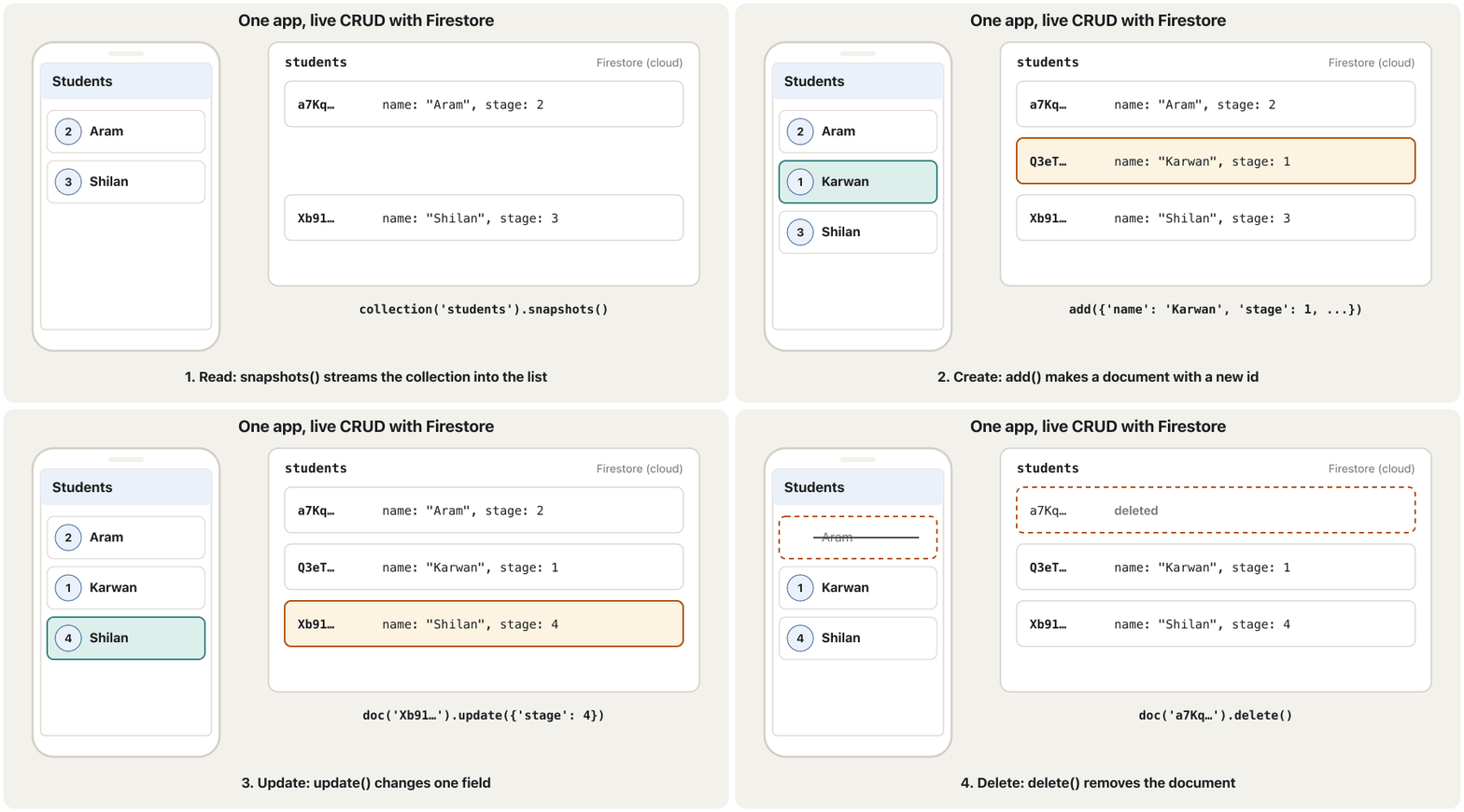
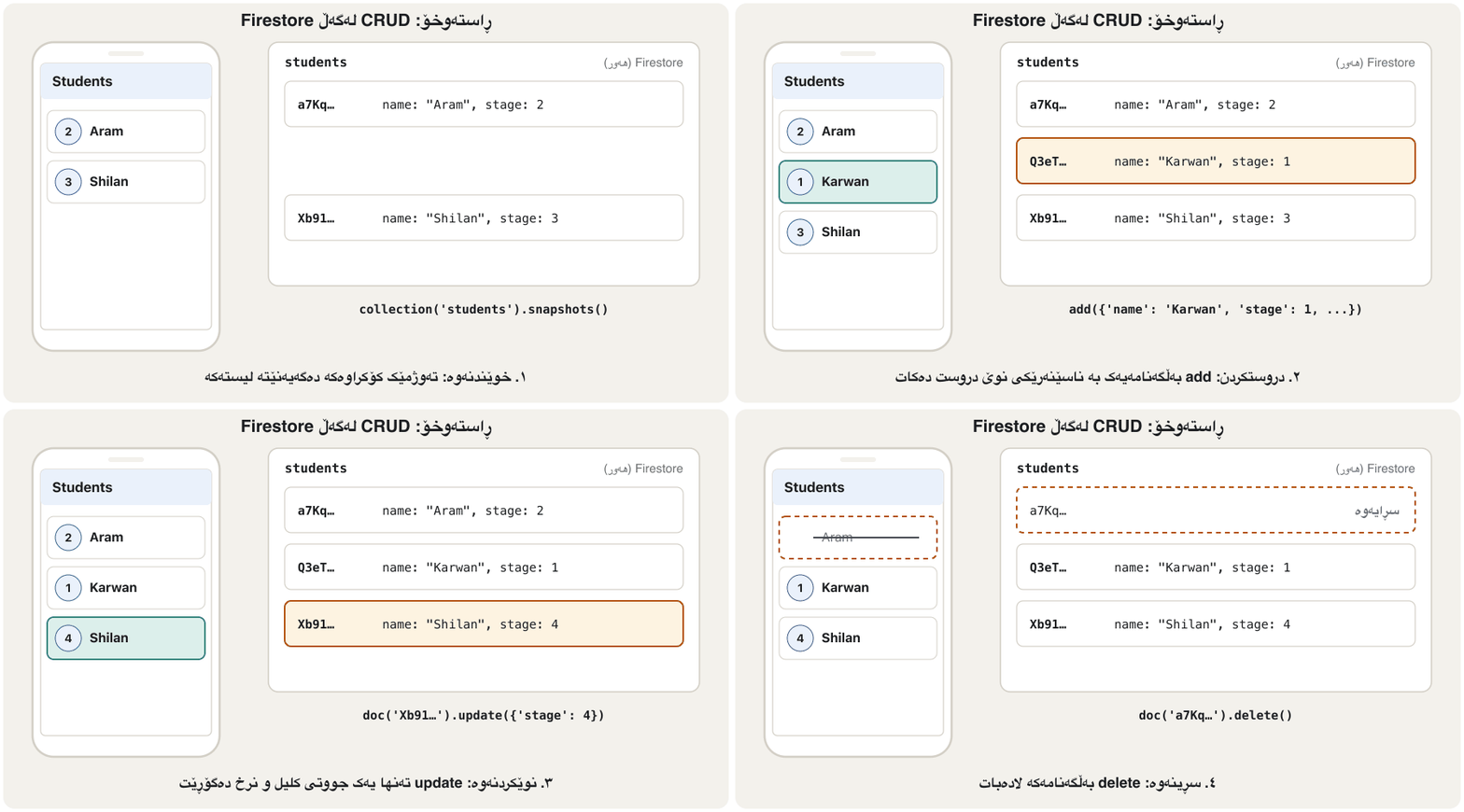
Here is the lecture's student app rebuilt with everything from this lesson: a form with three fields (ID, name, stage) and an Add/Update button, and a live list below it. Tap a student to edit, tap the bin to delete. The app never calls setState for the list: every write changes Firestore, and the stream redraws the list, on this phone and on every other phone watching.
ئەمە قوتابییانی وانەکەیە کە بە هەموو ئەوەی لەم وانەیەدا هەیە دووبارە دروست کراوەتەوە: بە سێ خانە (ID، ناو، قۆناغ) و Add/Update، لەگەڵ ڕاستەوخۆ لە خوارەوە. بۆ دەستکاری لە قوتابییەک بدە، بۆ سڕینەوە لە سەتڵەکە بدە. هەرگیز بۆ setState بانگ ناکات: هەموو نووسینێک Firestore دەگۆڕێت و دووبارە دەکێشێتەوە، لەسەر ئەم مۆبایلە و لەسەر هەموو مۆبایلێکی تر کە سەیری دەکات.
import 'package:cloud_firestore/cloud_firestore.dart';
import 'package:firebase_core/firebase_core.dart';
import 'package:flutter/material.dart';

import 'firebase_options.dart';
import 'student.dart';

Future<void> main() async {
  WidgetsFlutterBinding.ensureInitialized();
  await Firebase.initializeApp(options: DefaultFirebaseOptions.currentPlatform);
  runApp(const MaterialApp(home: StudentsScreen()));
}

class StudentsScreen extends StatefulWidget {
  const StudentsScreen({super.key});

  @override
  State<StudentsScreen> createState() => _StudentsScreenState();
}

class _StudentsScreenState extends State<StudentsScreen> {
  final _students = FirebaseFirestore.instance.collection('students');
  late final Stream<QuerySnapshot<Map<String, dynamic>>> _stream =
      _students.orderBy('name').snapshots();

  final _idField = TextEditingController();
  final _nameField = TextEditingController();
  final _stageField = TextEditingController();
  String? _editingId; // null: the form adds a new student

  @override
  void dispose() {
    _idField.dispose();
    _nameField.dispose();
    _stageField.dispose();
    super.dispose();
  }

  Future<void> _save() async {
    final studentId = int.tryParse(_idField.text);
    final stage = int.tryParse(_stageField.text);
    final name = _nameField.text.trim();
    if (studentId == null || stage == null || name.isEmpty) {
      _show('Fill in all three fields correctly.');
      return;
    }
    final data = {'studentId': studentId, 'name': name, 'stage': stage};
    final id = _editingId;
    try {
      if (id == null) {
        await _students.add(data); // Create: Firestore makes the id
      } else {
        await _students.doc(id).update(data); // Update: only these fields
      }
      _clearForm();
    } on FirebaseException catch (e) {
      _show('Could not save (${e.code})');
    }
  }

  Future<void> _delete(String id) async {
    try {
      await _students.doc(id).delete(); // Delete the whole document
    } on FirebaseException catch (e) {
      _show('Could not delete (${e.code})');
    }
  }

  void _startEditing(Student s) {
    setState(() => _editingId = s.id);
    _idField.text = '${s.studentId}';
    _nameField.text = s.name;
    _stageField.text = '${s.stage}';
  }

  void _clearForm() {
    setState(() => _editingId = null);
    _idField.clear();
    _nameField.clear();
    _stageField.clear();
  }

  void _show(String message) {
    if (!mounted) return;
    ScaffoldMessenger.of(context)
        .showSnackBar(SnackBar(content: Text(message)));
  }

  @override
  Widget build(BuildContext context) {
    return Scaffold(
      appBar: AppBar(title: const Text('Students')),
      body: Column(
        children: [
          Padding(
            padding: const EdgeInsets.all(12),
            child: Column(
              children: [
                TextField(
                  controller: _idField,
                  keyboardType: TextInputType.number,
                  decoration: const InputDecoration(labelText: 'Student ID'),
                ),
                TextField(
                  controller: _nameField,
                  decoration: const InputDecoration(labelText: 'Name'),
                ),
                TextField(
                  controller: _stageField,
                  keyboardType: TextInputType.number,
                  decoration: const InputDecoration(labelText: 'Stage'),
                ),
                const SizedBox(height: 8),
                Row(
                  children: [
                    FilledButton(
                      onPressed: _save,
                      child: Text(_editingId == null ? 'Add' : 'Update'),
                    ),
                    if (_editingId != null)
                      TextButton(onPressed: _clearForm, child: const Text('Cancel')),
                  ],
                ),
              ],
            ),
          ),
          const Divider(),
          Expanded(
            child: StreamBuilder<QuerySnapshot<Map<String, dynamic>>>(
              stream: _stream, // Read: live, rebuilt on every change
              builder: (context, snapshot) {
                if (snapshot.hasError) {
                  return Center(child: Text('Error: ${snapshot.error}'));
                }
                if (!snapshot.hasData) {
                  return const Center(child: CircularProgressIndicator());
                }
                final students =
                    snapshot.data!.docs.map(Student.fromDoc).toList();
                if (students.isEmpty) {
                  return const Center(child: Text('No students yet.'));
                }
                return ListView(
                  children: [
                    for (final s in students)
                      ListTile(
                        leading: CircleAvatar(child: Text('${s.stage}')),
                        title: Text(s.name),
                        subtitle: Text('ID ${s.studentId}'),
                        onTap: () => _startEditing(s),
                        trailing: IconButton(
                          icon: const Icon(Icons.delete_outline),
                          tooltip: 'Delete',
                          onPressed: () => _delete(s.id),
                        ),
                      ),
                  ],
                );
              },
            ),
          ),
        ],
      ),
    );
  }
}
Explain the codeڕوونکردنەوەی کۆدەکە
- Lineدێڕی 8-12
Firebase starts before the app.
Firebase پێش دەست پێ دەکات.
- Lineدێڕی 22-24
One collection reference and one stream, made once.
یەک ئاماژە بۆ و یەک ، یەک جار دروست دەکرێن.
- Lineدێڕی 26-37
Text field controllers are disposed with the State: see the lifecycle of a State object and TextEditingController.
کۆنترۆڵەرەکانی لەگەڵ Stateـەکە فڕێ دەدرێن: بڕوانە سووڕی ژیانی ئۆبجێکتی دۆخ و TextEditingController.
- Lineدێڕی 39-46
Check the input before writing anything.
پێش نووسینی هەر شتێک بپشکنە.
- Lineدێڕی 48-58
No id yet →
add(Create); editing →update(Update). Errors become a SnackBar.هێشتا نییە ←
add(دروستکردن)؛ دەستکاری ←update(نوێکردنەوە). دەبن بە SnackBar.- Lineدێڕی 61-67
deleteremoves the document (Delete).deleteلادەبات (سڕینەوە).- Lineدێڕی 129-160
The StreamBuilder (Read): error, waiting, empty, then the list;
onTapstarts editing and the bin deletes.StreamBuilder (خوێندنەوە): ، چاوەڕوانی، بەتاڵ، پاشان ؛
onTapدەستکاری دەست پێ دەکات و سەتڵەکە دەسڕێتەوە.
Security Rules: who may read and writeSecurity Rules: کێ دەتوانێت بخوێنێتەوە و بنووسێت
Your app talks to Firestore directly, and the project settings are inside every copy of the app. So anyone could write a program that calls your database. What stops them is Cloud Firestore Security Rules: rules stored on Firebase's servers that decide, for every request, whether it may read or write. They are access control done on the server, where the user cannot change it.
ڕاستەوخۆ قسە لەگەڵ Firestore دەکات و پڕۆژەکە لەناو هەموو کۆپییەکی هەن. بۆیە هەر کەسێک دەتوانێت بەرنامەیەک بنووسێت کە بانگ بکات. ئەوەی ڕێگرییان لێ دەکات Cloud Firestore Security Rulesـە: یاساگەلێک کە لەسەر Firebase هەڵگیراون و بۆ هەر بڕیار دەدەن ئایا دەتوانێت بخوێنێتەوە یان بنووسێت. ئەمانە کۆنترۆڵی دەستڕاگەیشتنـن کە لەسەر ئەنجام دەدرێن، لە شوێنێک کە ناتوانێت بیگۆڕێت.
When you create the database, Firebase asks for test mode or production mode. Test mode lets anyone read and overwrite your data: fine for a first try while learning, dangerous for anything real. Production mode denies all access from apps until you write rules. Two common patterns (Firebase Authentication provides request.auth):
کاتێک دروست دەکەیت، Firebase دەپرسێت test mode یان production mode. test mode ڕێگە دەدات هەر کەسێک دراوەکەت بخوێنێتەوە و بیگۆڕێت: بۆ یەکەم تاقیکردنەوەکانی فێربوون باشە، بۆ هەر شتێکی ڕاستەقینە مەترسیدارە. production mode هەموو دەستڕاگەیشتنێک لە ڕەت دەکاتەوە تا یاساکان دەنووسیت. دوو شێوازی باو (Firebase Authentication request.auth دابین دەکات):
rules_version = '2';
service cloud.firestore {
  match /databases/{database}/documents {

    // Any signed-in user may read and write students
    match /students/{studentId} {
      allow read, write: if request.auth != null;
    }

    // Each user may read and write only their own profile
    match /users/{userId} {
      allow read, write: if request.auth != null
                         && request.auth.uid == userId;
    }
  }
}
Explain the codeڕوونکردنەوەی کۆدەکە
- Lineدێڕی 6-8
request.auth != null: only users who signed in with Firebase Authentication.request.auth != null: تەنها ئەو بە Firebase Authentication چوونەتە ژوورەوە.- Lineدێڕی 11-14
{userId}is the document id; it must equal the signed-in user's uid, so nobody can open another person's profile.{userId}؛ دەبێت یەکسان بێت بە uidـی ئەو چووەتە ژوورەوە، بۆیە هیچ کەسێک ناتوانێت پرۆفایلی کەسێکی تر بکاتەوە.
What Firebase Security Rules are, how a match and allow rule is written, and how to allow access only to signed-in users.
Firebase Security Rules چییە، یاسایەک بە match و allow چۆن دەنووسرێت و چۆن تەنها ئەو چوونەتە ژوورەوە دەستیان بە بگات.
Watch 0:00–3:49: why rules sit between the app and the data, the syntax for Firestore (0:58) and rules based on the signed-in user or the data (2:35). Stops before the 2019 limitations.
لە 0:00 تا 3:49 سەیر بکە: بۆچی یاساکان لە نێوان و دادەنرێن، یاساکانی Firestore (0:58) و یاسا بەپێی ئەو چووەتە ژوورەوە یان بەپێی (2:35). پێش بەشی کەموکوڕییەکانی 2019 ڕادەوەستێت.
Common mistakesهەڵە باوەکان
| Mistakeهەڵە | What happensچی ڕوو دەدات | Fixچاکردنەوە |
|---|---|---|
Using Firestore before Firebase.initializeAppبەکارهێنانی Firestore پێش Firebase.initializeApp | Error: no Firebase App '[DEFAULT]' has been created: no Firebase App '[DEFAULT]' has been created | await Firebase.initializeApp(...) in main before runAppawait Firebase.initializeApp(...) لە mainـدا پێش runApp |
snapshot.data! before checkingsnapshot.data! پێش پشکنین | Red error screen while loadingشاشەی سووری لە کاتی بارکردندا | Check hasError, then hasDataسەرەتا hasError، پاشان hasData بپشکنە |
set to change one fieldset بۆ گۆڕینی یەک | The other fields disappear تر ون دەبن | update, or set with merge: trueupdate، یان set بە merge: true |
set (or a copy of insert) to deleteset (یان کۆپییەکی insert) بۆ سڕینەوە | The document is written again, not removed دووبارە دەنووسرێتەوە، لانابرێت | doc(id).delete()doc(id).delete() |
| A name as the document idناو وەک | Same-name students overwrite each otherقوتابییانی هاوناو یەکتر دەسڕنەوە | add() and keep doc.idadd() و هەڵگرتنی doc.id |
Creating the stream inside buildدروستکردنی لەناو build | A new listener on every rebuild نوێ لە هەر دووبارە دروستکردنەوەیەکدا | Keep it in a field of the Stateلە Stateـدا هەڵیبگرە |
Not awaiting writes, no tryawait نەکردنی نووسینەکان، بێ try | Failures are silentشکستەکان بێدەنگن | await inside try / on FirebaseExceptionawait لەناو try / on FirebaseException |
| Leaving test-mode rules onهێشتنەوەی یاساکانی test mode | Anyone can read and overwrite everythingهەر کەسێک دەتوانێت هەموو شتێک بخوێنێتەوە و بیگۆڕێت | Write real Security Rules before releaseپێش بڵاوکردنەوە Security Rulesـی ڕاستەقینە بنووسە |
Exercisesڕاهێنانەکان
A school library app stores books. Design the fields of one document in a books collection: name, type and an example value for each. Which value should be the document id?
کتێبخانەی قوتابخانە کتێب هەڵدەگرێت. یەک لە books دیزاین بکە: ناو، جۆر و نرخێکی نموونە بۆ هەر یەکێکیان. کام نرخ دەبێت بێت؟
Show answerوەڵامەکە پیشان بدە
| Field | Typeجۆر | Exampleنموونە |
|---|---|---|
title | string | "Kurdish Grammar" |
author | string | "Hana" |
pages | number | 240 |
available | boolean | true |
addedAt | timestamp | FieldValue.serverTimestamp() |
Let Firestore generate the id with add(): titles repeat (two copies of one book) and can be corrected.
ڕێگە بدە Firestore بە add() دروست بکات: ناونیشانەکان دووبارە دەبنەوە (دوو دانە لە یەک کتێب) و دەکرێت چاک بکرێن.
Write addBook (returns the new id, stores the server time), lendBook(id) (marks it not available) and availableTitles() (a live stream of titles of available books).
addBook (ناسێنەرە نوێیەکە دەگەڕێنێتەوە و کاتی هەڵدەگرێت)، lendBook(id) (وەک بەردەست نەبوو نیشانی دەکات) و availableTitles() ( ڕاستەوخۆی ناونیشانی کتێبە بەردەستەکان) بنووسە.
Show answerوەڵامەکە پیشان بدە
import 'package:cloud_firestore/cloud_firestore.dart';

final books = FirebaseFirestore.instance.collection('books');

Future<String> addBook(String title, String author, int pages) async {
  final ref = await books.add({
    'title': title,
    'author': author,
    'pages': pages,
    'available': true,
    'addedAt': FieldValue.serverTimestamp(), // the server's clock
  });
  return ref.id; // e.g. 'pX3v9QkTq2LmZbW8aYcD'
}

Future<void> lendBook(String id) =>
    books.doc(id).update({'available': false});

Stream<List<String>> availableTitles() => books
    .where('available', isEqualTo: true)
    .snapshots()
    .map((query) =>
        query.docs.map((doc) => doc.data()['title'] as String).toList());
FieldValue.serverTimestamp() uses Firebase's clock, not the phone's (which may be wrong). where(...).snapshots().map(...) turns a live query into a live list of strings.
FieldValue.serverTimestamp() کاتژمێری Firebase بەکار دەهێنێت، نەک هی مۆبایلەکە (کە دەکرێت هەڵە بێت). where(...).snapshots().map(...) ڕاستەوخۆ دەکات بە ڕاستەوخۆی .
Choose the call for each: (a) a settings document settings/{uid} that may not exist yet, saving only language; (b) moving an existing student to stage 3; (c) replacing a draft with a completely new version; (d) a new chat message.
بۆ هەر یەکێک بانگکردنەکە هەڵبژێرە: (أ) ڕێکخستنەکان settings/{uid} کە لەوانەیە هێشتا نەبێت، تەنها language پاشەکەوت دەکەیت؛ (ب) گواستنەوەی قوتابییەکی هەبوو بۆ قۆناغی 3؛ (ج) گۆڕینی ڕەشنووسێک بە وەشانێکی تەواو نوێ؛ (د) نامەیەکی نوێی چات.
Show answerوەڵامەکە پیشان بدە
- (a)
set({'language': 'ckb'}, SetOptions(merge: true)) - (b)
update({'stage': 3}) - (c)
set(newDraft)(replacing everything is the goal) - (d)
add(message)with a generated id
- (أ) بە
set({'language': 'ckb'}, SetOptions(merge: true)) - (ب) بە
update({'stage': 3}) - (ج)
set(newDraft)(گۆڕینی هەموو شتێک ئامانجەکەیە) - (د)
add(message)بە دروستکراو
The lecture's insert, update and delete all used doc(studentName).set(...). Rewrite the three so that students with the same name never clash, update changes only the stage, and delete really deletes.
insert، update و deleteـی وانەکە هەموویان doc(studentName).set(...)ـیان بەکار دەهێنا. هەر سێکیان دووبارە بنووسەوە بۆ ئەوەی قوتابییانی هاوناو هەرگیز بەریەک نەکەون، update تەنها قۆناغ بگۆڕێت و delete بە ڕاستی بسڕێتەوە.
Show answerوەڵامەکە پیشان بدە
Write a Security Rule so that any signed-in user can read the books collection, but nobody can write to it from the app (the librarian uses the console).
Security Ruleـێک بنووسە بۆ ئەوەی هەر کە چووەتە ژوورەوە بتوانێت books بخوێنێتەوە، بەڵام هیچ کەسێک لە نەتوانێت تێیدا بنووسێت (کتێبدار کۆنسۆڵ بەکار دەهێنێت).
Show answerوەڵامەکە پیشان بدە
match /books/{bookId} {
  allow read: if request.auth != null;
  allow write: if false;
}
Read and write are separate permissions. if false closes writing completely; console and server access are not affected by rules.
خوێندنەوە و نووسین دوو مۆڵەتی جیان. if false نووسین بە تەواوی دادەخات؛ کۆنسۆڵ و دەستڕاگەیشتنی بە یاساکان کاریگەر نابن.
Summaryپوختە
- FlutterFire = the official Flutter plugins for Firebase. Set up with
firebase login,flutterfire configure(writesfirebase_options.dart) andflutter pub add firebase_core cloud_firestore. - Start it once in
main:await Firebase.initializeApp(options: DefaultFirebaseOptions.currentPlatform). - Cloud Firestore is a NoSQL document database: collections of documents, each a set of key–value fields; no tables, no rows.
- Read live with
snapshots()+StreamBuilder(check error and loading first), or once withget(). - Create with
add()(generated id) ordoc(id).set(); update withupdate()orset(..., SetOptions(merge: true)); delete withdelete(), never withset. - Protect the data with Security Rules, not by hiding the configuration; never ship test-mode rules.
- FlutterFire = فەرمییەکانی Flutter بۆ Firebase. بە
firebase login،flutterfire configure(firebase_options.dartدەنووسێت) وflutter pub add firebase_core cloud_firestoreئامادەی بکە. - یەک جار لە
mainـدا دەستی پێ بکە:await Firebase.initializeApp(options: DefaultFirebaseOptions.currentPlatform). - Cloud Firestore لە جۆری : کە لەخۆ دەگرن، هەر یەکەیان کۆمەڵەیەک ؛ نە ، نە .
- بە
snapshots()+StreamBuilderبە شێوەی ڕاستەوخۆ بخوێنەرەوە (سەرەتا و چاوەڕوانی بپشکنە)، یان بەget()یەک جار. - بە
add()( دروستکراو) یانdoc(id).set()دروست بکە؛ بەupdate()یانset(..., SetOptions(merge: true))نوێ بکەرەوە؛ بەdelete()بسڕەوە، هەرگیز بەsetنا. - دراوەکە بە Security Rules بپارێزە، نەک بە شاردنەوەی ؛ هەرگیز یاساکانی test mode لەگەڵ بڵاو مەکەرەوە.
What is the difference between add() and doc(id).set()?جیاوازیی نێوان add() و doc(id).set() چییە؟
add creates a document with a generated id. set writes the document with the id you give, creating it or replacing it completely.
add بە دروستکراو دروست دەکات. set بەو تۆ دەیدەیت دەنووسێت، دروستی دەکات یان بە تەواوی دەیگۆڕێتەوە.
Why must a StreamBuilder check hasData before snapshot.data!?بۆچی StreamBuilder دەبێت پێش snapshot.data! hasData بپشکنێت؟
Until the first snapshot arrives, data is null, and the ! would throw.
تا یەکەم snapshot دەگات، دراوەکە nullـە و ! فڕێ دەدات.
Is the Firebase API key in firebase_options.dart a secret?ئایا کلیلی APIـی Firebase لە firebase_options.dartـدا نهێنییە؟
No: it is an identifier inside every copy of the app. Security Rules protect the data. Still, do not publish a real project's keys.
نەخێر: کە لەناو هەموو کۆپییەکی . Security Rules دراوەکە دەپارێزن. لەگەڵ ئەوەشدا پڕۆژەیەکی ڕاستەقینە بڵاو مەکەرەوە.
Videoڤیدیۆ
Watch a videoسەیری ڤیدیۆیەک بکە
A video that viewers liked a lot and praised in their comments, chosen for this lesson.ڤیدیۆیەک کە بینەران زۆریان پێ خۆش بووە و لە کۆمێنتەکانیاندا ستایشیان کردووە، بۆ ئەم وانەیە هەڵبژێردراوە.
A notes app on Cloud Firestore: set up Firebase with FlutterFire, then create, read live, update and delete documents.
نووسینی تێبینی لەسەر Cloud Firestore: ئامادەکردنی Firebase بە FlutterFire، پاشان دروستکردن، خوێندنەوەی ڕاستەوخۆ، و سڕینەوەی ().
The whole 13-minute video: setup with firebase login and flutterfire configure (0:00), add (4:36), read (7:33), update (10:12) and delete (12:13). At 2:40 it opens the rules so anyone can write: fine only while learning, see Security Rules.
هەموو ڤیدیۆ 13 خولەکییەکە: ئامادەکردن بە firebase login و flutterfire configure (0:00)، زیادکردن (4:36)، خوێندنەوە (7:33)، (10:12) و سڕینەوە (12:13). لە 2:40دا یاساکان دەکاتەوە تا هەر کەسێک بتوانێت بنووسێت: ئەمە تەنها لە کاتی فێربووندا باشە؛ بڕوانە بەشی Security Rules.
Lesson complete!وانەکە تەواو بوو!
Well done. Review the key terms, then go on to the next lesson.دەستخۆش. سەیرێکی زاراوە سەرەکییەکان بکەرەوە، پاشان بڕۆ بۆ وانەی داهاتوو.
Key termsزاراوە سەرەکییەکان
State Management with Providerبەڕێوەبردنی دۆخ بە Provider
Related lecturesوانە پەیوەندیدارەکان
- Saving Data on the Deviceپاشەکەوتکردنی دراوە لەسەر ئامێرەکە
- NoSQL and Big DataNoSQL و دراوەی گەورە
- Security by Obscurity, by Legislation, and the Trade-off Triangleئاسایش بە شاردنەوە، ئاسایش بە یاسا و سێگۆشەی هاوسەنگی
- Passwords, MFA and Access Controlتێپەڕەوشەکان، MFA و کۆنترۆڵی دەستڕاگەیشتن
- Stateless and Stateful Widgetsویجێتە بێدۆخەکان و ویجێتە دۆخدارەکان
References and further readingسەرچاوەکان و خوێندنەوەی زیاتر
- Firebase docs: Add Firebase to your Flutter app
- Firebase docs: Add data to Cloud Firestore
- Firebase docs: Delete data from Cloud Firestore
- Firebase docs: Get realtime updates with Cloud Firestore
- Firebase docs: Get started with Cloud Firestore Security Rules
- Firebase docs: Get started with Cloud Firestore (test and production mode)
- pub.dev API: DocumentReference.update (cloud_firestore 7.1)
- Flutter docs: Choose a database for your Flutter app
This lecture is a first edition. The Kurdish text and terminology are waiting for review by Kurdish IT teachers.ئەم وانەیە چاپی یەکەمە. دەقە کوردییەکە و زاراوەکانی چاوەڕێی پێداچوونەوەی مامۆستایانی کوردی بواری IT ن.