FlutterFlutter · Chapterبەش 7 · Lectureوانە 7.1
Layout Widgets: One Child or Manyویجێتەکانی ڕێکخستنی ڕووکار: یەک نۆدی منداڵ یان چەند دانەیەک
How Flutter builds layout from widgets: single-child widgets (child) and multi-child widgets (children), Padding, Center, Align, SizedBox, AspectRatio, ConstrainedBox, FittedBox, the constraints rule, a first Column, Stack and Positioned, and start/end for Kurdish apps.
Flutter چۆن لە دروست دەکات: یەکمنداڵ (child) و چەندمنداڵ (children)، Padding، Center، Align، SizedBox، AspectRatio، ConstrainedBox، FittedBox، یاسای ، یەکەم Column، Stack و Positioned و start/end بۆ کوردی.
What you will learnچی فێر دەبیت
- Tell single-child (
child) and multi-child (children) layout widgets apart and name examples of each. - Use Padding, Center, Align, SizedBox, AspectRatio, ConstrainedBox and FittedBox.
- Explain sizes with the rule: constraints go down, sizes go up, the parent sets the position.
- Layer widgets with Stack and Positioned, and write layouts that also work right-to-left.
- یەکمنداڵ (
child) و چەندمنداڵ (children) لێک جیا بکەیتەوە و نموونەی هەر یەکەیان بهێنیتەوە. - Padding، Center، Align، SizedBox، AspectRatio، ConstrainedBox و FittedBox بەکار بهێنیت.
- قەبارەکان بەم یاسایە ڕوون بکەیتەوە: دادەبەزن، قەبارەکان سەردەکەون و شوێن دادەنێت.
- بە Stack و Positioned چین چین دابنێیت و بنووسیت کە بە کار بکات.
Layout is made of widgets tooڕێکخستنی ڕووکار خۆی لە ویجێتەکان دروست دەبێت
In Flutter, everything is a widget. So the layout of a screen — where each thing sits and how big it is — is also built from widgets. Text, images, icons and buttons are widgets you can see. Around them are widgets you cannot see, whose only job is to arrange the others.
لە Flutterـدا هەموو شتێک . بۆیە شاشەیەک — هەر شتێک لە کوێ دادەنرێت و چەند گەورەیە — ئەویش لە دروست دەبێت. دەق، وێنە، و دیارن و دەیانبینیت. لە دەوریاندا نادیار هەن کە تاکە کاریان ڕیزکردنی ئەوانی ترە.
The two pictures show the same three buttons. On the right, the invisible layout widgets are outlined: a Row puts three Columns side by side, and each Column puts an Icon above a Text. Learning layout in Flutter means learning these invisible widgets. The lesson Widgets and the widget tree introduced visible and invisible widgets; here you meet the invisible ones one by one.
هەردوو وێنەکە هەمان سێ پیشان دەدەن. لە لای ڕاست، نادیارەکانی هێڵیان بە دەوردا کێشراوە: Row سێ Column لە تەنیشت یەکەوە دادەنێت و هەر Columnـێک Iconـێک لە سەرووی Textـێکەوە دادەنێت. فێربوونی لە Flutterـدا واتە ناسینی ئەم نادیارانە. وانەی ویجێتەکان و داری ویجێتەکان دیار و نادیاری ناساند؛ لێرەدا نادیارەکان یەک بە یەک دەناسیت.
One child or many childrenیەک نۆدی منداڵ یان چەند نۆدێکی منداڵ
Layout widgets come in two families. You can tell them apart by one word in the constructor:
دوو خێزانن. بە یەک وشە لە لێکیان جیا دەکەیتەوە:
- Single-child widgets have a
childproperty. It takes exactly one widget. Examples:Padding,Center,Align,SizedBox,Container. - Multi-child widgets have a
childrenproperty. It takes a list of widgets,[ … ], and each of these widgets arranges its children in its own way (in a line, on top of each other, in a grid…). Examples:Row,Column,Stack,ListView.
- یەکمنداڵ:
childـیان هەیە کە ڕێک یەک وەردەگرێت. نموونە:Padding،Center،Align،SizedBoxوContainer. - چەندمنداڵ:
childrenـیان هەیە کە لیستێک وەردەگرێت ([ … ]). هەر یەکێک لەم بە شێوەی خۆی ڕیز دەکات (لە هێڵێکدا، لەسەر یەکتر، لە تۆڕێکدا…). نموونە:Row،Column،StackوListView.
child holds one widget; children holds a list.child یەک هەڵدەگرێت؛ children لیستێک.CêITIn a tea house, a saucer holds one istikan — that is a single-child widget. A tray carries many glasses, set out in rows — that is a multi-child widget. The waiter can also put a whole tray on a table: one thing, which itself holds many.
لە چایخانەدا ژێرپیاڵە یەک ئیستیکان هەڵدەگرێت — ئەوە یەکمنداڵە. سینی چەندین پیاڵە بە ڕیز هەڵدەگرێت — ئەوە چەندمنداڵە. چایچییەکەش دەتوانێت سینییەکی تەواو لەسەر مێزێک دابنێت: یەک شت کە خۆی چەندین شتی تێدایە.
Where the analogy stops workingسنووری ئەم نموونەیە
A widget's single child is often a Row or Column that holds many more widgets, just like the tray on the table. Real saucers never hold trays; in Flutter any widget can go inside any other.
زۆرجار تاکە Row یان Columnـێکە کە چەندین تری تێدایە، وەک سینییەکەی سەر مێزەکە. ژێرپیاڵەی ڕاستەقینە هەرگیز سینی هەڵناگرێت؛ بەڵام لە Flutterـدا هەر دەتوانێت بچێتە ناو هەر ترەوە.
One child or many childrenیەک نۆدی منداڵ یان چەند نۆدێکی منداڵ
The single-child widgets in the courseویجێتە یەکمنداڵەکانی وانەکان
The course lists nine single-child widgets. The table says what each one does:
وانەکان نۆ یەکمنداڵ دەژمێرن. خشتەکە دەڵێت هەر یەکەیان چی دەکات:
| Widget | Familyخێزان | What it doesچی دەکات |
|---|---|---|
Align | child | Puts its child at a chosen place inside itself, e.g. the bottom-right corner. لە شوێنێکی دیاریکراوی ناو خۆیدا دادەنێت، بۆ نموونە گۆشەی خوارەوەی ڕاست. |
Center | child | Puts its child in the middle. It is an Align whose place is the centre. لە ناوەڕاست دادەنێت. Alignـێکە شوێنەکەی ناوەڕاستە. |
Padding | child | Leaves empty space around its child.بۆشایی بە دەوری بەجێ دەهێڵێت. |
SizedBox | child | Gives its child an exact width and/or height; with no child it is an empty gap.پانی و/یان بەرزییەکی ڕێک دەدات بە ؛ بەبێ child بۆشاییەکی بەتاڵە. |
AspectRatio | child | Makes its child keep a width-to-height ratio, such as 16 / 9.وا دەکات دیاریکراو بپارێزێت، وەک 16 / 9. |
ConstrainedBox | child | Adds extra size limits: a minimum or maximum width or height.سنووری قەبارەی زیادە دادەنێت: کەمترین یان زۆرترین پانی یان بەرزی. |
Baseline | child | Places its child so that the child's text baseline is a set distance from the top. وا دادەنێت کە هێڵی ژێرەوەی پیتەکانی دەقەکەی دووری دیاریکراوی لە سەرەوە هەبێت. |
FittedBox | child | Scales its child up or down so it fits. گەورە یان بچووک دەکاتەوە تا جێی ببێتەوە. |
Container | child | A handy mix of size, padding, margin, alignment and decoration in one widget.تێکەڵەیەکی بەسوود لە قەبارە، ، ، و ڕازاندنەوە لە یەک . |
One child or many childrenیەک نۆدی منداڵ یان چەند نۆدێکی منداڵ
The multi-child widgets in the course, and Expandedویجێتە چەندمنداڵەکانی وانەکان و Expanded
And these are the multi-child widgets in the course list. Each one arranges its children in its own way:
ئەمانەش چەندمنداڵەکانی لیستی وانەکانن. هەر یەکەیان بە شێوەی خۆی ڕیز دەکات:
| Widget | Familyخێزان | What it doesچی دەکات |
|---|---|---|
Row | children | Puts its children side by side. لە تەنیشت یەکەوە دادەنێت. |
Column | children | Puts its children one under another. لە ژێر یەکەوە دادەنێت. |
ListView | children | A column that the user can scroll.ستوونێک کە توانای هەیە. |
GridView | children | A scrollable grid: rows and columns of tiles.تۆڕێکی خانەخانە کە توانای هەیە: ڕیز و ستوونی خانەکان. |
Table | children | A table: its children are TableRows, and the cells of one column share a width.خشتەیەک: TableRowـن و خانەکانی یەک ستوون هەمان پانییان هەیە. |
Stack | children | Puts its children on top of each other, in layers. چین چین لەسەر یەکتر دادەنێت. |
Flow | children | An advanced widget where your own code (a FlowDelegate) decides each child's position; good for animated menus. پێشکەوتووە کە کۆدی خۆت (FlowDelegateـێک) شوێنی هەر دیاری دەکات؛ بۆ جووڵاو باشە. |
Single-child widgets you will use every dayئەو ویجێتە یەکمنداڵانەی هەموو ڕۆژێک بەکاریان دەهێنیت
Padding, Center and Align each wrap one widget and change only where it sits:
Padding، Center و Align هەر یەکەیان یەک لە خۆ دەگرن و تەنها ئەوە دەگۆڕن کە لە کوێ دادەنرێت:
const Padding(
  padding: EdgeInsets.all(24),
  child: Text('24 pixels of space on every side'),
),

const SizedBox(
  height: 150,
  child: Center(
    child: Text('I am in the middle'),
  ),
),

const SizedBox(
  height: 150,
  child: Align(
    alignment: Alignment.bottomRight,
    child: Text('Bottom right'),
  ),
),
Explain the codeڕوونکردنەوەی کۆدەکە
- Lineدێڕی 1-4
Paddingkeeps 24 pixels of empty space on every side of the text.EdgeInsets.all(24)means the same on all four sides.Padding٢٤ بۆشایی لە هەموو لایەکی دەقەکەوە دەهێڵێتەوە.EdgeInsets.all(24)واتە هەمان ژمارە بۆ هەر چوار لا.- Lineدێڕی 6-11
Centerputs the text in the middle of the 150-pixel-high area theSizedBoxgives it.Centerدەقەکە لە ناوەڕاستی ئەو ناوچە ١٥٠ بەرزەدا دادەنێت کەSizedBoxپێی دەدات.- Lineدێڕی 13-19
Aligncan use any of nine named places (topLeft…bottomRight) or exact values; here, the bottom-right corner.Alignدەتوانێت یەکێک لە نۆ شوێنە ناودارەکان (topLeft…bottomRight) یان نرخی ورد بەکار بهێنێت؛ لێرەدا گۆشەی خوارەوەی ڕاست.
These three are the building blocks of Container: a Container with padding and alignment is really a Padding and an Align put together. The box model — padding inside, margin outside — is taught in Container: size, padding, margin and alignment, so it is not repeated here.
ئەم سێیە بەردی بناغەی Containerـن: Containerـێک کە padding و alignmentـی هەبێت لە ڕاستیدا Padding و Alignـێکە پێکەوە. — لە ناوەوە و لە دەرەوە — لە Container: قەبارە، بۆشایی ناوەوە، پەراوێز و ڕێکخستنی شوێن فێر دەکرێت، بۆیە لێرەدا دووبارە ناکرێتەوە.
Single-child widgets you will use every dayئەو ویجێتە یەکمنداڵانەی هەموو ڕۆژێک بەکاریان دەهێنیت
SizedBox, AspectRatio, ConstrainedBox and BaselineSizedBox، AspectRatio، ConstrainedBox و Baseline
These widgets decide the size of their child:
ئەم قەبارەی دیاری دەکەن:
const SizedBox(
  width: 120,
  height: 48,
  child: ColoredBox(color: Colors.amber),
),
const SizedBox(height: 16), // an empty gap: no child at all

const AspectRatio(
  aspectRatio: 16 / 9,
  child: ColoredBox(color: Colors.black),
),

final okButton = ConstrainedBox(
  constraints: const BoxConstraints(minWidth: 200, maxHeight: 60),
  child: ElevatedButton(onPressed: () {}, child: const Text('OK')),
);
Explain the codeڕوونکردنەوەی کۆدەکە
- Lineدێڕی 1-5
A 120 × 48 amber box.
ColoredBoxonly paints a colour, so it is lighter than a Container.سندووقێکی زەردی پرتەقاڵی بە پانی ١٢٠ و بەرزی ٤٨.
ColoredBoxتەنها ڕەنگێک دەکێشێت، بۆیە لە Container سووکترە.- Lineدێڕی 6
A
SizedBoxwith no child is the usual way to leave a fixed gap between two widgets.SizedBoxـی بێ child ڕێگای ئاساییە بۆ بەجێهێشتنی بۆشاییەکی جێگیر لە نێوان دوو .- Lineدێڕی 8-11
AspectRatiotakes the width it is given and makes the height of it: the shape of a video.AspectRatioئەو پانییە وەردەگرێت کە پێی دەدرێت و بەرزییەکە دەکاتە ـی ئەو: شێوەی ڤیدیۆیەک.- Lineدێڕی 13-16
ConstrainedBoxadds limits: this button is at least 200 wide and at most 60 high, whatever its text.ConstrainedBoxسنوور زیاد دەکات: ئەم لانیکەم ٢٠٠ پانە و لە ٦٠ بەرزتر نابێت، دەقەکەی هەرچی بێت.
Baseline is rarely needed alone. It places its child so that the line the letters sit on (the baseline) is a fixed distance from its top. Rows use the same idea with CrossAxisAlignment.baseline, in main-axis and cross-axis alignment.
Baseline بە تەنها کەم پێویست دەبێت. وا دادەنێت کە ئەو هێڵەی پیتەکان لەسەری دادەنیشن (baseline) دووریی جێگیری لە سەرەوەی خۆیەوە هەبێت. Row هەمان بیرۆکە بە CrossAxisAlignment.baseline بەکار دەهێنێت، لە ڕێکخستنی شوێن لەسەر تەوەرەی سەرەکی و تەوەرەی ئاوەڵ.
Single-child widgets you will use every dayئەو ویجێتە یەکمنداڵانەی هەموو ڕۆژێک بەکاریان دەهێنیت
FittedBox: shrink to fitFittedBox: بچووککردنەوە تا جێی ببێتەوە
The course's single-child example is FittedBox. It puts a picture of a computer and a short text in a Row, and wraps the row in a FittedBox. The picture is much wider than the phone, so the row does not fit. FittedBox scales the whole row down until it fits, keeping its shape (BoxFit.contain).
نموونەی یەکمنداڵی وانەکان FittedBoxـە. وێنەی کۆمپیوتەرێک و دەقێکی کورت دەخاتە ناو Rowـێکەوە و Rowـەکە لە ناو FittedBoxـێکدا دادەنێت. وێنەکە زۆر لە مۆبایلەکە پانترە، بۆیە Rowـەکە جێی نابێتەوە. FittedBox هەموو Rowـەکە بچووک دەکاتەوە تا جێی دەبێتەوە و شێوەکەی دەپارێزێت (BoxFit.contain).
import 'package:flutter/material.dart';

class FittedBoxDemo extends StatelessWidget {
  const FittedBoxDemo({super.key});

  @override
  Widget build(BuildContext context) {
    return Scaffold(
      appBar: AppBar(title: const Text('FittedBox Widget')),
      body: Center(
        child: FittedBox(
          fit: BoxFit.contain,
          child: Row(
            children: [
              Image.asset('assets/computer.png'),
              const Text('This is a widget'),
            ],
          ),
        ),
      ),
    );
  }
}
Explain the codeڕوونکردنەوەی کۆدەکە
- Lineدێڕی 11-12
fit: BoxFit.contain(also the default) scales the child as much as needed so all of it is visible.fit: BoxFit.contain(کە بنەڕەتیشە) هێندەی پێویست بچووک دەکاتەوە تا هەمووی دیار بێت.- Lineدێڕی 15
The picture comes from the app's
assetsfolder. It only works ifpubspec.yamllists it underflutter: assets:.وێنەکە لە بوخچەی
assetsـی دێت. تەنها کاتێک کار دەکات کەpubspec.yamlلە ژێرflutter: assets:ناوی هێنابێت.
A friendly 2025 course whose short chapters show one Flutter widget at a time: layouts, the app frame, bars, buttons, lists and pictures.
کۆرسێکی دۆستانەی 2025 کە بەشە کورتەکانی هەر جارە یەک پیشان دەدەن: ، چوارچێوەی ، شریتەکان، ، و وێنەکان.
Watch 2:43:19-2:44:10: a Text wrapped in FittedBox shrinks to fit the width of the screen.
لە 2:43:19 تا 2:44:10 سەیر بکە: Textـێک لە ناو FittedBoxـدا بچووک دەبێتەوە تا لە پانیی شاشەکەدا جێی ببێتەوە.
How Flutter decides sizes: constraintsFlutter چۆن قەبارە دیاری دەکات: ڕێساکانی قەبارە
Why does width: 100 sometimes do nothing? Because in Flutter a widget does not choose its size alone. Every layout follows one rule, which the Flutter team asks every developer to learn early:
بۆچی هەندێک جار width: 100 هیچ ناکات؟ چونکە لە Flutterـدا بە تەنها قەبارەی خۆی هەڵنابژێرێت. هەموو یەک یاسا دەگرێتە بەر کە تیمی Flutter داوا لە هەموو گەشەپێدەرێک دەکات زوو فێری ببێت:
The parent tells its child the constraints: a minimum and a maximum width, and a minimum and a maximum height.
بە دەڵێت: کەمترین و زۆرترین پانی و کەمترین و زۆرترین بەرزی.
The child picks its own size inside those limits (after asking its own children the same way) and reports it back up.
قەبارەی خۆی لە ناو ئەو سنوورانەدا هەڵدەبژێرێت (دوای ئەوەی بە هەمان شێوە پرسیار لە منداڵەکانی خۆی دەکات) و بە دەڵێتەوە.
The parent decides where the child goes. A widget never decides its own position.
بڕیار دەدات لە کوێ دابنرێت. هەرگیز شوێنی خۆی دیاری ناکات.
The owner of a bazaar tells a shopkeeper: "your shop can be 2 to 4 metres wide" (constraints go down). The shopkeeper picks 3 metres and says so (the size goes up). The owner then decides where in the row of shops it goes (the parent sets the position). The shopkeeper never picks the place.
خاوەنی بازاڕێک بە دوکاندارێک دەڵێت: «دوکانەکەت دەتوانێت ٢ تا ٤ مەتر پان بێت» ( دادەبەزن). دوکاندارەکە ٣ مەتر هەڵدەبژێرێت و پێی دەڵێتەوە (قەبارە سەردەکەوێت). پاشان خاوەنی بازاڕەکە بڕیار دەدات لە کوێی ڕیزی دوکانەکاندا بێت ( شوێن دادەنێت). دوکاندار هەرگیز شوێنەکە هەڵنابژێرێت.
Where the analogy stops workingسنووری ئەم نموونەیە
Flutter does this for the whole widget tree in a single pass, every time the screen changes, in a tiny fraction of a second.
Flutter ئەمە بۆ هەموو لە یەک گەڕدا دەکات، هەر جارێک شاشەکە بگۆڕێت، لە بەشێکی زۆر بچووکی چرکەیەکدا.
How Flutter decides sizes: constraintsFlutter چۆن قەبارە دیاری دەکات: ڕێساکانی قەبارە
Two tiny programs: tight and looseدوو بەرنامەی بچووک: توند و شل
Now look at two tiny programs. In the first, the red Container is the first widget on the screen. The screen gives it tight constraints: exactly the screen's size. So width: 100 and height: 100 are ignored.
ئێستا سەیری دوو بەرنامەی بچووک بکە. لە یەکەمیاندا Containerـە سوورەکە یەکەم سەر شاشەکەیە. شاشەکە توندی پێ دەدات: ڕێک قەبارەی شاشەکە. بۆیە width: 100 و height: 100 پشتگوێ دەخرێن.
@override
Widget build(BuildContext context) {
  // The screen forces this Container to be exactly the screen's size,
  // so width: 100 and height: 100 are ignored.
  return Container(width: 100, height: 100, color: Colors.red);
}┌──────────────────────┐ │██████████████████████│ │██████████████████████│ │██████████████████████│ │██████████████████████│ │██████████████████████│ │██████████████████████│ │██████████████████████│ └──────────────────────┘
The whole screen is red (on a 400 × 800 test screen the Container measures 400 × 800).
هەموو شاشەکە سوور دەبێت (لەسەر شاشەیەکی تاقیکردنەوەی ، قەبارەی Containerـەکە ـە).
In the second, a Center sits between the screen and the Container. Center passes on loose constraints: anything from 0 up to the screen's size. Now the Container can be what it asked for.
لە دووەمیاندا Centerـێک لە نێوان شاشەکە و Containerـەکەدایە. Center شل دەنێرێت: هەر قەبارەیەک لە 0ـەوە تا قەبارەی شاشەکە. ئێستا Containerـەکە دەتوانێت ئەوە بێت کە داوای کردووە.
@override
Widget build(BuildContext context) {
  // Center lets its child be anything from 0 up to the screen's size,
  // so now the Container really is 100 × 100.
  return Center(
    child: Container(width: 100, height: 100, color: Colors.red),
  );
}┌──────────────────────┐ │ │ │ │ │ │ │ ████ │ │ ████ │ │ │ │ │ │ │ └──────────────────────┘
A red 100 × 100 square in the middle of a black screen.
چوارگۆشەیەکی سووری لە ناوەڕاستی شاشەیەکی ڕەشدا.
How Flutter decides sizes: constraintsFlutter چۆن قەبارە دیاری دەکات: ڕێساکانی قەبارە
Tight, loose, and three kinds of boxesتوند، شل و سێ جۆر سندووق
| Constraints | Meaningواتا | Who gives themکێ دەیاندات |
|---|---|---|
| Tightتوند | Minimum and maximum are the same: only one size is allowed.کەمترین و زۆرترین وەک یەکن: تەنها یەک قەبارە ڕێگەپێدراوە. | The screen to its first widget; SizedBox(width: 200, height: 200) to its child.شاشە بە یەکەم ؛ SizedBox(width: 200, height: 200) بە . |
| Looseشل | Minimum 0, maximum a limit: any size up to the limit.کەمترین 0، زۆرترین سنوورێک: هەر قەبارەیەک تا ئەو سنوورە. | Center, Align, Stack (for children that are not positioned).Center، Align، Stack (بۆ ئەو منداڵانەی شوێنیان دیاری نەکراوە). |
Given loose constraints, widgets behave in one of three ways:
کاتێک شل وەردەگرن، بە یەکێک لەم سێ شێوەیە ڕەفتار دەکەن:
- As big as possible:
Center,ListView, and aContainerwith no child and no size. - As big as their child:
Padding(child plus padding),Opacity,Transform. - A particular size:
Text,Image,Icon, and aSizedBoxorContainerwith a width and height.
- هێندەی بکرێت گەورە:
Center،ListViewوContainerـێک کە child و قەبارەی نییە. - هێندەی :
Padding(child لەگەڵ بۆشاییەکە)،Opacity،Transform. - قەبارەیەکی دیاریکراو:
Text،Image،IconوSizedBoxیانContainerـێک کە پانی و بەرزی هەیە.
A first layout: Center, Column, Text and SizedBoxیەکەم ڕێکخستنی ڕووکار: Center، Column، Text و SizedBox
The course draws a small widget tree: a Center whose child is a Column, and the Column holds a Text, a SizedBox and another Text. Here is that tree as a complete app:
وانەکان دارێکی بچووکی دەکێشن: Centerـێک کە Columnـێکە و Columnـەکە Textـێک، SizedBoxـێک و Textـێکی تری تێدایە. ئەمە هەمان دارە وەک تەواو:
import 'package:flutter/material.dart';

void main() => runApp(const MaterialApp(home: HelloLayout()));

class HelloLayout extends StatelessWidget {
  const HelloLayout({super.key});

  @override
  Widget build(BuildContext context) {
    return const Scaffold(
      body: Center(
        child: Column(
          mainAxisSize: MainAxisSize.min,
          children: [
            Text('Hello, Flutter!', style: TextStyle(fontSize: 28)),
            SizedBox(height: 16),
            Text('This is my first app'),
          ],
        ),
      ),
    );
  }
}
Explain the codeڕوونکردنەوەی کۆدەکە
- Lineدێڕی 11
Centerhas one child (the Column) and places it in the middle of the screen.Centerیەک هەیە (Columnـەکە) و لە ناوەڕاستی شاشەکەدا دایدەنێت.- Lineدێڕی 12-13
Columnhas three children.MainAxisSize.minmakes it only as tall as they are, so Center can centre the whole group.Columnسێ هەیە.MainAxisSize.minوا دەکات تەنها هێندەی ئەوان بەرز بێت، بۆ ئەوەی Center هەموو گرووپەکە بخاتە ناوەڕاست.- Lineدێڕی 16
An empty
SizedBoxmakes a 16-pixel gap between the two texts.SizedBoxـێکی بەتاڵ بۆشاییەکی ١٦ لە نێوان دوو دەقەکەدا دروست دەکات.
Row and Column get two whole lessons next: Row and Column and main-axis and cross-axis alignment.
Row و Column دوو وانەی تەواویان بۆ تەرخان کراوە: Row و Column و ڕێکخستنی شوێن لەسەر تەوەرەی سەرەکی و تەوەرەی ئاوەڵ.
Stack: widgets on top of each otherStack: ویجێتەکان لەسەر یەکتر
The course's multi-child example is a Stack. A Stack paints its children in layers: the first child at the bottom, each next one on top. Children without a position are placed at the top-start corner (top-left in English).
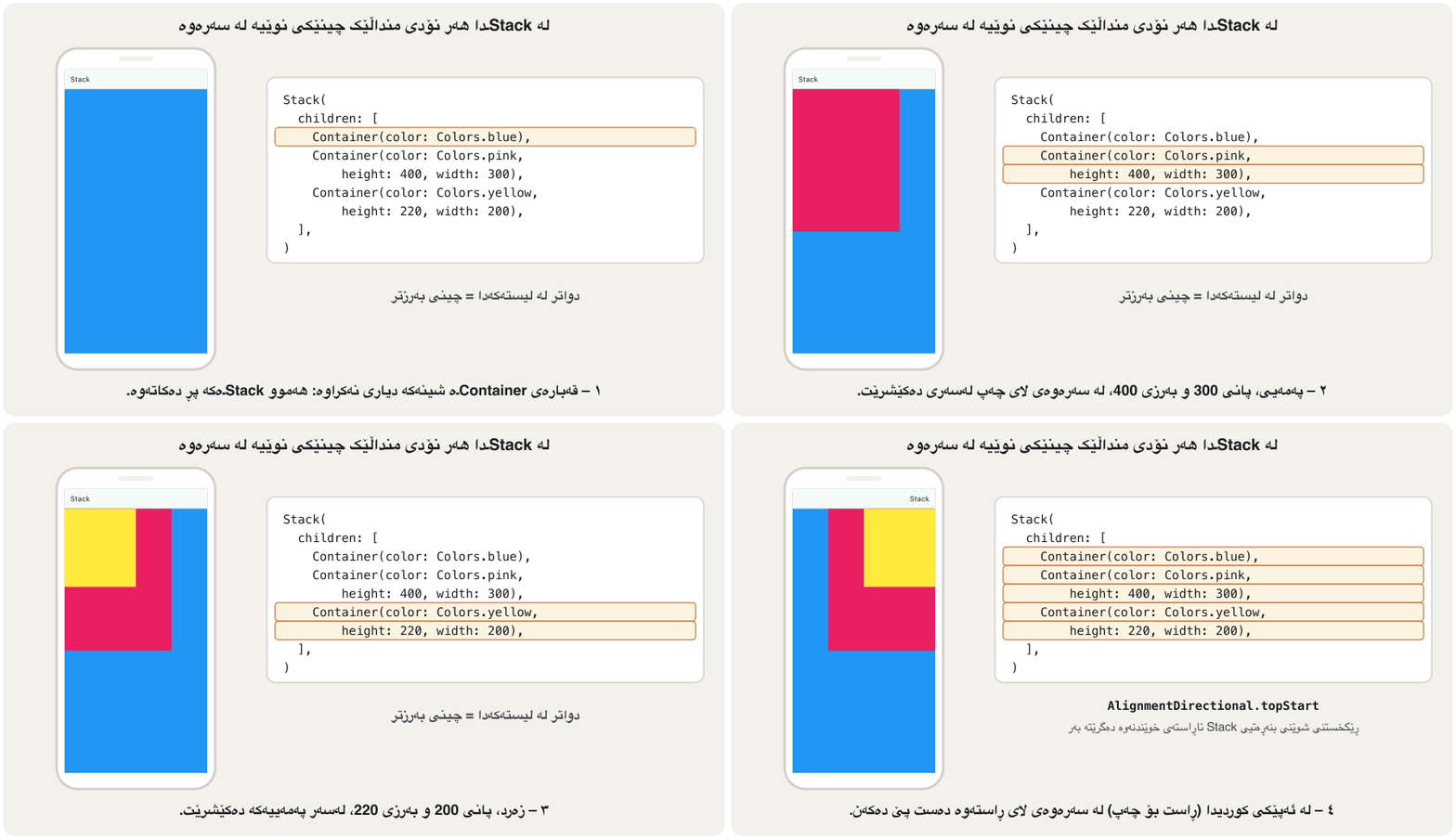
نموونەی چەندمنداڵی وانەکان Stackـە. Stack چین چین دەکێشێت: یەکەم منداڵ لە خوارەوە و هەر یەکێکی دواتر لەسەر ئەوانی پێشوو. ئەو منداڵانەی شوێنیان پێ نەدراوە لە گۆشەی سەرەوەی سەرەتا دادەنرێن (سەرەوەی چەپ لە ئینگلیزیدا).
@override
Widget build(BuildContext context) {
  return Center(
    child: Container(
      alignment: Alignment.center,
      color: Colors.white,
      child: Stack(
        children: [
          Container(color: Colors.blue),
          Container(color: Colors.pink, height: 400, width: 300),
          Container(color: Colors.yellow, height: 220, width: 200),
        ],
      ),
    ),
  );
}
Explain the codeڕوونکردنەوەی کۆدەکە
- Lineدێڕی 4-6
The outer Container fills the body (because of
alignment) and paints it white.Containerـە دەرەکییەکە body پڕ دەکاتەوە (بەهۆی
alignment) و سپی ڕەنگی دەکات.- Lineدێڕی 9
No size and no child: this Container grows as big as the Stack allows, so blue covers everything.
نە قەبارە و نە child: ئەم Containerـە هێندەی Stack ڕێگە بدات گەورە دەبێت، بۆیە شین هەموو شتێک دادەپۆشێت.
- Lineدێڕی 10-11
Pink (300 × 400) and then yellow (200 × 220) are painted on top, both at the top-left corner.
پەمەیی (پانی ٣٠٠، بەرزی ٤٠٠) و پاشان زەرد (پانی ٢٠٠، بەرزی ٢٢٠) لەسەری دەکێشرێن، هەردووکیان لە گۆشەی سەرەوەی چەپ.
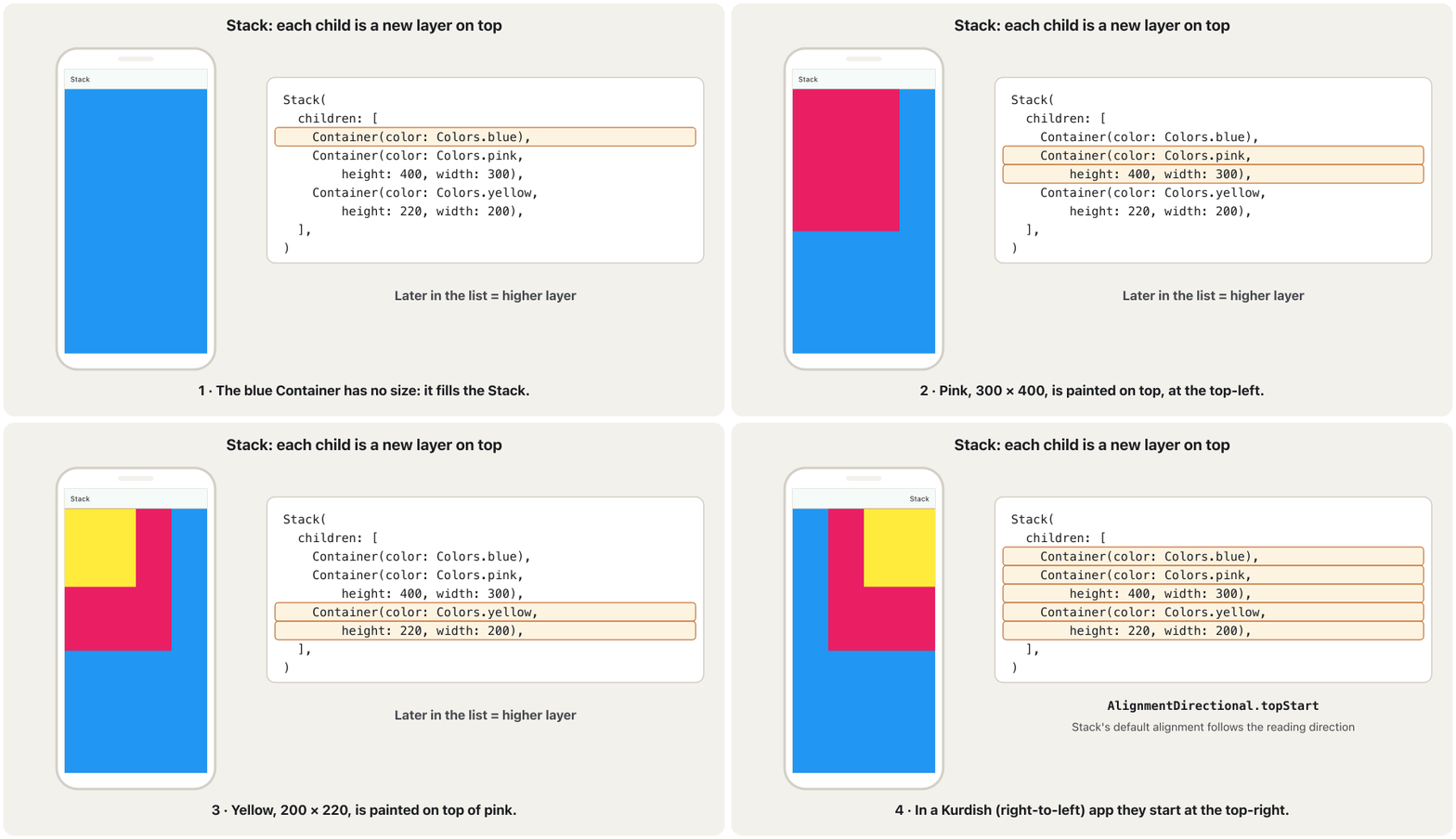
At the bakery, each fresh naan is laid on top of the pile. The first one is at the bottom, the last one on top, and you see the top one best. A Stack paints its children the same way.
لە نانەواخانەدا هەر نانێکی گەرم لەسەر کۆمەڵە نانەکە دادەنرێت. یەکەمیان لە خوارەوەیە و دوایینیان لە سەرەوە و باشتر لە هەمووان سەرەوەییەکە دەبینیت. Stack بە هەمان شێوە دەکێشێت.
Where the analogy stops workingسنووری ئەم نموونەیە
Naan are all the same size; Stack children can have different sizes and positions, so lower layers can still show around the edges.
نانەکان هەموویان یەک قەبارەن؛ بەڵام Stack قەبارە و شوێنی جیاوازیان دەبێت، بۆیە چینەکانی خوارەوە هێشتا لە لێوارەکانەوە دیار دەبن.
A friendly 2025 course whose short chapters show one Flutter widget at a time: layouts, the app frame, bars, buttons, lists and pictures.
کۆرسێکی دۆستانەی 2025 کە بەشە کورتەکانی هەر جارە یەک پیشان دەدەن: ، چوارچێوەی ، شریتەکان، ، و وێنەکان.
Watch 33:27-35:48 ('Stack'): putting widgets on top of each other.
لە 33:27 تا 35:48 سەیر بکە (Stack): دانانی لەسەر یەکتر.
Stack: widgets on top of each otherStack: ویجێتەکان لەسەر یەکتر
Positioned: pin a child to a cornerPositioned: نۆدێکی منداڵ لە گۆشەیەک بچەسپێنە
Wrap a Stack child in Positioned to place it by its distance from the Stack's edges (top, right, bottom, left). A typical use is a small badge on an icon, like the number of items in a shopping cart:
Stack لە ناو Positionedـدا دابنێ تا بە دووریی لە لێوارەکانی Stack شوێنی دیاری بکەیت (top، right، bottom، left). بەکارهێنانێکی ئاسایی نیشانەیەکی بچووکە لەسەر ، وەک ژمارەی کاڵاکانی ناو سەبەتەی کڕین:
@override
Widget build(BuildContext context) {
  return SizedBox(
    width: 48,
    height: 48,
    child: Stack(
      children: [
        const Center(child: Icon(Icons.shopping_cart, size: 32)),
        Positioned(
          top: 0,
          right: 0,
          child: Container(
            padding: const EdgeInsets.all(4),
            decoration: const BoxDecoration(
              color: Colors.red,
              shape: BoxShape.circle,
            ),
            child: Text(
              '$count',
              style: const TextStyle(color: Colors.white, fontSize: 12),
            ),
          ),
        ),
      ],
    ),
  );
}
Explain the codeڕوونکردنەوەی کۆدەکە
- Lineدێڕی 8
First child: the cart icon, centred in the 48 × 48 box.
یەکەم منداڵ: سەبەتەکە، لە ناوەڕاستی سندووقە ـەکەدا.
- Lineدێڕی 9-11
Second child, on top: pinned 0 pixels from the top and 0 from the right.
دووەم منداڵ، لە سەرەوە: لە ٠ لە سەرەوە و ٠ لە ڕاستەوە چەسپاوە.
- Lineدێڕی 12-17
A small red circle; the text inside is
count, a number the widget holds (3 in the picture).بازنەیەکی سووری بچووک؛ دەقی ناوی
countـە، ژمارەیەک کە هەڵیدەگرێت (لە وێنەکەدا ٣).
A Kurdish beginner course: what Flutter is, making an Android emulator, creating and running a project in VS Code, Hello World and hot reload.
کۆرسێکی کوردی بۆ سەرەتاییەکان: چییە، دروستکردنی Android، دروستکردن و کارپێکردنی پرۆژەیەک لە VS Codeـدا، Hello World و .
In Kurdish. Watch 1:26:44-1:29:34: Stack, then Positioned to pin a child to a place.
بە کوردی. لە 1:26:44 تا 1:29:34 سەیر بکە: Stack، پاشان Positioned بۆ چەسپاندنی لە شوێنێکی دیاریکراو.
Start and end: layouts that work in Kurdishسەرەتا و کۆتایی: ڕێکخستنێکی ڕووکار کە بۆ کوردی کار بکات
Kurdish is written right-to-left. When an app's language is right-to-left, Flutter mirrors the layout, and its widgets speak of start and end instead of left and right (see MaterialApp and Scaffold). The layout widgets of this lesson have directional versions for that:
کوردی دەنووسرێت. کاتێک زمانی بێت، Flutter وەک ئاوێنە هەڵدەگەڕێنێتەوە و Flutter لە جیاتی چەپ و ڕاست باسی سەرەتا (start) و کۆتایی (end) دەکەن (سەیری MaterialApp و Scaffold بکە). ئەم وانەیە وەشانی ئاڕاستەداریان هەیە بۆ ئەمە:
| Fixed sidesلای جێگیر | Follows the reading directionئاڕاستەی خوێندنەوە دەگرێتە بەر |
|---|---|
EdgeInsets.only(left: 24) | EdgeInsetsDirectional.only(start: 24) |
Alignment.centerLeft | AlignmentDirectional.centerStart |
Positioned(left: 0, …) | PositionedDirectional(start: 0, …) |
const Padding(
  padding: EdgeInsetsDirectional.only(start: 24),
  child: Align(
    alignment: AlignmentDirectional.centerStart,
    child: Text('Starts on the left in English, on the right in Kurdish'),
  ),
),
Explain the codeڕوونکردنەوەی کۆدەکە
- Lineدێڕی 2
24 pixels at the start: the left in English, the right in Kurdish.
٢٤ لە سەرەتا: چەپ لە ئینگلیزیدا، ڕاست لە کوردیدا.
- Lineدێڕی 4
Vertically centred, at the start side.
بە ئەستوونی لە ناوەڕاست، لە لای سەرەتا.
Common mistakesهەڵە باوەکان
| Mistakeهەڵە | What happensچی ڕوو دەدات | Fixچارەسەر |
|---|---|---|
Giving child: two widgets or a listدانی دوو یان لیستێک بە child: | The code does not compile: child takes one widget. کۆدەکە قبووڵ ناکات: child تەنها یەک وەردەگرێت. | Wrap them in a Column or Row and give that one widget to child.بیانخە ناو Column یان Rowـێکەوە و ئەو یەک بدە بە child. |
Writing children: on Center or Paddingنووسینی children: بۆ Center یان Padding | Flutter says: No named parameter with the name 'children'.Flutter دەڵێت: No named parameter with the name 'children'. | Single-child widgets only have child. یەکمنداڵ تەنها childـیان هەیە. |
Using Expanded outside a Row or Columnبەکارهێنانی Expanded لە دەرەوەی Row یان Column | Flutter says: Incorrect use of ParentDataWidget.Flutter دەڵێت: Incorrect use of ParentDataWidget. | Put Expanded directly in the children of a Row, Column or Flex.Expanded ڕاستەوخۆ بخە ناو childrenـی Row، Column یان Flexـەوە. |
Expecting width: 100 to work everywhereچاوەڕوانی ئەوەی width: 100 لە هەموو شوێنێک کار بکات | Under tight constraints (the screen, a sized SizedBox) the size is ignored.لە ژێر توندا (شاشە، SizedBoxـێکی قەبارەدار) قەبارەکە پشتگوێ دەخرێت. | Put a Center or Align around the widget so it gets loose constraints.Center یان Alignـێک بە دەوری دابنێ تا شل وەربگرێت. |
| Using an image without declaring itبەکارهێنانی وێنە بەبێ ناساندنی | Image.asset shows an error box: the file is not in the app.Image.asset سندووقێکی پیشان دەدات: فایلەکە لە ناو نییە. | List the file under flutter: assets: in pubspec.yaml.فایلەکە لە ژێر flutter: assets: لە pubspec.yamlـدا بنووسە. |
Using left and right in an app for Kurdishبەکارهێنانی left و right لە بۆ کوردی | Spaces and badges stay on the English side when the layout mirrors.بۆشایی و نیشانەکان لە لای ئینگلیزی دەمێننەوە کاتێک هەڵدەگەڕێتەوە. | Use the Directional versions with start and end.وەشانە Directionalـەکان بە start و end بەکار بهێنە. |
Exercisesڕاهێنانەکان
Put each widget in the right family, child or children: Padding, Row, Expanded, Stack, Center, ListView, SizedBox, Table.
هەر بخە ناو خێزانی خۆیەوە، child یان children: Padding، Row، Expanded، Stack، Center، ListView، SizedBox، Table.
Hintئاماژە
Look for the word in the constructor: child or children.
سەیری وشەکەی ناو بکە: child یان children.
Show answerوەڵامەکە پیشان بدە
child(one widget):Padding,Expanded,Center,SizedBox.children(a list):Row,Stack,ListView,Table.- Remember:
Expandedhas one child, even though it lives inside a Row or Column.
child(یەک ):Padding،Expanded،Center،SizedBox.children(لیستێک):Row،Stack،ListView،Table.- لە بیرت بێت:
Expandedیەک هەیە، هەرچەندە لە ناو Row یان Columnـدا دەژی.
How big is the red box on the phone? Then change the code so the red box really is 50 × 50.
سندووقە سوورەکە لەسەر مۆبایلەکە چەند گەورەیە؟ پاشان کۆدەکە بگۆڕە تا سندووقە سوورەکە بە ڕاستی بێت.
@override
Widget build(BuildContext context) {
  return Center(
    child: SizedBox(
      width: 200,
      height: 200,
      child: Container(width: 50, height: 50, color: Colors.red),
    ),
  );
}Hintئاماژە
Constraints go down: what does SizedBox(width: 200, height: 200) tell its child?
دادەبەزن: SizedBox(width: 200, height: 200) چی بە دەڵێت؟
Show answerوەڵامەکە پیشان بدە
200 × 200. The SizedBox gives its child tight constraints (exactly 200 × 200), so the Container's width: 50 and height: 50 are ignored. A Center between them gives loose constraints, and the Container can be 50 × 50:
. SizedBoxـەکە توند (ڕێک ) دەدات بە ، بۆیە width: 50 و height: 50ـی Container پشتگوێ دەخرێن. Centerـێک لە نێوانیاندا شل دەدات و Containerـەکە دەتوانێت بێت:
@override
Widget build(BuildContext context) {
  return Center(
    child: SizedBox(
      width: 200,
      height: 200,
      child: Center(
        child: Container(width: 50, height: 50, color: Colors.red),
      ),
    ),
  );
}Build a grey 300 × 200 card in the middle of the screen. Put the text 'Erbil' in the middle of the card and 'New' in its top corner on the end side (top-right in English, top-left in Kurdish).
کارتێکی خۆڵەمێشیی لە ناوەڕاستی شاشەکەدا دروست بکە. دەقی 'Erbil' لە ناوەڕاستی کارتەکە و 'New' لە گۆشەی سەرەوەی لای کۆتایی دابنێ (سەرەوەی ڕاست لە ئینگلیزیدا، سەرەوەی چەپ لە کوردیدا).
Hintئاماژە
Use a Stack with three children: a background, a Center and an Align.
Stackـێک بە سێ منداڵ بەکار بهێنە: باکگراوندێک، Centerـێک و Alignـێک.
Show answerوەڵامەکە پیشان بدە
@override
Widget build(BuildContext context) {
  return Center(
    child: SizedBox(
      width: 300,
      height: 200,
      child: Stack(
        children: [
          Container(color: Colors.grey[300]), // fills the 300 × 200 box
          const Center(child: Text('Erbil', style: TextStyle(fontSize: 24))),
          const Align(
            alignment: AlignmentDirectional.topEnd,
            child: Padding(
              padding: EdgeInsets.all(8),
              child: Text('New'),
            ),
          ),
        ],
      ),
    ),
  );
}
Explain the codeڕوونکردنەوەی کۆدەکە
- Lineدێڕی 3-6
Center + SizedBox: a 300 × 200 area in the middle.
Center و SizedBox: ناوچەیەکی لە ناوەڕاستدا.
- Lineدێڕی 9
No size: the grey Container fills the Stack, which is 300 × 200.
بێ قەبارە: Containerـە خۆڵەمێشییەکە Stack پڕ دەکاتەوە کە ـە.
- Lineدێڕی 11-12
AlignmentDirectional.topEndfollows the reading direction.AlignmentDirectional.topEndئاڕاستەی خوێندنەوە دەگرێتە بەر.
In the course's Stack, swap the pink and the yellow Containers in the children list. What do you see now, and why?
لە Stackـەکەی وانەکاندا، شوێنی Containerـە پەمەیی و زەردەکە لە لیستی childrenـدا بگۆڕە. ئێستا چی دەبینیت و بۆچی؟
Show answerوەڵامەکە پیشان بدە
You see only blue and pink. Yellow is now painted before pink, so pink covers it. Both start at the same corner and yellow (200 × 220) is smaller than pink (300 × 400), so no part of yellow shows.
تەنها شین و پەمەیی دەبینیت. ئێستا زەرد پێش پەمەیی دەکێشرێت، بۆیە پەمەیی دایدەپۆشێت. هەردووکیان لە هەمان گۆشەوە دەست پێ دەکەن و زەرد (پانی ٢٠٠، بەرزی ٢٢٠) لە پەمەیی (پانی ٣٠٠، بەرزی ٤٠٠) بچووکترە، بۆیە هیچ بەشێکی زەرد دیار نییە.
Summaryپوختە
- Layout in Flutter is built from widgets. Images, icons and text are widgets too; layout widgets are the invisible ones that arrange them.
- Single-child widgets take
child(Align, Center, Padding, SizedBox, AspectRatio, ConstrainedBox, Baseline, FittedBox, Container). Multi-child widgets takechildren(Row, Column, ListView, GridView, Table, Stack, Flow). Expandedhas one child and works only inside a Row, Column or Flex.- Constraints go down, sizes go up, the parent sets the position. Tight constraints fix the size; loose ones allow any size up to a limit.
- FittedBox scales its child to fit. Stack paints children in layers, the last on top; Positioned pins a child to the edges.
- For Kurdish apps, prefer the Directional versions (start/end) of EdgeInsets, Alignment and Positioned.
- لە Flutterـدا لە دروست دەبێت. وێنە، و دەقیش ؛ ئەو نادیارانەن کە ئەوانی تر ڕیز دەکەن.
- یەکمنداڵ
childوەردەگرن (Align، Center، Padding، SizedBox، AspectRatio، ConstrainedBox، Baseline، FittedBox، Container). چەندمنداڵchildrenوەردەگرن (Row، Column، ListView، GridView، Table، Stack، Flow). Expandedیەک هەیە و تەنها لە ناو Row، Column یان Flexـدا کار دەکات.- دادەبەزن، قەبارەکان سەردەکەون و شوێن دادەنێت. توند قەبارە جێگیر دەکەن؛ شلەکان هەر قەبارەیەک تا سنوورێک ڕێگە دەدەن.
- FittedBox گەورە یان بچووک دەکات تا جێی ببێتەوە. Stack چین چین دەکێشێت و دوایینیان لە سەرەوەیە؛ Positioned بە لێوارەکانەوە دەچەسپێنێت.
- بۆ کوردی، وەشانە Directionalـەکانی (start/end) EdgeInsets، Alignment و Positioned باشترن.
What decides whether a widget takes child or children?چی دیاری دەکات ویجێتێک child وەربگرێت یان children؟
How many widgets it arranges. Widgets that wrap one widget (to pad, centre, size or scale it) take child; widgets that arrange several (in a line, in layers, in a grid) take a list in children.
ژمارەی ئەو ڕیزیان دەکات. ئەوانەی یەک لە خۆ دەگرن (بۆ بۆشایی، ناوەڕاست، قەبارە یان گەورە و بچووککردن) child وەردەگرن؛ ئەوانەی چەند دانەیەک ڕیز دەکەن (لە هێڵێکدا، چین چین، لە تۆڕێکدا) لیستێک لە childrenـدا وەردەگرن.
Why is Container(width: 100, height: 100) full-screen when it is the first widget?بۆچی Container(width: 100, height: 100) هەموو شاشەکە دەگرێت کاتێک یەکەم ویجێتە؟
Because the screen gives tight constraints (exactly its own size), and a widget must choose a size inside its constraints. A Center or Align in between makes the constraints loose.
چونکە شاشەکە توند دەدات (ڕێک قەبارەی خۆی) و دەبێت قەبارەیەک لە ناو خۆیدا هەڵبژێرێت. Center یان Alignـێک لە نێوانیاندا شل دەکاتەوە.
In a Stack, how do you decide which widget is on top?لە Stackـێکدا چۆن دیاری دەکەیت کام ویجێت لە سەرەوە بێت؟
By the order of children: the first is at the bottom, the last on top.
بە ڕیزبەندیی children: یەکەمیان لە خوارەوەیە و دوایینیان لە سەرەوە.
Videoڤیدیۆ
Watch a videoسەیری ڤیدیۆیەک بکە
A video that viewers liked a lot and praised in their comments, chosen for this lesson.ڤیدیۆیەک کە بینەران زۆریان پێ خۆش بووە و لە کۆمێنتەکانیاندا ستایشیان کردووە، بۆ ئەم وانەیە هەڵبژێردراوە.
Flutter's official explanation of layout: constraints go down, sizes go up, the parent sets the position; then rows, columns and the unbounded width or height error.
ڕوونکردنەوەی فەرمیی بۆ : بەرەو خوار دەچن، قەبارەکان بەرەو سەر دەگەڕێنەوە و باوان شوێنەکە دیاری دەکات؛ پاشان Row، Column و هەڵەی پانی یان بەرزیی بێسنوور.
Whole video (4:49, 2026): the three-part layout rule, how widgets get their size, Row and Column, then how to avoid unbounded width and height errors.
هەموو ڤیدیۆکە (4:49، ساڵی 2026): یاسا سێ بەشییەکەی ، چۆن قەبارە وەردەگرن، Row و Column، پاشان چۆن خۆت لە هەڵەی پانی و بەرزیی بێسنوور بپارێزیت.
Lesson complete!وانەکە تەواو بوو!
Well done. Review the key terms, then go on to the next lesson.دەستخۆش. سەیرێکی زاراوە سەرەکییەکان بکەرەوە، پاشان بڕۆ بۆ وانەی داهاتوو.
Key termsزاراوە سەرەکییەکان
Row and ColumnRow و Column
Related lecturesوانە پەیوەندیدارەکان
References and further readingسەرچاوەکان و خوێندنەوەی زیاتر
This lecture is a first edition. The Kurdish text and terminology are waiting for review by Kurdish IT teachers.ئەم وانەیە چاپی یەکەمە. دەقە کوردییەکە و زاراوەکانی چاوەڕێی پێداچوونەوەی مامۆستایانی کوردی بواری IT ن.