FlutterFlutter · Chapterبەش 6 · Lectureوانە 6.5
Container: Size, Padding, Margin and AlignmentContainer: قەبارە، بۆشایی ناوەوە، پەراوێز و ڕێکخستنی شوێن
What a Container is (one child, like a <div>), the box model of margin, border, padding and child, EdgeInsets, the properties table and today's constructor, the rules that decide a Container's size (worked through the course's six examples), ConstrainedBox and Alignment.
Container چییە (یەک منداڵ، وەک <div>)، ، ، و منداڵ، EdgeInsets، خشتەی و ئەمڕۆ، ئەو ڕێسایانەی قەبارەی Container دیاری دەکەن (بە شەش نموونەکەی وانەکە)، ConstrainedBox و Alignment.
What you will learnچی فێر دەبیت
- Explain what a Container is and why it has exactly one child.
- Describe the box model (margin, border, padding, child) and give padding and margin with EdgeInsets.
- Predict a Container's size from its child, width/height, alignment and parent.
- Place a child with Alignment and limit a box with constraints or ConstrainedBox.
- ڕوونی بکەیتەوە Container چییە و بۆچی تەنها یەک منداڵی هەیە.
- (، ، ، منداڵ) وەسف بکەیت و بە EdgeInsets و بدەیت.
- قەبارەی Container لە منداڵەکەی، width/height، alignment و باوکەکەیەوە پێشبینی بکەیت.
- منداڵێک بە Alignment دابنێیت و سندووقێک بە constraints یان ConstrainedBox سنووردار بکەیت.
What is a Container?Container چییە؟
A Container is a box around one child widget. On its own a Text or a button has no size of its own choosing, no colour behind it and no space around it. Wrap it in a Container, and with a few properties you can give it a size, empty space inside and outside, a background colour, a border and a position.
Container سندووقێکە بە دەوری یەک منداڵدا. Textـێک یان دوگمەیەک بە تەنها نە قەبارەیەکی دیاریکراوی خۆی هەیە، نە ڕەنگێک لە پشتیەوە و نە بۆشایی بە دەوریدا. بیخە ناو Containerـێکەوە و بە چەند دەتوانیت قەبارە، بۆشایی لە ناوەوە و دەرەوە، ڕەنگی پاشبنەما، و شوێنی پێ بدەیت.
What is a Container?Container چییە؟
A box like an HTML <div>سندووقێک وەک <div>ـی HTML
The course compares a Container with the <div> tag in HTML (HTML elements). The idea is the same: a general-purpose box that you style and place. The difference: a <div> can hold many elements, a Container holds one child.
وانەکە Container بە تاگی <div> لە HTMLـدا بەراورد دەکات (توخمەکانی HTML). بیرۆکەکە هەمانە: سندووقێکی گشتی کە شێوازی دەدەیتێ و شوێنی دیاری دەکەیت. جیاوازییەکە: <div> دەتوانێت چەندین لە خۆ بگرێت، بەڵام Container تەنها یەک منداڵ.
Think of a photo hanging in a shop in the bazaar. The photo is the child. Around it is a white card (the padding), then the wooden frame (the border), and between this frame and the next one on the wall there is empty wall (the margin). The shopkeeper can choose how big the frame is, what colour the card is and where the photo sits on the card — exactly the jobs of a Container's properties.
وێنەیەک بهێنە بەرچاوت کە لە دووکانێکی بازاڕدا هەڵواسراوە. وێنەکە منداڵەکەیە. بە دەوریدا کارتێکی سپی هەیە ()، پاشان چوارچێوە دارینەکە () و لە نێوان ئەم چوارچێوەیە و چوارچێوەکەی تەنیشتیدا دیوارێکی بەتاڵ هەیە (). دووکاندار دەتوانێت هەڵبژێرێت چوارچێوەکە چەند گەورە بێت، کارتەکە چ ڕەنگێک بێت و وێنەکە لە کوێی کارتەکە دابنرێت — ڕێک ئەو کارانەی Container دەیکەن.
Where the analogy stops workingسنووری ئەم نموونەیە
A real frame always has a picture in it. A Container can be empty — and then, as you will see, it behaves very differently.
چوارچێوەی ڕاستەقینە هەمیشە وێنەیەکی تێدایە. Container دەتوانێت بەتاڵ بێت — و ئەو کاتە، وەک دەیبینیت، زۆر بە جیاوازی ڕەفتار دەکات.
A first Containerیەکەم Container
Here is the course's first example: a green box 200 wide and 100 high as the body of a screen, with a text inside.
ئەمە یەکەم نموونەی وانەکەیە: سندووقێکی سەوز بە پانیی ٢٠٠ و بەرزیی ١٠٠ وەک bodyـی شاشەیەک، کە دەقێکی تێدایە.
import 'package:flutter/material.dart';

void main() => runApp(const MaterialApp(home: FirstContainer()));

class FirstContainer extends StatelessWidget {
  const FirstContainer({super.key});

  @override
  Widget build(BuildContext context) {
    return Scaffold(
      appBar: AppBar(
        title: const Text('My Flutter Application'),
      ),
      body: Container(
        width: 200.0,
        height: 100.0,
        color: Colors.green,
        child: const Text('Hello! Students', style: TextStyle(fontSize: 25)),
      ),
    );
  }
}┌─────────────────────────────┐ │ My Flutter Application │ ├─────────────────────────────┤ │┌──────────────┐ │ ││Hello! Student│ │ ││ │ │ │└──────────────┘ │ │ │ │ │ └─────────────────────────────┘
A blue app bar 'My Flutter Application'. Under it, in the top-left corner of the page, a green box 200 × 100 with 'Hello! Students' at its top-left.
شین بە 'My Flutter Application'. لە ژێریدا، لە گۆشەی سەرەوەی چەپی پەڕەکە، سندووقێکی سەوزی ٢٠٠ × ١٠٠ کە 'Hello! Students' لە سەرەوەی چەپیدایە.
Explain the codeڕوونکردنەوەی کۆدەکە
- Lineدێڕی 14
The Container is the whole body of the Scaffold.
Containerـەکە هەموو bodyـی Scaffoldـەکەیە.
- Lineدێڕی 15-16
Width and height in logical pixels.
پانی و بەرزی بە لۆجیکی.
- Lineدێڕی 17
colorpaints the whole box, not only behind the letters.colorهەموو سندووقەکە ڕەنگ دەکات، نەک تەنها پشتی پیتەکان.- Lineدێڕی 18
The one child.
constbecause the text never changes.تاکە منداڵەکە.
constـە چونکە دەقەکە هەرگیز ناگۆڕێت.
alignment، سندووقەکە و دەقەکەی لە گۆشەی سەرەوەی سەرەتاوە دەست پێدەکەن.CêITSizes in Flutter are in logical pixels, not the phone's real screen dots. A phone with a pixel ratio of 3 draws this 200-wide box with 600 real pixels, so it looks about the same size on every phone.
قەبارەکان لە Flutterـدا بە لۆجیکین، نەک خاڵە ڕاستەقینەکانی شاشەی مۆبایلەکە. مۆبایلێک کە ڕێژەی ٣ـە ئەم سندووقە ٢٠٠ پانە بە ٦٠٠ ڕاستەقینە دەکێشێت، بۆیە لە هەموو مۆبایلێکدا نزیکەی هەمان قەبارە دەردەکەوێت.
A Kurdish beginner course: what Flutter is, making an Android emulator, creating and running a project in VS Code, Hello World and hot reload.
کۆرسێکی کوردی بۆ سەرەتاییەکان: چییە، دروستکردنی Android، دروستکردن و کارپێکردنی پرۆژەیەک لە VS Codeـدا، Hello World و .
In Kurdish. Watch 1:05:48-1:09:39 ('Container widget'): a first Container with a size and a colour.
بە کوردی. لە 1:05:48 تا 1:09:39 سەیر بکە (Container widget): یەکەم Container بە قەبارە و ڕەنگێکەوە.
The box model: margin, border, padding, childمۆدێلی سندووق: پەراوێز، سنوور، بۆشایی ناوەوە، child
Every Container is built in rings, from the inside out:
هەموو Containerـێک بە ئەڵقە دروست دەبێت، لە ناوەوە بۆ دەرەوە:
- child — the content: one widget.
- padding — empty space inside the box, between the child and the border. The box's colour fills it.
- border — an optional line around the box (it is part of
decoration, see Decorating a Container). - margin — empty space outside the border. It is always transparent and keeps the neighbours away.
- child — ناوەڕۆکەکە: یەک .
- — بۆشایی بەتاڵ لە ناو سندووقەکەدا، لە نێوان منداڵەکە و . ڕەنگی سندووقەکە پڕی دەکاتەوە.
- — هێڵێکی ئارەزوومەندانە بە دەوری سندووقەکەدا (بەشێکە لە
decoration، بڕوانە ڕازاندنەوەی Container). - — بۆشایی بەتاڵ لە دەرەوەی . هەمیشە ڕوونە و دراوسێکان دوور دەخاتەوە.
If you set width and height, they are the size of the coloured box: the child, the padding and the border together. The margin is added outside that size. So a Container with width: 200 and margin: EdgeInsets.all(10) takes 220 pixels of its parent's width, and its child gets 200 minus the padding.
ئەگەر width و height دابنێیت، ئەوانە قەبارەی سندووقە ڕەنگکراوەکەن: منداڵەکە، و پێکەوە. لە دەرەوەی ئەو قەبارەیە زیاد دەکرێت. بۆیە Containerـێک بە width: 200 و margin: EdgeInsets.all(10) ٢٢٠ لە پانیی باوکەکەی دەگرێت و منداڵەکەی ٢٠٠ کەم وەردەگرێت.
The Container's propertiesتایبەتمەندییەکانی Container
The course lists the Container properties you will use most. Here they are, with what each one really does:
وانەکە ئەو Container دەژمێرێت کە زۆرتر بەکاریان دەهێنیت. ئەمانەن، لەگەڵ ئەوەی هەریەکەیان بەڕاستی دەیکات:
| Property | What it doesچی دەکات |
|---|---|
child | The one widget inside the box.ئەو یەک لە ناو سندووقەکەدایە. |
color | Paints the whole box (child area and padding) with one colour.هەموو سندووقەکە (شوێنی منداڵ و ) بە یەک ڕەنگ ڕەنگ دەکات. |
width, height | A fixed size for the box (padding and border included, margin not).قەبارەیەکی جێگیر بۆ سندووقەکە ( و دەژمێردرێن، نا). |
margin | Empty space outside the box.بۆشایی بەتاڵ لە دەرەوەی سندووقەکە. |
padding | Empty space between the box's edge (border) and its child, on all four sides.بۆشایی بەتاڵ لە نێوان لێواری سندووقەکە () و منداڵەکەیدا، لە هەر چوار لاوە. |
alignment | Where the child sits inside the box (and it makes the box expand).منداڵەکە لە کوێی سندووقەکەدا دادەنیشێت (و سندووقەکە گەورە دەکات). |
decoration | A painted background: colour, border, rounded corners, shadow, gradient, image.پاشبنەمایەکی کێشراو: ڕەنگ، ، گۆشەی خڕ، سێبەر، ، وێنە. |
constraints | Minimum and maximum width and height.کەمترین و زۆرترین پانی و بەرزی. |
transform | Turns, moves or scales the box when it is painted.سندووقەکە دەسووڕێنێت، دەجووڵێنێت یان گەورە و بچووکی دەکات لە کاتی کێشاندا. |
decoration, borders, shadows and transform have their own lesson: Decorating a Container.
decoration، ، سێبەر و transform وانەی تایبەتی خۆیان هەیە: ڕازاندنەوەی Container.
The Container's propertiesتایبەتمەندییەکانی Container
The Container constructor todayدروستکەری Container لە ئەمڕۆدا
The course shows the Container constructor from before null safety. Here it is as it is in Flutter 3.44:
وانەکە Container لە پێش پیشان دەدات. ئەمە شێوەکەیەتی لە Flutter 3.44ـدا:
Container({
  super.key,
  this.alignment,            // AlignmentGeometry?
  this.padding,              // EdgeInsetsGeometry?
  this.color,                // Color?
  this.isAntiAlias = true,
  this.decoration,           // Decoration?
  this.foregroundDecoration, // Decoration?
  double? width,
  double? height,
  BoxConstraints? constraints,
  this.margin,               // EdgeInsetsGeometry?
  this.transform,            // Matrix4?
  this.transformAlignment,   // AlignmentGeometry?
  this.child,                // Widget?
  this.clipBehavior = Clip.none,
})
Explain the codeڕوونکردنەوەی کۆدەکە
- Lineدێڕی 2
super.keyreplaces the oldKey key.super.keyجێگەیKey keyـی کۆن دەگرێتەوە.- Lineدێڕی 3-6
?means "may be null": every property is optional.?واتە "دەکرێت بێنرخ بێت": هەموو ئارەزوومەندانەن.- Lineدێڕی 14
transformAlignmentis new: the point the box turns around.transformAlignmentنوێیە: ئەو خاڵەی سندووقەکە بە دەوریدا دەسووڕێتەوە.- Lineدێڕی 16
clipBehavior = Clip.nonekeeps its default from the course.clipBehavior = Clip.noneبنەڕەتەکەی وانەکە دەپارێزێت.
Giving padding and margin a size: EdgeInsetsقەبارە دان بە بۆشایی ناوەوە و پەراوێز: EdgeInsets
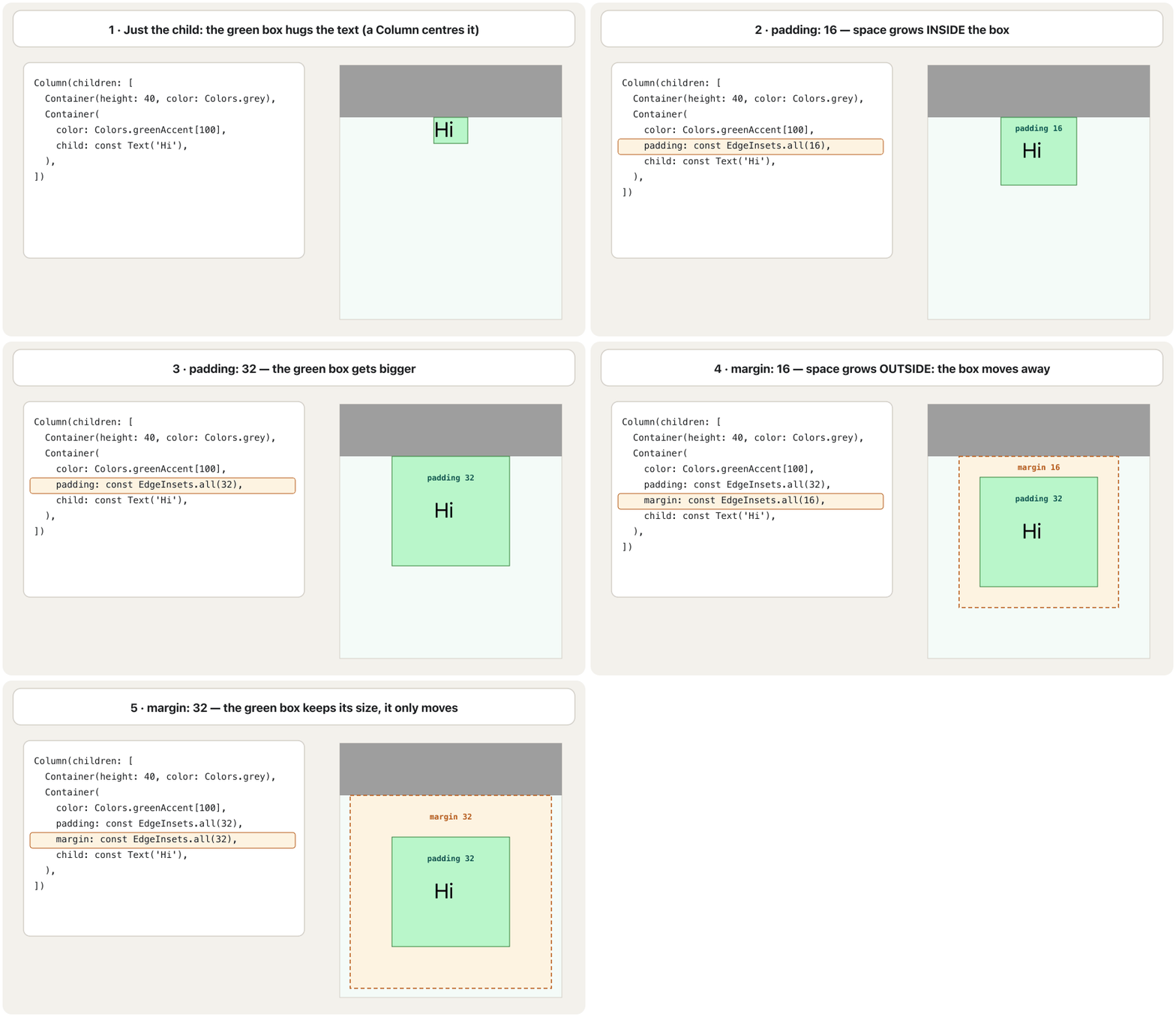
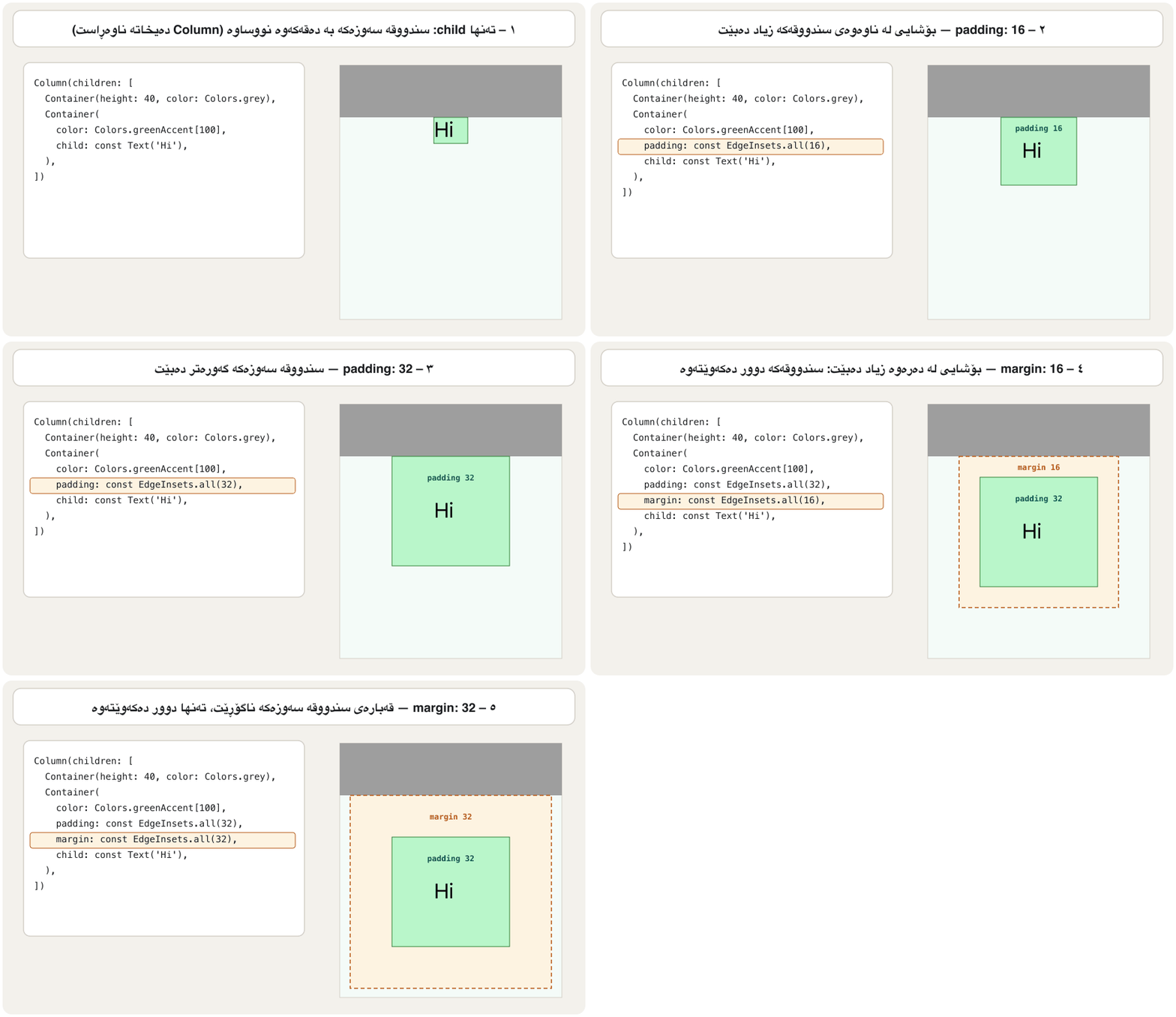
padding and margin take an EdgeInsets value: four numbers, one for each side. There are several ways to build one:
padding و margin نرخێکی EdgeInsets وەردەگرن: چوار ژمارە، بۆ هەر لایەک یەکێک. چەند ڕێگەیەک هەیە بۆ دروستکردنی:
| Constructor | Meaningواتا |
|---|---|
EdgeInsets.all(16) | 16 on all four sides.١٦ لە هەر چوار لاوە. |
EdgeInsets.symmetric(horizontal: 24, vertical: 8) | 24 left and right, 8 top and bottom.٢٤ چەپ و ڕاست، ٨ سەرەوە و خوارەوە. |
EdgeInsets.only(top: 20) | Only the sides you name; the others are 0.تەنها ئەو لایانەی ناویان دەبەیت؛ ئەوانی تر 0ـن. |
EdgeInsets.fromLTRB(10, 5, 50, 5) | Left, Top, Right, Bottom — in this order (the course uses this one).چەپ، سەرەوە، ڕاست، خوارەوە — بەم ڕیزبەندییە (وانەکە ئەمە بەکار دەهێنێت). |
EdgeInsetsDirectional.only(start: 40, end: 8) | start and end follow the reading direction: start is the right side in a Kurdish app.start و end بەدوای ئاڕاستەی خوێندنەوەدا دەڕۆن: لە کوردیدا start لای ڕاستە. |
import 'package:flutter/material.dart';

class EdgeInsetsDemo extends StatelessWidget {
  const EdgeInsetsDemo({super.key});

  @override
  Widget build(BuildContext context) {
    return Column(
      children: [
        Container(
          padding: const EdgeInsets.all(16), // 16 on every side
          color: Colors.amber,
          child: const Text('all'),
        ),
        Container(
          padding: const EdgeInsets.symmetric(horizontal: 24, vertical: 8),
          color: Colors.lightBlue,
          child: const Text('symmetric'),
        ),
        Container(
          margin: const EdgeInsets.only(top: 20),
          padding: const EdgeInsets.fromLTRB(10, 5, 50, 5), // left, top, right, bottom
          color: Colors.lightGreen,
          child: const Text('only + fromLTRB'),
        ),
        Container(
          // start/end follow the text direction: in a Kurdish (RTL) app
          // start is the right side.
          padding: const EdgeInsetsDirectional.only(start: 40, end: 8),
          color: Colors.pink[100],
          child: const Text('directional'),
        ),
      ],
    );
  }
}┌─────────────────────────────┐ │ (app bar) │ ├─────────────────────────────┤ │┌──────────┐ │ ││ all │ │ │└──────────┘ │ │┌──────────────┐ │ ││ symmetric │ │ │└──────────────┘ │ │ │ │┌──────────────────────┐ │ ││only + fromLTRB │ │ │└──────────────────────┘ │ │┌───────────────┐ │ ││ directional│ │ │└───────────────┘ │ └─────────────────────────────┘
Four coloured strips one under the other, each hugging its text: amber with 16 all round, light blue wider than tall, light green 20 pixels lower with a wide gap on the right, pink with a wide gap at the start.
چوار پارچەی ڕەنگاوڕەنگ یەک لە ژێر یەکەوە، هەریەکە بە دەقەکەیەوە نووساوە: کاڵی زەرد بە ١٦ لە هەموو لایەک، شینی کاڵ کە پانییەکەی لە بەرزییەکەی زیاترە، سەوزی کاڵ ٢٠ خوارتر و بۆشاییەکی پان لە ڕاست، پەمەیی بە بۆشاییەکی پان لە سەرەتادا.
Explain the codeڕوونکردنەوەی کۆدەکە
- Lineدێڕی 11
const: the numbers never change, so Flutter builds the value once.const: ژمارەکان هەرگیز ناگۆڕێن، بۆیە Flutter نرخەکە تەنها یەک جار دروست دەکات.- Lineدێڕی 22
L-T-R-B: the right side gets 50.
L-T-R-B: لای ڕاست ٥٠ وەردەگرێت.
- Lineدێڕی 29
40 on the left in English, on the right in Kurdish.
٤٠ لە چەپ لە ئینگلیزیدا، لە ڕاست لە کوردیدا.
How big is a Container?Container چەند گەورەیە؟
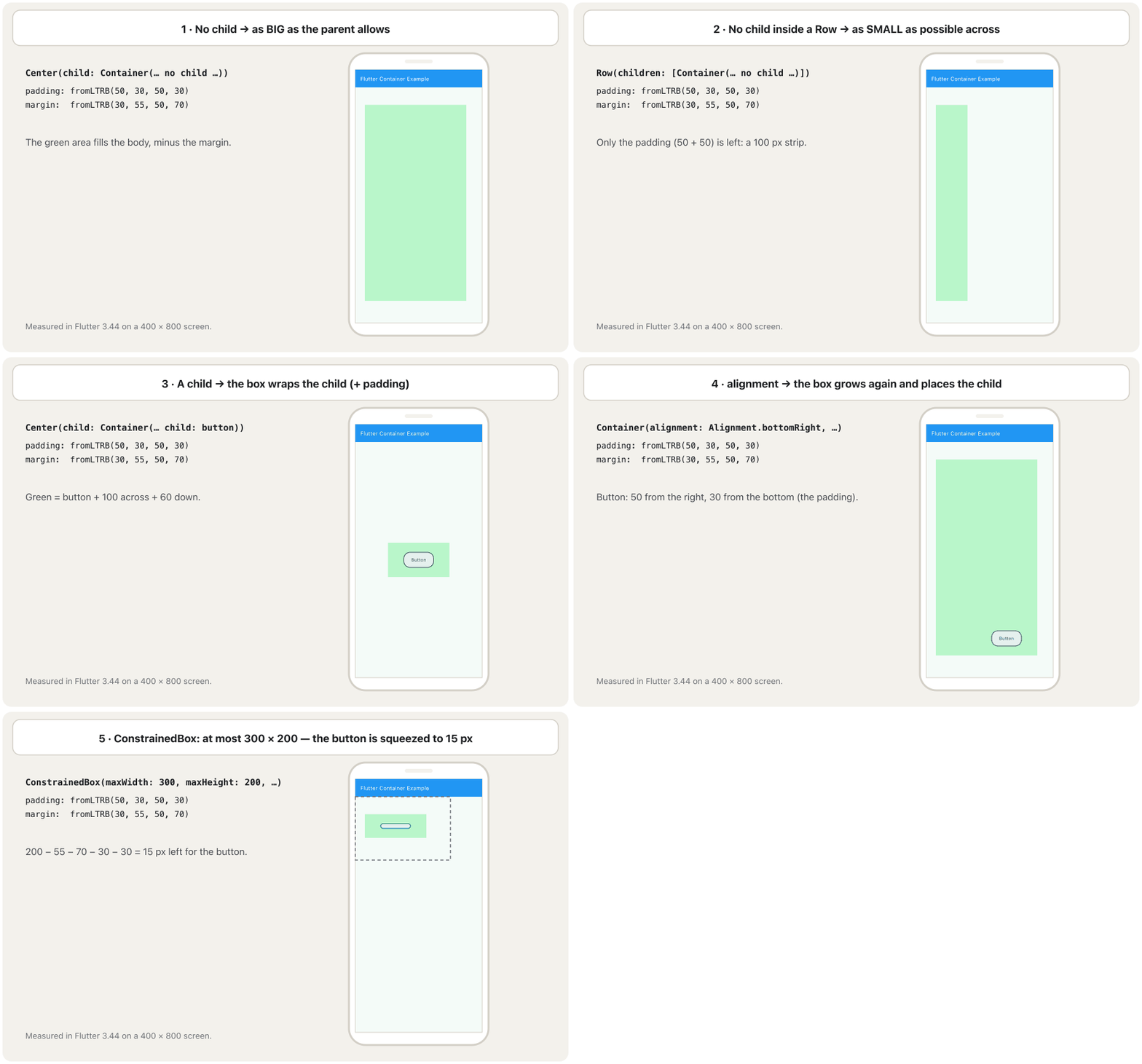
The course's examples show something surprising: the same green Container is sometimes a thin strip, sometimes as big as the screen, sometimes just big enough for a button. A Container decides its size from four things: its child, its width/height/constraints, its alignment, and how much room its parent gives it. Flutter's documentation lists the rules (the general idea of constraints is in Layout Widgets):
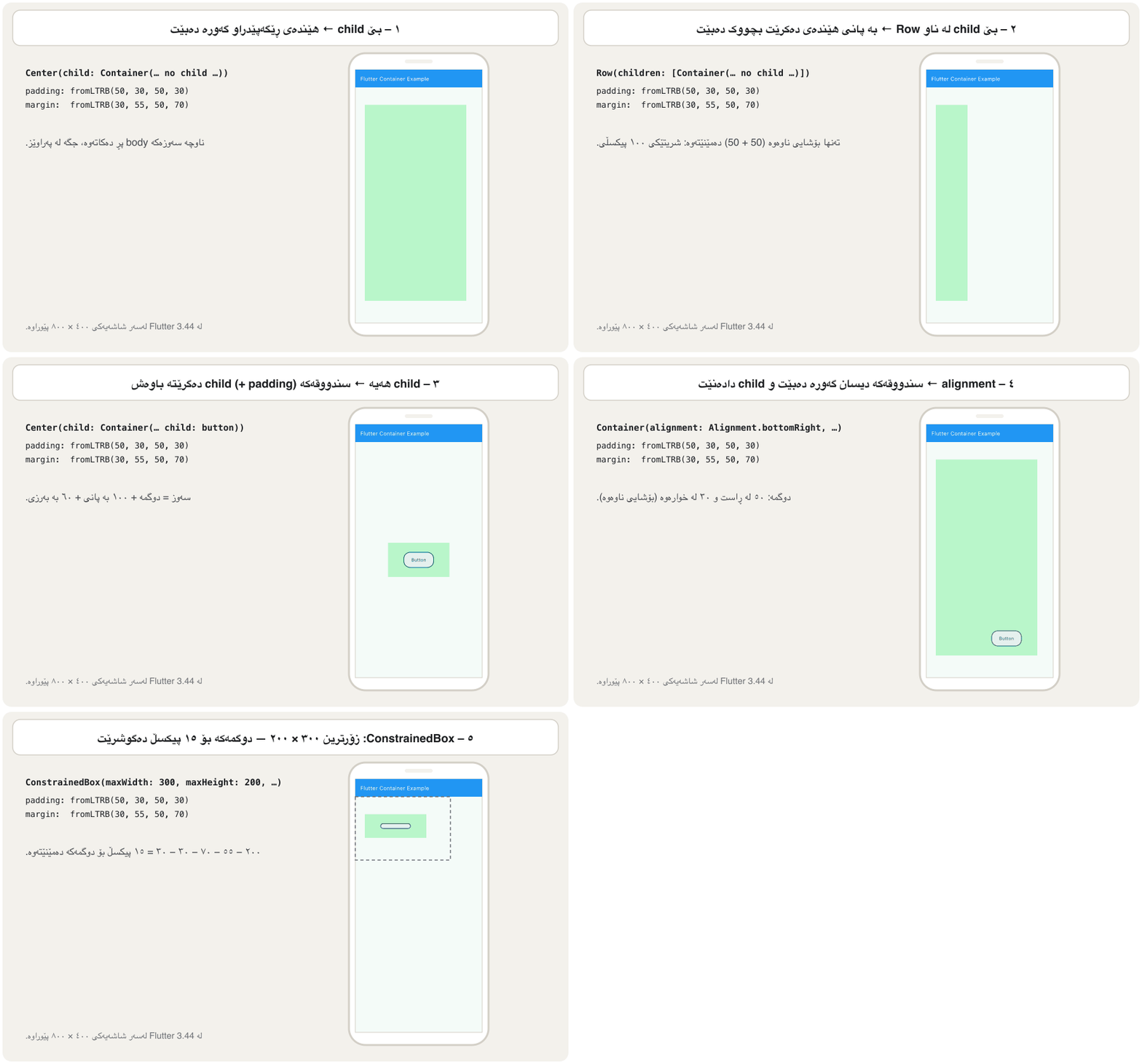
نموونەکانی وانەکە شتێکی سەیر پیشان دەدەن: هەمان Containerـی سەوز هەندێک جار پارچەیەکی باریکە، هەندێک جار بە قەد شاشەکە گەورەیە، هەندێک جار تەنها هێندەی دوگمەیەک گەورەیە. Container قەبارەکەی لە چوار شتەوە دیاری دەکات: childـەکەی، width/height/constraintsـەکەی، alignmentـەکەی و ئەو شوێنەی باوکەکەی پێی دەدات. بەڵگەنامەکانی Flutter ڕێساکان دەژمێرن (بیرۆکە گشتییەکەی لە ویجێتەکانی ڕێکخستنی ڕووکارـدایە):
| The Container has…Containerـەکە… | Its sizeقەبارەکەی |
|---|---|
| no child, no size, no alignmentنە منداڵی هەیە، نە قەبارە، نە alignment | as big as the parent allows (as small as possible if the parent has no limit)هێندەی ڕێگەی باوکەکەی گەورە دەبێت (ئەگەر باوکەکە سنووری نەبێت تا بتوانێت بچووک) |
width / height (or constraints)width / height (یان constraints) | that size, as far as the parent allowsئەو قەبارەیە، هێندەی باوکەکەی ڕێگە بدات |
| a child, no size, no alignmentمنداڵێک، بەبێ قەبارە و alignment | shrinks around the child (+ padding)بە دەوری منداڵەکەدا بچووک دەبێتەوە (+ ) |
alignment (and a child)alignment (و منداڵێک) | expands to fill the parent, then places the childگەورە دەبێت تا باوکەکە پڕ بکاتەوە، پاشان منداڵەکە دادەنێت |
How big is a Container?Container چەند گەورەیە؟
Example 1: a fixed sizeنموونەی ١: قەبارەی جێگیر
The course's first example gives the Container a width and a height of 200 and a padding, but no child:
یەکەم نموونەی وانەکە width و heightـی ٢٠٠ و دەدات بە Container، بەڵام منداڵی نییە:
Center(
  child: Container(
    color: Colors.greenAccent[100],
    padding: const EdgeInsets.fromLTRB(10, 5, 50, 5),
    width: 200,
    height: 200,
  ),
)┌─────────────────────────────┐ │ Flutter Container Example │ ├─────────────────────────────┤ │ │ │ ┌─────────┐ │ │ │░░░░░░░░░│ │ │ │░░░░░░░░░│ │ │ └─────────┘ │ │ │ └─────────────────────────────┘
A light-green square of 200 × 200 in the middle of the page.
چوارگۆشەیەکی سەوزی کاڵی ٢٠٠ × ٢٠٠ لە ناوەڕاستی پەڕەکەدا.
The size is exactly 200 × 200, because width and height win. The padding changes nothing you can see: it only says how much room a child would get. With fromLTRB(10, 5, 50, 5) a child would get:
قەبارەکە ڕێک ٢٠٠ × ٢٠٠ـە، چونکە width و height دەیبەنەوە. هیچ شتێکی دیار ناگۆڕێت: تەنها دەڵێت منداڵێک ئەگەر هەبووایە چەند شوێنی دەبوو. بە fromLTRB(10, 5, 50, 5) منداڵێک ئەمە وەردەگرێت:
The child's room inside a 200 × 200 box with padding (10, 5, 50, 5).
شوێنی منداڵ لە ناو سندووقێکی ٢٠٠ × ٢٠٠ بە (10, 5, 50, 5).
How big is a Container?Container چەند گەورەیە؟
Examples 2 and 3: no child, two parentsنموونەی ٢ و ٣: بێ منداڵ، دوو باوک
The next two examples use the same empty Container with padding and margin. Only the parent changes: first a Row, then a Center.
دوو نموونەکەی دواتر هەمان Containerـی بەتاڵ بە و بەکار دەهێنن. تەنها باوکەکە دەگۆڕێت: یەکەم Row، پاشان Center.
Row(
  children: [
    Container(
      color: Colors.greenAccent[100],
      padding: const EdgeInsets.fromLTRB(50, 30, 50, 30),
      margin: const EdgeInsets.fromLTRB(30, 55, 50, 70),
    ),
  ],
)┌─────────────────────────────┐ │ Flutter Container Example │ ├─────────────────────────────┤ │ │ │ ┌───┐ │ │ │░░░│ │ │ │░░░│ │ │ │░░░│ │ │ └───┘ │ │ │ └─────────────────────────────┘
A thin light-green strip, 100 pixels wide, near the left edge, from 55 below the app bar almost to the bottom.
پارچەیەکی سەوزی کاڵی باریک، ١٠٠ پان، نزیک لێواری چەپ، لە ٥٥ لە ژێر تا نزیکی خوارەوە.
Center(
  child: Container(
    color: Colors.greenAccent[100],
    padding: const EdgeInsets.fromLTRB(50, 30, 50, 30),
    margin: const EdgeInsets.fromLTRB(30, 55, 50, 70),
  ),
)┌─────────────────────────────┐ │ Flutter Container Example │ ├─────────────────────────────┤ │ │ │ ┌──────────────────────┐ │ │ │░░░░░░░░░░░░░░░░░░░░░░│ │ │ │░░░░░░░░░░░░░░░░░░░░░░│ │ │ │░░░░░░░░░░░░░░░░░░░░░░│ │ │ └──────────────────────┘ │ │ │ └─────────────────────────────┘
A big light-green box that fills the page except for the margin: 30 on the left, 55 at the top, 50 on the right, 70 at the bottom.
سندووقێکی گەورەی سەوزی کاڵ کە پەڕەکە پڕ دەکاتەوە جگە لە : ٣٠ لە چەپ، ٥٥ لە سەرەوە، ٥٠ لە ڕاست، ٧٠ لە خوارەوە.
- In a Row, a child may be as wide as it likes (a Row has no width limit for its children). An empty Container then takes the smallest width it can: just its padding, . Down the screen the Row has a limit, so the Container fills the body's height minus the margin: .
- In a Center, the limits are the whole body in both directions, so the empty Container fills it: wide and 619 high.
- لە ناو Rowـدا، منداڵ دەتوانێت هێندەی بیەوێت پان بێت (Row سنووری پانی بۆ منداڵەکانی دانانێت). ئەو کاتە Containerـی بەتاڵ کەمترین پانی دەگرێت کە دەتوانێت: تەنها : . بە درێژایی شاشەکە Row سنووری هەیە، بۆیە Containerـەکە بەرزیی body پڕ دەکاتەوە جگە لە : .
- لە ناو Centerـدا، سنوورەکان لە هەردوو ئاڕاستەدا هەموو bodyـن، بۆیە Containerـی بەتاڵ پڕی دەکاتەوە: پان و ٦١٩ بەرز.
Measured with Flutter 3.44 on a 400 × 800 screen (logical pixels) with a 56-pixel app bar, so the body is 400 × 744.
بە Flutter 3.44 لەسەر شاشەیەکی ٤٠٠ × ٨٠٠ ( لۆجیکی) پێوراوە کە ٥٦ ، بۆیە body ٤٠٠ × ٧٤٤ـە.
How big is a Container?Container چەند گەورەیە؟
Example 4: a child makes the box shrinkنموونەی ٤: منداڵ سندووقەکە بچووک دەکاتەوە
Now the Container gets a child, a button. The same box shrinks around it:
ئێستا Containerـەکە منداڵێک وەردەگرێت، دوگمەیەک. هەمان سندووق بە دەوریدا بچووک دەبێتەوە:
Center(
  child: Container(
    color: Colors.greenAccent[100],
    padding: const EdgeInsets.fromLTRB(50, 30, 50, 30),
    margin: const EdgeInsets.fromLTRB(30, 55, 50, 70),
    child: ElevatedButton(
      onPressed: () {},
      child: const Text('Button'),
    ),
  ),
)┌─────────────────────────────┐ │ Flutter Container Example │ ├─────────────────────────────┤ │ │ │ ┌──────────────┐ │ │ │ ( Button ) │ │ │ └──────────────┘ │ │ │ └─────────────────────────────┘
A small light-green box in the middle of the page with a 'Button' inside; the green is 50 wider than the button on each side and 30 taller at the top and the bottom.
سندووقێکی سەوزی کاڵی بچووک لە ناوەڕاستی پەڕەکەدا کە 'Button'ـێکی تێدایە؛ سەوزەکە لە هەر لایەکەوە ٥٠ لە دوگمەکە پانترە و لە سەرەوە و خوارەوە ٣٠ بەرزترە.
The green box is now the button's size plus the padding: pixels wider and pixels taller than the button. Because the parent is a Center, the box sits in the middle; the margin is still there, outside the green, but you cannot see it.
سندووقە سەوزەکە ئێستا قەبارەی دوگمەکەیە لەگەڵ : پانتر و بەرزتر لە دوگمەکە. چونکە باوکەکە Centerـە، سندووقەکە لە ناوەڕاستدا دادەنیشێت؛ هێشتا لەوێیە، لە دەرەوەی سەوزەکە، بەڵام نابینرێت.
How big is a Container?Container چەند گەورەیە؟
Example 5: ConstrainedBox sets a maximumنموونەی ٥: ConstrainedBox زۆرترین قەبارە دادەنێت
ConstrainedBox is a widget that passes limits (constraints) to its child: here, at most 300 wide and at most 200 high. The whole Container — margin included — must fit inside those limits.
ConstrainedBox کە دەدات بە منداڵەکەی: لێرەدا زۆرترین ٣٠٠ پان و زۆرترین ٢٠٠ بەرز. هەموو Containerـەکە — — دەبێت لە ناو ئەو سنوورانەدا جێی ببێتەوە.
ConstrainedBox(
  constraints: const BoxConstraints(
    maxWidth: 300,
    maxHeight: 200,
  ),
  child: Container(
    color: Colors.greenAccent[100],
    padding: const EdgeInsets.fromLTRB(50, 30, 50, 30),
    margin: const EdgeInsets.fromLTRB(30, 55, 50, 70),
    child: ElevatedButton(
      onPressed: () {},
      child: const Text('Button'),
    ),
  ),
)┌─────────────────────────────┐ │ Flutter Container Example │ ├─────────────────────────────┤ │┌ ─ ─ ─ ─ ─ ─ ─ ─ ─ ┐ │ │ ┌───────────┐ │ ││ │ (Button) │ │ │ │ └───────────┘ │ │└ ─ ─ ─ ─ ─ ─ ─ ─ ─ ┘ │ │ │ └─────────────────────────────┘
At the top-left of the page, inside an invisible 300 × 200 area, a light-green strip with a very flat button: the button is squeezed to 15 pixels high.
لە سەرەوەی چەپی پەڕەکە، لە ناو ناوچەیەکی نەبینراوی ٣٠٠ × ٢٠٠، پارچەیەکی سەوزی کاڵ بە دوگمەیەکی زۆر پان و نزم: دوگمەکە دەگوشرێت بۆ ١٥ بەرزی.
Down the screen there is no room left for the button. The 200 pixels must hold the margin and the padding first:
بە بەرزی هیچ شوێنێک بۆ دوگمەکە نامێنێتەوە. ٢٠٠ دەبێت سەرەتا و بگرێتە خۆ:
Only 15 pixels are left, so the button is squeezed to 15 pixels high.
تەنها ١٥ دەمێنێتەوە، بۆیە دوگمەکە دەگوشرێت بۆ ١٥ بەرزی.
A Container also has its own constraints property, so you often do not need a separate ConstrainedBox. This box grows with its text but never becomes wider than 250:
Container خۆی constraintsـی هەیە، بۆیە زۆر جار پێویستت بە ConstrainedBoxـی جیا نییە. ئەم سندووقە لەگەڵ دەقەکەیدا گەورە دەبێت بەڵام هەرگیز لە ٢٥٠ پانتر نابێت:
import 'package:flutter/material.dart';

class ConstraintsDemo extends StatelessWidget {
  const ConstraintsDemo({super.key});

  @override
  Widget build(BuildContext context) {
    return Center(
      child: Container(
        constraints: const BoxConstraints(
          minWidth: 100,
          maxWidth: 250,
          minHeight: 50,
        ),
        color: Colors.orange[200],
        padding: const EdgeInsets.all(8),
        child: const Text('I grow with my text, but never wider than 250'),
      ),
    );
  }
}┌─────────────────────────────┐ │ (app bar) │ ├─────────────────────────────┤ │ │ │ ┌──────────────────┐ │ │ │I grow with my │ │ │ │text, but never │ │ │ │wider than 250 │ │ │ └──────────────────┘ │ │ │ └─────────────────────────────┘
An orange box in the middle; the long text breaks onto two lines because the box may not be wider than 250.
سندووقێکی پرتەقاڵی لە ناوەڕاستدا؛ دەقە درێژەکە دەبێتە دوو دێڕ چونکە سندووقەکە ناتوانێت لە ٢٥٠ پانتر بێت.
Explain the codeڕوونکردنەوەی کۆدەکە
- Lineدێڕی 10-14
At least 100 × 50, at most 250 wide.
لانیکەم ١٠٠ × ٥٠، زۆرترین ٢٥٠ پان.
How big is a Container?Container چەند گەورەیە؟
Example 6: alignment makes the box expandنموونەی ٦: alignment سندووقەکە گەورە دەکات
The last example adds alignment: Alignment.bottomRight. With an alignment, the Container expands to fill its parent again, and then puts the child in the chosen place inside its padding:
دوایین نموونە alignment: Alignment.bottomRight زیاد دەکات. بە بوونی alignment، Container دووبارە گەورە دەبێت تا باوکەکەی پڕ بکاتەوە، پاشان منداڵەکە لە شوێنی هەڵبژێردراو لە ناو دادەنێت:
Center(
  child: Container(
    alignment: Alignment.bottomRight,
    color: Colors.greenAccent[100],
    padding: const EdgeInsets.fromLTRB(50, 30, 50, 30),
    margin: const EdgeInsets.fromLTRB(30, 55, 50, 70),
    child: ElevatedButton(
      onPressed: () {},
      child: const Text('Button'),
    ),
  ),
)┌─────────────────────────────┐ │ Flutter Container Example │ ├─────────────────────────────┤ │ │ │ ┌──────────────────────┐ │ │ │░░░░░░░░░░░░░░░░░░░░░░│ │ │ │░░░░░░░░░░░░░░░░░░░░░░│ │ │ │░░░░░░░░░░ (Button) ░░│ │ │ └──────────────────────┘ │ │ │ └─────────────────────────────┘
A big light-green box (the page minus the margin) with the 'Button' in its bottom-right corner, 50 pixels from the green's right edge and 30 from its bottom.
سندووقێکی گەورەی سەوزی کاڵ (پەڕەکە جگە لە ) کە 'Button' لە گۆشەی خوارەوەی ڕاستیدایە، ٥٠ لە لێواری ڕاستی سەوزەکە و ٣٠ لە خوارەوەی.
Compare with example 4: the only new line is alignment, and the box jumps from button-size to almost screen-size. That is the fourth sizing rule. (The course's code has no Center around this Container, but its picture is labelled Center; the result is the same, because an expanding box fills the body either way.)
بەراوردی بکە لەگەڵ نموونەی ٤: تاکە دێڕی نوێ alignmentـە و سندووقەکە لە قەبارەی دوگمەیەکەوە باز دەدات بۆ نزیکەی قەبارەی شاشە. ئەمە ڕێسای چوارەمی قەبارەیە. (کۆدەکەی وانەکە هیچ Centerـێکی بە دەوری ئەم Containerـەدا نییە، بەڵام وێنەکەی ناوی Centerـی لەسەرە؛ ئەنجامەکە هەمانە، چونکە سندووقێکی گەورەبوو بە هەردوو شێوەکە body پڕ دەکاتەوە.)
Alignment: a point between −1 and 1Alignment: خاڵێک لە نێوان −1 و 1
An Alignment is a point inside the box given by two numbers, x across and y down, each from −1 to 1. (0, 0) is the centre, (−1, −1) the top-left corner and (1, 1) the bottom-right. The named values such as Alignment.topCenter are just short names for these points; you can also give any point yourself, for example Alignment(0.5, 0.5).
Alignment خاڵێکە لە ناو سندووقەکەدا کە بە دوو ژمارە دیاری دەکرێت، x بە پانی و y بە بەرزی، هەریەکەیان لە −1 بۆ 1. (0, 0) ناوەڕاستە، (−1, −1) گۆشەی سەرەوەی چەپ و (1, 1) گۆشەی خوارەوەی ڕاست. نرخە ناودارەکانی وەک Alignment.topCenter تەنها ناوی کورتن بۆ ئەم خاڵانە؛ دەتوانیت هەر خاڵێکیش خۆت بدەیت، بۆ نموونە Alignment(0.5, 0.5).
import 'package:flutter/material.dart';

class AlignmentDemo extends StatelessWidget {
  const AlignmentDemo({super.key});

  @override
  Widget build(BuildContext context) {
    return Column(
      children: [
        Container(
          height: 120,
          color: Colors.grey[300],
          alignment: Alignment.topCenter, // the same as Alignment(0.0, -1.0)
          child: const Text('top centre'),
        ),
        Container(
          height: 120,
          color: Colors.grey[200],
          alignment: const Alignment(0.5, 0.5), // between the centre and the bottom-right
          child: const Text('(0.5, 0.5)'),
        ),
        Container(
          height: 120,
          color: Colors.grey[300],
          alignment: AlignmentDirectional.centerEnd, // right in LTR, left in RTL
          child: const Text('centre end'),
        ),
      ],
    );
  }
}┌─────────────────────────────┐ │ top centre │ │ │ │ │ │ (0.5, 0.5) │ │ │ │ │ │ centre end │ │ │ └─────────────────────────────┘
Three grey bands 120 pixels high, as wide as the screen. The first text sits at the top centre, the second between the centre and the bottom-right, the third at the right end of its band (the left end in a Kurdish app).
سێ پارچەی خۆڵەمێشی بە بەرزیی ١٢٠ و بە پانیی شاشەکە. دەقی یەکەم لە ناوەڕاستی سەرەوەیە، دووەم لە نێوان ناوەڕاست و خوارەوەی ڕاست، سێیەم لە کۆتایی ڕاستی پارچەکەی (لە کوردیدا کۆتایی چەپ).
Explain the codeڕوونکردنەوەی کۆدەکە
- Lineدێڕی 13
A named point: the middle of the top edge.
خاڵێکی ناودار: ناوەڕاستی لێواری سەرەوە.
- Lineدێڕی 19
Any point you like.
هەر خاڵێک کە بتەوێت.
- Lineدێڕی 25
AlignmentDirectionaluses start/end, so it mirrors in Kurdish apps.AlignmentDirectionalstart/end بەکار دەهێنێت، بۆیە لە کوردییەکاندا پێچەوانە دەبێتەوە.
Common mistakesهەڵە باوەکان
| Mistakeهەڵە | What happensچی ڕوو دەدات | Fixچاککردن |
|---|---|---|
Two child: arguments, or children: on a Containerدوو child:، یان children: لەسەر Container | Compile error | One child: put a Column, Row or Stack insideیەک منداڵ: Column، Row یان Stackـێک بخە ناوەوە |
const Container(...)const Container(...) | Compile error: no const constructor: const نییە | Drop const before Container; keep it on the argumentsconst لە پێش Container لابە؛ لەسەر بیهێڵەوە |
onPressed() {} inside a buttononPressed() {} لە ناو دوگمەیەکدا | Syntax errorهەڵەی | onPressed: () {}onPressed: () {} |
| Expecting an empty Container to be smallچاوەڕوانی ئەوە کە Containerـی بەتاڵ بچووک بێت | It fills its parentباوکەکەی پڕ دەکاتەوە | Give it a size or a childقەبارە یان منداڵێکی پێ بدە |
Adding alignment and expecting the box to stay smallزیادکردنی alignment و چاوەڕوانی ئەوە کە سندووقەکە بچووک بمێنێتەوە | The box expandsسندووقەکە گەورە دەبێت | Use a fixed size, or put the Container in a Center without alignmentقەبارەیەکی جێگیر بەکار بهێنە، یان Container بخە ناو Center بەبێ alignment |
Forgetting that margin is outside widthلەبیرکردنی ئەوەی لە دەرەوەی widthـە | The layout is wider than planned لە پلانەکە پانترە | Total = width + left margin + right marginکۆی گشتی = width + چەپ + ڕاست |
EdgeInsets.only(left: 16) in a Kurdish appEdgeInsets.only(left: 16) لە کوردیدا | The space is on the wrong sideبۆشاییەکە لە لای هەڵەدایە | EdgeInsetsDirectional.only(start: 16)EdgeInsetsDirectional.only(start: 16) |
Using color and decoration togetherبەکارهێنانی color و decoration پێکەوە | An error in debug modeهەڵەیەک لە دۆخی debugـدا | Put the colour inside BoxDecoration (the colour rule)ڕەنگەکە بخە ناو BoxDecoration (ڕێسای ڕەنگ) |
Exercisesڕاهێنانەکان
A Container has width: 200, height: 100, padding: EdgeInsets.all(20) and margin: EdgeInsets.all(10). (a) How much room does its child get? (b) How much room does the whole Container take inside its parent?
Containerـێک width: 200، height: 100، padding: EdgeInsets.all(20) و margin: EdgeInsets.all(10)ـی هەیە. (أ) منداڵەکەی چەند شوێن وەردەگرێت؟ (ب) هەموو Containerـەکە چەند شوێن لە ناو باوکەکەیدا دەگرێت؟
Show answerوەڵامەکە پیشان بدە
Padding is taken away inside the width and height; margin is added outside them.
لە ناو width و heightـدا کەم دەکرێتەوە؛ لە دەرەوەیان زیاد دەکرێت.
Without running the code, say how big the green Container (padding fromLTRB(50, 30, 50, 30)) is in each case, on a body of 400 × 744: (a) in a Center with no child; (b) in a Center with a 90 × 40 button as its child; (c) as (b), plus alignment: Alignment.bottomRight.
بەبێ جێبەجێکردنی کۆدەکە، بڵێ Containerـە سەوزەکە (padding fromLTRB(50, 30, 50, 30)) لە هەر حاڵەتێکدا چەند گەورەیە، لەسەر bodyـێکی ٤٠٠ × ٧٤٤: (أ) لە ناو Center بەبێ منداڵ؛ (ب) لە ناو Center بە منداڵێکی دوگمەی ٩٠ × ٤٠؛ (ج) وەک (ب)، لەگەڵ alignment: Alignment.bottomRight.
Show answerوەڵامەکە پیشان بدە
- (a) It fills the body minus the margin
fromLTRB(30, 55, 50, 70): 320 × 619. - (b) It wraps the button plus the padding: 190 × 100, in the middle.
- (c) The alignment makes it expand again to 320 × 619; the button sits in the bottom-right corner, 50 from the green's right edge and 30 from its bottom.
- (أ) body پڕ دەکاتەوە جگە لە
fromLTRB(30, 55, 50, 70): ٣٢٠ × ٦١٩. - (ب) دوگمەکە و دەگرێتە خۆی: ١٩٠ × ١٠٠، لە ناوەڕاستدا.
- (ج) دووبارە گەورەی دەکاتەوە بۆ ٣٢٠ × ٦١٩؛ دوگمەکە لە گۆشەی خوارەوەی ڕاستدا دادەنیشێت، ٥٠ لە لێواری ڕاستی سەوزەکە و ٣٠ لە خوارەوەی.
Build a price tag for a bazaar app: an amber box 160 pixels wide, with 16 pixels of space left and right of the text and 8 above and below it, 12 pixels of space all round outside the box, and the text '2,000 IQD' (font size 20) in its centre.
نرخنامەیەک بۆ بازاڕ دروست بکە: سندووقێکی زەرد بە پانیی ١٦٠ ، ١٦ بۆشایی لە چەپ و ڕاستی دەقەکە و ٨ لە سەرەوە و خوارەوەی، ١٢ بۆشایی لە هەموو لایەکی دەرەوەی سندووقەکە و دەقی '2,000 IQD' (قەبارەی فۆنت ٢٠) لە ناوەڕاستیدا.
Hintئاماژە
You need width, margin, padding (symmetric) and color. To centre the text, think twice before using alignment (remember the fourth sizing rule).
پێویستت بە width، margin، padding (symmetric) و color هەیە. بۆ ناوەڕاستکردنی دەقەکە، پێش بەکارهێنانی alignment باش بیر بکەرەوە (ڕێسای چوارەمی قەبارە لەبیر بێت).
Show answerوەڵامەکە پیشان بدە
import 'package:flutter/material.dart';

class PriceTag extends StatelessWidget {
  const PriceTag({super.key});

  @override
  Widget build(BuildContext context) {
    return Container(
      width: 160,
      margin: const EdgeInsets.all(12),
      padding: const EdgeInsets.symmetric(horizontal: 16, vertical: 8),
      color: Colors.amber,
      child: const Text(
        '2,000 IQD',
        textAlign: TextAlign.center,
        style: TextStyle(fontSize: 20),
      ),
    );
  }
}
Explain the codeڕوونکردنەوەی کۆدەکە
- Lineدێڕی 10
Space outside the box.
بۆشایی لە دەرەوەی سندووقەکە.
- Lineدێڕی 11
Space inside, around the text.
بۆشایی لە ناوەوە، بە دەوری دەقەکەدا.
- Lineدێڕی 15
The fixed width gives the text exactly 128 pixels (160 − 32), so
textAligncan centre it.پانییە جێگیرەکە ڕێک ١٢٨ دەدات بە دەقەکە ()، بۆیە
textAlignدەتوانێت بیخاتە ناوەڕاست.
Why not alignment: Alignment.center? An alignment makes a Container expand to fill its parent (the fourth sizing rule). In a Column the tag would stay small, but as the body of a screen it would become as tall as the whole screen. textAlign centres the text without changing the box's size.
بۆچی alignment: Alignment.center نا؟ Container گەورە دەکات تا باوکەکەی پڕ بکاتەوە (ڕێسای چوارەمی قەبارە). لە ناو Columnـدا نرخنامەکە بچووک دەمێنێتەوە، بەڵام وەک bodyـی شاشەیەک بە قەد هەموو شاشەکە بەرز دەبێت. textAlign دەقەکە دەخاتە ناوەڕاست بەبێ ئەوەی قەبارەی سندووقەکە بگۆڕێت.
This is the course's Container with a button, as written in the notes. Find the mistakes and write a version that compiles:
ئەمە Containerـەکەی وانەکەیە کە دوگمەیەکی تێدایە، وەک لە تێبینییەکاندا نووسراوە. هەڵەکان بدۆزەوە و وەشانێک بنووسە کە کۆمپایل ببێت:
Center(
  child: Container(
    color: Colors.greenAccent[100],
    padding: EdgeInsets.fromLTRB(50, 30, 50, 30),
    margin: EdgeInsets.fromLTRB(30, 55, 50, 70),
    child: ElevatedButton(
      child: Text("Button"),
      onPressed() {},
    )
  )
)
Show answerوەڵامەکە پیشان بدە
onPressed() {}must be the named argumentonPressed: () {},.- The brackets of
Center(...)andContainer(...)are closed correctly; Dart only needs trailing commas for good formatting. Inside abuildmethod the whole widget is returned:return Center(...);. - Good style:
conston theEdgeInsetsand theText, andchildlast.
onPressed() {}دەبێتonPressed: () {},بێت.- کەوانەکانی
Center(...)وContainer(...)بە دروستی داخراون؛ فاریزەی کۆتایی تەنها بۆ ڕێکخستنی جوانی کۆدەکەیە. لە ناو میتۆدیbuildـدا هەموو دەگەڕێنرێتەوە:return Center(...);. - شێوازی باش:
constلەسەرEdgeInsetsوText؛ هەروەهاchildلە کۆتاییدا.
import 'package:flutter/material.dart';

class ButtonBox extends StatelessWidget {
  const ButtonBox({super.key});

  @override
  Widget build(BuildContext context) {
    return Center(
      child: Container(
        color: Colors.greenAccent[100],
        padding: const EdgeInsets.fromLTRB(50, 30, 50, 30),
        margin: const EdgeInsets.fromLTRB(30, 55, 50, 70),
        child: ElevatedButton(
          onPressed: () {},
          child: const Text('Button'),
        ),
      ),
    );
  }
}Summaryپوختە
- A
Containeris a box around one child. It is like an HTML<div>, but with a single child. - The box model, from the inside out: child → padding → border → margin.
width/heightinclude padding and border, not margin. colorpaints the whole box. Padding and margin takeEdgeInsets(all,symmetric,only,fromLTRB) orEdgeInsetsDirectionalfor start/end.- Size rules: no child → as big as allowed; size given → that size; child → shrinks around it; alignment → expands. Parents such as
Row,CenterandConstrainedBoxset the limits. Alignment(x, y)places the child with x and y from −1 to 1;AlignmentDirectionalmirrors in Kurdish apps.
Containerسندووقێکە بە دەوری یەک منداڵدا. وەک<div>ـی HTML وایە، بەڵام تەنها یەک منداڵی هەیە.- ، لە ناوەوە بۆ دەرەوە: child ← ← ← .
width/heightو دەگرنە خۆ، نا. colorهەموو سندووقەکە ڕەنگ دەکات. وEdgeInsetsوەردەگرن (all،symmetric،only،fromLTRB) یانEdgeInsetsDirectionalبۆ start/end.- ڕێساکانی دیاریکردنی قەبارە: بێ منداڵ ← هێندەی ڕێگەپێدراو گەورە؛ قەبارەی دراو ← ئەو قەبارەیە؛ منداڵ ← بە دەوریدا بچووک دەبێتەوە؛ alignment ← گەورە دەبێت. باوکەکانی وەک
Row،CenterوConstrainedBoxدادەنێن. Alignment(x, y)منداڵەکە بە x و y لە −1 بۆ 1 دادەنێت؛AlignmentDirectionalلە کوردییەکاندا پێچەوانە دەبێتەوە.
What is the difference between padding and margin?جیاوازیی بۆشایی ناوەوە و پەراوێز چییە؟
Padding is space inside the box, between the border and the child, and it takes the box's colour. Margin is space outside the border; it is transparent and keeps neighbours away.
بۆشایی لە ناو سندووقەکەدایە، لە نێوان و منداڵەکەدا. ڕەنگی سندووقەکە وەردەگرێت. بۆشایی لە دەرەوەی ؛ ڕوونە و دراوسێکان دوور دەخاتەوە.
Why is an empty Container in a Row thin, but in a Center large?بۆچی Containerـی بەتاڵ لە ناو Rowـدا باریکە، بەڵام لە ناو Centerـدا گەورەیە؟
A Row gives no width limit, so the empty box takes the smallest width (its padding). A Center gives the whole body as the limit, so the box fills it.
Row سنووری پانی نادات، بۆیە سندووقە بەتاڵەکە کەمترین پانی دەگرێت (). Center هەموو body وەک سنوور دەدات، بۆیە سندووقەکە پڕی دەکاتەوە.
How many children can a Container have?Container دەتوانێت چەند منداڵی هەبێت؟
Exactly one, in child. For several, put a Row, Column or Stack inside it.
تەنها یەک، لە childـدا. بۆ زیاتر، Row، Column یان Stackـێک بخە ناوییەوە.
Videoڤیدیۆ
Watch a videoسەیری ڤیدیۆیەک بکە
A video that viewers liked a lot and praised in their comments, chosen for this lesson.ڤیدیۆیەک کە بینەران زۆریان پێ خۆش بووە و لە کۆمێنتەکانیاندا ستایشیان کردووە، بۆ ئەم وانەیە هەڵبژێردراوە.
Mitch Koko's calm beginner course in Dart and Flutter: variables, operators, if/else, switch, loops, functions, collections, a first screen and a counter.
کۆرسە ئارامەکەی Mitch Koko بۆ سەرەتاییەکان لە و : ، ، if/else، switch، ، ، List/Set/Map، یەکەم شاشە و .
Watch 31:42-34:22 ('CONTAINER'): a box with a height, width and colour around one child, padding with EdgeInsets.all, symmetric and only, then a BoxDecoration.
لە 31:42 تا 34:22 سەیر بکە (CONTAINER): سندووقێک بە بەرزی، پانی و ڕەنگ بە دەوری یەک childـدا، بە EdgeInsets.all و symmetric و only، پاشان BoxDecoration.
Lesson complete!وانەکە تەواو بوو!
Well done. Review the key terms, then go on to the next lesson.دەستخۆش. سەیرێکی زاراوە سەرەکییەکان بکەرەوە، پاشان بڕۆ بۆ وانەی داهاتوو.
Key termsزاراوە سەرەکییەکان
Decorating a Container: Border, Radius, Shadow, Transformڕازاندنەوەی Container: سنوور، گۆشەی خڕ، سێبەر، transform
Related lecturesوانە پەیوەندیدارەکان
- Decorating a Container: Border, Radius, Shadow, Transformڕازاندنەوەی Container: سنوور، گۆشەی خڕ، سێبەر، transform
- HTML Basics: Documents, Links and Tablesبنەماکانی HTML: بەڵگەنامە، بەستەرەکان و خشتەکان
- Layout Widgets: One Child or Manyویجێتەکانی ڕێکخستنی ڕووکار: یەک نۆدی منداڵ یان چەند دانەیەک
- Row and ColumnRow و Column
References and further readingسەرچاوەکان و خوێندنەوەی زیاتر
This lecture is a first edition. The Kurdish text and terminology are waiting for review by Kurdish IT teachers.ئەم وانەیە چاپی یەکەمە. دەقە کوردییەکە و زاراوەکانی چاوەڕێی پێداچوونەوەی مامۆستایانی کوردی بواری IT ن.