FlutterFlutter · Chapterبەش 6 · Lectureوانە 6.2
Stateless and Stateful Widgetsویجێتە بێدۆخەکان و ویجێتە دۆخدارەکان
Why Flutter has two kinds of widget: StatelessWidget and StatefulWidget with its State object. A counter step by step, how setState works and its rules, when widgets are rebuilt, the lecture's Red/Blue example in code, which widget should be stateful (lifting state up), the full State lifecycle from initState to dispose, and common mistakes.
بۆچی Flutter دوو جۆر هەیە: StatelessWidget و StatefulWidget لەگەڵ . هەنگاو بە هەنگاو، setState چۆن کار دەکات و یاساکانی، کەی دووبارە دروست دەکرێنەوە، نموونەی Red/Blueـی وانەکە بە کۆد، کام دەبێت دۆخدار بێت ()، تەواوی State لە initStateـەوە تا dispose و هەڵە باوەکان.
What you will learnچی فێر دەبیت
- Explain the difference between a StatelessWidget and a StatefulWidget, and why a StatefulWidget has a separate State object.
- Write a StatefulWidget that changes its state with setState, following setState's rules.
- Name the ways a widget gets rebuilt and decide where state should live by lifting it up.
- Use the State lifecycle methods correctly: initState, didUpdateWidget, build, dispose and the mounted check.
- جیاوازیی نێوان و ڕوون بکەیتەوە و بۆچی جیای هەیە.
- بنووسیت کە بە setState دەگۆڕێت، بەپێی یاساکانی setState.
- ئەو ڕێگایانە ناو ببەیت کە پێیان دووبارە دروست دەکرێتەوە و بە بڕیار بدەیت لە کوێ بژی.
- State بە دروستی بەکار بهێنیت: initState، didUpdateWidget، build، dispose و پشکنینی mounted.
Widgets that change, widgets that do notئەو ویجێتانەی دەگۆڕێن و ئەوانەی ناگۆڕێن
In Widgets and the Widget Tree you learned that a widget is an immutable description: once it is made, its fields never change. Yet real apps change all the time. A counter goes up, a checkbox gets a tick, a text turns red. How can a screen change if its widgets cannot?
لە ویجێتەکان و داری ویجێتەکان فێر بوویت کە وەسفێکی : کاتێک دروست کرا، هەرگیز ناگۆڕێن. کەچی ڕاستەقینە هەمیشە دەگۆڕێن. زیاد دەبێت، نیشانەی ✓ وەردەگرێت، دەقێک سوور دەبێت. چۆن شاشەیەک دەگۆڕێت ئەگەر نەتوانن بگۆڕێن؟
Flutter's answer is the declarative approach. You never reach into the screen to edit a widget. You change the data (the state), and Flutter builds new widgets from the new data and puts them in place of the old ones. The general idea, , is explained in App State and Declarative UI; this lesson shows how Flutter does it in code.
وەڵامی Flutter ڕێگای . هەرگیز دەست نابەیتە نێو شاشەکە بۆ دەستکاریکردنی . دراوەکە () دەگۆڕیت و Flutter لە دراوە نوێیەکەوە نوێ دروست دەکات و لە جێی کۆنەکان دایان دەنێت. بیرۆکە گشتییەکە، ، لە دۆخ و ڕووکاری وەسفی ڕوون کراوەتەوە؛ ئەم وانەیە پیشان دەدات Flutter چۆن ئەمە لە کۆددا دەکات.
StatelessWidget: no state of its ownStatelessWidget: بێ دۆخی خۆی
So Flutter has two kinds of widget. A StatelessWidget has no changing data of its own. A StatefulWidget keeps changing data in a separate State object and rebuilds when that data changes. First the simple kind:
بۆیە Flutter دوو جۆر هەیە. (لە کۆددا StatelessWidget) هیچ دراوەیەکی گۆڕاوی خۆی نییە. (لە کۆددا StatefulWidget) دراوە گۆڕاوەکەی لە جیادا هەڵدەگرێت و کاتێک ئەو دراوەیە دەگۆڕێت دووبارە دروست دەبێتەوە. سەرەتا جۆرە سادەکە:
A that keeps no changing data of its own: what it shows depends only on the values given to it. It is drawn again only when its parent gives it new values.
کە هیچ دراوەیەکی گۆڕاوی تایبەت بە خۆی هەڵناگرێت: ئەوەی پیشانی دەدات تەنها پشت بەو نرخانە دەبەستێت کە پێی دراون. تەنها کاتێک دووبارە دەکێشرێتەوە کە باوکەکەی نرخی نوێی پێ بدات.
A StatelessWidget has no state information of its own. Everything it shows comes from two places: the values its parent passes to its constructor, and the BuildContext (for example the app's theme). Its fields are all final.
هیچ زانیارییەکی خۆی نییە. هەموو ئەوەی پیشانی دەدات لە دوو شوێنەوە دێت: ئەو نرخانەی دەیاندات بە و BuildContext (بۆ نموونە ). هەموو finalـن.
import 'package:flutter/material.dart';

class WelcomeCard extends StatelessWidget {
  const WelcomeCard({super.key, required this.name});

  final String name; // input from the parent; it never changes here

  @override
  Widget build(BuildContext context) {
    return Card(
      child: Padding(
        padding: const EdgeInsets.all(16),
        child: Text('Welcome, $name!'),
      ),
    );
  }
}
Explain the codeڕوونکردنەوەی کۆدەکە
- Lineدێڕی 3
The class extends
StatelessWidget.StatelessWidgetextends دەکات.- Lineدێڕی 4, 6
namecomes from the parent through the constructor and isfinal: this widget never changes it.nameلە بە ڕێگەی دێت وfinalـە: ئەم هەرگیز نایگۆڕێت.- Lineدێڕی 8-15
builddescribes the card using onlyname.buildکارتەکە تەنها بەnameوەسف دەکات.
StatelessWidget: no state of its ownStatelessWidget: بێ دۆخی خۆی
Static, yet it can show new dataجێگیرە، بەڵام دەتوانێت دراوەی نوێ پیشان بدات
The notes say a stateless widget "remains static throughout its lifecycle". That is true for the widget object: it never changes. But the card on the screen can still show a new name. When the parent rebuilds with WelcomeCard(name: 'Shilan'), Flutter makes a new WelcomeCard and calls its build. So the life of a stateless widget is short: constructor → build, and build runs again whenever the parent gives new input or an inherited value it reads (such as the theme) changes.
تێبینییەکان دەڵێن «بە درێژایی جێگیر دەمێنێتەوە». ئەمە بۆ ڕاستە: هەرگیز ناگۆڕێت. بەڵام کارتەکەی سەر شاشە هێشتا دەتوانێت ناوێکی نوێ پیشان بدات. کاتێک بە WelcomeCard(name: 'Shilan') دووبارە دروست دەبێتەوە، Flutter WelcomeCardـێکی نوێ دروست دەکات و بانگی buildـەکەی دەکات. کەواتە ژیانی کورتە: ← build. buildـیش دووبارە جێبەجێ دەبێتەوە هەر کاتێک نوێ بدات، یان نرخێکی بۆماوەیی کە دەیخوێنێتەوە (وەک ) بگۆڕێت.
StatefulWidget: a widget plus a State objectStatefulWidget: ویجێتێک لەگەڵ ئۆبجێکتێکی دۆخ
A that has a object holding data that can change while the app runs. Calling setState() changes the data and makes Flutter build the widget again.
کە هەیە کە دراوەیەک هەڵدەگرێت کە لە کاتی کارکردنی ئەپەکەدا دەگۆڕێت. بانگکردنی setState() دراوەکە دەگۆڕێت و وا لە دەکات ویجێتەکە دووبارە دروست بکاتەوە.
Some parts of a screen must change by themselves: the user taps, data arrives, a timer ticks. Such a widget needs memory that survives rebuilds. A StatefulWidget keeps track of its current state by splitting the job into two classes:
هەندێک بەشی شاشە دەبێت خۆیان بگۆڕێن: دەست لێ دەدات، دراوە دەگات، کاتژمێرێک لێ دەدات. وەها پێویستی بە بیرگەیەک هەیە کە لە دووبارە دروستکردنەوەدا بمێنێتەوە. ئاگای لە ئێستای خۆی دەبێت بە دابەشکردنی کارەکە بەسەر دوو :
- The widget class (
extends StatefulWidget): immutable. It holds the configuration from the parent and creates the State increateState(). A new widget object is made on every parent rebuild. - The State class (
extends State<MyWidget>): mutable and long-lived. It holds the changing data and thebuildmethod. Flutter keeps the same State object in the element tree while the widget stays in the same place.
- (
extends StatefulWidget): . ڕێکخستنی هەڵدەگرێت و لەcreateState()ـدا Stateـەکە دروست دەکات. لە هەر دووبارە دروستکردنەوەیەکی نوێی دروست دەکرێت. - State (
extends State<MyWidget>): و تەمەندرێژە. دراوە گۆڕاوەکە وbuildهەڵدەگرێت. Flutter هەمان لە داری توخمەکان دەهێڵێتەوە تا لە هەمان شوێندا بمێنێت.
StatefulWidget: a widget plus a State objectStatefulWidget: ویجێتێک لەگەڵ ئۆبجێکتێکی دۆخ
The State survives rebuildsئۆبجێکتی دۆخ لە دووبارە دروستکردنەوەدا دەمێنێتەوە
A shop in the bazaar has a printed sign with its name: that is a stateless widget, it only shows what was printed. The shopkeeper also keeps a notebook of today's sales: that is the State. When the shop front is repainted (a rebuild), a fresh sign is printed, but the notebook stays on the counter with every sale in it, and the new price board is written from the notebook.
دوکانێک لە بازاڕدا تابلۆیەکی چاپکراوی ناوەکەی هەیە: ئەوە ، تەنها ئەوە پیشان دەدات کە چاپ کراوە. دوکاندارەکە دەفتەرێکیشی هەیە بۆ فرۆشی ئەمڕۆ: ئەوە Stateـەکەیە. کاتێک ڕووی دوکانەکە دووبارە بۆیاخ دەکرێتەوە (دووبارە دروستکردنەوە)، تابلۆیەکی نوێ چاپ دەکرێت، بەڵام دەفتەرەکە بە هەموو فرۆشەکانییەوە لەسەر مێزەکە دەمێنێتەوە و تەختەی نرخە نوێیەکە لە دەفتەرەکەوە دەنووسرێت.
Where the analogy stops workingسنووری ئەم نموونەیە
Flutter keeps the State only while the widget stays at the same place in the tree with the same type. If the widget is removed, the notebook is thrown away (dispose), and a new one starts empty.
Flutter تەنها کاتێک Stateـەکە دەهێڵێتەوە کە بە هەمان جۆر لە هەمان شوێنی بمێنێت. ئەگەر لاببرێت، دەفتەرەکە فڕێ دەدرێت (dispose) و دەفتەرێکی نوێ بە بەتاڵی دەست پێ دەکات.
StatefulWidget: a widget plus a State objectStatefulWidget: ویجێتێک لەگەڵ ئۆبجێکتێکی دۆخ
Stateful widgets you already knowویجێتە دۆخدارەکان کە پێشتر دەیانناسیت
Stateful widgets you already know: Checkbox, Radio, Slider, TextField and Form in the notes, and also Image (it waits for the picture to load) and Scaffold (it remembers whether its drawer is open).
کە پێشتر دەیانناسیت: Checkbox، Radio، Slider، TextField و Form لە تێبینییەکاندا، هەروەها Image (چاوەڕێی بارکردنی وێنەکە دەکات) و Scaffold (لە یادی دەمێنێت ئایا drawerـەکەی کراوەیە).
StatefulWidget: a widget plus a State objectStatefulWidget: ویجێتێک لەگەڵ ئۆبجێکتێکی دۆخ
Your first StatefulWidget: a counterیەکەم ویجێتی دۆخدارت: ژمێرەرێک
This is the classic example, close to the app that flutter create makes: a number in the middle and a + button. Read the two classes and the notes:
ئەمە نموونە بەناوبانگەکەیە، نزیک لەو flutter create دروستی دەکات: ژمارەیەک لە ناوەڕاست و +. هەردوو و تێبینییەکان بخوێنەوە:
import 'package:flutter/material.dart';

void main() => runApp(const MaterialApp(home: CounterPage()));

class CounterPage extends StatefulWidget {
  const CounterPage({super.key});

  @override
  State<CounterPage> createState() => _CounterPageState();
}

class _CounterPageState extends State<CounterPage> {
  int _count = 0; // the state lives in the State object

  void _increment() {
    setState(() {
      _count++; // change the data inside setState
    });
  }

  @override
  Widget build(BuildContext context) {
    return Scaffold(
      appBar: AppBar(title: const Text('Counter')),
      body: Center(
        child: Text(
          '$_count',
          style: Theme.of(context).textTheme.displayMedium,
        ),
      ),
      floatingActionButton: FloatingActionButton(
        onPressed: _increment,
        child: const Icon(Icons.add),
      ),
    );
  }
}(the screen after two taps on +) 2
Explain the codeڕوونکردنەوەی کۆدەکە
- Lineدێڕی 5-10
The widget class. It is immutable and only says which State class to create, in
createState.. و تەنها لە
createStateـدا دەڵێت کام State دروست بکرێت.- Lineدێڕی 12
The State class.
State<CounterPage>links it to its widget. The_makes it private to this file.State.
State<CounterPage>بە دەیبەستێتەوە._تایبەتی دەکات بەم .- Lineدێڕی 13
The state: a normal, changeable field inside the State object.
: ئاسایی و گۆڕاو لەناو .
- Lineدێڕی 16-18
Change the data inside
setState, so Flutter knows it must build again.دراوەکە لەناو
setStateـدا بگۆڕە، بۆ ئەوەی Flutter بزانێت دەبێت دووبارە دروستی بکاتەوە.- Lineدێڕی 22-36
buildlives in the State class and reads the current_counteach time it runs.buildلە Stateـدایە و هەر جارێک جێبەجێ دەبێت_countـی ئێستا دەخوێنێتەوە.- Lineدێڕی 32
The button only calls
_increment; it never touches the Text.تەنها بانگی
_incrementدەکات؛ هەرگیز دەست لە Textـەکە نادات.
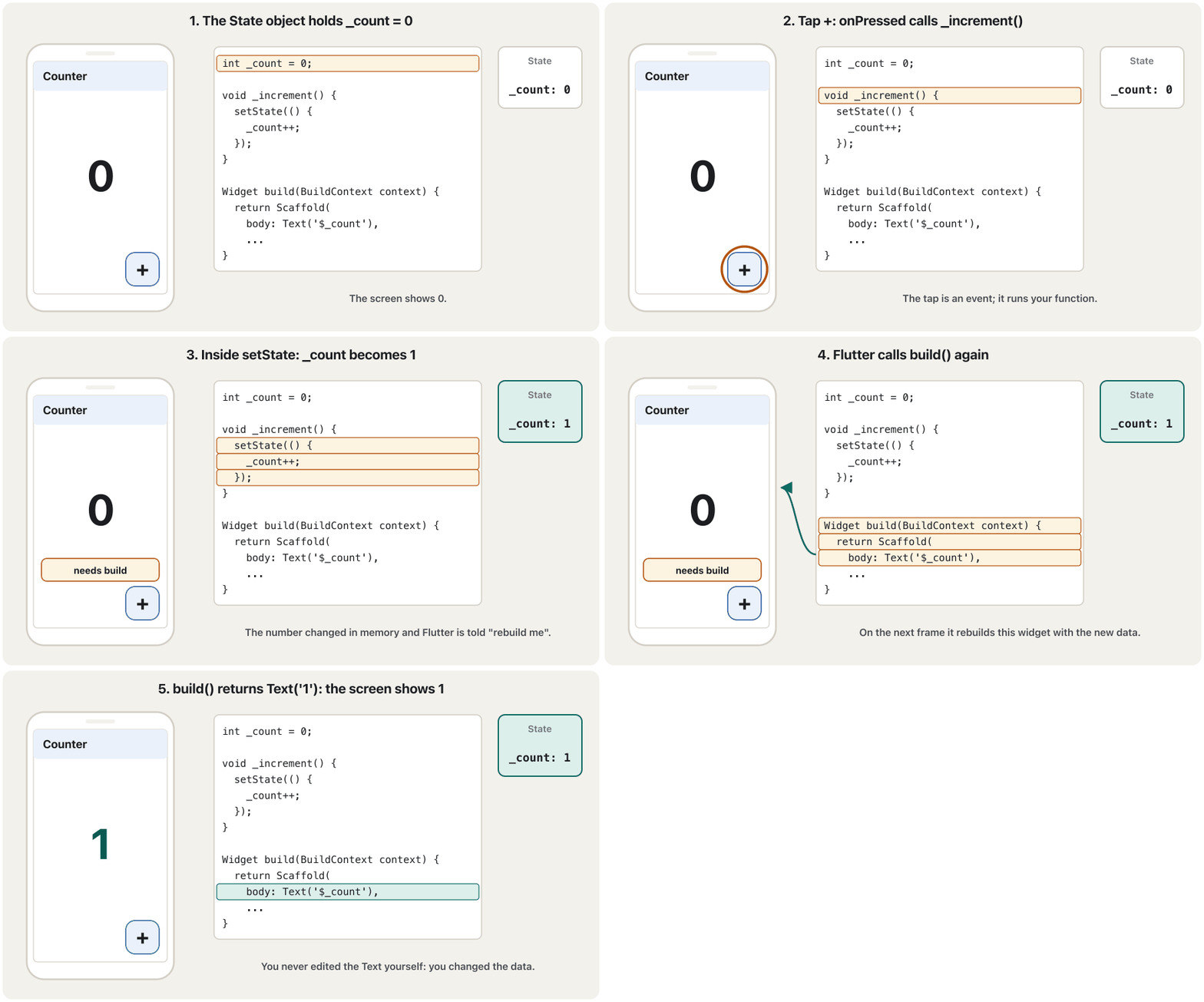
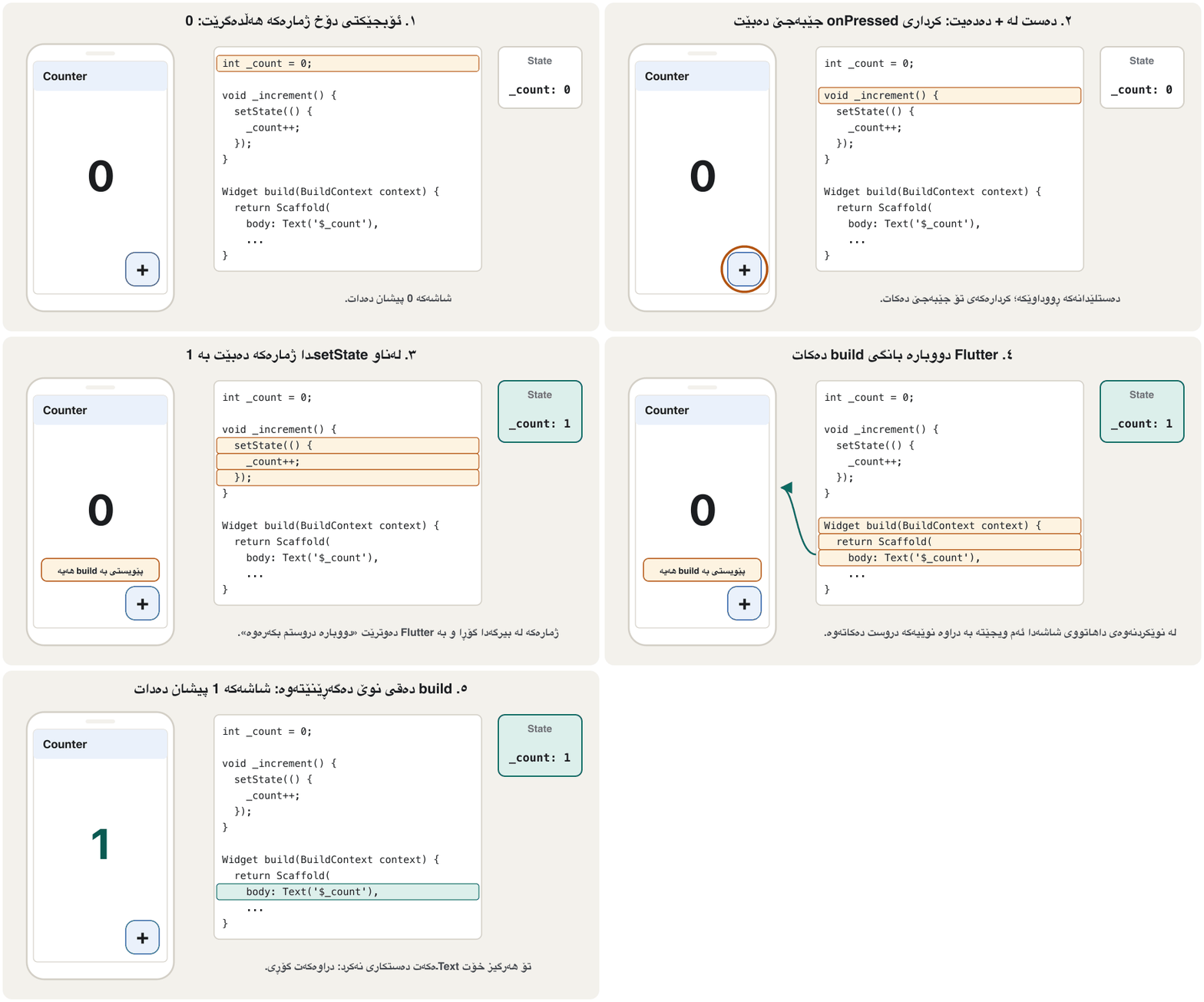
setState ← build ← ژمارەی نوێ.CêITNotice what you did not write: nothing finds the Text and changes it. You only changed _count and called setState; the new number appeared because build ran again.
سەرنج بدە چیت نەنووسی: هیچ شتێک Textـەکە نادۆزێتەوە و نایگۆڕێت. تەنها _countـت گۆڕی و بانگی setStateـت کرد؛ ژمارە نوێیەکە دەرکەوت چونکە build دووبارە جێبەجێ بوویەوە.
Mitch Koko's calm beginner course in Dart and Flutter: variables, operators, if/else, switch, loops, functions, collections, a first screen and a counter.
کۆرسە ئارامەکەی Mitch Koko بۆ سەرەتاییەکان لە و : ، ، if/else، switch، ، ، List/Set/Map، یەکەم شاشە و .
Plays 59:48-1:04:58: stateless vs stateful widgets with a counter app and setState.
لە 59:48 تا 1:04:58 پەخش دەبێت: بەرامبەر ، بە و setState.
StatefulWidget: a widget plus a State objectStatefulWidget: ویجێتێک لەگەڵ ئۆبجێکتێکی دۆخ
How setState works, and its rulessetState چۆن کار دەکات و یاساکانی
- Your code calls setStateکۆدەکەت بانگی setState دەکات
Usually from an event such as
onPressed.setStateis a method of the State class, so only code inside the State object can call it.زۆربەی جار لە وەک
onPressed.setStateStateـە، بۆیە تەنها کۆدی ناو دەتوانێت بانگی بکات. - The callback runs at onceکرداری بانگکردنەوەکە یەکسەر جێبەجێ دەبێت
The function you pass runs immediately and changes the data, for example
_count++.ئەو دەینێریت یەکسەر جێبەجێ دەبێت و دراوەکە دەگۆڕێت، بۆ نموونە
_count++. - The widget is marked dirtyویجێتەکە وەک «پیس» نیشان دەکرێت
Flutter notes that this part of the tree needs a new build. Nothing is drawn yet.
Flutter تێبینی دەکات کە ئەم بەشەی پێویستی بە buildـێکی نوێ هەیە. هێشتا هیچ شتێک ناکێشرێت.
- build runs on the next framebuild لە نوێکردنەوەی داهاتووی شاشەدا جێبەجێ دەبێت
Before the next screen refresh (usually 60 or more times a second) Flutter calls
buildagain. It returns new widgets made from the current data.پێش نوێکردنەوەی داهاتووی شاشە (زۆربەی جار ٦٠ جار یان زیاتر لە چرکەیەکدا) Flutter دووبارە بانگی
buildدەکات. نوێ دەگەڕێنێتەوە کە لە دراوەی ئێستا دروست کراون. - Only real changes are paintedتەنها گۆڕانکارییە ڕاستەقینەکان دەکێشرێنەوە
Flutter compares the new widgets with the element tree and updates only the render objects that changed.
Flutter نوێیەکان لەگەڵ داری توخمەکان بەراورد دەکات و تەنها ئەو نوێ دەکاتەوە کە گۆڕاون.
Five rules for setStateپێنج یاسا بۆ setState
- Always use setState after changing state. If you change
_countwithout it, the number changes in memory but the screen does not. - The callback must be synchronous. Never write
setState(() async {...}). Do the waiting first, then callsetStatewith the result. - Never call setState inside build. build would ask for itself again; Flutter stops with the error setState() or markNeedsBuild() called during build.
- Not after dispose. After an
await, the screen may already be closed. Checkif (!mounted) return;beforesetState. - Keep it small. Put only the change inside the callback, not heavy work.
- هەمیشە setState بەکار بهێنە دوای گۆڕینی . ئەگەر
_countبەبێ ئەو بگۆڕیت، ژمارەکە لە دەگۆڕێت بەڵام شاشەکە ناگۆڕێت. - دەبێت بێت. هەرگیز
setState(() async {...})مەنووسە. سەرەتا چاوەڕێ بکە، پاشان بە ئەنجامەکە بانگیsetStateبکە. - هەرگیز لەناو build بانگی setState مەکە. build دووبارە داوای خۆی دەکاتەوە؛ Flutter بە setState() or markNeedsBuild() called during build دەوەستێت.
- نەک دوای dispose. دوای
await، لەوانەیە شاشەکە پێشتر داخرابێت. پێشsetStateif (!mounted) return;بپشکنە. - بچووکی بهێڵەرەوە. تەنها گۆڕانکارییەکە بخە نێو ، نەک کاری قورس.
// Wrong: an async callback inside setState
setState(() async {
  _news = await loadNews();
});

// Right: wait first, then set the state
final news = await loadNews();
if (!mounted) return; // the screen may be gone
setState(() => _news = news);
Explain the codeڕوونکردنەوەی کۆدەکە
- Lineدێڕی 2-4
setState must not return a Future; Flutter reports an error.
setState نابێت بگەڕێنێتەوە؛ Flutter ڕادەگەیەنێت.
- Lineدێڕی 7-9
Await outside, check
mounted, then a small synchronous setState.لە دەرەوە await بکە،
mountedبپشکنە، پاشان setStateـێکی بچووکی .
When is a widget rebuilt?ویجێتێک کەی دووبارە دروست دەکرێتەوە؟
The lecture names three ways a widget gets rebuilt. A fourth one, from Flutter's API documentation, completes the list:
وانەکە سێ ڕێگا ناو دەبات کە پێیان دووبارە دروست دەکرێتەوە. چوارەمیان، لە بەڵگەنامەی APIـی Flutterـەوە، لیستەکە تەواو دەکات:
- The parent is rebuilt. It builds its children again, with new constructor values if they changed. That is how a stateless widget shows new data.
- A State object calls setState. That stateful widget and everything below it are rebuilt.
- A StreamBuilder receives a new value from its stream (and a FutureBuilder when its Future completes). It calls its
builderagain. See FutureBuilder and StreamBuilder. - An inherited value it reads changes, for example
Theme.of(context)when the phone switches to dark mode, orMediaQuerywhen it is rotated.
- دووبارە دروست دەکرێتەوە. دووبارە دروست دەکاتەوە، بە نرخی نوێی ئەگەر گۆڕابن. بەم شێوەیە دراوەی نوێ پیشان دەدات.
- بانگی setState دەکات. ئەو و هەموو ئەوەی لە خوارییەوەیە دووبارە دروست دەکرێنەوە.
- StreamBuilder نرخێکی نوێ لە وەردەگرێت (و FutureBuilder کاتێک تەواو دەبێت). دووبارە بانگی
builderـەکەی دەکات. سەیری FutureBuilder و StreamBuilder بکە. - نرخێکی بۆماوەیی کە دەیخوێنێتەوە دەگۆڕێت، بۆ نموونە
Theme.of(context)کاتێک مۆبایلەکە دەچێتە ، یانMediaQueryکاتێک دەسووڕێنرێت.
The Red/Blue example: setState in actionنموونەی Red/Blue: setState لە کاردا
The lecture explains rebuilding with a small screen: the text Hello World and two floating buttons, Red and Blue. Tapping a button changes the text's colour. Its widget tree is MyApp → HomePage → a Text and two buttons. Watch what happens when Red is tapped:
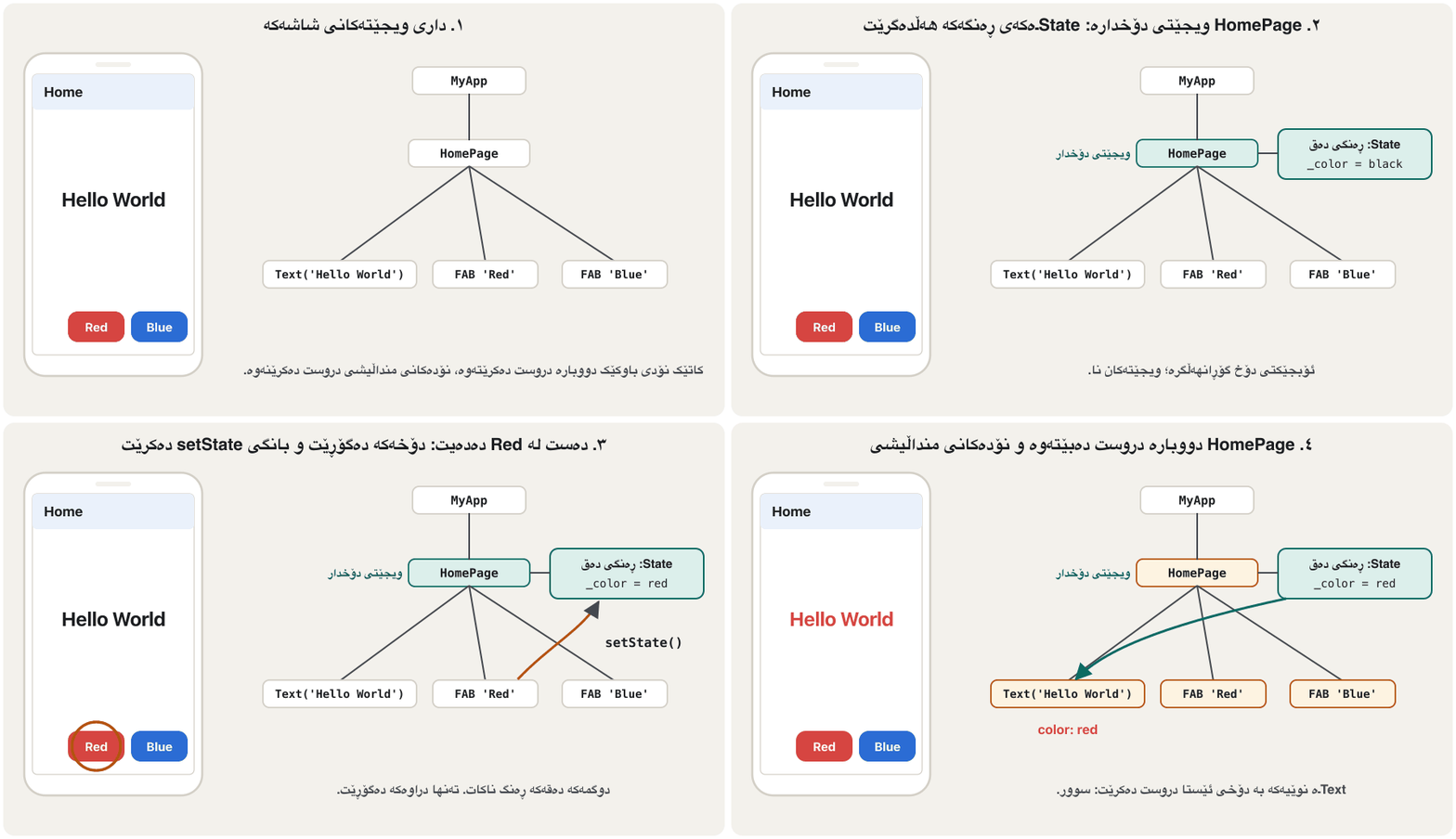
وانەکە دووبارە دروستکردنەوە بە شاشەیەکی بچووک ڕوون دەکاتەوە: دەقی Hello World و دوو ، Red و Blue. دەستلێدان لە ڕەنگی دەقەکە دەگۆڕێت. ئەم شاشەیە بریتییە لە MyApp ← HomePage ← Textـێک و دوو . سەیر بکە کاتێک دەست لە Red دەدرێت چی ڕوو دەدات:
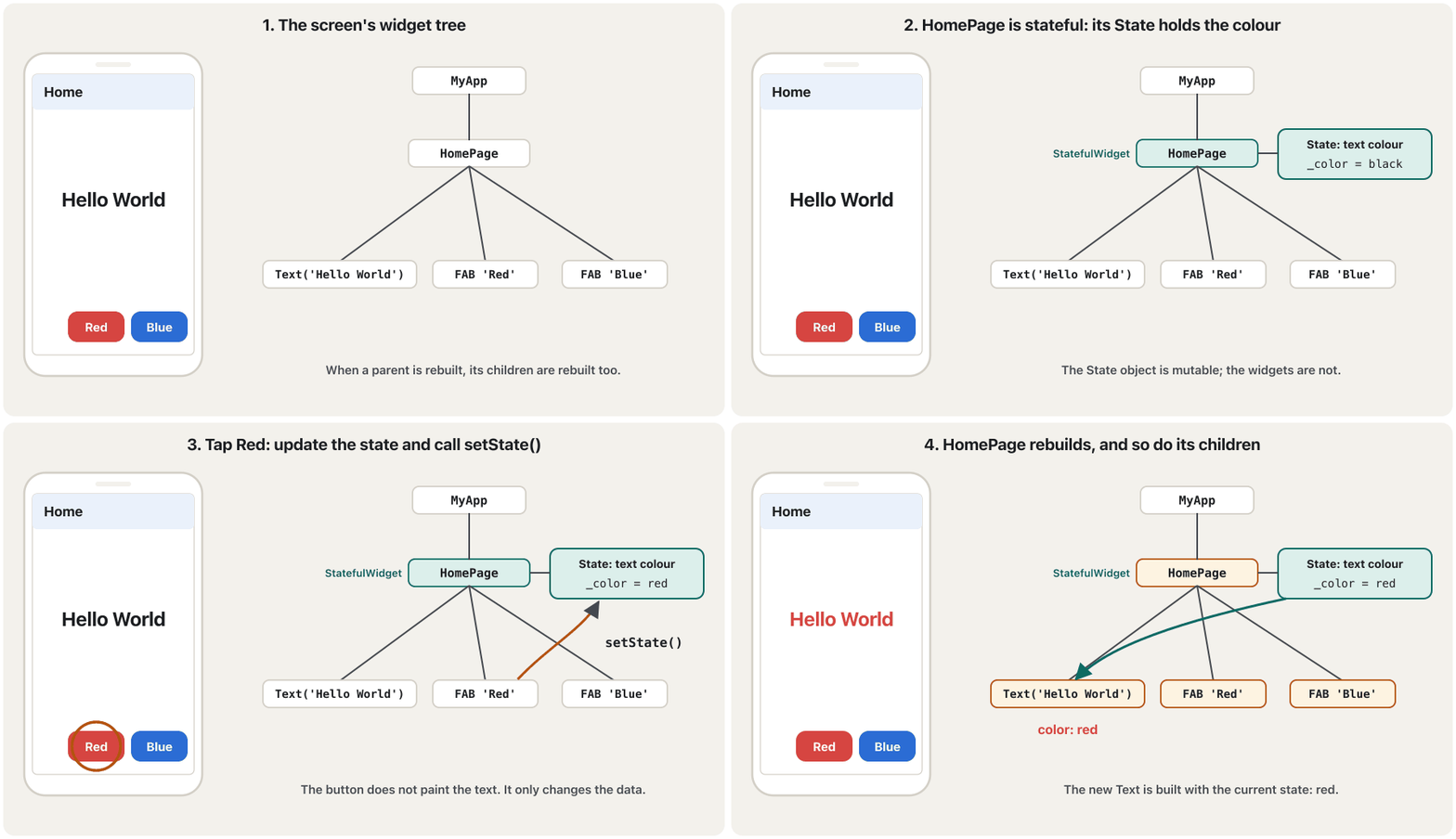
State ← setState() ← دووبارە دروستکردنەوە.CêIT- A stateful widget (here HomePage) is attached to a State object, and the State object is mutable.
- Each State object has the essential method
setState(). - Calling it rebuilds the stateful widget and its children.
- During the rebuild, widgets use the current state stored in the State object: the new Text is red.
- (لێرەدا HomePage) بە بەستراوە و .
- هەر سەرەکیی بە ناوی
setState()هەیە. - بانگکردنی ئەم و دووبارە دروست دەکاتەوە.
- لە کاتی دووبارە دروستکردنەوەدا، ئێستا بەکار دەهێنن کە لە هەڵگیراوە: Textـە نوێیەکە سوورە.
The Red/Blue example: setState in actionنموونەی Red/Blue: setState لە کاردا
The Red/Blue example in codeنموونەی Red/Blue بە کۆد
The lecture gives no code for this example, so here is a complete version. The lecturer's second slide says the state is "color and size", so the State keeps both: the buttons change the colour and a Slider changes the size.
وانەکە هیچ کۆدێک بۆ ئەم نموونەیە نادات، بۆیە ئەمە وەشانێکی تەواوە. سلایدی دووەمی وانەکە دەڵێت «ڕەنگ و قەبارە»یە، بۆیە Stateـەکە هەردووکیان هەڵدەگرێت: ڕەنگەکە دەگۆڕن و Sliderـێک قەبارەکە دەگۆڕێت.
import 'package:flutter/material.dart';

void main() => runApp(const MaterialApp(home: HomePage()));

// HomePage is the common ancestor of the Text and the buttons,
// so the state (colour and size) is lifted up to here.
class HomePage extends StatefulWidget {
  const HomePage({super.key});

  @override
  State<HomePage> createState() => _HomePageState();
}

class _HomePageState extends State<HomePage> {
  Color _color = Colors.black;
  double _size = 24;

  void _setColor(Color color) {
    setState(() => _color = color);
  }

  @override
  Widget build(BuildContext context) {
    return Scaffold(
      appBar: AppBar(title: const Text('Hello colours')),
      body: Column(
        mainAxisAlignment: MainAxisAlignment.center,
        children: [
          HelloText(color: _color, size: _size), // uses the state
          Slider(
            min: 12,
            max: 48,
            value: _size,
            onChanged: (value) => setState(() => _size = value), // updates it
          ),
        ],
      ),
      floatingActionButton: Row(
        mainAxisAlignment: MainAxisAlignment.end,
        children: [
          ColorButton(label: 'Red', color: Colors.red, onPressed: () => _setColor(Colors.red)),
          const SizedBox(width: 12),
          ColorButton(label: 'Blue', color: Colors.blue, onPressed: () => _setColor(Colors.blue)),
        ],
      ),
    );
  }
}

class HelloText extends StatelessWidget {
  const HelloText({super.key, required this.color, required this.size});

  final Color color;
  final double size;

  @override
  Widget build(BuildContext context) {
    return Text('Hello World', style: TextStyle(color: color, fontSize: size));
  }
}

class ColorButton extends StatelessWidget {
  const ColorButton({super.key, required this.label, required this.color, required this.onPressed});

  final String label;
  final Color color;
  final VoidCallback onPressed; // the button reports the tap up to HomePage

  @override
  Widget build(BuildContext context) {
    return FloatingActionButton.extended(
      heroTag: label, // two FABs on one screen need different hero tags
      backgroundColor: color,
      foregroundColor: Colors.white,
      onPressed: onPressed,
      label: Text(label),
    );
  }
}Start: Hello World in black. Tap Red: Hello World turns red. Tap Blue: Hello World turns blue.
Explain the codeڕوونکردنەوەی کۆدەکە
- Lineدێڕی 7-12
HomePage is the common parent of the text and the buttons, so it is the stateful widget.
HomePage هاوبەشی دەقەکە و ، بۆیە ئەو .
- Lineدێڕی 15-16
The state: colour and size.
: ڕەنگ و قەبارە.
- Lineدێڕی 18-20
One small method changes the colour inside setState.
بچووک ڕەنگەکە لەناو setStateـدا دەگۆڕێت.
- Lineدێڕی 29
The state flows down: HelloText receives colour and size as constructor arguments.
بەرەو خوارەوە دەڕوات: HelloText ڕەنگ و قەبارە وەک وەردەگرێت.
- Lineدێڕی 34, 41, 43
Events flow up: the Slider and the buttons call functions of the State, which call setState.
بەرەو سەرەوە دەڕۆن: Slider و بانگی Stateـەکە دەکەن، کە بانگی setState دەکەن.
- Lineدێڕی 50-60
HelloText is stateless: it only shows what it is given.
HelloText بێدۆخە: تەنها ئەوە پیشان دەدات کە پێی دەدرێت.
- Lineدێڕی 62-79
ColorButton is stateless too.
onPressedis a callback: the button reports the tap up to HomePage. Two floating buttons on one screen need differentheroTags.ColorButtonـیش بێدۆخە.
onPressed: دەستلێدانەکە بۆ سەرەوە بۆ HomePage ڕادەگەیەنێت. دوو لە یەک شاشەدا پێویستیان بەheroTagـی جیاواز هەیە.
Which widget should be stateful? Lift state upکام ویجێت دەبێت دۆخدار بێت؟ بەرزکردنەوەی دۆخ
In the Red/Blue screen, why is HomePage the stateful one, and not the Text or a button? The lecture answers with two questions:
لە شاشەی Red/Blueـدا، بۆچی HomePage دۆخدارەکەیە، نەک Textـەکە یان ؟ وانەکە بە دوو پرسیار وەڵام دەداتەوە:
- Who uses the state?کێ دۆخەکە بەکار دەهێنێت؟
Find the code that reads it. Here the colour is used in the Text widget's
TextStyle(color: ...).ئەو کۆدە بدۆزەرەوە کە دەیخوێنێتەوە. لێرەدا ڕەنگەکە لە
TextStyle(color: ...)ـی Textـدا بەکار دێت. - Who updates the state?کێ دۆخەکە نوێ دەکاتەوە؟
Find the code that changes it. Here it is the
onPressedof the two buttons.ئەو کۆدە بدۆزەرەوە کە دەیگۆڕێت. لێرەدا
onPressedـی هەردوو . - Put it in their common ancestorبیخە نێو باپیرە هاوبەشەکەیانەوە
The Text and the buttons are siblings, so the nearest widget above all of them is HomePage. Make HomePage stateful and keep the state there. This common technique is called lifting state up.
Text و خوشکوبران، بۆیە نزیکترین لە سەرووی هەموویانەوە HomePageـە. HomePage دۆخدار بکە و لەوێ هەڵبگرە. ئەم تەکنیکە باوە پێی دەوترێت .
Which widget should be stateful? Lift state upکام ویجێت دەبێت دۆخدار بێت؟ بەرزکردنەوەی دۆخ
State flows down, events flow upدۆخ بۆ خوارەوە دەڕوات، ڕووداوەکان بۆ سەرەوە
Because HomePage holds the state ("color and size"), every setState in it rebuilds HomePage, and when it gets rebuilt, so do its children: the Text gets the new colour and size. This is the Flutter form of the rule state flows down, events flow up, explained for every technology in App State and Declarative UI.
چونکە HomePage («ڕەنگ و قەبارە») هەڵدەگرێت، هەموو setStateـێک تێیدا HomePage دووبارە دروست دەکاتەوە و کاتێک ئەو دووبارە دروست دەکرێتەوە، دروست دەکرێنەوە: Textـەکە ڕەنگ و قەبارە نوێیەکە وەردەگرێت. ئەمە شێوەی Flutterـی ئەو یاسایەیە کە دەڵێت بۆ خوارەوە دەڕوات و بۆ سەرەوە، کە بۆ هەموو تەکنەلۆژیایەک لە دۆخ و ڕووکاری وەسفی ڕوون کراوەتەوە.
Which widget should be stateful? Lift state upکام ویجێت دەبێت دۆخدار بێت؟ بەرزکردنەوەی دۆخ
Who manages the state? Three patternsکێ دۆخەکە بەڕێوە دەبات؟ سێ شێواز
Flutter's interactivity guide describes three ways to place state. The Red/Blue screen used the second one.
ڕێنمایی کارلێککردنی Flutter سێ ڕێگا بۆ دانانی باس دەکات. شاشەی Red/Blue دووەمیانی بەکار هێنا.
| Patternشێواز | Howچۆن | Exampleنموونە |
|---|---|---|
| The widget manages its own state خۆی بەڕێوە دەبات | It is stateful and nobody outside needs the data.دۆخدارە و کەس لە دەرەوە پێویستی بە دراوەکە نییە. | A like button that only counts its own likes (below) لایک کە تەنها لایکەکانی خۆی دەژمێرێت (خوارەوە) |
| The parent manages it بەڕێوەی دەبات | The child is stateless; it gets the value and a callback from the parent. بێدۆخە؛ نرخەکە و لە وەردەگرێت. | HelloText and ColorButton in Red/BlueHelloText و ColorButton لە Red/Blueـدا |
| A mixتێکەڵێک | The child keeps small visual state itself and passes the important data up. بچووکی دیمەنی خۆی هەڵدەگرێت و دراوە گرنگەکە بۆ سەرەوە دەنێرێت. | A box that shows its own highlight while pressed but tells the parent when it is selectedسندوقێک کە لە کاتی داگرتندا ڕووناکییەکەی خۆی پیشان دەدات بەڵام کاتێک هەڵدەبژێردرێت بە دەڵێت |
- User data (is the checkbox ticked? where is the slider?) is usually best in the parent, which needs to know it.
- Looks only (an animation, a highlight) is best kept by the widget itself.
- If in doubt, start with the parent.
- دراوەی (ئایا نیشانەی هەیە؟ Slider لە کوێیە؟) زۆربەی جار باشترە لە بێت، کە پێویستی بە زانینیەتی.
- تەنها دیمەن (، ڕووناککردنەوەیەک) باشترە لای خودی بمێنێتەوە.
- ئەگەر دوودڵ بوویت، لە دەست پێ بکە.
import 'package:flutter/material.dart';

class LikeButton extends StatefulWidget {
  const LikeButton({super.key});

  @override
  State<LikeButton> createState() => _LikeButtonState();
}

class _LikeButtonState extends State<LikeButton> {
  bool _liked = false;
  int _likes = 41;

  void _toggle() {
    setState(() {
      _liked = !_liked;
      _likes += _liked ? 1 : -1;
    });
  }

  @override
  Widget build(BuildContext context) {
    return Row(
      mainAxisSize: MainAxisSize.min,
      children: [
        IconButton(
          onPressed: _toggle,
          icon: Icon(_liked ? Icons.favorite : Icons.favorite_border),
          color: Colors.red,
        ),
        Text('$_likes'),
      ],
    );
  }
}41 → tap → 42 (red heart) → tap → 41
Explain the codeڕوونکردنەوەی کۆدەکە
- Lineدێڕی 11-12
Two pieces of state that only this button needs.
دوو پارچە کە تەنها ئەم پێویستی پێیانە.
- Lineدێڕی 15-18
Both change together inside one setState.
هەردووکیان پێکەوە لەناو یەک setStateـدا دەگۆڕێن.
The lifecycle of a State objectسووڕی ژیانی ئۆبجێکتی دۆخ
The lecture's pictures show only the start of the story: a stateless widget goes constructor → build (and build again), and a stateful widget goes constructor → createState(). A State object lives much longer. Here is its whole life:
وێنەکانی وانەکە تەنها سەرەتای چیرۆکەکە پیشان دەدەن: ← build دەڕوات (و دووبارە build)؛ ← createState(). زۆر درێژتر دەژی. ئەمە هەموو ژیانیەتی:
The life of a State object step by step: initState, didChangeDependencies, didUpdateWidget, build, dispose and what setState really does.
ژیانی هەنگاو بە هەنگاو: initState، didChangeDependencies، didUpdateWidget، build، dispose و setState لە ڕاستیدا چی دەکات.
Whole video (7:40), episode 3 of "How Flutter Works" (May 2025): every lifecycle method in order.
هەموو ڤیدیۆکە (7:40)، ئەڵقەی سێیەمی How Flutter Works (ئایاری 2025): هەموو بە ڕیزبەندی.
The lifecycle of a State objectسووڕی ژیانی ئۆبجێکتی دۆخ
Each lifecycle method and its jobهەر میتۆدێکی سووڕی ژیان و کارەکەی
| Method | When Flutter calls itFlutter کەی بانگی دەکات | What you do thereتۆ لەوێ چی دەکەیت |
|---|---|---|
createState() | When the StatefulWidget is first put in the treeکاتێک یەکەم جار دەخرێتە نێو | Return a new State object, nothing else نوێ بگەڕێنەرەوە، هیچی تر |
initState() | Once, right after the State is created (now mounted is true)یەک جار، ڕاستەوخۆ دوای دروستکردنی Stateـەکە (ئێستا mounted trueـە) | One-time set-up: start timers, subscribe to streams, create controllersئامادەکردنی یەکجاری: دەستپێکردنی کاتژمێر، ئابوونە لە ، دروستکردنی کۆنترۆڵەر |
didChangeDependencies() | After initState, and when an inherited value it uses changesدوای initState و کاتێک نرخێکی بۆماوەیی کە بەکاری دەهێنێت دەگۆڕێت | Set-up that needs Theme, MediaQuery or other inherited dataئامادەکردنێک کە پێویستی بە Theme، MediaQuery یان دراوەی بۆماوەیی تر هەیە |
build() | After each of the above, and after every setStateدوای هەر یەکێک لەوانەی سەرەوە و دوای هەموو setStateـێک | Return widgets for the current state; nothing slow ئێستا بگەڕێنەرەوە؛ هیچ کارێکی خاو مەکە |
didUpdateWidget(old) | When the parent rebuilds with a new widget of the same typeکاتێک بە نوێی هەمان جۆرەوە دووبارە دروست دەبێتەوە | Compare old with widget and react (for example restart a timer)old لەگەڵ widget بەراورد بکە و کاردانەوە بنوێنە (بۆ نموونە کاتژمێرێک دووبارە دەست پێ بکەرەوە) |
setState(fn) | You call it, when your own data changesتۆ بانگی دەکەیت، کاتێک دراوەی خۆت دەگۆڕێت | Change the data inside fnدراوەکە لەناو fnـدا بگۆڕە |
deactivate() | When the widget is taken out of the tree (it may come back in the same frame)کاتێک لە دەردەهێنرێت (لەوانەیە لە هەمان نوێکردنەوەدا بگەڕێتەوە) | Rarely neededبە دەگمەن پێویستە |
dispose() | Once, when the State is removed for good (now mounted is false)یەک جار، کاتێک Stateـەکە بە یەکجاری لادەبرێت (ئێستا mounted falseـە) | Cancel timers and subscriptions, dispose controllersکاتژمێر و ئابوونەکان هەڵبوەشێنەرەوە، کۆنترۆڵەرەکان فڕێ بدە |
The lifecycle of a State objectسووڕی ژیانی ئۆبجێکتی دۆخ
The lifecycle in codeسووڕی ژیان لە کۆددا
This widget counts seconds. It starts a timer when it appears, notices when its parent sends a new label, and stops the timer when it is removed. Each method prints a line with debugPrint:
ئەم چرکەکان دەژمێرێت. کاتێک دەردەکەوێت کاتژمێرێک دەست پێ دەکات، هەست دەکات کاتێک ناونیشانێکی نوێ دەنێرێت و کاتێک لادەبرێت کاتژمێرەکە دەوەستێنێت. هەر بە debugPrint دێڕێک چاپ دەکات:
import 'dart:async';

import 'package:flutter/material.dart';

class SecondsText extends StatefulWidget {
  const SecondsText({super.key, required this.label});

  final String label;

  @override
  State<SecondsText> createState() => _SecondsTextState();
}

class _SecondsTextState extends State<SecondsText> {
  int _seconds = 0;
  Timer? _timer;

  @override
  void initState() {
    super.initState(); // always first
    debugPrint('initState');
    _timer = Timer.periodic(const Duration(seconds: 1), (_) {
      setState(() => _seconds++);
    });
  }

  @override
  void didUpdateWidget(SecondsText oldWidget) {
    super.didUpdateWidget(oldWidget);
    if (oldWidget.label != widget.label) {
      debugPrint('the parent gave a new label: ${widget.label}');
    }
  }

  Future<void> _resetLater() async {
    await Future.delayed(const Duration(seconds: 2));
    if (!mounted) return; // the widget may have been removed meanwhile
    setState(() => _seconds = 0);
  }

  @override
  void dispose() {
    _timer?.cancel(); // stop the timer, or it would call setState forever
    debugPrint('dispose');
    super.dispose(); // always last
  }

  @override
  Widget build(BuildContext context) {
    debugPrint('build: $_seconds');
    return GestureDetector(
      onTap: _resetLater,
      child: Text('${widget.label}: $_seconds s'),
    );
  }
}--- the parent shows SecondsText initState build: 0 --- two seconds pass build: 1 build: 2 --- the parent rebuilds with a new label the parent gave a new label: Coffee build: 2 --- the parent removes SecondsText dispose
Explain the codeڕوونکردنەوەی کۆدەکە
- Lineدێڕی 19-25
initStateruns once. Callsuper.initState()first, then start the timer. Each tick calls setState.initStateیەک جار جێبەجێ دەبێت. سەرەتا بانگیsuper.initState()بکە، پاشان کاتژمێرەکە دەست پێ بکە. هەر لێدانێک بانگی setState دەکات.- Lineدێڕی 27-33
didUpdateWidgetruns when the parent rebuilds with a new widget;widget.labelis the new value,oldWidget.labelthe old one. build always follows, so no setState is needed here.didUpdateWidgetکاتێک جێبەجێ دەبێت کە بە نوێوە دووبارە دروست دەبێتەوە؛widget.labelنرخە نوێیەکەیە وoldWidget.labelکۆنەکە. build هەمیشە دوای دێت، بۆیە لێرە setState پێویست نییە.- Lineدێڕی 35-39
After an
awaitthe widget may be gone: checkmountedbefore setState.دوای
awaitلەوانەیە نەمابێت: پێش setStatemountedبپشکنە.- Lineدێڕی 41-46
disposeruns once at the end. Cancel the timer, then callsuper.dispose()last.disposeیەک جار لە کۆتاییدا جێبەجێ دەبێت. کاتژمێرەکە هەڵبوەشێنەرەوە، پاشان لە کۆتاییدا بانگیsuper.dispose()بکە.- Lineدێڕی 53
Inside the State,
widgetgives you the current widget object and its fields.لەناو Stateـدا،
widgetئێستای و دەداتێ.
Read the output: initState once, then build after every tick; when the parent changes the label, didUpdateWidget and then build, while the seconds (2) are kept, because the State object was not replaced; finally dispose once.
بخوێنەوە: initState یەک جار، پاشان build دوای هەر لێدانێک؛ کاتێک ناونیشانەکە دەگۆڕێت، didUpdateWidget و پاشان build، لە کاتێکدا چرکەکان (2) دەمێننەوە، چونکە نەگۆڕدرا؛ لە کۆتاییدا dispose یەک جار.
- Call
super.initState()first andsuper.dispose()last. - Whatever you start in
initState(timers, stream subscriptions, animation or text controllers) you stop or dispose indispose. - Do not read
Theme.of(context)orMediaQuery.of(context)ininitState; read them inbuild(ordidChangeDependencies). - The same pattern keeps an intro screen safe: see Splash Screens (a timer started in
initState, cancelled indispose, and amountedcheck).
- بانگی
super.initState()سەرەتا وsuper.dispose()لە کۆتاییدا بکە. - هەرچی لە
initStateـدا دەستی پێ دەکەیت (کاتژمێر، ، کۆنترۆڵەری یان دەق) لەdisposeـدا دەیوەستێنیت یان فڕێی دەدەیت. Theme.of(context)یانMediaQuery.of(context)لەinitStateـدا مەخوێنەوە؛ لەbuildـدا (یانdidChangeDependencies) بیانخوێنەوە.- هەمان شێواز شاشەیەکی ناساندن سەلامەت دەهێڵێتەوە: سەیری شاشەکانی دەستپێک بکە (کاتژمێرێک لە
initStateـدا دەست پێ دەکات، لەdisposeـدا هەڵدەوەشێتەوە و پشکنینیmounted).
Stateless or stateful?بێدۆخ یان دۆخدار؟
| Aspectلایەن | StatelessWidget | StatefulWidget |
|---|---|---|
| Classes you writeئەو دەینووسیت | Oneیەک | Two: the widget and its Stateدوو: و Stateـەکەی |
| Changing data of its ownدراوەی گۆڕاوی خۆی | None; all fields finalنییە؛ هەموو finalـن | Yes, in the State objectبەڵێ، لە |
Where build isbuild لە کوێیە | In the widget classلە | In the State classلە Stateـدا |
| Rebuilt whenکەی دووبارە دروست دەکرێتەوە | The parent gives new input, or an inherited value changes نوێ دەدات، یان نرخێکی بۆماوەیی دەگۆڕێت | The same, and also after its own setStateهەمان شت، هەروەها دوای setStateـی خۆی |
| Lifecycle | Constructor → build ← build | createState → initState → … build … → disposecreateState ← initState ← … build … ← dispose |
| Examplesنموونە | Text, Icon, Card, IconButtonText، Icon، Card، IconButton | Checkbox, Slider, TextField, FormCheckbox، Slider، TextField، Form |
Stateless or stateful?بێدۆخ یان دۆخدار؟
Four rules of thumbچوار ڕێنمایی کرداری
- Start stateless. Make a widget stateful only when it must remember something that changes while it is on the screen.
- Push state down to the smallest widget that needs it, so a change rebuilds only a small part of the screen.
- Use
constfor parts that never change. - When many screens need the same data (a cart, a logged-in user), setState in one widget is no longer enough. That is app-wide state; later lessons of this course manage it: When setState is not enough and ChangeNotifier.
- بە بێدۆخ دەست پێ بکە. تەنها کاتێک دۆخدار بکە کە دەبێت شتێکی گۆڕاو لە یاد بهێڵێت لە کاتێکدا لەسەر شاشەیە.
- بۆ خوارەوە ببە بۆ بچووکترین کە پێویستی پێیەتی، بۆ ئەوەی گۆڕانکارییەک تەنها بەشێکی بچووکی شاشە دووبارە دروست بکاتەوە.
- بۆ ئەو بەشانەی هەرگیز ناگۆڕێن
constبەکار بهێنە. - کاتێک چەندین شاشە پێویستیان بە هەمان دراوە هەیە (سەبەتەی کڕین، چووەژوورەوە)، setState لە یەک چیتر بەس نییە. ئەوە دۆخی هاوبەشە؛ وانەکانی دواتری ئەم کۆرسە بەڕێوەی دەبەن: کاتێک
setStateبەس نییە و ChangeNotifier.
When state in one widget is no longer enough: app state shared by many widgets, and why apps then use a state-management approach.
کاتێک لە ناو یەک بەس نییە: کە چەندین بەکاری دەهێنن و بۆچی ئەوکات شێوازێکی بەکار دەهێنن.
Plays 0:00-2:37: the problem, app state and the idea of state management; stops before the Riverpod part.
لە 0:00 تا 2:37 پەخش دەبێت: کێشەکە، و بیرۆکەی ؛ پێش بەشی Riverpod ڕادەوەستێت.
Common mistakesهەڵە باوەکان
Two classic mistakes in one file. Both compile, both show a button with 0, and in both the number on the screen never changes when you tap:
دوو هەڵەی بەناوبانگ لە یەک . هەردووکیان کۆمپایل دەبن، هەردووکیان بە 0 پیشان دەدەن و لە هەردووکیاندا ژمارەکەی سەر شاشە بە دەستلێدان هەرگیز ناگۆڕێت:
import 'package:flutter/material.dart';

// Mistake 1: a changing field inside a StatelessWidget.
class BadCounter extends StatelessWidget {
  BadCounter({super.key});

  int count = 0;

  @override
  Widget build(BuildContext context) {
    return TextButton(
      onPressed: () => count++,
      child: Text('$count'),
    );
  }
}

// Mistake 2: changing the state without setState.
class ForgetfulCounter extends StatefulWidget {
  const ForgetfulCounter({super.key});

  @override
  State<ForgetfulCounter> createState() => _ForgetfulCounterState();
}

class _ForgetfulCounterState extends State<ForgetfulCounter> {
  int _count = 0;

  @override
  Widget build(BuildContext context) {
    return TextButton(
      onPressed: () => _count++, // memory changes, the screen does not
      child: Text('$_count'),
    );
  }
}flutter analyze: warning • This class (or a class that this class inherits from) is marked as '@immutable', but one or more of its instance fields aren't final: BadCounter.count • must_be_immutable widget test, after one tap: ForgetfulCounter shows: 0 BadCounter shows: 0
Explain the codeڕوونکردنەوەی کۆدەکە
- Lineدێڕی 4-7
A changing field in a StatelessWidget: the analyzer warns, and the field is lost whenever the parent rebuilds.
گۆڕاو لە : شیکارکەرەکە ئاگادار دەکاتەوە و هەر کاتێک دووبارە دروست ببێتەوە ون دەبێت.
- Lineدێڕی 12
count++changes memory only; a stateless widget has no setState to ask for a new build.count++تەنها دەگۆڕێت؛ setStateـی نییە تا داوای buildـێکی نوێ بکات.- Lineدێڕی 32
In a State, but without setState: Flutter is never told.
لە Stateـدایە، بەڵام بەبێ setState: هەرگیز بە Flutter ناوترێت.
| Mistakeهەڵە | What happensچی ڕوو دەدات | Fixچاکردنەوە |
|---|---|---|
| Changing state without setStateگۆڕینی بەبێ setState | Data changes, screen does notدراوە دەگۆڕێت، شاشە ناگۆڕێت | setState(() => _count++)setState(() => _count++) |
| A non-final field in a StatelessWidget نا-final لە | Analyzer warning; value lost on rebuildئاگادارکردنەوەی شیکارکەر؛ نرخەکە لە دووبارە دروستکردنەوەدا ون دەبێت | Make it a StatefulWidget and keep the field in Stateبیکە بە و لە Stateـدا هەڵبگرە |
| setState inside buildsetState لەناو build | Error: setState() or markNeedsBuild() called during build: setState() or markNeedsBuild() called during build | Change state only in events (onPressed…) or after awaits تەنها لە (onPressed…) یان دوای await بگۆڕە |
| setState after the screen closedsetState دوای داخستنی شاشە | Error: setState() called after dispose(): setState() called after dispose() | if (!mounted) return; after await; cancel timers in disposeدوای await if (!mounted) return;؛ کاتژمێرەکان لە disposeـدا هەڵبوەشێنەرەوە |
| Forgetting disposeلەبیرکردنی dispose | Timers and controllers keep running; memory is wastedکاتژمێر و کۆنترۆڵەرەکان بەردەوام دەبن؛ بەفیڕۆ دەچێت | Cancel and dispose them in dispose()لە dispose()ـدا هەڵیانبوەشێنەرەوە و فڕێیان بدە |
| Starting work in build (timer, network call)دەستپێکردنی کار لە buildـدا (کاتژمێر، داواکاریی ) | It starts again on every rebuildلە هەر دووبارە دروستکردنەوەیەکدا دووبارە دەست پێ دەکاتەوە | Start it in initStateلە initStateـدا دەستی پێ بکە |
| State in the wrong place لە شوێنی هەڵەدا | Siblings cannot share it, or far too much rebuildsخوشکوبراکان ناتوانن هاوبەشی بکەن، یان زۆر زیاتر لە پێویست دووبارە دروست دەبێتەوە | Lift it to the nearest common parent, no higherبەرزی بکەرەوە بۆ نزیکترین هاوبەش، نەک زیاتر |
Copying widget.x into State in initState onlyکۆپیکردنی widget.x بۆ State تەنها لە initStateـدا | New values from the parent are ignoredنرخە نوێیەکانی پشتگوێ دەخرێن | Read widget.x in build, or update the copy in didUpdateWidgetwidget.x لە buildـدا بخوێنەوە، یان کۆپییەکە لە didUpdateWidgetـدا نوێ بکەرەوە |
Exercisesڕاهێنانەکان
Sort these widgets by the class they extend in Flutter's code: Text, TextField, Checkbox, Icon, Slider, Container, Form, IconButton, Radio, Card. Then name one widget from the notes' list that is neither.
ئەم بەپێی ئەو لە کۆدی Flutterـدا extendsـی دەکەن پۆلێن بکە: Text، TextField، Checkbox، Icon، Slider، Container، Form، IconButton، Radio، Card. پاشان لە لیستی تێبینییەکان ناو ببە کە هیچیان نییە.
Show answerوەڵامەکە پیشان بدە
| StatelessWidget | StatefulWidget |
|---|---|
Text | TextField |
Icon | Checkbox |
Container | Slider |
IconButton | Form |
Card | Radio |
Row and Column are neither: they extend Flex, a render object widget.
Row و Column هیچیان نین: Flex extends دەکەن، کە .
Write a stateful TeaCounter that shows "N cups" with a − button, a + button and a Reset button. The − button must be disabled at 0.
TeaCounter بنووسە کە «N cups» لەگەڵ −، + و Reset پیشان بدات. − دەبێت لە 0دا ناچالاک بێت.
Hintئاماژە
Copy the counter and add two more buttons.
کۆپی بکە و دوو تر زیاد بکە.
Show answerوەڵامەکە پیشان بدە
import 'package:flutter/material.dart';

class TeaCounter extends StatefulWidget {
  const TeaCounter({super.key});

  @override
  State<TeaCounter> createState() => _TeaCounterState();
}

class _TeaCounterState extends State<TeaCounter> {
  int _cups = 0;

  @override
  Widget build(BuildContext context) {
    return Row(
      mainAxisSize: MainAxisSize.min,
      children: [
        IconButton(
          onPressed: _cups == 0 ? null : () => setState(() => _cups--), // null = disabled at 0
          icon: const Icon(Icons.remove),
        ),
        Text('$_cups cups'),
        IconButton(
          onPressed: () => setState(() => _cups++),
          icon: const Icon(Icons.add),
        ),
        TextButton(
          onPressed: () => setState(() => _cups = 0),
          child: const Text('Reset'),
        ),
      ],
    );
  }
}+, +, − → 1 cups Reset → 0 cups
Explain the codeڕوونکردنەوەی کۆدەکە
- Lineدێڕی 19
onPressed: nulldisables a button, so − cannot go below 0.onPressed: nullناچالاک دەکات، بۆیە − ناتوانێت لە 0 کەمتر بێت.
Every button changes _cups inside setState; the Text reads _cups in build.
هەموو _cups لەناو setStateـدا دەگۆڕێت؛ Textـەکە لە buildـدا _cups دەخوێنێتەوە.
Exercisesڕاهێنانەکان
More exercisesڕاهێنانی زیاتر
Build a screen with a Material 3 NavigationBar with three tabs (Home, Orders, Profile). The app bar title and the body text must show the selected tab. Which value is the state, and where does it live?
شاشەیەک دروست بکە بە NavigationBarـی Material 3 بە سێ تاب (Home، Orders، Profile). ناونیشانی و دەقی bodyـەکە دەبێت تابی هەڵبژێردراو پیشان بدەن. کام نرخ و لە کوێ دەژی؟
Show answerوەڵامەکە پیشان بدە
import 'package:flutter/material.dart';

class TabsPage extends StatefulWidget {
  const TabsPage({super.key});

  @override
  State<TabsPage> createState() => _TabsPageState();
}

class _TabsPageState extends State<TabsPage> {
  int _index = 0; // which tab is selected: the state

  static const _titles = ['Home', 'Orders', 'Profile'];

  @override
  Widget build(BuildContext context) {
    return Scaffold(
      appBar: AppBar(title: Text(_titles[_index])),
      body: Center(child: Text('This is the ${_titles[_index]} tab')),
      bottomNavigationBar: NavigationBar(
        selectedIndex: _index, // uses the state
        onDestinationSelected: (i) => setState(() => _index = i), // updates it
        destinations: const [
          NavigationDestination(icon: Icon(Icons.home), label: 'Home'),
          NavigationDestination(icon: Icon(Icons.receipt_long), label: 'Orders'),
          NavigationDestination(icon: Icon(Icons.person), label: 'Profile'),
        ],
      ),
    );
  }
}tap Orders → title "Orders", body "This is the Orders tab"
The state is the selected index _index. It lives in the screen's State, because both the app bar and the body need it. More about bottom bars in Drawers, Bottom Bars and Sheets.
ئیندێکسی هەڵبژێردراوە _index. لە Stateـی شاشەکەدا دەژی، چونکە و bodyـەکە هەردووکیان پێویستیان پێیەتی. بۆ زیاتر دەربارەی ، سەیری لیستە لاتەنیشتەکان، شریتەکانی خوارەوە و پەڕەی خوارەوە بکە.
A quiz screen has a question card, four answer buttons and a score at the top that goes up after a right answer. Which widget should be stateful? Use the lecture's two questions.
شاشەیەکی تاقیکردنەوە کارتێکی پرسیار، چوار وەڵام و نمرەیەک لە سەرەوە هەیە کە دوای وەڵامی ڕاست زیاد دەبێت. کام دەبێت دۆخدار بێت؟ دوو پرسیارەکەی وانەکە بەکار بهێنە.
Show answerوەڵامەکە پیشان بدە
- Who uses the score? The score text at the top.
- Who updates it? The answer buttons'
onPressed. - Their nearest common parent is the quiz screen: make it stateful, keep
_score(and the current question) there, pass them down, and give the buttons callbacks.
- کێ نمرەکە بەکار دەهێنێت؟ دەقی نمرەکە لە سەرەوە.
- کێ نوێی دەکاتەوە؟
onPressedـی وەڵام. - نزیکترین هاوبەشیان شاشەی تاقیکردنەوەکەیە: دۆخداری بکە،
_score(و پرسیاری ئێستا) لەوێ هەڵبگرە، بیاننێرە خوارەوە و بدە بە .
For each job, name the lifecycle method: (a) start listening to a stream; (b) stop listening; (c) react when the parent passes a new user id; (d) describe the screen; (e) read the app's colour scheme for a one-time setup.
بۆ هەر کارێک، ناو ببە: (أ) دەستپێکردنی گوێگرتن لە ؛ (ب) وەستاندنی گوێگرتن؛ (ج) کاردانەوە کاتێک ناسنامەی نوێ دەنێرێت؛ (د) وەسفکردنی شاشەکە؛ (هـ) خوێندنەوەی ڕەنگەکانی بۆ ئامادەکردنێکی یەکجاری.
Show answerوەڵامەکە پیشان بدە
- (a)
initState - (b)
dispose - (c)
didUpdateWidget - (d)
build - (e)
didChangeDependencies(not initState, becauseTheme.of(context)is an inherited value)
- (أ) لە
initStateـدا - (ب) لە
disposeـدا - (ج) لە
didUpdateWidgetـدا - (د) لە
buildـدا - (هـ) لە
didChangeDependenciesـدا (نەک initState، چونکەTheme.of(context)نرخێکی بۆماوەییە)
Summaryپوختە
- Flutter is declarative and widgets are immutable: to change the screen, change the state and let Flutter rebuild new widgets.
- A StatelessWidget has no state; it shows what its parent gives it. Its life: constructor → build.
- A StatefulWidget is two classes: the immutable widget and a mutable, long-lived State object that holds the data and
build. - setState changes the data and tells Flutter to rebuild that widget and its children with the current state. Never in build, never after dispose, never async.
- Widgets are rebuilt when the parent rebuilds, after setState, when a StreamBuilder/FutureBuilder gets data, and when an inherited value changes.
- Lift state up to the nearest common parent of the widgets that use and update it (HomePage in Red/Blue).
- Lifecycle:
createState→initState→didChangeDependencies→build⟲ (setState,didUpdateWidget) →deactivate→dispose.
- Flutter بەکار دەهێنێت و : بۆ گۆڕینی شاشە، بگۆڕە و با Flutter نوێ دروست بکاتەوە.
- هیچ نییە؛ ئەوە پیشان دەدات کە پێی دەدات. ژیانی: ← build.
- دوو : و و تەمەندرێژ کە دراوەکە و
buildهەڵدەگرێت. - setState دراوەکە دەگۆڕێت و بە Flutter دەڵێت ئەو و بە ئێستا دووبارە دروست بکاتەوە. هەرگیز لەناو build، هەرگیز دوای dispose، هەرگیز async.
- دووبارە دروست دەکرێنەوە کاتێک دووبارە دروست دەبێتەوە، دوای setState، کاتێک StreamBuilder/FutureBuilder دراوە وەردەگرێت و کاتێک نرخێکی بۆماوەیی دەگۆڕێت.
- : بۆ نزیکترین هاوبەشی ئەو بەکاری دەهێنن و نوێی دەکەنەوە (HomePage لە Red/Blueـدا).
- :
createState←initState←didChangeDependencies←build⟲ (setState،didUpdateWidget) ←deactivate←dispose.
What is the difference between a widget object and its State object?جیاوازیی نێوان ئۆبجێکتی ویجێت و ئۆبجێکتی دۆخەکەی چییە؟
The widget is an immutable description made again on every parent rebuild. The State is mutable, created once by createState and kept by Flutter until dispose.
وەسفێکی کە لە هەر دووبارە دروستکردنەوەیەکی نوێ دروست دەکرێتەوە. State ، یەک جار بە createState دروست دەکرێت و Flutter تا dispose دەیهێڵێتەوە.
Why does forgetting setState leave the screen unchanged?بۆچی لەبیرکردنی setState شاشەکە وەک خۆی دەهێڵێتەوە؟
The data changes in memory, but Flutter is never told that the widget needs a new build, so build does not run.
دراوەکە لە دەگۆڕێت، بەڵام هەرگیز بە Flutter ناوترێت کە پێویستی بە buildـێکی نوێ هەیە، بۆیە build جێبەجێ نابێت.
Where should state live when two sibling widgets need it?دۆخ لە کوێ بژی کاتێک دوو ویجێتی خوشکوبرا پێویستیان پێیەتی؟
In their nearest common parent (lifting state up), which passes it down and receives callbacks.
لە نزیکترین هاوبەشیاندا ()، کە دەینێرێتە خوارەوە و وەردەگرێت.
Videoڤیدیۆ
Watch a videoسەیری ڤیدیۆیەک بکە
A video that viewers liked a lot and praised in their comments, chosen for this lesson.ڤیدیۆیەک کە بینەران زۆریان پێ خۆش بووە و لە کۆمێنتەکانیاندا ستایشیان کردووە، بۆ ئەم وانەیە هەڵبژێردراوە.
A Kurdish explanation of the difference between StatelessWidget and StatefulWidget with a small example.
ڕوونکردنەوەیەکی کوردی بۆ جیاوازیی نێوان و بە نموونەیەکی بچووک.
Kurdish, whole video (10:08), Aug 2022.
بە کوردی، هەموو ڤیدیۆکە (10:08)، ئابی 2022.
Lesson complete!وانەکە تەواو بوو!
Well done. Review the key terms, then go on to the next lesson.دەستخۆش. سەیرێکی زاراوە سەرەکییەکان بکەرەوە، پاشان بڕۆ بۆ وانەی داهاتوو.
Key termsزاراوە سەرەکییەکان
MaterialApp and ScaffoldMaterialApp و Scaffold
Related lecturesوانە پەیوەندیدارەکان
References and further readingسەرچاوەکان و خوێندنەوەی زیاتر
This lecture is a first edition. The Kurdish text and terminology are waiting for review by Kurdish IT teachers.ئەم وانەیە چاپی یەکەمە. دەقە کوردییەکە و زاراوەکانی چاوەڕێی پێداچوونەوەی مامۆستایانی کوردی بواری IT ن.