FlutterFlutter · Chapterبەش 11 · Lectureوانە 11.7
Project: A To-Do App with Providersپڕۆژە: ئەپێکی ئەرکەکان بە providerـەکان
The lecture's demo as a guided project: a login-as screen and a to-do screen (log out, toggle, delete, add), sample data as Dart lists with neutral users and no passwords, and a provider tree with a FutureProvider of users, a ValueNotifier for the current user and a ChangeNotifierProxyProvider for the list, checked with a real widget test.
نموونەکەی وانەکە وەک پڕۆژەیەکی ڕێنماییکراو: شاشەیەکی وەک و شاشەیەکی ئەرکەکان (، گۆڕین، سڕینەوە، زیادکردن)، دراوە نموونەییەکان وەک لیستی Dart بە بێلایەن و بەبێ و دارێکی provider بە FutureProviderـێکی ، ValueNotifierـێک بۆ ئێستا و ChangeNotifierProxyProviderـێک بۆ لیستەکە، کە بە تاقیکردنەوەیەکی ڕاستەقینەی پشکنراوە.
What you will learnچی فێر دەبیت
- Plan an app as a provider tree: choose the right provider for each kind of data.
- Write immutable model classes and sample data without passwords.
- Build a ChangeNotifier that follows the current user through a ChangeNotifierProxyProvider.
- Connect taps, long presses and buttons to notifier methods with context.read, and show data with context.watch.
- وەک دارێکی provider پلان بکەیت: providerـی گونجاو بۆ هەر جۆرە دراوەیەک هەڵبژێریت.
- و دراوەی نموونەیی بەبێ بنووسیت.
- ChangeNotifierـێک دروست بکەیت کە بە ChangeNotifierProxyProvider شوێنی ئێستا بکەوێت.
- دەستلێدان، پەنجە ڕاگرتن و بە
context.readببەستیتەوە بە ChangeNotifier و دراوە بەcontext.watchپیشان بدەیت.
What we are going to buildئەوەی دروستی دەکەین
This lesson is a project. You build the lecture's demo app from start to finish with the providers of this chapter: FutureProvider, ChangeNotifierProvider with a ValueNotifier and ChangeNotifierProxyProvider. The app has two screens:
ئەم وانەیە پڕۆژەیەکە. نموونەی وانەکە لە سەرەتاوە تا کۆتایی بە providerـەکانی ئەم بەشە دروست دەکەیت: FutureProvider، ChangeNotifierProvider لەگەڵ ValueNotifier و ChangeNotifierProxyProvider. دوو شاشەی هەیە:
- LoginAsScreen: “Choose a user to log in as”, a list of users. Tapping a user logs in as that user. (A demo: there are no passwords.)
- TodoListScreen: the active user's to-do list, with the user's avatar and name in the app bar and a Log out button. Tap a to-do to toggle it between done and not done, long-press it to delete it, and press + to add a new one.
- LoginAsScreen: «Choose a user to log in as»، لیستێکی . دەستلێدان لە وەک ئەو دەچێتە ژوورەوە. (نموونەیە: هیچ نییە.)
- TodoListScreen: لیستی ئەرکەکانی چالاک، لەگەڵ وێنۆچکە و ناوی لە و Log out. دەست لە ئەرکێک بدە بۆ گۆڕینی لە نێوان تەواوکراو و تەواونەکراودا، پەنجەی لەسەر ڕابگرە بۆ سڕینەوەی و + دابگرە بۆ زیادکردنی ئەرکێکی نوێ.
The data: users and to-dosدراوەکە: بەکارهێنەرەکان و ئەرکەکان
The lecture keeps the data in two collections, todos and users, written as JSON. Each to-do has an id, the userId of its owner, a title and completed (true or false); each user has an id, a name and an e-mail. In Dart we describe each kind of data with a small model class. Both classes are immutable: to toggle a to-do we make a changed copy with copyWith:
وانەکە دراوەکە لە دوو کۆمەڵەدا هەڵدەگرێت، todos و users، کە بە نووسراون. هەر ئەرکێک id، userIdـی خاوەنەکەی، title و completed (true یان false)ـی هەیە؛ هەر id، name و هەیە. لە Dartـدا هەر جۆرە دراوەیەک بە بچووک وەسف دەکەین. هەردوو : بۆ گۆڕینی ئەرکێک کۆپییەکی گۆڕاو بە copyWith دروست دەکەین:
class User {
  const User({required this.id, required this.name, required this.email});

  final int id;
  final String name;
  final String email;
}

class Todo {
  const Todo({
    required this.id,
    required this.userId,
    required this.title,
    this.completed = false,
  });

  final int id;
  final int userId;
  final String title;
  final bool completed;

  // Todo is immutable: toggling makes a changed copy.
  Todo copyWith({bool? completed}) => Todo(
        id: id,
        userId: userId,
        title: title,
        completed: completed ?? this.completed,
      );
}
Explain the codeڕوونکردنەوەی کۆدەکە
- Lineدێڕی 23
A copy with one field changed; the original stays as it was.
کۆپییەک کە یەک خانەی گۆڕاوە؛ ئەسڵەکە وەک خۆی دەمێنێتەوە.
The data: users and to-dosدراوەکە: بەکارهێنەرەکان و ئەرکەکان
The sample data, without passwordsدراوە نموونەییەکان، بەبێ تێپەڕەوشە
Here are the two collections as Dart lists. The to-dos are the lecture's own sample data. The users are not: the slide's users have made-up English names, sample e-mail addresses, plain-text passwords and photos of real faces from a web service. We keep the structure and replace the rest:
ئەمە دوو کۆمەڵەکەیە وەک لیستی Dart. ئەرکەکان خودی دراوە نموونەییەکانی وانەکەن. نا: سلایدەکە ناوی ئینگلیزیی دروستکراو، نموونەیی، وەک و وێنەی ڕووخساری کەسانی ڕاستەقینە لە خزمەتگوزارییەکی وێبەوە هەیە. پێکهاتەکە دەهێڵینەوە و ئەوانی تر دەگۆڕین:
import 'models.dart';

// The lecture's two collections as Dart lists.
// Neutral names, example.com addresses, no passwords, no photos.
const sampleUsers = [
  User(id: 1, name: 'Aram', email: 'aram@example.com'),
  User(id: 2, name: 'Shilan', email: 'shilan@example.com'),
  User(id: 3, name: 'Karwan', email: 'karwan@example.com'),
];

const sampleTodos = [
  Todo(id: 1, userId: 1, title: 'Prepare proposal for the new project'),
  Todo(id: 2, userId: 1, title: 'Replace light bulb'),
  Todo(id: 3, userId: 1, title: 'Buy Flutter eBook'),
  Todo(id: 4, userId: 1, title: 'Subscribe to fibre-optic internet'),
  Todo(id: 5, userId: 1, title: 'Set up online meeting room', completed: true),
  Todo(id: 6, userId: 2, title: 'New task'),
  Todo(id: 8, userId: 2, title: 'New task', completed: true),
];
Explain the codeڕوونکردنەوەی کۆدەکە
- Lineدێڕی 17
Shilan's two to-dos were added in the app, so they are called “New task”. There is no id 7: it was deleted. Ids need not be consecutive.
دوو ئەرکەکەی شیلان لەناو زیاد کراون، بۆیە ناویان «New task»ـە. ژمارەی ناسنامەی 7 نییە: سڕاوەتەوە. پێویست ناکات ژمارەکان بە دوای یەکدا بن.
The data: users and to-dosدراوەکە: بەکارهێنەرەکان و ئەرکەکان
Two services that pretend to be a serverدوو خزمەتگوزاری کە خۆیان وەک ڕاژەکار پیشان دەدەن
In the lecture the data comes from a server through two services, UserDataService and TodoDataService. Ours keep the sample lists in memory and wait half a second before answering, so the app behaves like a real network app: it must show a spinner while it waits. TodoDataService keeps a changeable copy, so adding, changing and deleting really work:
لە وانەکەدا دراوەکە لە بە دوو دێت، UserDataService و TodoDataService. ئەوانەی ئێمە لیستە نموونەییەکان لە هەڵدەگرن و پێش وەڵامدانەوە نیو چرکە چاوەڕێ دەکەن، بۆیە وەک ڕاستەقینەی ڕەفتار دەکات: دەبێت لە کاتی چاوەڕوانیدا بازنەیەکی چاوەڕوانی پیشان بدات. TodoDataService کۆپییەکی گۆڕاو هەڵدەگرێت، بۆیە زیادکردن، گۆڕین و سڕینەوە بە ڕاستی کار دەکەن:
import 'models.dart';
import 'sample_data.dart';

// Pretend servers: they answer after a short wait.
class UserDataService {
  Future<List<User>> getUserList() async {
    await Future<void>.delayed(const Duration(milliseconds: 500));
    return sampleUsers;
  }
}

class TodoDataService {
  final List<Todo> _todos = [...sampleTodos]; // a changeable copy

  Future<List<Todo>> getTodoList(int userId) async {
    await Future<void>.delayed(const Duration(milliseconds: 500));
    return _todos.where((t) => t.userId == userId).toList();
  }

  Future<Todo> addTodo(int userId, String title) async {
    final nextId = _todos.fold(0, (max, t) => t.id > max ? t.id : max) + 1;
    final todo = Todo(id: nextId, userId: userId, title: title);
    _todos.add(todo);
    return todo;
  }

  Future<void> updateTodo(Todo todo) async {
    final i = _todos.indexWhere((t) => t.id == todo.id);
    if (i != -1) _todos[i] = todo;
  }

  Future<void> deleteTodo(int id) async {
    _todos.removeWhere((t) => t.id == id);
  }
}
Explain the codeڕوونکردنەوەی کۆدەکە
- Lineدێڕی 13
A copy of the
constlist, because aconstlist cannot change.کۆپییەکی لیستە
constـەکە، چونکە لیستیconstناتوانێت بگۆڕێت.- Lineدێڕی 21
The next id is the biggest id plus one: after 8 comes 9 (like a database).
ژمارەی ناسنامەی داهاتوو گەورەترین ژمارەیە زائیدەی یەک: دوای 8، 9 دێت (وەک ).
The plan: three providers above MaterialAppپلانەکە: سێ provider لە سەرووی MaterialAppـەوە
The lecture plans the app as a tree before writing code. Three providers sit in one MultiProvider above MaterialApp, so both screens can reach them. Each one holds a different kind of data, and each kind gets the provider that fits it:
وانەکە پێش نووسینی کۆد وەک دارێک پلان دەکات. سێ provider لە یەک MultiProviderـدا لە سەرووی MaterialAppـەوە دادەنرێن، بۆیە هەردوو شاشەکە دەتوانن پێیان بگەن. هەریەکەیان جۆرێکی جیاواز لە دراوە هەڵدەگرێت و هەر جۆرێک ئەو providerـە وەردەگرێت کە لەگەڵیدا دەگونجێت:
| Providerجۆری provider | Holdsهەڵدەگرێت | Why this providerبۆچی ئەم providerـە | Who uses itکێ بەکاری دەهێنێت |
|---|---|---|---|
1 FutureProvider<List<User>> | All usersهەموو | Loaded once from UserDataService, never changed by the appیەک جار لە UserDataServiceـەوە بار دەکرێت، هەرگیز نایگۆڕێت | LoginAsScreen: to build the ListViewLoginAsScreen: بۆ دروستکردنی ListView |
2 ChangeNotifierProvider<ValueNotifier<User?>> | The current user (null = nobody) ئێستا (null = هیچ کەس) | One value that the app changes; ValueNotifier notifies by itselfیەک نرخ کە دەیگۆڕێت؛ ValueNotifier خۆی ئاگادار دەکاتەوە | LoginAsScreen changes it; TodoListScreen shows it in the app barLoginAsScreen دەیگۆڕێت؛ TodoListScreen لە پیشانی دەدات |
3 ChangeNotifierProxyProvider<…, TodoListNotifier> | The current user's to-dosئەرکەکانی ئێستا | A notifier with its own state (the user edits the list) that must follow provider 2ChangeNotifierـێک بە خۆیەوە ( دەستکاریی لیستەکە دەکات) کە دەبێت شوێنی providerـی ٢ بکەوێت | TodoListScreen: to build the ListView, toggle, delete, addTodoListScreen: بۆ دروستکردنی ListView، گۆڕین، سڕینەوە، زیادکردن |
The TodoListNotifierکلاسی TodoListNotifier
The heart of the app is the notifier that holds the current user's to-dos. It follows the right pattern: it is created once without a user, and the proxy provider passes each new user in through setUser. Every change ends with notifyListeners():
دڵی ئەو ChangeNotifierـەیە کە ئەرکەکانی ئێستا هەڵدەگرێت. شێوازە دروستەکە پەیڕەو دەکات: یەک جار بەبێ دروست دەکرێت و providerـی proxy هەر نوێ بە setUser دەداتێ. هەموو گۆڕانێک بە notifyListeners() کۆتایی دێت:
import 'package:flutter/foundation.dart';

import 'models.dart';
import 'services.dart';

class TodoListNotifier extends ChangeNotifier {
  TodoListNotifier(this._service);

  final TodoDataService _service;
  User? _user;
  List<Todo> _todos = const [];
  bool _loading = false;

  List<Todo> get todos => _todos;
  bool get loading => _loading;

  // ChangeNotifierProxyProvider calls this whenever the current user changes.
  void setUser(User? user) {
    if (user?.id == _user?.id) return; // the same user: keep the list
    _user = user;
    _todos = const [];
    _loading = user != null;
    if (user != null) _load(user.id);
    notifyListeners();
  }

  Future<void> _load(int userId) async {
    final list = await _service.getTodoList(userId);
    if (_user?.id != userId) return; // another user logged in meanwhile
    _todos = list;
    _loading = false;
    notifyListeners();
  }

  Future<void> toggle(Todo todo) async {
    final changed = todo.copyWith(completed: !todo.completed);
    await _service.updateTodo(changed);
    _todos = [for (final t in _todos) t.id == todo.id ? changed : t];
    notifyListeners();
  }

  Future<void> delete(Todo todo) async {
    await _service.deleteTodo(todo.id);
    _todos = _todos.where((t) => t.id != todo.id).toList();
    notifyListeners();
  }

  Future<void> add(String title) async {
    final user = _user;
    if (user == null) return;
    final todo = await _service.addTodo(user.id, title);
    _todos = [..._todos, todo];
    notifyListeners();
  }
}
Explain the codeڕوونکردنەوەی کۆدەکە
- Lineدێڕی 18
Called by the proxy provider every time the current user changes.
providerـی proxy هەر جارێک ئێستا بگۆڕێت بانگی دەکات.
- Lineدێڕی 19
The same user again: keep the list and its edits.
دیسان هەمان : لیستەکە و دەستکارییەکانی بهێڵەوە.
- Lineدێڕی 29
A slow answer for a user who already logged out is ignored.
وەڵامێکی خاو بۆ کە پێشتر چووەتە دەرەوە پشتگوێ دەخرێت.
- Lineدێڕی 36
Toggle: a changed copy replaces the old to-do in a new list.
گۆڕین: کۆپییەکی گۆڕاو جێگەی ئەرکە کۆنەکە دەگرێتەوە لە لیستێکی نوێدا.
Notice that the screens never touch _todos directly. They read the todos getter and call toggle, delete and add. All the rules about the list live in this one class, which you could test without any widget.
سەرنج بدە کە شاشەکان هەرگیز ڕاستەوخۆ دەست لە _todos نادەن. todos دەخوێننەوە و toggle، delete و add بانگ دەکەن. هەموو یاساکانی لیستەکە لەم یەک دەژین کە دەتوانیت بەبێ هیچ تاقی بکەیتەوە.
Wiring the providers in main.dartبەستنەوەی providerـەکان لە main.dartـدا
Now the plan becomes code. The MultiProvider lists the two services first (as plain Providers, because they never change), then the three providers of the plan. The order matters: a provider can only read providers above it, and in a MultiProvider the first item is the outermost:
ئێستا پلانەکە دەبێت بە کۆد. MultiProvider یەکەم دوو دەنووسێت (وەک Providerـی ئاسایی، چونکە هەرگیز ناگۆڕێن)، پاشان سێ providerـەکەی پلانەکە. ڕیزبەندی گرنگە: provider تەنها دەتوانێت providerـەکانی سەرووی خۆی بخوێنێتەوە و لە MultiProviderـدا یەکەم دانە دەرەوەترینە:
import 'package:flutter/material.dart';
import 'package:provider/provider.dart';

import 'login_as_screen.dart';
import 'models.dart';
import 'services.dart';
import 'todo_list_notifier.dart';

void main() => runApp(const TodoApp());

class TodoApp extends StatelessWidget {
  const TodoApp({super.key});

  @override
  Widget build(BuildContext context) {
    return MultiProvider(
      providers: [
        // The services (the lecture's "service locator")
        Provider<UserDataService>(create: (_) => UserDataService()),
        Provider<TodoDataService>(create: (_) => TodoDataService()),
        // 1. All users, loaded once
        FutureProvider<List<User>>(
          create: (context) => context.read<UserDataService>().getUserList(),
          initialData: const [],
        ),
        // 2. The current user (null = nobody logged in)
        ChangeNotifierProvider<ValueNotifier<User?>>(
          create: (_) => ValueNotifier<User?>(null),
        ),
        // 3. The current user's to-dos, kept in sync with 2
        ChangeNotifierProxyProvider<ValueNotifier<User?>, TodoListNotifier>(
          create: (context) => TodoListNotifier(context.read<TodoDataService>()),
          update: (context, currentUser, list) =>
              list!..setUser(currentUser.value),
        ),
      ],
      child: MaterialApp(
        title: 'To-do',
        theme: ThemeData(colorSchemeSeed: Colors.green),
        home: const LoginAsScreen(),
      ),
    );
  }
}
Explain the codeڕوونکردنەوەی کۆدەکە
- Lineدێڕی 19
The services: the lecture's “service locator” role, given by dependency injection.
: ڕۆڵی «»ـی وانەکە، بە دەدرێن.
- Lineدێڕی 23
Provider 1 reads a service with
context.read.providerـی ١ بە
context.readدەخوێنێتەوە.- Lineدێڕی 28
Provider 2: nobody is logged in yet.
providerـی ٢: هێشتا کەس نەچووەتە ژوورەوە.
- Lineدێڕی 32
Provider 3 is created once, with its service…
providerـی ٣ یەک جار دروست دەکرێت، لەگەڵ …
- Lineدێڕی 34
…and told about every new current user.
…و لە هەموو ئێستای نوێ ئاگادار دەکرێتەوە.
The login-as screenشاشەی چوونەژوورەوە وەک بەکارهێنەرێک
The first screen watches the user list from the FutureProvider and shows a spinner until it arrives. Tapping a user writes the current user (with read, because a tap only changes something) and opens the to-do screen:
یەکەم شاشە لیستی لە FutureProviderـەوە watch دەکات و تا دەگات بازنەیەکی چاوەڕوانی پیشان دەدات. دەستلێدان لە ئێستا دەنووسێت (بە read، چونکە دەستلێدان تەنها شتێک دەگۆڕێت) و شاشەی ئەرکەکان دەکاتەوە:
import 'package:flutter/material.dart';
import 'package:provider/provider.dart';

import 'models.dart';
import 'todo_list_screen.dart';

class LoginAsScreen extends StatelessWidget {
  const LoginAsScreen({super.key});

  @override
  Widget build(BuildContext context) {
    final users = context.watch<List<User>>(); // from the FutureProvider
    return Scaffold(
      appBar: AppBar(title: const Text('Choose a user to log in as')),
      body: users.isEmpty
          ? const Center(child: CircularProgressIndicator())
          : ListView(
              children: [
                for (final user in users)
                  ListTile(
                    leading: CircleAvatar(child: Text(user.name[0])),
                    title: Text(user.name),
                    subtitle: Text('user id: ${user.id}'),
                    onTap: () => _logInAs(context, user),
                  ),
              ],
            ),
    );
  }

  void _logInAs(BuildContext context, User user) {
    context.read<ValueNotifier<User?>>().value = user; // change the current user
    Navigator.of(context).push(
      MaterialPageRoute<void>(builder: (_) => const TodoListScreen()),
    );
  }
}
Explain the codeڕوونکردنەوەی کۆدەکە
- Lineدێڕی 12
Get the user list, to build the ListView (
[]while loading).لیستی وەردەگرێت بۆ دروستکردنی ListView (
[]لە کاتی بارکردندا).- Lineدێڕی 32
Change the current user: setting
.valuenotifies, and the proxy provider loads this user's to-dos.ئێستا دەگۆڕێت: دانانی
.valueئاگادار دەکاتەوە و providerـی proxy ئەرکەکانی ئەم بار دەکات.
The to-do screenشاشەی ئەرکەکان
The second screen uses two providers: the current user for the app bar and the TodoListNotifier for the list. Taps, long presses and the + button only call methods on the notifier; the notifier changes the data and notifies, and the list redraws itself:
شاشەی دووەم دوو provider بەکار دەهێنێت: ئێستا بۆ و TodoListNotifier بۆ لیستەکە. دەستلێدان، پەنجە ڕاگرتن و + تەنها لەسەر ChangeNotifierـەکە بانگ دەکەن؛ ChangeNotifierـەکە دراوەکە دەگۆڕێت و ئاگادار دەکاتەوە و لیستەکە خۆی دووبارە دەکێشێتەوە:
import 'package:flutter/material.dart';
import 'package:provider/provider.dart';

import 'models.dart';
import 'todo_list_notifier.dart';

class TodoListScreen extends StatelessWidget {
  const TodoListScreen({super.key});

  @override
  Widget build(BuildContext context) {
    final user = context.watch<ValueNotifier<User?>>().value; // for the app bar
    final list = context.watch<TodoListNotifier>(); // for the list
    return Scaffold(
      appBar: AppBar(
        title: Row(
          children: [
            CircleAvatar(child: Text(user?.name[0] ?? '?')),
            const SizedBox(width: 12),
            Text(user?.name ?? ''),
          ],
        ),
        actions: [
          IconButton(
            tooltip: 'Log out',
            icon: const Icon(Icons.logout),
            onPressed: () {
              context.read<ValueNotifier<User?>>().value = null;
              Navigator.of(context).pop();
            },
          ),
        ],
      ),
      body: list.loading
          ? const Center(child: CircularProgressIndicator())
          : ListView.builder(
              itemCount: list.todos.length,
              itemBuilder: (context, i) {
                final todo = list.todos[i];
                return ListTile(
                  title: Text(
                    todo.title,
                    style: TextStyle(
                      decoration:
                          todo.completed ? TextDecoration.lineThrough : null,
                    ),
                  ),
                  subtitle: Text('id: ${todo.id}'),
                  onTap: () => context.read<TodoListNotifier>().toggle(todo),
                  onLongPress: () =>
                      context.read<TodoListNotifier>().delete(todo),
                );
              },
            ),
      floatingActionButton: FloatingActionButton(
        tooltip: 'Add a to-do',
        onPressed: () => context.read<TodoListNotifier>().add('New task'),
        child: const Icon(Icons.add),
      ),
    );
  }
}
Explain the codeڕوونکردنەوەی کۆدەکە
- Lineدێڕی 12
Get the current user, to build the AppBar.
ئێستا وەردەگرێت بۆ دروستکردنی AppBar.
- Lineدێڕی 13
Get the to-do list, to build the ListView.
لیستی ئەرکەکان وەردەگرێت بۆ دروستکردنی ListView.
- Lineدێڕی 28
Log out: no current user, then back to the login screen.
: هیچ ئێستا نییە، پاشان گەڕانەوە بۆ شاشەی .
- Lineدێڕی 45
Completed to-dos are crossed out, as on the slide.
ئەرکە تەواوکراوەکان هێڵیان بەسەردا دێت، وەک لە سلایدەکەدا.
- Lineدێڕی 49
onTap: toggle status.
onTap: گۆڕینی دۆخ.
- Lineدێڕی 51
onLongPress: delete the to-do.
onLongPress: سڕینەوەی ئەرکەکە.
- Lineدێڕی 57
+: add a new to-do.
+: زیادکردنی ئەرکێکی نوێ.
Running the appکارپێکردنی ئەپەکە
Here is the whole app in five steps: log in as a user, see the list, tap, long-press and add:
ئەمە هەموو لە پێنج هەنگاودا: وەک بچۆ ژوورەوە، لیستەکە ببینە، دەستی لێ بدە، پەنجەی لەسەر ڕابگرە و زیادی بکە:
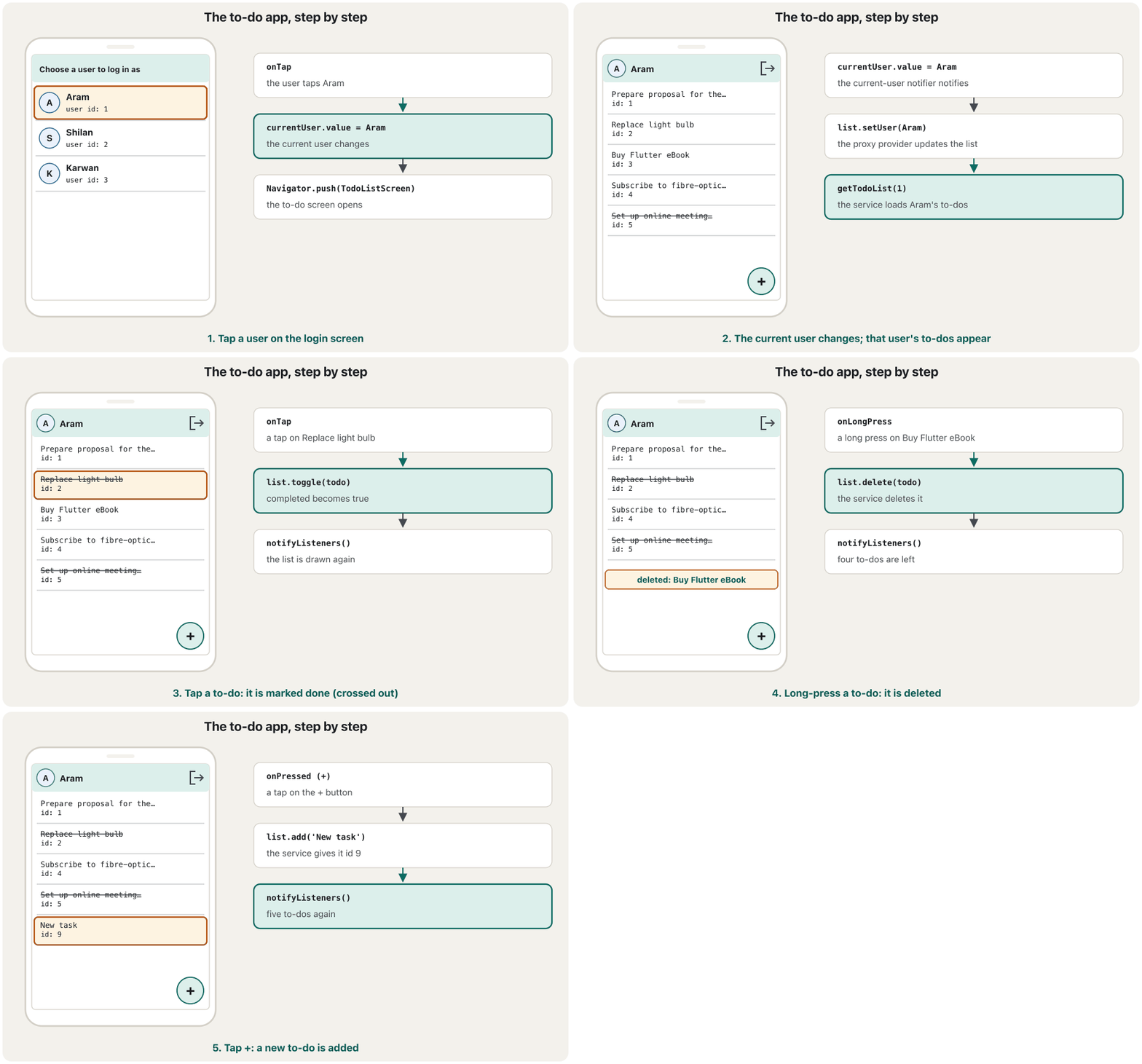
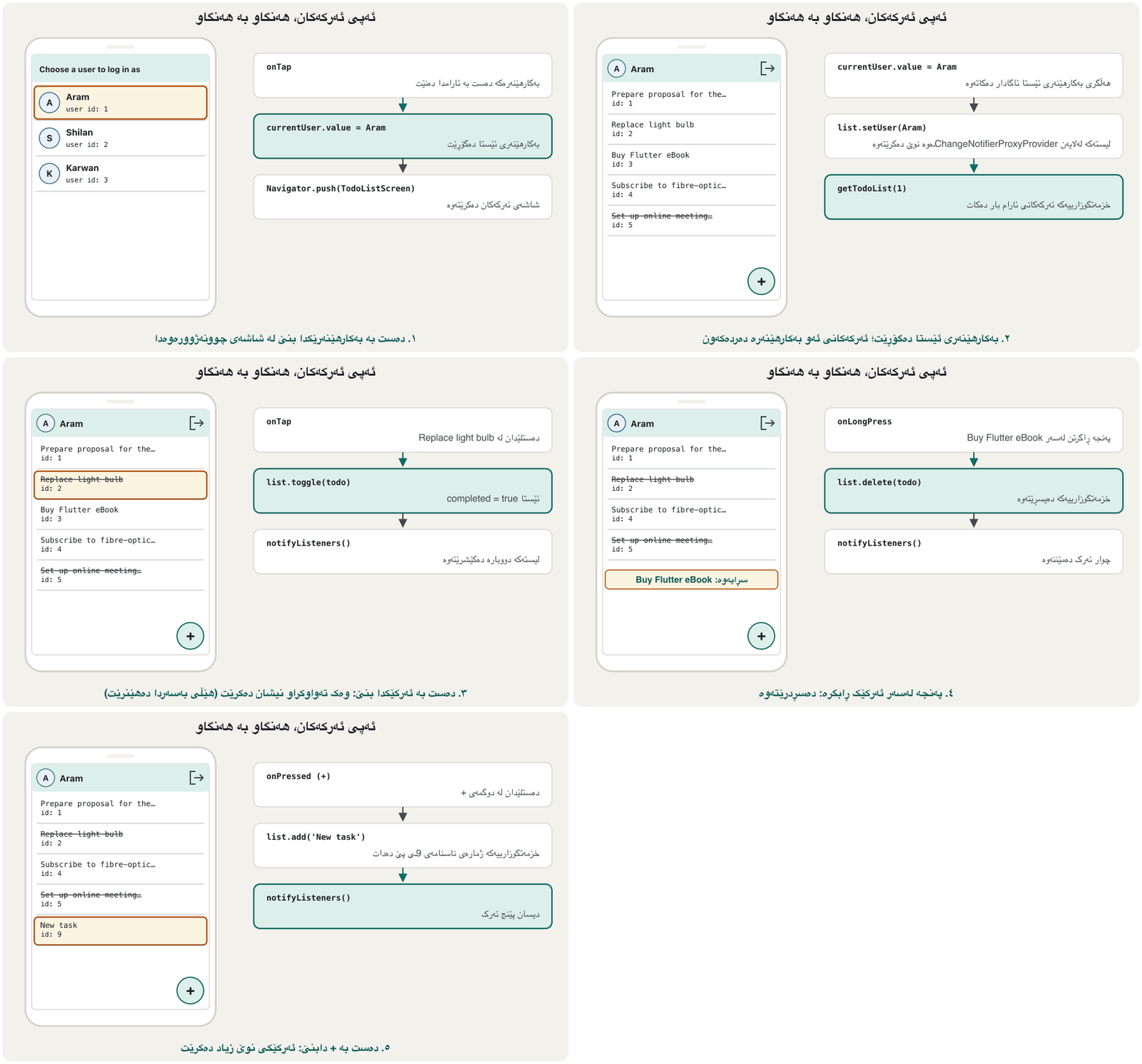
A widget test drove the real app the same way and printed what the screen showed after each step:
تاقیکردنەوەیەکی بە هەمان شێوە ڕاستەقینەکەی بەڕێوە برد و دوای هەر هەنگاوێک ئەوەی شاشەکە پیشانی دەدا چاپی کرد:
1 start:        spinner=true
2 users loaded: Aram | Shilan | Karwan
3 tap Aram:     app bar shows Aram=true
4 his to-dos:   Prepare proposal for the new project | Replace light bulb | Buy Flutter eBook | Subscribe to fibre-optic internet | Set up online meeting room (done)
5 tap:          Prepare proposal for the new project | Replace light bulb (done) | Buy Flutter eBook | Subscribe to fibre-optic internet | Set up online meeting room (done)
6 long-press:   Prepare proposal for the new project | Replace light bulb (done) | Subscribe to fibre-optic internet | Set up online meeting room (done)
7 tap +:        Prepare proposal for the new project | Replace light bulb (done) | Subscribe to fibre-optic internet | Set up online meeting room (done) | New task (new id 9)
8 log out:      back on "Choose a user to log in as"
9 tap Shilan:   New task | New task (done)
Step 9 shows the proxy provider at work: after logging out and choosing Shilan, setUser loaded her two to-dos, without any code in the screens that says “reload”.
هەنگاوی ٩ providerـی proxy لە کاتی کارکردندا پیشان دەدات: دوای و هەڵبژاردنی شیلان، setUser دوو ئەرکەکەی ئەوی بار کرد، بەبێ ئەوەی هیچ کۆدێک لە شاشەکاندا بڵێت «دووبارە بار بکەرەوە».
Next: the same app in MVVMداهاتوو: هەمان ئەپ بە MVVM
The next chapter rebuilds this very app with the MVVM architecture. The lecture's plan for it already looks different: the widget tree has only MaterialApp with LoginScreen and TodolistScreen, and a service locator holds a Rest Service (which talks to the database on the server) and two view models, UserViewmodel and TodoViewmodel. The providers above MaterialApp disappear; each screen gets its own. The details are in MVVM in Flutter with Provider.
بەشی داهاتوو هەر ئەم بە دووبارە دروست دەکاتەوە. پلانی وانەکە بۆی پێشتر جیاوازە: تەنها MaterialAppـی تێدایە لەگەڵ LoginScreen و TodolistScreen و Rest Serviceـێک هەڵدەگرێت (کە قسە لەگەڵ لەسەر دەکات) لەگەڵ دوو ، UserViewmodel و TodoViewmodel. providerـەکانی سەرووی MaterialApp نامێنن؛ هەر شاشەیەک providerـی خۆی وەردەگرێت. وردەکارییەکان لە MVVM لە Flutterـدا بە Providerـدان.
Common mistakesهەڵە باوەکان
| Mistakeهەڵە | What happensچی ڕوو دەدات | Fixچارەسەر |
|---|---|---|
ChangeNotifierProvider<User> with a plain User classChangeNotifierProvider<User> لەگەڵ Userـی ئاسایی | Does not compile: User is not a ChangeNotifiercompile نابێت: User ChangeNotifier نییە | Provide a ValueNotifier<User?> (or a notifier class that holds the user)ValueNotifier<User?> دابین بکە (یان ChangeNotifier کە هەڵدەگرێت) |
Changing a to-do in place (todo.completed = true)گۆڕینی ئەرکێک لە شوێنی خۆیدا (todo.completed = true) | With immutable models it does not compile; with mutable ones nobody is notifiedلەگەڵ compile نابێت؛ لەگەڵ گۆڕاوەکاندا کەس ئاگادار ناکرێتەوە | Replace it with copyWith(...) inside the notifier, then notifyListeners()لەناو ChangeNotifierـەکەدا بە copyWith(...) بیگۆڕەوە، پاشان notifyListeners() |
Creating TodoListNotifier(...) inside updateدروستکردنی TodoListNotifier(...) لەناو updateـدا | Every login builds a new list object; edits and listeners are lostهەموو لیستی نوێ دروست دەکات؛ دەستکاری و لەدەست دەچن | Create once in create; call setUser in updateیەک جار لە createـدا دروستی بکە؛ لە updateـدا setUser بانگ بکە |
context.watch inside onTap / onPressedcontext.watch لەناو onTap / onPressedـدا | Provider throws an error in debug modeprovider لە دۆخی debugـدا دروست دەکات | Use context.read in callbacksلە context.read بەکار بهێنە |
| Passwords in the sample data لە دراوە نموونەییەکاندا | Anyone with the app or the JSON can read themهەر کەسێک یان هەبێت دەتوانێت بیانخوێنێتەوە | Never store passwords in app data; use an authentication serviceهەرگیز لە دراوەی هەڵمەگرە؛ بەکار بهێنە |
Exercisesڕاهێنانەکان
Add the badge from the ProxyProvider lesson to the to-do screen: it must show how many to-dos are not completed for the current user. Which provider do you add, and where in the list?
نیشانەکەی وانەی ProxyProvider زیاد بکە بۆ شاشەی ئەرکەکان: دەبێت پیشان بدات چەند ئەرک تەواو نەکراون بۆ ئێستا. کام provider زیاد دەکەیت و لە کوێی لیستەکەدا؟
Show answerوەڵامەکە پیشان بدە
A ProxyProvider that reads the TodoListNotifier, listed after it:
ProxyProviderـێک کە TodoListNotifier دەخوێنێتەوە و دوای ئەو دەنووسرێت:
ProxyProvider<TodoListNotifier, int>(
  update: (context, list, previous) =>
      list.todos.where((t) => !t.completed).length,
),
In the app bar: Badge.count(count: context.watch<int>(), child: const Icon(Icons.checklist)). For Aram the badge shows 4 at first.
لە : Badge.count(count: context.watch<int>(), child: const Icon(Icons.checklist)). بۆ ئارام نیشانەکە سەرەتا ٤ پیشان دەدات.
The + button always adds “New task”. Change it so that it opens a dialog with a TextField and adds the typed title (ignore empty titles).
+ هەمیشە «New task» زیاد دەکات. بیگۆڕە بە شێوەیەک کە دیالۆگێک لەگەڵ TextFieldـێک بکاتەوە و ئەو ناونیشانەی نووسراوە زیاد بکات (ناونیشانی بەتاڵ پشتگوێ بخە).
Show answerوەڵامەکە پیشان بدە
Future<void> _addTodo(BuildContext context) async {
  final controller = TextEditingController();
  final title = await showDialog<String>(
    context: context,
    builder: (context) => AlertDialog(
      title: const Text('New to-do'),
      content: TextField(controller: controller, autofocus: true),
      actions: [
        TextButton(
          onPressed: () => Navigator.pop(context),
          child: const Text('Cancel'),
        ),
        FilledButton(
          onPressed: () => Navigator.pop(context, controller.text.trim()),
          child: const Text('Add'),
        ),
      ],
    ),
  );
  controller.dispose();
  if (title == null || title.isEmpty || !context.mounted) return;
  await context.read<TodoListNotifier>().add(title);
}
The notifier does not change at all: it already takes a title. Only the view asks the user for it. (Text fields are taught in Text fields and forms.)
ChangeNotifierـەکە هیچ ناگۆڕێت: پێشتر ناونیشانێک وەردەگرێت. تەنها شاشەکە داوای لە دەکات. ( لە خانەکانی دەق و فۆرمەکانـدا فێر دەکرێن.)
A long press deletes at once, which is easy to do by accident. Describe how to show a SnackBar “Deleted … UNDO” and put the to-do back if the user taps UNDO. Which class gets a new method?
پەنجە ڕاگرتن یەکسەر دەسڕێتەوە و ئەمە بە هەڵە ئاسان ڕوو دەدات. ڕوونی بکەرەوە چۆن SnackBarـێکی «Deleted … UNDO» پیشان بدەیت و ئەگەر دەستی لە UNDO دا ئەرکەکە بگەڕێنیتەوە. کام نوێ وەردەگرێت؟
Show answerوەڵامەکە پیشان بدە
- TodoListNotifier gets
restore(Todo todo). It cannot useadd, becauseaddTodogives a new id; so the service also getsrestoreTodo(Todo todo), which puts the same to-do (same id and title) back.restorecalls it, adds the to-do to_todosagain and notifies. - The screen keeps the deleted to-do in a local variable, calls
delete, then showsScaffoldMessenger.of(context).showSnackBar(SnackBar(content: Text('Deleted ${todo.title}'), action: SnackBarAction(label: 'UNDO', onPressed: () => list.restore(todo)))), wherelistiscontext.read<TodoListNotifier>(), read before the SnackBar is shown. - The rule (“a deleted to-do can come back”) lives in the notifier; the view only shows the message.
- TodoListNotifier
restore(Todo todo)وەردەگرێت. ناتوانێتaddبەکار بهێنێت، چونکەaddTodoژمارەی ناسنامەیەکی نوێ دەدات؛ بۆیەrestoreTodo(Todo todo)وەردەگرێت کە هەمان ئەرک (هەمان ژمارە و ناونیشان) دەگەڕێنێتەوە.restoreبانگی دەکات، ئەرکەکە دیسان دەخاتەوە ناو_todosو ئاگادار دەکاتەوە. - شاشەکە ئەرکە سڕاوەکە لە ناوخۆییدا هەڵدەگرێت،
deleteبانگ دەکات، پاشانScaffoldMessenger.of(context).showSnackBar(SnackBar(content: Text('Deleted ${todo.title}'), action: SnackBarAction(label: 'UNDO', onPressed: () => list.restore(todo))))پیشان دەدات، کە تێیداlistهەمانcontext.read<TodoListNotifier>()ـە و پێش پیشاندانی SnackBarـەکە خوێندراوەتەوە. - یاساکە («ئەرکێکی سڕاو دەتوانێت بگەڕێتەوە») لە ChangeNotifierـەکەدا دەژی؛ شاشەکە تەنها پەیامەکە پیشان دەدات.
Karwan has no to-dos. Write, in order, what happens in the providers and screens when the app starts and the user taps Karwan, then taps +.
کاروان هیچ ئەرکێکی نییە. بە ڕیز بنووسە چی لە providerـەکان و شاشەکاندا ڕوو دەدات کاتێک دەست پێ دەکات و دەست لە کاروان دەدات، پاشان دەست لە +.
Show answerوەڵامەکە پیشان بدە
The FutureProvider starts
getUserList(); LoginAsScreen watches[]and shows a spinner.FutureProvider
getUserList()دەست پێ دەکات؛ LoginAsScreen[]watch دەکات و بازنەی چاوەڕوانی پیشان دەدات.After 0.5 s the three users arrive; the screen rebuilds with three ListTiles.
دوای ٠٫٥ چرکە سێ دەگەن؛ شاشەکە بە سێ ListTile دووبارە دروست دەکرێتەوە.
Tap Karwan:
ValueNotifier<User?>.value = Karwannotifies; TodoListScreen is pushed.دەستلێدان لە کاروان:
ValueNotifier<User?>.value = Karwanئاگادار دەکاتەوە؛ TodoListScreen دەکرێتەوە.The proxy's
updatecallssetUser(Karwan): loading = true,getTodoList(3)starts; the screen shows a spinner.updateـی proxyـەکەsetUser(Karwan)بانگ دەکات:loading = true،getTodoList(3)دەست پێ دەکات؛ شاشەکە بازنەی چاوەڕوانی پیشان دەدات.After 0.5 s an empty list arrives; loading = false; the list is empty.
دوای ٠٫٥ چرکە لیستێکی بەتاڵ دەگات؛
loading = false؛ لیستەکە بەتاڵە.Tap +:
add('New task')gets id 9 from the service, notifies, and one row appears.دەستلێدان لە +:
add('New task')ژمارەی 9 لە وەردەگرێت، ئاگادار دەکاتەوە و یەک دێڕ دەردەکەوێت.
Summaryپوختە
- The lecture's demo has a login-as screen and a to-do screen (log out, tap to toggle, long-press to delete, + to add).
- The data is two collections (users, todos) described by small immutable model classes; samples use neutral users and never passwords.
- Three providers above MaterialApp: FutureProvider<List<User>> (loaded once), ChangeNotifierProvider<ValueNotifier<User?>> (the current user), ChangeNotifierProxyProvider for the TodoListNotifier (follows the current user).
- Screens watch to show and read to act; all rules about the list live in the notifier, which ends every change with
notifyListeners(). - Next, the same app is rebuilt in MVVM with view models in a service locator.
- نموونەکەی وانەکە شاشەیەکی وەک و شاشەیەکی ئەرکەکانی هەیە (، دەستلێدان بۆ گۆڕین، پەنجە ڕاگرتن بۆ سڕینەوە، + بۆ زیادکردن).
- دراوەکە دوو کۆمەڵەیە (، ئەرکەکان) کە بچووک و وەسفیان دەکەن؛ نموونەکان بێلایەن بەکار دەهێنن و هەرگیز نا.
- سێ provider لە سەرووی MaterialAppـەوە:
FutureProvider<List<User>>(یەک جار بار دەکرێت)،ChangeNotifierProvider<ValueNotifier<User?>>( ئێستا)، ChangeNotifierProxyProvider بۆ TodoListNotifier (شوێنی ئێستا دەکەوێت). - شاشەکان بۆ پیشاندان watch دەکەن و بۆ کارکردن read دەکەن؛ هەموو یاساکانی لیستەکە لە ChangeNotifierـەکەدا دەژین کە هەموو گۆڕانێک بە
notifyListeners()کۆتایی پێ دەهێنێت. - دواتر، هەمان بە دووبارە دروست دەکرێتەوە لەگەڵ لە .
Lesson complete!وانەکە تەواو بوو!
Well done. Review the key terms, then go on to the next lesson.دەستخۆش. سەیرێکی زاراوە سەرەکییەکان بکەرەوە، پاشان بڕۆ بۆ وانەی داهاتوو.
Key termsزاراوە سەرەکییەکان
MVVM in Flutter with ProviderMVVM لە Flutterـدا بە Provider
Related lecturesوانە پەیوەندیدارەکان
References and further readingسەرچاوەکان و خوێندنەوەی زیاتر
This lecture is a first edition. The Kurdish text and terminology are waiting for review by Kurdish IT teachers.ئەم وانەیە چاپی یەکەمە. دەقە کوردییەکە و زاراوەکانی چاوەڕێی پێداچوونەوەی مامۆستایانی کوردی بواری IT ن.