Chapterبەش 3 · Lectureوانە 3.4
App State and Declarative UIدۆخ و ڕووکاری وەسفی
What app state is, local versus app-wide state, how state management keeps data and screen in sync, and why modern toolkits draw the UI from the state () instead of editing it by hand. Technology-free, with pseudocode and examples from Android, iOS, the web and Flutter.
چییە، بەرامبەر ، چۆن و شاشە هاوڕێک ڕادەگرێت و بۆچی ئامرازە نوێیەکان لە دەکێشن () لە جیاتی دەستکاریکردنی بە دەست. بێ پەیوەندی بە یەک تەکنەلۆجیاوە، بە و نموونە لە Android، iOS، وێب و .
What you will learnچی فێر دەبیت
- Define app state, both widely and as the data needed to redraw the UI.
- Sort state into local (ephemeral) and app-wide (shared) by asking who needs it.
- Explain state management as keeping data and UI in sync, and say where state changes come from.
- Compare the imperative and declarative approaches with pseudocode, and explain .
- Describe one-way data flow: state down, events up, one owner.
- پێناسە بکەیت، هەم بە واتا فراوانەکەی و هەم وەک ئەو بۆ دووبارە کێشانەوەی پێویستە.
- بە پرسیاری «کێ پێویستی پێیەتی؟» بکەیتە و .
- وەک هاوڕێک ڕاگرتنی و ڕوون بکەیتەوە و بڵێیت گۆڕانی لە کوێوە دێت.
- و بە بەراورد بکەیت و ڕوون بکەیتەوە.
- ڕۆیشتنی یەکئاراستەی وەسف بکەیت: بۆ خوارەوە، بۆ سەرەوە، یەک خاوەن.
What does an app remember?ئەپ چی لە بیر دەمێنێت؟
Open any app and look at its screen: the number of unread messages, the text you are typing, the part of the app you chose, the name of the person who is logged in. While the app runs, it must keep all of this somewhere. That remembered data is the app's state.
هەر بکەرەوە و سەیری شاشەکەی بکە: ژمارەی نامە نەخوێندراوەکان، ئەو دەقەی خەریکی نووسینیت، ئەو بەشەی کە هەڵتبژاردووە و ناوی ئەو کەسەی چووەتە ژوورەوە. لە کاتی کارکردندا دەبێت هەموو ئەمانە لە شوێنێکدا هەڵبگرێت. ئەو بەم شێوەیە هەڵدەگیرێت، .
This lesson answers three questions. What exactly is state? How does the screen stay in step with it? And why do modern UI toolkits draw the screen again from the state, instead of editing it piece by piece?
ئەم وانەیە وەڵامی سێ پرسیار دەداتەوە: بە ڕاستی چییە؟ شاشەکە چۆن لەگەڵیدا هاوڕێک دەمێنێتەوە؟ بۆچی ئامرازە نوێیەکانی شاشەکە لە دووبارە دەکێشنەوە لە جیاتی ئەوەی پارچە پارچە دەستکاری بکەن؟
These ideas are the same whatever technology you use: Flutter, Jetpack Compose on Android, SwiftUI on iOS, React on the web, and others. So this lesson uses pictures, everyday examples and pseudocode (program steps written in plain words), not the code of one language.
ئەم بیرۆکانە هەر تەکنەلۆجیایەک بەکاربهێنیت وەک یەکن: ، Jetpack Compose لەسەر Android، SwiftUI لەسەر iOS، React لەسەر وێب و هی تر. بۆیە ئەم وانەیە وێنە، نموونەی ڕۆژانە و (هەنگاوەکانی بە وشەی ئاسایی) بەکار دەهێنێت، نەک کۆدی یەک زمان.
What is state?دۆخ چییە؟
The lecture gives a wide definition: state is everything that exists in memory while the app is running. That includes the app's assets (such as pictures and fonts), all the variables the app keeps, the current position of every animation, and the textures (images loaded for drawing).
وانەکە پێناسەیەکی فراوان دەدات: هەموو ئەو شتانەیە کە لە کاتی کارکردنی لە هەن. ئەمە (وەک وێنە و )، هەموو ئەو هەڵیان دەگرێت، شوێنی ئێستای هەموو و ئەو وێنانەی بۆ کێشان بارکراون (texture) دەگرێتەوە.
That is true, but it is too wide to help you design an app. A more useful definition is: state is the data you need to draw the UI again at any moment. Imagine the screen disappears and must be rebuilt from nothing. The values you would need to get back exactly the same screen are its state.
ئەمە ڕاستە، بەڵام زۆر فراوانە و یارمەتیت نادات لە دیزاینکردنی . پێناسەیەکی بەسوودتر ئەمەیە: ئەو کە لە هەر ساتێکدا بۆ دووبارە کێشانەوەی پێویستت پێیەتی. وێنا بکە شاشەکە ون دەبێت و دەبێت لە سفرەوە دروست بکرێتەوە. ئەو بەهایانەی بۆ گەڕاندنەوەی هەمان شاشە پێویستن، ئەو شاشەیەن.
All the data an app keeps in while it runs that decides what the screen shows: the text typed so far, the selected tab, the logged-in user, a counter's value. When the state changes, the UI must change with it.
هەموو ئەو کە ئەپێک لە کاتی کارکردندا لە هەڵیدەگرێت و دیاری دەکەن شاشەکە چی پیشان بدات: ئەو دەقەی تا ئێستا نووسراوە، تابی هەڵبژێردراو، ئەو چووەتە ژوورەوە، نرخی ژمێرەرێک. کاتێک دۆخەکە دەگۆڕێت، ڕووکارەکەش دەبێت لەگەڵیدا بگۆڕێت.
- the list of tasks;
- which tasks are done;
- the text already typed in the "new task" box;
- which filter (All or Done) is selected.
- لیستی ئەرکەکان؛
- کام ئەرکانە تەواو بوون؛
- ئەو دەقەی پێشتر لە خانەی «ئەرکی نوێ» نووسراوە؛
- کام فلتەر (All یان Done) هەڵبژێردراوە.
State is the data a program remembers while it runs, and the screen must change when that data changes.
ئەو کە لە کاتی کارکردندا هەڵیدەگرێت؛ کاتێک ئەو دەگۆڕێت، دەبێت شاشەکەش بگۆڕێت.
Whole video: what state means in programming.
هەموو ڤیدیۆکە: لە واتە چی.
Two kinds: local and app-wideدوو جۆر: ناوخۆیی و هاوبەش
Not all state is equal. To sort it, ask one question: who needs this data? In every UI framework the answer splits state into two kinds.
هەموو وەک یەک نییە. بۆ ڕیزکردنی، یەک پرسیار بکە: کێ پێویستی بەم هەیە؟ لە هەموو وەڵامەکە دەکاتە دوو جۆر.
State that only one part of the screen needs, such as whether a box is ticked or which tab is open, so it is kept inside that part. Flutter calls it ephemeral state.
ئەو کە تەنها بەشێکی شاشەکە پێویستی پێیەتی، وەک ئەوەی نیشانە کراوە یان کام تاب کراوەیە، بۆیە لە ناو ئەو بەشەدا هەڵدەگیرێت. پێی دەڵێت ephemeral state (دۆخی کاتی).
Also called ephemeral state or UI state. One part of the screen needs it; nothing else reads it.
هەروەها پێی دەوترێت کاتی یان ڕووکار. تەنها بەشێکی شاشەکە پێویستی پێیەتی و هیچ شتێکی تر نایخوێنێتەوە.
State that many parts of an app need, such as the logged-in user, the shopping cart or the chosen language. It is kept above all the screens that use it, often with a tool.
ئەو کە چەندین بەشی ئەپێک پێویستیان پێیەتی، وەک ئەو چووەتە ژوورەوە، سەبەتەی کڕین یان زمانی هەڵبژێردراو. لە سەرووی هەموو ئەو شاشانەوە هەڵدەگیرێت کە بەکاری دەهێنن، زۆرجار بە ئامرازێکی .
Also called app state or application state. Many parts or screens of the app need it, and it is often kept between uses of the app.
هەروەها پێی دەوترێت . زۆر بەش یان شاشەی پێویستیان پێیەتی و زۆرجار لە نێوان جارەکانی بەکارهێناندا هەڵدەگیرێت.
State changes over timeدۆخ لەگەڵ کاتدا دەگۆڕێت
State is not fixed. It changes again and again while the app is used, for two kinds of reasons:
نەگۆڕ نییە. لە کاتی بەکارهێنانی جار لە دوای جار دەگۆڕێت، بە دوو جۆر هۆکار:
- User interactions: the user taps a button, types a letter, swipes a page or turns the phone.
- Backend interactions: a server answers a request, a new message arrives, a download finishes, a timer fires.
- : پەنجە لە دەدات، پیتێک دەنووسێت، لاپەڕەیەک دەخشێنێت یان مۆبایلەکە دەسووڕێنێت.
- لەگەڵ لایەنی پشتەوە: وەڵامی دەداتەوە، نامەیەکی نوێ دێت، تەواو دەبێت، کاتژمێرێکی دیاریکراو دەگاتە کۆتایی.
Take the lecture's example: the classic counter app. It shows a number and a + button. Each tap on + adds one to the counter. This change happens in memory: a variable goes from 0 to 1. But memory is invisible. If nothing else happens, the screen still says 0. The state change must also be shown in the UI.
نموونەکەی وانەکە وەربگرە: کە زۆر ناسراوە. ژمارەیەک و + پیشان دەدات. هەر پەنجەلێدانێک لە + یەک بۆ زیاد دەکات. ئەم گۆڕانە لە ڕوو دەدات: لە 0ەوە دەبێتە 1. بەڵام نابینرێت. ئەگەر هیچ شتێکی تر ڕوو نەدات، شاشەکە هێشتا دەڵێت 0. گۆڕانی دەبێت لە پیشان بدرێت.
State management: keeping data and screen in syncبەڕێوەبردنی دۆخ: دراوە و شاشە هاوڕێک ڕابگرە
Keeping an app's and its UI in step: storing the state in the right place, changing it in one clear way and redrawing every part of the screen that depends on it.
هاوئاهەنگ ڕاگرتنی و ڕووکاری ئەپێکە: هەڵگرتنی دۆخەکە لە شوێنی گونجاودا، گۆڕینی بە یەک ڕێگای ڕوون و دووبارە کێشانەوەی هەموو ئەو بەشانەی شاشە کە پشتی پێ دەبەستن.
The lecture puts it in one line: state management makes sure the UI reflects every state change, so the app's data and its UI stay in sync.
وانەکە لە یەک دێڕدا دەیڵێت: دڵنیا دەبێتەوە کە هەموو گۆڕانێکی پیشان دەدات، بۆ ئەوەی و هاوڕێک بمێننەوە.
When this goes wrong, the user sees it at once. A shop app shows 2 on the cart badge while the cart really holds 3 items. A "Send" button stays grey after the message box is filled. The data changed, but some part of the screen did not.
کاتێک ئەمە بە هەڵەدا دەچێت، یەکسەر دەیبینێت. کڕین 2 لەسەر نیشانەی سەبەتە پیشان دەدات، لە کاتێکدا سەبەتەکە بە ڕاستی 3 کاڵای تێدایە. «Send» دوای پڕکردنەوەی خانەی نامەکە هەر بە خۆڵەمێشی دەمێنێتەوە. گۆڕا، بەڵام بەشێک لە شاشەکە نەگۆڕا.
So every UI technology must answer two questions: where does the state live, and how does the screen find out that it changed? For the second question there are two big approaches: imperative and declarative. The next screens compare them.
بۆیە هەموو تەکنەلۆجیایەکی دەبێت وەڵامی دوو پرسیار بداتەوە: لە کوێ دەژی؟ و شاشەکە چۆن دەزانێت کە گۆڕاوە؟ بۆ پرسیاری دووەم دوو ڕێگای گەورە هەیە: و . شاشەکانی داهاتوو بەراوردیان دەکەن.
The imperative way: find it, change itڕووکاری فەرمانی: بیدۆزەرەوە و بیگۆڕە
A way of building the user interface in which the code finds a part of the screen and changes it step by step, for example label.setText('4'). Classic Android views, UIKit and the web DOM work this way.
شێوازێکی دروستکردنی ڕووکاری بەکارهێنەرە کە تێیدا کۆدەکە بەشێکی شاشەکە دەدۆزێتەوە و هەنگاو بە هەنگاو دەیگۆڕێت، بۆ نموونە label.setText('4'). viewـە کۆنەکانی Android، UIKit و DOMـی وێب بەم شێوەیە کار دەکەن.
In the imperative approach the screen is built once. After that, you change it by hand every time the state changes. The lecture calls it "the approach you are most familiar with": it is how most programmers first learn to make a UI.
لە شاشەکە یەک جار دروست دەکرێت. دوای ئەوە تۆ هەموو جارێک کە دەگۆڕێت، بە دەست دەیگۆڕیت. وانەکە پێی دەڵێت «ئەو ڕێگایەی زیاتر پێی ئاشنایت»: زۆربەی یەکەم جار بەم شێوەیە فێری دروستکردنی دەبن.
- Find the componentپێکهاتەی ڕووکارەکە بدۆزەرەوە
Determine which UI component must change, and get hold of it (for example, the text that shows the number).
دیاری بکە کام دەبێت بگۆڕێت و دەستی پێ بگە (بۆ نموونە ئەو دەقەی ژمارەکە پیشان دەدات).
- Change itبیگۆڕە
Call methods on that component to change it: set its text, its colour, whether it is visible.
لەسەر ئەو بانگ بکە بۆ گۆڕینی: دەقەکەی، ڕەنگەکەی، یان ئەوەی دیار بێت یان نا.
This works because the components are mutable: each one stores its own text, colour and size, and those values can be changed after the component is made.
ئەمە کار دەکات چونکە : هەر یەکەیان دەق، ڕەنگ و قەبارەی خۆی هەڵدەگرێت و ئەو بەهایانە دوای دروستکردنی دەگۆڕدرێن.
The imperative way: find it, change itڕووکاری فەرمانی: بیدۆزەرەوە و بیگۆڕە
Imperative code, step by stepکۆدی فەرمانی، هەنگاو بە هەنگاو
// imperative pseudocode: runs when + is tapped
count = count + 1

countText = screen.find("countText")   // step 1: find the component
countText.setText(toString(count))     // step 2: change it
Explain the codeڕوونکردنەوەی کۆدەکە
- Lineدێڕی 3
Step 1: get the existing text component from the screen.
هەنگاوی ١: ئەو دەقەکە پیشان دەدات، لە شاشەکەوە وەربگرە.
- Lineدێڕی 4
Step 2: change its text by hand. If you forget this line, the screen keeps the old number.
هەنگاوی ٢: دەقەکەی بە دەست بگۆڕە. ئەگەر ئەم دێڕە لە بیر بکەیت، شاشەکە ژمارە کۆنەکە دەهێڵێتەوە.
The lecture's examples are classic Windows programming, web programming and Android and iOS programming. In each one the steps look the same: a web page changed with JavaScript finds an element and sets its text; an Android app built with Views finds a view by its id and calls setText; an iOS app built with UIKit sets label.text.
نموونەکانی وانەکە کلاسیکی Windows، وێب و Android و iOSـن. لە هەموویاندا هەنگاوەکان وەک یەکن: لە کە بە JavaScript دەگۆڕدرێت، کۆدەکە دەدۆزێتەوە و دەقەکەی دادەنێت؛ Android کە بە Views دروست کراوە، viewـێک بە idـەکەی دەدۆزێتەوە و setText بانگ دەکات؛ iOS کە بە UIKit دروست کراوە، label.text دادەنێت.
The imperative way is like lighting a house for guests by walking from room to room and flipping each switch yourself: lamp 1 on, lamp 2 off, lamp 3 on. You must remember every lamp and its order. Miss one, and that room stays dark.
وەک ئەوە وایە بۆ هاتنی میوان ماڵ ڕووناک بکەیتەوە بەوەی ژوور بە ژوور بڕۆیت و خۆت هەر بگۆڕیت: گڵۆپی ١ هەڵبکە، گڵۆپی ٢ بکوژێنەوە، گڵۆپی ٣ هەڵبکە. دەبێت هەموو گڵۆپێک و ڕیزبەندییەکەی لە بیر بێت. ئەگەر یەکێکیان لە بیر بچێت، ئەو ژوورە تاریک دەمێنێتەوە.
Where the analogy stops workingسنووری ئەم نموونەیە
The analogy shows the work, not the speed: a computer flips its "switches" in microseconds. The real cost is remembering every place by hand.
ئەم بەراوردە کارەکە پیشان دەدات، نەک خێرایی: «سویچەکانی» لە چرکەیەکی زۆر کورتدا دەگۆڕێت. تێچووی ڕاستەقینە لە بیرکردنی هەموو شوێنێکە بە دەست.
The imperative way: find it, change itڕووکاری فەرمانی: بیدۆزەرەوە و بیگۆڕە
Why the imperative way gets hardبۆچی ڕووکاری فەرمانی قورس دەبێت
For one counter, the imperative way is easy. Real apps show the same data in many places and have many states. Then hand-written updates start to go wrong:
بۆ یەک ، ئاسانە. بەڵام ڕاستەقینە هەمان لە زۆر شوێندا پیشان دەدات و زۆر هەیە. ئەو کاتە نوێکردنەوەی دەستی دەست دەکات بە هەڵەکردن:
- A forgotten place. The cart count appears on three screens; one update line is missing, so one screen shows an old number.
- Impossible screens. Two updates run in the wrong order, and the user sees a loading spinner and an error message at the same time.
- Changing something that is gone. The code updates a component that was already removed from the screen.
- Too many paths. With many states, you must write code for every move from one state to another, and every new feature touches the old update code.
- شوێنێکی لەبیرکراو. ژمارەی سەبەتە لەسەر سێ شاشە دەردەکەوێت؛ دێڕێکی نوێکردنەوە کەمە، بۆیە شاشەیەک ژمارەیەکی کۆن پیشان دەدات.
- شاشەی نەگونجاو. دوو نوێکردنەوە بە ڕیزبەندیی هەڵە جێبەجێ دەبن و لە یەک کاتدا هێمای چاوەڕوانی و پەیامی هەڵە پێکەوە دەبینێت.
- گۆڕینی شتێک کە نەماوە. کۆدەکە نوێ دەکاتەوە کە پێشتر لە شاشەکە لابراوە.
- ڕێگای زۆر. کاتێک زۆرە، دەبێت بۆ هەموو گواستنەوەیەک لە بۆ تر کۆد بنووسیت و هەر تایبەتمەندییەکی نوێ دەست لە کۆدە کۆنەکانی نوێکردنەوە دەدات.
The declarative way: describe the screen for the stateڕووکاری وەسفی: شاشەکە بۆ دۆخ وەسف بکە
A way of building the user interface in which the code describes what the screen should look like for the current , and the works out how to change it. When the state changes, the UI is built again: . Flutter, Jetpack Compose, SwiftUI and React work this way.
شێوازێکی دروستکردنی ڕووکاری بەکارهێنەرە کە تێیدا کۆدەکە وەسفی ئەوە دەکات شاشەکە بۆ ئێستا چۆن بێت و خۆی بڕیار دەدات چۆن بیگۆڕێت. کاتێک دۆخەکە دەگۆڕێت، ڕووکارەکە دووبارە دروست دەکرێتەوە: . ، Jetpack Compose، SwiftUI و React بەم شێوەیە کار دەکەن.
In the declarative approach your code says what the UI should look like for a given state. It does not list the steps to change the screen. When the state changes, the framework runs your description again and works out how to update the screen.
لە کۆدەکەت دەڵێت بۆ دیاریکراو دەبێت چۆن دەربکەوێت. هەنگاوەکانی گۆڕینی شاشەکە ڕیز ناکات. کاتێک دەگۆڕێت، وەسفەکەت دووبارە جێبەجێ دەکات و خۆی دەزانێت شاشەکە چۆن نوێ بکاتەوە.
The UI is the result of a function f applied to the state. Here f is your UI code (the part that describes the screen) and the state is the app's data. Give f a new state, and you get the new screen.
ئەنجامی بە ناوی f کە لەسەر جێبەجێ دەکرێت. لێرەدا f کۆدی (ئەو بەشەی شاشەکە وەسف دەکات) و . نوێ بدە بە f، شاشە نوێیەکە وەردەگریت.
// declarative pseudocode
describe screen(state):
    show TopBar(title: "Counter", badge: state.count)
    show Text("Taps: " + state.count)
    show Button("+", onTap: increment)

increment():
    state.count = state.count + 1   // change only the state
    // the framework calls screen(state) again
    // and updates the parts that changed
Explain the codeڕوونکردنەوەی کۆدەکە
- Lineدێڕی 2-5
The description of the whole screen for any state. Both the badge and the text read the same
state.count.وەسفی هەموو شاشەکە بۆ هەر . نیشانەکە و دەقەکە هەردووکیان هەمان
state.countدەخوێننەوە.- Lineدێڕی 8
The event handler changes the state and nothing else. It never touches the screen.
دەستگیرەی تەنها دەگۆڕێت. هەرگیز دەست لە شاشەکە نادات.
There is only one code path for the screen: the same description draws the first screen and every later screen. You never write separate "update" code, so you cannot forget a place. The components in the description are immutable: instead of editing an old one, the framework gets a fresh description and compares it with the last one.
تەنها یەک ڕێڕەوی کۆد بۆ شاشەکە هەیە: هەمان وەسف یەکەم شاشە و هەموو شاشەکانی دواتر دەکێشێت. هەرگیز کۆدی «نوێکردنەوە»ی جیا نانووسیت، بۆیە ناتوانیت شوێنێک لە بیر بکەیت. پێکهاتەکانی ناو وەسفەکە : لە جیاتی دەستکاریکردنی کۆنەکە، وەسفێکی نوێ وەردەگرێت و لەگەڵ دوایین وەسفدا بەراوردی دەکات.
Imperative code lists the steps (how); declarative code describes the result you want (what), with an everyday restaurant example.
کۆدی فەرمانی (imperative) هەنگاوەکان یەک بە یەک دەڵێت (چۆن)؛ کۆدی وەسفی (declarative) ئەو ئەنجامە وەسف دەکات کە دەتەوێت (چی)، بە نموونەیەکی ڕۆژانەی چێشتخانە.
Whole video: imperative (how) versus declarative (what).
هەموو ڤیدیۆکە: شێوازی فەرمانی (چۆن) بەرامبەر شێوازی وەسفی (چی).
An everyday picture: the scoreboardوێنەیەکی ڕۆژانە: تابلۆی ئەنجام
An old stadium has a manual scoreboard. After each goal, someone shouts to the worker on the board: "take down the 1 on the home side, hang a 2". The worker changes exactly what he is told. If nobody tells him about the second goal, the board stays wrong. That is imperative. A new stadium has an electronic board connected to the referee's match record. Nobody gives it instructions. Whenever the record changes, the board simply shows what the record says now: Home 2 – Away 1, 67'. That is declarative: the record is the state, and the board is drawn from it.
یاریگایەکی کۆن تابلۆیەکی ئەنجامی دەستی هەیە. دوای هەر گۆڵێک، کەسێک بانگ لە کرێکارەکەی سەر تابلۆکە دەکات: «١ـی لای خاوەن یاریگا لاببە و ٢ هەڵبواسە». کرێکارەکە تەنها ئەوە دەگۆڕێت کە پێی دەوترێت. ئەگەر کەس باسی گۆڵی دووەمی بۆ نەکات، تابلۆکە هەڵە دەمێنێتەوە. ئەمە . یاریگایەکی نوێ تابلۆیەکی ئەلیکترۆنی هەیە کە بە تۆماری یارییەکەی دادوەرەوە بەستراوە. کەس فەرمانی پێ نادات. هەر کاتێک تۆمارەکە بگۆڕێت، تابلۆکە تەنها ئەوە پیشان دەدات کە ئێستا لە تۆمارەکەدا هەیە: خاوەن یاریگا ٢ – میوان ١، خولەکی ٦٧. ئەمە : تۆمارەکە و تابلۆکە لێیەوە دەکێشرێت.
Where the analogy stops workingسنووری ئەم نموونەیە
A real declarative framework does not repaint everything blindly. It compares the new description with the old one and changes only the parts that differ, so it is fast. Also, the analogy needs one match record: if two notebooks disagree, no board can know the right score. Apps have the same rule: each piece of state needs one owner.
وەسفیی ڕاستەقینە هەموو شتێک بە کوێرانە دووبارە ناکێشێتەوە. وەسفە نوێیەکە لەگەڵ کۆنەکەدا بەراورد دەکات و تەنها ئەو بەشانە دەگۆڕێت کە جیاوازن، بۆیە خێرایە. هەروەها بەراوردەکە پێویستی بە یەک تۆماری یاری هەیە: ئەگەر دوو دەفتەر جیاواز بن، هیچ تابلۆیەک ناتوانێت ئەنجامی ڕاست بزانێت. هەمان یاسایان هەیە: هەر پارچەیەکی پێویستی بە یەک خاوەن هەیە.
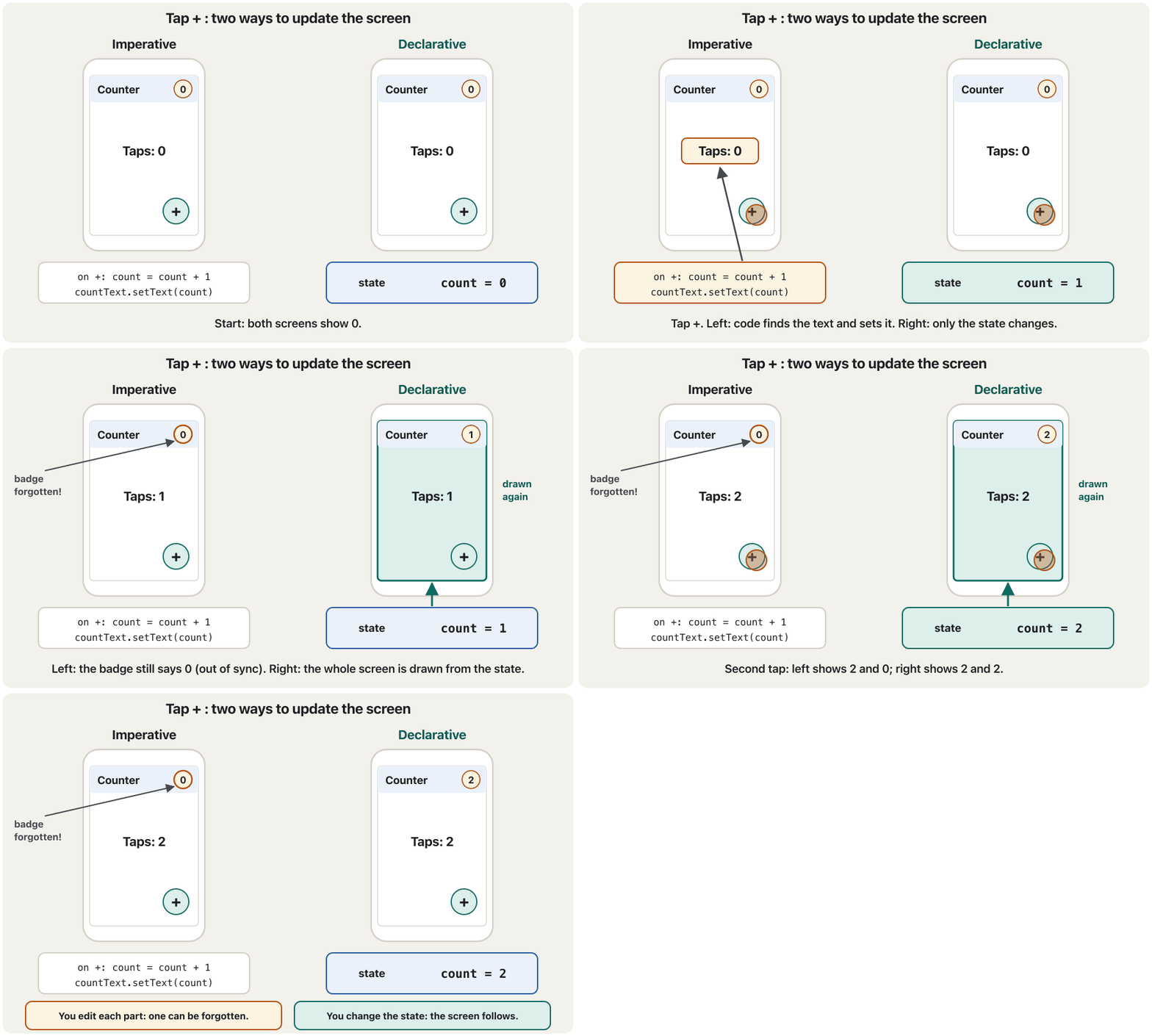
The same counter, both waysهەمان ژمێرەر، بە هەردوو ڕێگا
Here is one counter app built twice. Its top bar has a small badge with the count, and its body says how many times + was tapped. In the imperative version, the + code updates the body text but forgets the badge. Watch what happens after each tap:
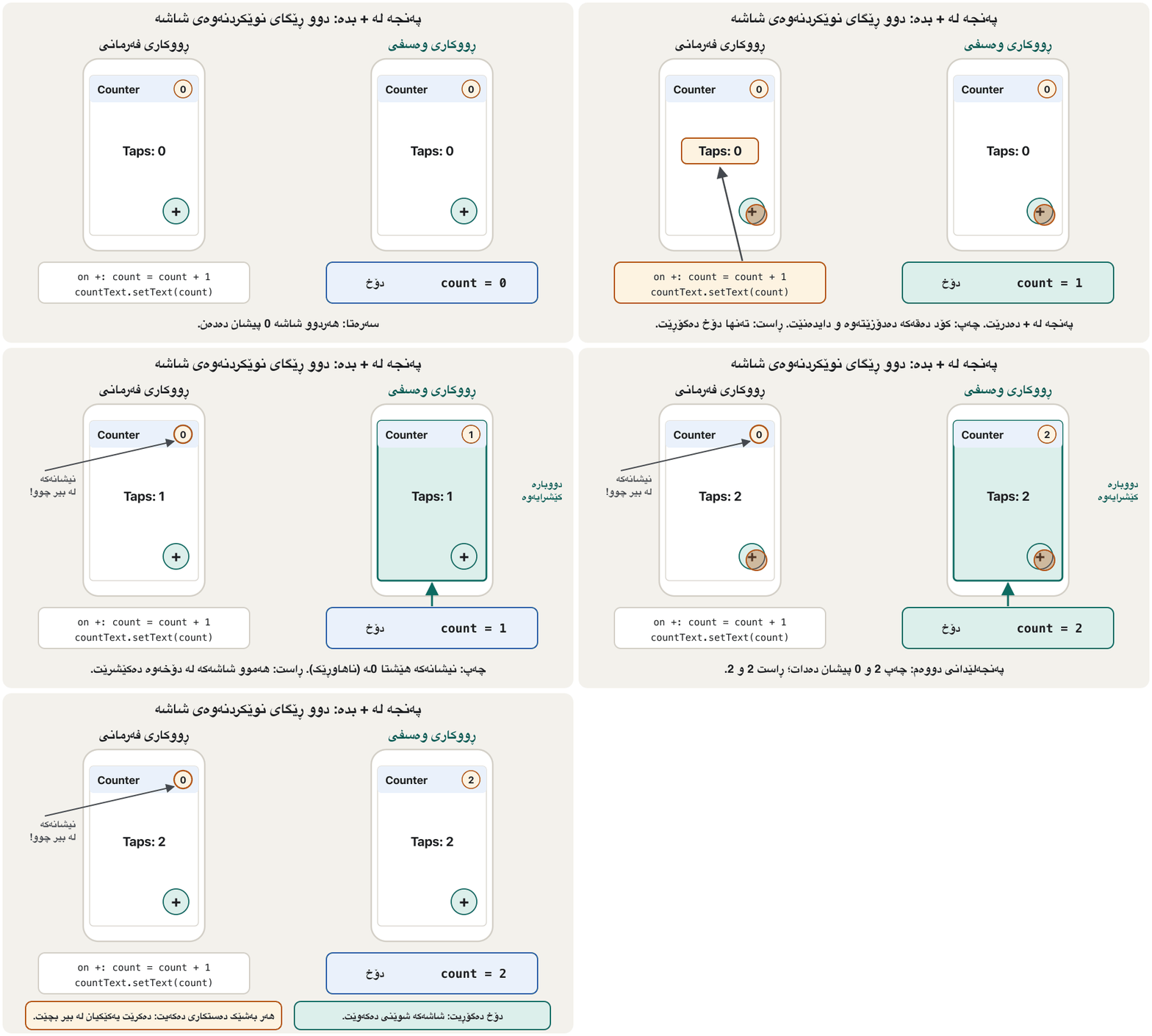
ئەمە یەک کە دوو جار دروست کراوە. شریتی سەرەوەی نیشانەیەکی بچووکی ژمارەکەی تێدایە و ناوەڕاستەکەی دەڵێت + چەند جار لێدراوە. لە وەشانی فەرمانیدا، کۆدی + دەقی ناوەڕاستەکە نوێ دەکاتەوە بەڵام نیشانەکە لە بیر دەکات. سەیر بکە دوای هەر پەنجەلێدانێک چی ڕوو دەدات:
| Aspectلایەن | Imperative | Declarative |
|---|---|---|
| What you writeئەوەی دەینووسیت | Steps that change the screenهەنگاوەکانی گۆڕینی شاشە | What the screen looks like for a stateشاشە بۆ چۆن دەردەکەوێت |
| UI components | Mutable objects you edit کە دەستکارییان دەکەیت | Immutable descriptions, made againوەسفی کە دووبارە دروست دەکرێنەوە |
| Who updates the screen?کێ شاشەکە نوێ دەکاتەوە؟ | Your code, place by placeکۆدەکەت، شوێن بە شوێن | The framework, from the new state، لە نوێیەکەوە |
| Risk of out-of-sync screensمەترسیی شاشەی ناهاوڕێک | High: one missed line is enoughزۆر: یەک دێڕی لەبیرکراو بەسە | Low: one code path for every stateکەم: یەک ڕێڕەوی کۆد بۆ هەموو |
Who uses the declarative way?کێ ڕووکاری وەسفی بەکار دەهێنێت؟
The lecture names React.js, Vue.js and Flutter as reactive UI frameworks that use the declarative approach. Since then, the two big mobile platforms have moved the same way. Each has an older imperative toolkit, still found in many apps, and a newer declarative one that its maker now recommends:
وانەکە React.js، Vue.js و وەک کاردانەوەیی ناو دەبات کە بەکار دەهێنن. لەو کاتەوە هەردوو گەورەکەی مۆبایلیش هەمان ڕێگایان گرتووە. هەر یەکەیان ئامرازێکی کۆنی فەرمانی هەیە کە هێشتا لە زۆر هەیە و ئامرازێکی نوێی وەسفی هەیە کە ئێستا دروستکەرەکەی پێشنیاری دەکات:
| Whereلە کوێ | Older imperative toolkitئامرازی کۆنی فەرمانی | Declarative toolkitئامرازی وەسفی | The "function of state"ئەو بەشەی وەک کار دەکات |
|---|---|---|---|
| Android | Views and XML layoutsViews و XML layouts | Jetpack Compose | Composable functions, called again when state changes ("recomposition")composable functions کە کاتی گۆڕانی دووبارە بانگ دەکرێنەوە (recomposition) |
| iOS and macOSiOS و macOS | UIKit and AppKitUIKit و AppKit | SwiftUI (2019)SwiftUI (٢٠١٩) | A view's body, computed again from its databodyـی viewـێک کە لە دووبارە دەژمێردرێتەوە |
| Webوێب | Changing page elements with JavaScriptگۆڕینی لاپەڕە بە JavaScript | React, VueReact، Vue | Components that return a description of their part of the pageپێکهاتەکان کە وەسفی بەشەکەی خۆیان لە لاپەڕەکەدا دەگەڕێننەوە |
| Cross-platform | – | Flutter | build methods that return widgetsbuild کە دەگەڕێننەوە |
Who uses the declarative way?کێ ڕووکاری وەسفی بەکار دەهێنێت؟
Android and iOS have changedAndroid و iOS گۆڕاون
State flows down, events flow upدۆخ دادەبەزێت، ڕووداوەکان سەردەکەون
Declarative apps usually follow one simple rule, called unidirectional data flow (data moving in one direction). The part of the app that owns a piece of state passes it down to the parts that show it. When the user does something, those parts send an event up to the owner. The owner changes the state, and the new state flows down again.
زۆرجار یەک یاسای سادە پەیڕەو دەکەن، کە پێی دەوترێت ڕۆیشتنی یەکئاراستەی . ئەو بەشەی کە خاوەنی پارچەیەک ، بەرەو خوارەوە دەینێرێت بۆ ئەو بەشانەی پیشانی دەدەن. کاتێک شتێک دەکات، ئەو بەشانە بەرەو سەرەوە دەنێرن بۆ خاوەنەکە. خاوەنەکە دەگۆڕێت و نوێیەکە دووبارە بەرەو خوارەوە دەڕوات.
- Single source of truth. Each piece of state has exactly one owner. Other parts only read it, or ask the owner to change it.
- Lifting state up. If two parts need the same state, keep it in their nearest common parent, which passes it down to both. Moving it there is called lifting state up; the Flutter track shows it with real widgets in Lift state up.
- یەک سەرچاوەی ڕاستی. هەر پارچەیەکی تەنها یەک خاوەنی هەیە. بەشەکانی تر تەنها دەیخوێننەوە، یان داوا لە خاوەنەکە دەکەن بیگۆڕێت.
- . ئەگەر دوو بەش پێویستیان بە هەمان بێت، لە نزیکترین باوانی هاوبەشیاندا هەڵیبگرە کە بۆ هەردووکیانی دەنێرێتە خوارەوە. گواستنەوەی بۆ ئەوێ پێی دەوترێت ؛ ڕێڕەوی Flutter بە ڕاستەقینە لە بەرزکردنەوەی دۆخ پیشانی دەدات.
These rules make bugs easier to find: to learn why the screen shows a value, you only look at the owner and the events that reached it. The next lesson, on the MVVM pattern, gives the owner a name: the view model.
ئەم یاسایانە دۆزینەوەی ئاسانتر دەکەن: بۆ ئەوەی بزانیت بۆچی شاشەکە بەهایەک پیشان دەدات، تەنها سەیری خاوەنەکە و ئەو پێی گەیشتوون دەکەیت. وانەی داهاتوو، دەربارەی شێوازی MVVM، ناوێک دەدات بە خاوەنەکە: .
Common mistakesهەڵە باوەکان
| Mistakeهەڵە | What is trueڕاستییەکە |
|---|---|
| "State is only the variables I declare."« تەنها ئەو کە خۆم دەیانناسێنم.» | Widely, state is everything in memory while the app runs. For design, think of it as the data needed to draw the screen again.بە واتا فراوانەکەی، هەموو شتێکە لە لە کاتی کارکردنی . بۆ دیزاین، وەک ئەو بیری لێ بکەرەوە کە بۆ دووبارە کێشانەوەی شاشەکە پێویستە. |
| "If I change a variable, the screen updates by itself."«ئەگەر بگۆڕم، شاشەکە خۆی نوێ دەبێتەوە.» | Only if the framework knows. Imperative code must edit the screen; declarative code must change the state in the way the framework watches.تەنها ئەگەر بزانێت. کۆدی فەرمانی دەبێت شاشەکە دەستکاری بکات؛ کۆدی وەسفی دەبێت بەو شێوەیە بگۆڕێت کە چاودێری دەکات. |
| "Declarative means the whole screen is repainted every time, so it is slow."«وەسفی واتە هەموو شاشەکە هەموو جارێک دووبارە دەکێشرێتەوە، بۆیە خاوە.» | The framework compares the new description with the old one and updates only what changed. وەسفە نوێیەکە لەگەڵ کۆنەکەدا بەراورد دەکات و تەنها ئەوەی گۆڕاوە نوێ دەکاتەوە. |
| "Android and iOS apps are always imperative."« Android و iOS هەمیشە فەرمانین.» | Classic Views and UIKit are; Jetpack Compose and SwiftUI are declarative.Views و UIKitـی کلاسیکی وان؛ Jetpack Compose و SwiftUI وەسفین. |
| "Make all state app-wide, just in case."«با هەموو هاوبەش بێت، بۆ دڵنیایی.» | Keep state as local as possible; share it only when several parts need it. تا دەکرێت ناوخۆیی ڕابگرە؛ تەنها کاتێک هاوبەشی بکە کە چەند بەشێک پێویستیان پێی هەبێت. |
| "A declarative description cannot contain if or loops."«وەسفی ناتوانێت if یان تێدا بێت.» | It can: "show the error text only if there is an error", "show one row for each task".دەتوانێت: «دەقی هەڵەکە تەنها ئەگەر هەڵەیەک هەبوو پیشان بدە»، «بۆ هەر ئەرکێک دێڕێک پیشان بدە». |
| Keeping two copies of the same data in two placesهەڵگرتنی دوو کۆپیی هەمان لە دوو شوێندا | Copies drift apart. Give each piece of state one owner and pass it down.کۆپییەکان لە یەک دوور دەکەونەوە. هەر پارچەیەکی یەک خاوەنی پێ بدە و بینێرە خوارەوە. |
Exercisesڕاهێنانەکان
A food-delivery app keeps these values. Say for each one whether it is local or app-wide state, and why: (a) the dishes in the basket; (b) whether the "ingredients" panel of one dish is open; (c) the user's delivery address; (d) how far the "added to basket" animation has played; (e) the language the user chose for the app.
گەیاندنی خواردن ئەم بەهایانە هەڵدەگرێت. بۆ هەر یەکەیان بڵێ یان و بۆچی: (أ) خواردنەکانی ناو سەبەتە؛ (ب) ئایا پانێڵی «پێکهاتەکان»ی یەک خواردن کراوەیە؛ (ج) ناونیشانی گەیاندنی ؛ (د) «زیادکرا بۆ سەبەتە» چەندی ڕۆیشتووە؛ (هـ) ئەو زمانەی بۆ هەڵیبژاردووە.
Hintئاماژە
Ask "who needs it?" and "must it survive a restart?"
بپرسە «کێ پێویستی پێیەتی؟» و «دەبێت دوای کردنەوەی دووبارە بمێنێتەوە؟»
Show answerوەڵامەکە پیشان بدە
- (a) App-wide: the menu, the basket badge and the checkout all need it.
- (b) Local: only that dish card cares, and losing it on restart is fine.
- (c) App-wide: checkout and order history need it, and it is kept for the next order.
- (d) Local: only the animation itself uses it.
- (e) App-wide: every screen shows text in that language, and it must be remembered after restart.
- (أ) هاوبەش: لیستی خواردن، نیشانەی سەبەتە و پارەدان هەموویان پێویستیان پێیەتی.
- (ب) ناوخۆیی: تەنها کارتی ئەو خواردنە گرنگی پێ دەدات و ونبوونی دوای کردنەوەی دووبارە کێشە نییە.
- (ج) هاوبەش: پارەدان و مێژووی داواکان پێویستیان پێیەتی و بۆ داوای داهاتوو هەڵدەگیرێت.
- (د) ناوخۆیی: تەنها خودی بەکاری دەهێنێت.
- (هـ) هاوبەش: هەموو شاشەیەک دەق بەو زمانە پیشان دەدات و دەبێت دوای کردنەوەی دووبارەش لە بیر بمێنێت.
Here is an imperative "like" button. Rewrite it as a declarative description plus an event handler that changes only the state.
ئەمە «حەزکردن»ی فەرمانییە. بە شێوەی وەسفێک و دەستگیرەیەکی بینووسەرەوە کە تەنها بگۆڕێت.
onTapHeart():
    heart = screen.find("heart")
    countText = screen.find("likeCount")
    if heart.color == red:
        heart.setColor(grey)
        countText.setText(toString(toNumber(countText.text) - 1))
    else:
        heart.setColor(red)
countText.setText(toString(toNumber(countText.text) + 1))Hintئاماژە
Two values are enough for the state: liked (yes/no) and likes (a number).
دوو بەها بۆ بەسن: liked (بەڵێ/نەخێر) و likes (ژمارەیەک).
Show answerوەڵامەکە پیشان بدە
describe likeButton(state):
    show Heart(color: state.liked ? red : grey)
    show Text(toString(state.likes))

onTapHeart():
    if state.liked:
        state.liked = false
        state.likes = state.likes - 1
    else:
        state.liked = true
        state.likes = state.likes + 1
    // no screen code: the framework draws likeButton(state) again
The handler only changes liked and likes. The heart colour and the number are both read from the state in one description, so they can never disagree.
دەستگیرەکە تەنها liked و likes دەگۆڕێت. ڕەنگی دڵەکە و ژمارەکە هەردووکیان لە یەک وەسفدا لە دەخوێنرێنەوە، بۆیە هەرگیز لەگەڵ یەکدا جیاواز نابن.
An imperative shop app has two functions. addToCart adds the item to the cart list and then sets the cart badge text. removeFromCart removes the item from the list but has no badge line. What does the user see, and how would a declarative UI prevent it?
کڕینی فەرمانی دوو هەیە. addToCart کاڵاکە بۆ لیستی سەبەتە زیاد دەکات و پاشان دەقی نیشانەی سەبەتە دادەنێت. removeFromCart کاڵاکە لە لیستەکە لادەبات بەڵام هیچ دێڕێکی نیشانەی تێدا نییە. چی دەبینێت و چۆن ڕێگری لێ دەکات؟
Show answerوەڵامەکە پیشان بدە
After a removal, the badge still shows the old, higher number: the list and the badge are out of sync (a forgotten place). In a declarative UI the badge is described as badge: length(state.cart). Both functions only change state.cart, and the badge is drawn again from it every time, so there is no badge code to forget.
دوای لابردن، نیشانەکە هێشتا ژمارە کۆنە گەورەترەکە پیشان دەدات: لیستەکە و نیشانەکە ناهاوڕێکن (شوێنێکی لەبیرکراو). لە نیشانەکە وەک badge: length(state.cart) وەسف دەکرێت. هەردوو تەنها state.cart دەگۆڕن و نیشانەکە هەموو جارێک لێیەوە دووبارە دەکێشرێتەوە، بۆیە هیچ کۆدێکی نیشانە نییە کە لە بیر بچێت.
A login screen has an e-mail box, a password box and a "Log in" button. While the request runs, a spinner shows; a wrong password shows an error; success shows "Welcome!". List the visual states, then design the smallest state that can describe all of them.
شاشەیەکی خانەیەکی ، خانەیەکی و «Log in»ـی هەیە. لە کاتی ناردنی هێمای چاوەڕوانی دەردەکەوێت؛ هەڵە پەیامی هەڵە پیشان دەدات؛ سەرکەوتن «Welcome!» پیشان دەدات. ڕیز بکە، پاشان بچووکترین دیزاین بکە کە بتوانێت هەموویان وەسف بکات.
Hintئاماژە
Instead of several yes/no flags, try one value that can be only one thing at a time.
لە جیاتی چەند ئاڵایەکی بەڵێ/نەخێر، یەک بەها تاقی بکەرەوە کە لە یەک کاتدا تەنها یەک شت بێت.
Show answerوەڵامەکە پیشان بدە
status = "empty" | "typing" | "submitting" | "error" | "success"
email = ""
password = ""
errorMessage = none

describe loginScreen(state):
    show EmailBox(text: state.email)
    show PasswordBox(text: state.password)
    show Button("Log in", enabled: state.status == "typing" or state.status == "error")
    if state.status == "submitting": show Spinner()
    if state.status == "error":      show Text(state.errorMessage)
    if state.status == "success":    show Text("Welcome!")
Five visual states: empty, typing, submitting, error, success. With separate yes/no flags such as isSubmitting and isError, both could be true at once: a spinner and an error together, a screen that should never exist. One status value can hold only one of the five, so impossible screens cannot happen. The button works while the user is typing (or trying again after an error); it is disabled while the boxes are empty, while a request is running and after success.
پێنج بینراو: empty، typing، submitting، error، success. بە ئاڵای جیای بەڵێ/نەخێر وەک isSubmitting و isError، دەکرێت هەردووکیان پێکەوە ڕاست بن: هێمای چاوەڕوانی و هەڵە پێکەوە، شاشەیەک کە هەرگیز نابێت هەبێت. یەک بەهای status تەنها یەکێک لە پێنجەکە هەڵدەگرێت، بۆیە شاشەی نەگونجاو ڕوو نادات. کاتێک کار دەکات کە خەریکی نووسینە (یان دوای هەڵەیەک دووبارە هەوڵ دەداتەوە)؛ لە کاتی بەتاڵبوونی خانەکان، لە کاتی ناردنی و دوای سەرکەوتن ناچالاکە.
Summaryپوختە
- State is the app's data while it runs. Widely it means everything in memory; for design, it is the data needed to draw the UI again at any moment.
- Local (ephemeral) state is needed by one part only; app-wide (shared) state is needed by many parts or kept between uses. The line can move as the app grows.
- State changes through user interactions and backend interactions. State management keeps the app's data and UI in sync.
- Imperative UI: find the mutable component, then change it by hand. Easy at first, but places get forgotten as the app grows.
- Declarative UI: . Describe the screen for a state, change only the state, and let the framework update what changed. React, Vue, Flutter, Jetpack Compose and SwiftUI work this way.
- State flows down from one owner; events flow up to it.
- لە کاتی کارکردندا. بە واتا فراوانەکەی هەموو شتێکە لە ؛ بۆ دیزاین، ئەو کە لە هەر ساتێکدا بۆ دووبارە کێشانەوەی پێویستە.
- تەنها یەک بەش پێویستی پێیەتی؛ زۆر بەش پێویستیان پێیەتی یان لە نێوان جارەکانی بەکارهێناندا هەڵدەگیرێت. سنوورەکە دەکرێت لەگەڵ گەشەکردنی بگوازرێتەوە.
- بە و لەگەڵ لایەنی پشتەوە دەگۆڕێت. و هاوڕێک ڕادەگرێت.
- : ؛ ئەوەی دەبێت بگۆڕێت بیدۆزەرەوە، پاشان بە دەست بیگۆڕە. سەرەتا ئاسانە، بەڵام لەگەڵ گەشەکردنی شوێنەکان لە بیر دەچن.
- : . شاشەکە بۆ وەسف بکە، تەنها بگۆڕە و با ئەوەی گۆڕاوە نوێ بکاتەوە. React، Vue، ، Jetpack Compose و SwiftUI بەم شێوەیە کار دەکەن.
- لە یەک خاوەنەوە بۆ خوارەوە دەڕوات؛ بۆ سەرەوە دەچن بۆ لای.
Why is the declarative approach less likely to show an out-of-sync screen?بۆچی ڕووکاری وەسفی کەمتر شاشەی ناهاوڕێک پیشان دەدات؟
Because there is only one code path: the whole screen is described from the current state, so no hand-written update can be forgotten.
چونکە تەنها یەک ڕێڕەوی کۆد هەیە: هەموو شاشەکە لە ئێستاوە وەسف دەکرێت، بۆیە هیچ نوێکردنەوەیەکی دەستی نییە کە لە بیر بچێت.
What are the two key steps of the imperative approach?دوو هەنگاوە سەرەکییەکەی ڕووکاری فەرمانی چین؟
1. Determine the UI component that needs an update. 2. Invoke mutations on it (change its text, colour, visibility).
١. ئەو دیاری بکە کە پێویستی بە نوێکردنەوەیە. ٢. گۆڕانکاری لەسەری جێبەجێ بکە (دەق، ڕەنگ، دیاربوونی بگۆڕە).
Give one example of local state and one of app-wide state.نموونەیەکی دۆخی ناوخۆیی و نموونەیەکی دۆخی هاوبەش بهێنەرەوە.
Local: whether a password is shown or hidden. App-wide: the logged-in user, or the items in a shopping cart.
ناوخۆیی: ئایا پیشان دەدرێت یان شاراوەیە. هاوبەش: ئەو چووەتە ژوورەوە، یان کاڵاکانی ناو سەبەتەی کڕین.
Compare imperative and declarative UI in one sentence each.ڕووکاری فەرمانی و ڕووکاری وەسفی بەراورد بکە، هەر یەکەیان بە یەک ڕستە.
Imperative: you tell the screen how to change, step by step. Declarative: you say what the screen should be for the state, and the framework makes it so.
فەرمانی: تۆ هەنگاو بە هەنگاو بە شاشەکە دەڵێیت چۆن بگۆڕێت. وەسفی: تۆ دەڵێیت شاشەکە بۆ دەبێت چی بێت و وای لێ دەکات.
Lesson complete!وانەکە تەواو بوو!
Well done. Review the key terms, then go on to the next lesson.دەستخۆش. سەیرێکی زاراوە سەرەکییەکان بکەرەوە، پاشان بڕۆ بۆ وانەی داهاتوو.
Key termsزاراوە سەرەکییەکان
App Architecture: the MVVM Patternتەلارسازیی نەرمەواڵە: شێوازی MVVM
Related lecturesوانە پەیوەندیدارەکان
References and further readingسەرچاوەکان و خوێندنەوەی زیاتر
- Flutter docs: Start thinking declaratively
- Flutter docs: Differentiate between ephemeral state and app state
- Flutter docs: Introduction to declarative UI
- Android Developers: Thinking in Compose
- Android Developers: Guide to app architecture (single source of truth, unidirectional data flow)
- React: Reacting to input with state
- Wikipedia: SwiftUI
This lecture is a first edition. The Kurdish text and terminology are waiting for review by Kurdish IT teachers.ئەم وانەیە چاپی یەکەمە. دەقە کوردییەکە و زاراوەکانی چاوەڕێی پێداچوونەوەی مامۆستایانی کوردی بواری IT ن.