FlutterFlutter · Chapterبەش 8 · Lectureوانە 8.1
Text, Images and Iconsدەق، وێنە و ئایکۆنەکان
The Text widget with textAlign and TextStyle, right-to-left Kurdish text, mixed styles with Text.rich, Material icons, pictures from the app's assets (pubspec, 2.0x/3.0x variants) and from the internet (loading and error builders, the INTERNET permission), and a custom font.
Text لەگەڵ textAlign و TextStyle، دەقی کوردیی ، تێکەڵکردنی شێوازەکان بە Text.rich، Material، وێنە لە (pubspec، جۆرەکانی 2.0x/3.0x) و لە (loadingBuilder و errorBuilder، INTERNET) و تایبەت.
What you will learnچی فێر دەبیت
- Show and style text with Text, textAlign, TextStyle, theme styles and Text.rich.
- Show Kurdish text right to left and explain start/end versus left/right.
- Use Material icons with size, colour and a semantic label.
- Declare assets in pubspec.yaml and show them with Image.asset or AssetImage, including 2.0x/3.0x variants.
- Load network pictures safely and add a custom font.
- دەق بە Text، textAlign، TextStyle، شێوازەکانی و Text.rich پیشان بدەیت و شێوازی بدەیتێ.
- دەقی کوردی پیشان بدەیت و جیاوازیی start/end و left/right ڕوون بکەیتەوە.
- Material بە قەبارە، ڕەنگ و semanticLabel بەکار بهێنیت.
- لە pubspec.yamlـدا ڕابگەیەنیت و بە Image.asset یان AssetImage پیشانیان بدەیت، لەگەڵ جۆرەکانی 2.0x/3.0x.
- وێنەی بە سەلامەتی بار بکەیت و تایبەت زیاد بکەیت.
Words, pictures and symbolsوشە، وێنە و هێما
Almost every screen of an app shows three kinds of things: words (a title, a price, a message), pictures (a logo, a product photo) and small symbols (a heart, a home, a search glass). Flutter has one widget for each: Text, Image and Icon.
نزیکەی هەموو شاشەیەکی سێ جۆر شت پیشان دەدات: وشە (ناونیشان، نرخ، نامە)، وێنە (لۆگۆ، وێنەی کاڵا) و هێمای بچووک (دڵ، ماڵ، شووشەی گەڕان). Flutter بۆ هەر یەکێکیان هەیە: Text، Image و Icon.
They are the most common visible widgets (see Visible and invisible widgets). In this lesson you style text, show text in Kurdish (right to left), mix styles in one line, use the built-in icons, show pictures that ship inside the app or come from the internet, and give the app its own font.
ئەمانە باوترین بینراون (سەیری ویجێتەکانی بینراو و نەبینراو بکە). لەم وانەیەدا شێواز دەدەیت بە دەق، دەقی کوردی () پیشان دەدەیت، چەند شێوازێک لە یەک دێڕدا تێکەڵ دەکەیت، ئامادە بەکار دەهێنیت، ئەو وێنانە پیشان دەدەیت کە لە ناو یان لە دێن و تایبەت دەدەیت بە .
Think of the sign above a shop in the bazaar. The words on it are the data (Text). The sign maker's choices — how big the letters are, how thick, what colour — are the style (TextStyle). A small cup painted next to the name is an icon, and a photo of the shop's tea glasses is an image.
بیر لە تابلۆی سەر دوکانێک لە بازاڕدا بکەرەوە. وشەکانی سەری (Text). هەڵبژاردنەکانی تابلۆنووسەکە — پیتەکان چەند گەورە بن، چەند ئەستوور بن، چ ڕەنگێک بن — شێوازەکەیە (TextStyle). کوپێکی بچووک کە لە تەنیشت ناوەکەوە کێشراوە و وێنەی ئیستیکانەکانی چای دوکانەکە وێنەیە.
Where the analogy stops workingسنووری ئەم نموونەیە
A real sign is painted once. In Flutter you can change the words or the style at any moment: the widget is simply built again with new values.
تابلۆی ڕاستەقینە یەک جار دەکێشرێت. لە Flutterـدا هەر کاتێک بتەوێت دەتوانیت وشەکان یان شێوازەکە بگۆڕیت: تەنها دووبارە بە بەهای نوێ دروست دەکرێتەوە.
Text: words on the screenText: وشە لەسەر شاشە
The course defines Text as a widget that holds some text to display on the screen. You give it a string as its first argument, and it draws that string with the current style. A long text wraps onto the next line by itself when it reaches the edge of the space it has.
وانەکە Text وا پێناسە دەکات: کە دەقێک هەڵدەگرێت بۆ ئەوەی لەسەر شاشە پیشانی بدات. وەک یەکەم دەدەیتێ و ئەویش ئەو بە شێوازی ئێستا دەکێشێت. دەقێکی درێژ کاتێک دەگاتە لێواری ئەو شوێنەی هەیەتی، خۆی دەچێتە دێڕی دواتر.
TextDARTRuns on a phone (or an emulator)لەسەر مۆبایل کار دەکاتimport 'package:flutter/material.dart';
class FairNotice extends StatelessWidget {
const FairNotice({super.key});
@override
Widget build(BuildContext context) {
const int visitors = 1250;
return const Column(
crossAxisAlignment: CrossAxisAlignment.start,
children: [
Text('Erbil Book Fair'),
Text(
'Open every day from 10 am to 9 pm in the big hall next to '
'the citadel. Entry is free for school and university students.',
maxLines: 2,
overflow: TextOverflow.ellipsis,
),
Text('Visitors today: $visitors'),
],
);
}
}┌─────────────────────────────┐ │Erbil Book Fair │ │Open every day from 10 am to │ │9 pm in the big hall next t… │ │Visitors today: 1250 │ │ │ │ │ └─────────────────────────────┘
Three lines at the top left: 'Erbil Book Fair'; then the long notice cut after two lines with '…'; then 'Visitors today: 1250'.
سێ دێڕ لە سەرەوەی چەپ: 'Erbil Book Fair'؛ پاشان ئاگادارییە درێژەکە کە دوای دوو دێڕ بڕاوە و '…'ـی لە کۆتاییە؛ پاشان 'Visitors today: 1250'.
Explain the codeڕوونکردنەوەی کۆدەکە
- Lineدێڕی 12
The simplest form: just a string.
سادەترین شێوە: تەنها .
- Lineدێڕی 16-17
At most two lines; what does not fit is cut and ends with an ellipsis (…).
زۆرترین دوو دێڕ؛ ئەوەی جێی نابێتەوە دەبڕدرێت و بە سێ خاڵ (…) کۆتایی دێت.
- Lineدێڕی 19
Textneeds a String. Put a number inside the string with$, or call.toString().Textتەنها (String) وەردەگرێت. ژمارە بە$بخە ناو ، یان.toString()بانگ بکە.
| Property | What it doesچی دەکات |
|---|---|
maxLines | The largest number of lines. More text is cut.زۆرترین ژمارەی دێڕ. دەقی زیاتر دەبڕدرێت. |
overflow | What happens to cut text: TextOverflow.ellipsis (…), .fade, .clip.دەقی بڕاو چی لێ دێت: TextOverflow.ellipsis (…)، .fade، .clip. |
softWrap | true (the default): wrap at the edge. false: stay on one line.true (بنەڕەتی): لە لێوارەکەدا دەچێتە دێڕی دواتر. false: لە یەک دێڕدا دەمێنێتەوە. |
textAlign | Where the lines sit inside the Text's box (next screen).دێڕەکان لە کوێی سندووقی Textـەکەدا دادەنرێن (شاشەی دواتر). |
style | Size, weight, colour, spacing… (TextStyle, below).قەبارە، ئەستووری، ڕەنگ، بۆشایی… (TextStyle، لە خوارەوە). |
textAlign: where the lines sittextAlign: دێڕەکان لە کوێ دادەنیشن
The course says a Text can be aligned using the textAlign property. textAlign moves the lines inside the Text's own box: left, center, right, justify (stretch full lines to both edges), and start / end, which depend on the reading direction.
وانەکە دەڵێت Text دەکرێت بە textAlign ڕێک بخرێت. textAlign دێڕەکان لە ناو سندووقی خودی Textـەکەدا دەجووڵێنێت: left، center، right، justify (دێڕە پڕەکان تا هەردوو لێوار ڕادەکێشێت) و start / end کە بەستراونەتەوە بە ئاڕاستەی خوێندنەوە.
An important detail: a Text is normally only as wide as its words. Then there is no empty space to move into, and changing textAlign shows no change. The example gives every Text a full-width box, so the difference is visible:
وردەکارییەکی گرنگ: Text بە شێوەی ئاسایی تەنها بە ئەندازەی وشەکانی پانە. ئەوکاتە بۆشایی بەتاڵ نییە بۆ جووڵان و گۆڕینی textAlign هیچ گۆڕانێک پیشان نادات. نموونەکە سندووقێکی بە پانیی تەواوی شاشە دەدات بە هەر Textـێک، بۆ ئەوەی جیاوازییەکە ببینرێت:
import 'package:flutter/material.dart';

class AlignDemo extends StatelessWidget {
  const AlignDemo({super.key});

  @override
  Widget build(BuildContext context) {
    return Column(
      children: [
        for (final align in [
          TextAlign.left,
          TextAlign.center,
          TextAlign.right,
          TextAlign.start,
          TextAlign.end,
        ])
          Container(
            width: double.infinity, // the box is as wide as the screen
            margin: const EdgeInsets.all(4),
            color: Colors.amber[100],
            child: Text('Tea is ready', textAlign: align),
          ),
      ],
    );
  }
}┌─────────────────────────────┐ │Tea is ready │ │ Tea is ready │ │ Tea is ready │ │Tea is ready │ │ Tea is ready │ └─────────────────────────────┘
Five pale-yellow bars. 'Tea is ready' is at the left, centre, right, left (start) and right (end) — in an English app start = left and end = right.
پێنج شریتی زەردی کاڵ. 'Tea is ready' لە چەپ، ناوەڕاست، ڕاست، چەپ (start) و ڕاست (end)ـە — لە ئینگلیزیدا start = چەپ و end = ڕاست.
Explain the codeڕوونکردنەوەی کۆدەکە
- Lineدێڕی 10
A collection for builds one Container per value (see collection for).
collection for بۆ هەر بەهایەک Containerـێک دروست دەکات (سەیری collection for بکە).
- Lineدێڕی 18
The box is as wide as the screen, so there is room to move the text.
سندووقەکە بە پانیی شاشەیە، بۆیە شوێن هەیە بۆ جووڵاندنی دەقەکە.
- Lineدێڕی 21
The only thing that changes from row to row.
تاکە شت کە لە ڕیزێکەوە بۆ ڕیزێکی تر دەگۆڕێت.
textAlign: where the lines sittextAlign: دێڕەکان لە کوێ دادەنیشن
Kurdish text: right to leftدەقی کوردی: ڕاست بۆ چەپ
Kurdish (Sorani) is written right to left. Flutter joins the Arabic-script letters correctly by itself, and it takes the reading direction from the nearest Directionality widget above the text. MaterialApp creates one from the app's language: in a Kurdish app everything is right to left already, so TextAlign.start puts Kurdish text on the right with no extra work.
کوردی (سۆرانی) دەنووسرێت. Flutter خۆی پیتەکانی ئەلفوبێی عەرەبی بە دروستی پێکەوە دەلکێنێت و ئاڕاستەی خوێندنەوە لە نزیکترین Directionality وەردەگرێت کە لە سەرووی دەقەکەوەیە. MaterialApp یەکێکیان لە زمانی دروست دەکات: لە کوردیدا هەموو شتێک پێشتر ، بۆیە TextAlign.start بەبێ هیچ کارێکی زیادە دەقی کوردی دەخاتە لای ڕاست.
While you practise in an English app, you can make one part right to left yourself: wrap it in Directionality, or give a single Text its own textDirection.
کاتێک لە ئینگلیزیدا ڕاهێنان دەکەیت، دەتوانیت خۆت بەشێک بکەیت بە : بیخە ناو Directionality، یان textDirectionـی تایبەت بدە بە یەک Text.
import 'package:flutter/material.dart';

class KurdishGreeting extends StatelessWidget {
  const KurdishGreeting({super.key});

  @override
  Widget build(BuildContext context) {
    return const Directionality(
      textDirection: TextDirection.rtl,
      child: SizedBox(
        width: double.infinity,
        child: Column(
          crossAxisAlignment: CrossAxisAlignment.start,
          children: [
            Text('بەخێربێیت بۆ پێشانگای کتێب', textAlign: TextAlign.start),
            Text('نرخی بلیت: 2,000 دینار'),
          ],
        ),
      ),
    );
  }
}

// One Kurdish line inside an English (left-to-right) screen:
class MixedScreenLine extends StatelessWidget {
  const MixedScreenLine({super.key});

  @override
  Widget build(BuildContext context) {
    return const SizedBox(
      width: double.infinity,
      child: Text(
        'سڵاو لە هەمووان',
        textDirection: TextDirection.rtl,
        textAlign: TextAlign.start,
      ),
    );
  }
}┌─────────────────────────────┐ │ بەخێربێیت بۆ پێشانگای کتێب│ │ نرخی بلیت: 2,000 دینار│ │ │ └─────────────────────────────┘
Both Kurdish lines start at the right edge: 'بەخێربێیت بۆ پێشانگای کتێب' and 'نرخی بلیت: 2,000 دینار'; the number 2,000 is still read left to right.
هەردوو دێڕە کوردییەکە لە لێواری ڕاستەوە دەست پێ دەکەن: 'بەخێربێیت بۆ پێشانگای کتێب' و 'نرخی بلیت: 2,000 دینار'؛ ژمارەی 2,000 هێشتا چەپ بۆ ڕاست دەخوێنرێتەوە.
Explain the codeڕوونکردنەوەی کۆدەکە
- Lineدێڕی 8-9
Everything inside this widget is laid out right to left.
هەموو شتێکی ناو ئەم ڕێک دەخرێت.
- Lineدێڕی 16
Numbers and Latin words inside Kurdish text stay left to right automatically (the Unicode bidirectional rules).
ژمارە و وشەی لاتینی لە ناو دەقی کوردیدا خۆکارانە چەپ بۆ ڕاست دەمێننەوە (ڕێساکانی دووئاڕاستەیی ).
- Lineدێڕی 33-34
Only this one Text is right to left.
تەنها ئەم یەک Textـە .
TextStyle: size, weight, colour and spacingTextStyle: قەبارە، ئەستووری، ڕەنگ و بۆشایی
The style property takes a TextStyle object. The course lists what it can change: font, font weight, font style, letter spacing, colour, and many more. The animation tunes one property at a time:
style TextStyle وەردەگرێت. وانەکە ئەوانە دەژمێرێت کە دەتوانێت بیانگۆڕێت: ، ئەستووریی پیت، شێوازی پیت، بۆشایی نێوان پیتەکان، ڕەنگ و زۆری تر. ئەم جووڵەیە لە هەر جارێکدا یەک دەگۆڕێت:
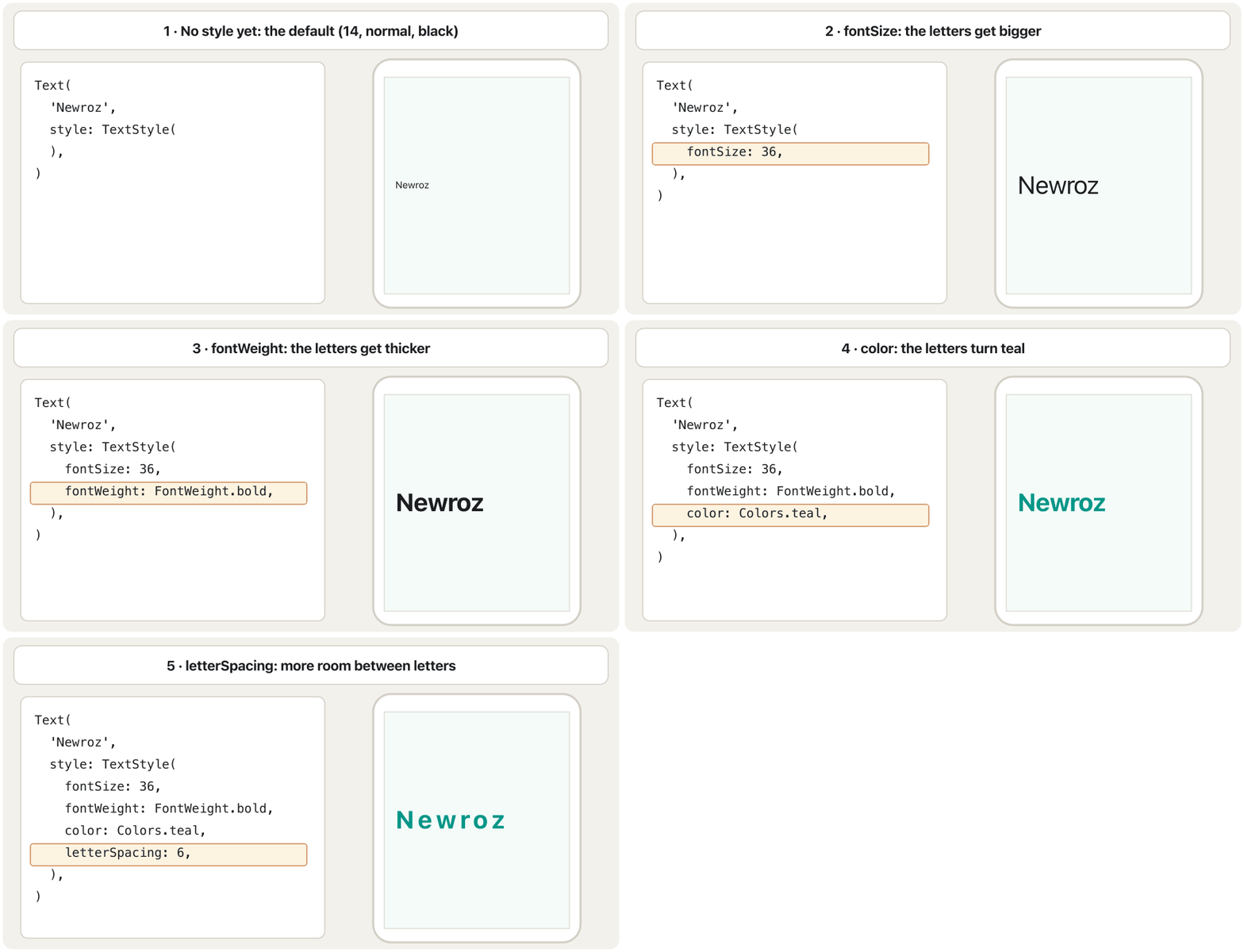
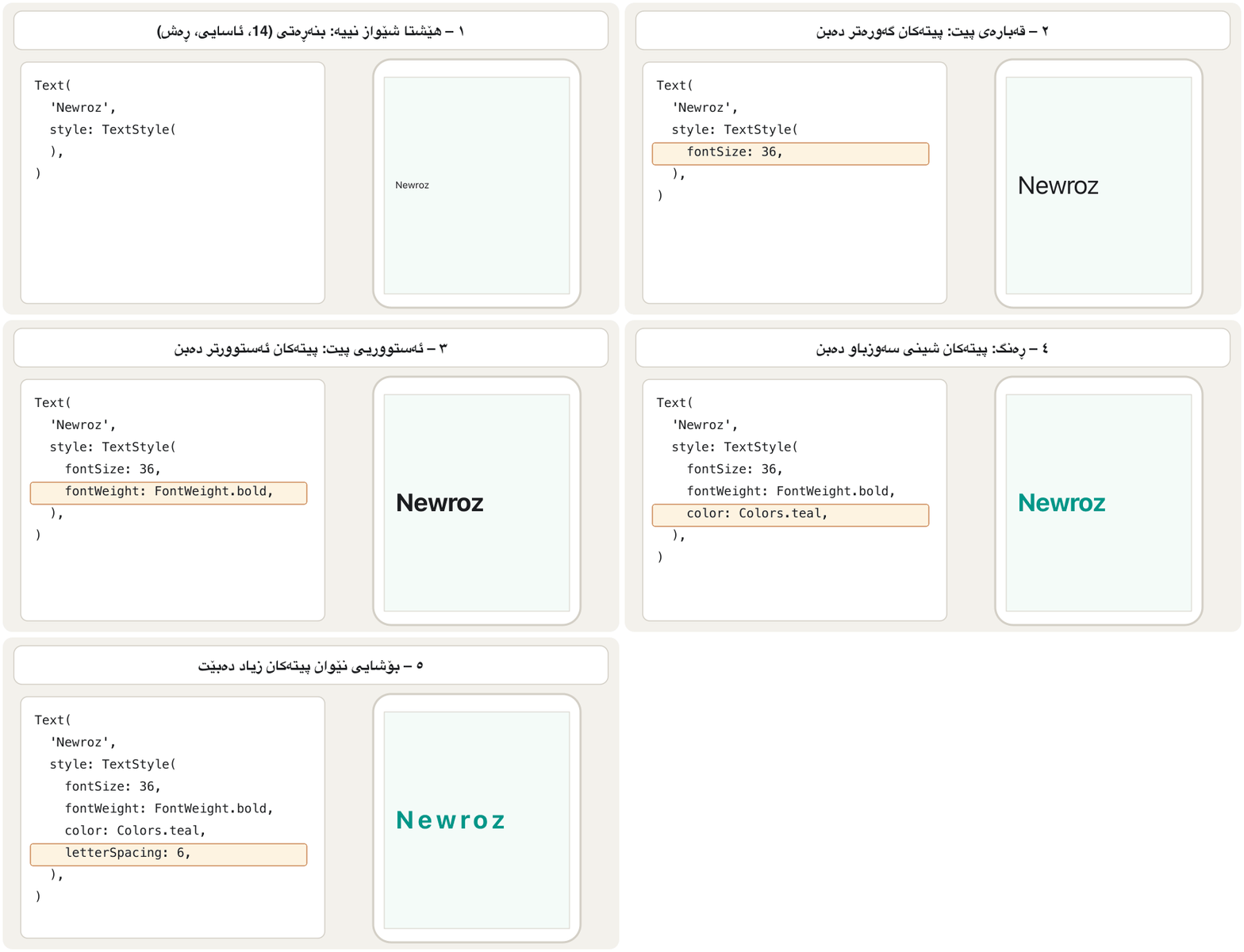
fontSize → fontWeight → color → letterSpacing.لە هەر وێنەیەکدا یەک : fontSize ← fontWeight ← color ← letterSpacing.CêIT| Property | Exampleنموونە | Meaningواتا |
|---|---|---|
fontSize | 36 | Letter size in logical pixels (default 14).قەبارەی پیت بە لۆجیکی (بنەڕەتی 14). |
fontWeight | FontWeight.bold | Thickness: w100 (thin) … w400 (normal) … w700 (bold) … w900.ئەستووری: w100 (تەنک) … w400 (ئاسایی) … w700 (ئەستوور) … w900. |
fontStyle | FontStyle.italic | Slanted letters.پیتی لار. |
color | Colors.teal | Colour of the letters.ڕەنگی پیتەکان. |
letterSpacing | 6 | Extra space between letters.بۆشایی زیادە لە نێوان پیتەکاندا. |
wordSpacing | 8 | Extra space between words.بۆشایی زیادە لە نێوان وشەکاندا. |
height | 1.5 | Line height as a multiple of the font size.بەرزیی دێڕ وەک چەند هێندەی قەبارەی پیت. |
decoration | TextDecoration.underline | A line under, over or through the text (lineThrough).هێڵێک لە ژێر، سەر یان بە ناو دەقەکەدا (lineThrough). |
backgroundColor | Color(0xFFFFF3E0) | Colour behind the letters only.ڕەنگ تەنها لە پشت پیتەکان. |
fontFamily | 'Vazirmatn' | Which font to use (see Your own font).کام بەکار بێت (سەیری فۆنتی تایبەتی خۆت بکە). |
A Kurdish beginner course: what Flutter is, making an Android emulator, creating and running a project in VS Code, Hello World and hot reload.
کۆرسێکی کوردی بۆ سەرەتاییەکان: چییە، دروستکردنی Android، دروستکردن و کارپێکردنی پرۆژەیەک لە VS Codeـدا، Hello World و .
In Kurdish. Watch 27:54-30:50: styling a Text with TextStyle.
بە کوردی. لە 27:54 تا 30:50 سەیر بکە: شێوەدان بە Text بە یارمەتیی TextStyle.
TextStyle: size, weight, colour and spacingTextStyle: قەبارە، ئەستووری، ڕەنگ و بۆشایی
A fully styled titleناونیشانێکی تەواو شێوازدار
Here is every row of the table in one Text. Most titles need only two or three of them.
ئەمە هەموو ڕیزەکانی خشتەکەیە لە یەک Textـدا. زۆربەی ناونیشانەکان تەنها دوو یان سێیانیان پێویستە.
import 'package:flutter/material.dart';

class StyledTitle extends StatelessWidget {
  const StyledTitle({super.key});

  @override
  Widget build(BuildContext context) {
    return const Text(
      'Newroz',
      style: TextStyle(
        fontSize: 36,
        fontWeight: FontWeight.bold,
        color: Colors.teal,
        letterSpacing: 6,
        fontStyle: FontStyle.italic,
        wordSpacing: 8,
        height: 1.5,
        decoration: TextDecoration.underline,
        decorationColor: Colors.amber,
        backgroundColor: Color(0xFFFFF3E0),
      ),
    );
  }
}┌─────────────────────────────┐ │ │ │ N e w r o z │ │ ‾‾‾‾‾‾‾‾‾‾‾ │ │ │ └─────────────────────────────┘
The word 'Newroz', large, bold, italic and teal, with wide letter spacing, an amber underline and a light-orange background behind the letters.
وشەی 'Newroz'، گەورە، ئەستوور، لار و شینی سەوزباو، بە بۆشایی فراوانی نێوان پیتەکان، هێڵێکی زەردی تۆخ لە ژێریدا و پاشبنەمایەکی پرتەقاڵیی کاڵ لە پشت پیتەکانەوە.
Explain the codeڕوونکردنەوەی کۆدەکە
- Lineدێڕی 11-14
The four properties of the animation.
چوار جووڵەکە.
- Lineدێڕی 18-19
An amber line under the word.
هێڵێکی زەردی تۆخ لە ژێر وشەکەدا.
- Lineدێڕی 20
A colour written as 0xAARRGGBB: FF = not see-through, then red, green, blue.
ڕەنگێک بە شێوەی 0xAARRGGBB نووسراوە: FF = ڕوون نییە، پاشان سوور، سەوز، شین.
TextStyle: size, weight, colour and spacingTextStyle: قەبارە، ئەستووری، ڕەنگ و بۆشایی
Styles from the themeشێوازەکانی تێم
Writing sizes and colours by hand on every Text makes an app look uneven. Material 3 gives each app a ready type scale in its theme: 15 named styles in five groups — display, headline, title, body and label — each in Large, Medium and Small. Take one with Theme.of(context).textTheme, and change only what you need with copyWith. (How a theme is made is in Theming with Material 3.)
نووسینی قەبارە و ڕەنگ بە دەست لەسەر هەموو Textـێک نایەکسان دەردەخات. Material 3 لە پێوەرێکی پیتی ئامادە دەدات بە هەر : ١٥ شێوازی ناونراو لە پێنج کۆمەڵدا — display، headline، title، body و label — هەر یەکەیان بە Large، Medium و Small. یەکێکیان بە Theme.of(context).textTheme وەربگرە و تەنها ئەوەی پێویستە بە copyWith بیگۆڕە. (چۆنیەتیی دروستکردنی لە تێم لە Material 3ـدادایە.)
import 'package:flutter/material.dart';

class MenuHeader extends StatelessWidget {
  const MenuHeader({super.key});

  @override
  Widget build(BuildContext context) {
    final textTheme = Theme.of(context).textTheme;
    return Column(
      crossAxisAlignment: CrossAxisAlignment.start,
      children: [
        Text("Today's menu", style: textTheme.headlineMedium),
        Text(
          'Kubba, dolma and fresh naan',
          style: textTheme.bodyLarge?.copyWith(color: Colors.brown),
        ),
        // DefaultTextStyle: every Text below it gets this style.
        const DefaultTextStyle(
          style: TextStyle(fontSize: 18, color: Colors.green),
          child: Column(
            crossAxisAlignment: CrossAxisAlignment.start,
            children: [Text('Tea: 500 IQD'), Text('Coffee: 1,000 IQD')],
          ),
        ),
      ],
    );
  }
}┌─────────────────────────────┐ │Today's menu │ │Kubba, dolma and fresh naan │ │Tea: 500 IQD │ │Coffee: 1,000 IQD │ │ │ └─────────────────────────────┘
A large headline 'Today's menu', a brown line 'Kubba, dolma and fresh naan', then two green lines 'Tea: 500 IQD' and 'Coffee: 1,000 IQD' in size 18.
سەردێڕێکی گەورە 'Today's menu'، دێڕێکی قاوەیی 'Kubba, dolma and fresh naan'، پاشان دوو دێڕی سەوز 'Tea: 500 IQD' و 'Coffee: 1,000 IQD' بە قەبارەی 18.
Explain the codeڕوونکردنەوەی کۆدەکە
- Lineدێڕی 8
The text styles of the app's current theme.
شێوازەکانی دەقی ئێستای .
- Lineدێڕی 15
Copy
bodyLargeand change only the colour.?.is needed because a theme style may be null.bodyLargeکۆپی بکە و تەنها ڕەنگەکەی بگۆڕە.?.پێویستە چونکە لەوانەیە شێوازێکی null بێت.- Lineدێڕی 18-22
DefaultTextStylegives a style to every Text below it that does not set its own.DefaultTextStyleشێوازێک دەدات بە هەموو ئەو Textـانەی لە ژێریەوەن و شێوازی خۆیان دانەناوە.
Several styles in one line: Text.richچەند شێوازێک لە یەک دێڕدا: Text.rich
One TextStyle styles a whole Text. To make part of a line different — a bold price, a crossed-out old price — use Text.rich with a tree of TextSpan objects. Each span has its own text, style and children, and a child span takes its parent's style and changes only what it sets.
یەک TextStyle شێواز دەدات بە هەموو Textـێک. بۆ ئەوەی بەشێک لە دێڕێک جیاواز بێت — نرخێکی ئەستوور، نرخێکی کۆنی هێڵ بەسەرداهاتوو — Text.rich لەگەڵ دارێک لە TextSpan بەکار بهێنە. هەر spanـێک text، style و childrenـی خۆی هەیە و spanـی منداڵ شێوازی باوانەکەی وەردەگرێت و تەنها ئەوە دەگۆڕێت کە خۆی دایدەنێت.
import 'package:flutter/material.dart';

class PriceLine extends StatelessWidget {
  const PriceLine({super.key});

  @override
  Widget build(BuildContext context) {
    return const Text.rich(
      TextSpan(
        text: 'Price: ',
        style: TextStyle(fontSize: 20),
        children: [
          TextSpan(
            text: '3,000 IQD',
            style: TextStyle(fontWeight: FontWeight.bold, color: Colors.green),
          ),
          TextSpan(
            text: '  4,000 IQD',
            style: TextStyle(
              color: Colors.grey,
              decoration: TextDecoration.lineThrough,
            ),
          ),
        ],
      ),
    );
  }
}┌─────────────────────────────┐ │Price: 3,000 IQD 4̶,̶0̶0̶0̶ ̶I̶Q̶D̶ │ └─────────────────────────────┘
One line: 'Price: ' in black, '3,000 IQD' in bold green, then '4,000 IQD' in grey with a line through it.
یەک دێڕ: 'Price: ' بە ڕەش، '3,000 IQD' بە سەوزی ئەستوور، پاشان '4,000 IQD' بە خۆڵەمێشی و هێڵێک بەسەریدا.
Explain the codeڕوونکردنەوەی کۆدەکە
- Lineدێڕی 10-11
The parent span: 'Price: ' in size 20. Its children inherit this size.
spanـی باوان: 'Price: ' بە قەبارەی 20. منداڵەکانی ئەم قەبارەیە میرات دەگرن.
- Lineدێڕی 14
Bold and green — still size 20.
ئەستوور و سەوز — هێشتا قەبارە 20.
- Lineدێڕی 21
The old price, grey and crossed out.
نرخە کۆنەکە، خۆڵەمێشی و هێڵ بەسەرداهاتوو.
Icon: small symbols from a fontIcon: هێمای بچووک لە فۆنتێکەوە
Icon draws a small symbol. The symbols are not pictures: each one is a letter of a special icon font. That is why an icon stays sharp at any size and can take any colour. The Icons class names thousands of Material icons, most of them in four looks: Icons.home, Icons.home_outlined, Icons.home_rounded and Icons.home_sharp.
Icon هێمایەکی بچووک دەکێشێت. هێماکان وێنە نین: هەر یەکێکیان پیتێکی تایبەتی ە. بۆیە لە هەموو قەبارەیەکدا ڕوون دەمێنێتەوە و دەتوانێت هەر ڕەنگێک وەربگرێت. Icons ناوی هەزاران Material دەبات، زۆربەیان بە چوار شێوە: Icons.home، Icons.home_outlined، Icons.home_rounded و Icons.home_sharp.
import 'package:flutter/cupertino.dart';
import 'package:flutter/material.dart';

class IconRow extends StatelessWidget {
  const IconRow({super.key});

  @override
  Widget build(BuildContext context) {
    return const Row(
      mainAxisAlignment: MainAxisAlignment.spaceEvenly,
      children: [
        Icon(Icons.home),
        Icon(Icons.favorite, color: Colors.red, size: 36),
        Icon(Icons.local_cafe_outlined, color: Colors.brown, size: 36),
        Icon(Icons.arrow_back, semanticLabel: 'Back'),
        Icon(CupertinoIcons.heart_fill, color: Colors.pink),
      ],
    );
  }
}┌─────────────────────────────┐ │ │ │ ⌂ ♥ ♨ ← ♡ │ │ │ └─────────────────────────────┘
Five icons spread across one row: a black house, a big red heart, a big brown coffee cup, a back arrow and a pink heart.
پێنج لە یەک ڕیزدا بڵاو بوونەتەوە: ماڵێکی ڕەش، دڵێکی سووری گەورە، کوپێکی قاوەیی گەورە، تیرێکی گەڕانەوە و دڵێکی پەمەیی.
Explain the codeڕوونکردنەوەی کۆدەکە
- Lineدێڕی 12
No size or colour given: 24 logical pixels, coloured by the theme's
IconTheme.قەبارە و ڕەنگ نەدراوە: ٢٤ لۆجیکی، ڕەنگەکەی لە
IconThemeـی دێت.- Lineدێڕی 13
colorandsizechange one icon.colorوsizeیەک دەگۆڕن.- Lineدێڕی 15
semanticLabelis read aloud by screen readers (TalkBack, VoiceOver) for people who cannot see the screen.semanticLabelلەلایەن (TalkBack، VoiceOver) بە دەنگی بەرز دەخوێنرێتەوە بۆ ئەو کەسانەی شاشەکە نابینن.- Lineدێڕی 16
iPhone-style icons come from
CupertinoIcons(thecupertino_iconspackage, already in a new project's pubspec).شێوەی iPhone لە
CupertinoIconsـەوە دێن (cupertino_iconsکە لە pubspecـی پرۆژەیەکی نوێدا هەیە).
- The icon font is added by
uses-material-design: trueunderflutter:in pubspec.yaml. A new project has this line; if you delete it, icons show as empty boxes. - Icons that point a way, such as
Icons.arrow_back, are mirrored automatically in a right-to-left app: the back arrow points right in Kurdish. - Search all Material icons by name at fonts.google.com/icons. For your own drawn symbol, use
ImageIcon(AssetImage('assets/icons/tea.png')). - An
Iconcannot be tapped. A tappable icon is anIconButton(see IconButton).
- بە
uses-material-design: trueلە ژێرflutter:لە pubspec.yamlـدا زیاد دەکرێت. پرۆژەی نوێ ئەم دێڕەی تێدایە؛ ئەگەر بیسڕیتەوە، وەک چوارگۆشەی بەتاڵ دەردەکەون. - ئەو ئاڕاستەیەک نیشان دەدەن، وەک
Icons.arrow_back، لە خۆکارانە هەڵدەگەڕێنەوە: تیری گەڕانەوە لە کوردیدا بەرەو ڕاست ئاماژە دەکات. - هەموو Material بە ناو لە fonts.google.com/icons بگەڕێ. بۆ هێمایەکی خۆت کێشاوت،
ImageIcon(AssetImage('assets/icons/tea.png'))بەکار بهێنە. Iconدەستی لێ نادرێت. کە دەستی لێ بدرێتIconButtonـە (سەیری IconButton بکە).
Image: where does the picture come from?Image: وێنەکە لە کوێوە دێت؟
The Image widget shows a picture. The important question is where the picture comes from. Flutter answers it with an image provider object, and each common source has a shortcut constructor:
Image وێنەیەک پیشان دەدات. پرسیارە گرنگەکە ئەوەیە وێنەکە لە کوێوە دێت. Flutter بە image provider وەڵامی دەداتەوە و هەر سەرچاوەیەکی باو کورتکراوەی هەیە:
| Sourceسەرچاوە | Shortcutکورتکراوە | ProviderProviderـەکە | Typical useبەکارهێنانی باو |
|---|---|---|---|
| Inside the app (an asset)لە ناو () | Image.asset(path) | AssetImage | Logos, icons, pictures that never changeلۆگۆ، ، ئەو وێنانەی هەرگیز ناگۆڕێن |
| The internet | Image.network(url) | NetworkImage | Product photos from a server, profile picturesوێنەی کاڵا لە ، وێنەی پرۆفایل |
| A file on the phone لەسەر مۆبایلەکە | Image.file(file) | FileImage | A photo just taken with the camera (not on the web)وێنەیەک کە ئێستا بە کامێرا گیراوە (نەک لەسەر وێب) |
| Bytes in memoryبایت لە بیرگەدا | Image.memory(bytes) | MemoryImage | A picture that arrived inside a JSON replyوێنەیەک کە لە ناو وەڵامێکی JSONـدا هاتووە |
Flutter shows JPEG, PNG, GIF, WebP (both also animated), BMP and WBMP. SVG is not one of them: an .svg file needs the flutter_svg package.
Flutter دەتوانێت JPEG، PNG، GIF، WebP (هەردووکیان بە جووڵاویشەوە)، BMP و WBMP پیشان بدات. SVG لەوانە نییە: .svg پێویستی بە flutter_svg هەیە.
An asset is like bread you bake at home and carry in your bag: it is always with you, even in the mountains. A network image is like bread ordered from the bakery: it can be fresh and new every day, but you must wait for it, and some days the delivery does not come.
وەک ئەو نانە وایە کە لە ماڵەوە دەیکەیت و لە جانتاکەتدا هەڵیدەگریت: هەمیشە لەگەڵتە، تەنانەت لە چیاش. وێنەی وەک نانێک وایە کە لە نانەواخانە داوای دەکەیت: دەکرێت هەموو ڕۆژێک تازە بێت، بەڵام دەبێت چاوەڕێی بکەیت و هەندێک ڕۆژ نانەکە ناگات.
Where the analogy stops workingسنووری ئەم نموونەیە
An asset changes only with a new version of the app; a network picture can change at any time.
تەنها بە وەشانێکی نوێی دەگۆڕێت؛ وێنەی هەر کاتێک دەتوانێت بگۆڕێت.
A friendly 2025 course whose short chapters show one Flutter widget at a time: layouts, the app frame, bars, buttons, lists and pictures.
کۆرسێکی دۆستانەی 2025 کە بەشە کورتەکانی هەر جارە یەک پیشان دەدەن: ، چوارچێوەی ، شریتەکان، ، و وێنەکان.
Watch 27:17-32:06 ('Images'): pictures from the internet and from the app's assets folder, with size and fit.
لە 27:17 تا 32:06 سەیر بکە (Images): وێنە لە و لە ، لەگەڵ قەبارە و fit.
Assets: files that travel inside the appئەسێتەکان: ئەو فایلانەی لە ناو ئەپەکەدا دەڕۆن
A file that is packed inside an app and shipped with it, such as an image, a font or a JSON file. Flutter apps list their assets under assets: in pubspec.yaml.
فایلێکە کە لە ناو ئەپێکدا دەپێچرێتەوە و لەگەڵیدا دەنێردرێت، وەک وێنەیەک، یان فایلێکی . ئەپەکانی لە ژێر assets: لە pubspec.yamlـدا ڕیز دەکەن.
Pictures, fonts, sound and data files (for example JSON) can all be assets.
وێنە، ، دەنگ و (بۆ نموونە JSON) هەموویان دەکرێت بن.
Flutter does not pack every file of your project into the app — only the ones that pubspec.yaml lists. The course's lessons load pictures such as assets/images/back_img.jpg but never show this step, so here it is in full:
Flutter هەموو پرۆژەکەت ناخاتە ناو — تەنها ئەوانەی pubspec.yaml ناویان دەبات. وانەکانی کۆرسەکە وێنەی وەک assets/images/back_img.jpg بار دەکەن، بەڵام هەرگیز ئەم هەنگاوە پیشان نادەن، بۆیە لێرەدا بە تەواوی هاتووە:
- Make a folder next to lib/فۆڵدەرێک لە تەنیشت lib/ دروست بکە
In the project's top folder (where
pubspec.yamlis), createassets/images/. Any name works;assets/is the custom.لە سەرەوەی پرۆژەکە (ئەو شوێنەی
pubspec.yamlـی تێدایە)،assets/images/دروست بکە. هەر ناوێک کار دەکات؛assets/نەریتە. - Copy the file inفایلەکە کۆپی بکە ناوی
Put
logo.pngthere. Use lower-case names without spaces:logo.png, notMy Logo.PNG.logo.pngبخە ئەوێ. ناوی پیتی بچووک و بێ بۆشایی بەکار بهێنە:logo.png، نەکMy Logo.PNG. - Declare it in pubspec.yamlلە pubspec.yamlـدا ڕایبگەیەنە
Under
flutter:, add anassets:list with the folder (ending in/) or the single file.لە ژێر
flutter:ـدا، لیستێکیassets:زیاد بکە بە (بە/کۆتایی دێت) یان بە تاکە . - Run the app againئەپەکە دووبارە ڕابکە
In VS Code or Android Studio, saving pubspec.yaml runs
flutter pub getfor you (in a terminal, run it yourself). If the picture still does not appear, stop the app and start it again: a hot reload does not always pick up new assets.لە VS Code یان Android Studioـدا پاشەکەوتکردنی pubspec.yaml فەرمانی
flutter pub getبۆت جێبەجێ دەکات (لە خۆت جێبەجێی بکە). ئەگەر وێنەکە هێشتا دەرنەکەوت، ڕاگرە و دووبارە دەستی پێ بکەرەوە: هەمیشە نوێ وەرناگرێت.
Assets: files that travel inside the appئەسێتەکان: ئەو فایلانەی لە ناو ئەپەکەدا دەڕۆن
The assets: list in pubspec.yamlلیستی assets: لە pubspec.yamlـدا
The picture shows the three places that must agree, and the code shows the forms an assets: entry can take.
وێنەکە ئەو سێ شوێنە پیشان دەدات کە دەبێت وەک یەک بن و کۆدەکە ئەو شێوانە پیشان دەدات کە تۆمارێکی assets: دەتوانێت هەیبێت.
pubspec.yaml is your packing list for a trip to Halabja. What is on the list goes into the bag; what is not on the list stays at home, even if it was lying next to the bag. When you arrive (the app runs on the phone) you can only use what you packed.
pubspec.yaml لیستی پێداویستییەکانتە بۆ گەشتێک بۆ هەڵەبجە. ئەوەی لە لیستەکەدایە دەچێتە ناو جانتاکە؛ ئەوەی لە لیستەکەدا نییە لە ماڵەوە دەمێنێتەوە، تەنانەت ئەگەر لە تەنیشت جانتاکەش بووبێت. کاتێک دەگەیت ( لەسەر مۆبایلەکە کار دەکات) تەنها ئەوەت بەکار دێت کە پێچاوتە.
Where the analogy stops workingسنووری ئەم نموونەیە
A real bag has a size limit you feel; an app has none you notice, but every asset makes the download bigger, so do not pack pictures you do not use.
جانتای ڕاستەقینە سنووری قەبارەی هەیە کە هەستی پێ دەکەیت؛ سنوورێکی وای نییە کە هەستی پێ بکەیت، بەڵام هەر گەورەتر دەکات، بۆیە ئەو وێنانە مەپێچە کە بەکاریان ناهێنیت.
pubspec.yaml → Image.asset: the path must match exactly. ← pubspec.yaml ← Image.asset: دەبێت تەواو وەک یەک بێت.CêITflutter:
uses-material-design: true
assets:
- assets/images/ # every file directly in this folder
- assets/images/products/ # a sub-folder needs its own line
- assets/data/menu.json # or one single fileExplain the codeڕوونکردنەوەی کۆدەکە
- Lineدێڕی 4
assets:sits two spaces in, underflutter:— YAML uses indentation to show what belongs to what.assets:دوو بۆشایی چووەتە ناوەوە، لە ژێرflutter:— بەکار دەهێنێت بۆ پیشاندانی ئەوەی چی سەر بە چییە.- Lineدێڕی 5-6
A folder entry takes only the files directly in it, not its sub-folders: list each sub-folder too.
تۆمارێکی تەنها ئەو دەگرێت کە ڕاستەوخۆ تێیدان، نەک ناوەوەی: هەر ناوەوەش بنووسە.
- Lineدێڕی 7
A single file can be listed by its full path.
تاکە دەکرێت بە تەواوی بنووسرێت.
Assets: files that travel inside the appئەسێتەکان: ئەو فایلانەی لە ناو ئەپەکەدا دەڕۆن
Showing an asset pictureپیشاندانی وێنەیەکی ئەسێت
There are two ways to write the same thing. Image.asset('…') is short. Image(image: AssetImage('…')) uses the provider directly. You need the provider alone wherever a widget expects an image rather than a widget: a round profile picture (CircleAvatar.backgroundImage) or a background picture (DecorationImage, in image: a background picture).
دوو ڕێگە هەیە بۆ نووسینی هەمان شت. Image.asset('…') کورتە. Image(image: AssetImage('…')) ڕاستەوخۆ providerـەکە بەکار دەهێنێت. هەر شوێنێک کە چاوەڕێی وێنە بکات نەک ، تەنها providerـەکەت پێویستە: وێنەی پرۆفایلی خڕ (CircleAvatar.backgroundImage) یان وێنەی پاشبنەما (DecorationImage، لە image: وێنەیەکی پاشبنەمادا).
import 'package:flutter/material.dart';

class ShopLogo extends StatelessWidget {
  const ShopLogo({super.key});

  @override
  Widget build(BuildContext context) {
    return Column(
      children: [
        // The short way:
        Image.asset('assets/images/logo.png', width: 120),
        // The same picture through its ImageProvider:
        const Image(image: AssetImage('assets/images/logo.png'), width: 120),
        // ImageProviders also go where a widget is not wanted:
        const CircleAvatar(
          radius: 40,
          backgroundImage: AssetImage('assets/images/aram.png'),
        ),
      ],
    );
  }
}┌─────────────────────────────┐ │ [Chaikhana logo] │ │ [Chaikhana logo] │ │ ( ☺ ) │ │ │ └─────────────────────────────┘
The shop logo twice, 120 wide, one under the other, and below them a round 80 × 80 profile picture.
لۆگۆی دوکانەکە دوو جار، بە پانیی 120، یەکێکیان لە ژێر ئەوی تر و لە ژێریاندا وێنەیەکی پرۆفایلی خڕی 80 × 80.
Explain the codeڕوونکردنەوەی کۆدەکە
- Lineدێڕی 11
Width 120; the height follows the picture's shape.
پانی 120؛ بەرزییەکە شوێن شێوەی وێنەکە دەکەوێت.
- Lineدێڕی 13
Exactly the same result, written with the provider.
هەمان ئەنجام، بە providerـەکە نووسراوە.
- Lineدێڕی 17
CircleAvatarwants an image provider, not a widget.CircleAvatarproviderـی وێنەی دەوێت، نەک .
Assets: files that travel inside the appئەسێتەکان: ئەو فایلانەی لە ناو ئەپەکەدا دەڕۆن
Sharp pictures on every screen: 2.0x and 3.0xوێنەی ڕوون لەسەر هەموو شاشەیەک: 2.0x و 3.0x
Flutter measures sizes in logical pixels. A phone screen has more real dots than that: on many phones one logical pixel is 2, 3 or more real pixels. This number is the phone's devicePixelRatio. A 300 × 100 picture drawn 300 logical pixels wide on a phone with ratio 3 is stretched three times — and looks blurry.
Flutter قەبارەکان بە لۆجیکی دەپێوێت. شاشەی مۆبایل خاڵی ڕاستەقینەی زیاتری هەیە: لەسەر زۆر مۆبایل یەک لۆجیکی 2، 3 یان زیاتر ڕاستەقینەیە. ئەم ژمارەیە devicePixelRatioـی مۆبایلەکەیە. وێنەیەکی 300 × 100 کە بە پانیی 300 لۆجیکی لەسەر مۆبایلێکی ڕێژە 3 دەکێشرێت، سێ هێندە ڕادەکێشرێت — و تەڵخ دەردەکەوێت.
The fix: put bigger copies of the same picture, with the same file name, in folders named after the ratio. You declare only the main file (or its folder); Flutter packs the variants itself and, on each phone, uses the one nearest to its ratio.
چارەسەرەکە: کۆپیی گەورەتری هەمان وێنە، بە هەمان ناوی ، بخە ناو ئەو ناوی ڕێژەکەیان لێ نراوە. تەنها سەرەکی (یان ) ڕادەگەیەنیت؛ Flutter خۆی جۆرەکانی تر دەخاتە ناو و لەسەر هەر مۆبایلێک ئەوەیان بەکار دەهێنێت کە لە ڕێژەکەی نزیکترە.
assets/images/logo.png        <- 300 × 100  (the main file, 1.0x)
assets/images/2.0x/logo.png   <- 600 × 200
assets/images/3.0x/logo.png <- 900 × 300Pictures from the internetوێنە لە ئینتەرنێتەوە
Image.network(url) downloads a picture when the screen is built. Downloading takes time and can fail — no internet, a wrong address, a deleted file. A good app plans for both with loadingBuilder (what to show while the bytes arrive) and errorBuilder (what to show if it fails). Without errorBuilder, a failed picture leaves an error box or an empty hole.
Image.network(url) کاتی دروستکردنی شاشەکە وێنەیەک دادەبەزێنێت. کاتی دەوێت و لەوانەیە سەرنەکەوێت — نییە، ناونیشان هەڵەیە، سڕاوەتەوە. باش بۆ هەردووکیان پلان دادەنێت بە loadingBuilder (چی پیشان بدرێت تا بایتەکان دەگەن) و errorBuilder (چی پیشان بدرێت ئەگەر سەرنەکەوت). بەبێ errorBuilder، وێنەیەکی سەرنەکەوتوو سندووقێکی یان کونێکی بەتاڵ بەجێ دەهێڵێت.
import 'package:flutter/material.dart';

class NetworkPicture extends StatelessWidget {
  const NetworkPicture({super.key});

  @override
  Widget build(BuildContext context) {
    return Image.network(
      'https://example.com/images/citadel.jpg',
      width: 300,
      height: 200,
      fit: BoxFit.cover,
      // While the bytes arrive: show a progress indicator.
      loadingBuilder: (context, child, progress) {
        if (progress == null) return child; // finished: show the picture
        return const SizedBox(
          width: 300,
          height: 200,
          child: Center(child: CircularProgressIndicator()),
        );
      },
      // No internet, wrong address, broken file: show something useful.
      errorBuilder: (context, error, stackTrace) {
        return Container(
          width: 300,
          height: 200,
          color: Colors.grey[200],
          alignment: Alignment.center,
          child: const Icon(Icons.broken_image, size: 48, color: Colors.grey),
        );
      },
    );
  }
}┌─────────────────────────────┐ │ │ │ ┌──────────────────┐ │ │ │ │ │ │ │ ⊘ ▨ │ │ │ │ │ │ │ └──────────────────┘ │ │ │ └─────────────────────────────┘
First a 300 × 200 space with a spinning circle; then either the photo of the citadel or, without internet, a grey box with a broken-picture icon.
سەرەتا شوێنێکی 300 × 200 بە بازنەیەکی سووڕاوە؛ پاشان یان وێنەی قەڵاکە یان، بەبێ ، سندووقێکی خۆڵەمێشی بە وێنەی شکاو.
Explain the codeڕوونکردنەوەی کۆدەکە
- Lineدێڕی 9
example.comis a reserved example address. Use your own server's URL.example.comناونیشانێکی نموونەیی تەرخانکراوە. خۆت بەکار بهێنە.- Lineدێڕی 14-15
progressis null when the download is finished: then show the picture (child).کاتێک تەواو بوو
progressnull دەبێت: ئەوکاتە وێنەکە (child) پیشان بدە.- Lineدێڕی 23
Called instead of throwing when the picture cannot be loaded.
لە جیاتی فڕێدانی ، کاتێک وێنەکە بار نابێت ئەمە بانگ دەکرێت.
Pictures from the internetوێنە لە ئینتەرنێتەوە
Release builds, cache and copyrightوەشانی بڵاوکراوە، کاش و مافی لەبەرگرتنەوە
- Flutter keeps decoded pictures in a memory cache (up to 1,000 pictures or 100 MB by default), so the same URL is not downloaded twice while the app runs. The cache is empty again after the app closes; the
cached_network_imagepackage also saves pictures on the phone's storage. - Only show pictures you are allowed to use. Linking straight to another shop's or a photo agency's pictures ignores their copyright and breaks when they move the file. Serve your own pictures from your own server, or ship them as assets.
- Flutter وێنە بارکراوەکان لە بیرگەدا هەڵدەگرێت (بە شێوەی بنەڕەتی تا 1,000 وێنە یان 100 MB)، بۆیە هەمان لە کاتی کارکردنی دوو جار دانابەزێنرێت. دوای داخستنی دووبارە بەتاڵ دەبێتەوە؛
cached_network_imageوێنەکان لەسەر بیرگەی مۆبایلەکەش پاشەکەوت دەکات. - تەنها ئەو وێنانە پیشان بدە کە مۆڵەتی بەکارهێنانیانت هەیە. بەستنەوەی ڕاستەوخۆ بە وێنەکانی دوکانێکی تر یان ئاژانسێکی وێنە پشتگوێ دەخات و کاتێک دەگوازنەوە تێک دەچێت. وێنەکانی خۆت لە خۆتەوە بنێرە، یان وەک لەگەڵ بیاننێرە.
Your own fontفۆنتی تایبەتی خۆت
Without a custom font, Flutter uses the phone's own fonts, so Kurdish text can look different on every brand. Shipping a font with the app gives the same look everywhere. Choose a font whose licence allows use in apps — for example Vazirmatn or Noto Sans Arabic (both under the SIL Open Font License), which contain all Kurdish letters such as ڕ ڵ ۆ ێ.
بەبێ تایبەت، Flutter خودی مۆبایلەکە بەکار دەهێنێت، بۆیە لەوانەیە دەقی کوردی لەسەر هەر مارکەیەک جیاواز دەربکەوێت. ناردنی لەگەڵ هەمان شێوە لە هەموو شوێنێک دەدات. هەڵبژێرە کە ڕێگە بە بەکارهێنان لە بدات — بۆ نموونە Vazirmatn یان Noto Sans Arabic (هەردووکیان بە SIL Open Font License)، کە هەموو پیتە کوردییەکانی وەک ڕ ڵ ۆ ێیان تێدایە.
flutter:
  uses-material-design: true

  fonts:
    - family: Vazirmatn
      fonts:
        - asset: fonts/Vazirmatn-Regular.ttf
        - asset: fonts/Vazirmatn-Bold.ttf
          weight: 700
    - family: RobotoMono
      fonts:
        - asset: fonts/RobotoMono-Regular.ttf
Explain the codeڕوونکردنەوەی کۆدەکە
- Lineدێڕی 5
familyis the name you will use in Dart. It must match exactly (capital letters too).familyئەو ناوەیە کە لە Dartـدا بەکاری دەهێنیت. دەبێت تەواو وەک یەک بێت (پیتی گەورەش).- Lineدێڕی 7-9
One file per weight. Flutter does not guess the weight from the file name, so the bold file says
weight: 700.بۆ هەر ئەستوورییەک . Flutter ئەستووری لە ناوی ناخوێنێتەوە، بۆیە ئەستوور
weight: 700دەڵێت.- Lineدێڕی 7
Font files sit in a
fonts/folder next tolib/. Use.ttf,.otfor.ttcfiles.لە
fonts/لە تەنیشتlib/ـدان..ttf،.otfیان.ttcبەکار بهێنە.
A fast real-project video: adds a custom font in pubspec.yaml and the theme, and describes items with a model class instead of index checks.
ڤیدیۆیەکی خێرا لەسەر پرۆژەیەکی ڕاستەقینە: تایبەت لە pubspec.yaml و زیاد دەکات و لە جیاتی پشکنین بە ، شتەکان بە وەسف دەکات.
Watch 3:58-4:41: a fonts folder, the font family and weights declared under fonts: in pubspec.yaml, flutter pub get, and fontFamily in the app's ThemeData.
لە 3:58 تا 4:41 سەیر بکە: بۆ ، ناساندنی family و weight لە ژێر fonts: لە pubspec.yamlـدا، flutter pub get، پاشان fontFamily لە ThemeDataـی .
Your own fontفۆنتی تایبەتی خۆت
Using the font in the appبەکارهێنانی فۆنتەکە لە ئەپەکەدا
Once the files are declared, name the family in Dart: once in the theme for the whole app, or in one TextStyle for a single text.
دوای ڕاگەیاندنی ، ناوی خێزانەکە لە Dartـدا بنووسە: یەک جار لە بۆ هەموو ، یان لە TextStyleـێکدا بۆ تاکە دەقێک.
import 'package:flutter/material.dart';

void main() {
  runApp(
    MaterialApp(
      // Every Text in the app uses Vazirmatn unless it says otherwise.
      theme: ThemeData(fontFamily: 'Vazirmatn'),
      home: const FontPage(),
    ),
  );
}

class FontPage extends StatelessWidget {
  const FontPage({super.key});

  @override
  Widget build(BuildContext context) {
    return const Scaffold(
      body: Center(
        child: Column(
          mainAxisSize: MainAxisSize.min,
          children: [
            Text('سڵاو، Flutter!', style: TextStyle(fontSize: 28)),
            Text(
              'بەخێربێیت',
              style: TextStyle(fontSize: 28, fontWeight: FontWeight.w700),
            ),
            // One widget can still choose another family:
            Text('Roboto Mono', style: TextStyle(fontFamily: 'RobotoMono')),
          ],
        ),
      ),
    );
  }
}┌─────────────────────────────┐ │ │ │ سڵاو، Flutter! │ │ بەخێربێیت │ │ Roboto Mono │ │ │ └─────────────────────────────┘
In the middle of the screen: 'سڵاو، Flutter!' and a bold 'بەخێربێیت' in Vazirmatn, then 'Roboto Mono' in a fixed-width font.
لە ناوەڕاستی شاشەکەدا: 'سڵاو، Flutter!' و 'بەخێربێیت'ـی ئەستوور بە Vazirmatn، پاشان 'Roboto Mono' بە پانیی جێگیر.
Explain the codeڕوونکردنەوەی کۆدەکە
- Lineدێڕی 7
The whole app uses Vazirmatn by default.
هەموو بە شێوەی بنەڕەتی Vazirmatn بەکار دەهێنێت.
- Lineدێڕی 26
w700 picks the file declared with
weight: 700.w700 ئەو هەڵدەبژێرێت کە بە
weight: 700ڕاگەیەنراوە.- Lineدێڕی 29
One widget can still use another family.
یەک هێشتا دەتوانێت خێزانێکی تر بەکار بهێنێت.
Common mistakesهەڵە باوەکان
| Mistakeهەڵە | What you seeئەوەی دەیبینیت | Fixچاککردن |
|---|---|---|
| The picture is not listed in pubspec.yamlوێنەکە لە pubspec.yamlـدا نەنووسراوە | Unable to load asset when the screen opensUnable to load asset کاتی کرانەوەی شاشەکە | Add the file or its folder under flutter: assets: and run again یان لە ژێر flutter: assets: زیاد بکە و دووبارە ڕای بکە |
assets: not indented under flutter:assets: لە ژێر flutter:ـدا نەچووەتە ناوەوە | An error from flutter pub get لە flutter pub getـەوە | Two spaces before assets:, four before each - lineدوو بۆشایی پێش assets:، چوار پێش هەر دێڕێکی - |
Only assets/images/ listed, file in assets/images/products/تەنها assets/images/ نووسراوە، لە assets/images/products/ـدایە | Unable to load assetهەمان هەڵە: Unable to load asset | List every sub-folderهەموو ناوەوە بنووسە |
'assets/images/Logo.PNG' for a file called logo.png'assets/images/Logo.PNG' بۆ بە ناوی logo.png | Unable to load asset on phones (a desktop computer that ignores capital letters may hide the mistake)Unable to load asset لەسەر مۆبایل (کۆمپیوتەرێک کە جیاوازیی پیتی گەورە و بچووک ناکات لەوانەیە هەڵەکە بشارێتەوە) | Copy the path exactly; paths are case-sensitive وەک خۆی کۆپی بکە؛ پیتی گەورە و بچووک جیاوازن |
Image.network without errorBuilderImage.network بەبێ errorBuilder | An error box or a hole when offlineسندووقێکی یان کونێک کاتێک نییە | Add errorBuilder (and loadingBuilder)errorBuilder (و loadingBuilder) زیاد بکە |
| No INTERNET permission in the main manifest INTERNET لە سەرەکیدا نییە | Network pictures blank only in the release buildوێنەکانی تەنها لە بەتاڵن | Add <uses-permission … INTERNET /><uses-permission … INTERNET /> زیاد بکە |
textAlign on a Text that is only as wide as its wordstextAlign لەسەر Textـێک کە تەنها بە ئەندازەی وشەکانی پانە | Nothing movesهیچ شتێک ناجووڵێت | Give the Text a width, or align the widget itselfپانی بدە بە Textـەکە، یان خودی ڕێک بخە |
fontFamily spelled differently from familyfontFamily جیاواز لە family نووسراوە | The default font, no error بنەڕەتی، بێ | Copy the family name exactlyناوی خێزانەکە وەک خۆی کۆپی بکە |
Text(count) with an intText(count) بە int | A compile error کۆمپایل | Text('$count')Text('$count') |
| Text inside a box with a fixed heightدەق لە ناو سندووقێکی بەرزیی جێگیردا | Cut-off text when the user enlarges textدەقی بڕاو کاتێک بەکارهێنەر دەق گەورە دەکات | Let text boxes grow; test with large textڕێگە بدە ئەو سندووقەی دەقی تێدایە گەورە ببێت؛ بە دەقی گەورە تاقی بکەرەوە |
Exercisesڕاهێنانەکان
Build a full-width brown bar with the white text 'Chaikhana Machko' in the middle: size 28, weight 700, letter spacing 2, and 16 pixels of space above and below.
شریتێکی قاوەیی بە پانیی تەواوی شاشە دروست بکە کە دەقی سپیی 'Chaikhana Machko'ـی لە ناوەڕاستدایە: قەبارە 28، ئەستووری 700، بۆشایی نێوان پیتەکان 2 و 16 بۆشایی لە سەرەوە و خوارەوە.
Hintئاماژە
A Container with width, padding and color; inside it a Text with textAlign and style.
Containerـێک بە width، padding و color؛ لە ناویدا Textـێک بە textAlign و style.
Show answerوەڵامەکە پیشان بدە
import 'package:flutter/material.dart';

class ShopSign extends StatelessWidget {
  const ShopSign({super.key});

  @override
  Widget build(BuildContext context) {
    return Container(
      width: double.infinity,
      padding: const EdgeInsets.symmetric(vertical: 16),
      color: Colors.brown,
      child: const Text(
        'Chaikhana Machko',
        textAlign: TextAlign.center,
        style: TextStyle(
          fontSize: 28,
          fontWeight: FontWeight.w700,
          color: Colors.white,
          letterSpacing: 2,
        ),
      ),
    );
  }
}┌─────────────────────────────┐ │▓▓▓▓▓▓▓▓▓▓▓▓▓▓▓▓▓▓▓▓▓▓▓▓▓▓▓▓▓│ │▓▓▓▓ Chaikhana Machko ▓▓▓▓▓│ │▓▓▓▓▓▓▓▓▓▓▓▓▓▓▓▓▓▓▓▓▓▓▓▓▓▓▓▓▓│ └─────────────────────────────┘
A brown bar across the screen with 'Chaikhana Machko' in large, bold, slightly spaced white letters in the centre.
شریتێکی قاوەیی بە درێژایی شاشە، 'Chaikhana Machko' بە پیتی سپیی گەورە، ئەستوور و کەمێک لە یەک دوور لە ناوەڕاستدا.
Explain the codeڕوونکردنەوەی کۆدەکە
- Lineدێڕی 9
Full width, so
textAlign: TextAlign.centerhas room to work.پانیی تەواو، بۆیە
textAlign: TextAlign.centerشوێنی هەیە بۆ کارکردن.- Lineدێڕی 16-19
The four style values of the task.
چوار بەهای شێوازی ئەرکەکە.
Show one line: 'Naan ' in size 18, then '250 IQD' in bold green, then ' today only' in italic grey — all in one widget.
یەک دێڕ پیشان بدە: 'Naan ' بە قەبارەی 18، پاشان '250 IQD' بە سەوزی ئەستوور، پاشان ' today only' بە خۆڵەمێشیی لار — هەمووی لە یەک .
Show answerوەڵامەکە پیشان بدە
import 'package:flutter/material.dart';

class DiscountLine extends StatelessWidget {
  const DiscountLine({super.key});

  @override
  Widget build(BuildContext context) {
    return const Text.rich(
      TextSpan(
        text: 'Naan ',
        style: TextStyle(fontSize: 18),
        children: [
          TextSpan(
            text: '250 IQD',
            style: TextStyle(fontWeight: FontWeight.bold, color: Colors.green),
          ),
          TextSpan(
            text: ' today only',
            style: TextStyle(fontStyle: FontStyle.italic, color: Colors.grey),
          ),
        ],
      ),
    );
  }
}┌─────────────────────────────┐ │Naan 250 IQD today only │ └─────────────────────────────┘
'Naan 250 IQD today only' on one line; the price bold and green, the last words grey and slanted.
'Naan 250 IQD today only' لە یەک دێڕدا؛ نرخەکە ئەستوور و سەوز، دوایین وشەکان خۆڵەمێشی و لار.
Explain the codeڕوونکردنەوەی کۆدەکە
- Lineدێڕی 11
Size 18 is inherited by both children.
قەبارەی 18 لەلایەن هەردوو منداڵەکەوە میرات دەگیرێت.
The picture assets/images/menu/tea.png does not load. Find both mistakes in this pubspec.yaml and correct them.
وێنەی assets/images/menu/tea.png بار نابێت. هەردوو هەڵەکەی ئەم pubspec.yamlـە بدۆزەرەوە و چاکیان بکەرەوە.
flutter:
  uses-material-design: true
assets:
- assets/images/Hintئاماژە
Look at the spaces at the start of each line, and at the folder of tea.png.
سەیری بۆشاییەکانی سەرەتای هەر دێڕێک و tea.png بکە.
Show answerوەڵامەکە پیشان بدە
First, assets: is not indented under flutter:, so it is not part of the Flutter section. Second, only assets/images/ is listed, but the picture is in the sub-folder menu/, which is not included automatically.
یەکەم، assets: لە ژێر flutter:ـدا نەچووەتە ناوەوە، بۆیە بەشێک نییە لە بەشی Flutter. دووەم، تەنها assets/images/ نووسراوە، بەڵام وێنەکە لە ناوەوەی menu/ـدایە کە خۆکارانە ناگیرێتە خۆ.
flutter:
  uses-material-design: true
  assets:
    - assets/images/
- assets/images/menu/Write a ProductPicture widget that takes a url, shows it 120 × 120 with BoxFit.cover, and shows the asset assets/images/no_picture.png when the download fails.
ProductPicture بنووسە کە urlـێک وەردەگرێت، بە 120 × 120 و BoxFit.cover پیشانی دەدات و کاتێک سەرناکەوێت assets/images/no_picture.png پیشان دەدات.
Show answerوەڵامەکە پیشان بدە
import 'package:flutter/material.dart';

class ProductPicture extends StatelessWidget {
  const ProductPicture({super.key, required this.url});

  final String url;

  @override
  Widget build(BuildContext context) {
    return Image.network(
      url,
      width: 120,
      height: 120,
      fit: BoxFit.cover,
      errorBuilder: (context, error, stackTrace) => Image.asset(
        'assets/images/no_picture.png',
        width: 120,
        height: 120,
      ),
    );
  }
}
Explain the codeڕوونکردنەوەی کۆدەکە
- Lineدێڕی 15
The fallback is a local asset, so it works without internet.
جێگرەوەکە ناوخۆییە، بۆیە بەبێ کار دەکات.
Declare Vazirmatn Regular and Bold in pubspec.yaml, then show a right-to-left heading 'پێشانگای کتێبی هەولێر' (size 26, bold) with a smaller line under it, both in Vazirmatn.
Vazirmatn Regular و Bold لە pubspec.yamlـدا ڕابگەیەنە، پاشان سەردێڕێکی 'پێشانگای کتێبی هەولێر' (قەبارە 26، ئەستوور) لەگەڵ دێڕێکی بچووکتر لە ژێریدا پیشان بدە، هەردووکیان بە Vazirmatn.
Show answerوەڵامەکە پیشان بدە
flutter:
  fonts:
    - family: Vazirmatn
      fonts:
        - asset: fonts/Vazirmatn-Regular.ttf
        - asset: fonts/Vazirmatn-Bold.ttf
weight: 700import 'package:flutter/material.dart';
class KurdishHeading extends StatelessWidget {
const KurdishHeading({super.key});
@override
Widget build(BuildContext context) {
return const Directionality(
textDirection: TextDirection.rtl,
child: Column(
crossAxisAlignment: CrossAxisAlignment.start,
children: [
Text(
'پێشانگای کتێبی هەولێر',
style: TextStyle(
fontFamily: 'Vazirmatn',
fontSize: 26,
fontWeight: FontWeight.w700,
),
),
Text(
'هەموو ڕۆژێک لە کاتژمێر ١٠ـی بەیانییەوە',
style: TextStyle(fontFamily: 'Vazirmatn', fontSize: 16),
),
],
),
);
}
}Explain the codeڕوونکردنەوەی کۆدەکە
- Lineدێڕی 9
Right to left, so
CrossAxisAlignment.startlines both texts up on their right edge.، بۆیە
CrossAxisAlignment.startهەردوو دەقەکە لە لێواری ڕاستیانەوە ڕێک دەخات.- Lineدێڕی 18
Uses the Bold file declared with weight 700.
Bold بەکار دەهێنێت کە بە weight 700 ڕاگەیەنراوە.
Summaryپوختە
Textshows a string;maxLines+overflowcut long text;textAlignplaces lines inside the Text's own box (start/endfollow the reading direction).TextStylesets size, weight, style, colour, letter and word spacing, line height and decoration; take theme styles withTheme.of(context).textThemeandcopyWith.Text.richwithTextSpanchildren mixes styles in one line; children inherit the parent's style.Icon(Icons.…)draws a symbol from an icon font (uses-material-design: true);semanticLabelhelps screen-reader users.- Assets must be declared under
flutter: assets:(folders end with/, sub-folders need their own line); 2.0x/3.0x folders give sharp pictures. Image.networkneedserrorBuilder, the Android INTERNET permission for release builds, and pictures you are allowed to use.- A custom font is declared under
flutter: fonts:(family, asset, weight) and used withThemeData(fontFamily: …)orTextStyle(fontFamily: …).
Textپیشان دەدات؛maxLines+overflowدەقی درێژ دەبڕن؛textAlignدێڕەکان لە ناو سندووقی خودی Textـەکەدا دادەنێت (start/endشوێن ئاڕاستەی خوێندنەوە دەکەون).TextStyleقەبارە، ئەستووری، شێواز، ڕەنگ، بۆشایی نێوان پیت و وشە، بەرزیی دێڕ و هێڵ دیاری دەکات؛ شێوازەکانی بەTheme.of(context).textThemeوcopyWithوەربگرە.Text.richلەگەڵ منداڵانیTextSpanچەند شێوازێک لە یەک دێڕدا تێکەڵ دەکات؛ منداڵەکان شێوازی باوان میرات دەگرن.Icon(Icons.…)هێمایەک لە دەکێشێت (uses-material-design: true)؛semanticLabelیارمەتیی بەکارهێنەرانی دەدات.- دەبێت لە ژێر
flutter: assets:ـدا ڕابگەیەنرێن ( بە/کۆتایی دێن، ناوەوە دێڕی خۆیان دەوێت)؛ 2.0x/3.0x وێنەی ڕوون دەدەن. Image.networkپێویستی بەerrorBuilder، INTERNETـی Android بۆ و ئەو وێنانە هەیە کە مۆڵەتی بەکارهێنانیانت هەیە.- تایبەت لە ژێر
flutter: fonts:ـدا ڕادەگەیەنرێت (family، asset، weight) و بەThemeData(fontFamily: …)یانTextStyle(fontFamily: …)بەکار دێت.
What is the difference between Image.asset and AssetImage?جیاوازیی نێوان Image.asset و AssetImage چییە؟
Image.asset is a widget that shows the picture. AssetImage is the image provider that only says where the picture comes from; use it where an image (not a widget) is expected, such as CircleAvatar.backgroundImage or DecorationImage.
Image.asset کە وێنەکە پیشان دەدات. AssetImage providerـی وێنەیە کە تەنها دەڵێت وێنەکە لە کوێوە دێت؛ لەو شوێنانە بەکاری بهێنە کە وێنە (نەک ) چاوەڕوان دەکرێت، وەک CircleAvatar.backgroundImage یان DecorationImage.
Why does textAlign: TextAlign.end put Kurdish text on the left?بۆچی textAlign: TextAlign.end دەقی کوردی دەخاتە لای چەپ؟
Because Kurdish is read right to left: reading starts on the right and ends on the left. end follows the reading direction; right would not.
چونکە کوردی دەخوێنرێتەوە: خوێندنەوە لە ڕاستەوە دەست پێ دەکات و لە چەپ کۆتایی دێت. end شوێن ئاڕاستەی خوێندنەوە دەکەوێت؛ right نا.
Which file does a phone with ratio 1.8 use: logo.png, 2.0x/logo.png or 3.0x/logo.png?مۆبایلێکی ڕێژە 1.8 کام فایل بەکار دەهێنێت: logo.png، 2.0x/logo.png یان 3.0x/logo.png؟
2.0x/logo.png, the variant nearest to 1.8.
2.0x/logo.png، نزیکترین جۆر لە 1.8.
Lesson complete!وانەکە تەواو بوو!
Well done. Review the key terms, then go on to the next lesson.دەستخۆش. سەیرێکی زاراوە سەرەکییەکان بکەرەوە، پاشان بڕۆ بۆ وانەی داهاتوو.
Key termsزاراوە سەرەکییەکان
Buttonsدوگمەکان
Related lecturesوانە پەیوەندیدارەکان
References and further readingسەرچاوەکان و خوێندنەوەی زیاتر
This lecture is a first edition. The Kurdish text and terminology are waiting for review by Kurdish IT teachers.ئەم وانەیە چاپی یەکەمە. دەقە کوردییەکە و زاراوەکانی چاوەڕێی پێداچوونەوەی مامۆستایانی کوردی بواری IT ن.